Williams Sound T46 Portable Hearing Assistance Transmitter User Manual MAN170yx

Williams Sound, LLC Portable Hearing Assistance Transmitter Users Manual MAN170yx

User's Manual

 PPA T46 Manual  Page 1  Preliminary  Personal PA™ Tour Guide System Transmitter Model PPA T46 Manual and User Guide Contents System Overview ............................................................................................................................................................. 2 Compatible Accessories ................................................................................................................................................... 2 Safety Information ........................................................................................................................................................... 3 Hearing Safety ............................................................................................................................................................. 3 Battery Safety and Disposal ......................................................................................................................................... 3 Pacemaker Safety ......................................................................................................................................................... 3 RECYCLING INSTRUCTIONS .................................................................................................................................. 3 Using the T46 Transmitter ............................................................................................................................................... 4 Getting Started ............................................................................................................................................................. 4 Muting the Microphone ................................................................................................................................................ 4 Setting the Basic Features ............................................................................................................................................ 5 Table 1: Menu Controlled Features .............................................................................................................................. 5 Setting the Advanced Features ..................................................................................................................................... 6 Table 2: Frequencies, Channel Numbers, and  Receiver Compatibility ......................................................................... 6 Using the Auxiliary Jack .............................................................................................................................................. 6 Locking the Menu ........................................................................................................................................................ 6 Restoring Factory Defaults ........................................................................................................................................... 7 Using the PPA T46 in Dual Preset Mode .......................................................................................................................... 7 Turning Dual Preset Mode On or Off: .......................................................................................................................... 7 Setting Up the Dual Presets .......................................................................................................................................... 8 Switching Between Dual Presets .................................................................................................................................. 8 Battery Information .......................................................................................................................................................... 8 Installation/Removal .................................................................................................................................................... 8 IMPORTANT WARNINGS: ....................................................................................................................................... 9 Tips for Using the System ................................................................................................................................................ 9 Using Multiple Systems for Multiple Groups ................................................................................................................... 9 Troubleshooting ............................................................................................................................................................... 9 Lifetime PLUS Limited Warranty ...................................................................................................................................11
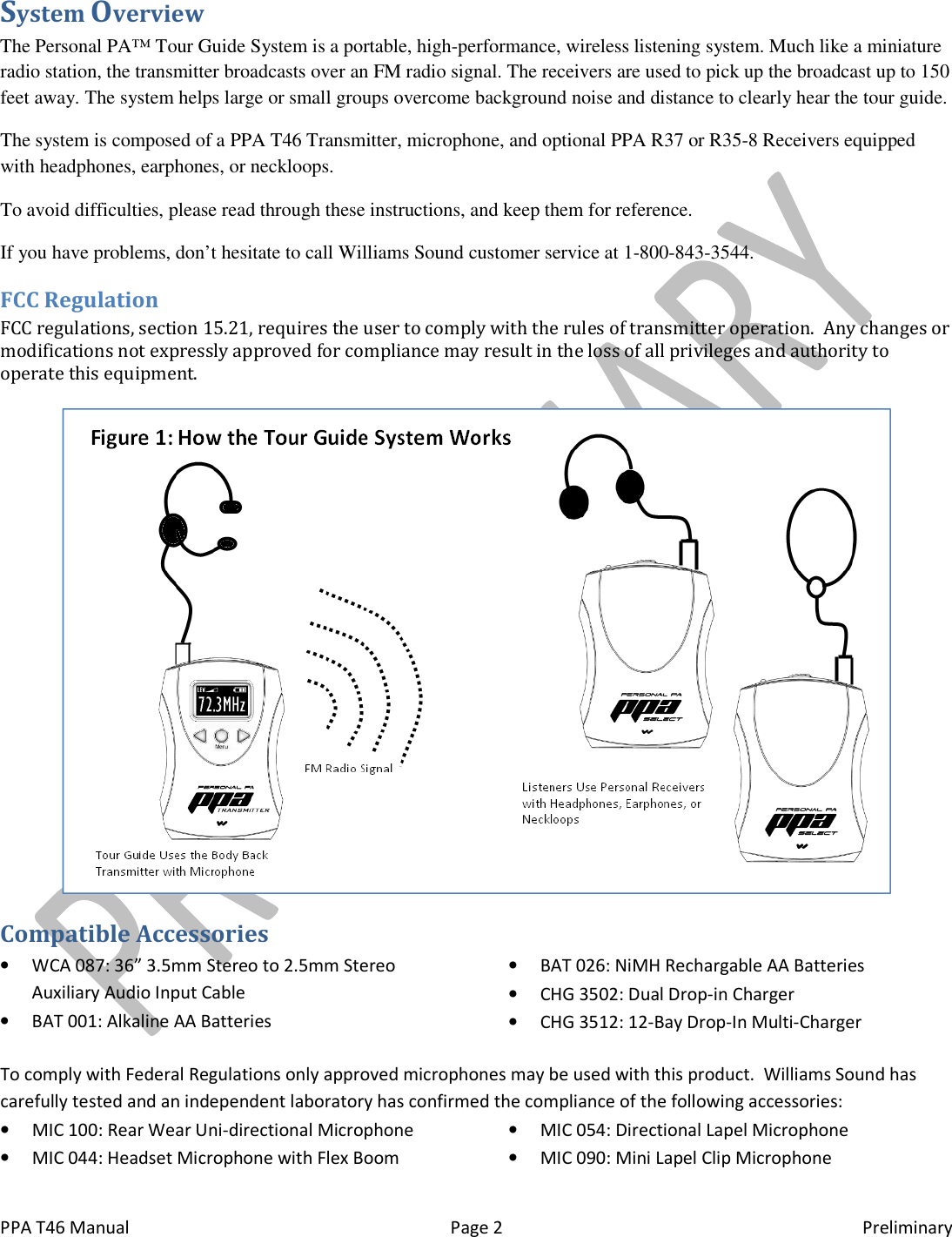
 PPA T46 Manual  Page 2  Preliminary System Overview The Personal PA™ Tour Guide System is a portable, high-performance, wireless listening system. Much like a miniature radio station, the transmitter broadcasts over an FM radio signal. The receivers are used to pick up the broadcast up to 150 feet away. The system helps large or small groups overcome background noise and distance to clearly hear the tour guide. The system is composed of a PPA T46 Transmitter, microphone, and optional PPA R37 or R35-8 Receivers equipped with headphones, earphones, or neckloops. To avoid difficulties, please read through these instructions, and keep them for reference. If you have problems, don’t hesitate to call Williams Sound customer service at 1-800-843-3544. FCC Regulation FCC regulations, section 15.21, requires the user to comply with the rules of transmitter operation.  Any changes or modifications not expressly approved for compliance may result in the loss of all privileges and authority to operate this equipment.   Compatible Accessories • WCA 087: 36” 3.5mm Stereo to 2.5mm Stereo Auxiliary Audio Input Cable • BAT 001: Alkaline AA Batteries • BAT 026: NiMH Rechargable AA Batteries • CHG 3502: Dual Drop-in Charger • CHG 3512: 12-Bay Drop-In Multi-Charger To comply with Federal Regulations only approved microphones may be used with this product.  Williams Sound has carefully tested and an independent laboratory has confirmed the compliance of the following accessories: • MIC 100: Rear Wear Uni-directional Microphone • MIC 044: Headset Microphone with Flex Boom • MIC 054: Directional Lapel Microphone • MIC 090: Mini Lapel Clip Microphone
 PPA T46 Manual Safety Information Hearing Safety  CAUTION! Many Williams Sound receivers are designed to amplify sounds to a high volume level which could potentially cause hearing damage if used improperly. To protect your hearing and the1. Make sure the volume is turned down before putting on the earphone or headphone and then adjusting the volume to a comfortable level.  2. Set the volume level at the minimum setting that you need to hear. 3. If you experience feedback (a squaway from the earphone or headphone. Do not allow children or other unauthorized persons to have access to this product. Battery Safety and Disposal CAUTION! Williams Sound receivers are supplied with disposable alkaline batteries. Do not attempt to recharge disposable batteries, which may explode, release dangerous chemicals, cause burns, or other serious harm to the user or product. Pacemaker Safety  CAUTION! Before using Williams Sound receivers with a pacemaker or other medical device, consult your physician or the manufacturer of your pacemaker or other medical device.  If you have a pacemaker or other medical device, make sure that you are using the Williams Sound receiestablished by your physician or the paceRECYCLING INSTRUCTIONS Help Williams Sound protect the environment! Please take the time to dispose of your equipment properly.Product Recycling Instructions: Please do NOT dispose of your Williams Sound equipment in the household trash. Please take the equipment to an electronics recycling center; OR return the product to the factory for proper disposal.Battery Recycling Instructions: Please do NOT dispose of used batteries in the household trash.  Please take batteries to a retail or community collection point for recycling.   Page 3 Many Williams Sound receivers are designed to amplify sounds to a high volume level which could potentially cause hearing damage if used improperly. To protect your hearing and theMake sure the volume is turned down before putting on the earphone or headphone and then adjusting the volume Set the volume level at the minimum setting that you need to hear.  If you experience feedback (a squealing or howling sound), reduce the volume setting and move the microphone away from the earphone or headphone.  Do not allow children or other unauthorized persons to have access to this product.  receivers are supplied with disposable alkaline batteries. Do not attempt to recharge disposable batteries, which may explode, release dangerous chemicals, cause burns, or other serious harm to Williams Sound receivers with a pacemaker or other medical device, consult your physician or the manufacturer of your pacemaker or other medical device.  If you have a pacemaker or other medical device, make sure that you are using the Williams Sound receiver in accordance with safety guidelines established by your physician or the pacemaker manufacturer. Help Williams Sound protect the environment! Please take the time to dispose of your equipment properly.Please do NOT dispose of your Williams Sound equipment in the household trash. Please take the equipment to an electronics recycling center; OR return the product to the factory for proper disposal. OT dispose of used batteries in the household trash.  Please take batteries to a retail or community collection Preliminary Many Williams Sound receivers are designed to amplify sounds to a high volume level which could poten-tially cause hearing damage if used improperly. To protect your hearing and the hearing of others: Make sure the volume is turned down before putting on the earphone or headphone and then adjusting the volume ealing or howling sound), reduce the volume setting and move the microphone receivers are supplied with disposable alkaline batteries. Do not attempt to recharge disposable batteries, which may explode, release dangerous chemicals, cause burns, or other serious harm to Williams Sound receivers with a pacemaker or other medical device, consult your physician or the manufacturer of your pacemaker or other medical device.  If you have a pacemaker or other medical ver in accordance with safety guidelines Help Williams Sound protect the environment! Please take the time to dispose of your equipment properly. Please do NOT dispose of your Williams Sound equipment in the household trash. Please take the equipment to an OT dispose of used batteries in the household trash.  Please take batteries to a retail or community collection
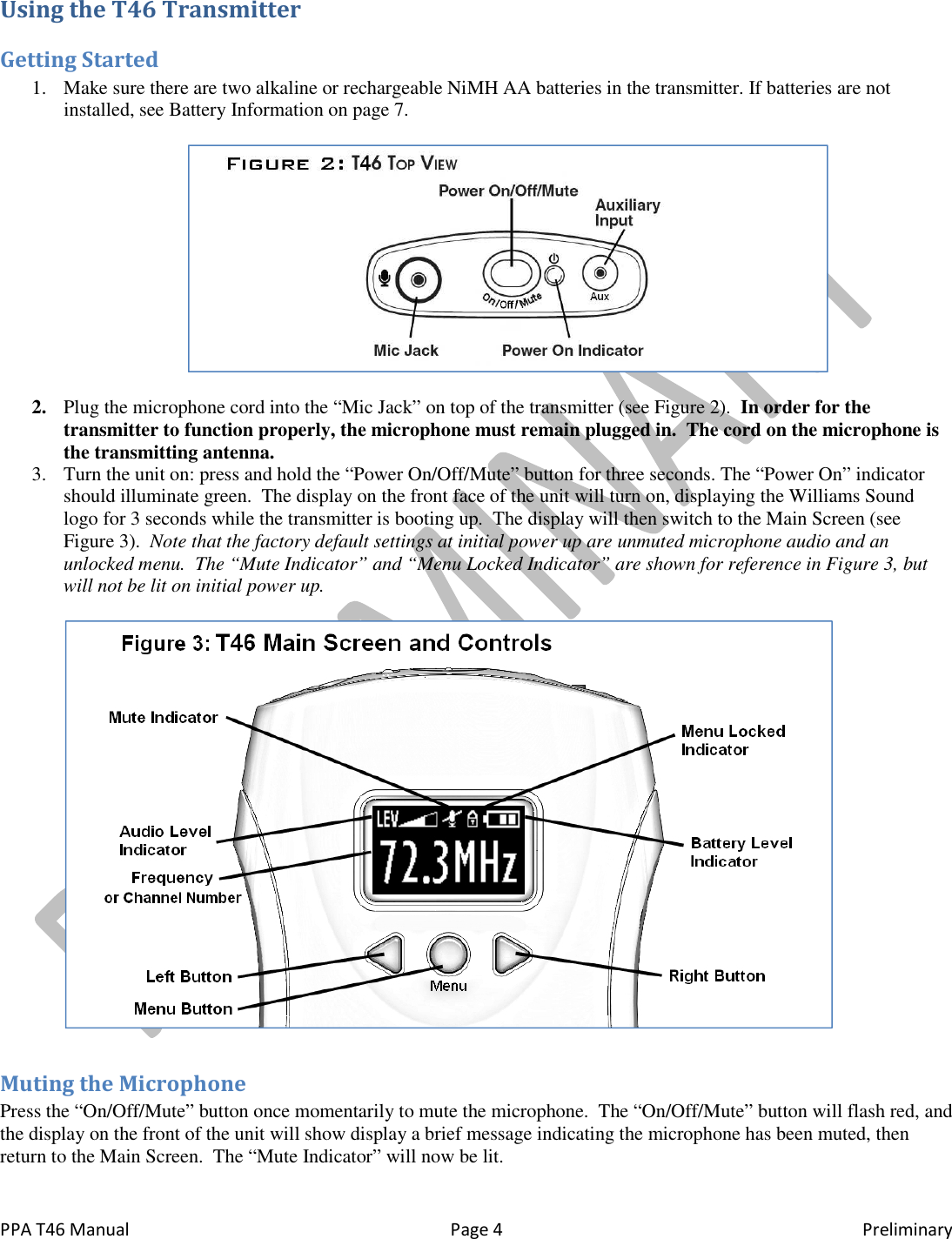
 PPA T46 Manual  Page 4  Preliminary Using the T46 Transmitter Getting Started 1. Make sure there are two alkaline or rechargeable NiMH AA batteries in the transmitter. If batteries are not installed, see Battery Information on page 7.    2. Plug the microphone cord into the “Mic Jack” on top of the transmitter (see Figure 2).  In order for the transmitter to function properly, the microphone must remain plugged in.  The cord on the microphone is the transmitting antenna. 3. Turn the unit on: press and hold the “Power On/Off/Mute” button for three seconds. The “Power On” indicator should illuminate green.  The display on the front face of the unit will turn on, displaying the Williams Sound logo for 3 seconds while the transmitter is booting up.  The display will then switch to the Main Screen (see Figure 3).  Note that the factory default settings at initial power up are unmuted microphone audio and an unlocked menu.  The “Mute Indicator” and “Menu Locked Indicator” are shown for reference in Figure 3, but will not be lit on initial power up.    Muting the Microphone Press the “On/Off/Mute” button once momentarily to mute the microphone.  The “On/Off/Mute” button will flash red, and the display on the front of the unit will show display a brief message indicating the microphone has been muted, then return to the Main Screen.  The “Mute Indicator” will now be lit.
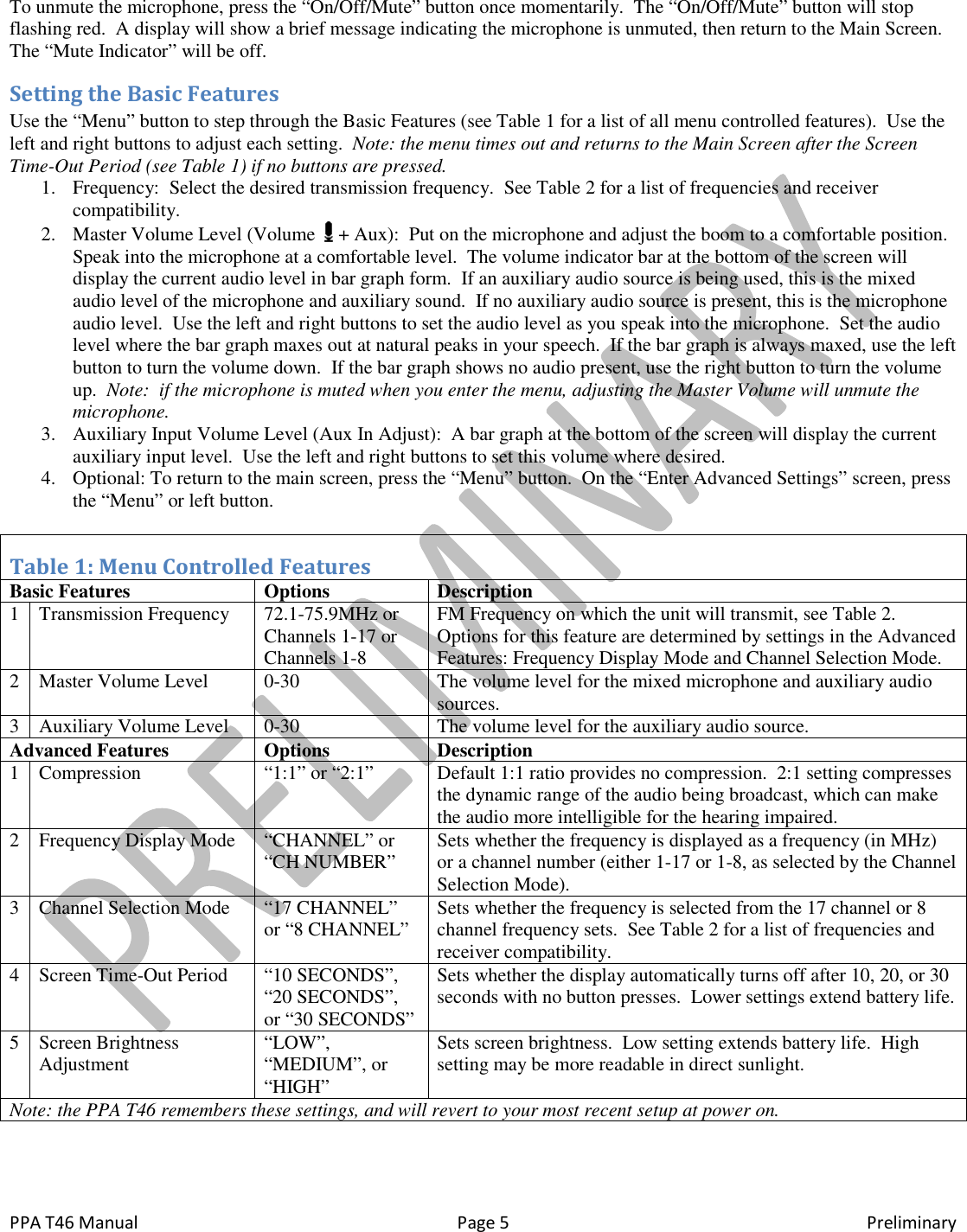
 PPA T46 Manual  Page 5  Preliminary To unmute the microphone, press the “On/Off/Mute” button once momentarily.  The “On/Off/Mute” button will stop flashing red.  A display will show a brief message indicating the microphone is unmuted, then return to the Main Screen.  The “Mute Indicator” will be off. Setting the Basic Features Use the “Menu” button to step through the Basic Features (see Table 1 for a list of all menu controlled features).  Use the left and right buttons to adjust each setting.  Note: the menu times out and returns to the Main Screen after the Screen Time-Out Period (see Table 1) if no buttons are pressed. 1. Frequency:  Select the desired transmission frequency.  See Table 2 for a list of frequencies and receiver compatibility. 2. Master Volume Level (Volume   + Aux):  Put on the microphone and adjust the boom to a comfortable position.  Speak into the microphone at a comfortable level.  The volume indicator bar at the bottom of the screen will display the current audio level in bar graph form.  If an auxiliary audio source is being used, this is the mixed audio level of the microphone and auxiliary sound.  If no auxiliary audio source is present, this is the microphone audio level.  Use the left and right buttons to set the audio level as you speak into the microphone.  Set the audio level where the bar graph maxes out at natural peaks in your speech.  If the bar graph is always maxed, use the left button to turn the volume down.  If the bar graph shows no audio present, use the right button to turn the volume up.  Note:  if the microphone is muted when you enter the menu, adjusting the Master Volume will unmute the microphone. 3. Auxiliary Input Volume Level (Aux In Adjust):  A bar graph at the bottom of the screen will display the current auxiliary input level.  Use the left and right buttons to set this volume where desired. 4. Optional: To return to the main screen, press the “Menu” button.  On the “Enter Advanced Settings” screen, press the “Menu” or left button.  Table 1: Menu Controlled Features Basic Features  Options  Description 1 Transmission Frequency 72.1-75.9MHz or Channels 1-17 or Channels 1-8 FM Frequency on which the unit will transmit, see Table 2.  Options for this feature are determined by settings in the Advanced Features: Frequency Display Mode and Channel Selection Mode. 2 Master Volume Level 0-30 The volume level for the mixed microphone and auxiliary audio sources. 3 Auxiliary Volume Level 0-30 The volume level for the auxiliary audio source. Advanced Features  Options  Description 1 Compression “1:1” or “2:1” Default 1:1 ratio provides no compression.  2:1 setting compresses the dynamic range of the audio being broadcast, which can make the audio more intelligible for the hearing impaired.   2 Frequency Display Mode “CHANNEL” or “CH NUMBER” Sets whether the frequency is displayed as a frequency (in MHz) or a channel number (either 1-17 or 1-8, as selected by the Channel Selection Mode).  3 Channel Selection Mode “17 CHANNEL” or “8 CHANNEL” Sets whether the frequency is selected from the 17 channel or 8 channel frequency sets.  See Table 2 for a list of frequencies and receiver compatibility. 4 Screen Time-Out Period “10 SECONDS”, “20 SECONDS”, or “30 SECONDS” Sets whether the display automatically turns off after 10, 20, or 30 seconds with no button presses.  Lower settings extend battery life. 5 Screen Brightness Adjustment “LOW”, “MEDIUM”, or “HIGH” Sets screen brightness.  Low setting extends battery life.  High setting may be more readable in direct sunlight. Note: the PPA T46 remembers these settings, and will revert to your most recent setup at power on.
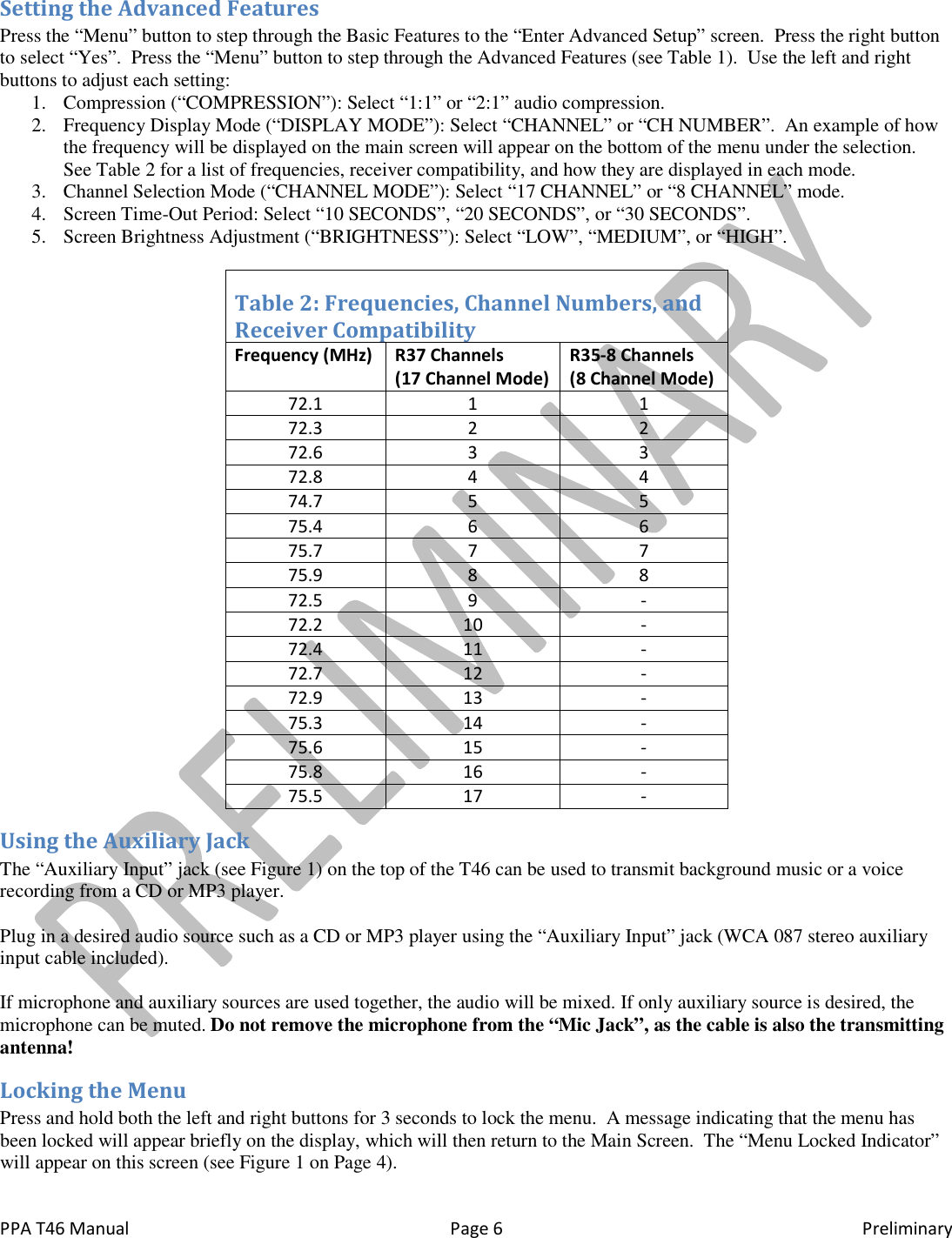
 PPA T46 Manual  Page 6  Preliminary Setting the Advanced Features Press the “Menu” button to step through the Basic Features to the “Enter Advanced Setup” screen.  Press the right button to select “Yes”.  Press the “Menu” button to step through the Advanced Features (see Table 1).  Use the left and right buttons to adjust each setting: 1. Compression (“COMPRESSION”): Select “1:1” or “2:1” audio compression. 2. Frequency Display Mode (“DISPLAY MODE”): Select “CHANNEL” or “CH NUMBER”.  An example of how the frequency will be displayed on the main screen will appear on the bottom of the menu under the selection.  See Table 2 for a list of frequencies, receiver compatibility, and how they are displayed in each mode. 3. Channel Selection Mode (“CHANNEL MODE”): Select “17 CHANNEL” or “8 CHANNEL” mode. 4. Screen Time-Out Period: Select “10 SECONDS”, “20 SECONDS”, or “30 SECONDS”. 5. Screen Brightness Adjustment (“BRIGHTNESS”): Select “LOW”, “MEDIUM”, or “HIGH”.  Table 2: Frequencies, Channel Numbers, and  Receiver Compatibility Frequency (MHz) R37 Channels     (17 Channel Mode) R35-8 Channels  (8 Channel Mode) 72.1 1 1 72.3 2 2 72.6 3 3 72.8 4 4 74.7 5 5 75.4 6 6 75.7 7 7 75.9 8 8 72.5 9 - 72.2 10 - 72.4 11 - 72.7 12 - 72.9 13 - 75.3 14 - 75.6 15 - 75.8 16 - 75.5 17 - Using the Auxiliary Jack The “Auxiliary Input” jack (see Figure 1) on the top of the T46 can be used to transmit background music or a voice recording from a CD or MP3 player.    Plug in a desired audio source such as a CD or MP3 player using the “Auxiliary Input” jack (WCA 087 stereo auxiliary input cable included).   If microphone and auxiliary sources are used together, the audio will be mixed. If only auxiliary source is desired, the microphone can be muted. Do not remove the microphone from the “Mic Jack”, as the cable is also the transmitting antenna! Locking the Menu Press and hold both the left and right buttons for 3 seconds to lock the menu.  A message indicating that the menu has been locked will appear briefly on the display, which will then return to the Main Screen.  The “Menu Locked Indicator” will appear on this screen (see Figure 1 on Page 4).
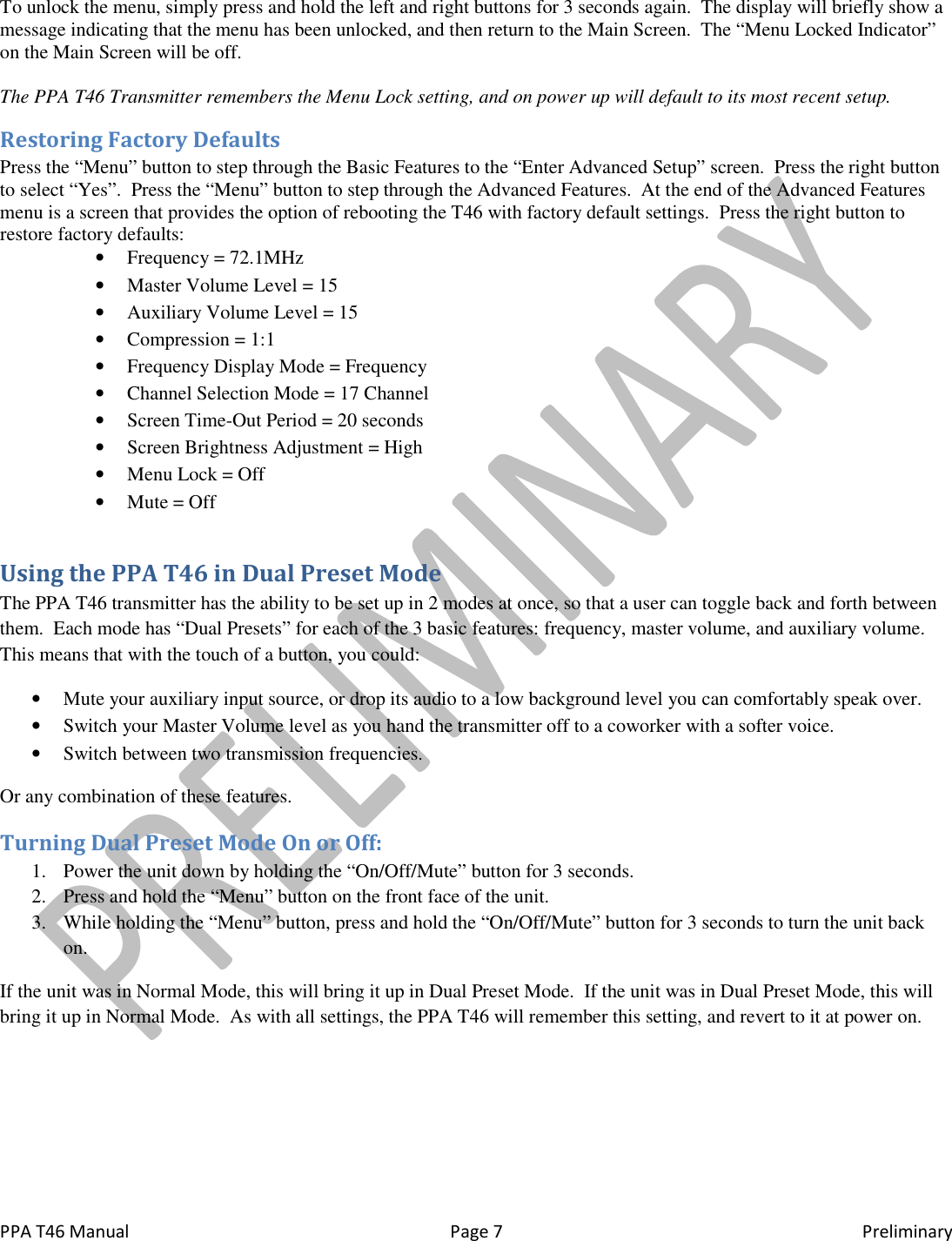
 PPA T46 Manual  Page 7  Preliminary To unlock the menu, simply press and hold the left and right buttons for 3 seconds again.  The display will briefly show a message indicating that the menu has been unlocked, and then return to the Main Screen.  The “Menu Locked Indicator” on the Main Screen will be off.  The PPA T46 Transmitter remembers the Menu Lock setting, and on power up will default to its most recent setup. Restoring Factory Defaults Press the “Menu” button to step through the Basic Features to the “Enter Advanced Setup” screen.  Press the right button to select “Yes”.  Press the “Menu” button to step through the Advanced Features.  At the end of the Advanced Features menu is a screen that provides the option of rebooting the T46 with factory default settings.  Press the right button to restore factory defaults: • Frequency = 72.1MHz • Master Volume Level = 15 • Auxiliary Volume Level = 15 • Compression = 1:1 • Frequency Display Mode = Frequency • Channel Selection Mode = 17 Channel • Screen Time-Out Period = 20 seconds • Screen Brightness Adjustment = High • Menu Lock = Off • Mute = Off Using the PPA T46 in Dual Preset Mode The PPA T46 transmitter has the ability to be set up in 2 modes at once, so that a user can toggle back and forth between them.  Each mode has “Dual Presets” for each of the 3 basic features: frequency, master volume, and auxiliary volume.  This means that with the touch of a button, you could: • Mute your auxiliary input source, or drop its audio to a low background level you can comfortably speak over. • Switch your Master Volume level as you hand the transmitter off to a coworker with a softer voice. • Switch between two transmission frequencies. Or any combination of these features. Turning Dual Preset Mode On or Off: 1. Power the unit down by holding the “On/Off/Mute” button for 3 seconds. 2. Press and hold the “Menu” button on the front face of the unit. 3. While holding the “Menu” button, press and hold the “On/Off/Mute” button for 3 seconds to turn the unit back on. If the unit was in Normal Mode, this will bring it up in Dual Preset Mode.  If the unit was in Dual Preset Mode, this will bring it up in Normal Mode.  As with all settings, the PPA T46 will remember this setting, and revert to it at power on.
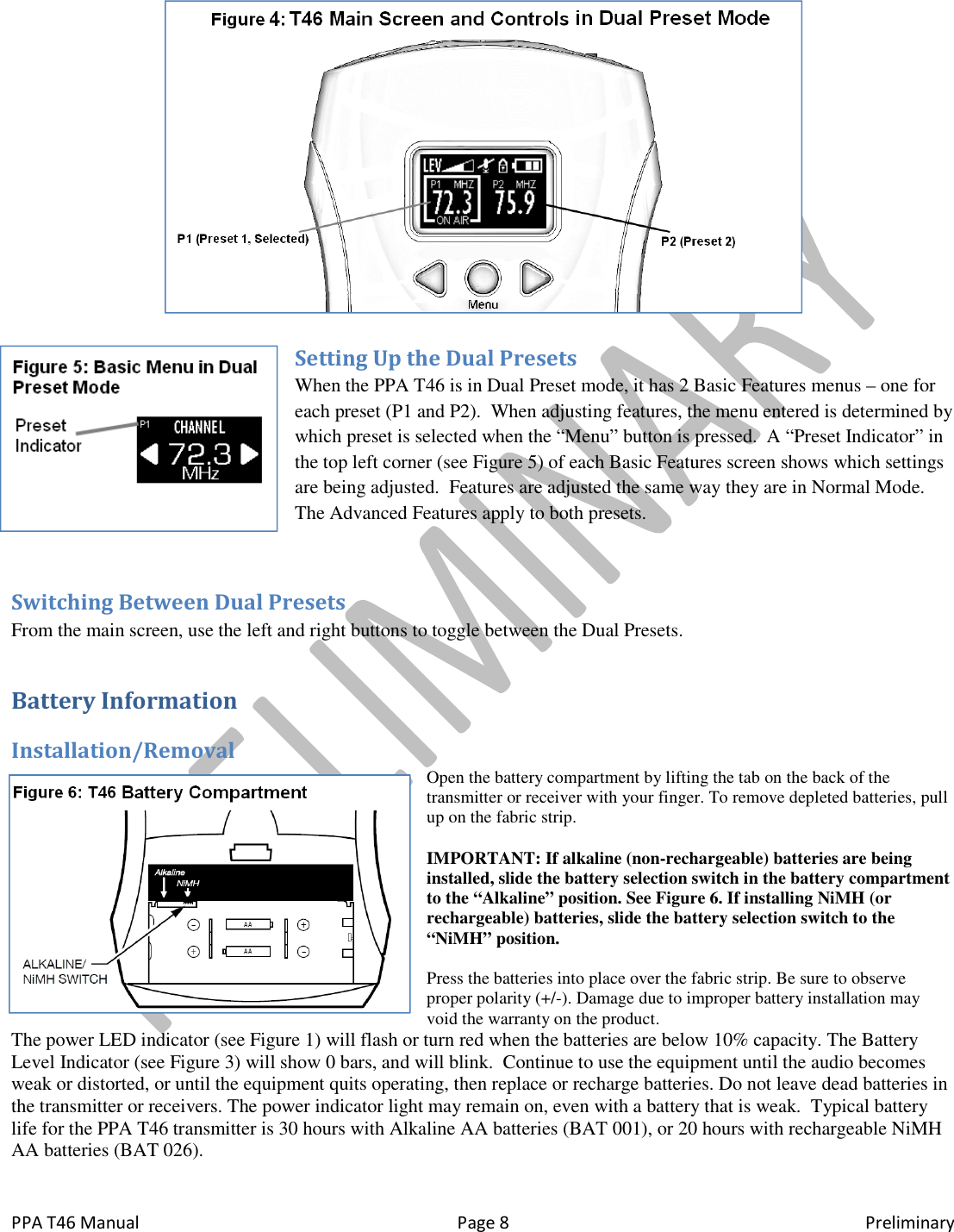
 PPA T46 Manual  Page 8  Preliminary  Setting Up the Dual Presets When the PPA T46 is in Dual Preset mode, it has 2 Basic Features menus – one for each preset (P1 and P2).  When adjusting features, the menu entered is determined by which preset is selected when the “Menu” button is pressed.  A “Preset Indicator” in the top left corner (see Figure 5) of each Basic Features screen shows which settings are being adjusted.  Features are adjusted the same way they are in Normal Mode.  The Advanced Features apply to both presets.  Switching Between Dual Presets From the main screen, use the left and right buttons to toggle between the Dual Presets. Battery Information Installation/Removal Open the battery compartment by lifting the tab on the back of the transmitter or receiver with your finger. To remove depleted batteries, pull up on the fabric strip.  IMPORTANT: If alkaline (non-rechargeable) batteries are being installed, slide the battery selection switch in the battery compartment to the “Alkaline” position. See Figure 6. If installing NiMH (or rechargeable) batteries, slide the battery selection switch to the “NiMH” position.  Press the batteries into place over the fabric strip. Be sure to observe proper polarity (+/-). Damage due to improper battery installation may void the warranty on the product. The power LED indicator (see Figure 1) will flash or turn red when the batteries are below 10% capacity. The Battery Level Indicator (see Figure 3) will show 0 bars, and will blink.  Continue to use the equipment until the audio becomes weak or distorted, or until the equipment quits operating, then replace or recharge batteries. Do not leave dead batteries in the transmitter or receivers. The power indicator light may remain on, even with a battery that is weak.  Typical battery life for the PPA T46 transmitter is 30 hours with Alkaline AA batteries (BAT 001), or 20 hours with rechargeable NiMH AA batteries (BAT 026).
 PPA T46 Manual IMPORTANT WARNINGS:DO NOT ATTEMPT TO RECHARGE ZINC CARBON (“HEAVY DUTYLITHIUM BATTERIES! DO NOT ATTEMPT TO RECHARGE DISPOSABLE BATTERIES! These batteries may heat up and explode, causing possible injury and damage to the equipment.  Avoid shorting the plus and minus battery terminals together with metal dispose of batteries in fire. Do not open batteries Tips for Using the System The maximum operating distance between the transmitter and receiver is about 46 meters (150 feet).will vary in different buildings and surroundings. In some locations, the signal may momentarily disappear. This is called a “drop-out” and is due to reflection and cancellation of the radio signal. Moving a few feet should restore the Keep the transmitter and receiver units at least 1 meter (3 feet) apart. If the transmitter gets too close to a receiver, it overload the receiver, causing noisy reception or blocking of the signal. Do not use more than one transmitter on thseparated by more than 60 meters (200 feet). Operating more than one transmitter on the same channel at the same time in the same place will result in interference.Using Multiple Systems for Multiple GroupsFM transmitters on the same frequency interfere with each other.  For multiple tour groups within the same facility, either maintain physical separation of more than 60 meters (200 feet) between groupsfrequencies.  See “Setting the Basic Features” step 1 on page 5 for instructions on how to change the transmitter frequency. Troubleshooting Indicator State Power On Flashing Red On/Off/Mute Flashing Red  The system is noisy or has poor range. • Check the “Battery Level Indicator” on the display, making sure it displays at least one bar.  If not, replace or recharge the batteries. • Make sure the microphone is plugged in, and that a compat“Compatible Accessories” on page • Make sure the transmitter and receivers are at least 3 feet (1 meter), but less than 150 feet (45 meters) apart.• Move a few feet.  When using the system indoors, it’s normal for thlocations.  This is called “drop out”.  Moving a few feet may restore the signal.• Make sure another transmitter on the same frequency is not nearby.  Transmitters on the same frequency interfere with each other.  Keep transmitters on the same frequency at least 200 feet (60 meters) apart.My rechargeable batteries only work for a short period of time.• Make sure the batteries are fully charged.be replaced every 1-2 years. Page 9 IMPORTANT WARNINGS: DO NOT ATTEMPT TO RECHARGE ZINC CARBON (“HEAVY DUTYLITHIUM BATTERIES! DO NOT ATTEMPT TO RECHARGE DISPOSABLE BATTERIES!These batteries may heat up and explode, causing possible injury and damage to the equipment.  Avoid shorting the plus and minus battery terminals together with metal objects.  Battery damage and burns can result! Do not dispose of batteries in fire. Do not open batteries - toxic chemicals inside. The maximum operating distance between the transmitter and receiver is about 46 meters (150 feet).will vary in different buildings and surroundings. In some locations, the signal may momentarily disappear. This is called out” and is due to reflection and cancellation of the radio signal. Moving a few feet should restore theKeep the transmitter and receiver units at least 1 meter (3 feet) apart. If the transmitter gets too close to a receiver, it overload the receiver, causing noisy reception or blocking of the signal. Do not use more than one transmitter on the same channel (frequency) at the same time unless they are physically separated by more than 60 meters (200 feet). Operating more than one transmitter on the same channel at the same time in the same place will result in interference. ms for Multiple Groups FM transmitters on the same frequency interfere with each other.  For multiple tour groups within the same facility, either maintain physical separation of more than 60 meters (200 feet) between groups, or set up the tours on differeSee “Setting the Basic Features” step 1 on page 5 for instructions on how to change the transmitter Condition Battery Discharged Below 10% Microphone is Muted  Check the “Battery Level Indicator” on the display, making sure it displays at least one bar.  If not, replace or Make sure the microphone is plugged in, and that a compatible microphone has been selected.  See “Compatible Accessories” on page 2. Make sure the transmitter and receivers are at least 3 feet (1 meter), but less than 150 feet (45 meters) apart.Move a few feet.  When using the system indoors, it’s normal for the signal to momentarily disappear in certain locations.  This is called “drop out”.  Moving a few feet may restore the signal. Make sure another transmitter on the same frequency is not nearby.  Transmitters on the same frequency Keep transmitters on the same frequency at least 200 feet (60 meters) apart.My rechargeable batteries only work for a short period of time. are fully charged.  Rechargeable batteries gradually lose capacity over time, and need to Preliminary DO NOT ATTEMPT TO RECHARGE ZINC CARBON (“HEAVY DUTY”), ALKALINE, OR LITHIUM BATTERIES! DO NOT ATTEMPT TO RECHARGE DISPOSABLE BATTERIES! These batteries may heat up and explode, causing possible injury and damage to the equipment.  Avoid shorting objects.  Battery damage and burns can result! Do not The maximum operating distance between the transmitter and receiver is about 46 meters (150 feet). The operating range will vary in different buildings and surroundings. In some locations, the signal may momentarily disappear. This is called out” and is due to reflection and cancellation of the radio signal. Moving a few feet should restore the signal. Keep the transmitter and receiver units at least 1 meter (3 feet) apart. If the transmitter gets too close to a receiver, it may e same channel (frequency) at the same time unless they are physically separated by more than 60 meters (200 feet). Operating more than one transmitter on the same channel at the same time in FM transmitters on the same frequency interfere with each other.  For multiple tour groups within the same facility, either , or set up the tours on different See “Setting the Basic Features” step 1 on page 5 for instructions on how to change the transmitter Check the “Battery Level Indicator” on the display, making sure it displays at least one bar.  If not, replace or ible microphone has been selected.  See Make sure the transmitter and receivers are at least 3 feet (1 meter), but less than 150 feet (45 meters) apart. e signal to momentarily disappear in certain Make sure another transmitter on the same frequency is not nearby.  Transmitters on the same frequency Keep transmitters on the same frequency at least 200 feet (60 meters) apart. Rechargeable batteries gradually lose capacity over time, and need to
 PPA T46 Manual  Page 10  Preliminary Call our customer service team at 1-800-843-3544 for help with these or other problems.
 PPA T46 Manual  Page 11  Preliminary Lifetime PLUS Limited Warranty Williams Sound products are engineered, designed, and manufactured under carefully controlled conditions to provide you with many years of reliable service.   Effective January 1, 2012, Williams Sound warrants the Personal PA® FM Listening transmitters and receivers (models PPA T35, PPA T27, PPA T36, PPA R37, and PPA R35-8) against defects in materials and workmanship under normal use and conditions for the useful lifetime of the product from date of purchase.  This warranty is available to the original end purchaser of the product and CAN BE transferred to subsequent purchasers of the product.  Microphones, earphones, headphones, batteries, chargers, cables, carry cases, and most other accessory products carry a 90-day warranty.  Williams Sound has no control over the conditions under which this product is used. Williams Sound, therefore, disclaims all warranties not set forth above, both express and implied, with respect to the Personal PA® FM Listening System, including but not limited to, any implied warranty of merchantability or fitness of use of such equipment including, without limitation, any warranty that the use of such equipment for any purpose will comply with applicable laws and regulations. Williams Sound shall not be liable to any person or entity for any medical expenses or any direct, incidental or consequential damages caused by any use, defect, failure or malfunctioning of the product, whether a claim for such damages is based upon warranty, contract, tort or otherwise, the sole remedy for any defect, failure or malfunction of the products is replacement of the product. No person has any authority to bind Williams Sound to any representation or warranty with respect to the Personal PA® FM Listening System. Unauthorized repairs or modifications will void the warranty. This warranty is void if damage occurred because of misuse, or if the product has been repaired or modified by anyone other than a factory authorized service technician. Warranty does not cover normal wear and tear on the product or any other physical damage unless the damage was the result of a manufacturing defect. Williams Sound is not liable for consequential damages due to any failure of equipment to perform as intended. Williams Sound shall bear no responsibility or obligation with respect to the manner of use of any equipment sold by it.  This warranty does not cover reimbursement for your costs of removing and transporting the product for warranty service evaluation or installation of any replacement product provided under this warranty.  The exclusions and limitations set out above are not intended to, and should not be construed so as to contravene mandatory provisions of applicable law. If any part or term of this Disclaimer of Warranty is held to be illegal, unenforceable, or in conflict with applicable law by a court of competent jurisdiction, the validity of the remaining portions of this Disclaimer of Warranty shall not be affected, and all rights and obligations shall be construed and enforced as if this Limited Warranty did not contain the particular part or term held to be invalid. The terms of the warranty are governed by the laws of the State of Minnesota.  Prices and the specifications of the products are subject to change without notice.  *For Complete Warranty Statement go to: www.williamssound.com/warranty-statement   <Add Specifications Here>

Navigation menu