Winlite D40 Wireless Speaker User Manual
WINLITE INTERNATIONAL ( HK ) LTD Wireless Speaker
Winlite >
User manual
User’s Guide – Wireless Speaker
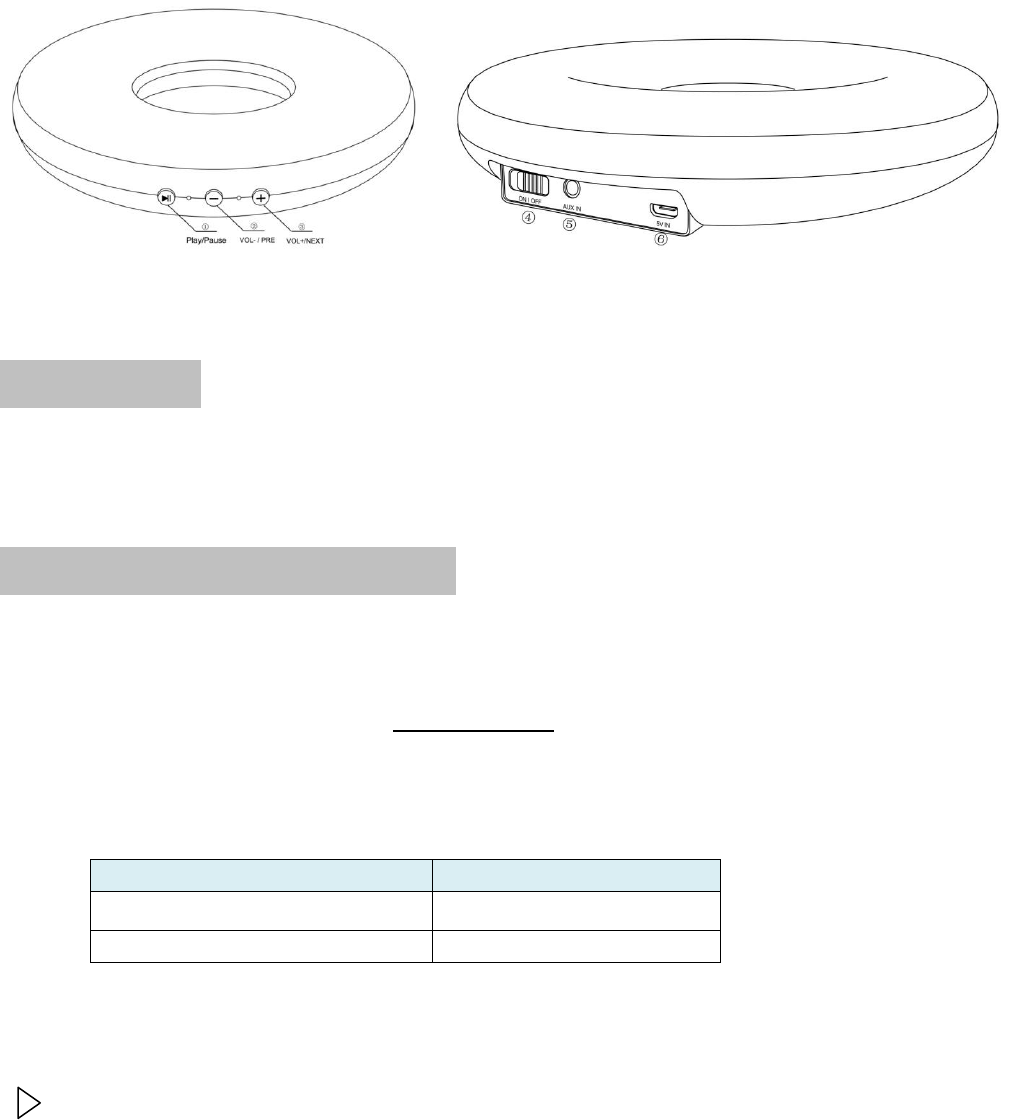
At a glance ( features)
①Play/Pause ②VOL-/PRE ③VOL+/NEXT ④ON/OFF Switch ⑤AUX IN ⑥Micro USB
Getting Started
To avoid damage to the rechargeable battery, it is only half charged when supplied.
Charge the battery fully before using the speaker for the first time
Charging the rechargeable battery
You can charge the speaker’s rechargeable battery via a PC or via the USB mains adapter.
We have enclosed a charging cable with a micro USB plug and USB connector for this
purpose.
1. Insert the micro USB plug into the “MICRO USB” mains connection socket on the speaker.
2. Insert the USB connector into a USB port on your computer or into the mains adapter.
The battery charge indicator lights up red while the battery is charging.
Once the battery is fully charged the light will go off.
Battery charge indicator
Status
Red stays lit
Charging
Red goes off
Fully charged
3. Each charging cycle takes approximately 3 hours. The playback time via Bluetooth
(depending on volume, environment conditions, ets.) is approximately 6 hours.
You can use the speaker while it is charging.
However, this will increase the charging time

NOTE: When the remaining capacity of the rechargeable battery is down to 20% or less,
3x warning beeps every 10 seconds will alert you to charge the battery at this point.
NOTE: If you are not using the speaker for a prolonged period, please switch it off to
protect the rechargeable battery. For this reason the speaker automatically switches to a
battery-saving mode after 50 days without use.
To preserve the rechargeable battery’s fully capacity for as long as possible, you should
discharge and recharge the battery every 3 months, even if you do not use the speaker.
Canceling battery-saving mode
1. To exit the speaker from battery-saving mode, switch it off and then back to on.
2. Then connect the speaker to a USB port on your computer or to the mains adapter
using the enclosed USB cable。
Connect with Bluetooth device
The speaker will automatically search available Bluetooth devices or pair with the last
used device after being switched on. If you have connected a device by means of the
connection socket AUX on the speaker, you only need to switch on speaker and
playback device and start playback
NOTE: These instructions for use cannot explain the connecting procedure for every
device available on the market. The iPhone is therefore used here as an example of how
to connect the speaker.
To establish a new Bluetooth connection the speaker must first be in search mode and
there must not be a cable plugged into the AUX connection socket. The speaker will be
forced into new Bluetooth pairing mode after press the Play/Pause button briefly twice.
1. Switch on the speaker. Indicator light flashes blue. The speaker is in search mode with
double beep.
2. Switch on the iPhone.
3. Activate the Bluetooth function on the iPhone as follows:
·Open Settings.
·Select General>Bluetooth
·Set Bluetooth to On.
The iPhone immediately begins to search for available Bluetooth devices. As soon as
any are found, they are displayed.
The speaker is displayed under Devices as XXX and Not Paired or Not Connected.
4. To connect the two devices, tap Not Paired or Not Connected.
The speaker is then displayed on the iPhone screen as Connected. The indicator
light lights up blue. You can now begin to play music, for example, using the relevant
function on your iPhone and this will be transmitted to the speaker.

NOTE:
·If no device connected and no Bluetooth connection within 10 minutes, the speaker
will automatically switch to standby mode. To exit the speaker from standby mode,
push the On/Off switch to OFF and then back to ON.
·If you switch the speaker off, after switching it on again you will need to re-establish
the Bluetooth connection as described.
·If you connect a device to the AUX connection socket, it will be given priority for
playback. Transmission from the Bluetooth device will be completely interrupted,
and will not resume until you remove the plug from the AUX socket.
·The speaker will automatically connect to the Bluetooth device within 3 seconds after
remove the AUX connection – provided that the device is nearby and switched on
and Bluetooth is also activated. The indicator light will briefly go off, then blue as
soon as it has found the Bluetooth device.
·AUX connection will always take precedence over incoming calls and Bluetooth
playback.
Connection priority:
AUX > Incoming calls >Bluetooth
(iPhone is a trademark register by Apple Computer Inc.)
Bluetooth:Playing music & making a phone call
Playing music
The speaker can play music in all current file formats supported by your playback device.
The speaker also supports the new A2DP transmission standard. This standard, which is
supported by most current smartphones, has been specially developed for the wireless
transmission of stereo audio signals via Bluetooth
NOTE: You might need to activate this type of transmission via A2DP manually on your
smartphone. Refer to your smartphone’s operation instructions for more
information about this.
Depending on the smartphone, the speaker might not be able to initiate the start
of music playback. In this case, you should start music playback manually. You
will then be able to pause and resume music playback on each device.
To start music playback
Open the relevant function on your smartphones and start playback.
Briefly press the Play/Pause button on the speaker.
To pause playback part way through, briefly press the Play/Pause button on the
speaker
To then resume playback, briefly press the Play/Pause button on the speaker again.
Adjusting the Volume

Hold and press + to increase the volume
Hold and press – to decrease the volume
NOTE: In Bluetooth mode, 1X warning beep to be emitted at full volume. DO NOT press
+ button repeatedly which would lead to shortening the button’s life.
Song Change
Briefly press + to select next track
Briefly press – to select previous track
Making a phone call
You can also use the speaker as a hands-free device. It features a built-in microphone.
As soon as a call comes in, music playback is interrupted and you will hear the ringing
tone over the loudspeaker.
…To accept an incoming call
Briefly press the Play/Pause button on the speaker.
The call will be transmitted via the speaker. You can use the built-in microphone to
talk hands-free.
Accept the call on your smartphone as usual.
You can select on your smartphone whether to transmit the call via the speaker or hold a
private conversation directly on the smarphone.
Ending a call
To end a call
…briefly press the Play/Pause button on the speaker.
…or end the call on your smartphone as usual.
Depending on the smartphone, music playback will resume automatically or you will
need to start it again as described.
Playback from other devices& making a phone call
Playing music
You can connect mobile playback devices without Bluetooth function directly to the
speaker. You will need an audio cable with a 3.5mm jack plug on each end.
NOTE: Please also follow the operating instruction for your mobile device.
1. Connect the headphone output of the mobile device to the AUX IN connection socket
on the speaker using a suitable audio cable..
2. Switch on both devices.
3. Start playback on the playback device.
4. Set the maximum volume on the playback device and then adjust the volume using

the +/- buttons on the speaker.
Switch the device off before disconnecting them again.
Making a phone call
When you connect a device to the AUX connection socket, transmission from the
Bluetooth device will be completely interrupted (means that you can not hear the
incoming call sounds from the speaker).
…To accept an incoming call via the speaker
·Remove the AUX connection first, the speaker will automatically connect to the
Bluetooth device within 3 seconds. The indicator light will briefly go off, then blue as
soon as it has found the Bluetooth device.
NOTE: the device should be nearby and switched on and Bluetooth is also activated.
·Briefly press the Play/Pause button on the speaker. The call will be transmitted via the
speaker. You can use the built-in microphone to talk hands-free.
Ending a call
Refer to the operation instructions in Bluetooth mode for more information about this
Fault / remedy
· Not working · Is the rechargeable battery flat? Connect the speaker to a USB port on your
computer or to the mains adapter.
· Is the device in battery-saving mode? Switch the device off and on again. Then
connect it to a USB port on your computer or to the mains adapter.
· No Bluetooth connection
· Is your mobile device Bluetooth-compatible? Refer to the operating instructions for
your mobile device.
· Has Bluetooth been deactivated on the mobile device? Check the settings.
Activate Bluetooth if necessary. Check whether the speaker appears in the list of
found devices. If not, press the Bluetooth button again. Place both devices close
together. Remove any other radio communication devices from the surrounding
area.
· Does your mobile device require a password? Check the settings.
· Have you switched off the speaker between uses (On/Off switch on OFF)?You will
need to reestablish the Bluetooth connection.
· No Music playback

· Are there no music files on your mobile device? Check out the relevant media
folders. Refer to the operating instructions for the device if necessary.
· Is playback on pause? Briefly press the Bluetooth button on the speaker to resume
playback.
· Is the volume on the playback device too low?
· Is there a device connected to AUX? Playback from the Bluetooth device will be
paused as soon as you insert a plug into the AUX connection socket.
Specifications
Micro-USB port: 5V , 600mA
Rechargeable Battery: 1X3.7V , 1000mAh
Charging time: Around 3 hours to fully charge
Battery Life: Around 6 hours of continuous play time
(varies by volume level & audio content)
Connection: Bluetooth / AUX IN
Output power: 2.5W x 2
Frequency: 120Hz – 18KHz
Bluetooth:
Version: 2.1+EDR
Range: Max. 10m
Working temperature: +10C to +40C
Contents in Box
- Wireless Speaker
- 3.5mm stereo cable
- Micro-USB cable (for charging speaker)

Safety warnings !
Intended use
The speaker is designed to output sound from mobile playback devices such as smartphones, tablet
PCs, laptops, MP3 players and more via a Bluetooth or audio cable connection. The speaker is
designed for private use and is not suitable for commercial purposes. Only use the product under
moderate climatic conditions.
DANGER to children
· Children are not aware of the risks involved when handling electric appliances incorrectly. Keep
children away from the device.
· Keep packing materials away from children
DANGER due to electricity
When you wish to charge the device, please note the following:
· Do not put any containers filled with liquid, such as vases, on or within close proximity of the device.
They could topple over and the liquid impair the electrical safety of the device.
· Do not connect the speaker to the mains power supply if it shows visible signs of damage.
· Do not open or remove any part of the speaker casing or insert any objects into openings in the
casing. There are live electrical parts inside the casing that could give you an electric shock if they
are touched.
· Do not make any modifications to the product.
· You cannot and must not replace the rechargeable battery yourself.
CAUTION
RISK OF EXPLOSION IF BATTERY IS REPLACED
BY AN INCORRECT TYPE.
DISPOSE OF USED BATTERIES ACCORDING
TO THE INSTRUCTIONS
Attention should be drawn to the environmental aspects of battery disposal
WARING – risk of burns/fire
· Do not operate the speaker in closed cabinets or on shelves with insufficient ventilation. The
speaker must have at least 5 CM free on all sides.
· Do not place any naked sources of fire, such as burning candles, on or in the vicinity of the speaker.
CAUTION – MATERIAL DAMAGE
· Do not immerse the speaker or its mains and connection cables in water or other liquid. Do not use it
outdoors or in rooms with high humidity.
· Do not connect the speaker to speaker output of a separate amplifier as this may damage the
product.
· Protect the speaker form intense heat such as direct sunlight or heater.
· Keep magnetized ID cards, phone and credit cards, audio tapes, watches and anything similar away
from the immediate vicinity of the speaker as they could be damaged by the integrated magnets.

· Never use caustic chemicals or aggressive or abrasive cleaning products ofr cleaning. Only use a
soft, lint-free cloth.
· Some lacquers, synthetic substances or furniture polish may react adversely to the material of the
non-slip feet and soften them. To avoid unwanted traces on furniture, place a non-slip mate under
the product.
· If the speaker is taken from a cold to a warm location, condensation can form inside the device.
Leave it switched off for a few hours.
CORRECT DISPOSAL OF THE PRODUCT
(Waste electrical and electronic equipment).
(Applicable in the European Union and in countries with selective waste collection systems).
The presence of this symbol on the product or on its accessories or informative material means that
at the end of their useful lives neither the product nor its electronic accessories (charger, cables, etc.)
should be disposed of together with other domestic waste.To avoid possible damage to the
environment or to human health, separate these products from other types of waste, and re-cycle
them correctly. This promotes the sustainable re-use of material resources.Private users can
contact the establishment where they acquired the product or the appropriate local authorities to
obtain information about how and where to take it for ecological and safe re-cycling.Business users
can contact their supplier and consult the terms and conditions of the purchase contract.
Neither this product nor its electronic accessories should be disposed of together with other types of
business waste products.
FCC Statements:
This equipment has been tested and found to comply with the limits for a Class B digital device, pursuant to
Part 15 of the FCC Rules. These limits are designed to provide reasonable protection against harmful
interference in a residential installation.
This equipment generates, uses and can radiate radio frequency energy. However, there is no guarantee
that interference will not occur in a particular installation. If this equipment does cause harmful interference to
radio or reception, which can be determined by turning the equipment off and on, the user is encouraged to
try to correct the interference by one or more of the following measures:
• Reorient or relocate the receiving antenna.
• Increase the separation between the equipment and receiver.
• Connect the equipment into an outlet on a circuit different from that to which the receiver is connected.
• Consult the dealer or an experienced technician for help.
This device complies with part 15 of the FCC Rules. Operation is subject to the following two conditions:
1) This device may not cause harmful interference, and
2) This device must accept any interference received, including interference that my cause undesired
operation.
MODIFICATION: Any changes or modifications not expressly approved by the grantee of this device could
void the user’s authority to operate the device.