Wintecronics TR300A Car Alarm Transceiver User Manual
Wintecronics Ltd Car Alarm Transceiver
UserManual.wiki
>
Wintecronics
>
TR300A User Manual
User Manual
Navigation menu
Upload a User Manual
Namespaces
Wiki Guide
HTML
PDF
Info
Views
User Manual
Discussion / Help
Navigation
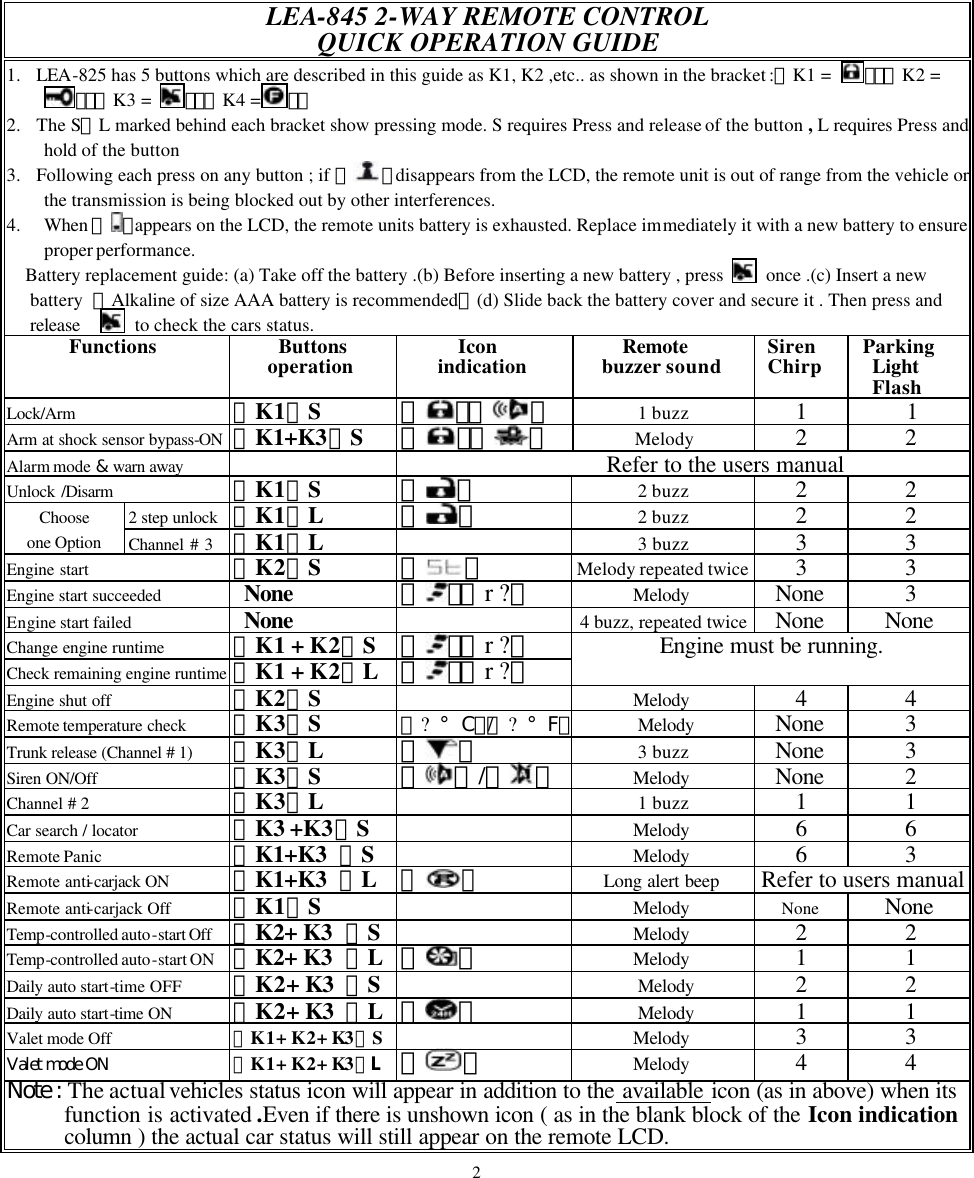
![LEA-845 SUPER RANGE 2 –WAY SECURITY WITH REMOTE ENGINE START USER’S MANUAL ※ USERS’ PRECAUTION 1. To fully utilize whole system’s features with ease , read the installation manual thoroughly。 2. Be sure to remote start your car only parked outside to avoid being suffocated by engine’s emission as in situation of parking inside in the garage。 3. Valet mode must be turned ON for servicing or maintenance of car。 4. LEA-825 has many other functions ,some of which, need additional accessories [ Refer to the installation guide]。 5. For any functions marked with [RF features programmable],refer to programming in the installation guide。 Functions : 1. Remote control and security monitoring from a distance【effective 800-1200 m】 2. 5 button programmable 2-way RF remote unit 3. Electronic Luminescent backlight and vibrator 4. Hopping code technology 5. System’s code learning from remote unit (up to 4 units) 6. Remote operate system’s features with feedback confirmation 7. Remote lock/arm and unlock/disarm 8. Manual arm/disarm 9. Remote engine start/shut-off with safety circuit 10. Selectable manual or auto transmission gear car 11. Selectable gasoline or diesel car 12. Aut omatic temperature-controlled / auto daily time starting 13. Remote security status check and interior temperature shown on LCD display 14. Defective zone bypass shown on LCD display 15. Shock sensor bypass shown on LCD display 16. Security diagnostic report 17. Remote active channel #1、#2、#3 18. Remote-controlled / switch-controlled anti-carjack mode 19. Remote panic 20. Remote or manual valet 21. Other programmable multi-functions 22. Dash mount LED status indicator 4](https://usermanual.wiki/Wintecronics/TR300A/User-Guide-276634-Page-5.png)
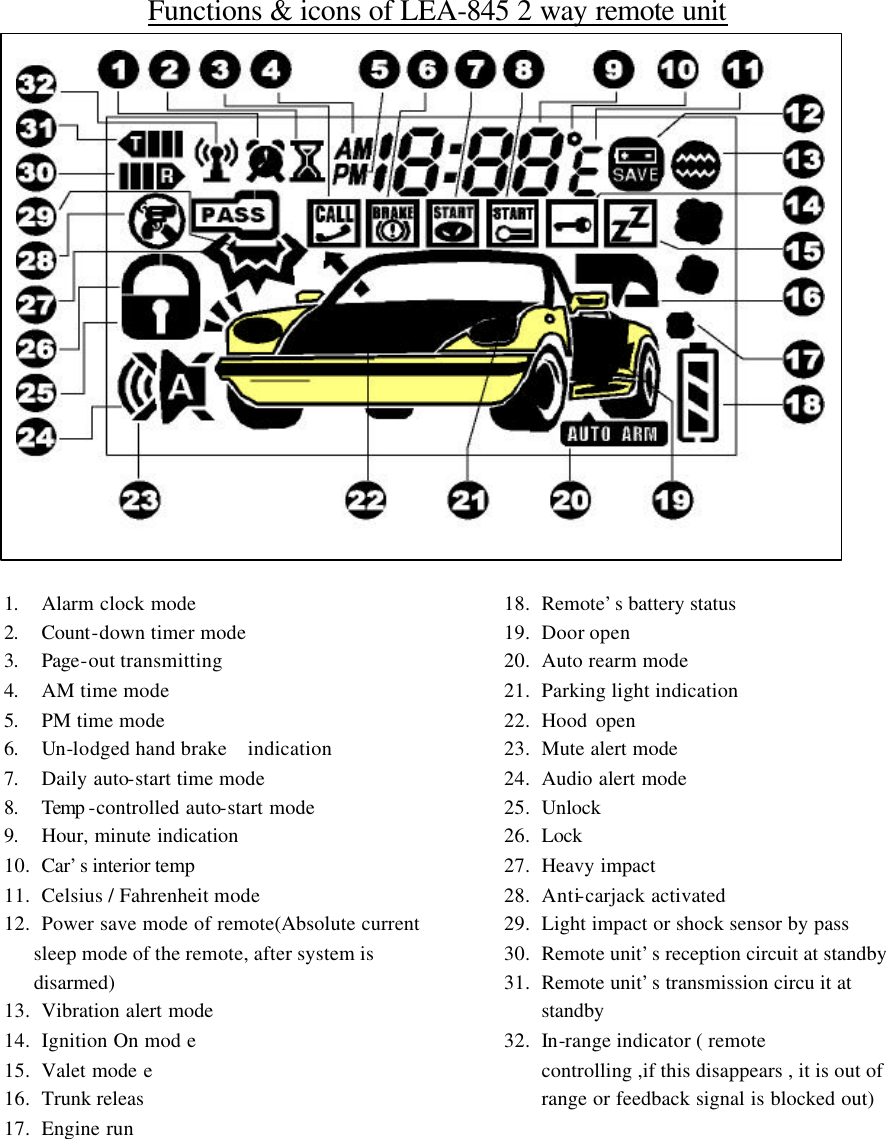
![1. Door Lock/arm (a)、Shut the engine down, close all car doors assuring all hood and trunk are closed and handbrake is pulled up。 (b)、Press and release【 】 ;siren chirps once with 1 flash , the car door is locked and system enters arm mode。 l The remote unit has the following responses. (c) 、If the main system is in audible alert mode, the remote LCD shows up 『』『 』with melody sound。 (d)、If the main system is in mute mode, the remote LCD shows up『』『 』with melody sound。 Note: (e)、Defective zone bypass: In the case that car’s siren chirps 4 times or the remote unit sounds 4 times twice , the main system detects a defective zone like any door not yet closed.( The LCD will shows the door open mode in such case ). The system will automatically bypass the defective zone and enter arm mode. After the defective zone is corrected, the system enters full arm mode。 (f)、Program the system into 6 or 30 sec arming time mode as required [ RE features programmable guide]。 2. Door unlock/disarm (a)、To activate this function, the car must be in the lock/arm mode。 (b)、Press and release【】: The main system will unlock the door, siren chirps 2 times with 2 flashes of parking light. The dome light will automatically turn on [an accessory is require for the dome light ]。 l The remote LCD shows up 『 』with 2 short beeps. Note: (c)、Security diagnostic report:When【 】is pressed and released ; if siren chirps 4 times or remote unit makes 4 buzzer sounds, there had been some zones being triggered.[ The triggered zones will appear in the remote LCD]。 (d)、Parking light flash upon door open: [RF features programmable] Whenever the door is opened after the system is in unlock/disarm mod e,parking light will flash automatically for 10 sec。 (e)、Auto relock [RF features programmable ] If the door is not opened within 15 sec after it is unlocked by the remote unit , the main system will automatically lock/arm itself。 3. Door Lock/unlock (a)、While the engine is running and at the same time the ignition key at “ON” position。 (b)、If 【 】 is pressed and release each time; the main system will automatically lock /unlock car door with confirmation by its parking light flash。 l The remote LCD shows 『』when the door is unlocked and shows『 』when the door is locked。 Note: For this feature of auto door lock/unlock upon ignition on/off [Refers RF features programmable]。 5](https://usermanual.wiki/Wintecronics/TR300A/User-Guide-276634-Page-6.png)
![Active channel # 3 [RF features programmable ] (a)、If the main system is set at channel # 3 mode {additional accessory is required}。 (b)、Press and hold【】: The parking light flashes 3 times [system responses according to programmed mode]。 l The remote LCD shows up current car’s status with 3 short beeps. Single Option (choose one only) 2 Steps door unlock /disarm [RF features programmable ] (a)、If the system is set at 2 Steps door unlock mode {additional accessory is required}。 (b)、Press and release 【】: the driver’s door is opened。 (c)、Press and hold 【】: all the car’s doors are unlocked and the main system disarm itself at the same time. Siren chirp 2 times with 2 parking light flashes. l The remote LCD shows『』 icon with 2 short beeps。 Note: Choose one of these options as required for your programming.[ Refer to RF features programmable]。 4. Remote engine start [Refer to item 24 for manual transmission gear mode and RF features programmable ] (a)、While the engine is shut off。 (b)、Press and release【 】Siren chirps 3 times with 3 parking light flashes when the engine is started。 l The remote LCD responses as below : (c)、 During the 1st stage: The remote LCD shows up the current status along with 『 』during the pre-starting stage and the melody sound: (d)、During the 2nd stage: When the engine is started , the remote LCD shows up 『 』icons along with engine’s preset run time and s melody sound. Note: (e)、The remote start run time can be programmed as required.[RF features programmable] When the preset run time expires the engine will automatically shut down.[ The remote LCD will show 『r 01』 when the last remaining 1 min begins ]。The remote LCD shows 『r 00』 at the moment of engine shut-off and disappears. (f)、Remote engine start cannot be done under such abnormal conditions. (1).The gear is not in its neutral position (2) Ignition key is turned on (3) Hood is opened (4) Hand break is depressed .Under such normal condition, the system will start with the pre-set runtime. Additional 3 times of starting will be done in case of the 1st start failure. If starting succeeds, there will be no second attempt. (g)、When arriving your vehicle, press and release remote unit’s button【 】enter the vehicle and turn the ignition to “ON” position. 6](https://usermanual.wiki/Wintecronics/TR300A/User-Guide-276634-Page-7.png)
![5. Remote control run time with status check (a)、Following the success of engine start; press both【 + 】simultaneously each time to allow 5 min engine run time with maximum up to of 20 min. The remote LCD shows up t he runtime achieved. For example the LCD’s icon that shows『r 15』means engine run time is 15 min。 (b)、 Following the success of engine start; press and hold both 【 + 】simultaneously to check the remaining engine run time. For example the LCD’s icon that shows 『r 08』 means the remaining run time is 8 min . Note: While the engine is not running,press shortly (or for longer time) both【 + 】simultaneously to check the current status of vehicle which will be displayed on the remote LCD . 6. Remote engine shut off (a)、While the remote engine is running (b)、Press and releaser【】: the engine shuts off with 2 siren chirps and 2 parking light flashes. l The remote LCD’s icon 『 』will disappear but shows up the car’s status and sounds melody. 7. Remote temperature start ON/OFF (a)、Temperature-controlled auto-start “ON” : Press and hold both【 + 】 to activate this function. Siren chirps 3 times with 3 parking light flashes. Following this function’s activation , siren chirps 3 times with 3 flashes of par king light. The engine will start at the pre-selected temperature and begin running and automatically shut off when the pre-set run time expires 。 (b)、Temperature-controlled auto-start “OFF” : Press and release both 【 + 】to turn the temperature-controlled auto-start “OFF。 l The remote LCD responses as below:- (c)、If temperature-controlled auto-start ON is activated; the remote LCD shows 『 』to confirm this function is activated and the pre-set temperature icon like 『-』 appear on the display. The transmitter unit sounds melody.【When the main system sensed - temperature, the engine start automatically】。 (d)、If temperature-controlled auto-start OFF is activated; the icon『 』disappears from remote LCD and the remote unit sounds melody。 (e)、When such feature is programmed , the temp -controlled auto-engine run will go on for maximum 2 hours each time with a total 6 repeated cycles。 Note: The temperature can be programmed at -5º、-10º 、-20º 、-30º depending on your requirement for auto-engine run [RF features programmable]。 7](https://usermanual.wiki/Wintecronics/TR300A/User-Guide-276634-Page-8.png)
![8. Daily auto-start time ON/OFF (a)、Daily auto-start time ON: Press and hold both 【 + 】simultaneously,the engine will auto-start at the real time of entry beginning from the next day. Siren chirps 6 times with 6 flashes of parking light and immediate engine running. (b)、Daily auto-start time OFF: Press and release both 【 + 】simultaneously to turn this function OFF. l The remote LCD responses as below: (c)、Dairy auto-start time ON : The remote LCD shows both『 』and sounds melody if this mode is chosen. (d)、Dairy auto-start time OFF: The『 』disappears from the remote LCD but sounds melody if this mode is chosen. 9. Remote Temperature/Status check (a)、Press and release 【 】to remote check the interior temperature and the current status of car. Parking light flashes 3 times.。 l The remote LCD shows up the car’s current status and the interior temp of the car and sounds melody. For example, the 『 』shows the Celsius temp. of interior of the car。 Note: The temp. indication on the LCD can be programmed into Celsius or Fahrenheit mode as required.[RF features programmable]。 10. Active channel # 1 for release trunk (a)、Whether the main system is in lock/arm or unlock/disarm modes, remote trunk release can be done using this channel ( The car must have electronic trunk release )。 (b)、Press and hold【 】simultaneously to remote release the trunk. Siren chirps 3 times with 3 flashes of parking light. l The remote LCD shows up the trunk release icon『 』along with the current status and sounds melody. 11. Remote siren/horn alert ON/OFF (a)、While the main system is in lock/arm mode; press and release 【 】 to select the audible or mute alert modes。 (b)、While the main system is in unlock/disarm mode; press and release【 】to enter mute alert mode。 l The remote LCD responses as below: (c)、If the audible alert mode is chosen , the remote LCD shows『 』and sounds melody。 (d)、If the mute alert mode is chosen, the remote LCD shows 『 』 and sounds melody.。 Note: (e)、Even the main system is in the mute alert mode, the siren will still blurts when remote anti-carjack or panic is activated。 (b)、Siren alert volume can be adjusted [FR features programmable]。 8](https://usermanual.wiki/Wintecronics/TR300A/User-Guide-276634-Page-9.png)
![12. Active channel # 2 (for use to turn on headlight for example ) (a)、This function can be remote controlled even the main system is arm or disarm modes. ( an additional accessory is required and can be programmed for the desired function ). For example: the 30 sec headlight ON. (b)、Press and release【】: The parking light flashes 2 times and headlight turns on for 30 sec before automatically turns itself off. l The remote LCD shows up the car’s current status and sounds melody. Note: This can be programmed according t o your requirement.[RF features programmable]。 13. Car locator/search (a)、Press and release both【 + 】 simultaneously; siren chirps 6 times with 6 flashes of parking light. l The remote LCD shows up the car’s current status and sounds melody. 14. Shock sensor by pass (a)、This function can be activated to avoid false alarm especially when the car is parked in an area near a rail-line or where trucks frequently passes by. Whether in lock/arm or unlock/disarm modes, press both and release both【 + 】simultaneously,the main system’s shock sensor becomes ineffective but the other security functions lock/arm mode are operable. l The remote LCD shows up『 』 and 『 』 with one beep alert. Note: (b)、Press 【 】button to get the inactive shock sensor into normal working mode again.。 (c)、During the system’s arm mode, after the shock sensor is being triggered for 8 times; the system will bypass the shock sensor. 15. Alarm mode & warn away (a)、In arm mode; if the car detects any impact , the shock sensor’s first stage will be triggered. The siren chirps 3 times with 2 flashes of parking light. l The remote LCD shows up 『 』with one long beep alert. (b)、If the heavier impact is detected by the main system, the second stage shock sensor will be triggered .The siren blurts for 15 sec with parking light flashing for the same time. l The remote LCD shows up『 』with beep alert for 15 sec. (c)、If the trigger is generated by other means like door open, trunk/hood open or ignition “ON” under arm mode,the siren blurts 30 sec with parking light flashing for the same time and the engine start circuit is killed. l The remote LCD will show up icon of triggered zone and keep beeping for 30 sec. Note: (d)、While the alert is being triggered in arm mode, press and release【 】once to disable triggering. The 2nd press and release of 【 】to make the main system enter unlock/disarm mode. (e)、The main system will enter security mode during or after the triggered zone is closed. In case that the trigged zone is still open, the system will isolate it . But the system will still protect all other zones . 9](https://usermanual.wiki/Wintecronics/TR300A/User-Guide-276634-Page-10.png)
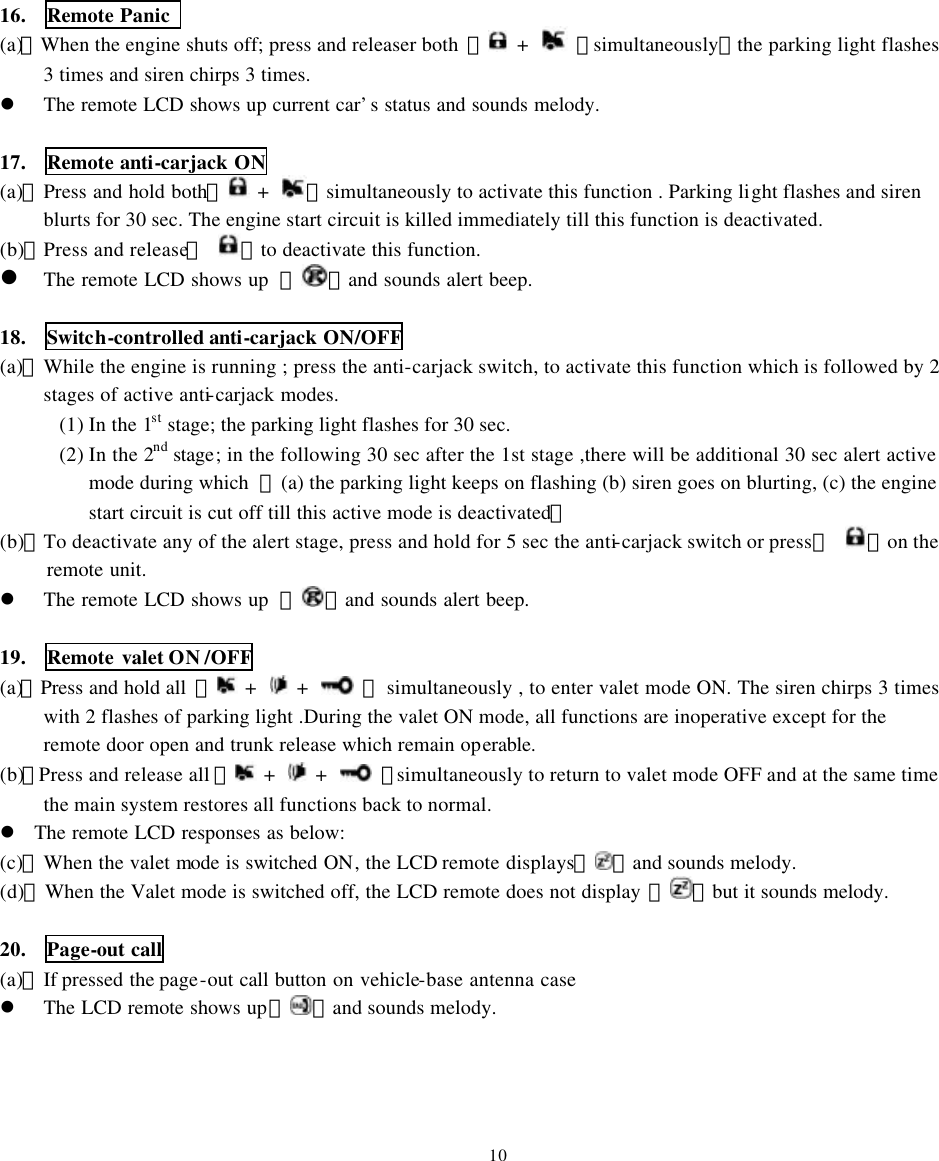
![21. Programmable function by over-ride switch (a)、The LEA-825 model’s functions 【valet, daily auto-start time ,temperature-controlled auto start 】can be switched into ON/OFF modes using over-ride switch in the following procedure. (1)、Turn the ignition OFF (2)、Press and release the over-ride switch for assigned number of times to enter various modes [ 3 times to enter valet change mode ],[ 4 times to ent er daily auto-start time ],[5 times to enter temperature-controlled auto start]. The number of siren’s chirps follow the equal number press on the over-ride switch to confirm the current active mode . (3)、Turn the ignition ON when the desired active mode is reached. [ Engine must not be running] (4)、To choose the ON and OFF in any active mode, press again the over-ride switch 1 or 2 times. The factory default setting is marked with shaded description like OFF. Manual features program table Procedure (4) Procedure (4) Press 3 times over-ride switch for choice of valet “ON”, “OFF” mode Press once for “ON Press twice for “OFF” Press 4 times over-ride switch for choice of daily auto-start time “ON”, “OFF” mode Press once for “ON”(see Note) Press twice for “OFF” Press 5 times over-ride switch for choice of temp -controlled auto-start “ON”, “OFF” mode Press once for “ON Press twice for “OFF” Siren and L E D indicator 1 2 Note: If the daily auto-start time ON is programmed, the engine will be running immediately when the ignition key is turned to OFF position.( Use the remote LCD unit to shut off the engine in this case.) 22. Manual ARM and DISARM (In case the remote transmitter is lost) (a) Manual ARM: (1)、Turn the ignition key to ON position . [ Engine must not be running] (2)、Press and release the over-ride switch 8 times (3)、 Turn the ignition key to OFF position {siren chirps 1 time with 1 flash of parking light } After 20 sec, the main system will enter ARM mode . (b)、Manual DISARM: (1)、Turn the ignition key to ON position. [ Engine must not be running ] (2)、Press and release the over-ride switch 4 times (3)、Turn the ignition key to OFF position {siren chirps 2 times with 2 flashes of parking light}. The system will enter DISARM mode. Note: (a)、Under manual ARM mode; if the system is triggered, the system will enter initial alert mode ( siren chirps 3 times with 3 flashes of parking light ). 20 sec later , the system enter Alarm and Warn Away Mode. [The alarm trigger at this stage can be terminated by the car owner]。 (b)、Under manual ARM or DISARM modes, all the system’s features can still be operated by the remote transmitter. 11](https://usermanual.wiki/Wintecronics/TR300A/User-Guide-276634-Page-12.png)
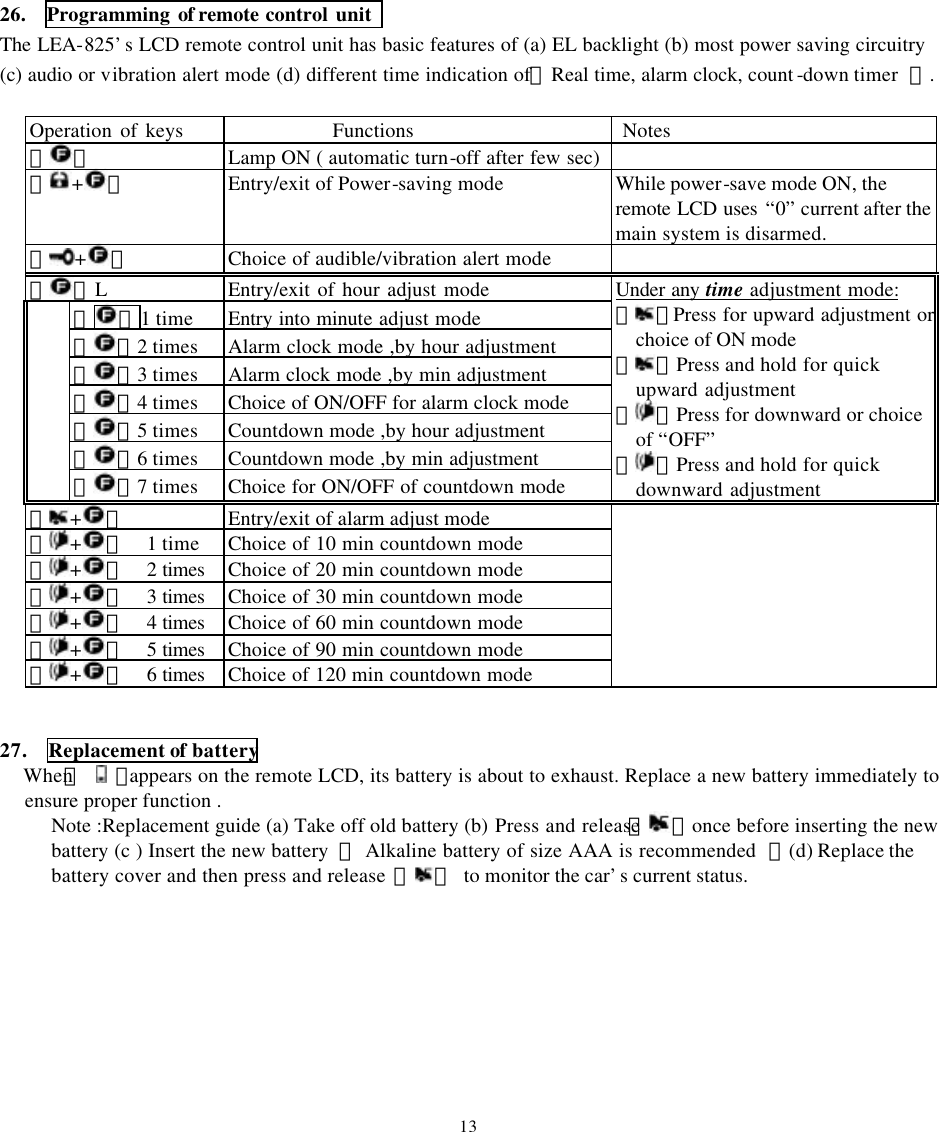
![23. Procedures of remote start for manual transmission gear car (a)、Auto transmission gear car : To enable remote engine start, the gear shift must be in the neutral mode Otherwise remote engine start is disabled. (b)、Procedures for Manual transmission gear car :[ The system must be in the manual gear mode]。 (1)、While engine is running by ignition key, pull up the hand brake. (2)、Press and release【 】and try to complete steps (c) and (d) within 30 sec. (3)、Turn the ignition off while the engine is still running.( Engine is running at this stage) (4)、Open the car door, get off and re-close the door ( Engine will automatically shut off at this stage).The system’s start is operable afterwards. If there is any mistake in the procedures, the system’s engine start is disabled. Note:To operate our system safely; each time remote engine starting of the manual transmission car. definitely follow the above procedures to enable remote starting. 24. How to learn codes of the remote transmitter The LEA-825 main system can memorize transmitter’s coding ( from up to 4 different remote units) (1) Turn the ignition key to “ON” ( Engine must not be running) Press and hold the over-ride switch for 6 sec and release it after the siren chirps 4 times which confirms the system has entered active learning mode. (2) Press and hold 【 + 】simultaneously till the siren chirps 1 time confirming code learning is completed. Follow the same step (2) with other remote transmitters ,one after another, to allow the main system learn coding of each transmitter.( Maximum 4 remotes can be learned by the LEA-825) .The system will automatically jump out of learning mode if no signal is received within 6 sec. from the last signal. Note: (a)、The pre-memorized coding will be erased each time the learning mode is activated. Re-do the code learning in this case. (b)、If more than one remotes are used in remote operating the same system, the car status will be displayed on the single remote which sends the latest remote signal. 25. Dash LED status indicator Fix the LED status indicator at the appropriate location inside the car to allow maximum visibility of it. LED blinking pattern for various standby modes while ignition key is turned “ OFF ” Different standby modes Pattern of LED blinking The remote engine being started L E D solid on Alarm mode being cleared No L E D light Arm mode * * * * * * * * Daily auto-start time ON ** ** ** ** ** ** ** Temp -controlled auto-start ON *** *** *** *** *** Daily auto-start time ON + Temp - auto-start ON **** **** **** **** Valet mode ON ***** ***** ***** ***** 12](https://usermanual.wiki/Wintecronics/TR300A/User-Guide-276634-Page-13.png)