Wintecronics TR68A Car Alarm Transceiver User Manual manual
Wintecronics Ltd Car Alarm Transceiver manual
User Manual
1
1
MODEL TR68A USER’S MANUAL
※
PRE-INSTALLATION CHECK
1. For safety sake, check first if your ignition key can activate engine start while the hand gear is engaged. If
engine starting is possible while hand gear is engaged , the gear mode must be in “manual hand gear mode”
during installation ( Refer to the operation guide ) .
2. Check if immobilization feature is present in your auto mobile [A1].If so, another accessory ( Item no: 444 )is
required to enable remote engine start and this is buyable from the same dealer.
3. Check the circuits and their current first. Refer to [ Installation diagram for input / output current values]. If
the output current is lower than requirement, additional relays must be added.]
※
Check the followings after installation of alarm system
1. Installation is abnormal if the remote engine start can be done under these conditions (a) the gear is engaged
(b) ignition key is in “Ignition On Mode” (c) the engine hood is open ( d) the hand brake is not engaged.
2. The remote control should enable operation of functions in the same way as the original ignition key. If
remote control can hardly remote engine start, the installation abnormal. Check the related circuit connection
of the ignition cylinder.
3. For servicing , repair and valet parking, “ Valet Mode “ must be set to “ON”
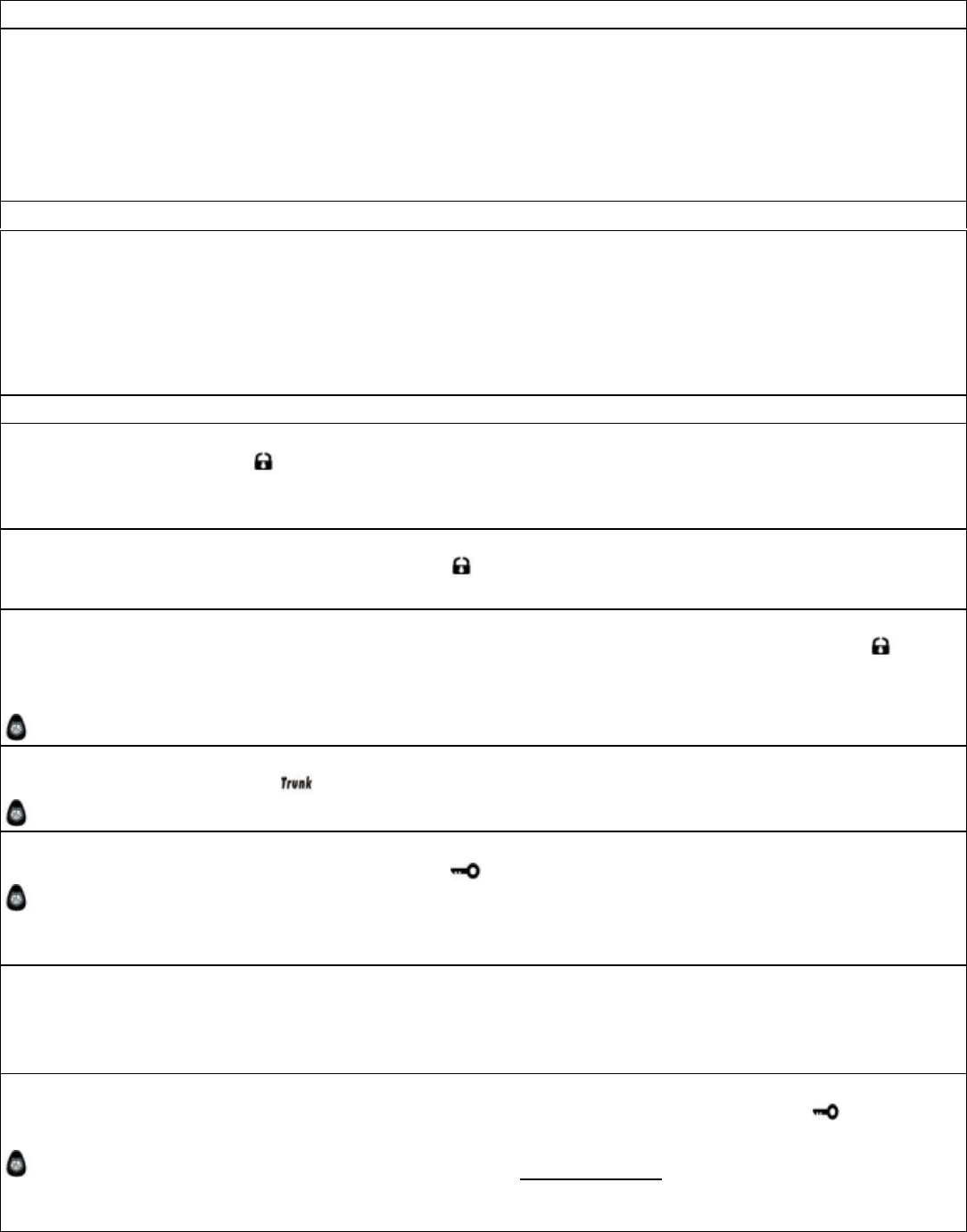
REMOTE CONTROL FEATURES
1. Remote door lock
To lock door , press button【 】, siren chirps once and parking light flashes once.
Middle button of the remote transmitter lights up with 1 buzzer sound.[ If remote’s buzzer makes 4 sounds,
system is not working normally.]
2. Remote door unlock
To remote unlock the locked vehicle, press button【 】, siren chirps twice and parking light flashes twice.
Upper LED lights up with 2 buzzer sounds.
3. Two steps door unlock or Channel # 3 [ Refer o Features Programmed Table , at # 32]
Another accessory buyable from the same dealer is required to have this feature. A press on button【 】can
unlock driver’s door and longer press on the same button can unlock all other doors. Siren chirps 3 times and
parking light flashes 3 times.
The remote Upper LCD lights up with 3 buzzer sounds.
4. Car locator / search
To locate the car, press button
【
】, siren chirps 6 times with 6 parking light flashes.
The remote LED indicates car’s status with melody
5. Remote engine start
To remote engine start, press and hold this button【 】; siren chirps 3 times with 3 parking light flashes.
The remote lower-LED lights up with melody upon engine start success ( LED blinks differently depending
on car’s status of unlock/lock ).
For runtime setup, refer to Program Table at # 30. Engine run stops when preset time expires.
6. Remote activate engine run time
Following the success of engine start, press engine run time button to automatically add up engine runtime with
5 min stepup for each button press .Maximum 20 min runtime can be attained . Engine stops automatically
when the runtime expires. [Refer to Remote Transmitter’s Features]
7. Remote engine stop
To remote stop engine run (excluding engine run by ignition key) , press and hold the button【 】 .Car engine
stops with 2 confirming siren chirps & 2 parking light flashes.
The remote lower-LED sounds melody , the lower-LED does not light up .(The rest LED may light up
depending on lock / unlock status)
2
2
8. Remote temperature-controlled start on/off [Refer to Remote Transmitter’s Features]
This feature enables engine start automatically when the pre-set temperature is reached. The engine running
will stop when the pre-set runtime expires. [refer to Features Program Table at 31 ]
9. Programmed daily start time on/off [ refer to Features Program Table, at # 32]
Daily start time can be programmed. Decide and set daily start time exactly at the desired time of the day .Once
this feature is “ ON ” ; from the next day, your car will auto engine start at pre-set time daily.
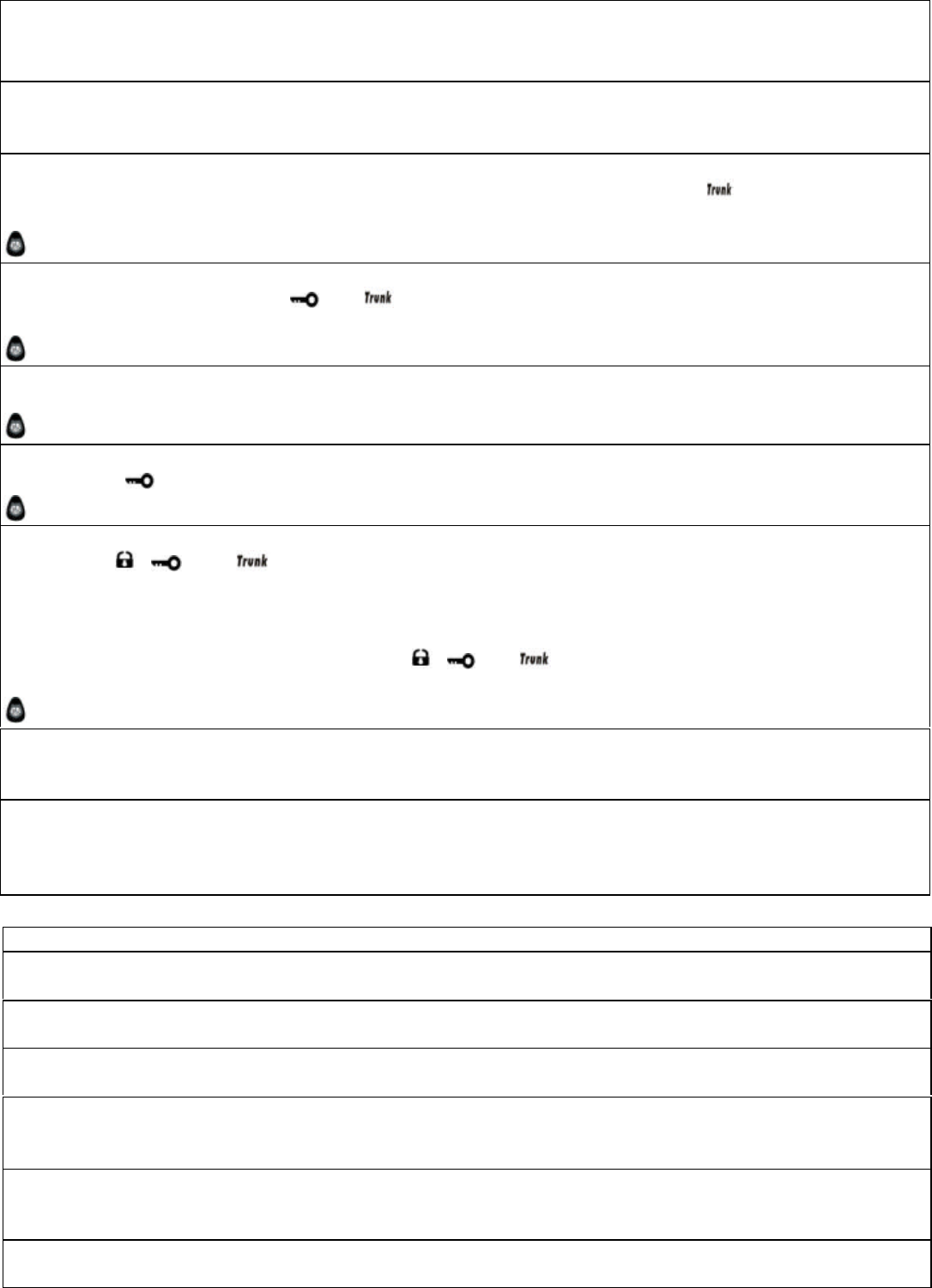
10. Trunk release ( activate channel # 1 )
To release trunk regardless of the car’s lock or unlock status, press and hold button
【
】 . The parking light
flashes twice to confirm trunk release。
The remote transmitter sounds melody , LED lights up to show car status
11. Headlight delay ( activate channel # 2) [refer to Features Program Table ,at # 31 ]
To have head delay, press buttons and simultaneously either in arm or disarm modes. Following 2
parking light flashes, headlight stays on 30 sec before it automatically turns off.
The remote transmitter sounds melody and LED lights up to show car status
12. Defective zones alert upon remote start
Remote engine start fails if there is a defective zone like the trunk being released or handbrake un-engaged
The remote transmitter reflects with 4 buzzer sounds and its LED lights up to show car status.
13. Status Check
Press button【 】to monitor the latest vehicle status. The parking light flashes 3 times.
The remote transmitter sounds melody and its LED lights up to show vehicle’s status.
14. Remote valet mode [ refer to Features Program Table 1 at # 31 or Remote Transmitter’s Features]
Press button , and to switch valet mode “ON” ; car’s parking light flashes 4 times, its siren
chirps 4 times; the remote transmitter reflects with 3 buzzer sounds with its upper- and middle-LED blinking a
while . Under valet mode ”ON” , the remote engine start is not operative while other features are still operative.
All features become operative when the valet mode is turned “OFF”.
To switch valet mode “OFF” , press and hold all , and simultaneously for a few sec, siren chirps 3
times;
The remote transmitter reflects with 3 buzzer sounds with all LED blinking a while.
15. Remote siren ( horn ) on/off [ refer to Features Programmed Table at #30 or Remote Transmitter’s
Features ]
Different programming can set the siren’s ( horn’s ) sound loud / soft or mute as desired.
16. Status feedback & confirmation signal [Refer to Remote Transmitter’s Features ]
Having received transmitter’s command and successfully processed its command, the main system will sends
feedback signal to the transmitter which will then reflect with confirmation signal or latest status reports by its
buzzer sound and/ or LED lights.
FEATURES OF MAIN UNIT
17. System’s code-learning from 4 different transmitters[Refer to Code Learning at #29]
The main unit can learn coding from 4 remote transmitters.
18. Power failure memory
The main unit retains the memory of last settings if its power source is disrupted.
19. Low voltage auto engine-rest
The main unit will terminate engine running if its power voltage becomes low at 5 v.
20. Safety remote engine start/stop engine circuit
For each time of remote engine start, the main unit will perform check on related circuit .Only in perfect
condition of all switches , will the engine start.
21. Smart of engine crank circuit
Having received remote engine start signal by remote transmitter, the system will try engine starting. Cranking
will automatically terminate immediately after engine-start success.
22. Success of engine start diagnosed RPM/voltage [ Refer to the Installation Diagram, note (9) ]
The main unit will diagnose the engine-start success be means of RPM or voltage sensing.

3
3
23. Valet mode by override switch [ Refer to Features Program Table ,at # 32 ]
While valet mode”ON”, all other functions are still operative except for the engine-start which will not be
operable unless valet mode is switched “OFF”.
24. Auto relock
After car door is unlocked , it will automatically relock itself if nobody opens the door within 15 sec.
25. Safety door lock/unlock upon ignition on/off [ refer to Features Program Table, at # 33 ]
The central door locking system will be activated and all doors are automatically locked if the ignition is turned
on. All doors will be unlocked immediately the ignition is turned off.
26. Immobilizer by-pass features [ Refer to Installation diagram note ( 5).]
In case of inability to remote start your car with original immobilizer, this system feature can overcome this
problem by means of by-passing the immobilizer feature.。
27. Remote start with automatic and manual gear [ Refer to Installation diagram note (10) ]
Auto transmission gear : The remote transmitter is compatible with this type. The automobile must be in free
gear mode otherwise the auto remote start is not operative.
Manual gear car : To enable remote engine start for this type, following steps must be done.
(a) Engage the hand brake while the engine is running
(b) Press the remote engine start button of the remote transmitter and try to complete steps (c) and ( d )
within 30 secs.
(c) While the engine is still running, turn the ignition “OFF”
(d) Open the car door and re-close it .Power door lock is activated.( The engine will automatically
stop running at the same time). All the features become operative now.
※
If there is any mistake in any of the above steps, the system can fail its remote engine start.
28. LED Status indicator
Mount the LED status indicator in the interior of the car at an visible place. Car owner can learn the current
setting status of main unit. Refer to the table below.
Normal mode
* * * * * * * * * *
Programmed daily start-time in standby mode
** ** ** ** ** ** ** **
Temperature-controlled start in standby mode
*** *** *** *** *** ***
Temperature-controlled & daily start-time in standby mode
**** **** **** **** ****
Valet mode on
***** ***** ***** ***** ***** *****
29. Code learning of remote transmitters
Follow the steps as below.
(1) Turn the ignition “ON” ( Engine must not be running)
Press and hold override switch for about 6 sec and release after the siren chirps 4 times when the main
system has entered learning mode.
(2) Press and hold remote transmitter’s button , and simultaneously till the siren chirps 1 time. Do
the same step (2) with other remote transmitters one after another , to let the main system learn codes of
each transmitter. (maximum 4 remotes can be learned )
※
Note: The previously-memorized coding will be erased each time learning mode is activated.
4
4
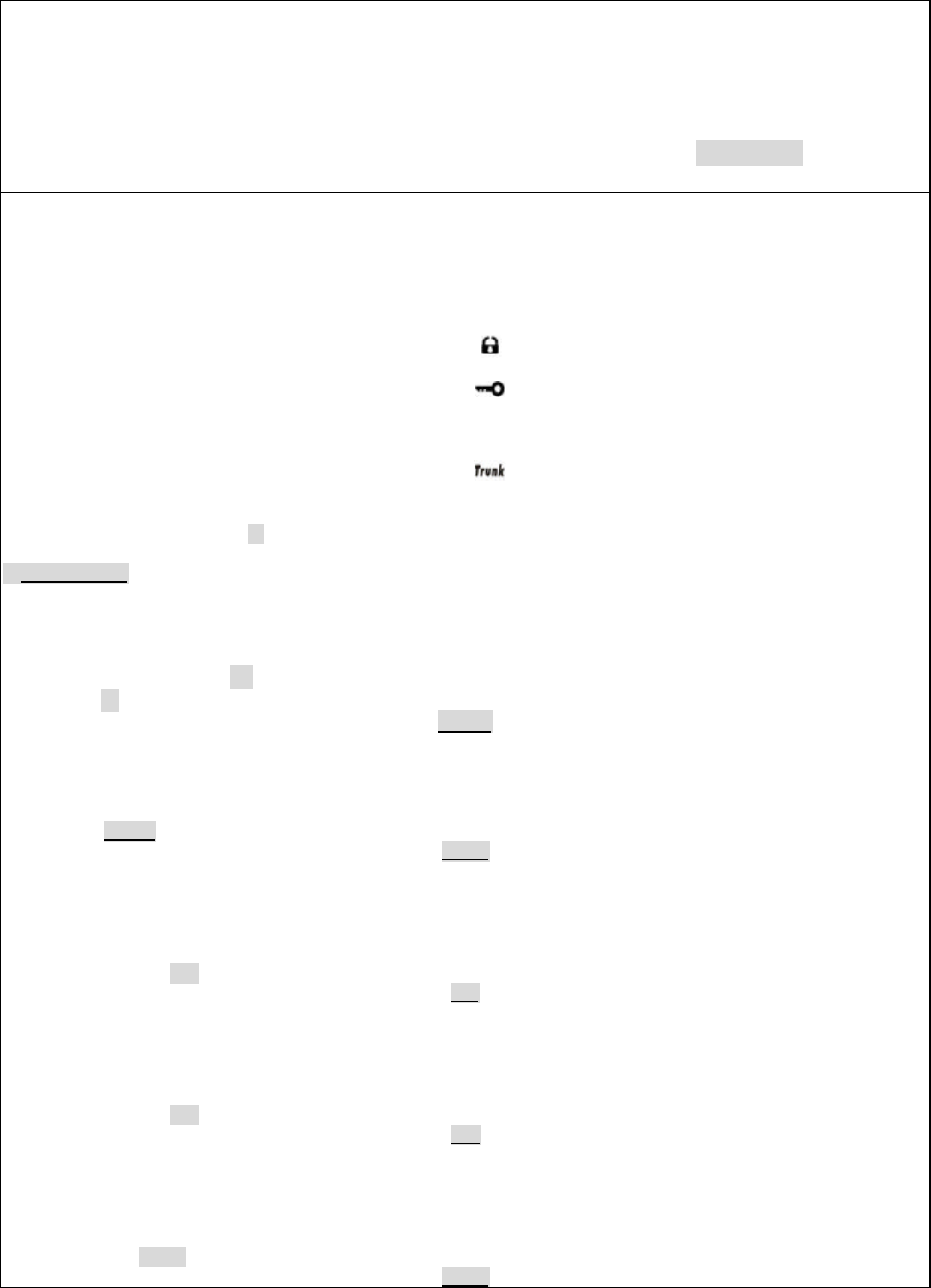
30. Features Program Table ( 1 )
Follow the steps as below.
(1) Turn the ignition “ON” ( Engine must not be running)
(2) Press and release the override switch 6 times.
(3) Turn the ignition “OFF ” , siren chirps 6 times to confirm it has entered programming mode.
(4) During programming mode, each press on override switch is followed by 1 siren chirp .The number of
siren chirps reflect default “ ON “ and “OFF” as shown in the chart below. The shaded value is the factory
default setting.
Features Program Table ( 1)
Buttons of the remote transmitter
Pressing times on override switch
Programmed features Press & release
Button
Press & release
Button
Press & release
Button
Press & hold
Button
1 time
Engine runtime upon ignition for 5/ 10/.15/20 min 5 min
10 min 15 min
20 min
2 times
Temp-controlled auto start at –5/-10/-20/-30C°
-5 C°
-10 C
°
-20 C°
-30 C°
3 times
Crank time for 800ms/1000ms/1600ms/2000ms 800ms
1000ms
1600ms
2000ms
4 times
Channel #2 output time 0.8s/10s/30s/on-off 0.8s
10s
30s
On/Off
5 times
Channel #3 output time 0.8s/10s/30s/on-off 0.8s
10s
30s
On/Off
6 times
Siren/horn time for 100ms /20ms/15ms/20ms 100ms

5
5
10ms
15ms
20ms
7 times
On/off setting of ignition # 2 output while cranking ON
OFF
OFF
OFF
31 Features Programming Table ( 2 )
Follow the steps as below.
(1) Turn the ignition ‘Off”
(2) 【Total 3 times press of override switch for valet mode】
【Total 4 times press of override for programmed daily start time】
【 Total 5 times press on override for temp-controlled auto start.】
Same number of presses on override switch is followed by same numbers of siren chirps.
(3) Turn the ignition “ON” to decide in each features mode.
(4) Press again override switch once /twice to decide each feature “ON” or “OFF”
※
The shaded indication like OFF is the factory default modes.
Features Program Table ( 2 )
Once
Twice
3 times, valet
ON
OFF
4 times, programmed daily start time on/off ON{ Refer below note}
OFF
5 times, time-controlled auto start on/off ON
OFF
Siren and L E D indicator 1
2
Note: NOTE: Having set the programmed daily start time mode “ON” , when the ignition is turned “OFF”, the engine will
immediately be running to indicate this feature in at standby mode .( Use remote control to engine stop engine running in this
case.)
32. How to restore setting to factory default.
Follow the steps as below.
(5) Turn the ignition “ON” ( Engine must not be running)
(6) Press and release the override switch 10 times.
(7) Turn the ignition “ OFF” ( Siren chirps 10 sounds. This confirms system has entered features programming
mode.)
(8) Press over-ride switch.1 more time. Siren chirps 1 time to confirm the # 30, #31 are ready for change of
default
(9) Press remote’s button
Ⅰ
【 】Its buzzer makes 1 sound to confirm # 30, # 31 are restored to factory
default.
Over ride switch
Features programming
6
6
33.
程式設定開關功能表
[ 3 ]
硬體程式設定功能表[3]
Set no
項目
出廠原設定值/off
on
Set 4
Ignition 預熱時間
汽油
柴油
Set 3
Central lock time
0.8s
3.6s
Set 2
Unlock 2 step/ch3
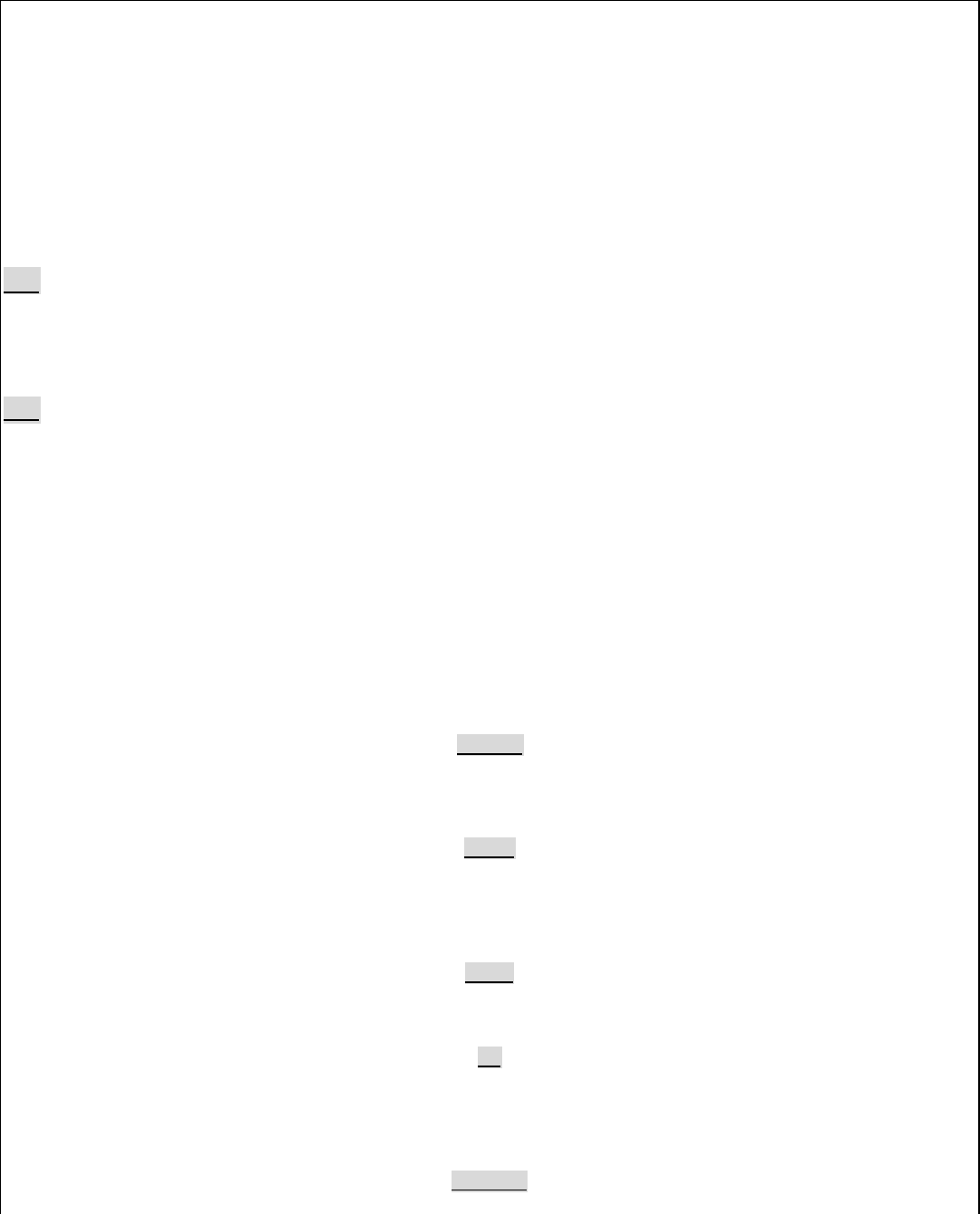
33. Pre-programmed Hardware Features Table ( 3 )
Pre-programmed hardware features [ selectable by mode switches]
Mode switch
Features
Factory default/ Off on
Mode switch # 4
Remote start pre-ignition time Gasoline
Diesel
Mode switch # 3
Central lock delay time 0.8 sec
3.6 sec
Mode switch # 2
2 steps unlock , Ch # 3 2 step Unlock
Ch # 3
Mode switch # 1
Safety door lock / unlock upon ignition on / off Off
On
Black wire
Auto gear / manual hand gear Auto gear
For manual gear, cut the wire loop (Refer to wiring installation guide Note (10)
7
7
The 2-way pager is a low-powered transmitter device used in monitoring the automobile security
status as well as in remotely arming/disarming car security system and other optional features.
Its features and functions are described in the separate attached sheet.
The transmission is powered by 12 V of the car alarm control mudle and works on 433.92 Mhz
single fixed frequency. Details of circuit diagram and its block diagram are shown on the
attached sheets.
The automobile’s sensor will trigger the digital control signals and modulate the carrier
signal. The carrier signal is generated by a crystal oscillator/amplifier circuit of a 433.92
MHz crystal and a npn transmitter. The modulated output of the RF amplifier is coupled to the
coil.
Fundamental Frequency
433.92MHz
Power Source
12V
Transmitting Time
Periodic ≤ 5 seconds
Associated Transceiver
FCC ID : NJQTR68A
All the tuning and verification are done by manufacturer during the production process and
no adjustment is allowed by any consumer. No external ground is needed in such device.
8
8
FCC Statement
This device complies with part 15 of the FCC Rules. Operation is subject to the following two condition.(1).this
device may not cause harmful interference. (2).this device must accept any interference received, including
interference that may cause undesired operation
Warning:
Note: This equipment has been tested and found to comply with the limits for digital device, pursuant
to Part 15 of FCC Rules. These limits are designed to provide reasonable protection against harmful
interference in a residential installation. This equipment generates, used and can radiate radio
frequency energy and, if not installed and used in accordance with the instructions, may cause harmful
interference in to radiate communications. However, there is no guarantee that interference will not
occur in a particular installation. If this equipment does cause harmful interference to radio or
television reception, which can be determined by turning the equipment off and on, the user is encouraged
to try to correct the interference by one or more of the following measures:
l Reorient or relocate the receiving antenna
l Increase the separation between the equipment and receiver.
l Connect the equipment into an outlet on a circuit different form that to which the receiver in connected.
l Consult the dealer or an experienced radio/TV technician for help.
This device complies with part 15 of the FCC rules. Operation is subject to the following two conditions:
(1) This device may not cause harmful interference: and
(2) This device must accept any interference received: including interference that may cause undesired
operation.
THE MANUFACTURER IS NOT RESPONSIBKE FOR ANY RADIO OR TV INTERFERENCE CAUSED
BY UNAUTHORIZED MODIFICATIONS TO THIS EQUIPMENT.SUCH ODIFICATIONS COULD VOID
THE USER’S AUTHORITY TO OPERATE THE EQUIPMENT.
Note: The manufacturer is not responsible for any radio or TV interference caused by unauthorized modification to
this equipment. Such modification could void the user’s authority to operate the equipment.