Wireless Dynamics ICARTE110 13.56 MHz RFID device User Manual iCarte110

Wireless Dynamics Inc. 13.56 MHz RFID device iCarte110

Manual

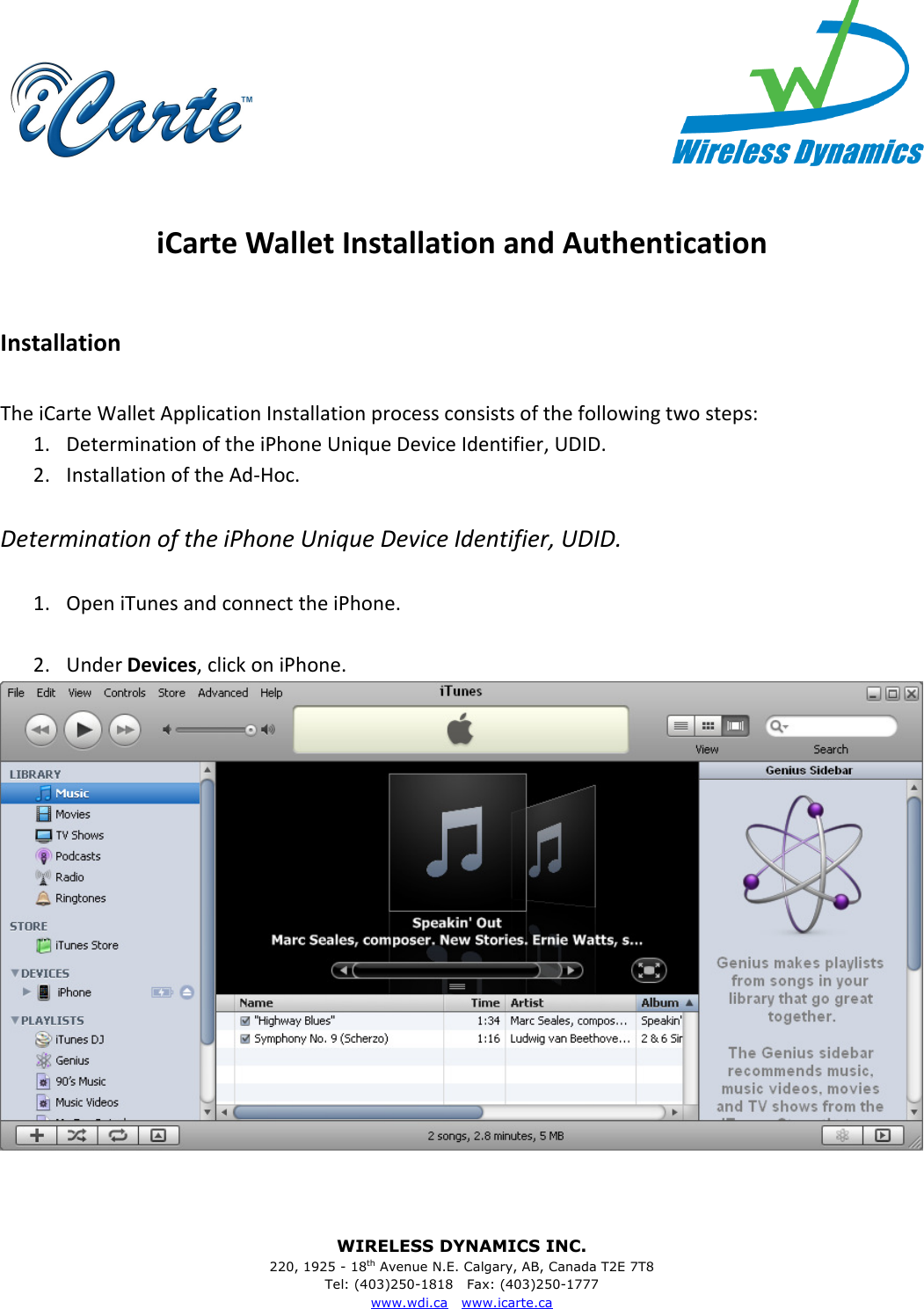
WIRELESS DYNAMICS INC. 220, 1925 - 18th Avenue N.E. Calgary, AB, Canada T2E 7T8 Tel: (403)250-1818   Fax: (403)250-1777 www.wdi.ca   www.icarte.ca      iCarte Wallet Installation and Authentication  Installation  The iCarte Wallet Application Installation process consists of the following two steps: 1. Determination of the iPhone Unique Device Identifier, UDID. 2. Installation of the Ad-Hoc.    Determination of the iPhone Unique Device Identifier, UDID.  1. Open iTunes and connect the iPhone.  2. Under Devices, click on iPhone.
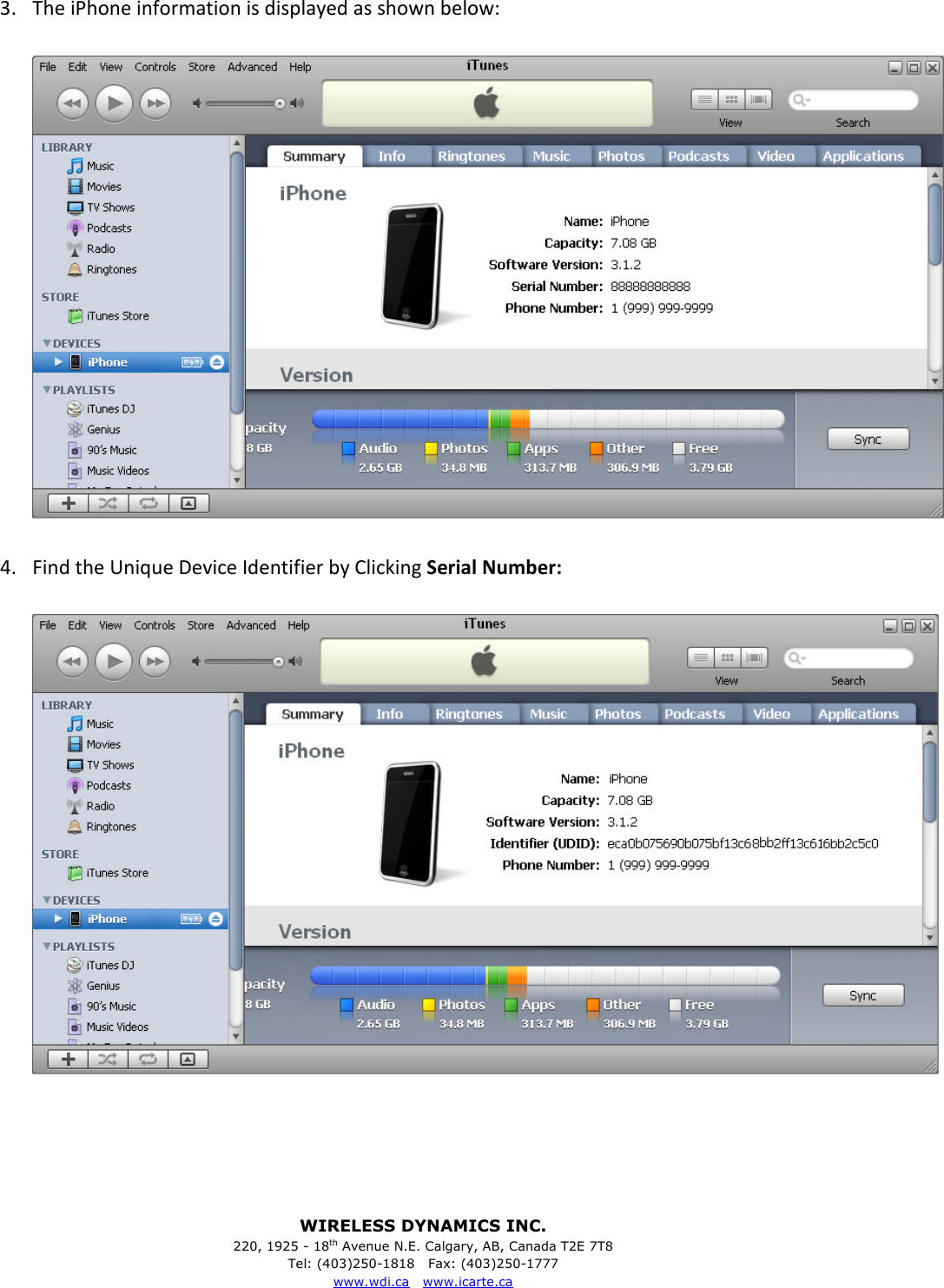
WIRELESS DYNAMICS INC. 220, 1925 - 18th Avenue N.E. Calgary, AB, Canada T2E 7T8 Tel: (403)250-1818   Fax: (403)250-1777 www.wdi.ca   www.icarte.ca  3. The iPhone information is displayed as shown below:    4. Find the Unique Device Identifier by Clicking Serial Number:
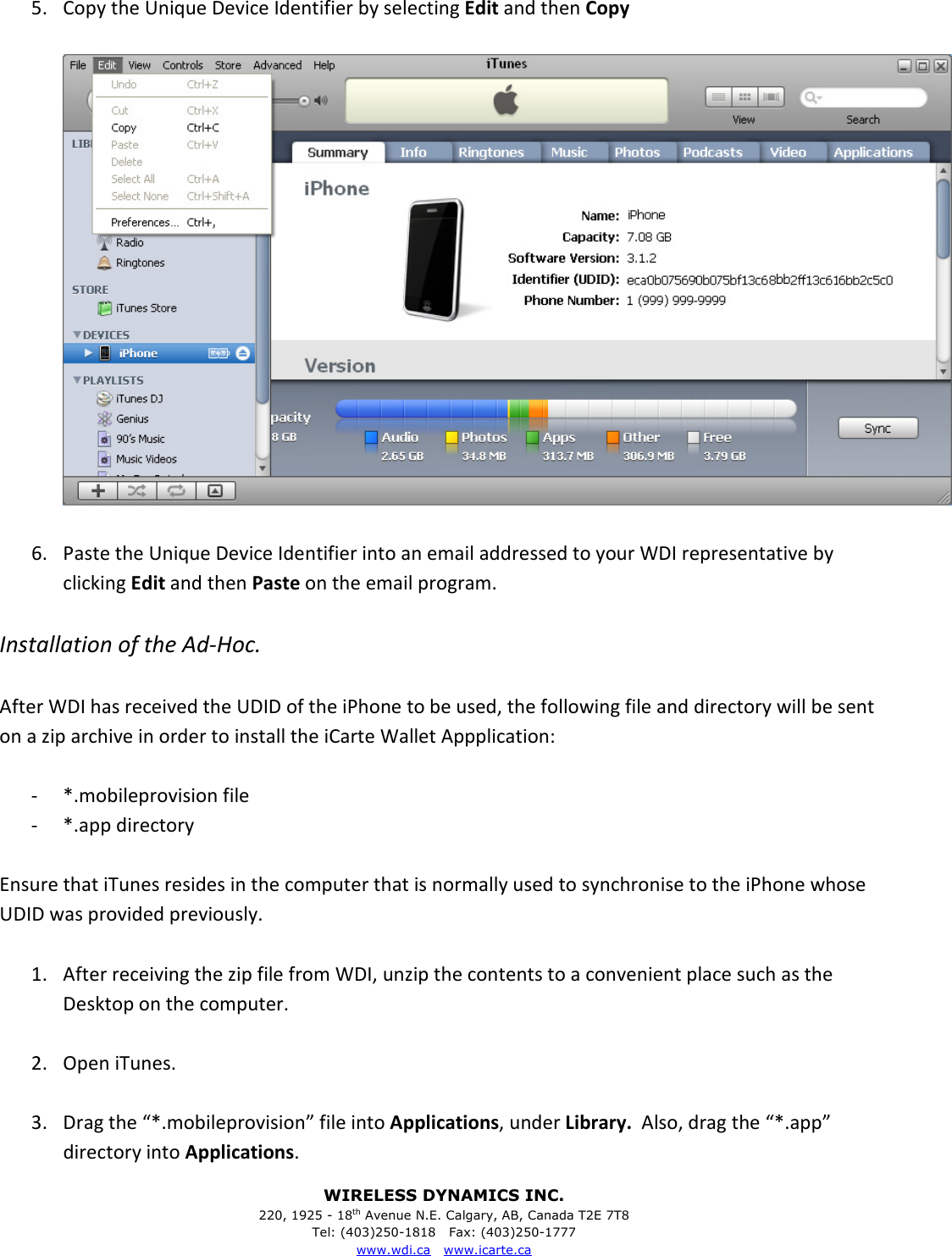
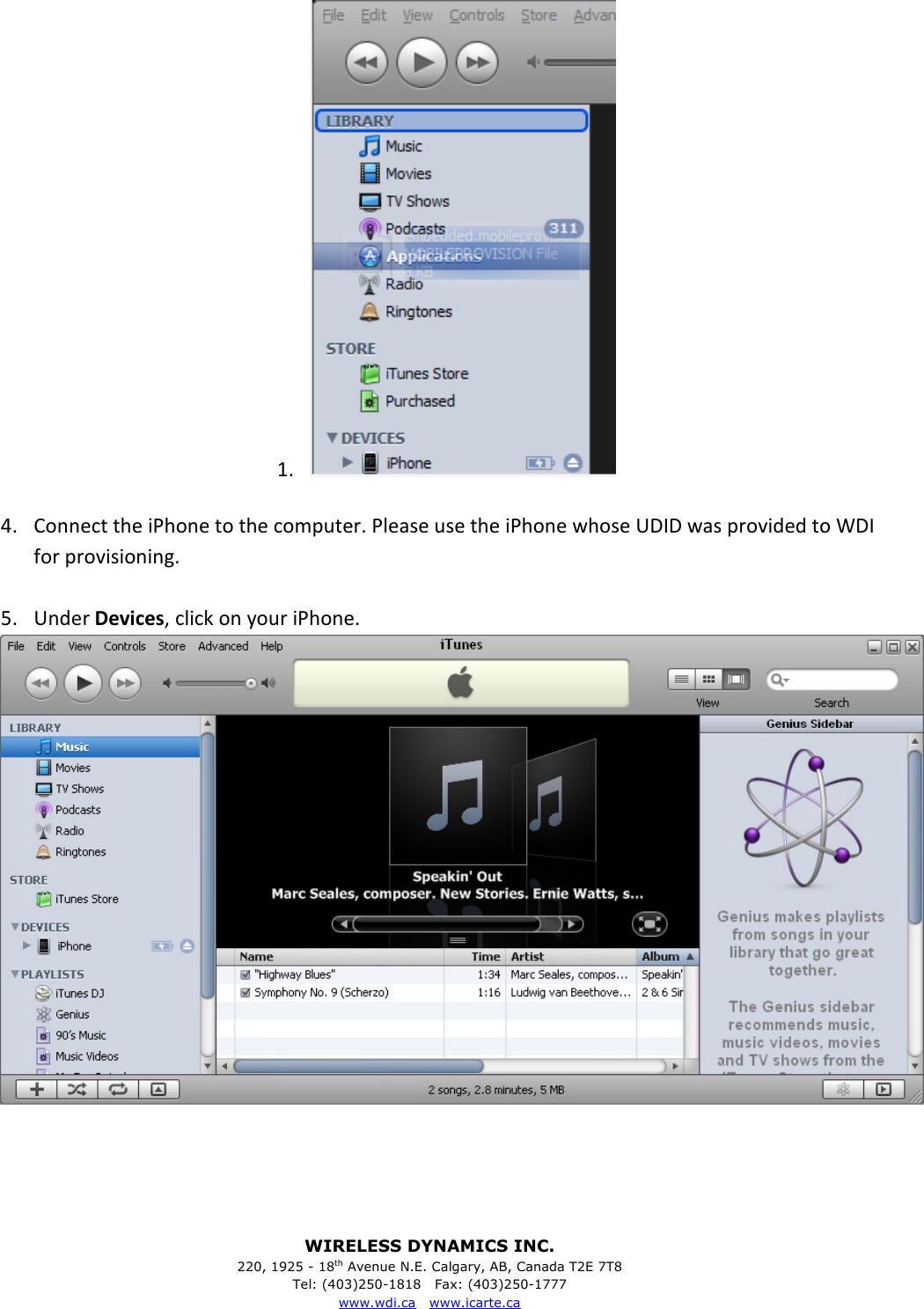
WIRELESS DYNAMICS INC. 220, 1925 - 18th Avenue N.E. Calgary, AB, Canada T2E 7T8 Tel: (403)250-1818   Fax: (403)250-1777 www.wdi.ca   www.icarte.ca  5. Copy the Unique Device Identifier by selecting Edit and then Copy    6. Paste the Unique Device Identifier into an email addressed to your WDI representative by clicking Edit and then Paste on the email program.  Installation of the Ad-Hoc.  After WDI has received the UDID of the iPhone to be used, the following file and directory will be sent on a zip archive in order to install the iCarte Wallet Appplication:  - *.mobileprovision file - *.app directory  Ensure that iTunes resides in the computer that is normally used to synchronise to the iPhone whose UDID was provided previously.  1. After receiving the zip file from WDI, unzip the contents to a convenient place such as the Desktop on the computer.  2. Open iTunes.  3. Drag the “*.mobileprovision” file into Applications, under Library.  Also, drag the “*.app” directory into Applications.
WIRELESS DYNAMICS INC. 220, 1925 - 18th Avenue N.E. Calgary, AB, Canada T2E 7T8 Tel: (403)250-1818   Fax: (403)250-1777 www.wdi.ca   www.icarte.ca  1.   4. Connect the iPhone to the computer. Please use the iPhone whose UDID was provided to WDI for provisioning.  5. Under Devices, click on your iPhone.
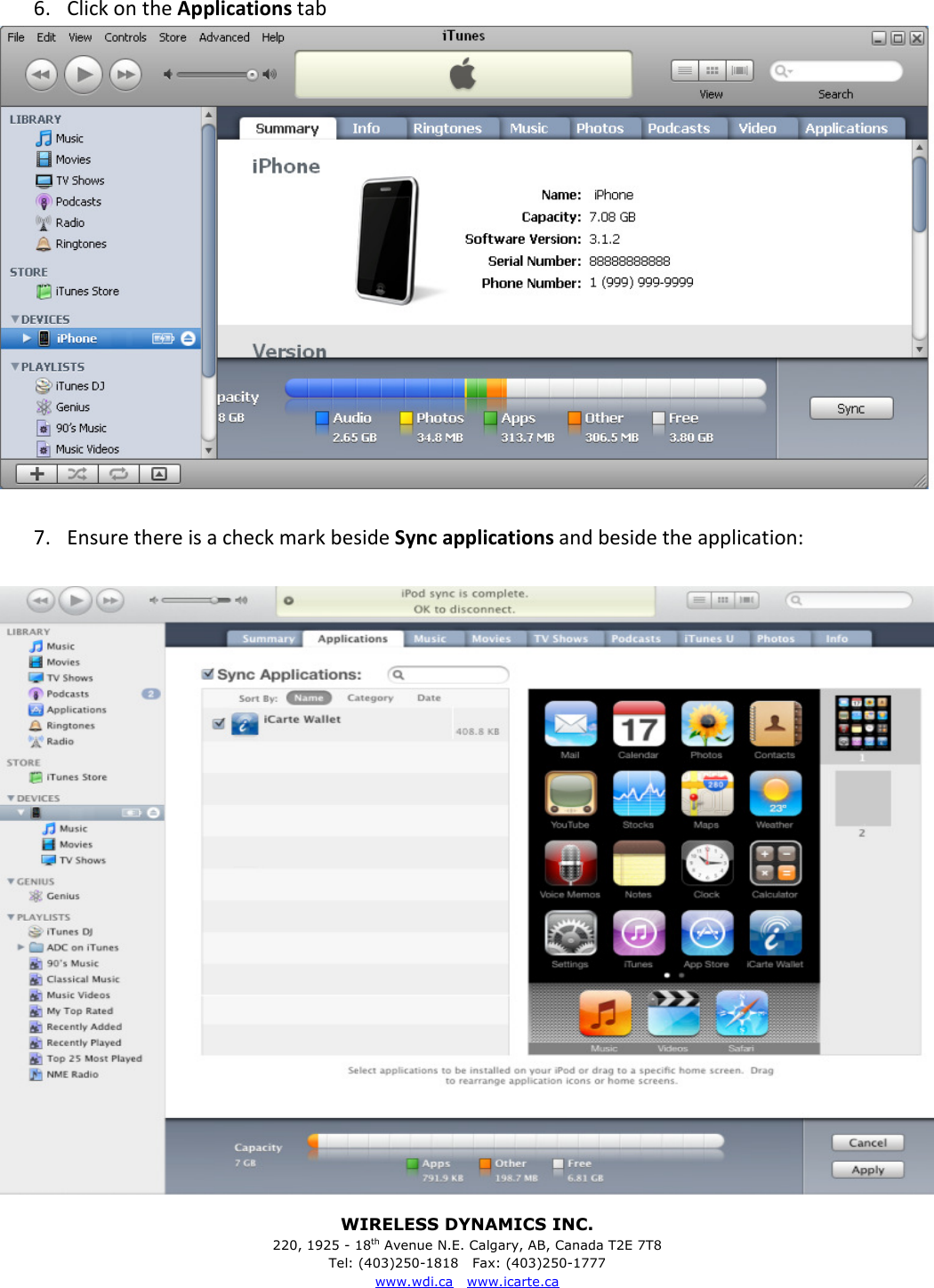
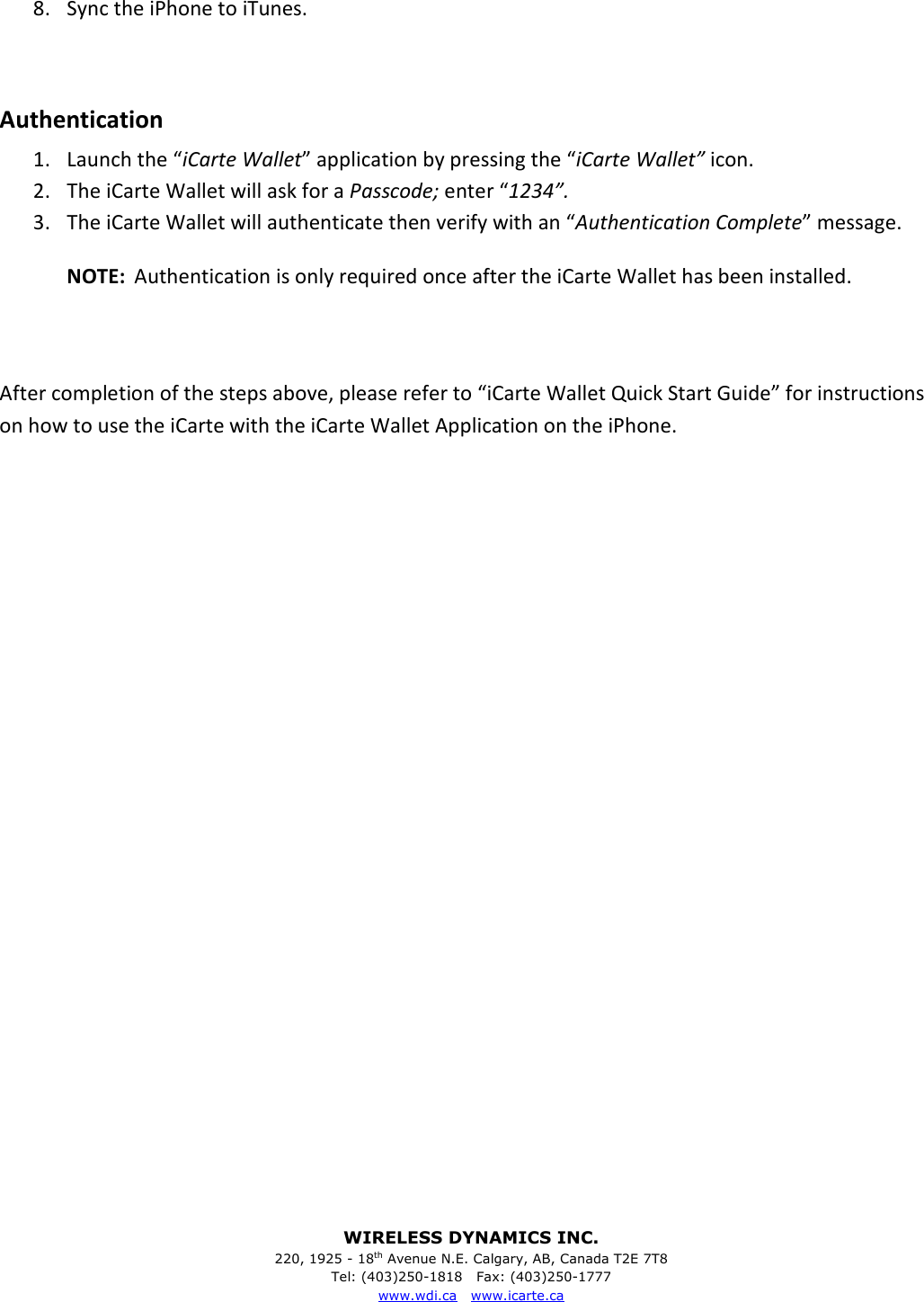
WIRELESS DYNAMICS INC. 220, 1925 - 18th Avenue N.E. Calgary, AB, Canada T2E 7T8 Tel: (403)250-1818   Fax: (403)250-1777 www.wdi.ca   www.icarte.ca   6. Click on the Applications tab   7. Ensure there is a check mark beside Sync applications and beside the application:
WIRELESS DYNAMICS INC. 220, 1925 - 18th Avenue N.E. Calgary, AB, Canada T2E 7T8 Tel: (403)250-1818   Fax: (403)250-1777 www.wdi.ca   www.icarte.ca   8. Sync the iPhone to iTunes.  Authentication 1. Launch the “iCarte Wallet” application by pressing the “iCarte Wallet” icon. 2. The iCarte Wallet will ask for a Passcode; enter “1234”. 3. The iCarte Wallet will authenticate then verify with an “Authentication Complete” message. NOTE:  Authentication is only required once after the iCarte Wallet has been installed.   After completion of the steps above, please refer to “iCarte Wallet Quick Start Guide” for instructions on how to use the iCarte with the iCarte Wallet Application on the iPhone.
WIRELESS DYNAMICS INC. 220, 1925 - 18th Avenue N.E. Calgary, AB, Canada T2E 7T8 Tel: (403)250-1818   Fax: (403)250-1777 www.wdi.ca   www.icarte.ca  iCarte Wallet Quick Start Guide  Installation and Authentication 4. Install the application 5. Launch the “iCarte Wallet” application by pressing the “iCarte Wallet” icon. 6. The iCarte Wallet will ask for a Passcode; enter “1234”. 7. The iCarte Wallet will authenticate then verify with an “Authentication Complete” message. NOTE:  Authentication is only required once after the iCarte Wallet has been installed.  Use Insert the iCarte into the bottom connector of the iPhone and follow the instructions below: Enter PIN 3. When iCarte Wallet is launched, the iCarte Wallet will ask for a PIN; enter “7905”. 4. The iCarte Wallet will then go to the “Main Menu”.    The iCarte Wallet supports the following features: Payment, Discovery and Quick Payment. These features require the iCarte to be connected to the iPhone via the 30-pin connector.  Payment 1. From the “Main Menu” press the “Make Payment” button. 2. Present the iCarte™ to a contactless point-of-sale terminal. 3. The terminal will beep when the transaction has taken place. 4. The iCarte Wallet will ask to save the eReceipt. 5. To save the eReceipt press “Yes”; to discard press “No.”
WIRELESS DYNAMICS INC. 220, 1925 - 18th Avenue N.E. Calgary, AB, Canada T2E 7T8 Tel: (403)250-1818   Fax: (403)250-1777 www.wdi.ca   www.icarte.ca  Discovery 1. From the “Main Menu” press the “Discovery” button. 2. Present the iCarte to a Smart Poster. 3. When the iCarte has read a Smart Poster the iCarte Wallet will display the contents of the Smart Poster. NOTE:  Please ensure that 3G or WiFi connectivity is enabled in order to display the contents of the Smart Poster correctly.
WIRELESS DYNAMICS INC. 220, 1925 - 18th Avenue N.E. Calgary, AB, Canada T2E 7T8 Tel: (403)250-1818   Fax: (403)250-1777 www.wdi.ca   www.icarte.ca  FCC Notice  This device complies with Part 15 of the FCC Rules.  Operation is subject to the following two conditions:  This device may not cause harmful interference, and This device must accept any interference received, including interference that may cause undesired operation.  Any change or modification not expressly approved by the manufacturer could void the user’s authority to operate the equipment.                               FCC ID: SHFICARTE110 Industry Canada Certification Number: 5998A-ICARTE110  This device is a Radio Frequency Identification Reader operating in the frequency of 13.56 MHz. This device has been approved by The Federal Communications Commission, FCC, and Industry Canada. This device also complies with European requirements.   European Declaration of Conformity  The CE mark confirms that the iCarte is in compliance with the legal requirements of the European Union as a prerequisite for the placing and free movement of the product within the European internal market.  Wireless Dynamics Inc. hereby declares that iCarte is in compliance with the essential requirements of:  1. The European Directive 1999/5/EC on radio equipment and telecommunications terminal equipment and the mutual recognition of their conformity (R&TTE),  2. The European Directive 1999/519/EC on the limitation of exposure of the general public to electromagnetic fields (0 Hz to 300 GHz), and  3. The European Directive 2002/95/EC on the restriction of the use of certain hazardous substances in electrical and electronic equipment (RoHS).  The Signed European Declaration of Conformity is maintained by the manufacturer and a copy can be obtained upon request.

Navigation menu