Wisair DV9100A UWB Transeiver Development Kit User Manual UWB MB OFDM DVModule DV9100
Wisair Inc. UWB Transeiver Development Kit UWB MB OFDM DVModule DV9100
Wisair >
DV9100 Users manual

Wisair’s
UWB MB-OFDM
Development Kit
DV9100
User’s Guide
Rev1.21
Wisair Confidential and Proprietary Information

UWB MB-OFDM DVModule DV9100 User Manual Wisair Ltd. ii
Table of Contents
Chapter 1 OVERVIEW.......................................................................1-1
Chapter 2 GETTING STARTED ..........................................................2-1
PACKAGE CONTENTS............................................................................... 2-1
INTRODUCING THE DV9100..................................................................... 2-2
PERFORMING THE INITIAL DVMODULE SETUP................................................. 2-2
CONNECTING TO THE WISMAN™ WISAIR HOST APPLICATION (OPTIONAL)............. 2-4
Chapter 3 OPERATING THE DVMODULE ...........................................3-1
SETTING UP A UWB LINK ......................................................................... 3-1
CONFIGURING DVMODULE MANUALLY ........................................................ 3-2
External MAC Interface / Internal MAC .......................................... 3-4
Master / Slave............................................................................... 3-4
No-ACK / Imm-ACK ..................................................................... 3-4
Duty Cycle and Super-frame Duration Configuration ..................... 3-4
EMUL Mode (Test Mode for Compliance Testing) ........................... 3-6
Appendix A SPECIFICATIONS..............................................................A-1

Chapter 0 Error! No text of specified style in document. Wisair Ltd. iii
Rights
Rights to use this documentation are set forth in the License Agreement accompanying the UWB MB-
OFDM DVModule.
© Wisair 2005. All rights reserved.
All right, title and interest, copyrights, patents, know-how, trade secrets and other intellectual
property relating to this publication and to the DVModule product are proprietary products of Wisair
Ltd. (“Wisair”). Any and all other trademarks, product names and other intellectual property rights are
the sole property of their respective owners.
The information presented in this publication does not form part of any quotation or contract, is
believed to be accurate and reliable and may change. No part of this publication may be reproduced in
any form whatsoever without prior written approval by Wisair. All products are sold subject to Wisair’s
terms and conditions of sale supplied at the time of order. Wisair™ is a registered trademark of Wisair.
No right, license, or interest to such trademark is granted hereunder.
Regulatory Notice
U.S. Operation:
This device complies with FCC Code of Federal Regulations (CFR) 47, Part 15 Subpart F: Ultra-
Wideband Operation. Operation is subject to the following two conditions: (1) this device may not
cause harmful interference, and (2) this device must accept any interference received, including
interference that may cause undesired operation.
This device may only be operated indoors. Operation outdoors is in violation of 47 U.S.C. 301 and
could subject the operator to serious legal penalties.
Please consult with Wisair Ltd. if you have any questions, prior to use.
Non-U.S. Operation:
Wisair chipset technology has not been authorized for use or commercial exploitation under the
regulations of any non-U.S. government agency. Please confer with your government’s regulatory
agency to obtain proper authorizations.
Disclaimer
Wisair reserves the right to make any corrections, modifications, enhancements, improvements and
other changes to the DVModule and its services at any time and to discontinue any product or service
without notice. As far as possible, major changes of the DVModule specifications and functionality
will be stated in product specific Errata Notes.
Wisair warrants the performance of its products to the specifications applicable at the time of sale in
accordance with Wisair’s standard warranty.
Wisair shall be released from all obligations under its warranty in the event that the equipment has
been subjected to misuse, neglect, accident or improper installation, or if repairs or modifications
were made by persons other than Wisair’s own authorized service personnel, unless such repairs by
others were made with the written consent of Wisair. You will be liable for any damages caused by the
above mentioned to yourself, Wisair or any third party.
There are no warranties which extend beyond the face of Wisair’s standard warranty, including, but
not limited to, warranties of title, non-infringement, merchantability or fitness for a particular
purpose, and in no event shall Wisair be liable for consequential damages.

iv Wisair Ltd.UWB MB-OFDM DVModule DV9100 User Manual
You are responsible for your products and applications using Wisair products. Wisair assumes no
liability for applications assistance or customer product design.
Wisair shall not be liable to any person for any special or indirect damages, including, but not limited
to, lost profits from any cause whatsoever arising from or in any way connected with the manufacture,
sale, handling, repair, maintenance or use of the DVModule.
Software components in the DVModule are provided "as is" and without warranty of any kind.
Notwithstanding the foregoing, Wisair shall do its best to provide error-free software products and
shall offer free software updates during the warranty period.
Wisair’s cumulative liability to you or any other party for any loss or damages resulting from any
claims, demands, or actions arising out of or relating to this publication and the DVModule shall not
exceed the sum paid to Wisair for the purchase of the DVModule.
You may not, directly or indirectly, develop, market, distribute, license, or sell any product that
supports substantially similar functionality as the DVModule, based on or derived in any way from the
DVModule.
Life Support Policy
Wisair assumes no liability for the use of the DVModule. The DVModule is not designed for use in life
support appliances, devices or other systems where malfunction can reasonably be expected to result
in significant personal injury to the user or as a critical component in any life support device or
system whose failure to perform can be reasonably expected to cause the failure of the life support
device or system or to affect its safety or effectiveness. If you use or sell the product for us in such
applications you do that at your own risk and agree to fully indemnify Wisair for any damages
resulting form any of the abovementioned.
About Wisair
Wisair (www.wisair.com ) develops and markets MBOA based standard, high performance wireless
communication chipset solutions, founded on UWB technology. The company is an active Promoter
Member of the Multi-Band OFDM Alliance Special Interest Group (MBOA-SIG), an active participant in
the IEEE standardization process and a member of the Wireless USB Promoter Group and Wimedia
Alliance.
Wisair, a privately held company, located in Israel is part of the RAD Group. Wisair’s international
offices, in USA, Japan, Korea and Taiwan, support business development, marketing and customer
activities.
For further information contact Wisair local offices and representatives at
http://www.wisair.com/contact.html

UWB MB-OFDM DVModule DV9100 User Manual Wisair Confidential and Proprietary Information 1-1
1
Overview
The DV9100 is one of the Wisair Development modules (DVModule) in Wisair
Development Kit (DVK). Wisair DVK is targeted to support the development of
reference designs based on Wisair chipset. In addition the development kit
enables application evaluation, demonstration and supports regulation and
standardization efforts.
The DVK is modular and includes a main module supporting the chipset and main
interfaces and additional add on modules to enable additional MAC features and
data interfaces development.
The DV9100 is a small form-factor board and a complete UWB Multi-Band OFDM
transceiver with several data and host interfaces. It is based on the Wisair 501
SiGe-based RF Transceiver and the 530 CMOS-based Baseband chips. The
DV9100 also includes a patented Wisair UWB antenna, based on a PCB-based
design, along with the WisMan™ configuration and control host utility.
The UWB MB-OFDM DVModule consists of the following main components, all
developed by Wisair:
UWB Omni Antenna
RF transceiver Wisair 501 chip
Baseband Wisair 530 chip
Internal MAC FPGA chip
External Data and Control Interfaces
The UWB MB-OFDM DVModule provides the following:
Based on Wisair MBOA-compliant UWB Baseband and RF transceiver chips.
Small form-factor: 6 x 2.4” (153 x 64mm).
High performance, robust wireless UWB link (Bit Error Rate better than 10-9).

1-2 Wisair Confidential and Proprietary Information UWB MB-OFDM DVModule DV9100 User Manual
Supports high quality and QoS for Wireless Data and Wireless Video
applications.
Provides MBOA MAC-PHY standard interface.
Offers multiple data interfaces and protocols: Ethernet/IP and optional MPEG,
Transport Stream and High Speed parallel data.
USB Host interface for external applications.
Supports multiple operation and communication profiles for the different
applications.
WisMan™ Windows-based software utility based on the Wisair API for
managing and configuring Wisair development kit modules.

UWB MB-OFDM DVModule DV9100 User Manual Wisair Confidential and Proprietary Information 2-1
2
Getting Started
This chapter provides you with the basic information you need to use the UWB
MB-OFDM DVModule for the first time.
Package Contents
Wisair’s DVModule type DV9100 package contains the following items:
Table 2-1: Package Content s
# Description Qty Remarks
1 DV9100 module assembly 2 Assembled with transparent
plastics on each side of module
1.1 DV9100 Serial # XXXXXXX -- Master mode
1.2 DV9100 Serial # YYYYYYY -- Slave mode
2 UWB Antenna 2 3-5 GHz type with SMA RF
attachment
3 Universal AC to DC power
supply
2 100-240VAC to 3.3VDC.
(AC power cable not included)
4 USB Cable 2 USB type A to mini USB type B
(used for WisMan™ host utility)
5 CD-ROM 1 Electronic format
5.1 This DV9100 User Manual -- PDF copy
5.2 WisMan™ User Guide -- PDF copy (entry level)
5.3 WisMan™ Host Application
Utility (including USB drivers)
-- Entry level
6 DV9100 Manual Configuration 1 One page quick guide

2-2 Wisair Confidential and Proprietary Information UWB MB-OFDM DVModule DV9100 User Manual
Introducing the DV9100
Wisair’s type DV9100 DVModule has various external connectors, switches, and
LEDs, which are listed below:
Power supply inlet
SMA female for UWB antenna
Ethernet RJ-45 connector
For service, debug, or configuration:
Mini USB type B female host connector
DIP switches for manual configuration
Reset button
LEDs:
Power
Signal Strength Indication (RSSI)
Line
Active
Link (UWB)
Performing the Initial DVModule Setup
After opening the UWB MB-OFDM DVModule package, you must perform the
following initial setup in order to begin using the module.
Important Note: If the DVModule is being used for the first time, the
DVModule is set to internal MAC mode (DIP switch #1 on both
DVModules is in IMC (“On” position)). Test the UWB link by using
an application that uses the external Ethernet connectors. After
this procedure is performed successfully, External MAC users
should set DIP switch #1 on both DVModules to EMC (“Off”
position).
To perform initial setup on the DVModule
1. Verify that the antenna is connected to the semi rigid cable included in the
package.
2. Connect the other side of the semi rigid cable to the antenna connector on
the DVModule.

Chapter 2 Getting Started Wisair Confidential and Proprietary Information 2-3
3. Verify that the SMA cable-connector is firmly tightened over the connections.
Caution: Do NOT close the connector too tight. Seven to ten inch-pounds
torque using a connector wrench is recommended. The center
pin on the SMA connector is fragile and may break.
Caution: Do not use any other antenna other than the one provided in
the kit. The use of another antenna element other than the one
provided in the kit is a violation of FCC rules governing the
transmission of UWB signals.
4. Verify that the configuration of one of the DVModules is Master and the other
DVModule is Slave (refer to
Configuring the DVModule Manually
in Chapter 3,
Operating the DVModule
).
Note: Cables and accessories are packed inside the carton section of
the box.
5. Connect the external DC power supply cable to the power inlet of each of the
DVModules.
6. Place the DVModules two meters apart with their antennas facing each other.
7. Plug the AC power cable into the external power supply to apply power to the
DVModules.
Note: The unit supports an international power supply (100-240V, 47
to 63Hz).
8. Verify that the power LED on the DVModule is ON.
9. Verify that the RSSI LEDs are ON (at least one RSSI LED should light on both
DVModules in order to start transmission).
Note: If at least one RSSI LED is not lit as expected, reset each of the
DVModules using the reset button.
10. Connect a regular PC to an Ethernet wall outlet (LAN side) to surf the Internet.
If this connection is working correctly, use this setup for the following steps.
11. Connect a regular Ethernet cable between one DVModule and an Ethernet
wall outlet (LAN side).
12. Verify that the Line LED is ON.

2-4 Wisair Confidential and Proprietary Information UWB MB-OFDM DVModule DV9100 User Manual
Note: The Active LED may blink if the module detects any activity on
the network side.
13. Connect a crossed Ethernet cable between the other DVModule and a PC
Ethernet port (that previously was configured to work with the LAN network).
14. Verify that the Line LED is ON.
15. Use the PC to surf the Internet over the wireless UWB connection.
16. Verify that the Active LED blinks on both DVModules.
Note: If a link is not established as expected, reset each of the
DVModules using the reset button.
Connecting to the WisMan™ Wisair Host Application
(Optional)
Working with the DVModule does not require any software application support.
To configure a pre-selected basic mode of operation, you can use the on-board
pre-configured DIP switches.
For additional modes of operation, an optional WisMan host application is
required. For more information about the WisMan host application, refer to the
WisMan User Guide
.
Note: The minimum requirement for the host PC is Windows XP® or
Windows 2000® operating system with a USB1.1 interface PC
required to run the WisMan host application.
To install the WisMan host application
1. Install the USB drivers (refer to the
WisMan Use Guide
).
r
2. Connect the DVModule to the PC USB interface (if you are using multiple
modules, they should be attached to another PC USB port or a USB hub).
3. Install the Wisman application (refer to the
WisMan User Guide
).

UWB MB-OFDM DVModule DV9100 User Manual Wisair Confidential and Proprietary Information 3-1
3
Operating the DVModule
This chapter discusses how to manually set the DV9100 configuration using DIP
switch (S1) for proper operation.
Important Note: The instructions in this chapter apply only to
Ethernet users of the DVModule using Wisair’s internal MAC. If
you are using an External MAC, the Wisair MAC-PHY interface
DIP switch#1 must be set to EMC (“Off” position) for External
MAC. The DIP switch #1 setting defines internal MAC /external
MAC.
Setting Up a UWB Link
The following is a simple procedure for setting up a UWB link between two
DVModule’s and testing that it is functioning correctly
Note: Refer to Chapter 2,
Getting Started
the first time you use the
DVModule to surf the Internet using a wireless link based on the
UWB link.
To set up a UWB link between two DVModules
1. Connect an antenna to each of the DVModules.
2. Connect a power cable to each of the DVModules.
3. Place the DVModules two meters apart with the antennas facing each other.
4. Power on the DVModules.
5. Verify that both Power LEDs are ON.
6. Verify that on both modules, at least one RSSI LED is ON.
7. Connect Ethernet cables to the DVModules and attach them to the application
PCs.
8. Verify that the Line LED is ON
9. Verify that the Active LED blinks (on both DVModules).
3-2 Wisair Confidential and Proprietary Information UWB MB-OFDM DVModule DV9100 User Manual
Configuring DVModule Manually
The DVModule internal MAC emulator supports the following features:
Point-to-point configuration.
Ethernet MAC interface (using the RMII interface).
Support 100 Mbps full duplex.
Configuration of both RMII MAC and PHY is done using the on-board manual
dipswitch configuration or the optional Wisair Host Application using the
USB1.1 interface.
The following configurations are supported: MAC/PHY interface or Internal
MAC, Super frame length, [Tx:Rx] duty cycle ratio, Master/Slave, ACK policy.
Status registers from the MAC can be read through the USB1.1 interface
using the optional WisMan, Wisair’s Host Application.
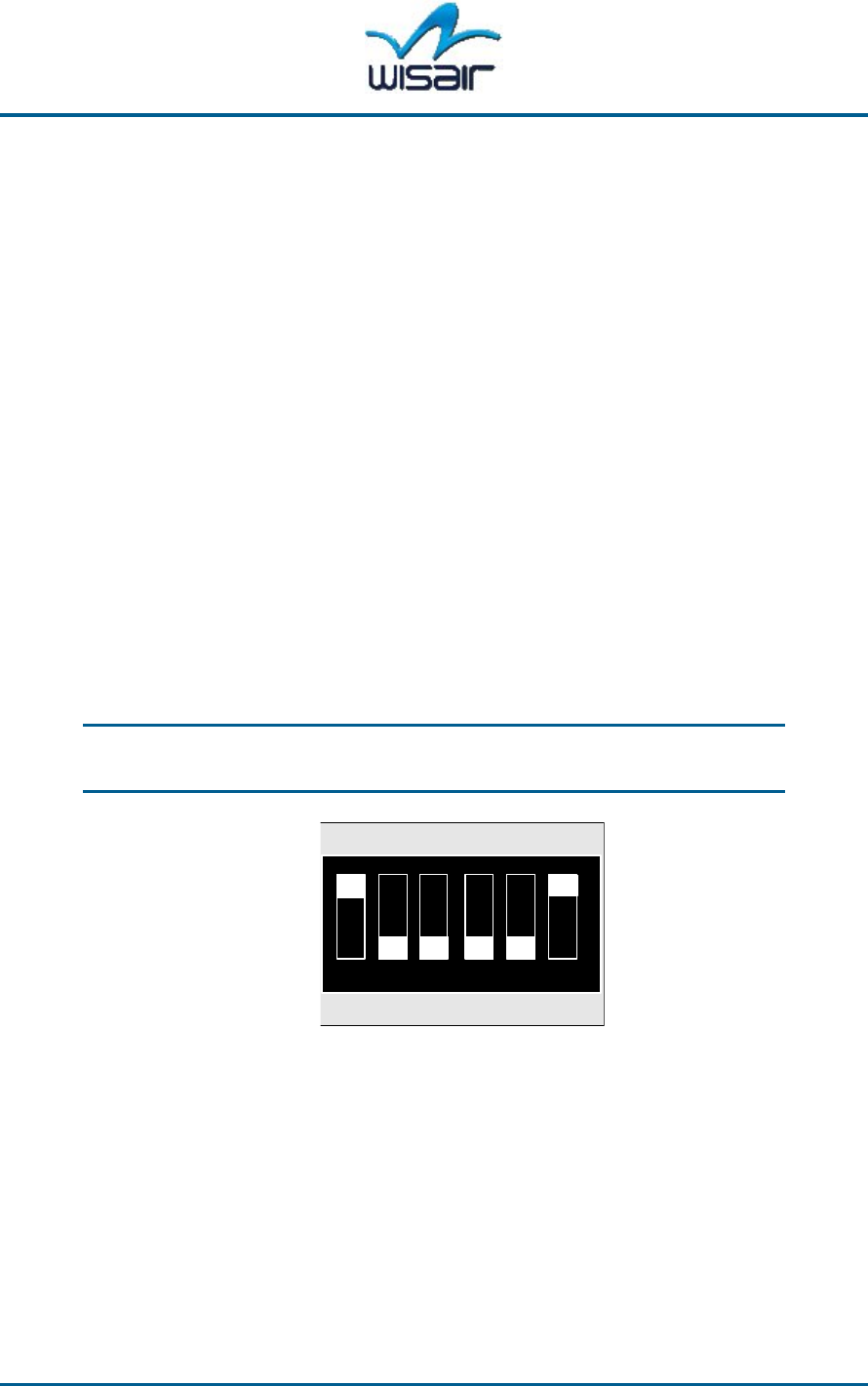
The DVModule modes of operation can be set manually by the on-board DIP
switch (two positions, six micro-switches) on the component side of the
DVModule.
Note: To configure the DVModule using the WisMan host application,
refer to the
WisMan Use Guide
.
r
12 3 45 6
ON
A0
B0
C0
ACK
MST
IMC
A1
B1
C1
NAK
SLV
EMC
Figure 3-1: DVModule Manual DIP Switch Configuration (Example: Slave Mode)
Chapter 3 Operating the DVModule Wisair Confidential and Proprietary Information 3-3
The modes of operation available by the DIP switch are described below:
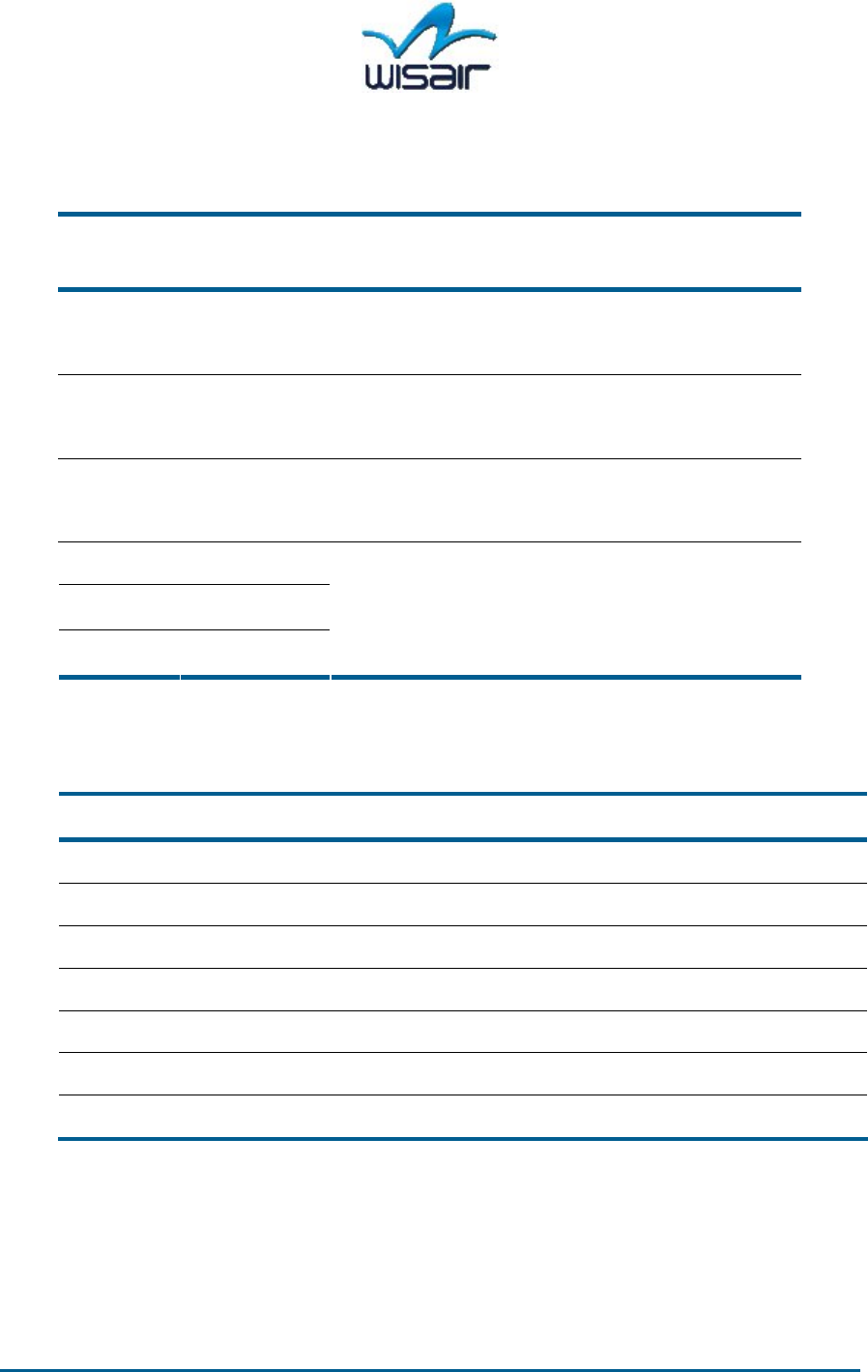
Table 3-1: DIP Switch Configurations
DIP switch
Number
DIP switch
State
Selected Configuration
1 On
Off
Internal MAC (IMC)
External MAC (EMC)
2 On
Off
Master (MST)
Slave (SLV)
3 On
Off
Immediate Ack Mode (ACK)
No Ack Mode (NAK)
4 C
5 B
6 A
Refer to Table 3-2 for ”CBA” state
combinations.
The following table lists of the DIP switch state combinations to use for either the
Master or Slave DVModules:
Table 3-2: State Combinations (CBA)
C B A Selected Configuration From Master From Slave
On On On 100/0%, 5mSec 100% 0%
Off On On 92/8%, 5mSec 92% 8%
On Off On 80/20%, 5mSec 80% 20%
Off Off On 50/50%, 5mSec 50% 50%
On On Off 80/20%, 2mSec 80% 20%
Off On Off 50/50%, 2mSec 50% 50%
Off Off Off EMUL mode (see page 3-6)
3-4 Wisair Confidential and Proprietary Information UWB MB-OFDM DVModule DV9100 User Manual
External MAC Interface / Internal MAC
DIP switch 1 is used to choose between an external MAC (using MBOA type of
PHY-MAC interface) and the internal MAC (Wisair proprietary). The internal MAC is
either the Ethernet MAC or the internal packet generator. The default
configuration is the Ethernet MAC.
Master / Slave
DIP switch 2 is used to indicate if the DVModule works in master or slave mode.
For a point-to-point application, designate one DVModule as the master and the
other as the slave. The slave DVModule synchronizes itself to the Master
DVModule, and channel time usage will be divided between both modules, based
on the TDD duty cycle configuration of DIP switch 1.
No-ACK / Imm-ACK
DIP switch 3 is used to identify whether the MAC uses Immediate ACK to
acknowledge for received frames. For a point-to-point application, set both
DVModules to the same ACK mode. The default configuration is No-Ack.
Duty Cycle and Super-frame Duration Configuration
DIP switches 4, 5, and 6 are used together to define the duty cycle and the super-
frame duration for a point-to-point application (see its combination named as
CBA).
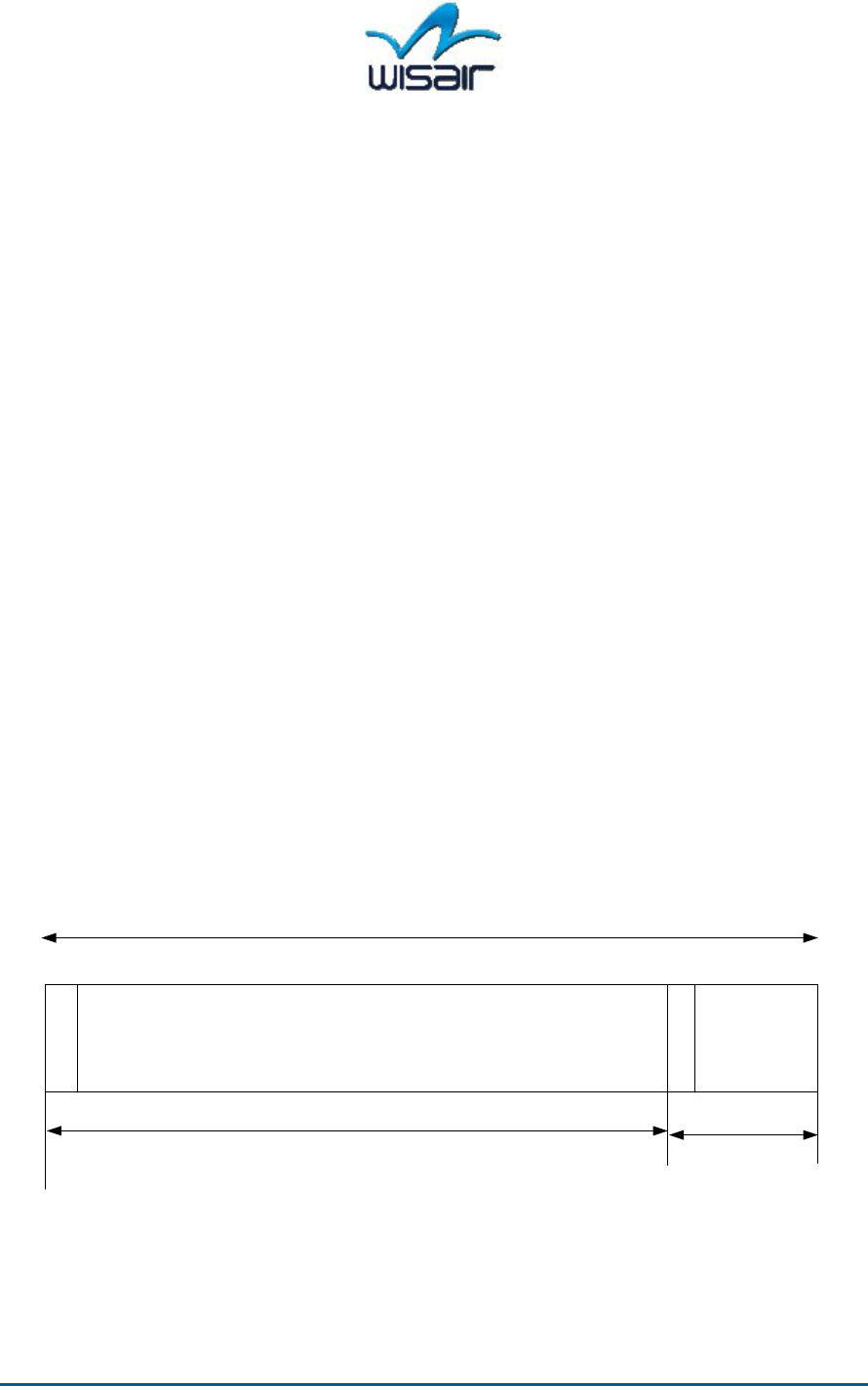
Example 1: 80/20 Configuration
0
Master RX/
Slave TX
Master TX/
Slave RX
Superframe Duration
80% 20%
Master Beacon
Slave Beacon
Figure 3-2: 80%/20% MAC Configuration Example
Chapter 3 Operating the DVModule Wisair Confidential and Proprietary Information 3-5
Note: The master is defined as the source of the high throughput for
asymmetric transfer. For example:
If you chose Tx:80/Rx:20 and 5mSec (CBA=On, On, On):
- The DVModule configured as the master is set to 80%.
- The DVModule configured as the slave is set to 20%.
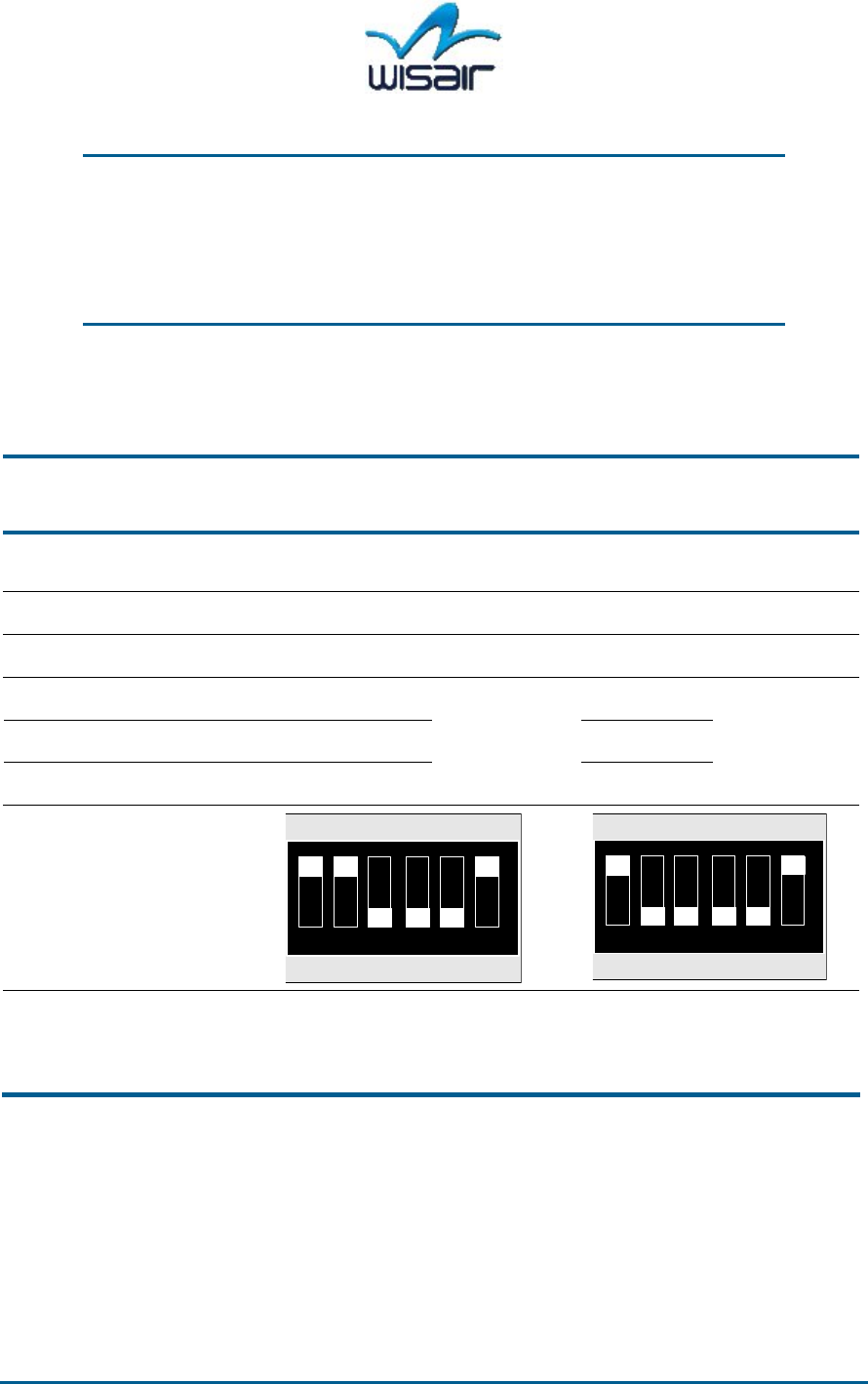
Example 2: 50/50 Configuration, 5mSec Superframe
Table 3-3: Example: Internal MAC, 50% Tx/50% Rx, 5mSec – Default Configuration
DIP
Switch#
Description DV9100 Master
Wisair S/N:
DV9100 Slave
Wisair S/N:
1 External MAC /
Internal MAC
On (IMC) On (IMC)
2 Master/Slave On (MST) Off (SLV)
3 ACK/NAK Off (NAK) Off (NAK)
4 CX Off (C1) Off (C1)
5 BX Off (B1) Off (B1)
6 AX On (A0)
5 millisecond
50% - 50%
On (A0)
5 millisecond
50% - 50%
12 3 45 6
ON
A0
B0
C0
ACK
MST
IMC
A1
B1
C1
NAK
SLV
EMC
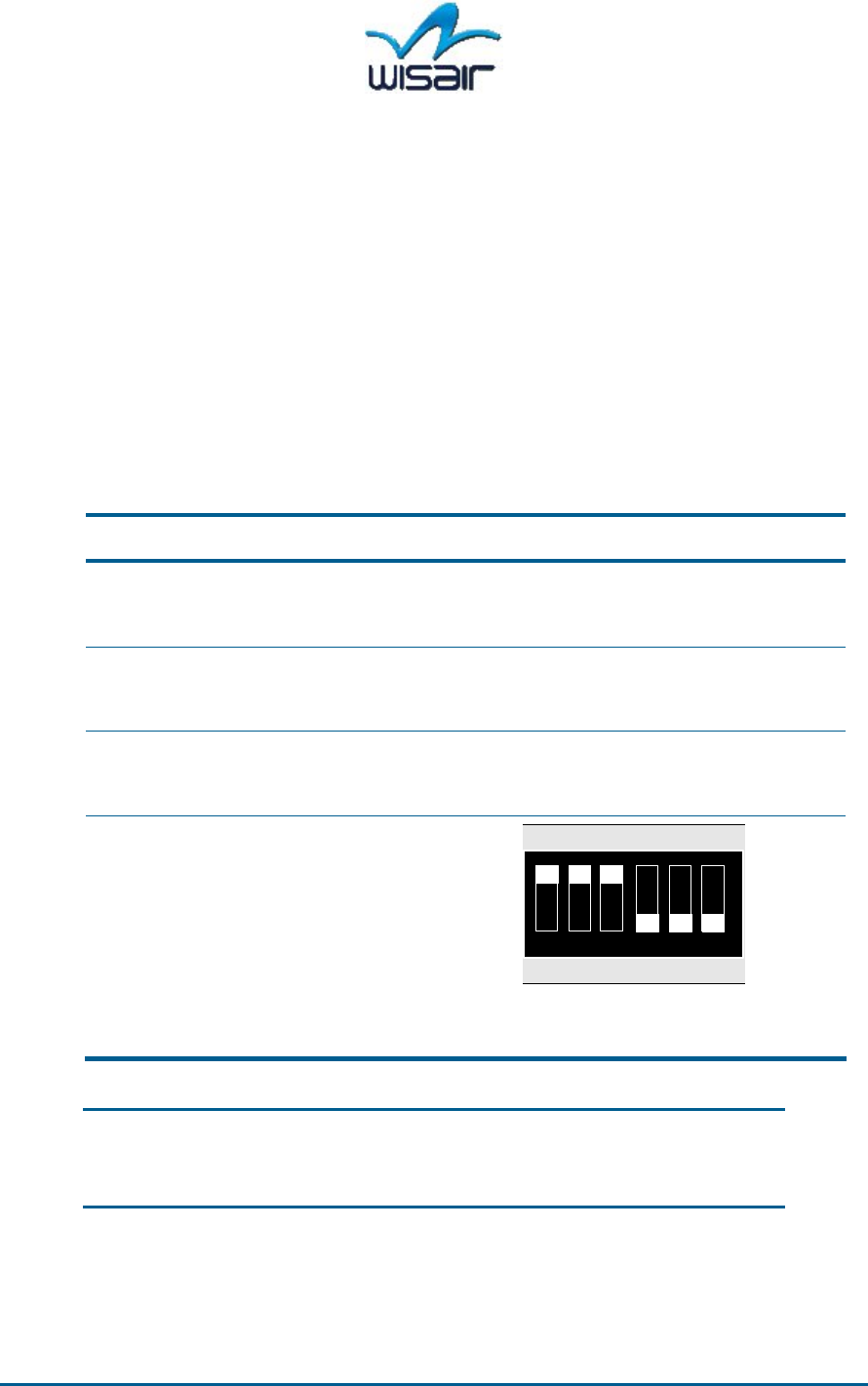
1 2 3 4 5 6
ON
A0
B0
C0
ACK
MST
IMC
A1
B1
C1
NAK
SLV
EMC
Figure 3-3: Example 50/50
DV9100 Master Configuration
Figure 3-4: Example
50/50 DV9100 Slave
Configuration
This result in superframe duration of 5mSec and a duty cycle of 50%/50%.
3-6 Wisair Confidential and Proprietary Information UWB MB-OFDM DVModule DV9100 User Manual
EMUL Mode (Test Mode for Compliance Testing)
In general the DVModule’s transmission is controlled by the internal MAC
function. Unless set otherwise, the unit will not transmit on power up or reset. For
troubleshooting or compliance testing purposes, a TX test mode is incorporated
into the module (TX Emulator mode or EMUL).
Configure DVModule Manually
Set the DIP switches as described in the following table.
Table 3-4: DIP Switches
1 2 3 4 5 6
ON
A0
B0
C0
ACK
MST
IMC
A1
B1
C1
NAK
SLV
EMC
DIP Switch # Description DV9100
1 Internal MAC/ External MAC On (IMC)
2 Master/Slave On (MST)
3 ACK/NAK On (ACK)
4 CX Off (C1)
5 BX Off (B1)
6 AX Off (A1)
Figure 3-5: DVModule
Emulation Mode Configuration
Note: The DIP switch configuration is sampled at module reset.
Therefore, after you change the DIP switches, reset the module
by pressing the Reset button.

Chapter 3 Operating the DVModule Wisair Confidential and Proprietary Information 3-7
Generated Signal
The EMUL transmit only mode is used only for test purposes and intended to be
used for FCC tests. The data sent in the test mode is a pseudo-random data
sequence of 64Bytes. The DV9100 under normal operating condition works with a
receiver. If there is no receiver located, the transmitter stops transmitting in less
than 10 seconds.
Important Note: EMUL test mode is the worst case conditions (in terms
of energy transmitted). When EMUL test mode is selected it
overrides the TDD duty cycle selection configured by the
module’s dipswitches.
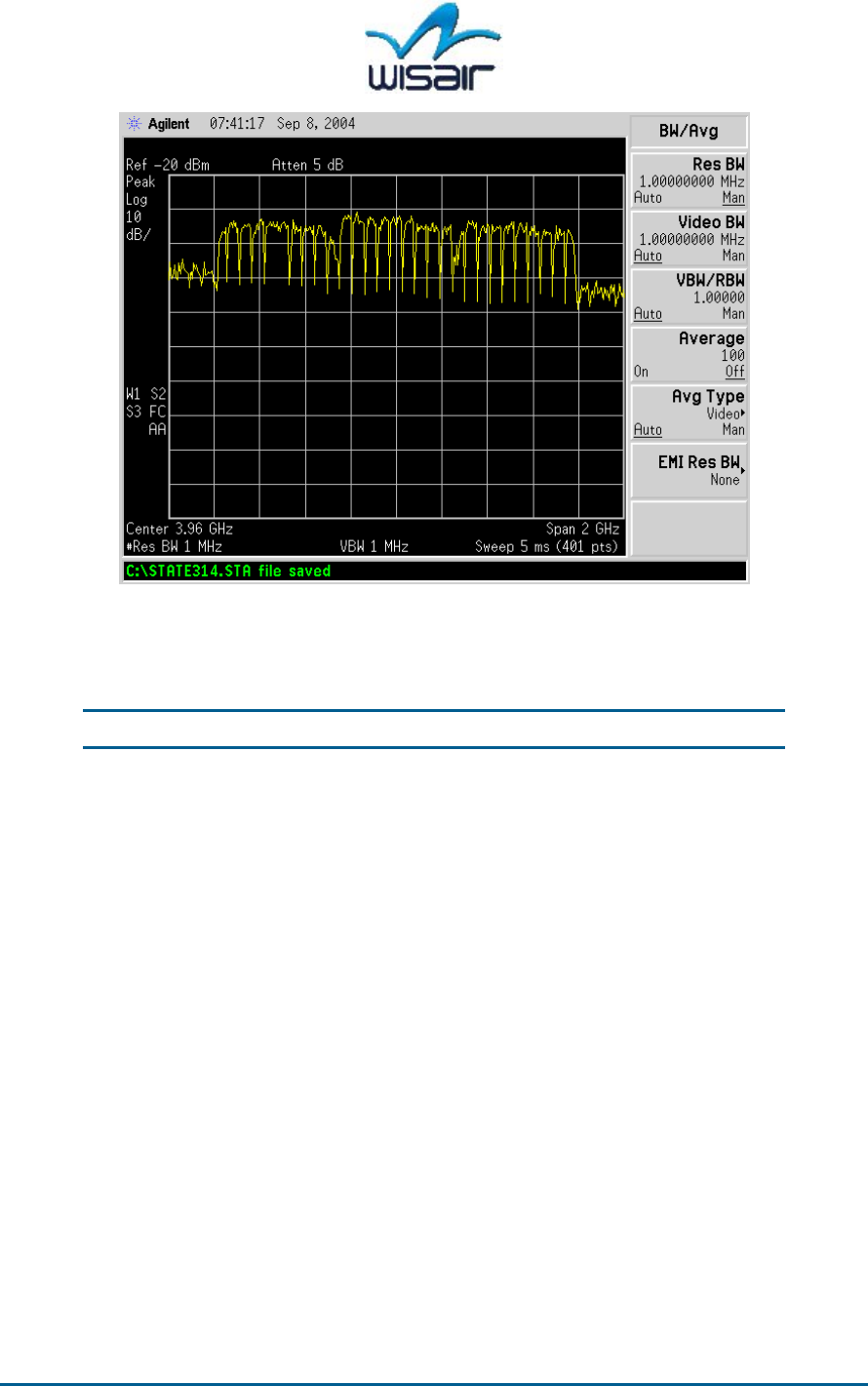
The following are the spectrum analyzer settings and view for this signal.
A signal in three bands over the 3-5GHz frequency band should be present and
can be viewed with a spectrum analyzer, such as Agilent™ 8563E, E4407B or a
similar model covering this frequency range.
Set the following parameters on the Spectrum Analyzer:
Center Frequency: 3.960GHz
Span: 2GHz
RBW: 1MHz (RBW : Reference Band Width)
VBW: 1MHz (VBW : Video Band Width)
Reference level: -20dBm
Scale: 10dB/div
3-8 Wisair Confidential and Proprietary Information UWB MB-OFDM DVModule DV9100 User Manual
Figure 3-6: TX EMUL test mode Transmit Signal
If the signal is not visible at this stage, push the white RESET button on the
module and wait a few seconds.
Note: If no signal is visible, contact Wisair for technical support.
Once this test is complete, return the DIP switches to their previous positions and
reset the DVModule.

UWB MB-OFDM DVModule DV9100 User Manual Wisair Confidential and Proprietary Information A-1
A
Specifications
The following are the specifications for the DV9100.
DV9100 Module Specification
Table A-1:DV9100 Specification
Parameter Description / value
Frequency Band 3.168 – 4.752GHz (three MBOA sub bands -
Band Group 1) with 528MHz spacing
Modulations MB-OFDM (QPSK )
Output Power 80µW (-42dBm/MHz max)
Receiver Sensitivity -80dbm
Data Rate 100 Mbps
Wisair Chipset 501 RF Transceiver
530 Baseband
MBOA Data interface MAC-PHY interface
Parameters Configuration ¥
¥
Manually select using a DIP switch
¥
¥
WisMan™ Wisair PC-based host application
utility
MBOA PHY specification Based on Rev0.9
MAC-PHY I/F MBOA
Specifications
Based on Rev0.9
External data Interface Ethernet 100Base-T (Full Duplex), RJ-45
External Control Interface USB1.1, Mini-USB type B female
Power Supply Input +3.3VDC +5%/-5% @ 4 Amp

A-2 Wisair Confidential and Proprietary Information UWB MB-OFDM DVModule DV9100 User Manual
Parameter Description / value
LED indications Power, Link (UWB), Line, Active, Signal strength
indication RSSI(0-3)
Size 6 x 2.4” (153 x 64mm)
Temperature Range Operational: 0 to 40 oC
Storage: -20 to 70 oC
Humidity 5-95% (non-condensing)
Options:
- External Power Supply Desktop power supply Input: 100-240VAC 2A
47-63Hz
Output: 3.3VDC @4Amp
- UWB Antenna UWB external Omni (or directional radiation
pattern)
- WisMan™ Host Application
Utility
Wisair’s Windows-based application utility with a
graphical user interface that allows you to
manage Wisair UWB-enabled devices in piconets