Wonderware Mobile Solutions 90XX1 RFID Reader User Manual 07441 10 SAT SRM2 User Guide
Wonderware Mobile Solutions RFID Reader 07441 10 SAT SRM2 User Guide
manual

Confidential & Proprietary
Created by Clay Weston Page 1 of 2
Last revised:5/24/2007
SRM2-MC90XX User Guide
Introduction
This document provides important information regarding safety, regulatory
compliance, and operation of the SAT SRM2-MC90XX RFID Module. The Module
attaches to Symbol / Motorola MC9060 and MC9090 handheld computers to provide
read/write access to SAT ST-1 tags and other tags employing 134 kHz TIRIS MPT
technology. For application-specific information refer to the SAT Mobile IntelaTrac
User Guide or other documentation appropriate to the software application being
used.
Safety and Regulatory Notices
The following notices are required to ensure safe and proper use of the Module.
Please read them carefully and contact SAT if you have any questions.
This apparatus is suitable for use in Class I, Division 2 groups A-D, or unclassified
or nonhazardous locations.
This device may only be used in hazardous locations when connected in accordance
with the control drawings SATDN 70213 and SATDN 70214. In hazardous locations,
use only the handheld computer model numbers listed in the control drawings.
Caution: Changes or modifications not expressly approved by SAT Corporation
could void the user’s authority to operate the equipment.
This device complies with Part 15 of the FCC Rules. Operation is subject to the
following two conditions: (1) this device may not cause harmful interference, and (2)
this device must accept any interference received, including interference that may
cause undesired operation.
FCC ID: OFZ90XX1
This Class [*] digital apparatus complies with Canadian ICES-003.
Cet appareil numériqué de la classe B est conformé à la norme NMB-003 du
Canada.
IC: 6984A-90XX1
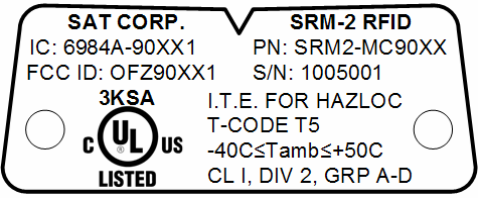
Following is a reproduction of the rear label:
Operation
The SRM2-MC90XX attaches to the bottom of Symbol/Motorola MC9060 and
MC9090 series handheld computers. In hazardous locations, use only handheld
computer model numbers listed on the control drawing (SATDN 70214). The module
can be attached and detached in the hazardous area.
LED Indicators
Power to the module is controlled by software running on the host computer. When
the host computer turns on power to the module both LEDs blink briefly, then stay
off. When software initiates a read or write operation, the green LED flashes once. If
the operation is successful, the green LED flashes again. If the operation fails, the red
LED flashes. By default, the module will retry the operation ten times. If you see the
green and red LEDs flashing alternately while attempting to read or write a tag, try
repositioning the module.
Range and Orientation
The maximum range of the module is approximately 3” in the optimum orientation of
reader to RFID tag. Imagine that the ST1 inspection tag (oriented horizontally, and
with the label side facing the user) as a conventional circular clock. If the handheld
computer itself (with the SRM-2 always facing the clock's center) were the clock's
hour hand, the optimal positions for reading are between 2 and 3, or between 6 and 7,
with the SRM-2 within an inch of the tag.