Wyse Technology WT9450 Windows-Based Terminal User Manual 883753 01A Website2
Wyse Technology Windows-Based Terminal 883753 01A Website2
Contents
- 1. Installation guide
- 2. User Manual
Installation guide
NOTES: QUICK START GUIDE
I’ve attached a draft of the Quick Start Guide for Model WT9450XE. The final edition will be the same as
this document, except for the following modifications:
• Photographs on pages 1 and 2 will be replaced with those of Model WT9450XE.
• Back Panel Connectors chart on page 2 will be updated.
The existing text, including the Power Source information and the ferrite bead installation instructions, will
remain in the WT9450XE Quick Start Guide.
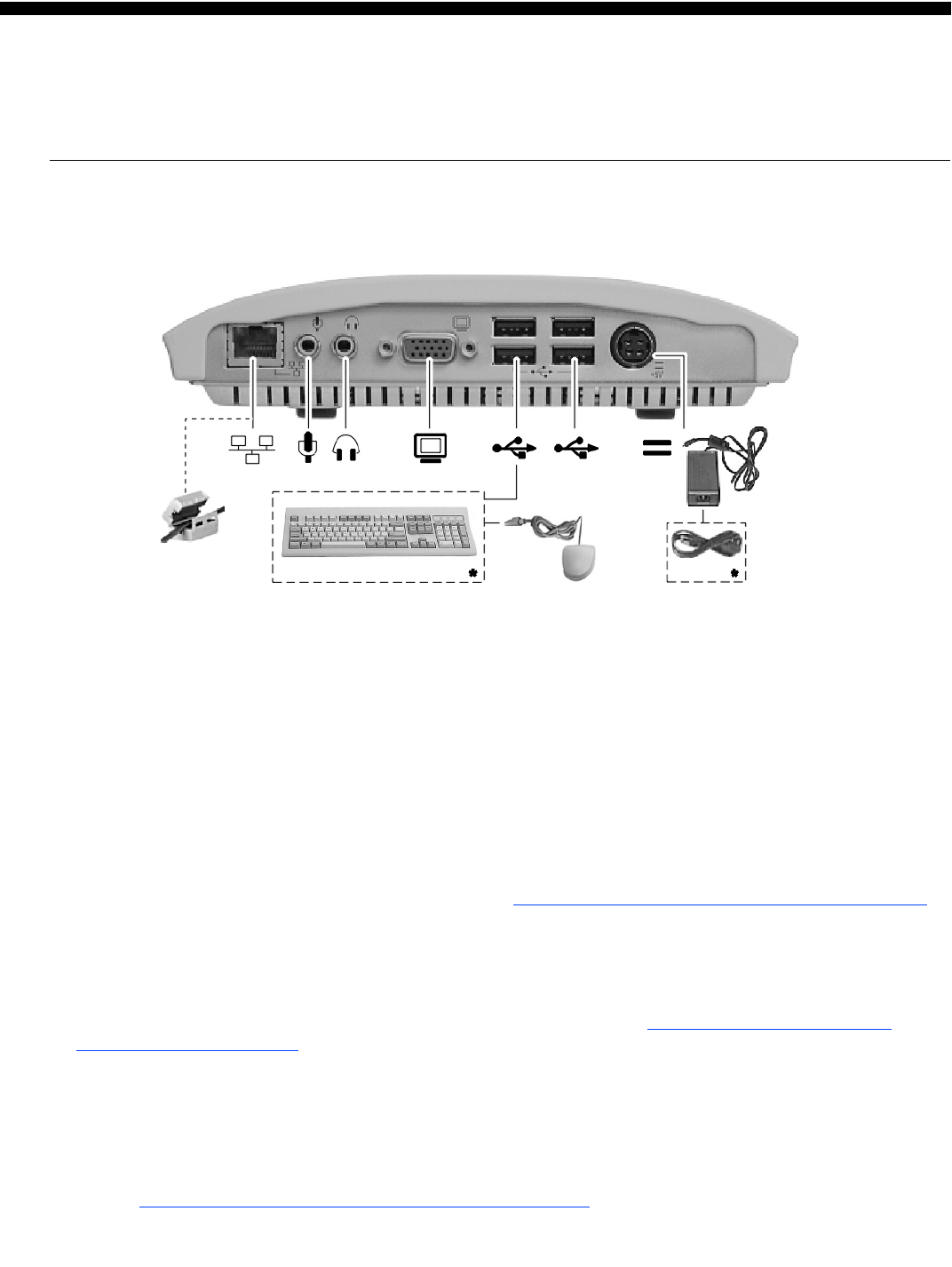
Winterm™ Model 9450XE XPE-Based Terminal
Quick-Start Guide
➊Connect –
Caution: Improper connection, mounting, or use of this product could result in component failure and/or flash
memory corruption. Read the following caution statements before setting up and operating the terminal.
Cautions:
Setup
• Do not connect power until all other connections are made. Connecting or disconnecting components
or devices on the back panel when the terminal is receiving power can cause power surges and damage the
terminal. (USB ports are hot-swappable.)
• Do not force a connector into its socket. If any undue resistance is encountered, ensure that the connector is
correctly oriented to the receptacle.
Orientation and Venting
• Mount the terminal only as shown above or in accordance with the instructions provided with the
Wyse-approved wall mount (see Note below). Improper orientation (such as component side down, where the
back panel’s symbols are upside down) could inhibit the dissipation of heat from the terminal and damage it.
• Allow sufficient space around the terminal for ventilation; do not place the terminal in any enclosure that
restricts airflow around the terminal; do not place any objects on the terminal. Product environmental
specifications are available through Wyse’s Web site at http://www.wyse.com/products/winterm/products.htm.
Power Sources
• To ensure regulatory compliance, use only the power supply included in the shipping box, or a
Wyse-approved equivalent, with the terminal. Also, the noise suppressor (ferrite bead) included in the box
with the terminal must be installed on the network cable as described following these caution statements.
Refer to the regulatory notices in the terminal’s on-line documentation at http://www.wyse.com/products/
winterm/quickstart/9000.htm.
• To prevent accidental loss of power, brown out, and spikes which could damage the terminal, avoid
connecting it to any form of switching device (including power strips) or hard resetting the terminal by holding
down the power button.
• When turning off the terminal, be sure to perform a complete shutdown (via the user interface or power
button); do not disconnect the power cord, shut off power at a circuit breaker, etc., to turn off the terminal.
Note: Visit http://www.wyse.com/products/accessories/mounting.htm for information about approved wall-mount
and monitor-mount accessory kits.
*Supplied for U.S.A.; in other locales, check package contents or contact your Wyse reseller.
883753-01 Rev. A
July 2002
Wyse Technology Inc.
3471 North First Street
San Jose, CA 95134-1801 U.S.A.
©2002 Wyse Technology Inc. All rights reserved.
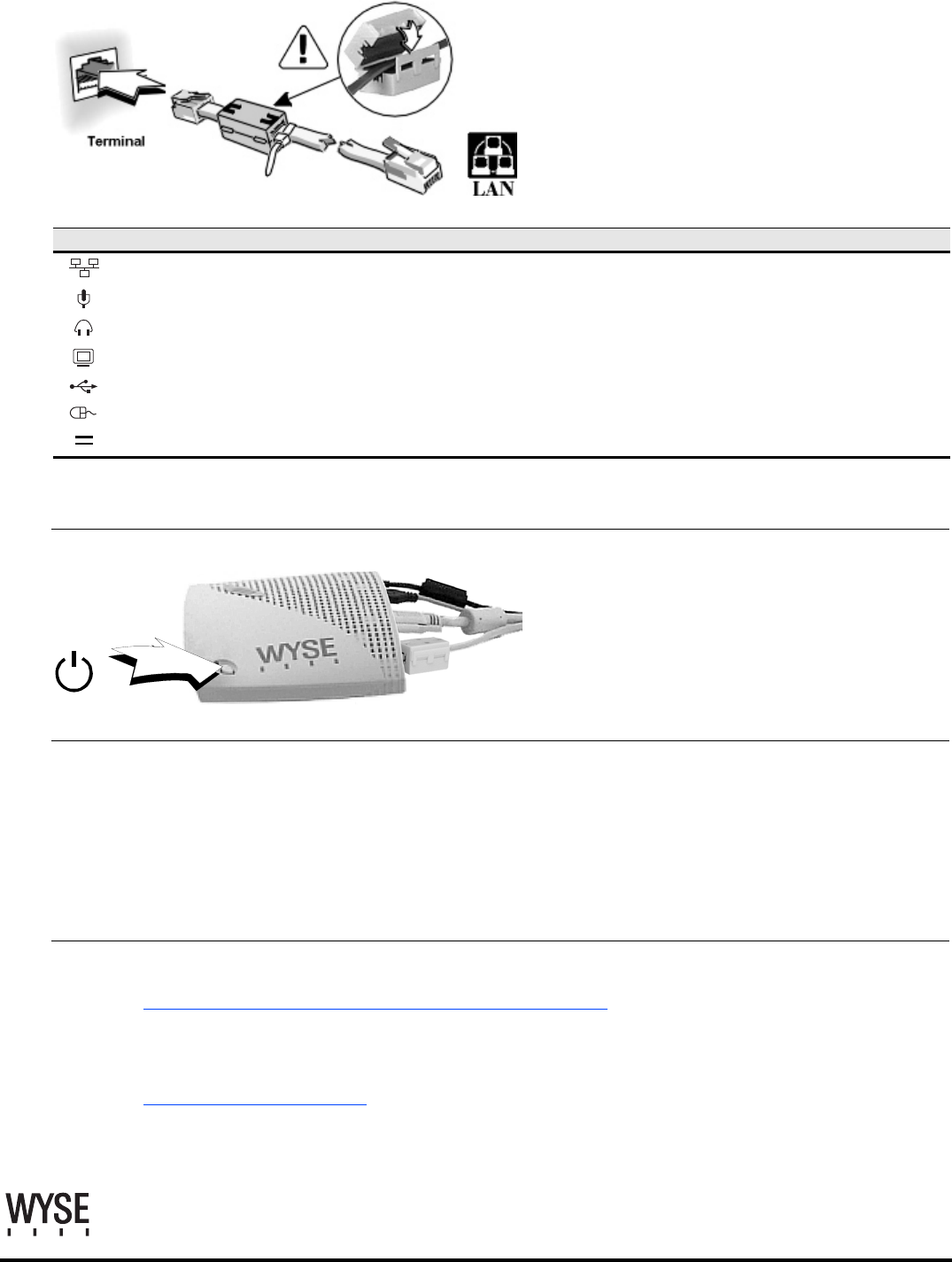
Note: To ensure that the product complies with
EN55022B and FCC Class B requirements, follow
these instructions to install the ferrite bead on your
LAN cable.
Note: Attach ferrite bead to the terminal-end of the
cable.
1. Supported in a future firmware release.
2. Only the use of up to two USB to Serial converters are supported at one time.
➋Turn On – Wait until the initialization sequence is completed
(amber light goes off) before pressing the power
button.
Important: By unpacking and using the terminal,
you agree to be bound by the license agreements
in the users and administrators guides. See those
agreements for specific details.
➌Configure – Setup is quick and simple...
The terminal is preset to auto-login as User (password: User). For administrative access, the terminal is preset to
accept the user name Administrator (password: Administrator). VNC is also preset to start automatically
(password: Wyse). User names are not case sensitive; passwords are case sensitive.
Caution: It is strongly advised that the administrative password be changed immediately upon configuring the
terminal for use.
➍Help – Need more information or upgrades/accessories?
http://www.wyse.com/products/winterm/quickstart/9000.htm
Need more information on Wyse Rapport, the remote management software that
comes with this terminal, or Wyse’s automatedwarranty registration process?
http://www.wyse.com/bundle
Register within 90 days to get 2 years’ extended warranty at no cost.
Models 9235LE Back Panel Connectors
Icon Connector/Indicator Description
Network LAN connection, 10/100Base-T
Microphone1Audio input jack for a microphone
Headphones Audio output jack for headphones or powered speakers
Video Monitor interface
USB port (4)2USB device connection (keyboard connects to any USB port)
Mouse PS/2-type mouse interface; connect to USB keyboard
Power Power module cable interface