XIAMEN LEELEN TECHNOLOGY EH-OS-M10 Outdoor Unit User Manual
XIAMEN LEELEN TECHNOLOGY CO., LTD Outdoor Unit Users Manual
UserManual.wiki
>
XIAMEN LEELEN TECHNOLOGY
>
EH-OS-M10 User Manual
>
Users Manual
Contents
1.
Users Manual
2.
User Manual
Users Manual
Navigation menu
Upload a User Manual
Namespaces
Wiki Guide
HTML
PDF
Info
Views
User Manual
Discussion / Help
Navigation
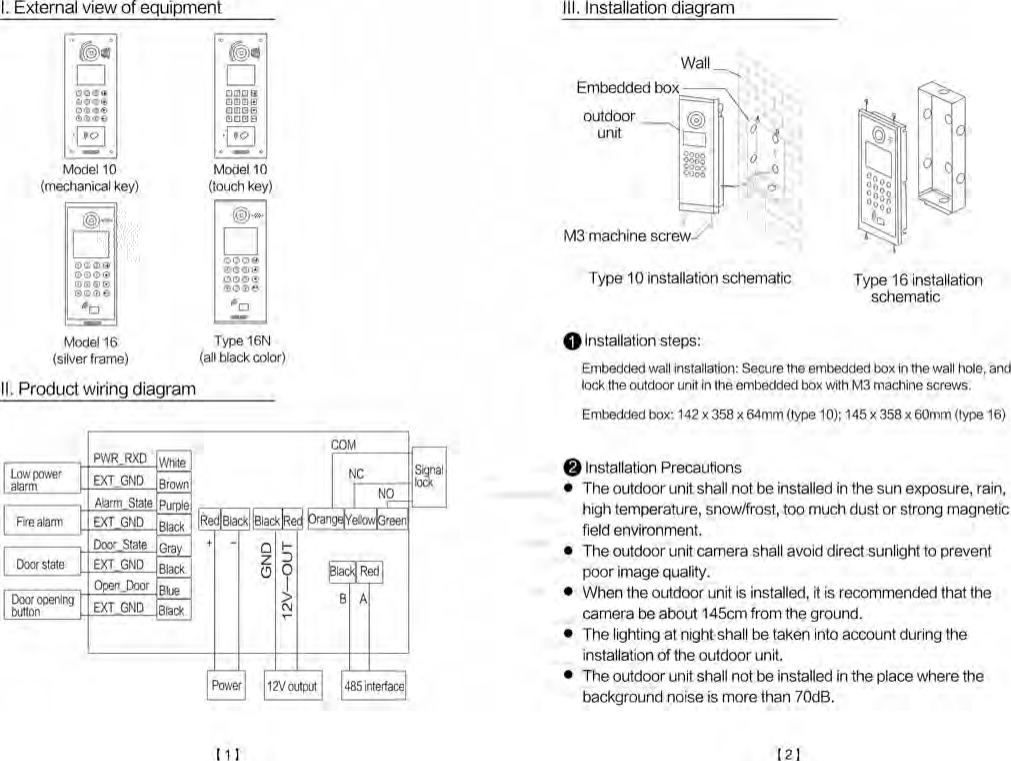
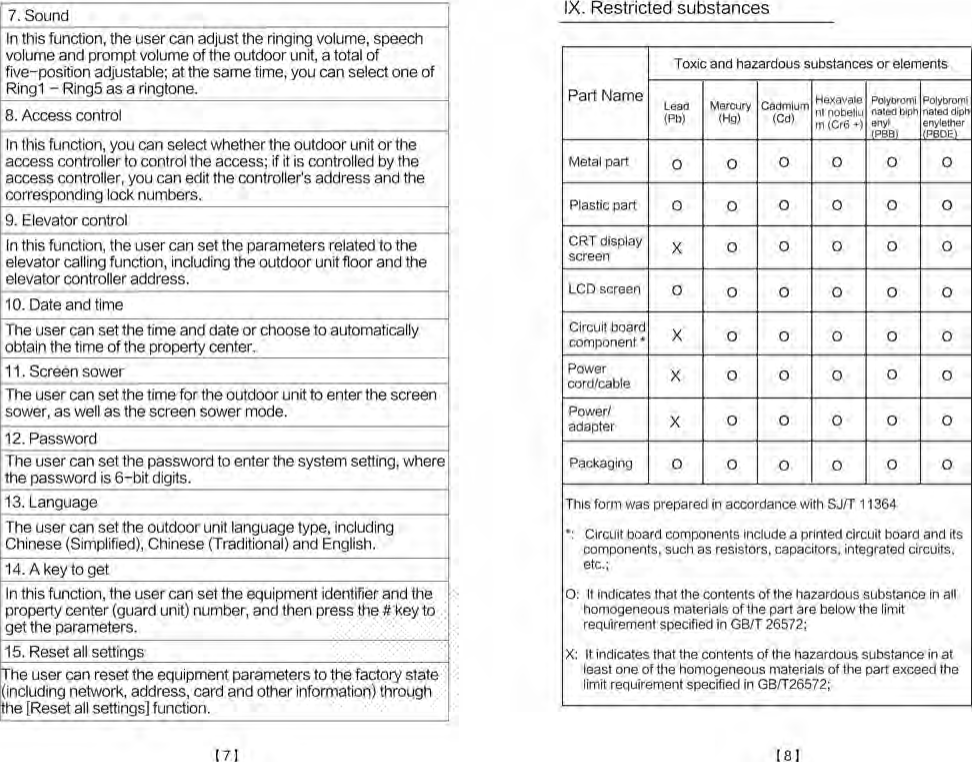
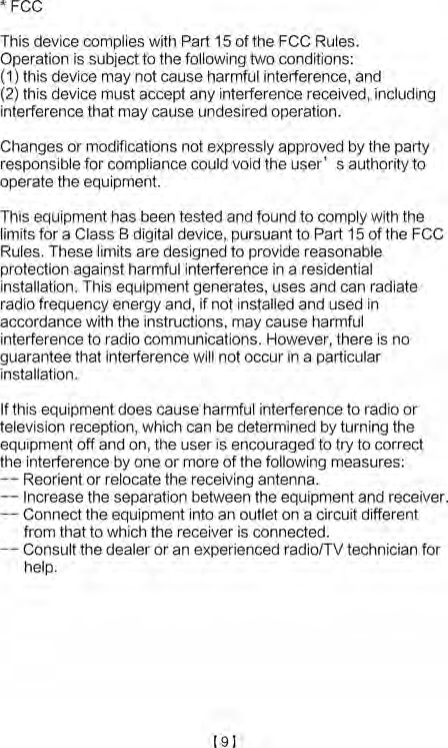
![It is made of aluminum die-casting panel, and has the explosion-proofing function.It has the night light capturing function.It is equipped with a safety professional camera, has a video image pre-processing function and has better image qualityBuilt-in IC card reader.Support the equipment displacement alarm.Unlocking modes include bluetooth (optional), card swiping,QR code, password locking and other unlocking mode.V. Features and FunctionsCard capacity: 30 000Card Type: IC cardExplosion-proof class: IK07Waterproof and dustproof class: IP54Operating temperature range: -40℃ - +70℃Static power consumption: 3WMaximum power consumption: 8WOperating voltage: 12-24VDCExternal dimensions: 170 x 386 x 54mm (type 10) 166 x 386 x 52mm (type 16)IV. Technical ParametersThe user swipes the registered residence card at the card reader on the outdoor unit, the outdoor unit gives a voice prompt[The door has been opened].Unlocking by swiping the cardClick on the [ ︿] button on the outdoor unit panel to enter the identification interface, start the mobile APP to the function ofopening the door with the QR code and scan the dynamic QR code in front of the outdoor unit lens to open the door, thenthe outdoor unit gives a voice prompt [The door has beenopened; please come in].Unlocking with QR code(optional)VII. Operating instructions for access functionThe user can call the center through the [security] buttonon the panel, and then the guard unit can have the videointercom or unlocking operation.Call centerThe user directly inputs the apartment No., and the resident canimplement the video intercom or unlocking operation.Call residentVI. Operating instructions for calling residence and management center【3】【4】](https://usermanual.wiki/XIAMEN-LEELEN-TECHNOLOGY/EH-OS-M10.Users-Manual/User-Guide-3852171-Page-3.png)
![Registration: Enter the property card management interface → swipe the card at the marked place of the card reader according to the interface prompts → register successfully.Proper-ty cardmanag-ementCancellation: Enter the resident card managementinterface → edit the unit number and the apartmentnumber (four digits respectively) → press the down keyto the cancellation bar to enter the cancellation interface→press "#" to select the OK option so that the deletion issuccessful.Registration: Enter the resident card management interface → edit the unit number and the apartment number (four digits respectively) → press the down key to the registration bar to enter the registration interface →swipe the card at the marked place of the card reader according to the interface prompts →register successfully.register successfully.Residentcardmana-gementThe user can choose to unlock with the password,Two-dimensional code or bluetooth, and the accesscard can be used in multiple choices in types.Accessconfig-urationAccess control interface includes access configuration, residence card management, property card management, bluetooth, Two-dimensional code and other items.1. Access controlDescription of the parameter item setting2Press the [unlocking key + * 90 * + 1234 + unlocking key] button to enter the parameter menu.Method for entering the parameter setting1VIII. Description of the parameter settingIn this interface, you can view and set the number of dialing digits of the outdoor unit within 1 - 8 digits.6. DialIn this interface, you can view and edit the unlocking time, unlocking time limit, limited service start and time limited serviceend time.5. Time limitIn this interface, you can view the software version, hardware version, kernel version and single chip version of the equipment.4. VersionIn this function, the user can view and edit the outdoor unit number,guard unit number, property center number and outdoor unit type.3. AddressIn this function, the user can view and edit the outdoor unit IP address,sub-net mask and gateway, and view the outdoor unit MAC address.2. NetworkCancellation: Enter the Two-dimensional code identification interface → edit the unit number and the apartment number (four digits respectively) → press the down key→ confirm the cancellation so that the cancellation is successful.Registration: Enter the Two-dimensional code interface → edit the unit number and the apartment number (four digits respectively)→ press the down key to the registration bar →input the ID number of the Two-dimensional code on the mobile APP in the input bar of the registration interface, and press the # key to complete the registration.the registration.QRcode【5】【6】](https://usermanual.wiki/XIAMEN-LEELEN-TECHNOLOGY/EH-OS-M10.Users-Manual/User-Guide-3852171-Page-4.png)