XKGLOW XK-PANEL XK-BULB-PANEL User Manual XK BULB HALFPAGEx
XKGLOW INC XK-BULB-PANEL XK BULB HALFPAGEx
UserManual.wiki
>
XKGLOW
>
XK PANEL User Manual
user manual
Navigation menu
Upload a User Manual
Namespaces
Wiki Guide
HTML
PDF
Info
Views
User Manual
Discussion / Help
Navigation
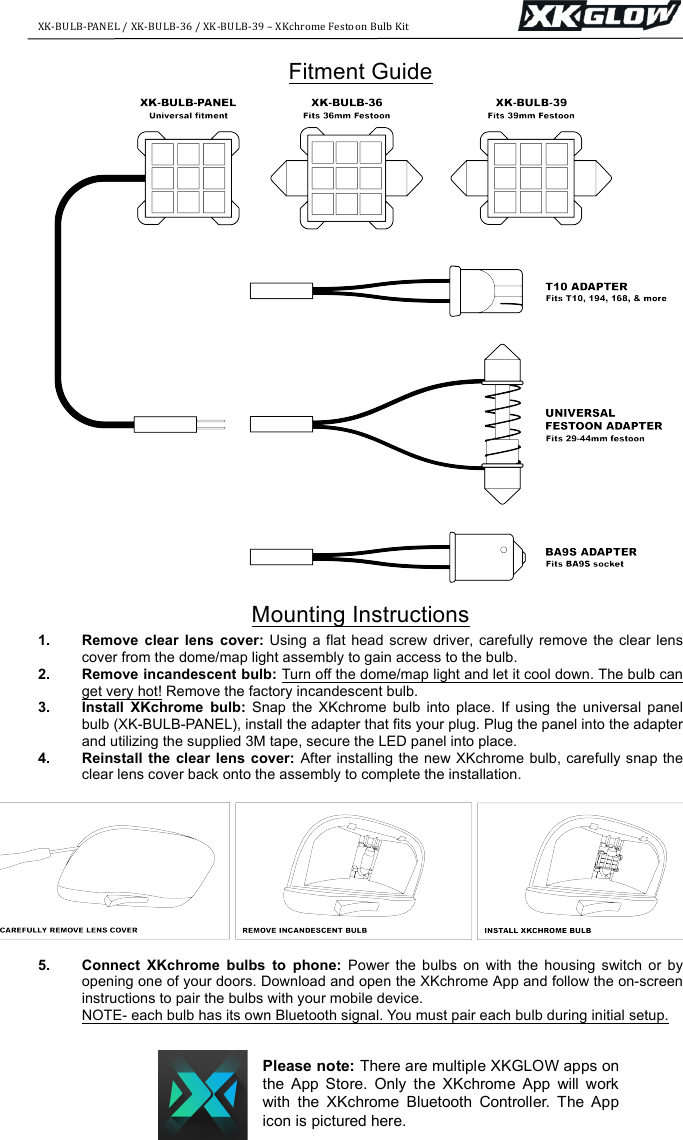
![XK-BULB-PANEL+/+XK-BULB-36+/+XK-BULB-39+–+XKchrome+Festoon+Bulb+Kit+++++++++++++++++++++++++++++++++++++++++++ ++Input Voltage Bulb Wattage 12V DC 1W per bulb Warranty and Disclaimer Within One year after the purchase date, the original buyer may return any XKGLOW product that has failed due to a defect in materials or workmanship. Festoon bulbs that have one or more LEDs fail to illuminate due to a defect in materials or workmanship are covered with a one-year warranty for the original buyer. Installation of this product must be performed by a licensed professional. Should the failure of the product be the result of damage occurring as a result of improper installation, alteration of the product or an act or omission on the part of the consumer, this warranty is void. XKGLOW Lighting shall not be responsible for any consequential damages which arise from the use and/or installation of the product. If the kit is installed in any manner other than specified, XKGLOW Lighting reserves the right to deny any warranty claims at the discretion of the technical support department. Any product return must include the original packaging, invoice number and a statement of the alleged defect. Upon receipt of the returned product, the company will test the product for defect. If the results of the testing do not support the warranty claim, do not reveal any defect or indicate consumer negligence in the installation and handling of the product, then the product will be returned to you and you will be charged a reshipping fee. If the product is returned from an address within the continental United States, within the first 30 days after purchase, and is found to be defective, XKGLOW Lighting will exchange or refund the original purchase expense. This offer does not extend to the cost for shipping charges on any international packages. Additional Disclaimer Terms Please check your local and state laws for the proper use of this product. • Improper installation of electrical products such as lighting may cause damage to any vehicle or device to which the improperly handled or installed lighting is attached. • Improperly installed product may cause electrical injury to persons. • It is recommended that the kit should be installed by a licensed professional. • XKGLOW assumes no liability for the installation of the product. • Warranty or liability will not exceed the product purchase price, which shall be buyer’s sole and exclusive remedy. Return/Exchange Procedure 1. Email [xk@xkglow.com] to notify us of the product issue as well as the item number and name of customer on invoice. 2. We will send you the trouble-shooting guide to fix the issue, or to narrow down which of the component(s) need to be replaced. If the issue still exists, we will ask you to send back the defective items to be replaced. 3. Please send the returned item as instructed, along with claims and a telephone number where you can be reached. 4. After the returned item(s) have been accepted and inspected, we will issue a refund or replace the items ASAP. For refunds, item(s) must be sent to XKGLOW within 14 days from date of purchase. Original shipping charges are not refundable. We always stand behind our products and are committed to our customers! For questions you may have, please contact xk@xkglow.com. We normally respond within 24 hours. (Monday-Friday).](https://usermanual.wiki/XKGLOW/XK-PANEL/User-Guide-4097601-Page-1.png)