XTR C FX18 feature phone User Manual Thank you for purchasing this mobile
XTR S.A.C. feature phone Thank you for purchasing this mobile
UserManual.wiki
>
XTR C
>
FX18 User Manual
>
User manual
Contents
1.
User manual
2.
User Manual
User manual
Navigation menu
Upload a User Manual
Namespaces
Wiki Guide
HTML
PDF
Info
Views
User Manual
Discussion / Help
Navigation
![Page 3 Call logs You can view your recent call situation. [Missed calls]: Show all missed calls list, select a view after a missed call occurred the date and time, phone number and times. [Dialed calls]: Show all dialed calls list, select a view after a dialed calls occurred in the date and time, phone number and times. [Received calls]: Show all answered the phone list, select a view after a phone that has the date and time of occurrence, telephone number, frequency [Rejected calls]: Show all refused to answer the phone list, select a view after a missed call occurred the date and time, phone number and times. Press the OK softkey to enter the options menu can be more than the number of call records in the following:](https://usermanual.wiki/XTR-C/FX18.User-manual/User-Guide-2994437-Page-4.png)
![Page 4 Details: View the current record date, time, type. Call: Call the current number Save: You can save the current record to the phone or SIM card Write message: send the current record of SMS Add to contacts: the number of the record the name added to the existing record which Add to blacklist: the current record to reject a call which Delete: Delete the currently selected record Delete all: Delete all call records Mark: Mark to operation [Delete all]: Delete all call records [Call times]: Last time zero starting time for last call statistics, a total of dialed calls, received calls, all calls total, all the time can also be zero. [GPRS counter]: Display the SIM card GPRS data.](https://usermanual.wiki/XTR-C/FX18.User-manual/User-Guide-2994437-Page-5.png)
![Page 6 address book or from the menu Into the address book, do the following: [New]: Create a record to phone or SIM [Delete multiple]: Choose one or more records to delete [Import/Export]: Copy/Import/Export records to T-Card or phone [Others] [Memory status]: Query the current SIM card and mobile phone storage capacity. Profiles [Add]: Add the new profile [Delete]: Delete the profile [Settings]: set the selected mode [Rename]: Rename the profile [Ring settings] SIM call ring: set the SIM card of the ringing tone](https://usermanual.wiki/XTR-C/FX18.User-manual/User-Guide-2994437-Page-7.png)
![Page 7 SIM message ring: set the SIM card message tone [Adjust volume] Caller ringtone: set the ringing tone volume Message ringtone: ring volume settings information Alarm & calendar volume; set the alarm tone Call volume: Set the volume of calls Power ringtone: the voice of setting switch [Ring type] Call alert: a ring, vibration, silent, vibration and ringing and ringing after the first five vibration incoming call alert for you to choose Message alert: a ring, vibration, silent, ringing and message alert vibration four ways for you to choose Alarm & calendar remind: a ring, vibration, silent, ringing and message alert vibration four ways for you to choose](https://usermanual.wiki/XTR-C/FX18.User-manual/User-Guide-2994437-Page-8.png)
![Page 8 [Other alert rings] Key tone: set the key tone of voice Battery low alert: Choose open the alert of battery low Power ringtone: Set the sound is turned Off Dial tone: Activate dial tone Multimedia Image viewer View the image which in phone memory or T-card Video palyer Use the function of video player Music Play audio files, MP3 songs; to play audio files, MP3 songs, press the Up and Down keys to adjust the volume, press the left and right keys to select the present, the next song, press the OK button for the on / off Music [Music list]: Into playlist interface. Can be added to the play](https://usermanual.wiki/XTR-C/FX18.User-manual/User-Guide-2994437-Page-9.png)
![Page 9 list editing and other operations [Add]: Add songs or music playlist bookmark [Set as ringtone]: The song is set to call or alarm tone [Repeat]: Choose one/all repeat [Shuffle]: Choose shuffle to play the music [Settings]: Equalizer: Choose a variety of equalizer effects BT stereo output: Set the BT output BT stereo headset: Set the BT headset [Open review]: Open the function of review [Exit]: Exit menu audio player Recorder [Start recording]: Start recording [Record file list]: The memory card inside the recording file list [Storage]: Set the locate of storage](https://usermanual.wiki/XTR-C/FX18.User-manual/User-Guide-2994437-Page-10.png)
![Page 10 [File format]: Set the format of record file FM radio [Auto search and save]: Channel auto search and save [Channel list]: View channel list [Save]: Save the channel to the channel list [Manual search]: Manually enter the channel and find [Open speaker]: Choose whether to open the microphone [Background play]: Choose whether to open the Background Play [Record]: Record the FM [Timing record]: Set the time to record [Record file list]: The list of FM record file [Storage]: Set the location of storage [Help]: FM Help Message The Messaging function is a network service. Sending and](https://usermanual.wiki/XTR-C/FX18.User-manual/User-Guide-2994437-Page-11.png)
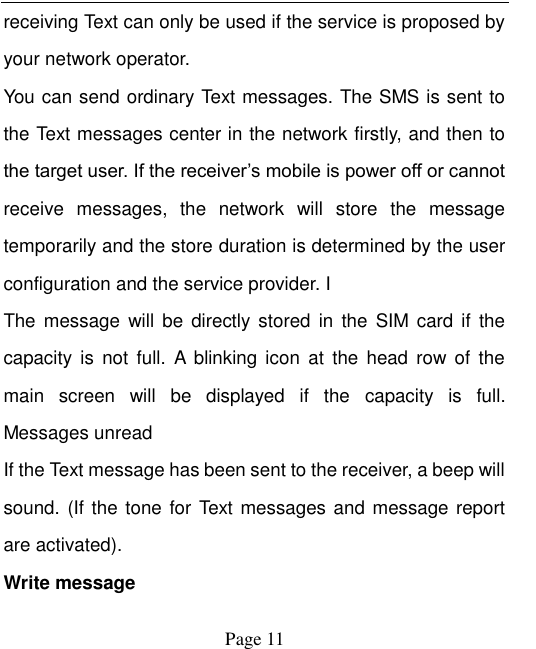
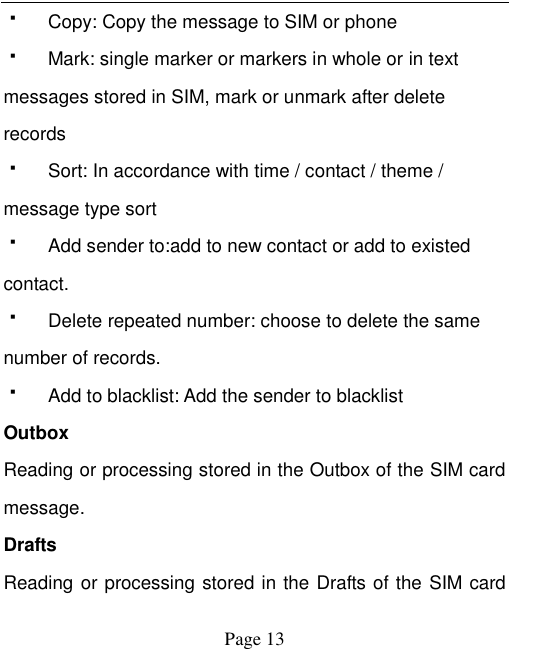
![Page 12 [New SMS] Send: Enter the appropriate number of the recipient or from the phonebook add Insert template: to the content of the message currently being edited into the common language Add contact info: Insert the contact person Add phiz: emoticons into the meaning of the representative Save as draft: will save the information to Drafts Exit: Exit message Inbox Reply: reply to SMS to each other. Delete: Delete short message Call: choose a voice call or a call to the sender IP calls Lock: lock cannot be deleted Move: Move the message to SIM or phone](https://usermanual.wiki/XTR-C/FX18.User-manual/User-Guide-2994437-Page-13.png)
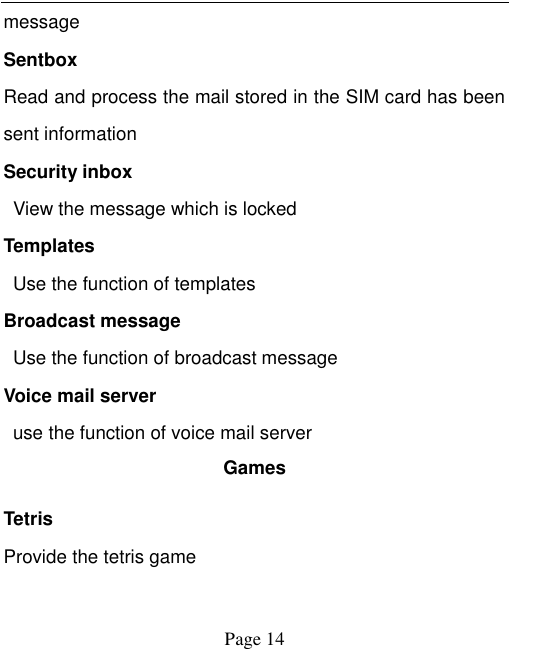
![Page 15 Tools My Files [MemoryCard]: SD card needs to support T card [New folder]: Create a new folder. [Delete]: delete the specified folder. [Details]: View the folder or file for more information [Edit]: the selected folder or rename the file or copy [Search]: Enter the folder name to find out. [Sort]: By the way you choose to sort the files. [Mark]: Select Mark / Unmark single / all [More] Memory Card capacity: View the memory card capacity Format MemoryCard: Format memory card Alarm This machine has three alarm times available for your settings. Access any time, you can set its status to on / off,](https://usermanual.wiki/XTR-C/FX18.User-manual/User-Guide-2994437-Page-16.png)
![Page 16 ring time, repeat mode, ring tones, alarm clock name, etc. Calculator Can be continuously mixed arithmetic, the operation is simple, practical, convenient Calendar Press the left soft key to access the calendar display interface, the first line shows the year, month, and the third line shows the week, the middle section shows the specific date of a month, the last line shows the right and left soft key in the message. Interface in the calendar, press the arrow keys on the date forward one week, press the arrow keys to move one week after the date, press the left arrow key date forward one day, press the right arrow keys to move the day after the date, select the date to a dark display [Add new schedule]: a new agenda [View schedule]: View the schedule one day save](https://usermanual.wiki/XTR-C/FX18.User-manual/User-Guide-2994437-Page-17.png)
![Page 17 [All schedule]: View the schedule all day [Clear tasks today]: Clear the calendar day [Clear all]: Empty all the schedules [Go to date]: Enter the dates you want to find, the cursor will jump to that date quickly [Weekly]: the week / month display calendar. World clock View the time of countries Ebook View the “txt” document Bluetooth [Open Bluetooth]: Choose to activate the Bluetooth [Bluetooth visibility]: Bluetooth visibility set [Paired device]: Search and paired Bluetooth devices [Device name]: Local Bluetooth name [Bluetooth file storage]: Storage location](https://usermanual.wiki/XTR-C/FX18.User-manual/User-Guide-2994437-Page-18.png)
![Page 18 [Help]::Help Documentation Torch light Choose to open the torch STK Full name of the SIM card application tool kit (SIM Application Tool kit). It can provide you with flexible information functions, such as stock information, traffic information, weather and so on. STK functionality provided by the network operator decision. The business needs the support of SIM cards and network Internet Use the function of internet [Bookmark]: Website of interest can be saved in the bookmarks and the bookmarks can be edited or direct them to surf. [History]: Mobile recently logged in the menu page is saved,](https://usermanual.wiki/XTR-C/FX18.User-manual/User-Guide-2994437-Page-19.png)
![Page 19 you can directly select the records inside the surf [Offline pages]: Throughout the course of mobile browsing, save the snapshot shown here [Homepage]: Open the home page [Settings]: Set account/homepage/content/restore default [Exit]: Exit browser Settings Call setting [Call divert]: SIM Call Transfer Call forwarding unconditional: Set a forwarding number, for forwarding all calls are. Call forwarding on busy: set the forwarding number, transfer calls when in busy Call forwarding on no reply: Set a forwarding number, in case of no response transfer](https://usermanual.wiki/XTR-C/FX18.User-manual/User-Guide-2994437-Page-20.png)
![Page 20 Diver if unreachable: to set the forwarding number in the phone unable to connect the case of transfer Cancel all diverts: cancel all of the transfer [Call waiting]: Open the SIM call waiting [Call barred]: SIM Call Barring [Hide ID]:SIM to hide the machine when the power numbers. * SIM card, operators need to support [Others]: [IP prefix]: select IP prefix [Call time minute reminder]: Select the open or closed during a voice call has prompted [Auto redial]: Select whether to open automatically redial function [Vibration when connected]: Select the phone is turned on or off the tone when [Reply SMS after reject]: Select whether to reject messages](https://usermanual.wiki/XTR-C/FX18.User-manual/User-Guide-2994437-Page-21.png)
![Page 21 or return after any key answer [Flight mode]: Manually open the flight mode [Flight mode—select when power on]: Each boot will be asked whether to open flight mode [Auto record voice call]: Auto record the voice call Phone settings [Date & time] Set time: set the phone to display the time Set date: set the phone to display the date Time format: Set the display time format Date format: Set the date display format Update time settings: Select open update time [Language settings]: Select phone display language. [Shortcut settings]: Set the function of shortcut [Auto power on/off]: Set the time and frequency of Automatic Turning](https://usermanual.wiki/XTR-C/FX18.User-manual/User-Guide-2994437-Page-22.png)
![Page 22 [Restore factory settings]: restore the factory settings Display [Wallpaper settings]: Set wallpaper [Idle display setting]: Set the idle [Contrast]: adjust the screen's backlight brightness [Display sleep]: Set the time of display light [Keypad backlight time]: Set the backlight time key Connections [Network account]: Create or edit the network account [New connection]: Create a new Internet account [Add from list]: from the system built-in Internet account to add a new account [Search]: from the current logged on to Internet search to the card account information, which added to the list after the selected [Delete]: delete the selected account](https://usermanual.wiki/XTR-C/FX18.User-manual/User-Guide-2994437-Page-23.png)
![Page 23 [Edit]: edit the currently selected account [GPRS service]: Choose open or close GPRS service [Data connection settings]: The type of data connection [Network selection]: Choose auto or manual select network Use the effect for menu list Security [PIN]: Select open or modify the phone's PIN code [Modify PIN2]: PIN2 choose to modify the phone code [Phone locked]: Set the phone locked [Modify the cellphone password]: Modify the password of phone [Privacy]: set access to enter the password to view functionality. (Including: call logs / message / camera / phonebook / my files / ebook / calendar / U disk/audio player/video player) [Auto keypad lock]: Set the auto keypad lock](https://usermanual.wiki/XTR-C/FX18.User-manual/User-Guide-2994437-Page-24.png)
![Page 24 [Lock screen by end-key]: press the end key to select whether the off-screen function [Guardlock]: To set the security password and open the feature, open the opportunity for the card and then prompts for security password, if the wrong password is entered three times, the phone can receive within 24 hours of alarm information [Fixed dialing]: Set the fixed dialing function [Blacklist]: Set the blacklist with call or message](https://usermanual.wiki/XTR-C/FX18.User-manual/User-Guide-2994437-Page-25.png)