Xetawave 93829283-MSD9 MSD9 User Manual Exhibit D Users Manual per 2 1033 c3

Xetawave LLC MSD9 Exhibit D Users Manual per 2 1033 c3

Contents

Exhibit D Users Manual per 2 1033 c3
DRAFT – subject to change      Xetawave MSD9   Spread Spectrum Wireless Data Transceiver Licensed Spectrum Wireless Data Transceiver   User Manual Installation Guide         Version 0.7
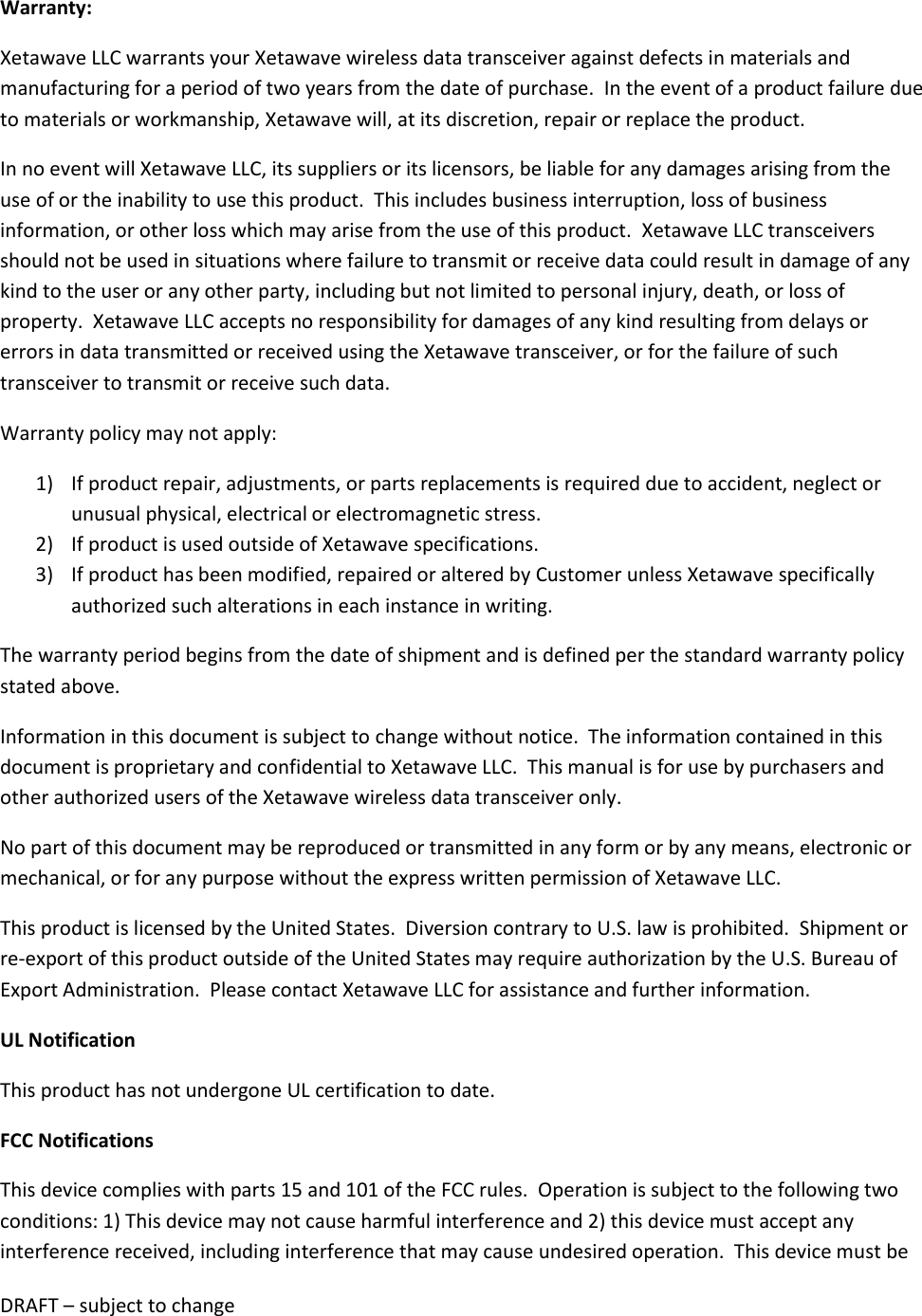
DRAFT – subject to change  Warranty: Xetawave LLC warrants your Xetawave wireless data transceiver against defects in materials and manufacturing for a period of two years from the date of purchase.  In the event of a product failure due to materials or workmanship, Xetawave will, at its discretion, repair or replace the product. In no event will Xetawave LLC, its suppliers or its licensors, be liable for any damages arising from the use of or the inability to use this product.  This includes business interruption, loss of business information, or other loss which may arise from the use of this product.  Xetawave LLC transceivers should not be used in situations where failure to transmit or receive data could result in damage of any kind to the user or any other party, including but not limited to personal injury, death, or loss of property.  Xetawave LLC accepts no responsibility for damages of any kind resulting from delays or errors in data transmitted or received using the Xetawave transceiver, or for the failure of such transceiver to transmit or receive such data. Warranty policy may not apply: 1) If product repair, adjustments, or parts replacements is required due to accident, neglect or unusual physical, electrical or electromagnetic stress. 2) If product is used outside of Xetawave specifications. 3) If product has been modified, repaired or altered by Customer unless Xetawave specifically authorized such alterations in each instance in writing.  The warranty period begins from the date of shipment and is defined per the standard warranty policy stated above. Information in this document is subject to change without notice.  The information contained in this document is proprietary and confidential to Xetawave LLC.  This manual is for use by purchasers and other authorized users of the Xetawave wireless data transceiver only. No part of this document may be reproduced or transmitted in any form or by any means, electronic or mechanical, or for any purpose without the express written permission of Xetawave LLC. This product is licensed by the United States.  Diversion contrary to U.S. law is prohibited.  Shipment or re-export of this product outside of the United States may require authorization by the U.S. Bureau of Export Administration.  Please contact Xetawave LLC for assistance and further information. UL Notification This product has not undergone UL certification to date. FCC Notifications This device complies with parts 15 and 101 of the FCC rules.  Operation is subject to the following two conditions: 1) This device may not cause harmful interference and 2) this device must accept any interference received, including interference that may cause undesired operation.  This device must be
DRAFT – subject to change  operated as supplied by Xetawave LLC.  Any changes or modifications made to the device without the express written approval of Xetwave LLC may void the user’s authority to operate the device. Caution:   The model number MSD9 has a maximum transmitted output power of 5000mW when used in the 928-960MHz band and 1000mW when used in the 902-928MHz band.  It is recommended that the transmit antenna be kept at least 102.5* cm away from nearby persons to satisfy FCC RF requirements.  Additional details may be found in the “RF Exposure Calculations” at the end of this section. This equipment has been tested and found to comply with the limits for a Class B digital device, pursuant to part 15 of the FCC Rules.  These limits are designed to provide reasonable protection against harmful energy and, if not installed and used in accordance with the instructions, may cause harmful interference to radio communications.  However, there is no guarantee that interference will not occur in a particular installation.  If this equipment does cause harmful interference to radio or television reception, which can be determined by turning the equipment off and on, the user is encouraged to try to correct the interference by one or more of the following measures: 1) Reorient or relocate the receiving antenna. 2) Increase the separation between the equipment and the receiver. 3) Connect the equipment to an outlet on a circuit different from that to which the receiver is connected. 4) Consult the dealer or an experienced radio/TV technician for help. Note: Whenever any Xetawave LLC module is placed inside an enclosure, a label must be placed on the outside of that enclosure which includes the module’s FCC ID.   FCC Exposure Compliance It is the responsibility of the user to guarantee compliance with the FCC MPE regulations when operating this device in a way other than described here.  The installer of this equipment must ensure the antenna is located or pointed such that it does not emit an RF field in excess guidelines as posted in the Canadian Safety Code 6 of Health Canada, Bulletin 65 of the Federal Communications Commission, or the Council of European Union recommendation of 12 July 1999 as appropriate.
DRAFT – subject to change  The Xetawave MSD9 uses a low power radio frequency transmitter.  The concentrated energy from an antenna may pose a health hazard.  People should not be in front of the antenna when the transmitter is operating.
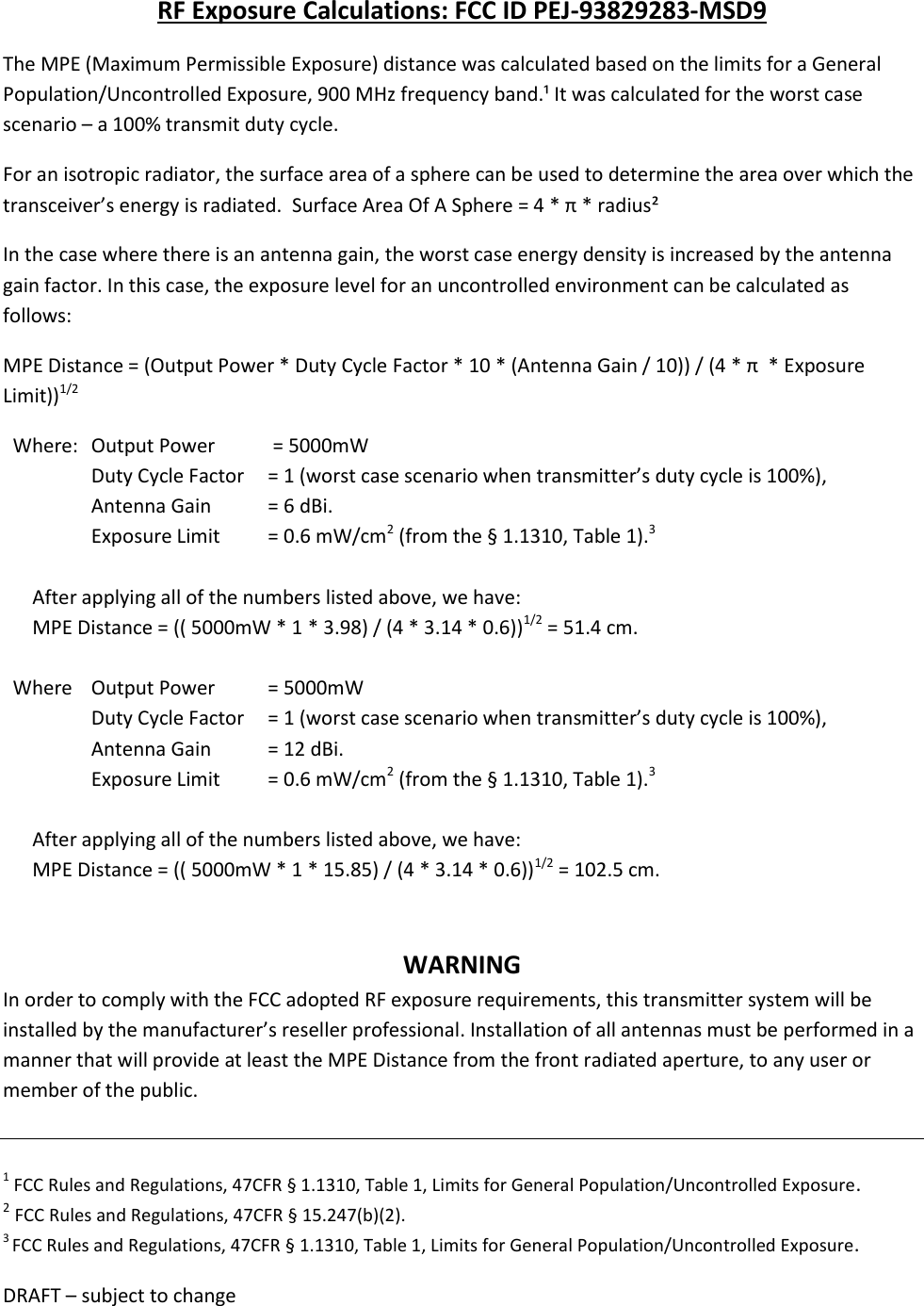
DRAFT – subject to change  RF Exposure Calculations: FCC ID PEJ-93829283-MSD9 The MPE (Maximum Permissible Exposure) distance was calculated based on the limits for a General Population/Uncontrolled Exposure, 900 MHz frequency band.¹ It was calculated for the worst case scenario – a 100% transmit duty cycle.  For an isotropic radiator, the surface area of a sphere can be used to determine the area over which the transceiver’s energy is radiated.  Surface Area Of A Sphere = 4 * π * radius² In the case where there is an antenna gain, the worst case energy density is increased by the antenna gain factor. In this case, the exposure level for an uncontrolled environment can be calculated as follows: MPE Distance = (Output Power * Duty Cycle Factor * 10 * (Antenna Gain / 10)) / (4 * π  * Exposure Limit))1/2    Where:   Output Power    = 5000mW   Duty Cycle Factor  = 1 (worst case scenario when transmitter’s duty cycle is 100%),          Antenna Gain    = 6 dBi.      Exposure Limit    = 0.6 mW/cm2 (from the § 1.1310, Table 1).3             After applying all of the numbers listed above, we have:       MPE Distance = (( 5000mW * 1 * 3.98) / (4 * 3.14 * 0.6))1/2 = 51.4 cm.    Where   Output Power   = 5000mW   Duty Cycle Factor    = 1 (worst case scenario when transmitter’s duty cycle is 100%),        Antenna Gain   = 12 dBi.        Exposure Limit   = 0.6 mW/cm2 (from the § 1.1310, Table 1).3             After applying all of the numbers listed above, we have:       MPE Distance = (( 5000mW * 1 * 15.85) / (4 * 3.14 * 0.6))1/2 = 102.5 cm.   WARNING In order to comply with the FCC adopted RF exposure requirements, this transmitter system will be installed by the manufacturer’s reseller professional. Installation of all antennas must be performed in a manner that will provide at least the MPE Distance from the front radiated aperture, to any user or member of the public.   1 FCC Rules and Regulations, 47CFR § 1.1310, Table 1, Limits for General Population/Uncontrolled Exposure. 2 FCC Rules and Regulations, 47CFR § 15.247(b)(2). 3 FCC Rules and Regulations, 47CFR § 1.1310, Table 1, Limits for General Population/Uncontrolled Exposure.
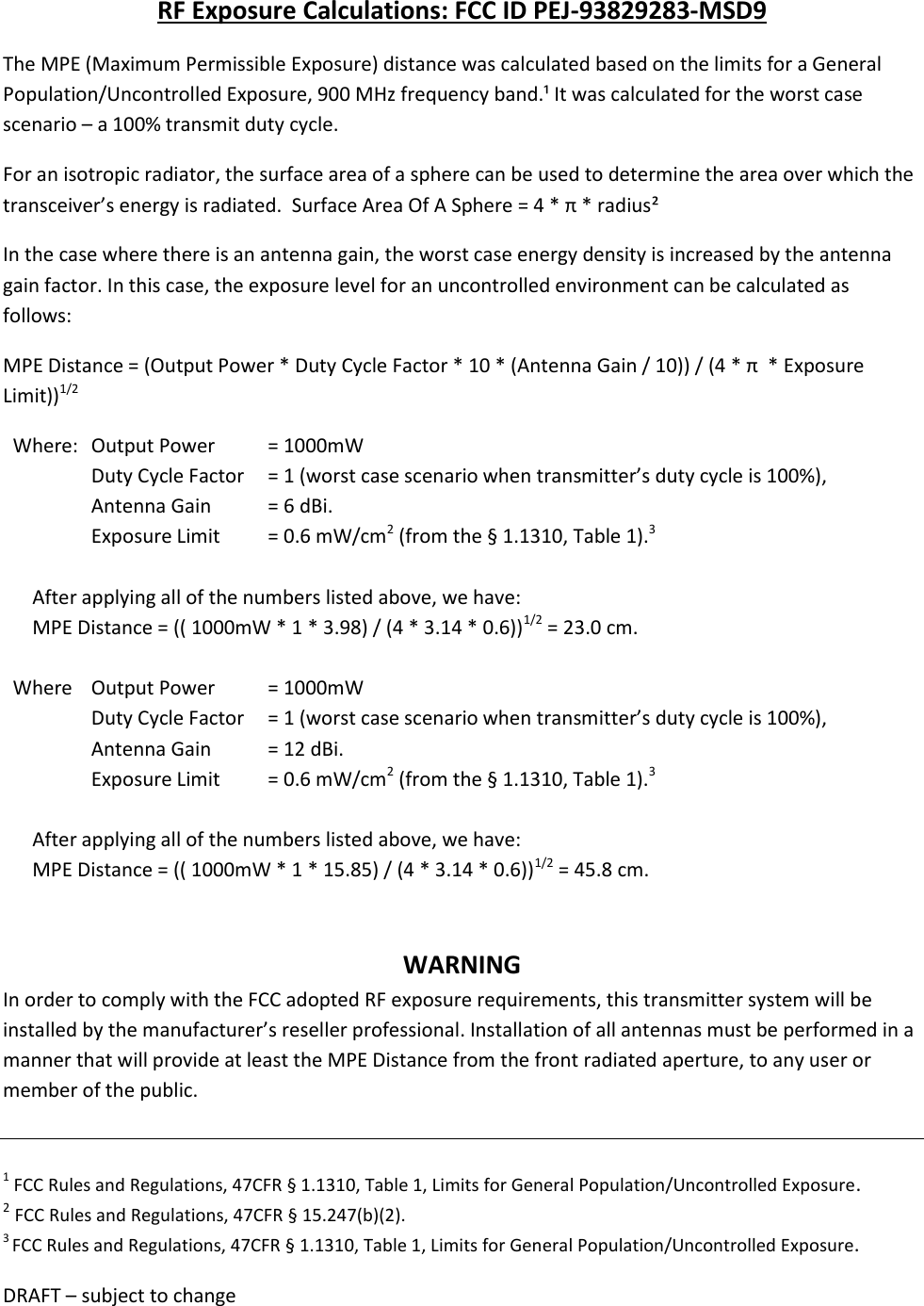
DRAFT – subject to change  RF Exposure Calculations: FCC ID PEJ-93829283-MSD9 The MPE (Maximum Permissible Exposure) distance was calculated based on the limits for a General Population/Uncontrolled Exposure, 900 MHz frequency band.¹ It was calculated for the worst case scenario – a 100% transmit duty cycle.  For an isotropic radiator, the surface area of a sphere can be used to determine the area over which the transceiver’s energy is radiated.  Surface Area Of A Sphere = 4 * π * radius² In the case where there is an antenna gain, the worst case energy density is increased by the antenna gain factor. In this case, the exposure level for an uncontrolled environment can be calculated as follows: MPE Distance = (Output Power * Duty Cycle Factor * 10 * (Antenna Gain / 10)) / (4 * π  * Exposure Limit))1/2    Where:   Output Power   = 1000mW   Duty Cycle Factor    = 1 (worst case scenario when transmitter’s duty cycle is 100%),          Antenna Gain           = 6 dBi.      Exposure Limit        = 0.6 mW/cm2 (from the § 1.1310, Table 1).3             After applying all of the numbers listed above, we have:       MPE Distance = (( 1000mW * 1 * 3.98) / (4 * 3.14 * 0.6))1/2 = 23.0 cm.    Where   Output Power   = 1000mW   Duty Cycle Factor    = 1 (worst case scenario when transmitter’s duty cycle is 100%),        Antenna Gain   = 12 dBi.        Exposure Limit   = 0.6 mW/cm2 (from the § 1.1310, Table 1).3             After applying all of the numbers listed above, we have:       MPE Distance = (( 1000mW * 1 * 15.85) / (4 * 3.14 * 0.6))1/2 = 45.8 cm.   WARNING In order to comply with the FCC adopted RF exposure requirements, this transmitter system will be installed by the manufacturer’s reseller professional. Installation of all antennas must be performed in a manner that will provide at least the MPE Distance from the front radiated aperture, to any user or member of the public.   1 FCC Rules and Regulations, 47CFR § 1.1310, Table 1, Limits for General Population/Uncontrolled Exposure. 2 FCC Rules and Regulations, 47CFR § 15.247(b)(2). 3 FCC Rules and Regulations, 47CFR § 1.1310, Table 1, Limits for General Population/Uncontrolled Exposure.
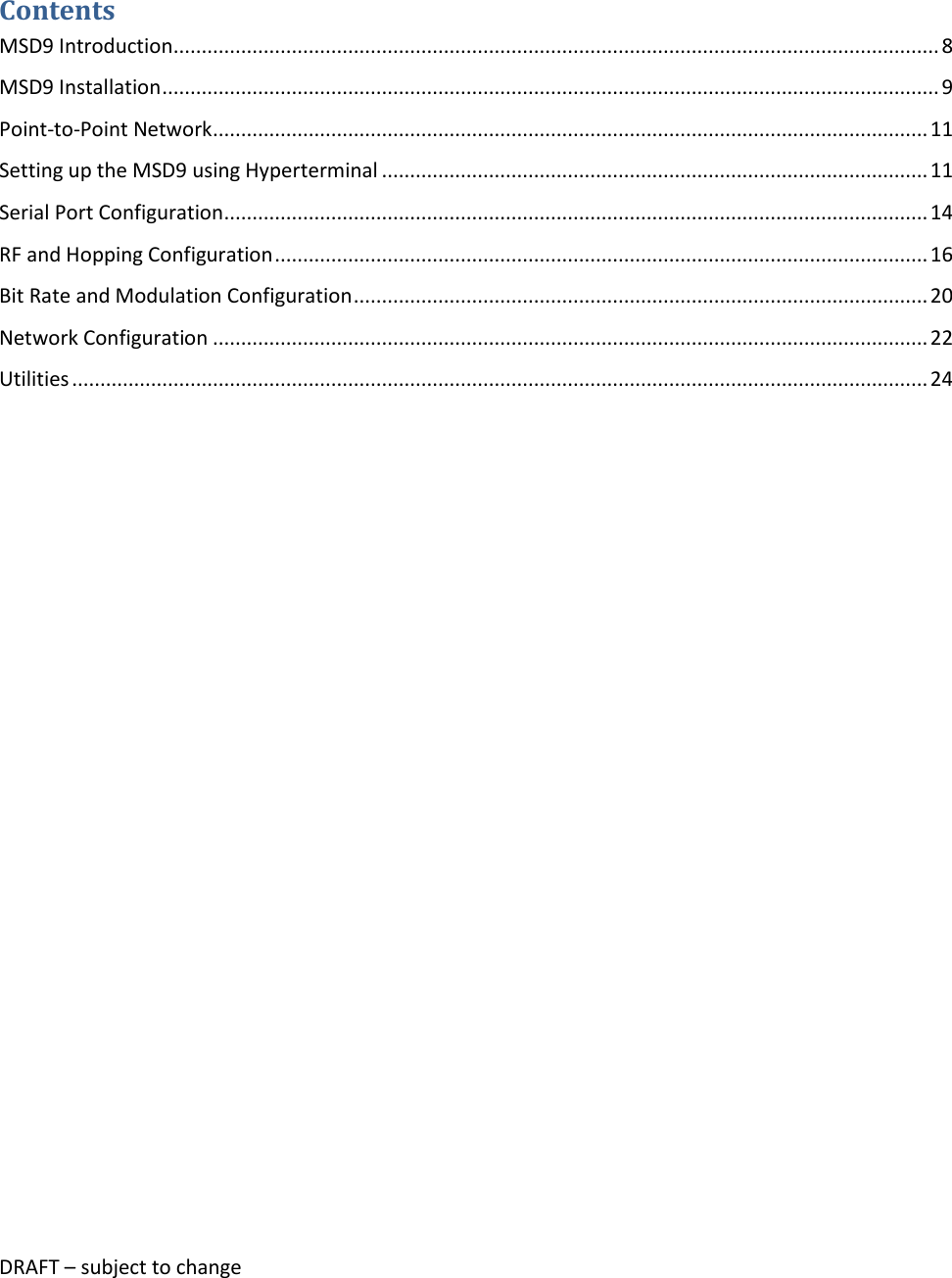
DRAFT – subject to change   Contents MSD9 Introduction ........................................................................................................................................ 8 MSD9 Installation .......................................................................................................................................... 9 Point-to-Point Network ............................................................................................................................... 11 Setting up the MSD9 using Hyperterminal ................................................................................................. 11 Serial Port Configuration ............................................................................................................................. 14 RF and Hopping Configuration .................................................................................................................... 16 Bit Rate and Modulation Configuration ...................................................................................................... 20 Network Configuration ............................................................................................................................... 22 Utilities ........................................................................................................................................................ 24
DRAFT – subject to change  MSD9 Introduction  The MSD (Mini Software Defined) Radio family is a small form-factor data radio designed for transmitting low to moderate speed data across distances of up to 100 miles.  Thus, this radio family has a much longer range than WiFi or other short distance radios, but at a lower data rate capacity.  The radio also has several unique features including the ability to operate on two different bands: a wide bandwidth unlicensed band and a narrow bandwidth licensed band which permits both higher data rates when available, as well as guaranteed delivery of data of lower data rate requirements.  The radio can seamlessly switch between the high data rate mode and the guaranteed delivery licensed mode.  In fact, since the radio is software defined, as changing environmental conditions can cause variations in performance, the radio will automatically adjust its operating parameters to maximize performance.  Thus, if the signal quality degrades, instead of stopping all transmissions, the radio will reduce data rates, change modulation methods, increase power levels, change frequencies, or enact other modifications to maintain the best data link possible given the conditions.  The design of the radio also includes a physically small size, low weight and very low power consumption while maintaining a robust design over large temperature extremes and other environmental parameters. MSD9 The MSD9 is the 900MHz version of the MSD family.  The two radio bands used are the ISM band from 902-928MHz which is unlicensed and allows for a transmission rate of 3.5 Mbit/sec and the licensed band from 928-960MHz which, depending upon the license obtained can permit operation in a 50 kHz, 25 kHz or other bandwidth channel.  Thus the radio is effectively two radios in one: one for high-speed, wide-bandwidth unlicensed operation and one for low-speed narrow-bandwidth licensed operation.  The operating mode and parameters are completely controlled by software and can be modified without direct contact with the radio.  In addition to the flexible operating bands, the radio also has a high power design of up to 5Watt transmit power which allows for the 1W FCC ISM band approved operation as well as the higher output power possible in the MAS band.   The MSD9 includes standard modulation methods such as GMSK, 2-level FSK, 4-level FSK, 8-level FSK as well as 2-level, 4-level and 8-level PSK and 16-QAM.  Because the MSD series radios have a software defined modulation and detection system, additional modulation methods may be added in the field allowing the radio to benefit from future advances in the industry. The OEM board has two connectors: one MMCX for the RF signal and one 24-pin header for the user data interface and power.  The user data interface connector includes the 7.5V power for the radio, one standard speed diagnostics/control serial interface of up to 921kbps, one high-speed data serial interface with hardware flow control and several user-definable digital signals.
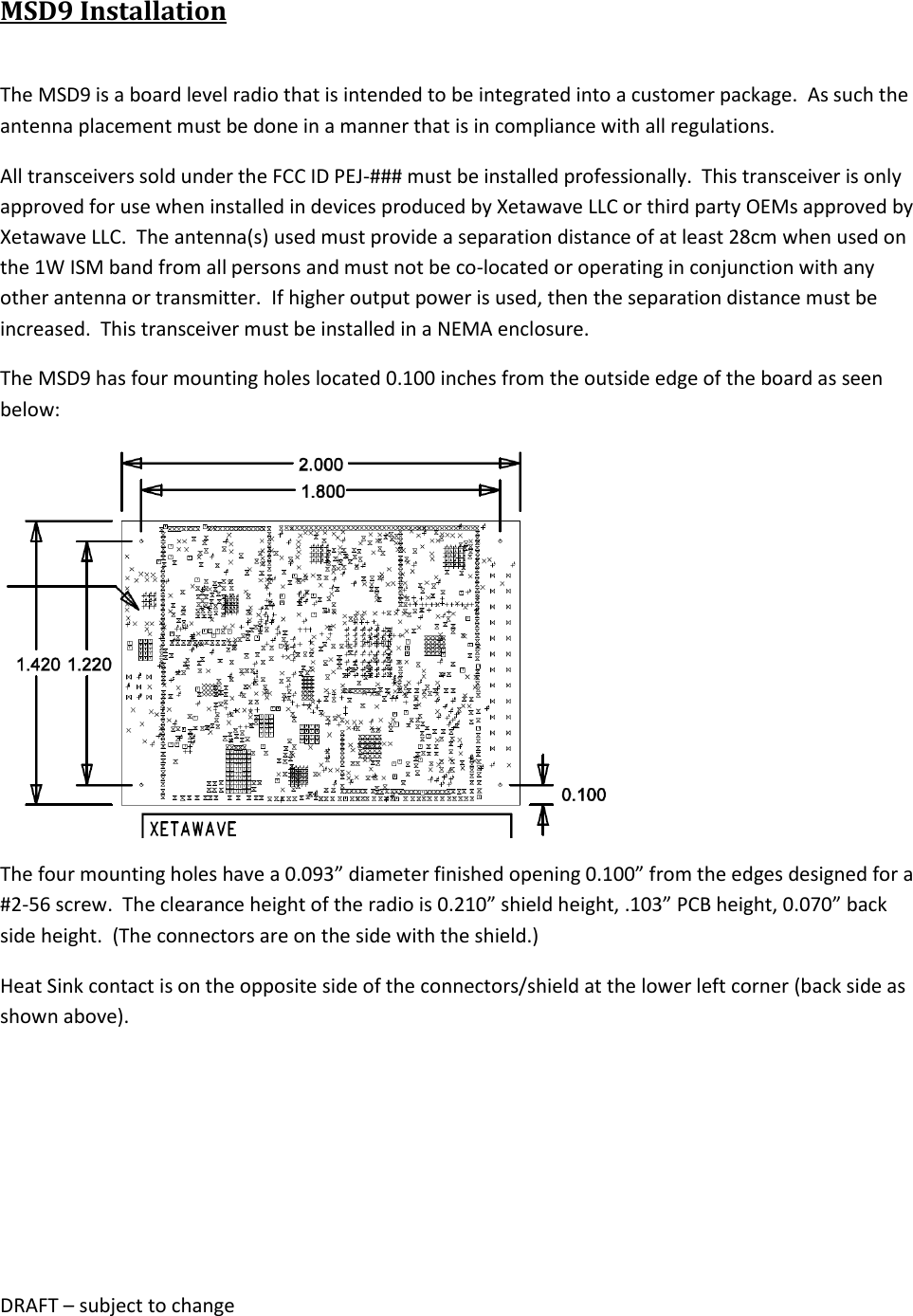
DRAFT – subject to change  MSD9 Installation  The MSD9 is a board level radio that is intended to be integrated into a customer package.  As such the antenna placement must be done in a manner that is in compliance with all regulations. All transceivers sold under the FCC ID PEJ-### must be installed professionally.  This transceiver is only approved for use when installed in devices produced by Xetawave LLC or third party OEMs approved by Xetawave LLC.  The antenna(s) used must provide a separation distance of at least 28cm when used on the 1W ISM band from all persons and must not be co-located or operating in conjunction with any other antenna or transmitter.  If higher output power is used, then the separation distance must be increased.  This transceiver must be installed in a NEMA enclosure. The MSD9 has four mounting holes located 0.100 inches from the outside edge of the board as seen below:  The four mounting holes have a 0.093” diameter finished opening 0.100” from the edges designed for a #2-56 screw.  The clearance height of the radio is 0.210” shield height, .103” PCB height, 0.070” back side height.  (The connectors are on the side with the shield.) Heat Sink contact is on the opposite side of the connectors/shield at the lower left corner (back side as shown above).
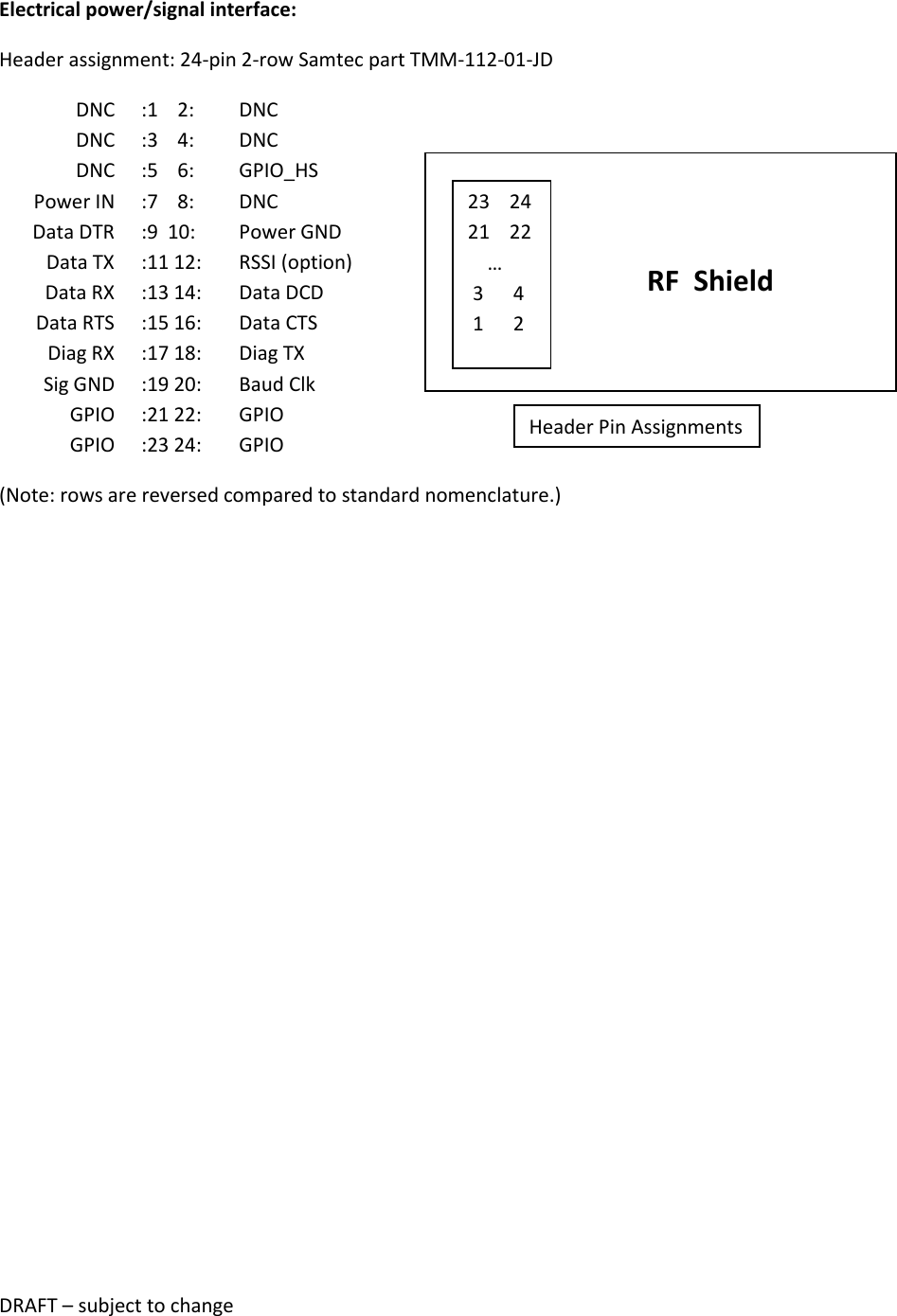
DRAFT – subject to change  Electrical power/signal interface: Header assignment: 24-pin 2-row Samtec part TMM-112-01-JD    DNC  :1    2:  DNC    DNC  :3    4:  DNC    DNC  :5    6:  GPIO_HS    Power IN  :7    8:   DNC    Data DTR  :9  10:  Power GND    Data TX     :11 12:  RSSI (option)    Data RX     :13 14:   Data DCD    Data RTS    :15 16:   Data CTS    Diag RX     :17 18:   Diag TX    Sig GND  :19 20:  Baud Clk    GPIO  :21 22:  GPIO    GPIO  :23 24:   GPIO (Note: rows are reversed compared to standard nomenclature.)                 Shield                     RF  Shield   23    24 21    22     …  3      4  1      2 Header Pin Assignments
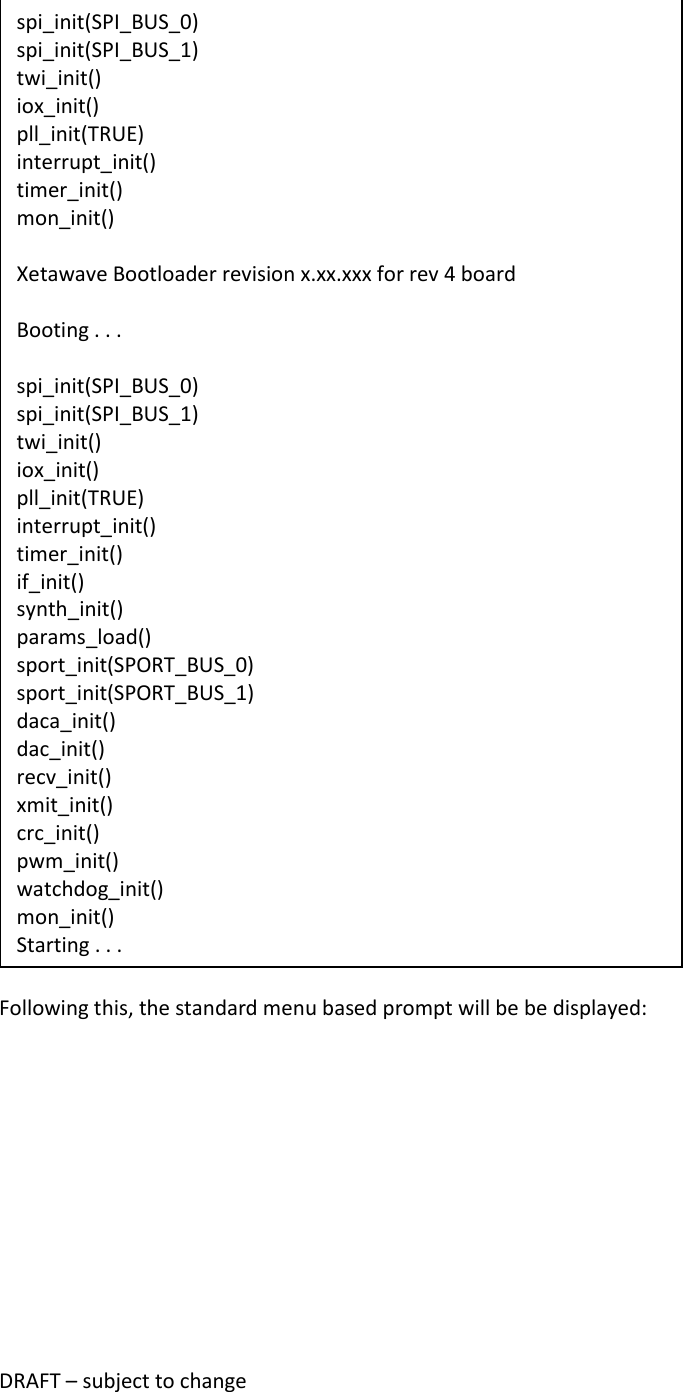
DRAFT – subject to change  Point-to-Point Network The point-to-point network consists of a minimum of two radios; a master and a slave, or multiple radios with repeaters inserted between the master and slave.  Each radio must be configured for its role in the network.  Each radio in the network must have the same network identifier but unique radio identifiers.  The master radio has the radio identifier of “1” while the repeaters and slaves have other unique radio identifiers.  Each radio has its upstream and/or down-stream radio identifier programmed during configuration. Typically, the radio is physically installed with an antenna and communications connector before software configuration.  The communications connector interfaces with a PC running a terminal services program such as hyperterminal or TeraTerm.  It is critical that the first time the radio and host computer communicate, the serial port connection is configured at 115,200 Baud.  If this is not set correctly, then the radio will not communicate with the host.  If the menu is displayed on the terminal window, then communication was successful and configuration may proceed. The minimal steps to configure a radio are: 1) Verify and/or configure the serial port speeds (both diagnostics and data ports) 2) Configure the radio for network operation: a. Master, Repeater, or Slave (one master per network) b. Network operation of “point-to-point” or “point-to-multipoint” c. Network address that is shared by all radios on the network d. Radio address of this radio (“1” if master) e. Address of radio upstream (closer to the Master) f. Address of radio downstream (farther from the Master) g. Set the data block size sent downstream and upstream 3) Set the RF data rate speed and modulation method 4) Set either the frequency (if MAS band) or the hopping pattern (if ISM band). 5) Set the transmit power 6) Set the distance between the radios for worst case propagation delay. Setting up the MSD9 using Hyperterminal The radios are factory configured with the serial diagnostics port configured as 115,200 Baud, 8 data bits, no parity, and one stop bit with no flow control.  The computer’s serial port must be configured by the user to match this configuration to communicate.   Once the radio is connected to the computer, power may be applied to the radio resulting in the following initialization information being displayed on the terminal:
DRAFT – subject to change   Following this, the standard menu based prompt will be be displayed: spi_init(SPI_BUS_0) spi_init(SPI_BUS_1) twi_init() iox_init() pll_init(TRUE) interrupt_init() timer_init() mon_init()  Xetawave Bootloader revision x.xx.xxx for rev 4 board  Booting . . .  spi_init(SPI_BUS_0) spi_init(SPI_BUS_1) twi_init() iox_init() pll_init(TRUE) interrupt_init() timer_init() if_init() synth_init() params_load() sport_init(SPORT_BUS_0) sport_init(SPORT_BUS_1) daca_init() dac_init() recv_init() xmit_init() crc_init() pwm_init() watchdog_init() mon_init() Starting . . .
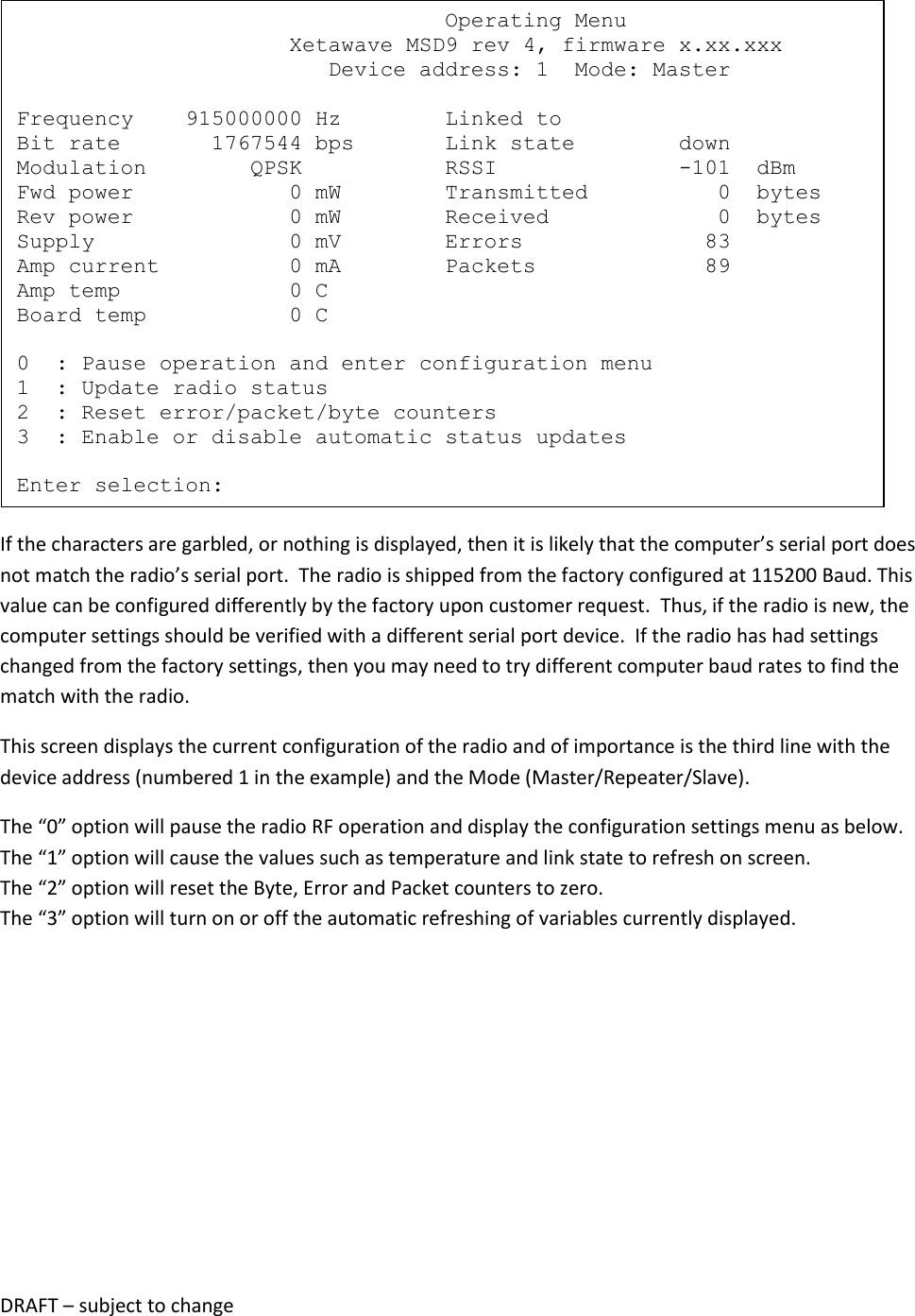
DRAFT – subject to change   If the characters are garbled, or nothing is displayed, then it is likely that the computer’s serial port does not match the radio’s serial port.  The radio is shipped from the factory configured at 115200 Baud. This value can be configured differently by the factory upon customer request.  Thus, if the radio is new, the computer settings should be verified with a different serial port device.  If the radio has had settings changed from the factory settings, then you may need to try different computer baud rates to find the match with the radio. This screen displays the current configuration of the radio and of importance is the third line with the device address (numbered 1 in the example) and the Mode (Master/Repeater/Slave).   The “0” option will pause the radio RF operation and display the configuration settings menu as below. The “1” option will cause the values such as temperature and link state to refresh on screen. The “2” option will reset the Byte, Error and Packet counters to zero. The “3” option will turn on or off the automatic refreshing of variables currently displayed.                                    Operating Menu                      Xetawave MSD9 rev 4, firmware x.xx.xxx                         Device address: 1  Mode: Master  Frequency    915000000 Hz        Linked to Bit rate       1767544 bps       Link state        down Modulation        QPSK           RSSI              -101  dBm Fwd power            0 mW        Transmitted          0  bytes Rev power            0 mW        Received             0  bytes Supply               0 mV        Errors              83 Amp current          0 mA        Packets             89 Amp temp             0 C Board temp           0 C  0  : Pause operation and enter configuration menu 1  : Update radio status 2  : Reset error/packet/byte counters 3  : Enable or disable automatic status updates  Enter selection:
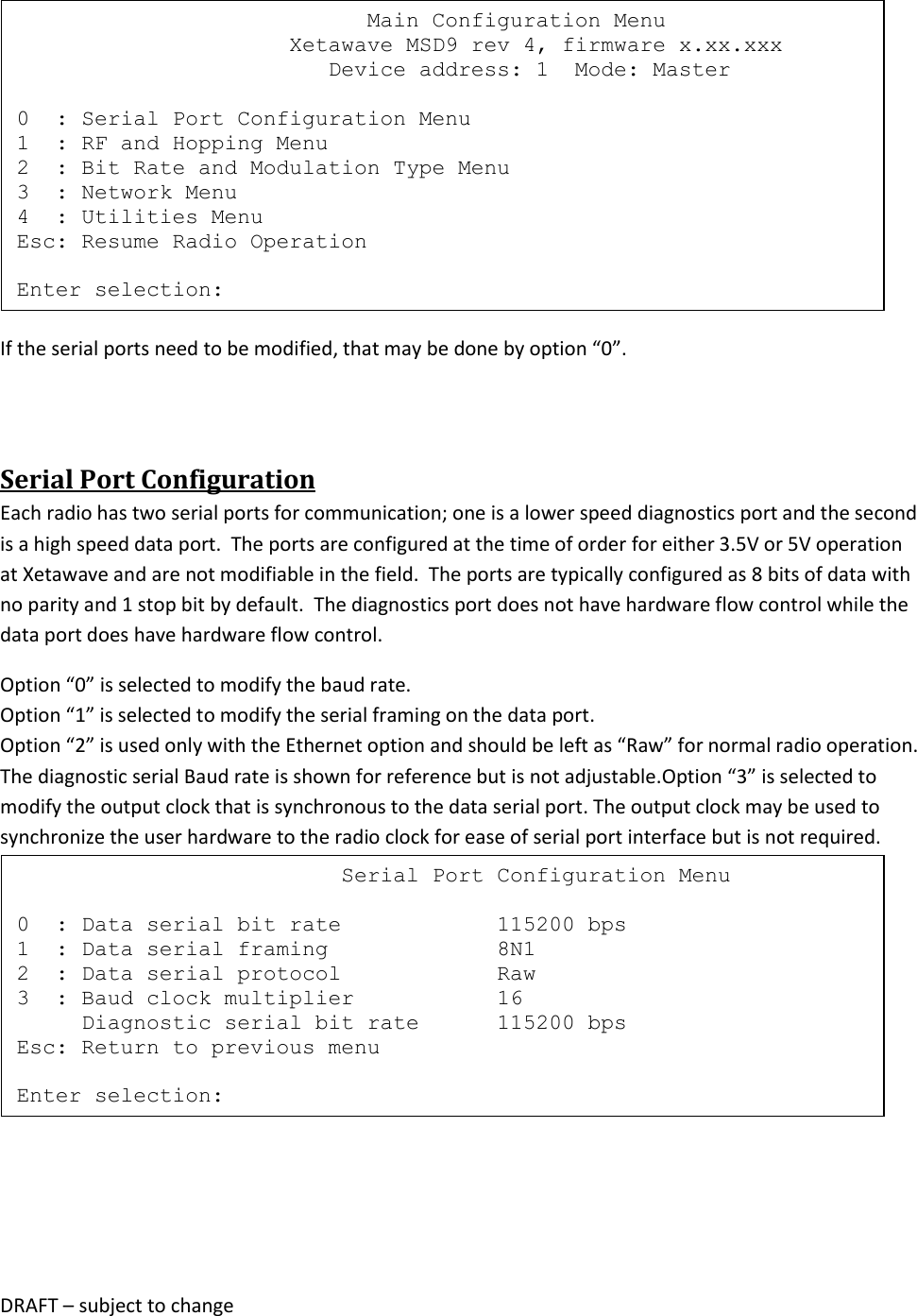
DRAFT – subject to change   If the serial ports need to be modified, that may be done by option “0”.  Serial Port Configuration Each radio has two serial ports for communication; one is a lower speed diagnostics port and the second is a high speed data port.  The ports are configured at the time of order for either 3.5V or 5V operation at Xetawave and are not modifiable in the field.  The ports are typically configured as 8 bits of data with no parity and 1 stop bit by default.  The diagnostics port does not have hardware flow control while the data port does have hardware flow control.   Option “0” is selected to modify the baud rate. Option “1” is selected to modify the serial framing on the data port.  Option “2” is used only with the Ethernet option and should be left as “Raw” for normal radio operation. The diagnostic serial Baud rate is shown for reference but is not adjustable.Option “3” is selected to modify the output clock that is synchronous to the data serial port. The output clock may be used to synchronize the user hardware to the radio clock for ease of serial port interface but is not required.                                 Serial Port Configuration Menu  0  : Data serial bit rate            115200 bps 1  : Data serial framing             8N1 2  : Data serial protocol            Raw 3  : Baud clock multiplier           16      Diagnostic serial bit rate      115200 bps Esc: Return to previous menu  Enter selection:                            Main Configuration Menu                      Xetawave MSD9 rev 4, firmware x.xx.xxx                         Device address: 1  Mode: Master  0  : Serial Port Configuration Menu 1  : RF and Hopping Menu 2  : Bit Rate and Modulation Type Menu 3  : Network Menu 4  : Utilities Menu Esc: Resume Radio Operation  Enter selection:
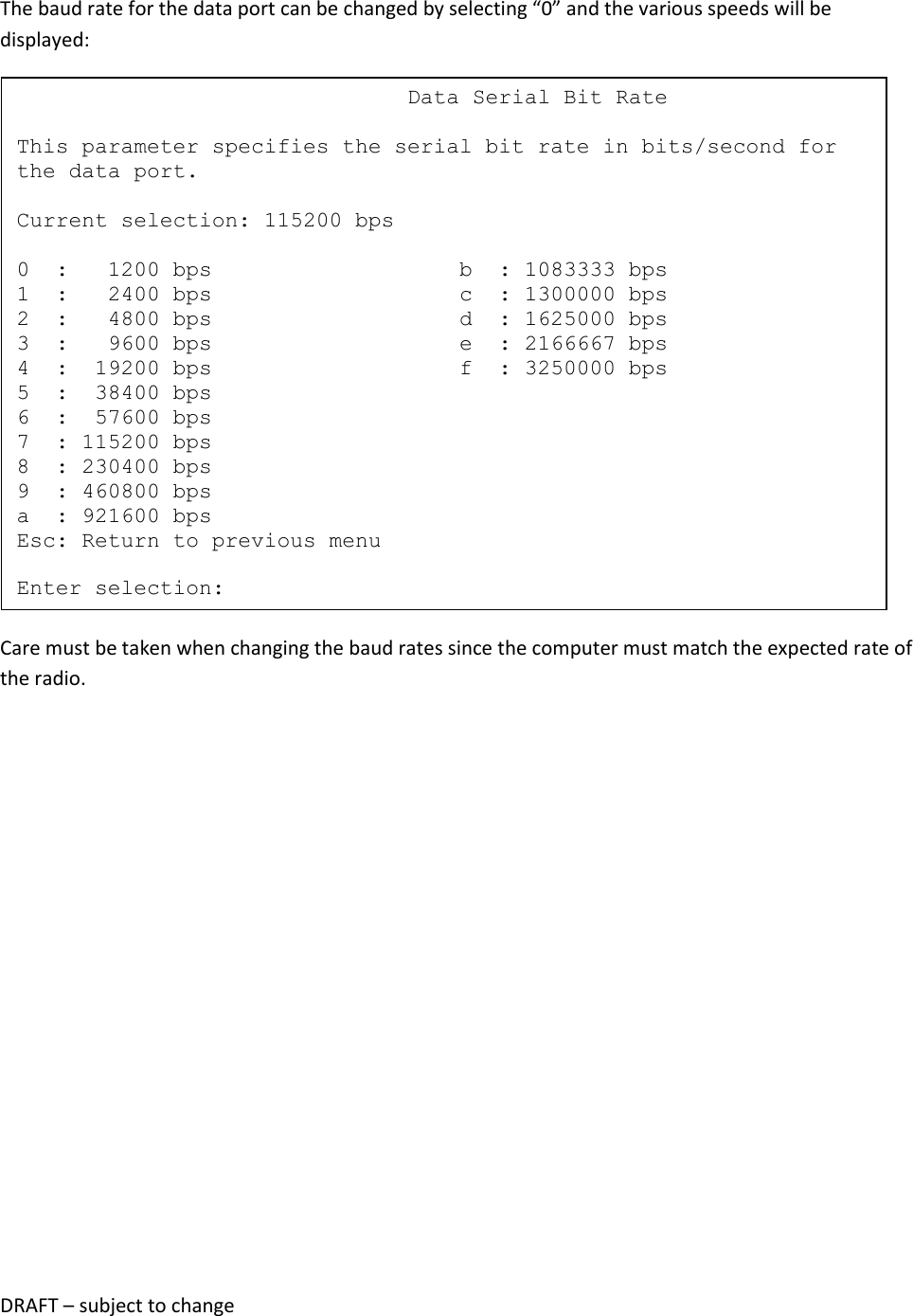
DRAFT – subject to change  The baud rate for the data port can be changed by selecting “0” and the various speeds will be displayed:  Care must be taken when changing the baud rates since the computer must match the expected rate of the radio.                                   Data Serial Bit Rate  This parameter specifies the serial bit rate in bits/second for the data port.  Current selection: 115200 bps  0  :   1200 bps                   b  : 1083333 bps 1  :   2400 bps                   c  : 1300000 bps 2  :   4800 bps                   d  : 1625000 bps 3  :   9600 bps                   e  : 2166667 bps 4  :  19200 bps                   f  : 3250000 bps 5  :  38400 bps 6  :  57600 bps 7  : 115200 bps 8  : 230400 bps 9  : 460800 bps a  : 921600 bps Esc: Return to previous menu  Enter selection:
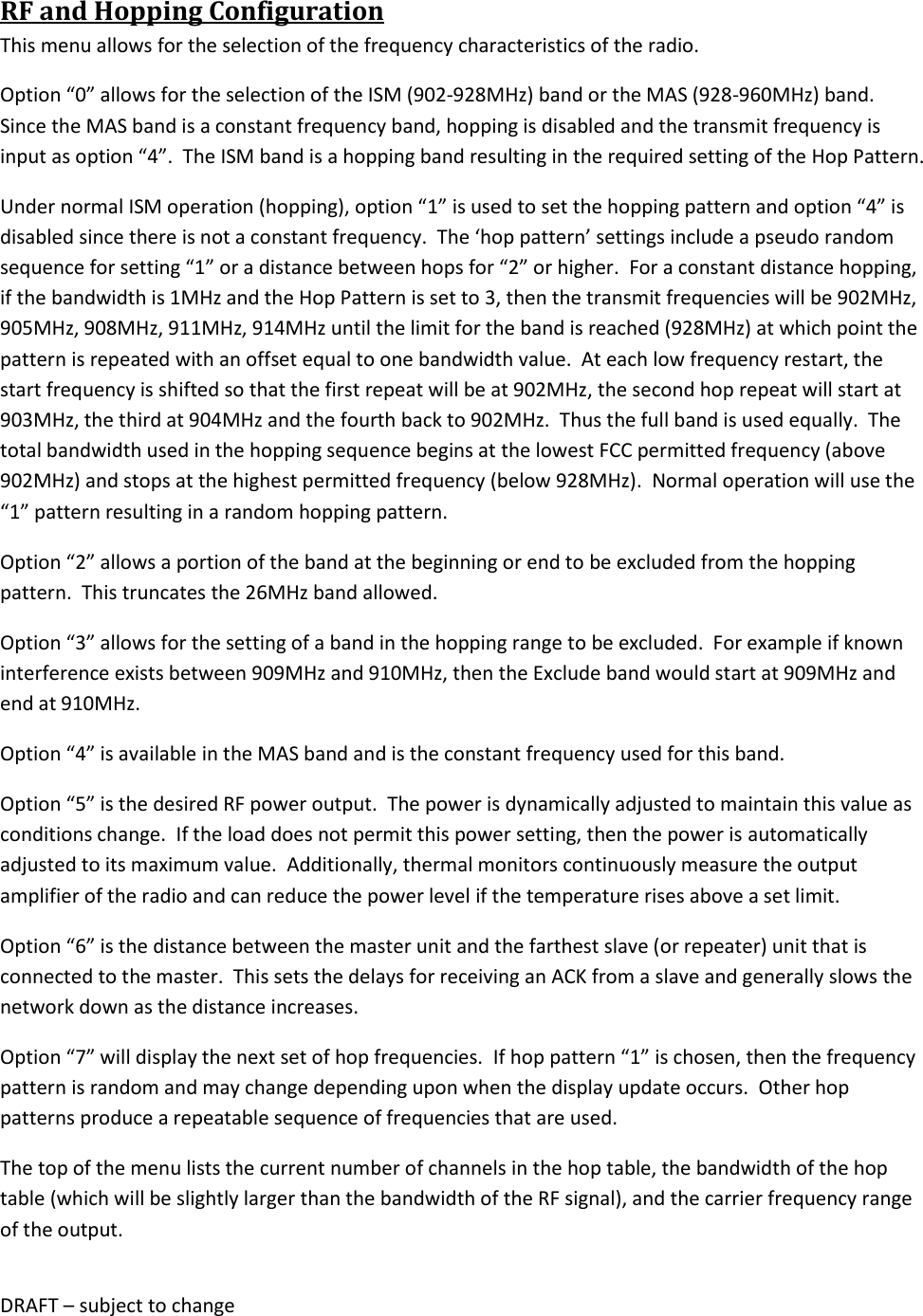
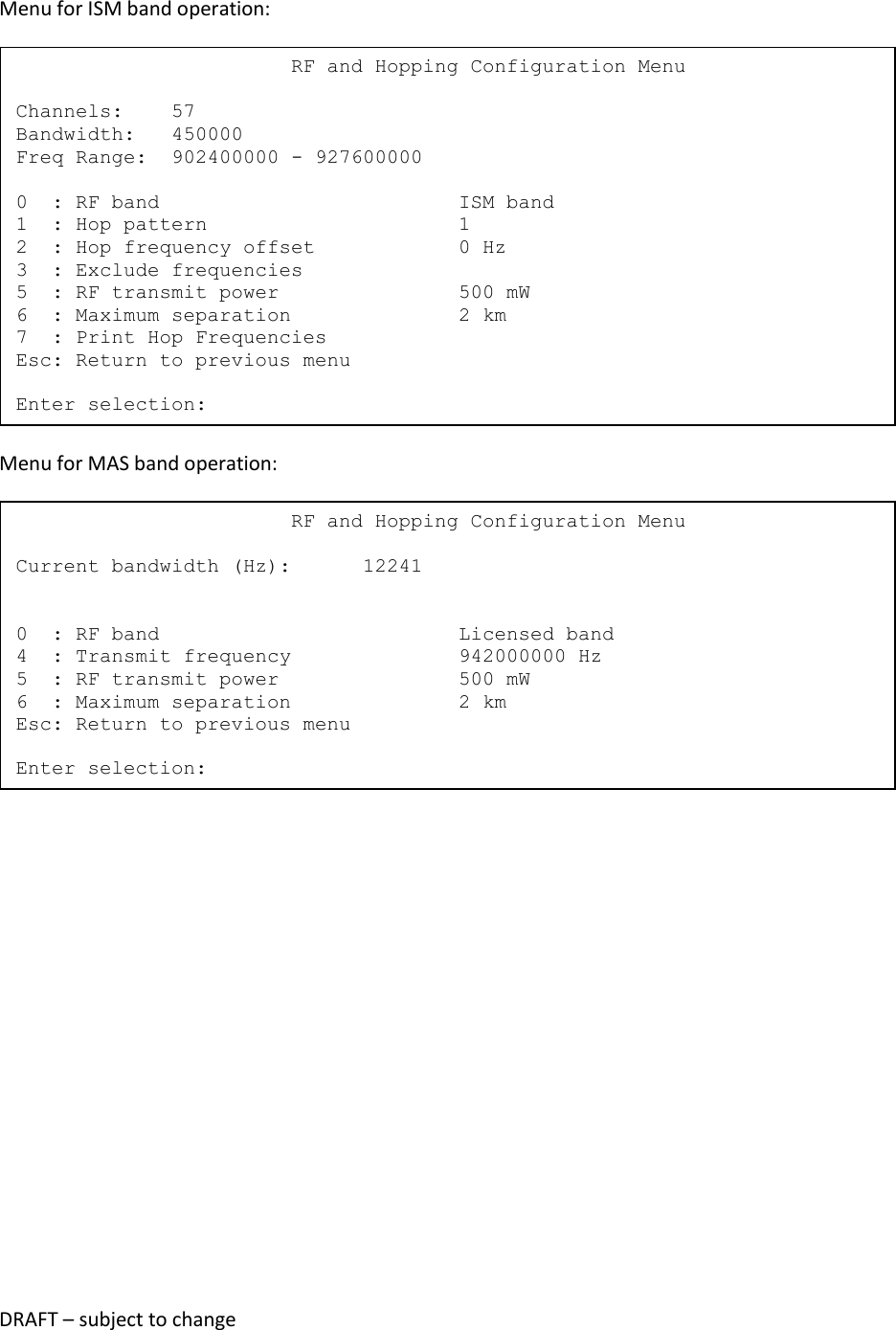
DRAFT – subject to change  RF and Hopping Configuration This menu allows for the selection of the frequency characteristics of the radio.   Option “0” allows for the selection of the ISM (902-928MHz) band or the MAS (928-960MHz) band.  Since the MAS band is a constant frequency band, hopping is disabled and the transmit frequency is input as option “4”.  The ISM band is a hopping band resulting in the required setting of the Hop Pattern. Under normal ISM operation (hopping), option “1” is used to set the hopping pattern and option “4” is disabled since there is not a constant frequency.  The ‘hop pattern’ settings include a pseudo random sequence for setting “1” or a distance between hops for “2” or higher.  For a constant distance hopping, if the bandwidth is 1MHz and the Hop Pattern is set to 3, then the transmit frequencies will be 902MHz, 905MHz, 908MHz, 911MHz, 914MHz until the limit for the band is reached (928MHz) at which point the pattern is repeated with an offset equal to one bandwidth value.  At each low frequency restart, the start frequency is shifted so that the first repeat will be at 902MHz, the second hop repeat will start at 903MHz, the third at 904MHz and the fourth back to 902MHz.  Thus the full band is used equally.  The total bandwidth used in the hopping sequence begins at the lowest FCC permitted frequency (above 902MHz) and stops at the highest permitted frequency (below 928MHz).  Normal operation will use the “1” pattern resulting in a random hopping pattern. Option “2” allows a portion of the band at the beginning or end to be excluded from the hopping pattern.  This truncates the 26MHz band allowed. Option “3” allows for the setting of a band in the hopping range to be excluded.  For example if known interference exists between 909MHz and 910MHz, then the Exclude band would start at 909MHz and end at 910MHz. Option “4” is available in the MAS band and is the constant frequency used for this band. Option “5” is the desired RF power output.  The power is dynamically adjusted to maintain this value as conditions change.  If the load does not permit this power setting, then the power is automatically adjusted to its maximum value.  Additionally, thermal monitors continuously measure the output amplifier of the radio and can reduce the power level if the temperature rises above a set limit. Option “6” is the distance between the master unit and the farthest slave (or repeater) unit that is connected to the master.  This sets the delays for receiving an ACK from a slave and generally slows the network down as the distance increases. Option “7” will display the next set of hop frequencies.  If hop pattern “1” is chosen, then the frequency  pattern is random and may change depending upon when the display update occurs.  Other hop patterns produce a repeatable sequence of frequencies that are used. The top of the menu lists the current number of channels in the hop table, the bandwidth of the hop table (which will be slightly larger than the bandwidth of the RF signal), and the carrier frequency range of the output.
DRAFT – subject to change  Menu for ISM band operation:  Menu for MAS band operation:                            RF and Hopping Configuration Menu  Current bandwidth (Hz):      12241   0  : RF band                         Licensed band 4  : Transmit frequency              942000000 Hz 5  : RF transmit power               500 mW 6  : Maximum separation              2 km Esc: Return to previous menu  Enter selection:                        RF and Hopping Configuration Menu  Channels:    57 Bandwidth:   450000 Freq Range:  902400000 - 927600000  0  : RF band                         ISM band 1  : Hop pattern                     1 2  : Hop frequency offset            0 Hz 3  : Exclude frequencies 5  : RF transmit power               500 mW 6  : Maximum separation              2 km 7  : Print Hop Frequencies Esc: Return to previous menu  Enter selection:
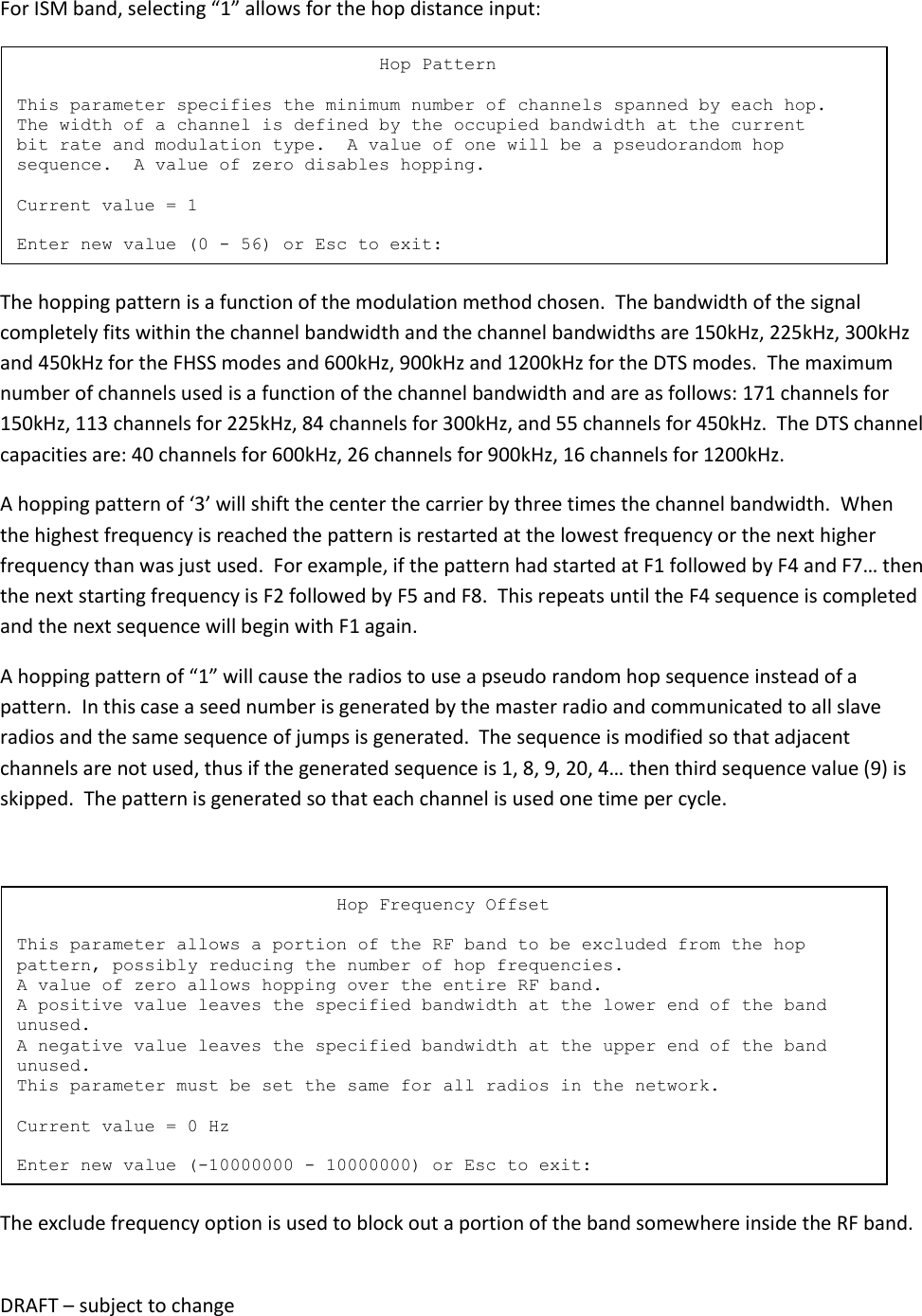
DRAFT – subject to change  For ISM band, selecting “1” allows for the hop distance input:  The hopping pattern is a function of the modulation method chosen.  The bandwidth of the signal completely fits within the channel bandwidth and the channel bandwidths are 150kHz, 225kHz, 300kHz and 450kHz for the FHSS modes and 600kHz, 900kHz and 1200kHz for the DTS modes.  The maximum number of channels used is a function of the channel bandwidth and are as follows: 171 channels for 150kHz, 113 channels for 225kHz, 84 channels for 300kHz, and 55 channels for 450kHz.  The DTS channel capacities are: 40 channels for 600kHz, 26 channels for 900kHz, 16 channels for 1200kHz. A hopping pattern of ‘3’ will shift the center the carrier by three times the channel bandwidth.  When the highest frequency is reached the pattern is restarted at the lowest frequency or the next higher frequency than was just used.  For example, if the pattern had started at F1 followed by F4 and F7… then the next starting frequency is F2 followed by F5 and F8.  This repeats until the F4 sequence is completed and the next sequence will begin with F1 again. A hopping pattern of “1” will cause the radios to use a pseudo random hop sequence instead of a pattern.  In this case a seed number is generated by the master radio and communicated to all slave radios and the same sequence of jumps is generated.  The sequence is modified so that adjacent channels are not used, thus if the generated sequence is 1, 8, 9, 20, 4… then third sequence value (9) is skipped.  The pattern is generated so that each channel is used one time per cycle.   The exclude frequency option is used to block out a portion of the band somewhere inside the RF band.                               Hop Frequency Offset  This parameter allows a portion of the RF band to be excluded from the hop pattern, possibly reducing the number of hop frequencies. A value of zero allows hopping over the entire RF band. A positive value leaves the specified bandwidth at the lower end of the band unused. A negative value leaves the specified bandwidth at the upper end of the band unused. This parameter must be set the same for all radios in the network.  Current value = 0 Hz  Enter new value (-10000000 - 10000000) or Esc to exit:                                   Hop Pattern  This parameter specifies the minimum number of channels spanned by each hop. The width of a channel is defined by the occupied bandwidth at the current bit rate and modulation type.  A value of one will be a pseudorandom hop sequence.  A value of zero disables hopping.  Current value = 1  Enter new value (0 - 56) or Esc to exit:
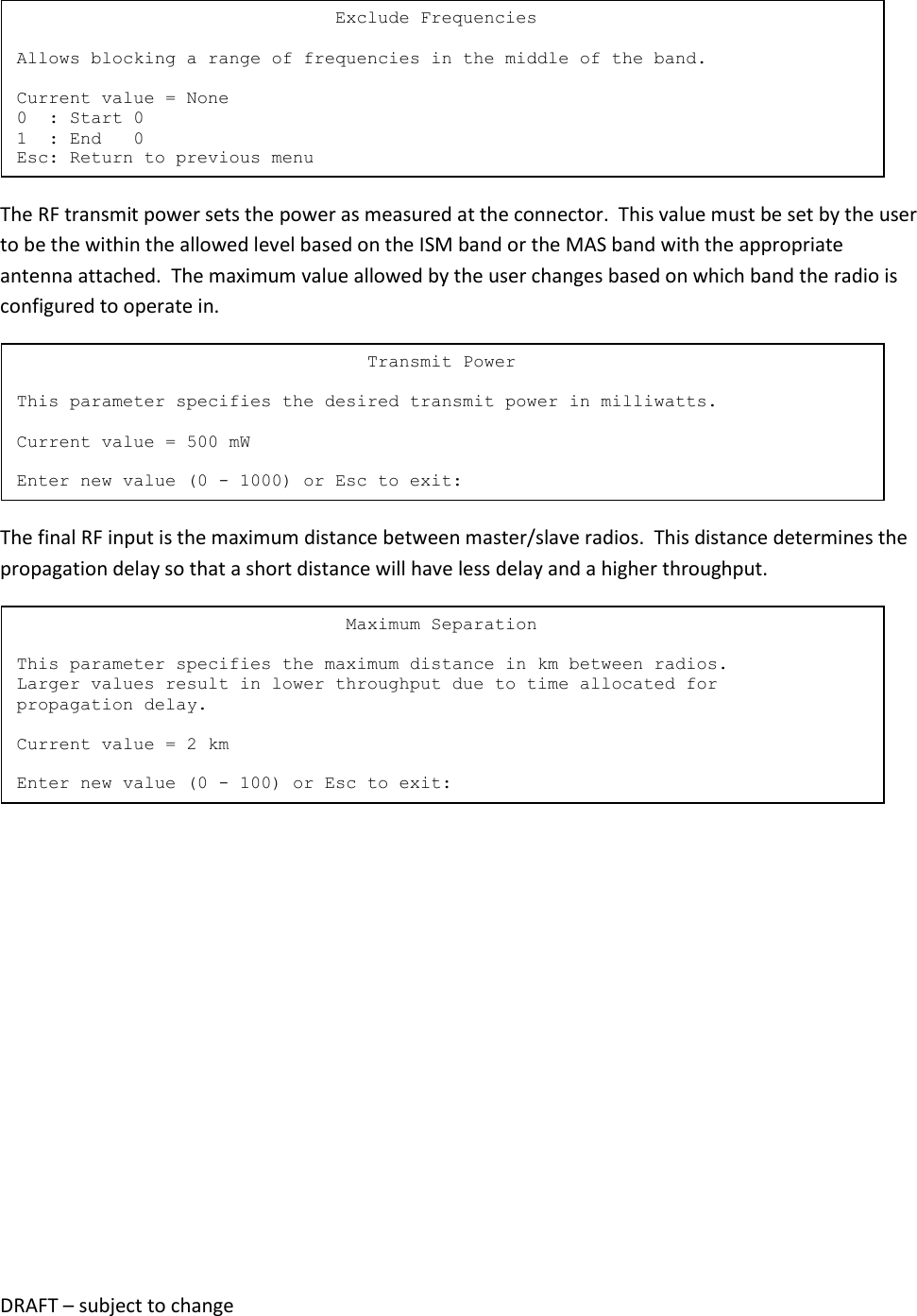
DRAFT – subject to change   The RF transmit power sets the power as measured at the connector.  This value must be set by the user to be the within the allowed level based on the ISM band or the MAS band with the appropriate antenna attached.  The maximum value allowed by the user changes based on which band the radio is configured to operate in.  The final RF input is the maximum distance between master/slave radios.  This distance determines the propagation delay so that a short distance will have less delay and a higher throughput.                                    Maximum Separation  This parameter specifies the maximum distance in km between radios. Larger values result in lower throughput due to time allocated for propagation delay.  Current value = 2 km  Enter new value (0 - 100) or Esc to exit:                                  Transmit Power  This parameter specifies the desired transmit power in milliwatts.  Current value = 500 mW  Enter new value (0 - 1000) or Esc to exit:                               Exclude Frequencies  Allows blocking a range of frequencies in the middle of the band.  Current value = None 0  : Start 0 1  : End   0 Esc: Return to previous menu
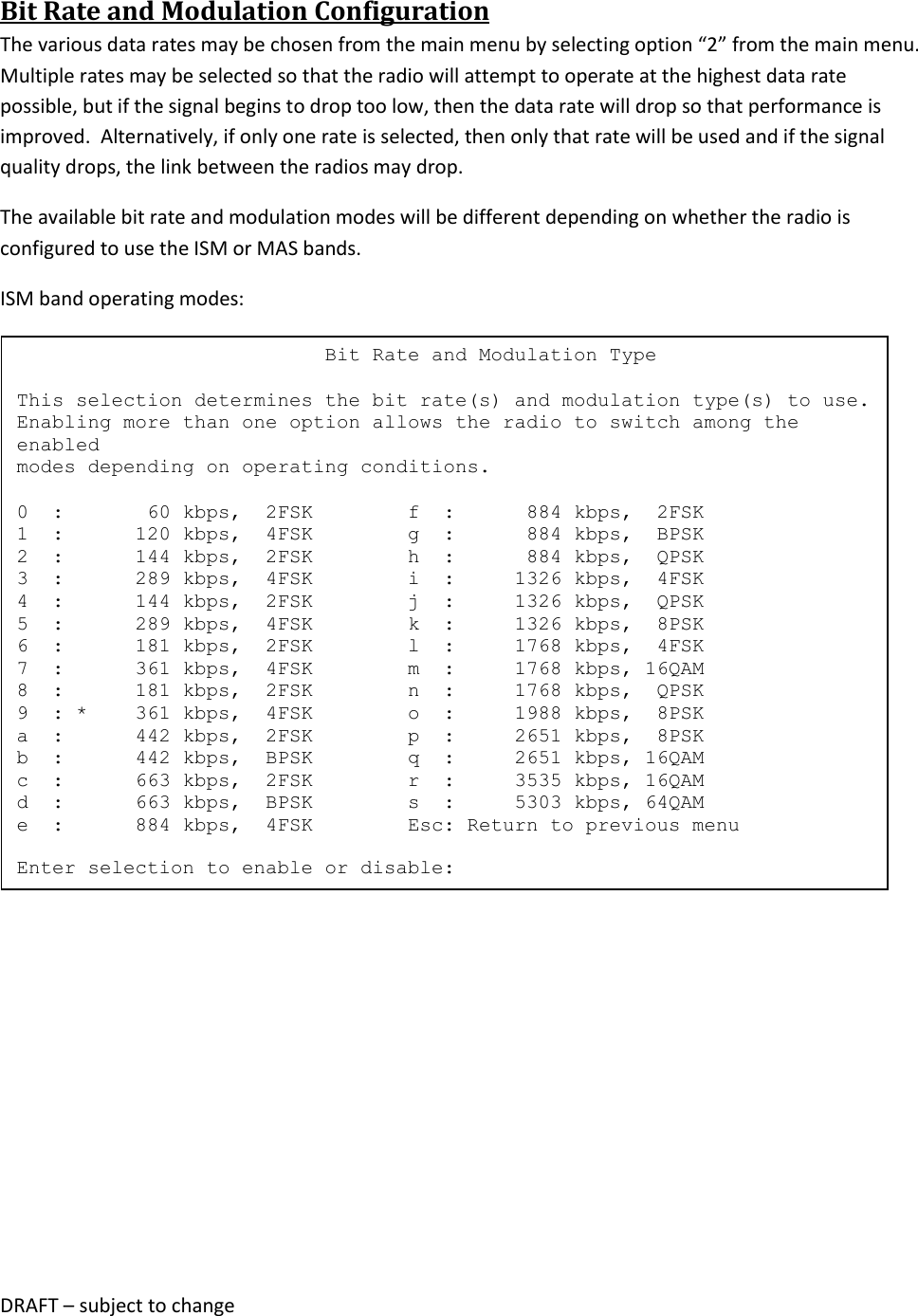
DRAFT – subject to change  Bit Rate and Modulation Configuration The various data rates may be chosen from the main menu by selecting option “2” from the main menu.  Multiple rates may be selected so that the radio will attempt to operate at the highest data rate possible, but if the signal begins to drop too low, then the data rate will drop so that performance is improved.  Alternatively, if only one rate is selected, then only that rate will be used and if the signal quality drops, the link between the radios may drop.  The available bit rate and modulation modes will be different depending on whether the radio is configured to use the ISM or MAS bands.  ISM band operating modes:                                Bit Rate and Modulation Type  This selection determines the bit rate(s) and modulation type(s) to use. Enabling more than one option allows the radio to switch among the enabled modes depending on operating conditions.  0  :       60 kbps,  2FSK        f  :      884 kbps,  2FSK 1  :      120 kbps,  4FSK        g  :      884 kbps,  BPSK 2  :      144 kbps,  2FSK        h  :      884 kbps,  QPSK 3  :      289 kbps,  4FSK        i  :     1326 kbps,  4FSK 4  :      144 kbps,  2FSK        j  :     1326 kbps,  QPSK 5  :      289 kbps,  4FSK        k  :     1326 kbps,  8PSK 6  :      181 kbps,  2FSK        l  :     1768 kbps,  4FSK 7  :      361 kbps,  4FSK        m  :     1768 kbps, 16QAM 8  :      181 kbps,  2FSK        n  :     1768 kbps,  QPSK 9  : *    361 kbps,  4FSK        o  :     1988 kbps,  8PSK a  :      442 kbps,  2FSK        p  :     2651 kbps,  8PSK b  :      442 kbps,  BPSK        q  :     2651 kbps, 16QAM c  :      663 kbps,  2FSK        r  :     3535 kbps, 16QAM d  :      663 kbps,  BPSK        s  :     5303 kbps, 64QAM e  :      884 kbps,  4FSK        Esc: Return to previous menu  Enter selection to enable or disable:
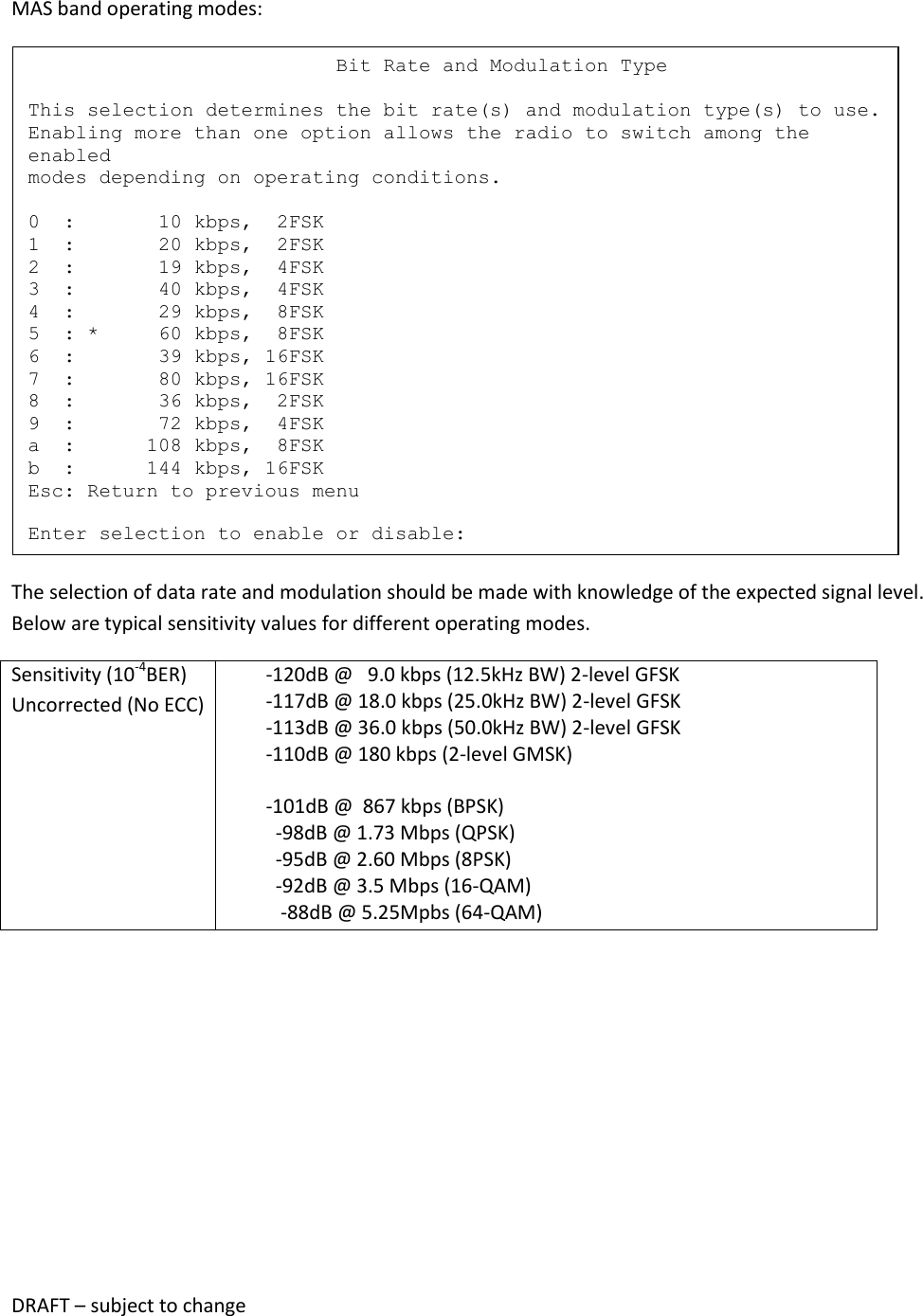
DRAFT – subject to change  MAS band operating modes:  The selection of data rate and modulation should be made with knowledge of the expected signal level.  Below are typical sensitivity values for different operating modes. Sensitivity (10-4BER) Uncorrected (No ECC)         -120dB @   9.0 kbps (12.5kHz BW) 2-level GFSK         -117dB @ 18.0 kbps (25.0kHz BW) 2-level GFSK         -113dB @ 36.0 kbps (50.0kHz BW) 2-level GFSK         -110dB @ 180 kbps (2-level GMSK)          -101dB @  867 kbps (BPSK)           -98dB @ 1.73 Mbps (QPSK)           -95dB @ 2.60 Mbps (8PSK)           -92dB @ 3.5 Mbps (16-QAM)            -88dB @ 5.25Mpbs (64-QAM)                              Bit Rate and Modulation Type  This selection determines the bit rate(s) and modulation type(s) to use. Enabling more than one option allows the radio to switch among the enabled modes depending on operating conditions.  0  :       10 kbps,  2FSK 1  :       20 kbps,  2FSK 2  :       19 kbps,  4FSK 3  :       40 kbps,  4FSK 4  :       29 kbps,  8FSK 5  : *     60 kbps,  8FSK 6  :       39 kbps, 16FSK 7  :       80 kbps, 16FSK 8  :       36 kbps,  2FSK 9  :       72 kbps,  4FSK a  :      108 kbps,  8FSK b  :      144 kbps, 16FSK Esc: Return to previous menu  Enter selection to enable or disable:
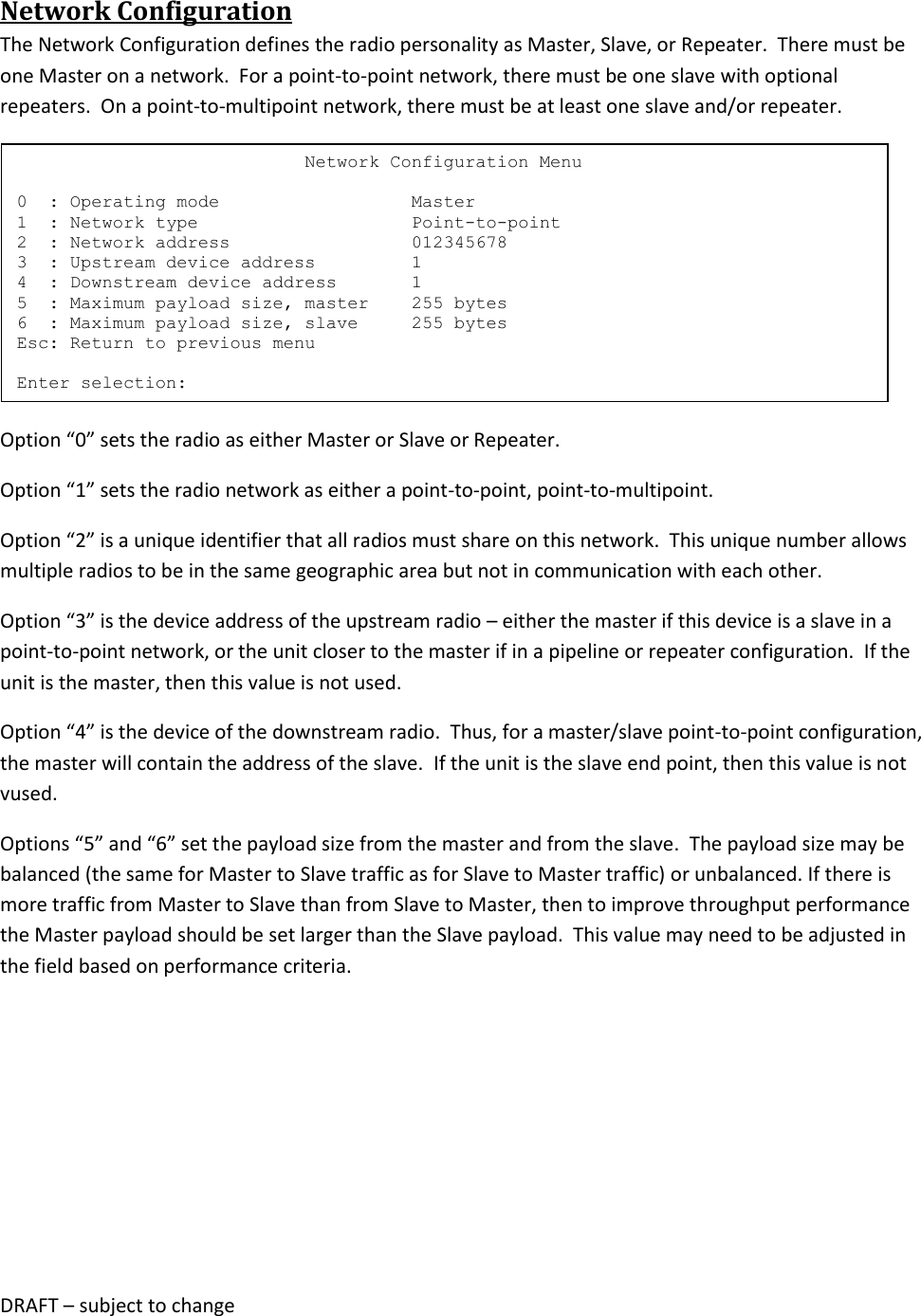
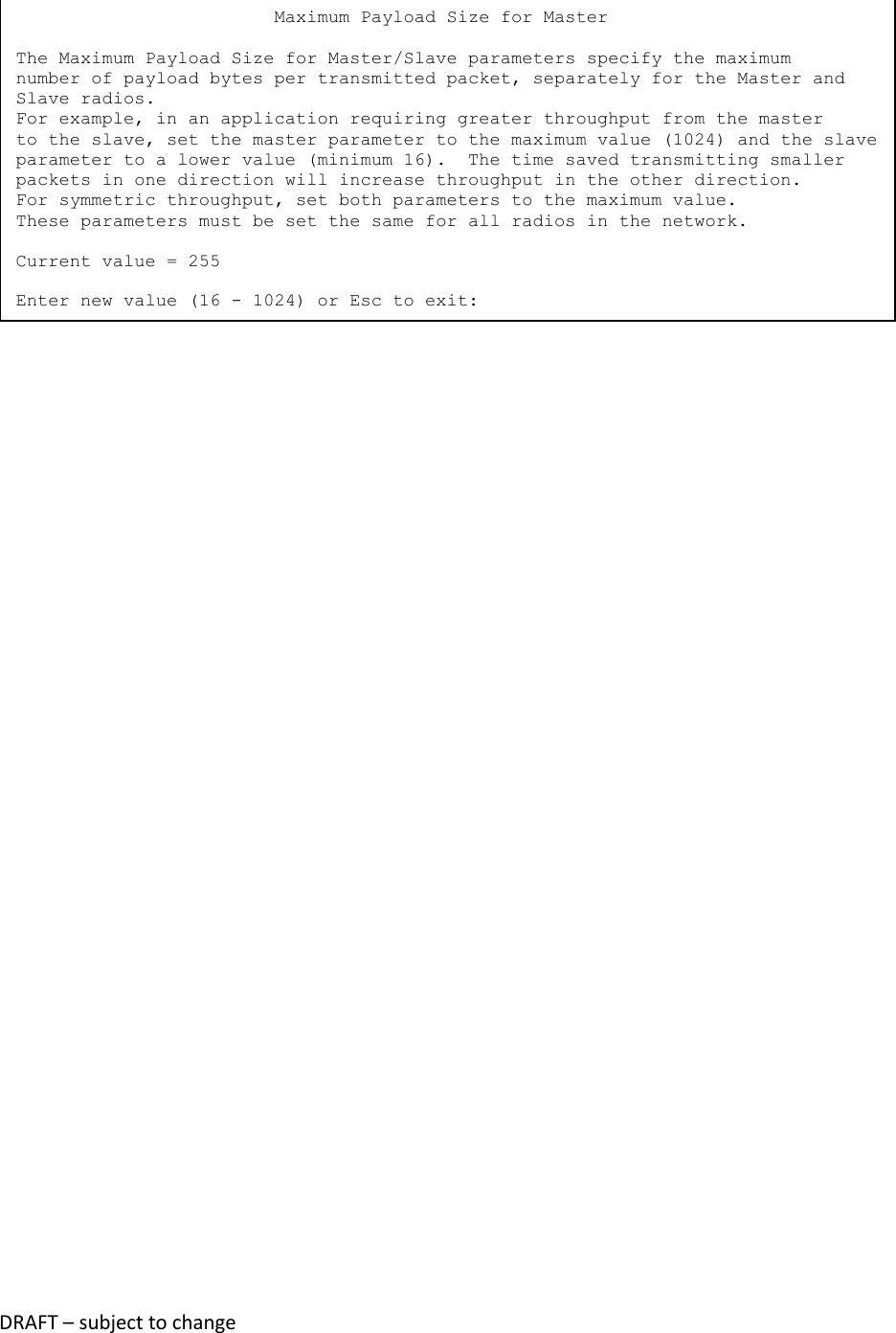
DRAFT – subject to change  Network Configuration The Network Configuration defines the radio personality as Master, Slave, or Repeater.  There must be one Master on a network.  For a point-to-point network, there must be one slave with optional repeaters.  On a point-to-multipoint network, there must be at least one slave and/or repeater.  Option “0” sets the radio as either Master or Slave or Repeater. Option “1” sets the radio network as either a point-to-point, point-to-multipoint.  Option “2” is a unique identifier that all radios must share on this network.  This unique number allows multiple radios to be in the same geographic area but not in communication with each other. Option “3” is the device address of the upstream radio – either the master if this device is a slave in a point-to-point network, or the unit closer to the master if in a pipeline or repeater configuration.  If the unit is the master, then this value is not used. Option “4” is the device of the downstream radio.  Thus, for a master/slave point-to-point configuration, the master will contain the address of the slave.  If the unit is the slave end point, then this value is not vused. Options “5” and “6” set the payload size from the master and from the slave.  The payload size may be balanced (the same for Master to Slave traffic as for Slave to Master traffic) or unbalanced. If there is more traffic from Master to Slave than from Slave to Master, then to improve throughput performance the Master payload should be set larger than the Slave payload.  This value may need to be adjusted in the field based on performance criteria.                            Network Configuration Menu  0  : Operating mode                  Master 1  : Network type                    Point-to-point 2  : Network address                 012345678 3  : Upstream device address         1 4  : Downstream device address       1 5  : Maximum payload size, master    255 bytes 6  : Maximum payload size, slave     255 bytes Esc: Return to previous menu  Enter selection:
DRAFT – subject to change                              Maximum Payload Size for Master  The Maximum Payload Size for Master/Slave parameters specify the maximum number of payload bytes per transmitted packet, separately for the Master and Slave radios. For example, in an application requiring greater throughput from the master to the slave, set the master parameter to the maximum value (1024) and the slave parameter to a lower value (minimum 16).  The time saved transmitting smaller packets in one direction will increase throughput in the other direction. For symmetric throughput, set both parameters to the maximum value. These parameters must be set the same for all radios in the network.  Current value = 255  Enter new value (16 - 1024) or Esc to exit:
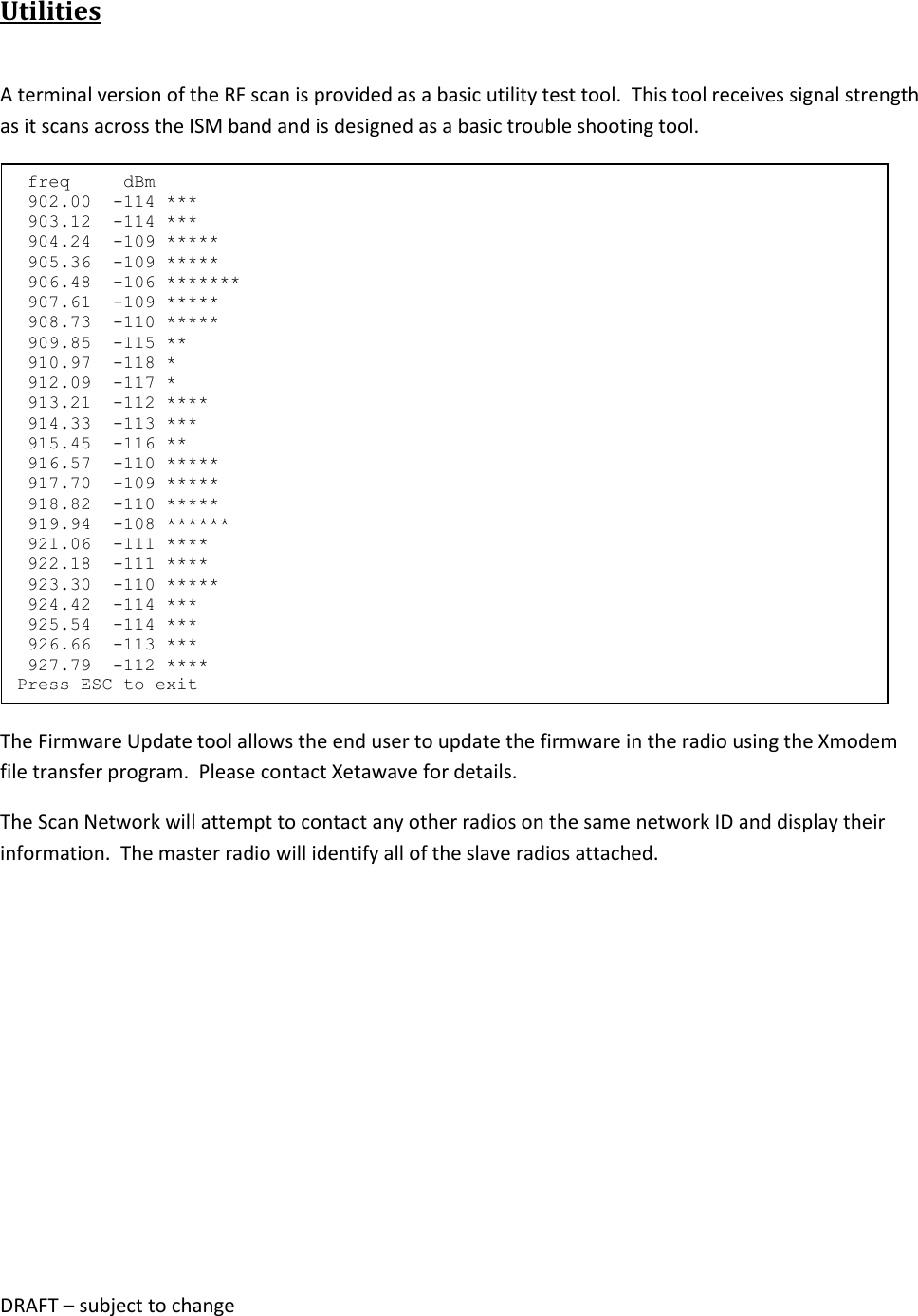
DRAFT – subject to change  Utilities  A terminal version of the RF scan is provided as a basic utility test tool.  This tool receives signal strength as it scans across the ISM band and is designed as a basic trouble shooting tool.  The Firmware Update tool allows the end user to update the firmware in the radio using the Xmodem file transfer program.  Please contact Xetawave for details. The Scan Network will attempt to contact any other radios on the same network ID and display their information.  The master radio will identify all of the slave radios attached.    freq     dBm  902.00  -114 ***  903.12  -114 ***  904.24  -109 *****  905.36  -109 *****  906.48  -106 *******  907.61  -109 *****  908.73  -110 *****  909.85  -115 **  910.97  -118 *  912.09  -117 *  913.21  -112 ****  914.33  -113 ***  915.45  -116 **  916.57  -110 *****  917.70  -109 *****  918.82  -110 *****  919.94  -108 ******  921.06  -111 ****  922.18  -111 ****  923.30  -110 *****  924.42  -114 ***  925.54  -114 ***  926.66  -113 ***  927.79  -112 **** Press ESC to exit

Navigation menu