Xiamen Four Faith Communication Technology F2414 WCDMA/HSDPA/HSUPA IP Modem F2414 User Manual

Xiamen Four-Faith Communication Technology Co., Ltd. WCDMA/HSDPA/HSUPA IP Modem F2414

user manual

          F2414 User Manual           FCC ID: NZRF2414
                                                          User Manual                       Xiamen Four-Faith Communication Technology Co.,Ltd.              Page 2 of 41     Add:  J1-J3,3rdFloor,No.44,GuanRiRoad,SoftWare Park,XiaMen .361008.China                                    http://www.fourfaith.com   Tel: +86 592-6300326  6300325  6300324     Fax:+86 592-5912735  Copyright Notice All contents in the files are protected by copyright law, and all copyrights are reserved by Xiamen Four-Faith Communication Technology Co., Ltd.  Without written permission, all commercial use of the files from Four-Faith are forbidden, such as copy, distribute, reproduce the files, etc., but non-commercial purpose, downloaded or printed by individual (all files shall be not revised, and the copyright and other proprietorship notice shall be reserved) are welcome.   Trademark Notice Four-Faith、四信、 、 、  are all registered trademarks of Xiamen Four-Faith Communication Technology Co., Ltd., illegal use of the name of Four-Faith, trademarks and other marks of Four-Faith is forbidden, unless written permission is authorized in advance.
                                                          User Manual                       Xiamen Four-Faith Communication Technology Co.,Ltd.              Page 3 of 41     Add:  J1-J3,3rdFloor,No.44,GuanRiRoad,SoftWare Park,XiaMen .361008.China                                    http://www.fourfaith.com   Tel: +86 592-6300326  6300325  6300324     Fax:+86 592-5912735
                                                          User Manual                       Xiamen Four-Faith Communication Technology Co.,Ltd.              Page 4 of 41     Add:  J1-J3,3rdFloor,No.44,GuanRiRoad,SoftWare Park,XiaMen .361008.China                                    http://www.fourfaith.com   Tel: +86 592-6300326  6300325  6300324     Fax:+86 592-5912735  CCoonntteennttss  Chapter 1 Brief Introduction of Product ........................................................................................... 5 1.1 General ................................................................................................................................ 5 1.2 Features and Benefits .......................................................................................................... 5 1.3 Working Principle ............................................................................................................... 6 1.4 Specifications ...................................................................................................................... 7 Chapter 2 Installation Introduction ................................................................................................. 10 2.1 General .............................................................................................................................. 10 2.2 Encasement List ................................................................................................................ 10 2.3 Installation and Cable Connection .................................................................................... 10 2.4 Power ................................................................................................................................ 13 2.5 Indicator Lights Introduction ............................................................................................ 13 Chapter 3 Configuration .................................................................................................................. 14 3.1 Configuration Connection ................................................................................................. 14 3.2 Configuration Introduction ................................................................................................ 14 3.3 Run the configure Tool: IP Modem Configure.exe ........................................................... 15 3.4 Re-power IP MODEM ...................................................................................................... 16 3.5 Configuration .................................................................................................................... 16 3.5.1 Data Service Center Settings .................................................................................. 16 3.5.2 IP MODEM Settings .............................................................................................. 19 3.5.3 Other Settings ......................................................................................................... 24 3.5.4 Scheduled Power ON/OFF Setting ........................................................................ 27 3.6 Functions ........................................................................................................................... 37 3.7 Work State Switch ............................................................................................................. 38 Appendix ......................................................................................................................................... 39
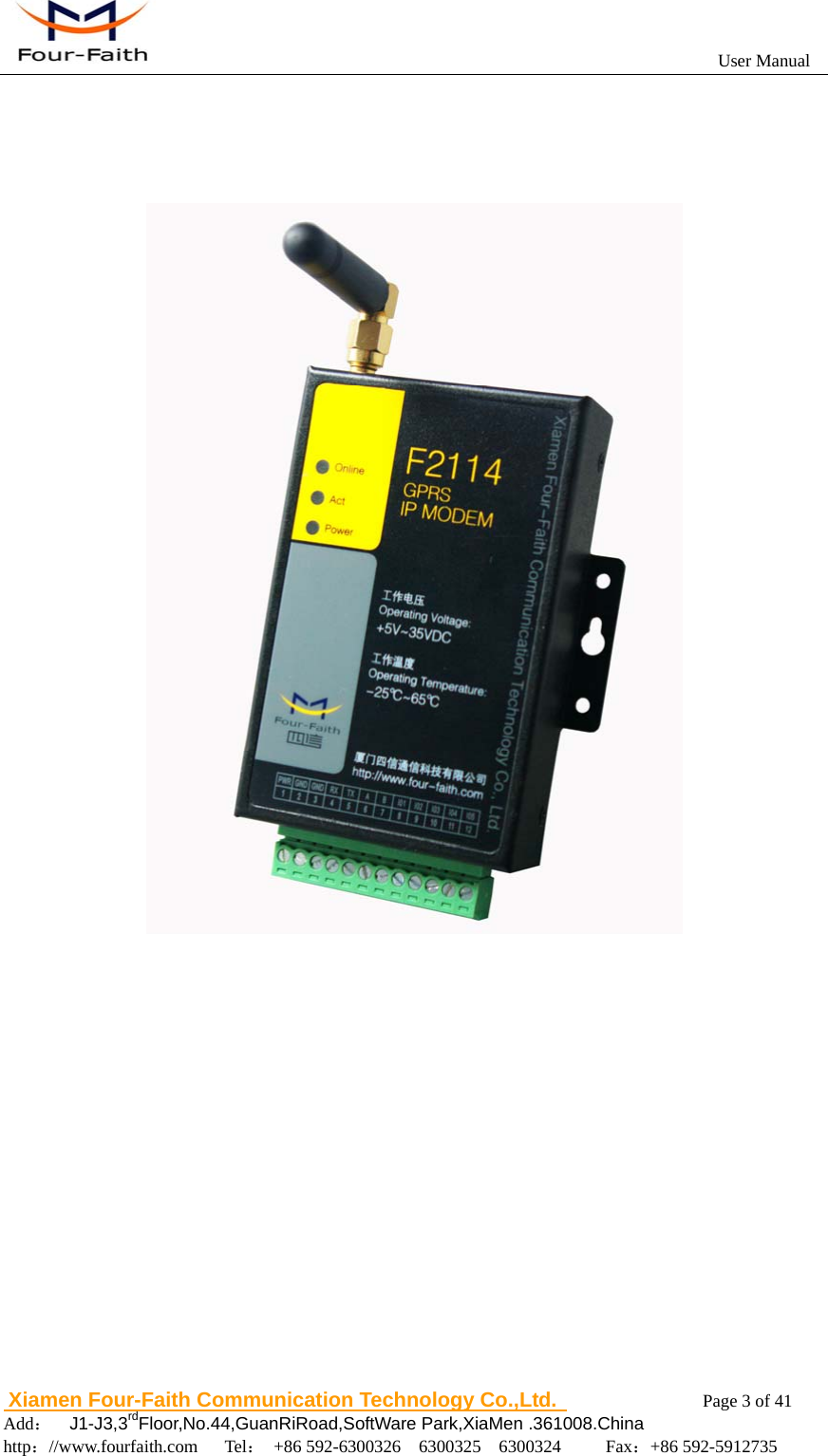
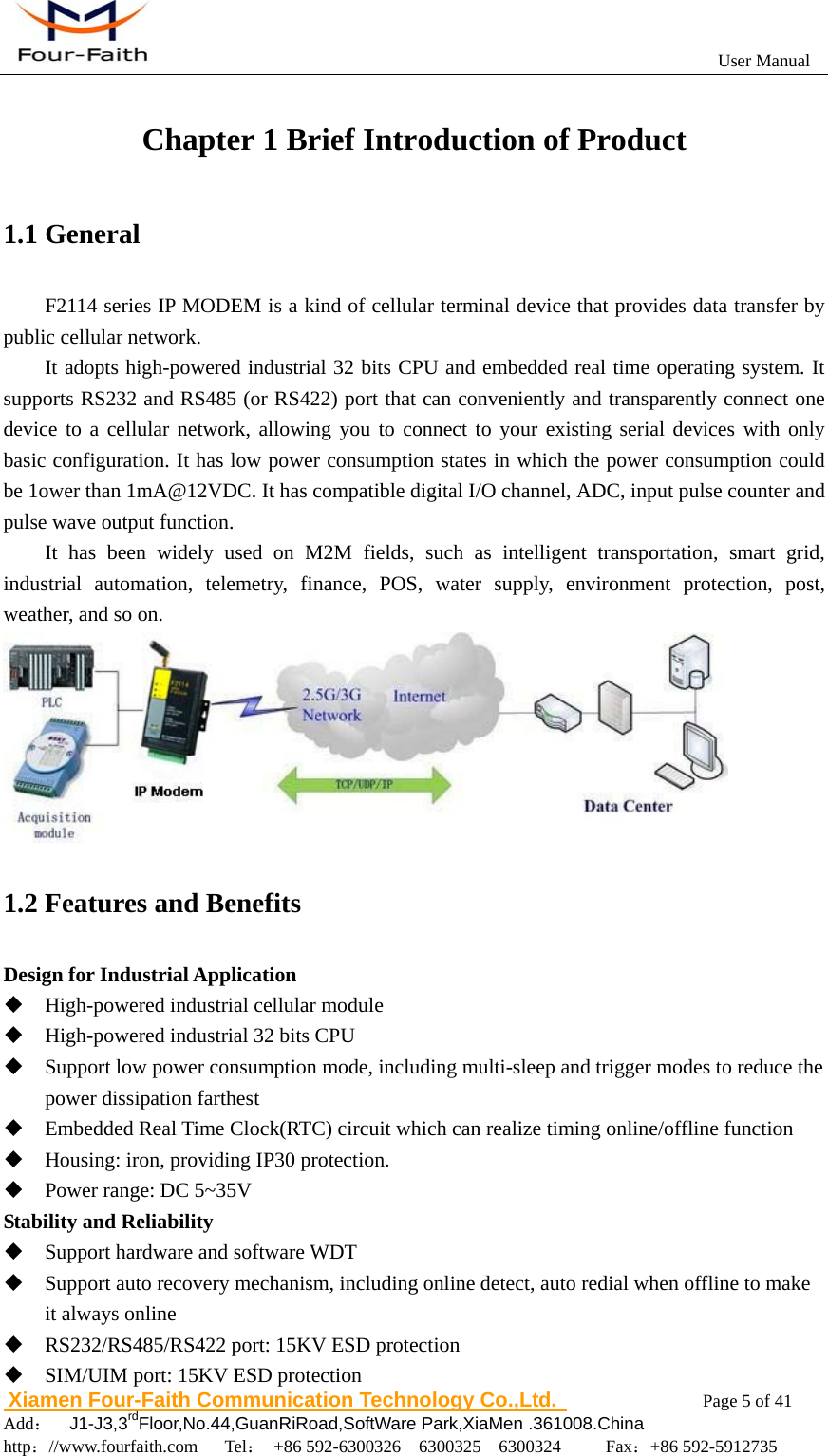
                                                          User Manual                       Xiamen Four-Faith Communication Technology Co.,Ltd.              Page 5 of 41     Add:  J1-J3,3rdFloor,No.44,GuanRiRoad,SoftWare Park,XiaMen .361008.China                                    http://www.fourfaith.com   Tel: +86 592-6300326  6300325  6300324     Fax:+86 592-5912735  Chapter 1 Brief Introduction of Product 1.1 General F2114 series IP MODEM is a kind of cellular terminal device that provides data transfer by public cellular network. It adopts high-powered industrial 32 bits CPU and embedded real time operating system. It supports RS232 and RS485 (or RS422) port that can conveniently and transparently connect one device to a cellular network, allowing you to connect to your existing serial devices with only basic configuration. It has low power consumption states in which the power consumption could be 1ower than 1mA@12VDC. It has compatible digital I/O channel, ADC, input pulse counter and pulse wave output function.   It has been widely used on M2M fields, such as intelligent transportation, smart grid, industrial automation, telemetry, finance, POS, water supply, environment protection, post, weather, and so on.  1.2 Features and Benefits Design for Industrial Application  High-powered industrial cellular module  High-powered industrial 32 bits CPU  Support low power consumption mode, including multi-sleep and trigger modes to reduce the power dissipation farthest  Embedded Real Time Clock(RTC) circuit which can realize timing online/offline function  Housing: iron, providing IP30 protection.  Power range: DC 5~35V Stability and Reliability  Support hardware and software WDT  Support auto recovery mechanism, including online detect, auto redial when offline to make it always online    RS232/RS485/RS422 port: 15KV ESD protection  SIM/UIM port: 15KV ESD protection
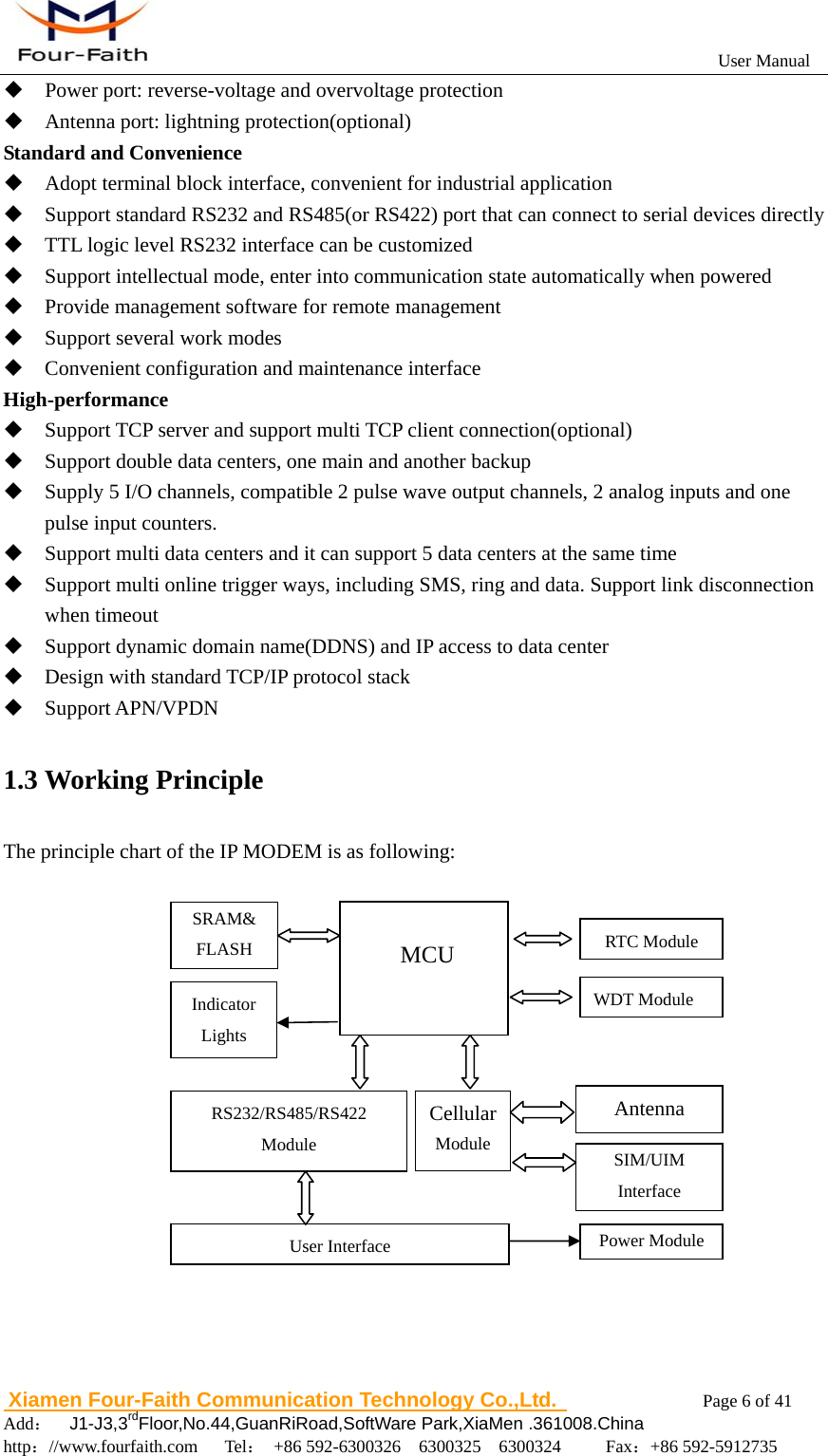
                                                          User Manual                       Xiamen Four-Faith Communication Technology Co.,Ltd.              Page 6 of 41     Add:  J1-J3,3rdFloor,No.44,GuanRiRoad,SoftWare Park,XiaMen .361008.China                                    http://www.fourfaith.com   Tel: +86 592-6300326  6300325  6300324     Fax:+86 592-5912735   Power port: reverse-voltage and overvoltage protection  Antenna port: lightning protection(optional) Standard and Convenience  Adopt terminal block interface, convenient for industrial application  Support standard RS232 and RS485(or RS422) port that can connect to serial devices directly  TTL logic level RS232 interface can be customized  Support intellectual mode, enter into communication state automatically when powered  Provide management software for remote management  Support several work modes  Convenient configuration and maintenance interface High-performance  Support TCP server and support multi TCP client connection(optional)  Support double data centers, one main and another backup  Supply 5 I/O channels, compatible 2 pulse wave output channels, 2 analog inputs and one pulse input counters.  Support multi data centers and it can support 5 data centers at the same time  Support multi online trigger ways, including SMS, ring and data. Support link disconnection when timeout  Support dynamic domain name(DDNS) and IP access to data center  Design with standard TCP/IP protocol stack  Support APN/VPDN 1.3 Working Principle The principle chart of the IP MODEM is as following:    Cellular Module  MCU Antenna SIM/UIM Interface Indicator Lights SRAM& FLASH WDT Module RTC Module User Interface RS232/RS485/RS422 Module Power Module
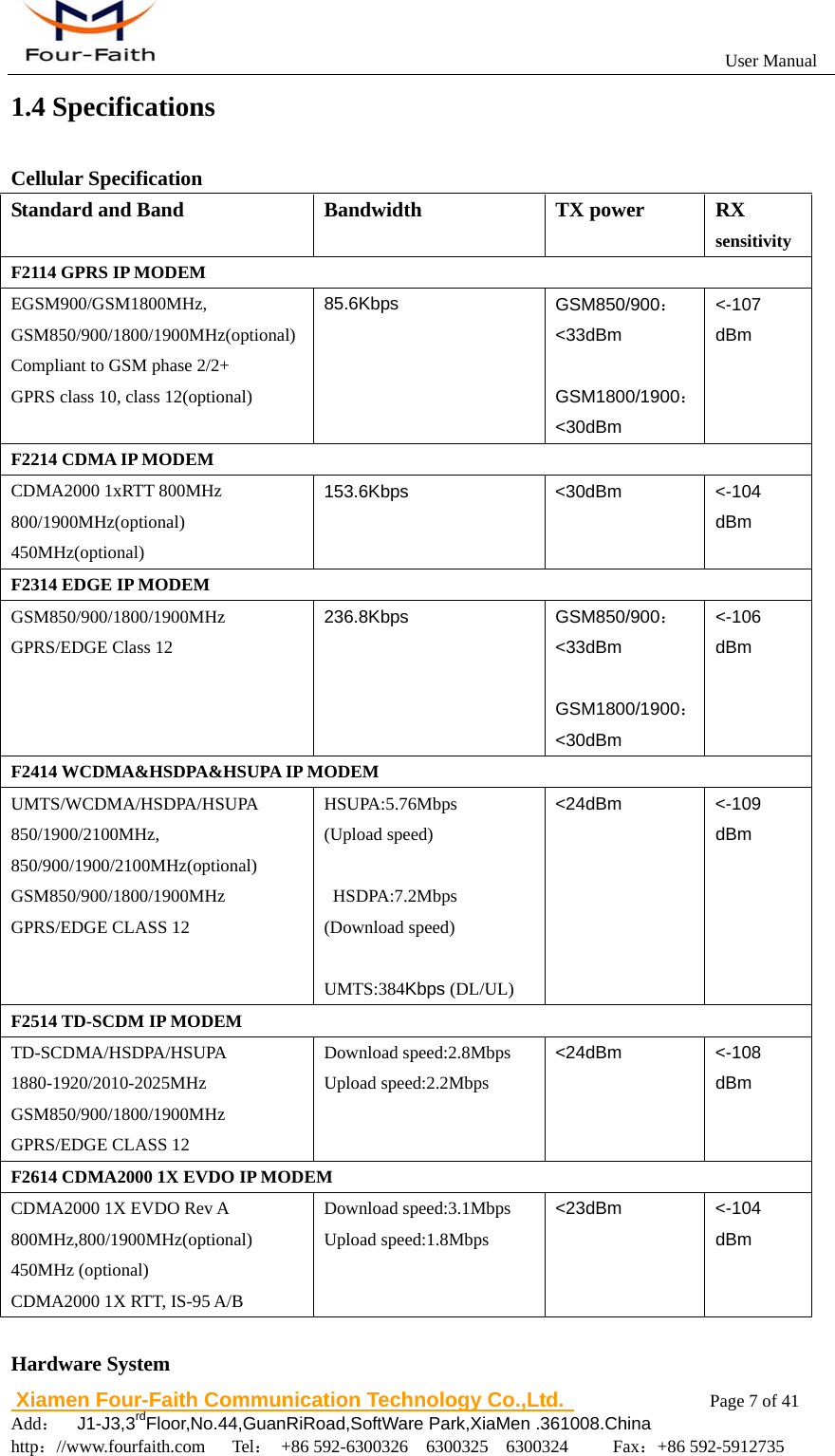
                                                          User Manual                       Xiamen Four-Faith Communication Technology Co.,Ltd.              Page 7 of 41     Add:  J1-J3,3rdFloor,No.44,GuanRiRoad,SoftWare Park,XiaMen .361008.China                                    http://www.fourfaith.com   Tel: +86 592-6300326  6300325  6300324     Fax:+86 592-5912735  1.4 Specifications Cellular Specification Standard and Band Bandwidth TX power RX sensitivity F2114 GPRS IP MODEM EGSM900/GSM1800MHz, GSM850/900/1800/1900MHz(optional) Compliant to GSM phase 2/2+ GPRS class 10, class 12(optional) 85.6Kbps  GSM850/900:<33dBm  GSM1800/1900:<30dBm <-107 dBm F2214 CDMA IP MODEM CDMA2000 1xRTT 800MHz 800/1900MHz(optional) 450MHz(optional) 153.6Kbps <30dBm <-104 dBm F2314 EDGE IP MODEM GSM850/900/1800/1900MHz GPRS/EDGE Class 12 236.8Kbps  GSM850/900:<33dBm  GSM1800/1900:<30dBm <-106 dBm F2414 WCDMA&HSDPA&HSUPA IP MODEM UMTS/WCDMA/HSDPA/HSUPA 850/1900/2100MHz, 850/900/1900/2100MHz(optional) GSM850/900/1800/1900MHz GPRS/EDGE CLASS 12 HSUPA:5.76Mbps (Upload speed)   HSDPA:7.2Mbps (Download speed)  UMTS:384Kbps (DL/UL) <24dBm <-109 dBm F2514 TD-SCDM IP MODEM TD-SCDMA/HSDPA/HSUPA 1880-1920/2010-2025MHz GSM850/900/1800/1900MHz GPRS/EDGE CLASS 12 Download speed:2.8Mbps Upload speed:2.2Mbps <24dBm <-108 dBm F2614 CDMA2000 1X EVDO IP MODEM CDMA2000 1X EVDO Rev A 800MHz,800/1900MHz(optional) 450MHz (optional) CDMA2000 1X RTT, IS-95 A/B Download speed:3.1Mbps Upload speed:1.8Mbps <23dBm <-104 dBm  Hardware System
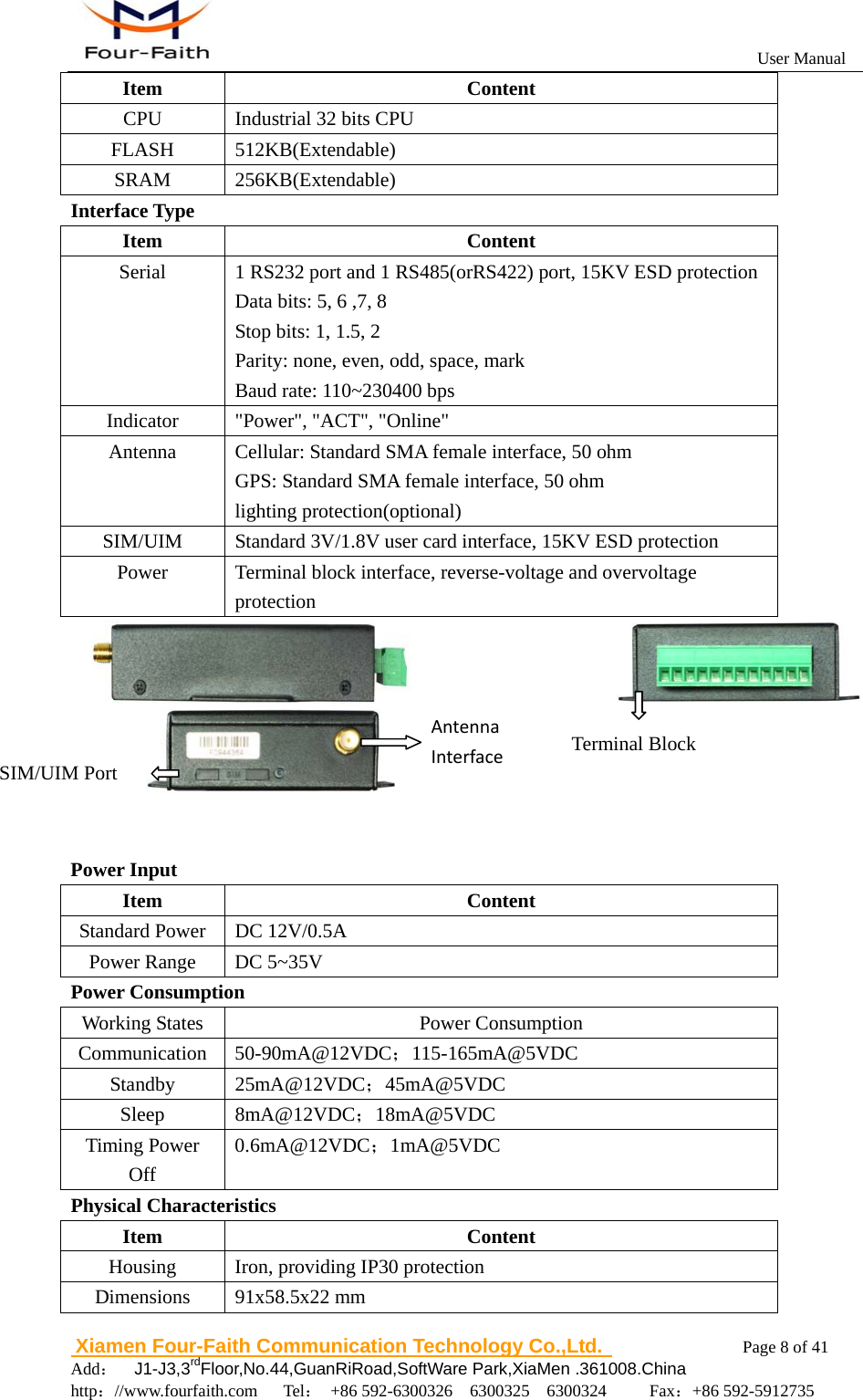
                                                          User Manual                       Xiamen Four-Faith Communication Technology Co.,Ltd.              Page 8 of 41     Add:  J1-J3,3rdFloor,No.44,GuanRiRoad,SoftWare Park,XiaMen .361008.China                                    http://www.fourfaith.com   Tel: +86 592-6300326  6300325  6300324     Fax:+86 592-5912735  Item Content CPU  Industrial 32 bits CPU FLASH 512KB(Extendable) SRAM 256KB(Extendable) Interface Type Item Content Serial    1 RS232 port and 1 RS485(orRS422) port, 15KV ESD protection Data bits: 5, 6 ,7, 8 Stop bits: 1, 1.5, 2 Parity: none, even, odd, space, mark Baud rate: 110~230400 bps Indicator  "Power", "ACT", "Online" Antenna  Cellular: Standard SMA female interface, 50 ohm GPS: Standard SMA female interface, 50 ohm lighting protection(optional) SIM/UIM  Standard 3V/1.8V user card interface, 15KV ESD protection Power  Terminal block interface, reverse-voltage and overvoltage protection                        Power Input Item Content Standard Power  DC 12V/0.5A Power Range  DC 5~35V Power Consumption Working States Power Consumption Communication 50-90mA@12VDC;115-165mA@5VDC Standby 25mA@12VDC;45mA@5VDC Sleep 8mA@12VDC;18mA@5VDC Timing Power Off 0.6mA@12VDC;1mA@5VDC Physical Characteristics Item Content Housing  Iron, providing IP30 protection Dimensions 91x58.5x22 mm SIM/UIM Port Terminal Block AntennaInterface
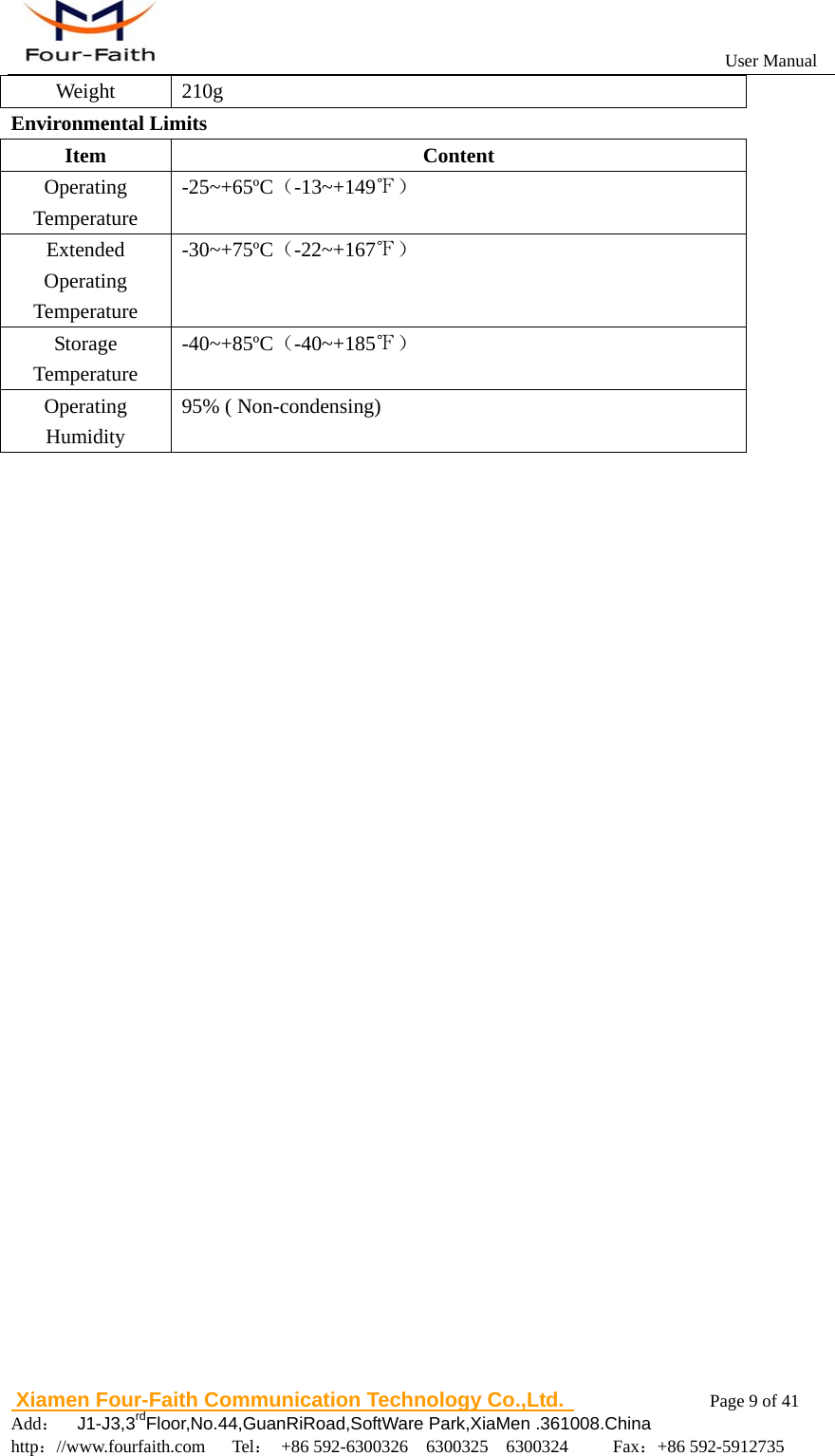
                                                          User Manual                       Xiamen Four-Faith Communication Technology Co.,Ltd.              Page 9 of 41     Add:  J1-J3,3rdFloor,No.44,GuanRiRoad,SoftWare Park,XiaMen .361008.China                                    http://www.fourfaith.com   Tel: +86 592-6300326  6300325  6300324     Fax:+86 592-5912735  Weight 210g Environmental Limits Item Content Operating Temperature -25~+65ºC(-13~+149℉) Extended  Operating Temperature -30~+75ºC(-22~+167℉) Storage Temperature -40~+85ºC(-40~+185℉) Operating Humidity 95% ( Non-condensing)
                                                          User Manual                       Xiamen Four-Faith Communication Technology Co.,Ltd.              Page 10 of 41     Add:  J1-J3,3rdFloor,No.44,GuanRiRoad,SoftWare Park,XiaMen .361008.China                                    http://www.fourfaith.com   Tel: +86 592-6300326  6300325  6300324     Fax:+86 592-5912735  Chapter 2 Installation Introduction 2.1 General The IP MODEM must be installed correctly to make it work properly. Warning: Forbid to install the IP MODEM when powered! 2.2 Encasement List  Name Quantity  Remark IP MODEM host  1   Cellular Antenna  1   Power adapter  1   RS232 data cable  1  optional RS485 data cable  1  optional Manual CD  1   Certification card  1   Maintenance card  1   Table 2-1 Encasement List    2.3 Installation and Cable Connection Dimension: (unit: mm)
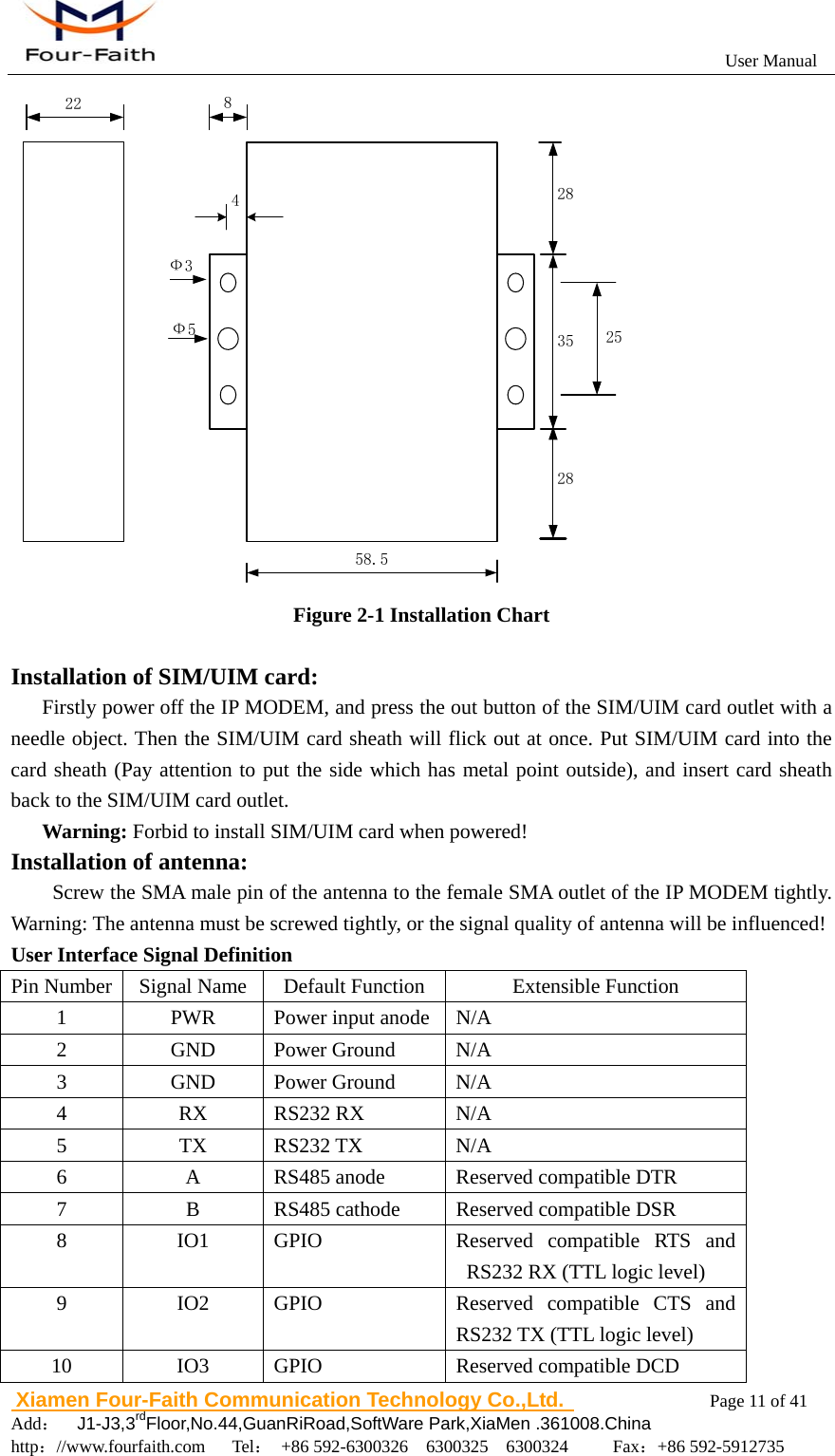
                                                          User Manual                       Xiamen Four-Faith Communication Technology Co.,Ltd.              Page 11 of 41     Add:  J1-J3,3rdFloor,No.44,GuanRiRoad,SoftWare Park,XiaMen .361008.China                                    http://www.fourfaith.com   Tel: +86 592-6300326  6300325  6300324     Fax:+86 592-5912735  58.535282822 825Ф3Ф54 Figure 2-1 Installation Chart  Installation of SIM/UIM card: Firstly power off the IP MODEM, and press the out button of the SIM/UIM card outlet with a needle object. Then the SIM/UIM card sheath will flick out at once. Put SIM/UIM card into the card sheath (Pay attention to put the side which has metal point outside), and insert card sheath back to the SIM/UIM card outlet. Warning: Forbid to install SIM/UIM card when powered! Installation of antenna:                    Screw the SMA male pin of the antenna to the female SMA outlet of the IP MODEM tightly. Warning: The antenna must be screwed tightly, or the signal quality of antenna will be influenced! User Interface Signal Definition Pin Number  Signal Name  Default Function  Extensible Function 1  PWR  Power input anode N/A 2 GND Power Ground N/A 3 GND Power Ground N/A 4 RX RS232 RX N/A 5 TX RS232 TX N/A 6  A  RS485 anode  Reserved compatible DTR 7  B  RS485 cathode  Reserved compatible DSR 8 IO1 GPIO  Reserved compatible RTS and RS232 RX (TTL logic level) 9 IO2 GPIO  Reserved compatible CTS and RS232 TX (TTL logic level) 10 IO3 GPIO   Reserved compatible DCD
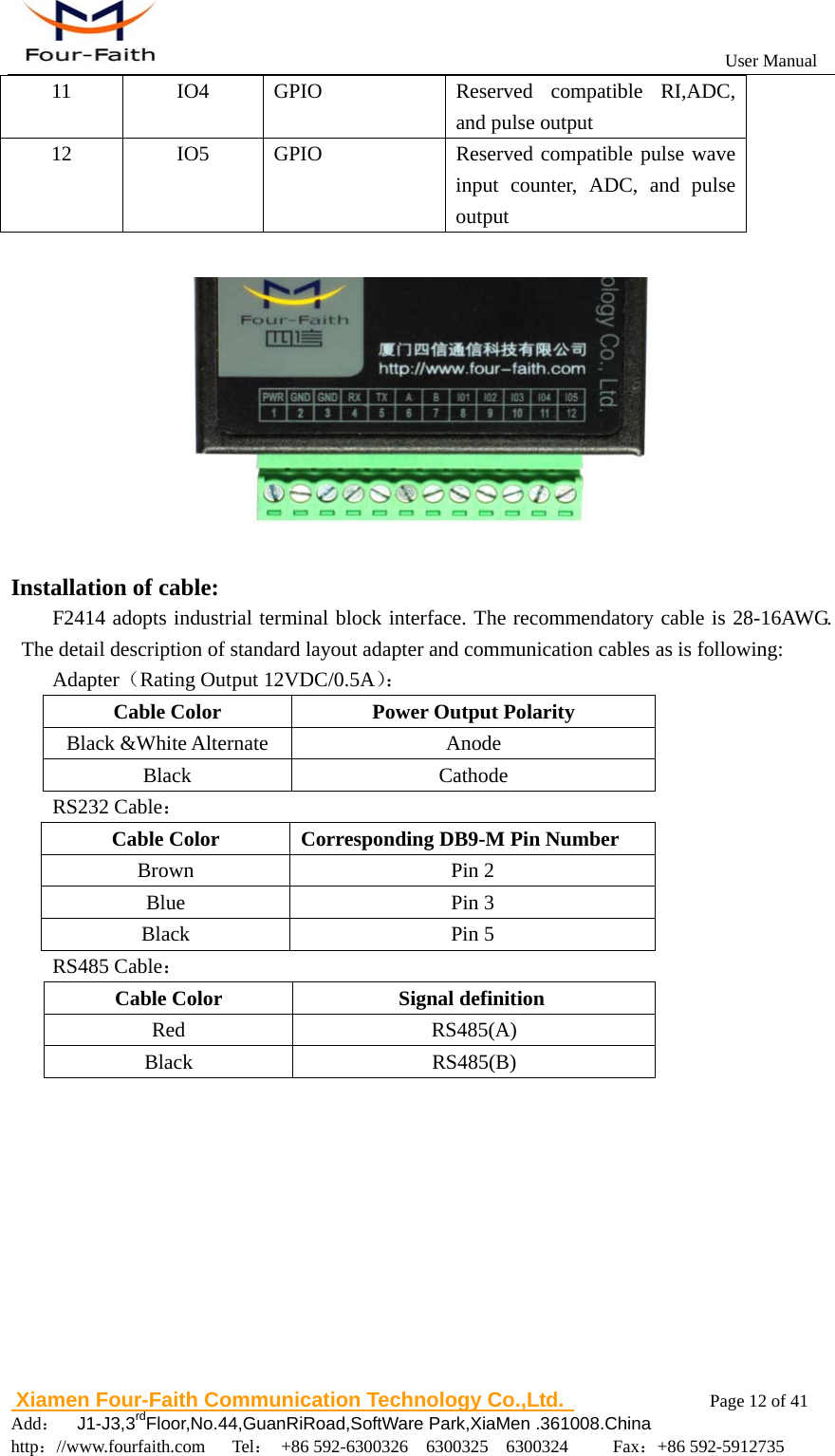
                                                          User Manual                       Xiamen Four-Faith Communication Technology Co.,Ltd.              Page 12 of 41     Add:  J1-J3,3rdFloor,No.44,GuanRiRoad,SoftWare Park,XiaMen .361008.China                                    http://www.fourfaith.com   Tel: +86 592-6300326  6300325  6300324     Fax:+86 592-5912735  11 IO4 GPIO  Reserved compatible RI,ADC, and pulse output   12  IO5  GPIO   Reserved compatible pulse wave input counter, ADC, and pulse output    Installation of cable: F2414 adopts industrial terminal block interface. The recommendatory cable is 28-16AWG. The detail description of standard layout adapter and communication cables as is following: Adapter(Rating Output 12VDC/0.5A): Cable Color  Power Output Polarity Black &White Alternate  Anode Black Cathode RS232 Cable: Cable Color  Corresponding DB9-M Pin Number Brown Pin 2 Blue Pin 3 Black Pin 5 RS485 Cable: Cable Color  Signal definition  Red RS485(A) Black RS485(B)
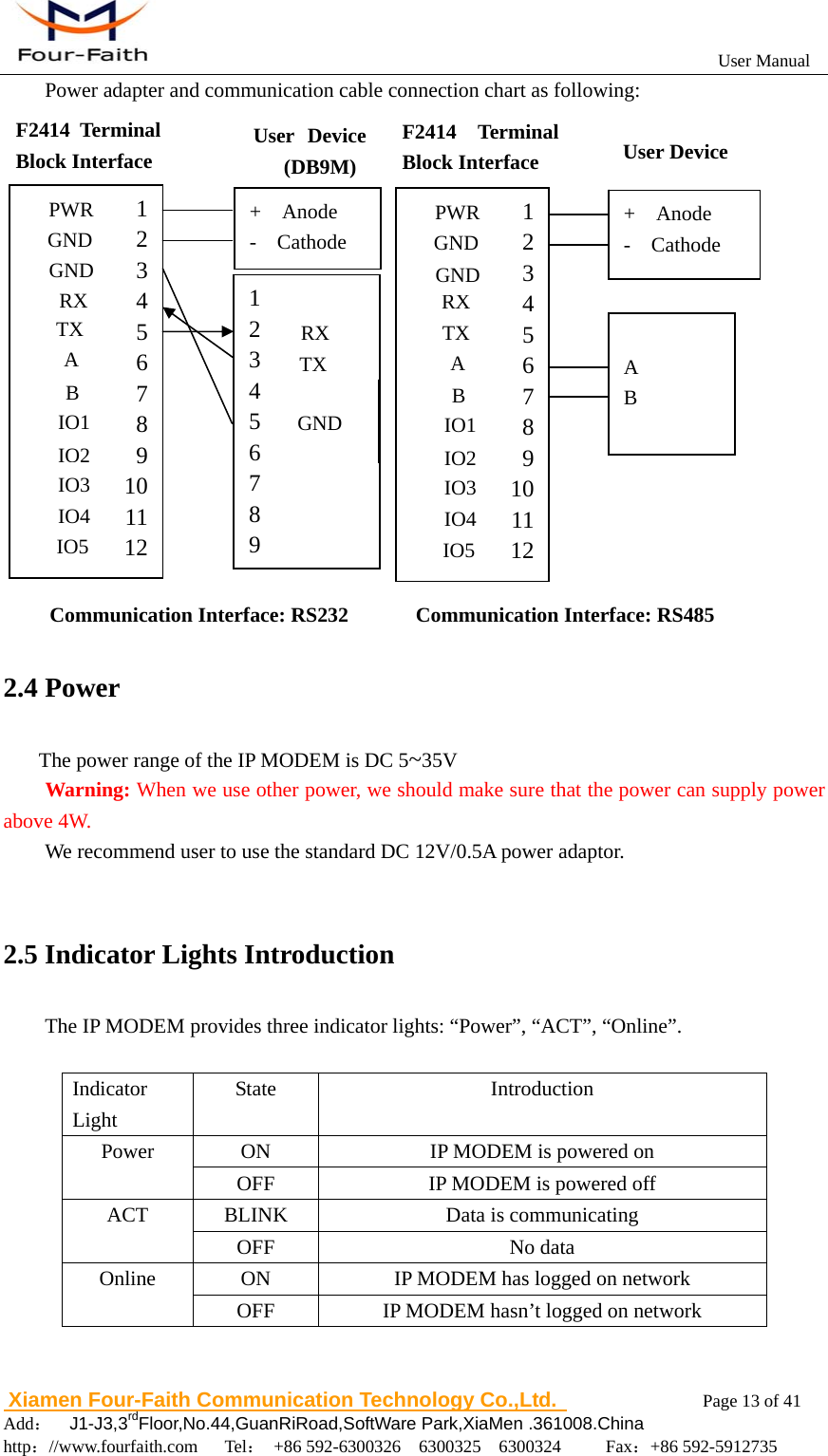
                                                          User Manual                       Xiamen Four-Faith Communication Technology Co.,Ltd.              Page 13 of 41     Add:  J1-J3,3rdFloor,No.44,GuanRiRoad,SoftWare Park,XiaMen .361008.China                                    http://www.fourfaith.com   Tel: +86 592-6300326  6300325  6300324     Fax:+86 592-5912735  Power adapter and communication cable connection chart as following:                                 2.4 Power The power range of the IP MODEM is DC 5~35V Warning: When we use other power, we should make sure that the power can supply power above 4W. We recommend user to use the standard DC 12V/0.5A power adaptor.    2.5 Indicator Lights Introduction The IP MODEM provides three indicator lights: “Power”, “ACT”, “Online”.  Indicator Light State Introduction Power  ON  IP MODEM is powered on OFF  IP MODEM is powered off ACT BLINK  Data is communicating  OFF No data  Online  ON  IP MODEM has logged on network OFF  IP MODEM hasn’t logged on network   Communication Interface: RS232  Communication Interface: RS485 F2414 Terminal Block Interface  User Device (DB9M)  User Device 123456789101112RX GND TX A B IO1 IO2 IO3 IO4 PWR GND IO5 + Anode - Cathode  A B F2414 Terminal Block Interface 1 2 3 4 5 6 7 8 9 10 11 12 RX GND TX A B IO1 IO2 IO3 IO4 PWR GND IO5 1 2 3 4 5 6 7 8 9 GND TX RX + Anode - Cathode RX
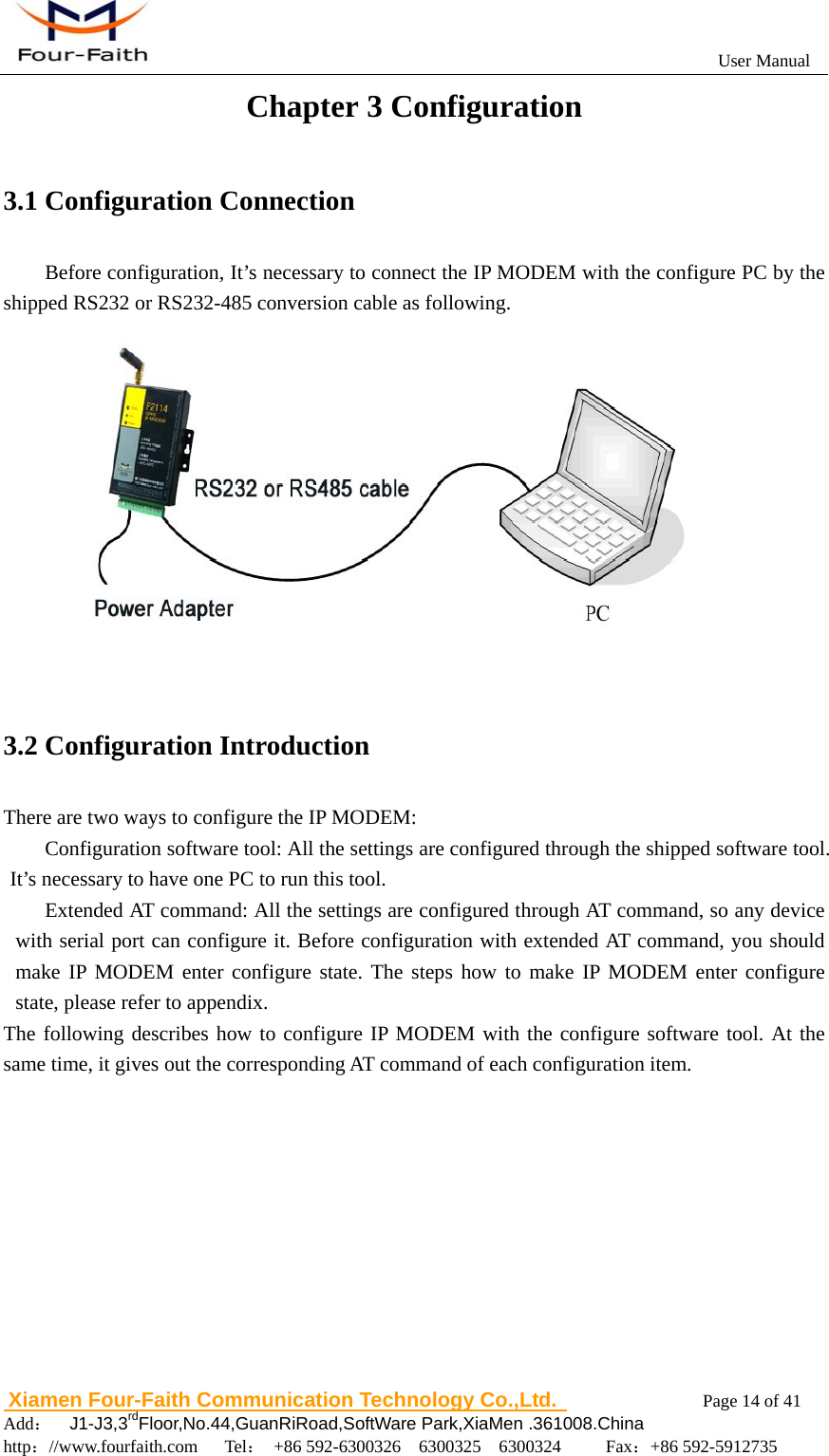
                                                          User Manual                       Xiamen Four-Faith Communication Technology Co.,Ltd.              Page 14 of 41     Add:  J1-J3,3rdFloor,No.44,GuanRiRoad,SoftWare Park,XiaMen .361008.China                                    http://www.fourfaith.com   Tel: +86 592-6300326  6300325  6300324     Fax:+86 592-5912735  Chapter 3 Configuration 3.1 Configuration Connection Before configuration, It’s necessary to connect the IP MODEM with the configure PC by the shipped RS232 or RS232-485 conversion cable as following.  3.2 Configuration Introduction There are two ways to configure the IP MODEM: Configuration software tool: All the settings are configured through the shipped software tool. It’s necessary to have one PC to run this tool. Extended AT command: All the settings are configured through AT command, so any device with serial port can configure it. Before configuration with extended AT command, you should make IP MODEM enter configure state. The steps how to make IP MODEM enter configure state, please refer to appendix. The following describes how to configure IP MODEM with the configure software tool. At the same time, it gives out the corresponding AT command of each configuration item.
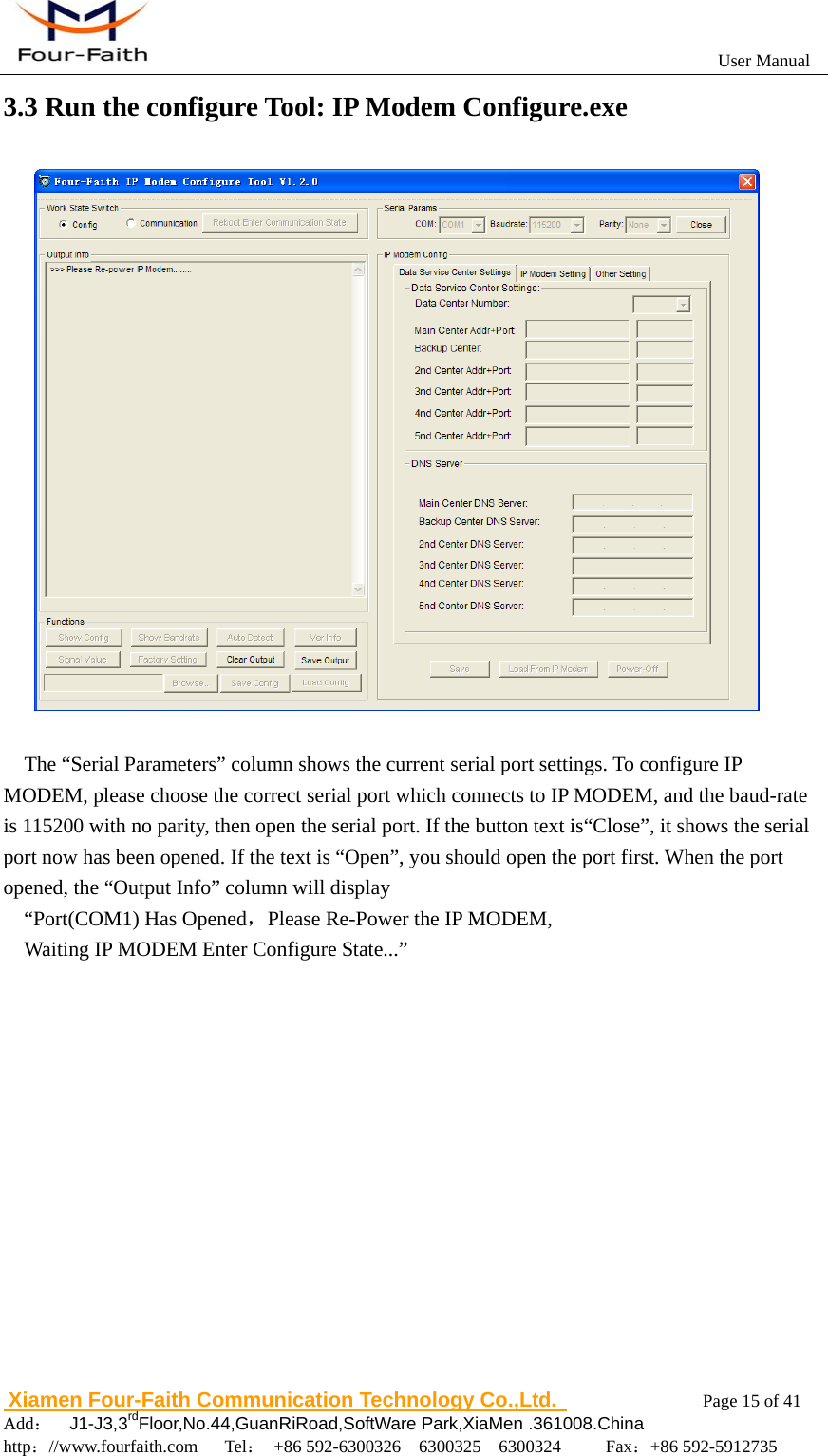
                                                          User Manual                       Xiamen Four-Faith Communication Technology Co.,Ltd.              Page 15 of 41     Add:  J1-J3,3rdFloor,No.44,GuanRiRoad,SoftWare Park,XiaMen .361008.China                                    http://www.fourfaith.com   Tel: +86 592-6300326  6300325  6300324     Fax:+86 592-5912735  3.3 Run the configure Tool: IP Modem Configure.exe     The “Serial Parameters” column shows the current serial port settings. To configure IP MODEM, please choose the correct serial port which connects to IP MODEM, and the baud-rate is 115200 with no parity, then open the serial port. If the button text is“Close”, it shows the serial port now has been opened. If the text is “Open”, you should open the port first. When the port opened, the “Output Info” column will display   “Port(COM1) Has Opened,Please Re-Power the IP MODEM, Waiting IP MODEM Enter Configure State...”
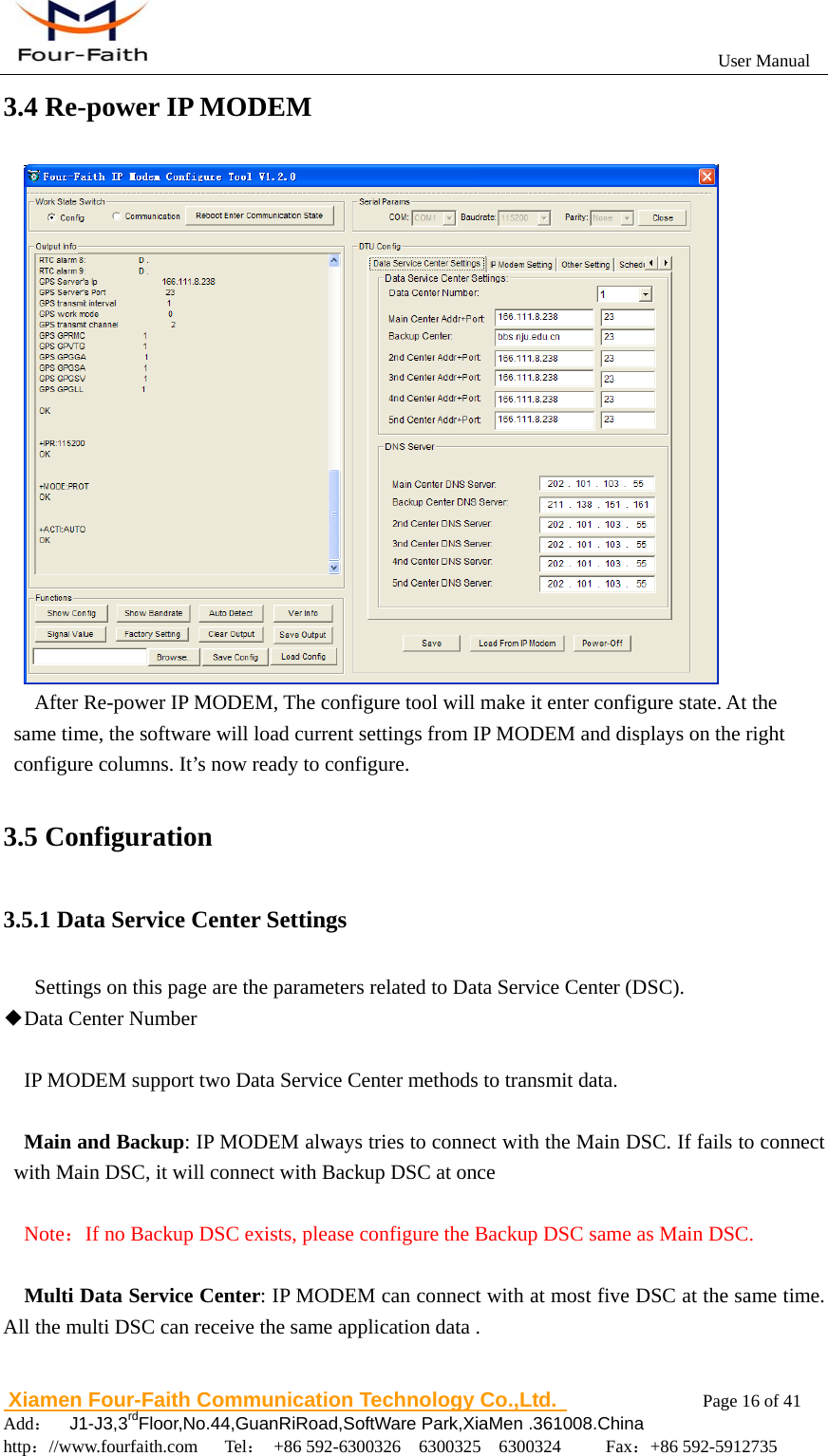
                                                          User Manual                       Xiamen Four-Faith Communication Technology Co.,Ltd.              Page 16 of 41     Add:  J1-J3,3rdFloor,No.44,GuanRiRoad,SoftWare Park,XiaMen .361008.China                                    http://www.fourfaith.com   Tel: +86 592-6300326  6300325  6300324     Fax:+86 592-5912735  3.4 Re-power IP MODEM        After Re-power IP MODEM, The configure tool will make it enter configure state. At the same time, the software will load current settings from IP MODEM and displays on the right configure columns. It’s now ready to configure.  3.5 Configuration 3.5.1 Data Service Center Settings Settings on this page are the parameters related to Data Service Center (DSC). ◆Data Center Number  IP MODEM support two Data Service Center methods to transmit data.  Main and Backup: IP MODEM always tries to connect with the Main DSC. If fails to connect with Main DSC, it will connect with Backup DSC at once     Note:If no Backup DSC exists, please configure the Backup DSC same as Main DSC.  Multi Data Service Center: IP MODEM can connect with at most five DSC at the same time. All the multi DSC can receive the same application data .
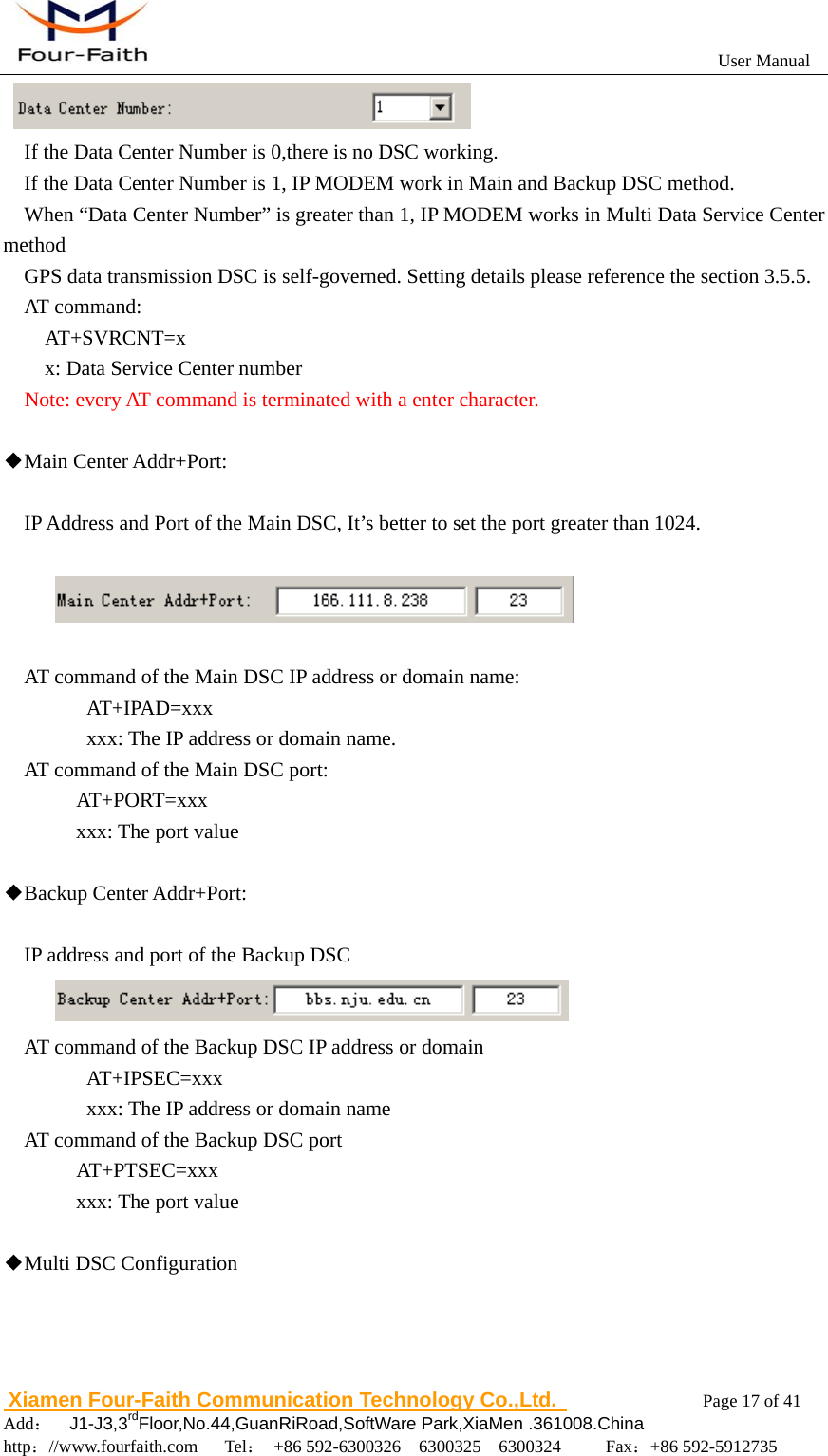
                                                          User Manual                       Xiamen Four-Faith Communication Technology Co.,Ltd.              Page 17 of 41     Add:  J1-J3,3rdFloor,No.44,GuanRiRoad,SoftWare Park,XiaMen .361008.China                                    http://www.fourfaith.com   Tel: +86 592-6300326  6300325  6300324     Fax:+86 592-5912735         If the Data Center Number is 0,there is no DSC working. If the Data Center Number is 1, IP MODEM work in Main and Backup DSC method.   When “Data Center Number” is greater than 1, IP MODEM works in Multi Data Service Center method GPS data transmission DSC is self-governed. Setting details please reference the section 3.5.5. AT command: AT+SVRCNT=x  x: Data Service Center number   Note: every AT command is terminated with a enter character.    ◆Main Center Addr+Port:    IP Address and Port of the Main DSC, It’s better to set the port greater than 1024.    AT command of the Main DSC IP address or domain name:    AT+IPAD=xxx       xxx: The IP address or domain name. AT command of the Main DSC port:   AT+PORT=xxx     xxx: The port value  ◆Backup Center Addr+Port:  IP address and port of the Backup DSC  AT command of the Backup DSC IP address or domain    AT+IPSEC=xxx       xxx: The IP address or domain name AT command of the Backup DSC port   AT+PTSEC=xxx     xxx: The port value    ◆Multi DSC Configuration
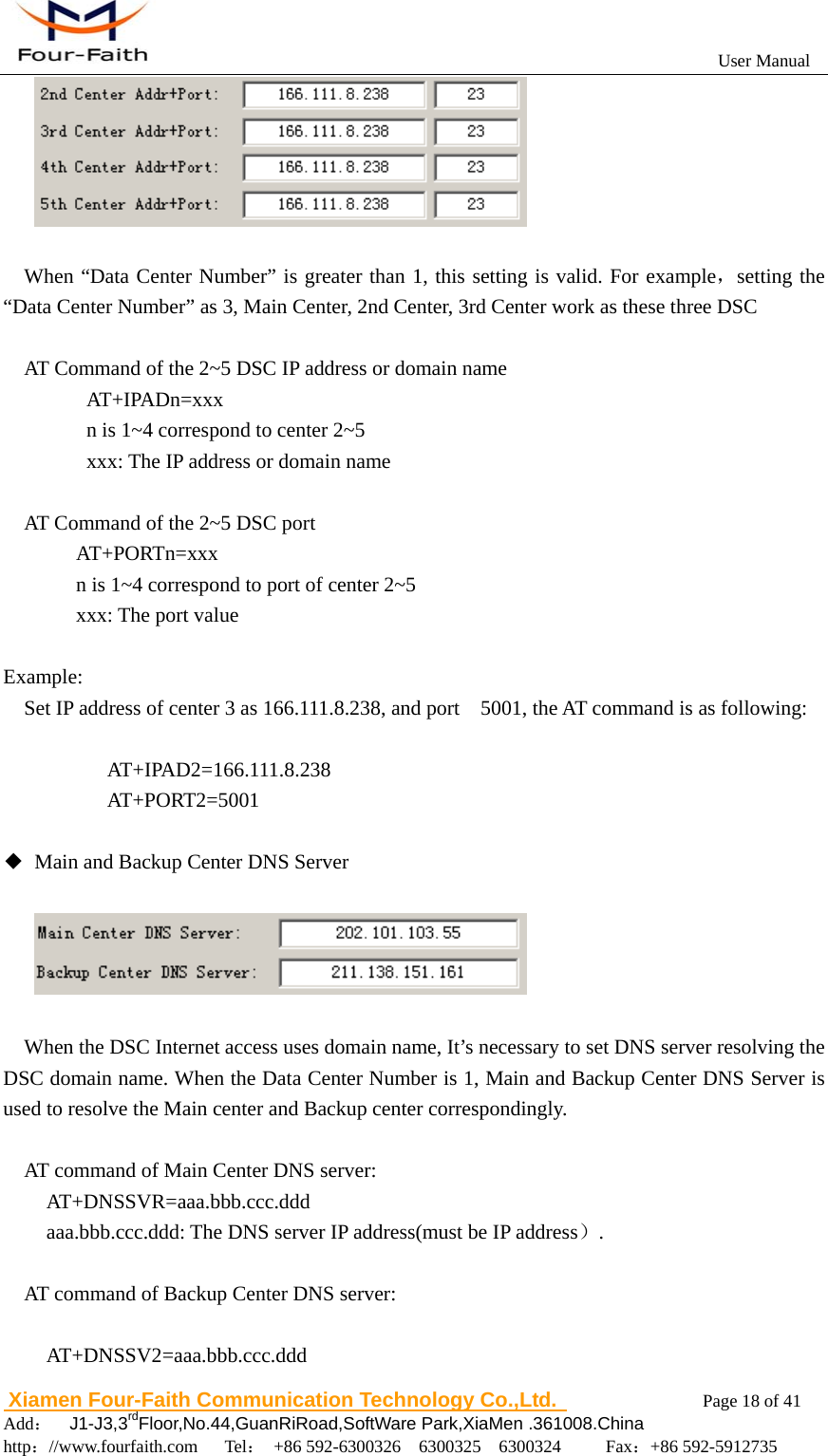
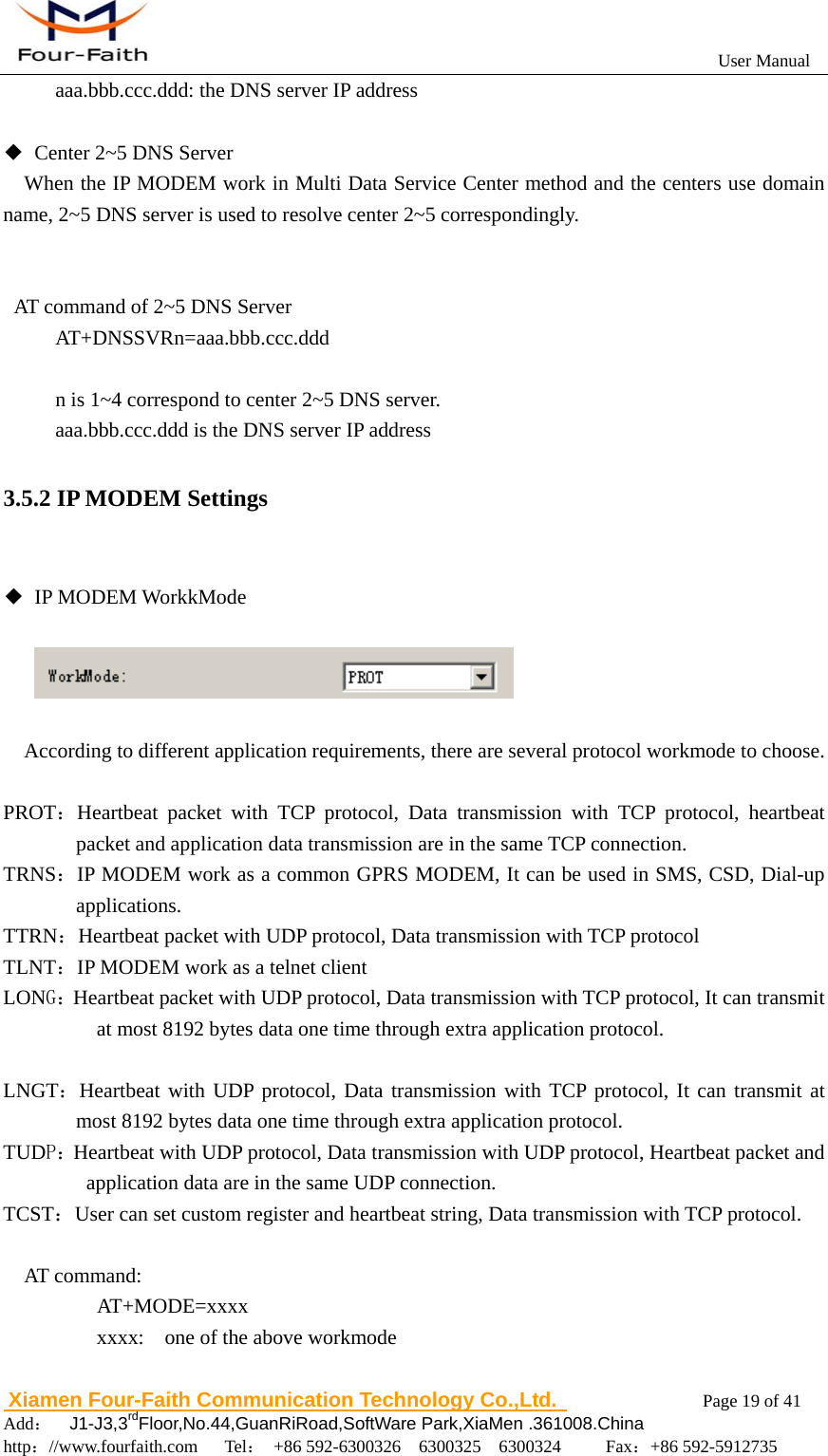
                                                          User Manual                       Xiamen Four-Faith Communication Technology Co.,Ltd.              Page 18 of 41     Add:  J1-J3,3rdFloor,No.44,GuanRiRoad,SoftWare Park,XiaMen .361008.China                                    http://www.fourfaith.com   Tel: +86 592-6300326  6300325  6300324     Fax:+86 592-5912735    When “Data Center Number” is greater than 1, this setting is valid. For example,setting the “Data Center Number” as 3, Main Center, 2nd Center, 3rd Center work as these three DSC  AT Command of the 2~5 DSC IP address or domain name    AT+IPADn=xxx       n is 1~4 correspond to center 2~5       xxx: The IP address or domain name        AT Command of the 2~5 DSC port   AT+PORTn=xxx     n is 1~4 correspond to port of center 2~5     xxx: The port value  Example:     Set IP address of center 3 as 166.111.8.238, and port    5001, the AT command is as following:  AT+IPAD2=166.111.8.238 AT+PORT2=5001  ◆  Main and Backup Center DNS Server      When the DSC Internet access uses domain name, It’s necessary to set DNS server resolving the DSC domain name. When the Data Center Number is 1, Main and Backup Center DNS Server is used to resolve the Main center and Backup center correspondingly.  AT command of Main Center DNS server:         AT+DNSSVR=aaa.bbb.ccc.ddd aaa.bbb.ccc.ddd: The DNS server IP address(must be IP address).  AT command of Backup Center DNS server:      AT+DNSSV2=aaa.bbb.ccc.ddd
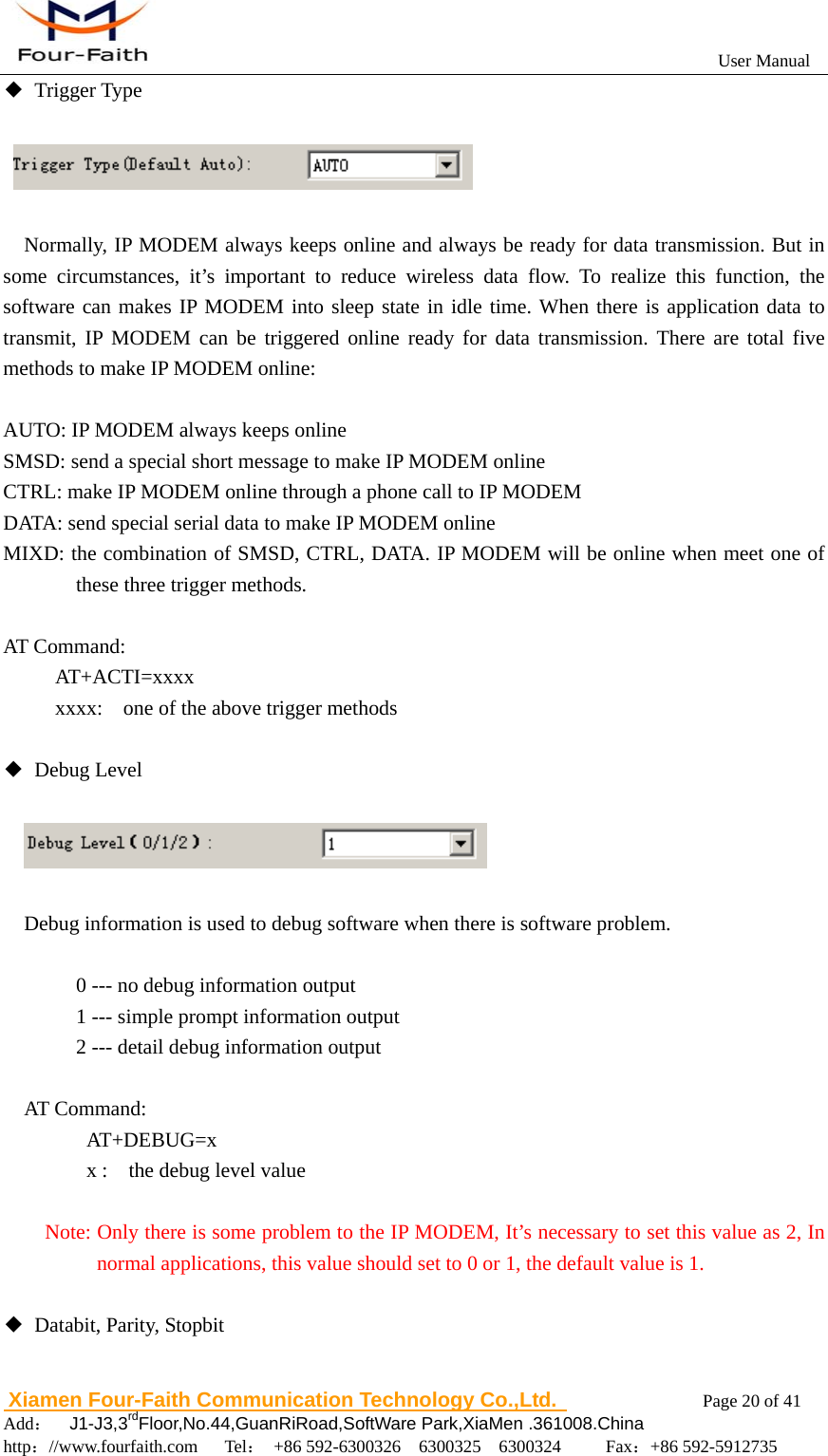
                                                          User Manual                       Xiamen Four-Faith Communication Technology Co.,Ltd.              Page 19 of 41     Add:  J1-J3,3rdFloor,No.44,GuanRiRoad,SoftWare Park,XiaMen .361008.China                                    http://www.fourfaith.com   Tel: +86 592-6300326  6300325  6300324     Fax:+86 592-5912735  aaa.bbb.ccc.ddd: the DNS server IP address  ◆  Center 2~5 DNS Server When the IP MODEM work in Multi Data Service Center method and the centers use domain name, 2~5 DNS server is used to resolve center 2~5 correspondingly.   AT command of 2~5 DNS Server AT+DNSSVRn=aaa.bbb.ccc.ddd  n is 1~4 correspond to center 2~5 DNS server. aaa.bbb.ccc.ddd is the DNS server IP address 3.5.2 IP MODEM Settings  ◆ IP MODEM WorkkMode          According to different application requirements, there are several protocol workmode to choose.  PROT:Heartbeat packet with TCP protocol, Data transmission with TCP protocol, heartbeat packet and application data transmission are in the same TCP connection. TRNS:IP MODEM work as a common GPRS MODEM, It can be used in SMS, CSD, Dial-up applications. TTRN:Heartbeat packet with UDP protocol, Data transmission with TCP protocol TLNT:IP MODEM work as a telnet client LONG:Heartbeat packet with UDP protocol, Data transmission with TCP protocol, It can transmit at most 8192 bytes data one time through extra application protocol.  LNGT:Heartbeat with UDP protocol, Data transmission with TCP protocol, It can transmit at most 8192 bytes data one time through extra application protocol. TUDP:Heartbeat with UDP protocol, Data transmission with UDP protocol, Heartbeat packet and application data are in the same UDP connection. TCST:User can set custom register and heartbeat string, Data transmission with TCP protocol.  AT command:     AT+MODE=xxxx     xxxx:  one of the above workmode
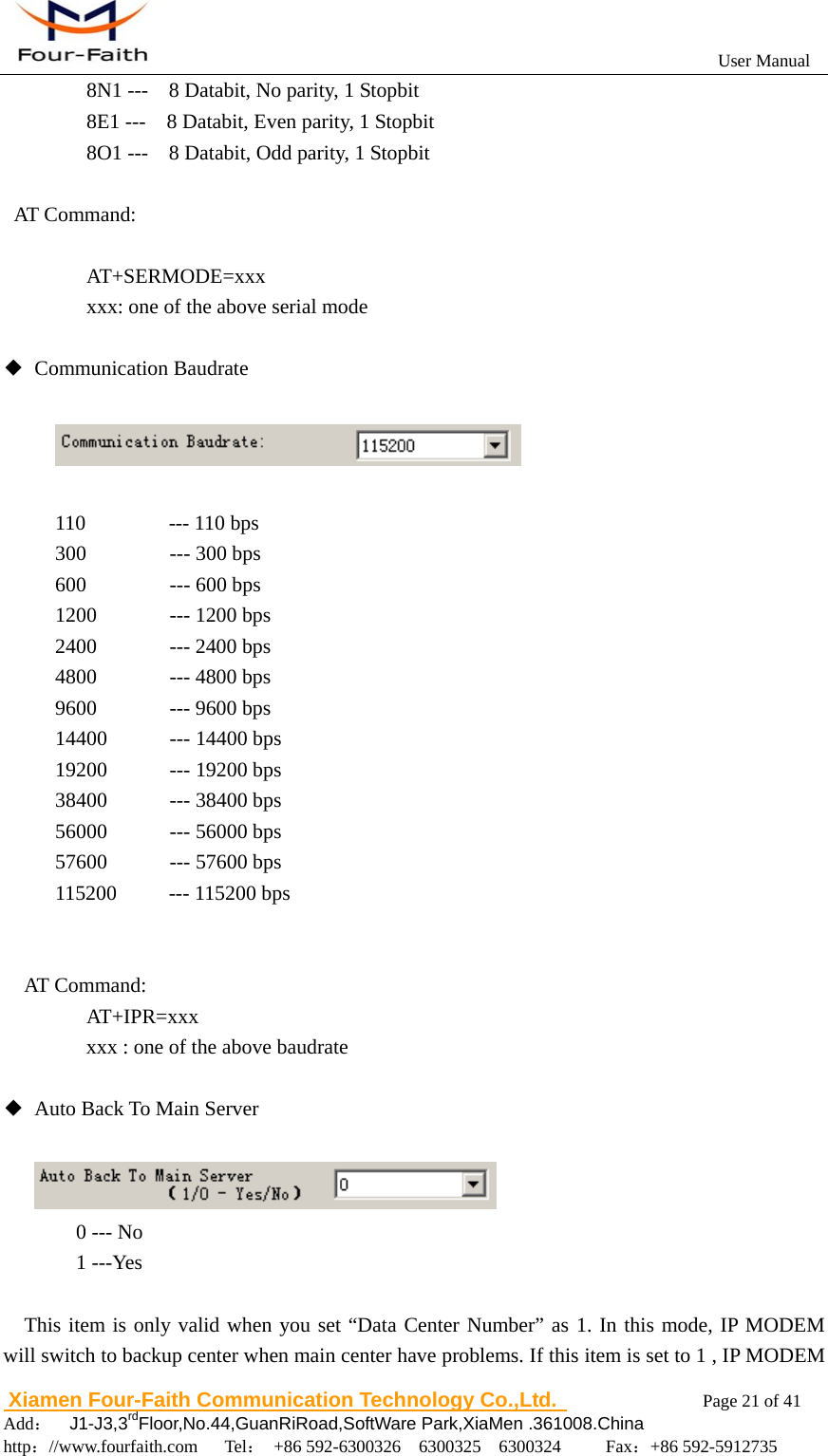
                                                          User Manual                       Xiamen Four-Faith Communication Technology Co.,Ltd.              Page 20 of 41     Add:  J1-J3,3rdFloor,No.44,GuanRiRoad,SoftWare Park,XiaMen .361008.China                                    http://www.fourfaith.com   Tel: +86 592-6300326  6300325  6300324     Fax:+86 592-5912735  ◆ Trigger Type     Normally, IP MODEM always keeps online and always be ready for data transmission. But in some circumstances, it’s important to reduce wireless data flow. To realize this function, the software can makes IP MODEM into sleep state in idle time. When there is application data to transmit, IP MODEM can be triggered online ready for data transmission. There are total five methods to make IP MODEM online:  AUTO: IP MODEM always keeps online SMSD: send a special short message to make IP MODEM online CTRL: make IP MODEM online through a phone call to IP MODEM DATA: send special serial data to make IP MODEM online MIXD: the combination of SMSD, CTRL, DATA. IP MODEM will be online when meet one of these three trigger methods.    AT Command:      AT+ACTI=xxxx           xxxx:    one of the above trigger methods  ◆ Debug Level             Debug information is used to debug software when there is software problem.      0 --- no debug information output     1 --- simple prompt information output     2 --- detail debug information output  AT Command:    AT+DEBUG=x    x :  the debug level value    Note: Only there is some problem to the IP MODEM, It’s necessary to set this value as 2, In normal applications, this value should set to 0 or 1, the default value is 1.  ◆  Databit, Parity, Stopbit
                                                          User Manual                       Xiamen Four-Faith Communication Technology Co.,Ltd.              Page 21 of 41     Add:  J1-J3,3rdFloor,No.44,GuanRiRoad,SoftWare Park,XiaMen .361008.China                                    http://www.fourfaith.com   Tel: +86 592-6300326  6300325  6300324     Fax:+86 592-5912735        8N1 ---    8 Databit, No parity, 1 Stopbit       8E1 ---    8 Databit, Even parity, 1 Stopbit       8O1 ---    8 Databit, Odd parity, 1 Stopbit  AT Command:     AT+SERMODE=xxx       xxx: one of the above serial mode  ◆ Communication Baudrate    110        --- 110 bps 300        --- 300 bps 600        --- 600 bps 1200       --- 1200 bps 2400       --- 2400 bps 4800       --- 4800 bps 9600       --- 9600 bps 14400      --- 14400 bps 19200      --- 19200 bps 38400      --- 38400 bps 56000      --- 56000 bps 57600      --- 57600 bps 115200     --- 115200 bps   AT Command:    AT+IPR=xxx xxx : one of the above baudrate  ◆  Auto Back To Main Server           0 --- No   1 ---Yes    This item is only valid when you set “Data Center Number” as 1. In this mode, IP MODEM will switch to backup center when main center have problems. If this item is set to 1 , IP MODEM
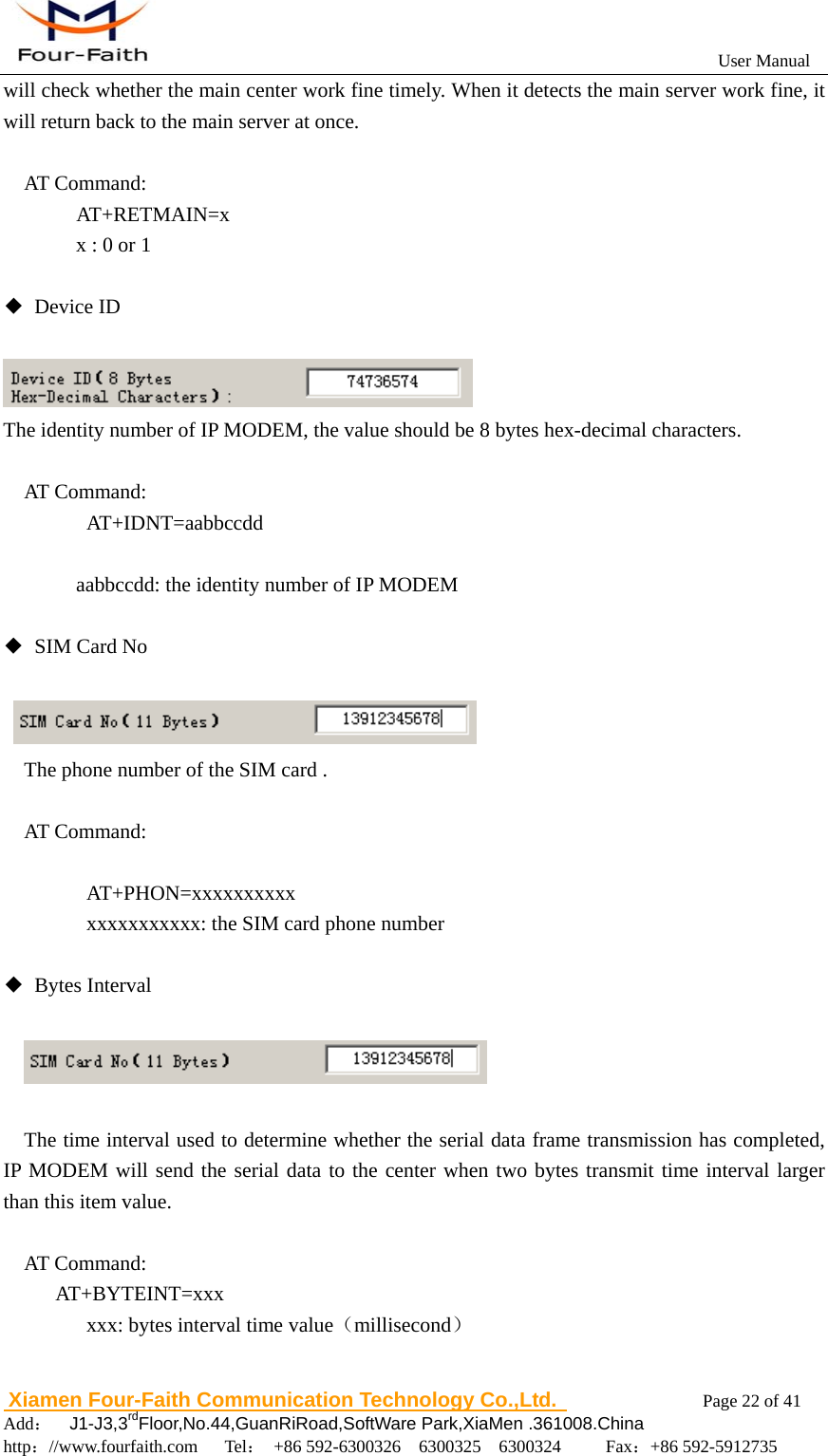
                                                          User Manual                       Xiamen Four-Faith Communication Technology Co.,Ltd.              Page 22 of 41     Add:  J1-J3,3rdFloor,No.44,GuanRiRoad,SoftWare Park,XiaMen .361008.China                                    http://www.fourfaith.com   Tel: +86 592-6300326  6300325  6300324     Fax:+86 592-5912735  will check whether the main center work fine timely. When it detects the main server work fine, it will return back to the main server at once.  AT Command:   AT+RETMAIN=x     x : 0 or 1  ◆ Device ID   The identity number of IP MODEM, the value should be 8 bytes hex-decimal characters.  AT Command:    AT+IDNT=aabbccdd      aabbccdd: the identity number of IP MODEM  ◆ SIM Card No    The phone number of the SIM card .  AT Command:     AT+PHON=xxxxxxxxxx       xxxxxxxxxxx: the SIM card phone number  ◆ Bytes Interval       The time interval used to determine whether the serial data frame transmission has completed, IP MODEM will send the serial data to the center when two bytes transmit time interval larger than this item value.  AT Command: AT+BYTEINT=xxx       xxx: bytes interval time value(millisecond)
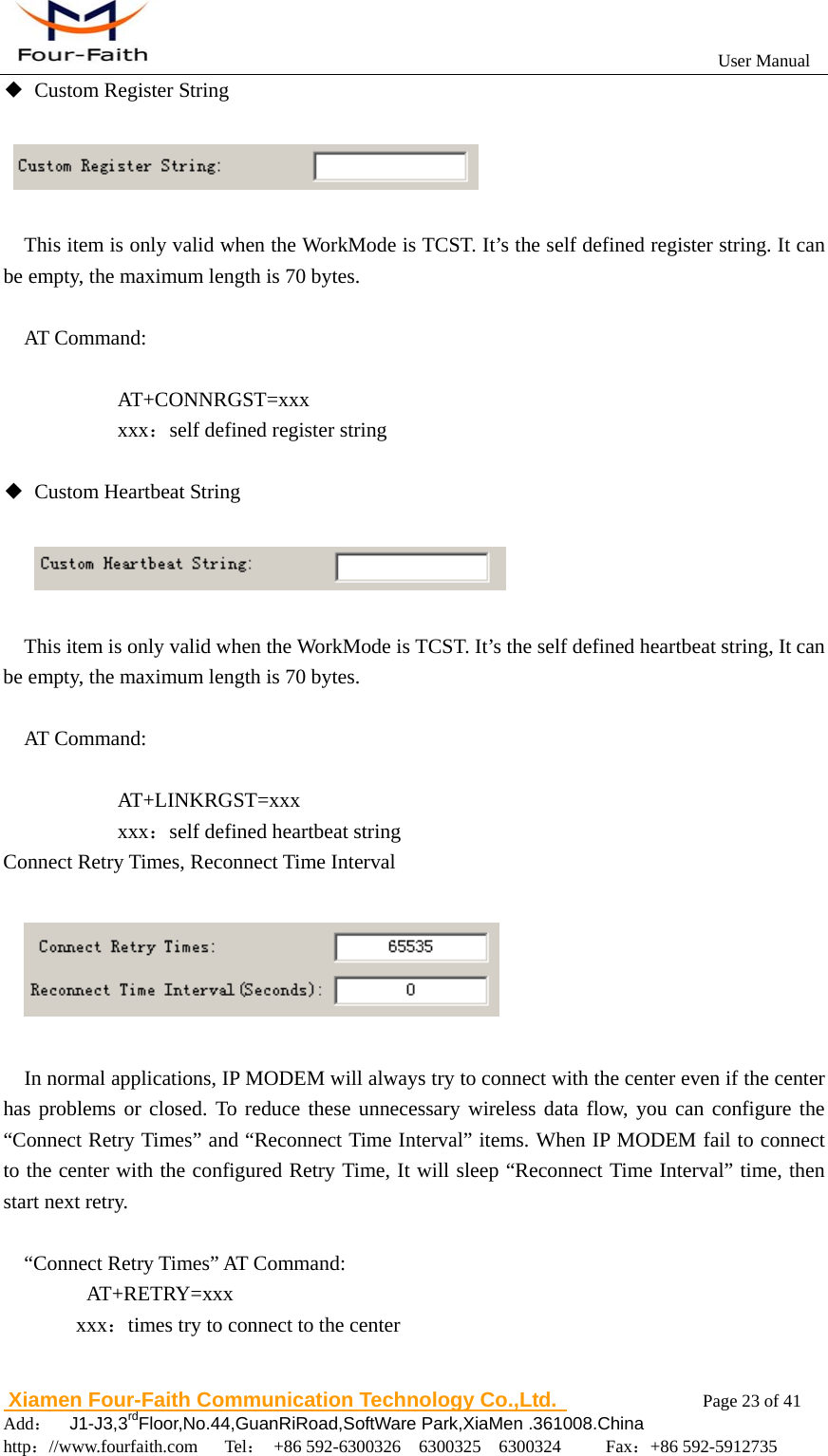
                                                          User Manual                       Xiamen Four-Faith Communication Technology Co.,Ltd.              Page 23 of 41     Add:  J1-J3,3rdFloor,No.44,GuanRiRoad,SoftWare Park,XiaMen .361008.China                                    http://www.fourfaith.com   Tel: +86 592-6300326  6300325  6300324     Fax:+86 592-5912735  ◆  Custom Register String     This item is only valid when the WorkMode is TCST. It’s the self defined register string. It can be empty, the maximum length is 70 bytes.  AT Command:  AT+CONNRGST=xxx       xxx:self defined register string       ◆  Custom Heartbeat String        This item is only valid when the WorkMode is TCST. It’s the self defined heartbeat string, It can be empty, the maximum length is 70 bytes.  AT Command:  AT+LINKRGST=xxx       xxx:self defined heartbeat string Connect Retry Times, Reconnect Time Interval             In normal applications, IP MODEM will always try to connect with the center even if the center has problems or closed. To reduce these unnecessary wireless data flow, you can configure the “Connect Retry Times” and “Reconnect Time Interval” items. When IP MODEM fail to connect to the center with the configured Retry Time, It will sleep “Reconnect Time Interval” time, then start next retry.  “Connect Retry Times” AT Command:    AT+RETRY=xxx   xxx:times try to connect to the center
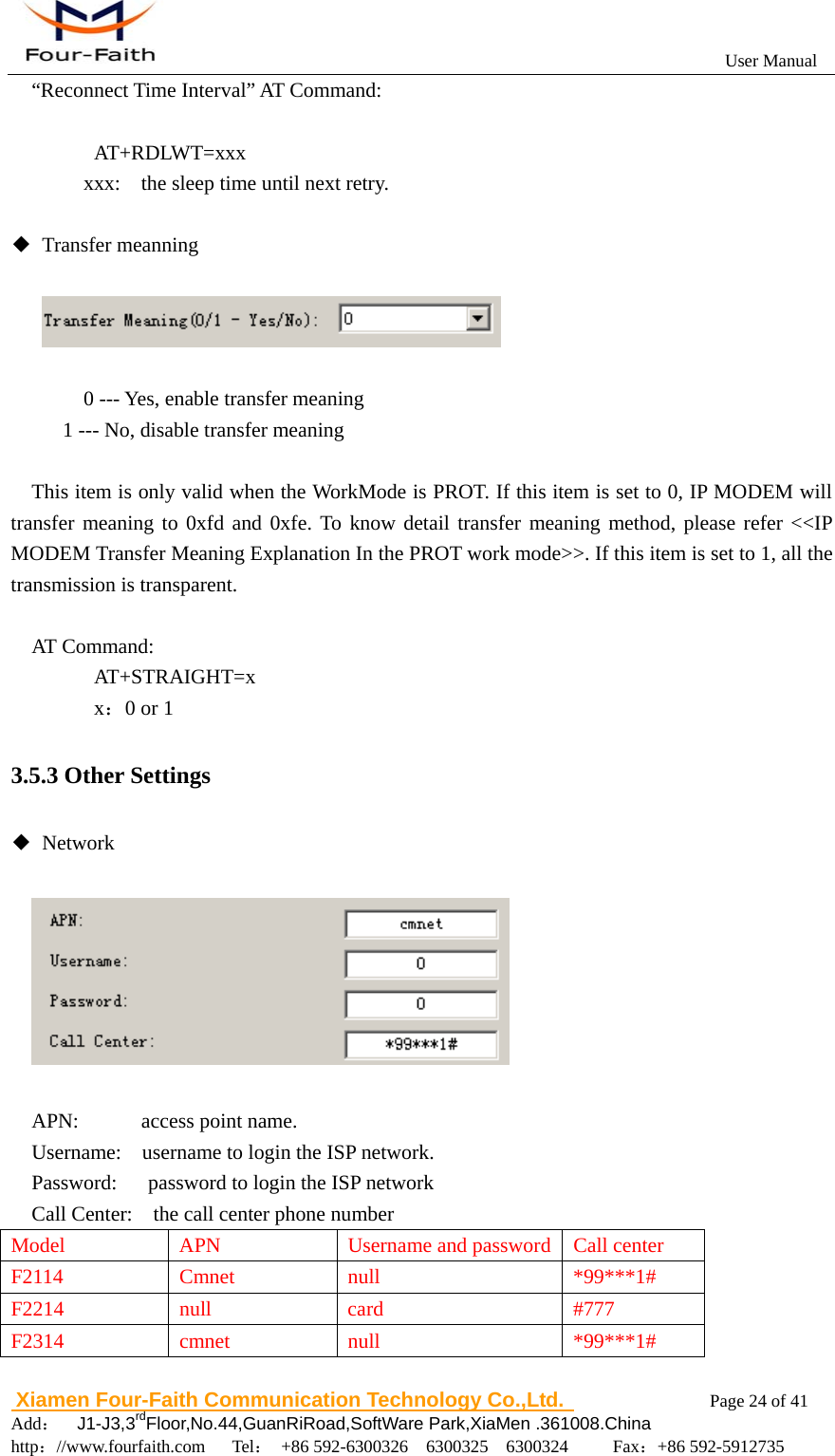
                                                          User Manual                       Xiamen Four-Faith Communication Technology Co.,Ltd.              Page 24 of 41     Add:  J1-J3,3rdFloor,No.44,GuanRiRoad,SoftWare Park,XiaMen .361008.China                                    http://www.fourfaith.com   Tel: +86 592-6300326  6300325  6300324     Fax:+86 592-5912735  “Reconnect Time Interval” AT Command:     AT+RDLWT=xxx     xxx:    the sleep time until next retry.  ◆ Transfer meanning            0 --- Yes, enable transfer meaning 1 --- No, disable transfer meaning      This item is only valid when the WorkMode is PROT. If this item is set to 0, IP MODEM will transfer meaning to 0xfd and 0xfe. To know detail transfer meaning method, please refer <<IP MODEM Transfer Meaning Explanation In the PROT work mode>>. If this item is set to 1, all the transmission is transparent.  AT Command:    AT+STRAIGHT=x    x:0 or 1 3.5.3 Other Settings ◆ Network       APN:      access point name. Username:    username to login the ISP network. Password:      password to login the ISP network Call Center:    the call center phone number Model  APN  Username and password Call center F2114 Cmnet null  *99***1# F2214 null  card  #777 F2314 cmnet null  *99***1#
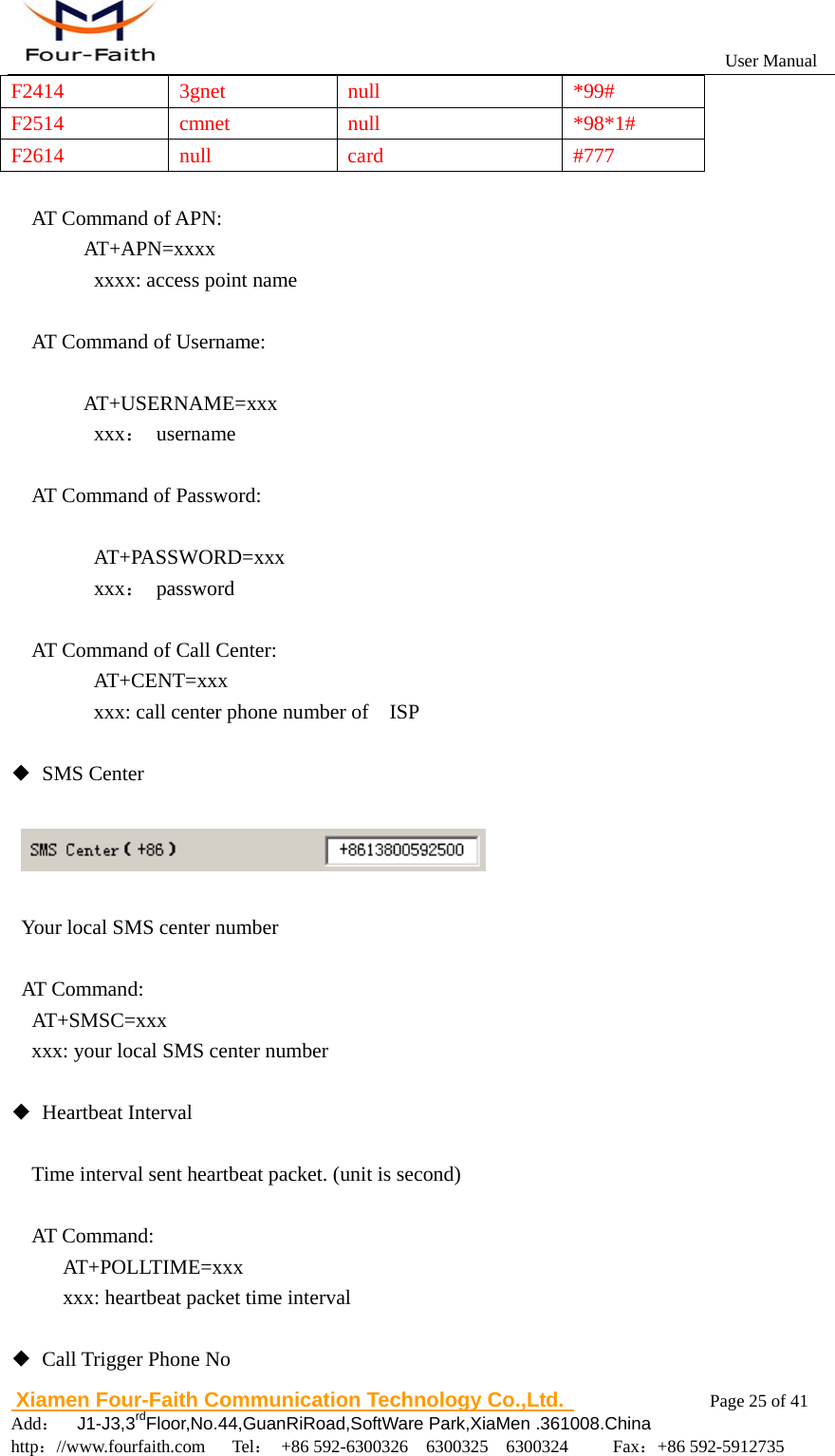
                                                          User Manual                       Xiamen Four-Faith Communication Technology Co.,Ltd.              Page 25 of 41     Add:  J1-J3,3rdFloor,No.44,GuanRiRoad,SoftWare Park,XiaMen .361008.China                                    http://www.fourfaith.com   Tel: +86 592-6300326  6300325  6300324     Fax:+86 592-5912735  F2414 3gnet  null  *99# F2514 cmnet null  *98*1# F2614 null  card  #777  AT Command of APN:   AT+APN=xxxx       xxxx: access point name    AT Command of Username:     AT+USERNAME=xxx     xxx: username   AT Command of Password:     AT+PASSWORD=xxx     xxx: password  AT Command of Call Center: AT+CENT=xxx xxx: call center phone number of    ISP  ◆ SMS Center        Your local SMS center number   AT Command:   AT+SMSC=xxx     xxx: your local SMS center number     ◆ Heartbeat Interval  Time interval sent heartbeat packet. (unit is second)  AT Command:      AT+POLLTIME=xxx      xxx: heartbeat packet time interval  ◆  Call Trigger Phone No
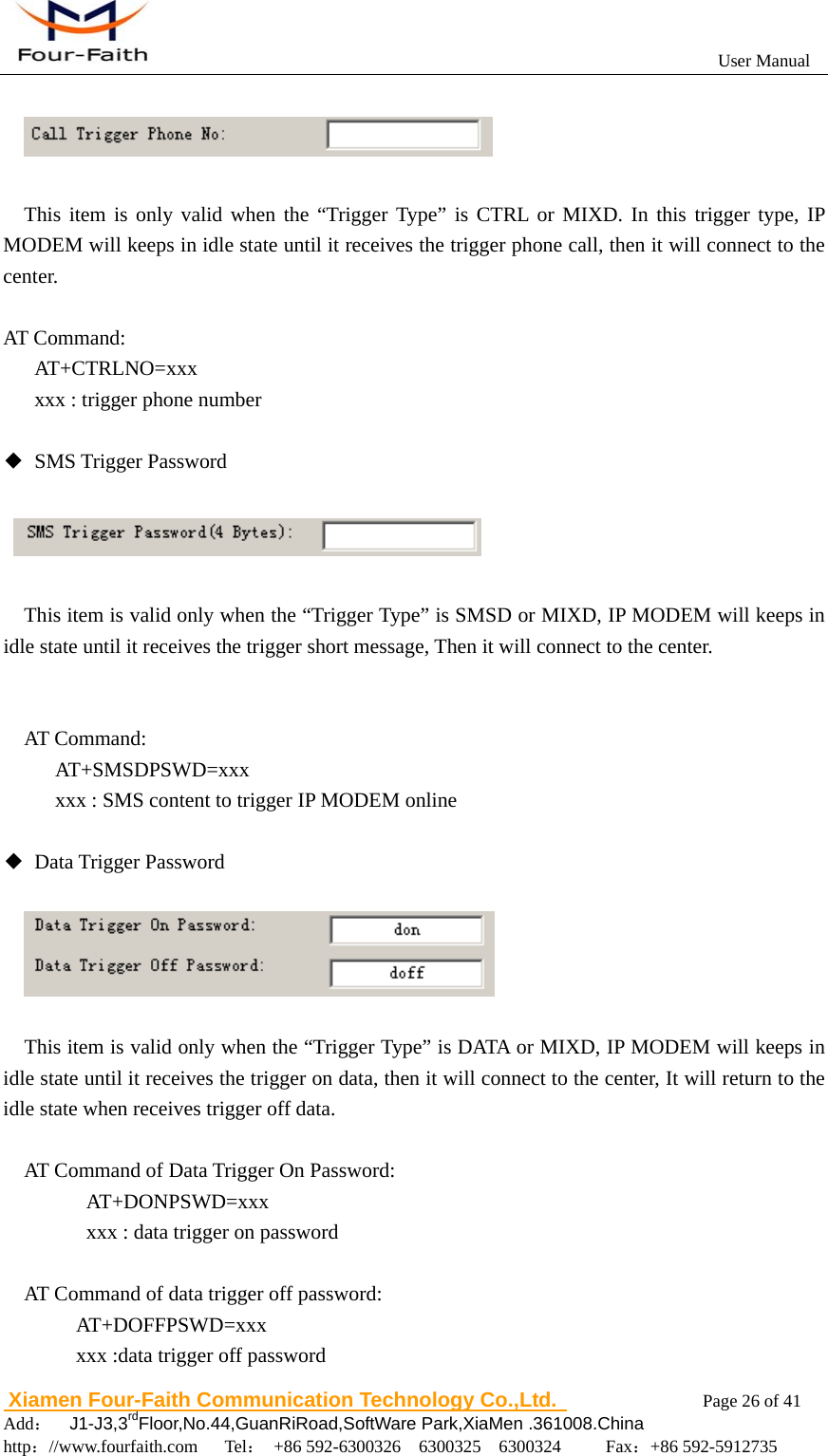
                                                          User Manual                       Xiamen Four-Faith Communication Technology Co.,Ltd.              Page 26 of 41     Add:  J1-J3,3rdFloor,No.44,GuanRiRoad,SoftWare Park,XiaMen .361008.China                                    http://www.fourfaith.com   Tel: +86 592-6300326  6300325  6300324     Fax:+86 592-5912735     This item is only valid when the “Trigger Type” is CTRL or MIXD. In this trigger type, IP MODEM will keeps in idle state until it receives the trigger phone call, then it will connect to the center.  AT Command:    AT+CTRLNO=xxx       xxx : trigger phone number  ◆ SMS Trigger Password         This item is valid only when the “Trigger Type” is SMSD or MIXD, IP MODEM will keeps in idle state until it receives the trigger short message, Then it will connect to the center.     AT Command:      AT+SMSDPSWD=xxx           xxx : SMS content to trigger IP MODEM online  ◆ Data Trigger Password           This item is valid only when the “Trigger Type” is DATA or MIXD, IP MODEM will keeps in idle state until it receives the trigger on data, then it will connect to the center, It will return to the idle state when receives trigger off data.    AT Command of Data Trigger On Password: AT+DONPSWD=xxx xxx : data trigger on password  AT Command of data trigger off password:        AT+DOFFPSWD=xxx        xxx :data trigger off password
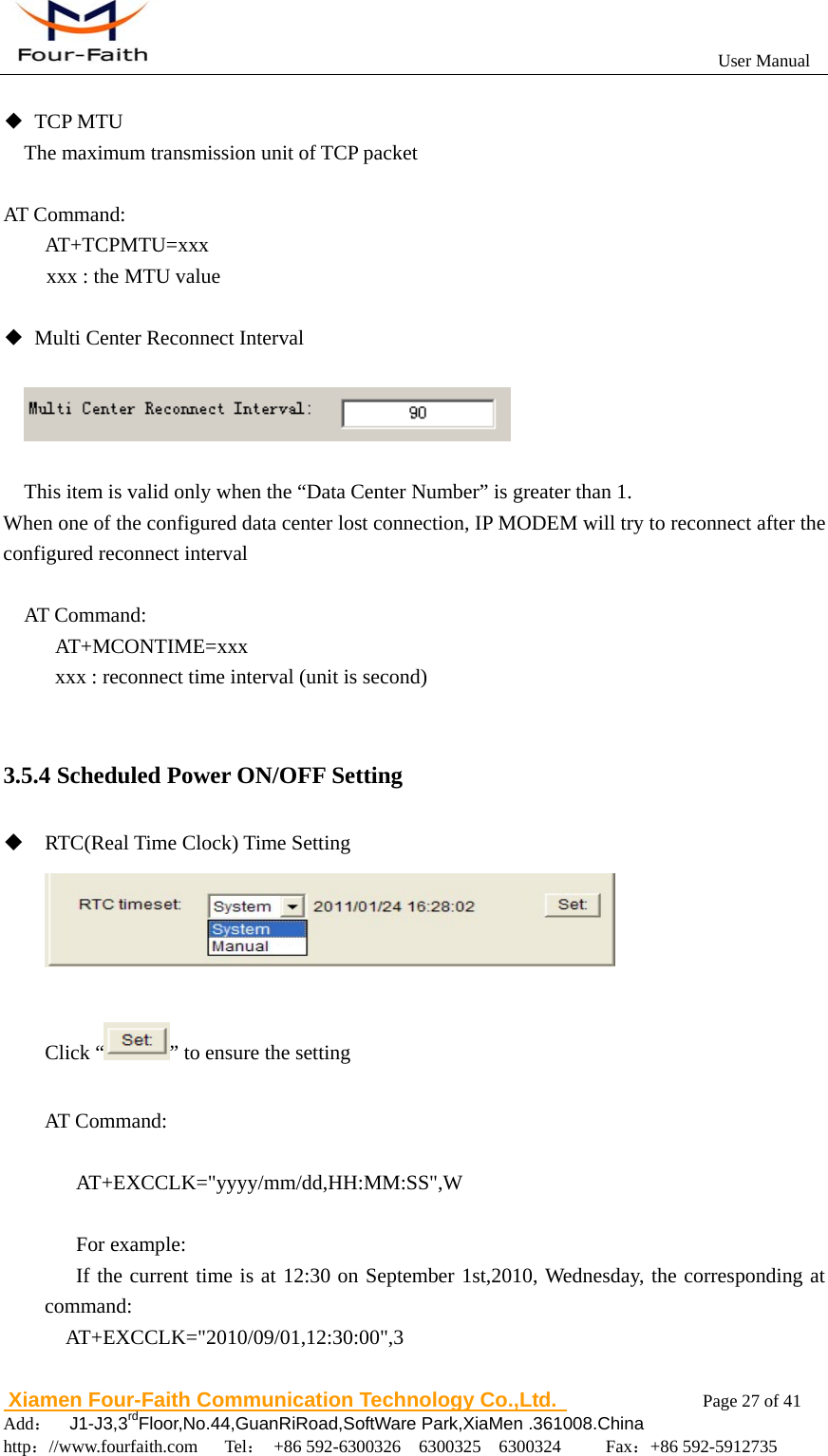
                                                          User Manual                       Xiamen Four-Faith Communication Technology Co.,Ltd.              Page 27 of 41     Add:  J1-J3,3rdFloor,No.44,GuanRiRoad,SoftWare Park,XiaMen .361008.China                                    http://www.fourfaith.com   Tel: +86 592-6300326  6300325  6300324     Fax:+86 592-5912735   ◆ TCP MTU The maximum transmission unit of TCP packet  AT Command:     AT+TCPMTU=xxx xxx : the MTU value  ◆  Multi Center Reconnect Interval       This item is valid only when the “Data Center Number” is greater than 1. When one of the configured data center lost connection, IP MODEM will try to reconnect after the configured reconnect interval  AT Command:      AT+MCONTIME=xxx           xxx : reconnect time interval (unit is second)  3.5.4 Scheduled Power ON/OFF Setting  RTC(Real Time Clock) Time Setting   Click “ ” to ensure the setting  AT Command:     AT+EXCCLK="yyyy/mm/dd,HH:MM:SS",W     For example:  If the current time is at 12:30 on September 1st,2010, Wednesday, the corresponding at command:  AT+EXCCLK="2010/09/01,12:30:00",3
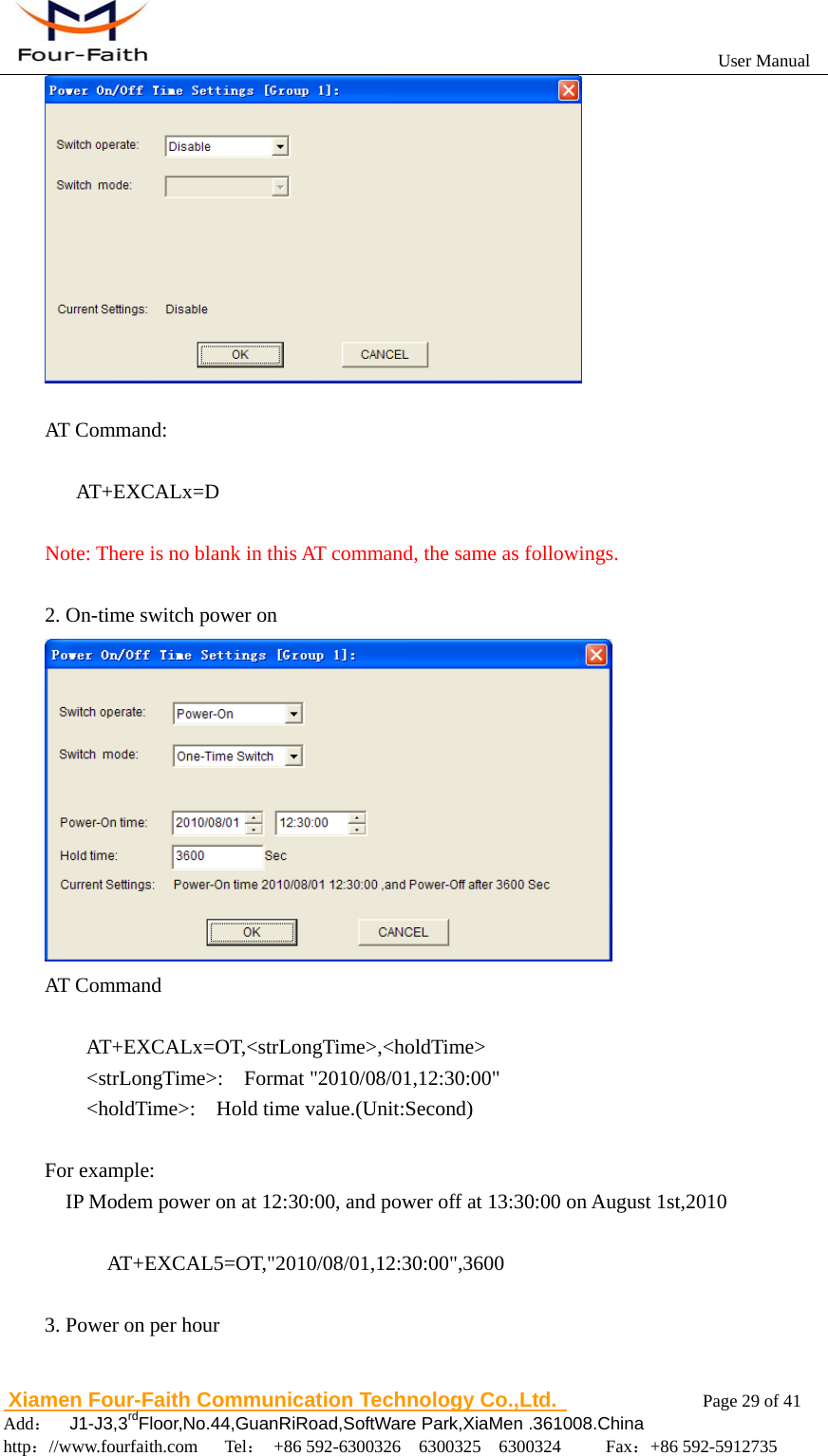
                                                          User Manual                       Xiamen Four-Faith Communication Technology Co.,Ltd.              Page 28 of 41     Add:  J1-J3,3rdFloor,No.44,GuanRiRoad,SoftWare Park,XiaMen .361008.China                                    http://www.fourfaith.com   Tel: +86 592-6300326  6300325  6300324     Fax:+86 592-5912735   Power On/Off Setting  Press “Set” you will see the follow window, you can do the setting.   AT Command:    AT+EXCALx=<options>[, <value1>[,<value2>[,<value3>]]]       Options:     D -- Disabled. Scheduled Power On/Off function is disabled (Default).     O – On. Set the IP Modem power on time.     S – Shut Down. Set the IP Modem power off time.    Setting type, [IP] use for power on, C use for power off T -- Time. Set the action time point. H -- per Hour. Set a time point of every hour D -- per Day. Set a time point of every day W -- per Week. Set a time point of every week M -- per Month. Set a time point of every month I -- Interval. Set the time interval. P -- Power always on.   C -- Count down. Set the count down length.    1. Disable
                                                          User Manual                       Xiamen Four-Faith Communication Technology Co.,Ltd.              Page 29 of 41     Add:  J1-J3,3rdFloor,No.44,GuanRiRoad,SoftWare Park,XiaMen .361008.China                                    http://www.fourfaith.com   Tel: +86 592-6300326  6300325  6300324     Fax:+86 592-5912735    AT Command:     AT+EXCALx=D   Note: There is no blank in this AT command, the same as followings.  2. On-time switch power on  AT Command     AT+EXCALx=OT,<strLongTime>,<holdTime>     <strLongTime>:  Format "2010/08/01,12:30:00"     <holdTime>:  Hold time value.(Unit:Second)  For example:     IP Modem power on at 12:30:00, and power off at 13:30:00 on August 1st,2010            AT+EXCAL5=OT,"2010/08/01,12:30:00",3600  3. Power on per hour
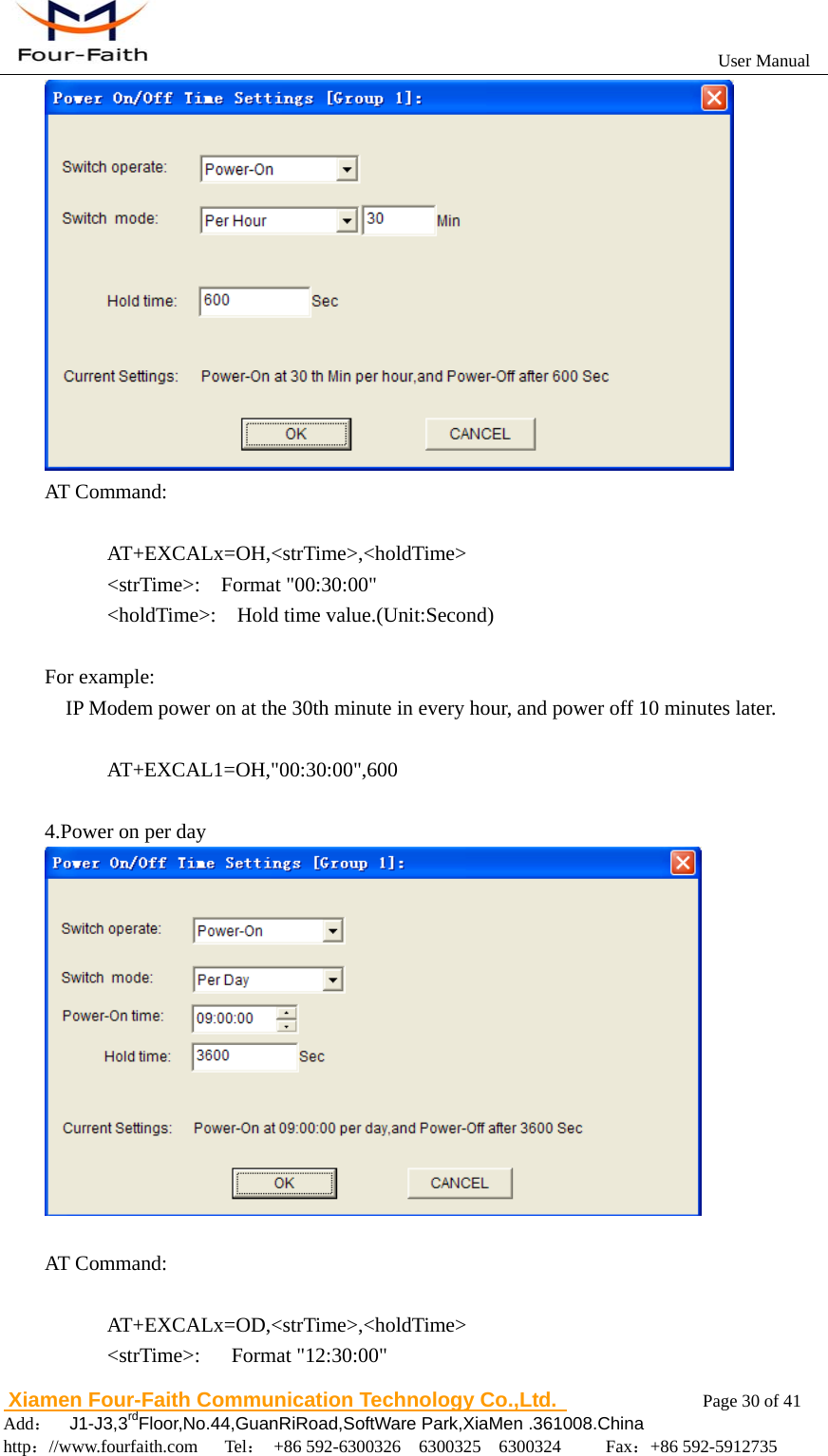
                                                          User Manual                       Xiamen Four-Faith Communication Technology Co.,Ltd.              Page 30 of 41     Add:  J1-J3,3rdFloor,No.44,GuanRiRoad,SoftWare Park,XiaMen .361008.China                                    http://www.fourfaith.com   Tel: +86 592-6300326  6300325  6300324     Fax:+86 592-5912735   AT Command:        AT+EXCALx=OH,<strTime>,<holdTime>       <strTime>:  Format "00:30:00"       <holdTime>:  Hold time value.(Unit:Second)  For example:     IP Modem power on at the 30th minute in every hour, and power off 10 minutes later.           AT+EXCAL1=OH,"00:30:00",600  4.Power on per day   AT Command:        AT+EXCALx=OD,<strTime>,<holdTime>       <strTime>:   Format "12:30:00"
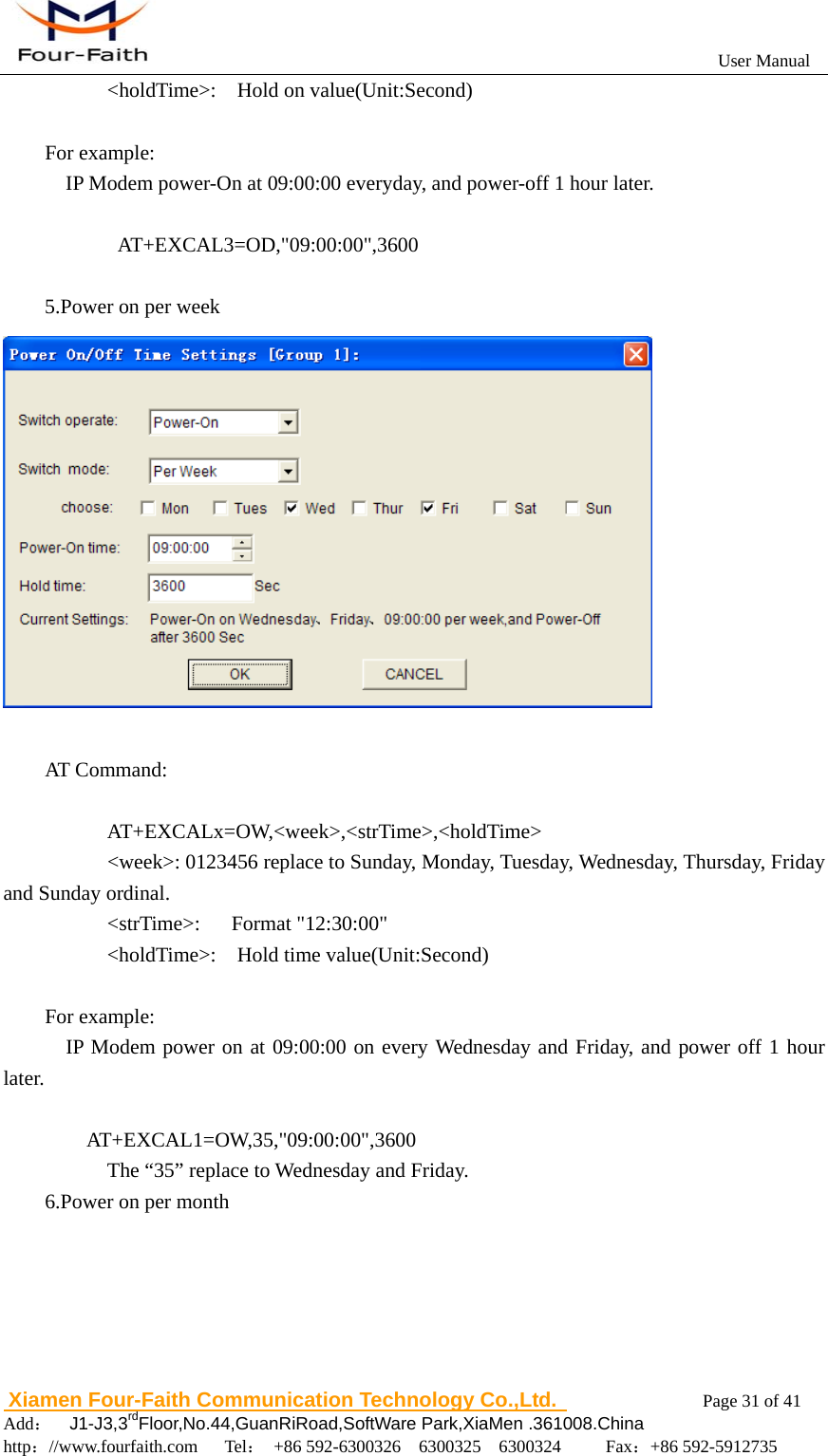
                                                          User Manual                       Xiamen Four-Faith Communication Technology Co.,Ltd.              Page 31 of 41     Add:  J1-J3,3rdFloor,No.44,GuanRiRoad,SoftWare Park,XiaMen .361008.China                                    http://www.fourfaith.com   Tel: +86 592-6300326  6300325  6300324     Fax:+86 592-5912735        <holdTime>:  Hold on value(Unit:Second)  For example:             IP Modem power-On at 09:00:00 everyday, and power-off 1 hour later.              AT+EXCAL3=OD,"09:00:00",3600      5.Power on per week   AT Command:        AT+EXCALx=OW,<week>,<strTime>,<holdTime>             <week>: 0123456 replace to Sunday, Monday, Tuesday, Wednesday, Thursday, Friday and Sunday ordinal.       <strTime>:   Format "12:30:00"       <holdTime>:  Hold time value(Unit:Second)  For example:   IP Modem power on at 09:00:00 on every Wednesday and Friday, and power off 1 hour later.  AT+EXCAL1=OW,35,"09:00:00",3600     The “35” replace to Wednesday and Friday. 6.Power on per month
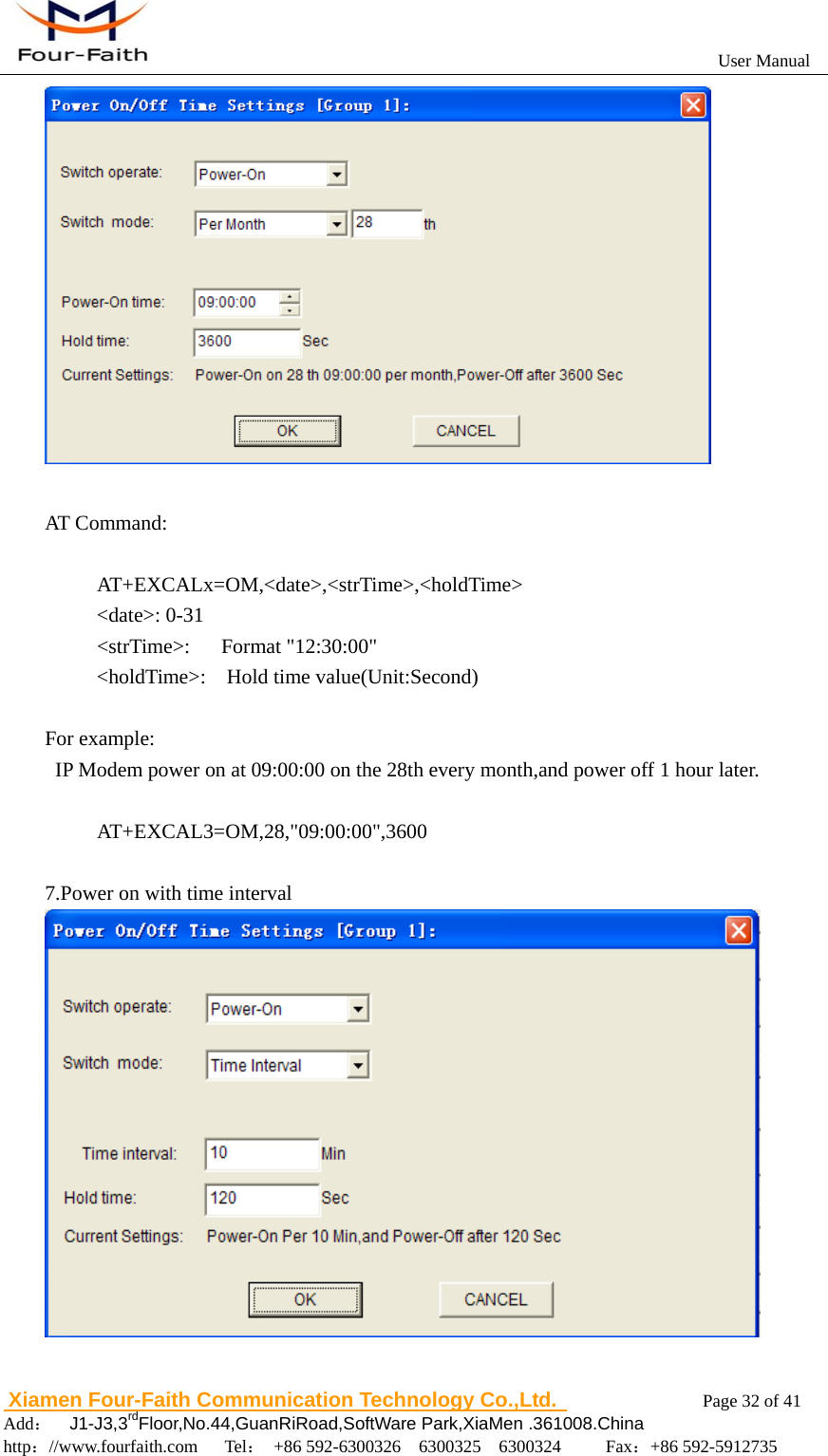
                                                          User Manual                       Xiamen Four-Faith Communication Technology Co.,Ltd.              Page 32 of 41     Add:  J1-J3,3rdFloor,No.44,GuanRiRoad,SoftWare Park,XiaMen .361008.China                                    http://www.fourfaith.com   Tel: +86 592-6300326  6300325  6300324     Fax:+86 592-5912735    AT Command:  AT+EXCALx=OM,<date>,<strTime>,<holdTime>      <date>: 0-31      <strTime>:   Format "12:30:00"      <holdTime>:  Hold time value(Unit:Second)  For example:   IP Modem power on at 09:00:00 on the 28th every month,and power off 1 hour later.       AT+EXCAL3=OM,28,"09:00:00",3600  7.Power on with time interval
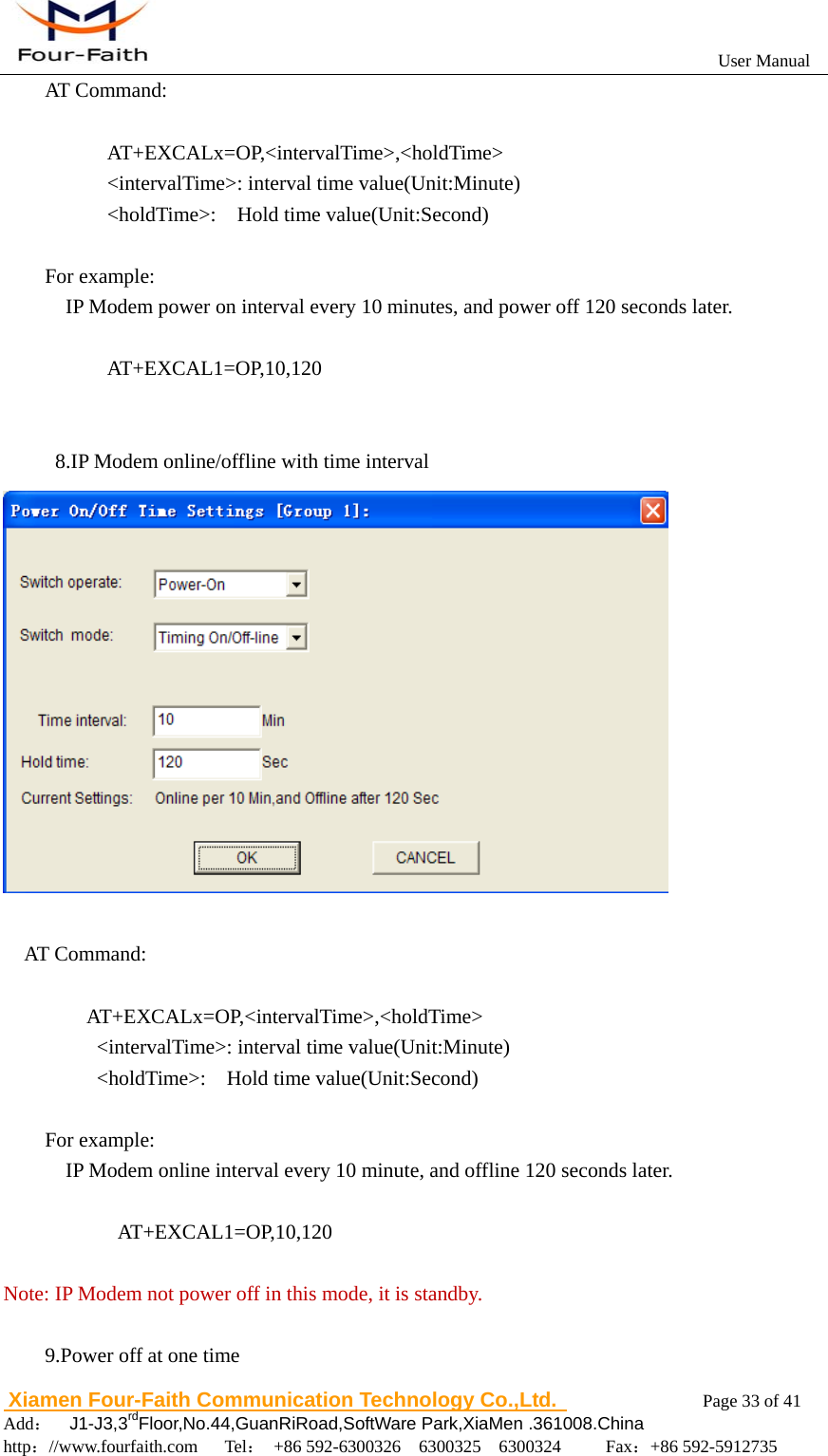
                                                          User Manual                       Xiamen Four-Faith Communication Technology Co.,Ltd.              Page 33 of 41     Add:  J1-J3,3rdFloor,No.44,GuanRiRoad,SoftWare Park,XiaMen .361008.China                                    http://www.fourfaith.com   Tel: +86 592-6300326  6300325  6300324     Fax:+86 592-5912735  AT Command:        AT+EXCALx=OP,<intervalTime>,<holdTime>       <intervalTime>: interval time value(Unit:Minute)       <holdTime>:  Hold time value(Unit:Second)  For example:     IP Modem power on interval every 10 minutes, and power off 120 seconds later.        AT+EXCAL1=OP,10,120             8.IP Modem online/offline with time interval   AT Command:      AT+EXCALx=OP,<intervalTime>,<holdTime>      <intervalTime>: interval time value(Unit:Minute)      <holdTime>:  Hold time value(Unit:Second)  For example:     IP Modem online interval every 10 minute, and offline 120 seconds later.             AT+EXCAL1=OP,10,120  Note: IP Modem not power off in this mode, it is standby.  9.Power off at one time
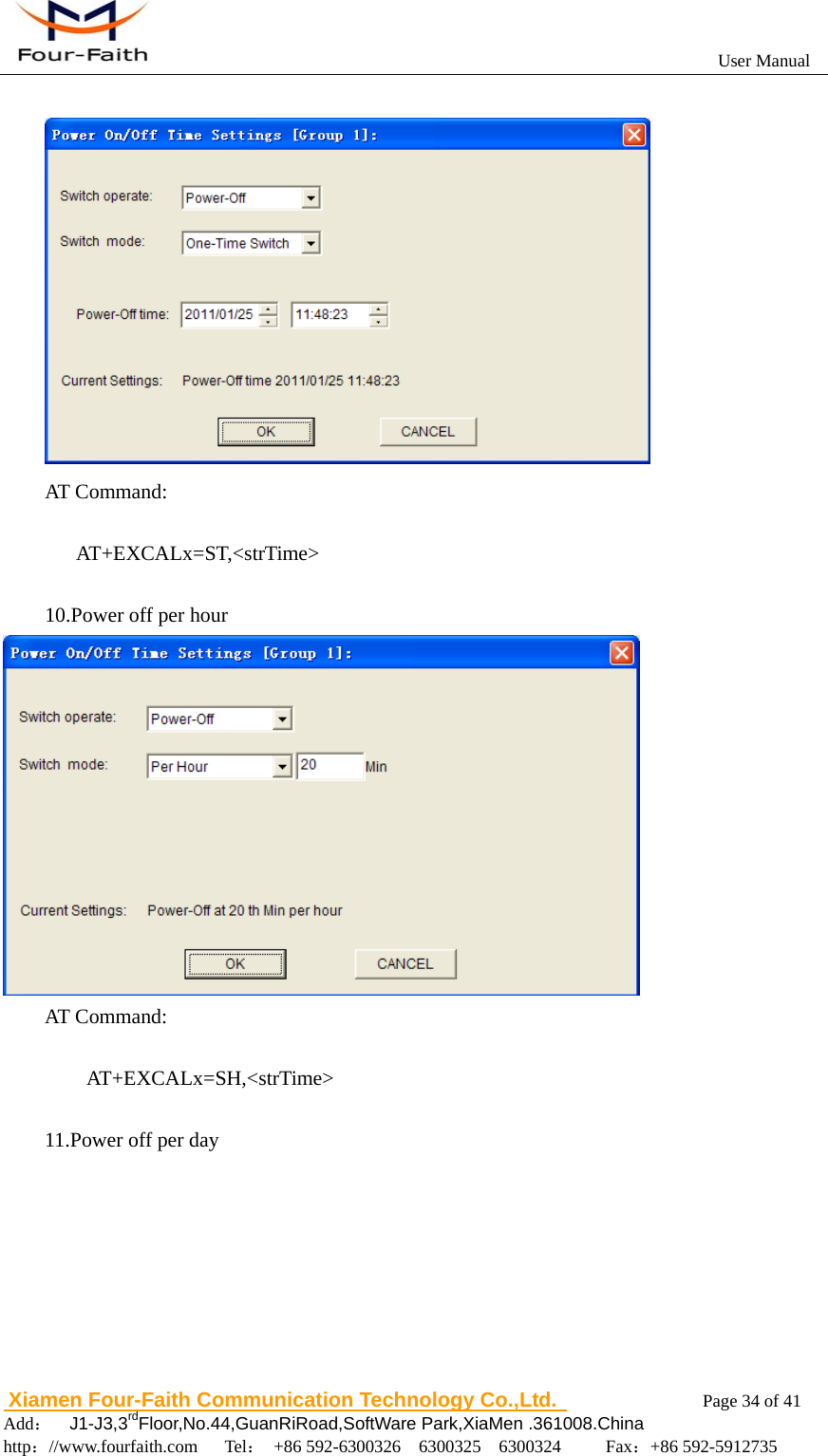
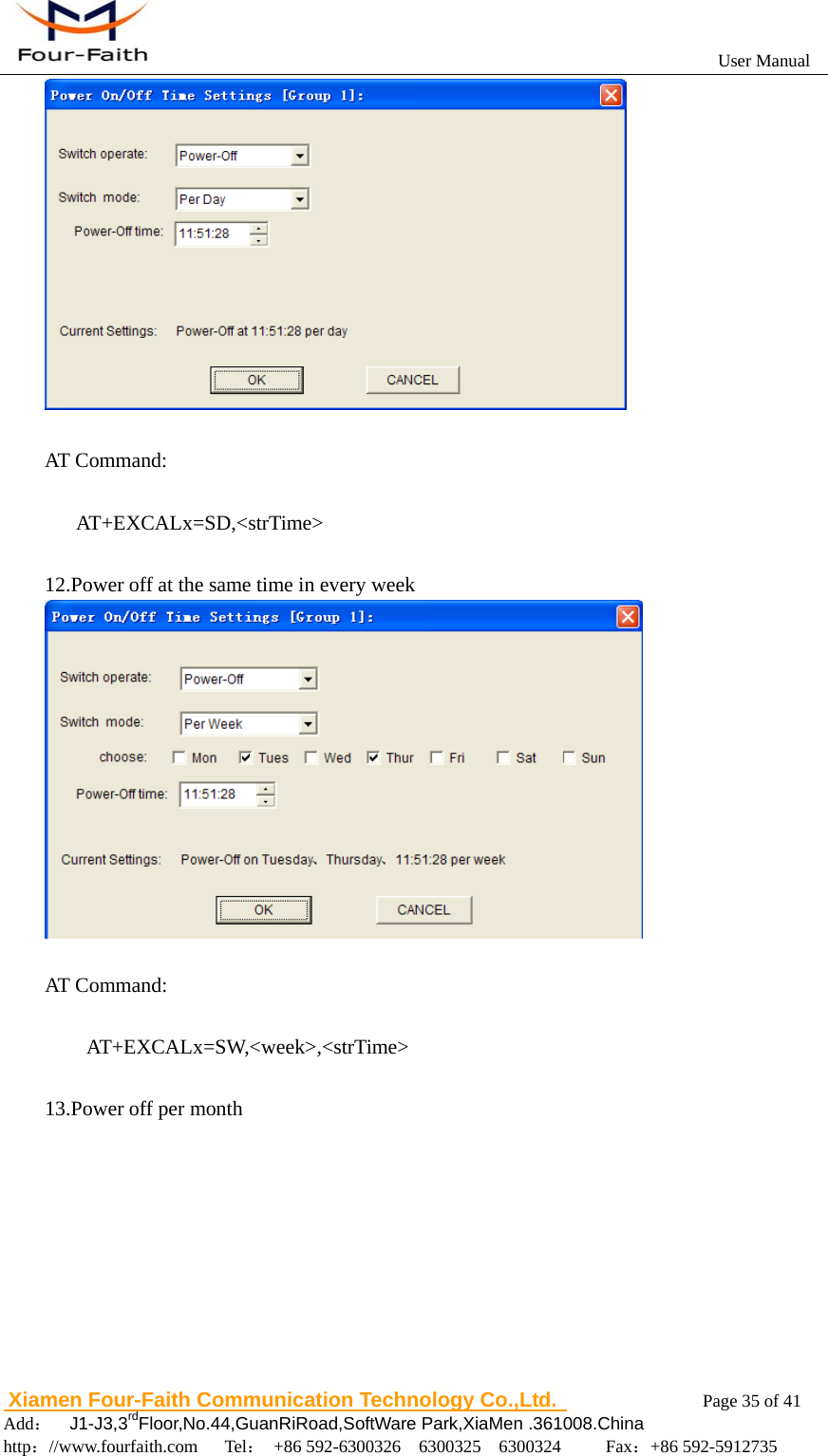
                                                          User Manual                       Xiamen Four-Faith Communication Technology Co.,Ltd.              Page 34 of 41     Add:  J1-J3,3rdFloor,No.44,GuanRiRoad,SoftWare Park,XiaMen .361008.China                                    http://www.fourfaith.com   Tel: +86 592-6300326  6300325  6300324     Fax:+86 592-5912735    AT Command:       AT+EXCALx=ST,<strTime>  10.Power off per hour  AT Command:         AT+EXCALx=SH,<strTime>  11.Power off per day
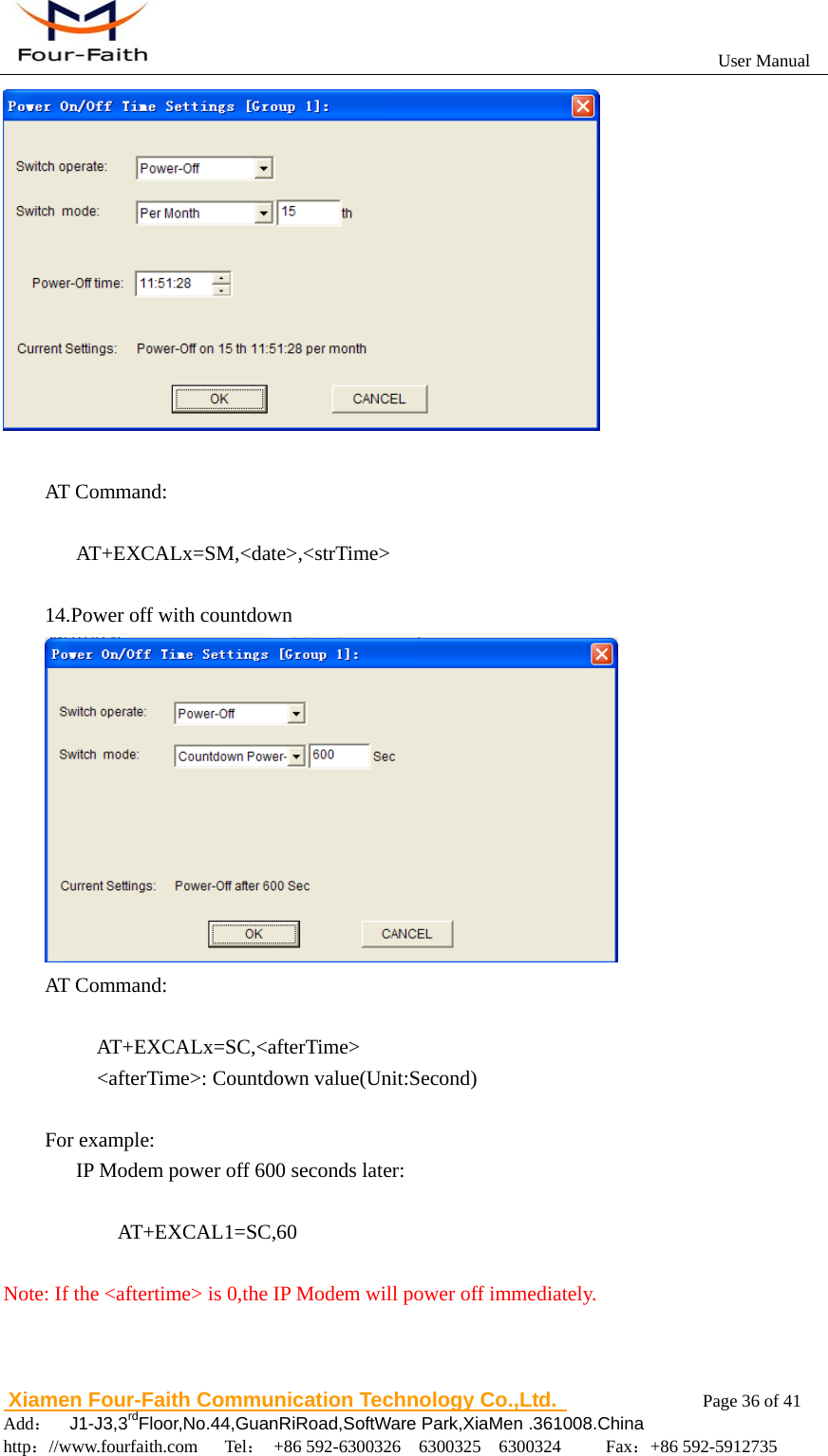
                                                          User Manual                       Xiamen Four-Faith Communication Technology Co.,Ltd.              Page 35 of 41     Add:  J1-J3,3rdFloor,No.44,GuanRiRoad,SoftWare Park,XiaMen .361008.China                                    http://www.fourfaith.com   Tel: +86 592-6300326  6300325  6300324     Fax:+86 592-5912735    AT Command:     AT+EXCALx=SD,<strTime>  12.Power off at the same time in every week   AT Command:      AT+EXCALx=SW,<week>,<strTime>  13.Power off per month
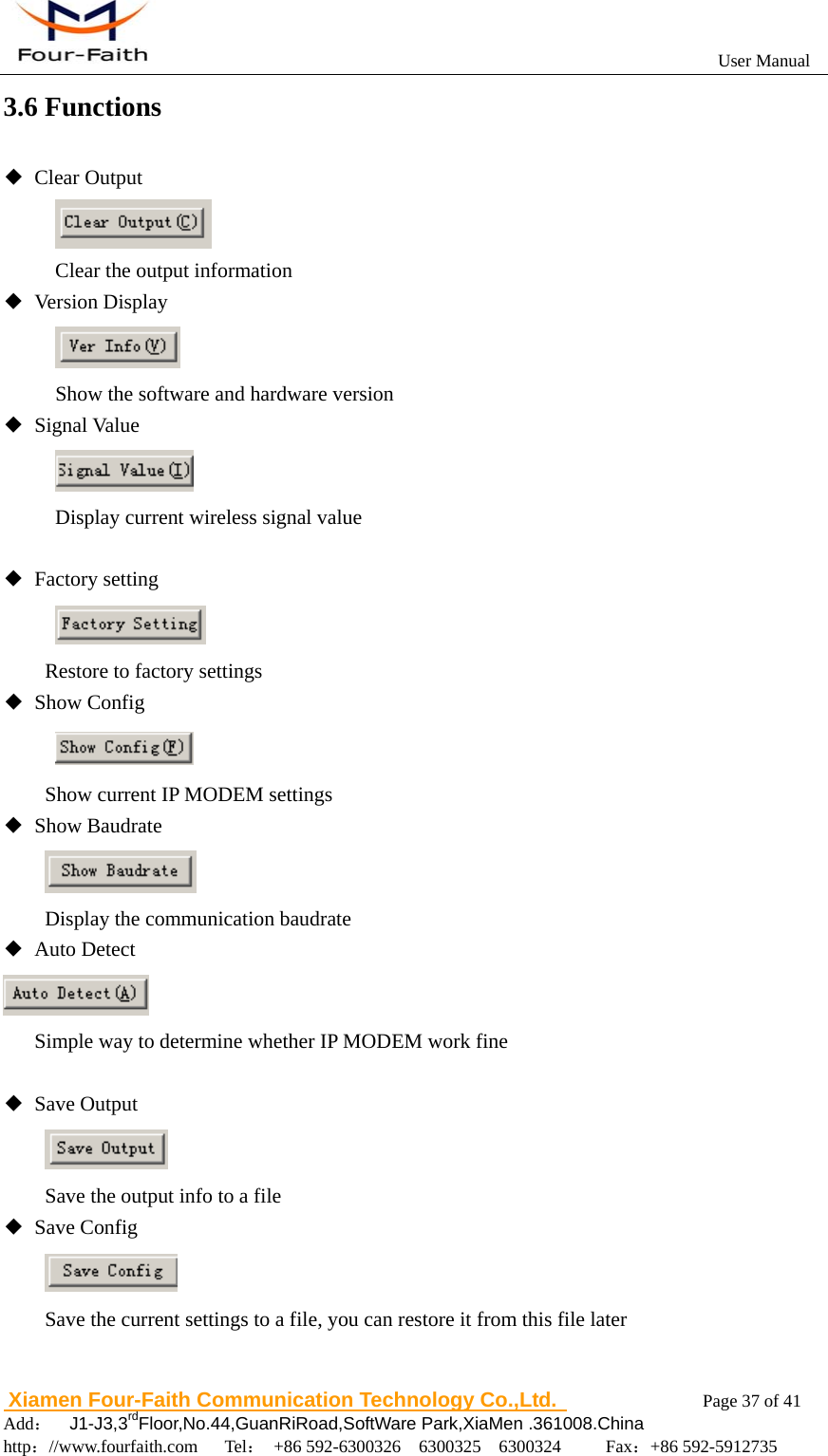
                                                          User Manual                       Xiamen Four-Faith Communication Technology Co.,Ltd.              Page 36 of 41     Add:  J1-J3,3rdFloor,No.44,GuanRiRoad,SoftWare Park,XiaMen .361008.China                                    http://www.fourfaith.com   Tel: +86 592-6300326  6300325  6300324     Fax:+86 592-5912735    AT Command:     AT+EXCALx=SM,<date>,<strTime>  14.Power off with countdown  AT Command:       AT+EXCALx=SC,<afterTime>     <afterTime>: Countdown value(Unit:Second)  For example:       IP Modem power off 600 seconds later:  AT+EXCAL1=SC,60  Note: If the <aftertime> is 0,the IP Modem will power off immediately.
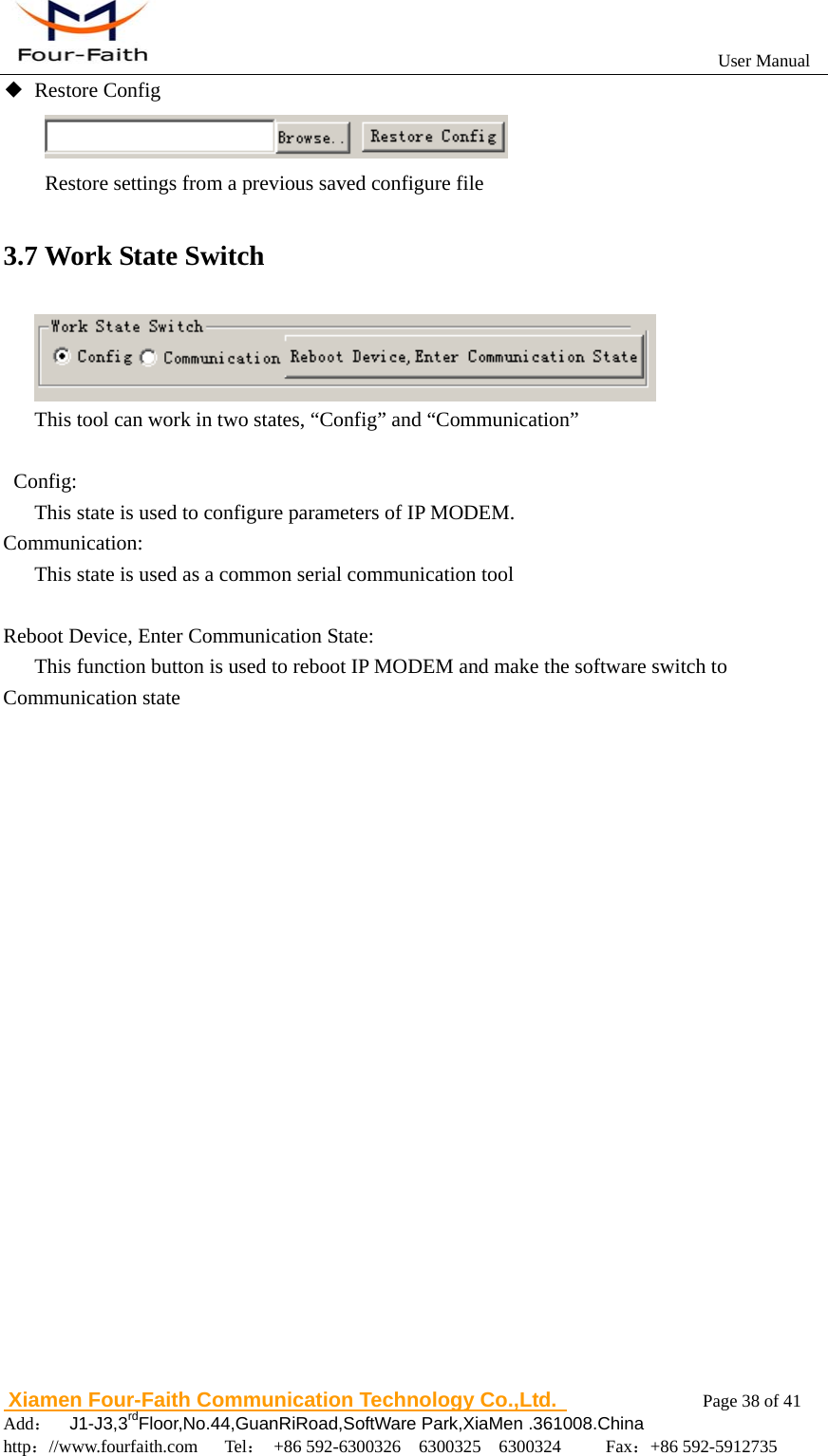
                                                          User Manual                       Xiamen Four-Faith Communication Technology Co.,Ltd.              Page 37 of 41     Add:  J1-J3,3rdFloor,No.44,GuanRiRoad,SoftWare Park,XiaMen .361008.China                                    http://www.fourfaith.com   Tel: +86 592-6300326  6300325  6300324     Fax:+86 592-5912735  3.6 Functions ◆ Clear Output  Clear the output information ◆ Version Display  Show the software and hardware version ◆ Signal Value  Display current wireless signal value  ◆ Factory setting  Restore to factory settings ◆ Show Config            Show current IP MODEM settings ◆ Show Baudrate           Display the communication baudrate ◆ Auto Detect        Simple way to determine whether IP MODEM work fine        ◆ Save Output           Save the output info to a file ◆ Save Config  Save the current settings to a file, you can restore it from this file later
                                                          User Manual                       Xiamen Four-Faith Communication Technology Co.,Ltd.              Page 38 of 41     Add:  J1-J3,3rdFloor,No.44,GuanRiRoad,SoftWare Park,XiaMen .361008.China                                    http://www.fourfaith.com   Tel: +86 592-6300326  6300325  6300324     Fax:+86 592-5912735  ◆ Restore Config               Restore settings from a previous saved configure file 3.7 Work State Switch  This tool can work in two states, “Config” and “Communication”   Config:       This state is used to configure parameters of IP MODEM. Communication:       This state is used as a common serial communication tool       Reboot Device, Enter Communication State:       This function button is used to reboot IP MODEM and make the software switch to Communication state
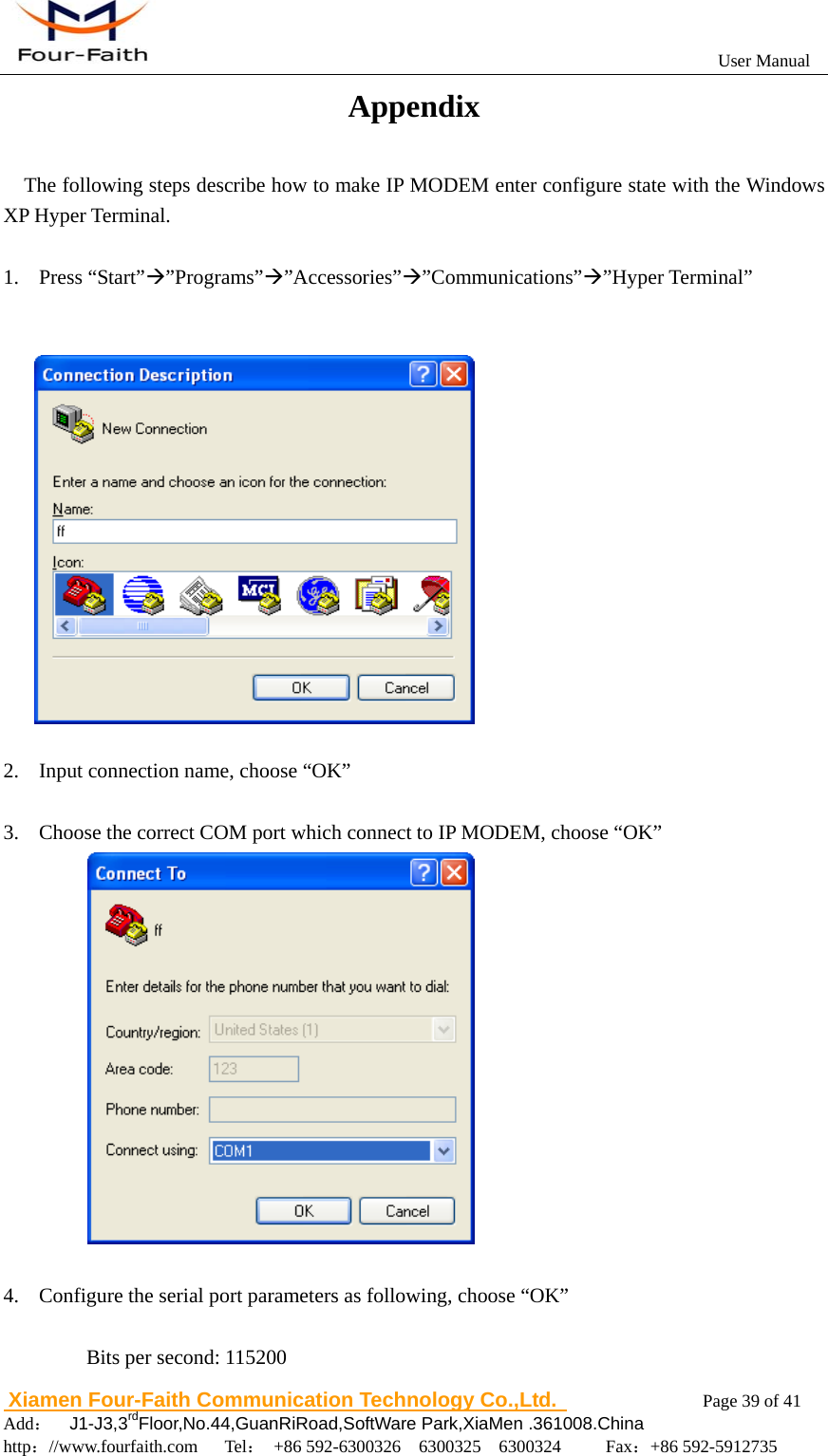
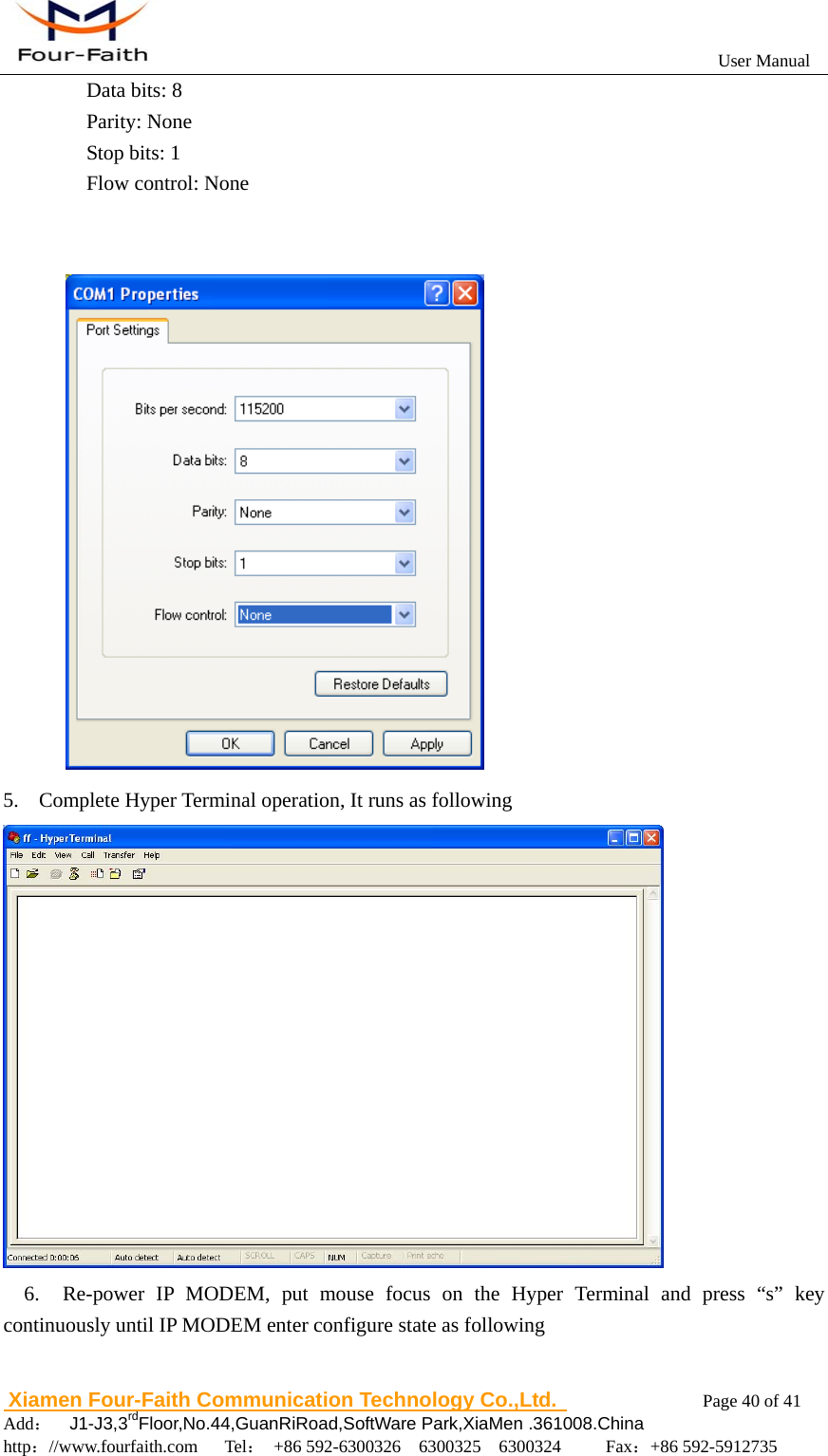
                                                          User Manual                       Xiamen Four-Faith Communication Technology Co.,Ltd.              Page 39 of 41     Add:  J1-J3,3rdFloor,No.44,GuanRiRoad,SoftWare Park,XiaMen .361008.China                                    http://www.fourfaith.com   Tel: +86 592-6300326  6300325  6300324     Fax:+86 592-5912735  Appendix The following steps describe how to make IP MODEM enter configure state with the Windows XP Hyper Terminal.  1. Press “Start”Æ”Programs”Æ”Accessories”Æ”Communications”Æ”Hyper Terminal”     2. Input connection name, choose “OK”  3. Choose the correct COM port which connect to IP MODEM, choose “OK”              4. Configure the serial port parameters as following, choose “OK”  Bits per second: 115200
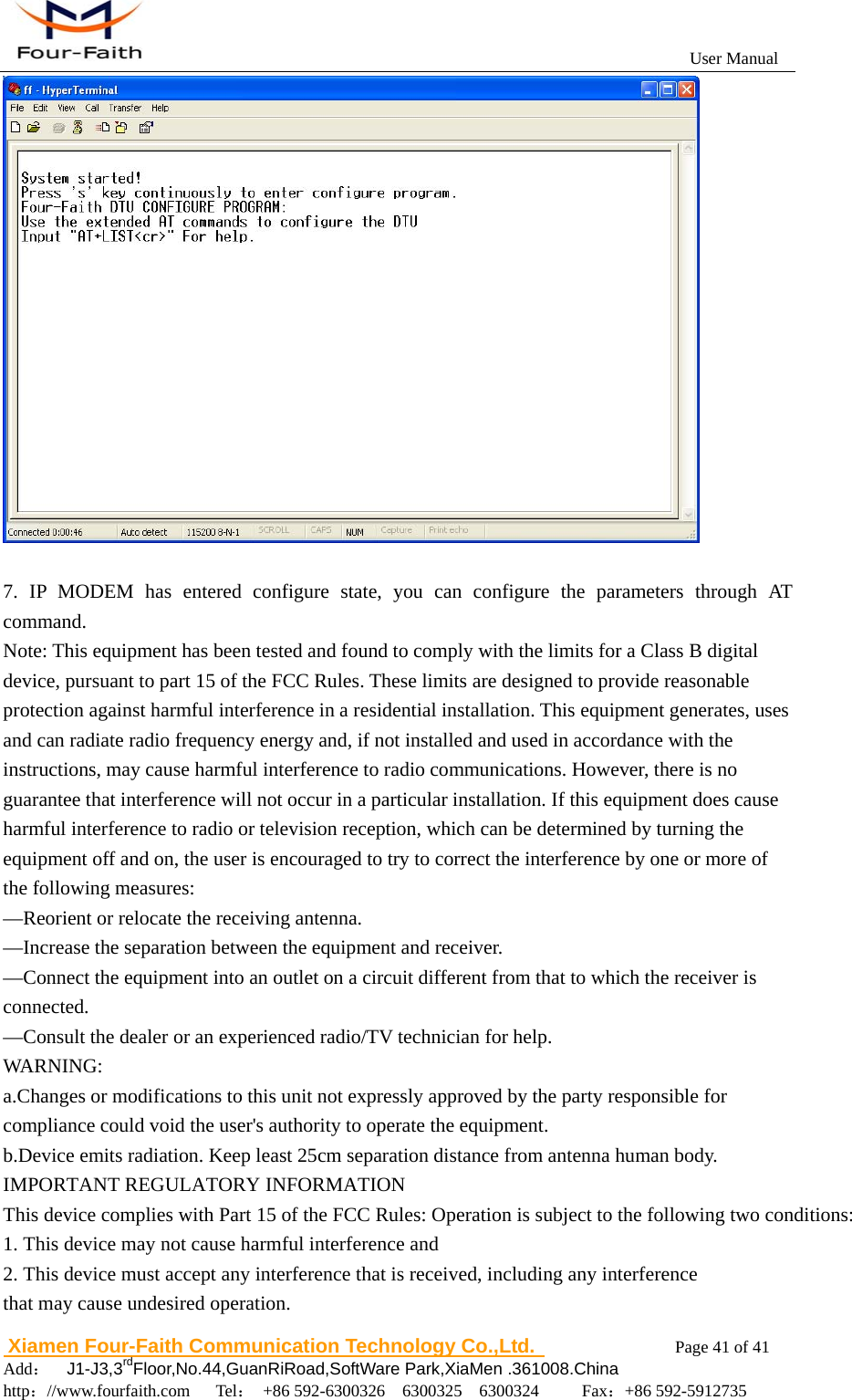
                                                          User Manual                       Xiamen Four-Faith Communication Technology Co.,Ltd.              Page 40 of 41     Add:  J1-J3,3rdFloor,No.44,GuanRiRoad,SoftWare Park,XiaMen .361008.China                                    http://www.fourfaith.com   Tel: +86 592-6300326  6300325  6300324     Fax:+86 592-5912735  Data bits: 8   Parity: None   Stop bits: 1   Flow control: None    5. Complete Hyper Terminal operation, It runs as following      6.  Re-power IP MODEM, put mouse focus on the Hyper Terminal and press “s” key continuously until IP MODEM enter configure state as following
                                                          User Manual                       Xiamen Four-Faith Communication Technology Co.,Ltd.              Page 41 of 41     Add:  J1-J3,3rdFloor,No.44,GuanRiRoad,SoftWare Park,XiaMen .361008.China                                    http://www.fourfaith.com   Tel: +86 592-6300326  6300325  6300324     Fax:+86 592-5912735    7. IP MODEM has entered configure state, you can configure the parameters through AT command. Note: This equipment has been tested and found to comply with the limits for a Class B digital device, pursuant to part 15 of the FCC Rules. These limits are designed to provide reasonable protection against harmful interference in a residential installation. This equipment generates, uses and can radiate radio frequency energy and, if not installed and used in accordance with the instructions, may cause harmful interference to radio communications. However, there is no guarantee that interference will not occur in a particular installation. If this equipment does cause harmful interference to radio or television reception, which can be determined by turning the equipment off and on, the user is encouraged to try to correct the interference by one or more of the following measures:   —Reorient or relocate the receiving antenna.   —Increase the separation between the equipment and receiver. —Connect the equipment into an outlet on a circuit different from that to which the receiver is connected.  —Consult the dealer or an experienced radio/TV technician for help. WARNING:         a.Changes or modifications to this unit not expressly approved by the party responsible for compliance could void the user's authority to operate the equipment.              b.Device emits radiation. Keep least 25cm separation distance from antenna human body. IMPORTANT REGULATORY INFORMATIONThis device complies with Part 15 of the FCC Rules: Operation is subject to the following two conditions:1. This device may not cause harmful interference and2. This device must accept any interference that is received, including any interference that may cause undesired operation.

Navigation menu