Xiamen Four Faith Communication Technology F8L10GW F8L10GW LoRa Gateway User Manual

Xiamen Four-Faith Communication Technology Co., Ltd. F8L10GW LoRa Gateway Users Manual

Contents

user manual

     F8L10GW LoRa Gateway   User Manual  FCC ID:2ALUW-F8L10GW
                                                     F8L10GW LoRa Gateway                                                        Page  2  of  37  Add:11th Floor, A-06 Area, No.370, Chengyi Street, Jimei, Xiamen, Fujian, China. http://www.four-faith.com                                Tel:+86-592-6307217           Fax: +86-592-5912735  Files Revised Record Date Version Remark Author 2018.07.19 V1.0.0 Initial version Cheney/Carolin 2018.10.11 V1.0.1 Add 1-3 system block diagram; Modify document format; Document style adjust; Font size adjustment. Jim
                                                     F8L10GW LoRa Gateway                                                        Page  3  of  37  Add:11th Floor, A-06 Area, No.370, Chengyi Street, Jimei, Xiamen, Fujian, China. http://www.four-faith.com                                Tel:+86-592-6307217           Fax: +86-592-5912735  Copyright Notice All contents in the files are protected by copyright law, and all copyrights are reserved by Xiamen Four-Faith Communication Technology Co., Ltd. Without written permission, all commercial  use  of  the  files  from  Four-Faith  are  forbidden,  such  as  copy,  distribute, reproduce the files, etc., but non-commercial purpose, downloaded or printed by individual (all files shall be not revised, and the copyright and other proprietorship notice shall be reserved) are welcome.  Trademark Notice Four-Faith、四信、 、 、   are  all  registered  trademarks  of Xiamen  Four-Faith  Communication  Technology  Co.,  Ltd.,  illegal  use  of  the  name  of Four-Faith,  trademarks  and  other  marks  of  Four-Faith  is  forbidden,  unless  written permission is authorized in advance.
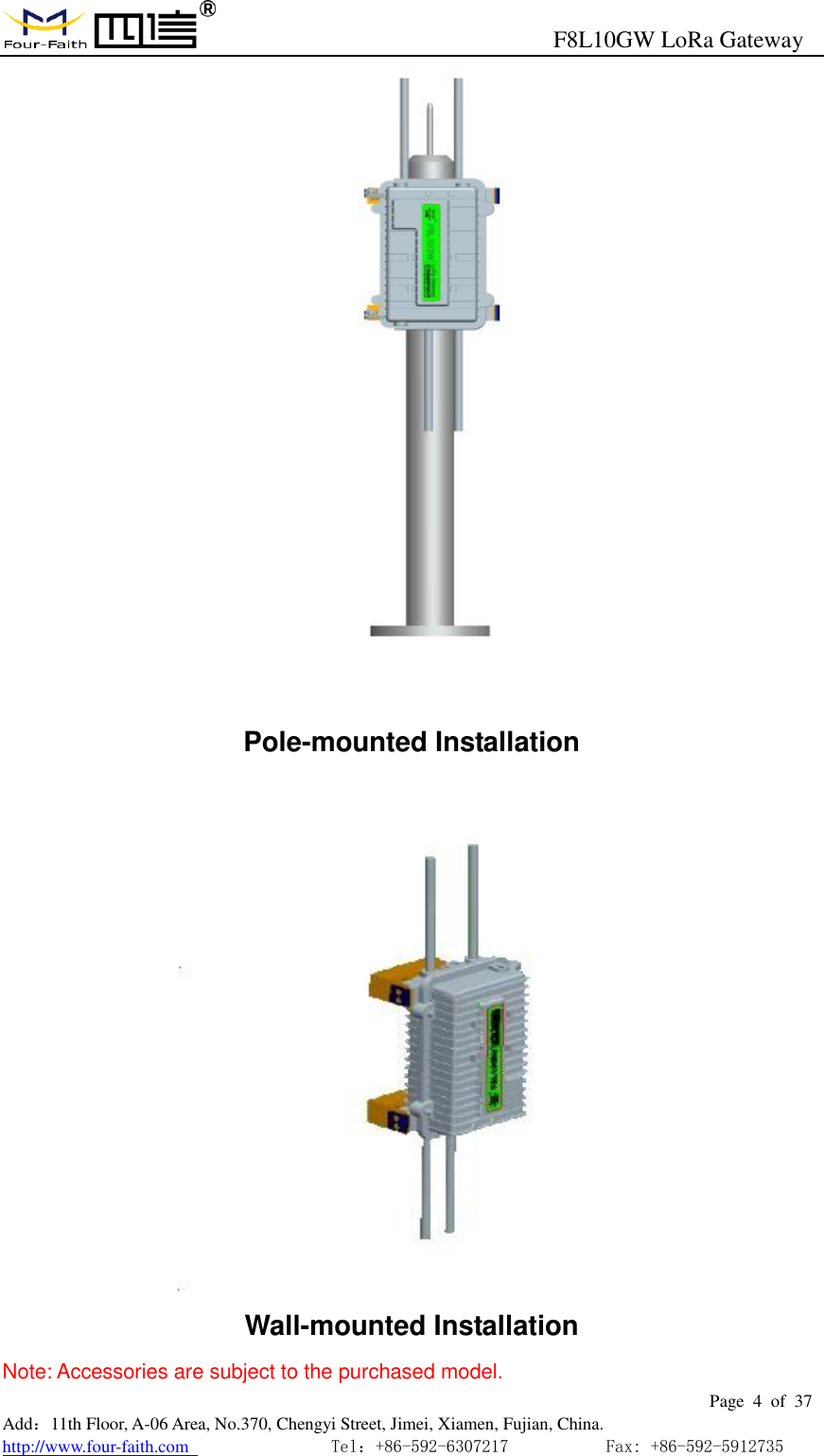
                                                     F8L10GW LoRa Gateway                                                        Page  4  of  37  Add:11th Floor, A-06 Area, No.370, Chengyi Street, Jimei, Xiamen, Fujian, China. http://www.four-faith.com                                Tel:+86-592-6307217           Fax: +86-592-5912735   Pole-mounted Installation  Wall-mounted Installation Note: Accessories are subject to the purchased model.
                                                     F8L10GW LoRa Gateway                                                        Page  5  of  37  Add:11th Floor, A-06 Area, No.370, Chengyi Street, Jimei, Xiamen, Fujian, China. http://www.four-faith.com                                Tel:+86-592-6307217           Fax: +86-592-5912735  CCoonntteennttss  Chapter 1 Brief Introduction .......................................................................................................... 6 1.1 General ................................................................................................................................ 6 1.2 Features and Benefits .......................................................................................................... 7 1.3 Working Principle ............................................................................................................... 7 1.4 Specifications ...................................................................................................................... 8 Chapter 2 Installation Instruction ............................................................................................... 11 2.1 General .............................................................................................................................. 11 2.2 Packing List ...................................................................................................................... 11 2.2.1. Wall-mounted Packing List............................................................................... 11 2.2.2. Pole-mounted Packing List .............................................................................. 11 2.3 Installation......................................................................................................................... 12 2.3.1 SIM/UIM Installation ........................................................................................... 12 2.3.2 Wall-mounted Installation .................................................................................. 13 2.3.3 Pole-mounted Installation .................................................................................. 16 2.3.4 Antenna Installation ............................................................................................ 17 2.4 Indicator light description ................................................................................................. 18 Chapter 3 Configuration .............................................................................................................. 20 3.1 Configuration Connection ................................................................................................. 20 3.2 Access to Configuration Web Page ................................................................................... 20 3.2.1 IP Address Setting .............................................................................................. 20 3.2.2 Login configuration web page ........................................................................... 21 3.3 Management & Configuration .......................................................................................... 23 3.3.1 Connection Setting ............................................................................................. 23 3.3.2 WiFi ....................................................................................................................... 25 3.3.2.1 Basic Configuration .................................................................................... 26 3.3.3 LoRaWAN Application ........................................................................................ 27 3.3.4 ADMINISTER ...................................................................................................... 28 3.3.4.1 ADMINISTER ............................................................................................ 28 3.3.4.2 The factory default ...................................................................................... 31 3.3.4.3 Firmware Upgrade ...................................................................................... 32 3.3.4.4 Backup ........................................................................................................ 32 3.3.5 State...................................................................................................................... 34 3.3.5.1 F8L10GW ................................................................................................... 34 Appendix ........................................................................................................................................ 36
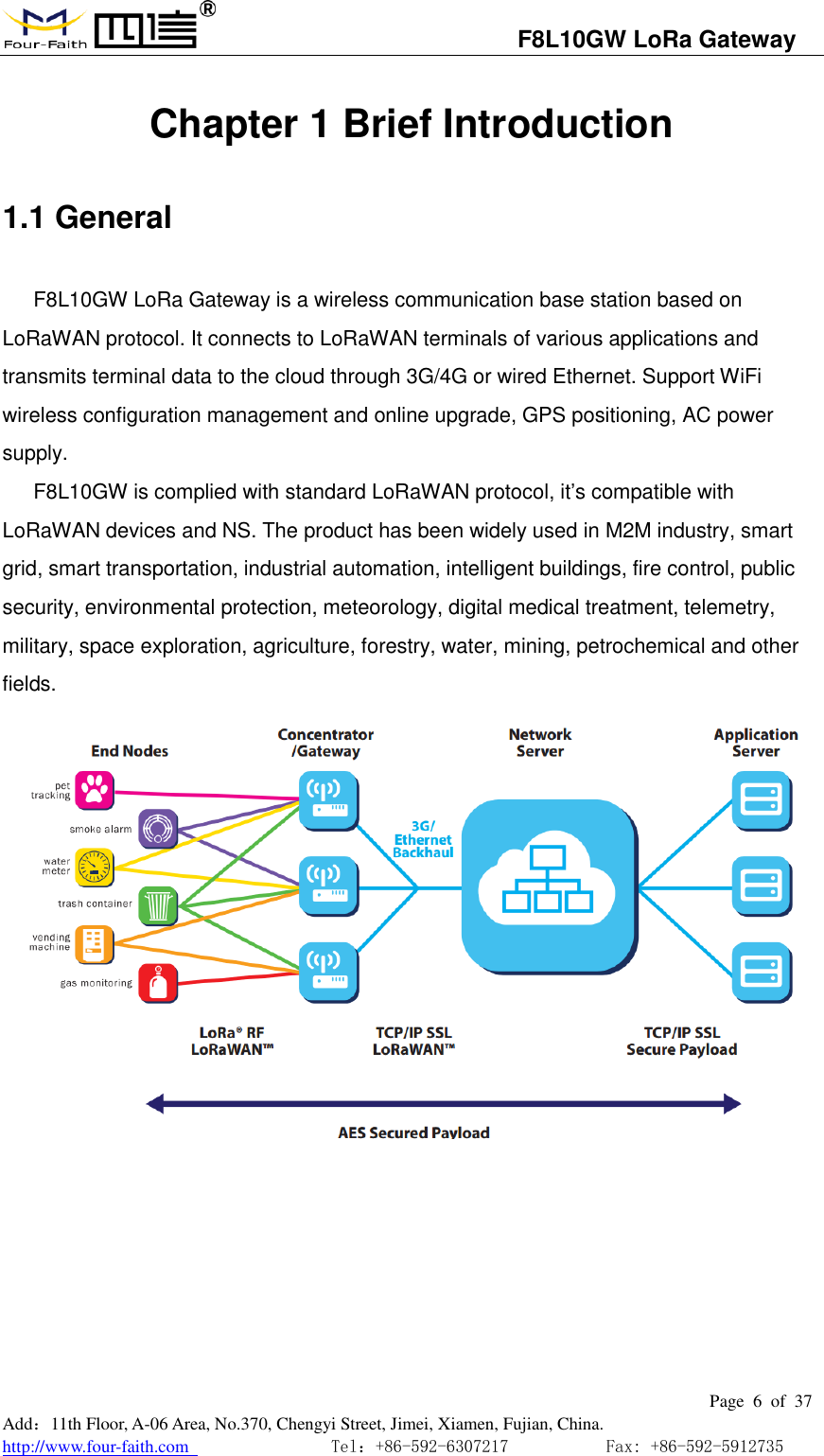
                                  F8L10GW LoRa Gateway                                                         Page  6  of  37  Add:11th Floor, A-06 Area, No.370, Chengyi Street, Jimei, Xiamen, Fujian, China. http://www.four-faith.com                                Tel:+86-592-6307217           Fax: +86-592-5912735  Chapter 1 Brief Introduction 1.1 General F8L10GW LoRa Gateway is a wireless communication base station based on LoRaWAN protocol. It connects to LoRaWAN terminals of various applications and transmits terminal data to the cloud through 3G/4G or wired Ethernet. Support WiFi wireless configuration management and online upgrade, GPS positioning, AC power supply. F8L10GW is complied with standard LoRaWAN protocol, it’s compatible with LoRaWAN devices and NS. The product has been widely used in M2M industry, smart grid, smart transportation, industrial automation, intelligent buildings, fire control, public security, environmental protection, meteorology, digital medical treatment, telemetry, military, space exploration, agriculture, forestry, water, mining, petrochemical and other fields.
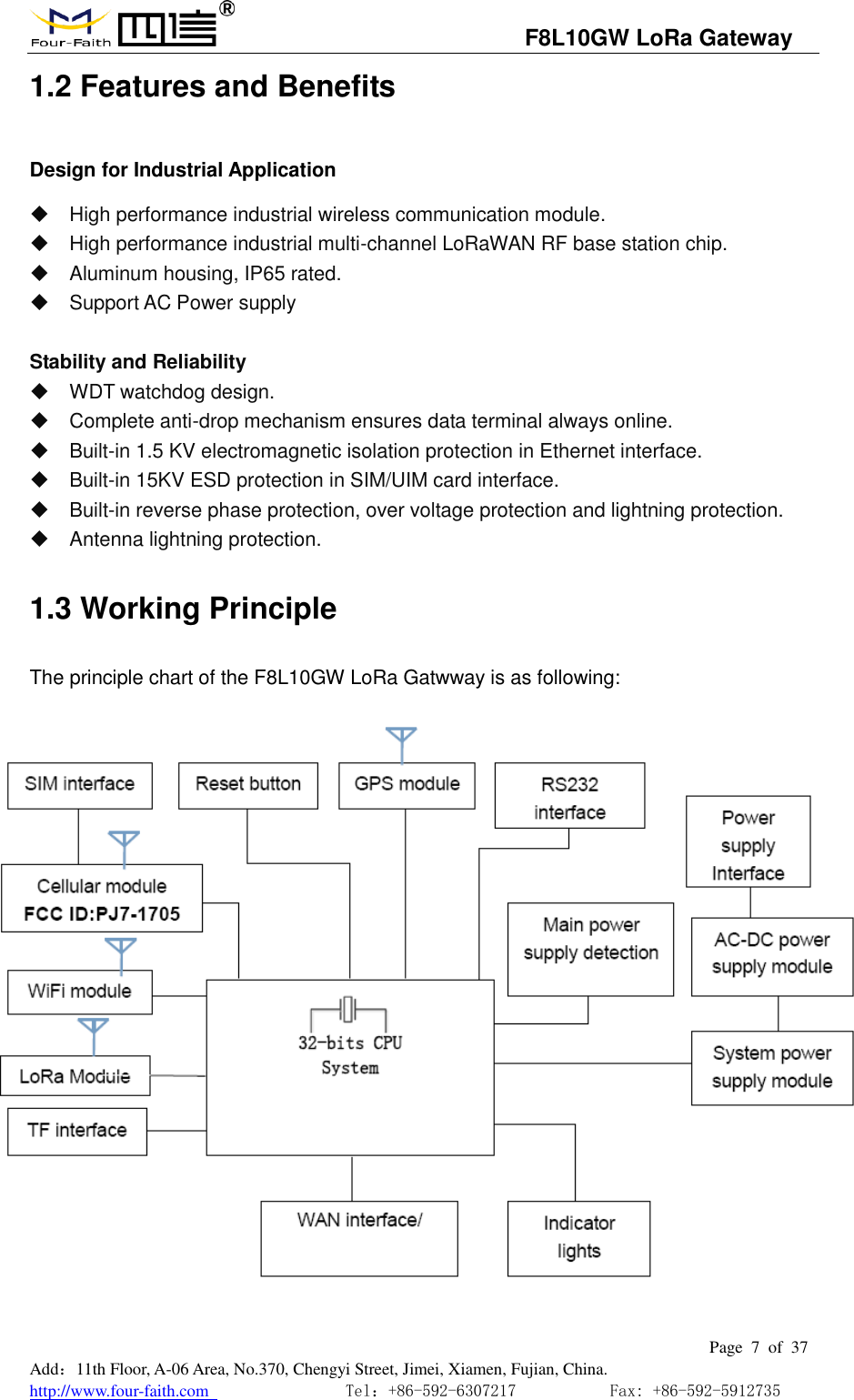
                                  F8L10GW LoRa Gateway                                                         Page  7  of  37  Add:11th Floor, A-06 Area, No.370, Chengyi Street, Jimei, Xiamen, Fujian, China. http://www.four-faith.com                                Tel:+86-592-6307217           Fax: +86-592-5912735  1.2 Features and Benefits Design for Industrial Application   High performance industrial wireless communication module.   High performance industrial multi-channel LoRaWAN RF base station chip.   Aluminum housing, IP65 rated.   Support AC Power supply  Stability and Reliability     WDT watchdog design.   Complete anti-drop mechanism ensures data terminal always online.   Built-in 1.5 KV electromagnetic isolation protection in Ethernet interface.   Built-in 15KV ESD protection in SIM/UIM card interface.   Built-in reverse phase protection, over voltage protection and lightning protection.   Antenna lightning protection. 1.3 Working Principle The principle chart of the F8L10GW LoRa Gatwway is as following:
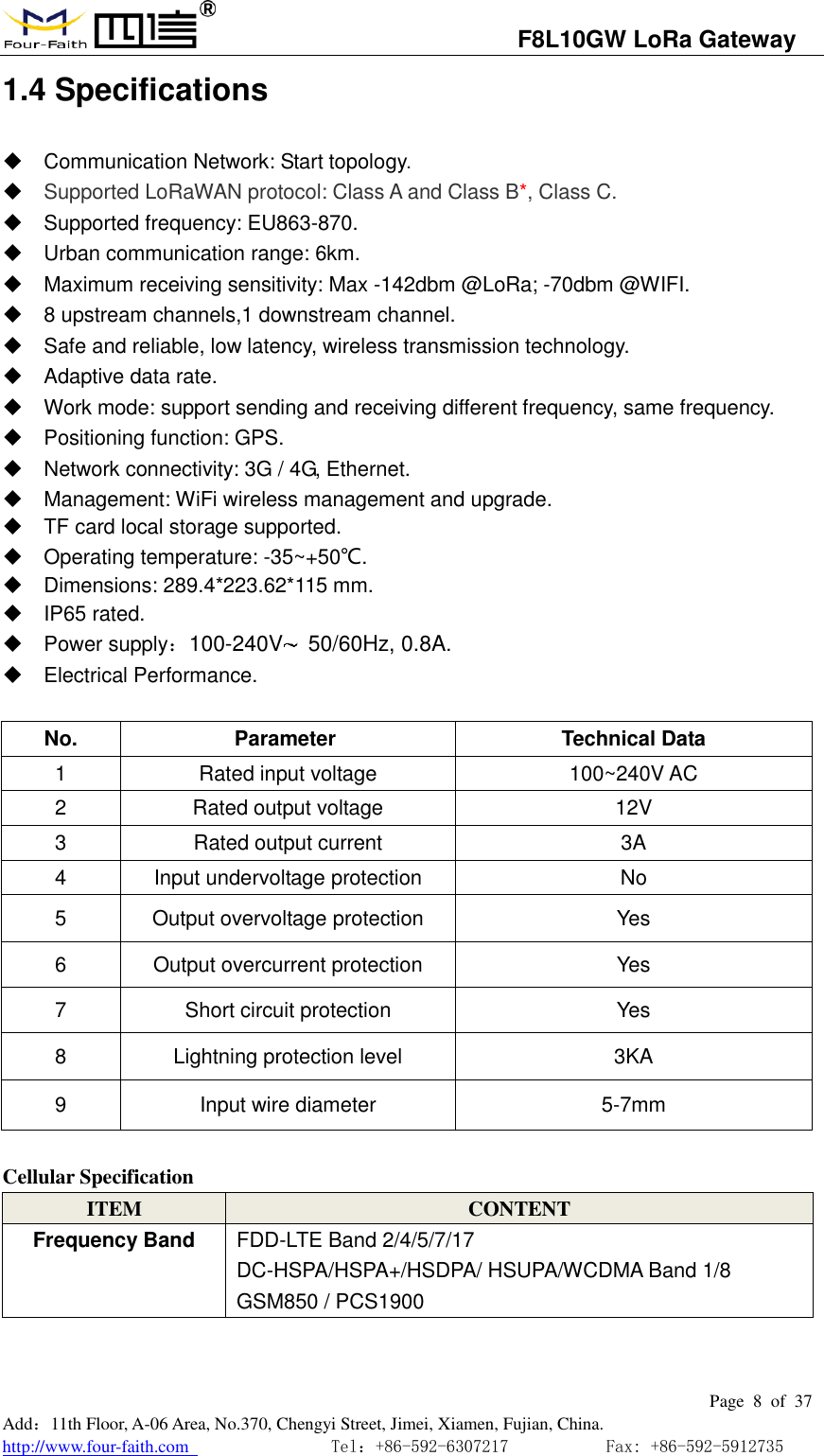
                                  F8L10GW LoRa Gateway                                                         Page  8  of  37  Add:11th Floor, A-06 Area, No.370, Chengyi Street, Jimei, Xiamen, Fujian, China. http://www.four-faith.com                                Tel:+86-592-6307217           Fax: +86-592-5912735  1.4 Specifications   Communication Network: Start topology.  Supported LoRaWAN protocol: Class A and Class B*, Class C.   Supported frequency: EU863-870.   Urban communication range: 6km.   Maximum receiving sensitivity: Max -142dbm @LoRa; -70dbm @WIFI.   8 upstream channels,1 downstream channel.   Safe and reliable, low latency, wireless transmission technology.   Adaptive data rate.   Work mode: support sending and receiving different frequency, same frequency.   Positioning function: GPS.   Network connectivity: 3G / 4G, Ethernet.   Management: WiFi wireless management and upgrade.   TF card local storage supported.   Operating temperature: -35~+50℃.   Dimensions: 289.4*223.62*115 mm.   IP65 rated.   Power supply:100-240V   50/60Hz, 0.8A.   Electrical Performance.  No. Parameter  Technical Data 1 Rated input voltage 100~240V AC 2 Rated output voltage 12V 3 Rated output current 3A 4 Input undervoltage protection No 5 Output overvoltage protection Yes 6 Output overcurrent protection Yes 7 Short circuit protection Yes 8 Lightning protection level 3KA 9 Input wire diameter 5-7mm  Cellular Specification ITEM CONTENT Frequency Band FDD-LTE Band 2/4/5/7/17 DC-HSPA/HSPA+/HSDPA/ HSUPA/WCDMA Band 1/8 GSM850 / PCS1900
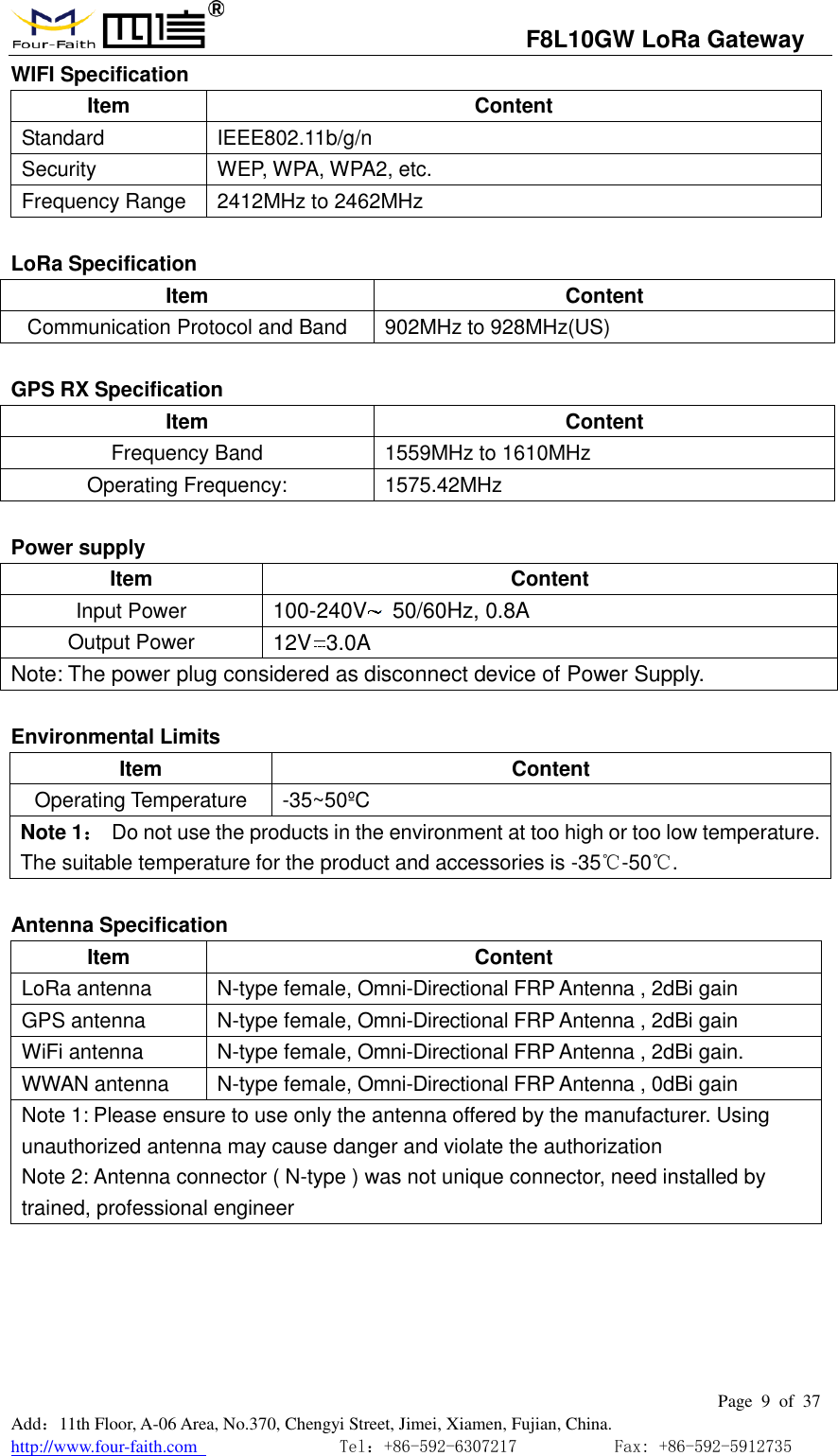
                                  F8L10GW LoRa Gateway                                                         Page  9  of  37  Add:11th Floor, A-06 Area, No.370, Chengyi Street, Jimei, Xiamen, Fujian, China. http://www.four-faith.com                                Tel:+86-592-6307217           Fax: +86-592-5912735  WIFI Specification Item Content Standard IEEE802.11b/g/n Security WEP, WPA, WPA2, etc.   Frequency Range 2412MHz to 2462MHz  LoRa Specification Item Content Communication Protocol and Band 902MHz to 928MHz(US)  GPS RX Specification Item Content Frequency Band 1559MHz to 1610MHz Operating Frequency: 1575.42MHz  Power supply Item Content Input Power 100-240V   50/60Hz, 0.8A Output Power 12V 3.0A Note: The power plug considered as disconnect device of Power Supply.  Environmental Limits Item Content Operating Temperature -35~50ºC  Note 1:  Do not use the products in the environment at too high or too low temperature. The suitable temperature for the product and accessories is -35℃-50℃.    Antenna Specification Item Content LoRa antenna N-type female, Omni-Directional FRP Antenna , 2dBi gain GPS antenna N-type female, Omni-Directional FRP Antenna , 2dBi gain WiFi antenna N-type female, Omni-Directional FRP Antenna , 2dBi gain.   WWAN antenna N-type female, Omni-Directional FRP Antenna , 0dBi gain Note 1: Please ensure to use only the antenna offered by the manufacturer. Using unauthorized antenna may cause danger and violate the authorization Note 2: Antenna connector ( N-type ) was not unique connector, need installed by trained, professional engineer
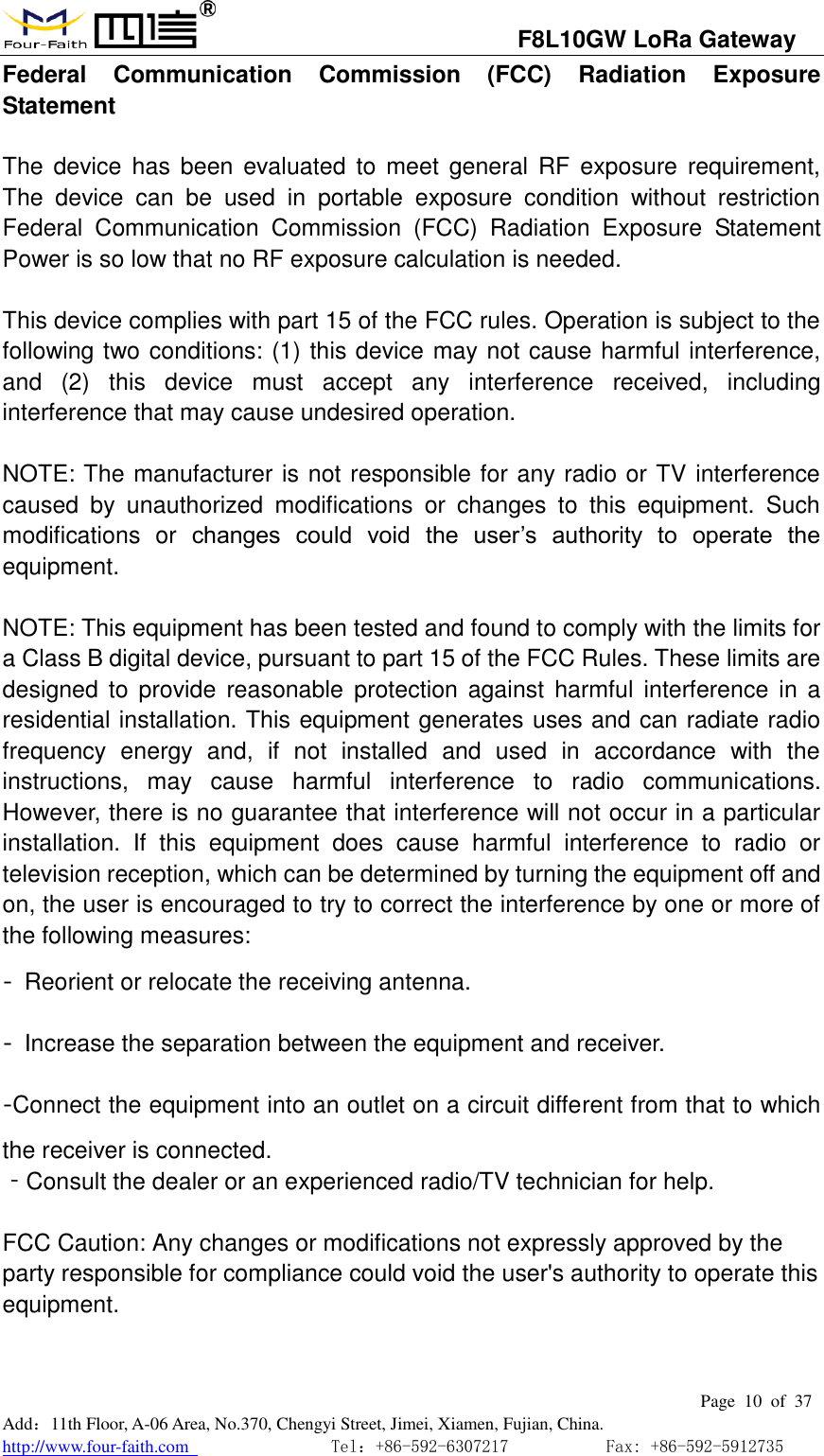
                                  F8L10GW LoRa Gateway                                                         Page  10  of  37  Add:11th Floor, A-06 Area, No.370, Chengyi Street, Jimei, Xiamen, Fujian, China. http://www.four-faith.com                                Tel:+86-592-6307217           Fax: +86-592-5912735  Federal  Communication  Commission  (FCC)  Radiation  Exposure Statement  The  device  has  been  evaluated  to  meet  general RF exposure requirement, The  device  can  be  used  in  portable  exposure  condition  without  restriction Federal  Communication  Commission  (FCC)  Radiation  Exposure  Statement Power is so low that no RF exposure calculation is needed.  This device complies with part 15 of the FCC rules. Operation is subject to the following two conditions: (1) this device may not cause harmful interference, and  (2)  this  device  must  accept  any  interference  received,  including interference that may cause undesired operation.    NOTE: The manufacturer is not responsible for any radio or TV interference caused  by  unauthorized  modifications  or  changes  to  this  equipment.  Such modifications  or  changes  could  void  the  user’s  authority  to  operate  the equipment.  NOTE: This equipment has been tested and found to comply with the limits for a Class B digital device, pursuant to part 15 of the FCC Rules. These limits are designed  to  provide  reasonable  protection against  harmful  interference  in  a residential installation. This equipment generates uses and can radiate radio frequency  energy  and,  if  not  installed  and  used  in  accordance  with  the instructions,  may  cause  harmful  interference  to  radio  communications. However, there is no guarantee that interference will not occur in a particular installation.  If  this  equipment  does  cause  harmful  interference  to  radio  or television reception, which can be determined by turning the equipment off and on, the user is encouraged to try to correct the interference by one or more of the following measures: ‐  Reorient or relocate the receiving antenna. ‐  Increase the separation between the equipment and receiver. ‐Connect the equipment into an outlet on a circuit different from that to which the receiver is connected. ‐Consult the dealer or an experienced radio/TV technician for help.  FCC Caution: Any changes or modifications not expressly approved by the party responsible for compliance could void the user's authority to operate this equipment.
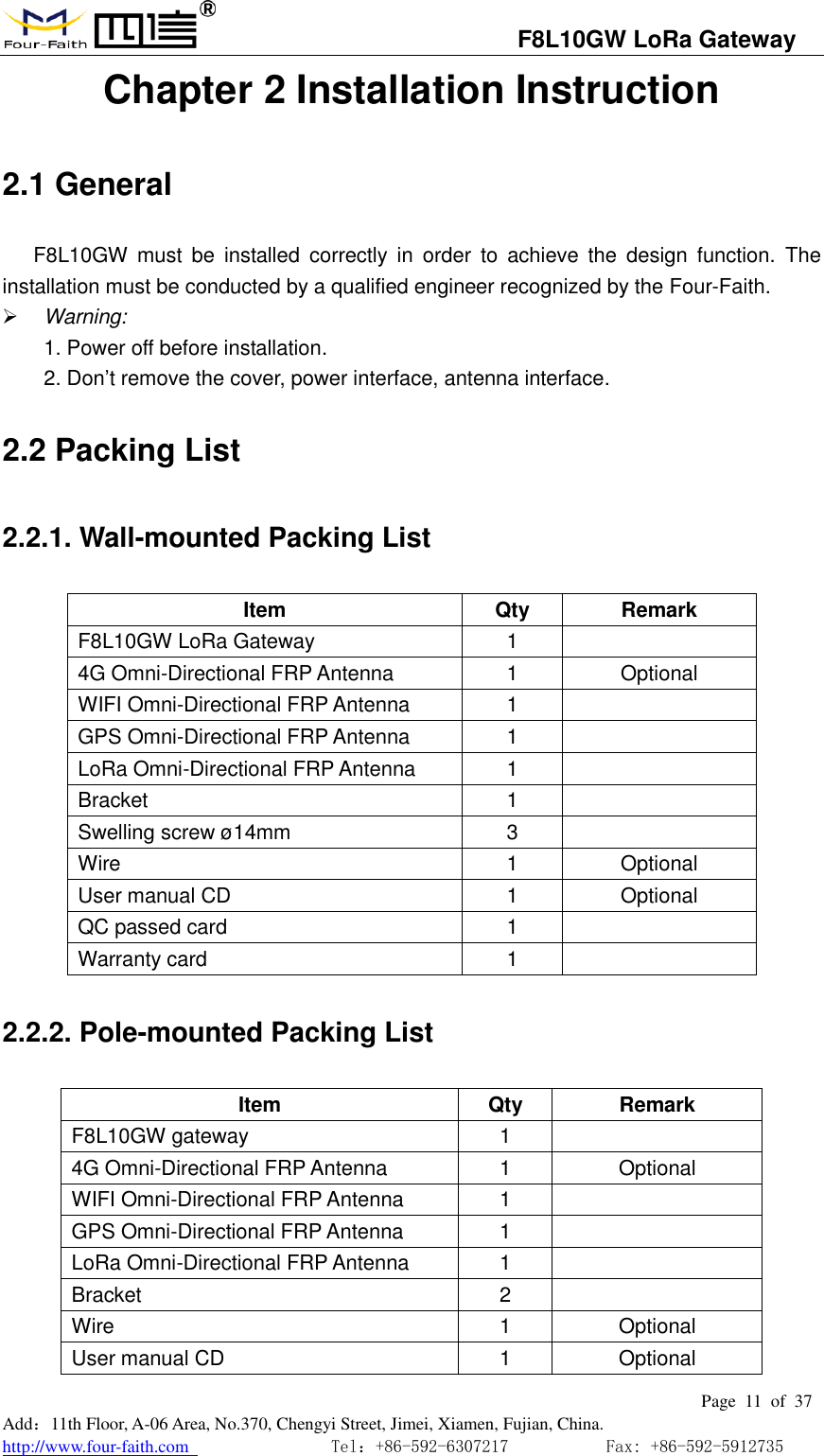
                                  F8L10GW LoRa Gateway                                                         Page  11  of  37  Add:11th Floor, A-06 Area, No.370, Chengyi Street, Jimei, Xiamen, Fujian, China. http://www.four-faith.com                                Tel:+86-592-6307217           Fax: +86-592-5912735  Chapter 2 Installation Instruction 2.1 General F8L10GW  must  be  installed  correctly  in  order  to  achieve  the  design  function.  The installation must be conducted by a qualified engineer recognized by the Four-Faith.  Warning: 1. Power off before installation. 2. Don’t remove the cover, power interface, antenna interface. 2.2 Packing List 2.2.1. Wall-mounted Packing List Item Qty Remark F8L10GW LoRa Gateway 1  4G Omni-Directional FRP Antenna 1 Optional WIFI Omni-Directional FRP Antenna 1  GPS Omni-Directional FRP Antenna 1  LoRa Omni-Directional FRP Antenna 1  Bracket 1  Swelling screw ø14mm 3  Wire 1 Optional User manual CD 1 Optional QC passed card 1  Warranty card 1  2.2.2. Pole-mounted Packing List Item Qty Remark F8L10GW gateway 1  4G Omni-Directional FRP Antenna 1 Optional WIFI Omni-Directional FRP Antenna 1  GPS Omni-Directional FRP Antenna 1  LoRa Omni-Directional FRP Antenna 1  Bracket 2  Wire 1 Optional User manual CD 1 Optional
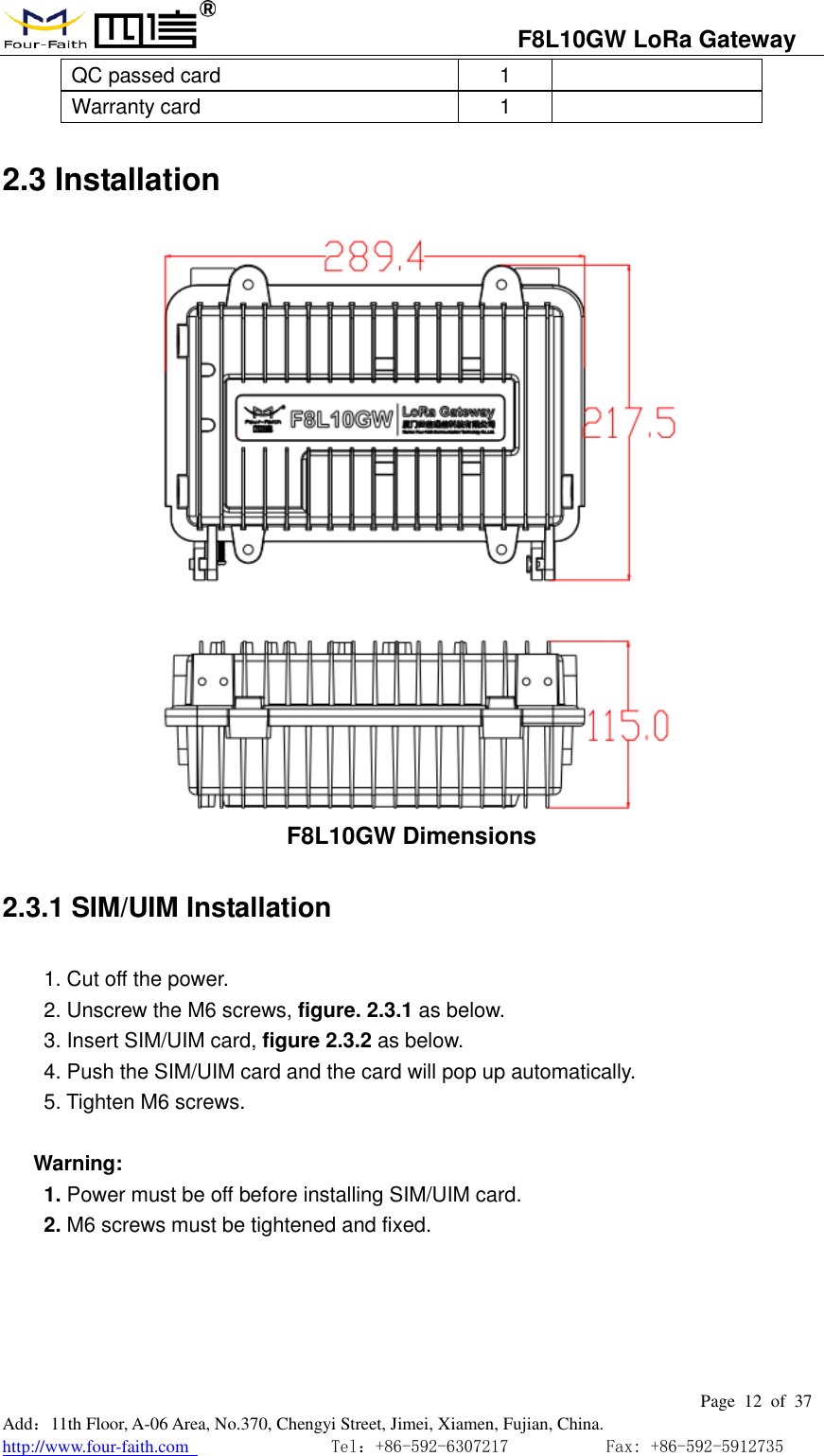
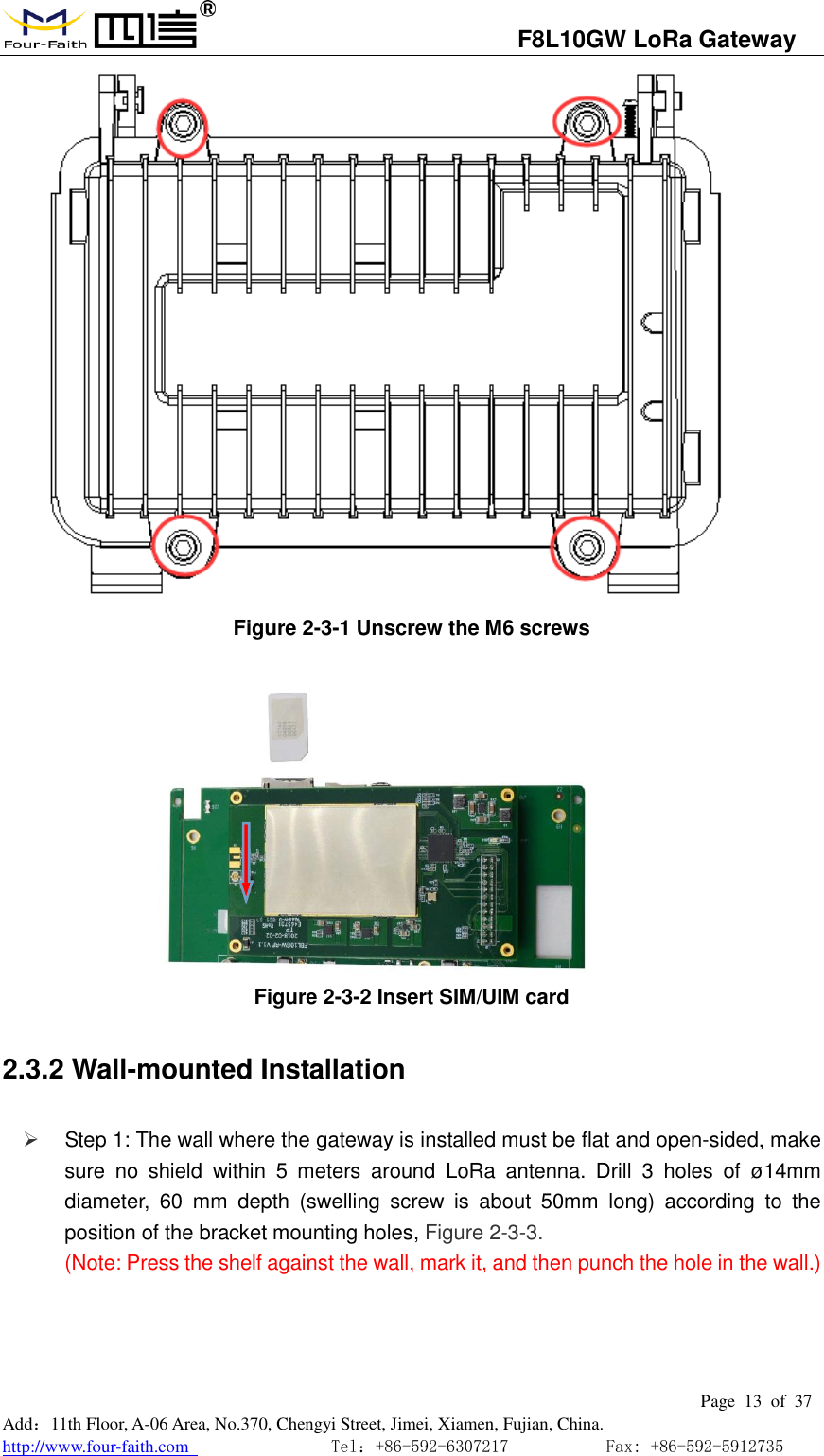
                                  F8L10GW LoRa Gateway                                                         Page  12  of  37  Add:11th Floor, A-06 Area, No.370, Chengyi Street, Jimei, Xiamen, Fujian, China. http://www.four-faith.com                                Tel:+86-592-6307217           Fax: +86-592-5912735  QC passed card 1  Warranty card 1  2.3 Installation  F8L10GW Dimensions 2.3.1 SIM/UIM Installation 1. Cut off the power. 2. Unscrew the M6 screws, figure. 2.3.1 as below. 3. Insert SIM/UIM card, figure 2.3.2 as below. 4. Push the SIM/UIM card and the card will pop up automatically. 5. Tighten M6 screws.  Warning:   1. Power must be off before installing SIM/UIM card. 2. M6 screws must be tightened and fixed.
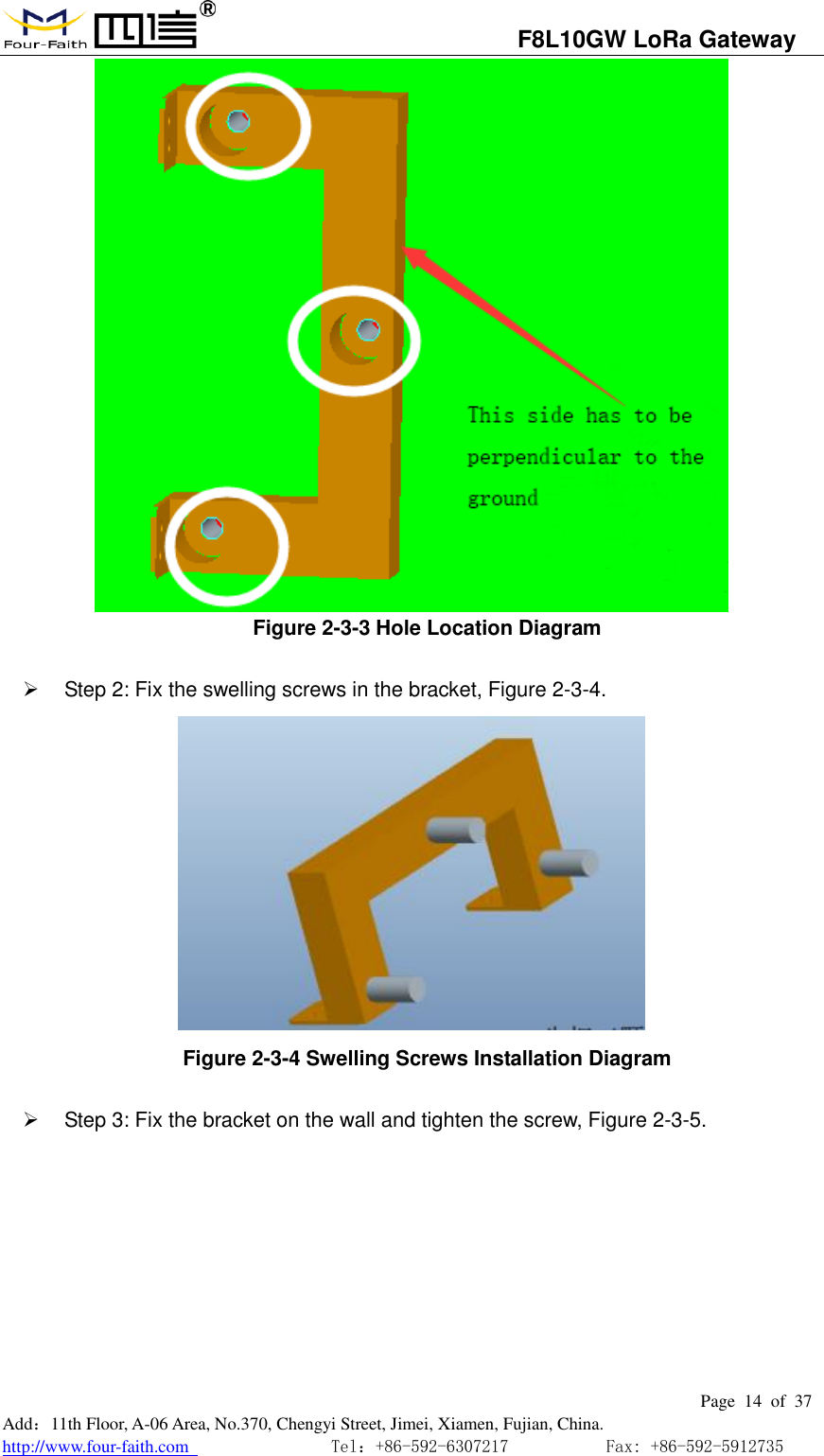
                                  F8L10GW LoRa Gateway                                                         Page  13  of  37  Add:11th Floor, A-06 Area, No.370, Chengyi Street, Jimei, Xiamen, Fujian, China. http://www.four-faith.com                                Tel:+86-592-6307217           Fax: +86-592-5912735   Figure 2-3-1 Unscrew the M6 screws            Figure 2-3-2 Insert SIM/UIM card 2.3.2 Wall-mounted Installation    Step 1: The wall where the gateway is installed must be flat and open-sided, make sure  no  shield  within  5  meters  around  LoRa  antenna.  Drill  3  holes  of  ø14mm diameter,  60  mm  depth  (swelling  screw  is  about  50mm  long)  according  to  the position of the bracket mounting holes, Figure 2-3-3. (Note: Press the shelf against the wall, mark it, and then punch the hole in the wall.)
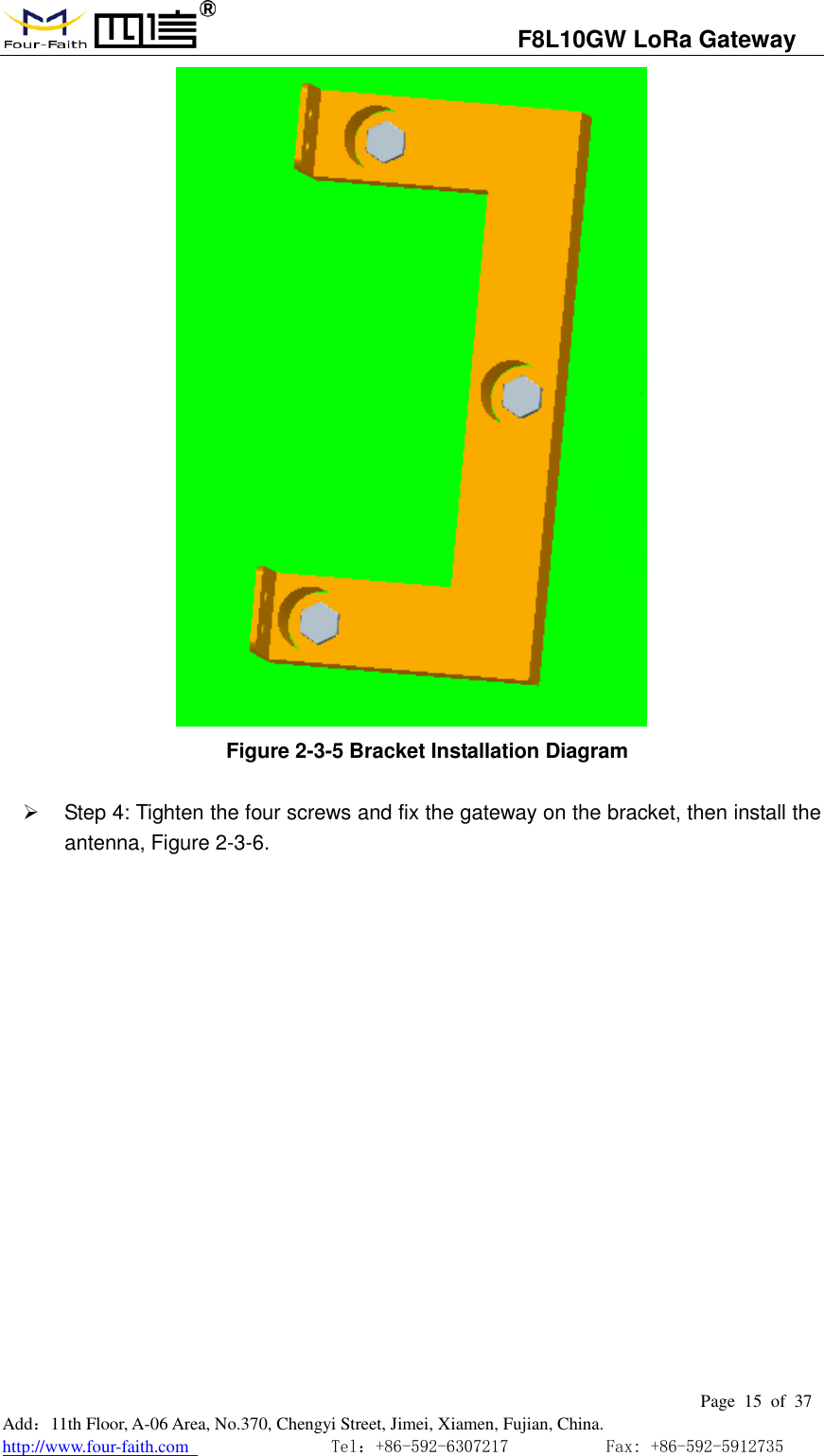
                                  F8L10GW LoRa Gateway                                                         Page  14  of  37  Add:11th Floor, A-06 Area, No.370, Chengyi Street, Jimei, Xiamen, Fujian, China. http://www.four-faith.com                                Tel:+86-592-6307217           Fax: +86-592-5912735   Figure 2-3-3 Hole Location Diagram     Step 2: Fix the swelling screws in the bracket, Figure 2-3-4.  Figure 2-3-4 Swelling Screws Installation Diagram     Step 3: Fix the bracket on the wall and tighten the screw, Figure 2-3-5.
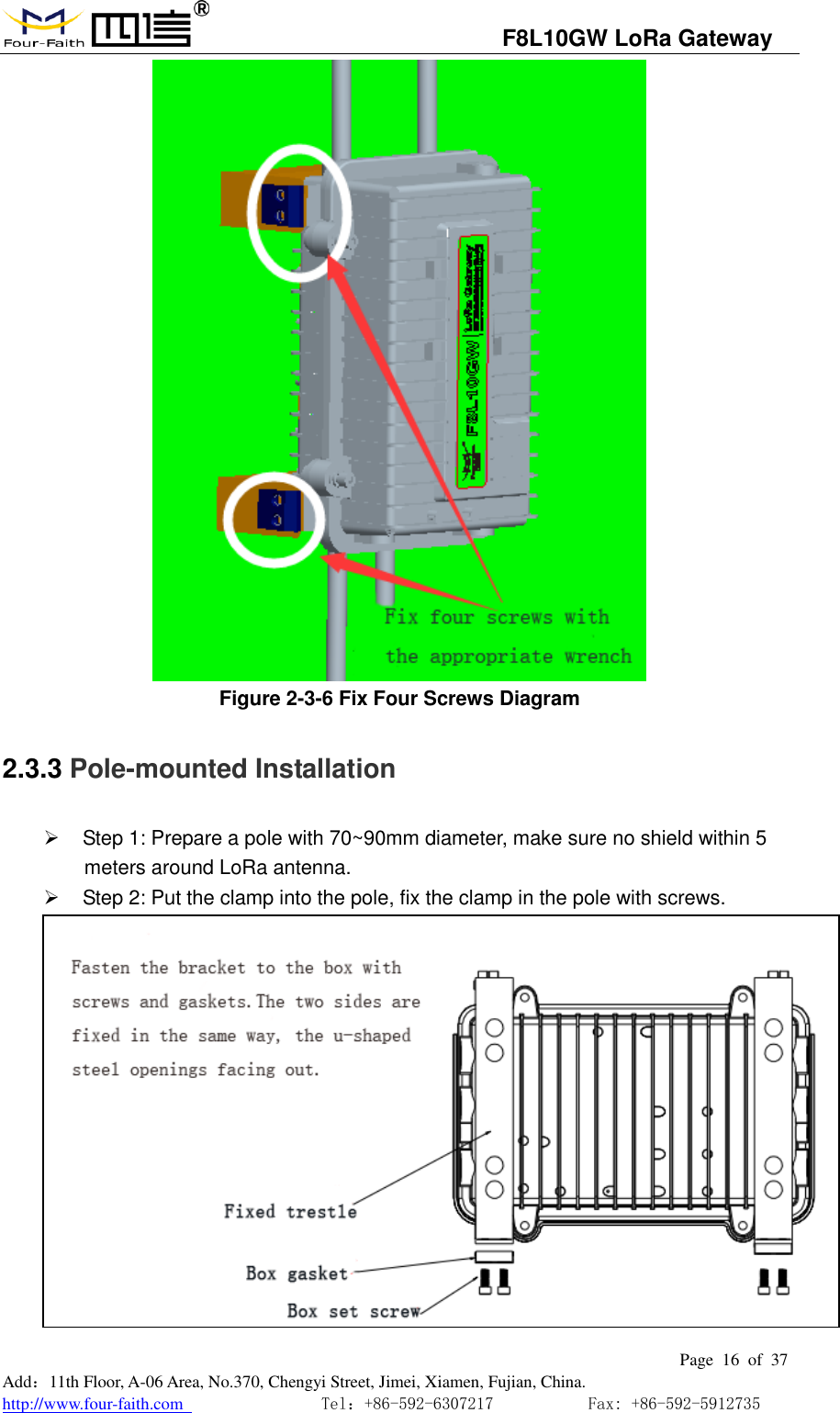
                                  F8L10GW LoRa Gateway                                                         Page  15  of  37  Add:11th Floor, A-06 Area, No.370, Chengyi Street, Jimei, Xiamen, Fujian, China. http://www.four-faith.com                                Tel:+86-592-6307217           Fax: +86-592-5912735   Figure 2-3-5 Bracket Installation Diagram     Step 4: Tighten the four screws and fix the gateway on the bracket, then install the antenna, Figure 2-3-6.
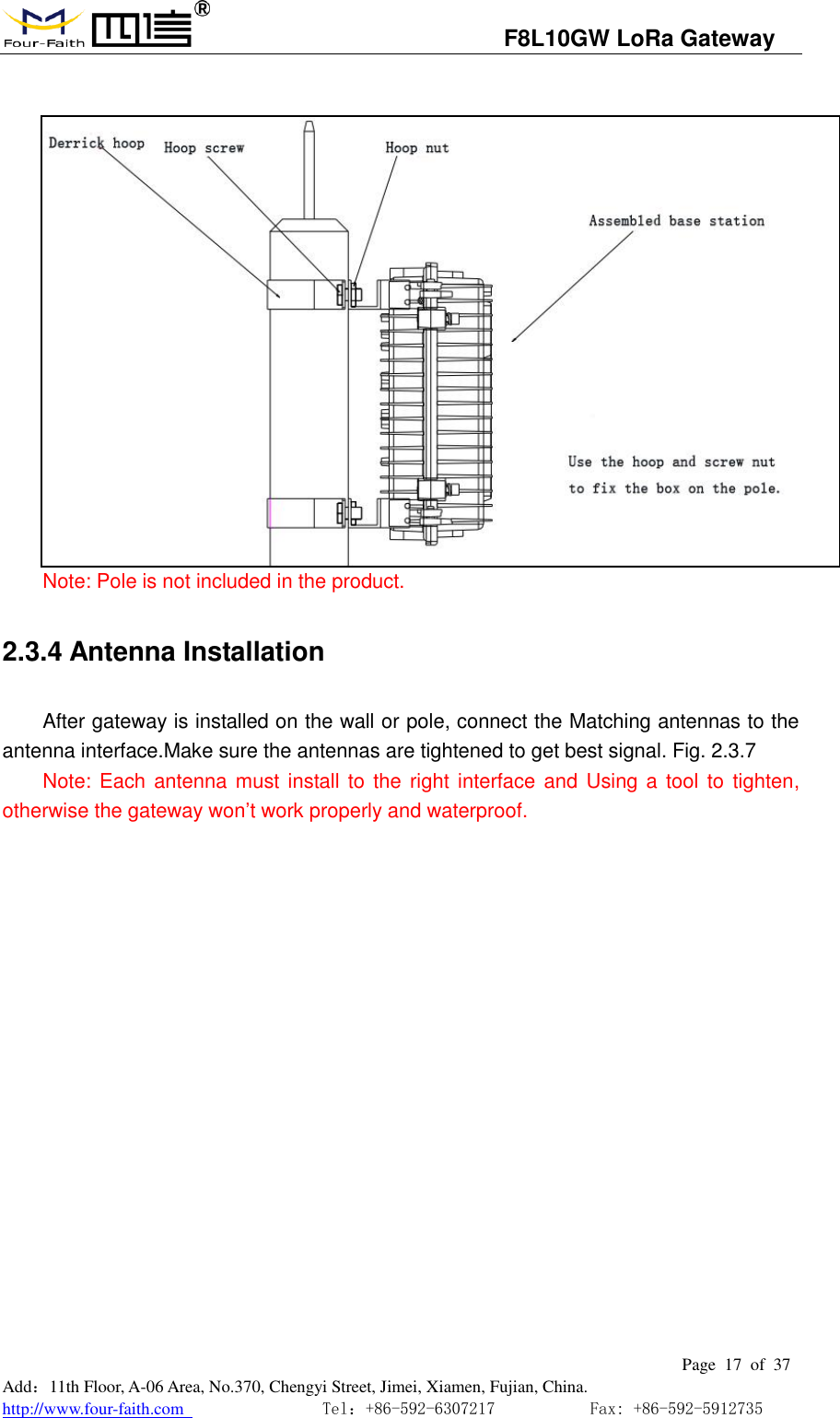
                                  F8L10GW LoRa Gateway                                                         Page  16  of  37  Add:11th Floor, A-06 Area, No.370, Chengyi Street, Jimei, Xiamen, Fujian, China. http://www.four-faith.com                                Tel:+86-592-6307217           Fax: +86-592-5912735   Figure 2-3-6 Fix Four Screws Diagram 2.3.3 Pole-mounted Installation   Step 1: Prepare a pole with 70~90mm diameter, make sure no shield within 5 meters around LoRa antenna.   Step 2: Put the clamp into the pole, fix the clamp in the pole with screws.
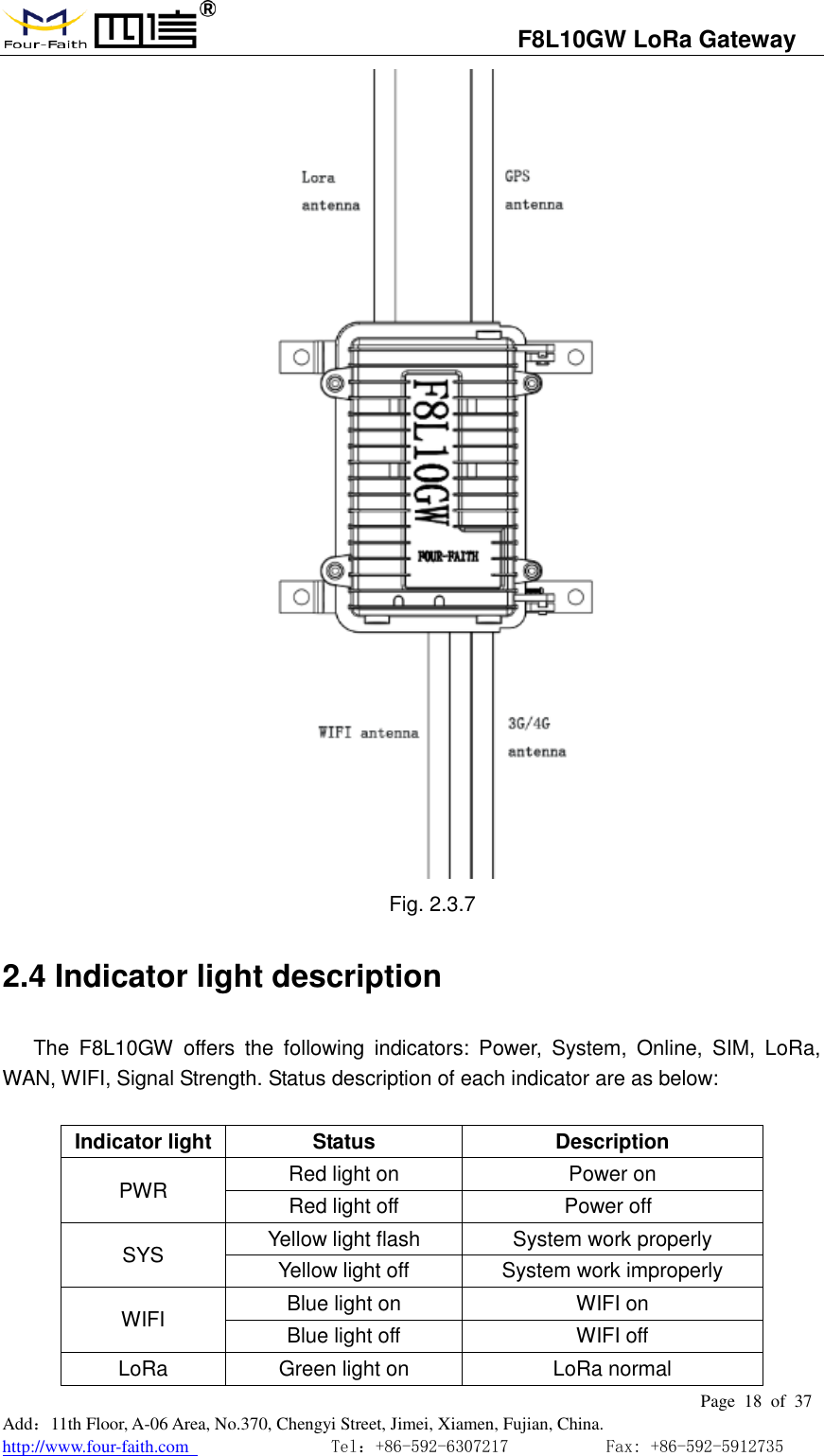
                                  F8L10GW LoRa Gateway                                                         Page  17  of  37  Add:11th Floor, A-06 Area, No.370, Chengyi Street, Jimei, Xiamen, Fujian, China. http://www.four-faith.com                                Tel:+86-592-6307217           Fax: +86-592-5912735    Note: Pole is not included in the product. 2.3.4 Antenna Installation After gateway is installed on the wall or pole, connect the Matching antennas to the antenna interface.Make sure the antennas are tightened to get best signal. Fig. 2.3.7   Note: Each antenna must install to  the right  interface and  Using a tool  to tighten, otherwise the gateway won’t work properly and waterproof.
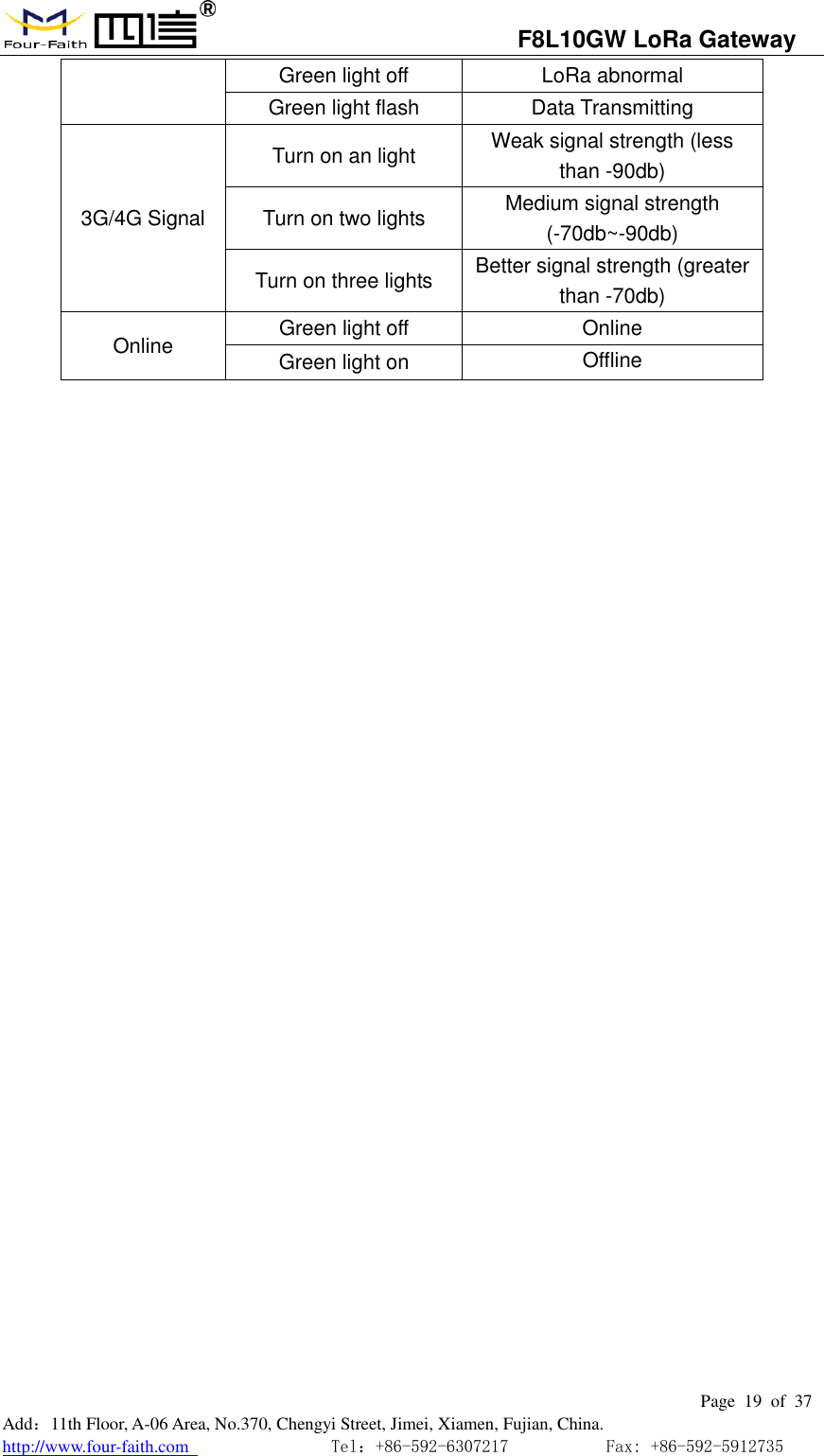
                                  F8L10GW LoRa Gateway                                                         Page  18  of  37  Add:11th Floor, A-06 Area, No.370, Chengyi Street, Jimei, Xiamen, Fujian, China. http://www.four-faith.com                                Tel:+86-592-6307217           Fax: +86-592-5912735   Fig. 2.3.7 2.4 Indicator light description The  F8L10GW  offers  the  following  indicators:  Power,  System,  Online,  SIM,  LoRa, WAN, WIFI, Signal Strength. Status description of each indicator are as below:  Indicator light Status Description PWR Red light on Power on Red light off    Power off SYS Yellow light flash System work properly Yellow light off System work improperly WIFI Blue light on WIFI on Blue light off   WIFI off LoRa Green light on LoRa normal
                                  F8L10GW LoRa Gateway                                                         Page  19  of  37  Add:11th Floor, A-06 Area, No.370, Chengyi Street, Jimei, Xiamen, Fujian, China. http://www.four-faith.com                                Tel:+86-592-6307217           Fax: +86-592-5912735  Green light off   LoRa abnormal Green light flash Data Transmitting 3G/4G Signal Turn on an light Weak signal strength (less than -90db) Turn on two lights Medium signal strength (-70db~-90db) Turn on three lights Better signal strength (greater than -70db) Online Green light off Online Green light on Offline
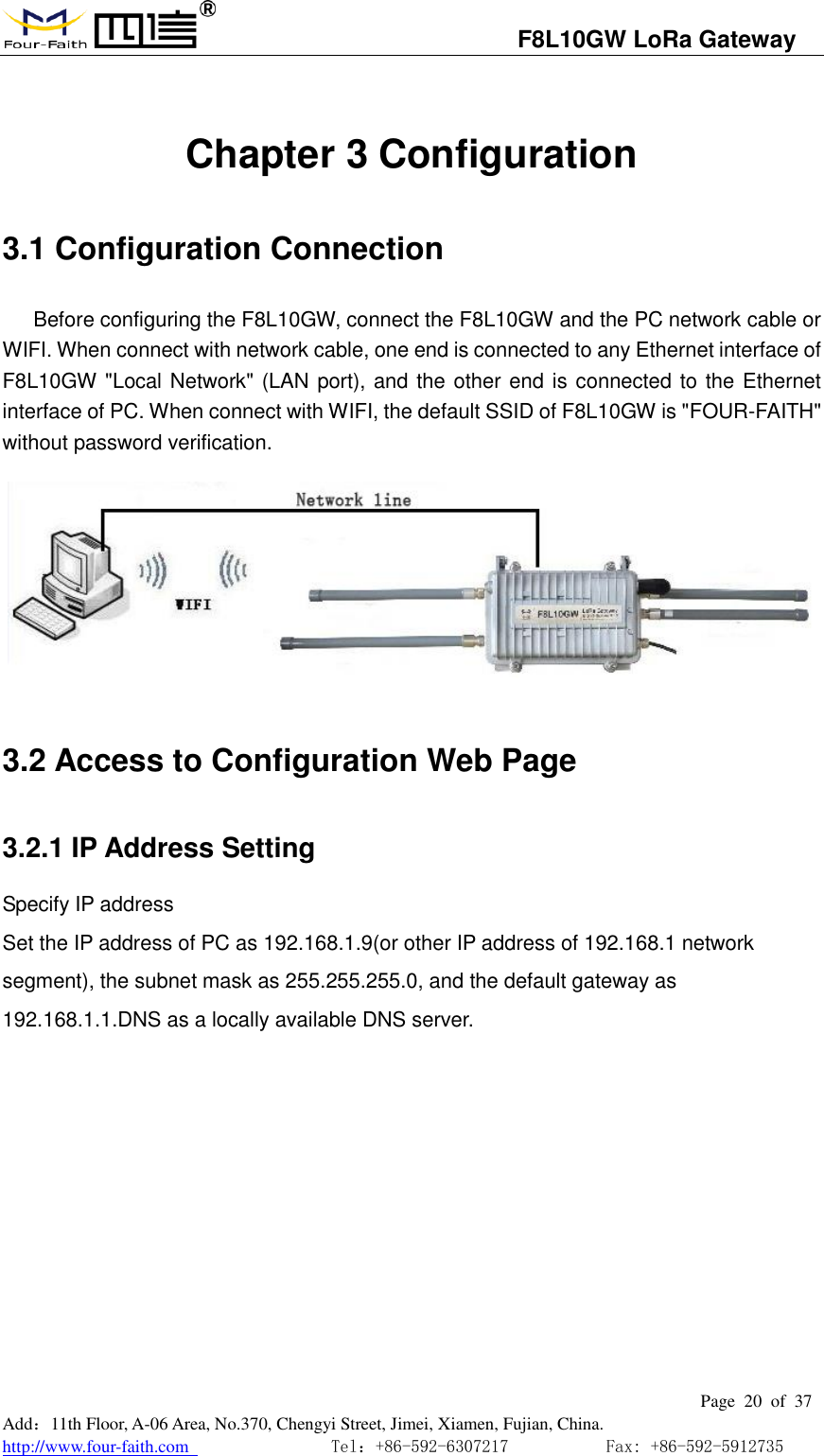
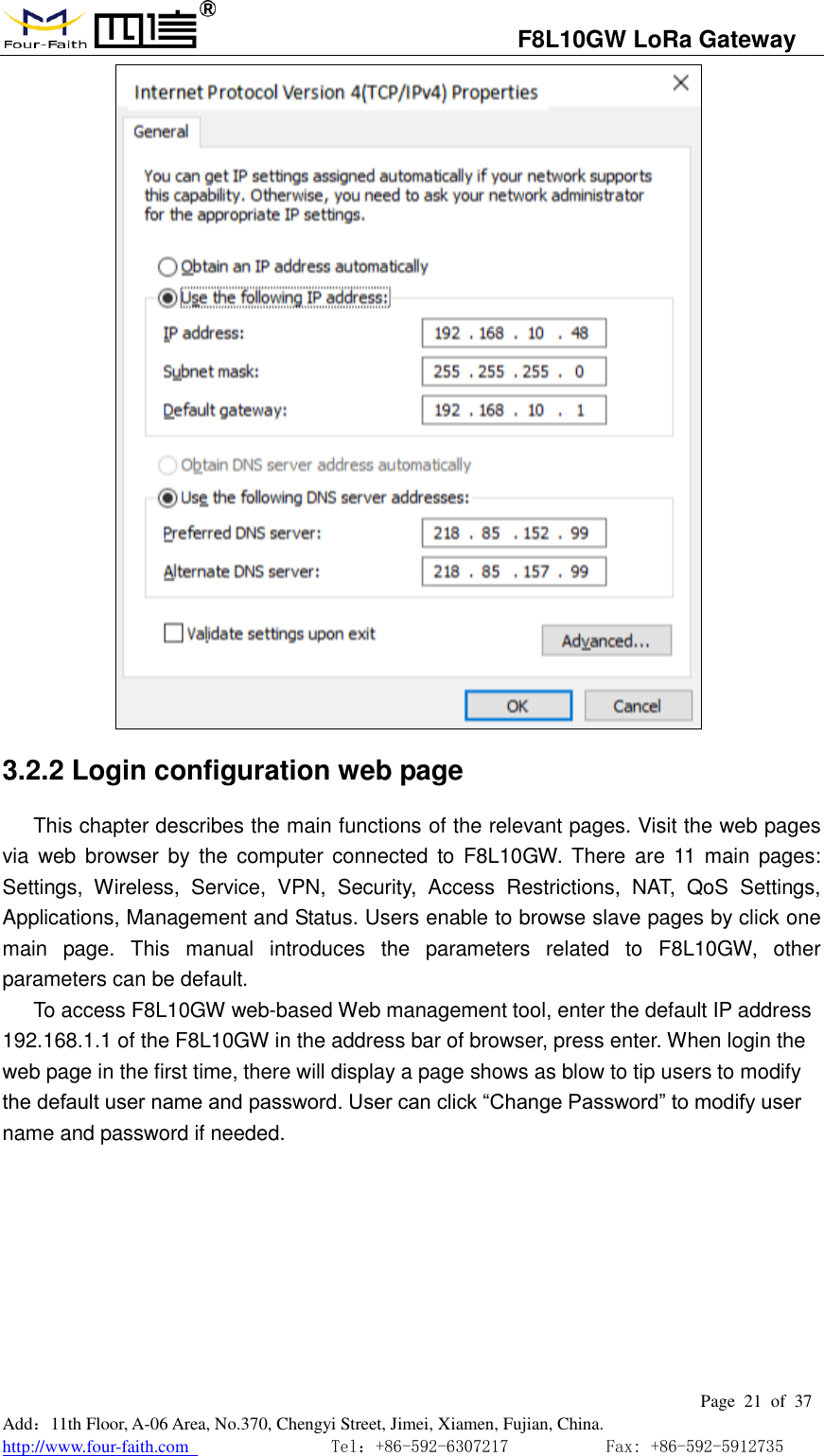
                                  F8L10GW LoRa Gateway                                                         Page  20  of  37  Add:11th Floor, A-06 Area, No.370, Chengyi Street, Jimei, Xiamen, Fujian, China. http://www.four-faith.com                                Tel:+86-592-6307217           Fax: +86-592-5912735   Chapter 3 Configuration 3.1 Configuration Connection Before configuring the F8L10GW, connect the F8L10GW and the PC network cable or WIFI. When connect with network cable, one end is connected to any Ethernet interface of F8L10GW "Local Network" (LAN port), and the other end is connected to the Ethernet interface of PC. When connect with WIFI, the default SSID of F8L10GW is "FOUR-FAITH" without password verification.         3.2 Access to Configuration Web Page 3.2.1 IP Address Setting Specify IP address Set the IP address of PC as 192.168.1.9(or other IP address of 192.168.1 network segment), the subnet mask as 255.255.255.0, and the default gateway as 192.168.1.1.DNS as a locally available DNS server.
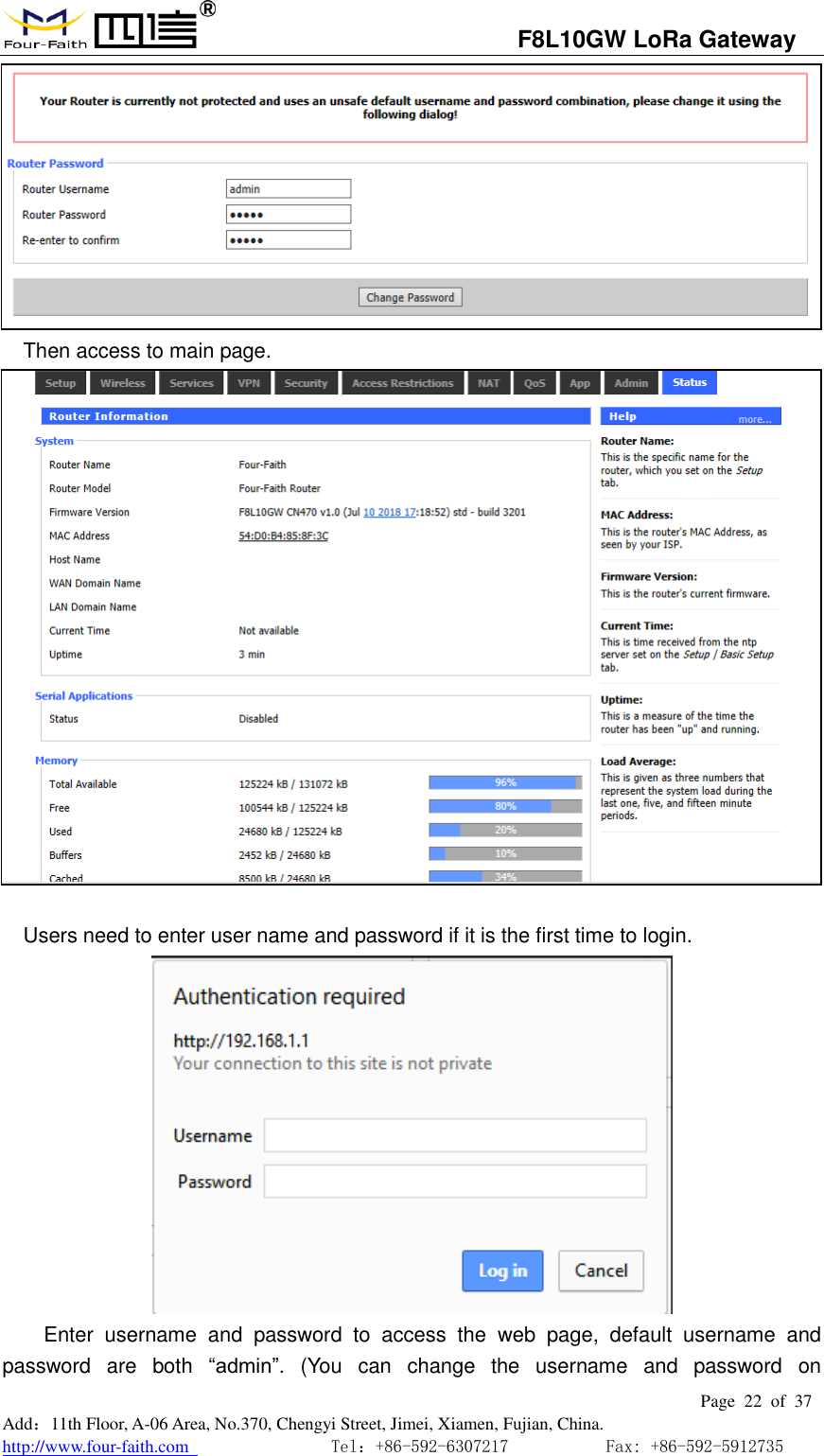
                                  F8L10GW LoRa Gateway                                                         Page  21  of  37  Add:11th Floor, A-06 Area, No.370, Chengyi Street, Jimei, Xiamen, Fujian, China. http://www.four-faith.com                                Tel:+86-592-6307217           Fax: +86-592-5912735   3.2.2 Login configuration web page This chapter describes the main functions of the relevant pages. Visit the web pages via  web  browser  by the  computer connected  to  F8L10GW. There  are 11 main pages: Settings,  Wireless,  Service,  VPN,  Security,  Access  Restrictions,  NAT,  QoS  Settings, Applications, Management and Status. Users enable to browse slave pages by click one main  page.  This  manual  introduces  the  parameters  related  to  F8L10GW,  other parameters can be default. To access F8L10GW web-based Web management tool, enter the default IP address 192.168.1.1 of the F8L10GW in the address bar of browser, press enter. When login the web page in the first time, there will display a page shows as blow to tip users to modify the default user name and password. User can click “Change Password” to modify user name and password if needed.
                                  F8L10GW LoRa Gateway                                                         Page  22  of  37  Add:11th Floor, A-06 Area, No.370, Chengyi Street, Jimei, Xiamen, Fujian, China. http://www.four-faith.com                                Tel:+86-592-6307217           Fax: +86-592-5912735   Then access to main page.   Users need to enter user name and password if it is the first time to login.    Enter  username  and  password  to  access  the  web  page,  default  username  and password  are  both  “admin”.  (You  can  change  the  username  and  password  on
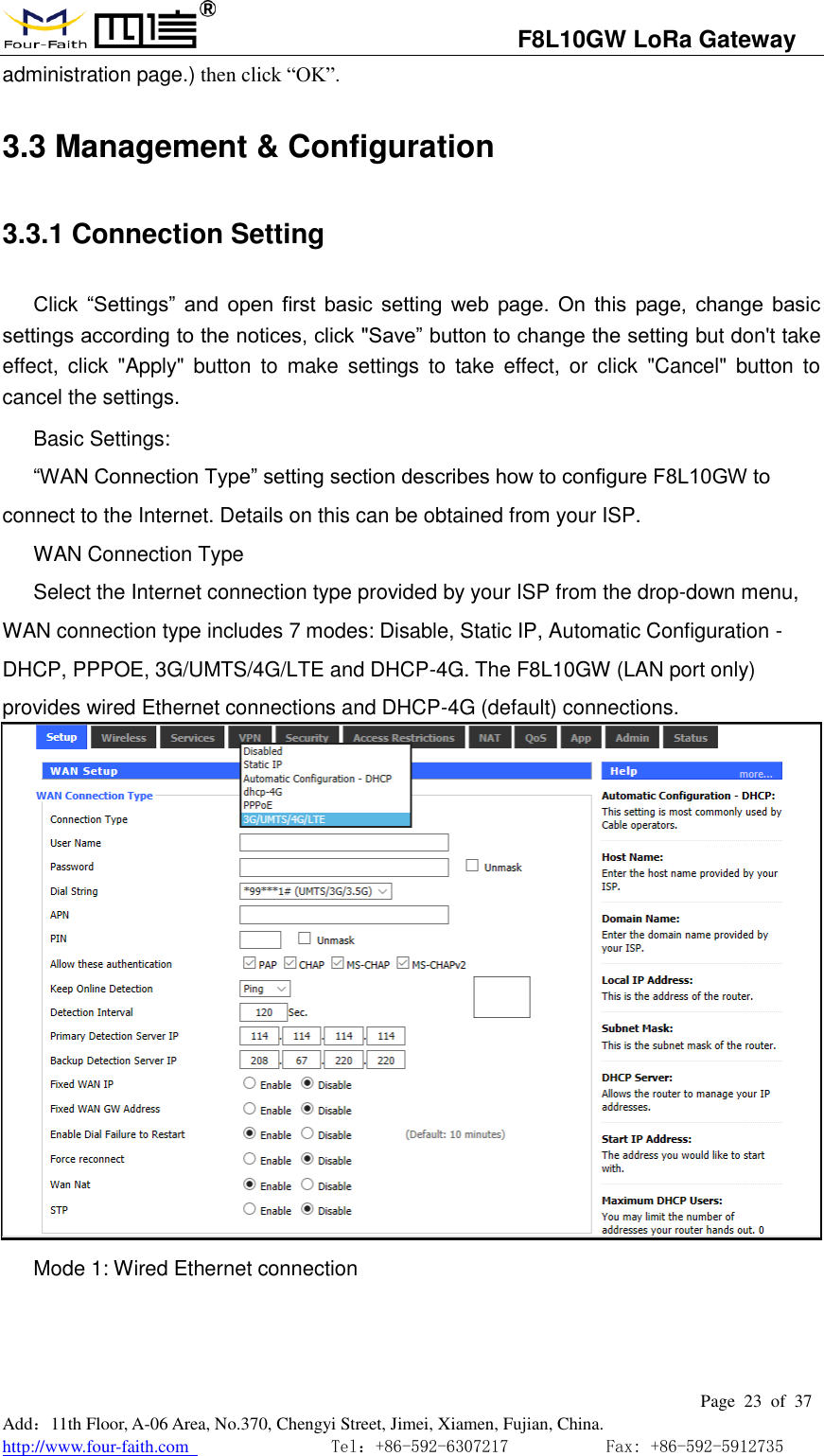
                                  F8L10GW LoRa Gateway                                                         Page  23  of  37  Add:11th Floor, A-06 Area, No.370, Chengyi Street, Jimei, Xiamen, Fujian, China. http://www.four-faith.com                                Tel:+86-592-6307217           Fax: +86-592-5912735  administration page.) then click “OK”.  3.3 Management & Configuration 3.3.1 Connection Setting   Click  “Settings”  and  open  first  basic  setting  web  page.  On  this  page,  change  basic settings according to the notices, click "Save” button to change the setting but don't take effect,  click  "Apply" button  to  make  settings  to  take  effect,  or  click  "Cancel"  button  to cancel the settings. Basic Settings: “WAN Connection Type” setting section describes how to configure F8L10GW to connect to the Internet. Details on this can be obtained from your ISP. WAN Connection Type Select the Internet connection type provided by your ISP from the drop-down menu, WAN connection type includes 7 modes: Disable, Static IP, Automatic Configuration - DHCP, PPPOE, 3G/UMTS/4G/LTE and DHCP-4G. The F8L10GW (LAN port only) provides wired Ethernet connections and DHCP-4G (default) connections.  Mode 1: Wired Ethernet connection
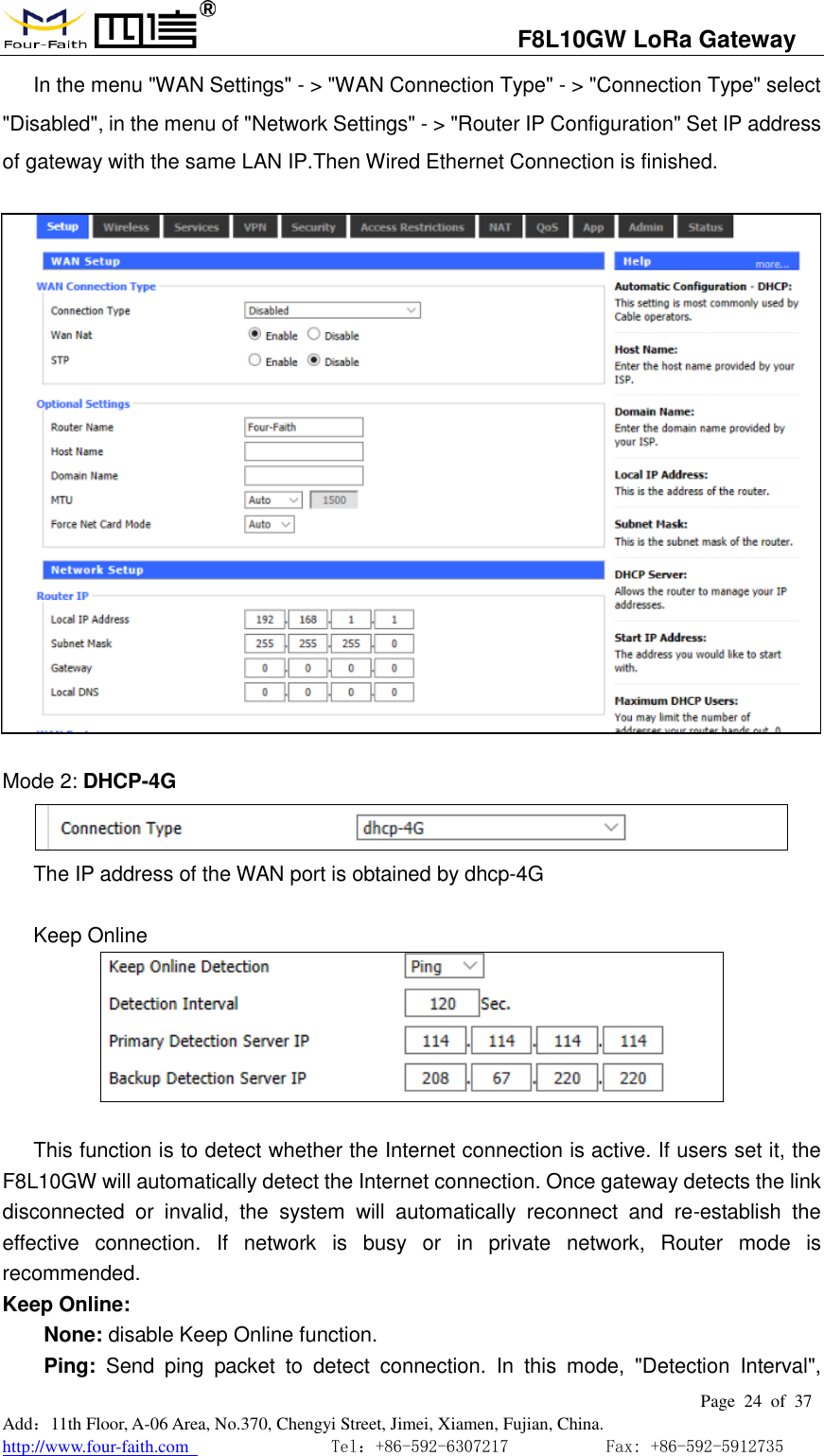
                                  F8L10GW LoRa Gateway                                                         Page  24  of  37  Add:11th Floor, A-06 Area, No.370, Chengyi Street, Jimei, Xiamen, Fujian, China. http://www.four-faith.com                                Tel:+86-592-6307217           Fax: +86-592-5912735  In the menu "WAN Settings" - > "WAN Connection Type" - > "Connection Type" select "Disabled", in the menu of "Network Settings" - > "Router IP Configuration" Set IP address of gateway with the same LAN IP.Then Wired Ethernet Connection is finished.    Mode 2: DHCP-4G  The IP address of the WAN port is obtained by dhcp-4G  Keep Online   This function is to detect whether the Internet connection is active. If users set it, the F8L10GW will automatically detect the Internet connection. Once gateway detects the link disconnected  or  invalid,  the  system  will  automatically  reconnect  and  re-establish  the effective  connection.  If  network  is  busy  or  in  private  network,  Router  mode  is recommended. Keep Online:   None: disable Keep Online function.     Ping:  Send  ping  packet  to  detect  connection.  In  this  mode,  "Detection  Interval",
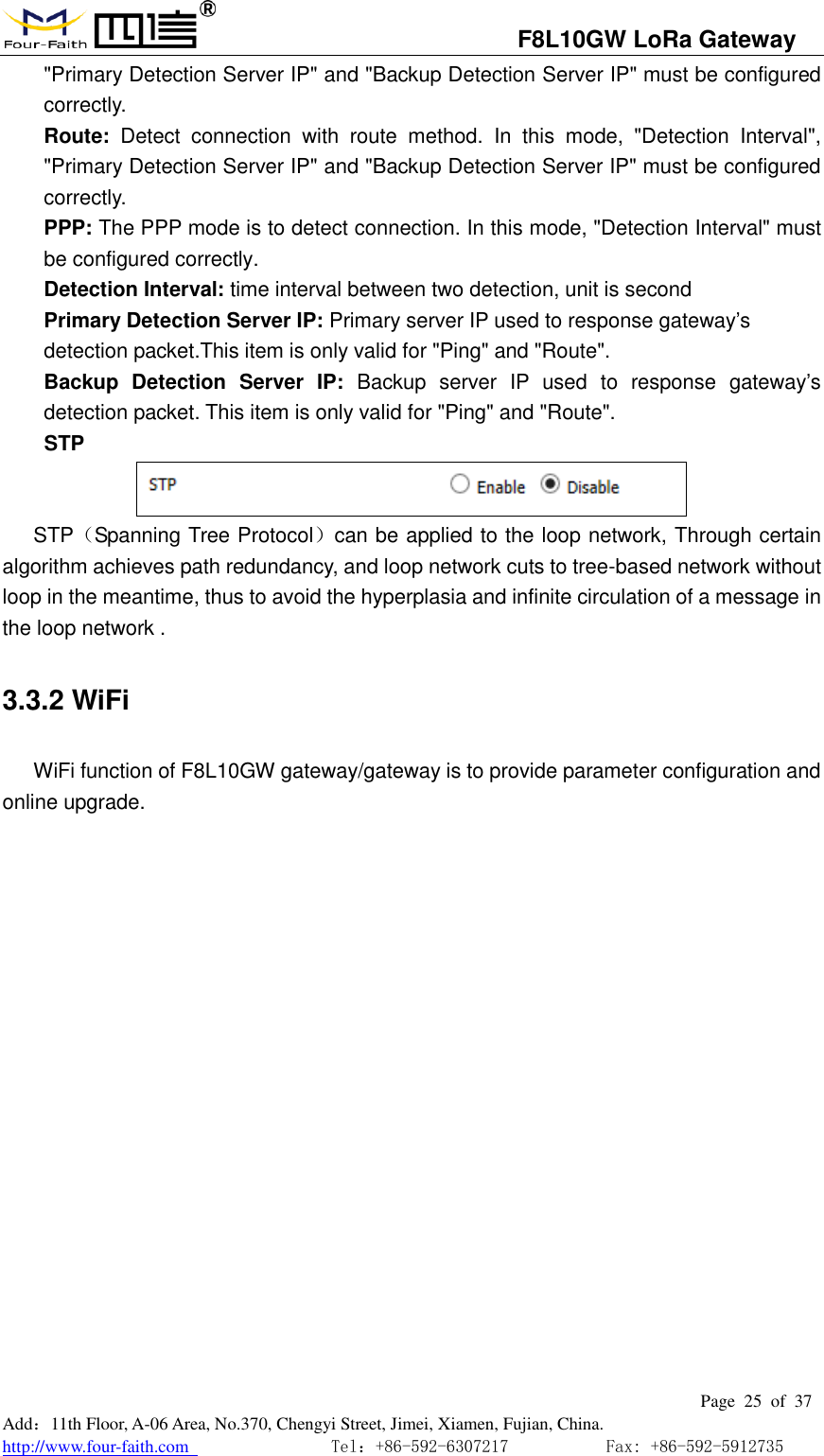
                                  F8L10GW LoRa Gateway                                                         Page  25  of  37  Add:11th Floor, A-06 Area, No.370, Chengyi Street, Jimei, Xiamen, Fujian, China. http://www.four-faith.com                                Tel:+86-592-6307217           Fax: +86-592-5912735  "Primary Detection Server IP" and "Backup Detection Server IP" must be configured correctly. Route:  Detect  connection  with  route  method.  In  this  mode,  "Detection  Interval", "Primary Detection Server IP" and "Backup Detection Server IP" must be configured correctly. PPP: The PPP mode is to detect connection. In this mode, "Detection Interval" must be configured correctly.   Detection Interval: time interval between two detection, unit is second     Primary Detection Server IP: Primary server IP used to response gateway’s detection packet.This item is only valid for "Ping" and "Route".   Backup  Detection  Server  IP:  Backup  server  IP  used  to  response  gateway’s detection packet. This item is only valid for "Ping" and "Route".   STP  STP(Spanning Tree Protocol)can be applied to the loop network, Through certain algorithm achieves path redundancy, and loop network cuts to tree-based network without loop in the meantime, thus to avoid the hyperplasia and infinite circulation of a message in the loop network . 3.3.2 WiFi WiFi function of F8L10GW gateway/gateway is to provide parameter configuration and online upgrade.
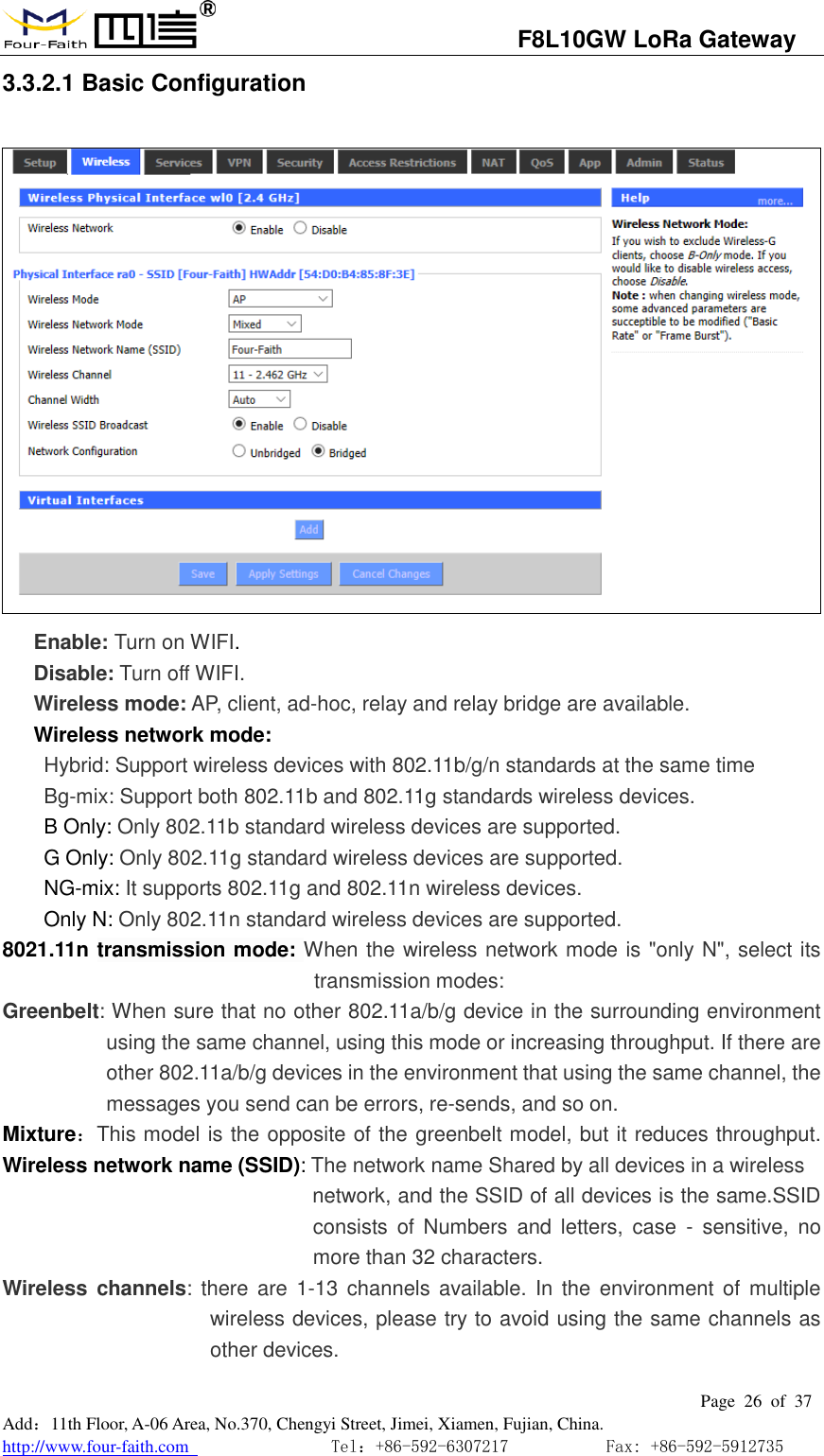
                                  F8L10GW LoRa Gateway                                                         Page  26  of  37  Add:11th Floor, A-06 Area, No.370, Chengyi Street, Jimei, Xiamen, Fujian, China. http://www.four-faith.com                                Tel:+86-592-6307217           Fax: +86-592-5912735  3.3.2.1 Basic Configuration  Enable: Turn on WIFI. Disable: Turn off WIFI. Wireless mode: AP, client, ad-hoc, relay and relay bridge are available. Wireless network mode:  Hybrid: Support wireless devices with 802.11b/g/n standards at the same time  Bg-mix: Support both 802.11b and 802.11g standards wireless devices. B Only: Only 802.11b standard wireless devices are supported. G Only: Only 802.11g standard wireless devices are supported. NG-mix: It supports 802.11g and 802.11n wireless devices. Only N: Only 802.11n standard wireless devices are supported. 8021.11n transmission mode: When the wireless network mode is "only N", select its transmission modes:   Greenbelt: When sure that no other 802.11a/b/g device in the surrounding environment using the same channel, using this mode or increasing throughput. If there are other 802.11a/b/g devices in the environment that using the same channel, the messages you send can be errors, re-sends, and so on. Mixture:This model is the opposite of the greenbelt model, but it reduces throughput. Wireless network name (SSID): The network name Shared by all devices in a wireless                                                     network, and the SSID of all devices is the same.SSID consists of  Numbers  and  letters,  case  -  sensitive,  no more than 32 characters. Wireless  channels: there  are 1-13  channels  available. In  the environment of  multiple wireless devices, please try to avoid using the same channels as other devices.
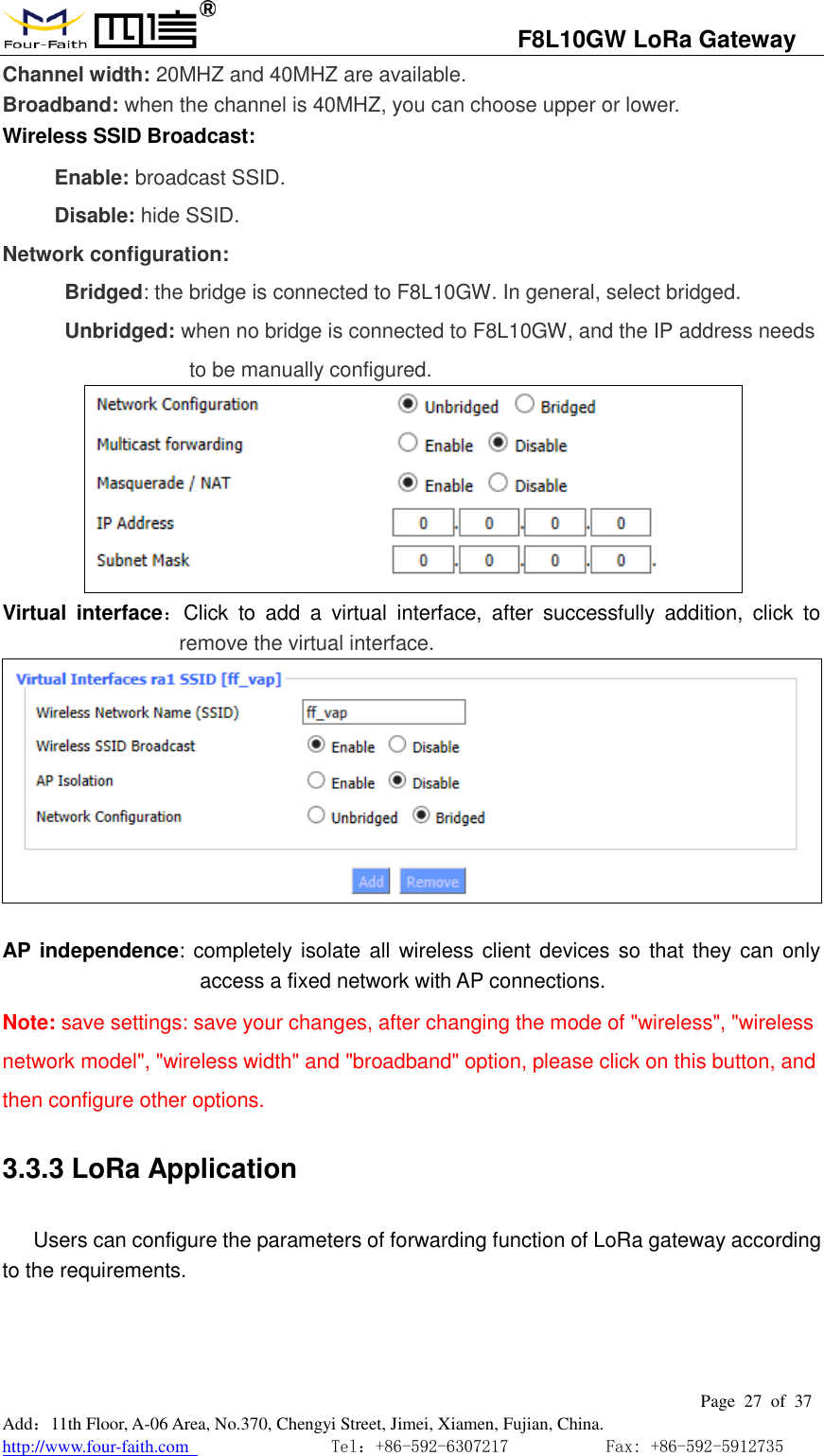
                                  F8L10GW LoRa Gateway                                                         Page  27  of  37  Add:11th Floor, A-06 Area, No.370, Chengyi Street, Jimei, Xiamen, Fujian, China. http://www.four-faith.com                                Tel:+86-592-6307217           Fax: +86-592-5912735  Channel width: 20MHZ and 40MHZ are available. Broadband: when the channel is 40MHZ, you can choose upper or lower. Wireless SSID Broadcast:  Enable: broadcast SSID. Disable: hide SSID. Network configuration: Bridged: the bridge is connected to F8L10GW. In general, select bridged. Unbridged: when no bridge is connected to F8L10GW, and the IP address needs to be manually configured.      Virtual  interface:Click  to  add  a  virtual  interface,  after  successfully  addition,  click  to remove the virtual interface.       AP  independence: completely isolate all wireless client devices so  that they can only access a fixed network with AP connections. Note: save settings: save your changes, after changing the mode of "wireless", "wireless network model", "wireless width" and "broadband" option, please click on this button, and then configure other options. 3.3.3 LoRa Application  Users can configure the parameters of forwarding function of LoRa gateway according to the requirements.
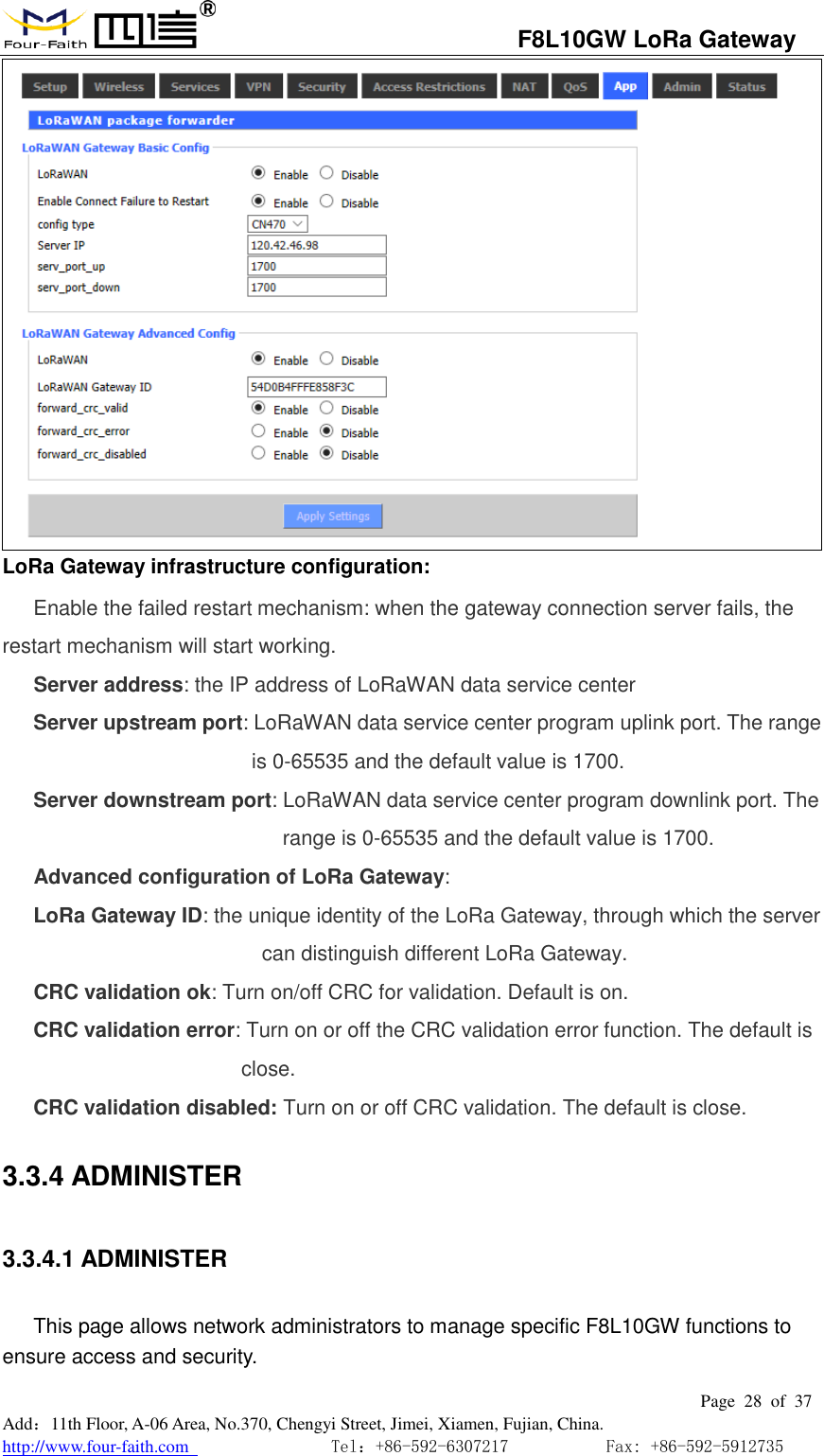
                                  F8L10GW LoRa Gateway                                                         Page  28  of  37  Add:11th Floor, A-06 Area, No.370, Chengyi Street, Jimei, Xiamen, Fujian, China. http://www.four-faith.com                                Tel:+86-592-6307217           Fax: +86-592-5912735   LoRa Gateway infrastructure configuration: Enable the failed restart mechanism: when the gateway connection server fails, the restart mechanism will start working. Server address: the IP address of LoRaWAN data service center Server upstream port: LoRaWAN data service center program uplink port. The range is 0-65535 and the default value is 1700. Server downstream port: LoRaWAN data service center program downlink port. The range is 0-65535 and the default value is 1700. Advanced configuration of LoRa Gateway: LoRa Gateway ID: the unique identity of the LoRa Gateway, through which the server can distinguish different LoRa Gateway. CRC validation ok: Turn on/off CRC for validation. Default is on. CRC validation error: Turn on or off the CRC validation error function. The default is close. CRC validation disabled: Turn on or off CRC validation. The default is close. 3.3.4 ADMINISTER 3.3.4.1 ADMINISTER This page allows network administrators to manage specific F8L10GW functions to ensure access and security.
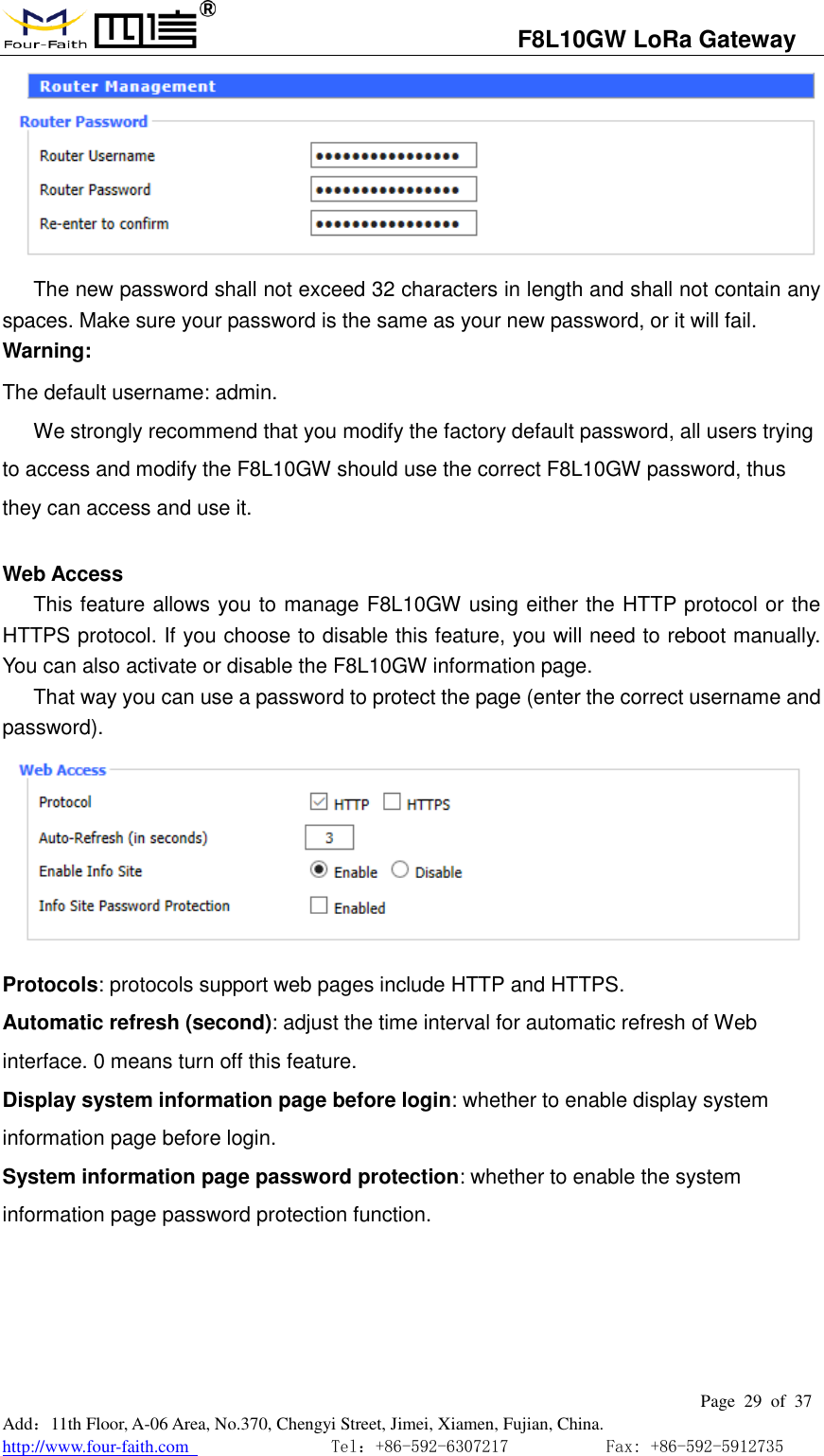
                                  F8L10GW LoRa Gateway                                                         Page  29  of  37  Add:11th Floor, A-06 Area, No.370, Chengyi Street, Jimei, Xiamen, Fujian, China. http://www.four-faith.com                                Tel:+86-592-6307217           Fax: +86-592-5912735   The new password shall not exceed 32 characters in length and shall not contain any spaces. Make sure your password is the same as your new password, or it will fail. Warning: The default username: admin. We strongly recommend that you modify the factory default password, all users trying to access and modify the F8L10GW should use the correct F8L10GW password, thus they can access and use it.  Web Access This feature allows you to manage F8L10GW using either the HTTP protocol or the HTTPS protocol. If you choose to disable this feature, you will need to reboot manually. You can also activate or disable the F8L10GW information page. That way you can use a password to protect the page (enter the correct username and password).                    Protocols: protocols support web pages include HTTP and HTTPS. Automatic refresh (second): adjust the time interval for automatic refresh of Web interface. 0 means turn off this feature. Display system information page before login: whether to enable display system information page before login. System information page password protection: whether to enable the system information page password protection function.
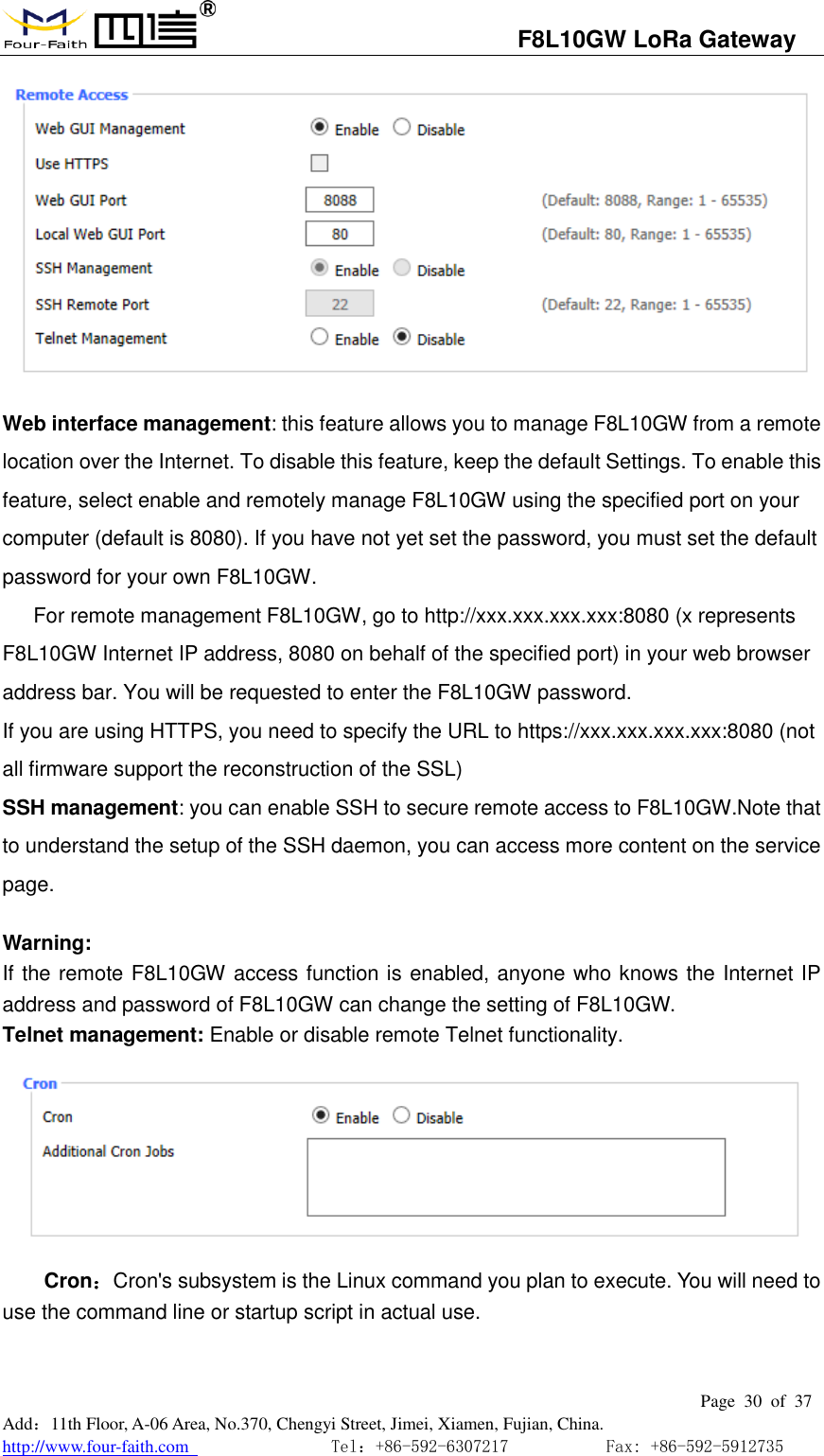
                                  F8L10GW LoRa Gateway                                                         Page  30  of  37  Add:11th Floor, A-06 Area, No.370, Chengyi Street, Jimei, Xiamen, Fujian, China. http://www.four-faith.com                                Tel:+86-592-6307217           Fax: +86-592-5912735   Web interface management: this feature allows you to manage F8L10GW from a remote location over the Internet. To disable this feature, keep the default Settings. To enable this feature, select enable and remotely manage F8L10GW using the specified port on your computer (default is 8080). If you have not yet set the password, you must set the default password for your own F8L10GW. For remote management F8L10GW, go to http://xxx.xxx.xxx.xxx:8080 (x represents F8L10GW Internet IP address, 8080 on behalf of the specified port) in your web browser address bar. You will be requested to enter the F8L10GW password. If you are using HTTPS, you need to specify the URL to https://xxx.xxx.xxx.xxx:8080 (not all firmware support the reconstruction of the SSL) SSH management: you can enable SSH to secure remote access to F8L10GW.Note that to understand the setup of the SSH daemon, you can access more content on the service page.  Warning: If the remote F8L10GW access function is enabled, anyone who knows the Internet IP address and password of F8L10GW can change the setting of F8L10GW. Telnet management: Enable or disable remote Telnet functionality.  Cron:Cron's subsystem is the Linux command you plan to execute. You will need to use the command line or startup script in actual use.
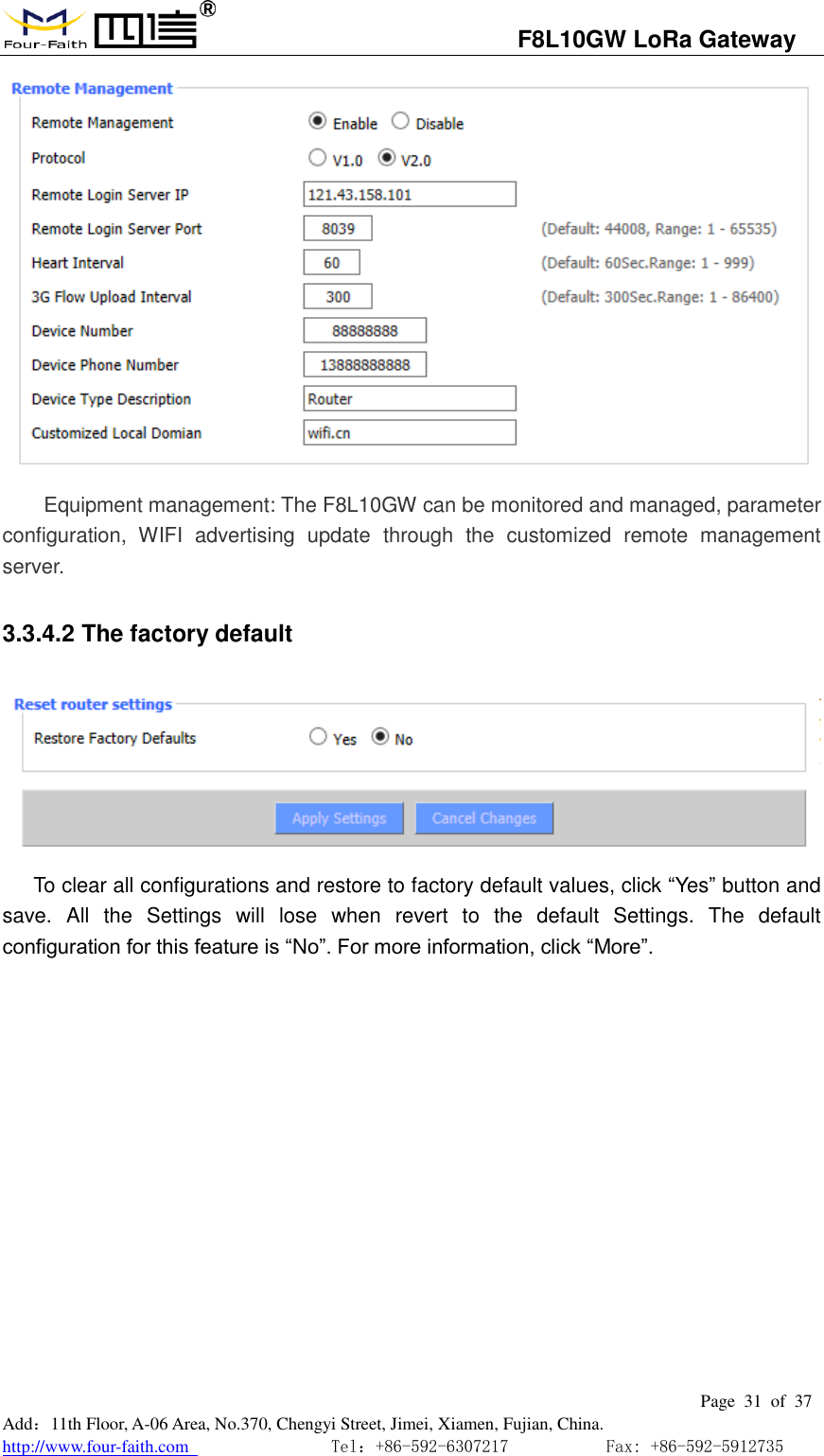
                                  F8L10GW LoRa Gateway                                                         Page  31  of  37  Add:11th Floor, A-06 Area, No.370, Chengyi Street, Jimei, Xiamen, Fujian, China. http://www.four-faith.com                                Tel:+86-592-6307217           Fax: +86-592-5912735   Equipment management: The F8L10GW can be monitored and managed, parameter configuration,  WIFI  advertising  update  through  the  customized  remote  management server. 3.3.4.2 The factory default  To clear all configurations and restore to factory default values, click “Yes” button and save.  All  the  Settings  will  lose  when  revert  to  the  default  Settings.  The  default configuration for this feature is “No”. For more information, click “More”.
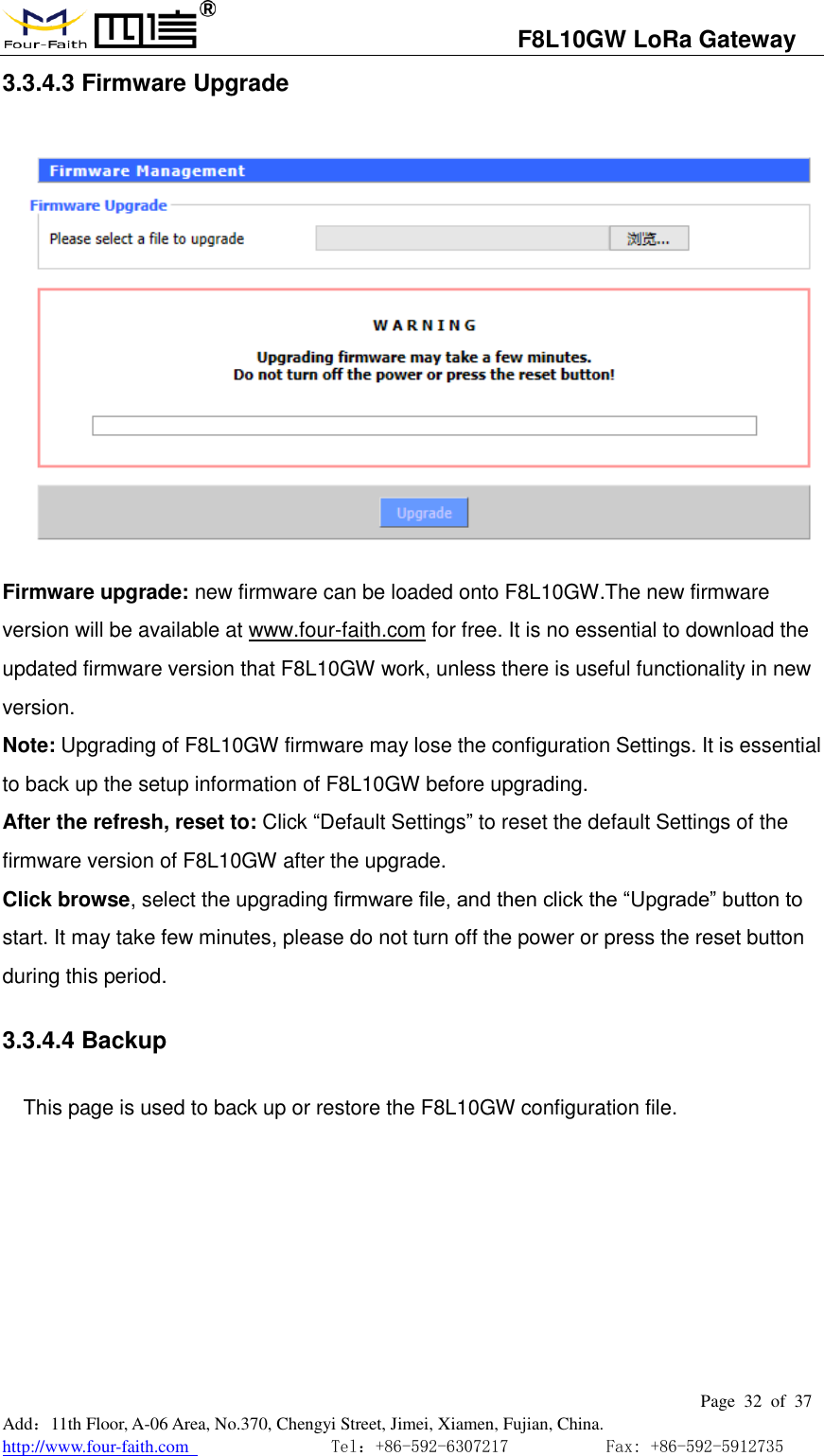
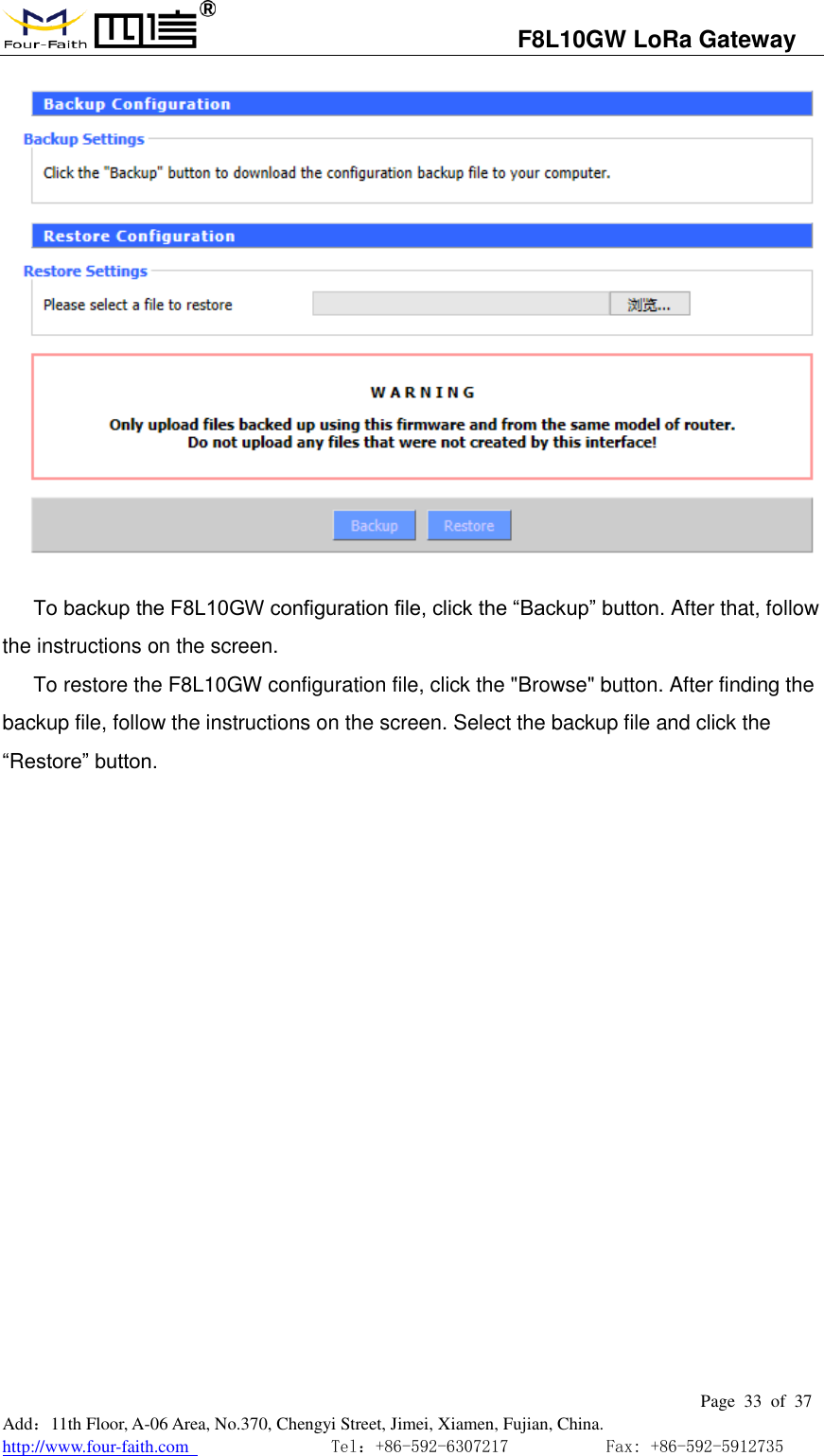
                                  F8L10GW LoRa Gateway                                                         Page  32  of  37  Add:11th Floor, A-06 Area, No.370, Chengyi Street, Jimei, Xiamen, Fujian, China. http://www.four-faith.com                                Tel:+86-592-6307217           Fax: +86-592-5912735  3.3.4.3 Firmware Upgrade  Firmware upgrade: new firmware can be loaded onto F8L10GW.The new firmware version will be available at www.four-faith.com for free. It is no essential to download the updated firmware version that F8L10GW work, unless there is useful functionality in new version. Note: Upgrading of F8L10GW firmware may lose the configuration Settings. It is essential to back up the setup information of F8L10GW before upgrading. After the refresh, reset to: Click “Default Settings” to reset the default Settings of the firmware version of F8L10GW after the upgrade. Click browse, select the upgrading firmware file, and then click the “Upgrade” button to start. It may take few minutes, please do not turn off the power or press the reset button during this period. 3.3.4.4 Backup This page is used to back up or restore the F8L10GW configuration file.
                                  F8L10GW LoRa Gateway                                                         Page  33  of  37  Add:11th Floor, A-06 Area, No.370, Chengyi Street, Jimei, Xiamen, Fujian, China. http://www.four-faith.com                                Tel:+86-592-6307217           Fax: +86-592-5912735   To backup the F8L10GW configuration file, click the “Backup” button. After that, follow the instructions on the screen. To restore the F8L10GW configuration file, click the "Browse" button. After finding the backup file, follow the instructions on the screen. Select the backup file and click the “Restore” button.
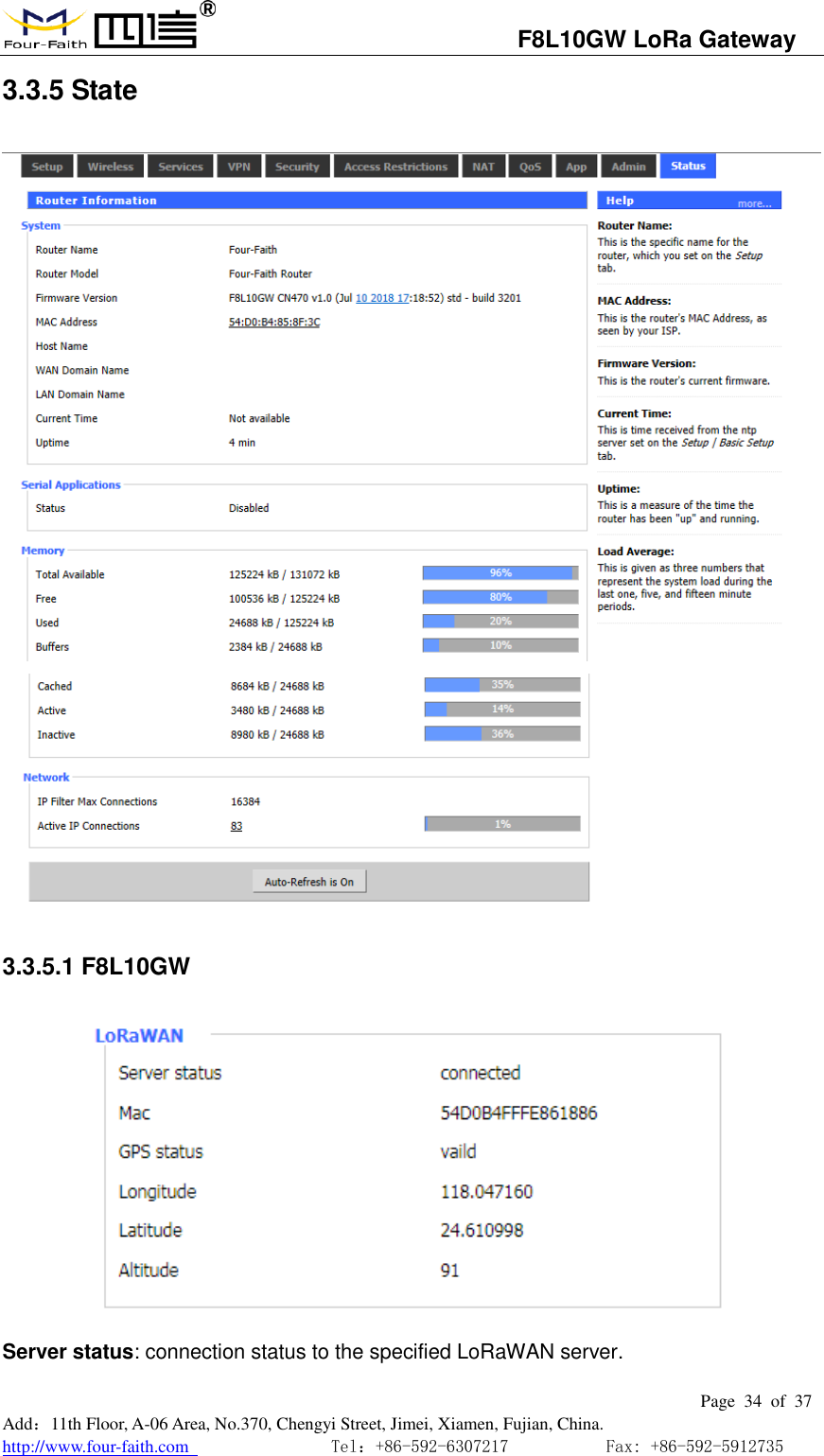
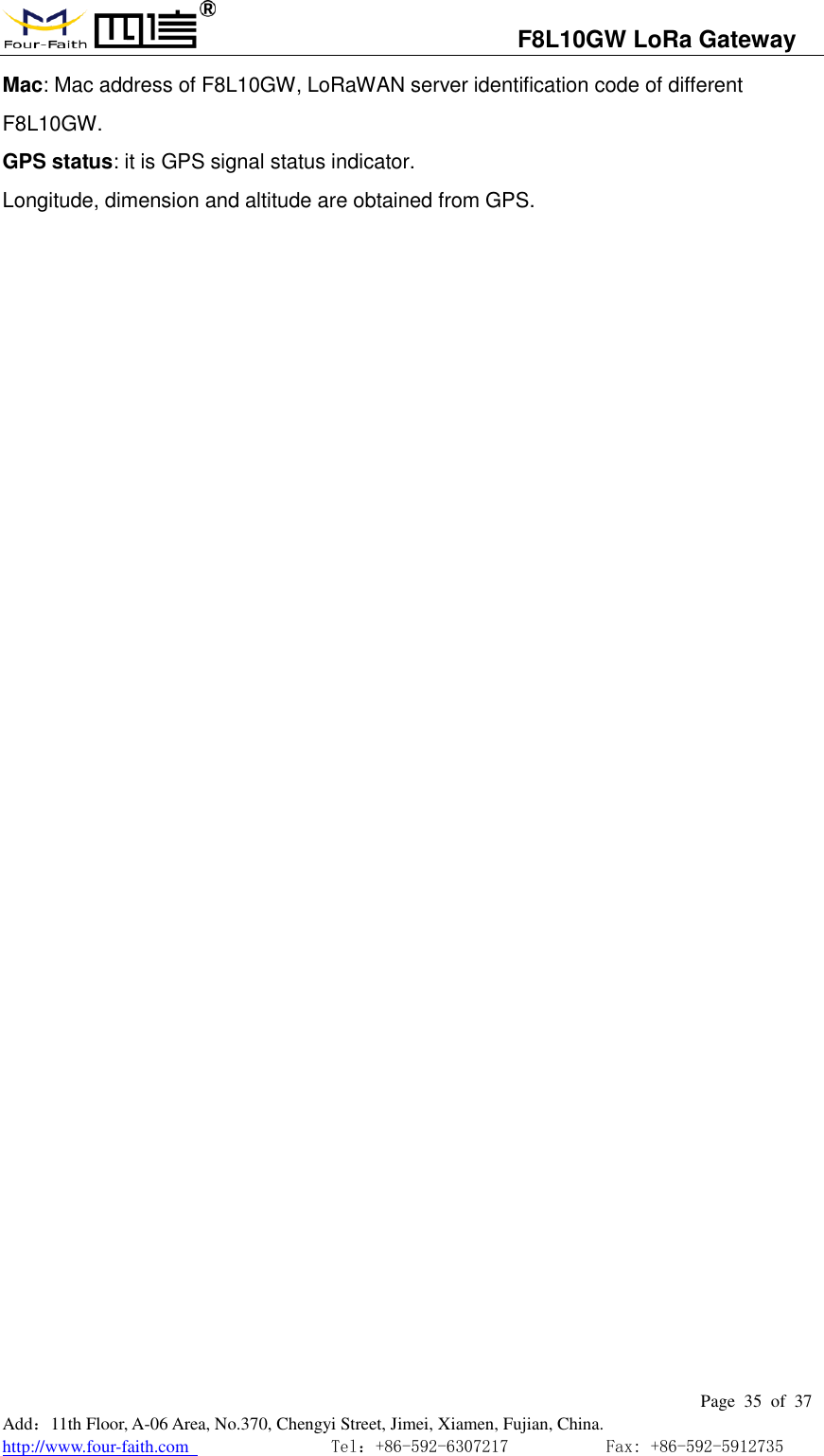
                                  F8L10GW LoRa Gateway                                                         Page  34  of  37  Add:11th Floor, A-06 Area, No.370, Chengyi Street, Jimei, Xiamen, Fujian, China. http://www.four-faith.com                                Tel:+86-592-6307217           Fax: +86-592-5912735  3.3.5 State   3.3.5.1 F8L10GW  Server status: connection status to the specified LoRaWAN server.
                                  F8L10GW LoRa Gateway                                                         Page  35  of  37  Add:11th Floor, A-06 Area, No.370, Chengyi Street, Jimei, Xiamen, Fujian, China. http://www.four-faith.com                                Tel:+86-592-6307217           Fax: +86-592-5912735  Mac: Mac address of F8L10GW, LoRaWAN server identification code of different F8L10GW. GPS status: it is GPS signal status indicator. Longitude, dimension and altitude are obtained from GPS.
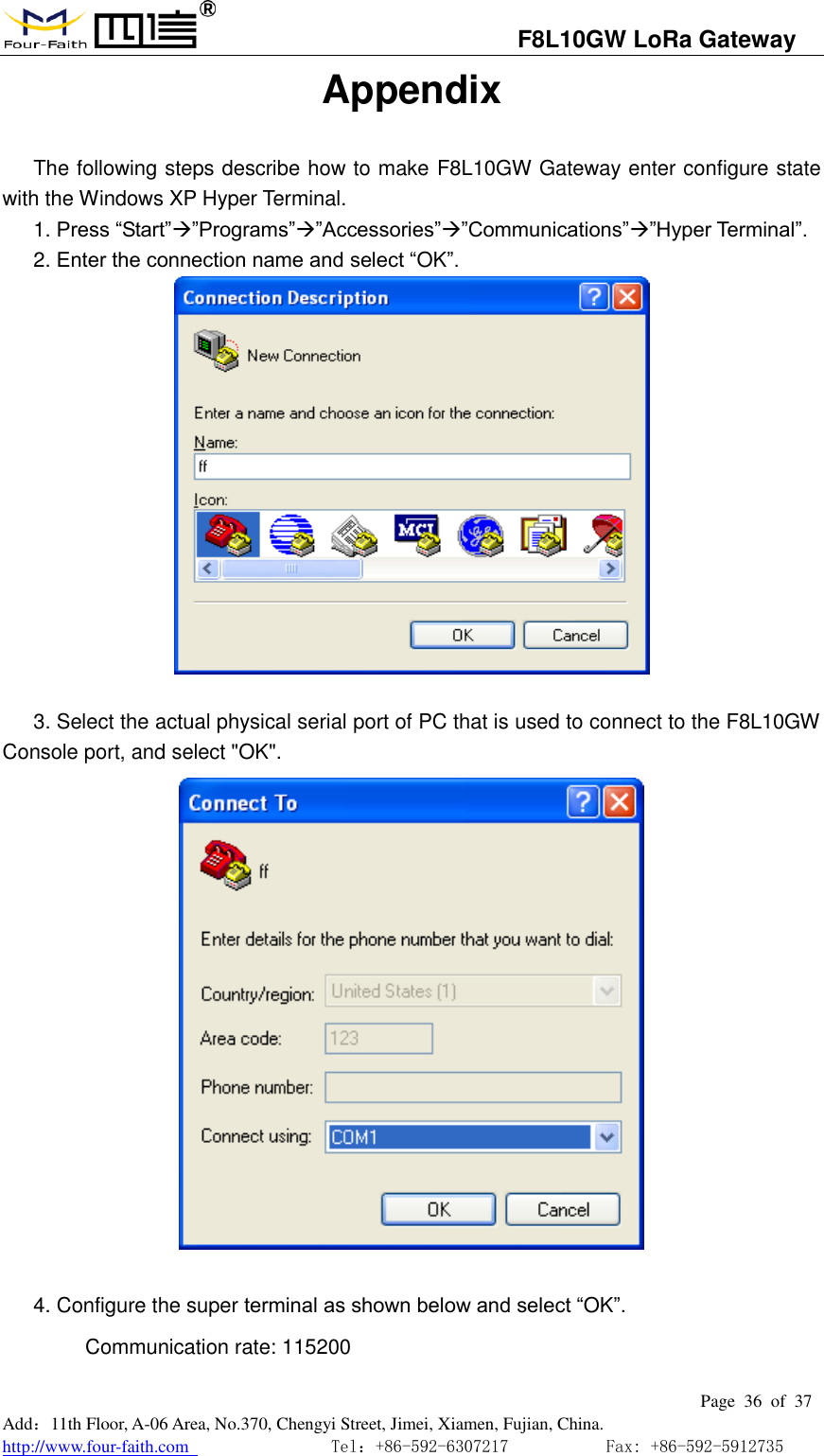
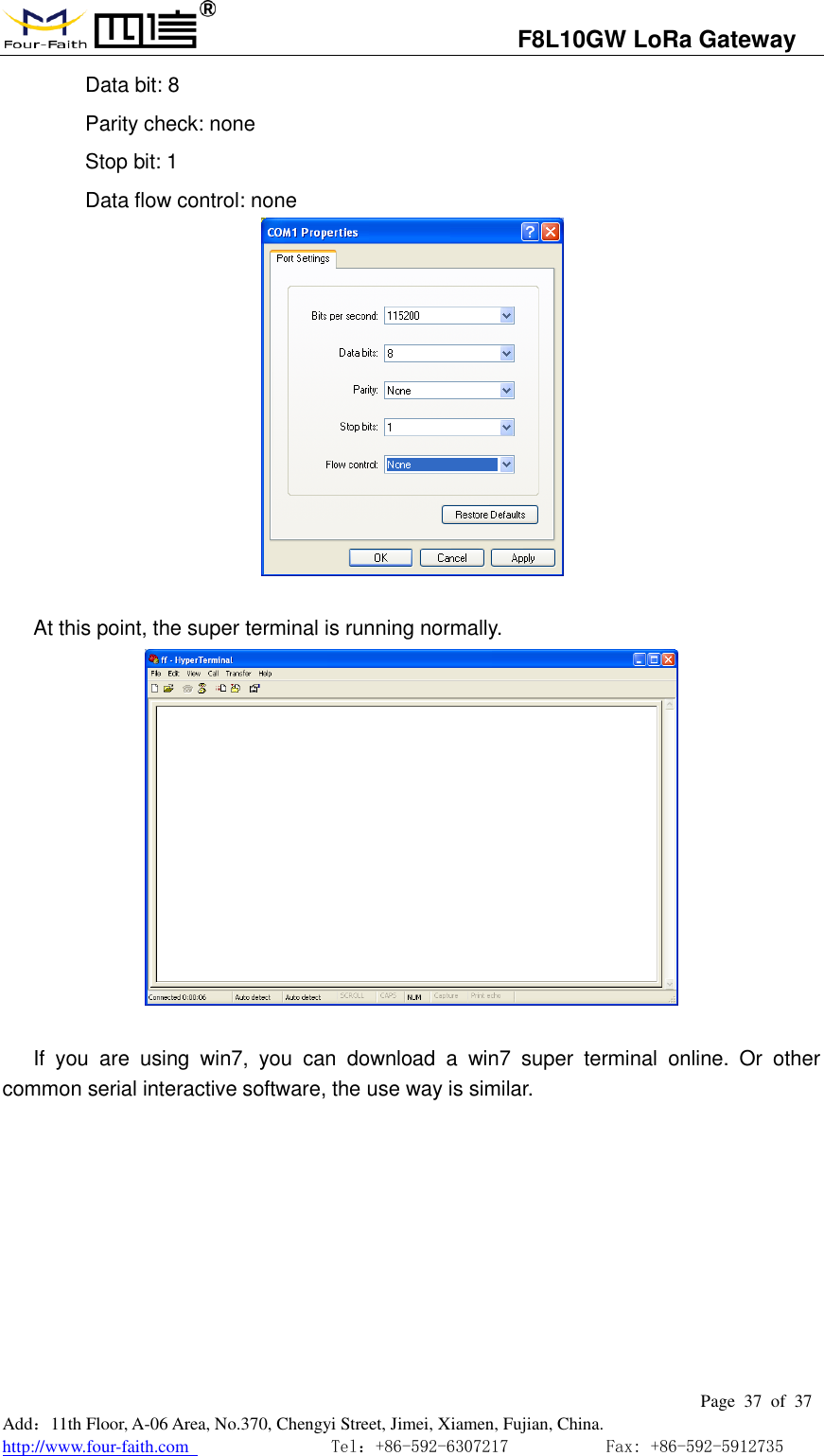
                                  F8L10GW LoRa Gateway                                                         Page  36  of  37  Add:11th Floor, A-06 Area, No.370, Chengyi Street, Jimei, Xiamen, Fujian, China. http://www.four-faith.com                                Tel:+86-592-6307217           Fax: +86-592-5912735  Appendix The following steps describe how to make F8L10GW Gateway enter configure state with the Windows XP Hyper Terminal. 1. Press “Start””Programs””Accessories””Communications””Hyper Terminal”. 2. Enter the connection name and select “OK”.   3. Select the actual physical serial port of PC that is used to connect to the F8L10GW Console port, and select "OK".   4. Configure the super terminal as shown below and select “OK”. Communication rate: 115200
                                  F8L10GW LoRa Gateway                                                         Page  37  of  37  Add:11th Floor, A-06 Area, No.370, Chengyi Street, Jimei, Xiamen, Fujian, China. http://www.four-faith.com                                Tel:+86-592-6307217           Fax: +86-592-5912735  Data bit: 8 Parity check: none Stop bit: 1 Data flow control: none                       At this point, the super terminal is running normally.   If  you  are  using  win7,  you  can  download  a  win7  super  terminal  online.  Or  other common serial interactive software, the use way is similar.

Navigation menu