Xiamen Padmate Technology X13 Bluetooth Headset User Manual X13 180412x
Xiamen Padmate Technology Co.,LTD Bluetooth Headset X13 180412x
User Manual

User Manual-PaMu
Instruction of PaMu True Wireless Stereo Headset
Thanks for purchasing Padmate PaMu True Wireless Stereo
Headset. You will need to pair the device with your mobile phone
or other Bluetooth enabled devices in order to experience its
great performance. Please read through the instruction manual
below before using.
1.IMPORTANCE BEFORE USING
The unit was designed and produced according to the related
quality requests and safety standards. Please read through the
following operation instructions before using it:
1. Read and keep well these instructions;
2. Do not use or operateit where it is forbidden of using, for
example, airplanes and hospitals;
3. Do not use or operateit according to the local laws and
rules, for example, do not use it when driving;
4. Do not use or operate it when you are close to explosive or
flammable sources, eg, gas station etc;
5. Do not hit or throw or open the unit by force as it may cause
damage to the device;
6. Do not put the unit near heat sources, eg, stoves, heat
registers and radiators etc;
7. Keep the unit away from wet, water or other liquids that might
cause short circuit or malfunctions;
8. Keep the unit and its accessories away from children to
prevent being swallowed
9. For special users, such as patients who use heart
pacemakers, audiphones and built-in cochlea devices etc,
please follow the advice of doctors.
10. Using it below minus 15 ℃ or above 55 ℃ could shorten the
life span of battery.
2.About The Device
2.1 Packing lis
1、Bluetooth headset (left & right) *1 pair
2、Instruction manual *1pcs
3、Quick start manual *1pcs
4、Micro-USB cable *1pcs
5、Silicon caps (L,S): 2 pairs
6、Charging cradle with power bank *1pcs
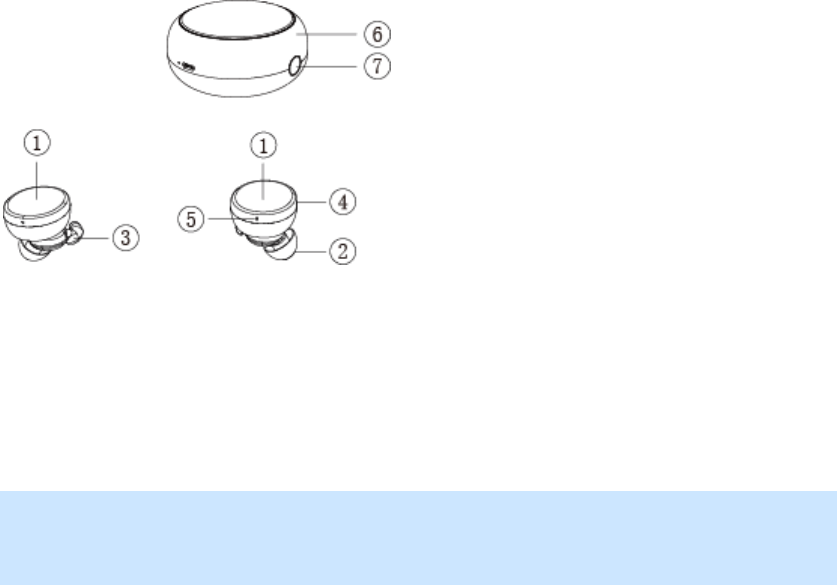
2.2 Device controls and locations
1、Multi Function touch button
2、Silicon earbuds
3、Fixation silicon hook
4、LED indicator
5、Microphone hole
6、Charging cradle
7、Decap button of
Charging cradle
2.3 Charging and battery
Please use the original USB cable for charging.
Warning: Using no original USB cable for charging might
damage the device. Also, you are not permitted to take the
battery out of the device in case of damage and danger.
Suggested input power is DC 5V, 100mA-2A max.
3.Operations
3.1 How to pair
Please keep the cradle fully charged first before using, the
headset can not be used if the cradle no power.
1. Make sure the cradle has enough power, take the left and
right of headsets out of the cradle, blue LED on(After take
the two headsets out of the cradle, the headset power on
automatically and at pairing mode) , then please take your
mobile phone close to the device. Suggested distance is
less than 1 meter.
2. Turn on the bluetooth application of your mobile phone and
click to search Bluetooth devices near your mobile. Once
searched “PaMu” device name, please select it to pair. After
completely paired, blue LED on and voice prompt “Pairing
successful”.
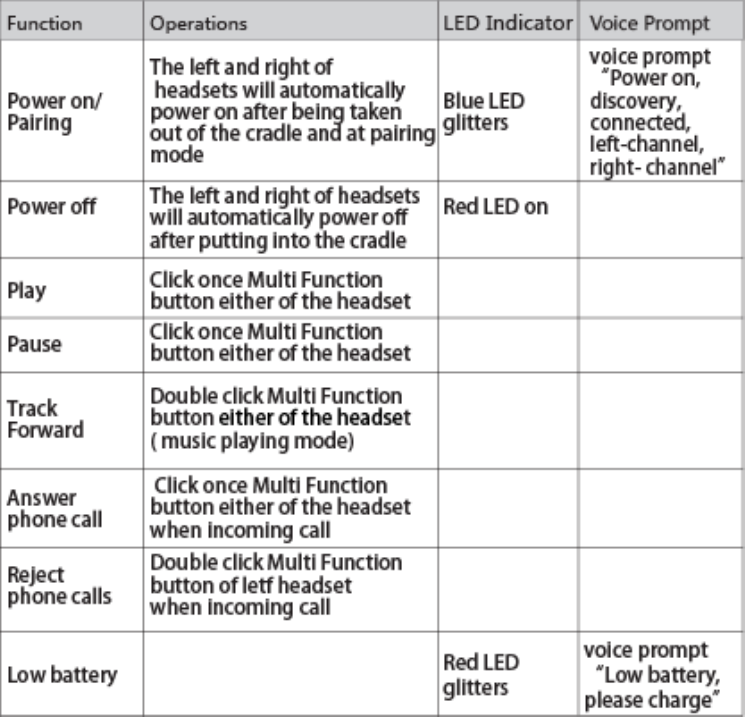
3.2 Operations
Please keep the cradle full charged first before using, the
Headsetscannotbe use if the cradle no power.
NOTE: The left and right headsets will automatically connect
after power on in factory. The left headset for pairing will be the
master headset while sub-headset for the right one.
3.3 Use them as two separate headsets:
If need to use them as two separate headsets, it has two
ways as below:
A、Turn on and pair either of the headset with your mobile
phone and power off the other headset.
B、If need to use them as two separate headsets at the same
time, suggested distance is more than 30 meter, turn on
the headset and pairing with the different mobile phone.
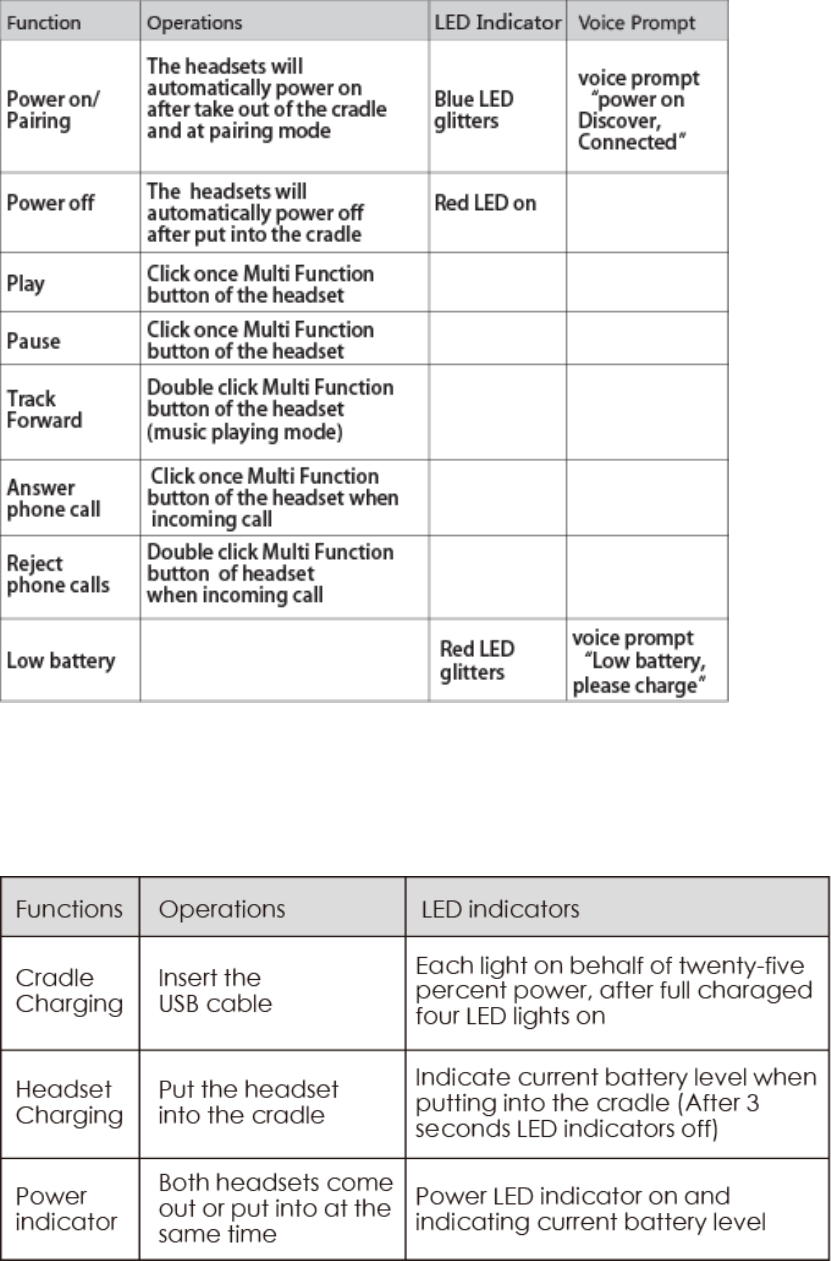
C、The use way of one headset as below:
3.4 Cradle charging
The cradle can supply up to two to three times charging to the
two headsets once fully charged.

4.Specifications
4.1 Notice
If you fail to connect the headset with your mobile phone,
please follow the below suggestions and instructions:
- Make sure your cradle and headset has enough power and at
power on mode, and paired successfully with your mobile
phone.
- Make sure the bluetooth application of your mobile phone is
at open mode
- Make sure your mobile phone is within 10 meter distance to
the headset and no objectives between them, such as wall,
electronic devices, metal things etc
- Please re-operate them again if failed.
- If the headset can not be paired to your mobile phone within
5 minutes at pairing mode, it will power off automatically.
- If the headset is disconnected with your mobile phone and is
not connected to your mobile phone within 5 minutes, it will
power off automatically.
- If the headset can not power on after take out of the cradle,
please confirm if the cradle has enough power or not first;
if the cradle have power,please put the headset into the
cradle and take out of the cradle again.
warning
Any Changes or modifications not expressly approved by the party
responsible for compliance could void the user's authority to operate the
equipment.
This device complies with part 15 of the FCC Rules. Operation is subject
to the following two conditions : (1) This device may not cause harmful
interference, and
(2) this device must accept any interference received, including
interference that may cause undesired operation.
Note : This equipment has been tested and found to comply with the limits
for a Class B digital device, pursuant to part 15 of the FCC Rules. These
limits are
designed to provide reasonable protection against harmful interference
in a residential installation. This equipment generates,uses and can
radiate radio
frequency energy and, if not installed and used in accordance with the
instructions, may cause harmful interference to radio communications.
However, there is
no guarantee that interference will not occur in a particular installation.
If this equipment does cause harmful interference to radio or television
reception,
which can be determined by turning the equipment off and on, the user is
encouraged to try to correct the interference by one or
more of the following measures:
—Reorient or relocate the receiving antenna.
—Increase the separation between the equipment and receiver.
—Connect the equipment into an outlet on a circuit different from that
to which the receiver is
connected.
—Consult the dealer or an experienced radio/TV technician for help.
FCC Radiation Exposure Statement:
This equipment complies with FCC radiation exposure limits set forth for
an uncontrolled environment .
This transmitter must not be co‐located or operating in conjunction with
any other antenna or transmitter