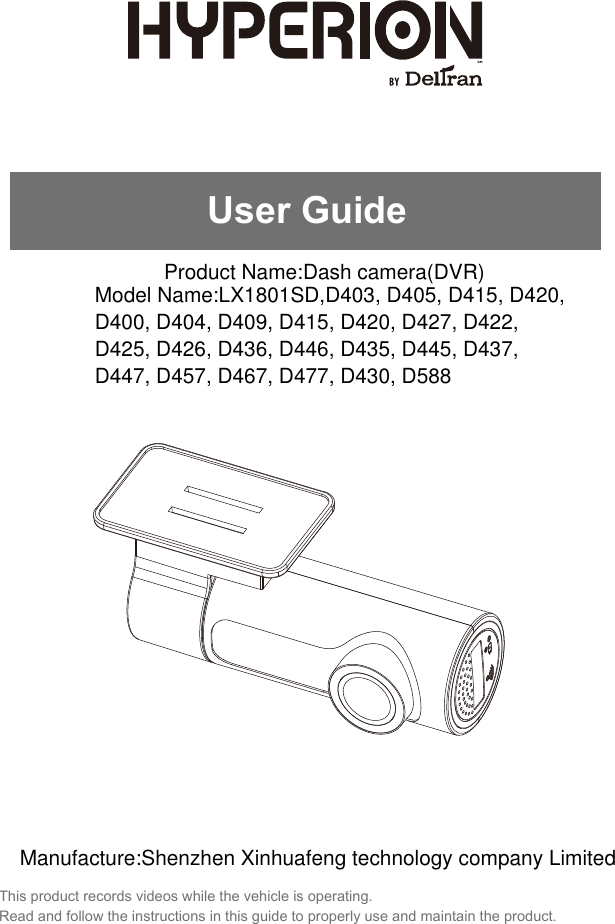
Xinhuafeng technology LX1801SD Dash camera(DVR) User Manual Walmart Dash Cam 5 Manual 201800604

Shenzhen Xinhuafeng technology company Limited Dash camera(DVR) Walmart Dash Cam 5 Manual 201800604

User manual

This product records videos while the vehicle is operating.Read and follow the instructions in this guide to properly use and maintain the product.User GuideProduct Name:Dash camera(DVR)Model Name:LX1801SD,D403, D405, D415, D420,D400, D404, D409, D415, D420, D427, D422, D425, D426, D436, D446, D435, D445, D437, D447, D457, D467, D477, D430, D588Manufacture:Shenzhen Xinhuafeng technology company Limited
BEFORE USING THE PRODUCTAbout the productThis product is not guaranteed to record ALL events. Use this product only for reference when investigating incidents or road accidents. The device may not properly record accidents, it only operated by a range of impact.Ensure completely turned on the recorder, then video recording and event recording will available. Hyperion-e-AD is not responsible for any loss caused by an accident, nor is it responsible for providing any support regarding the outcome of an accident.Registered trademarksHyperion-e-AD is a registered trademark of Hyperion.Other product logos and service names in this guide are trademarks of the relevant companies.CopyrightsAll rights for the content and maps in this guide are reserved by Hyperion and are protected under copyright laws. All unauthorized duplication, revision, publication, or distribution of this guide without written consent from Hyperion is prohibited and is eligible for criminal charges.Model No. LX1801SD 1Contact us : 877 - 456 - 7901
FCC STATEMENTThis device complies with Part 15 of the FCC Rules. Operation is subject to the following two conditions: (1) This device may not cause harmful interference, and (2) this device must accept anyinterference received, including interference that may cause undesired operation.This equipment has been tested and found to comply with the limits for a Class A digital device, pursuant to Part 15 of the FCC Rules. These limits are designed to provide reasonable protection against harmful interference in a residential installation. This equipment generates, uses and can radiate radio frequency energy and, if not installed and used in accordance with the instructions, may cause harmful interference to radio communica-tions. However, there is no guarantee that interference will not occur in a particular installation. If this equipment does cause harmful interference to radioor television reception, which can be determined by turning the equipment off and on, the user is encouraged to try to correct the interference by one or more of the following measures:      Reorient or relocate the receiving antenna.      Increase the separation between the equipment and receiver.      Connect the equipment to an outlet on a circuit different from that to       which the receiver is connected.      Consult the dealer or an experienced radio/TV technician for help.FCC CAUTION: Any changes or modifications to the equipment not expressly approved by the party responsible for compliance could void your authority to operate the equipment.This Class A digital apparatus complies with Canadian ICES-003.Model No. LX1801SD 2Contact us : 877 - 456 - 7901This equipment complies with FCC radiation exposure limits set forth for an uncontrolled environment. This equipment should be installed and operated with minimum distance 20cm between the radiator & your body.
BEFORE USING THE PRODUCTFCC STATEMENTPRODUCT OVERVIEWHYPERION APP SET UPINSTALLING THE PRODUCTCONTENTSModel No. LX1801SD 3Contact us : 877 - 456 - 7901OTHER INFORMATION ABOUT THE PRODUCTIncluded items111444667788256About the productCopyrightsRegistered trademarks....................................................................................................................................................................................................................................................................................................................................................................................................................................................................................................................................................................................................................................................................................................................................................................................................................................................................................................................................................................................................................................................................................................................................FCC StatementProduct management and operationDriving and product operationPower supplyChildren and petsInstalling the camera (main unit)Securing the productConnecting the power cableSensor and indicatorApp InstallationApp UI Overview
Connect the car adapter’s miniUSB plug to camera miniUSB port.Connect the cigarette lighter adapter plug to the vehicle’s cigarette lighter port.In certain models of cars, the cigarette lighter keeps providing power even when the engine is off. Be sure to remove the car charger or disconnect the device when leaving the vehicle to prevent draining the vehicle battery. Check your vehicle’s owner’s manual to determine if this applies to your vehicle.Children and petsEnsure that the product is out of the reach of children and pets. If the product breaks, it may result in fatal damage.Model No. LX1801SD 4Contact us : 877 - 456 - 7901Driving and product operationDo not operate the product while driving a vehicle. Distraction while driving may cause accidents and result in injury or death.Install the product in places where the driver's view is not obstructed. Obstruction of the driver’s vision may cause accidents and result in injury or death. Check with your state and municipal laws before mounting the product to the windshield.Power supply
OTHER INFORMATION ABOUT THE PRODUCTDo not expose the product to direct sunlight or intense light. Such damages are not covered by the warranty.Frequently check the product for the proper installation position. Impact caused by extreme roadconditions may alter the installation position. Ensure that the product is positioned as instructed in this guide.Do not use chemical cleaners or solvents to clean the product. Do not disassemble the product or subject the product to impact. This device is designed to record video while the vehicle is in operation. The quality of the video might be affected by weather conditions and the road environment, such as whether it is day or night, presence of street lighting, entering/exiting tunnels, and the surrounding temperature.Model No. LX1801SD 5Contact us : 877 - 456 - 7901Product management and operationModel NameOperating TemperatureStorage TemperatureIP ratingSD Card SlotReset MiniUSB PortResolutionAspect radioView AngleVideo FormatG-SensorRecording methodSound recordingMemory Location14°F and 140°F (-10°C to 60°C)-4°F and 158°F (-20°C to 70°C).IP50microSD card up to 64GB.Connects the device to the power source.1080P 30FPS4:3120MP4Collision DetectionLoop RecordingBuilt-In MicrophoneOnly store on SD cardInsert an unbent paper clip to reset your device ifit has crashed and is unresponsive.LX1801SD
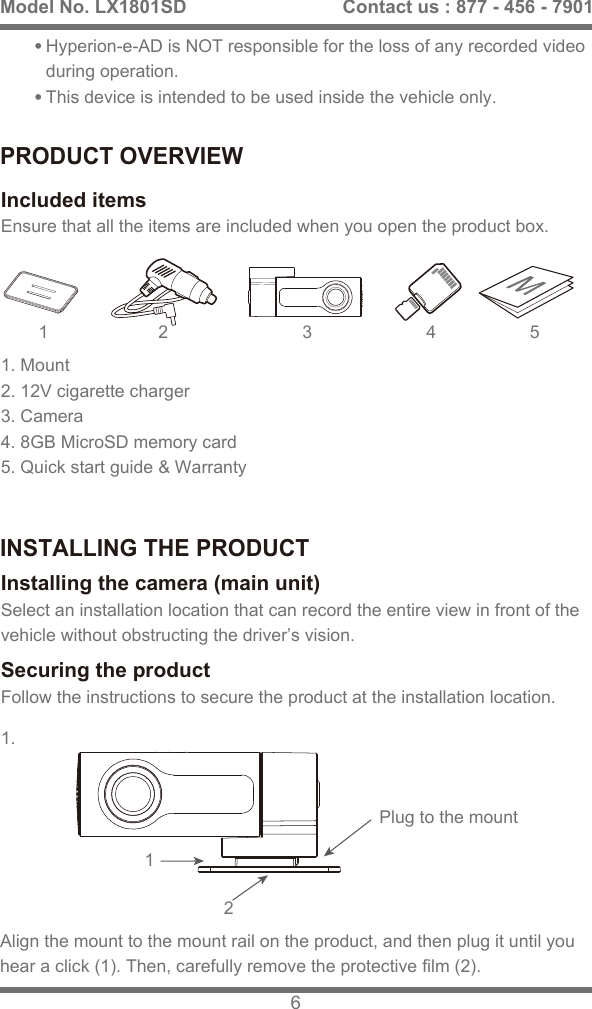
PRODUCT OVERVIEWINSTALLING THE PRODUCTEnsure that all the items are included when you open the product box.Included itemsSelect an installation location that can record the entire view in front of the vehicle without obstructing the driver’s vision.Installing the camera (main unit)Follow the instructions to secure the product at the installation location.Securing the product3 4 511.121. Mount 2. 12V cigarette charger 3. Camera 4. 8GB MicroSD memory card5. Quick start guide & Warranty2Hyperion-e-AD is NOT responsible for the loss of any recorded video during operation.This device is intended to be used inside the vehicle only.Align the mount to the mount rail on the product, and then plug it until you hear a click (1). Then, carefully remove the protective film (2).Model No. LX1801SD 6Contact us : 877 - 456 - 7901Plug to the mount
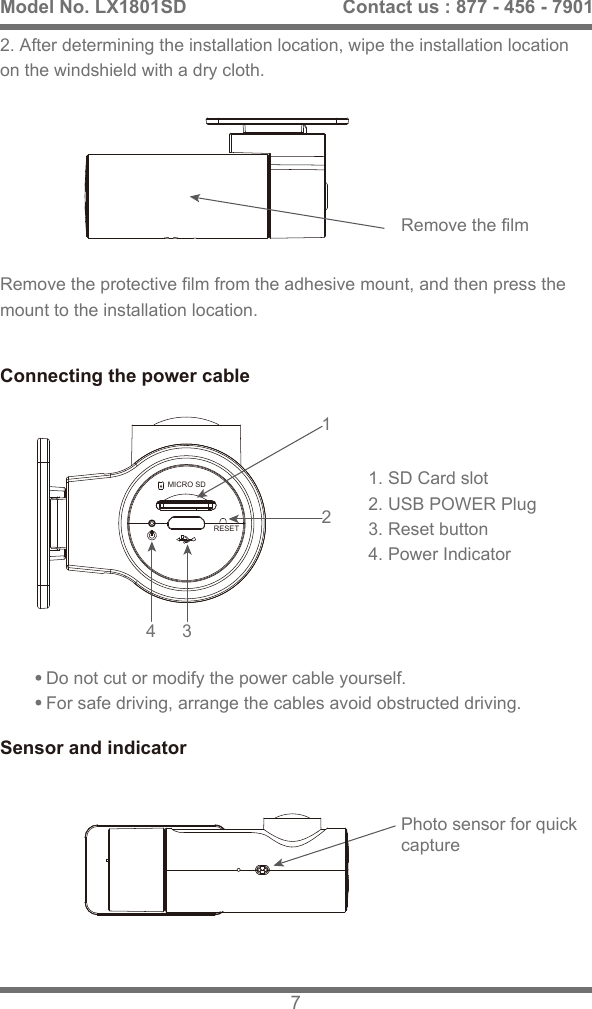
2. After determining the installation location, wipe the installation location on the windshield with a dry cloth.Remove the protective film from the adhesive mount, and then press the mount to the installation location.3412Connecting the power cableSensor and indicator1. SD Card slot2. USB POWER Plug3. Reset button4. Power IndicatorDo not cut or modify the power cable yourself. For safe driving, arrange the cables avoid obstructed driving. Remove the filmPhoto sensor for quickcaptureModel No. LX1801SD 7Contact us : 877 - 456 - 7901RESETMICRO SD
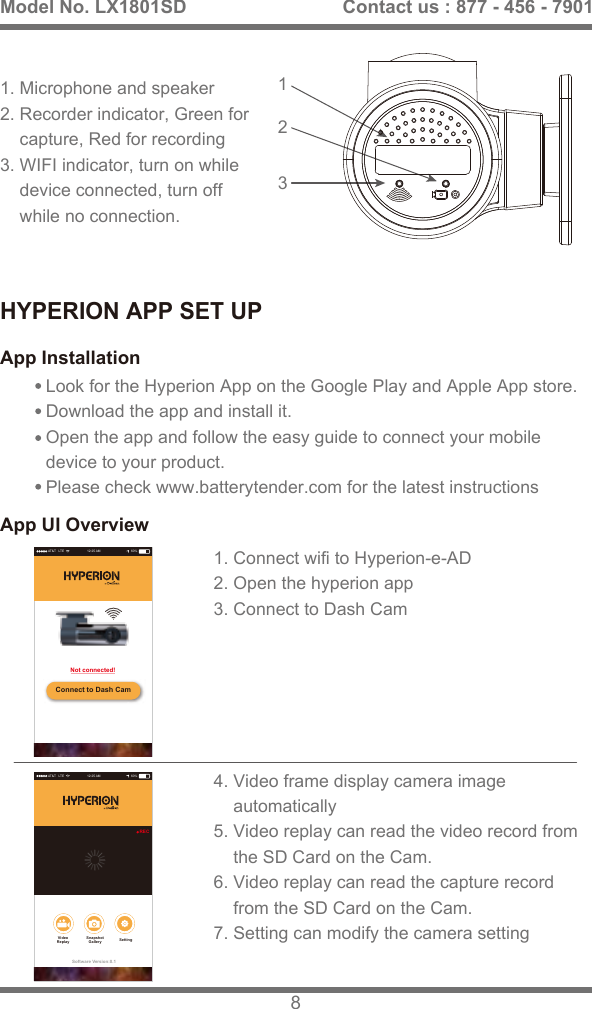
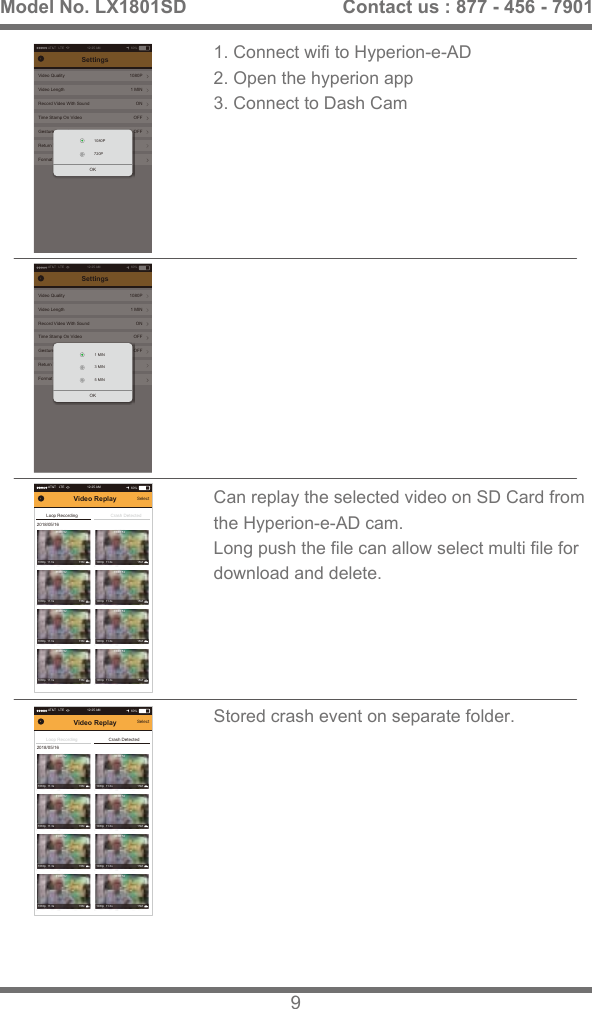
HYPERION APP SET UPApp InstallationApp UI OverviewLook for the Hyperion App on the Google Play and Apple App store. Download the app and install it. Open the app and follow the easy guide to connect your mobile device to your product. Please check www.batterytender.com for the latest instructions3121. Microphone and speaker2. Recorder indicator, Green for     capture, Red for recording 3. WIFI indicator, turn on while     device connected, turn off     while no connection.1. Connect wifi to Hyperion-e-AD2. Open the hyperion app3. Connect to Dash Cam4. Video frame display camera image    automatically5. Video replay can read the video record from     the SD Card on the Cam.6. Video replay can read the capture record    from the SD Card on the Cam.7. Setting can modify the camera settingModel No. LX1801SD 8Contact us : 877 - 456 - 7901AT&T   LTE 12:25 AM 60%Connect to Dash CamNot connected!AT&T   LTE 12:25 AM 60%Software Version:0.1RECSnapshotGallery SettingVideoReplay
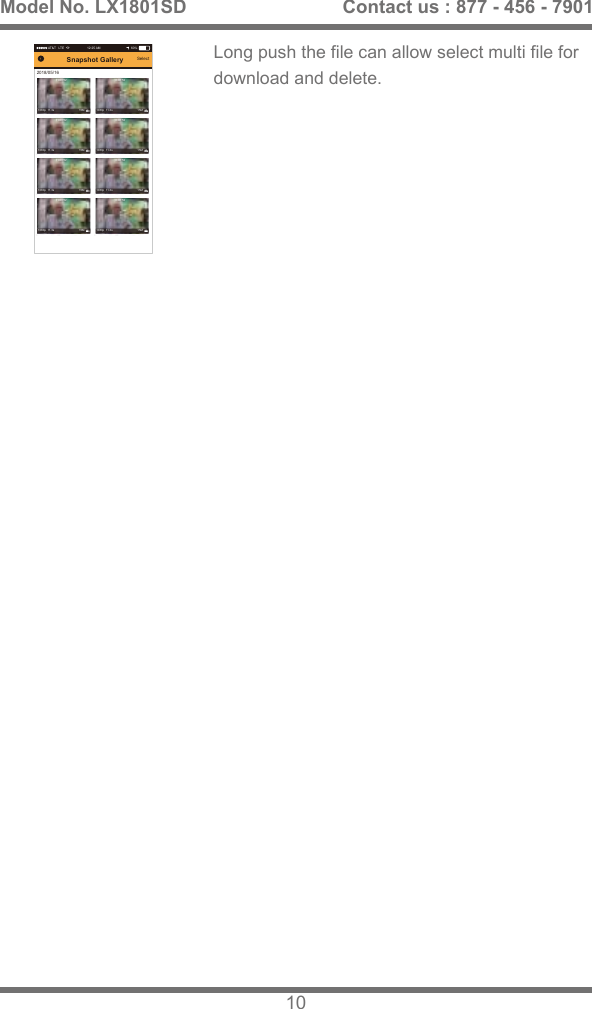
1. Connect wifi to Hyperion-e-AD2. Open the hyperion app3. Connect to Dash CamCan replay the selected video on SD Card from the Hyperion-e-AD cam.Long push the file can allow select multi file for download and delete.Stored crash event on separate folder.Model No. LX1801SD 9Contact us : 877 - 456 - 7901AT&T   LTE 12:25 AM 60%SettingsVideo Quality 1080P1 MINONOFFOFFVideo LengthRecord Video With SoundTime Stamp On VideoGesture SnapshotReturn To DefaultFormat SD-CardOK1080P720PAT&T   LTE 12:25 AM 60%SettingsVideo Quality 1080P1 MINONOFFOFFVideo LengthRecord Video With SoundTime Stamp On VideoGesture SnapshotReturn To DefaultFormat SD-CardOK3 MIN1 MIN5 MINAT&T   LTE 12:25 AM 60%Loop RecordingSelect2018/05/16Crash DetectedVideo Replay11:08:521080p  11.3s                               15M11:08:521080p  11.3s                               15M11:08:521080p  11.3s                               15M11:08:521080p  11.3s                               15M11:08:521080p  11.3s                               15M11:08:521080p  11.3s                               15M11:08:521080p  11.3s                               15M11:08:521080p  11.3s                               15MAT&T   LTE 12:25 AM 60%Loop RecordingSelect2018/05/16Crash DetectedVideo Replay11:08:521080p  11.3s                               15M11:08:521080p  11.3s                               15M11:08:521080p  11.3s                               15M11:08:521080p  11.3s                               15M11:08:521080p  11.3s                               15M11:08:521080p  11.3s                               15M11:08:521080p  11.3s                               15M11:08:521080p  11.3s                               15M
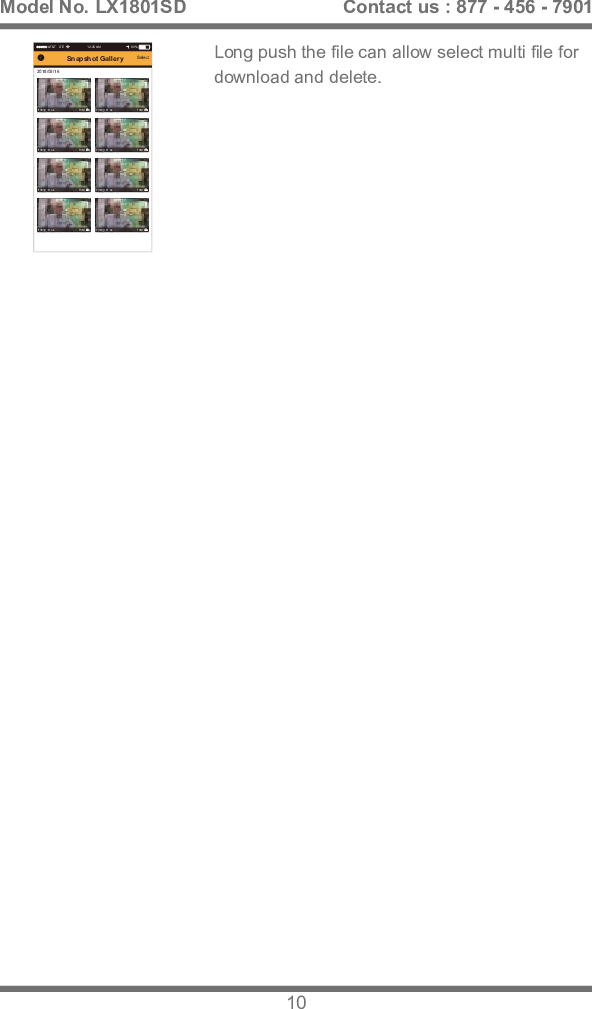
AT&T   LTE 12:25 AM 60%Select2018/05/16Snapshot Gallery11:08:521080p  11.3s                               15M11:08:521080p  11.3s                               15M11:08:521080p  11.3s                               15M11:08:521080p  11.3s                               15M11:08:521080p  11.3s                               15M11:08:521080p  11.3s                               15M11:08:521080p  11.3s                               15M11:08:521080p  11.3s                               15MLong push the file can allow select multi file for download and delete.Model No. LX1801SD 10Contact us : 877 - 456 - 7901

Navigation menu