Xinwei Electronic Quanzhou HSE26 Bluetooth Headset User Manual

Xinwei Electronic Co., Ltd., Quanzhou Bluetooth Headset Users Manual

Users Manual

 1PREFACE E26 MP3 Bluetooth headset is a new digital communication personal stereo device. It is a super latter-hang Bluetooth headset with MP3 built in, FM radio, TF card support, Bluetooth and telephone recorder functions. You can use it as a mobile USB memory card as well. It exceeds the traditional ones, and combines Bluetooth with MP3 together. It not only with advanced technology and concise, generous appearance, but also can be operated simply and conveniently. It looks good, feels great and sounds even better. This latter-hang MP3 Bluetooth headset (hereinafter referred Bluetooth headset) is no longer a single communicate tool, but the music lovers’ new favorite. From now on, you are one of the hi-tech wireless communications--Bluetooth user team. NOW, free your hands and without any trouble of the cables. You will feel that communication and entertainment is that simple.  Before using the E26 MP3 Bluetooth headset, please read this User's Manual carefully. In addition to this "user's manual", please read the mobile phone "user's manual" as well. It provides important safety and maintenance information.
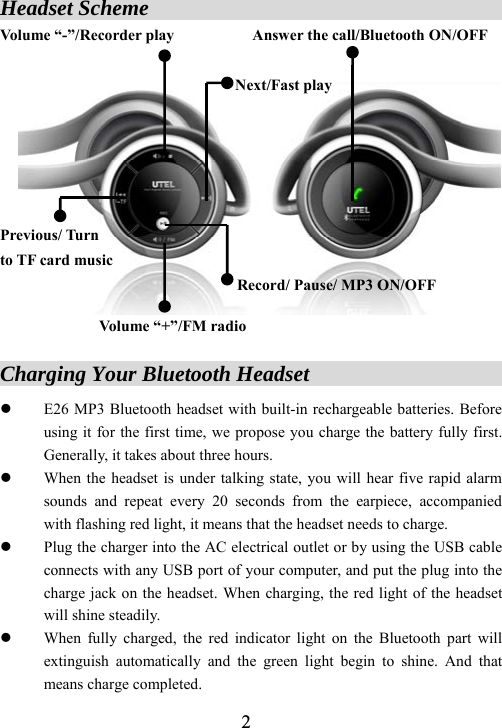
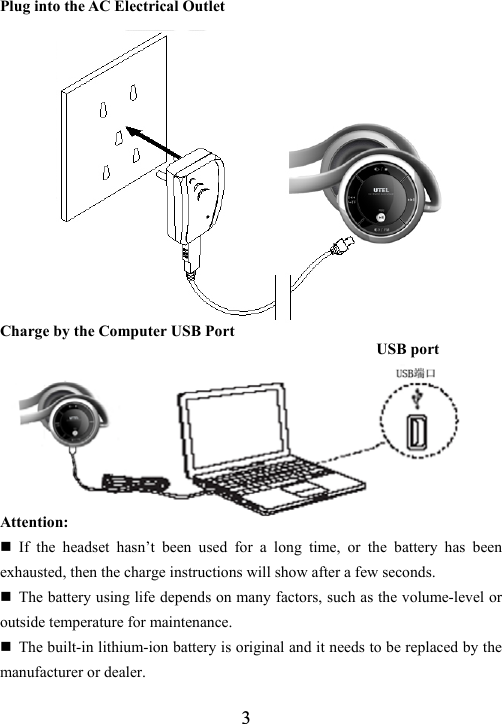
 2Headset Scheme                                      Volume “-”/Recorder play          Answer the call/Bluetooth ON/OFF                               Next/Fast play      Previous/ Turn   to TF card music Record/ Pause/ MP3 ON/OFF  Volume “+”/FM radio  Charging Your Bluetooth Headset                       z E26 MP3 Bluetooth headset with built-in rechargeable batteries. Before using it for the first time, we propose you charge the battery fully first. Generally, it takes about three hours. z When the headset is under talking state, you will hear five rapid alarm sounds and repeat every 20 seconds from the earpiece, accompanied with flashing red light, it means that the headset needs to charge. z Plug the charger into the AC electrical outlet or by using the USB cable connects with any USB port of your computer, and put the plug into the charge jack on the headset. When charging, the red light of the headset will shine steadily. z When fully charged, the red indicator light on the Bluetooth part will extinguish automatically and the green light begin to shine. And that means charge completed.
 3Plug into the AC Electrical Outlet             Charge by the Computer USB Port                                                 USB port       Attention:  If the headset hasn’t been used for a long time, or the battery has been exhausted, then the charge instructions will show after a few seconds.  The battery using life depends on many factors, such as the volume-level or outside temperature for maintenance.  The built-in lithium-ion battery is original and it needs to be replaced by the manufacturer or dealer.
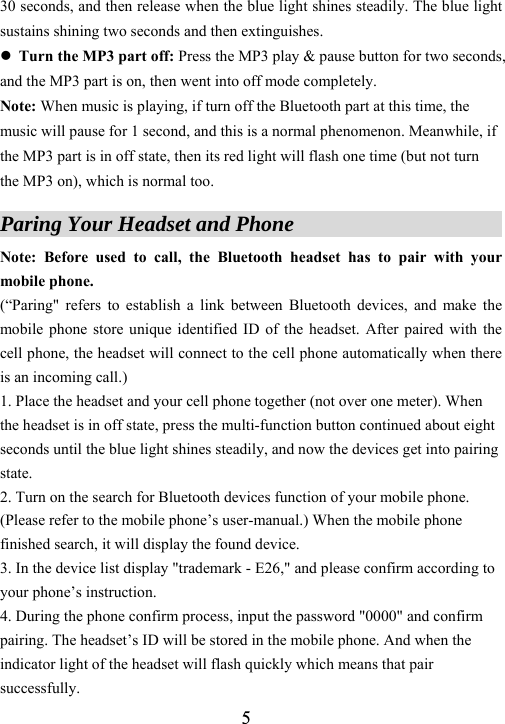
 4 Any equipment with the rechargeable battery must be disposed properly, and is likely to be recycled. Please contact the local recycling centers to access to proper disposal.  The Bluetooth headset can continue playing music when it’s charging without any influence on charge. Or you can turn the headset off, because use it when charging will be prolong the charge time.  If you want to finish charge soon, listening to music while charging is not recommended. Warning: Never dispose of batteries in a fire because they may explode.  A fully charged battery can support the Bluetooth talking about 30 hours, standby about 240 hours and listen to stereo music about 15 hours. Even without a call, the headset will remain in the standby state.  How to Power ON/OFF Your Headset               1. To power your headset on     z Turn on the Bluetooth part: press the multi-function button (MFB) about five seconds, and then release after the blue light flashes. The blue light indicator on the headset flashes every three seconds. z Turn on the MP3 part: Press the MP3 play & pause key for two seconds, and then the MP3 is on and plays music.   Note: To simplify the operation, the MP3 of the headset will be on automatically and play music, which is normal. Under standby state, press the Bluetooth MFB, the MP3 will be automatically activated and enter standby mode. 2.    To power your headset OFF z Turn the Bluetooth part off: Press the multi-function button (MFB) about
 530 seconds, and then release when the blue light shines steadily. The blue light sustains shining two seconds and then extinguishes. z Turn the MP3 part off: Press the MP3 play & pause button for two seconds, and the MP3 part is on, then went into off mode completely.   Note: When music is playing, if turn off the Bluetooth part at this time, the music will pause for 1 second, and this is a normal phenomenon. Meanwhile, if the MP3 part is in off state, then its red light will flash one time (but not turn the MP3 on), which is normal too.  Paring Your Headset and Phone                        Note: Before used to call, the Bluetooth headset has to pair with your mobile phone.   (“Paring" refers to establish a link between Bluetooth devices, and make the mobile phone store unique identified ID of the headset. After paired with the cell phone, the headset will connect to the cell phone automatically when there is an incoming call.) 1. Place the headset and your cell phone together (not over one meter). When the headset is in off state, press the multi-function button continued about eight seconds until the blue light shines steadily, and now the devices get into pairing state.  2. Turn on the search for Bluetooth devices function of your mobile phone. (Please refer to the mobile phone’s user-manual.) When the mobile phone finished search, it will display the found device.   3. In the device list display "trademark - E26," and please confirm according to your phone’s instruction.   4. During the phone confirm process, input the password "0000" and confirm pairing. The headset’s ID will be stored in the mobile phone. And when the indicator light of the headset will flash quickly which means that pair successfully.
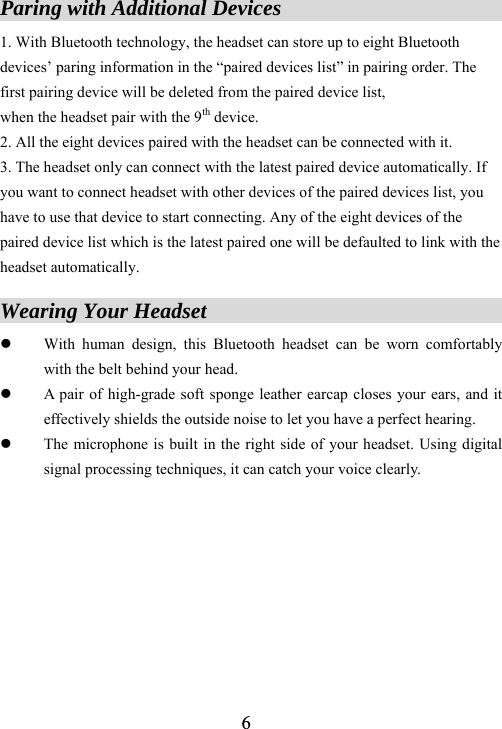
 6Paring with Additional Devices                      1. With Bluetooth technology, the headset can store up to eight Bluetooth devices’ paring information in the “paired devices list” in pairing order. The first pairing device will be deleted from the paired device list,   when the headset pair with the 9th device.   2. All the eight devices paired with the headset can be connected with it.   3. The headset only can connect with the latest paired device automatically. If you want to connect headset with other devices of the paired devices list, you have to use that device to start connecting. Any of the eight devices of the paired device list which is the latest paired one will be defaulted to link with the headset automatically.  Wearing Your Headset                                   z With human design, this Bluetooth headset can be worn comfortably with the belt behind your head. z A pair of high-grade soft sponge leather earcap closes your ears, and it effectively shields the outside noise to let you have a perfect hearing. z The microphone is built in the right side of your headset. Using digital signal processing techniques, it can catch your voice clearly.
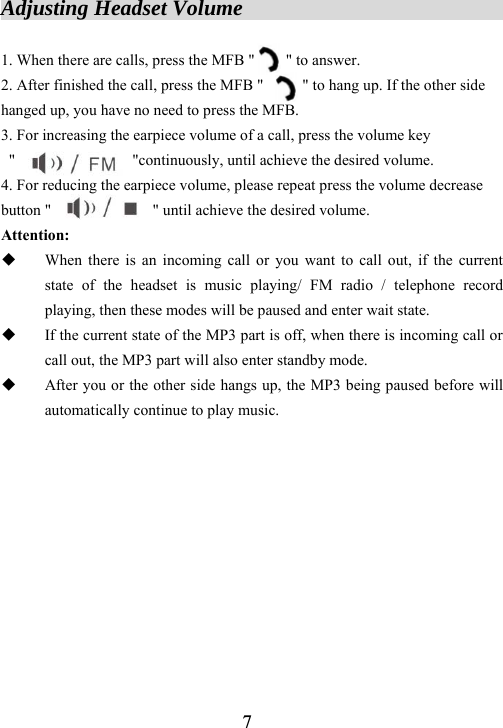
 7Adjusting Headset Volume                          1. When there are calls, press the MFB "        " to answer. 2. After finished the call, press the MFB "          " to hang up. If the other side hanged up, you have no need to press the MFB.   3. For increasing the earpiece volume of a call, press the volume key  "               "continuously, until achieve the desired volume.    4. For reducing the earpiece volume, please repeat press the volume decrease button "             " until achieve the desired volume. Attention:  When there is an incoming call or you want to call out, if the current state of the headset is music playing/ FM radio / telephone record playing, then these modes will be paused and enter wait state.  If the current state of the MP3 part is off, when there is incoming call or call out, the MP3 part will also enter standby mode.  After you or the other side hangs up, the MP3 being paused before will automatically continue to play music.
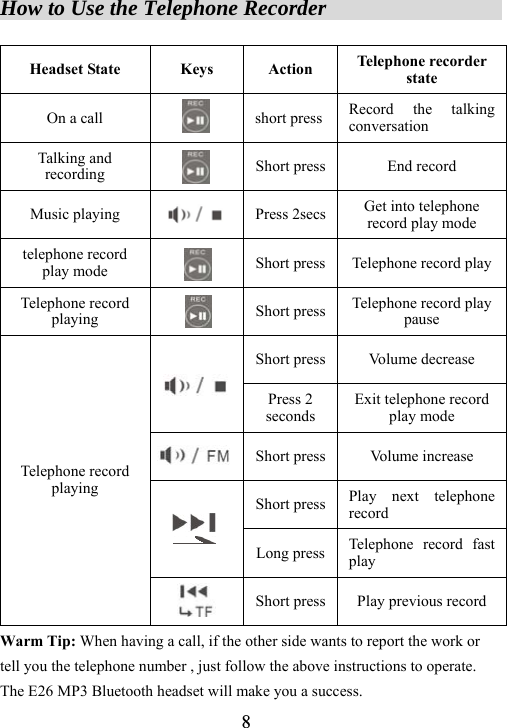
 8How to Use the Telephone Recorder                    Headset State  Keys  Action  Telephone recorder state On a call  short press Record the talking conversation Talking and recording  Short press End record Music playing  Press 2secs Get into telephone record play mode telephone record play mode  Short press Telephone record playTelephone record playing  Short press Telephone record play pause Short press Volume decrease  Press 2 seconds Exit telephone record play mode  Short press Volume increase Short press Play next telephone record  Long press Telephone record fast play Telephone record playing  Short press Play previous record Warm Tip: When having a call, if the other side wants to report the work or tell you the telephone number , just follow the above instructions to operate. The E26 MP3 Bluetooth headset will make you a success.
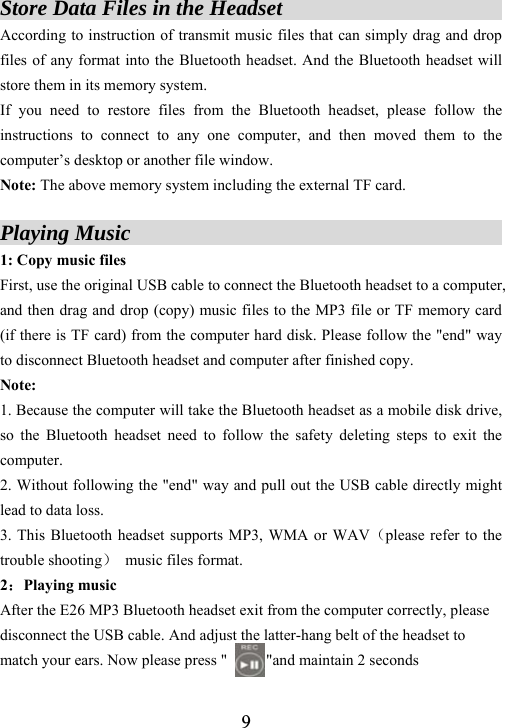
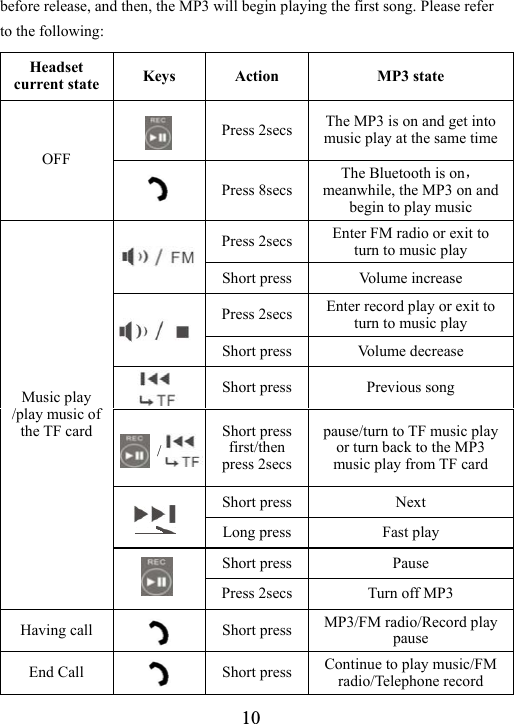
 9Store Data Files in the Headset                     According to instruction of transmit music files that can simply drag and drop files of any format into the Bluetooth headset. And the Bluetooth headset will store them in its memory system.   If you need to restore files from the Bluetooth headset, please follow the instructions to connect to any one computer, and then moved them to the computer’s desktop or another file window.   Note: The above memory system including the external TF card.  Playing Music                                   1: Copy music files First, use the original USB cable to connect the Bluetooth headset to a computer, and then drag and drop (copy) music files to the MP3 file or TF memory card (if there is TF card) from the computer hard disk. Please follow the "end" way to disconnect Bluetooth headset and computer after finished copy. Note:  1. Because the computer will take the Bluetooth headset as a mobile disk drive, so the Bluetooth headset need to follow the safety deleting steps to exit the computer.  2. Without following the "end" way and pull out the USB cable directly might lead to data loss.   3. This Bluetooth headset supports MP3, WMA or WAV(please refer to the trouble shooting)  music files format. 2:Playing music After the E26 MP3 Bluetooth headset exit from the computer correctly, please disconnect the USB cable. And adjust the latter-hang belt of the headset to match your ears. Now please press "          "and maintain 2 seconds
 10before release, and then, the MP3 will begin playing the first song. Please refer to the following:  Headset current state  Keys Action  MP3 state  Press 2secs The MP3 is on and get into music play at the same timeOFF   Press 8secsThe Bluetooth is on,meanwhile, the MP3 on and begin to play music Press 2secs Enter FM radio or exit to turn to music play    Short press  Volume increase Press 2secs Enter record play or exit to turn to music play  Short press  Volume decrease  Short press  Previous song    / Short press first/then press 2secs pause/turn to TF music play or turn back to the MP3 music play from TF card Short press  Next    Long press  Fast play Short press  Pause Music play /play music of the TF card  Press 2secs Turn off MP3 Having call   Short press  MP3/FM radio/Record play pause End Call     Short press  Continue to play music/FM radio/Telephone record
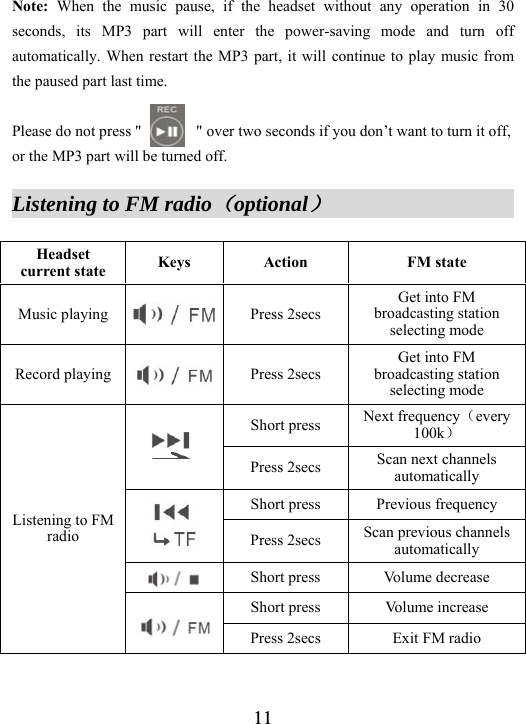
 11Note: When the music pause, if the headset without any operation in 30 seconds, its MP3 part will enter the power-saving mode and turn off automatically. When restart the MP3 part, it will continue to play music from the paused part last time.  Please do not press "              " over two seconds if you don’t want to turn it off, or the MP3 part will be turned off.  Listening to FM radio(optional)                   Headset current state  Keys Action  FM state Music playing  Press 2secs Get into FM broadcasting station selecting mode Record playing  Press 2secs Get into FM broadcasting station selecting mode Short press  Next frequency(every 100k)  Press 2secs  Scan next channels automatically Short press  Previous frequency  Press 2secs  Scan previous channels automatically  Short press  Volume decrease Short press  Volume increase Listening to FM radio  Press 2secs  Exit FM radio
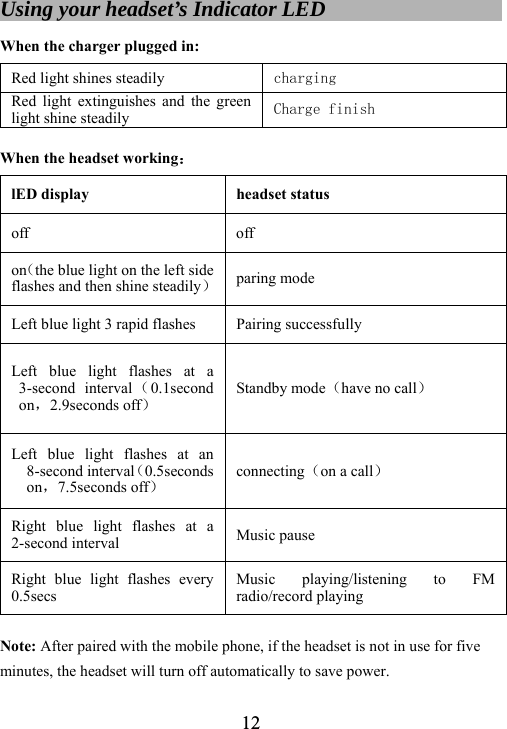
 12Using your headset’s Indicator LED                       When the charger plugged in: Red light shines steadily  charging Red light extinguishes and the green light shine steadily Charge finish  When the headset working: lED display  headset status off off on(the blue light on the left side flashes and then shine steadily)paring mode Left blue light 3 rapid flashes  Pairing successfully Left blue light flashes at a 3-second interval (0.1second on,2.9seconds off) Standby mode(have no call) Left blue light flashes at an 8-second interval(0.5seconds on,7.5seconds off) connecting(on a call) Right blue light flashes at a 2-second interval  Music pause Right blue light flashes every 0.5secs Music playing/listening to FM radio/record playing  Note: After paired with the mobile phone, if the headset is not in use for five minutes, the headset will turn off automatically to save power.
 13The Bone Conduction Telephone Transmitter(optional) Bone conduction telephone transmitter is used to catch the voice through skull’s tremor. The main function of this microphone is that it can transmit the voice without any outside noise, so that you can talk in the noisy street or discotheque just as in a quiet bedroom. Operations for bone conduction telephone transmitter 1. Plug the bone conduction telephone transmitter into the earphone jack on the right side of the Bluetooth headset.   2. Bent the bone conduction telephone transmitter close your face and neck.   Annotation: The built-in microphone of the headset will disconnect communication automatically when the bone conduction telephone transmitter plugged in.  The General Safety Knowledge for Using Bluetooth Headset              Before using Bluetooth headset, please read these tips below to avoid accidents when use headset.   Avoid distraction: When you are driving motor vehicles, motorcycles, and bicycles, please don’t listen to music or have calls for a long time with the E26 Bluetooth headset. Besides, you need to know the local laws about using like that is legal or not. Anyway, please use it carefully when doing anything required full attention to avoid any injuries and accidents. Avoid damaging ears: Too high volume may cause hearing loss academically. If you feel tinnitus, please lower the volume or suspend using your Bluetooth headset as soon as possible. Avoid electromagnetic interference: To avoid electromagnetic interference or
 14compatibility conflicts, please stop using your Bluetooth headset at circumstances, such as hospitals, airports, laboratories, and other occasions with stop using requirements.   Avoid shocks: Please avoid the Bluetooth headset damaged by too hard external force or collisions. Please use it carefully and avoid falling.  Trouble Shooting                                      If the Bluetooth headset is unable to connect to the mobile phone, please do the following: z Make sure the Bluetooth headset was turned on and was paired with the handset. z Make sure the distance between the handset and Bluetooth headset not over 10M, or are there any stumbling block between them, such as wall and electronic equipments.   z The Bluetooth paired list may have been full. One Bluetooth headset can be linked (or “paired”) with up to 8 Bluetooth devices. Please pair the headset again if the paired list is full. z When the headset can not connect with the selected handset automatically, please charge it again, turn it off and then turn on again or pair with the handset again. If the Bluetooth can not play music: z Please make sure the volume is high enough, in case that it’s too low to hear the music. z Please check the headset’s battery have power or not. Charge it with the computer or the AC charger to check the state of the battery. If the battery is full, the indicator light on the headset will shine stably.   z Please make sure that there are music files inside the MP3 memory card. Connect the MP3 to a computer, and then open the MP3 file to see
 15whether there is any music file inside. The computer will show the MP3 as a mobile hard disk. z Please check the music file format is MP3, WMA or WAV, the MP3 player only support these three formats. And the WAV format only supported for record play. Note:Please check the music files is formats the MP3 support. If the format is not correct, the headset will stop playing automatically with “Di  Di  Di” alarm sound. If there is difference in their volume among music files:    The pre-stored music files (WAV files or compressed files record by simulate method first) may sound higher or lower than other music files in the MP3. Please adjust the volume carefully to make it have the same volume with others.  Maintenance                                          Your MP3 Bluetooth headset is product with eximious design and technology. It should be used carefully. The following suggestions will help you use the after services effectively. ● Please put all accessories on places that children can not reach.   ● Please keep the Bluetooth headset dry. Rain, humidity and various liquid or moisture may contain minerals which will erode the headset’s electronic circuits. If your Bluetooth headset is wet, please don’t use it before dry it completely.  ● Please don’t use or keep your Bluetooth headset in dusty or dirty places, because that will damage its removable parts and electronic components. ● Please don’t keep your Bluetooth headset in place of high temperature because the high temperature will shorten the electronic devices’ using life, damage the battery and make the plastic parts distort or melt.
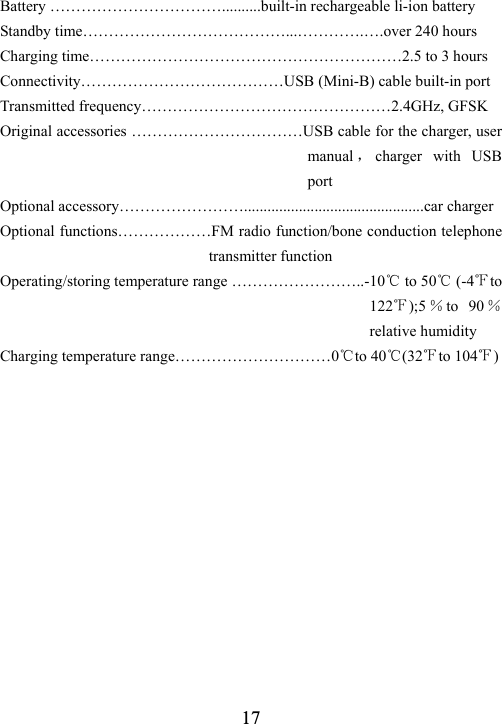
 16● Please don’t keep your Bluetooth headset in over-cold places. Otherwise, when the temperature rises to room temperature, it will cause moisture inside the headset and damage its circuit board. ● Please do not throw, beat or shake the Bluetooth headset because that will damage its internal circuit boards and exact structure. ● Please don’t use strong chemicals, cleanser or strong wash to clean your Bluetooth headset. ● Please do not paint your Bluetooth headset, because the paint will obstruct its removable components and affect its normal work.  All these proposals above are applicable to your USB cables, batteries, chargers or various accessories as well. If any of them can not work, please send them to the nearest authorized maintenance organizations to maintain.  Specification                                         Support file Format………………………………………MP3/ WMA/ WAV Memory………128MB/256MB/512MB/1GB/2GB(depends on the model) File transmitted speed …………………………………………Up to 1.4MB/s Signal Noise Ratio………………………………………………………~90dB Total harmonic distortion………………………………………………<0.1% Frequency response …………………………………………20HZ-20,000H Output power……………………………………20mW(rating)/40mw (max)  Bluetooth specification…………………………BTV2.0 and V1.1 compatible   Microphone …………………large diameter close ear with noise-proof effect Telephone frequency response…………..……………….……300Hz to 3KHz Talking time ………………………………………….continue 25 to 30 hours, music 15 to 18hours
 17Battery ……………………………..........built-in rechargeable li-ion battery Standby time…………………………………...………….….over 240 hours Charging time……………………………………………………2.5 to 3 hours Connectivity…………………………………USB (Mini-B) cable built-in port Transmitted frequency…………………………………………2.4GHz, GFSK Original accessories ……………………………USB cable for the charger, user manual ,charger with USB port Optional accessory……………………..............................................car charger Optional functions………………FM radio function/bone conduction telephone transmitter function Operating/storing temperature range ……………………..-10℃ to 50℃ (-4℉to 122℉);5 %to 90 % relative humidity Charging temperature range…………………………0℃to 40℃(32℉to 104℉)
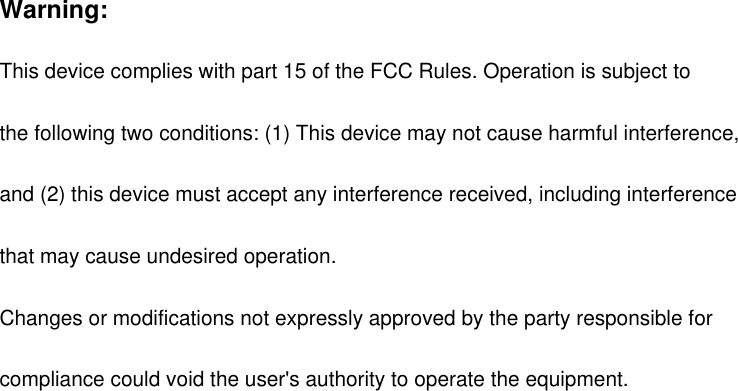
Warning: This device complies with part 15 of the FCC Rules. Operation is subject to   the following two conditions: (1) This device may not cause harmful interference,   and (2) this device must accept any interference received, including interference   that may cause undesired operation. Changes or modifications not expressly approved by the party responsible for   compliance could void the user's authority to operate the equipment.

Navigation menu