Xinwei Electronic Quanzhou HSH52 Bluetooth Headset User Manual UTE H52 user instruction

Xinwei Electronic Co., Ltd., Quanzhou Bluetooth Headset UTE H52 user instruction

User Manual

 1Table of Content  Table of Content ………………………………..……..……..... 1~2 Introduction to Bluetooth Headset UTEL H52………….…...…..3 Introduction to Bluetooth Technology …………….….……….....4 Headset H52 Profiles …………………………………..……....…5  Usage ① Charging ………..……………………….………...6~7 ② Wearing ……………………………………….…..….7 ③ Powering ON/OFF …………………………....….....8 ④ Paring …...…………………………………..……8~11
 2  ⑤ Volume Adjustment …...…………….………...11~12 Operation and Indication Chart………................................12~14 Indicator Light Chart ………………………………….………14~15 Trouble Shooting ...........………………………………...….. 16~17 Caution……………………………………………………...………18 Maintenance.......…………………………………………...…19~20 Technical Specifications…………………………………..………21
 3 Introduction to Bluetooth Headset UTEL H52                    UTEL H52 exceeds traditional Bluetooth headsets. It has super mini size and super-lightweight, easy to use. Utilizing Bluetooth V2.1 chipset enables its faster connection, clearer communication and better anti-jamming capacity. With headset H52, you can cast off wires trouble and enjoy the advanced Bluetooth wireless technology. You will feel that COMMUNICATION IS THAT EASY.  Please read this manual carefully before using Bluetooth headset UTEL H52. In addition, please keep your mobile phones’ instruction manuals for reference as well.
 4Introduction to Bluetooth Technology                What is Bluetooth technology? Bluetooth devices enable to communicate without wires, using built-in radio transceivers which operate on a globally available radio frequency to ensure worldwide compatibility. Your Bluetooth wireless headset can communicate with other Bluetooth devices within a range of approximately 10 meters (33feet). * Bluetooth signal would be interfered by obstructs, such as wall, body, etc. How to use Bluetooth wireless headsets?    With Bluetooth technology, your wireless headset is able to connect with any Bluetooth enabled devices freely, for example, Nokia N72.  Making calls at hands-free profile and adjust volume level.  Reject call via headset.  Making calls through voice dialing function.   Note: To meet different using habits, headset UTEL H52 supports both HSP (Headset Profile) and HFP (Hands-free Profile). Please refer to your user manual for more operation instruction.
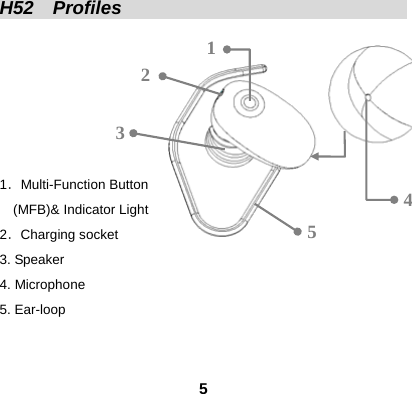
 5H52  Profiles                                             1.Multi-Function Button   (MFB)& Indicator Light 2.Charging socket 3. Speaker 4. Microphone 5. Ear-loop   1 2 3 4 5
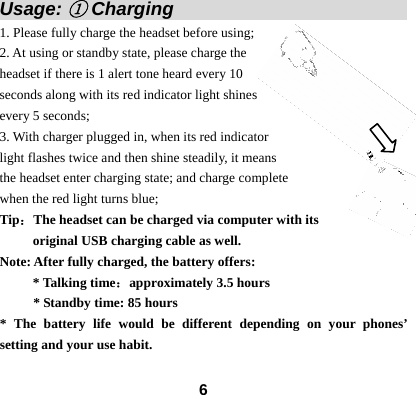
 6Usage: ① Charging                          1. Please fully charge the headset before using; 2. At using or standby state, please charge the headset if there is 1 alert tone heard every 10 seconds along with its red indicator light shines every 5 seconds;   3. With charger plugged in, when its red indicator   light flashes twice and then shine steadily, it means the headset enter charging state; and charge complete   when the red light turns blue; Tip:The headset can be charged via computer with its   original USB charging cable as well. Note: After fully charged, the battery offers: * Talking time:approximately 3.5 hours         * Standby time: 85 hours * The battery life would be different depending on your phones’ setting and your use habit.
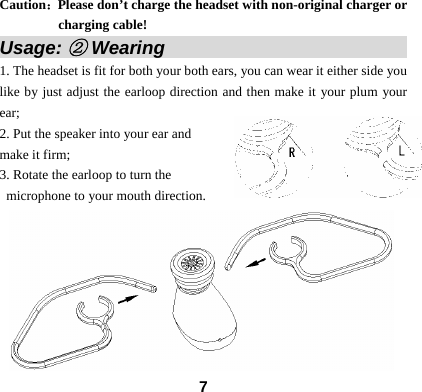
 7Caution:Please don’t charge the headset with non-original charger or charging cable! Usage: ② Wearing                            1. The headset is fit for both your both ears, you can wear it either side you like by just adjust the earloop direction and then make it your plum your ear; 2. Put the speaker into your ear and   make it firm; 3. Rotate the earloop to turn the microphone to your mouth direction.
 8Usage: ③ Powering ON/OFF                   Powering  ON: At OFF mode, press and hold its MFB for around 5 seconds then release when its indicator lights (both blue and red) shine for 1 second. Now, the headset has been turned on along with indication tone and the flashed indicator light turns red.   Note: When the headset hasn’t been connected to any Bluetooth devices, there will be only its red indicator light flashes.  Powering  OFF: When the headset is ON, press and hold its MFB for about 5 seconds, then release when its indicator lights (both blue and red) shine for 1 second and then extinguish along with indication tone. Now, the headset has been turned off.
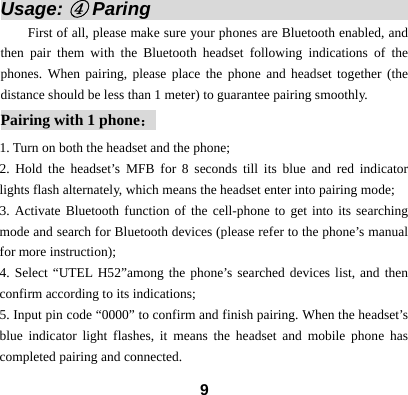
 9Usage: ④ Paring                             First of all, please make sure your phones are Bluetooth enabled, and then pair them with the Bluetooth headset following indications of the phones. When pairing, please place the phone and headset together (the distance should be less than 1 meter) to guarantee pairing smoothly.   Pairing with 1 phone: 1. Turn on both the headset and the phone;   2. Hold the headset’s MFB for 8 seconds till its blue and red indicator lights flash alternately, which means the headset enter into pairing mode; 3. Activate Bluetooth function of the cell-phone to get into its searching mode and search for Bluetooth devices (please refer to the phone’s manual for more instruction); 4. Select “UTEL H52”among the phone’s searched devices list, and then confirm according to its indications;   5. Input pin code “0000” to confirm and finish pairing. When the headset’s blue indicator light flashes, it means the headset and mobile phone has completed pairing and connected.
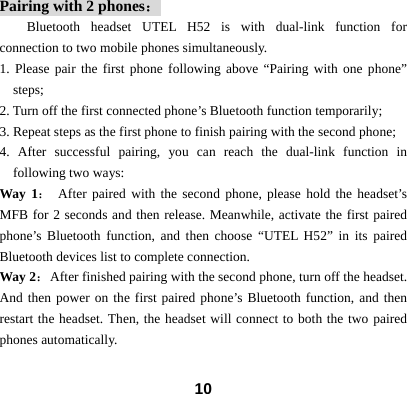
 10Pairing with 2 phones: Bluetooth headset UTEL H52 is with dual-link function for connection to two mobile phones simultaneously. 1. Please pair the first phone following above “Pairing with one phone” steps; 2. Turn off the first connected phone’s Bluetooth function temporarily;   3. Repeat steps as the first phone to finish pairing with the second phone; 4. After successful pairing, you can reach the dual-link function in following two ways: Way 1: After paired with the second phone, please hold the headset’s MFB for 2 seconds and then release. Meanwhile, activate the first paired phone’s Bluetooth function, and then choose “UTEL H52” in its paired Bluetooth devices list to complete connection.     Way 2:  After finished pairing with the second phone, turn off the headset. And then power on the first paired phone’s Bluetooth function, and then restart the headset. Then, the headset will connect to both the two paired phones automatically.
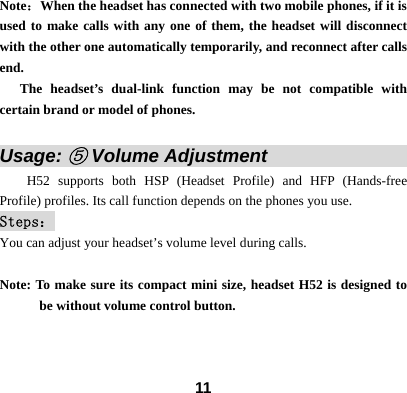
 11Note:When the headset has connected with two mobile phones, if it is used to make calls with any one of them, the headset will disconnect with the other one automatically temporarily, and reconnect after calls end.     The headset’s dual-link function may be not compatible with certain brand or model of phones.  Usage: ⑤ Volume Adjustment                       H52 supports both HSP (Headset Profile) and HFP (Hands-free Profile) profiles. Its call function depends on the phones you use.   Steps: You can adjust your headset’s volume level during calls.  Note: To make sure its compact mini size, headset H52 is designed to be without volume control button.
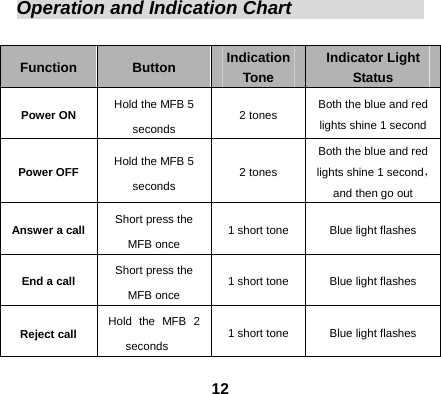
 12Operation and Indication Chart                Function  Button  Indication Tone Indicator Light Status Power ON  Hold the MFB 5 seconds  2 tones  Both the blue and red lights shine 1 second Power OFF  Hold the MFB 5 seconds  2 tones Both the blue and red lights shine 1 second,and then go out Answer a call  Short press the MFB once  1 short tone  Blue light flashes End a call  Short press the MFB once  1 short tone  Blue light flashes Reject call  Hold the MFB 2 seconds  1 short tone  Blue light flashes
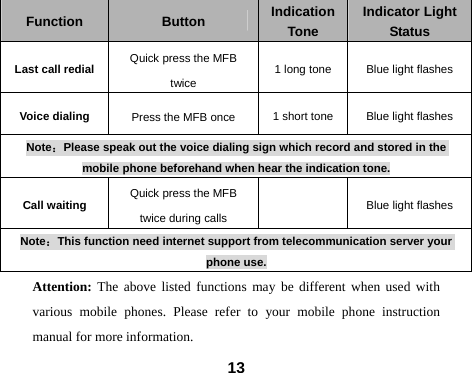
 13 Function  Button  Indication Tone Indicator Light Status Last call redial  Quick press the MFB twice  1 long tone  Blue light flashes Voice dialing  Press the MFB once  1 short tone  Blue light flashes Note:Please speak out the voice dialing sign which record and stored in the mobile phone beforehand when hear the indication tone. Call waiting  Quick press the MFB twice during calls   Blue light flashes Note:This function need internet support from telecommunication server your phone use. Attention: The above listed functions may be different when used with various mobile phones. Please refer to your mobile phone instruction manual for more information.
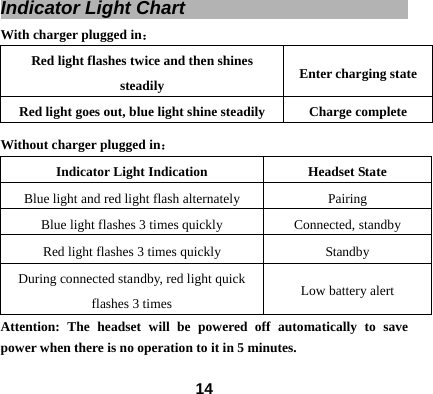
 14Indicator Light Chart                                With charger plugged in: Red light flashes twice and then shines steadily  Enter charging state Red light goes out, blue light shine steadily  Charge complete Without charger plugged in: Indicator Light Indication  Headset State Blue light and red light flash alternately  Pairing   Blue light flashes 3 times quickly  Connected, standby Red light flashes 3 times quickly  Standby   During connected standby, red light quick flashes 3 times  Low battery alert Attention: The headset will be powered off automatically to save power when there is no operation to it in 5 minutes.
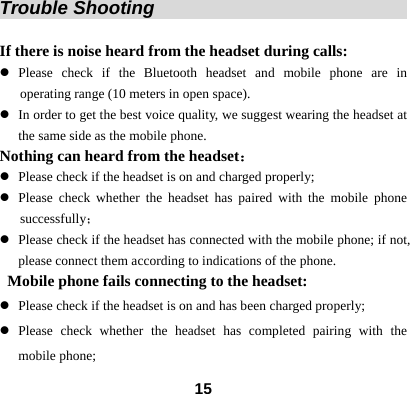
 15Trouble Shooting                                    If there is noise heard from the headset during calls:   z Please check if the Bluetooth headset and mobile phone are in    operating range (10 meters in open space). z In order to get the best voice quality, we suggest wearing the headset at the same side as the mobile phone. Nothing can heard from the headset: z Please check if the headset is on and charged properly; z Please check whether the headset has paired with the mobile phone successfully; z Please check if the headset has connected with the mobile phone; if not, please connect them according to indications of the phone.   Mobile phone fails connecting to the headset: z Please check if the headset is on and has been charged properly; z Please check whether the headset has completed pairing with the mobile phone;
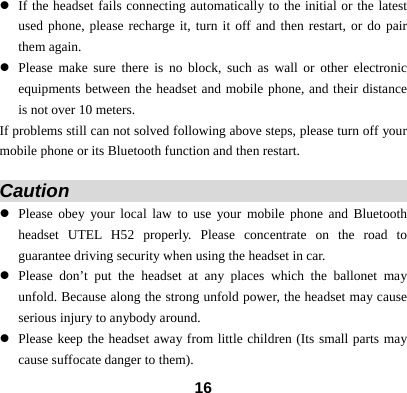
 16z If the headset fails connecting automatically to the initial or the latest used phone, please recharge it, turn it off and then restart, or do pair them again. z Please make sure there is no block, such as wall or other electronic equipments between the headset and mobile phone, and their distance is not over 10 meters.   If problems still can not solved following above steps, please turn off your mobile phone or its Bluetooth function and then restart.    Caution                                       z Please obey your local law to use your mobile phone and Bluetooth headset UTEL H52 properly. Please concentrate on the road to guarantee driving security when using the headset in car. z Please don’t put the headset at any places which the ballonet may unfold. Because along the strong unfold power, the headset may cause serious injury to anybody around. z Please keep the headset away from little children (Its small parts may cause suffocate danger to them).
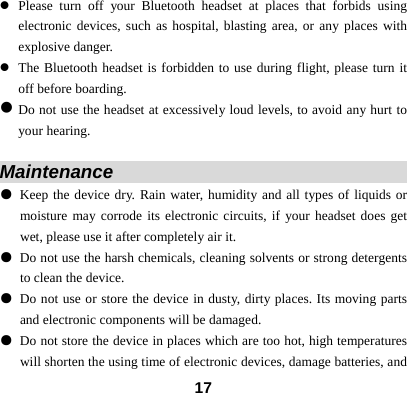
 17z Please turn off your Bluetooth headset at places that forbids using electronic devices, such as hospital, blasting area, or any places with explosive danger. z The Bluetooth headset is forbidden to use during flight, please turn it off before boarding. z Do not use the headset at excessively loud levels, to avoid any hurt to your hearing.  Maintenance                                   ● Keep the device dry. Rain water, humidity and all types of liquids or moisture may corrode its electronic circuits, if your headset does get wet, please use it after completely air it. ● Do not use the harsh chemicals, cleaning solvents or strong detergents to clean the device. ● Do not use or store the device in dusty, dirty places. Its moving parts and electronic components will be damaged. ● Do not store the device in places which are too hot, high temperatures will shorten the using time of electronic devices, damage batteries, and
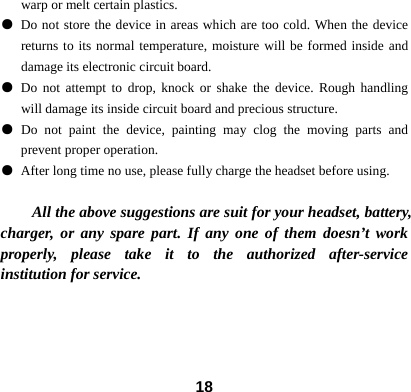
 18warp or melt certain plastics.   ● Do not store the device in areas which are too cold. When the device returns to its normal temperature, moisture will be formed inside and damage its electronic circuit board. ● Do not attempt to drop, knock or shake the device. Rough handling will damage its inside circuit board and precious structure. ● Do not paint the device, painting may clog the moving parts and prevent proper operation. ● After long time no use, please fully charge the headset before using.  All the above suggestions are suit for your headset, battery, charger, or any spare part. If any one of them doesn’t work properly, please take it to the authorized after-service institution for service.
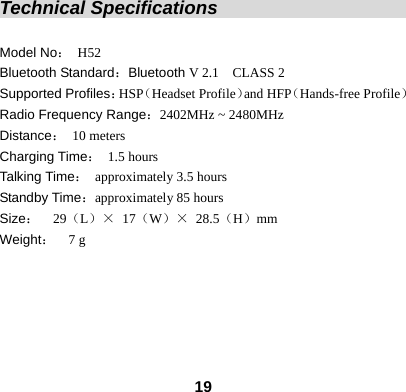
 19Technical Specifications                             Model No: H52 Bluetooth Standard:Bluetooth V 2.1    CLASS 2   Supported Profiles:HSP(Headset Profile)and HFP(Hands-free Profile) Radio Frequency Range:2402MHz ~ 2480MHz   Distance: 10 meters Charging Time: 1.5 hours Talking Time: approximately 3.5 hours Standby Time:approximately 85 hours Size:  29(L)× 17(W)× 28.5(H)mm Weight:  7 g
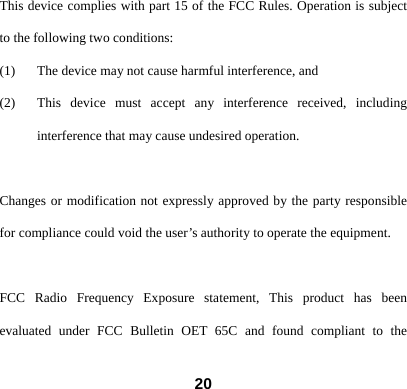
 20This device complies with part 15 of the FCC Rules. Operation is subject to the following two conditions: (1) The device may not cause harmful interference, and   (2) This device must accept any interference received, including interference that may cause undesired operation.  Changes or modification not expressly approved by the party responsible for compliance could void the user’s authority to operate the equipment.  FCC Radio Frequency Exposure statement, This product has been evaluated under FCC Bulletin OET 65C and found compliant to the
 21requirement asset as set forth in CFR 47 section 2.1093 and 15.247(i) addressing RF Exposure from radio frequency device ,The redialed output power of this product is far below the FCC radio frequency exposure limits.  * Above battery life may be different depends on your using habit and mobile phone function setting.

Navigation menu