Y Soft a s 0YX0X033000 HID iClass Reader User Manual 1
Y Soft Corporation, a.s. HID iClass Reader 1
Contents
- 1. User Manual 1
- 2. User manual 2
- 3. User Manual 3
- 4. User Manual 4
User Manual 1

makingtheMFDsthink™
YSoftSafeQTerminalProfessional
v3.5
Administrator’sGuide
Version1.3

23.11.2009
YSOFTSAFEQTERMINALPROFESSIONALV3.5–ADMINISTRATOR’SGUIDEV1.3[EN]2/19
©2009byYSofts.r.o.
Allrightstothisdocument,domesticandinternational,arereservedbyYSofts.r.o..Nopartofthispublication
maybereproduced,storedinaretrievalsystem,ortransmittedinanyformorbyanymeans(electronic,me‐
chanical,photocopying,recording,orotherwise)withoutpriorwrittenpermissionofYSoft.
YSoft®,YSoftSafeQ®anditslogoareregisteredtrademarksofYSofts.r.o.
Allotherbrandsandtheirproductsaretrademarksorregisteredtrademarksoftheirrespectiveholders,and
shouldbenotedassuch.

23.11.2009
YSOFTSAFEQTERMINALPROFESSIONALV3.5–ADMINISTRATOR’SGUIDEV1.3[EN]3/19
TABLEOFCONTENTS
TableofContents .................................................................................................................................................3
1Introduction.................................................................................................................................................4
1.1Purposeofdocument .........................................................................................................................4
1.2GoalsandObjectives ...........................................................................................................................4
1.3Validityofdocument ...........................................................................................................................4
1.4Disclaimer............................................................................................................................................4
2Overview .....................................................................................................................................................5
3Technicalspecifications ...............................................................................................................................6
3.1TerminalpropertiesandtechnicalspecificationS ................................................................................6
4Terminalsetting...........................................................................................................................................9
4.1Terminalconfiguration‐Common.......................................................................................................9
4.2Enteringservicemenu.........................................................................................................................9
4.3Networksettings ...............................................................................................................................10
4.4Serversetting ....................................................................................................................................11
4.5Cardreadersetting............................................................................................................................11
4.6I/OModulesettings...........................................................................................................................12
4.7Interfacesettings...............................................................................................................................12
4.8Languagesettings..............................................................................................................................14
4.9Displaysettings .................................................................................................................................14
4.10Diagnosticutils ..................................................................................................................................15
4.11Service...............................................................................................................................................15
5Conclusion .................................................................................................................................................17
6Relationshipwithotherdocuments...........................................................................................................18
7Versionhistory...........................................................................................................................................19
23.11.2009
YSOFTSAFEQTERMINALPROFESSIONALV3.5–ADMINISTRATOR’SGUIDEV1.3[EN]4/19
1INTRODUCTION
1.1PURPOSEOFDOCUMENT
Thisguideprovidestheessentialinformationontheinstallation,configurationandusageoftheYSoftSafeQ
TerminalProfessionalv3.5withcolordisplay.
Youareexpectedtounderstandsomenetworkingandprintingconcepts:inparticular,youshouldbefamiliar
withtheclient/serverparadigm,withIPaddressingandTCP/UDPports.Ideally,youshouldknowsomething
aboutLDAPandSNMPaswell.ItassumesadeeperunderstandingofYSoftSafeQonthecommonadministra‐
torlevelandknowledgeoftheYSoftSafeQAdministratorGuide.Thisguidealsoassumestheownershipand/or
accesstoarticles,suchasservicecables.
1.2GOALSANDOBJECTIVES
YSoftSafeQ®TerminalProfessionalprovidesuserinterfaceforauthorizationtoprinterandcopierandwork‐
flowimprovementssuchasfollowmefeature,printjobmanagement,self‐serveprintingandcopyingandscan
workflowimprovements.
1.3VALIDITYOFDOCUMENT
TheinformationinthisguideappliestoYSoftSafeQTerminalProfessionalversion3.6.2andnewer.
Thecontentsofthisguideareup‐to‐dateandapplytothefollowingversions:
YSoftSafeQ®InstantEditionv3.5
YSoftSafeQ®ProfessionalEditionv3.1.5
YSoftSafeQ®EnterpriseEditionv3.1.5
1.4DISCLAIMER
Theproducerdoesnotbearanyresponsibilityfortheuseofanyfunctionsnotspecifiedhereunlesscoveredby
aseparatedocument.
Theproducerrejectsanyandallresponsibilityfortheconsequencesofimproper,negligentorincorrect
installationorsettingsofoptionaloperationalsystemparameters.
Informationtouser:
Theuserthatmakeschangesormodificationsnotexpresslyapprovedbythepartyresponsibleforcompliance
(YSofts.r.o.)couldvoidtheuser’sauthoritytooperatetheequipment.
23.11.2009
YSOFTSAFEQTERMINALPROFESSIONALV3.5–ADMINISTRATOR’SGUIDEV1.3[EN]5/19
2OVERVIEW
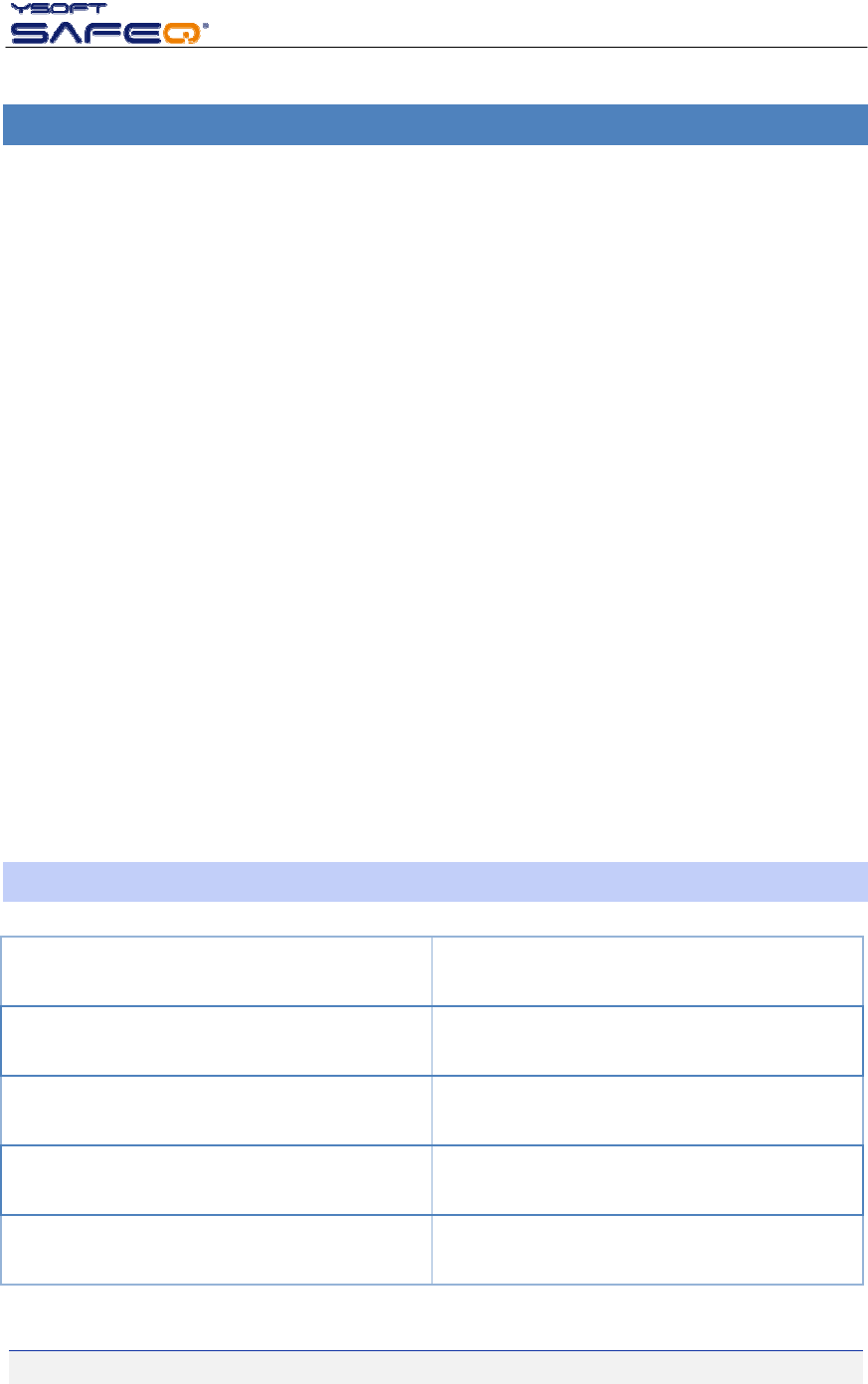
TheYSoftSafeQTerminalProfessionalhasagraphictouch‐screenandisequippedwithafour‐portnetwork
adapter.
Picture1:YSoftSafeQTerminalProfessional
Italsofeaturesamicrocomputer,flashROM,networkinterfaceandacardreader.Thecardreaderisoptional,
asPINcodecanbeusedforauthenticationinsteadofcards.Terminalissuppliedwithanexternalpowersup‐
ply(includedinthepackage).
Thecardreaderisareplaceablemodule:therearemanydifferentstandardsandtypesofidentificationcards,
bothcontactlessandcontactcards,andthereadermustbecompatiblewiththem.
TheterminalscommunicatewiththeYSoftSafeQserveroverthenetworkusingaTCPchannelandneedstobe
configuredinordertowork.
23.11.2009
YSOFTSAFEQTERMINALPROFESSIONALV3.5–ADMINISTRATOR’SGUIDEV1.3[EN]6/19
3TECHNICALSPECIFICATIONS
YSoftSafeQTerminalProfessionalfunctionality:
choiceprint/copying/scanningoptions
supportsfollow‐mefunctions,print,copying,scanninganddisplaysinformationonaccountingand
credit
authorizationbyPIN,cardoracombinationthereof
one‐timeauthorizationbyPUKcodeiftheuserhasnoactivecard
joblist(selectionofjobsforprint,offavouritejobsandprintedjobs)
deletionofjobfromqueue
favouritejobs(automaticprintofdocumentsdirectlyfromterminal)
projectaccounting
informationonprint/copyingstatusanddetailedpriceaccountingontheterminalscreen
beepingofthetouch‐screenandwarningthatthecopyingtimeouthasexpired
blocksaccesstoMFD–firewallandrouting
supportsSSLandIPSECcommunicationencryption
enablescentralconfiguration
Supportsremoteadministration–onlineterminaldisplay
dataoptimizationbetweenSafeQandprinter
YSoftSafeQterminalisconnectedtotheethernetnetwork.AnyethernetinterfacecanbeconnectedwithRJ45
totheterminalports.MFD,printerscommunicatewithSafeQ“via”theterminal.Accessrightsmaybesetfor
eachlink.
TheterminalhasaMACaddressallocateddirectlybytheproducer.
3.1TERMINALPROPERTIESANDTECHNICALSPECIFICATIONS
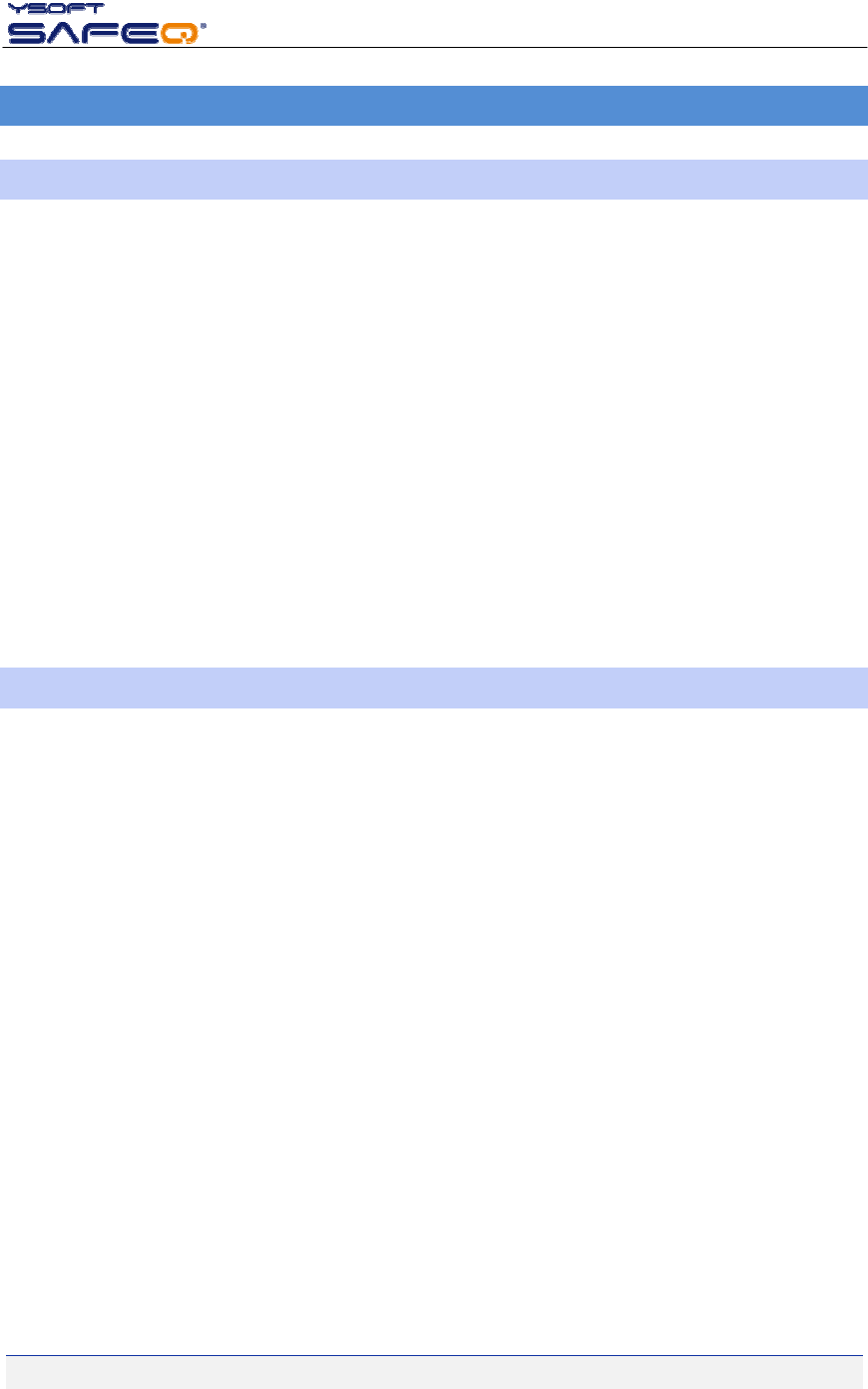
Terminalel.powersupplyinput: 12VDC
Maximumcurrentinput: 1.0A
Workingtemperature+10°Cto+40°C
Storagetemperature: 0°Cto+50°C
Maximumairhumidity:80%withoutcondensation

23.11.2009
YSOFTSAFEQTERMINALPROFESSIONALV3.5–ADMINISTRATOR’SGUIDEV1.3[EN]7/19
Resistancetomagneticfield: noaddedresistance
Weight:cca900g(dependsonusedcardreader)
Size(WxHxD)165x99x52mm
Architecture:RenesasSH7710/SH‐3
200MhzCPU,64MBSDRAM,16MBFlash(dedi‐
catedforFirmware)+128MBFlash(dedicatedfor
data)
Screen:480x272px,16bitcolor,
Maximumpressure:250g
Internalreaders:RFID125kHz,
Mifare,Motorola,HID,IDTECK,TIRIS,Cotag,Unique,
Smartcard,magneticthreetrack,draftingbarcodes,
dualreadersandmanyothers
Forthecompletelist,pleaseseethecurrentprice
list.
Externalinterface:8pinminiDIN,RS232interface,
ItemYSoftSafeQ®
ProfessionalTerminal
Power/frequency200MIPS
Databus32bit
InstructionsetRISC
RAMmemory64MB

23.11.2009
YSOFTSAFEQTERMINALPROFESSIONALV3.5–ADMINISTRATOR’SGUIDEV1.3[EN]8/19
FLASHmemory16MB
BlockingcablestoMFDYES
InternaloperatingsystemLINUX
CustomizationoptionYES/asrequired
23.11.2009
YSOFTSAFEQTERMINALPROFESSIONALV3.5–ADMINISTRATOR’SGUIDEV1.3[EN]9/19
4TERMINALSETTING
4.1TERMINALCONFIGURATION‐COMMON
IfaDHCPserveristobeusedforconfiguringtheterminalnetworksettings,enabletheuseofDHCP;
Otherwise,settheIPaddressoftheterminal,thesubnetmaskanddefaultgatewayandcheckthat
DHCPisdisabled;
Inbothcases,settheSafeQIPaddressoftheserverandtheportnumber;notethatthisisnotthe
portofthewebinterfacethatyouwereaskedforduringinstallationbuttheTCPportonwhichthe
SafeQServercommunicateswiththeterminals.Bydefaultitsnumberis4096
WhenenteringIPaddressesinthevariousmenuoptions,notethatyoumustenterallthreedigitsof
allthefournumericfieldsoftheaddress.Forexample,toenter192.168.0.37,youpressthe
192168000037buttonsontheon‐screenkeypadandthenconfirmwithOK.
Whentherequiredparametershavebeenset(orchanged),pushthe"Save"buttonandexittheset‐
tings.Theterminalwillrestartandthenewsettingswilltakeeffect.
Whenenteringthedataonscreenmanually,youshouldhearabeepwitheveryregisteredtouch.
Pressthescreenonlyuntilyourdepressioncausesabeep.Donotusegreaterforcethannecessary.
(Thebeepingmaybeturnedoff.)
4.2ENTERINGSERVICEMENU
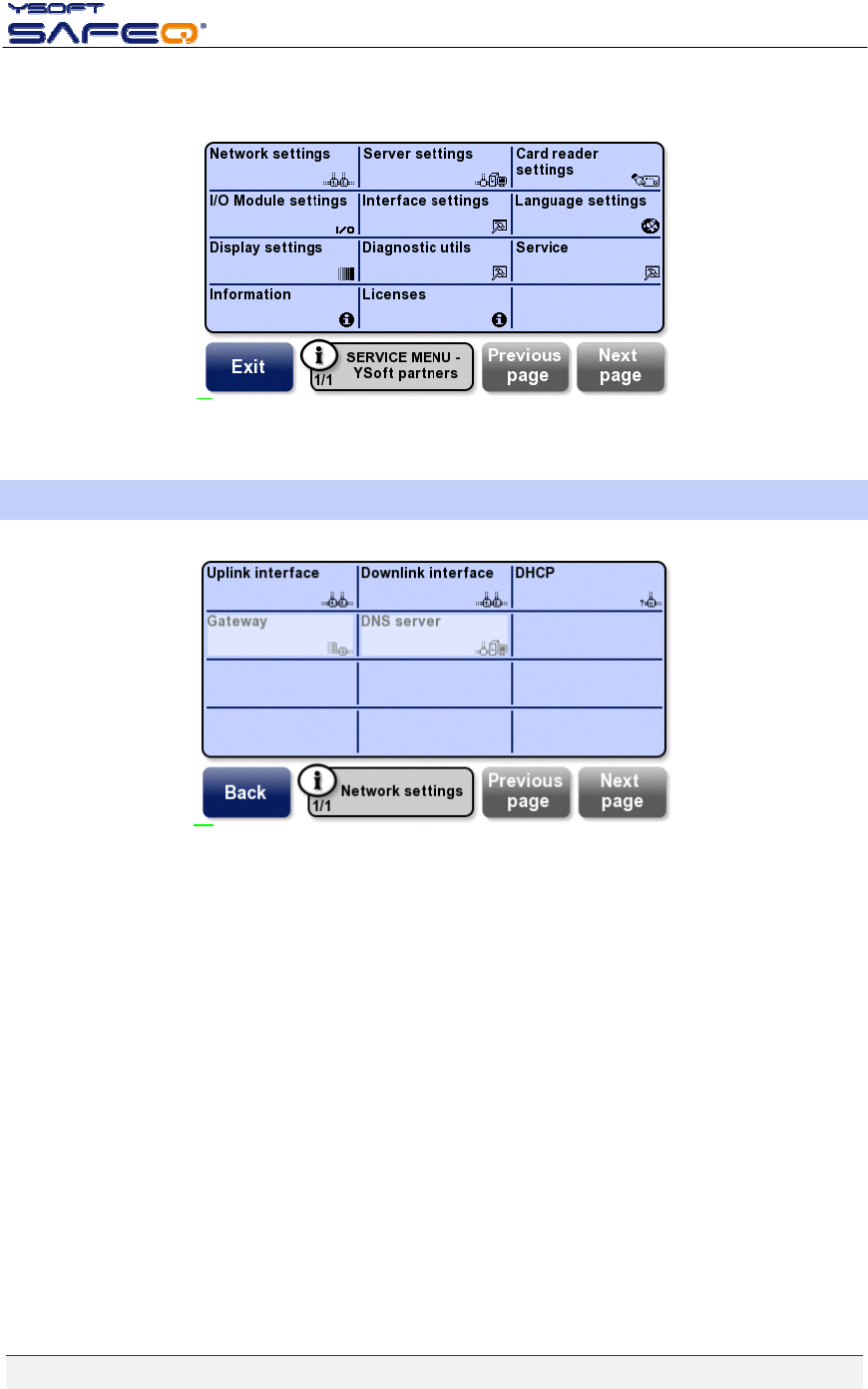
Afterthebootupofterminal,themainmenuwilldisplay(withthe“Placecard”message).Toenterservice
menudothefollowing:
1.touchthetopleftcornerofthescreen
2.touchthetoprightcornerofthescreen
3.touchthetopleftcornerofthescreenagain
4.touchthetoprightcornerofthescreenagain
5.anumericalkeyboardshoulddisplay.Pressthe0(zero)buttonfourtimesandthenpressOK.Apre‐
conditionisthatthedefaultaccesscodefortheservicemenu(0000)hasnotbeenchanged
6.theterminalservicemenushouldnowbedisplayed
IftheterminalisconfiguredtousePINauthenticationonly(nocards),themainmenuwillNOTbedisplayed
aftertheterminalbootsup.Inthiscase,enter000000000(ninezeroes)inthePINentryscreen,andthenpro‐
ceedwithstep5above.
Theadministratorisadvisedtochangethedefaultaccesscodetotheservicemenu(0000)topreventusers
fromchanginganyofthesettings.
Note:Theprocedureforenteringintoservicemenudescribedabovecorrespondstotheservicemenulevel1
(siteadministratorlevel).Thereinafterindocumenttherearescreenshotsrelevanttoservicemenulevel2(all
themenuoptions)andthereforesomeoptionsmaybehiddenwhenenteringintoservicemenulevel1.
23.11.2009
YSOFTSAFEQTERMINALPROFESSIONALV3.5–ADMINISTRATOR’SGUIDEV1.3[EN]10/19
Picture2‐Servicemenu
4.3NETWORKSETTINGS
Picture3‐Networksettings
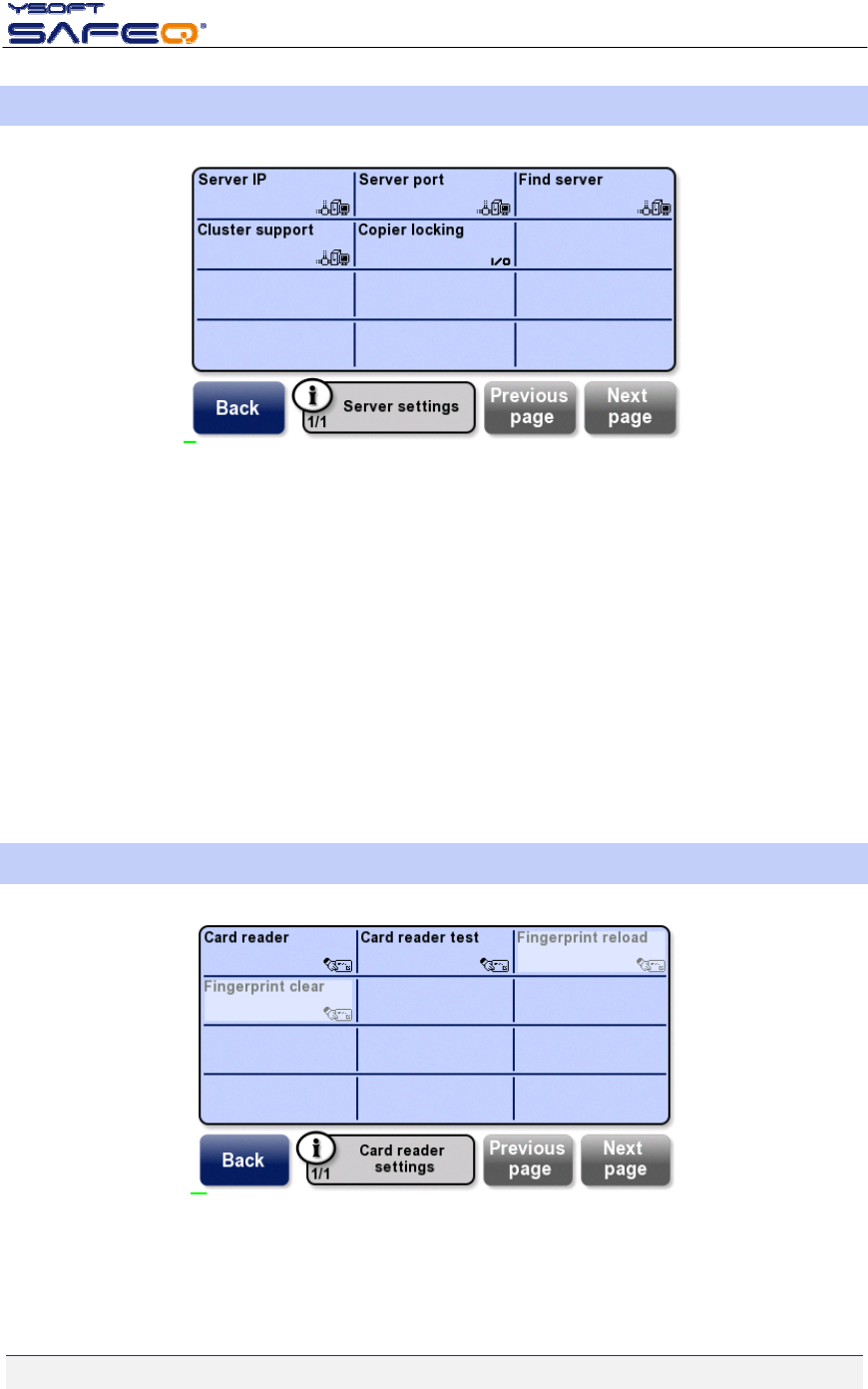
Uplinkinterface–setupIPaddressofterminal,netmask,portsspeedandnetworkadaptermode(foruseof
normalUTPcableorcrossedUTPcable)
Downlinkinterface–definespeedandnetworkadaptermodeforeachport
DHCP–enableordisableDHCP
Gateway–definegatewayforterminal(optionisgrayedifDHCPenabled)
DNSserver–defineDNSfortheterminal(optionisgrayedifDHCPenabled)
23.11.2009
YSOFTSAFEQTERMINALPROFESSIONALV3.5–ADMINISTRATOR’SGUIDEV1.3[EN]11/19
4.4SERVERSETTING
Picture4‐Serversettings
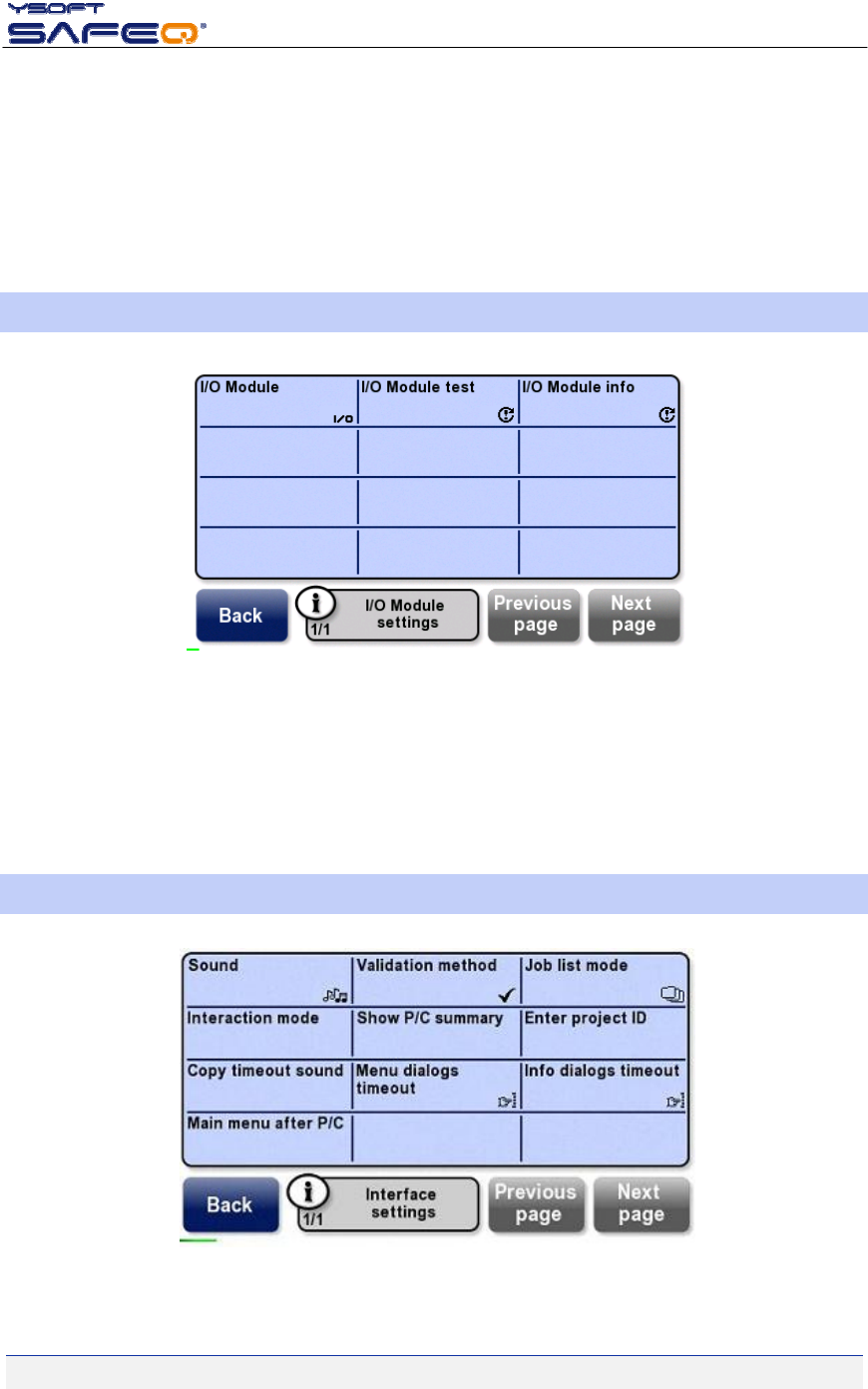
ServerIP–fillinSafeQserverIPaddress
Serverport–chooseSafeQserverportforcommunication,default4096
Findserver–searchforSafeQserveronthesamenetworkinterface
Clustersupport–allowsclustersupportforSafeQserverEnterprise
Copierlocking–definesifdevice(un)lockingisdirectedbyterminal(whenanuserpressesEndbuttonandis
loggedoutofsession)orbyserver(afterthejobisfinishedanddeviceisin“readystatus”)
4.5CARDREADERSETTING
Picture5‐Cardreadersettings
23.11.2009
YSOFTSAFEQTERMINALPROFESSIONALV3.5–ADMINISTRATOR’SGUIDEV1.3[EN]12/19
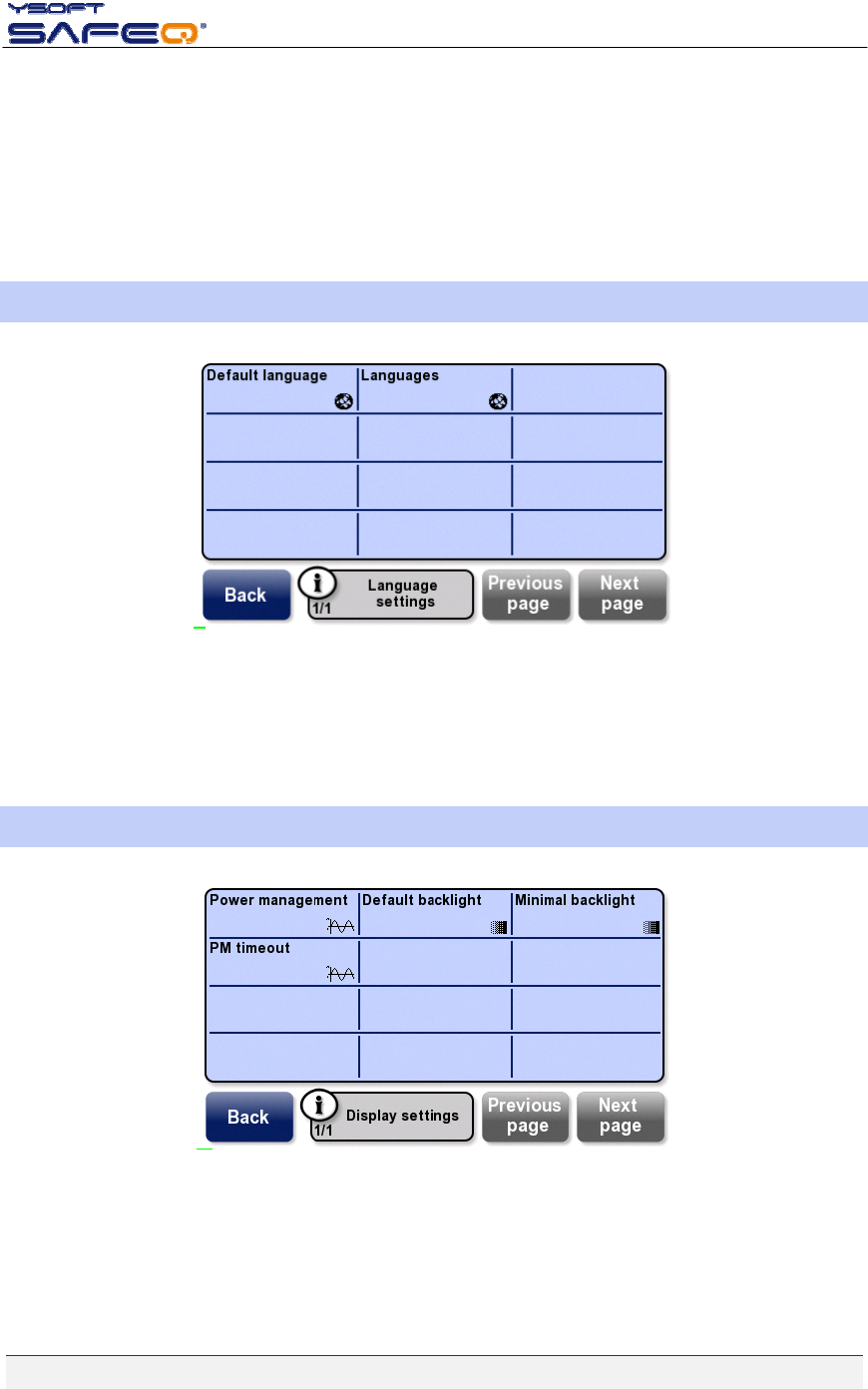
Cardreader–choosethetypeofcardreaderinstalled
Cardreadertest–placeacardandseecardnumberontheterminalscreen
Fingerprintreload–supportforbiometriclogin
Fingerprintclear–consultYsoftSafeQFingerprinttechnicalspecificationformoredetails
4.6I/OMODULESETTINGS
Picture6‐I/OModulesettings
I/OModule–chooseappropriatemoduleforblockingcableinterface(dependsofmachine)
I/OModuletest–testfunctionality(blockorunblockdeviceinterface)
I/OModuleinfo–seesummaryofinformationaboutI/OModule
4.7INTERFACESETTINGS
Picture7‐Interfacesettings

23.11.2009
YSOFTSAFEQTERMINALPROFESSIONALV3.5–ADMINISTRATOR’SGUIDEV1.3[EN]13/19
Sound–switchsound(beep)on/off
Validationmethod–fouroptions:
Card,–authorizationpossibleonlywithcard
PIN–authorizationpossibleonlywithPIN
CardandPIN–authorizationpossiblewithcardandPIN
CardorPIN–usermaychoosebetweenauthorizationwithcardorPIN
Joblistmode–fouroptions:
Nojoblist–nojoblisticononterminalscreenforanuser
Queueonly–usermayreadonlytheprintqueue
Queue/printed–usermayreadtheprintqueueandalsoprinted(andnotdeleted)jobs
Queue/printed/favorites–usermayreadtheentireprintqueue,includingfavouritejobs
Interactionmode
normal
simplified
Ifchosensimplified,theTerminalProfessionalwillbehaveasaLiteterminal.User´sprintjobisautomati‐
callyprintedandtheuserisautomaticallyloggedoffafterhisprintisdone.
ShowP/Csummary–informationsummaryafterprint/copyoperation:
pagesonly–informationaboutamountofpages(withoutprice)isdisplayedtotheuserbeforethe
print/copysessionends
pagesandprice–informationaboutamountofpagesandpriceisdisplayedtotheuserbeforethe
print/copysessionends
disabled–theprint/copysessionendsimmediatelywithoutanyinformationaboutamountofpages
orprice.
EnterProjectID–enablesfilteringbasedonprojectID.
Copytimeoutsound–enableordisablesoundwhenatimehaselapsedforacopysession.
Menudialogtimeout–settimeoutofmenudialogs:
30seconds
60seconds
none
Noneisapplicableonlyifterminalcardreaderiscapableofensuringcardpresenceanduserisloggedin
withacard.CurrentlyonlysmartcardandHIDwithcontinuousmodearesupported.
Infodialogtimeout–settimeoutforinfodialogs:
2seconds
5seconds
10seconds
20seconds
23.11.2009
YSOFTSAFEQTERMINALPROFESSIONALV3.5–ADMINISTRATOR’SGUIDEV1.3[EN]14/19
MainmenuafterP/C–enablingofdisplayingMainmenuafterthetheprint/copysessionisfinished.Appli‐
cableonlyforterminalswithreaders,thosearecapableofensuringcardpresence.
enabled–re‐loginisforcedtoserverafterprint/copyoperationfinished.Terminalreturnstothe
Mainmenu(user´scardmustbestillpresentatthereader).OnlywaytoendsessionistoclickEND
buttonintheMainmenu.
disabled(default)–userlogoutappearsaftertheprint/copysessionfinished.
4.8LANGUAGESETTINGS
Picture8‐Languagesettings
Defaultlanguage–setspecificlanguageforyourcountry
Language–chooselanguagesthatwillbeavailableforanusertochooseonthemainscreen
4.9DISPLAYSETTINGS
Picture9‐Displaysettings
Powermanagement–fouroptionfortouch‐screenpowermanagement‐Disable,Screendimming,Backlight
completelyoff,screencompletelyoff
23.11.2009
YSOFTSAFEQTERMINALPROFESSIONALV3.5–ADMINISTRATOR’SGUIDEV1.3[EN]15/19
Defaultbacklight–setupbacklightintensity
Minimalbacklight–setminimalbacklight
PMTimeout–definetimeoutforpowermanagement(minutes)
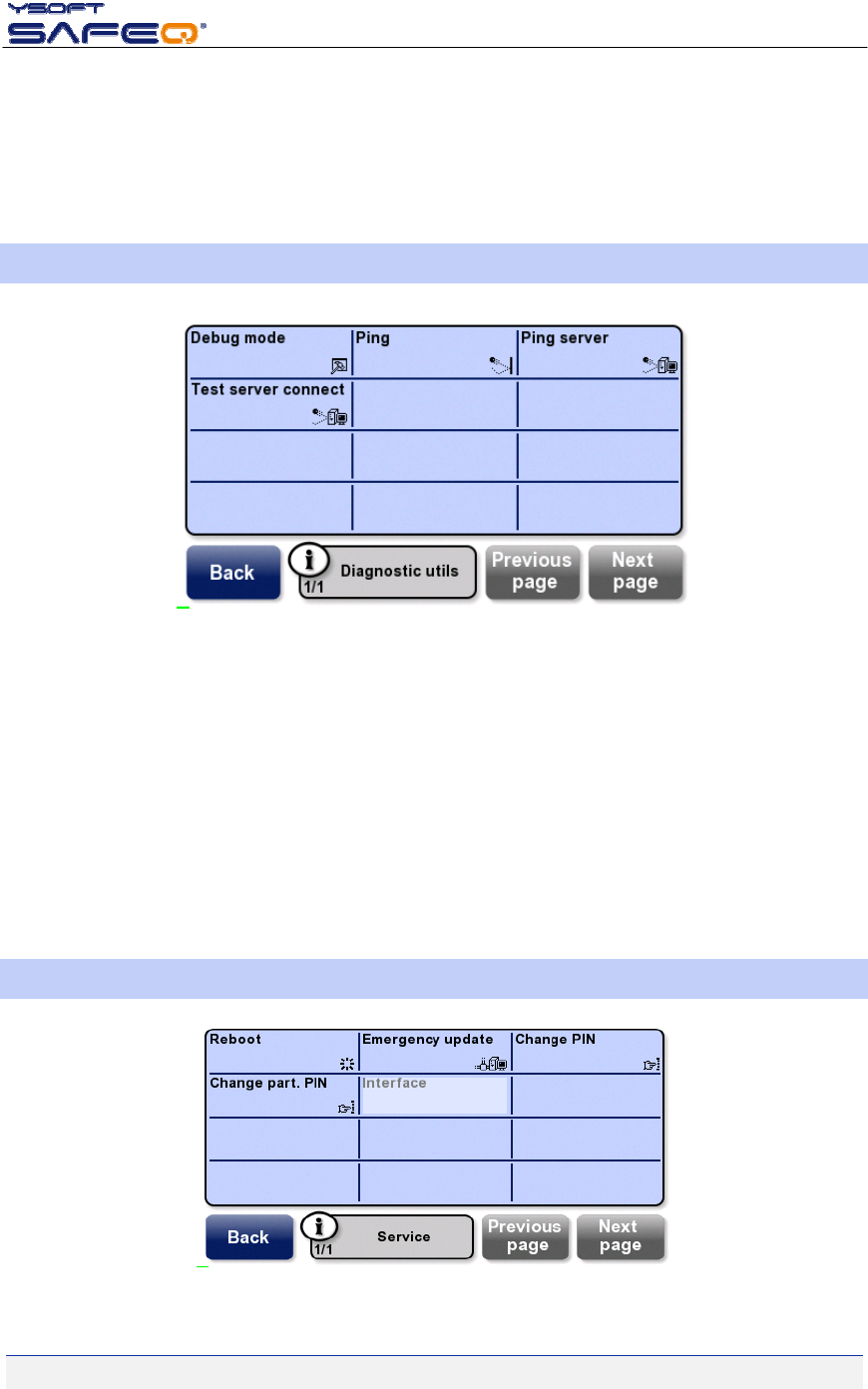
4.10DIAGNOSTICUTILS
Picture10‐Diagnosticutils
Debugmode‐enablesthedebugmodefortheterminal(Nologbydefault).
Nolog–doesnotloganyinformation
Logerrors–thisoptionrecordsonlyerrormessagesinthelog
Logallmessages–thisoptionrecordsallmessagesinthelog
Ping–testconnectionwithpingcommand
Pingserver‐testconnectiontotheIPaddressofYSoftSafeQserver
Testserverconnect‐testconnectionbetweenterminalandYSoftSafeQserver
4.11SERVICE
Picture11‐Service

23.11.2009
YSOFTSAFEQTERMINALPROFESSIONALV3.5–ADMINISTRATOR’SGUIDEV1.3[EN]16/19
Reboot–reboottheterminal
Emergencyupdate–runanemergencyfirmwareupdatefromYSoftSafeQserver
ChangePIN–changeservicemenuaccessPINcode(“customerlevel”PIN)
Changepart.PIN–changeservicemenuaccessPINcode(“partnerslevel”PIN)

23.11.2009
YSOFTSAFEQTERMINALPROFESSIONALV3.5–ADMINISTRATOR’SGUIDEV1.3[EN]17/19
5CONCLUSION
InthisdocumentyougotacquaintedwiththeinstallationproceduresofYSoftSafeQTerminalProfessional
v3.5.ForotherinformationaboutsettingupofterminalonSafeQserverconsultSafeQ‐AdministratorsGuide,
whichyoucandownloadalongwithothernewestmanualsonthePartner’sPortal.
Partner‘sPortalwebpage:http://www.ysoft.com/partner‐network/log‐on‐to‐partner‐portal/
23.11.2009
YSOFTSAFEQTERMINALPROFESSIONALV3.5–ADMINISTRATOR’SGUIDEV1.3[EN]18/19
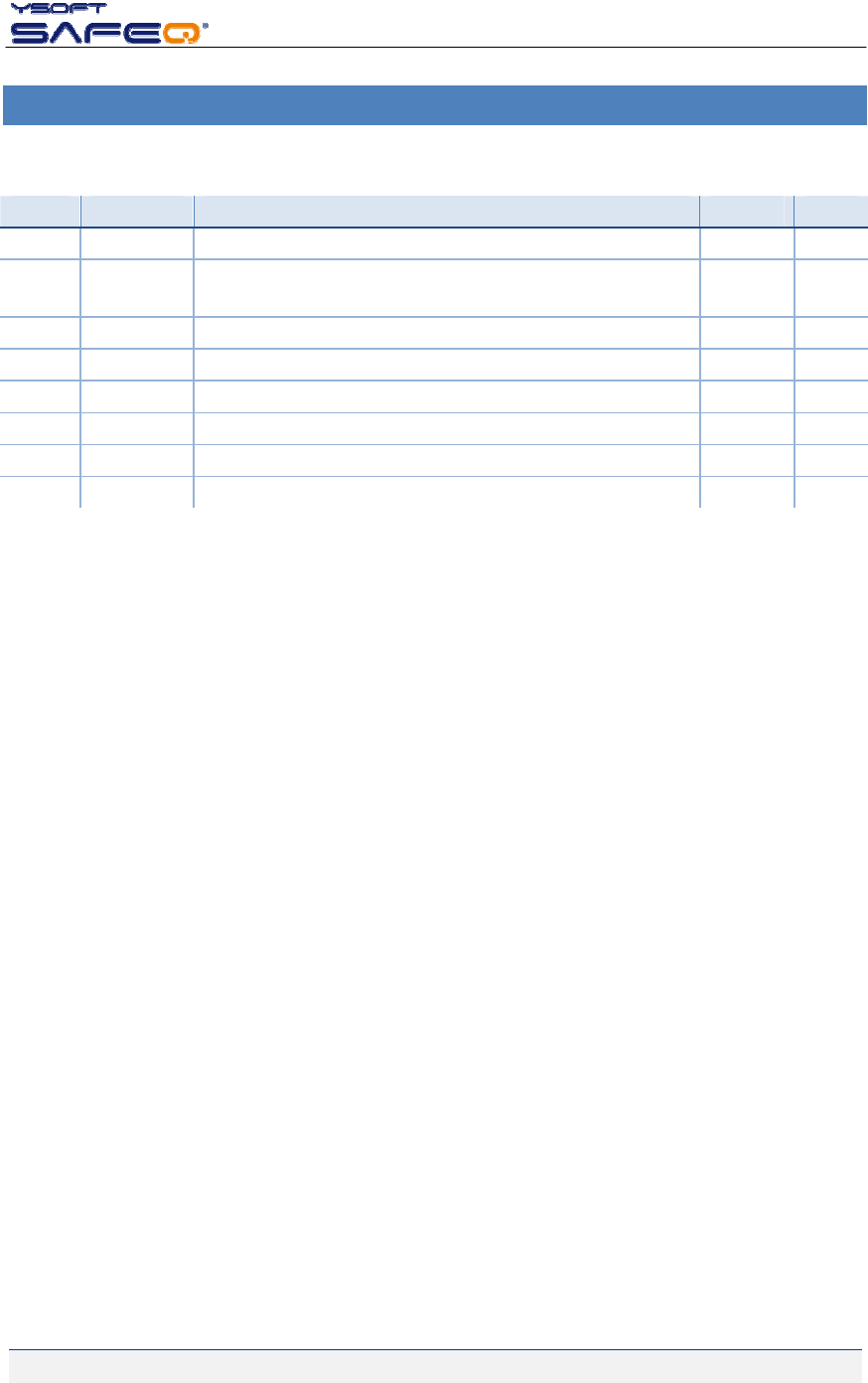
6RELATIONSHIPWITHOTHERDOCUMENTS
Thissectiondescribeshowthisguideisrelatedtootherdocumentation:
Nr.DocumentVersionAuthor
1. YSoftSafeQTerminalProfessionalv3.5–ServiceGuide[EN] 1.1RMU
2. YSoftSafeQTerminalProfessionalv3.5–User’sGuide[EN] 1.3RMU
3.
4.
5.
6.
7.
23.11.2009
YSOFTSAFEQTERMINALPROFESSIONALV3.5–ADMINISTRATOR’SGUIDEV1.3[EN]19/19
7VERSIONHISTORY
Documentauthor/owner:YSofts.r.o.
VersionDateChangeStatusAuthor
0.106/2009InitialversionAcceptedRMU
1.006/2009Creation2separatesdocuments–ServiceGuideandAdminis‐
trator’sGuide
FinalPNE
1.109/2009Chapter1update(disclaimeradded)FinalPNE
1.209/2009Chapter4.7update(newmenuoptionsdescription)AcceptedRMU
1.311/2009Chapter1andChapter4.7updateFinalPNE