Y Soft a s 0YX0X033000 HID iClass Reader User Manual 2
Y Soft Corporation, a.s. HID iClass Reader 2
Contents
- 1. User Manual 1
- 2. User manual 2
- 3. User Manual 3
- 4. User Manual 4
User manual 2

makingtheMFDsthink™
YSoftSafeQTerminalProfessional
v3.5
User’sGuide
Version1.3

4.9.2009
YSOFTSAFEQTERMINALPROFESSIONALV3.5‐USER’SGUIDE(COLORDISPLAY)V1.3[EN]2/14
©2009byYSofts.r.o.
Allrightstothisdocument,domesticandinternational,arereservedbyYSofts.r.o..Nopartofthispublication
maybereproduced,storedinaretrievalsystem,ortransmittedinanyformorbyanymeans(electronic,me‐
chanical,photocopying,recording,orotherwise)withoutpriorwrittenpermissionofYSoft.
YSoft®,YSoftSafeQ®anditslogoareregisteredtrademarksofYSofts.r.o.
Allotherbrandsandtheirproductsaretrademarksorregisteredtrademarksoftheirrespectiveholders,and
shouldbenotedassuch.

4.9.2009
YSOFTSAFEQTERMINALPROFESSIONALV3.5‐USER’SGUIDE(COLORDISPLAY)V1.3[EN]3/14
TABLEOFCONTENTS
TableofContents .................................................................................................................................................3
1Annotation ................................................................................................................................................4
2Overview ...................................................................................................................................................5
3YSoftSafeQTerminalusage.......................................................................................................................6
3.1Userauthorization ....................................................................................................................6
3.2Mainmenu ...............................................................................................................................7
3.3Print ..........................................................................................................................................8
3.4Copy/scansession ...................................................................................................................8
3.5Joblist.......................................................................................................................................9
3.5.1Joblistsmanagement ..................................................................................................10
4Conclusion...............................................................................................................................................12
5Relationshipwithotherdocuments.........................................................................................................13
6Versionhistory ........................................................................................................................................14

4.9.2009
YSOFTSAFEQTERMINALPROFESSIONALV3.5‐USER’SGUIDE(COLORDISPLAY)V1.3[EN]4/14
1ANNOTATION
ThisguideprovidestheessentialinformationonusageoftheYSoftSafeQTerminalProfessionalv3.5(withcolor
display)fromtheuserpointofview.
Theproducerdoesnotbearanyresponsibilityfortheuseofanyfunctionsnotspecifiedhereunlesscoveredby
aseparatedocument.
Theproducerrejectsanyandallresponsibilityfortheconsequencesofimproper,negligentorincorrect
installationorsettingsofoptionaloperationalsystemparameters.
Informationtouser:
Theuserthatmakeschangesormodificationsnotexpresslyapprovedbythepartyresponsibleforcompliance
(YSofts.r.o.)couldvoidtheuser’sauthoritytooperatetheequipment.

4.9.2009
YSOFTSAFEQTERMINALPROFESSIONALV3.5‐USER’SGUIDE(COLORDISPLAY)V1.3[EN]5/14
2OVERVIEW
TheYSoftSafeQTerminalProfessionalv3.5hasacolorgraphictouchscreenandisequippedwithafour‐port
networkadapter.
Italsofeaturesamicrocomputer,flashROM,networkinterfaceandacardreader.Thecardreaderisoptional,
asPINcodescanbeusedforauthenticationinsteadofcards.
Terminalispoweredbyexternalpowersupplythatisalsoincludedininstallationpackage.
4.9.2009
YSOFTSAFEQTERMINALPROFESSIONALV3.5‐USER’SGUIDE(COLORDISPLAY)V1.3[EN]6/14
3YSOFTSAFEQTERMINALUSAGE
3.1USERAUTHORIZATION
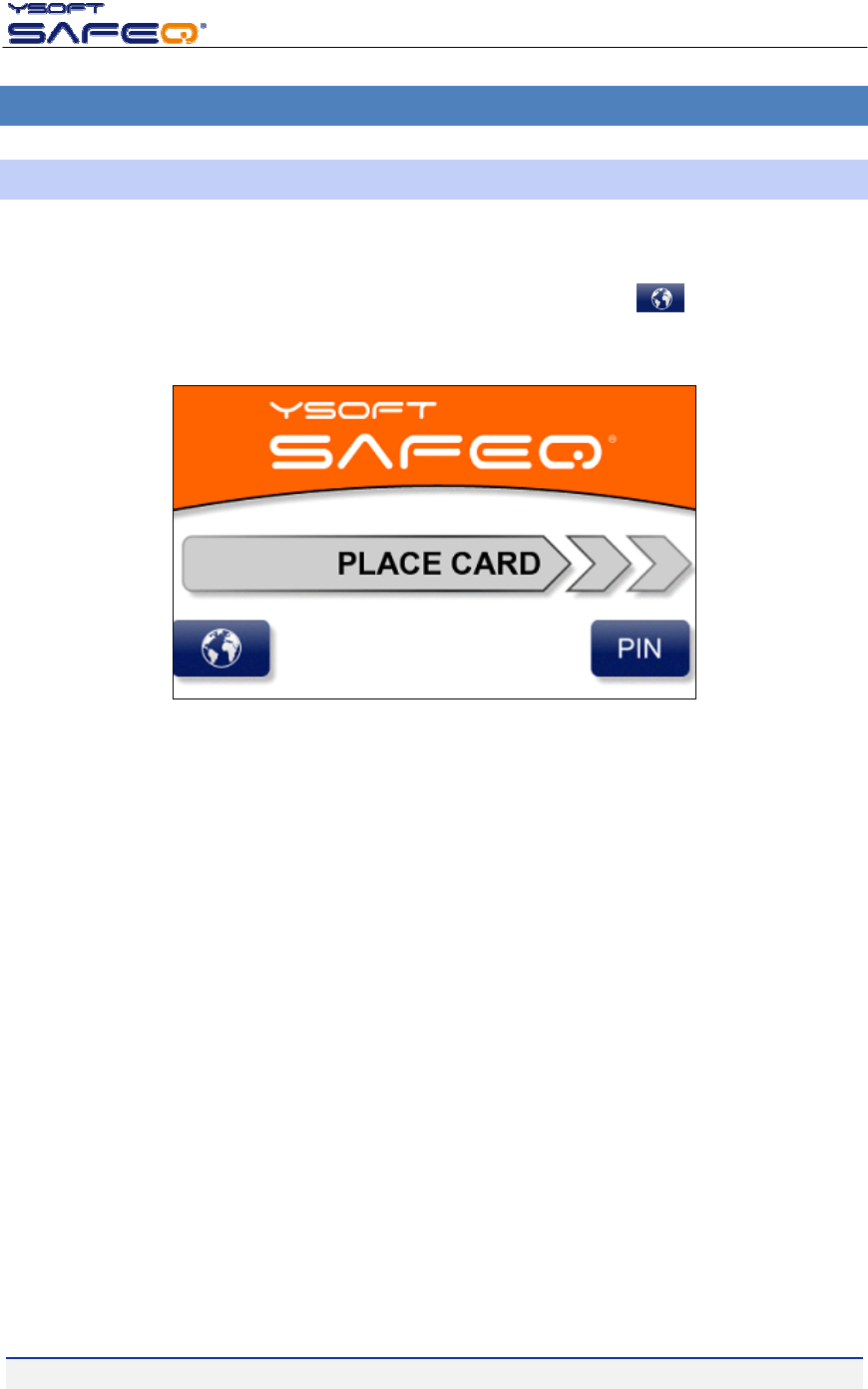
Priortoanyactiononterminaleveryuserhastoauthorize.ProceedwithPINorcardauthorizationonLogin
screen(seePicture1).Tochangeaterminallanguageotherthandefault,pressbuttonandlistofavailable
languagewillappear.
Picture1‐Loginscreen
Therearefourvalidationmethodsthatmaybesetupinterminalbyadministrator.Authorizationcanbemade
byonlycard,byfillinginPINcodeorcombinationsofthesetwooptions–PINorCard(usercanchoose),PIN
andCard(usermustauthenticatewithcardandPIN).RefertotheterminalAdministratorsmanual,ifyouwant
tochangeterminalbehaviour.
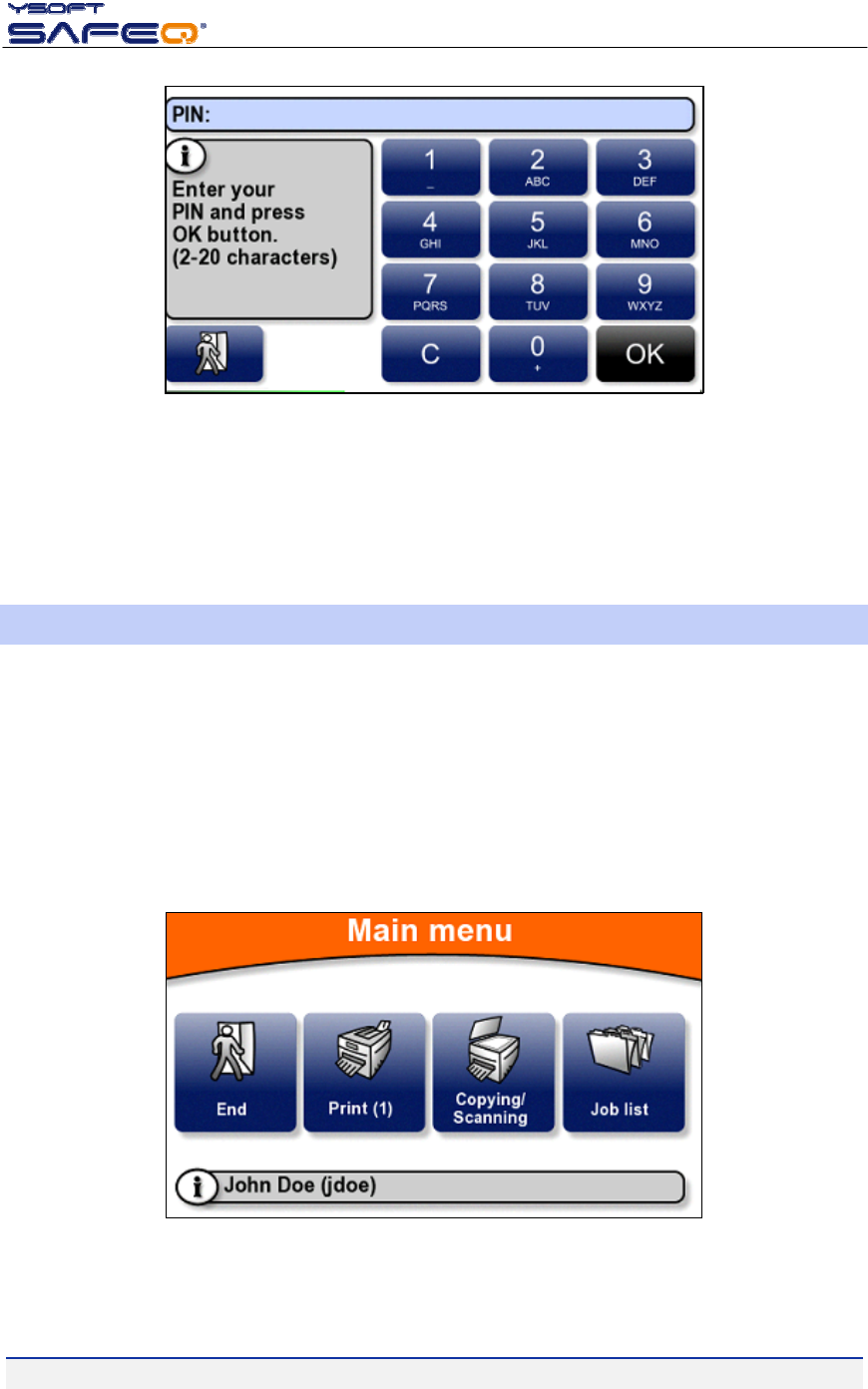
TologinwithPINcode,Press“PIN”buttonandyouwillseenewscreen(Picture2).
4.9.2009
YSOFTSAFEQTERMINALPROFESSIONALV3.5‐USER’SGUIDE(COLORDISPLAY)V1.3[EN]7/14
Picture2‐PINcodeidentification
FillinPINcodeandpress“OK”button.Ifauserissuccessfullyidentified“Mainmenu”willappearotherwise
errormessage“Cannotverifyuser”willbeshown.
Toauthorizebycard,simplyplaceyourcardontheleftsideofterminal(leftsidefromterminalscreen).
3.2MAINMENU
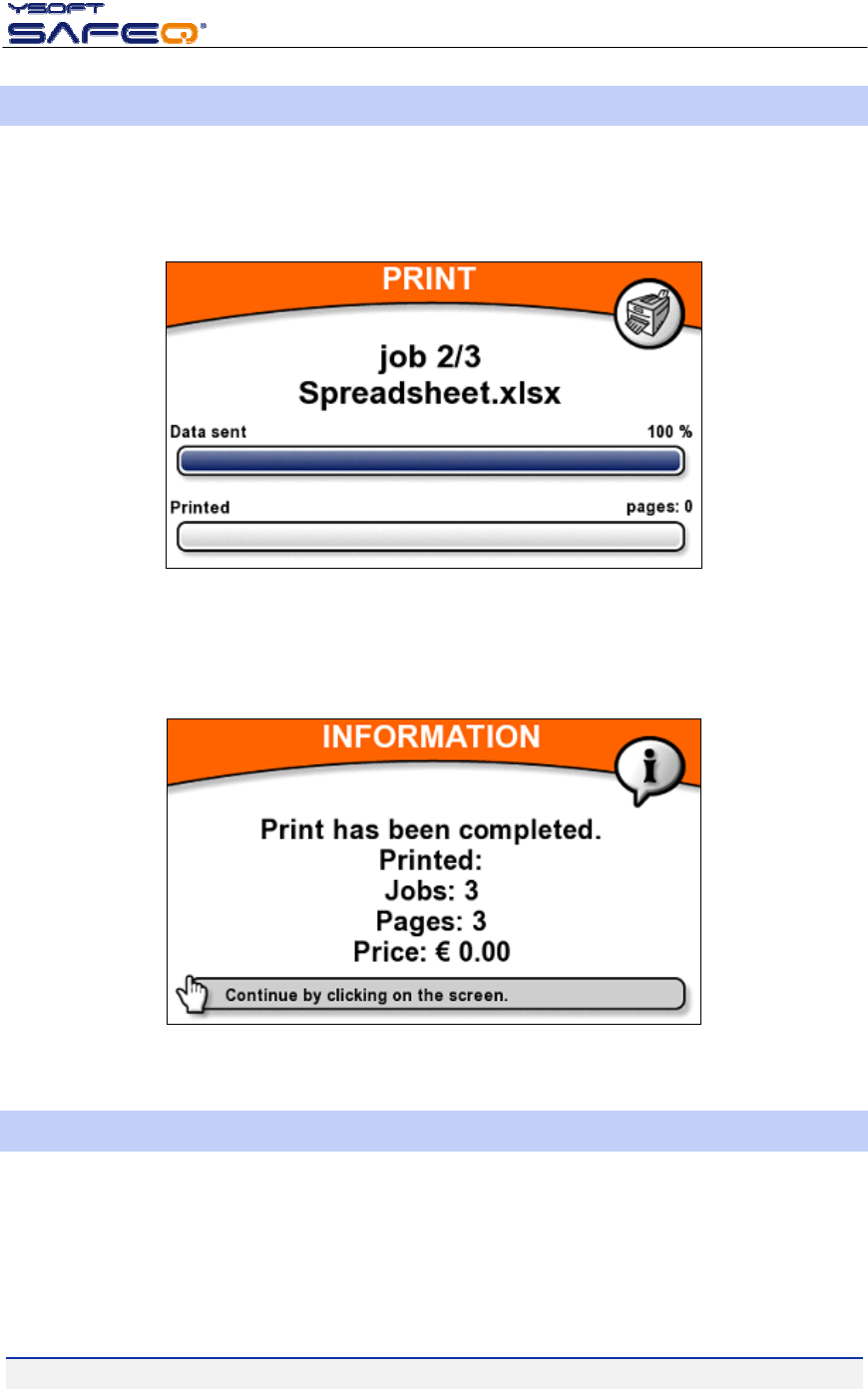
Inthe“Mainmenu”youcanseebasicinformationaboutloggeduser–name,loginorcreditavailable(ifcredit
systemisused).Choosefromthefollowingchoicesonterminalscreen(Picture3)toperformrequiredaction:
Print–printoutallyourjobsthatyouhavesenttoprint
Copying/Scanning–startcopysessionortoscandocuments
Joblist–manageyourprintjobs
Endbutton–logofftheuserfromterminalwillreturnto“Loginscreen”
Picture3‐Mainmenu
4.9.2009
YSOFTSAFEQTERMINALPROFESSIONALV3.5‐USER’SGUIDE(COLORDISPLAY)V1.3[EN]8/14
3.3PRINT
NumberofwaitingjobsisindicatedontheMainmenu“Print”button(seePicture3withonewaitingjob).
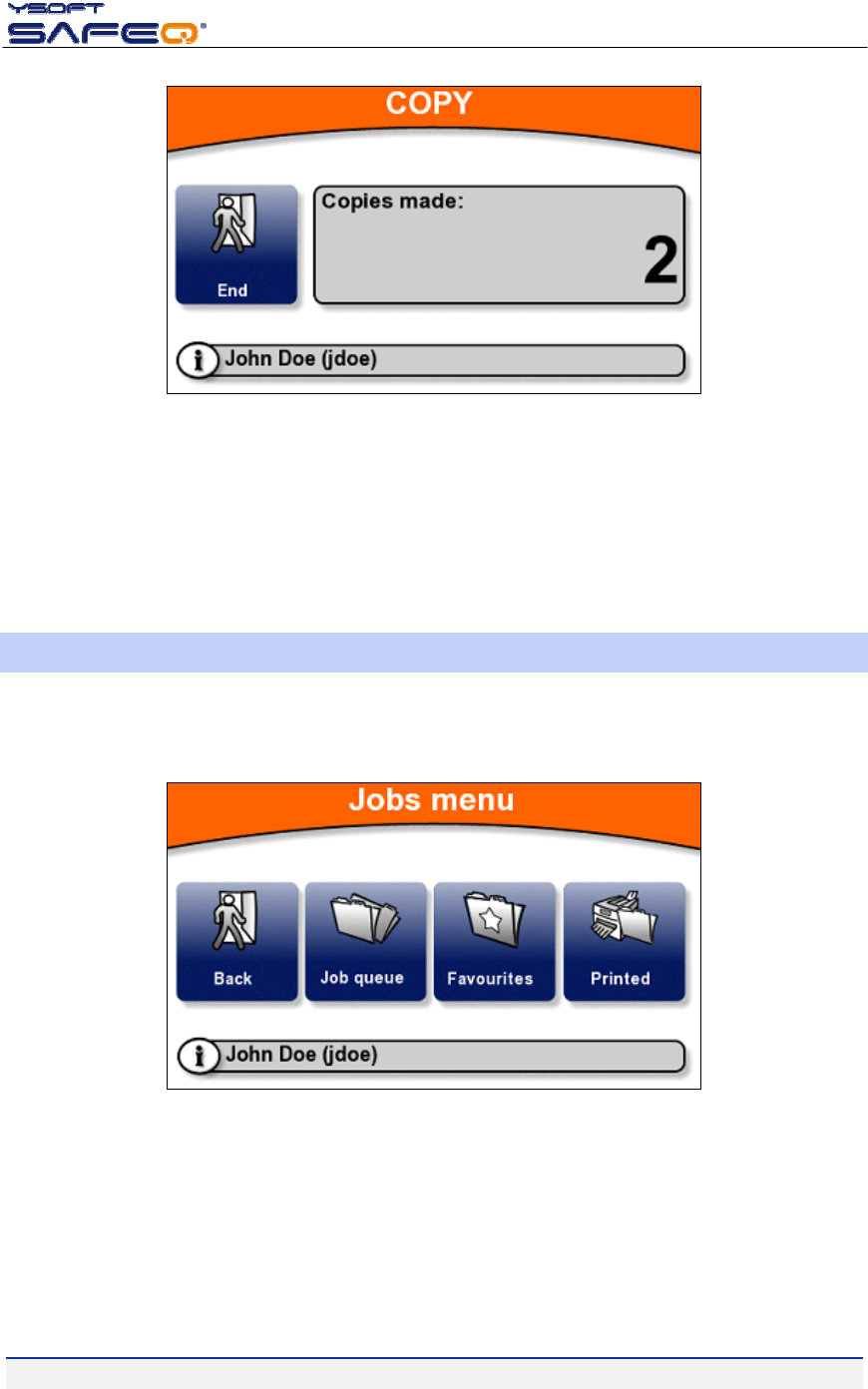
Whenyoupress“Print”icon,newscreenwillappear(Picture4).Allyourwaitingprintjobswillbesenttothe
printer/MFD.Youcanseeprogressasprintjobsarebeingsenttothedeviceandprocessed.
Picture4‐Printprogressbar
Whenallyourdocumentsareprintedout,youwillseeinformationmessageaboutnumberofjobs,printed
pagesandprice(Picture5).Youwillbeautomaticallyloggedout.
Picture5‐Informationmessageaftertheprintfinished
3.4COPY/SCANSESSION
Press“Copying/Scanning”buttontounlockmachineandtostartthecopysession.
4.9.2009
YSOFTSAFEQTERMINALPROFESSIONALV3.5‐USER’SGUIDE(COLORDISPLAY)V1.3[EN]9/14
Picture6‐Copy/Scansessionscreen
The“Copying/Scanning”screencontainsinformationaboutloggeduserandavailablecredit(ifcreditsystemis
used).Theuseriscontinuouslyinformedaboutnumberofcopiesthathasbeenmade.
Tofinishsession,press“End”button.Informationmessagesimilartoprintsession(Picture5)willappearbe‐
foretheuserisloggedout.
3.5JOBLIST
Whenyoupress“Joblist”button,youwillentermenuforvariousjoblists.Choicemaybelimiteddependingon
thesettinginterminal.
Picture7‐Joblistsmenu
Jobqueue–printordeleteallyourjobssenttoprintthathasnotbeenprintedyet.
Favourites–printordeletealljobsthathasbeenmarkedasfavouriteonSafeQwebinterface.
Printed–containsalljobsthathasbeenalreadyprinted.Maximumstoragetimeisdefinedby
AdministratorinSafeQserversettings(RefertoAdministrator’sGuide).Deleteorreprinttheseprintjob.
4.9.2009
YSOFTSAFEQTERMINALPROFESSIONALV3.5‐USER’SGUIDE(COLORDISPLAY)V1.3[EN]10/14
3.5.1JOBLISTSMANAGEMENT
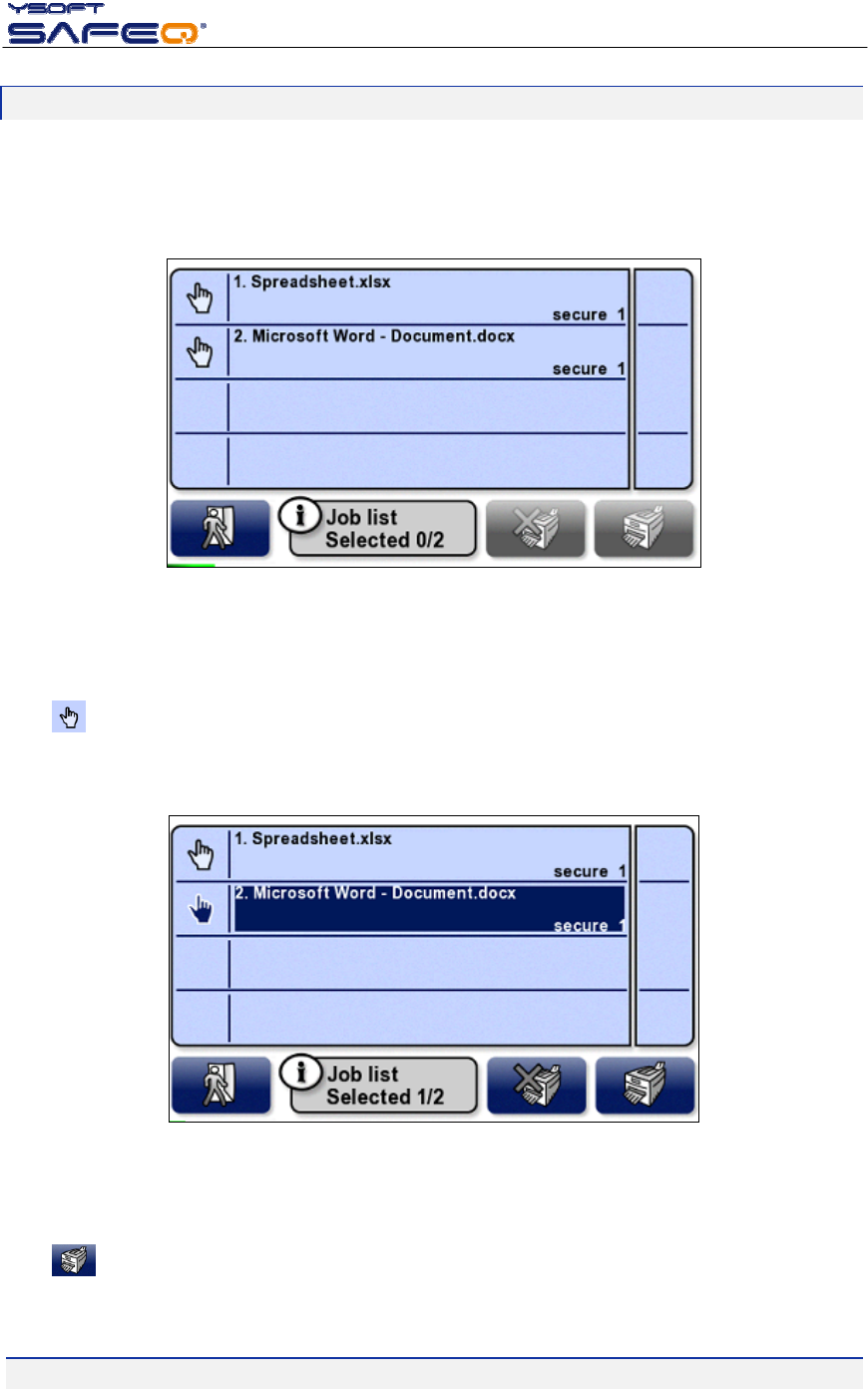
Managementofjoblistsissameforallofthreejoblists.Afteryoumakeselection,newscreenwithspecificlist
ofjobswillappear.Hereyoucanbrowseallprintjobsthatareavailable(Picture8).Foreachitemthereisa
name(usuallydocumentfilename)andthequeuename,whichisusedtodeliverprintjobtodevice.
Picture8‐Joblist
Selectjob(s)thatyouwanttomanagebypressingtouchscreen.Iftherearemorethanfourjobsinyourjoblist,
youwillbeabletonavigateinthelistwithscrollbarontherightsideofscreen.
Pressiconontherightsideofterminalscreentomassselectorunselectallprintjobsinthelist.
Totalnumberofselecteditemsisvisibleonthebottomofthescreen(Picture9).
Picture9‐Joblistwithselecteditem
Pressicontosendmarkeddocumentstoprinter.Terminalwillshowprogressbar(Picture4).Afterthe
printisdone,theuserisloggedout.

4.9.2009
YSOFTSAFEQTERMINALPROFESSIONALV3.5‐USER’SGUIDE(COLORDISPLAY)V1.3[EN]11/14
Pressicontodeleteallselectedjobs.
Toleavethescreen,press“Exit”icon .Youwillreturntothe“Joblist”menu.
Toexit“JobList”menupress“Back”button.

4.9.2009
YSOFTSAFEQTERMINALPROFESSIONALV3.5‐USER’SGUIDE(COLORDISPLAY)V1.3[EN]12/14
4CONCLUSION
InthisdocumentyougotacquaintedwiththebasicfunctionsofYSoftSafeQTerminalProfessionalv3.5.You
canfindmoreinformationaboutotherprocesses,configurationsandpossibilitiesintheAdministrator’sguide,
whichyoucandownloadalongwithothernewestmanualsonthePartner’sPortal.
Partner‘sPortalwebpage:http://partners.ysoft.com/

4.9.2009
YSOFTSAFEQTERMINALPROFESSIONALV3.5‐USER’SGUIDE(COLORDISPLAY)V1.3[EN]13/14
5RELATIONSHIPWITHOTHERDOCUMENTS
Thissectiondescribeshowthisguideisrelatedtootherdocumentation:
Nr.DocumentVersionAuthor
1. YSoftSafeQ3.5InstantEdition–AdministratorGuide[EN] 1.1TSO
2. YSoftSafeQTerminalProfessionalv3.5–Administrator’sGuide[EN] 1.1RMU
3.
4.
5.
6.
7.

4.9.2009
YSOFTSAFEQTERMINALPROFESSIONALV3.5‐USER’SGUIDE(COLORDISPLAY)V1.3[EN]14/14
6VERSIONHISTORY
Documentauthor/owner:YSofts.r.o.
VersionDateChangeStatusAuthor
0.1April/2009InitialversionDraftRMU
0.2April/2009MinorChangesAcceptedPNE
1.0April/2009UpdateafterreviewFinalPNE
1.1April/2009EnglishscreenshotsaddedFinalRMU
1.2August/2009TableofcontentsupdateFinalPNE
1.3September/2009Chapter1update(disclaimeradded)FinalPNE