Yale Electronics A990BL BLUETOOTH EARPHONE User Manual

Shenzhen Yale Electronics Co., Ltd. BLUETOOTH EARPHONE

User manual

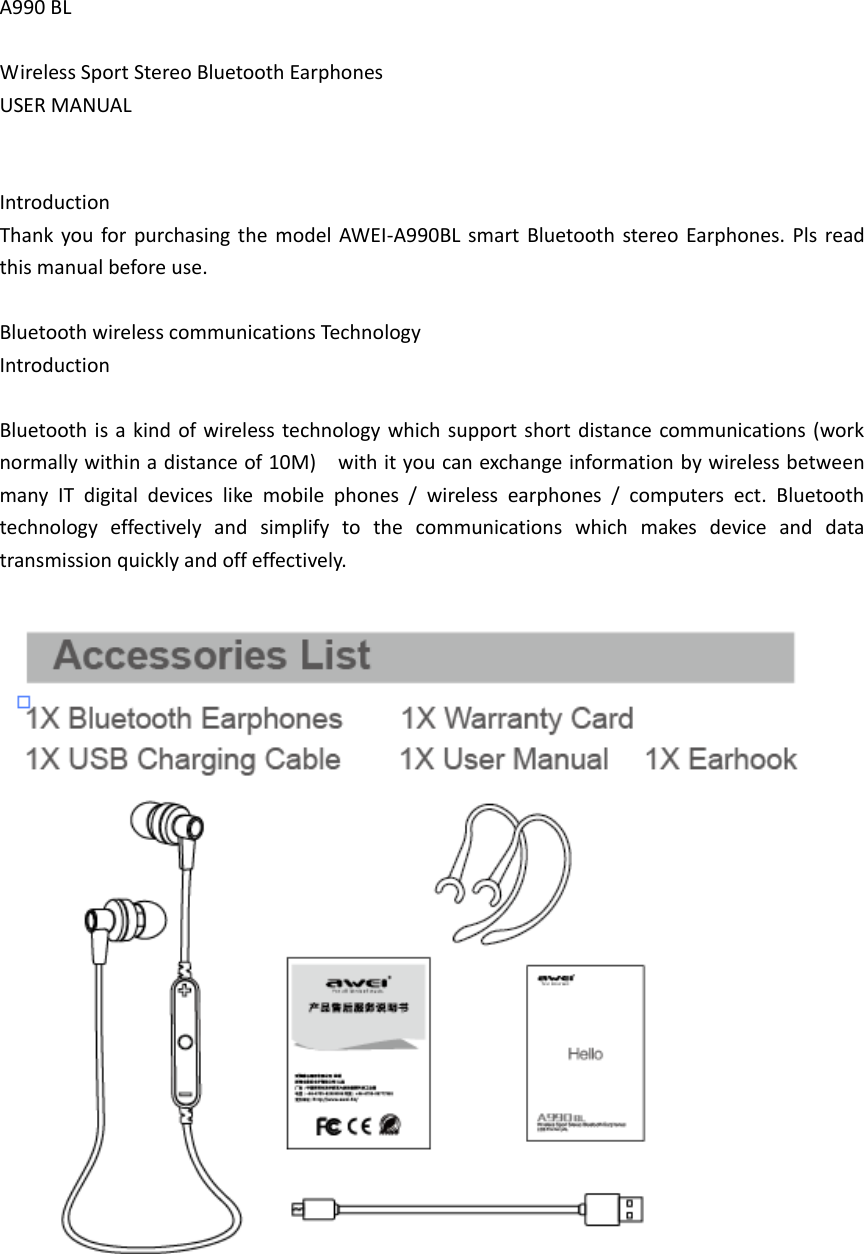
A990 BL  Wireless Sport Stereo Bluetooth Earphones USER MANUAL   Introduction Thank  you for purchasing the model AWEI-A990BL  smart  Bluetooth stereo Earphones. Pls  read this manual before use.  Bluetooth wireless communications Technology   Introduction  Bluetooth is  a kind  of wireless technology which support short  distance communications (work normally within a distance of 10M)    with it you can exchange information by wireless between many  IT  digital  devices  like  mobile  phones  /  wireless  earphones  /  computers  ect.  Bluetooth technology  effectively  and  simplify  to  the  communications  which  makes  device  and  data transmission quickly and off effectively.
  Function Introduction  The  latest  technology  of  CSR,and  backward  compatibility  V4.0,  V3.0,  V2.1,  V2.0,  V1.2,  V1.1. Internal  integrate  80MHz  RISC  MCU  and  80MIPS  Kalimba  DSP,  However  Bluetooth  3.0  the maximum support to 64MHz RISC MCU and 64MIPS Kalimba DSP. This product supports Profiles: ■  HFP v1.6 wideband speech (HD voice ready) ■  HSP v1.2 ■  A2DP v1.2 ■  AVRCP v1.4 ■  CVC Version 6.0  Effective distance: 10metres Work frequency: 2.402-2.480GHz
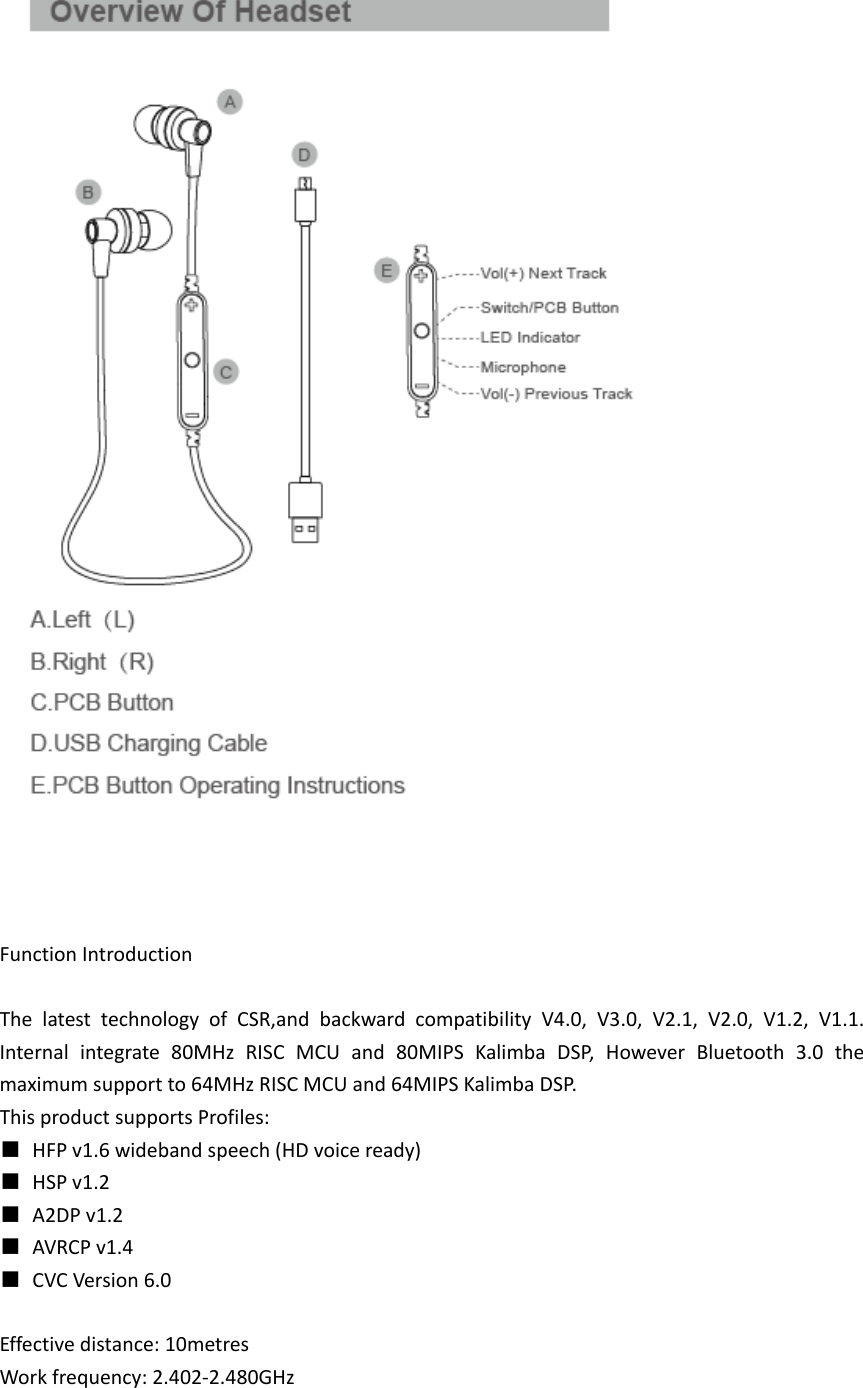
 Support multi-point connection (simultaneous   connection of two mobile phones)  Two mobile phones, one headset, a key to answer the call.  Support voice report number When phone call coming,  automatic report telephone numbers to avoid important telephones. E.g.: “1”“0”“0”“8”“6” phone call coming.  Support voice reminding function Real-time report to users the status of the Bluetooth earphone, handle skillfully. E.g.: “Bluetooth is turned on”, “Bluetooth is power off”.  iPhone: power consumption display function: Display Bluetooth headset power on iPhone                    , In order to consider whether need to charge the headset.    Take A Look  A. Calls and streaming audio  ◆  Take a call or end it (1 tap) ◆  Reject a call (2-second press) ◆  Hold first call and answer second call (1 tap) ◆  Switch between calls (2-second press) ◆  End second call and retrieve first call (1 tap) ◆  Transfer call from phone (1 tap) ◆  Redial (2 taps) ◆Use phone’s voice-control feature to make a call (2-second press unitil tone is heard) ◆  Reconnect lost Bluetooth® connection (1 tap if the earbuds can’t automatically reconnect) ◆  Play or pause audio (1 tap)  B. Micro USB charging port (right earbud) ◆  1 hour before first use (LED is red until fully charged) ◆  2.5 hours for full charge  C. Volume, tracking and mute ◆  Volume up or down (1 tap on + or - per level change) ◆  Track forward or back (3 second press on+ or- per track change)  D. Power, pawing and battery check
◆  Turn on or off (2-seconds press) ◆  Activate pairing mode after initial set up (press until red/blue LED flashes) ◆  Check battery level (1 tap when power is on)  Get Connected  1. Ready  First time, right out of the box: With earbuds turned off, activate Bluetooth pairing mode by pressing Power/Pairing button on. The LED flashes red/blue to indicate pairing mode. Pairing new phone/reconnecting original: With earbuds turned off,    Press Power/Pairing button until the LED flashes red/blue.  2. Set Activate the Bluetooth feature on your device, then use phone menus to “add,” search” or “scan” for new Bluetooth devices. Phones have different menus to select from: iPhone: Settings > Bluetooth > On (starts the search for devices) BlackBerry® smartphone: Settings/options >Bluetooth: On > Search for devices Android smartphone: Settings > Bluetooth: On > Scan for devices  3. Connect Select “AWEI-A990” from the list of Bluetooth devices shown on your device. If device asks for a passcode, enter four zeros (0000). You may see **** on screen. Some devices also ask to confirm connection after paring. The earbud’s LED will stop flashing red/blue once successfully paired/connected. You  can  now  make  a  call  using  your  device’s  keypad  or  voice-dialing  feature  and  enjoy  audio listening from your device.  Try It On  The right fit = the best audio:]  For the best sound performance and a secure, Comfortable fit, Be sure to adjust the earbuds to rest gently in your ear. And drape around the back of your neck, Use the provided fit kit to find the ear tip that works best for you.  Learn More  Stay near your device: Bluetooth has a working “range” of up to 33 feet between your phone and earbuds before audio degrades and the connection is lost. For best audio reception, keep your phone on the right side of your body.
Learn how to reconnect: Your earbuds try to reconnect a lost connection. If they can’t, then tap the Call button once or manually reconnect via your phone’s Bluetooth menu.  Decipher the beeps:  If you have a call on hold, you will hear a beep every 5 seconds, If you are on mute, you will hear a beep every 30 seconds. In addition, if you long-press certain buttons (more than 2-seconds press), a feedback beep will be heard (example, accessing the Voice control feature on your phone).  Juggle two calls:  You can take a second call and place the first call on hold by tapping the call button to accept the new call. Switch  between  calls  by  pressing  the  Call  button  for  a  few  seconds  and  you  will  hear  a  beep, indicating the switch is happening.  Learn More  You can end a call and return to the other call on hold by tapping the Call button. Some phones require tapping the Call button twice.  Use your voice: Some  smart  phones  allow  you  to  use  voice  commands  to  activate  their  features,  such  as voice-dialing or playing music. To  activate your  smart  phone’s  voice  controls,  press  the  Call/Audio  button  until  you  hear  your phone prompt you for a command.  Never miss a call: You will hear an incoming call alert while listening to stored or streaming audio. When you take the call, you stored audio (downloaded tunes, video or podcast ) will pause. If you are listening to live streaming  audio  (Internet radio) then  it will  mute, not  pause,  during your call. Once you end your call, your playback or streaming will resume.  Check the battery level: If you are on a call or listening to audio you will hear a tone when the battery is low. You can-check the battery level by tapping the Power button. The LED flashes to show the charge level. Blue flash=battery OK to full Red flash=less than 15 minutes call time remaining
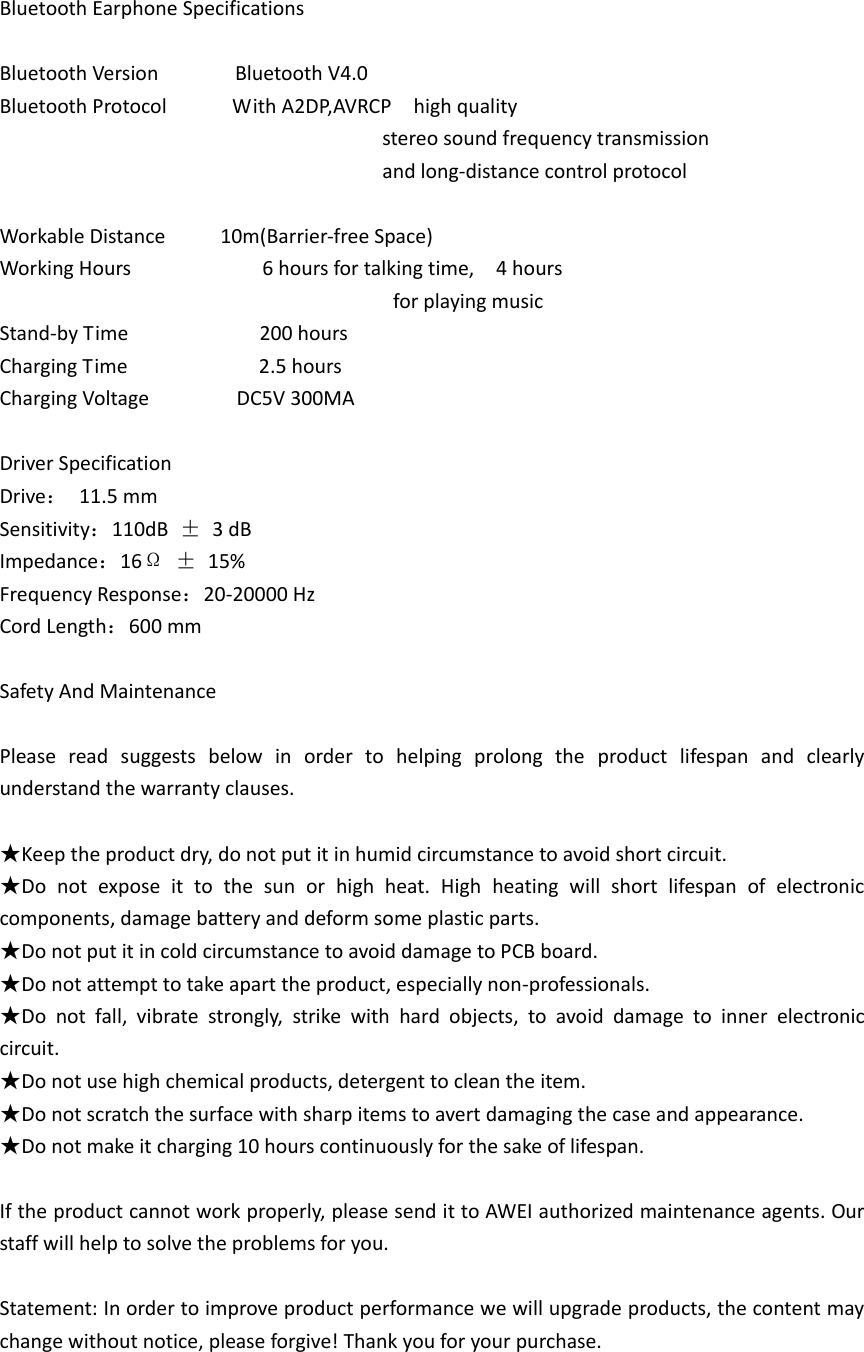
Bluetooth Earphone Specifications  Bluetooth Version              Bluetooth V4.0 Bluetooth Protocol            With A2DP,AVRCP    high quality                                                                         stereo sound frequency transmission                                                                           and long-distance control protocol    Workable Distance          10m(Barrier-free Space) Working Hours                        6 hours for talking time,    4 hours                                                                         for playing music Stand-by Time                        200 hours Charging Time                        2.5 hours Charging Voltage              DC5V 300MA  Driver Specification Drive:  11.5 mm                           Sensitivity:110dB  ±  3 dB Impedance:16Ω ±  15%                         Frequency Response:20-20000 Hz Cord Length:600 mm  Safety And Maintenance  Please  read  suggests  below  in  order  to  helping  prolong  the  product  lifespan  and  clearly understand the warranty clauses.  ★Keep the product dry, do not put it in humid circumstance to avoid short circuit. ★Do  not  expose  it  to  the  sun  or  high  heat.  High  heating  will  short  lifespan  of  electronic   components, damage battery and deform some plastic parts. ★Do not put it in cold circumstance to avoid damage to PCB board. ★Do not attempt to take apart the product, especially non-professionals. ★Do  not  fall,  vibrate  strongly,  strike  with  hard  objects,  to  avoid  damage  to  inner  electronic circuit. ★Do not use high chemical products, detergent to clean the item. ★Do not scratch the surface with sharp items to avert damaging the case and appearance. ★Do not make it charging 10 hours continuously for the sake of lifespan.  If the product cannot work properly, please send it to AWEI authorized maintenance agents. Our staff will help to solve the problems for you.  Statement: In order to improve product performance we will upgrade products, the content may change without notice, please forgive! Thank you for your purchase.
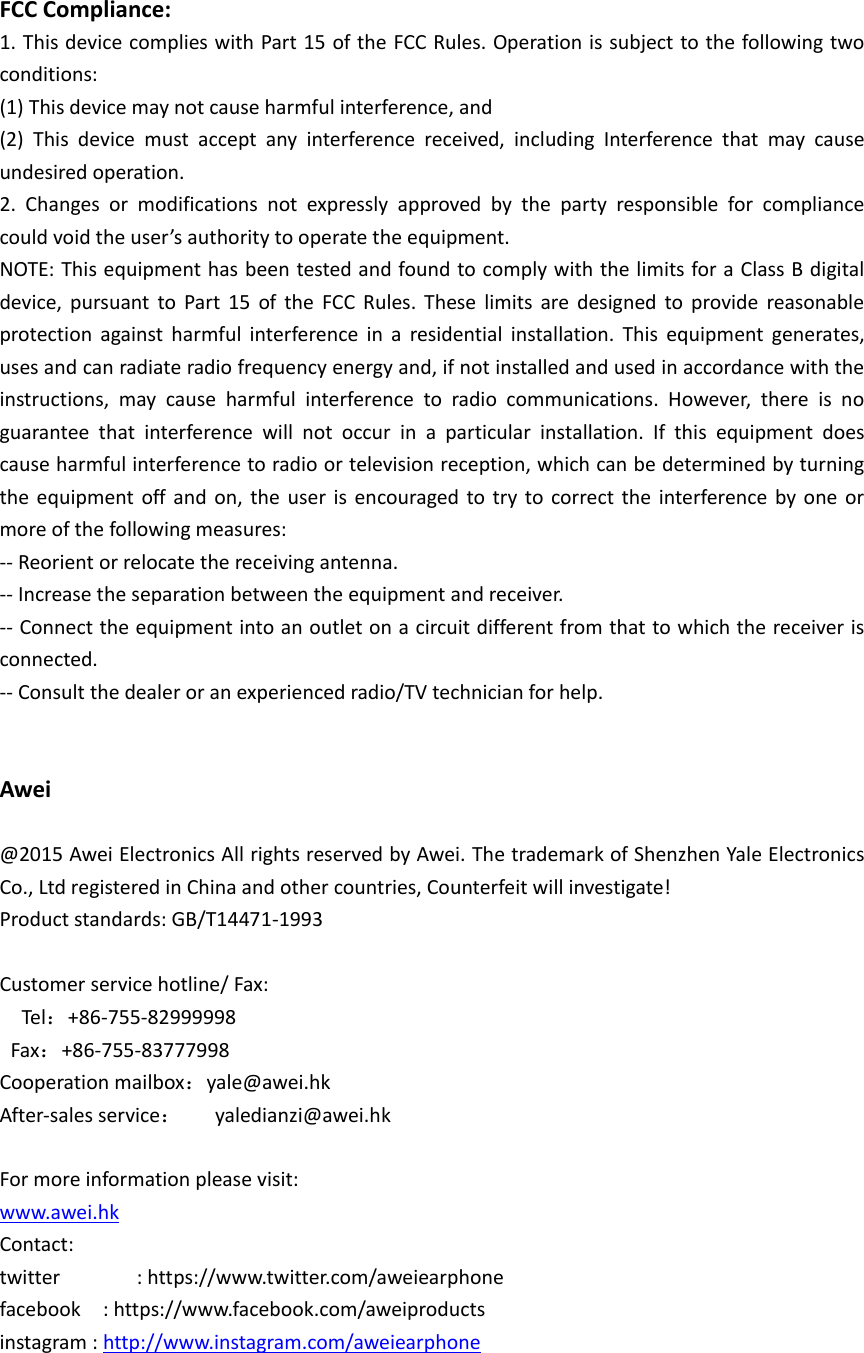
  FCC Compliance: 1. This device complies with Part 15 of the FCC Rules. Operation is subject to the following two conditions: (1) This device may not cause harmful interference, and (2)  This  device  must  accept  any  interference  received,  including  Interference  that  may  cause undesired operation. 2.  Changes  or  modifications  not  expressly  approved  by  the  party  responsible  for  compliance could void the user’s authority to operate the equipment. NOTE: This equipment has been tested and found to comply with the limits for a Class B digital device,  pursuant  to  Part  15  of  the  FCC  Rules.  These  limits  are  designed  to  provide  reasonable protection  against  harmful  interference  in  a  residential  installation.  This  equipment  generates, uses and can radiate radio frequency energy and, if not installed and used in accordance with the instructions,  may  cause  harmful  interference  to  radio  communications.  However,  there  is  no guarantee  that  interference  will  not  occur  in  a  particular  installation.  If  this  equipment  does cause harmful interference to radio or television reception, which can be determined by turning the  equipment off and  on,  the  user  is  encouraged to  try  to  correct the  interference  by  one  or more of the following measures: -- Reorient or relocate the receiving antenna. -- Increase the separation between the equipment and receiver. -- Connect the equipment into an outlet on a circuit different from that to which the receiver is connected. -- Consult the dealer or an experienced radio/TV technician for help.   Awei  @2015 Awei Electronics All rights reserved by Awei. The trademark of Shenzhen Yale Electronics Co., Ltd registered in China and other countries, Counterfeit will investigate! Product standards: GB/T14471-1993  Customer service hotline/ Fax:       Tel:+86-755-82999998   Fax:+86-755-83777998 Cooperation mailbox:yale@awei.hk After-sales service:   yaledianzi@awei.hk  For more information please visit: www.awei.hk Contact: twitter              : https://www.twitter.com/aweiearphone facebook    : https://www.facebook.com/aweiproducts instagram : http://www.instagram.com/aweiearphone

Navigation menu