Yamaha 7_DTX 3000 QCguide DTX Connection Diagram
If not then DTX-3000 Manual: ://www.generalmanual.com/pdf/yamaha/DTX-3000
User Manual: Yamaha DTX-3000 Connection Diagram
Open the PDF directly: View PDF  .
.
Page Count: 2
Quick-Connect Guide
DTX-3000
Home Theater in a Box
YHT
YHT
home theater
1 2
3
8
5
7
4
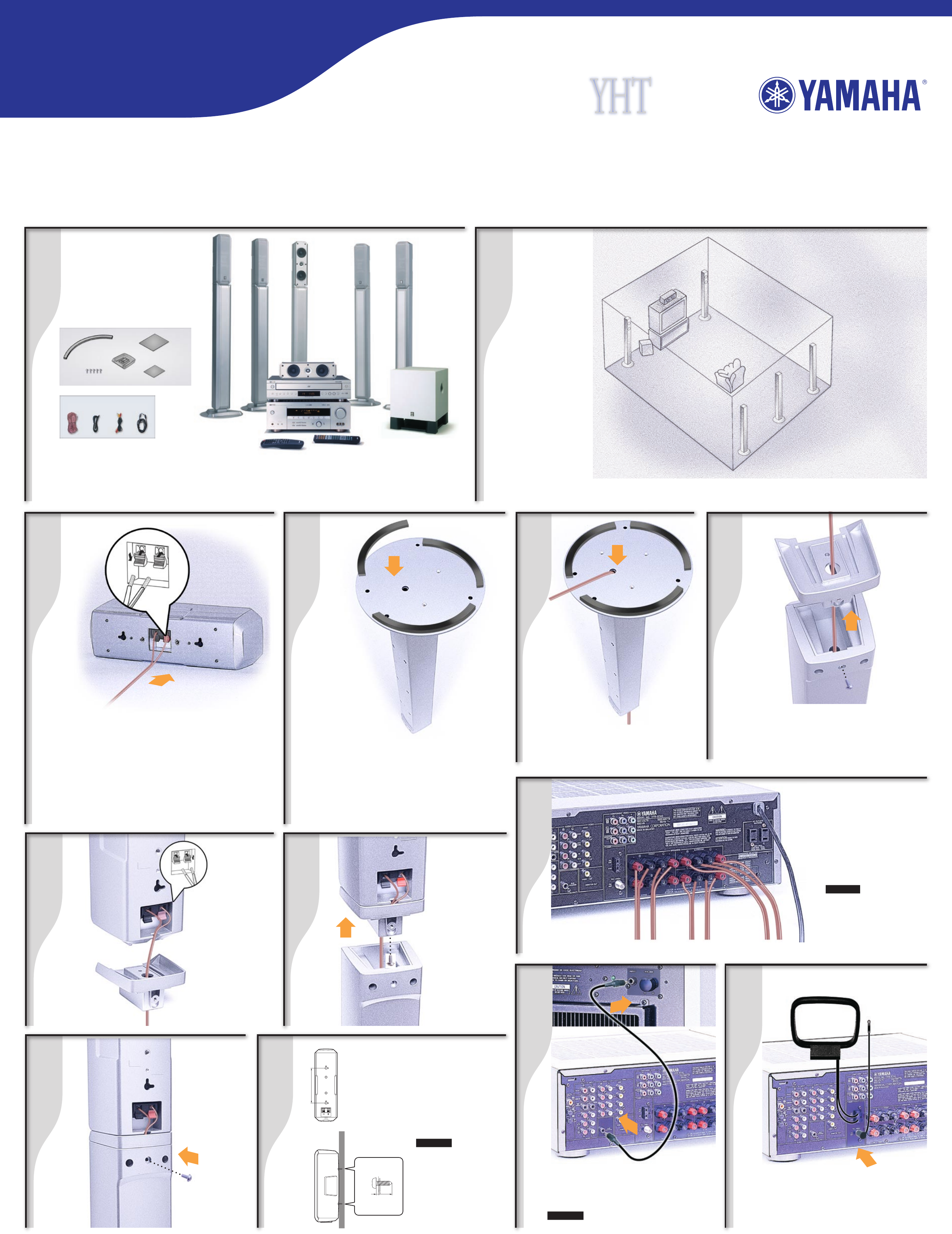
Inspect Contents After unpacking, inspect the contents to confirm you have the above items: two front
speakers, three surround speakers, one center speaker, powered subwoofer, HTR-5740 A/V Receiver with
remote control, DV-C6660 DVD Player with remote control, speaker wire, RCA cable, audio/video RCA cable,
optical cable, non-skid pads, screws, support bases, and fasteners. Also included, but not shown, are
AM and FM antennas and three related Owner’s Manuals.
Attach Bottom Pads Apply pads to bottom of
speaker stand as shown.
13
Connect Center
Speaker Wire
Your
System
Room
Layout
Speaker Placement After connection of the speakers place them so they appear in the
approximate positions as shown in the diagram above.
Yamaha created this package to greatly enhance your audio and home theater enjoyment. This Quick-Connect
Guide will help you get started. Follow the steps to connect the speakers first. Then connect your Receiver,
DVD Player and other components. Refer to your Owner’s Manuals as well as those that came with your other
components for complete instructions and precautions. Be sure that all components are not plugged in while
making connections. You will need the following which are not included in the package: Phillips screwdriver,
wire cutter/stripper. Brackets, toggle bolts, molly anchor screws or sheet metal screws are optional.
9
11
Thread Speaker Wire Pass the
speaker wire through the underside of
speaker stand.
Connect
Front and
Surround
Speaker
Wire Positive
(+) side of the
wire with white
stripe attaches
to (+) terminal.
Negative (-)
side attaches to
(-) terminal.
Subwoofer
Connection
Connect RCA Cable Connect RCA cable
to subwoofer . Set subwoofer VOLUME control
to half-way mark and POWER to OFF. Connect
RCA cable to receiver from subwoofer.
WARNING Components must not be plugged
in while connecting them.
Connect Antennas to Receiver Locate AM
loop antenna and indoor FM antenna. Keeping
receiver unplugged, connect as shown. For more
information about obtaining clear reception and
grounding, see your Owner’s Manual.
Antenna Connection
Indoor
FM Antenna
AM Loop Antenna
Front and Surround
Speaker Assembly
YST-SW030
Subwoofer
HTR-5740
Receiver
HTR-5740
Receiver
HTR-5740
Receiver
Receiver
Connections
FRONT
RIGHT LEFT
CENTER SURROUND BACK
Cut speaker wire to appropriate lengths for all speaker
connections. Connect speaker wire for center speaker . The
positive (+) side of the wire with the white stripe attaches to
the red terminal. The negative (-) side attaches to the black
terminal. (See your HTR-5740 Owner’s Manual for more
information on speaker wire connections.)
6
Turn Speaker Stand Right-Side-Up Remove
screw that holds adapter in, carefully set aside, then
remove adapter from speaker stand.
Thread Speaker Wire Make sure speaker wire
continues to pass through the adapter.
Attach
Adapter to
the Speaker
using the
supplied screw
.
Push Together
the speaker and
adapter into the
speaker stand.
Attach adapter to
the speaker stand
using the screw
that was set
aside in Step 6.
10
SURROUND
RIGHT LEFT
Connect Speakers
Positive (+) side of the wire
with white stripe attaches
to (+) terminal. Negative (-)
side attaches to (-) terminal.
CAUTION Receiver must
not be plugged in while
connecting speakers.
Mounting Speakers
to Wall (Optional)
Fasten mounting screws
into a firm wall or wall
support. Leave 7/32 in.
between head and wall.
Hang the keyholes on
the speaker backs on the
protruding screws.
WARNING Please contact
a reliable source about
the best type of hardware
for your particular wall’s
construction. Secure
installation is purchaser’s
responsibility. See your
owner’s manual for
additional precautions.
12
(5)
(5)
(5)
(2)
(15)
HTR-5740 Receiver
VCR
15
14 16
17 18 19
20
Enjoy the Yamaha Home Theater Experience
Be sure to put batteries in your remotes (see Owner’s Manuals for instructions).
Refer to your Owner’s Manuals for each component in your system for more information.
Now, relax and enjoy the unparalleled sound of your Yamaha Home Theater system.
YAMAHA ELECTRONICS CORPORATION, USA
6660 Orangethorpe Avenue
Buena Park, CA 90620
http://www.yamaha.com
Phone: 1-800-292-2982
©2004 Yamaha Electronics Corporation
Printed in USA
Part No. 3000QCG rev1
06/04
VCR Connection
DSS/Cable/
HDTV Tuner Box
Video Monitor
Video Game Console
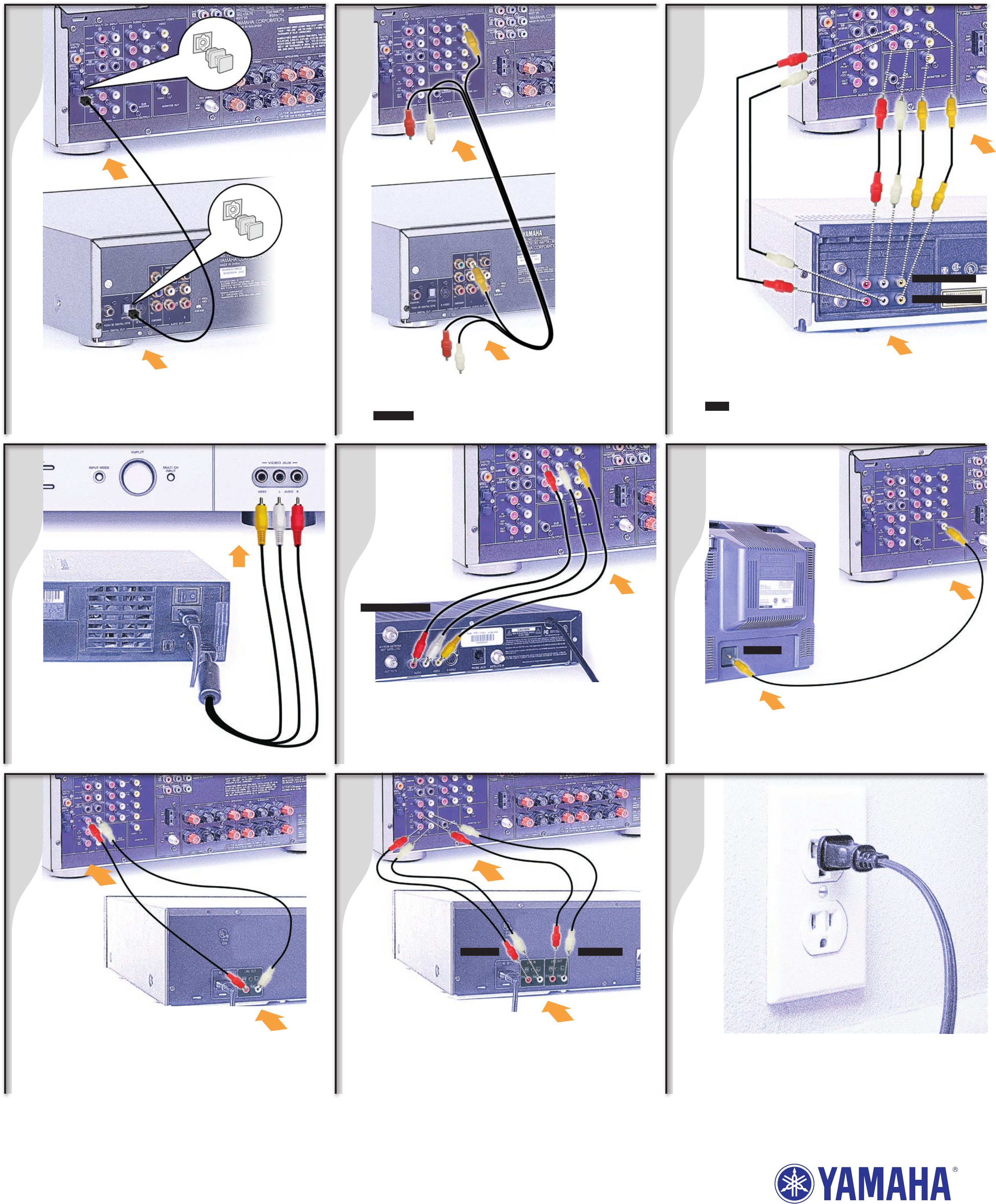
Connect VCR (optional) Connect audio/video cables (not included)
as shown.
NOTE VCR shown is for illustration purposes only. When using a hi-fi-
stereo VCR, set the Tuner/Line switch on the VCR to “Line” position to
record from another source connected to the HTR-5740 receiver.
DVD Player Optical Connection (optional) Remove dust
cap on optical input as shown on insets. Connect optical cable to
receiver. Connect optical cable to DVD player from receiver.
Connect DSS/Cable/HDTV Tuner Box (optional) Connect RCA
audio/video cables (not included) and optional optical cable (not pictured)
to “DTV/CBL” terminals on receiver to A/V OUT connections on Box as shown.
DSS/Cable/HDTV
Tuner Connection
21
Video Monitor Connection
Connect a Video Monitor (optional) Connect an RCA video cable
(not included) to receiver Monitor OUT from your video monitor as shown .
Bottom: Connect video
cable to DVD player
from receiver: Yellow to
“Video”, as shown, and
leave White and Red
unplugged.
Plug In Plug in the subwoofer, receiver, DVD player and other
components. Power on the receiver first, then the subwoofer, and the
others next. Adjust volume on the receiver. Please see each of your your
respective Owner’s Manuals for recommended guidelines and settings.
22
CD Player
Connection
Connect CD Player (optional) Connect RCA audio cables (not
included) to “CD” terminals on receiver as shown. If your CD Player
has digital output terminal, connect digital cable (not included)
to HTR-5740 Receiver Digital Input terminal. See page 17 of your
HTR-5740 Owner’s Manual for more information.
AUDIO/VIDEO IN
AUDIO/VIDEO OUT
HTR-5740 Receiver
DV-C6660 DVD Player
HTR-5740 Receiver
DV-C6660 DVD Player
HTR-5740 Receiver
HTR-5740 Receiver
HTR-5740 Receiver
HTR-5740 Receiver
HTR-5740 Receiver
Video Game
Console Connection
Connect Game Console or Video
Camera (optional) Connect RCA audio/video
cables (not included) as shown.
Audio/Video
OUT
MD/CD-R Recorder
CD Player
MD/CD-R
Player Connection
Connect MD/CD-R Recorder (optional) Connect RCA audio
cables (not included) to “MD/CD-R” terminals on receiver as shown.
WARNING Components must not be plugged in while connecting them.
Wait until all connections are made before plugging in your components.
AUDIO IN AUDIO OUT
Connect DVD
Player
Top: Connect RCA
audio/video cables
to receiver: Yellow to
“DVD,” as shown, and
leave White and Red
unplugged.
VIDEO IN
AUDIO/VIDEO OUT
DVD Player Connection
