Yamaha Remote Control Protocol Specifications MTX3, MTX5 D, XMV Series, EXi8, EXo8
MTX3, MTX5-D, XMV Series, EXi8, EXo8 Remote Control Protocol Specifications V1.0.3 MTX3_MTX5-D_RemoteCtrlProtocolSpecs_v103_en
2015-03-09
: Yamaha Remote-Control-Protocol-Specifications yamaha-remote-control-protocol-specifications-647266 yamaha pdf
Open the PDF directly: View PDF  .
.
Page Count: 80

MTX3, MTX5-D, XMV Series, EXi8, EXo8
Remote Control Protocol Specications
Version 1.0.3
Release May 23rd, 2014
This specication document applies to MTX3, MTX5-D, XMV, EXi8,
and EXo8 V1.20 and later.
MTX3/MTX5-D/XMV Series/EXi8/EXo8 Remote Control Protocol Specications V1.0.3 2
0. Revision History
Version Date Section Description
V1.0.0 Sep. 1, 2013 - Initial version
V1.0.1 Sep. 25, 2013 7Added note (*1) to XMV "InputSelect" parameter
7Added *2 to XMV "ATT" and "DigitalATT"
8 Separated Meter List of EXi8 and EXo8
V1.0.2 Jan.14, 2014 3.1 Added Heart beat command
3.1 Added explanation for escape character
3.2.4 Added note for "1-10) Time synchronization notication <Old format>"
3.2.4, 3.4.3 Added time set and get commands
3.2.4, 3.4.3 Added DST related commands
3.3.1 Added note for "2-1) Device run mode query"
3.3.3 Modied description text and added note for "2-9) Keepalive activation setting"
3.4.3 Added alert event log related commands
4 Fixed text "devstatus devmode" to "devstatus runmode" in communication start process explanation
4 Fixed communication start process ow diagram
6Added parameter value detail for MY4-AEC (table 12, 13, 14)
7Added parameter "MYInsert 16 Channel" to Parameter List
7Added MY4-AEC parameters to Parameter List
7Amend description for parameter "Power" in XMV Parameter List
8 Added MY4-AEC address to Meter List
V1.0.3 May 23, 2014 3.3.1, 4 Added clarication of [devstatus runmode] command, which is necessary to establish remote control
communication.
MTX3/MTX5-D/XMV Series/EXi8/EXo8 Remote Control Protocol Specications V1.0.3 3
1. Setup
1.1. Connection Procedure
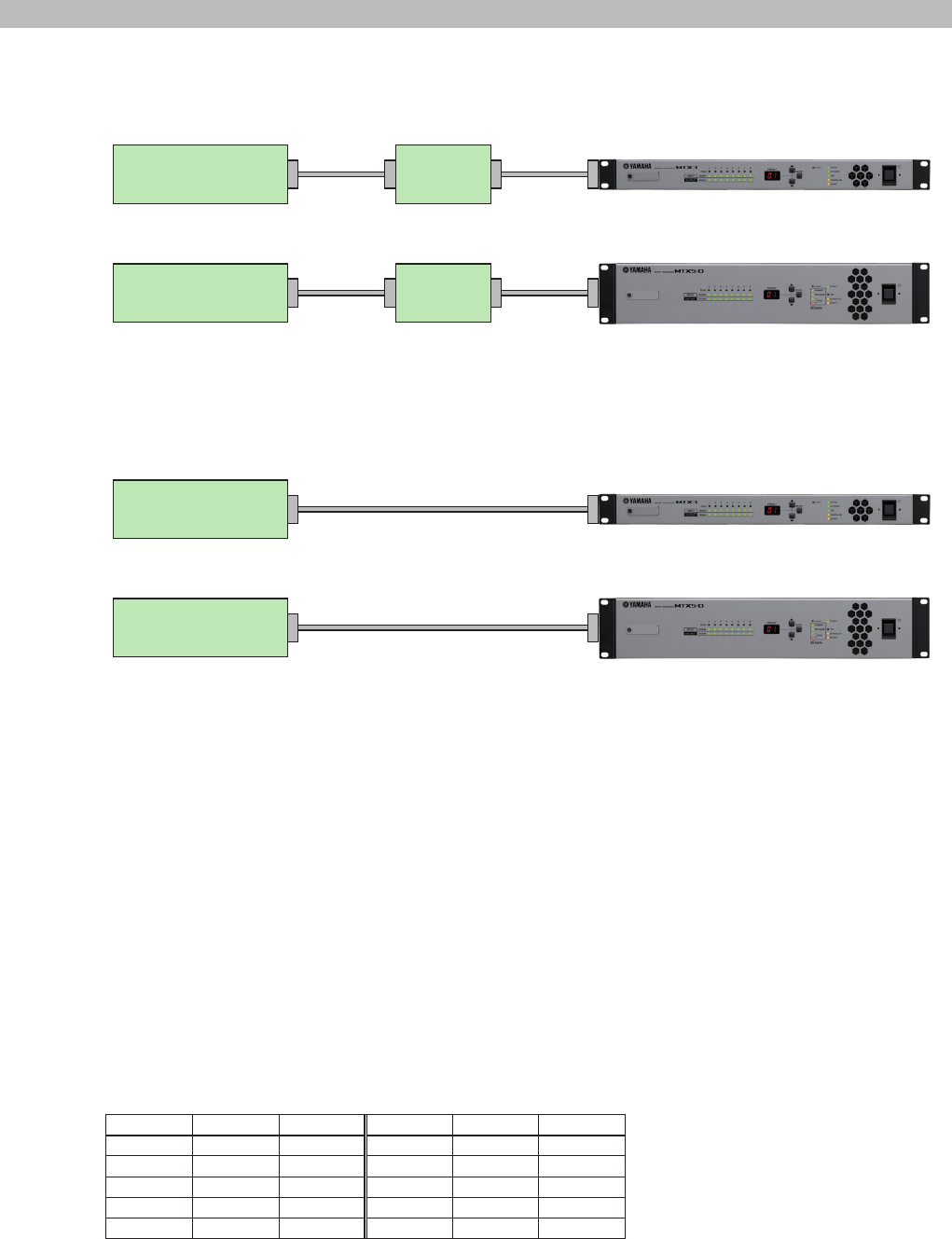
Connection when using the NETWORK connector to perform remote control using this protocol
MTX3
Remote Controller Network
Switch
Ethernet Ethernet
MTX5-D
Remote Controller Network
Switch
Ethernet Ethernet
* Also for XMV, EXi8 and EXo8.
XMV can be controlled with the protocol in this document without MTX3 or MTX5-D.
Connection when using the REMOTE connector to perform remote control using this protocol
MTX3
Remote Controller RS-232C (Crossover cable)
MTX5-D
Remote Controller RS-232C (Crossover cable)
* XMV, EXi8 and EXo8 do not have REMOTE connectors
1.2. Conguring the Remote Controller
MTX3 and MTX5-D can be controlled from an external controller through the Ethernet (NETWORK) connector and RS-232C
(REMOTE) connector.
XMV, EXi8 and EXo8 can be controlled from an external controller through the Ethernet (NETWORK) connector.
The conguration on the remote controller side for each type of connection is shown below.
Ethernet (NETWORK connector) control
IP Address: Specify the IP address of the device you want to control.
IP Port No.: 49280
RS-232C (REMOTE connector) control
Bit Rate: The specied bit rate.
Data: 8 bits
Parity: none
Stop bit: 1 bit
Flow Control : none
RS-232C port pin assignment
Pin Name In/Out Pin Name In/Out
1 NC - 6DSR In
2 RxD In 7RTS Out
3 TxD Out 8 CTS In
4 DTR Out 9 NC -
5 GND -
* Pin 4 and Pin 6 are connected internally.
* Pin 7 and Pin 8 are connected internally.
MTX3/MTX5-D/XMV Series/EXi8/EXo8 Remote Control Protocol Specications V1.0.3 4
1. Setup
1.3. Device Conguration
1.3.1. MTX3 and MTX5-D
MTX3 and MTX5-D can be controlled from an external controller through a NETWORK and RS-232C connector.
Two remote controllers can connect simultaneously via two available ports.
The rst controller is xed to using the NETWORK connector while the second controller can use the NETWORK or RS-232C
connector.
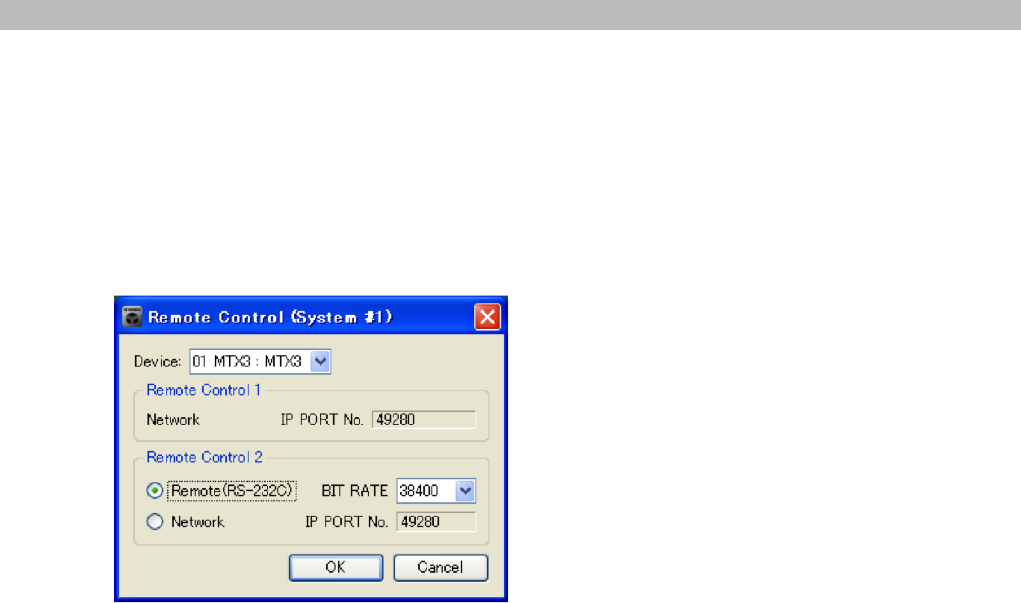
The procedure to congure the second control port of MTX3 and MTX5-D is shown below, this is found in MTX Editor - System
Menu- > Remote control.
(1)
(2) (3)
(1) Select an MTX within the MTX system.
(2) Select NETWORK connector or RS-232C for Remote Control 2.
(3) Select 38400 or 115200 (if RS-232C is selected).
After selecting all the parameters, click OK to complete the procedure.
* In the case of the MTX5-D NETWORK remote control connection, either network connector (Primary or Secondary) can be
used when DANTE Daisy Chain mode is selected.
If using DANTE Redundant mode, only the Primary network connection and/or RS-232C connection can be used for remote
control.
1.3.2. XMV, EXi8 and EXo8
XMV, EXi8 and EXo8 can be controlled via an external device through a NETWORK connector.
Two remote controllers can connect simultaneously via two available ports.
As remote control of XMV, EXi8 and EXo8 is performed via the NETWORK connector only, there is no requirement to congure
the port using MTX Editor.
When XMV, Exi8 and EXo8 are connected and controlled from MTX3 or MTX5-D, only one remote controller can be used, as
one port is required for system control from MTX3 or MTX5-D.
MTX3/MTX5-D/XMV Series/EXi8/EXo8 Remote Control Protocol Specications V1.0.3 5
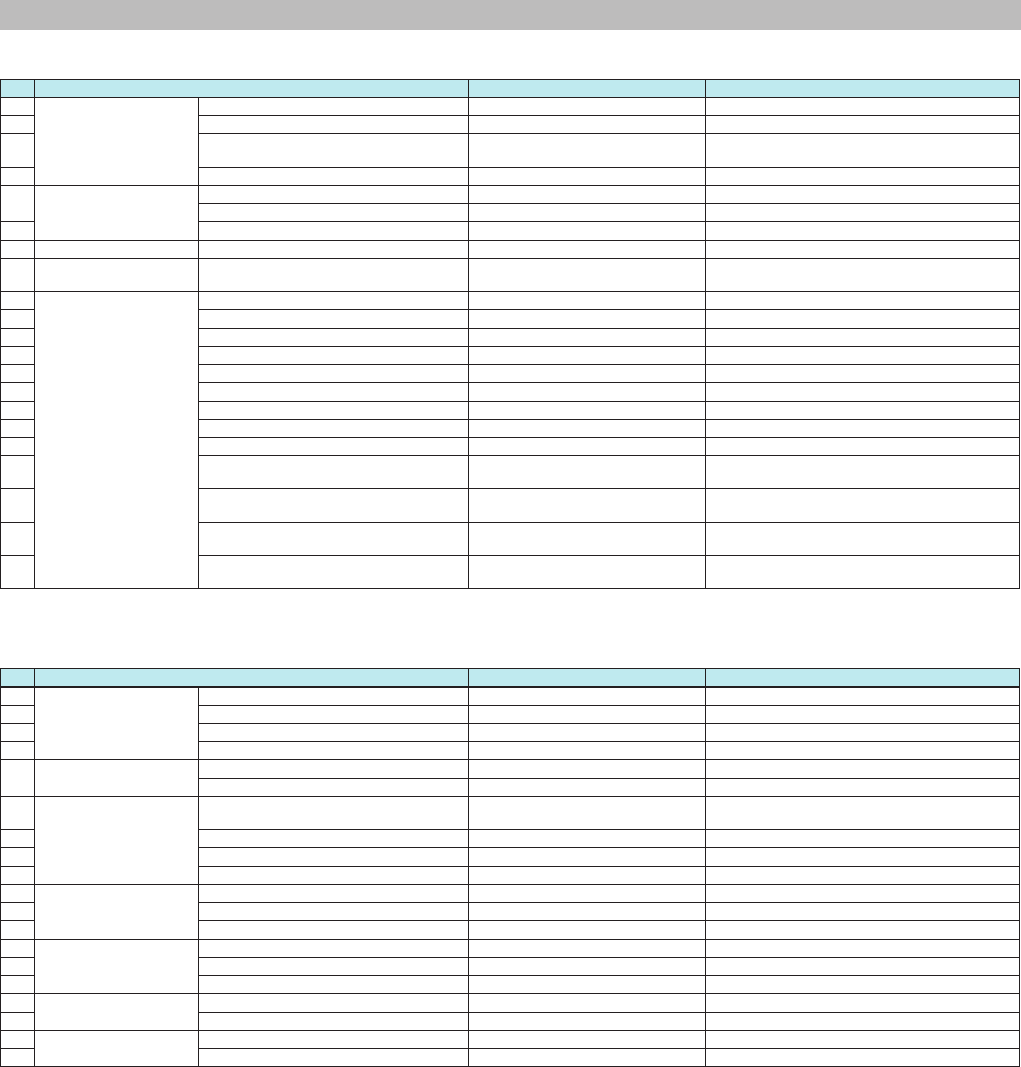
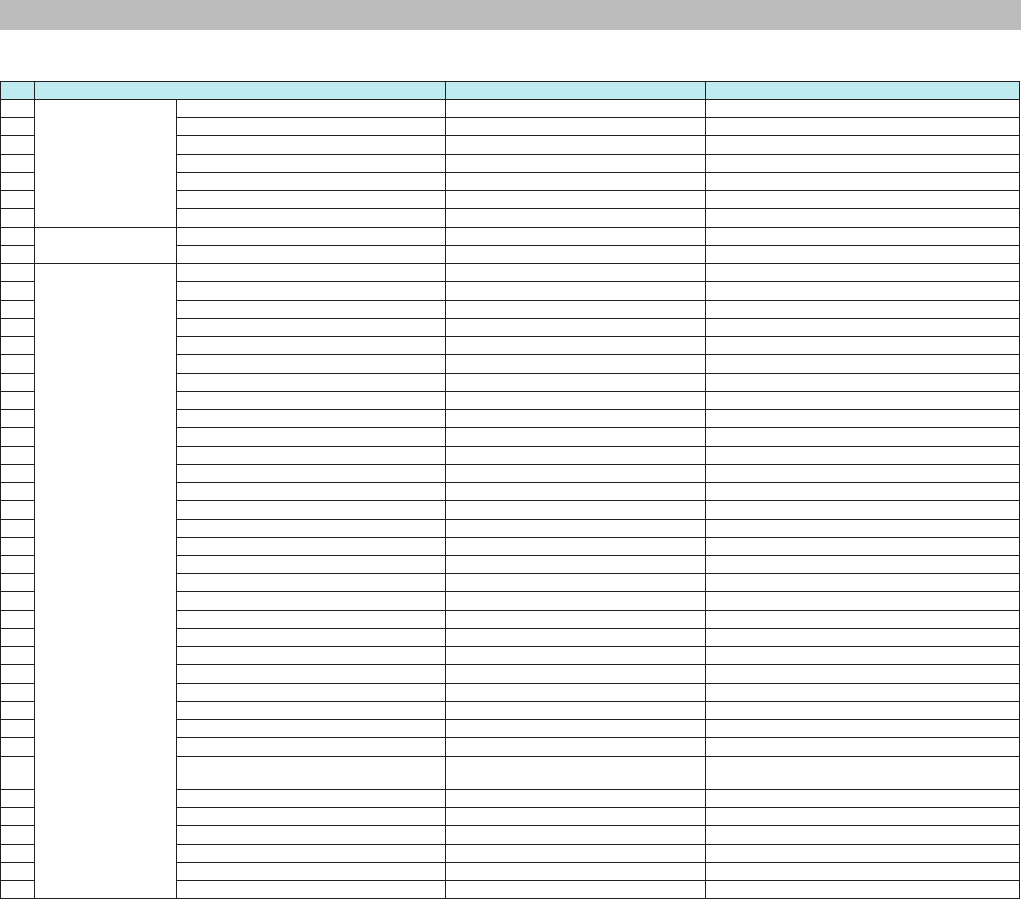
2. Command List
1. Commands from a device sent to a remote controller
No. Request details Reply from device Remarks
1-1 Device status change
notication
Device run mode notication NOTIFY devstatus runmode ... "emergency" is invalid on the XMV, EXi8 and EXo8.
1-2 Device error status notication NOTIFY devstatus error ...
1-3 Current Fs (sampling frequency) setting
notication
NOTIFY devstatus fs ...
1-4 Current word clock status notication NOTIFY devstatus lockstatus ...
1-5 Parameter change
notication
Parameter change notication raw value NOTIFY set ...
Parameter change notication normalized value NOTIFY setn ...
1-6 Scheduler on/off change notication NOTIFY set(setn) MTX:EvntScd_On ...
1-7 Meter change notication Meter information notication NOTIFY mtr ...
1-8 Current snapshot (preset)
number change notication
Current snapshot (preset) number change
notication
NOTIFY sscurrent ...
1-9 Event processing change
notication
Media insertion notication NOTIFY event MTX:Media ... This command is invalid on the XMV, EXi8 and EXo8.
1-10 Time synchronization notication <old format> NOTIFY event MTX:AbsoluteTime ... This command is invalid on the EXi8 and EXo8.
1-11 Time synchronization notication <new format> NOTIFY event MTX:SetAbsoluteTime… This command is invalid on the EXi8 and EXo8.
1-12 DST enable change notication NOTIFY event MTX:DSTSetEnable… This command is invalid on the XMV, EXi8 and EXo8.
1-13 DST offset time change notication NOTIFY event MTX:DSTSetOffset… This command is invalid on the XMV, EXi8 and EXo8.
1-14 DST start time change notication NOTIFY event MTX:DSTSetStartTime… This command is invalid on the XMV, EXi8 and EXo8.
1-15 DST end time change notication NOTIFY event MTX:DSTSetEndTime… This command is invalid on the XMV, EXi8 and EXo8.
1-16 DST start/end day change notication (day/week) NOTIFY event MTX:DSTSetDayWeek… This command is invalid on the XMV, EXi8 and EXo8.
1-17 DST start/end day change notication (day) NOTIFY event MTX:DSTSetDay… This command is invalid on the XMV, EXi8 and EXo8.
1-18 Song play mode notication NOTIFY event MTX:
AudioPlayerSetPlayMode ...
This command is invalid on the XMV, EXi8 and EXo8.
1-19 Play, stop, and other transport operation
notication
NOTIFY event MTX:
AudioPlayerTransport ...
This command is invalid on the XMV, EXi8 and EXo8.
1-20 Playback song notication NOTIFY event MTX:
AudioPlayerSetCurrentSong ...
This command is invalid on the XMV, EXi8 and EXo8.
1-21 MTX Editor synchronization processing
notication
NOTIFY event MTX:
SynchronizationSetStatus ...
This command is invalid on the XMV, EXi8 and EXo8.
2. Commands for controlling a device
No. Request details Command string Remarks
2-1 Device status query Device run mode query devstatus runmode "emergency" is invalid on the XMV, EXi8 and EXo8.
2-2 Device error status query devstatus error
2-3 Current Fs (sampling frequency) status query devstatus fs
2-4 Current word clock status query devstatus lockstatus
2-5 Device run mode change Normal run mode change devmode normal
Emergency run mode change devmode emergency This command is invalid on the XMV, EXi8 and EXo8.
2-6 MTX external control
protocol run mode setting
Result and change notication character
encoding setting
scpmode encoding ...
2-7 Value notication mode setting scpmode valuetype ...
2-8 Normalization resolution setting scpmode resolution ...
2-9 Keepalive activation setting scpmode keepalive ...
2-10 Parameter query Raw value parameter query get ...
2-11 Normalized value parameter query getn ...
2-12 Scheduler status notication get(getn,gett) MTX:EvntScd_On ... This command is invalid on the XMV, EXi8 and EXo8.
2-13 Parameter setting Raw value parameter setting set ...
2-14 Normalized value parameter setting setn ...
2-15 Scheduler setting set(setn,sett) MTX:EvntScd_On ... This command is invalid on the XMV, EXi8 and EXo8.
2-16 Meter control Transmission request mtrstart ...
2-17 Stop request mtrstop ...
2-18 Snapshot (preset)
processing
Snapshot (preset) current number query sscurrent ... This command is invalid on the XMV, EXi8 and EXo8.
2-19 Snapshot (preset) recall processing ssrecall ... This command is invalid on the XMV, EXi8 and EXo8.
MTX3/MTX5-D/XMV Series/EXi8/EXo8 Remote Control Protocol Specications V1.0.3 6
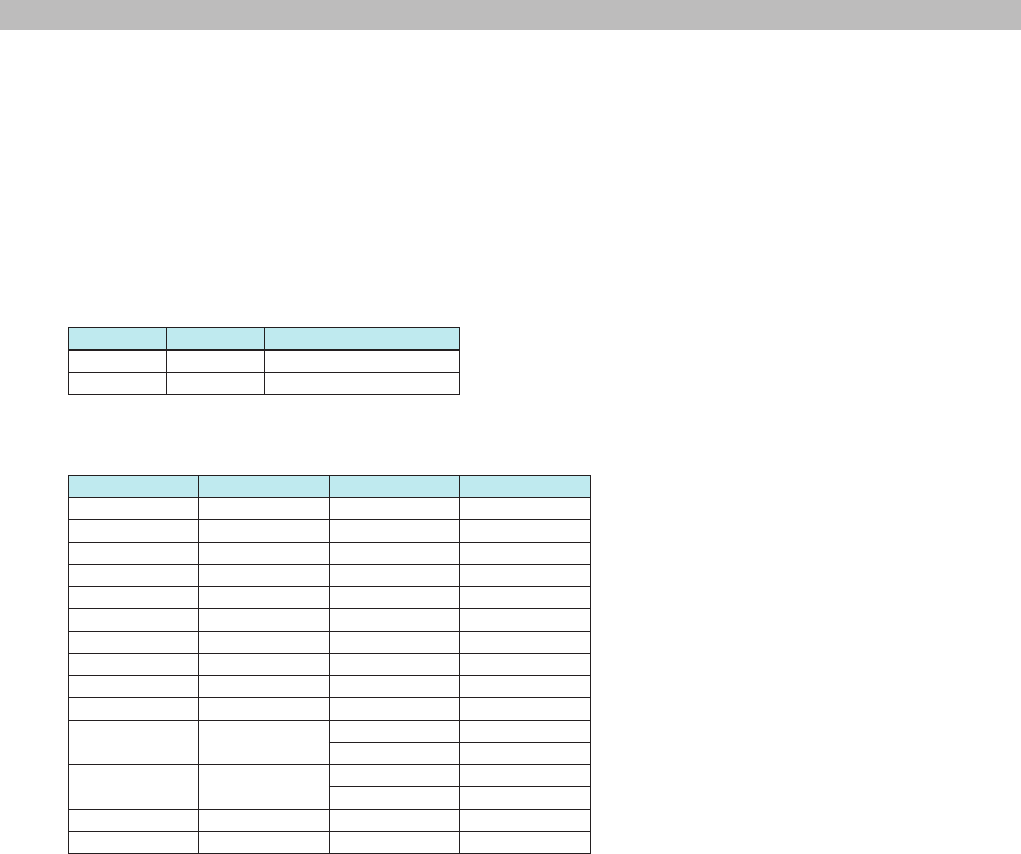
2. Command List
3. Extended commands
No. Request details Data Remarks
3-1 Product information
query request
MTX external control protocol version query devinfo protocolver ...
3-2 Parameter set version query devinfo paramsetver ...
3-3 Firmware version query devinfo version ...
3-4 Product name query devinfo productname ...
3-5 Serial number query devinfo serialno ...
3-6 Device ID query devinfo deviceid ...
3-7 Device name query devinfo devicename ...
3-8 Snapshot list (preset)
recall processing
Number of snapshot (preset) lists ssnum ... This command is invalid on the XMV, EXi8 and EXo8.
3-9 Nth preset information ssinfo ... This command is invalid on the XMV, EXi8 and EXo8.
3-10 Event processing
request
Time synchronization event MTX:AbsoluteTime ... This command is invalid on the EXi8 and EXo8.
3-11 Time synchronization event MTX:SetAbsoluteTime ... This command is invalid on the EXi8 and EXo8.
3-12 Time query event MTX:GetAbsoluteTime ... This command is invalid on the EXi8 and EXo8.
3-13 DST enable/disable setting event MTX:DSTSetEnable… This command is invalid on the XMV, EXi8 and EXo8.
3-14 DST enable/disable query event MTX:DSTGetEnable… This command is invalid on the XMV, EXi8 and EXo8.
3-15 DST status query event MTX:DSTGetStatus… This command is invalid on the XMV, EXi8 and EXo8.
3-16 DST offset time setting event MTX:DSTSetOffset… This command is invalid on the XMV, EXi8 and EXo8.
3-17 DST offset time query event MTX:DSTGetOffset… This command is invalid on the XMV, EXi8 and EXo8.
3-18 DST start time setting event MTX:DSTSetStartTime… This command is invalid on the XMV, EXi8 and EXo8.
3-19 DST start time query event MTX:DSTGetStartTime… This command is invalid on the XMV, EXi8 and EXo8.
3-20 DST end time setting event MTX:DSTSetEndTime… This command is invalid on the XMV, EXi8 and EXo8.
3-21 DST end time query event MTX:DSTGetEndTime… This command is invalid on the XMV, EXi8 and EXo8.
3-22 DST start/end day setting (day/week) event MTX:DSTSetDayWeek… This command is invalid on the XMV, EXi8 and EXo8.
3-23 DST start/end day query (day/week) event MTX:DSTGetDayWeek… This command is invalid on the XMV, EXi8 and EXo8.
3-24 DST start/end day setting (day) event MTX:DSTSetDay… This command is invalid on the XMV, EXi8 and EXo8.
3-25 DST start/end day query (day) event MTX:DSTGetDay… This command is invalid on the XMV, EXi8 and EXo8.
3-26 DST start/end day setting query event MTX:DSTGetDaySetting… This command is invalid on the XMV, EXi8 and EXo8.
3-27 Current folder information (for list) query event MTX:AudioPlayerGetCurrentDir ... This command is invalid on the XMV, EXi8 and EXo8.
3-28 Current folder move (for list) query event MTX:AudioPlayerSetCurrentDir ... This command is invalid on the XMV, EXi8 and EXo8.
3-29 Folder name query event MTX:AudioPlayerGetDirName ... This command is invalid on the XMV, EXi8 and EXo8.
3-30 File name query event MTX:AudioPlayerGetFileName ... This command is invalid on the XMV, EXi8 and EXo8.
3-31 Folder name list: Multiple Folder name query event MTX:AudioPlayerGetDirNameList ... This command is invalid on the XMV, EXi8 and EXo8.
3-32 File name list query event MTX:AudioPlayerGetFileNameList ... This command is invalid on the XMV, EXi8 and EXo8.
3-33 Song play mode query event MTX:AudioPlayerGetPlayMode ... This command is invalid on the XMV, EXi8 and EXo8.
3-34 Song play mode setting event MTX:AudioPlayerSetPlayMode ... This command is invalid on the XMV, EXi8 and EXo8.
3-35 Song playback status query event MTX:AudioPlayerGetStatus ... This command is invalid on the XMV, EXi8 and EXo8.
3-36 Play, stop, and other transport operation event MTX:AudioPlayerTransport ... This command is invalid on the XMV, EXi8 and EXo8.
3-37 Currently playing or selected song
information query
event MTX:AudioPlayerGetCurrentSong ... This command is invalid on the XMV, EXi8 and EXo8.
3-38 Playback song designation event MTX:AudioPlayerSetCurrentSong ... This command is invalid on the XMV, EXi8 and EXo8.
3-39 MTX Editor synchronization processing query event MTX:SynchronizationGetStatus ... This command is invalid on the XMV, EXi8 and EXo8.
3-40 Number of alert event log query event MTX:EventLogGetLogNumber…
3-41 Alert event log query event MTX:EventLogGetLog…
3-42 Query for alert event log as list event MTX:EventLogGetLogList…
3-43 Clear alert event log event MTX:EventLogClear…
MTX3/MTX5-D/XMV Series/EXi8/EXo8 Remote Control Protocol Specications V1.0.3 7
3. Command Specications
3. Command Specications
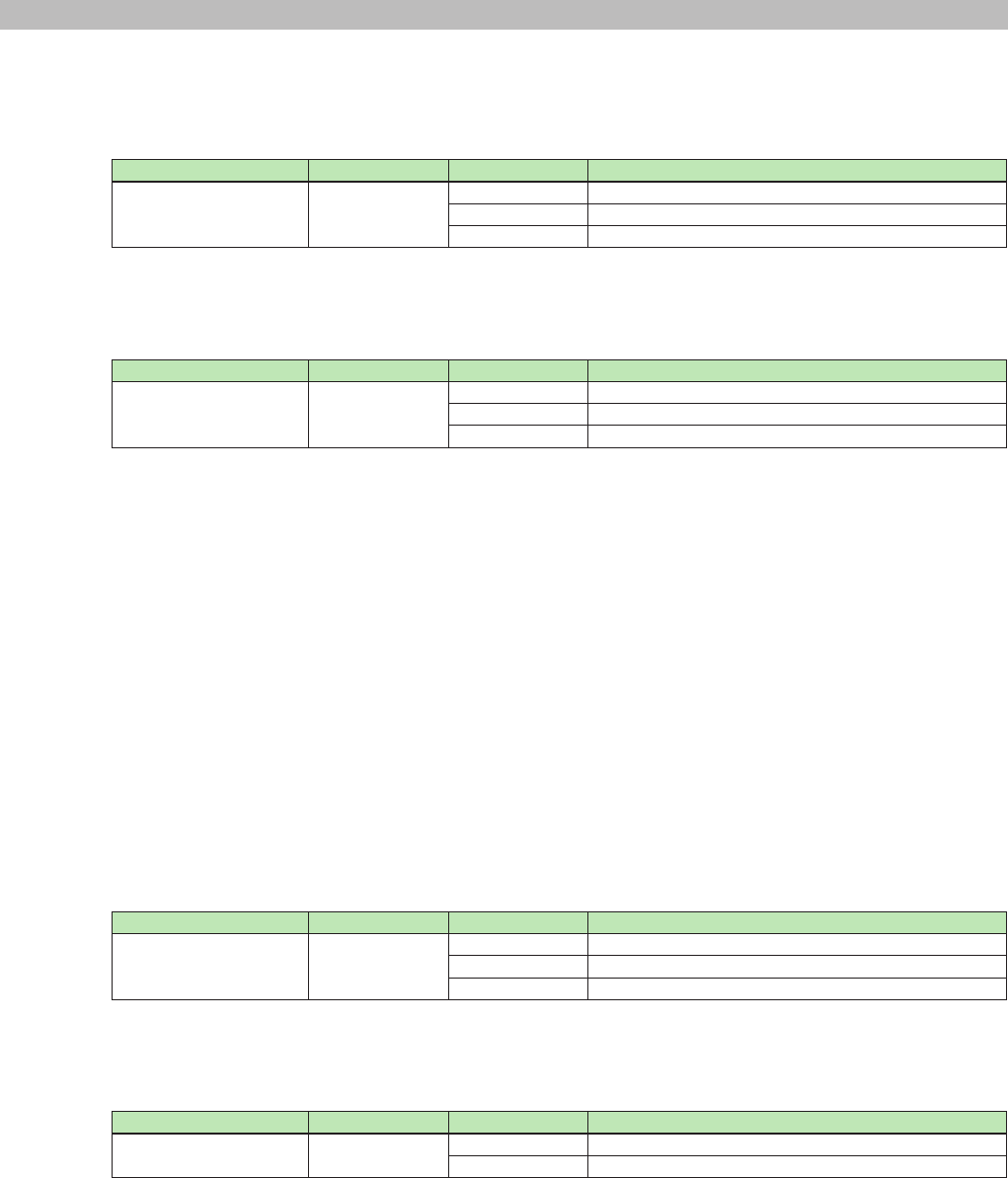
3.1. Basic Command Specications
Below is the syntax of commands exchanged between a device and remote controller.
<command name> <option 1> <option 2> . . . <option n> <new line>
- Each command must end with LF (0x0A).
- LF (0x0A) code can be sent as heart-beat command.
Refer to section 3.3.3: "2-9) Keepalive activation setting" for description of run mode setting, which describes the use of this heart-beat
command.
- Character type letter(s) in command line must be bracketed by double quotations.
When double quotation itself needs to be included in command line, use "escape character" as shown below.
Backslash works as an escape character to express following one character for double quotation and backslash.
Syntax Meaning Description
\\ \ backslash
\" " double quotation
- At least one space is necessary between a command name and an option and between options.
- Commands must be expressed using ASCII characters. Other characters are not allowed.
- Option strings that express parameter values are shown below.
Value Displayed string Raw value Normalized value
-Innity "-INFINITY" -13801 0
-18dB "-18.00" -1800 810
-6.5dB "-6.50" -650 888
0dB "0.00" 0 932
10dB "10.00" 1000 1000
2kHz "2.00k" 2000 98
400Hz "400" 400 18
Pan L 63 "L63" -63 0
Pan Center "C" 0 500
Pan R 63 "R63" +63 1000
ON "ON" 0 0
1 1000
OFF "OFF" 0 0
1 1000
INVERTED "INVERTED" 1 1000
NORMAL "NORMAL" 0 0
* For other parameters, see section 6, "Parameter Value Details," provided later.
* Normalized value is a converted value when minimum value of the parameter is as 0 and maximum value of the parameter is as 1000*1.
Example: -inf as minimum mapped 0, 10dB as maximum mapped 1000, 0dB mapped 932 for level parameter.
*1: This value is set by 2-8) Normalization resolution setting, default resolution is 1000.
MTX3/MTX5-D/XMV Series/EXi8/EXo8 Remote Control Protocol Specications V1.0.3 8
3. Command Specications
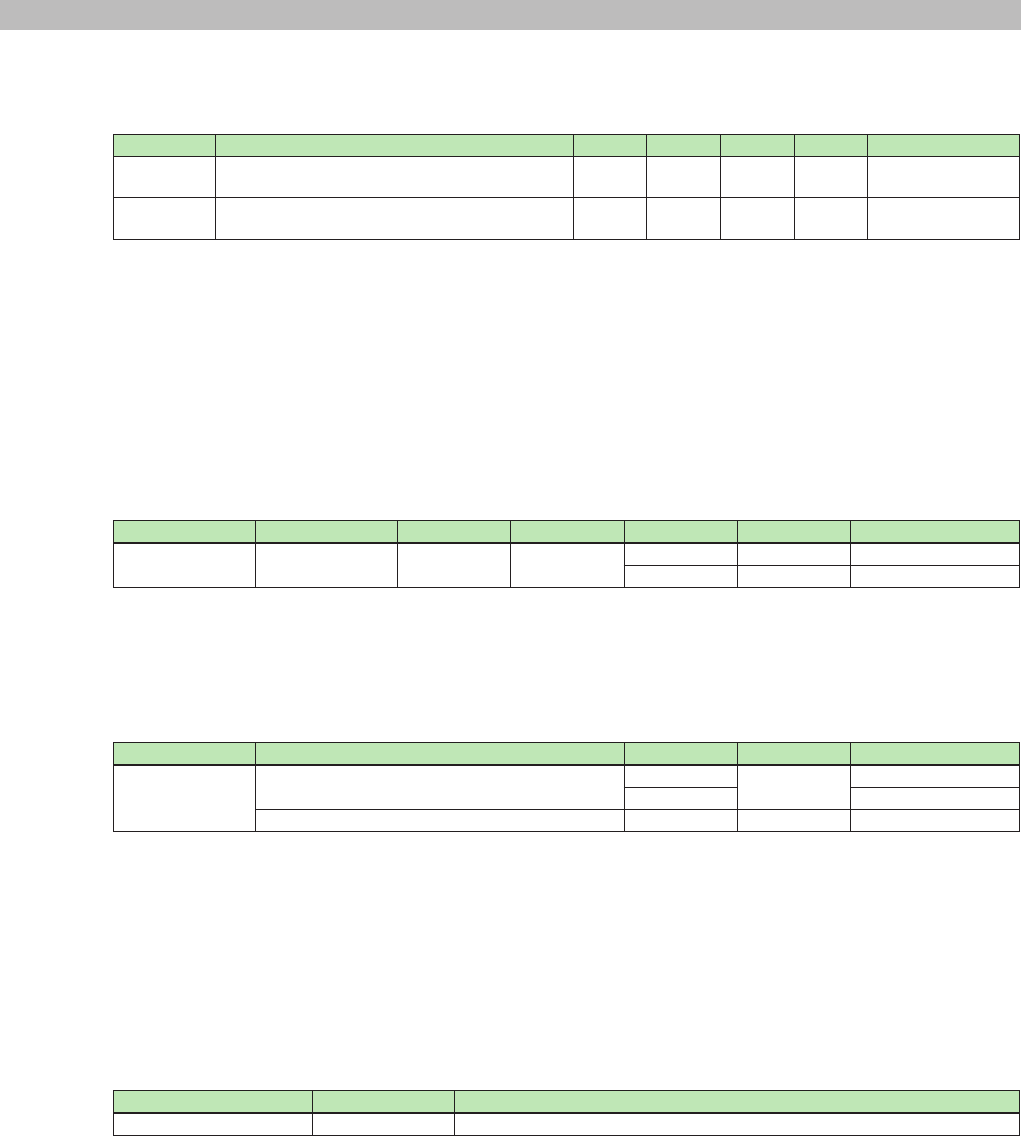
3.2. Commands a Device Sends to a Remote Controller
3.2.1. Device status change notication
1-1) Device run mode notication
Command Option 1 Option 2 Description
NOTIFY devstatus runmode "emergency" Emergency run mode
"update" Update mode
"normal" Normal run mode
Example: Notication: NOTIFY devstatus runmode "normal"
Meaning: The run mode was changed to normal mode.
1-2) Device error status notication
Command Option 1 Option 2 Description
NOTIFY devstatus error "t/xxxx" Alert fault information
"err/xxxx" Alert error information
"wrn/xxxx" Alert warning information
Details: "t/xxxx" = "t/message// xnnn onf (sssss) ID-xxx 2012/12/31 23:59:59"
"err/xxxx" = "err/message// xnnn onf (sssss) ID-xxx 2012/12/31 23:59:59"
"wrn/xxxx" = "wrn/message// xnnn onf (sssss) ID-xxx 2012/12/31 23:59:59"
The rst three characters indicate the alert type.
message = Alert message (The section from "/" to "//" after the alert type is the message data.)
. . . up to 32 characters (ascii characters)
nnn = Alert number (panel display number)
. . . 2 or 3 digit hexadecimal notation (The x at the front indicates hexadecimal notation.)
onf = Alert on/off
. . . Persistent alerts turn on when an alert condition occurs and turn off when they are cleared.
Single-shot alerts turn on while an alert condition is true.
sssss = Identical alert count (a counter that indicates the number of identical alerts, normally set to 1)
. . . Decimal notation
xxx = UNIT ID number . . . 3-digit hexadecimal
Date
Time
Example: Notication: NOTIFY devstatus error "err/DCP[0] communication error// x53 on (1) ID-001 2013/1/22 11:38:23"
Meaning: Error alert 53 occurred.
1-3) Current Fs (sampling frequency) setting notication
Command Option 1 Option 2 Description
NOTIFY devstatus fs "unknown" Fs undened
44.1kHz 44.1kHz
"48kHz" 48kHz
Example: Notication: NOTIFY devstatus fs "44.1kHz"
Meaning: Fs was changed to 44.1 kHz.
1-4) Current word clock status notication
Command Option 1 Option 2 Description
NOTIFY devstatus lockstatus "unlock" Unlock
"lock" Lock
Example: Notication: NOTIFY devstatus lockstatus "lock"
Meaning: Word clock was locked.
MTX3/MTX5-D/XMV Series/EXi8/EXo8 Remote Control Protocol Specications V1.0.3 9
3. Command Specications
3.2.2. Parameter change notication
1-5) Parameter change notication raw value
Parameter change notication normalized value
Command Option 1 Option 2 Option 3 Option 4 Option 5 Description
NOTIFY set MTX:mem_MemNo/UniqueId/ElmNo/Xpos/Ypos/
PrmNo/IndexNo
0 0 "(value)" "(string)" Parameter change
raw value
NOTIFY setn MTX:mem_MemNo/UniqueId/ElmNo/Xpos/Ypos/
PrmNo/IndexNo
0 0 "(value)" "(string)" Parameter change
normalized value
Details: MemNo = See section 7, "Parameter Values."
UniqueId = See section 7, "Parameter Values."
Xpos = See section 7, "Parameter Values."
Ypos = See section 7, "Parameter Values."
IndexNo = See section 7, "Parameter Values."
"(value)" = See section 3.1, "Basic Command Specications," or section 7, "Parameter Values."
"(string)" = See section 3.1, "Basic Command Specications," or section 7, "Parameter Values."
Example: Notication: NOTIFY set MTX:mem_512/60000/0/0/0/0/0 0 0 -7760 "-77.60"
Meaning: DCA Fader 1ch level was changed to "-77.60."
1-6) Scheduler on/off change notication
Command Option 1 Option 2 Option 3 Option 4 Option 5 Description
NOTIFY set(setn) MTX:EvntScd_On 0 0 1 "1" Scheduler on
0 "0" Scheduler off
* For setn, option 4 is expressed using a normalized value.
Example: Notication: NOTIFY set MTX:EvntScd_On 0 0 1 "1"
Meaning: The scheduler was turned on.
1-7) Parameter change notication
Command Option 1 Option 2 Option 3 Description
NOTIFY mtr MTX:mtr_MemNo/UniqueId/meter level (meter) Level meter value
gr gr meter value
MTX:mtr_MemNo/UniqueId/hold hold Hold meter value
Details: MemNo = See section 8, "Meters."
UniqueId = See section 8, "Meters."
(meter) = See section 5, "Meter Values."
Example: Notication: NOTIFY mtr MTX:mtr_512/20020/meter level 71 71 71 71 71 71 69 68
* The meter value is expressed using a 2-digit hexadecimal.
Meaning: Output levels for ch1 to 8 Level are sent.
3.2.3. Current snapshot (preset) number change notication
1-8) Current snapshot (preset) number change notication
Command Option 1 Description
NOTIFY sscurrent (index) Current preset number change notication
Details: (index) = Current preset index number
Example: Notication: NOTIFY sscurrent 10
Meaning: Current preset was changed to index 10 (preset 10).
MTX3/MTX5-D/XMV Series/EXi8/EXo8 Remote Control Protocol Specications V1.0.3 10
3. Command Specications
3.2.4. Event processing change notication
1-9) Media insertion notication
Command Option 1 Option 2 Description
NOTIFY event MTX:Media "sdcard=inserted" An SD memory card was inserted.
"sdcard=extracted" An SD memory card was removed.
Example: Notication: NOTIFY event MTX:Media "sdcard=inserted"
Meaning: An SD memory card was inserted into an SD memory card slot and was detected normally.
* SD Card should not be removed when the MTX is powered on.
1-10) Time synchronization notication <Old format>
Command Option 1 Option 2 Description
NOTIFY event MTX:AbsoluteTime "yyyy/mm/dd hh:mm:ss" Time synchronization notication
Details: yyyy = Year (Gregorian)
mm = Month (1 to 12)
dd = Day (1 to 31)
hh = Hour (0 to 23)
mm = Minute (0 to 59)
ss = Second (0 to 59)
* DST (Daylight Saving Time) is not accounted for.
Example: Notication: NOTIFY event MTX:AbsoluteTime "2013/1/25 10:58:19"
Meaning: The time was set to January 25, 2013, 10 hours 58 minutes 19 seconds.
Note: This command’s option1 string "MTX:AbsoluteTime" is retained to keep compatibility with previous programming using
the previous protocol. The command’s function is identical to the new format shown below.
Device sends both format commands when time is set in order to keep compatibility with program which done for old
format in past.
Ignore this command and process new format command in new program.
1-11) Time synchronization notication <New format>
Command Option 1 Option 2 Description
NOTIFY event MTX:SetAbsoluteTime "yyyy/mm/dd hh:mm:ss" Time synchronization notication
Details: yyyy = Year (Gregorian)
mm = Month (1 to 12)
dd = Day (1 to 31)
hh = Hour (0 to 23)
mm = Minute (0 to 59)
ss = Second (0 to 59)
* DST (Daylight Saving Time) is not accounted for.
Example: Notication: NOTIFY event MTX:SetAbsoluteTime "2013/1/25 10:58:19"
Meaning: The time was set to January 25, 2013, 10 hours 58 minutes 19 seconds
1-12) DST enable change notication
Command Option 1 Option 2 Description
NOTIFY event MTX:DSTSetEnable "enable" DST enable
"disable" DST disable
Example: Notication: NOTIFY event MTX:DSTSetEnable "enable"
Meaning: DST was enabled
1-13) DST offset time change notication
Command Option 1 Option 2 Description
NOTIFY event MTX:DSTSetOffset "offset=hh:mm" DST offset time change notication
Details: hh = Hour (0 to 2)
mm = Minute (0 to 59)
Example: Notication: NOTIFY event MTX:DSTSetOffset "01:00"
Meaning: DST offset was set one hour
MTX3/MTX5-D/XMV Series/EXi8/EXo8 Remote Control Protocol Specications V1.0.3 11
3. Command Specications
1-14) DST start time change notication
Command Option 1 Option 2 Description
NOTIFY event MTX:DSTSetStartTime "time=hh:mm" DST start time change notication
Details: hh = Hour (0 to 23)
mm = Minute (0 to 59)
Example: Notication: NOTIFY event MTX:DSTSetStartTime "time=12:00"
Meaning: DST start time was set to 12:00
1-15) DST end time change notication
Command Option 1 Option 2 Description
NOTIFY event MTX:DSTSetEndTime "time=hh:mm" DST end time change notication
Details: hh = Hour (0 to 23)
mm = Minute (0 to 59)
Example: Notication: NOTIFY event MTX:DSTSetEndTime "time=12:00"
Meaning: DST end time was set to 12:00
1-16) DST start/end day change notication (day/week)
Command Option 1 Option 2 Description
NOTIFY event MTX:DSTSetDayWeek "s_weekindex=xxxx|s_day=yyyy|s_month=zzzz|
e_weekindex=uuuu|e_day=vvvv|e_month=wwww"
DST start/end day change
notication (day/week)
Details: xxxx = Start week (First, Second, Third, Fourth, Fifth, Last)
yyyy = Start day (Sun, Mon, Tue, Wed, Thu, Fri, Sat)
zzzz = Start month (Jan, Feb, Mar, Apr, May, Jun, Jul, Aug, Sep, Oct, Nov, Dec)
uuuu = End week (First, Second, Third, Fourth, Fifth, Last)
vvvv = End day (Sun, Mon, Tue, Wed, Thu, Fri, Sat)
wwww = End month (Jan, Feb, Mar, Apr, May, Jun, Jul, Aug, Sep, Oct, Nov, Dec)
Example: Notication: NOTIFY event MTX:DSTSetDayWeek "s_weekindex=Last|s_day=Sun|s_month=Mar|
e_weekindex=Last|e_day=Sun|e_month=Oct"
Meaning: DST start/end days were set as from last Sunday in March to last Sunday in October
1-17) DST start/end day change notication (day)
Command Option 1 Option 2 Description
NOTIFY event MTX:DSTSetDay "s_month=xxxx|s_date=yyyy|e_month=zzzz|
e_date=wwww"
DST start/end day change
notication (day)
Details: xxxx = Start month (Jan, Feb, Mar, Apr, May, Jun, Jul, Aug, Sep, Oct, Nov, Dec)
yyyy = Start day (1 ~ 31)
zzzz = End month (Jan, Feb, Mar, Apr, May, Jun, Jul, Aug, Sep, Oct, Nov, Dec)
wwww = End day (1 ~ 31)
Example: Notication: NOTIFY event MTX:DSTSetDay "s_month=Mar|s_date=10|e_month=Nov|e_day=3"
Meaning: DST start day was set to March 10th and DST end day was set to Novenber 3rd
1-18) Song play mode notication
Command Option 1 Option 2 Description
NOTIFY event MTX:AudioPlayerSetPlayMode "playmode=one" One song play mode
"playmode=repeat one" One song repeat
"playmode=all" All song play
"playmode=repeat all" All songs repeat
"playmode=shufe" Shufe repeat
Example: Notication: NOTIFY event MTX:AudioPlayerSetPlayMode "playmode=repeat one"
Meaning: The play mode was changed to one song repeat.
MTX3/MTX5-D/XMV Series/EXi8/EXo8 Remote Control Protocol Specications V1.0.3 12
3. Command Specications
1-19) Play, stop, and other transport operation notication
Command Option 1 Option 2 Description
NOTIFY event MTX:AudioPlayerTransport "operation=stop" Stop
"operation=play" Play
"operation=pause" Pause
Example: Notication: NOTIFY event MTX:AudioPlayerTransport "operation=stop"
Meaning: Playback was paused.
1-20) Playback song notication
Command Option 1 Option 2 Description
NOTIFY event MTX:AudioPlayerSetCurrentSong "dirpath=xxxx|dirname=yyyy|leindex=
zzzz|lename=wwww"
Playback song designation
Details: xxxx = Directory path (index expression)
yyyy = Directory name (name of the folder)
zzzz = File index
wwww = File name
Example: Notication: NOTIFY event MTX:AudioPlayerSetCurrentSong
"dirpath=0/1|dirname=Folder #1|leindex=2|lename=xxxx.mp3"
Meaning: The playback song was set to index number 1 "xxxx.mp3" in the "Folder #1" folder of 0/1
(index expression).
* "0/1" expresses the root folder number/sub folder number (the root folder number is always xed at 0).
Note: The character encoding for directory and le names conforms to the setting specied by the scpmode encoding
command.
1-21) MTX Editor synchronization processing notication
Command Option 1 Option 2 Description
NOTIFY event MTX:SynchronizationSetStatus "active" Synchronization start
"inactive" Synchronization end
Example: Notication: NOTIFY event MTX:SynchronizationSetStatus "active"
Meaning: Synchronization processing was started between MTX and MTX Editor.
Note: When this notication is received, because the internal MTX settings may have changed signicantly, we recommend
that you verify the connection by querying relevant parameters.
3.3. Commands for controlling a device
3.3.1. Device status query
2-1) Device run mode query
Command Option 1 Description
devstatus runmode Queries the run mode
Response
Response string Description
OK devstatus runmode "emergency" Emergency run mode
OK devstatus runmode "update" Update mode
OK devstatus runmode "normal" Normal run mode
Example: Command: devstatus runmode
Response: OK devstatus runmode "normal"
Meaning: Query the run mode.
The device is currently in normal run mode.
Note: After device responds with -OK devstatus runmode "normal"-, device starts to send commands.
In order to establish remote control communication, the external controller must send [devstatus runmode] command
to the device and await response. When the device responds as [OK devstatus runmode "normal"], the device is ready
to receive commands.
MTX3/MTX5-D/XMV Series/EXi8/EXo8 Remote Control Protocol Specications V1.0.3 13
3. Command Specications
2-2) Device error status query
Command Option 1 Description
devstatus error Queries the error status
Response
Response string Description
OK devstatus error "none" No alerts
OK devstatus error "t/xxxx" fault alert
OK devstatus error "err/xxxx" error alert
OK devstatus error "wrn/xxxx" warning alert
Details: "t/ xxxx" = "t/message// xnnn onf (sssss) ID-xxx 2012/12/31 23:59:59"
"err/ xxxx" = "err/message// xnnn onf (sssss) ID-xxx 2012/12/31 23:59:59"
"wrn/ xxxx" = "wrn/message// xnnn onf (sssss) ID-xxx 2012/12/31 23:59:59"
The rst three characters indicate the alert type.
message = Alert message (The section from "/" to "//" after the alert type is the message data.)
. . . up to 32 characters (ascii characters)
nnn = Alert number (panel display number)
. . . 2 or 3 digit hexadecimal notation (The x at the front indicates hexadecimal notation.)
onf = Alert on/off
. . . Persistent alerts turn on when an alert condition occurs and turn off when they are cleared.
Single-shot alerts turn on while an alert condition is true.
sssss = Identical alert count (a counter that indicates the number of identical alerts, normally set to 1)
. . . Decimal notation
xxx = UNIT ID number . . . 3- digit hexadecimal
Date
Time
Example: Command: devstatus error
Response: OK devstatus error "err/DCP[0] communication error// x53 on (1) ID-001 2013/1/22 11:38:23"
Meaning: Query the alert status.
Error alert 53 is occurring.
2-3) Current Fs (sampling frequency) status query
Command Option 1 Description
devstatus fs Queries Fs
Response
Response string Description
OK devstatus fs "unknown" Fs undened
OK devstatus fs "44.1kHz" 44.1kHz
OK devstatus fs "48kHz" 48kHz
Example: Command: devstatus fs
Response: OK devstatus fs "44.1kHz"
Meaning: Query Fs.
The current Fs is 44.1 kHz.
2-4) Current word clock status query
Command Option 1 Description
devstatus lockstatus Queries the word clock lock status
Response
Response string Description
OK devstatus lockstatus "unlock" Unlock
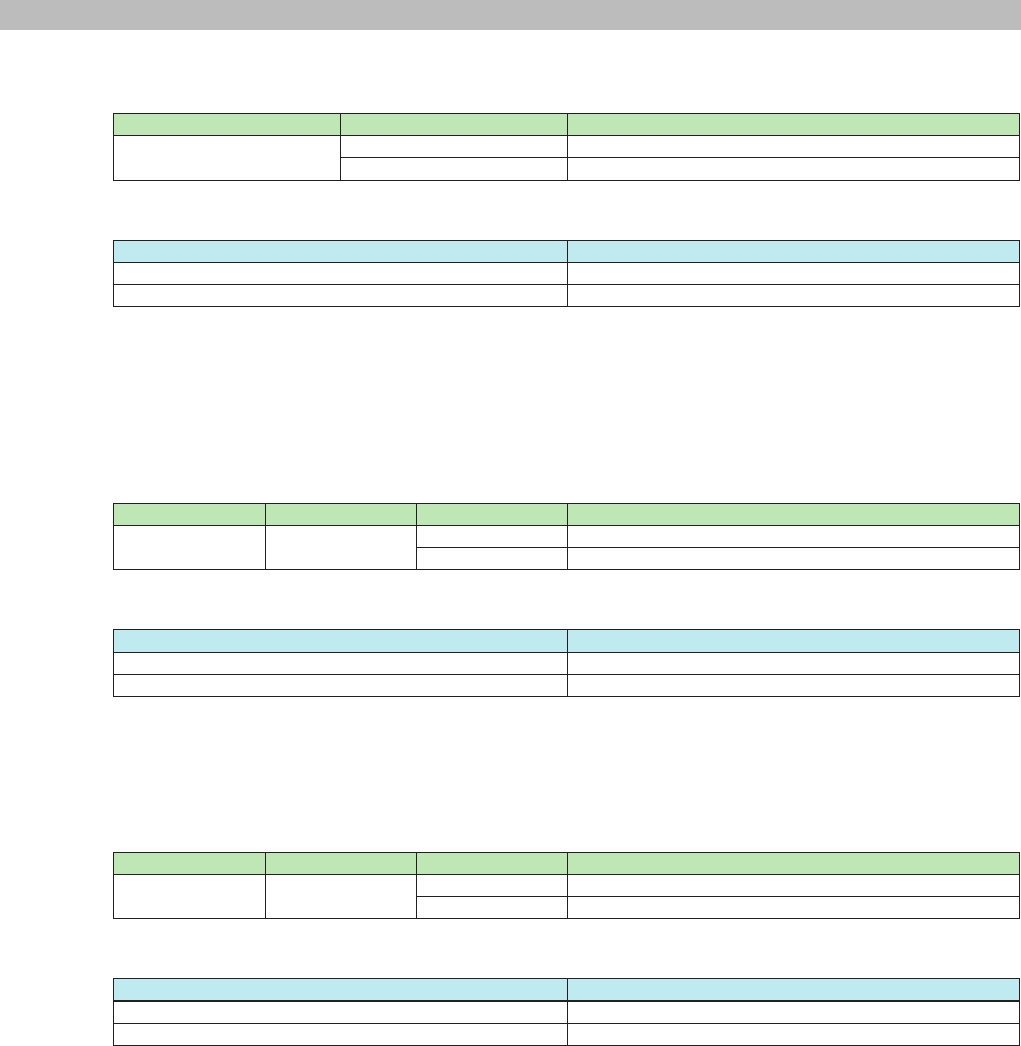
OK devstatus lockstatus "lock" Lock
Example: Command: devstatus lockstatus
Response: OK devstatus lockstatus "lock"
Meaning: Query the word clock lock status.
Locked
MTX3/MTX5-D/XMV Series/EXi8/EXo8 Remote Control Protocol Specications V1.0.3 14
3. Command Specications
3.3.2. Device run mode query
2-5) Emergency run mode change
Command Option 1 Description
devmode normal Sets the run mode to normal
emergency Sets the run mode to emergency
Response
Response string Description
OK devmode normal Normal run mode change complete
OK devmode emergency Emergency run mode change complete
Example: Command: devmode emergency
Response: OK devmode emergency
Meaning: Change to emergency mode.
Run mode was changed to emergency.
3.3.3. MTX external control protocol run mode setting
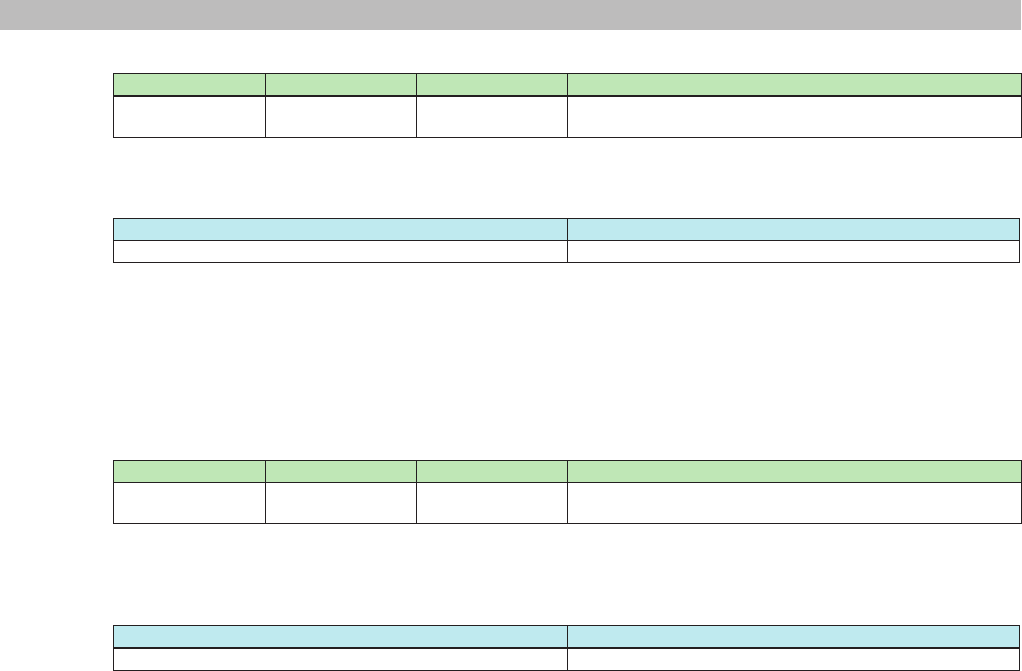
2-6) Result and change notication character encoding setting
Command Option 1 Option 2 Description
scpmode encoding ascii ASCII encoding mode (default setting)
utf8 UTF-8 encoding mode
Response
Response string Description
OK scpmode encoding ascii ASCII encoding mode change complete
OK scpmode encoding utf8 UTF-8 encoding mode change complete
Example: Command: scpmode encoding utf8
Response: OK scpmode encoding utf8
Meaning: Change the result and change notication encoding code to UTF-8.
The encoding mode was changed to UTF-8.
2-7) Value notication mode setting
Command Option 1 Option 2 Description
scpmode valuetype raw Raw value mode (default setting)
normalized Normalized value mode
Response
Response string Description
OK scpmode valuetype raw Raw value mode change complete
OK scpmode valuetype normalized Normalized value mode change complete
Example: Command: scpmode valuetype normalized
Response: OK scpmode valuetype normalized
Meaning: Change parameter change notications to normalized value mode.
Parameter change notications were changed to normalized value mode.
MTX3/MTX5-D/XMV Series/EXi8/EXo8 Remote Control Protocol Specications V1.0.3 15
3. Command Specications
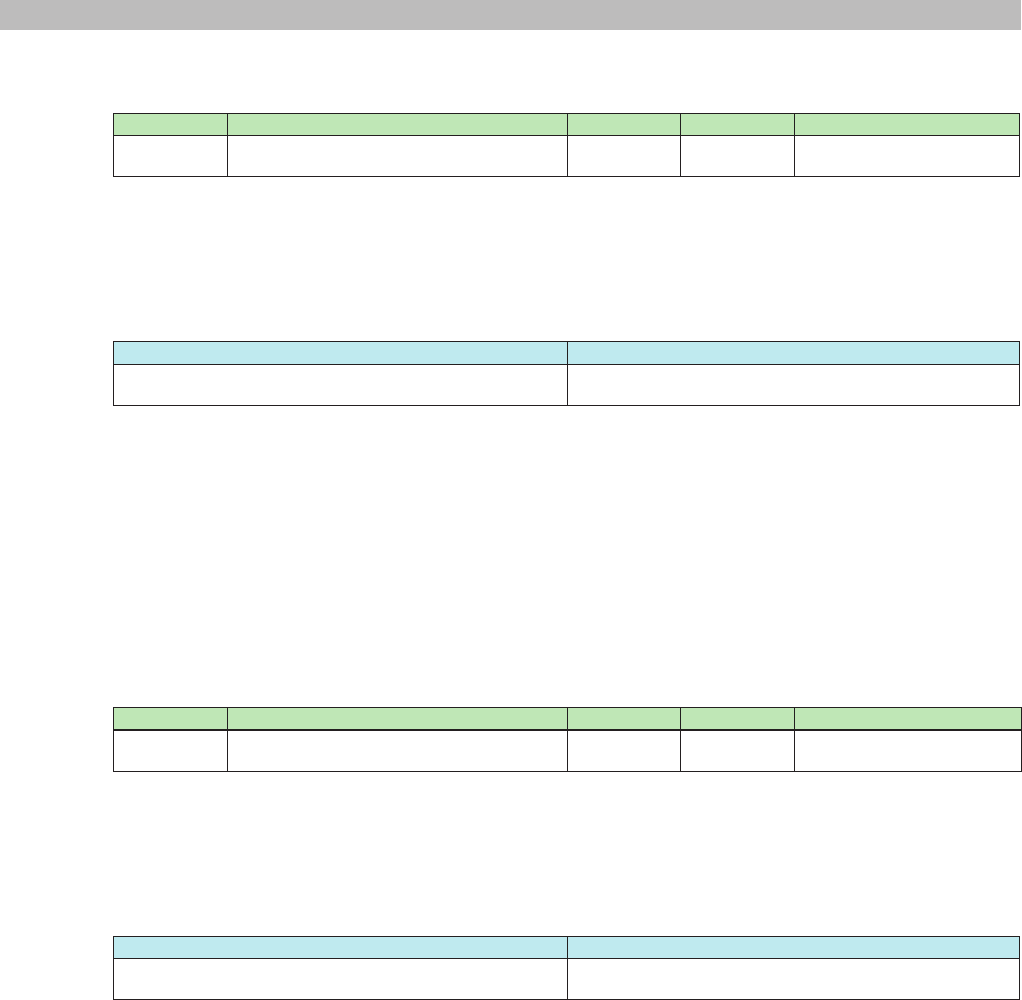
2-8) Normalization resolution setting
Command Option 1 Option 2 Description
scpmode resolution (res) Resolution for normalized value notications
(default setting = 1000)
Details: (res) = Resolution for normalized values
Response
Response string Description
OK scpmode resolution xxxx The resolution for normalized value notications
Details: xxxx = Specied resolution * Specied resolution should be more than 100.
Example: Command: scpmode resolution 128
Response: OK scpmode resolution 128
Meaning: Set the resolution of normalized values for setn commands to 128.
The resolution of normalized values for setn commands was set to 128.
2-9) Keepalive activation setting
Command Option 1 Option 2 Description
scpmode keepalive (interval) Maximum interval for a client to send some kind of message,
including heart beats (default setting = disabled)
Details: (interval) = Timeout value (msec) * Timeout value should be more than 1000.
* The actual timeout value will be increased by 1 second.
Response
Response string Description
OK scpmode keepalive xxxx Keepalive activated notication
Details: xxxx = The specied timeout value (msec)
Example: Command: scpmode keepalive 2000
Response: OK scpmode keepalive 2000
Meaning: Set the timeout value to 2000 msec (2 seconds).
The timeout value was set to 2000 msec (2 seconds).
Note: When unexpected disconnection happens, remote controller can’t nish communication with closing process.
In such case, device has to keep status "connected" and remote controller can’t establish new connection after that.
In order to prevent the situation above, device watches keepalive command if connection with remote controller is still
alive.
If device doesn’t receive keepalive command within timeout value which is set by this command, device terminates
connection by itself.
After the Keepalive activation command has been activated, the Remote controller must send any command or
LF(0x0A) code as a heart beat to the device within the timeout value.
MTX3/MTX5-D/XMV Series/EXi8/EXo8 Remote Control Protocol Specications V1.0.3 16
3. Command Specications
3.3.4. Parameter query
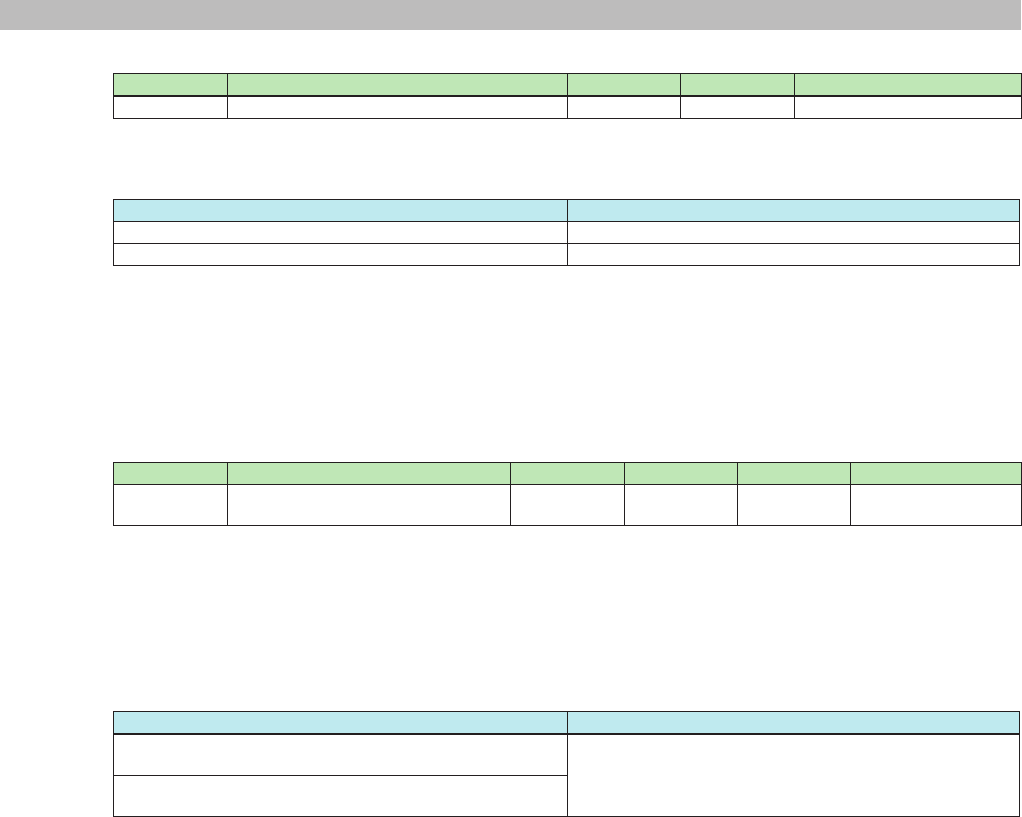
2-10) Raw value parameter query
Command Option 1 Option 2 Option 3 Description
get MTX:mem_MemNo/UniqueId/ElmNo/Xpos/
Ypos/PrmNo/IndexNo
0 0 Raw value parameter query
request
Details: MemNo = See section 7, "Parameter Values."
UniqueId = See section 7, "Parameter Values."
Xpos = See section 7, "Parameter Values."
Ypos = See section 7, "Parameter Values."
IndexNo = See section 7, "Parameter Values."
Response
Response string Description
OK get MTX:mem_MemNo/UniqueId/ElmNo/Xpos/Ypos/
PrmNo/IndexNo 0 0 (value)
Raw value parameter query response
Details: MemNo = See section 7, "Parameter Values."
UniqueId = See section 7, "Parameter Values."
Xpos = See section 7, "Parameter Values."
Ypos = See section 7, "Parameter Values."
IndexNo = See section 7, "Parameter Values."
(value) = See section 3.1, "Basic Command Specications," or section 7, "Parameter Values."
Example: Command: get MTX:mem_512/60000/0/0/0/0/0 0 0
Response: OK get MTX:mem_512/60000/0/0/0/0/0 0 0 -7760
Meaning: Query the 1ch level of the DCA fader with raw values.
The 1ch level of the DCA fader is -77.60.
2-11) Normalized value parameter query
Command Option 1 Option 2 Option 3 Description
getn MTX:mem_MemNo/UniqueId/ElmNo/Xpos/
Ypos/PrmNo/IndexNo
0 0 Normalized value parameter
query request
Details: MemNo = See section 7, "Parameter Values."
UniqueId = See section 7, "Parameter Values."
Xpos = See section 7, "Parameter Values."
Ypos = See section 7, "Parameter Values."
IndexNo = See section 7, "Parameter Values."
Response
Response string Description
OK gen MTX:mem_MemNo/UniqueId/ElmNo/Xpos/Ypos/
PrmNo/IndexNo 0 0 (value)
Normalized value parameter query response
Details: MemNo = See section 7, "Parameter Values."
UniqueId = See section 7, "Parameter Values."
Xpos = See section 7, "Parameter Values."
Ypos = See section 7, "Parameter Values."
IndexNo = See section 7, "Parameter Values."
(value) = See section 3.1, "Basic Command Specications," or section 7, "Parameter Values."
Example: Command: getn MTX:mem_512/60000/0/0/0/0/0 0 0
Response: OK getn MTX:mem_512/60000/0/0/0/0/0 0 0 408
Meaning: Query the 1ch level of the DCA fader with normalized values.
The 1ch level of the DCA fader is 408.
MTX3/MTX5-D/XMV Series/EXi8/EXo8 Remote Control Protocol Specications V1.0.3 17
3. Command Specications
2-12) Scheduler status query
Command Option 1 Option 2 Option 3 Description
get(getn,gett) MTX:EvntScd_On 0 0 Queries the scheduler status
* For getn, the response will contain a normalized value; for gett, the response will contain a text string.
Response
Response string Description
OK get MTX:EvntScd_On 0 0 1 Scheduler on
OK get MTX:EvntScd_On 0 0 0 Scheduler off
Example: Command: get MTX:EvntScd_On 0 0
Response: OK get MTX:EvntScd_On 0 0 1
Meaning: Query the scheduler status.
Enabled
3.3.5. Parameter setting
2-13) Raw value parameter setting
Command Option 1 Option 2 Option 3 Option 4 Description
set MTX:mem_MemNo/UniqueId/ElmNo/
Xpos/Ypos/PrmNo/IndexNo
0 0 (value) Raw value parameter
setting
Details: MemNo = See section 7, "Parameter Values."
UniqueId = See section 7, "Parameter Values."
Xpos = See section 7, "Parameter Values."
Ypos = See section 7, "Parameter Values."
IndexNo = See section 7, "Parameter Values."
(value) = See section 3.1, "Basic Command Specications," or section 7, "Parameter Values."
Response
Response string Description
OK set MTX:mem_MemNo/UniqueId/ElmNo/Xpos/Ypos/
PrmNo/IndexNo 0 0 (value) "(string)"
Raw value parameter setting response
OKm set MTX:mem_MemNo/UniqueId/ElmNo/Xpos/Ypos/
PrmNo/IndexNo 0 0 (value) "(string)"
* If the requested parameter value is outside the range, the value is adjusted within the range and set.
If this occurs, the result notication will be OKm instead of OK.
Details: MemNo = See section 7, "Parameter Values."
UniqueId = See section 7, "Parameter Values."
Xpos = See section 7, "Parameter Values."
Ypos = See section 7, "Parameter Values."
IndexNo = See section 7, "Parameter Values."
(value) = See section 3.1, "Basic Command Specications," or section 7, "Parameter Values."
"(string)" = See section 3.1, "Basic Command Specications," or section 7, "Parameter Values."
Example: Command: set MTX:mem_512/60000/0/0/0/0/0 0 0 -7760
Response: OK set MTX:mem_512/60000/0/0/0/0/0 0 0 -7760 "-77.60"
Meaning: Set the 1ch level of the DCA fader to a raw value of -77.60.
The 1ch level of the DCA fader was set to "-77.60".
MTX3/MTX5-D/XMV Series/EXi8/EXo8 Remote Control Protocol Specications V1.0.3 18
3. Command Specications
2-14) Normalized value parameter setting
Command Option 1 Option 2 Option 3 Option 4 Description
setn MTX:mem_MemNo/UniqueId/ElmNo/
Xpos/Ypos/PrmNo/IndexNo
0 0 (value) Normalized value
parameter setting
Details: MemNo = See section 7, "Parameter Values."
UniqueId = See section 7, "Parameter Values."
Xpos = See section 7, "Parameter Values."
Ypos = See section 7, "Parameter Values."
IndexNo = See section 7, "Parameter Values."
(value) = See section 3.1, "Basic Command Specications," or section 7, "Parameter Values."
Response
Response string Description
OK setn MTX:mem_MemNo/UniqueId/ElmNo/Xpos/Ypos/
PrmNo/IndexNo 0 0 (value) "(string)"
Normalized value parameter setting response
OKm setn MTX:mem_MemNo/UniqueId/ElmNo/Xpos/Ypos/
PrmNo/IndexNo 0 0 (value) "(string)"
* If the requested parameter value is outside the range, the value is adjusted within the range and set.
If this occurs, the result notication will be OKm instead of OK.
Details: MemNo = See section 7, "Parameter Values."
UniqueId = See section 7, "Parameter Values."
Xpos = See section 7, "Parameter Values."
Ypos = See section 7, "Parameter Values."
IndexNo = See section 7, "Parameter Values."
(value) = See section 3.1, "Basic Command Specications," or section 7, "Parameter Values."
"(string)" = See section 3.1, "Basic Command Specications," or section 7, "Parameter Values."
Example: Command: setn MTX:mem_512/60000/0/0/0/0/0 0 0 408
Response: OKm setn MTX:mem_512/60000/0/0/0/0/0 0 0 408 "-20.56"
Meaning: Set the 1ch level of the DCA fader to a normalized value of 408.
The 1ch level of the DCA fader was set to "-20.56".
2-15) Scheduler status query
Command Option 1 Option 2 Option 3 Option 4 Description
set(setn,sett) MTX:EvntScd_On 0 0 1 Scheduler on
0 Scheduler off
* For setn, specify a normalized value; for sett, specify option 4 with a character string.
Response
Response string Description
OK set MTX:EvntScd_On 0 0 1 "1" Scheduler enabled response
OK set MTX:EvntScd_On 0 0 0 "0" Scheduler disabled response
Example: Command: set MTX:EvntScd_On 0 0 1
Response: OK set MTX:EvntScd_On 0 0 1 "1"
Meaning: Enable the scheduler.
The scheduler was enabled.
MTX3/MTX5-D/XMV Series/EXi8/EXo8 Remote Control Protocol Specications V1.0.3 19
3. Command Specications
3.3.6. Meter control
2-16) Transmission request
Command Option 1 Option 3 Description
mtrstart MTX:mtr_MemNo/UniqueId/meter (interval) Requests that the specied meter data be transmitted.
MTX:mtr_MemNo/UniqueId/hold Requests that the specied hold meter data be transmitted.
Details: MemNo = See section 7, "Parameter Values."
UniqueId = See section 7, "Parameter Values."
(interval) = Minimum transmission interval (msec)
Response
Response string Description
OK mtrstart MTX:mtr_MemNo/UniqueId/meter Meter data transmission setting complete
OK mtrstart MTX:mtr_MemNo/UniqueId/hold Hold meter data transmission setting complete
Details: MemNo = See section 7, "Parameter Values."
UniqueId = See section 7, "Parameter Values."
Example: Command: mtrstart MTX:mtr_512/20020/meter 1000
Notication: OK mtrstart MTX:mtr_512/20020/meter
NOTIFY mtr MTX:mtr_512/20020/meter level 71 71 71 71 71 71 69 68
NOTIFY mtr MTX:mtr_512/20020/meter level 71 71 71 71 71 71 69 68
* The meter value is expressed using a 2-digit hexadecimal.
Meaning: Send the meter data of ch1 to 8 output levels at 1000 msec intervals.
A request for the ch1 to 8 output levels was received, so the data will be transmitted.
2-17) Stop request
Command Option 1 Description
mtrstop MTX:mtr_MemNo/UniqueId/meter Requests that the specied meter data be stopped.
MTX:mtr_MemNo/UniqueId/hold Requests that the specied hold meter data be stopped.
Details: MemNo = See section 7, "Parameter Values."
UniqueId = See section 7, "Parameter Values."
Response
Response string Description
OK mtrstop MTX:mtr_MemNo/UniqueId/meter Meter data stop setting complete
OK mtrstop MTX:mtr_MemNo/UniqueId/hole Hold meter data stop setting complete
Details: MemNo = See section 7, "Parameter Values."
UniqueId = See section 7, "Parameter Values."
Example: Command: mtrstop MTX:mtr_512/20020/meter
Notication: OK mtrstop MTX:mtr_512/20020/meter
Meaning: Stop the meter data of ch1 to 8 output levels.
The request to stop the meter data of ch1 to 8 output levels was received.
MTX3/MTX5-D/XMV Series/EXi8/EXo8 Remote Control Protocol Specications V1.0.3 20
3. Command Specications
3.3.7. Snapshot (preset) processing
2-18) Snapshot (preset) current number query processing
Command Description
sscurrent Queries the current preset number (index)
Response
Response string Description
OK sscurrent (index) unmodied Current preset number queried
(There is no parameter change after recalling.)
OK sscurrent (index) modied Current preset number queried
(There is a parameter change after recalling.)
Details: (index) = Current preset number
Example: Command: sscurrent
Notication: OK sscurrent 10 unmodied
Meaning: Query the last index number (preset number) that was recalled.
The index number (preset number) is index 10 (preset 10), and no parameter has changed after
recalling.
2-19) Snapshot (preset) recall processing
Command Option 1 Description
ssrecall (index) Recalls the preset at the specied index from the preset list.
Details: (index) = Snapshot (preset) number
Response
Response string Description
OK ssrecall (index) Requested index
Details: (index) = Snapshot (preset) number
Example: Command: ssrecall 1
Notication: OK ssrecall 1
Meaning: Recall the preset at index 1 (preset 1).
The preset at index 1 (preset 1) was recalled.
3.4. Extended commands
3.4.1. Product information query request
3-1) MTX external control protocol version query
Command Option 1 Description
devinfo protocolver Queries the MTX external control protocol version
Response
Response string Description
OK devinfo protocolver "xxxx" MTX external control protocol version
Details: xxxx = Version
Example: Command: devinfo protocolver
Notication: OK devinfo protocolver "1.0.0"
Meaning: Query the protocol version.
Protocol version = V1.0.0
MTX3/MTX5-D/XMV Series/EXi8/EXo8 Remote Control Protocol Specications V1.0.3 21
3. Command Specications
3-2) Parameter set version query
Command Option 1 Description
devinfo paramsetver Queries the parameter set version
Response
Response string Description
OK devinfo paramsetver "xxxx" Parameter set version
Details: xxxx = Version
Example: Command: devinfo paramsetver
Notication: OK devinfo paramsetver "MTX:1.2.0"
Meaning: Query the parameter set version.
Parameter set version = V1.2.0
3-3) Firmware version query
Command Option 1 Description
devinfo version Queries the rmware version
Response
Response string Description
OK devinfo version "xxxx" Firmware version
Details: xxxx = Version
Example: Command: devinfo version
Notication: OK devinfo version "1.0.0"
Meaning: Query the rmware version.
Firmware version = V1.00
3-4) Product name query
Command Option 1 Description
devinfo productname Queries the product name
Response
Response string Description
OK devinfo productname "xxxx" Product name
Details: xxxx = Product name
Example: Command: devinfo productname
Notication: OK devinfo productname "MTX3"
Meaning: Query the product name.
Product name = "MTX3"
3-5) Serial number query
Command Option 1 Description
devinfo serialno Queries the serial number
Response
Response string Description
OK devinfo serialno "xxxx" Serial number
Details: xxxx = Serial number
Example: Command: devinfo serialno
Notication: OK devinfo serialno "ZA37640CHNET101001"
Meaning: Query the serial number.
Serial number = "ZA37640CHNET101001"
MTX3/MTX5-D/XMV Series/EXi8/EXo8 Remote Control Protocol Specications V1.0.3 22
3. Command Specications
3-6) Device ID query
Command Option 1 Description
devinfo deviceid Queries the device ID
Response
Response string Description
OK devinfo deviceid "xxxx" Device ID
Details: xxxx = Device ID
* 3-digit hexadecimal
Example: Command: devinfo deviceid
Notication: OK devinfo deviceid "001"
Meaning: Query the device ID.
Device ID = "001"
Note: The device ID corresponds to the UNIT ID.
3-7) Device name query
Command Option 1 Description
devinfo devicename Queries the device name assigned by the user
Response
Response string Description
OK devinfo devicename "xxxx" Device name assigned by the user
Details: xxxx = Device name
Example: Command: devinfo devicename
Notication: OK devinfo devicename "MTX3"
Meaning: Query the device name.
Device name = "MTX3"
Note: The character encoding for the device name conforms to the setting specied by the scpmode encoding command.
3.4.2. Snapshot (preset) list recall processing
devinfo: queries the device status
3-8) Number of snapshot (preset) lists
Command Description
ssnum Queries the number of preset lists
Response
Response string Description
OK ssnum (num) The number of preset lists
Details: (num) = Quantity
Example: Command: ssnum
Notication: OK ssnum 51
Meaning: Query the number of presets.
The number of presets is 51.
MTX3/MTX5-D/XMV Series/EXi8/EXo8 Remote Control Protocol Specications V1.0.3 23
3. Command Specications
3-9) Nth preset information
Command Option 1 Description
ssinfo (index) Queries the preset information at the specied index in the
preset list.
Response
Response string Description
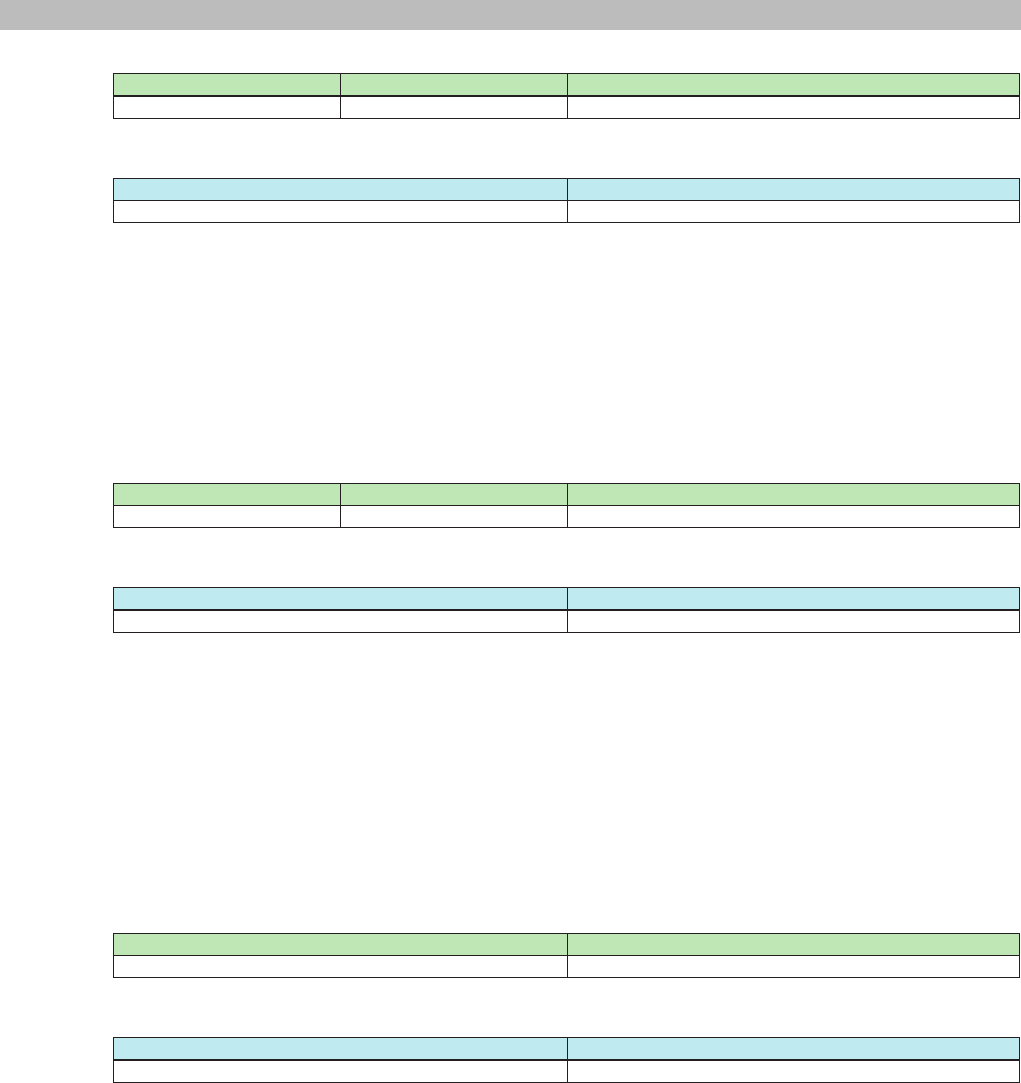
OK ssinfo (index) "xxxxxx" (attrib) "yyyyyy" "zzzzzz" Preset information at the specied index in the preset list.
Details: (index) = Requested index number
"xxxxxxx" = Text expressing the relevant preset number
(attrib) = Relevant preset attribute
preinst = preinstalled preset
reserve = reserved area
user = user preset available
empty = empty
"yyyyyyy" = = title text of the relevant preset
"zzzzzz" = comment text of the relevant preset.
(reserved for future use. MTX does not currently use comments. "" will be returned.)
Example: Command: ssinfo 10
Notication: OK ssinfo 10 "10" user "Preset 10" ""
Meaning: Query the contents of the preset at index 10 (preset 10).
The preset at index 10 contains
display number = "10"
title = "Preset 10"
comment = ""
and is a stored preset.
Note: The character encoding for preset titles and comments conforms to the setting specied by the scpmode encoding
command.
3.4.3. Event processing request
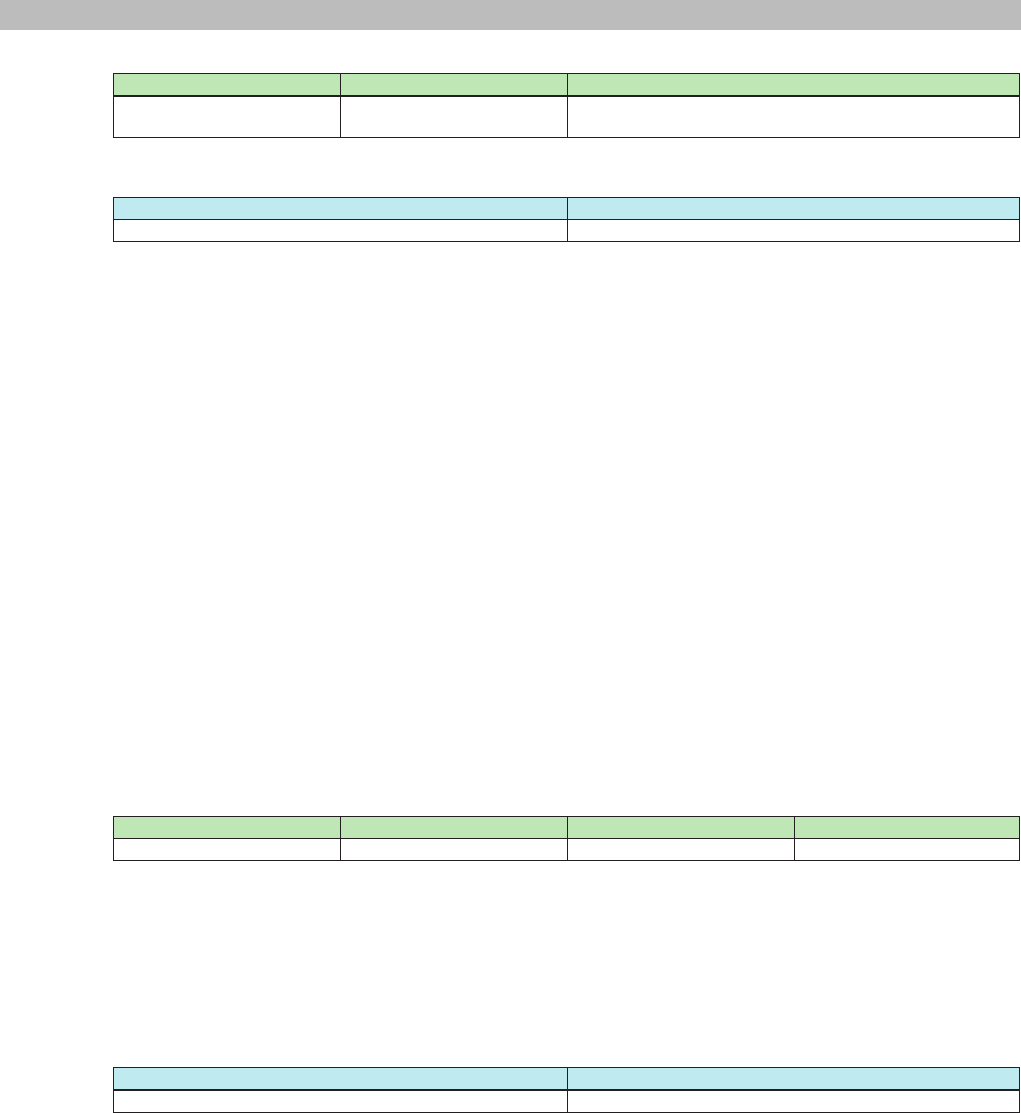
3-10) Time synchronization
Command Option 1 Option 2 Description
event MTX:AbsoluteTime "yyyy/mm/dd hh:mm:ss" Changes the time
Details: yyyy = Year (Gregorian)
mm = Month (1 to 12)
dd = Day (1 to 31)
hh = Hour (0 to 23)
mm = Minute (0 to 59)
ss = Second (0 to 59)
* DST (Daylight Saving Time) is not accounted for.
Response
Response string Description
OK event MTX:AbsoluteTime "caught" Time change complete
Example: Command: event MTX:AbsoluteTime "2013/1/25 11:56:14"
Notication: OK event MTX:AbsoluteTime "caught"
Meaning: Set the time to January 25, 2013, 11 hours 56 minutes 14 seconds.
The time was set.
MTX3/MTX5-D/XMV Series/EXi8/EXo8 Remote Control Protocol Specications V1.0.3 24
3. Command Specications
3-11) Time synchronization
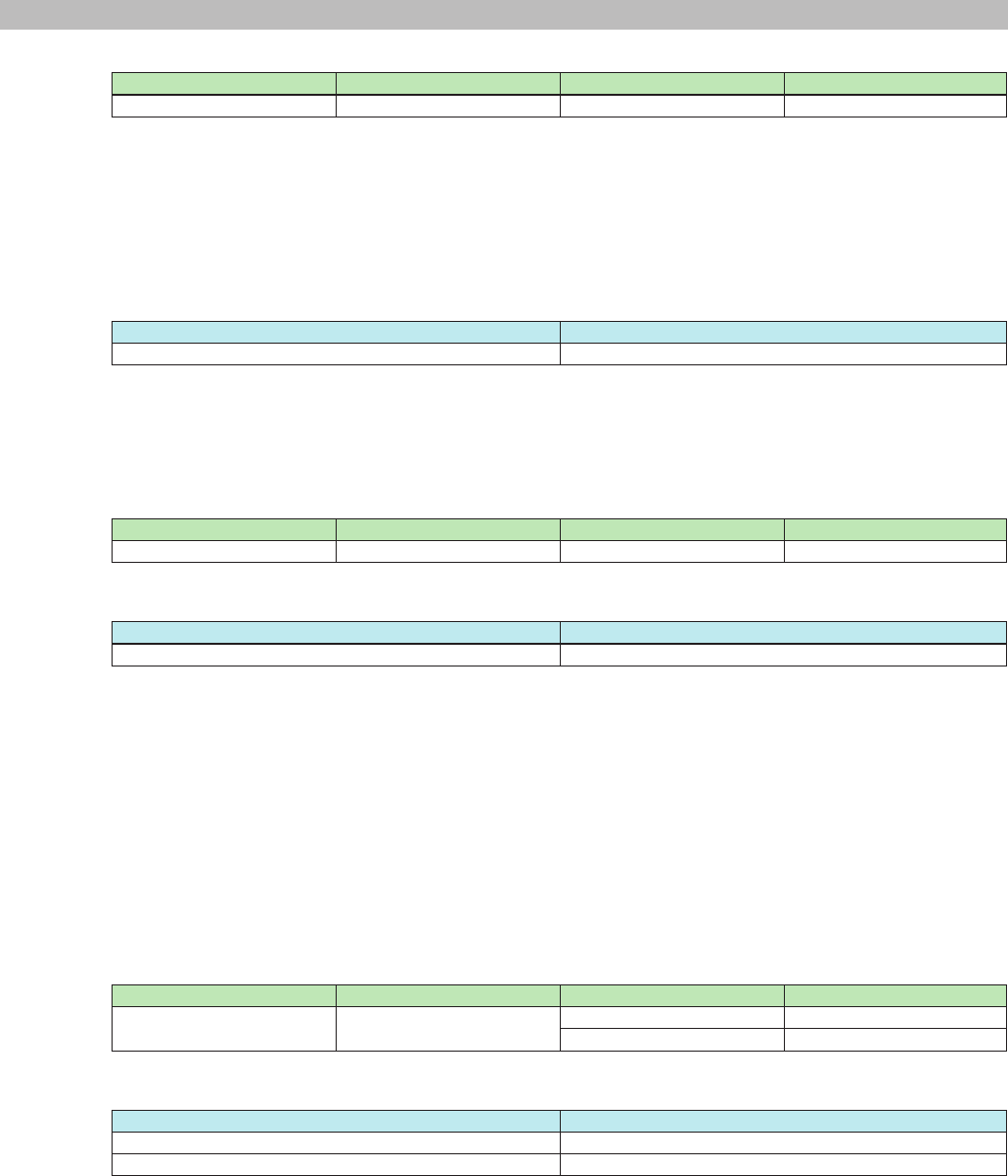
Command Option 1 Option 2 Description
event MTX:SetAbsoluteTime "yyyy/mm/dd hh:mm:ss" Changes the time
Details: yyyy = Year (Gregorian)
mm = Month (1 to 12)
dd = Day (1 to 31)
hh = Hour (0 to 23)
mm = Minute (0 to 59)
ss = Second (0 to 59)
* DST (Daylight Saving Time) is not accounted for.
Response
Response string Description
OK event MTX:SetAbsoluteTime "caught" Time change complete
Example: Command: event MTX:SetAbsoluteTime "2013/1/25 11:56:14"
Notication: OK event MTX:SetAbsoluteTime "caught"
Meaning: Set the time to January 25, 2013, 11 hours 56 minutes 14 seconds.
The time was set.
3-12) Time query
Command Option 1 Option 2 Description
event MTX:GetAbsoluteTime "" Time query with absolute time
Response
Response string Description
OK event MTX:GetAbsoluteTime "yyyy/mm/dd hh:mm:ss" Current time info with absolute time
Details: yyyy = Year (Gregorian)
mm = Month (1 to 12)
dd = Day (1 to 31)
hh = Hour (0 to 23)
mm = Minute (0 to 59)
ss = Second (0 to 59)
* DST (Daylight Saving Time) is not accounted for.
Example: Command: event MTX:GetAbsoluteTime ""
Notication: OK event MTX:GetAbsoluteTime "2014/1/25 11:56:14"
Meaning: Get current time with absolute time
Current time is January 25 2014, 11 hours 56 minutes 14 seconds
3-13) DST enable/disable setting
Command Option 1 Option 2 Description
event MTX:DSTSetEnable "enable" Set DST enable
"disable" Set DST disable
Response
Response string Description
OK event MTX:DSTSetEnable "enable" DST was enabled
OK event MTX:DSTSetEnable "disable" DST was disabled
Example: Command: event MTX:DSTSetEnable "enable"
Notication: OK event MTX:DSTSetEnable "enable"
Meaning: Set DST enable
DST was enabled
MTX3/MTX5-D/XMV Series/EXi8/EXo8 Remote Control Protocol Specications V1.0.3 25
3. Command Specications
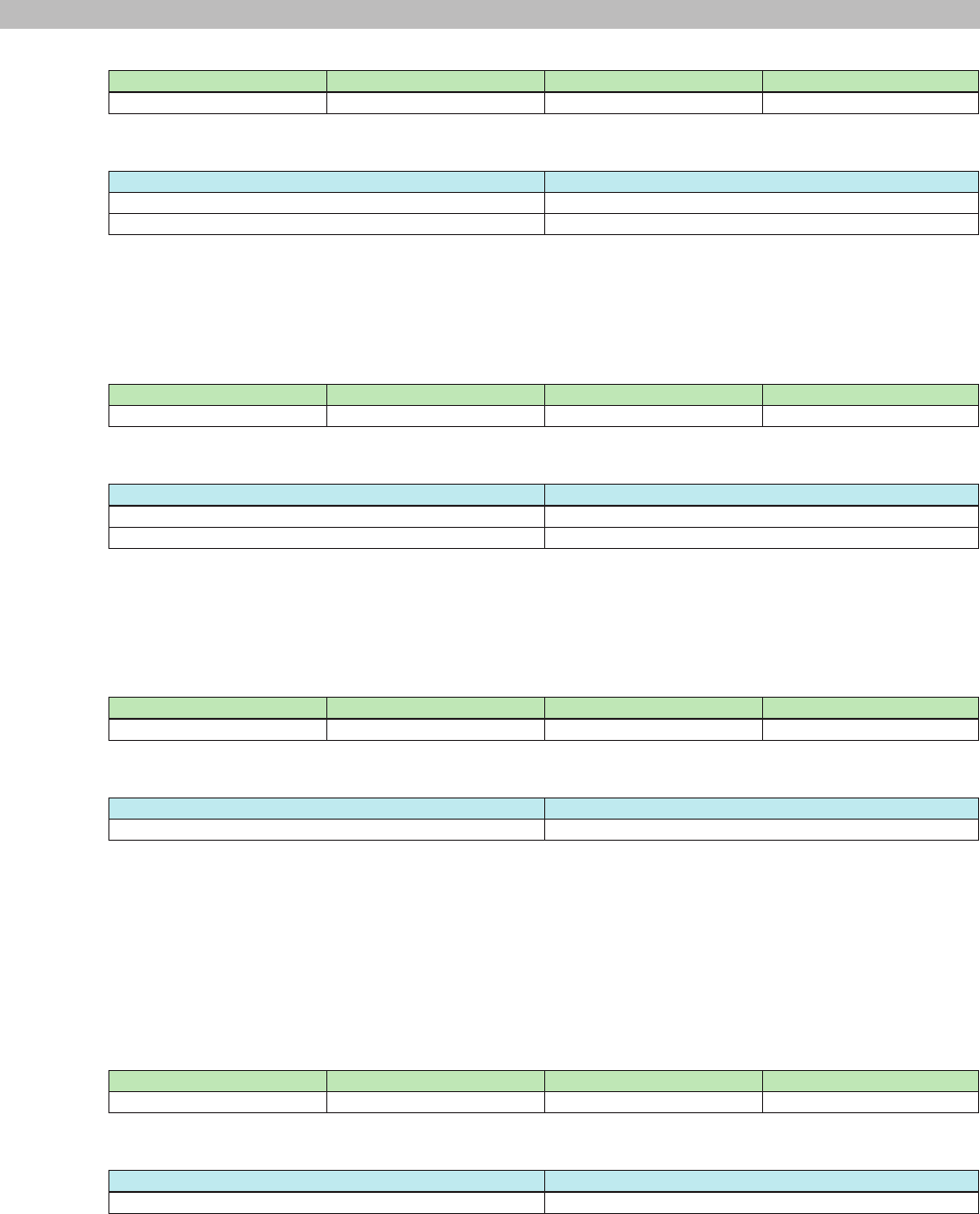
3-14) DST enable/disable query
Command Option 1 Option 2 Description
event MTX:DSTGetEnable "" DST enable/disable query
Response
Response string Description
OK event MTX:DSTGetEnable "enable" DST is enable
OK event MTX:DSTGetEnable "disable" DST is disable
Example: Command: event MTX:DSTGetEnable ""
Notication: OK event MTX:DSTGetEnable "enable"
Meaning: Get DST setting
DST is enable
3-15) DST status query
Command Option 1 Option 2 Description
event MTX:DSTGetStatus "" DST status query
Response
Response string Description
OK event MTX:DSTGetStatus "on" Working with DST
OK event MTX:DSTGetStatus "off" Not working with DST
Example: Command: event MTX:DSTGetStatus ""
Notication: OK event MTX:DSTGetStatus "on"
Meaning: Get DST working status
Working with DST
3-16) DST offset time setting
Command Option 1 Option 2 Description
event MTX:DSTSetOffset "offset=hh:mm" Set DST offset
Response
Response string Description
OK event MTX:DSTSetOffset "offset=hh:mm" DST offset was set
Details: hh = Hour (0 to 2)
mm = Minute (0 to 59)
(Up to 2 hours can be set)
Example: Command: event MTX:DSTSetOffset "offset=1:00"
Notication: OK event MTX:DSTSetOffset "offset=1:00"
Meaning: Set DST offset to 1 hour
DST offset was set to 1 hour
3-17) DST offset time query
Command Option 1 Option 2 Description
event MTX:DSTGetOffset "" Get DST offset
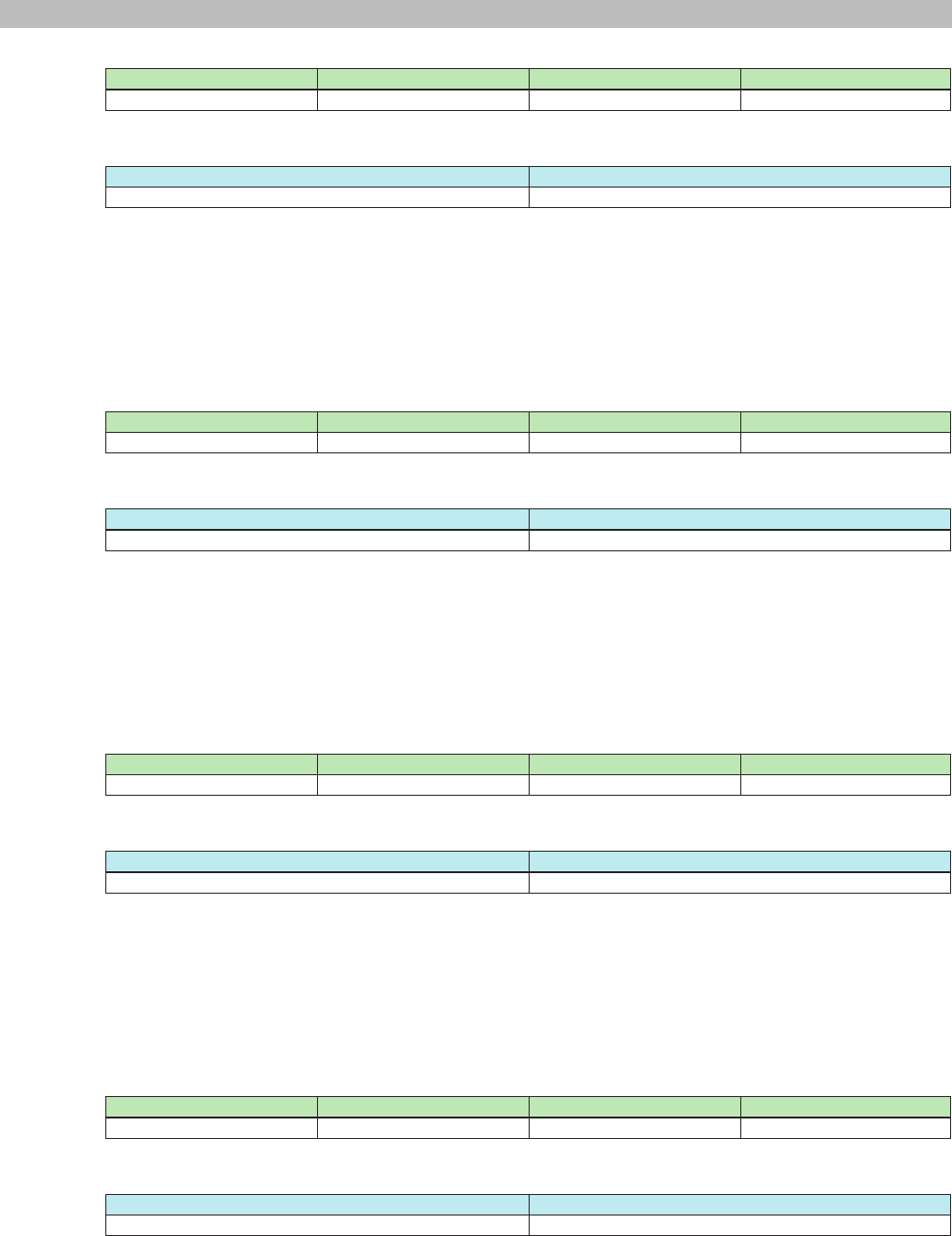
Response
Response string Description
OK event MTX:DSTGetOffset "offset=hh:mm" DST offset
Details: hh = Hour (0 to 2)
mm = Minute (0 to 59)
Example: Command: event MTX:DSTGetOffset ""
Notication: OK event MTX:DSTGetOffset "offset=01:00"
Meaning: Get DST offset
DST offset was set to 1 hour
MTX3/MTX5-D/XMV Series/EXi8/EXo8 Remote Control Protocol Specications V1.0.3 26
3. Command Specications
3-18) DST start time setting
Command Option 1 Option 2 Description
event MTX:DSTSetStartTime "time=hh:mm" Set DST start time
Response
Response string Description
OK event MTX:DSTSetStartTime "time=hh:mm" DST start time was set
Details: hh = Hour (0 to 23)
mm = Minute (0 to 59)
Example: Command: event MTX:DSTSetStartTime "time=12:00"
Notication: OK event MTX:DSTSetStartTime "time=12:00"
Meaning: Set DST start time to 12:00
DST start time was set to 12:00
3-19) DST start time query
Command Option 1 Option 2 Description
event MTX:DSTGetStartTime "" Get DST start time
Response
Response string Description
OK event MTX:DSTGetStartTime "time=hh:mm" DST start time
Details: hh = Hour (0 to 23)
mm = Minute (0 to 59)
Example: Command: event MTX:DSTGetStartTime ""
Notication: OK event MTX:DSTGetStartTime "time=12:00"
Meaning: Get DST start time
DST start time is 12:00
3-20) DST end time setting
Command Option 1 Option 2 Description
event MTX:DSTSetEndTime "time=hh:mm" Set DST end time
Response
Response string Description
OK event MTX:DSTSetEndTime "time=hh:mm" DST end time was set
Details: hh = Hour (0 to 23)
mm = Minute (0 to 59)
Example: Command: event MTX:DSTSetEndTime "time=12:00"
Notication: OK event MTX:DSTSetEndTime "time=12:00"
Meaning: Set DST end time to 12:00
DST end time was set to 12:00
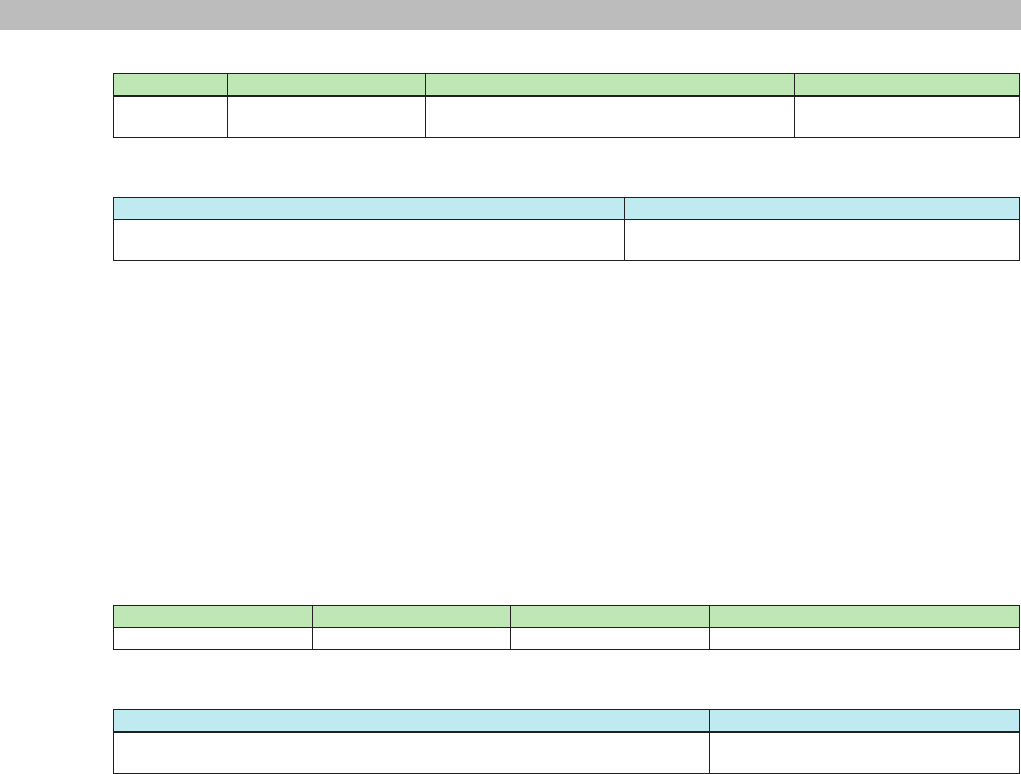
3-21) DST end time query
Command Option 1 Option 2 Description
event MTX:DSTGetEndTime "" Get DST end time
Response
Response string Description
OK eventMTX:DSTGetEndTime "time=hh:mm" DST end time
Details: hh = Hour (0 to 23)
mm = Minute (0 to 59)
Example: Command: event MTX:DSTGetEndTime ""
Notication: OK event MTX:DSTGetEndTime "time=12:00"
Meaning: Get DST end time
DST end time is 12:00
MTX3/MTX5-D/XMV Series/EXi8/EXo8 Remote Control Protocol Specications V1.0.3 27
3. Command Specications
3-22) DST start/end days setting (day/week)
Command Option 1 Option 2 Description
event MTX:DSTSetDayWeek "s_weekindex=xxxx|s_day=yyyy|s_month=zzzz|
e_weekindex=uuuu|e_day=vvvv|e_month=wwww"
Set DST start/end days by day
and week
Response
Response string Description
OK event MTX:DSTSetDayWeek "s_weekindex=xxxx|s_day=yyyy|
s_month=zzzz|e_weekindex=uuuu|e_day=vvvv|e_month=wwww"
DST start/end days by day and week was set
Details: xxxx = Start week (First, Second, Third, Fourth, Fifth, Last)
yyyy = Start day (Sun, Mon, Tue, Wed, Thu, Fri, Sat)
zzzz = Start month (Jan, Feb, Mar, Apr, May, Jun, Jul, Aug, Sep, Oct, Nov, Dec)
uuuu = End week (First, Second, Third, Fourth, Fifth, Last)
vvvv = End day (Sun, Mon, Tue, Wed, Thu, Fri, Sat)
wwww = End month (Jan, Feb, Mar, Apr, May, Jun, Jul, Aug, Sep, Oct, Nov, Dec)
Example: Command: event MTX:DSTSetDayWeek "s_weekindex=Last|s_day=Sun|s_month=Mar|e_weekindex=Last|
e_day=Sun|e_month=Oct"
Notication: OK event MTX:DSTSetDayWeek "s_weekindex=Last|s_day=Sun|s_month=Mar|
e_weekindex=Last|e_day=Sun|e_month=Oct"
Meaning: Set DST start/end days as from last Sunday in March to last Sunday in October
DST start/end days was set as from last Sunday in March to last Sunday in October
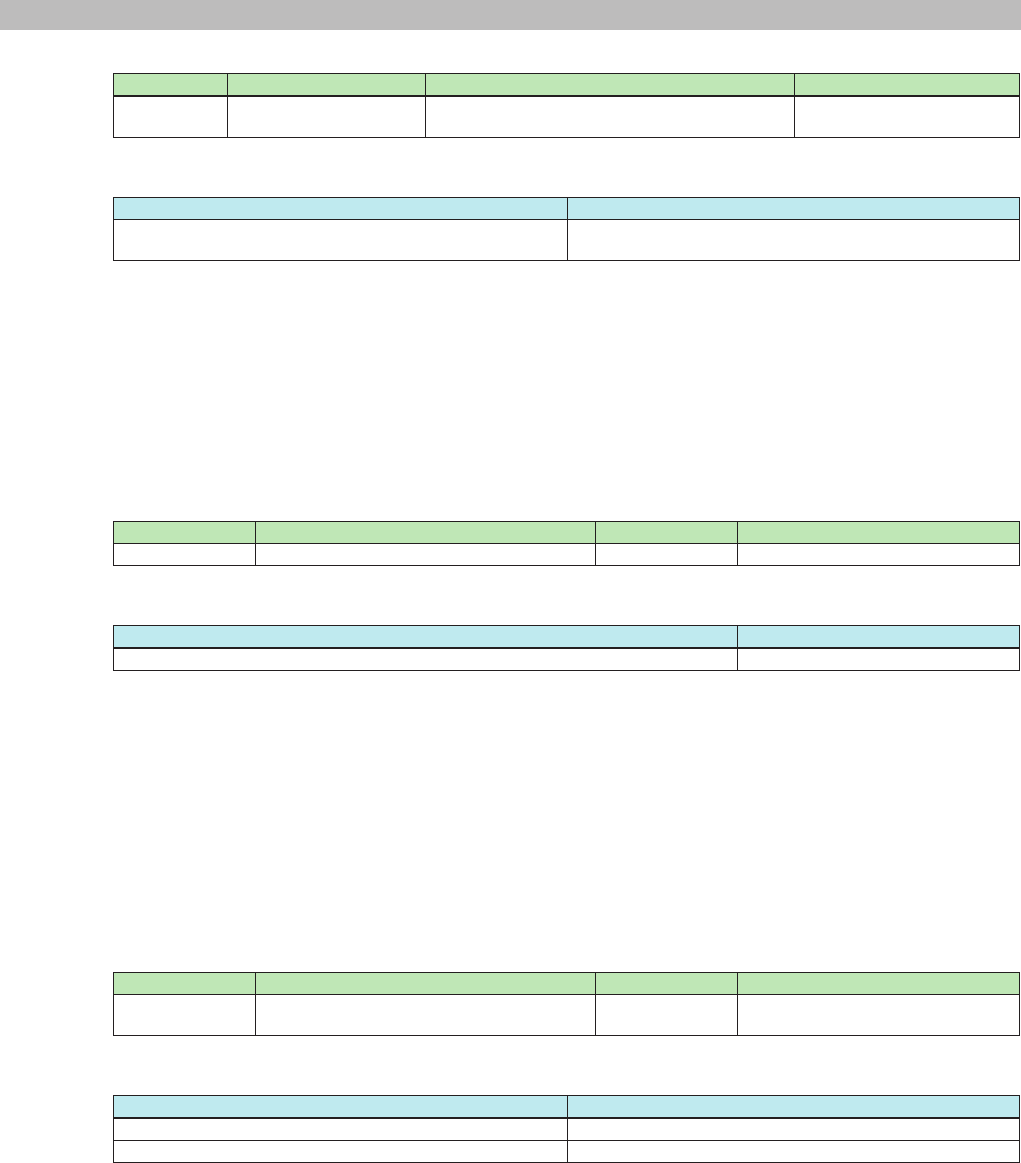
3-23) DST start/end days query (day/week)
Command Option 1 Option 2 Description
event MTX:DSTGetDayWeek "" Get DST start/end days by day and week
Response
Response string Description
OK event MTX:DSTGetDayWeek "s_weekindex=xxxx|s_day=yyyy|
s_month=zzzz|e_weekindex=uuuu|e_day=vvvv|e_month=wwww"
DST start/end days by day and week
Details: xxxx = Start week (First, Second, Third, Fourth, Fifth, Last)
yyyy = Start day (Sun, Mon, Tue, Wed, Thu, Fri, Sat)
zzzz = Start month (Jan, Feb, Mar, Apr, May, Jun, Jul, Aug, Sep, Oct, Nov, Dec)
uuuu = End week (First, Second, Third, Fourth, Fifth, Last)
vvvv = End day (Sun, Mon, Tue, Wed, Thu, Fri, Sat)
wwww = End month (Jan, Feb, Mar, Apr, May, Jun, Jul, Aug, Sep, Oct, Nov, Dec)
Example: Command: event MTX:DSTGetDayWeek ""
Notication: OK event MTX:DSTGetDayWeek "s_weekindex=Last|s_day=Sun|s_month=Mar|
e_weekindex=Last|e_day=Sun|e_month=Oct"
Meaning: Get DST start/end days by day and week
DST start/end days is set as from last Sunday in March to last Sunday in October
Note: When DST is set not by "day and week" but by "day", error returns.
MTX3/MTX5-D/XMV Series/EXi8/EXo8 Remote Control Protocol Specications V1.0.3 28
3. Command Specications
3-24) DST start/end days setting (day)
Command Option 1 Option 2 Description
event MTX:DSTSetDay "s_month=xxxx|s_date=yyyy|e_month=zzzz|
e_date=wwww"
Set DST start/end days by day
Response
Response string Description
OK event MTX:DSTSetDay "s_month=xxxx|s_date=yyyy|
e_month=zzzz|e_date=wwww"
DST start/end days by day was set
Details: xxxx = Start month (Jan, Feb, Mar, Apr, May, Jun, Jul, Aug, Sep, Oct, Nov, Dec)
yyyy = Start day (1 ~ 31)
zzzz = End month (Jan, Feb, Mar, Apr, May, Jun, Jul, Aug, Sep, Oct, Nov, Dec)
wwww = End day (1 ~ 31)
Example: Command: event MTX:DSTSetDay "s_month=Mar|s_date=10|e_month=Nov|e_day=3"
Notication: OK event MTX:DSTSetDay "s_month=Mar|s_date=10|e_month=Nov|e_day=3"
Meaning: Set DST start/end days as from March 10 to November 3
DST start/end days was set as from March 10 to November 3
3-25) DST start/end days query (day)
Command Option 1 Option 2 Description
event MTX:DSTGetDay "" Set DST start/end days by day
Response
Response string Description
OK event MTX:DSTGetDay "s_month=xxxx|s_date=yyyy|e_month=zzzz|e_date=wwww" DST start/end days by day
Details: xxxx = Start month (Jan, Feb, Mar, Apr, May, Jun, Jul, Aug, Sep, Oct, Nov, Dec)
yyyy = Start day (1 ~ 31)
zzzz = End month (Jan, Feb, Mar, Apr, May, Jun, Jul, Aug, Sep, Oct, Nov, Dec)
wwww = End day (1 ~ 31)
Example: Command: event MTX:DSTGetDay ""
Notication: OK event MTX:DSTGetDay "s_month=Mar|s_date=10|e_month=Nov|e_day=3"
Meaning: Get DST start/end days by date
DST start/end days is from March 10 to November 3
Note: When DST is set not by "day" but by "day and week", error returns.
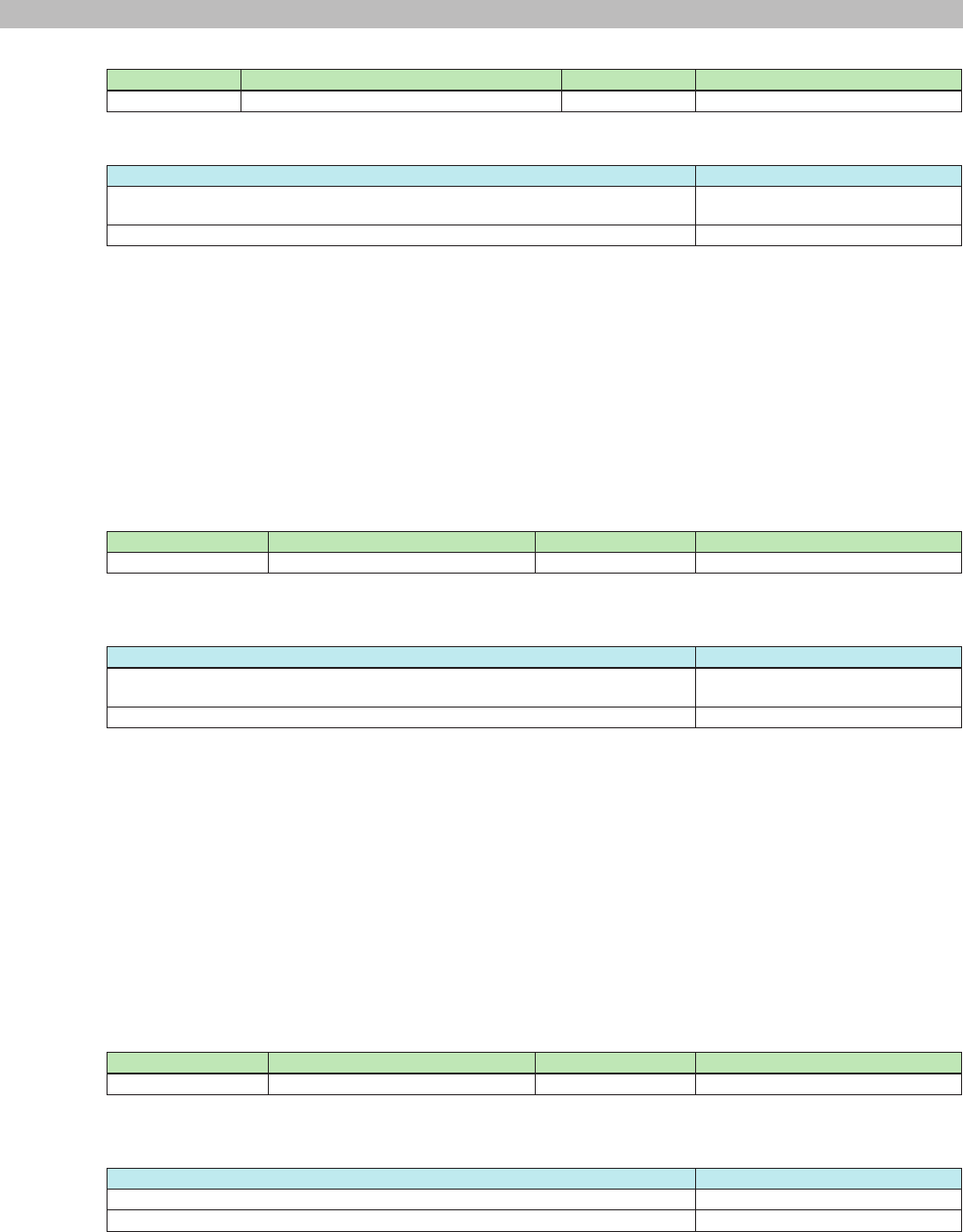
3-26) DST start/end days setting query
Command Option 1 Option 2 Description
event MTX:DSTGetDaySetting "" Get DST start/end days format, "day
and week" or "day"
Response
Response string Description
OK event MTX:DSTGetDaySetting "setting=dayweek" DST start/end days are set by "day and week"
OK event MTX:DSTGetDaySetting "setting=day" DST start/end days are set by "day"
Example: Command: event MTX:DSTGetDaySetting ""
Notication: OK event MTX:DSTGetDaySetting "setting=dayweek"
Meaning: Get DST start/end days format, "day and week" or "day"
DST start/end days were set by "day and week"
MTX3/MTX5-D/XMV Series/EXi8/EXo8 Remote Control Protocol Specications V1.0.3 29
3. Command Specications
3-27) Current folder information (for list) query
Command Option 1 Option 2 Description
event MTX:AudioPlayerGetCurrentDir "" Queries the current folder information.
Response
Response string Description
OK event MTX:AudioPlayerGetCurrentDir "dirpath=xxxx|dirname=yyyy|
subdirnum=zzzz|lenum=wwww"
Current folder information
OKm event MTX:AudioPlayerGetCurrentDir "sdcard is not inserted" There is no SD memory card inserted.
* OKm is returned if there is no SD memory card inserted.
Details: xxxx = Directory path (index expression)
yyyy = Directory name (name of the folder)
zzzz = The number of sub folders in the current directory
wwww = The number of les in the current directory
Example: Command: event MTX:AudioPlayerGetCurrentDir ""
Notication: OK event MTX:AudioPlayerGetCurrentDir "dirpath=0|dirname=|subdirnum=4|lenum=2"
Meaning: Query the current folder information.
The current folder contains four directories and two les.
3-28) Current folder move (for list) query
Command Option 1 Option 2 Description
event MTX:AudioPlayerSetCurrentDir "dirpath=xxxx" Moves the current folder
Details: xxxx = Directory path (index expression)
Response
Response string Description
OK event MTX:AudioPlayerSetCurrentDir "dirpath=xxxx|dirname=yyyy|
subdirnum=zzzz|lenum=wwww"
Current folder information
OKm event MTX:AudioPlayerSetCurrentDir "sdcard is not inserted" There is no SD memory card inserted.
* OKm is returned if there is no SD memory card inserted.
Details: xxxx = Directory path (index expression)
yyyy = Directory name (name of the folder)
zzzz = The number of sub folders in the current directory
wwww = The number of les in the current directory
Example: Command: event MTX:AudioPlayerSetCurrentDir "dirpath=0/1"
Notication: OK event MTX:AudioPlayerSetCurrentDir "dirpath=0/1|dirname=songs|subdirnum=0|lenum=3"
Meaning: Make the 0/1 (index expression) directory the current directory.
The 0/1 (index expression) directory was made the current directory. This folder contains no sub
directories and three les.
* "0/1" expresses the root folder number/sub folder number (the root folder number is always xed at 0).
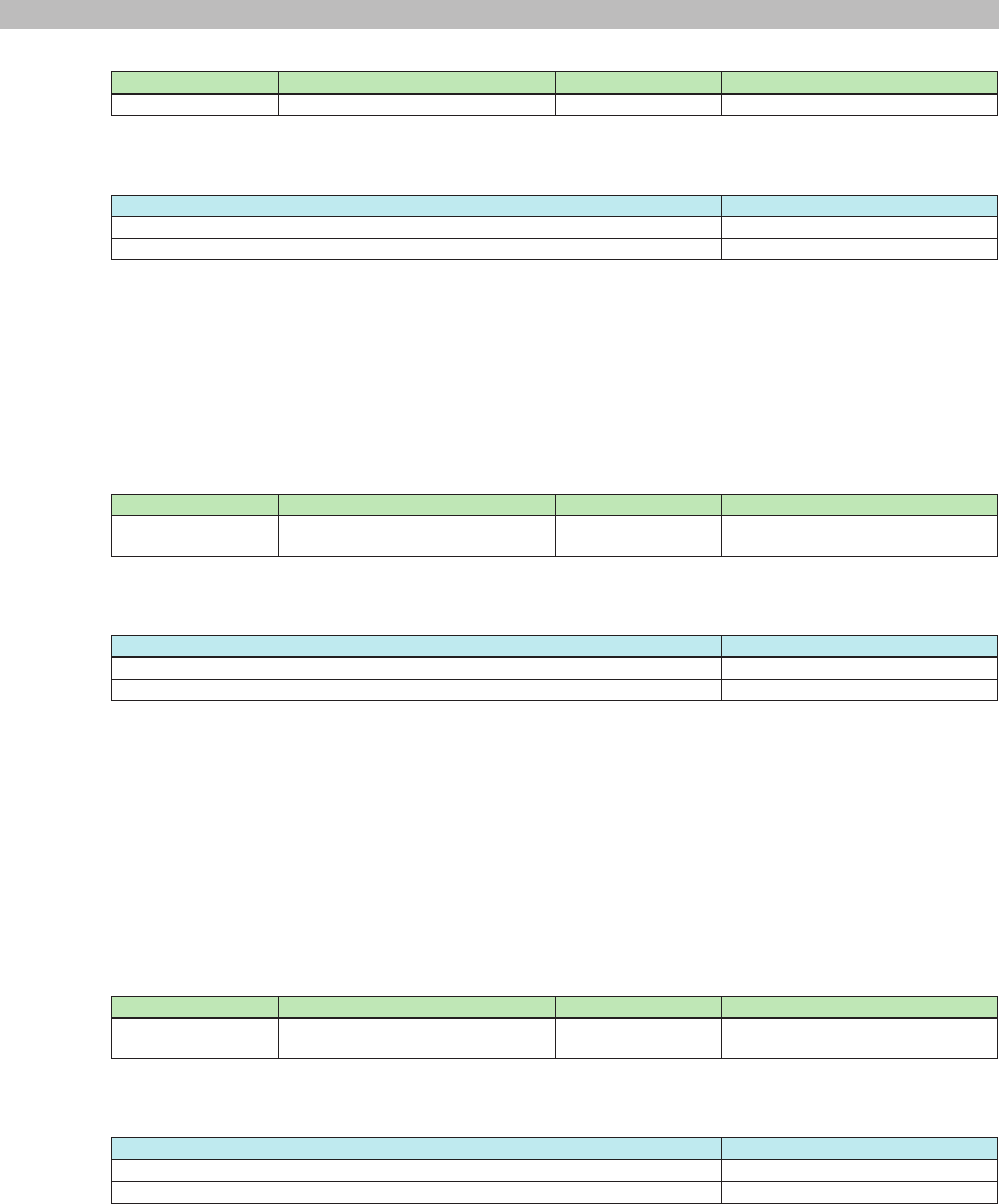
3-29) Folder name query
Command Option 1 Option 2 Description
event MTX:AudioPlayerGetDirName "dirindex=xxxx" Folder name query
Details: xxxx = Index number
Response
Response string Description
OK event MTX:AudioPlayerGetDirName "dirname=xxxx" Folder name
OKm event MTX:AudioPlayerGetDirName "sdcard is not inserted" There is no SD memory card inserted.
* OKm is returned if there is no SD memory card inserted.
Details: xxxx = Folder name
Example: Command: event MTX:AudioPlayerGetDirName "dirindex=1"
Notication: OK event MTX:AudioPlayerGetDirName "dirname=songs"
Meaning: Query the directory name of 1 (index expression).
The directory name is "songs".
MTX3/MTX5-D/XMV Series/EXi8/EXo8 Remote Control Protocol Specications V1.0.3 30
3. Command Specications
3-30) File name query
Command Option 1 Option 2 Description
event MTX:AudioPlayerGetFileName "leindex=xxxx" File name query
Details: xxxx = Index number
Response
Response string Description
OK event MTX:AudioPlayerGetFileName "lename=xxxx" File name
OKm event MTX:AudioPlayerGetFileName "sdcard is not inserted" There is no SD memory card inserted.
* OKm is returned if there is no SD memory card inserted.
Details: xxxx = File name
Example: Command: event MTX:AudioPlayerGetFileName "leindex=1"
Notication: OK event MTX:AudioPlayerGetFileName "lename=xxxx.mp3"
Meaning: Query the le name of 1 (index expression).
The le name is "xxxx.mp3".
3-31) Folder name list query
Command Option 1 Option 2 Description
event MTX:AudioPlayerGetDirNameList "dirindex=xxxx-xxxx" Folder name list: Multiple folder name
query
Details: xxxx = Index number
Response
Response string Description
OK event MTX:AudioPlayerGetDirNameList "dirindex=xxxx-xxxx|dirname0=xxxx| ... " Folder name list
OKm event MTX:AudioPlayerGetDirNameList "sdcard is not inserted" There is no SD memory card inserted.
* OKm is returned if there is no SD memory card inserted.
Details: xxxx-xxxx= First list number-last list number (decimal notation)
→ Cannot be set to a value greater than the number of folders.
→ The rst number cannot be greater than the last number.
→ By changing the rst and last numbers, you can query the list of folder names in that range.
Example: Command: event MTX:AudioPlayerGetDirNameList "dirindex=0-1"
Notication: OK event MTX:AudioPlayerGetDirNameList "dirindex=0-1|dirname0=Folder #1|dirname1=Folder #2"
Meaning: Query the directory names of 0 and 1 (index expression).
The directory name of 0 is "Folder #1", and that of 1 is "Folder #2".
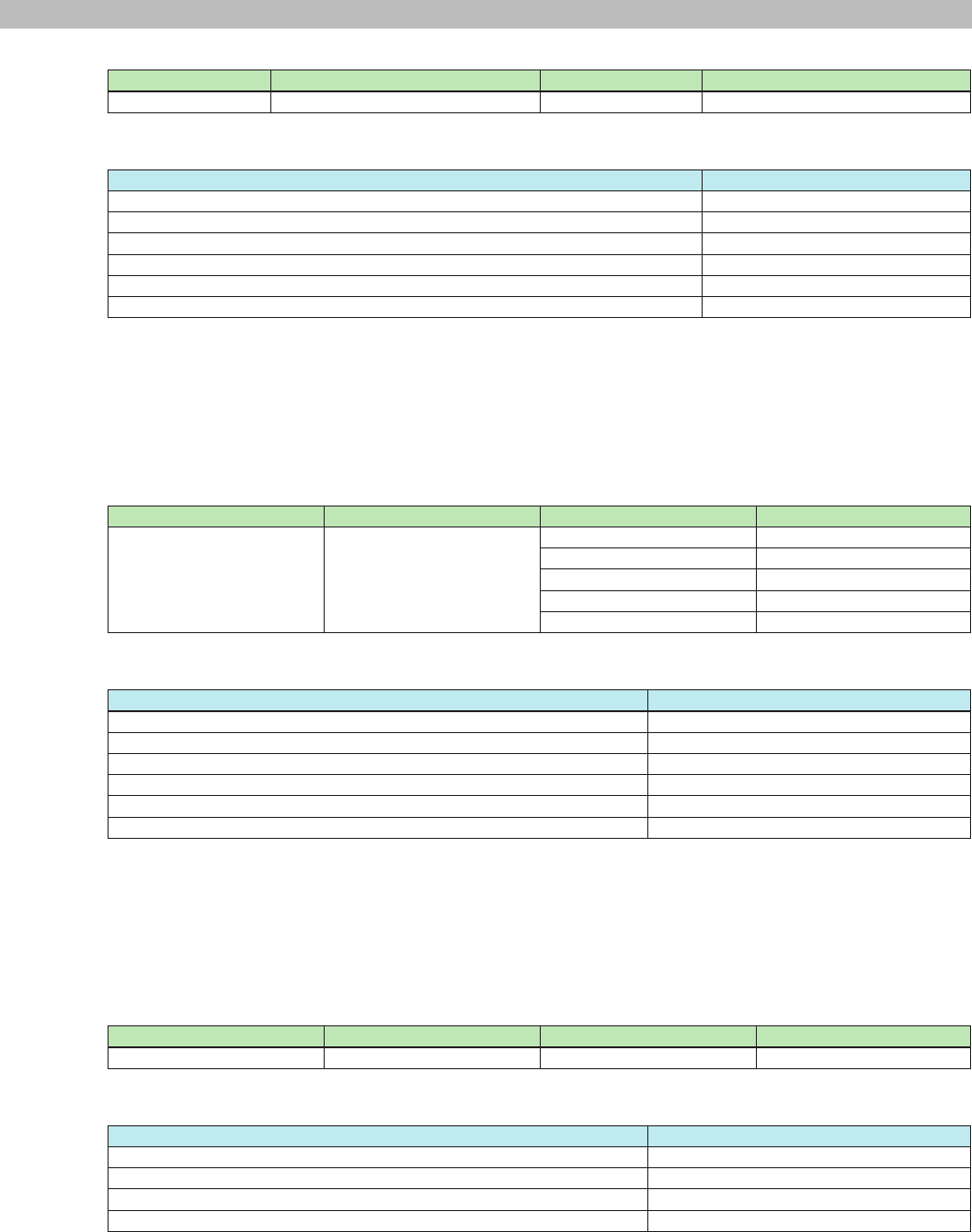
3-32) File name list query
Command Option 1 Option 2 Description
event MTX:AudioPlayerGetFileNameList "leindex=xxxx-xxxx" Folder name list: Multiple le name
query
Details: xxxx = Index number
Response
Response string Description
OK event MTX:AudioPlayerGetFileNameList "leindex=xxxx-xxxx|lename0=xxxx| ... " File name list
OKm event MTX:AudioPlayerGetFileNameList "sdcard is not inserted" There is no SD memory card inserted.
* OKm is returned if there is no SD memory card inserted.
Details: xxxx-xxxx= First list number-last list number (decimal notation)
→ Cannot be set to a value greater than the number of les.
→ The rst number cannot be greater than the last number.
→ By changing the rst and last numbers, you can query the list of le names in that range.
Example: Command: event MTX:AudioPlayerGetFileNameList "leindex=0-1"
Notication: OK event MTX:AudioPlayerGetFileNameList "leindex=0-1|lename0=xxxx.mp3|lename1=xxxx2.mp3"
Meaning: Query the le names of 0 and 1 (index expression).
The le name of 0 is "xxxx.mp3", and that of 1 is "xxxx2.mp3".
MTX3/MTX5-D/XMV Series/EXi8/EXo8 Remote Control Protocol Specications V1.0.3 31
3. Command Specications
3-33) Song play mode query
Command Option 1 Option 2 Description
event MTX:AudioPlayerGetPlayMode "" Queries the play mode
Response
Response string Description
OK event MTX:AudioPlayerGetPlayMode "playmode=one" One song play mode
OK event MTX:AudioPlayerGetPlayMode "playmode=repeat one" One song repeat
OK event MTX:AudioPlayerGetPlayMode "playmode=all" All song play
OK event MTX:AudioPlayerGetPlayMode "playmode=repeat all" All songs repeat
OK event MTX:AudioPlayerGetPlayMode "playmode=shufe" Shufe repeat
OKm event MTX:AudioPlayerGetPlayMode "sdcard is not inserted" There is no SD memory card inserted.
* OKm is returned if there is no SD memory card inserted.
Example: Command: event MTX:AudioPlayerGetPlayMode ""
Notication: OK event MTX:AudioPlayerGetPlayMode "playmode=one"
Meaning: Query the play mode.
The play mode is set to one song play mode.
3-34) Song play mode setting
Command Option 1 Option 2 Description
event MTX:AudioPlayerSetPlayMode "playmode=one" One song play mode
"playmode=repeat one" One song repeat
"playmode=all" All song play
"playmode=repeat all" All songs repeat
"playmode=shufe" Shufe repeat
Response
Response string Description
OK event MTX:AudioPlayerSetPlayMode "playmode=one" One song play mode
OK event MTX:AudioPlayerSetPlayMode "playmode=repeat one" One song repeat
OK event MTX:AudioPlayerSetPlayMode "playmode=all" All song play
OK event MTX:AudioPlayerSetPlayMode "playmode=repeat all" All songs repeat
OK event MTX:AudioPlayerSetPlayMode "playmode=shufe" Shufe repeat
OKm event MTX:AudioPlayerSetPlayMode "sdcard is not inserted" There is no SD memory card inserted.
* OKm is returned if there is no SD memory card inserted.
Example: Command: event MTX:AudioPlayerSetPlayMode "playmode=one"
Notication: OK event MTX:AudioPlayerSetPlayMode "playmode=one"
Meaning: Set the play mode to one song play mode.
The play mode was set to one song play mode.
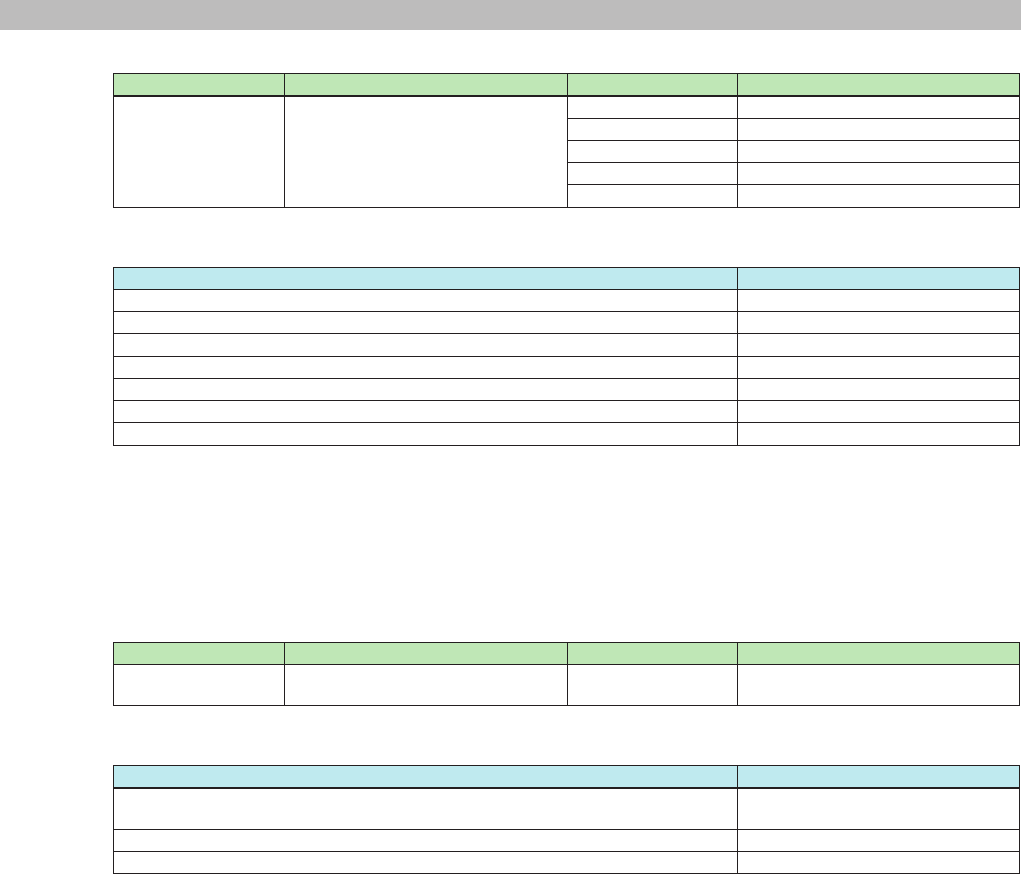
3-35) Song playback status query
Command Option 1 Option 2 Description
event MTX:AudioPlayerGetStatus "" Song playback status query
Response
Response string Description
OK event MTX:AudioPlayerGetStatus "status=stop" Stop
OK event MTX:AudioPlayerGetStatus "status=play" Play
OK event MTX:AudioPlayerGetStatus "status=pause" Pause
OKm event OK event MTX:AudioPlayerGetStatus "sdcard is not inserted" There is no SD memory card inserted.
* OKm is returned if there is no SD memory card inserted.
Example: Command: event MTX:AudioPlayerGetStatus ""
Notication: OK event MTX:AudioPlayerGetStatus "status=stop"
Meaning: Query the song playback status.
Stopped
MTX3/MTX5-D/XMV Series/EXi8/EXo8 Remote Control Protocol Specications V1.0.3 32
3. Command Specications
3-36) Play, stop, and other transport operation
Command Option 1 Option 2 Description
event MTX:AudioPlayerTransport "operation=stop" Stop
"operation=play" Play
"operation=pause" Pause
"operation=prev" Beginning of the previous song
"operation=next" Next song
Response
Response string Description
OK event MTX:AudioPlayerTransport "operation=stop" Stop
OK event MTX:AudioPlayerTransport "operation=play" Play
OK event MTX:AudioPlayerTransport "operation=pause" Pause
OK event MTX:AudioPlayerTransport "operation=prev" Beginning of the previous song
OK event MTX:AudioPlayerTransport "operation=next" Next song
OKm event MTX:AudioPlayerTransport "sdcard is not inserted" There is no SD memory card inserted.
OKm event MTX:AudioPlayerTransport "song is not set up" The playback song is not specied.
* OKm is returned if there is no SD memory card inserted or the playback song is not specied.
Example: Command: event MTX:AudioPlayerTransport "operation=stop"
Notication: OK event MTX:AudioPlayerTransport "operation=stop"
Meaning: Stop playback.
Playback was stopped.
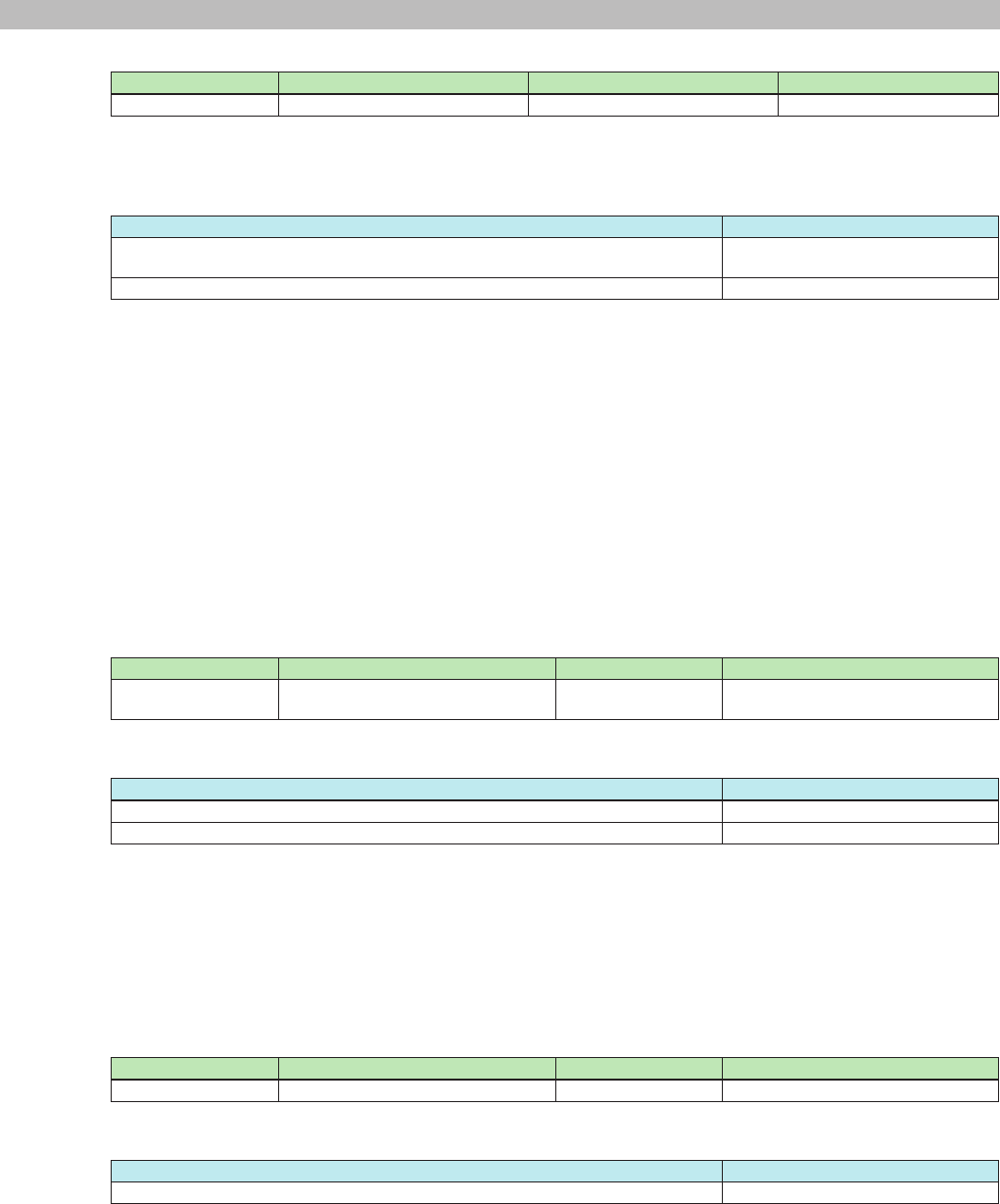
3-37) Currently playing or selected song information query
Command Option 1 Option 2 Description
event MTX:AudioPlayerGetCurrentSong "" Queries the currently playing or
selected song information
Response
Response string Description
OK event MTX:AudioPlayerGetCurrentSong "dirpath=xxxx|dirname=yyyy|
leindex=zzzz|lename=wwww"
Currently playing or selected song
information
OKm event MTX:AudioPlayerGetCurrentSong "sdcard is not inserted" There is no SD memory card inserted.
OKm event MTX:AudioPlayerGetCurrentSong "song is not set up" The playback song is not specied.
* OKm is returned if there is no SD memory card inserted or the playback song is not specied.
Details: xxxx = Directory path (index expression)
yyyy = Directory name (name of the folder)
zzzz = File index
wwww = File name
Example: Command: event MTX:AudioPlayerGetCurrentSong ""
Notication: OK event MTX:AudioPlayerSetCurrentSong "dirpath=0/1|dirname=Folder #1|leindex=2|
lename=xxxx.mp3"
Meaning: Query the information of the song currently being played.
The song that is being played is index number 2 "xxxx.mp3" in the "Folder #1" folder of 0/1
(index expression).
* "0/1" expresses the root folder number/sub folder number (the root folder number is always xed at 0).
MTX3/MTX5-D/XMV Series/EXi8/EXo8 Remote Control Protocol Specications V1.0.3 33
3. Command Specications
3-38) Playback song designation
Command Option 1 Option 2 Description
event MTX:AudioPlayerSetCurrentSong "dirpath=xxxx|leindex=yyyy" Playback song designation
Details: xxxx= Directory path (index expression)
yyyy= File index
Response
Response string Description
OK event MTX:AudioPlayerSetCurrentSong "dirpath=xxxx|dirname=yyyy|
leindex=zzzz|lename=wwww"
The specied song that will be played
OKm event MTX:AudioPlayerSetCurrentSong "sdcard is not inserted" There is no SD memory card inserted.
* OKm is returned if there is no SD memory card inserted.
Details: xxxx = Directory path (index expression)
yyyy = Directory name (name of the folder)
zzzz = File index
wwww = File name
Example: Command: event MTX:AudioPlayerSetCurrentSong "dirpath=0/1|leindex=2"
Notication: OK event MTX:AudioPlayerSetCurrentSong "dirpath=0/1|dirname=Folder #1|leindex=2|
lename=xxxx.mp3"
Meaning: Play the le at index number 2 in the 0/1 folder (index expression).
The playback song was set to index number 2 "xxxx.mp3" in the "Folder #1" folder of 0/1
(index expression).
* "0/1" expresses the root folder number/sub folder number (the root folder number is always xed at 0).
3-39) MTX Editor synchronization processing query
Command Option 1 Option 2 Description
event MTX:SynchronizationGetStatus "" MTX Editor synchronization
processing query
Response
Response string Description
OK event MTX:SynchronizationGetStatus "active" In the process of synchronizing
OK event MTX:SynchronizationGetStatus "inactive" Not in the process of synchronizing
Example: Command: event MTX:SynchronizationGetStatus ""
Notication: OK event MTX:SynchronizationGetStatus "inactive"
Meaning: Query the synchronization status between the MTX and MTX Editor.
Not in the process of synchronizing
Note: The character encoding for directory and le names conforms to the setting specied by the scpmode encoding
command.
3-40) Number of alert event log query
Command Option 1 Option 2 Description
event MTX:EventLogGetLogNumber "" Number of event log query
Response
Response string Description
OK event MTX:EventLogGetLogNumber "lognum=xxxx" Number of event log
Details: xxxx= number of event log
Example: Command: event MTX:EventLogGetLogNumber ""
Notication: OK event MTX:EventLogGetLogNumber "lognum=6"
Meaning: Query the number of event logs
Number of event log is 6
MTX3/MTX5-D/XMV Series/EXi8/EXo8 Remote Control Protocol Specications V1.0.3 34
3. Command Specications
3-41) Alert event log query
Command Option 1 Option 2 Description
event MTX:EventLogGetLog "logindex=xxxx" Event log query
Details: xxxx= Index number of event log
Response
Response string Description
OK event MTX:EventLogGetLog "logxxxx=(AlertData)" Event log
Details: xxxx= Index number of event log
(AlertData)= "t/message// xnnn onf (sssss) ID-xxx yyyy/mm/dd hh:mm:ss"
"err/message// xnnn onf (sssss) ID-xxx yyyy/mm/dd hh:mm:ss"
"wrn/message// xnnn onf (sssss) ID-xxx yyyy/mm/dd hh:mm:ss"
First 3 letter describes type of event ( i.e. t = fault, err = error, wrn = warning)
message = Alert message string - Maximum 32 letter (ascii character)
nnn = Alert number (same as number that displayed front panel) - 2 or 3 digit of hexadecimal.
onf = alert ON/OFF
Event of status change (e.g. wordclock unlock) sends ON when the remarkable
event starts, sends OFF when the event ends.
Momentary event (e.g. SD card player error) sends only ON when it happens.
sssss = counter of alarm ( Count up same Alert, normally as 1) as decimal counter.
xxx = UNIT ID as 3 degit hexadecimal.
yyyy = Year (Gregorian)
mm = Month (1 to 12)
dd = Day (1 to 31)
hh = Hour (0 to 23)
mm = Minute (0 to 59)
ss = Second (0 to 59)
Example: Command: event MTX:EventLogGetLog "logindex=2"
Notication: OK event MTX:EventLogGetLog "log2=err/DCP[0] communication error// x53 on (1) ID-001
2013/1/22 11:38:23"
Meaning: Query of event log at index number 2.
Event log of index no.2 is error alert no. 53.
MTX3/MTX5-D/XMV Series/EXi8/EXo8 Remote Control Protocol Specications V1.0.3 35
3. Command Specications
3-42) Query for alert event log as list
Command Option 1 Option 2 Description
event MTX:EventLogGetLogList "logindex=xxxx-xxxx" Query for event log list
Details: xxxx-xxxx= First index number - Last index number
Remark: Do not allow exceed number of event log.
First index number should be less than Last index number.
One message can query up to 10 logs.
Response
Response string Description
OK event MTX:EventLogGetLogList "logindex=x-x|log0=(AlertData)|log1=(AlertData)|…" Query for event log as list
Details: xxxx-xxxx= First index number - Last index number
(AlertData)= "t/message// xnnn onf (sssss) ID-xxx yyyy/mm/dd hh:mm:ss"
"err/message// xnnn onf (sssss) ID-xxx yyyy/mm/dd hh:mm:ss"
"wrn/message// xnnn onf (sssss) ID-xxx yyyy/mm/dd hh:mm:ss"
First 3 letter describes type of event
message = Alert message string - Maximum 32 letter (ascii character)
nnn = Alert number (same as number that displayed front panel)
- 2 or 3 digit of hexadecimal.
onf = alert ON/OFF
Event of status change (e.g. wordclock unlock) sends ON when the remarkable
event starts, sends OFF when the event ends.
Momentary event (e.g. SD card player error) sends only ON when it happens.
sssss = counter of alarm ( Count up same Alert, normally as 1) as decimal counter.
xxx = UNIT ID as 3 degit hexadecimal.
yyyy = Year (Gregorian)
mm = Month (1 to 12)
dd = Day (1 to 31)
hh = Hour (0 to 23)
mm = Minute (0 to 59)
ss = Second (0 to 59)
Example: command: event MTX:EventLogGetLogList "logindex=0-5"
Notication: OK event MTX:EventLogGetLogList logindex=0-5|log0=err/DCP[0] communication error// x53 on (1)
ID-001 2013/1/22 11:38:23|log1=t/System error// x01 on ….
Meanings: Query for list of event log of index number 0 to 5.
Alert of index number 0 to 5 is, index number 0, error alert no.53/ index number 1, error alert ….
3-43) Clear alert event log
Command Option 1 Option 2 Description
event MTX:EventLogClear "" Clear event log
Response
Response string Description
OK event MTX:EventLogClear "lognum=0" Number of cleared event log
Example: Command: event MTX:EventLogClear ""
Notication: OK event MTX:EventLogClear "lognum=0"
Meaning: Clear event log
Cleared event log
MTX3/MTX5-D/XMV Series/EXi8/EXo8 Remote Control Protocol Specications V1.0.3 36
3. Command Specications
3.5. Command Errors
3.5.1. Command Error Notications
Error notication that indicates errors in commands.
If an error is found when the command is sent, this notication is returned instead of the normal successful notication.
[Notication syntax] ERROR <command name> <error code>
Command name Alphanumeric Name of the command that caused the error
Error code Alphanumeric Error description
* See the error codes below.
Error code
Error code Description
UnknownCommand Ignored because it was an unknown command.
WrongFormat Ignored because the command parameter format was wrong and could not be interpreted.
Examples: The number of parameters is wrong.
The parameter syntax is wrong.
InvalidArgument Ignored because the command parameter content was outside the appropriate range and
could not be interpreted.
Examples: The parameter value is outside the range.
The parameter syntax does not comply with the specications.
The letter case of the parameter is wrong.
UnknownAddress Ignored because the specied address does not exist.
UnknownEventID Ignored because the specied event ID does not exist.
TooLongCommand Could not be interpreted because the command was too long.
AccessDenied Procedure rejected because the peer device is not in an normal running state.
Examples: Rejected because an ssrecall command was received in emergency run
mode.
Busy The device is busy processing; it can’t receive commands.
ReadOnly Ignored because an attempt was made to set a parameter at a read-only address.
NoPermission Ignored because you do not have access permission.
InternalError An internal error may have occurred.
Examples: Failed to process the command.
Attempted to query or change the value of a parameter that does not exist
in the device.
MTX3/MTX5-D/XMV Series/EXi8/EXo8 Remote Control Protocol Specications V1.0.3 37
4. Command Sequence
Below are examples of how to process remote control.
When viewed from the controller, the following major phases exist in order to perform remote control.
Start procedure
Communication start
• Wait for the device to start (devstatus)
Detects the operation
of controls by the user.
• Operation of a parameter control
• Operation of a snapshot (preset)
control
• set
• setn
• sett
• setr
• ssrecall, etc.
Send request commands
depending on the
operation.
Initial setting
• MTX external control protocol setting
(scpmode)
• Parameter syncing (get, set, etc.)
Normal procedure
• Detect operation of controls.
• Receive communication from the
device.
Information query trigger
caused by user operation
• snapshot (preset) display
• device information display
• sscurrent
• ssnum
• ssinfo
• devinfo, etc.
Send request commands
depending on the
necessary information.
Meter display is necessary. • mtrstart
Request periodically.
• OK
• OKm
• NOTIFY
Control or display
• Position change
• Display change
For various events
• Parameter syncing
• Event processing
Apply changes depending on the
notification.
The controller designer needs to design and implement the blue items in the above gure.
The detailed sequences of various procedures are provided below.
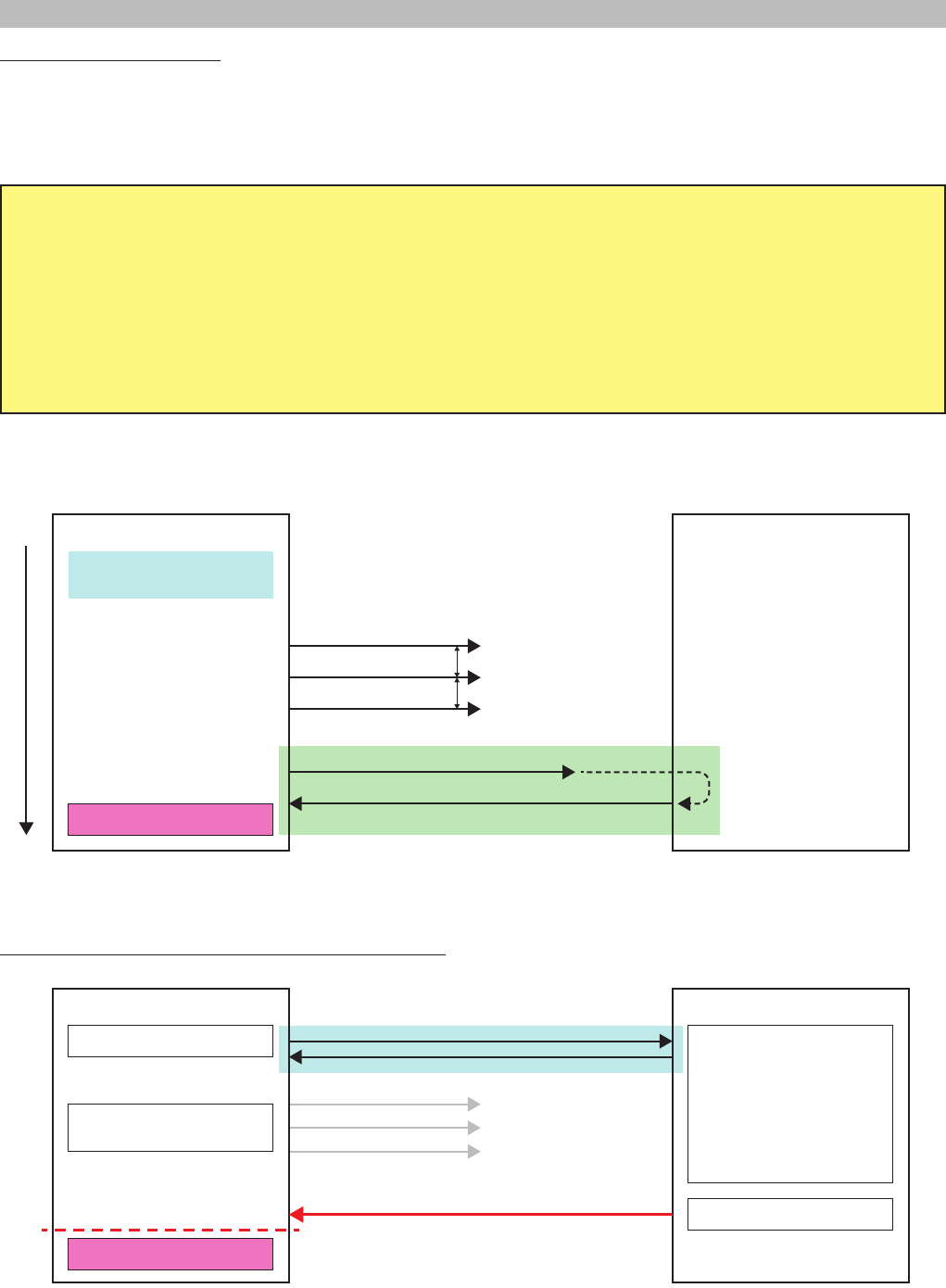
MTX3/MTX5-D/XMV Series/EXi8/EXo8 Remote Control Protocol Specications V1.0.3 38
4. Command Sequence
Communication start sequence
The amount of time for the controller and the controlled device to start is different.
Remote control is an act of controlling the controlled device from the controller, so the controller must wait for the controlled device to become
ready.
The controller needs to wait using the sequence below.
1. If an Ethernet connection is required, the remote controller needs to establish a logical session, with the MTX device(s) based on IP
address(es) and port number.
(This is not necessary for a connection that only needs to be connected physically, as in RS-232C.)
2. After the session is established, the controller sends devstatus commands at 1 second or longer intervals.
3. If "OK devstatus runmode" is returned, the controller should check the information.
4. If the controller determines that the controlled device is in normal running mode, the controller can start sending command strings to
change parameter value and preset etc. If the controlled device is not in normal running mode, the controller continues trying.
Note: In order to establish remote control communication, the external controller must send [devstatus runmode] command to the device and
await response. When the device responds as [OK devstatus runmode "normal"], the device is ready to receive commands.
Remote controller
Establish communication path to
controlled device.
* If the communication path is
already established, the
controller sends devstatus
runmode at 1 second or longer
intervals until a result
notification is returned.
The controller checks the run
mode included in the result
notifications to see if the
device is ready to start remote
control communication.
The device may also actively
send change notifications, so
the controller must monitor
both result and change
notifications.
Controlled device
Connection detected.
Time
devstatus runmode
devstatus runmode
OK devstatus runmode "normal"
devstatus runmode
devstatus runmode
........
1 second or longer intervals
1 second or longer intervals
The reason for using such a sequence is provided below.
Example when the controller starts earlier than the controlled device
devstatus runmode
devstatus runmode
devstatus runmode
Remote controller
Normally running
Connection unknown
Waiting to start
Controlled device
Connection detection
Connected physically
........
OK devstatus runmode "normal"
Device starting
Device normal running
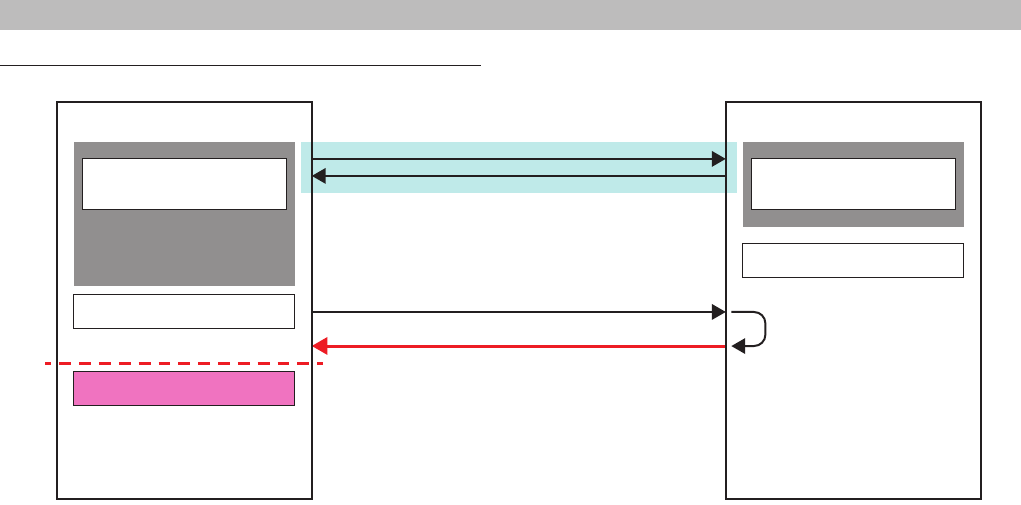
MTX3/MTX5-D/XMV Series/EXi8/EXo8 Remote Control Protocol Specications V1.0.3 39
4. Command Sequence
Example when the controlled device starts earlier than the controller
OK devstatus runmode "normal"
Remote controller
Starting Device starting
Connection unknown
* With the first devstatus runmode
request, a result notification is
returned.
Controlled device
Connection detection
Connected physically
Device normal running
devstatus runmode
Controller can recognize that Controlled device is ready to receive commands when there is response for "devstatus runmode" command.
In case of Ethernet connection, Ethernet logical session (e.g. port open) should be established before sending "devstatus runmode".
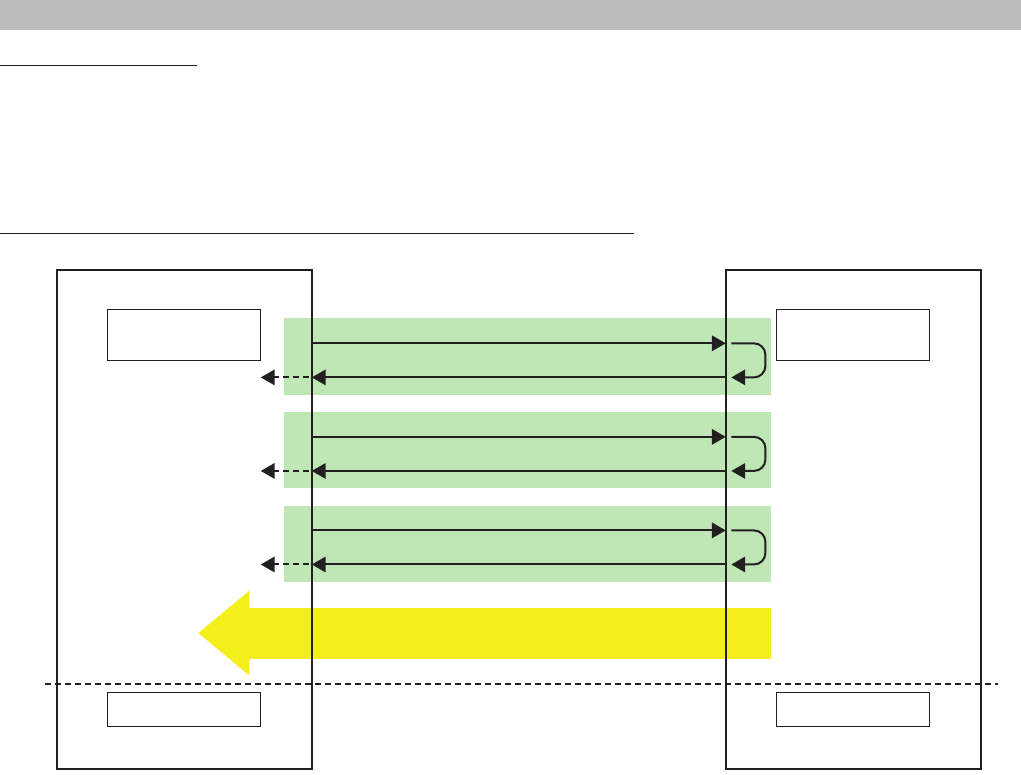
MTX3/MTX5-D/XMV Series/EXi8/EXo8 Remote Control Protocol Specications V1.0.3 40
4. Command Sequence
Parameter sync sequence
Immediately after communication starts, the controller does not know anything about the most recent status of the controlled device.
Therefore, the controller must query all parameters that it plans to handle.
This also applies for when preset recall is executed, because the controller does not know how the device has changed.
Querying the most recent status of the controlled device or when a snapshot recall occurs
Remote controller Controlled device
Synced Synced
OK get MTX:mem_512/60000/0/0/0/0/0 0 0 -7760
get MTX:mem_512/60000/0/0/0/0/0 0 0
Normally running
Connection detection
Normally running
Communication possible
Apply
OK get MTX:mem_XXX/XXXXX/X/X/X/X/X X X
get MTX:mem_XXX/XXXXX/X/X/X/X/X X X
Apply
OK get MTX:mem_XXX/XXXXX/X/X/X/X/X X X
* Repeat get for all the necessary parameters.
get MTX:mem_XXX/XXXXX/X/X/X/X/X X X
Apply
......
Example 1: Query the DCA fader value.
get MTX:mem_512/60000/0/0/0/0/0 0 0
Query the 1ch level of the DCA fader with raw values.
OK get MTX:mem_512/60000/0/0/0/0/0 0 0 -7760
The 1ch level of the DCA fader is -77.60.
Example 2: Set the DCA fader value.
set MTX:mem_512/60000/0/0/0/0/0 0 0 -7760
Set the 1ch level of the DCA fader to a raw value of -77.60.
OK set MTX:mem_512/60000/0/0/0/0/0 0 0 -7760 "-77.60"
The 1ch level of the DCA fader was set to "-77.60".
Executing this sequence synchronizes the status with the controlled device.
However, if the controller receives a change notication from the controlled device during this query sequence, the controller needs to query
again.
Note that, as with a GPI controller made by user, if you want to apply the physical positions of the controller to the device, there is no need to
execute the above sequence.
If you want to apply the physical positions of the controller to the device immediately after a connection is established, without any user
interaction, simply use set commands to do so.
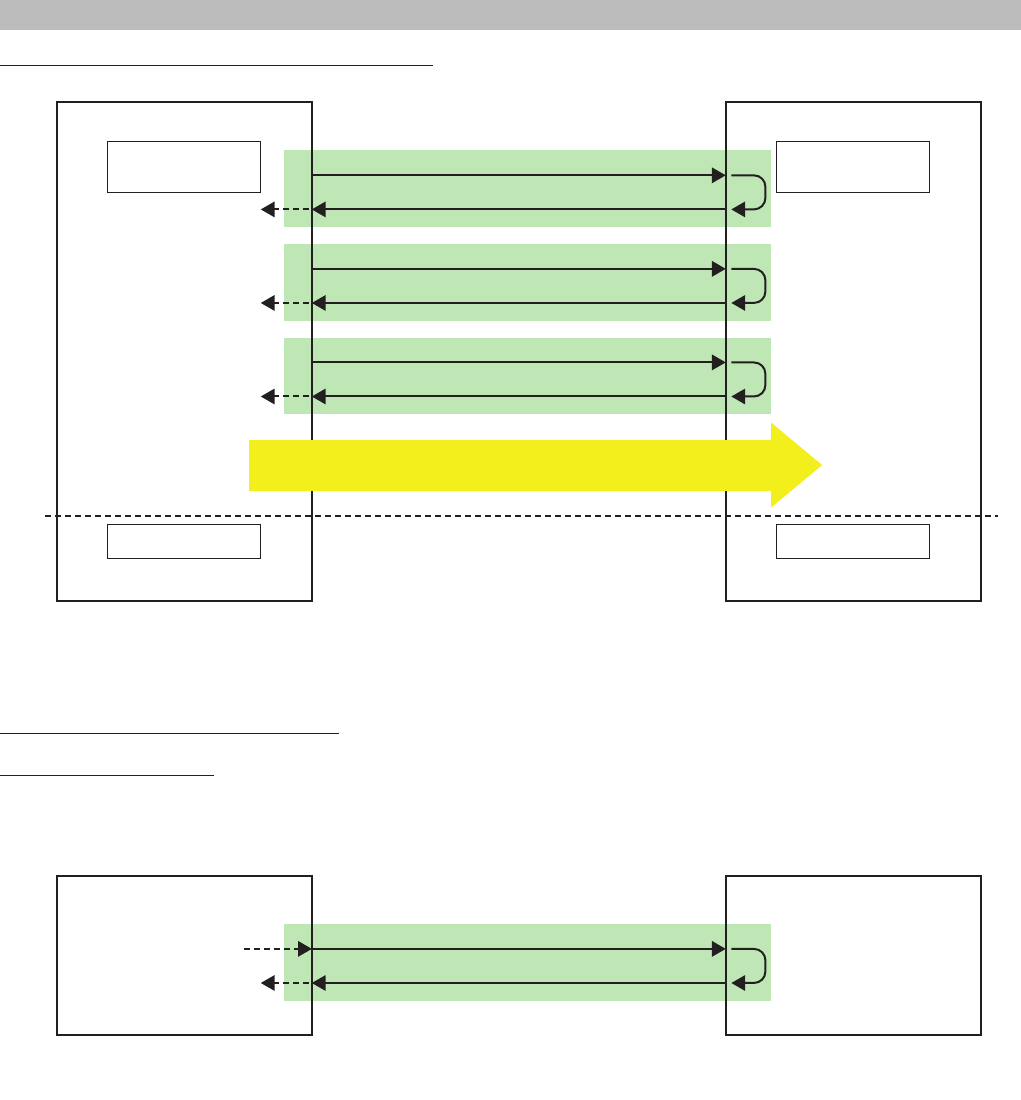
MTX3/MTX5-D/XMV Series/EXi8/EXo8 Remote Control Protocol Specications V1.0.3 41
4. Command Sequence
Applying the most recent status of the controller to the device
Remote controller Controlled device
Synced Synced
OK set MTX:mem_512/60000/0/0/0/0/0 0 0 -7760 "-77.60"
set MTX:mem_512/60000/0/0/0/0/0 0 0 -7760
Normally running
Connection detection
Normally running
Communication possible
Apply
OK set MTX:mem_XXX/XXXXX/X/X/X/X/X X X XXXX "XXXX"
OK set MTX:mem_XXX/XXXXX/X/X/X/X/X X X XXXX
Apply
OK set MTX:mem_XXX/XXXXX/X/X/X/X/X X X XXXX "XXXX"
* Repeat get for all the necessary parameters.
OK set MTX:mem_XXX/XXXXX/X/X/X/X/X X X XXXX
Apply
......
Depending on the controller specications, the above two sequences may be used in combination.
Example: The GPI fader uses the status of the controller, but other parameters use the status of the controlled device.
Parameter query sequence at any given time
LEDs and displays on the GUI
Indications are updated on the basis of the result notications returned after the processing of the set commands.
Alternatively, send an explicit get request and apply the result to the indications, as shown below.
Remote controller Controlled device
OK get MTX:mem_512/XXXXX/X/X/X/X/X X X
get MTX:mem_512/XXXXX/X/X/X/X/X X X
An event occurs that
calls for a value to be queried
One example of using this sequence would
be for refreshing the UI after boot-up or after
changing tabs.
Apply
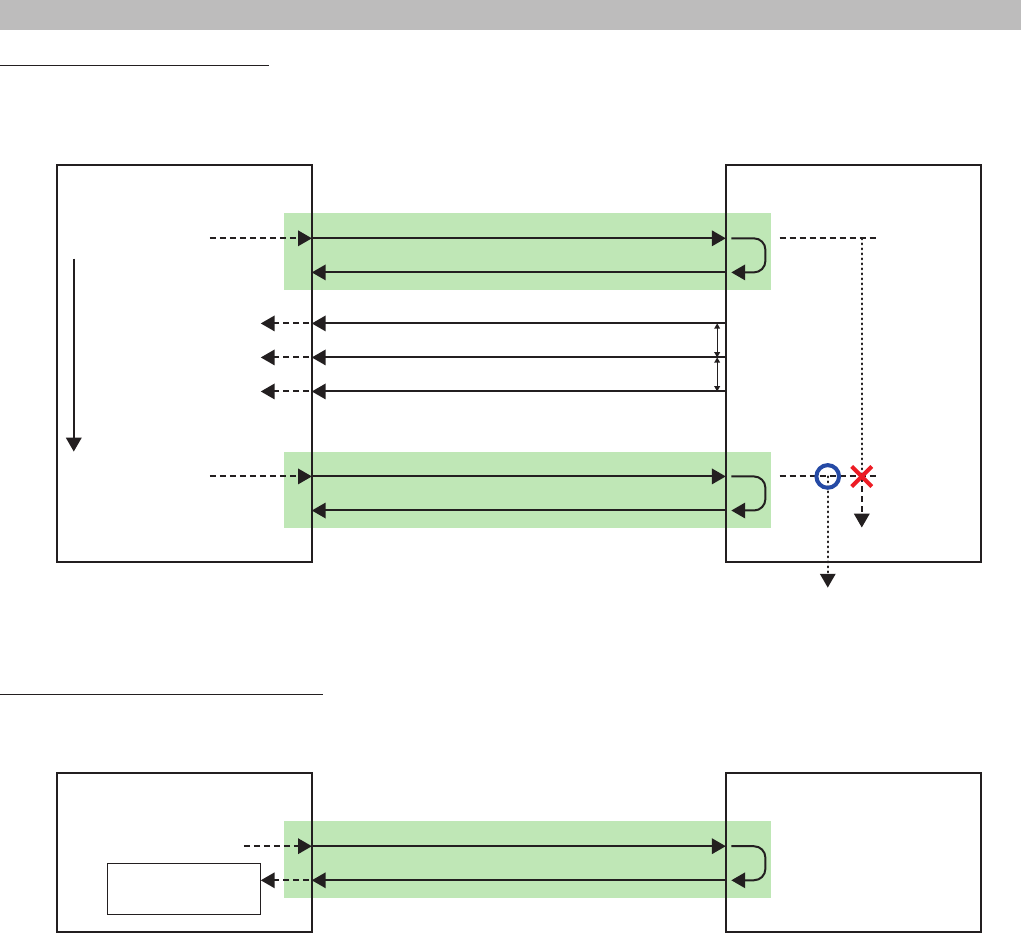
MTX3/MTX5-D/XMV Series/EXi8/EXo8 Remote Control Protocol Specications V1.0.3 42
4. Command Sequence
Meter data request/query sequence
The controller requests meter data by specifying the meter data address and the minimum transmission interval.
The meter transmission stops after 10 seconds. To continue receiving data, make another request before the 10 seconds pass.
Remote controller Controlled device
OK mtrstart MTX:mtr_512/20020/level
mtrstart MTX:mtr_512/20020/level 1000
OutputLevelMeter
request
Request periodically
at 10 seconds or
shorter intervals
OK mtrstart MTX:mtr_512/20020/level
mtrstart MTX:mtr_512/20020/level 1000
OutputLevelMeter
request
NOTIFY mtr MTX:mtr_512/20020/level level 71 71 ...
Apply
NOTIFY mtr MTX:mtr_512/20020/level level 70 70 ...
Apply
NOTIFY mtr MTX:mtr_512/20020/level level 69 69 ...
Apply
Start measuring
10 seconds
Start measuring
10 seconds
1000 ms or longer
intervals
1000 ms or longer
intervals
............
* Transmission for 10 seconds after a request
If another request is received, restart measuring the time.
Snapshot (preset) recall request sequence
Upon receiving a result notication in response to a snapshot (preset) request, you need to execute the parameter sync sequence.
Remote controller Controlled device
OK ssrecall 10
ssrecall 10
Remote control
To the parameter
sync sequence
In addition, if a snapshot (preset) recall occurs internally in the controlled device (e.g. by front panel button press) or when such a request is
received from another controller, the controller receives a change notication that indicates that all parameters have changed (see the next
section). If this occurs, the controller needs to execute the parameter sync sequence.
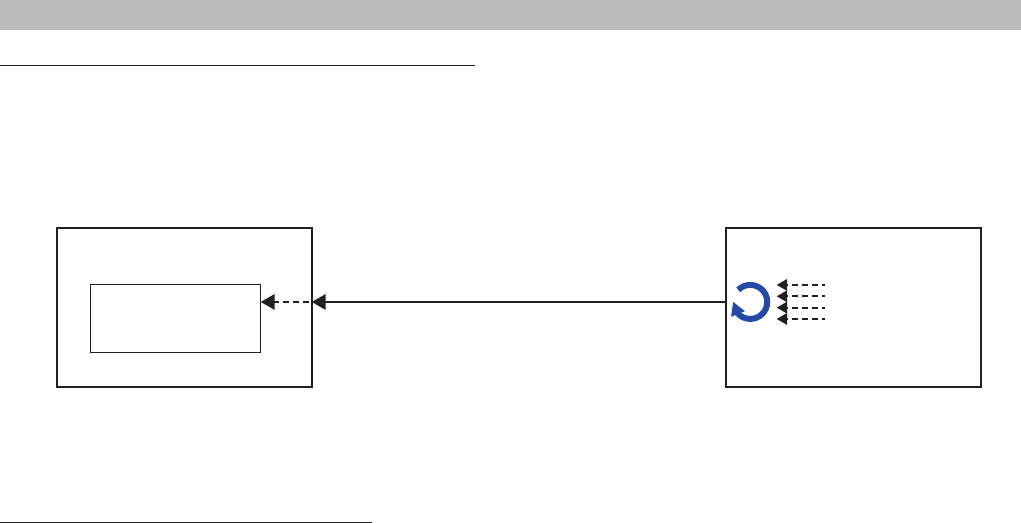
MTX3/MTX5-D/XMV Series/EXi8/EXo8 Remote Control Protocol Specications V1.0.3 43
4. Command Sequence
Sequence when parameters are changed by another controller
If the controller sends a parameter set request, a change notication is returned immediately.
However, if parameters change internally in the controlled device (this includes changes in parameters that occur as a result of a controller
operation on another parameter) or due to a request from another controller, a parameter change notication is received, as shown below.
The controller receiving a parameter change notication updates its own status if necessary.
Remote controller Controlled device
NOTIFY ...
Apply parameter changes
or proceed to the
parameter sync sequence
Recall operation or
parameter change
by the controlled device
or another controller
Sampled
parameter
changes
The way in which parameter change notications are sent varies depending on the value notication mode specied in the MTX external control
protocol mode.
Advice for choosing normalized/raw value mode.
If you want to handle a value with a given range, such as in an MIDI controller,
• Set the value notication mode to normalized value notication mode, and specify the required resolution.
• Use setn/getn to perform processing from the controller.
• Apply changes to the controller according to NOTIFY setn.
Conversely, for a highly functional PC application where you want to use all the internal parameters,
• Set the MTX external control protocol mode to raw value mode.
• Use set/get to perform processing from the controller.
• Apply changes to the controller according to NOTIFY set.
• Use setn/getn for certain parameters when necessary.

MTX3/MTX5-D/XMV Series/EXi8/EXo8 Remote Control Protocol Specications V1.0.3 44
5. Meter Value
1. Level Meter, Hold Meter
Value Data Value Data Value Data Value Data
00 -126dBFS or less 20 -94dBFS 40 -62dBFS 60 -30dBFS
01 -125dBFS 21 -93dBFS 41 -61dBFS 61 -29dBFS
02 -124dBFS 22 -92dBFS 42 -60dBFS 62 -28dBFS
03 -123dBFS 23 -91dBFS 43 -59dBFS 63 -27dBFS
04 -122dBFS 24 -90dBFS 44 -58dBFS 66 -26dBFS
05 -121dBFS 25 -89dBFS 45 -57dBFS 65 -25dBFS
06 -120dBFS 26 -88dBFS 46 -56dBFS 66 -24dBFS
07 -119dBFS 27 -87dBFS 47 -55dBFS 67 -23dBFS
08 -118dBFS 28 -86dBFS 48 -54dBFS 68 -22dBFS
09 -117dBFS 29 -85dBFS 49 -53dBFS 69 -21dBFS
0A -116dBFS 2A -84dBFS 4A -52dBFS 6A -20dBFS
0B -115dBFS 2B -83dBFS 4B -51dBFS 6B -19dBFS
0C -114dBFS 2C -82dBFS 4C -50dBFS 6C -18dBFS
0D -113dBFS 2D -81dBFS 4D -49dBFS 6D -17dBFS
0E -112dBFS 2E -80dBFS 4E -48dBFS 6E -16dBFS
0F -111dBFS 2F -79dBFS 4F -47dBFS 6F -15dBFS
10 -110dBFS 30 -78dBFS 50 -46dBFS 70 -14dBFS
11 -109dBFS 31 -77dBFS 51 -45dBFS 71 -13dBFS
12 -108dBFS 32 -76dBFS 52 -44dBFS 72 -12dBFS
13 -107dBFS 33 -75dBFS 55 -43dBFS 77 -11dBFS
14 -106dBFS 34 -74dBFS 54 -42dBFS 74 -10dBFS
15 -105dBFS 35 -73dBFS 55 -41dBFS 77 -9dBFS
16 -104dBFS 36 -72dBFS 56 -40dBFS 76 -8dBFS
17 -103dBFS 37 -71dBFS 57 -39dBFS 77 -7dBFS
18 -102dBFS 38 -70dBFS 58 -38dBFS 78 -6dBFS
19 -101dBFS 39 -69dBFS 59 -37dBFS 79 -5dBFS
1A -100dBFS 3A -68dBFS 5A -36dBFS 7A -4dBFS
1B -99dBFS 3B -67dBFS 5B -35dBFS 7B -3dBFS
1C -98dBFS 3C -66dBFS 5C -34dBFS 7C -2dBFS
1D -97dBFS 3D -65dBFS 5D -33dBFS 7D -1dBFS
1E -96dBFS 3E -64dBFS 5E -32dBFS 7E 0dBFS
1F -95dBFS 3F -63dBFS 5F -31dBFS 7F OVER
NOTE: A device may not be able to send all the values depending on how precise the device processes values internally.
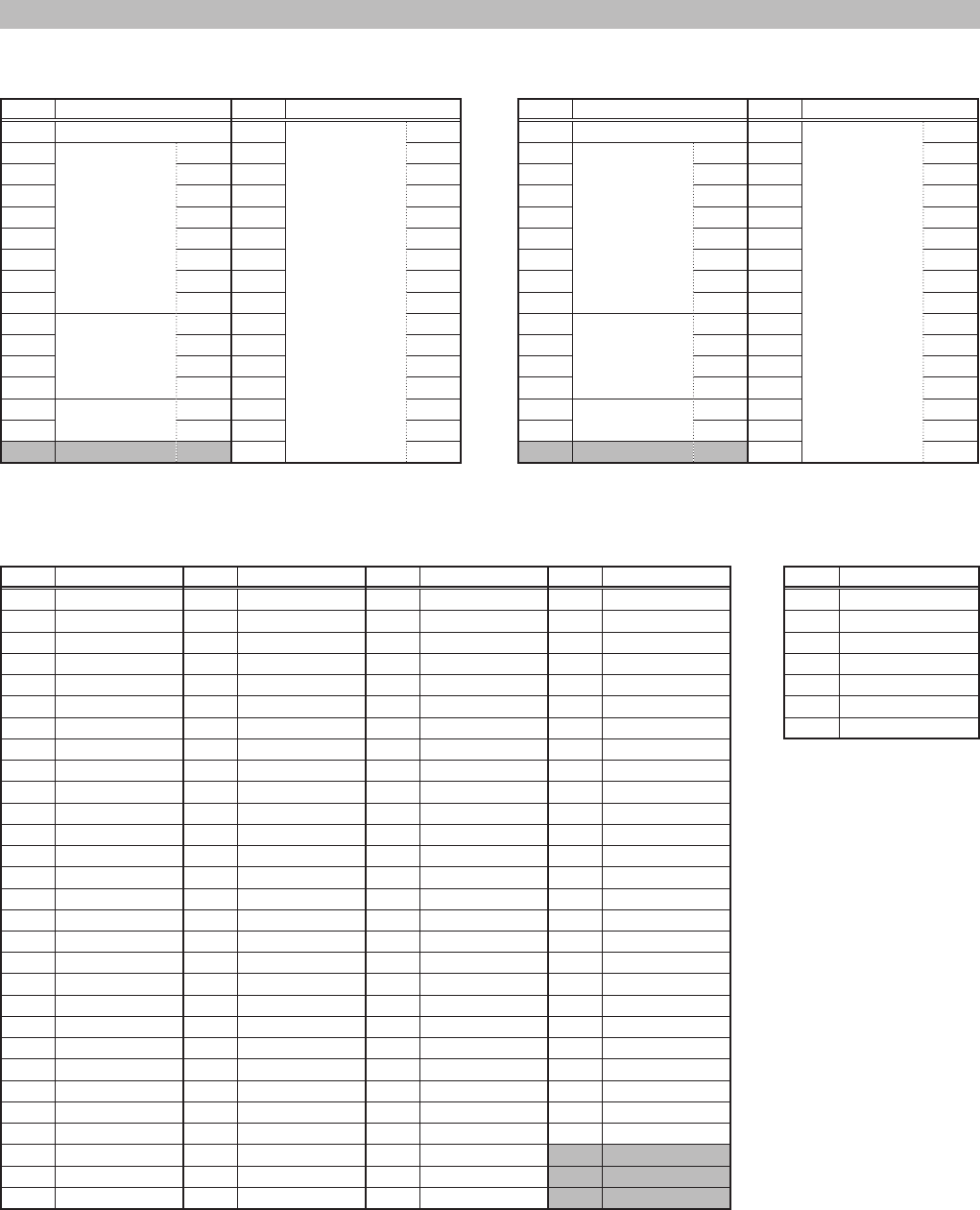
MTX3/MTX5-D/XMV Series/EXi8/EXo8 Remote Control Protocol Specications V1.0.3 45
6. Parameter Value Details
1. INPUT PATCH
MTX3
Value Displayed value Value Displayed value
0 NONE 15 YDIF 1
1 Input 1 16 2
2 2 17 3
3 3 18 4
4 4 19 5
5 5 20 6
6 6 21 7
7 7 22 8
8 8 23 9
9 ST IN 1L 24 10
10 1R 25 11
11 2L 26 12
12 2R 27 13
13 SD IN L 28 14
14 R 29 15
30 16
MTX5-D
Value Displayed value Value Displayed value
0 NONE 15 YDIF 1
1 Input 1 16 2
2 2 17 3
3 3 18 4
4 4 19 5
5 5 20 6
6 6 21 7
7 7 22 8
8 8 23 9
9 ST IN 1L 24 10
10 1R 25 11
11 2L 26 12
12 2R 27 13
13 SD IN L 28 14
14 R 29 15
30 16
2. 3BAND EQ / 4BAND EQ
Q
Value Displayed value Value Displayed value Value Displayed value Value Displayed value
0 0.1 29 0.53 58 2.8 87 15.0
1 0.105 30 0.56 59 3.0 88 16.0
2 0.11 31 0.6 60 3.2 89 17.0
3 0.12 32 0.63 61 3.3 90 18.0
4 0.125 33 0.67 62 3.5 91 19.0
5 0.13 34 0.7 63 3.8 92 20.0
60.14 35 0.75 64 4.0 93 21.0
70.15 36 0.8 65 4.2 94 22.0
8 0.16 37 0.85 66 4.5 95 24.0
9 0.17 38 0.9 67 4.7 96 25.0
10 0.18 39 0.95 68 5.0 97 27.0
11 0.19 40 1.0 69 5.3 98 28.0
12 0.2 41 1.05 70 5.6 99 30.0
13 0.21 42 1.1 71 6.0 100 32.0
14 0.22 43 1.2 72 6.3 101 34.0
15 0.24 44 1.25 73 6.7 102 35.0
16 0.25 45 1.3 74 7.0 103 38.0
17 0.27 46 1.4 75 7.5 104 40.0
18 0.28 47 1.5 76 8 105 42.0
19 0.3 48 1.6 77 8.4 106 45.0
20 0.32 49 1.7 78 9.0 107 47.0
21 0.33 50 1.8 79 9.5 108 50.0
22 0.35 51 1.9 80 10.0 109 53.0
23 0.38 52 2.0 81 10.5 110 56.0
24 0.4 53 2.1 82 11.0 111 60.0
25 0.42 54 2.2 83 12.0 112 63.0
26 0.45 55 2.4 84 12.5
27 0.47 56 2.5 85 13.0
28 0.5 57 2.7 86 14.0
Type
Value Displayed value
0 PEQ
1 L.SHELF 6dB/Oct
2 L.SHELF 12dB/Oct
3 H.SHELF 6dB/Oct
4 H.SHELF 12dB/Oct
5 HPF
6LPF
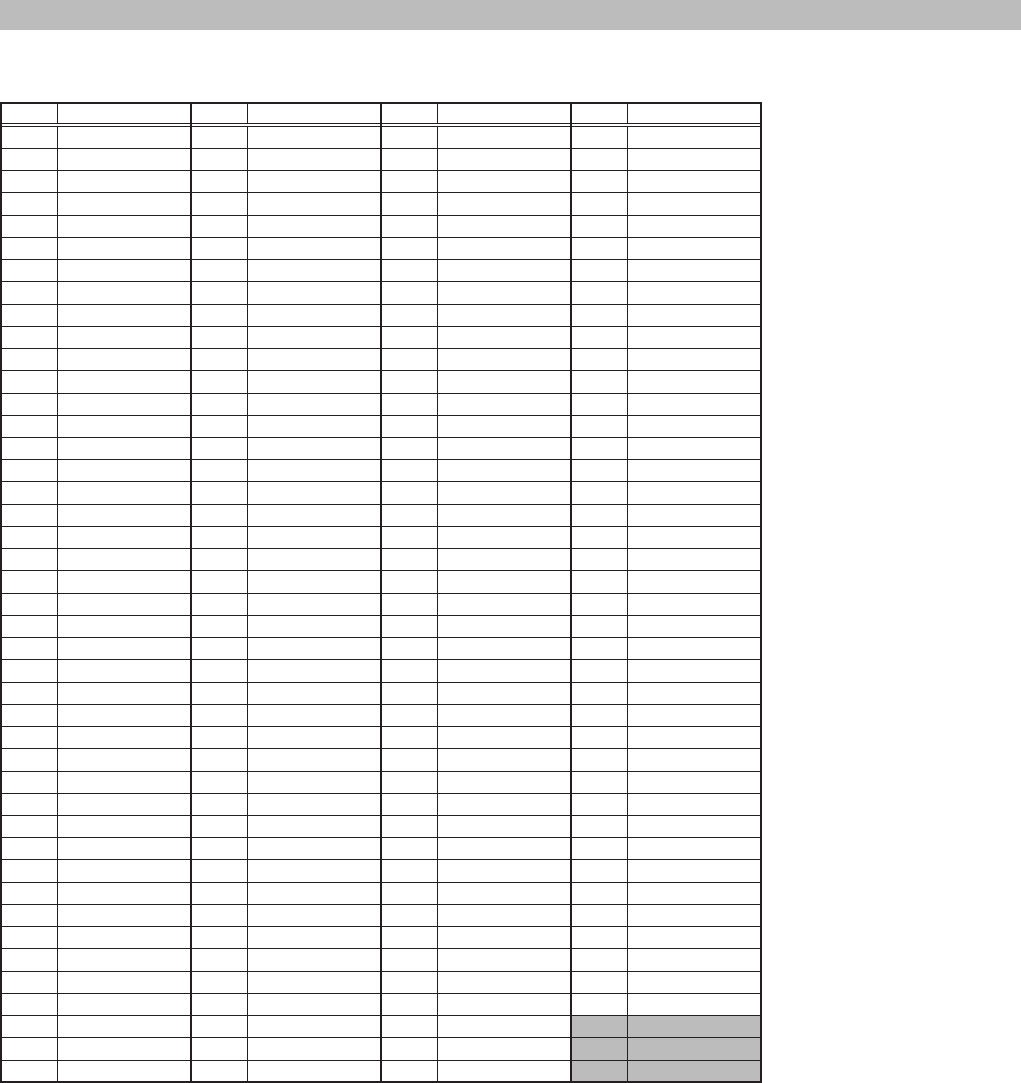
MTX3/MTX5-D/XMV Series/EXi8/EXo8 Remote Control Protocol Specications V1.0.3 46
6. Parameter Value Details
3. GATE
DECAY
Value Displayed value Value Displayed value Value Displayed value Value Displayed value
0 3msec 43 189msec 86 1.23sec 129 7.68sec
1 7msec 44 196msec 87 1.28sec 130 8.11sec
2 10msec 45 203msec 88 1.34sec 131 8.54sec
3 13msec 46 209msec 89 1.39sec 132 8.97sec
4 17msec 47 219msec 90 1.44sec 133 9.39sec
5 22msec 48 229msec 91 1.50sec 134 9.82sec
625msec 49 243msec 92 1.55sec 135 10.2sec
728msec 50 256msec 93 1.60sec 136 10.7sec
8 32msec 51 269msec 94 1.66sec 137 11.1sec
9 35msec 52 283msec 95 1.74sec 138 11.5sec
10 38msec 53 296msec 96 1.82sec 139 12.0sec
11 42msec 54 309msec 97 1.92sec 140 12.4sec
12 45msec 55 323msec 98 2.03sec 141 12.8sec
13 48msec 56 336msec 99 2.14sec 142 13.2sec
14 52msec 57 349msec 100 2.24sec 143 13.9sec
15 55msec 58 363msec 101 2.35sec 144 14.5sec
16 59msec 59 376msec 102 2.46sec 145 15.4sec
17 63msec 60 390msec 103 2.56sec 146 16.2sec
18 66msec 61 403msec 104 2.67sec 147 17.1sec
19 69msec 62 416msec 105 2.78sec 148 17.9sec
20 73msec 63 436msec 106 2.89sec 149 18.8sec
21 76msec 64 456msec 107 2.99sec 150 19.6sec
22 79msec 65 483msec 108 3.10sec 151 20.5sec
23 83msec 66 509msec 109 3.21sec 152 21.4sec
24 86msec 67 536msec 110 3.31sec 153 22.2sec
25 89msec 68 563msec 111 3.47sec 154 23.1sec
26 93msec 69 589msec 112 3.63sec 155 23.9sec
27 96msec 70 616msec 113 3.84sec 156 24.8sec
28 99msec 71 643msec 114 4.06sec 157 25.6sec
29 103msec 72 670msec 115 4.27sec 158 26.5sec
30 106msec 73 696msec 116 4.48sec 159 27.7sec
31 111msec 74 723msec 117 4.70sec 160 29.0sec
32 116msec 75 750msec 118 4.91sec 161 30.7sec
33 123msec 76 777msec 119 5.13sec 162 32.4sec
34 129msec 77 803msec 120 5.34sec 163 34.1sec
35 136msec 78 830msec 121 5.55sec 164 35.9sec
36 143msec 79 870msec 122 5.77sec 165 37.6sec
37 149msec 80 909msec 123 5.98sec 166 39.3sec
38 156msec 81 963msec 124 6.20sec 167 41.0sec
39 163msec 82 1.02sec 125 6.41sec 168 42.7sec
40 169msec 83 1.07sec 126 6.62sec
41 176msec 84 1.12sec 127 6.94sec
42 183msec 85 1.18sec 128 7.26sec

MTX3/MTX5-D/XMV Series/EXi8/EXo8 Remote Control Protocol Specications V1.0.3 47
6. Parameter Value Details
HOLD
Value Displayed value Value Displayed value Value Displayed value Value Displayed value
0 0.02msec 54 2.01msec 108 20.2msec 162 211msec
1 0.04msec 55 2.10msec 109 20.9msec 163 222msec
2 0.07msec 56 2.19msec 110 21.6msec 164 233msec
3 0.09msec 57 2.28msec 111 22.6msec 165 245msec
4 0.11msec 58 2.36msec 112 23.6msec 166 256msec
5 0.14msec 59 2.45msec 113 25.0msec 167 267msec
60.16msec 60 2.54msec 114 26.4msec 168 278msec
70.18msec 61 2.62msec 115 27.8msec 169 289msec
8 0.21msec 62 2.71msec 116 29.2msec 170 300msec
9 0.23msec 63 2.84msec 117 30.6msec 171 311msec
10 0.25msec 64 2.97msec 118 32.0msec 172 323msec
11 0.27msec 65 3.14msec 119 33.4msec 173 334msec
12 0.29msec 66 3.32msec 120 34.8msec 174 345msec
13 0.31msec 67 3.49msec 121 36.2msec 175 361msec
17 0.41msec 71 4.19msec 125 41.7msec 179 445msec
18 0.43msec 72 4.36msec 126 43.1msec 180 467msec
19 0.45msec 73 4.53msec 127 45.2msec 181 489msec
20 0.47msec 74 4.71msec 128 47.2msec 182 511msec
21 0.49msec 75 4.88msec 129 50.0msec 183 534msec
22 0.52msec 76 5.06msec 130 52.8msec 184 556msec
23 0.54msec 77 5.23msec 131 55.6msec 185 578msec
24 0.56msec 78 5.40msec 132 58.4msec 186 601msec
25 0.58msec 79 5.66msec 133 61.2msec 187 623msec
26 0.60msec 80 5.92msec 134 63.9msec 188 645msec
27 0.62msec 81 6.27msec 135 66.7msec 189 667msec
28 0.65msec 82 6.61msec 136 69.5msec 190 690msec
29 0.67msec 83 6.96msec 137 72.3msec 191 723msec
30 0.69msec 84 7.31msec 138 75.1msec 192 756msec
31 0.72msec 85 7.66msec 139 77.9msec 193 800msec
32 0.75msec 86 8.01msec 140 80.7msec 194 845msec
33 0.80msec 87 8.36msec 141 83.4msec 195 889msec
34 0.84msec 88 8.70msec 142 86.2msec 196 934msec
35 0.88msec 89 9.05msec 143 90.3msec 197 978msec
36 0.93msec 90 9.40msec 144 94.5msec 198 1.02sec
37 0.97msec 91 9.75msec 145 100msec 199 1.07sec
38 1.02msec 92 10.1msec 146 106msec 200 1.11sec
39 1.06msec 93 10.4msec 147 111msec 201 1.16sec
40 1.10msec 94 10.8msec 148 117msec 202 1.20sec
41 1.15msec 95 11.3msec 149 122msec 203 1.25sec
42 1.19msec 96 11.8msec 150 128msec 204 1.29sec
43 1.23msec 97 12.5msec 151 133msec 205 1.33sec
44 1.28msec 98 13.2msec 152 139msec 206 1.38sec
45 1.32msec 99 13.9msec 153 145msec 207 1.45sec
46 1.36msec 100 14.6msec 154 150msec 208 1.51sec
47 1.43msec 101 15.3msec 155 156msec 209 1.60sec
48 1.49msec 102 16.0msec 156 161msec 210 1.69sec
49 1.58msec 103 16.7msec 157 167msec 211 1.78sec
50 1.67msec 104 17.4msec 158 172msec 212 1.87sec
51 1.75msec 105 18.1msec 159 181msec 213 1.96sec
52 1.84msec 106 18.8msec 160 189msec
53 1.93msec 107 19.5msec 161 200msec
MTX3/MTX5-D/XMV Series/EXi8/EXo8 Remote Control Protocol Specications V1.0.3 48
6. Parameter Value Details
4. COMPRESSOR
RATIO
Value Displayed value Value Displayed value Value Displayed value Value Displayed value
10 1.0:1 58 5.8:1 106 10.6:1 154 15.4:1
11 1.1:1 59 5.9:1 107 10.7:1 155 15.5:1
12 1.2:1 60 6.0:1 108 10.8:1 156 15.6:1
13 1.3:1 61 6.1:1 109 10.9:1 157 15.7:1
14 1.4:1 62 6.2:1 110 11.0:1 158 15.8:1
15 1.5:1 63 6.3:1 111 11.1:1 159 15.9:1
16 1.6:1 64 6.4:1 112 11.2:1 160 16.0:1
17 1.7:1 65 6.5:1 113 11.3:1 161 16.1:1
18 1.8:1 66 6.6:1 114 11.4:1 162 16.2:1
19 1.9:1 67 6.7:1 115 11.5:1 163 16.3:1
20 2.0:1 68 6.8:1 116 11.6:1 164 16.4:1
21 2.1:1 69 6.9:1 117 11.7:1 165 16.5:1
22 2.2:1 70 7.0:1 118 11.8:1 166 16.6:1
23 2.3:1 71 7.1:1 119 11.9:1 167 16.7:1
24 2.4:1 72 7.2:1 120 12.0:1 168 16.8:1
25 2.5:1 73 7.3:1 121 12.1:1 169 16.9:1
26 2.6:1 74 7.4:1 122 12.2:1 170 17.0:1
27 2.7:1 75 7.5:1 123 12.3:1 171 17.1:1
28 2.8:1 76 7.6:1 124 12.4:1 172 17.2:1
29 2.9:1 77 7.7:1 125 12.5:1 173 17.3:1
30 3.0:1 78 7.8:1 126 12.6:1 174 17.4:1
31 3.1:1 79 7.9:1 127 12.7:1 175 17.5:1
32 3.2:1 80 8.0:1 128 12.8:1 176 17.6:1
33 3.3:1 81 8.1:1 129 12.9:1 177 17.7:1
34 3.4:1 82 8.2:1 130 13.0:1 178 17.8:1
35 3.5:1 83 8.3:1 131 13.1:1 179 17.9:1
36 3.6:1 84 8.4:1 132 13.2:1 180 18.0:1
37 3.7:1 85 8.5:1 133 13.3:1 181 18.1:1
38 3.8:1 86 8.6:1 134 13.4:1 182 18.2:1
39 3.9:1 87 8.7:1 135 13.5:1 183 18.3:1
40 4.0:1 88 8.8:1 136 13.6:1 184 18.4:1
41 4.1:1 89 8.9:1 137 13.7:1 185 18.5:1
42 4.2:1 90 9.0:1 138 13.8:1 186 18.6:1
43 4.3:1 91 9.1:1 139 13.9:1 187 18.7:1
44 4.4:1 92 9.2:1 140 14.0:1 188 18.8:1
45 4.5:1 93 9.3:1 141 14.1:1 189 18.9:1
46 4.6:1 94 9.4:1 142 14.2:1 190 19.0:1
47 4.7:1 95 9.5:1 143 14.3:1 191 19.1:1
48 4.8:1 96 9.6:1 144 14.4:1 192 19.2:1
49 4.9:1 97 9.7:1 145 14.5:1 193 19.3:1
50 5.0:1 98 9.8:1 146 14.6:1 194 19.4:1
51 5.1:1 99 9.9:1 147 14.7:1 195 19.5:1
52 5.2:1 100 10.0:1 148 14.8:1 196 19.6:1
53 5.3:1 101 10.1:1 149 14.9:1 197 19.7:1
54 5.4:1 102 10.2:1 150 15.0:1 198 19.8:1
55 5.5:1 103 10.3:1 151 15.1:1 199 19.9:1
56 5.6:1 104 10.4:1 152 15.2:1 200 20.0:1
57 5.7:1 105 10.5:1 153 15.3:1 201 ∞:1
KNEE
Value Displayed value
0 HARD
1 1
2 2
3 3
4 4
5 5
RELEASE
Same as GATE DECAY
MTX3/MTX5-D/XMV Series/EXi8/EXo8 Remote Control Protocol Specications V1.0.3 49
6. Parameter Value Details
5. AGC
RESPONSE TIME
Value Displayed value Value Displayed value
0 100msec 30 2.20sec
1 150msec 31 2.30sec
2 200msec 32 2.40sec
3 250msec 33 2.50sec
4 300msec 34 2.60sec
5 350msec 35 2.70sec
6400msec 36 2.80sec
7450msec 37 2.90sec
8 500msec 38 3.00sec
9 550msec 39 3.10sec
10 600msec 40 3.20sec
12 700msec 42 3.40sec
13 750msec 43 3.50sec
14 800msec 44 3.60sec
15 850msec 45 3.70sec
16 900msec 46 3.80sec
17 950msec 47 3.90sec
18 1.00sec 48 4.00sec
19 1.10sec 49 4.10sec
20 1.20sec 50 4.20sec
21 1.30sec 51 4.30sec
22 1.40sec 52 4.40sec
23 1.50sec 53 4.50sec
24 1.60sec 54 4.60sec
25 1.70sec 55 4.70sec
26 1.80sec 56 4.80sec
27 1.90sec 57 4.90sec
28 2.00sec 58 5.00sec
29 2.10sec
MTX3/MTX5-D/XMV Series/EXi8/EXo8 Remote Control Protocol Specications V1.0.3 50
6. Parameter Value Details
6. EFFECT
TYPE
Value Displayed value
0 Reverb Hall
1 Reverb Stage1
2 Karaoke Echo
3 Vocal Echo
RevHallTime/RevStageTime
Value Time(sec) Value Time(sec)
0 0.3 29 3.2
1 0.4 30 3.3
2 0.5 31 3.4
3 0.6 32 3.5
4 0.7 33 3.6
5 0.8 34 3.7
60.9 35 3.8
71.0 36 3.9
8 1.1 37 4.0
9 1.2 38 4.1
10 1.3 39 4.2
11 1.4 40 4.3
12 1.5 41 4.4
13 1.6 42 4.5
14 1.7 43 4.6
15 1.8 44 4.7
16 1.9 45 4.8
17 2.0 46 4.9
18 2.1 47 5.0
19 2.2 48 5.5
20 2.3 49 6.0
21 2.4 50 6.5
22 2.5 51 7.0
23 2.6 52 7.5
24 2.7 53 8.0
25 2.8 54 8.5
26 2.9 55 9.0
27 3.0 56 9.5
28 3.1 57 10.0
KaraokeTime/VocalTime
Value Time (msec) Value Time (msec) Value Time (msec)
0 0.4 43 135.5 86 270.9
1 3.2 44 138.6 87 274
2 6.4 45 141.8 88 277.2
3 9.5 46 144.9 89 280.3
4 12.7 47 148.1 90 283.5
5 15.8 48 151.2 91 286.6
619 49 154.4 92 289.8
722.1 50 157.5 93 292.9
8 25.3 51 160.7 94 296.1
9 28.4 52 163.8 95 299.2
10 31.6 53 167 96 302.4
11 34.7 54 170.1 97 305.5
12 37.9 55 173.3 98 308.7
13 41 56 176.4 99 311.8
14 44.2 57 179.6 100 315
15 47.3 58 182.7 101 318.1
16 50.5 59 185.9 102 321.3
17 53.6 60 189 103 324.4
18 56.8 61 192.2 104 327.6
19 59.9 62 195.3 105 330.7
20 63.1 63 198.5 106 333.9
21 66.2 64 201.6 107 337
22 69.4 65 204.8 108 340.2
23 72.5 66 207.9 109 343.3
24 75.7 67 211.1 110 346.5
25 78.8 68 214.2 111 349.6
26 82 69 217.4 112 352.8
27 85.1 70 220.5 113 355.9
28 88.3 71 223.7 114 359.1
29 91.4 72 226.8 115 362.2
30 94.6 73 230 116 365.4
31 97.7 74 233.1 117 368.5
32 100.9 75 236.3 118 371.7
33 104 76 239.4 119 374.8
34 107.2 77 242.6 120 378
35 110.3 78 245.7 121 381.1
36 113.5 79 248.9 122 384.3
37 116.6 80 252 123 387.4
38 119.8 81 255.2 124 390.6
39 122.9 82 258.3 125 393.7
40 126.1 83 261.5 126 396.9
41 129.2 84 264.6 127 400
42 132.4 85 267.7
MTX3/MTX5-D/XMV Series/EXi8/EXo8 Remote Control Protocol Specications V1.0.3 51
6. Parameter Value Details
7. SPEAKER PROCESSOR
HPF/LPF TYPE
Value Displayed value
0 Thru
1 6dB/Oct
2 12dB/Oct AdjustGc
3 12dB/Oct Butrwrth
4 12dB/Oct Bessel
5 12dB/Oct Linkwitz
618dB/Oct AdjustGc
718dB/Oct Butrwrth
8 18dB/Oct Bessel
9 24dB/Oct AdjustGc
10 24dB/Oct Butrwrth
11 24dB/Oct Bessel
12 24dB/Oct Linkwitz
13 32dB/Oct AdjustGc
14 32dB/Oct Butrwrth
15 32dB/Oct Bessel
16 48dB/Oct AdjustGc
17 48dB/Oct Butrwrth
18 48dB/Oct Bessel
19 48dB/Oct Linkwitz
PEQ Q
Same as the Q of 3BAND EQ / 4BAND EQ
PEQ Type
Value Displayed value
0 PEQ
1 L.SHELF 6dB/Oct
2 L.SHELF 12dB/Oct
3 H.SHELF 6dB/Oct
4 H.SHELF 12dB/Oct
5 HPF
6LPF
7APF 1st
8 APF 2nd
9 Horn EQ
LIMITER RELEASE
Same as GATE DECAY
LIMITER ATTACK/RELEASE MODE
Value Displayed value
0 Fast
1 Mid
2 Slow
3 Manual
MTX3/MTX5-D/XMV Series/EXi8/EXo8 Remote Control Protocol Specications V1.0.3 52
6. Parameter Value Details
8. PRIORITY PROCESSOR
1st/2nd PRIORITY DUCKER PRIORITY SOURCE
ANC SOURCE
MTX3
Value Displayed value
0 NONE
1 CH1
2 CH2
3 CH3
4 CH4
5 CH5
6CH6
7CH7
8 CH8
9 STIN1L
10 STIN1R
11 STIN2L
12 STIN2R
13 STIN3L
14 STIN3R
15 CH9
16 CH10
17 CH11
18 CH12
19 CH13
20 CH14
21 CH15
22 CH16
23 YDIF IN 1
24 YDIF IN 2
25 YDIF IN 3
26 YDIF IN 4
27 YDIF IN 5
28 YDIF IN 6
29 YDIF IN 7
30 YDIF IN 8
31 YDIF IN 9
32 YDIF IN 10
33 YDIF IN 11
34 YDIF IN 12
35 YDIF IN 13
36 YDIF IN 14
37 YDIF IN 15
38 YDIF IN 16
39 ANC BUS1
40 ANC BUS2
MTX5-D
Value Displayed value Value Displayed value
0 NONE 31 YDIF IN 1
1 CH1 32 YDIF IN 2
2 CH2 33 YDIF IN 3
3 CH3 34 YDIF IN 4
4 CH4 35 YDIF IN 5
5 CH5 36 YDIF IN 6
6CH6 37 YDIF IN 7
7CH7 38 YDIF IN 8
8 CH8 39 YDIF IN 9
9 CH9 40 YDIF IN 10
10 CH10 41 YDIF IN 11
11 CH11 42 YDIF IN 12
12 CH12 43 YDIF IN 13
13 CH13 44 YDIF IN 14
14 CH14 45 YDIF IN 15
15 CH15 46 YDIF IN 16
16 CH16 47 ANC BUS1
17 STIN1L 48 ANC BUS2
18 STIN1R
19 STIN2L
20 STIN2R
21 STIN3L
22 STIN3R
23 CH17
24 CH18
25 CH19
26 CH20
27 CH21
28 CH22
29 CH23
30 CH24
ANC RATIO
Value Displayed value
5 0.5:1
60.6:1
70.7:1
8 0.8:1
9 0.9:1
10 1.0:1
11 1.1:1
12 1.2:1
13 1.3:1
14 1.4:1
15 1.5:1
16 1.6:1
17 1.7:1
18 1.8:1
19 1.9:1
20 2.0:1
RELEASE
Same as GATE DECAY
HOLD
Same as GATE HOLD
MTX3/MTX5-D/XMV Series/EXi8/EXo8 Remote Control Protocol Specications V1.0.3 53
6. Parameter Value Details
9. ROUTER
MTX3
Value Displayed value
0 NONE
1 ZONE 1
2 ZONE 2
3 ZONE 3
4 ZONE 4
5 ZONE 5
6ZONE 6
7ZONE 7
8 ZONE 8
9 YDIF IN 1
10 YDIF IN 2
11 YDIF IN 3
12 YDIF IN 4
13 YDIF IN 5
14 YDIF IN 6
15 YDIF IN 7
16 YDIF IN 8
17 YDIF IN 9
18 YDIF IN 10
19 YDIF IN 11
20 YDIF IN 12
21 YDIF IN 13
22 YDIF IN 14
23 YDIF IN 15
24 YDIF IN 16
MTX5-D
Value Displayed value Value Displayed value
0 NONE 17 YDIF IN 1
1 ZONE 1 18 YDIF IN 2
2 ZONE 2 19 YDIF IN 3
3 ZONE 3 20 YDIF IN 4
4 ZONE 4 21 YDIF IN 5
5 ZONE 5 22 YDIF IN 6
6ZONE 6 23 YDIF IN 7
7ZONE 7 24 YDIF IN 8
8 ZONE 8 25 YDIF IN 9
9 ZONE 9 26 YDIF IN 10
10 ZONE 10 27 YDIF IN 11
11 ZONE 11 28 YDIF IN 12
12 ZONE 12 29 YDIF IN 13
13 ZONE 13 30 YDIF IN 14
14 ZONE 14 31 YDIF IN 15
15 ZONE 15 32 YDIF IN 16
16 ZONE 16
10. OUTPUT PATCH
MTX3
Value Displayed value
0 NONE
1 OUTPUT CH1
2 OUTPUT CH2
3 OUTPUT CH3
4 OUTPUT CH4
5 OUTPUT CH5
6OUTPUT CH6
7OUTPUT CH7
8 OUTPUT CH8
MTX5-D
Value Displayed value
0 NONE
1 OUTPUT CH1
2 OUTPUT CH2
3 OUTPUT CH3
4 OUTPUT CH4
5 OUTPUT CH5
6OUTPUT CH6
7OUTPUT CH7
8 OUTPUT CH8
9 OUTPUT CH9
10 OUTPUT CH10
11 OUTPUT CH11
12 OUTPUT CH12
13 OUTPUT CH13
14 OUTPUT CH14
15 OUTPUT CH15
16 OUTPUT CH16
MTX3/MTX5-D/XMV Series/EXi8/EXo8 Remote Control Protocol Specications V1.0.3 54
6. Parameter Value Details
11. YDIF PATCH
MTX3
Value Displayed value
0 NONE
1 CH1
2 CH2
3 CH3
4 CH4
5 CH5
6CH6
7CH7
8 CH8
9 STIN1L
10 STIN1R
11 STIN2L
12 STIN2R
13 STIN3L
14 STIN3R
15 ZONE 1
16 ZONE 2
17 ZONE 3
18 ZONE 4
19 ZONE 5
20 ZONE 6
21 ZONE 7
22 ZONE 8
23 THRU 1
24 THRU 2
25 THRU 3
26 THRU 4
27 THRU 5
28 THRU 6
29 THRU 7
30 THRU 8
31 THRU 9
32 THRU 10
33 THRU 11
34 THRU 12
35 THRU 13
36 THRU 14
37 THRU 15
38 THRU 16
39 OUTPUT CH1
40 OUTPUT CH2
41 OUTPUT CH3
42 OUTPUT CH4
43 OUTPUT CH5
44 OUTPUT CH6
45 OUTPUT CH7
46 OUTPUT CH8
MTX5-D
Value Displayed value Value Displayed value
0 NONE 39 THRU 1
1 CH1 40 THRU 2
2 CH2 41 THRU 3
3 CH3 42 THRU 4
4 CH4 43 THRU 5
5 CH5 44 THRU 6
6CH6 45 THRU 7
7CH7 46 THRU 8
8 CH8 47 THRU 9
9 CH9 48 THRU 10
10 CH10 49 THRU 11
11 CH11 50 THRU 12
12 CH12 51 THRU 13
13 CH13 52 THRU 14
14 CH14 53 THRU 15
15 CH15 54 THRU 16
16 CH16 55 OUTPUT CH1
17 STIN1L 56 OUTPUT CH2
18 STIN1R 57 OUTPUT CH3
19 STIN2L 58 OUTPUT CH4
20 STIN2R 59 OUTPUT CH5
21 STIN3L 60 OUTPUT CH6
22 STIN3R 61 OUTPUT CH7
23 ZONE 1 62 OUTPUT CH8
24 ZONE 2 63 OUTPUT CH9
25 ZONE 3 64 OUTPUT CH10
26 ZONE 4 65 OUTPUT CH11
27 ZONE 5 66 OUTPUT CH12
28 ZONE 6 67 OUTPUT CH13
29 ZONE 7 68 OUTPUT CH14
30 ZONE 8 69 OUTPUT CH15
31 ZONE 9 70 OUTPUT CH16
32 ZONE 10
33 ZONE 11
34 ZONE 12
35 ZONE 13
36 ZONE 14
37 ZONE 15
38 ZONE 16
* About MTX3 23 to 38 (THRU1 to 16), MTX5-D 39 to 54 (THRU1 to 16)
Note the difference in behavior between the MTX Editor and MTX external control protocol. On the MTX editor, when you press THRU, one of
the 16 YDIF channels is selected automatically.
However, with the MTX external control protocol, you can select the channel freely.
MTX3/MTX5-D/XMV Series/EXi8/EXo8 Remote Control Protocol Specications V1.0.3 55
6. Parameter Value Details
12. MY4-AEC INPUT PATCH
Near-end Mic / From Far-end
value PORT value PORT
0 NONE 47 SLOT 1
1 Input 1 48 2
2 2 49 3
3 3 50 4
4 4 51 Output 1
5 5 52 2
6 6 53 3
7 7 54 4
8 8 55 5
9 ST IN 1L 56 6
10 1R 57 7
11 2L 58 8
12 2R 59 9
13 SD IN L 60 10
14 R 61 11
15 YDIF 1 62 12
16 2 63 13
17 3 64 14
18 4 65 15
19 5 66 16
20 6
21 7
22 8
23 9
24 10
25 11
26 12
27 13
28 14
29 15
30 16
31 DANTE 1
32 2
33 3
34 4
35 5
36 6
37 7
38 8
39 9
40 10
41 11
42 12
43 13
44 14
45 15
46 16
MTX3/MTX5-D/XMV Series/EXi8/EXo8 Remote Control Protocol Specications V1.0.3 56
6. Parameter Value Details
13. MY4-AEC FBS
WIDTH
Value Displayed Value
0 1/10oct
1 1/60oct
2 1/93oct
DEPTH
Value Displayed Value
0 -6dB
1 -12dB
2 -18dB
14. MY4-AEC Digtal I/O SRC
FsType
Value Displayed value
0 44.1kHz
1 48kHz
2 88.2kHz
3 96kHz
4 AES/EBU IN CH1/2
5 AES/EBU IN CH3/4
MTX3/MTX5-D/XMV Series/EXi8/EXo8 Remote Control Protocol Specications V1.0.3 57
7. Parameter List
MTX3/MTX5-D
Model Access ID
Category Prarameter Name MIN MAX unit Remarks
MTX3
MTX5-D
MemNo
(Memory
Number)
UniqueId
ElmNo
(Element
Number)
Xpos
(X Position)
Ypos
(Y Position)
PrmNo
(Parameter
Number)
IndexNo
(Index
Number)
o o 512 50000 0 0-7
(1-8ch)
0 0 0 INPUT
PORT
INTERNAL
HA
Internal Head
Amp 8ch AD
Ch Gain -6 66 dB
o o 1 +48V OFF ON - 0:OFF
1:ON
o o
50001 0 0-2 0 0 0 INPUT
PORT
SETUP
Internal ST
input 3ch AD
Port
Summing STEREO
SUM - 0:STEREO
1:SUM
* Not saved to
presets
o20001 0 0 0-21
(1-22ch)
0 0 INPUT
PATCH
INPUT
PATCH
InputPatch
30(62) Input x
22(30) Output
In Patch NONE YDIF IN
16
(SLOT
16)
- * See "1. INPUT
PATCH" in
"7. Parameter
Values"
o20003 0-7
(1-8ch)
o20004 0-21
(9-30ch)
o 20002 0 0-7
(1-8ch)
0 0 0
INPUT
CHANNEL
GAIN/HPF
PreInputSection
In Phase OFF ON - 0:OFF
1:ON
o 20005
o20006 0-7
(9-16ch)
o 20002 0 0-7
(1-8ch)
0 1 0 Gain -96.0 24.0 dB dB x 10
ex. -14.5dB x 10
= -145
o 20005
o20006 0-7
(9-16ch)
o 20002 1 0-7
(1-8ch)
0 0 0 HPF
Frequency
20.0 20.0k Hz Hz x 1000
ex. 1000Hz x
1000000
o 20005
o20006 0-7
(9-16ch)
o 20002 1 0-7
(1-8ch)
0 1 0 On OFF ON - 0:OFF
1:ON
o 20005
o20006 0-7
(9-16ch)
o 20004 0 0-7
(1-8ch)
0-2
(0:Band A
1:Band B
2:Band C)
0 0 3BAND EQ PEQ 8(16)
Channel 3
Band
PEQ Q(*) 63.0 0.1 -
* Valid only for PEQ
* See "2.3BAND EQ
/ 4BAND EQ" in "7.
Parameter Values"
o 20007
o20008 0-7
(9-16ch)
o20004 0 0-7
(1-8ch)
1 0
Frequency
20.0(*) 20.0k Hz * (100 : Other
than Band A)
Hz x 1000
ex. 1000Hz x
1000 = 1000000
o20007
o20008 0-7
(9-16ch)
o20004 0 0-7
(1-8ch)
2 0 Gain(*) -18.0 18.0 dB * Not adjustable
for HPF/LPF
dB x 10
ex. -14.5dB x 10
= -145
o20007
o20008 0-7
(9-16ch)
o 20004 0 0-7
(1-8ch)
3 0 Bypass OFF ON - 0:OFF
1:ON
o 20007
o20008 0-7
(9-16ch)
o 20004 0 0-7
(1-8ch)
0, 2
(0:Band A
2:Band C)
4 0 Type PEQ LPF - * See "2.3BAND
EQ / 4BAND EQ"
in "7. Parameter
Values"
o 20007
o20008 0-7
(9-16ch)
o 20004 1 0-7
(1-8ch)
0 0 0 Property PEQOn OFF ON - 0:ON
1:OFF
o 20007
o20008 0-7
(9-16ch)

MTX3/MTX5-D/XMV Series/EXi8/EXo8 Remote Control Protocol Specications V1.0.3 58
7. Parameter List
Model Access ID
Category Prarameter Name MIN MAX unit Remarks
MTX3
MTX5-D
MemNo
(Memory
Number)
UniqueId
ElmNo
(Element
Number)
Xpos
(X Position)
Ypos
(Y Position)
PrmNo
(Parameter
Number)
IndexNo
(Index
Number)
o 512 40002 0 0-7
(1-8ch)
0 0 0
INPUT
CHANNEL
GATE Gate 8(16)
Channel
Dyn
Threshold
-72 0 dB
o 40000
o40001 0-7
(9-16ch)
o 40002 0 0-7
(1-8ch)
0 1 0 Range -70 0 dB
o 40000
o40001 0-7
(9-16ch)
o 40002 0 0-7
(1-8ch)
0 2 0 Attack 0 120 ms
o 40000
o40001 0-7
(9-16ch)
o 40002 0 0-7
(1-8ch)
0 3 0 Decay 3.2m 42.600 s* See "3.GATE"
in "7. Parameter
Values"
o 40000
o40001 0-7
(9-16ch)
o 40002 0 0-7
(1-8ch)
0 4 0 Hold 0.02m 1.96 s* See "3.GATE"
in "7. Parameter
Values"
o 40000
o40001 0-7
(9-16ch)
o 40002 1 0-7
(1-8ch)
0 0 0 ON On OFF ON - 0:OFF
1:ON
o 40000
o40001 0-7
(9-16ch)
o 40002 - - - - - Gate 8(16)
Channel Meter
- - - - - See Meter Value
Details
o 40000
o 40001
o 40000 0 0-7
(1-8ch)
0 0 0
COMPRESSOR
Compressor
8(16) Channel
Dyn
Threshold
-54 0 dB
o 40002
o40003 0-7
(9-16ch)
o 40000 0 0-7
(1-8ch)
0 1 0 Ratio 1.0:1 ∞:1 -
* See
"4.COMPRESSOR"
in "7. Parameter
Values"
o 40002
o40003 0-7
(9-16ch)
o 40000 0 0-7
(1-8ch)
0 2 0 Knee HARD 5 -
* See
"4.COMPRESSOR"
in "7. Parameter
Values"
o 40002
o40003 0-7
(9-16ch)
o 40000 0 0-7
(1-8ch)
0 3 0 Attack 0 120 ms
o 40002
o40003 0-7
(9-16ch)
o 40000 0 0-7
(1-8ch)
0 4 0 Release 3.2m 42.600 s
* See
"4.COMPRESSOR"
in "7. Parameter
Values"
o 40002
o40003 0-7
(9-16ch)
o 40000 0 0-7
(1-8ch)
0 5 0 Gain 0.0 18.0 dB dB x 10
ex. 5.2dB x 10
= 52
o 40002
o40003 0-7
(9-16ch)
o 40000 1 0-7
(1-8ch)
0 0 0 ON On OFF ON - 0:OFF
1:ON
o 40002
o40003 0-7
(9-16ch)
o 40000 - - - - - Compressor
8(16) Channel
Meter
- - - - - See Meter Value
Details
o 40002
o 40003

MTX3/MTX5-D/XMV Series/EXi8/EXo8 Remote Control Protocol Specications V1.0.3 59
7. Parameter List
Model Access ID
Category Prarameter Name MIN MAX unit Remarks
MTX3
MTX5-D
MemNo
(Memory
Number)
UniqueId
ElmNo
(Element
Number)
Xpos
(X Position)
Ypos
(Y Position)
PrmNo
(Parameter
Number)
IndexNo
(Index
Number)
o512 40005 0 0-3
(1-4ch)
0 0 0
INPUT
CHANNEL
FBS Feedback
Suppressor
4(8) Channel
Dynamic
AutoDetect
OFF ON - 0:OFF
1:ON
o40004 0-7
(1-8ch)
o
40005 0 0-3
(1-4ch)
0 1 0 Clear OFF ON - Write 1 to start
the clear process.
When the process
nishes, the value
automatically
returns to 0.
o
40004 0-7
(1-8ch)
o40005 1 0-3
(1-4ch)
0-6
(Freq1-7)
0 0
DynFilter
Frequency
20.0 20.0k Hz Readable.
Operation is not
guaranteed when
it is written to.
o40004 0-7
(1-8ch)
o40005 2 0-3
(1-4ch)
0 0 0 Fixed On OFF ON - 0:OFF
1:ON
o40004 0-7
(1-8ch)
o40005 2 0-3
(1-4ch)
0 1 0 Detect OFF ON - 0:OFF
1:ON
o40004 0-7
(1-8ch)
o
40005 2 0-3
(1-4ch)
0 2 0 Clear OFF ON - Write 1 to start
the clear process.
When the process
nishes, the value
automatically
returns to 0.
o
40004 0-7
(1-8ch)
o40005 3 0-3
(1-4ch)
0-6
(Freq1-7)
0 0
FixedFilter
Frequency
20.0 20.0k Hz Readable.
Writing is also
possible.
o40004 0-7
(1-8ch)
o40004 0 0-3
(1-4ch)
0 0 0 AGC
AutoGainControl
4(8) Channel
Compensator
Response
Time
100m 5.0 - * See "5.AGC"
in "7. Parameter
Values"
o40005 0-7
(1-8ch)
o40004 0-3
(1-4ch)
1 Level 1 5 -
o40005 0-7
(1-8ch)
o40004 0-3
(1-4ch)
2
NoiseGate
On
OFF ON - 0:OFF
1:ON
o40005 0-7
(1-8ch)
o40004 1 0-3
(1-4ch)
0 0 0 On On OFF ON - 0:OFF
1:ON
o40005 0-7
(1-8ch)
o60000 0 0-7
(1-8ch)
0 0 0 INPUT
CHANNEL
LEVEL
DCA Fader
8(16) Channel
Fader Level -∞ 10.00 dB dB x 100
ex.-73.60dB x 100
= -7360
o0-15
(1-16ch)
o1 0-7
(1-8ch)
0-7
(A-H)
DCAAssign
AssignOn
OFF ON - 0:OFF
1:ON
o0-15
(1-16ch)
o o
2 0 Group
Master
Level -∞ 10.00 dB dB x 100
ex.-73.60dB x 100
= -7360
o60001 0 0-7
(1-8ch)
0 0 0 INPUT
CHANNEL
MUTE
DCA Mute
8(16) Channel
On On OFF ON - 0:OFF
1:ON
o0-15
(1-16ch)
o1 0-7
(1-8ch)
0-7
(A-H)
DCAAssign
AssignOn
OFF ON - 0:OFF
1:ON
o0-15
(1-16ch)
o 2 0 Group
Master
MuteOn
UNMUTED
MUTED - 0:UNMUTED
1:MUTED
o
o20033 0 0-15
(1-16ch)
0 0 0 Insert Insert with
MY card 16
Channel
Insert Insert OFF ON - CH * Ins.Out
->SLOT OUT *
CH * Ins.In ->
SLOT In *
o
o70000 0 0-7
(1-8ch)
0 0 0
ChannelName
Channel
Name 8(16)
Channel
ChName
Name
Charactor (UTF-8)
48byte
-
o0-15
(1-16ch)
o o
30000 0 0-5
(STIN1L-
3R)
0 0 0 GAIN/HPF Digital Gain 6
Channel
Ch Gain -96.0 24.0 dB x 10
ex. -14.5dB x 10
= -145

MTX3/MTX5-D/XMV Series/EXi8/EXo8 Remote Control Protocol Specications V1.0.3 60
7. Parameter List
Model Access ID
Category Prarameter Name MIN MAX unit Remarks
MTX3
MTX5-D
MemNo
(Memory
Number)
UniqueId
ElmNo
(Element
Number)
Xpos
(X Position)
Ypos
(Y Position)
PrmNo
(Parameter
Number)
IndexNo
(Index
Number)
o512 30001 0 0-5
(STIN1L-
3R)
0-2
(0:Band A
1:Band B
2:Band C)
0 0 3BAND EQ PEQ 6
Channel 3
Band
PEQ Q(*) 63.0 0.1 - * See "2.3BAND
EQ / 4 BAND EQ"
in "7. Parameter
Values"
o
o0 1 0
Frequency
20.0(*) 20.0k Hz *(100 : Other than
Band A)
Hz x 1000
ex. 1000Hz x
1000 = 1000000
o
o0 2 0 Gain(*) -18.0 18.0 dB * Not adjustable
for HPF/LPF
dB x 10
ex. -14.5dB x 10
= -145
o
o 0 3 0 Bypass OFF ON - 0:OFF
1:ON
o
o0 0, 2
(0:Band A
2:Band C)
4 0 Type PEQ LPF - * See "2.3BAND
EQ / 4 BAND EQ"
in "7. Parameter
Values"
o
o 1 0 0 0 Property PEQOn OFF ON - 0:ON
1:OFF
o
o 40001 0 0-3
(STIN1L-
2R)
0 0 0
COMPRESSOR
Compressor
4 Channel
Dyn
Threshold
-54 0 dB
o 40006
o40001 0 0 1 0 Ratio 1.0:1 ∞:1 -
* See
"4.COMPRESSOR"
in "7. Parameter
Values"
o40006
o40001 0 0 2 0 Knee HARD 5 -
* See
"4.COMPRESSOR"
in "7. Parameter
Values"
o40006
o 40001 0 0 3 0 Attack 0 120 ms
o 40006
o40001 0 0 4 0 Release 3.2m 42.600 s
* See
"4.COMPRESSOR"
in "7. Parameter
Values"
o40006
o40001 0 0 5 0 Gain 0.0 18.0 dB dB x 10
ex. 5.2dB x 10
= 52
o40006
o 40001 1 0 0 0 On On OFF ON - 0:OFF
1:ON
o 40006
o40001 - - - - - Compressor
4 Channel
Meter
- - - - - See Meter Value
Details
o40008
o40003 0 0-3
(STIN1L-
2R)
0 0 0 AGC
AutoGainControl
4 Channel
Compensator
Response
Time
100m 5.0 s* See "5.AGC"
in "7. Parameter
Values"
o40007
o 40003 0 0 1 0 Level 1 5 -
o 40007
o 40003 0 0 2 0
NoiseGate
On
OFF ON - 0:OFF
1:ON
o 40007
o 40003 1 0 0 0 On On OFF ON - 0:OFF
1:ON
o 40007
o
60000 0 8-13
(ST IN
1L-ST
IN 3R)
0 0 0 INPUT
CHANNEL
LEVEL
DCA Fader 6
Channel
Fader Level -∞ 10.00 dB dB x 100
ex.-73.60dB x 100
= -7360
o
16-21
(ST1L-
ST3R)
o
1 8-13
(ST1L-
ST3R)
0-7
(A-H)
DCAAssign
AssignOn
OFF ON - 0:OFF
1:ON
o
16-21
(ST1L-
ST3R)
o o
2 0 Group
Master
Level -∞ 10.00 dB dB x 100
ex.-73.60dB x 100
= -7360

MTX3/MTX5-D/XMV Series/EXi8/EXo8 Remote Control Protocol Specications V1.0.3 61
7. Parameter List
Model Access ID
Category Prarameter Name MIN MAX unit Remarks
MTX3
MTX5-D
MemNo
(Memory
Number)
UniqueId
ElmNo
(Element
Number)
Xpos
(X Position)
Ypos
(Y Position)
PrmNo
(Parameter
Number)
IndexNo
(Index
Number)
o
512 60001 0 8-13
(ST1L-
ST3R)
0 0 0 INPUT
CHANNEL
MUTE
DCA Mute 6
Channel
On On OFF ON - 0:OFF
1:ON
o
16-21
(ST1L-
ST3R)
o
1 8-13
(ST1L-
ST3R)
0-7
(A-H)
0 0
DCAAssign
AssignOn
OFF ON - 0:OFF
1:ON
o
16-21
(ST1L-
ST3R)
o o 2 0 Group
Master
MuteOn
UNMUTED
MUTED - 0:UNMUTED
1:MUTED
o o
70004 0 0-5
(ST1L-
ST3R)
0 0 0
ChannelName
Channel
Name 3
Channel
ChName
Name Charactor (UTF-8)
48byte
-
o
60000 0 14-21
(9-16Ch
"DIRECT
INPUT
CH")
0 0 0 INPUT
CHANNEL
LEVEL
DCA Fader 8
Channel
Fader Level -∞ 10.00 dB dB x 100
ex.-73.60dB x 100
= -7360
o
22-29
(17-24Ch
"DIRECT
INPUT
CH")
o
1 14-21
(9-16Ch
"DIRECT
INPUT
CH")
0-7
(A-H)
0 0
DCAAssign
AssignOn
OFF ON - 0:OFF
1:ON
o
22-29
(17-24Ch
"DIRECT
INPUT
CH")
o o
2 0 Group
Master
Level -∞ 10.00 dB dB x 100
ex.-73.60dB x 100
= -7360
o
60001 0 14-21
(9-16Ch
"DIRECT
INPUT
CH")
0 0 0 INPUT
CHANNEL
MUTE
DCA Mute 8
Channel
On On OFF ON - 0:OFF
1:ON
o
22-29
(17-24Ch
"DIRECT
INPUT
CH")
o
1 14-21
(9-16Ch
"DIRECT
INPUT
CH")
0-7
(A-H)
0 0
DCAAssign
AssignOn
OFF ON - 0:OFF
1:ON
o
22-29
(17-24Ch
"DIRECT
INPUT
CH")
o o 2 0 Group
Master
MuteOn
UNMUTED
MUTED - 0:UNMUTED
1:MUTED
o70000 0 8-15
(9-16ch)
0 0 0
ChannelName
Channel
Name 8
Channel
ChName
Name Charactor (UTF-8)
48byte
-
o70003 0-7
(17-24ch)
0 0 0
o20006 0 0-1
(Effect1-2)
0 1 0 EFFECT Effect Effect Type Reverb
Hall
Vocal
Echo
- * See "6.
EFFECT" in
"7. Parameter
Values"
o20013
o20006 1 0 Simple
Effect
RevHall
Time
0.3 10.0 s* See "6.
EFFECT" in
"7. Parameter
Values"
o20013
o20006 1
RevStage
Time
0.3 10.0 s* See "6.
EFFECT" in
"7. Parameter
Values"
o20013
o20006 2 Karaoke
Time
0.4 400 ms * See "6.
EFFECT" in
"7. Parameter
Values"
o20013
o20006 3 Vocal
Time
0.4 400 ms * See "6.
EFFECT" in
"7. Parameter
Values"
o20013

MTX3/MTX5-D/XMV Series/EXi8/EXo8 Remote Control Protocol Specications V1.0.3 62
7. Parameter List
Model Access ID
Category Prarameter Name MIN MAX unit Remarks
MTX3
MTX5-D
MemNo
(Memory
Number)
UniqueId
ElmNo
(Element
Number)
Xpos
(X Position)
Ypos
(Y Position)
PrmNo
(Parameter
Number)
IndexNo
(Index
Number)
o512 20008 0 0-3
(Fx.RTN1L
- 2R)
0 0 0 EFFECT ST
RETURN
Fader 4
Channel
Fader Level -∞ 10.00 dB dB x 100
ex.-73.60dB x 100
= -7360
o20014
o 20008 1 On On OFF ON - 0:OFF
1:ON
o 20014
o o
70004 0 6-7
(FxRtn1,
FxRtn2)
0 0 0
INPUT
CHANNEL
ChannelName
Channel
Name 2
Channel
ChName
Name Charactor (UTF-8)
48byte
-
o
30002 1 0-25
(0- 7:CH1-8
8-13:STIN1L-3R
14-17:FxRt1L-2R
18-25:CH9-16)
0-7
(MATRIX1-8
SEND)
0 0 MATRIX MATRIX
SEND
MixBus 26(34)
Input x 8(16)
Output
(STEREO) ->
(MONO)
Ch Level -∞ 0.00 dB dB x 100
ex.-73.60dB x 100
= -7360
o
1 0-33
(0-15:CH1-16
16-21:STIN1L-3R
22-25:CH17-24
26-33:FxRt1L-2R)
0-15
(MATRIX1-16
SEND)
0 0
o
1 0-25
(0- 7:CH1-8
8-13:STIN1L-3R
14-17:FxRt1L-2R
18-25:CH9-16)
0-7
(MATRIX1-8
SEND)
1 0 On OFF ON - 0:OFF
1:ON
o
1 0-33
(0-15:CH1-16
16-21:STIN1L-3R
22-25:CH17-24
26-33:FxRt1L-2R)
0-15
(MATRIX1-16
SEND)
1 0
o
1 0-25
(0- 7:CH1-8
8-13:STIN1L-3R
14-17:FxRt1L-2R
18-25:CH9-16)
0-7
(MATRIX1-8
SEND)
0 0 MixBus 26(34)
Input x 8(16)
Output
(MONO) ->
(STEREO)
Ch Level -∞ 0.00 dB dB x 100
ex.-73.60dB x 100
= -7360
o
1 0-33
(0-15:CH1-16
16-21:STIN1L-3R
22-25:CH17-24
26-33:FxRt1L-2R)
0-15
(MATRIX1-16
SEND)
0 0
o
1 0-25
(0- 7:CH1-8
8-13:STIN1L-3R
14-17:FxRt1L-2R
18-25:CH9-16)
0-7
(MATRIX1-8
SEND)
1 0 On OFF ON - 0:OFF
1:ON
o
1 0-33
(0-15:CH1-16
16-21:STIN1L-3R
22-25:CH17-24
26-33:FxRt1L-2R)
0-15
(MATRIX1-16
SEND)
1 0
o
1 0-25
(0- 7:CH1-8
8-13:STIN1L-3R
14-17:FxRt1L-2R
18-25:CH9-16)
0-7
(MATRIX1-8
SEND)
2 0 Pan L63 R63 - * Matrix is valid
only for odd
channels.
o
1 0-33
(0-15:CH1-16
16-21:STIN1L-3R
22-25:CH17-24
26-33:FxRt1L-2R)
0-15
(MATRIX1-16
SEND)
2 0
o
20010 0 0-21
(0- 7:CH1-8
8-13:STIN1L-3R
14-21:CH9-16)
0-3
(0:FX 1 SEND
1:FX 2 SEND
2:ANC 1 SEND
3:ANC 2 SEND)
0 0 FX/ANC
SEND
Matrix Mixer
22(30) Input 2
Output
Ch Level -∞ 0.00 dB dB x 100
ex.-73.60dB x 100
= -7360
o
20017 0 0-29
(0- 15:CH1-16
16-21:STIN1L-3R
22-29:CH17-24)
o
20010 0
0-21
( 0- 7:CH1-8
8-13:STIN1L-3R
14-21:CH9-16 )
1 0 On OFF ON - 0:OFF
1:ON
o
20017 0 0-29
(0- 15:CH1-16
16-21:STIN1L-3R
22-29:CH17-24)
MTX3/MTX5-D/XMV Series/EXi8/EXo8 Remote Control Protocol Specications V1.0.3 63
7. Parameter List
Model Access ID
Category Prarameter Name MIN MAX unit Remarks
MTX3
MTX5-D
MemNo
(Memory
Number)
UniqueId
ElmNo
(Element
Number)
Xpos
(X Position)
Ypos
(Y Position)
PrmNo
(Parameter
Number)
IndexNo
(Index
Number)
o
512 20011 0 0 0-7
(0:ZONE1
2nd
PRIORITY
PRIORITY
SOURCE
:
7:ZONE8
2nd
PRIORITY
PRIORITY
SOURCE)
0 0 ZONE SOURCE
SELECT
Router 40(48)
Input 1 Output
In Patch None ANC
BUS 2
- * See
"8.PRIORITY
PROCESSOR"
in "7. Parameter
Values"
o
20018
o 20012 0 0-7
(ZONE1-8)
0 0 0 2nd
PRIORITY
DUCKER
Ducking 8
Channel
Dyn
Threshold
-54 0 dB
o 20019
o 20012 1 Range -70 0 dB
o 20019
o 20012 2 Attack 0 240 ms
o 20019
o20012 3 Release 3.2m 42.600 s* See
"8.PRIORITY
PROCESSOR"
in "7. Parameter
Values"
o20019
o20012 4 Hold 0.02m 1.96 s* See
"8.PRIORITY
PROCESSOR"
in "7. Parameter
Values"
o20019
o20012 1 0 Source Level -∞ 0.00 dB dB x 100
ex.-73.60dB x 100
= -7360
o20019
o 20012 1 On OFF ON - 0:OFF
1:ON
o 20019
o
20011 0 0 8-15
(8:ZONE1
1st
PRIORITY
PRIORITY
SOURCE
:
15:ZONE8
1st
PRIORITY
PRIORITY
SOURCE)
0 0 SOURCE
SELECT
Router 40(48)
Input 1 Output
In Patch None ANC
BUS 2
- * See
"8.PRIORITY
PROCESSOR"
in "7. Parameter
Values"
o
20018
o 20012 0 0-7
(ZONE1-8)
0 0 0 1st
PRIORITY
DUCKER
Ducking 8
Channel
Dyn
Threshold
-54 0 dB
o 20019
o 20012 1 Range -70 0 dB
o 20019
o 20012 2 Attack 0 240 ms
o 20019
o20012 3 Release 3.2m 42.600 s* See
"8.PRIORITY
PROCESSOR"
in "7. Parameter
Values"
o20019
o20012 4 Hold 0.02m 1.96 s* See
"8.PRIORITY
PROCESSOR"
in "7. Parameter
Values"
o20019
o20012 1 0 Source Level -∞ 0.00 dB dB x 100
ex.-73.60dB x 100
= -7360
o20019
o 20012 1 On OFF ON - 0:OFF
1:ON
o 20019
o
20011 0 0 16-23
(16:ZONE1
ANC
AMBIENT
SOURCE
:
23:ZONE8
ANC
AMBIENT
SOURCE)
0 0 SOURCE
SELECT
Router 40(48)
Input 1 Output
In Patch None ANC
BUS 2
- * See
"8.PRIORITY
PROCESSOR"
in "7. Parameter
Values"
o
20018

MTX3/MTX5-D/XMV Series/EXi8/EXo8 Remote Control Protocol Specications V1.0.3 64
7. Parameter List
Model Access ID
Category Prarameter Name MIN MAX unit Remarks
MTX3
MTX5-D
MemNo
(Memory
Number)
UniqueId
ElmNo
(Element
Number)
Xpos
(X Position)
Ypos
(Y Position)
PrmNo
(Parameter
Number)
IndexNo
(Index
Number)
o512 20014 0 0-7
(ZONE1-8)
0 0 0 ZONE ANC Ambient Noise
Compensator
8 Channel
Ambient
Threshold
-∞ 0.00 dB dB x 100
ex.-73.60dB x 100
= -7360
o20021
o20014 1 0 Gap
Threshold
-∞ 0.00 dB dB x 100
ex.-73.60dB x 100
= -7360
o20021
o20014 1 Time 0.1 5.0 ssec x 10
ex. 3.8sec x 10
= 38
o20021
o20014 2 0 Program
MaxGain
0.0 18.0 dB dB x 10
ex. 5.2dB x 10
= 52
o20021
o20014 1 MinGain -18.0 0.0 dB dB x 10
ex. -14.5dB x 10
= -145
o20021
o20014 2 Ratio 0.5:1 2.0:1 s* See
"8.PRIORITY
PROCESSOR"
in "7. Parameter
Values"
o20021
o 20014 3
Response
Time
1 60 -
o 20021
o 20014 3 0 On On OFF ON - 0:OFF
1:ON
o 20021
o60002 0 0-7
(ZONE1-8)
0 0 0 MATRIX
OUTPUT
MASTER
DCA Fader
8(16) Channel
Fader Level -∞ 10.00 dB dB x 100
ex.-73.60dB x 100
= -7360
o0-15
(ZONE1-16)
o1 0-7
(ZONE1-8)
0-7
(A-H)
0
DCAAssign
AssignOn
OFF ON - 0:OFF
1:ON
o0-15
(ZONE1-16)
o2 0 0-7
(A-H)
0 Group
Master
Level -∞ 10.00 dB dB x 100
ex.-73.60dB x 100
= -7360
o
o60003 0 0-7
(ZONE1-8)
0 0 0 MATRIX
OUTPUT
MASTER
DCA Mute
8(16) Channel
On On OFF ON - 0:OFF
1:ON
o0-15
(ZONE1-16)
o1 0-7
(ZONE1-8)
0-7
(A-H)
0
DCAAssign
AssignOn
OFF ON - 0:OFF
1:ON
o0-15
(ZONE1-16)
o 2 0 0-7
(A-H)
0 Group
Master
MuteOn
UNMUTED
MUTED - 0:UNMUTED
1:MUTED
o
o o 70001 0 0-7
(ZONE1-8)
0 0 0
ChannelName
Channel
Name 8(16)
Channel
ChName
Name Charactor (UTF-8)
48byte
-
o70005 0-7
(ZONE9-16)
o20016 1 0 0-7
(OUT1-8)
0 0 ROUTER ROUTOR Bus Out
Router 24(32)
Input x 8(16)
Output
In Patch NONE YDIF
OUT 16
- * See
"9.ROUTER" in
"7. Parameter
Values"
o20023 0-15
(OUT1-16)
o20017 0 0-7
(OUT1-8)
0 0 0
OUTPUT
CHANNEL
OUTPUT
CHANNEL
LEVEL
Fader 8(16)
Channel
Fader Level -∞ 10.00 dB dB x 100
ex.-73.60dB x 100
= -7360
o0-15
(OUT1-16)
o1 0-7
(OUT1-8)
On On OFF ON - 0:OFF
1:ON
o0-15
(OUT1-16)
o o 70002 0 0-7
(OUT1-8)
0 0 0
ChannelName
Channel
Name 8(16)
Channel
ChName
Name Charactor (UTF-8)
48byte
-
o70006 0-7
(OUT9-16)
o20018 0 0-7
(OUT1-8)
0 0 0 DELAY Delay 8(16)
Channel
Delay On OFF ON - 0:OFF
1:ON
o20025 0-15
(OUT1-16)
o20018 0 0-7
(OUT1-8)
1
DelayTime
0.00 1000.00 ms ms x 100
ex. 102.80ms x
100 = 10280
o20025 0-15
(OUT1-16)

MTX3/MTX5-D/XMV Series/EXi8/EXo8 Remote Control Protocol Specications V1.0.3 65
7. Parameter List
Model Access ID
Category Prarameter Name MIN MAX unit Remarks
MTX3
MTX5-D
MemNo
(Memory
Number)
UniqueId
ElmNo
(Element
Number)
Xpos
(X Position)
Ypos
(Y Position)
PrmNo
(Parameter
Number)
IndexNo
(Index
Number)
o
512 20019 0 0-7
(OUT1-8)
0-3
(0:Band A
1:Band B
2:Band C
3:Band D)
0 0
OUTPUT
CHANNEL
4BAND EQ PEQ 8(16)
Channel 4
Band
PEQ Q(*) 63.0 0.1 - * See "2.3BAND
EQ / 4 BAND EQ"
in "7. Parameter
Values"
o20026 0-15
(OUT1-16)
o20019 0 0-7
(OUT1-8)
1 0
Frequency
20.0(*) 20.0k Hz *(100 : Other than
Band A)
Hz x 1000
ex. 1000Hz x
1000 = 1000000
o20026 0-15
(OUT1-16)
o20019 0 0-7
(OUT1-8)
2 0 Gain(*) -18.0 18.0 dB * Not adjustable
for HPF/LPF
dB x 10
ex. -14.5dB x 10
= -145
o20026 0-15
(OUT1-16)
o20019 0 0-7
(OUT1-8)
3 0 Bypass OFF ON - 0:OFF
1:ON
o20026 0-15
(OUT1-16)
o20019 0 0-7
(OUT1-8)
0, 3
(0:Band A
3:Band D)
4 0 Type PEQ LPF - * See "2.3BAND
EQ / 4 BAND EQ"
in "7. Parameter
Values"
o20026 0-15
(OUT1-16)
o20019 1 0-7
(OUT1-8)
0 0 0 Property PEQOn OFF ON - 0:ON
1:OFF
o20026 0-15
(OUT1-16)
o
40006:OUT1
40007:OUT2
: :
40013:OUT8
1 0 0 0 0
SPEAKER
PROCESSOR
Speaker
Processor 1
Way
*Speaker
Processor
type (1 Way
or 2 Way) is
congurable
through
MTX Editor
software.
Delay On OFF ON - 0:OFF
1:ON
o
40008:OUT1
40009:OUT2
: :
40023:OUT16
o
40006:OUT1
40007:OUT2
: :
40013:OUT8
1 0 0 1 0
DelayTime
0.00 500.00 ms ms x 100
ex. 102.80ms x
100 = 10280
o
40008:OUT1
40009:OUT2
: :
40023:OUT16
o
40006:OUT1
40007:OUT2
: :
40013:OUT8
2 0 0 2 0 Band
LPFFrequency
20.0 20.0k Hz Hz x 1000
ex. 1000Hz x
1000 = 1000000
o
40008:OUT1
40009:OUT2
: :
40023:OUT16
o
40006:OUT1
40007:OUT2
: :
40013:OUT8
2 0 0 3 0
HPFFrequency
20.0 20.0k Hz Hz x 1000
ex. 1000Hz x
1000 = 1000000
o
40008:OUT1
40009:OUT2
: :
40023:OUT16
o
40006:OUT1
40007:OUT2
: :
40013:OUT8
2 0 0 4 0
LPFType
Thru
48dB/Oct
Linkwitz
- * See
"7.SPEAKER
PROCESSOR"
in "7. Parameter
Values"
o
40008:OUT1
40009:OUT2
: :
40023:OUT16
o
40006:OUT1
40007:OUT2
: :
40013:OUT8
2 0 0 5 0
HPFType
Thru
48dB/Oct
Linkwitz
- * See
"7.SPEAKER
PROCESSOR"
in "7. Parameter
Values"
o
40008:OUT1
40009:OUT2
: :
40023:OUT16

MTX3/MTX5-D/XMV Series/EXi8/EXo8 Remote Control Protocol Specications V1.0.3 66
7. Parameter List
Model Access ID
Category Prarameter Name MIN MAX unit Remarks
MTX3
MTX5-D
MemNo
(Memory
Number)
UniqueId
ElmNo
(Element
Number)
Xpos
(X Position)
Ypos
(Y Position)
PrmNo
(Parameter
Number)
IndexNo
(Index
Number)
o
512
40006:OUT1
40007:OUT2
: :
40013:OUT8
2 0 0 60
OUTPUT
CHANNEL
SPEAKER
PROCESSOR
Speaker
Processor 1
Way
*Speaker
Processor
type (1 Way
or 2 Way) is
congurable
through
MTX Editor
software.
Band
LPFGc(*)
-6 6dB *Valid only for
AdjustGc
o
40008:OUT1
40009:OUT2
: :
40023:OUT16
o
40006:OUT1
40007:OUT2
: :
40013:OUT8
2 0 0 70
HPFGc(*)
-6 6dB *Valid only for
AdjustGc
o
40008:OUT1
40009:OUT2
: :
40023:OUT16
o
40006:OUT1
40007:OUT2
: :
40013:OUT8
2 0 0 8 0 Polarity
NORMAL
INVERTED
- 0:NORMAL
1:INVERTED
o
40008:OUT1
40009:OUT2
: :
40023:OUT16
o
40006:OUT1
40007:OUT2
: :
40013:OUT8
4 0 0-5
(0:Band A
1:Band B
2:Band C
3:Band D
4:Band E
5:Band F)
0 0 PEQ Q(*) 63.0 0.1 - * See
"7.SPEAKER
PROCESSOR"
in "7. Parameter
Values"
o
40008:OUT1
40009:OUT2
: :
40023:OUT16
o
40006:OUT1
40007:OUT2
: :
40013:OUT8
4 0 1 0
Frequency
20.0(*) 20.0k Hz
*(For 500 : HORN EQ
100 : Other than Band A)
Hz x 1000
ex. 1000Hz x 1000 = 1000000
o
40008:OUT1
40009:OUT2
: :
40023:OUT16
o
40006:OUT1
40007:OUT2
: :
40013:OUT8
4 0 2 0 Gain(*) -18.0 18.0 dB * Not adjustable
for HPF/LPF/APF
1st/APF 2nd
dB x 10
ex. -14.5dB x 10
= -145
o
40008:OUT1
40009:OUT2
: :
40023:OUT16
o
40006:OUT1
40007:OUT2
: :
40013:OUT8
4 0 3 0 Bypass OFF ON - 0:OFF
1:ON
o
40008:OUT1
40009:OUT2
: :
40023:OUT16
o
40006:OUT1
40007:OUT2
: :
40013:OUT8
4 0 4 0 Type PEQ Horn EQ - * See
"7.SPEAKER
PROCESSOR"
in "7. Parameter
Values"
o
40008:OUT1
40009:OUT2
: :
40023:OUT16

MTX3/MTX5-D/XMV Series/EXi8/EXo8 Remote Control Protocol Specications V1.0.3 67
7. Parameter List
Model Access ID
Category Prarameter Name MIN MAX unit Remarks
MTX3
MTX5-D
MemNo
(Memory
Number)
UniqueId
ElmNo
(Element
Number)
Xpos
(X Position)
Ypos
(Y Position)
PrmNo
(Parameter
Number)
IndexNo
(Index
Number)
o
512
40006:OUT1
40007:OUT2
: :
40013:OUT8
5 0 0 0 0
OUTPUT
CHANNEL
SPEAKER
PROCESSOR
Speaker
Processor 1
Way
*Speaker
Processor
type (1 Way
or 2 Way) is
congurable
through
MTX Editor
software.
Limiter
Threshold
-54 0 dB
o
40008:OUT1
40009:OUT2
: :
40023:OUT16
o
40006:OUT1
40007:OUT2
: :
40013:OUT8
5 0 0 1 0 Attack 0.0 120.0 ms ms x 10
ex. 24.5ms x 10
= 245
o
40008:OUT1
40009:OUT2
: :
40023:OUT16
o
40006:OUT1
40007:OUT2
: :
40013:OUT8
5 0 0 2 0 Release 3.2m 42.600 s* See
"7.SPEAKER
PROCESSOR"
in "7. Parameter
Values"
o
40008:OUT1
40009:OUT2
: :
40023:OUT16
o
40006:OUT1
40007:OUT2
: :
40013:OUT8
5 0 0 3 0 On OFF ON - 0:OFF
1:ON
o
40008:OUT1
40009:OUT2
: :
40023:OUT16
o
40006:OUT1
40007:OUT2
: :
40013:OUT8
5 0 0 4 0
AttackMode
Fast Manual - * See
"7.SPEAKER
PROCESSOR"
in "7. Parameter
Values"
o
40008:OUT1
40009:OUT2
: :
40023:OUT16
o
40006:OUT1
40007:OUT2
: :
40013:OUT8
5 0 0 5 0
ReleaseMode
Fast Manual - * See
"7.SPEAKER
PROCESSOR"
in "7. Parameter
Values"
o
40008:OUT1
40009:OUT2
: :
40023:OUT16
o
40006:OUT1
40007:OUT2
: :
40013:OUT8
60 0 0 0 Out Level -∞ 10.00 dB dB x 100
ex.-73.60dB x 100
= -7360
o
40008:OUT1
40009:OUT2
: :
40023:OUT16
o
40006:OUT1
40007:OUT2
: :
40013:OUT8
60 0 1 0 Mute
UNMUTED
MUTED - 0:UNMUTED
1:MUTED
o
40008:OUT1
40009:OUT2
: :
40023:OUT16
o
40006:OUT1
40007:OUT2
: :
40013:OUT8
60 0 2 0 PEQOn OFF ON - 0:ON
1:OFF
o
40008:OUT1
40009:OUT2
: :
40023:OUT16

MTX3/MTX5-D/XMV Series/EXi8/EXo8 Remote Control Protocol Specications V1.0.3 68
7. Parameter List
Model Access ID
Category Prarameter Name MIN MAX unit Remarks
MTX3
MTX5-D
MemNo
(Memory
Number)
UniqueId
ElmNo
(Element
Number)
Xpos
(X Position)
Ypos
(Y Position)
PrmNo
(Parameter
Number)
IndexNo
(Index
Number)
o
512
40014:OUT1
40015:OUT3
: :
40017:OUT7
1 0-1
(0:LOW
1:HIGH)
0 0 0
OUTPUT
CHANNEL
SPEAKER
PROCESSOR
Speaker
Processor 2
Way
*Speaker
Processor
type (1 Way
or 2 Way) is
congurable
through
MTX Editor
software.
Delay On OFF ON - 0:ON
1:OFF
o
40024:OUT1
40025:OUT3
: :
40031:OUT15
o
40014:OUT1
40015:OUT3
: :
40017:OUT7
1 0 1 0 Delay 0.00 500.00 ms ms x 100
ex. 102.80ms x
100 = 10280
o
40024:OUT1
40025:OUT3
: :
40031:OUT15
o
40014:OUT1
40015:OUT3
: :
40017:OUT7
2 0
(0:LOW)
0 2 0 Band
LPFFrequency
20.0 20.0k Hz Hz x 1000
ex. 1000Hz x
1000 = 1000000
o
40024:OUT1
40025:OUT3
: :
40031:OUT15
o
40014:OUT1
40015:OUT3
: :
40017:OUT7
2 0-1
(0:LOW
1:HIGH)
0 3 0
HPFFrequency
20.0 20.0k Hz Hz x 1000
ex. 1000Hz x
1000 = 1000000
o
40024:OUT1
40025:OUT3
: :
40031:OUT15
o
40014:OUT1
40015:OUT3
: :
40017:OUT7
2 0
(0:LOW)
0 4 0
LPFType
Thru
48dB/Oct
Linkwitz
- * See
"7.SPEAKER
PROCESSOR"
in "7. Parameter
Values"
o
40024:OUT1
40025:OUT3
: :
40031:OUT15
o
40014:OUT1
40015:OUT3
: :
40017:OUT7
2 0-1
(0:LOW
1:HIGH)
0 5 0
HPFType
Thru
48dB/Oct
Linkwitz
- * See
"7.SPEAKER
PROCESSOR"
in "7. Parameter
Values"
o
40024:OUT1
40025:OUT3
: :
40031:OUT15
o
40014:OUT1
40015:OUT3
: :
40017:OUT7
2 0
(0:LOW)
060
LPFGc(*)
-6 6dB *Valid only for
AdjustGc
o
40024:OUT1
40025:OUT3
: :
40031:OUT15
o
40014:OUT1
40015:OUT3
: :
40017:OUT7
2 0-1
(0:LOW
1:HIGH)
070
HPFGc(*)
-6 6dB *Valid only for
AdjustGc
o
40024:OUT1
40025:OUT3
: :
40031:OUT15
o
40014:OUT1
40015:OUT3
: :
40017:OUT7
2 0 8 0 Polarity
NORMAL
INVERTED
- 0:NORMAL
1:INVERTED
o
40024:OUT1
40025:OUT3
: :
40031:OUT15
o
40014:OUT1
40015:OUT3
: :
40017:OUT7
3 0 0 0 0 Center
Frequency
20.0 20.0k Hz Hz x 1000
ex. 1000Hz x
1000 = 1000000
o
40024:OUT1
40025:OUT3
: :
40031:OUT15

MTX3/MTX5-D/XMV Series/EXi8/EXo8 Remote Control Protocol Specications V1.0.3 69
7. Parameter List
Model Access ID
Category Prarameter Name MIN MAX unit Remarks
MTX3
MTX5-D
MemNo
(Memory
Number)
UniqueId
ElmNo
(Element
Number)
Xpos
(X Position)
Ypos
(Y Position)
PrmNo
(Parameter
Number)
IndexNo
(Index
Number)
o
512
40014:OUT1
40015:OUT3
: :
40017:OUT7
4 0-1
(0:LOW
1:HIGH)
0-5
(0:Band A
1:Band B
2:Band C
3:Band D
4:Band E
5:Band F)
0 0
OUTPUT
CHANNEL
SPEAKER
PROCESSOR
Speaker
Processor 2
Way
*Speaker
Processor
type (1 Way
or 2 Way) is
congurable
through
MTX Editor
software.
PEQ Q(*) 63.0 0.1 - * See
"7.SPEAKER
PROCESSOR"
in "7. Parameter
Values"
o
40024:OUT1
40025:OUT3
: :
40031:OUT15
o
40014:OUT1
40015:OUT3
: :
40017:OUT7
4 1 0
Frequency
20.0(*) 20.0k Hz
*(For 500 : HORN EQ
100 : Other than Band A)
Hz x 1000
ex. 1000Hz x 1000 = 1000000
o
40024:OUT1
40025:OUT3
: :
40031:OUT15
o
40014:OUT1
40015:OUT3
: :
40017:OUT7
4 2 0 Gain(*) -18.0 18.0 dB *Not adjustable for
HPF/LPF/APF 1st/
APF 2nd
dB x 10
ex. -14.5dB x 10
= -145
o
40024:OUT1
40025:OUT3
: :
40031:OUT15
o
40014:OUT1
40015:OUT3
: :
40017:OUT7
4 3 0 Bypass OFF ON - 0:ON
1:OFF
o
40024:OUT1
40025:OUT3
: :
40031:OUT15
o
40014:OUT1
40015:OUT3
: :
40017:OUT7
4 4 0 Type PEQ Horn EQ - * See
"7.SPEAKER
PROCESSOR"
in "7. Parameter
Values"
o
40024:OUT1
40025:OUT3
: :
40031:OUT15
o
40014:OUT1
40015:OUT3
: :
40017:OUT7
5 0-1
(0:LOW
1:HIGH)
0 0 0 Limiter
Threshold
-54 0 dB
o
40024:OUT1
40025:OUT3
: :
40031:OUT15
o
40014:OUT1
40015:OUT3
: :
40017:OUT7
5 0 1 0 Attack 0.0 120.0 ms ms x 10
ex. 24.5ms x 10
= 245
o
40024:OUT1
40025:OUT3
: :
40031:OUT15
o
40014:OUT1
40015:OUT3
: :
40017:OUT7
5 0 2 0 Release 3.2m 42.600 s* See
"7.SPEAKER
PROCESSOR"
in "7. Parameter
Values"
o
40024:OUT1
40025:OUT3
: :
40031:OUT15
o
40014:OUT1
40015:OUT3
: :
40017:OUT7
5 0 3 0 On OFF ON - 0:ON
1:OFF
o
40024:OUT1
40025:OUT3
: :
40031:OUT15
o
40014:OUT1
40015:OUT3
: :
40017:OUT7
5 0 4 0
AttackMode
Fast Manual - * See
"7.SPEAKER
PROCESSOR"
in "7. Parameter
Values"
o
40024:OUT1
40025:OUT3
: :
40031:OUT15
MTX3/MTX5-D/XMV Series/EXi8/EXo8 Remote Control Protocol Specications V1.0.3 70
7. Parameter List
Model Access ID
Category Prarameter Name MIN MAX unit Remarks
MTX3
MTX5-D
MemNo
(Memory
Number)
UniqueId
ElmNo
(Element
Number)
Xpos
(X Position)
Ypos
(Y Position)
PrmNo
(Parameter
Number)
IndexNo
(Index
Number)
o
512
40014:OUT1
40015:OUT3
: :
40017:OUT7
50-1
(0:LOW
1:HIGH)
0 5 0
OUTPUT
CHANNEL
SPEAKER
PROCESSOR
Speaker
Processor 2
Way
*Speaker
Processor
type (1 Way
or 2 Way) is
congurable
through
MTX Editor
software.
Limiter Release
Mode
Fast Manual - * See
"7.SPEAKER
PROCESSOR"
in "7. Parameter
Values"
o
40024:OUT1
40025:OUT3
: :
40031:OUT15
o
40014:OUT1
40015:OUT3
: :
40017:OUT7
60-1
(0:LOW
1:HIGH)
0 0 0 Out Level -∞ 10.00 dB dB x 100
ex.-73.60dB x 100
= -7360
o
40024:OUT1
40025:OUT3
: :
40031:OUT15
o
40014:OUT1
40015:OUT3
: :
40017:OUT7
60 1 0 Mute
UNMUTED
MUTED - 0:UNMUTED
1:MUTED
o
40024:OUT1
40025:OUT3
: :
40031:OUT15
o
40014:OUT1
40015:OUT3
: :
40017:OUT7
60 2 0 PEQOn OFF ON - 0:ON
1:OFF
o
40024:OUT1
40025:OUT3
: :
40031:OUT15
o20021 0 0 0-7
(OUT1-8)
0 0 OUTPUT
PORT
OUTPUT
PATCH
OutputPatch
8(16) Input x
8(40) Output
In Patch NONE
OUTPUT
CH8
(SLOT
OUT 16)
- * See "10.
OUTPUT PATCH"
in "7. Parameter
Values"
o20028 0-15
(OUT1-16)
o20022 0 0 0-15
(1-16ch)
0 0 YDIF OUT
PATCH
Router 46(70)
Input x 16
Output
In Patch NONE
OUTPUT
CH8
(OUTPUT
CH16)
- * See "11.YDIF
PATCH" in
"7. Parameter
Values"
o20029
o20023 0 0-7
(OUTPUT1-8)
0 0 0 OUTPUT
PORT
OutputPort
8(40) Channel
Out Polarity
NORMAL
INVERTED
- 0:NORMAL
1:INVERTED
o20030 0-15
(OUTPUT1-16)
o20023 0-7
(OUTPUT1-8)
1 Gain -96.0 24.0 dB dB x 10
ex. -14.5dB x 10
= -145
o20030 0-15
(OUTPUT1-16)
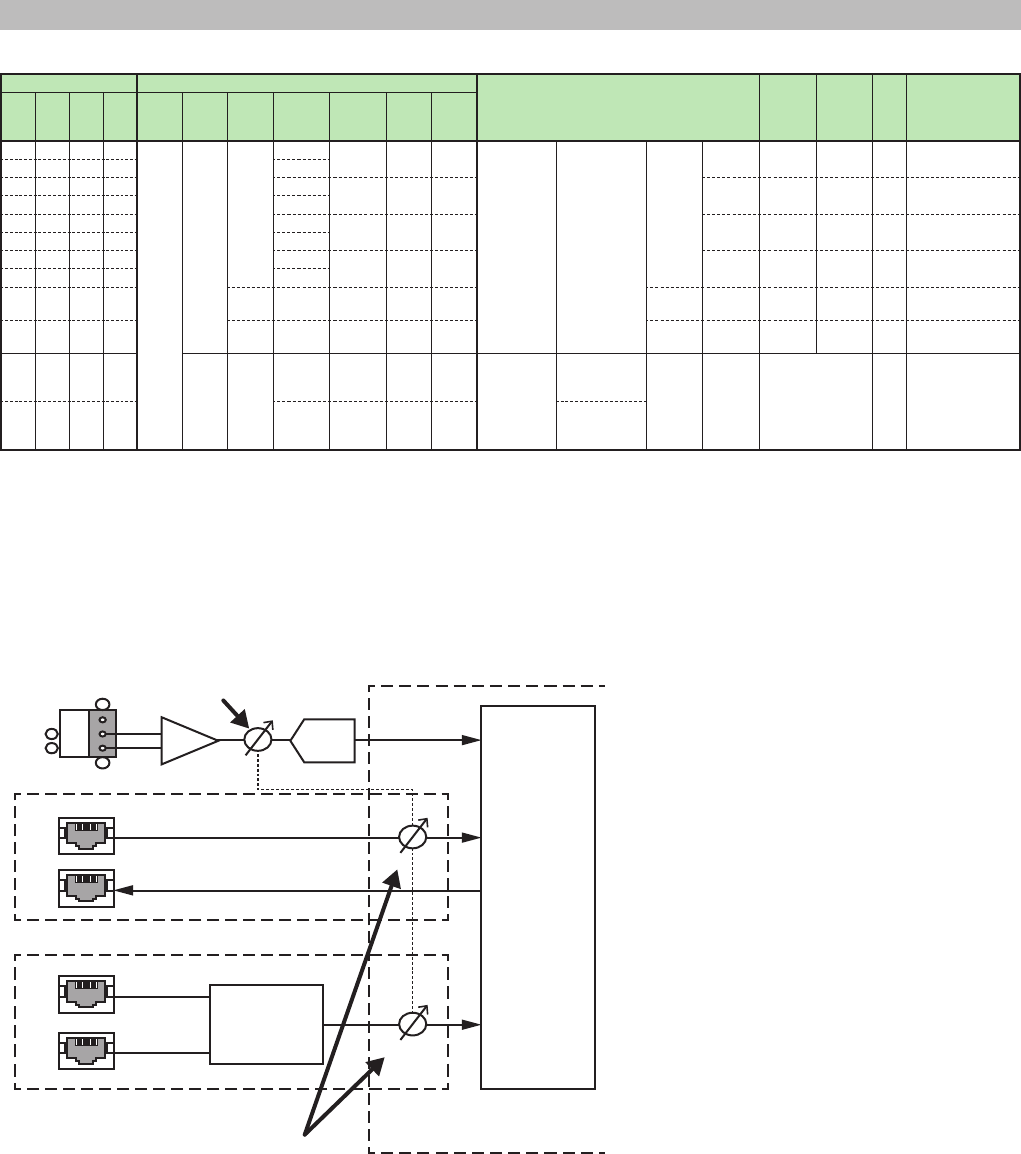
MTX3/MTX5-D/XMV Series/EXi8/EXo8 Remote Control Protocol Specications V1.0.3 71
7. Parameter List
XMV Series
Model Access ID
Prarameter Name MIN MAX unit Remarks
4ch 8ch
4ch D 8ch D
MemNo
(Memory
Number)
UniqueId
ElmNo
(Element
Number)
Xpos
(X Position)
Ypos
(Y Position)
PrmNo
(Parameter
Number)
IndexNo
(Index
Number)
o o 512 1 4 0 to 3 0 0 0
Signal
Processing
ATT *2 -99 0 dB Synchronized with
DigitalATT
o o 0 to 7
o o 0 to 3 0 1 0 Digital
ATT *2
-99 0 dB Synchronized with
ATT
o o 0 to 7
o o 0 to 3 0 2 0 Mute OFF ON - 0:OFF
1:ON
o o 0 to 7
o o 0 to 3 0 3 0 Polarity Normal Inverse - 0:Normal
1:Inverse
o o 0 to 7
o o o o 60 0 0 0 Power Standby Standby ON - 0:ON
1:Standby
oooo 70 0 0 0 Utility
Input
Select *1
Analog Digital - 0:Analog
1:Digital
o o
2 0 0 to 3 0 0 0
ChannelName
Channel
Name 4
Channel
ChName
Name Character (UTF-8)
48byte
-
o o
0 to 7 0 0 0 Channel
Name 8
Channel
*1 : Note
The XMV’s input sensitivity is -3dBFS (rated output at -3dBFS) when connected via digital (YDIF or Dante) and +4dBu (rated output at
+4dBu) when connected via analog.
Please set an appropriate level before switching input.
*2 : The ATT and DigitalATT parameters are always synchronized internally within an XMV amplier.
Controlling either one will provide the same result.
< XMV Block Diagram > e.g. XMV4280/XMV4140/XMV4280-D/XMV4140-D
In
ATT
Dante
XMV4280-D/XMV4140-D only
DANTE
MODULE
SECONDARY
PRIMARY
Out
ATT
ATT
INPUT MIX
Input:
Analog: 4
YDIF: 4
(XMV4280/
XMV4140
only)
Dante: 4
(XMV4280-D/
XMV4140-D
only)
Output: 4
YDIF
XMV4280/XMV4140 only
HA
CH A, B, C, D
G
+
-
AD
ATT
DigitalATT
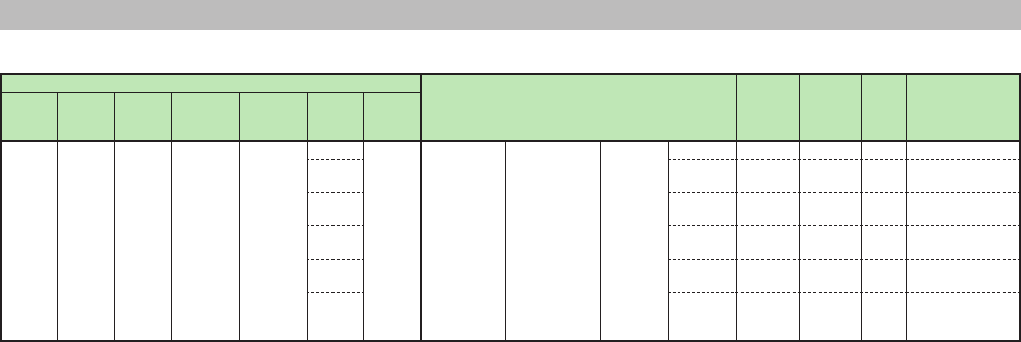
MTX3/MTX5-D/XMV Series/EXi8/EXo8 Remote Control Protocol Specications V1.0.3 72
7. Parameter List
EXi8
Access ID
Prarameter Name MIN MAX unit Remarks
MemNo
(Memory
Number)
UniqueId
ElmNo
(Element
Number)
Xpos
(X Position)
Ypos
(Y Position)
PrmNo
(Parameter
Number)
IndexNo
(Index
Number)
512 1 3 0 to 7 0 0 0
Signal
Processing
GAIN -6 66 dB
1 +V48 OFF ON - 0:OFF
1:ON
2 Phase OFF ON - 0:OFF
1:ON
3 On OFF ON - 0:OFF
1:ON
4 HPFOn OFF ON - 0:OFF
1:ON
5
HPFFrequency
20 20000 Hz Hz x 1000
ex. 1000Hz x
1000000
MTX3/MTX5-D/XMV Series/EXi8/EXo8 Remote Control Protocol Specications V1.0.3 73
7. Parameter List
EXo8
Access ID
Prarameter Name MIN MAX unit Remarks
MemNo
(Memory
Number)
UniqueId
ElmNo
(Element
Number)
Xpos
(X Position)
Ypos
(Y Position)
PrmNo
(Parameter
Number)
IndexNo
(Index
Number)
512 1 3 0 to 7 0 0 0
Signal
Processing
Polarity Normal Inverse - 0:Normal
1:Inverse
1 On OFF ON - 0:OFF
1:ON
2 Gain -96 24 dB dB x 10
ex. -14.5dB x 10
= -145
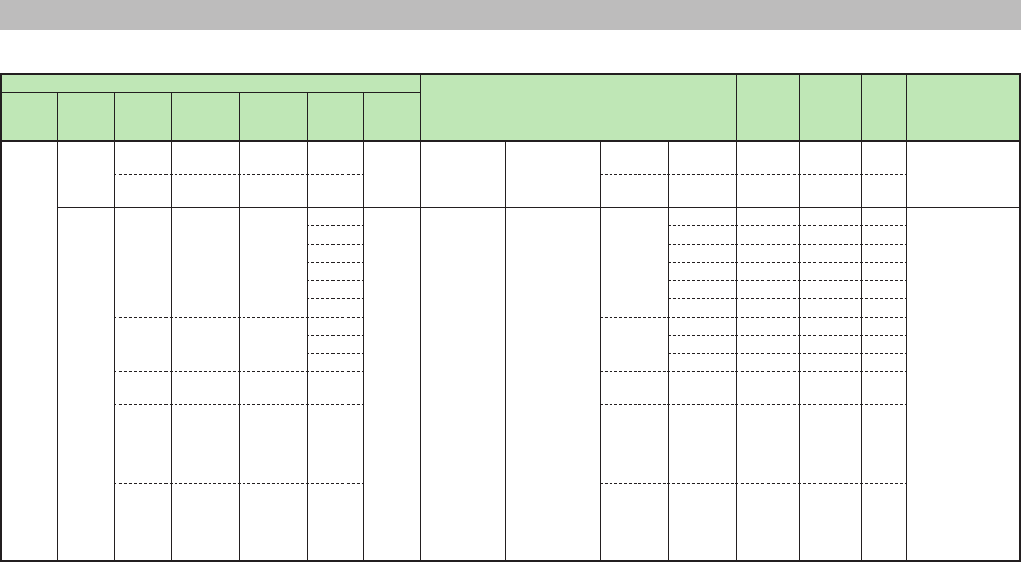
MTX3/MTX5-D/XMV Series/EXi8/EXo8 Remote Control Protocol Specications V1.0.3 74
7. Parameter List
MY4-AEC
Access ID
Prarameter Name MIN MAX unit Remarks
MemNo
(Memory
Number)
UniqueId
ElmNo
(Element
Number)
Xpos
(X Position)
Ypos
(Y Position)
PrmNo
(Parameter
Number)
IndexNo
(Index
Number)
512 20034 0 0 1 0 0 MY4-AEC
INPUT
PATCH
MY4AECInputPatch
NearEndMic
Patch NONE OUTPUT
CH16
-
1 0 1 1
FromFarEnd
NONE OUTPUT
CH16
-
90000 0 0-3
(AEC1-4)
0 0 0 MY4-AEC Acoustic Echo
Canceller 4
Channel
AEC On OFF ON -
1 Effect 1 4 -
2 PttOn OFF ON -
3
PttThreshold
-80 -20 dB
4 MicType Fixed Moving -
5 Distance 2 40 meter
1 0-3
(AEC1-4)
0 0 FBS On OFF ON -
1 Width 1/10 1/93 oct
2 Depth -6 -18 dB
2 0-3
(AEC1-4)
0 0 MicNR On OFF ON -
3 0 0-3
(0:Far-end A
1:Far-end B
2:Far-end C
3:Far-end D)
0 FarEndNR On OFF ON -
4 0-3
(AEC1-4)
0-3
(0:Far-end A
1:Far-end B
2:Far-end C
3:Far-end D)
0 Reference On OFF ON -
MTX3/MTX5-D/XMV Series/EXi8/EXo8 Remote Control Protocol Specications V1.0.3 75
8. Meter List
MTX3/MTX5-D
Model Access ID
Category Meter Name Type Remarks
MTX3 MTX5-D
MemNo
(Memory
Number)
UniqueId
o o 512 20000 INPUT PORT INPUT(ANALOG) Meter 12 Channel
(INPUT1-8, STIN1L-STIN2R)
level See Parameter Value
Details.
o 20004 INPUT(YDIF) Meter 16 Channel
(YDIF IN 1-16)
level
o 20001
o20002 INPUT(SLOT) Meter 16 Channel
(SLOT IN 1-16)
level
o20003 INPUT CHANNEL EQ OUT Meter 22 Channel
(CH1-8, STIN1L-STIN3R, CH9-16)
level
o20009 Meter 8 Channel
(CH1-8)
level
o20010 Meter 22 Channel
(CH9-16, STIN1L-STIN3R, CH17-24)
level
o40002 GATE Gate 8 Channel
(CH1-8)
gr
o40000 Gate 8 Channel
(CH1-8)
gr
o40001 Gate 8 Channel
(CH9-16)
gr
o40000 COMP Compressor 8 Channel
(CH1-8)
gr
o40001 Compressor 4 Channel
(STIN1L-STIN2R)
gr
o40002 Compressor 8 Channel
(CH1-8)
gr
o40003 Compressor 8 Channel
(CH9-16)
gr
o40006 Compressor 4 Channel
(STIN1L-STIN2R)
gr
o20005 POST ON Meter 22 Channel
(CH1-8, STIN1L-STIN3R, CH9-16)
level
o20011 Meter 8 Channel
(CH1-8)
level
o20012 Meter 22 Channel
(CH9-16, STIN1L-STIN3R, CH17-24)
level
o20009 EFFECT RETURN Meter 4 Channel
(Fx RTN1 L-Fx RTN2 R)
level
o20015 Meter 4 Channel
(Fx RTN1 L-Fx RTN2 R)
level
o20012 ZONE 2nd PRIORITY PRIORITY
DUCKER
Ducking 8 Channel
(ZONE1-8)
gr
o20019 Ducking 8 Channel
(ZONE1-8)
gr
o20013 1st PRIORITY PRIORITY
DUCKER
Ducking 8 Channel
(ZONE1-8)
gr
o20020 Ducking 8 Channel
(ZONE1-8)
gr
o
20014 ANC AMBIENT SOURCE Ambient Noise Compensator 8
Channel
ZONE 1-8(AMBIENT SOURCE)
level
o
20021 Ambient Noise Compensator 8
Channel
ZONE 1-8(AMBIENT SOURCE)
level
o20015 ZONE OUT Meter 8 Channel
ZONE 1-8
level
o20022 Meter 16 Channel
ZONE 1-16
level
o40006 OUTPUT CHANNEL OUTPUT CHANNEL(1way)
SPEAKER PROCESSOR
LIMITER
Speaker Processor 1 Way
(OUTPUT CH1)
gr
o40007 Speaker Processor 1 Way
(OUTPUT CH2)
gr
o40008 Speaker Processor 1 Way
(OUTPUT CH3)
gr
o40009 Speaker Processor 1 Way
(OUTPUT CH4)
gr
o40010 Speaker Processor 1 Way
(OUTPUT CH5)
gr
o40011 Speaker Processor 1 Way
(OUTPUT CH6)
gr
o40012 Speaker Processor 1 Way
(OUTPUT CH7)
gr
o40013 Speaker Processor 1 Way
(OUTPUT CH8)
gr
MTX3/MTX5-D/XMV Series/EXi8/EXo8 Remote Control Protocol Specications V1.0.3 76
8. Meter List
Model Access ID
Category Meter Name Type Remarks
MTX3 MTX5-D
MemNo
(Memory
Number)
UniqueId
o512 40008 OUTPUT CHANNEL OUTPUT CHANNEL(1way)
SPEAKER PROCESSOR
LIMITER
Speaker Processor 1 Way
(OUTPUT CH1)
gr See Parameter Value
Details.
o40009 Speaker Processor 1 Way
(OUTPUT CH2)
gr
o40010 Speaker Processor 1 Way
(OUTPUT CH3)
gr
o40011 Speaker Processor 1 Way
(OUTPUT CH4)
gr
o40012 Speaker Processor 1 Way
(OUTPUT CH5)
gr
o40013 Speaker Processor 1 Way
(OUTPUT CH6)
gr
o40014 Speaker Processor 1 Way
(OUTPUT CH7)
gr
o40015 Speaker Processor 1 Way
(OUTPUT CH8)
gr
o40016 Speaker Processor 1 Way
(OUTPUT CH9)
gr
o40017 Speaker Processor 1 Way
(OUTPUT CH10)
gr
o40018 Speaker Processor 1 Way
(OUTPUT CH11)
gr
o40019 Speaker Processor 1 Way
(OUTPUT CH12)
gr
o40020 Speaker Processor 1 Way
(OUTPUT CH13)
gr
o40021 Speaker Processor 1 Way
(OUTPUT CH14)
gr
o40022 Speaker Processor 1 Way
(OUTPUT CH15)
gr
o40023 Speaker Processor 1 Way
(OUTPUT CH16)
gr
o40006 OUTPUT CHANNEL(2way)
SPEAKER PROCESSOR
LIMITER
Speaker Processor 2 Way
(OUTPUT CH1 (Low))
gr
o40007 Speaker Processor 2 Way
(OUTPUT CH1 (High))
gr
o40008 Speaker Processor 2 Way
(OUTPUT CH3 (Low))
gr
o40009 Speaker Processor 2 Way
(OUTPUT CH3 (High))
gr
o40010 Speaker Processor 2 Way
(OUTPUT CH5 (Low))
gr
o40011 Speaker Processor 2 Way
(OUTPUT CH5 (High))
gr
o40012 Speaker Processor 2 Way
(OUTPUT CH7 (Low))
gr
o40013 Speaker Processor 2 Way
(OUTPUT CH7 (High))
gr
o40008 Speaker Processor 2 Way
(OUTPUT CH1 (Low))
gr
o40009 Speaker Processor 2 Way
(OUTPUT CH1 (High))
gr
o40010 Speaker Processor 2 Way
(OUTPUT CH3 (Low))
gr
o40011 Speaker Processor 2 Way
(OUTPUT CH3 (High))
gr
o40012 Speaker Processor 2 Way
(OUTPUT CH5 (Low))
gr
o40013 Speaker Processor 2 Way
(OUTPUT CH5 (High))
gr
o40014 Speaker Processor 2 Way
(OUTPUT CH7 (Low))
gr
o40015 Speaker Processor 2 Way
(OUTPUT CH7 (High))
gr
o40016 Speaker Processor 2 Way
(OUTPUT CH9 (Low))
gr
o40017 Speaker Processor 2 Way
(OUTPUT CH9 (High))
gr
o40018 Speaker Processor 2 Way
(OUTPUT CH11 (Low))
gr
o40019 Speaker Processor 2 Way
(OUTPUT CH11 (High))
gr
o40020 Speaker Processor 2 Way
(OUTPUT CH13 (Low))
gr
o40021 Speaker Processor 2 Way
(OUTPUT CH13 (High))
gr
o40022 Speaker Processor 2 Way
(OUTPUT CH15 (Low))
gr
o40023 Speaker Processor 2 Way
(OUTPUT CH15 (High))
gr
MTX3/MTX5-D/XMV Series/EXi8/EXo8 Remote Control Protocol Specications V1.0.3 77
8. Meter List
Model Access ID
Category Meter Name Type Remarks
MTX3 MTX5-D
MemNo
(Memory
Number)
UniqueId
o512 20020 OUTPUT CHANNEL OUTPUT CHANNEL Meter 8 Channel
(OUTPUT CH1-8)
level See Parameter Value
Details.
o20027 Meter 16 Channel
(OUTPUT CH1-16)
level
o20025 OUTPUT PORT OUTPUT (ANALOG) Meter 8 Channel
(OUTPUT CH1-8)
level
o20031 Meter 8 Channel
(OUTPUT CH1-8)
level
o20032 OUTPUT (SLOT) Meter 16 Channel
(SLOT IN 1-16)
level
o
90000 MY4-AEC MY4-AEC
(Mic In. 1-4
Ref In. 1-4
Echo Attn. 1-4
ERL 1-4
PTT Thesh. 1-4)
level
MTX3/MTX5-D/XMV Series/EXi8/EXo8 Remote Control Protocol Specications V1.0.3 78
8. Meter List
XMV Series
Model Access ID
Category Meter Name Type Remarks
4ch 8ch 4ch D 8ch D
MemNo
(Memory
Number)
UniqueId
o o
512 20000 - INPUT Meter 4 Channel
(ANALOG INPUT A-D,
DIGITAL INPUT A-D)
level See 6. Parameter
Value Details.
o o
Meter 8 Channel
(ANALOG INPUT A-H,
DIGITAL INPUT A-H)
level
o o 20001 - OUTPUT Meter 4 Channel
(OUTPUT A-D)
level
o o Meter 8 Channel
(OUTPUT A-H)
level

MTX3/MTX5-D/XMV Series/EXi8/EXo8 Remote Control Protocol Specications V1.0.3 79
8. Meter List
EXi8
Access ID
Category Meter Name Type Remarks
MemNo
(Memory Number) UniqueId
512 20000 - INPUT Meter 8 Channel
(INPUT1-8)
level See Parameter Value Details.

MTX3/MTX5-D/XMV Series/EXi8/EXo8 Remote Control Protocol Specications V1.0.3 80
8. Meter List
EXo8
Access ID
Category Meter Name Type Remarks
MemNo
(Memory Number) UniqueId
512 20001 - OUTPUT Meter 8 Channel
(OUTPUT1-8)
level See Parameter Value Details.
