Yamaha Sweet Spot Data Manager Installation Guide SSDM En Ig C0
User Manual: Yamaha Sweet Spot Data Manager Installation Guide
Open the PDF directly: View PDF  .
.
Page Count: 7
1
Sweet Spot Data Manager Installation Guide
PLEASE READ THIS SOFTWARE LICENSE AGREEMENT (“AGREEMENT”) CAREFULLY BEFORE USING THIS SOFTWARE.
YOU ARE ONLY PERMITTED TO USE THIS SOFTWARE PURSUANT TO THE TERMS AND CONDITIONS OF THIS AGREE-
MENT. THIS AGREEMENT IS BETWEEN YOU (AS AN INDIVIDUAL OR LEGAL ENTITY) AND YAMAHA CORPORATION
(“YAMAHA”).
BY
DOWNLOADING, INSTALLING, COPYING, OR OTHERWISE USING THIS SOFTWARE YOU ARE AGREEING TO BE
BOUND BY THE TERMS OF THIS LICENSE. IF YOU DO NOT AGREE WITH THE TERMS, DO NOT DOWNLOAD, INSTALL,
COPY, OR OTHERWISE USE THIS SOFTWARE. IF YOU HAVE DOWNLOADED OR INSTALLED THE SOFTWARE AND DO NOT
AGREE TO THE TERMS, PROMPTLY DELETE THE SOFTWARE.
1. GRANT OF LICENSE AND COPYRIGHT
Yamaha hereby grants you the right to use one copy of the software program(s) and data (“SOFTWARE”) accompanying this Agreement.
The term SOFTWARE shall encompass any updates to the accompanying software and data. The SOFTWARE is owned by Yamaha and/or
Yamaha’s licensor(s), and is protected by relevant copyright laws and all applicable treaty provisions. While you are entitled to claim owner-
ship of the data created with the use of SOFTWARE, the SOFTWARE will continue to be protected under relevant copyrights.
•
You may
use the SOFTWARE on a
single computer
.
•
You may
make one copy of the SOFTWARE in machine-readable form for backup purposes only, if the SOFTWARE is on media where
such backup copy is permitted. On the backup copy, you must reproduce Yamaha’s copyright notice and any other proprietary legends that
were on the original copy of the SOFTWARE.
•
You may
permanently transfer to a third party all your rights in the SOFTWARE, provided that you do not retain any copies and the recip-
ient reads and agrees to the terms of this Agreement.
2. RESTRICTIONS
•
You may not
engage in reverse engineering, disassembly, decompilation or otherwise deriving a source code form of the SOFTWARE by
any method whatsoever.
•
You may not
reproduce, modify, change, rent, lease, or distribute the SOFTWARE in whole or in part, or create derivative works of the
SOFTWARE.
•
You may not
electronically transmit the SOFTWARE from one computer to another or share the SOFTWARE in a network with other
computers.
•
You may not
use the SOFTWARE to distribute illegal data or data that violates public policy.
•
You may not
initiate services based on the use of the SOFTWARE without permission by Yamaha Corporation.
Copyrighted data, including but not limited to MIDI data for songs, obtained by means of the SOFTWARE, are subject to the following
restrictions which you must observe.
• Data received by means of the SOFTWARE may not be used for any commercial purposes without permission of the copyright owner.
•Data received by means of the SOFTWARE may not be duplicated, transferred, or distributed, or played back or performed for listeners in
public without permission of the copyright owner.
•The encryption of data received by means of the SOFTWARE may not be removed nor may the electronic watermark be modified without
permission of the copyright owner.
ATTENTION
SOFTWARE LICENSE AGREEMENT
Installation Guide
Installation Guide

2
Sweet Spot Data Manager Installation Guide
3. TERMINATION
This Agreement becomes effective on the day that you receive the SOFTWARE and remains effective until terminated. If any copyright law
or provisions of this Agreement is violated, the Agreement shall terminate automatically and immediately without notice from Yamaha. Upon
such termination, you must immediately destroy the licensed SOFTWARE, any accompanying written documents and all copies thereof.
4. DISCLAIMER OF WARRANTY ON SOFTWARE
You expressly acknowledge and agree that use of the SOFTWARE is at your sole risk. The SOFTWARE and related documentation are pro-
vided “AS IS” and without warranty of any kind. NOTWITHSTANDING ANY OTHER PROVISION OF THIS AGREEMENT, YAMAHA
EXPRESSLY DISCLAIMS ALL WARRANTIES AS TO THE SOFTWARE, EXPRESS, AND IMPLIED, INCLUDING BUT NOT LIM-
ITED TO THE IMPLIED WARRANTIES OF MERCHANTABILITY, FITNESS FOR A PARTICULAR PURPOSE AND NON-INFRINGE-
MENT OF THIRD PARTY RIGHTS. SPECIFICALLY, BUT WITHOUT LIMITING THE FOREGOING, YAMAHA DOES NOT
WARRANT THAT THE SOFTWARE WILL MEET YOUR REQUIREMENTS, THAT THE OPERATION OF THE SOFTWARE WILL BE
UNINTERRUPTED OR ERROR-FREE, OR THAT DEFECTS IN THE SOFTWARE WILL BE CORRECTED.
5. LIMITATION OF LIABILITY
YAMAHA’S ENTIRE OBLIGATION HEREUNDER SHALL BE TO PERMIT USE OF THE SOFTWARE UNDER THE TERMS
HEREOF. IN NO EVENT SHALL YAMAHA BE LIABLE TO YOU OR ANY OTHER PERSON FOR ANY DAMAGES, INCLUDING,
WITHOUT LIMITATION, ANY DIRECT, INDIRECT, INCIDENTAL OR CONSEQUENTIAL DAMAGES, EXPENSES, LOST PROF-
ITS, LOST DATA OR OTHER DAMAGES ARISING OUT OF THE USE, MISUSE OR INABILITY TO USE THE SOFTWARE, EVEN
IF YAMAHA OR AN AUTHORIZED DEALER HAS BEEN ADVISED OF THE POSSIBILITY OF SUCH DAMAGES. In no event shall
Yamaha’s total liability to you for all damages, losses and causes of action (whether in contract, tort or otherwise) exceed the amount paid for
the SOFTWARE.
6. THIRD PARTY SOFTWARE
Third party software and data (“THIRD PARTY SOFTWARE”) may be attached to the SOFTWARE. If, in the written materials or the elec-
tronic data accompanying the Software, Yamaha identifies any software and data as THIRD PARTY SOFTWARE, you acknowledge and
agree that you must abide by the provisions of any Agreement provided with the THIRD PARTY SOFTWARE and that the party providing
the THIRD PARTY SOFTWARE is responsible for any warranty or liability related to or arising from the THIRD PARTY SOFTWARE.
Yamaha is not responsible in any way for the THIRD PARTY SOFTWARE or your use thereof.
•Yamaha provides no express warranties as to the THIRD PARTY SOFTWARE. IN ADDITION, YAMAHA EXPRESSLY DISCLAIMS
ALL IMPLIED WARRANTIES, INCLUDING BUT NOT LIMITED TO THE IMPLIED WARRANTIES OF MERCHANTABILITY
AND FITNESS FOR A PARTICULAR PURPOSE, as to the THIRD PARTY SOFTWARE.
•Yamaha shall not provide you with any service or maintenance as to the THIRD PARTY SOFTWARE.
•Yamaha is not liable to you or any other person for any damages, including, without limitation, any direct, indirect, incidental or conse-
quential damages, expenses, lost profits, lost data or other damages arising out of the use, misuse or inability to use the THIRD PARTY
SOFTWARE.
7. GENERAL
This Agreement shall be interpreted according to and governed by Japanese law without reference to principles of conflict of laws. Any dis-
pute or procedure shall be heard before the Tokyo District Court in Japan. If for any reason a court of competent jurisdiction finds any portion
of this Agreement to be unenforceable, the remainder of this Agreement shall continue in full force and effect.
8. COMPLETE AGREEMENT
This Agreement constitutes the entire agreement between the parties with respect to use of the SOFTWARE and any accompanying written
materials and supersedes all prior or contemporaneous understandings or agreements, written or oral, regarding the subject matter of this
Agreement. No amendment or revision of this Agreement will be binding unless in writing and signed by a fully authorized representative of
Yamaha.
• The software and this manual are the exclusive copyrights of Yamaha Corporation.
• Use of the software and this manual is governed by the license agreement which the purchaser fully agrees to upon breaking the seal of the
software packaging. (Please read carefully the Software Licensing Agreement at the beginning of this manual before installing the application.)
•Copying of the software or reproduction of this manual in whole or in part by any means is expressly forbidden without the written consent
of the manufacturer.
•Yamaha makes no representations or warranties with regard to the use of the software and documentation and cannot be held responsible
for the results of the use of this manual and the software.
• Future upgrades of application and system software and any changes in specifications and functions will be announced separately.
•The screen displays as illustrated in this manual are for instructional purposes, and may appear somewhat different from the screens which
appear on your computer.
• Copying of the commercially available musical data including but not limited to MIDI data and/or audio data is strictly prohibited except
for your personal use.
•Windows is the registered trademarks of Microsoft
®
Corporation.
• Apple and Mac are trademarks of Apple Inc., registered in the U.S. and other countries.
• The company names and product names in this manual are the trademarks or registered trademarks of their respective companies.
SPECIAL NOTICES

3
Sweet Spot Data Manager Installation Guide
Sweet Spot Data Manager is a software application that enables you to replace the n8/n12’s compressor settings (Sweet Spot Data). This
application contains several Sweet Spot Data sets and enables you to easily replace the compressor data on the n8/n12.
For Windows Users:
System Requirements for Software (page 4)
Installing Sweet Spot Data Manager (page 4)
Uninstalling Sweet Spot Data Manager (page 6)
For Mac Users:
System Requirements for Software (page 7)
Installing Sweet Spot Data Manager (page 7)
Please contact your nearest Yamaha representative or the authorized distributor listed in the Owner’s Manual of your mixing console.
About Sweet Spot Data Manager
About This Guide
Questions regarding Sweet Spot Data Manager
4
Sweet Spot Data Manager Installation Guide
System Requirements for Software
OS : Windows XP Professional SP2 or later/XP Home Edition SP2 or later/Vista
Computer: Intel Core/Pentium/Celeron processor, with an S400(400Mbps) IEEE1394 or i.Link terminal(*1)
Hard Disk: 20MB or more; high-speed hard disk
Windows XP Professional SP2 or later/XP Home Edition SP2 or later
CPU : Pentium 1.4GHz or Celeron 1.7GHz or higher
Available Memory: 512MB or more
Windows Vista (32-bit)
CPU : Pentium 2GHz or higher
Available Memory: 512MB or more
Windows Vista (64-bit)
CPU : Core 2 Duo 2.66GHz or higher
Available Memory: 2GB or more
*1 The computer must have an IEEE1394 connector. If there is no connector, install an IEEE1394 interface card (PCI or PC). For more
details on system requirements and recommended PCI or PC cards, see
• When using a laptop or notebook computer, a built-in IEEE1394 terminal may not be available. If this is the case, install an appropriate PC interface
card.
Installing Sweet Spot Data Manager
Before installing Sweet Spot Data Manager
Before installing and using Sweet Spot Data Manager, make sure that the TOOLS for n Version2 has been installed correctly and that the n8/
n12 and your computer are connected via an IEEE 1394 cable. To install the software, also refer to the Installation Guide that comes with
the software. For information on TOOLS for n Version2, refer to the following website:
For Windows Users
http://www.yamahasynth.com/
http://www.yamahasynth.com/download/
5
Sweet Spot Data Manager Installation Guide
Starting up the installer
•Use the Cancel button or Close button to quit the installation procedure. Quitting by using the [Ctrl]+[Alt]+[Delete] keys, or by turning off the power while
the installation is in progress, may result in problems. Since the installation was terminated without performing a proper uninstall, this may cause the
software to be removed improperly later if you should try to uninstall the software.
1
Start the computer, and log on to the Administrator account.
2
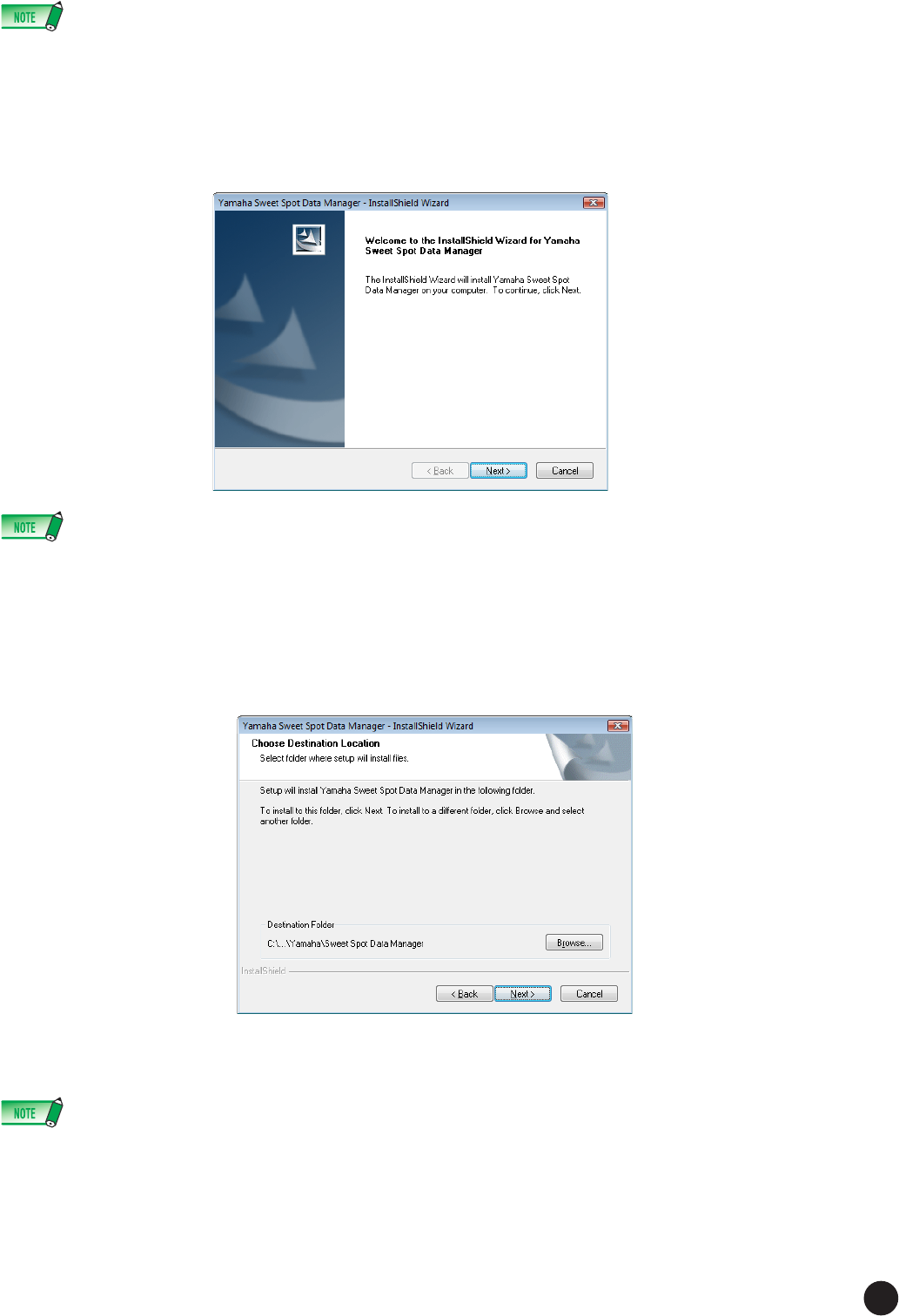
Double-click the file “Setup.exe”.
A “Welcome to the InstallShield Wizard for Yamaha Sweet Spot Data Manager” window appears.
• If Sweet Spot Data Manager has already been installed on your computer, a window for removing the application appears.
• If you are using Windows Vista, the “User Account Control” dialog box may appear. In this case, click “Continue” to install the application.
3
Click [Next]. The “Destination Directory” window appears, letting you specify the desired drive and folder name for
installing Sweet Spot Data Manager. If you wish to change the drive and folder name, click [Browse...] and select
the desired folder.
Click [Next] after making or confirming the selection to start installation.
4
When installation is finished, a “Completed” message appears.
Click [Finish].
• To start Sweet Spot Data Manager, select [Start]
→
[Program], or double-click the Sweet Spot Data Manager short-cut icon on the desktop. For infor-
mation on how to use the application, refer to the Owner's Manual that come with the application.

6
Sweet Spot Data Manager Installation Guide
Uninstalling Sweet Spot Data Manager
Windows XP
1
From the Start menu, select ([Settings]
→
) [Control Panel]
→
[Add or Remove Programs] to display the Add or
Remove Programs panel.
2
Click “Change or Remove Programs” located in the upper left corner on the panel, then select “Yamaha Sweet Spot
Data Manager” from the list in the right pane.
3
Click [Remove] to uninstall the software.
A dialog box appears. Follow the instructions on the screen to remove the software.
The uninstallation of Sweet Spot Data Manager is complete.
Windows Vista
1
From the Start menu, select ([Settings]
→
) [Control Panel]
→
[Programs and Features] to display the “Uninstall or
change a program” panel.
2
Select “Yamaha Sweet Spot Data Manager” from the list.
3
Click [Uninstall].
A dialog box appears. Follow the instructions on the screen to remove the software.
The uninstallation of Sweet Spot Data Manager is complete.
• If the “User Account Control” dialog box appears, click “Continue” to uninstall the application.
System Requirements for Software
OS: Mac OS X 10.4.x (Intel processor: 10.4.9 or later) / Mac OS X 10.5.x
Hard Disk: 20MB or more; high-speed hard disk
CPU: PowerPC G4 1GHz or higher/Intel processor
Available Memory: 512MB or more
For more details on system requirements, see
Installing the Software
Preparing to install
Before installing and using Sweet Spot Data Manager, make sure that the TOOLS for n Version2 has been installed correctly and that the n8/
n12 and your computer are connected via an IEEE 1394 cable. To install the software, also refer to the Installation Guide that comes with the
software. For information on TOOLS for n Version2, refer to the following website:
Starting up the installer
1
Start the computer and log in to the Administrator account.
2
Double-click “SSDManager.pkg.”
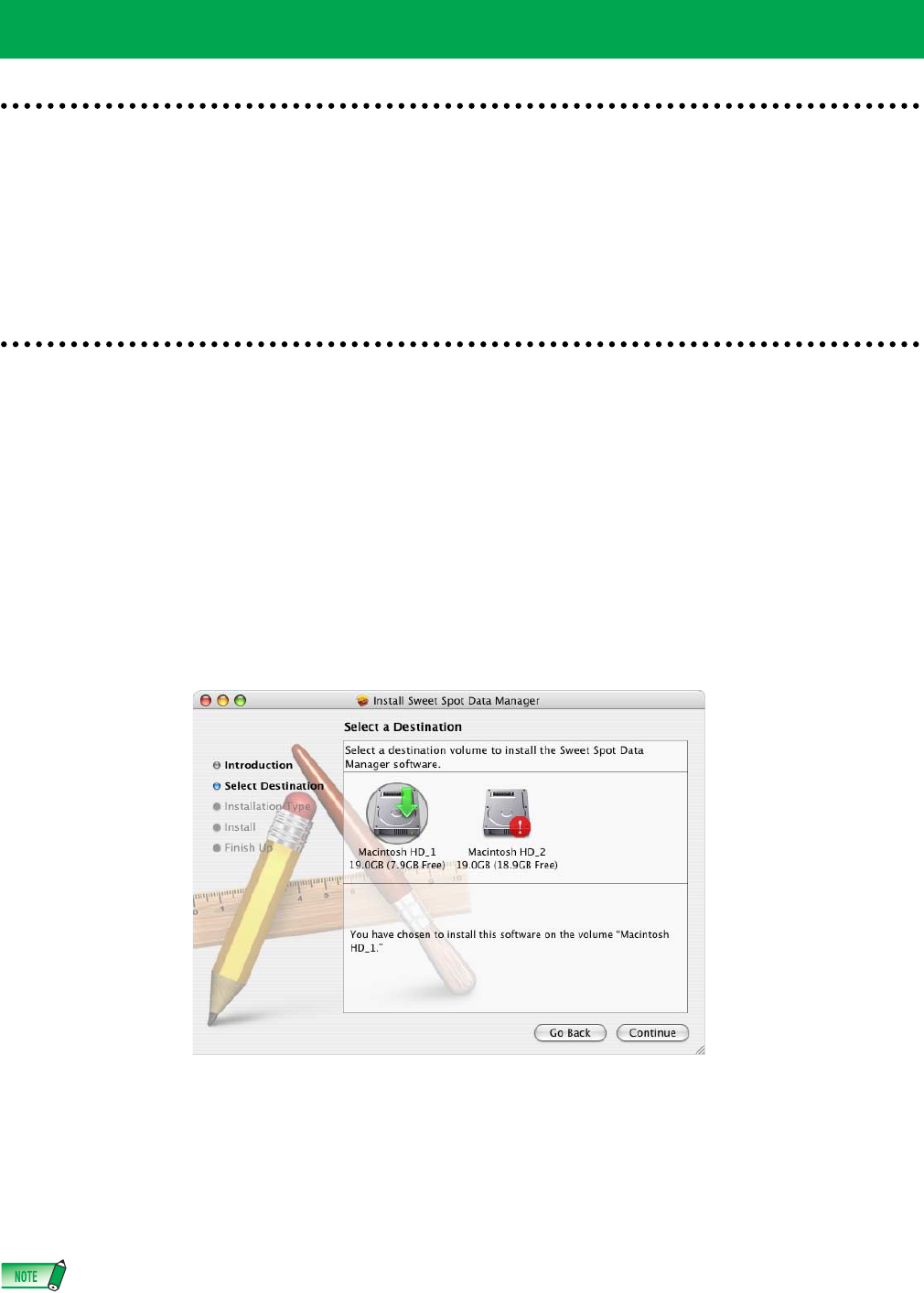
3
Click [Continue] to display the [Select a Destination] window. Select the destination and click [Continue].
The window for installing the application appears.
4
Click [Install].
The “Authenticate” window appears.
5
Enter the administrator password, then click [OK] to start the installation.
6
When installation is finished, a message appears indicating that the installation has been finished. Click [Close] to
complete the installation.
•To start Sweet Spot Data Manager, double-click [Applications]
→
[Yamaha]
→
[SweetSpotDataManager]
→
[SSDManager]. For information on how to
use the application, refer to the Owner's Manual that comes with the application.
For Mac Users
http://www.yamahasynth.com/
http://www.yamahasynth.com/download/
U.R.G., Pro Audio & Digital Musical Instrument Division, Yamaha Corporation
© 2007-2009 Yamaha Corporation
706AP-C0
