Yamaha TSX 10 Manual
TSX-15 Manual TSX-15
TSX-20 Manual TSX-20
User Manual: Yamaha TSX-10 Manual
Open the PDF directly: View PDF  .
.
Page Count: 28
TSX-10
TSX-15
TSX-20
OWNER’S MANUAL
MODE D’EMPLOI
BEDIENUNGSANLEITUNG
BRUKSANVISNING
MANUALE DI ISTRUZIONI
MANUAL DE INSTRUCCIONES
GEBRUIKSAANWIJZING
TABLETOP STEREO SYSTEM
SYSTEM HIFI TABLETOP
G B
02/TSX-10E(6.12)b 01.6.12, 4:17 PM1
CAUTION - VISIBLE AND
/
OR INVISIBLE LASER RADIATION WHEN OPEN
AND INTERLOCKS DEFEATED.AVOID EXPOSURE TO BEAM.
VARNING - SYNLIG OCH
/
ELLER OSYNLIG LASERSTRALNING NAR
DENNA DEL AR OPPNAD OCH SPARRAR AR URKOPPLADE.
STRALEN AR FARLIG.
VARO ! AVATTAESSA JA SUOJALUKITUS OHITETTAESSA OLET
ALTTINA NAKYVALLE JA
/
TAI NAKYMATOMALLE
LASERSATEILYLLE. ALA KATSO SATEESEEN.
VARNING - SYNLIG OCH
/
ELLER OSYNLIG LASERSTRALNING NAR DENNA
DEL AR OPPNAD OCH SPARREN AR URKOPPLAD. BETRAKTA
EJ STRALEN.
ATTENTION - RADIATION LASER VISIBLE ET
/
OU INVISIBLE LORSQUE
L´APPAREIL EST OUVERT ET QUE LE VERROUILLAGE EST
DESACTIVE. EVITEZ TOUTE EXPOSITION AU FAISCEAU.
VORSICHT ! SICHTBARE UND
/
ODER UNSICHTBARE LASERSTRAHLUNG
TRITT AUS,WENN DECKEL GEOFFNET UND WENN
SICHERHEITSVERRIEGELUNG UBERBRUCKT IST.
NICHT DEM STRAHL AUSSETZEN.
MODEL NO. CRX
-
TS10
230 VOLTS 35 WATTS
50 Hz
~
MADE IN MALAYSIA
CLASS 1 LASER PRODUCT
LASER KLASSE 1 PRODUKT
LUOKAN 1 LASERLAITE
KLASS 1 LASER APPARAT
CAUTION - VISIBLE AND
/
OR INVISIBLE LASER RADIATION WHEN OPEN
AND INTERLOCKS DEFEATED. AVOID EXPOSURE TO BEAM.
VARNING - SYNLIG OCH
/
ELLER OSYNLIG LASERSTRALNING NAR
DENNA DEL AR OPPNAD OCH SPARRAR AR URKOPPLADE.
STRALEN AR FARLIG.
VARO ! AVATTAESSA JA SUOJALUKITUS OHITETTAESSA OLET
ALTTINA NAKYVALLE JA
/
TAI NAKYMATOMALLE
LASERSATEILYLLE. ALA KATSO SATEESEEN.
VARNING - SYNLIG OCH
/
ELLER OSYNLIG LASERSTRALNING NAR DENNA
DEL AR OPPNAD OCH SPARREN AR URKOPPLAD. BETRAKTA
EJ STRALEN.
ATTENTION - RADIATION LASER VISIBLE ET
/
OU INVISIBLE LORSQUE
L´APPAREIL EST OUVERT ET QUE LE VERROUILLAGE EST
DESACTIVE. EVITEZ TOUTE EXPOSITION AU FAISCEAU.
VORSICHT ! SICHTBARE UND
/
ODER UNSICHTBARE LASERSTRAHLUNG
TRITT AUS,WENN DECKEL GEOFFNET UND WENN
SICHERHEITSVERRIEGELUNG UBERBRUCKT IST.
NICHT DEM STRAHL AUSSETZEN.
CLASS 1 LASER PRODUCT
LASER KLASSE 1 PRODUKT
LUOKAN 1 LASERLAITE
KLASS 1 LASER APPARAT
VARO!
AVATTAESSA JA SUOJALUKITUS
OHITETTAESSA OLET ALTTIINA
NÄKYMÄTTÖMÄLLE LASERSÄTEILYLLE. ÄLÄ
KATSO SÄTEESEEN.
VARNING!
OSYNLIG LASERSTRÅLNING NÄR DENNA DEL
ÄR ÖPPNAD OCH SPÄRREN ÄR URKOPPLAD.
BETRAKTA EJ STRÅLEN.
CAUTION
Use of controls or adjustments or performance of
procedures other than those specified herein may
result in hazardous radiation exposure.
ATTENTION
L’emploi de commandes, de réglages ou un choix
de procédures différents des spécifications de cette
brochure peut entraîner une exposition à
d’éventuelles radiations pouvant être dangereses.
ACHTUNG
Die Verwendung von Bedienungselementen oder
Einstellungen oder die Durchführung von
Bedienungsvorgängen, die nicht in dieser Anleitung
aufgeführt sind, kann zu einem Kontakt mit
gefährlichen Laserstrahlen führen.
OBSERVERA
Användning av kontroller och justeringar eller
genomförande av andra procedurer än de som
specificeras i denna bok kan resultera i att du
utsätter dig för farlig strålning.
ATTENZIONE
Uso di controlli o regolazioni o procedure non
specificamente descritte può causare l’esposizione
a radiazioni di livello pericoloso.
PRECAUCIÓN
El uso de los controles o los procedimientos de
ajuste o utilización diferentes de los especificados
en este manual pueden causar una exposición
peligrosa a la radiación.
VOORZICHTIG
Gebruik van bedieningsorganen of instellingen, of
uitvoeren van handelingen anders dan staan
beschreven in deze handleiding kunnen leiden tot
blootstelling aan gevaarlijke stralen.
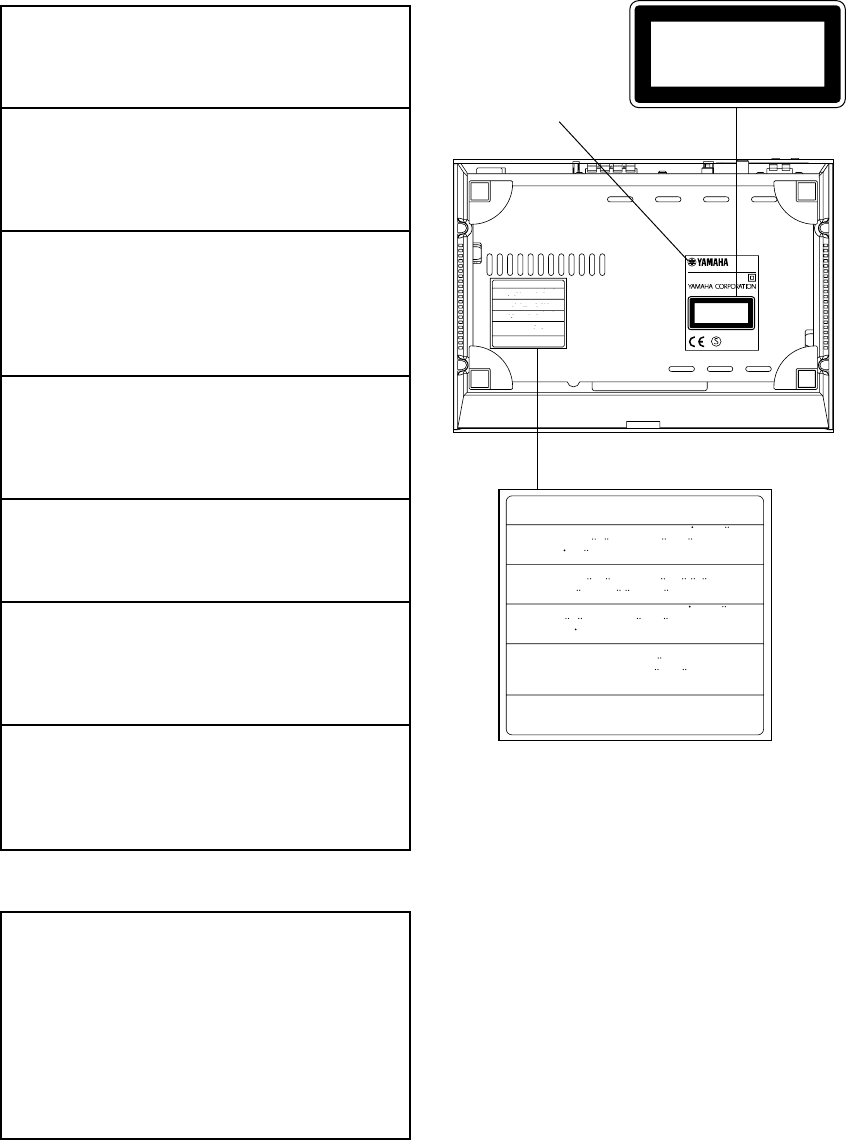
*: This label also shows the model number, required
voltage and power consumption of this unit, and other
cautions, etc.
*
02/TSX-10E(6.12)b 01.6.12, 4:17 PM2
1
English
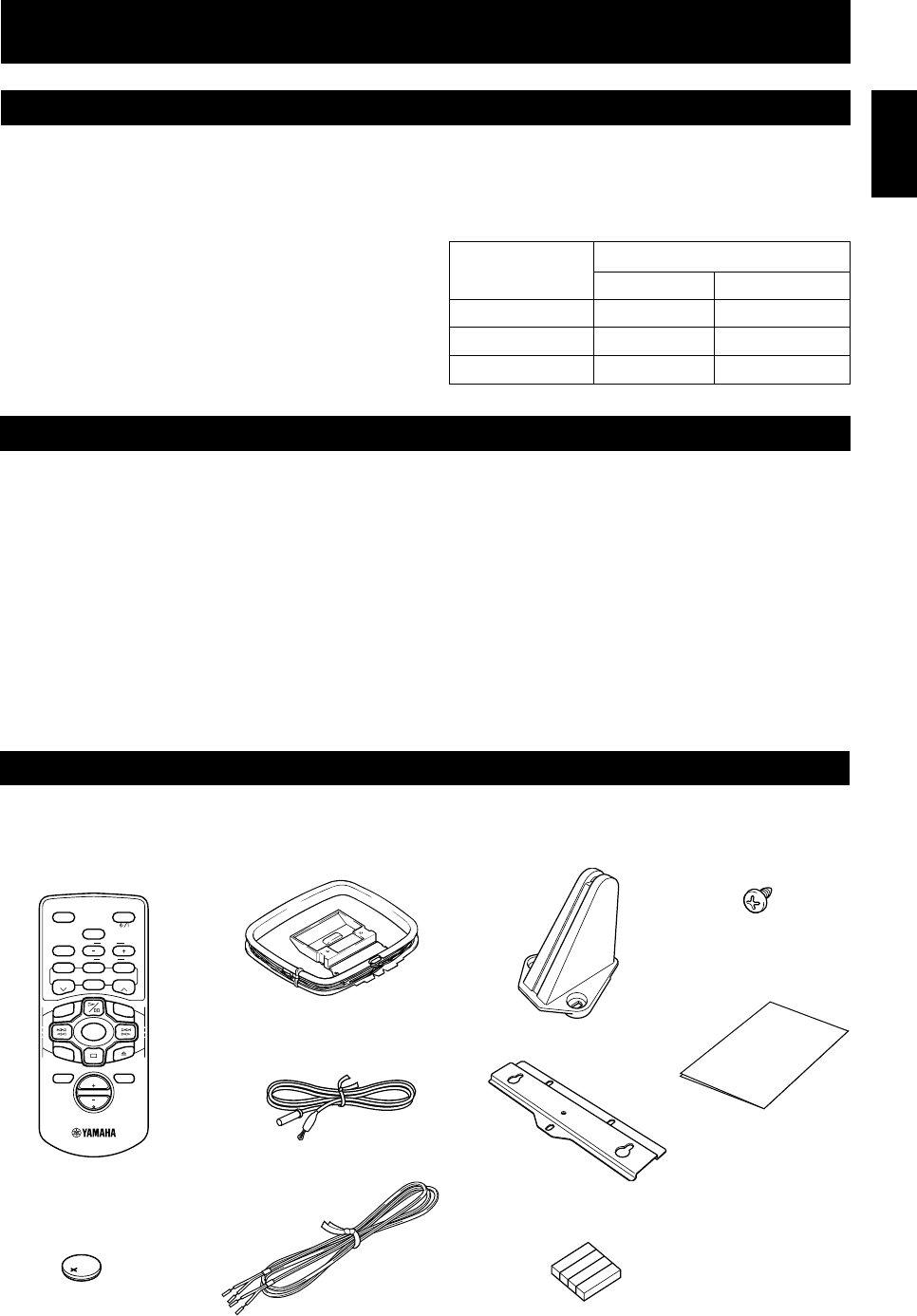
• Remote control
• Battery (CR2025)
• AM loop antenna
• Indoor FM antenna
• Speaker cable x 2
• Stand x 3
• Mounting bracket
• Non-slip pad x 4
Package number Components
CD receiver Speaker system
TSX-10 CRX-TS10 NX-TS10
TSX-15 CRX-TS20 NX-TS10
TSX-20 CRX-TS20 NX-TS20
INTRODUCTION
Thank you for purchasing this YAMAHA product. We
hope it will give you many years of trouble-free
enjoyment. For the best performance, read this manual
carefully. It will guide you in operating your YAMAHA
product.
ENGLISH
FEATURES
• Output Power per Channel
18 W + 18 W (4Ω, 1 kHz, 10% THD)
• Installation-free design
• Full Operation Remote Control
• Multi-Function Timer/Sleep Timer
• SUBWOOFER Output Terminal
Tuner
• 40-Station FM/AM Preset Tuning
• Multi-Function RDS Reception
CD Player
• S-bit DAC and 8fs Digital Filter
• Optical Digital Output
• Random and Repeat Play
Speakers
• 2-Way Bass-Reflex Speaker System
Magnetic Shielding Type
This owner’s manual covers three packages TSX-10,
TSX-15 and TSX-20.
Please check the package number of your product and its
components by refering to the following table.
SUPPLIED ACCESSORIES
After unpacking, check that the following parts are included.
SLEEP
B. BOOST
LEVEL
STANDBY/ON
BASS/TREBLE
MODE
ABCDE
MUTE
VOL
DISPLAY
INPUT
REP
TIME
RANDOM
TUNER
START
FREQ/RDS
PRESET PRESET
RTY SEEK
• Screw x 9
• Paper pattern
03/TSX-10E(6.12)b 01.6.12, 4:17 PM1
2
INTRODUCTION ..................................... 1
FEATURES .............................................. 1
SUPPLIED ACCESSORIES ....................... 1
SETTING UP THIS SYSTEM .................... 2
PRECAUTIONS ....................................... 3
NAMES OF BUTTONS AND CONTROLS
Front panel........................................................... 4
Display................................................................. 4
Remote control .................................................... 5
GETTING STARTED
Connections ......................................................... 6
Installation ........................................................... 8
CD preventive care ............................................ 10
Remote control .................................................. 11
Setting the clock ................................................ 12
Adjusting the brightness of the display ............. 12
LISTENING TO A SOURCE .................... 13
COMPACT DISC PLAYER OPERATIONS
CD play.............................................................. 14
Selecting the time display.................................. 15
Random-sequence play...................................... 15
Repeat play ........................................................ 16
TUNER OPERATIONS
Listening to the radio......................................... 17
Presetting stations .............................................. 18
RECEIVING RDS STATIONS
Receiving RDS data .......................................... 19
PTY SEEK mode............................................... 20
Optional settings for RDS functions ................. 21
USING THE BUILT-IN TIMER
Timer play ......................................................... 22
Sleep timer......................................................... 23
ADDITIONAL INFORMATION
Troubleshooting ................................................. 24
Specifications .................................................... 26
CONTENTS
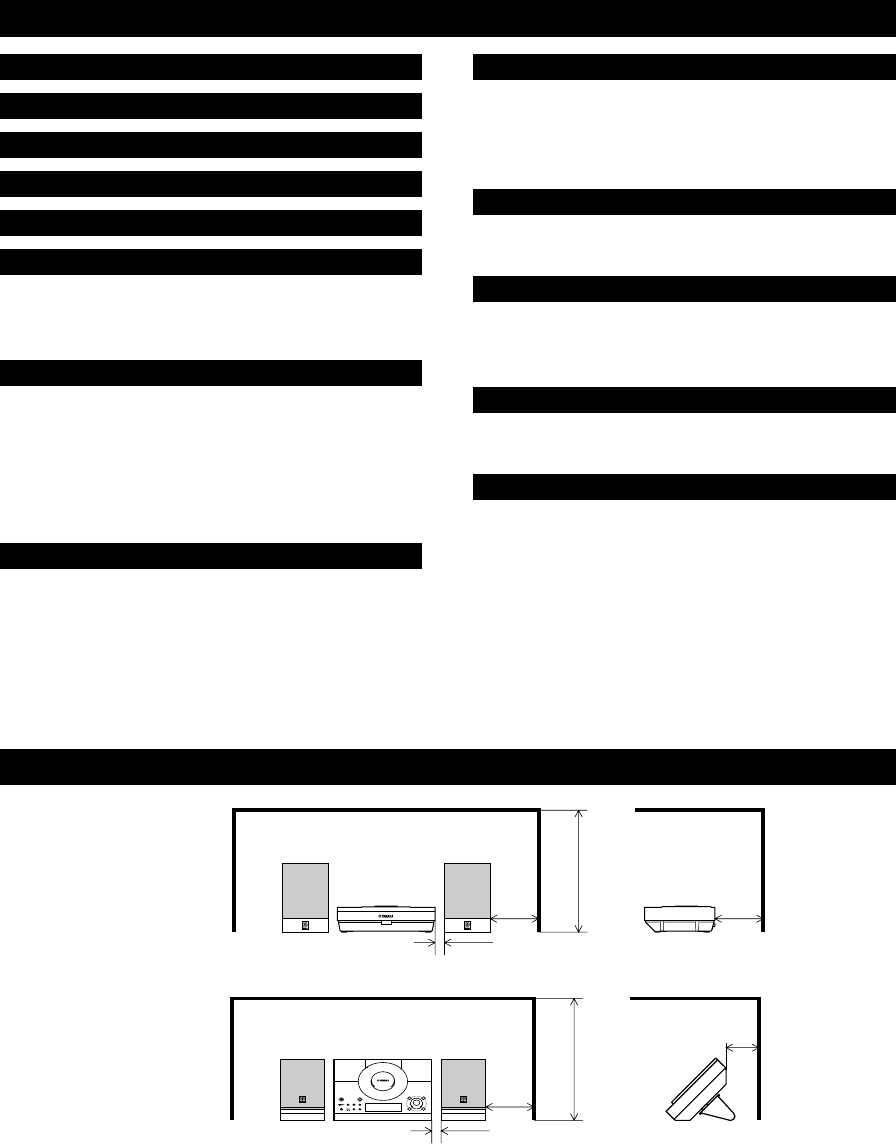
Set up this system by allowing spaces specified in the figure or more around and behind the main unit to assure good ventilation.
To prevent the ventilation holes from being obstructed, be sure not to place another unit or any object on top of the main unit.
Otherwise, it may cause fire or damage to the main unit.
Cautions
•If the main unit is put inside a rack, the front of it must be fully open.
•When mounting this system on the wall, allow spaces specified in the figure around the system as well, however,
the space between the system and the wall is determined by the mounting bracket and screws used.
•When mounting this system on the wall, make sure that there is no metalic projection on the wall. If a metallic
projection get into an opening of the main unit, it may cause fire or an electric shock to the user.
SETTING UP THIS SYSTEM
When using the stands
10mm
100mm
100mm
400mm
50mm
400mm
TIMER
TIME ADJ
10mm
100mm
When not using the stands
03/TSX-10E(6.12)b 01.6.12, 4:17 PM2
3
English
1To assure the best performance, please read this manual
carefully. Keep it in a safe place for future reference.
2To avoid humming sounds, position this system away
from other electrical appliances, motors and
transformers. To prevent fire or electrical shock, do not
place this system where it may get exposed to rain or
any kind of liquid.
3Avoid extreme temperature fluctuations or excessive use
of a humidifier in the room where this system is
installed to prevent condensation inside this system,
which may cause an electrical shock, fire damage to this
unit, and/or personal injury.
4In order not to obstruct heat radiation, do not cover the
main unit with a newspaper, a tablecloth, a curtain, etc.
If the temperature inside the main unit rises, it may
cause fire, damage to the main unit and/or personal
injury.
5Avoid installing this system in a place where foreign
objects and liquid might fall. It might cause a fire,
damage to this system and/or personal injury. Do not
place the following objects on this system:
• Other components, as they may cause damage and/or
discolor the surface of this system.
• Burning objects (i.e., candles), as they may cause fire,
damage to this system and/or personal injury.
• Containers with liquid in them, as they may cause an
electrical shock to the user and/or damage to this system.
6Do not use force on switches, controls or connection
cables. Never pull the cables when disconnecting them.
7Only the voltage specified on the main unit must be
used. Using this system with a higher voltage than
specified is dangerous and may result in fire or other
accidents. YAMAHA will not be held responsible for
any damage resulting from the use of this system with a
voltage other than that specified.
8Placing the speakers on the same shelf or rack as the
turntable can result in howling.
9Secure placement or installation is the owner’s
responsibility.
YAMAHA shall not be liable for any accident caused by
improper placement or installation of this system.
10 Any time you note distortion, reduce the volume to a
lower setting. Never allow the amplifier to be driven
into “clipping”. Otherwise the speakers may be
damaged.
11 Do not attempt to clean this system with chemical
solvents; this might damage the finish. Use a clean, dry
cloth.
12 Disconnect the power cord from the wall outlet when
not planning to use this system for a long period of time,
or during an electrical storm, as it could be damaged by
lightning.
13 Do not attempt to modify or fix this system yourself.
Contact qualified YAMAHA service personnel when
any service is needed. The cabinet should never be
opened for any reason.
14 Be sure to read the “Troubleshooting” section regarding
common operating errors before concluding that this
system is faulty.
PRECAUTIONS: READ THIS BEFORE OPERATING THIS SYSTEM
This compact disc
player is classified as a
CLASS 1 LASER
product.
The CLASS 1 LASER
PRODUCT label is
located on the rear
panel.
The laser component in this product is capable of
emitting radiation exceeding the limit for Class 1.
For U.K. customers
If the socket outlets in the home are not suitable for the
plug supplied with this appliance, it should be cut off and
an appropriate 3 pin plug fitted. For details, refer to the
instructions described above.
Note: The plug severed from the mains lead must be
destroyed, as a plug with bared flexible cord is hazardous
if engaged in a live socket outlet.
CAUTION
Use of controls or adjustments or performance of
procedures other than those specified herein may
result in hazardous radiation exposure.
The main unit is not disconnected from the AC power
source as long as it is connected to the wall outlet, even
if the unit itself is turned off. This state is called the
standby mode. In this state, the unit is designed to
consume a very small quantity of power.
CAUTION FOR CARRYING THE MAIN UNIT
Before carrying the main unit, first remove the disc
from the unit, press STANDBY/ON to turn the unit
off, then disconnect the AC power plug from the
wall outlet.
SPECIAL INSTRUCTIONS FOR U.K. MODEL
IMPORTANT:
The wires in the mains lead are coloured in accordance
with the following code:
Blue: NEUTRAL
Brown: LIVE
As the colours of the wires in the mains lead of this
apparatus may not correspond with the coloured
markings identifying the terminals in your plug,
proceed as follows: The wire which is coloured BLUE
must be connected to the terminal which is marked
with the letter N or coloured BLACK. The wire which
is coloured BROWN must be connected to the terminal
which is marked with the letter L or coloured RED.
Making sure that neither core is connected to the earth
terminal of the three pin plug.
CLASS 1 LASER PRODUCT
LASER KLASSE 1 PRODUKT
LUOKAN 1 LASERLAITE
KLASS 1 LASER APPARAT
03/TSX-10E(6.12)b 01.6.12, 4:17 PM3
4
NAMES OF BUTTONS AND CONTROLS
Front panel
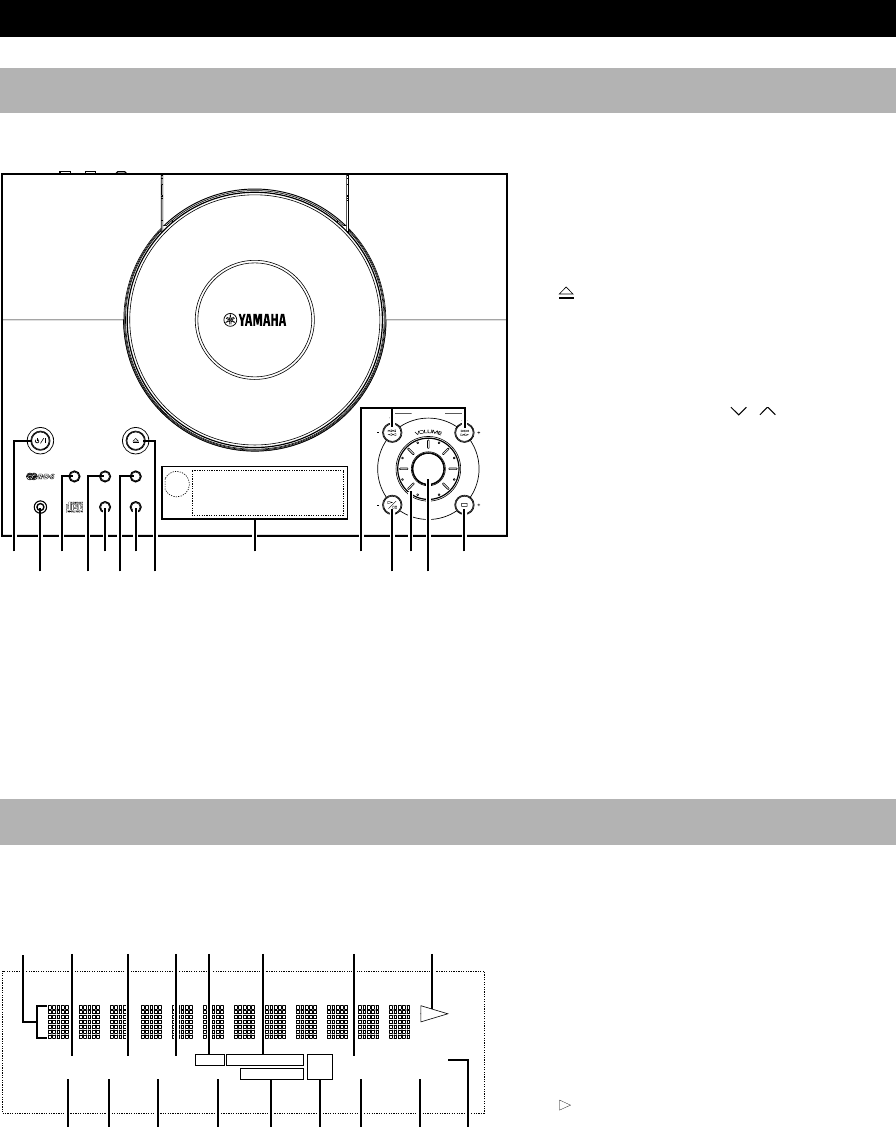
1STANDBY/ON (P.13)
2PHONES (P.13)
3MEMORY/TIME ADJ (P.12, 18)
4AUTO/MAN’L/TIMER (P.17, 22)
5SLEEP (P.23)
6 OPEN/CLOSE (P.14)
7DISPLAY (P.12, 22)
8PRESET/BAND (P.17)
9Display (P.4)
0PRESET/TUNING / (P.17)
When TUNER is selected as an input
source
$/!/⁄/› (P.14)
When CD is selected as an input source
A^ (Play/Pause) (P.14)
BVOLUME (P.13)
CINPUT/SNOOZE (P.8, 23)
DA/B/C/D/E (P.18)
When TUNER is selected as an input
source
& (Stop) (P.14)
When CD is selected as an input source
Display
1Multi information display
2PRESET indicator (P.18)
3STEREO indicator (P.17)
4AUTO indicator (P.17)
5RDS indicator (P.19)
6RDS mode indicators (P.19)
7PTY HOLD indicator (P.20)
8TOTAL indicator (P.15)
9 (Play) indicator (P.14)
0TIMER indicator (P.22)
ASLEEP indicator (P.23)
BMEMORY indicator (P.18)
CTUNED indicator (P.17)
DREP S/F (repeat single/full) indicator
(P.16)
ERANDOM indicator (P.15)
FB. BOOST (Bass boost) indicator (P.13)
GTONE indicator (P.13)
TONEPROG
TOTAL
REPRDS
AUTO
STEREO
PRESET
PSPTYRTCT
B. BOOST
RANDOMS F
PTY HOLD
TUNED
MEMORYSLEEPTIMER
NATURAL SOUND CD RECEIVER
STANDBY/ON
OPEN/CLOSE
MEMORY
AUTO/MAN´L
TIMER
SLEEP
PRESET/TUNING
INPUT
SNOOZE
A/B/C/D/E
HOUR
MIN MIN
HOUR
PHONES DISPLAY
TIME ADJ
PRESET/BAMD
1 34 8 62 5 7 9 A
B
CD0
TONE
TOTAL
REPRDS
AUTO
STEREO
PRESET
PSPTYRTCT
B. BOOST
RANDOMS F
PTY HOLD
TUNED
MEMORYSLEEPTIMER
0 A
2
1
3 8 94 5 6
B C D E F G7
04/TSX-10E(6.12)e 01.6.12, 4:17 PM4
5
English
Remote control
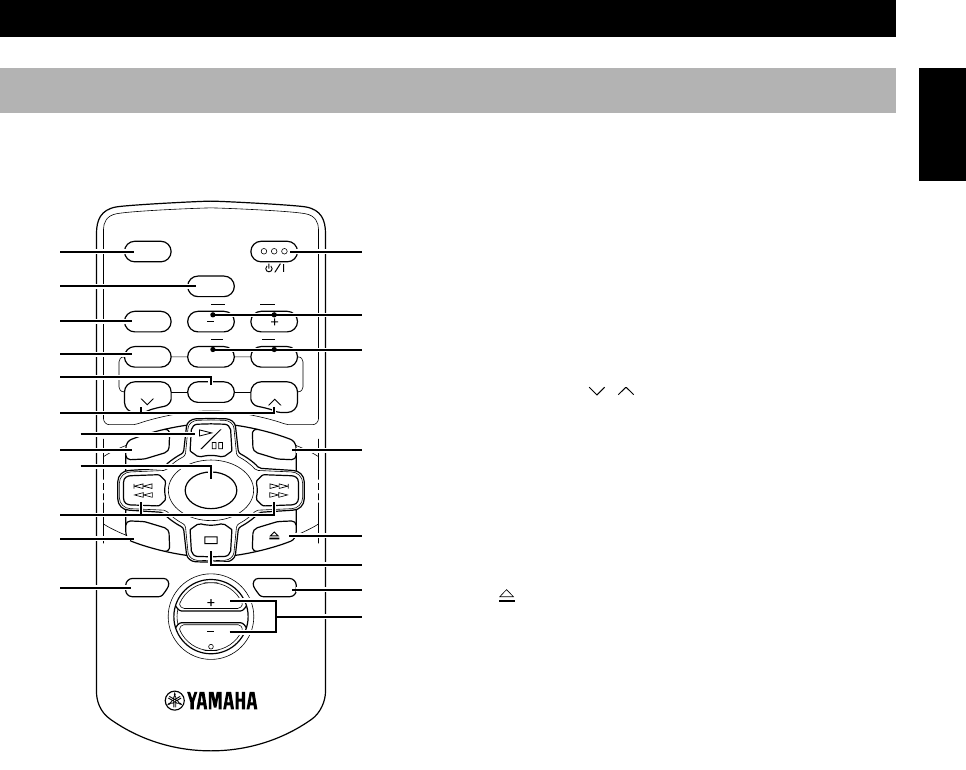
1STANDBY/ON (P.13)
2SLEEP (P.23)
3B. BOOST (Bass boost) (P.13)
4BASS/TREBLE (P.13)
5LEVEL +/– (P.13)
6FREQ/RDS (P.19)
7PTY SEEK MODE/START (P.20, 21)
8A/B/C/D/E (P.18)
9PRESET / (P.18)
0^ (Play/Pause) (P.14)
AREP (Repeat) (P.16)
BRANDOM (Random) (P.15)
CINPUT (P.13)
D$ !/⁄ › (P.14)
ETIME (P.15)
F (Open/Close) (P.14)
G& (Stop) (P.14)
HMUTE (P.13)
IDISPLAY (P.12, 22)
JVOL (Volume) +/– (P.13)
NAMES OF BUTTONS AND CONTROLS
CRX-
TS10/20 RDS
V776930
SLEEP
B. BOOST
LEVEL
STANDBY/ON
BASS/TREBLE
MODE
ABCDE
MUTE
VOL
DISPLAY
INPUT
REP
TIME
RANDOM
TUNER
START
FREQ/RDS
PRESET PRESET
RTY SEEK
1
B
F
G
2
4
6
A
E
H
0
C
8
3
9
5
7
I
J
D
04/TSX-10E(6.12)e 01.6.12, 4:17 PM5
6
4Ω MIN. /SPEAKER
SPEAKERS SETTING
HRIZ OTHER OUT
FM 75 Ω UNBAL.
GND AM
SUBWOOFER
CD DIGITAL OUT
OPTICAL
ANTENNA
FOR USA : CLASS 2 WIRING
OUT IN
LINE
A
B
NX-TS20
NX-TS10
NX-TS20
NX-TS10
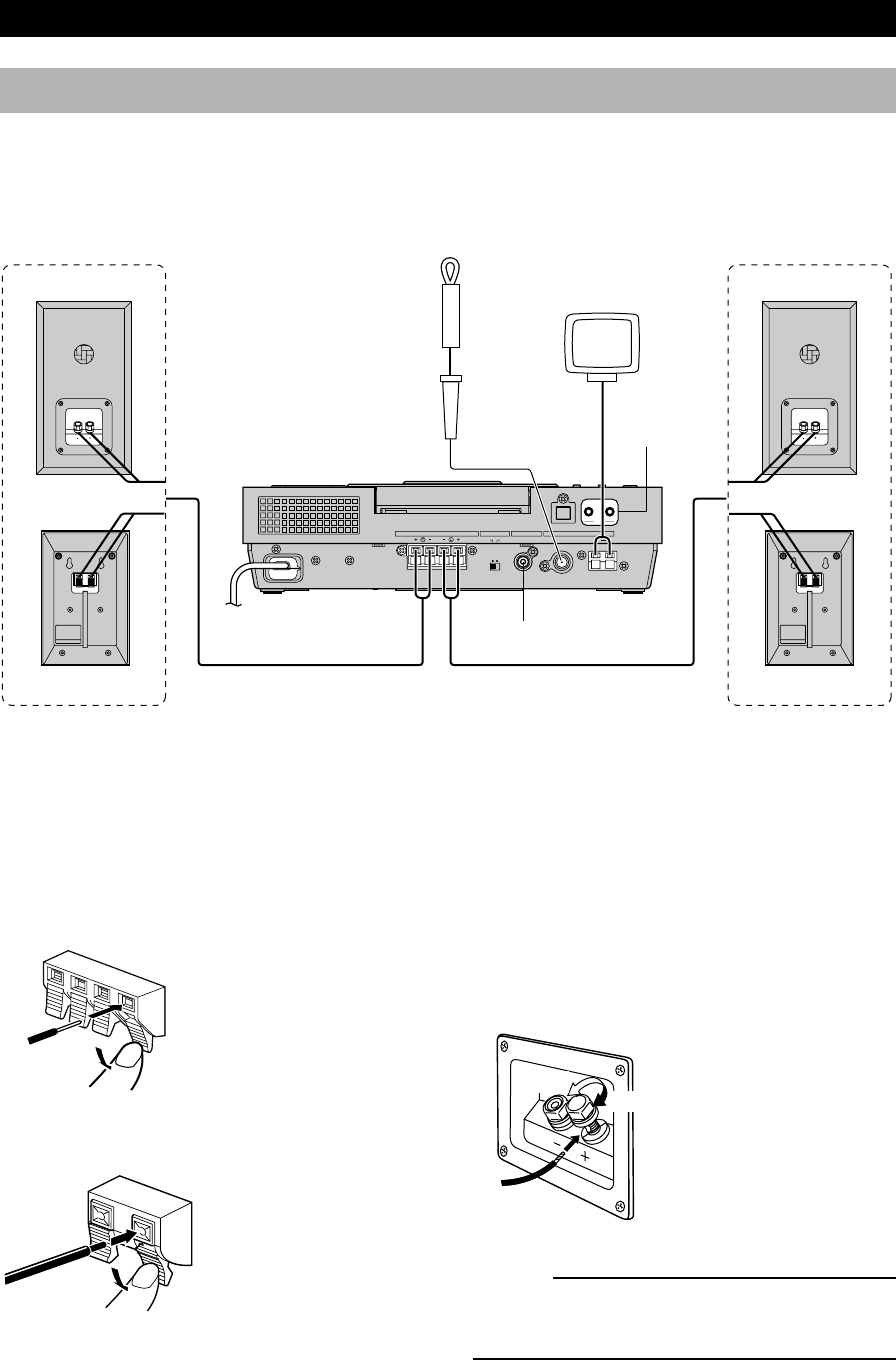
Connections
Never plug the AC power cord into the wall outlet until all connections are
completed.
Follow the steps as shown below to connect the system using the supplied cables and accessories.
Indoor
FM antenna AM loop antenna
Right speaker Left speaker
GETTING STARTED
To wall outlet
On the speakers (NX-TS20)
Red: positive (+)
Black: negative (–)
Caution
Do not let the bare speaker wires touch each
other as this could damage the main unit and/or
speakers.
1Connecting speakers
Connect the speakers to the SPEAKERS terminals of the main unit by using the speaker cables. Make sure that the
polarity of the speaker cables is correct, i.e. the + and – markings are observed. If these cables are reversed, the sound will
be unnatural and lack bass.
On the main unit
On the speakers
(NX-TS10)
Red: positive (+)
Black: negative (–)
1Press the tab.
2Remove approx. 10 mm
(3/8”) of insulation from
each of the speaker
cables and insert the bare
wire into the terminal.
3Release the tab and
secure the cable.
1Unscrew the knob.
2Remove approx. 10 mm
(3/8”) of insulation from
each of the speaker
cables and insert the bare
wire into the terminal.
3Tighten the knob to
secure the cable.
Loosen
Tighten
1
3
2
04/TSX-10E(6.12)e 01.6.12, 4:17 PM6
7
English
GETTING STARTED
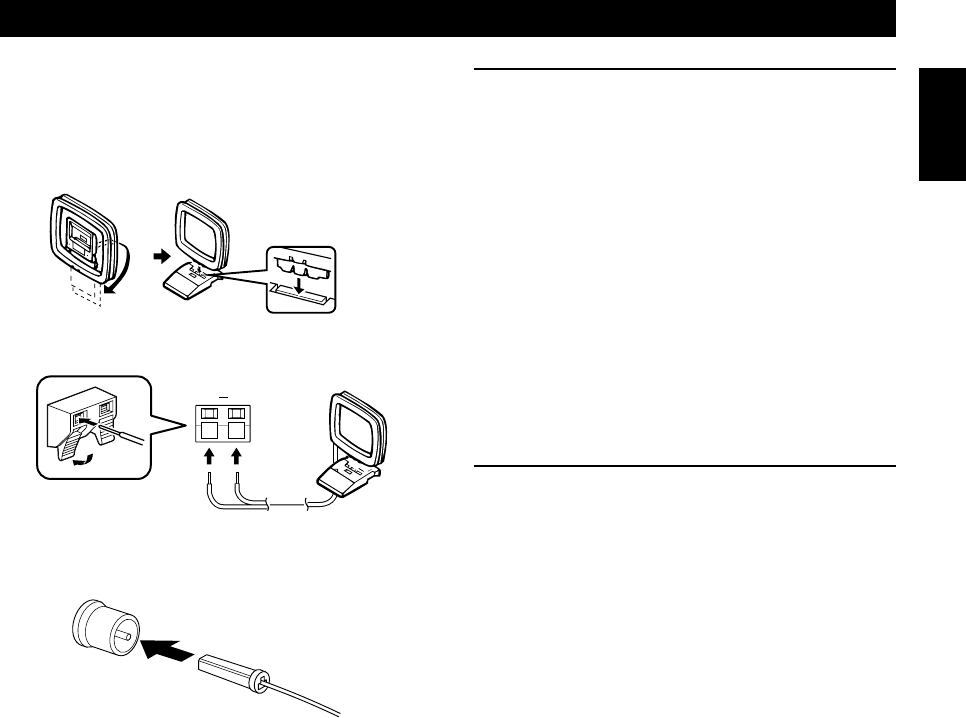
2Connecting antennas
AM loop antenna
Set up the AM loop antenna, then connect it.
Indoor FM antenna
Notes
•Use external FM/AM antennas if you need better reception.
Consult your dealer.
•The AM loop antenna should be placed apart from the main
unit. The antenna may be hung on a wall.
To enhance your system
A. To connect a Subwoofer (optional)
You can reinforce the bass frequencies by adding a
subwoofer (optional).
Connect the SUBWOOFER OUT terminal of the main
unit to the INPUT terminal of the subwoofer.
B. To connect an external component
•An external audio/video component can be connected to
the LINE OUT (output) and/or IN (input) mini-jack
terminals of the main unit.
•Digital-to-digital recording is possible from a CD
played on this system to an MD (or tape) on an external
MD (or DAT) recorder by connecting the CD
DIGITAL OUT (OPTICAL) terminal on the rear of the
main unit to the MD (or DAT) recorder.
3Connecting to the wall outlet
After all connections are finished, connect the AC power
cord to a wall outlet.
GND AM
04/TSX-10E(6.12)e 01.6.12, 4:17 PM7
8
Installation
You can install this system in various ways to fit neatly into your listening room (Except for the NX-TS20 speakers).
GETTING STARTED
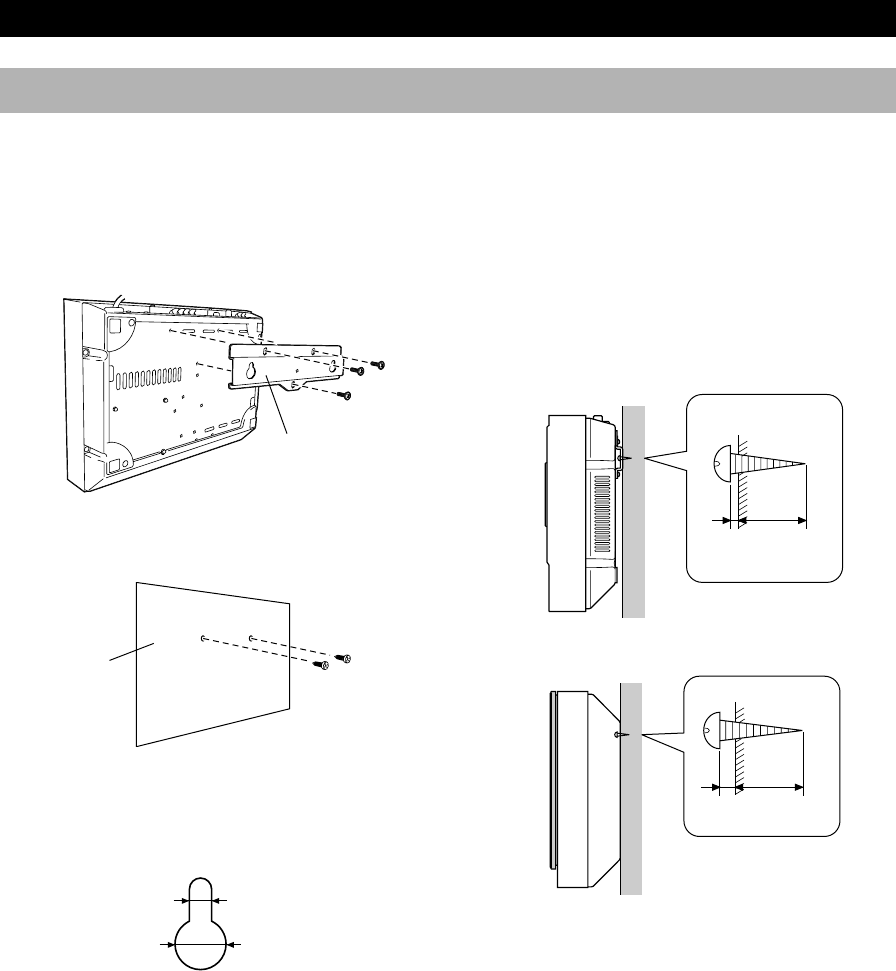
■ Mounting the system on the wall
* The supplied paper pattern helps you to align the main unit with the speakers properly.
4Hang the main unit and/or the speakers using the
holes on the back on the protruding screws.
*Make sure that the screws securely connect with the
narrow parts of the holes.
Important
●To avoid dropping and possible injury, be extremely
careful when mounting the system on the wall.
●Check if the wall is strong enough to carry the
weight of the unit (refer to the “Specifications” page).
When in doubt, consult qualified service personnel.
●Confirm that all screws are fastened tightly and the
wall mounting screws are properly fitted into the
holes of the bracket and the speakers.
●To avoid accidents resulting from tripping over loose
speaker cables, fix them to the wall.
●YAMAHA shall not be liable for any accident caused
by improper installation.
1Attach the bracket on the main unit with the screws.
2Mark where to fasten the screws on the wall using the
paper pattern.
●Wall mounting screws are not supplied with this
system. Use screws suitable for the wall material.
Also, select the screws of appropriate size for the
holes’ size as illustrated below.
3Drive the screws into the wall.
Paper pattern
Bracket
Main unit
Speaker
2 mm
Min.
20 mm
4 mm
Min.
20 mm
5 mm
10 mm
04/TSX-10E(6.12)e 01.6.12, 4:17 PM8
9
English
GETTING STARTED
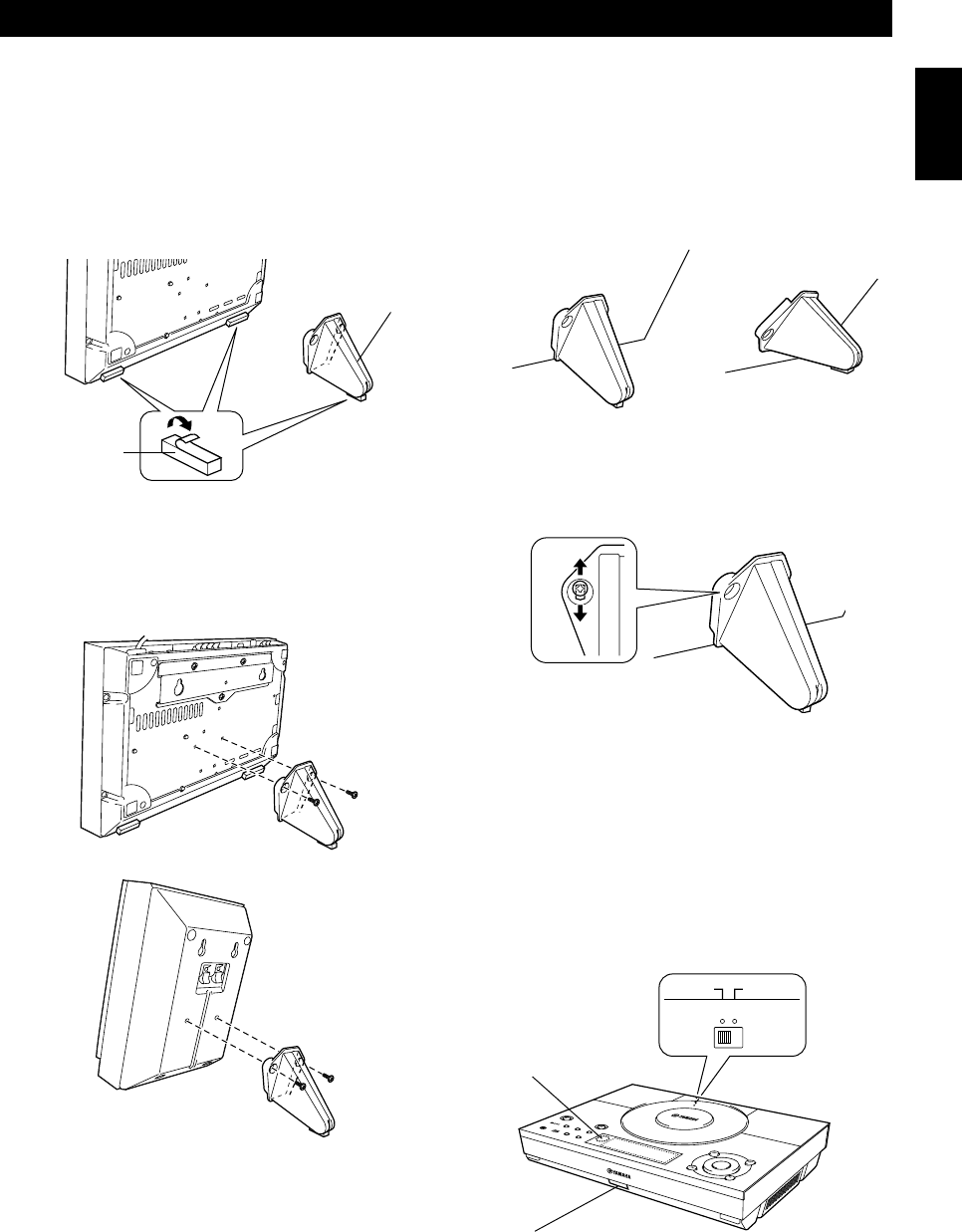
■ Standing the main unit and/or speakers on a surface
You can stand the main unit and/or the speakers on a hard surface at an angle of 45 degrees or 70 degrees using the
supplied stands.
1Peel off the seals of the non-slip pads and apply them
to the bottom of the main unit and the stands.
2Attach the stand to the main unit and/or the speakers
with the screws.
*The standing angle can be selected as 45 or 70
degrees by attaching the stands upside-down.
3Fine adjustment can be made by sliding the position
of a screw within a rectangular hole so that you can
align the main unit and the speakers.
Note
Change the setting of the remote control sensor switch so that the
main unit can receive the remote control signal properly;
●When the switch is set to the HRIZ position, the sensor A is
active.
●When the switch is set to the OTHER position, the sensor B
is active.
HRIZ OTHER
Main unit
Non-slip pad
Stand
Main unit
Speaker
70 degrees 45 degrees
A
B
Remote control sensor switch
04/TSX-10E(6.12)e 01.6.12, 4:17 PM9
10
CD preventive care
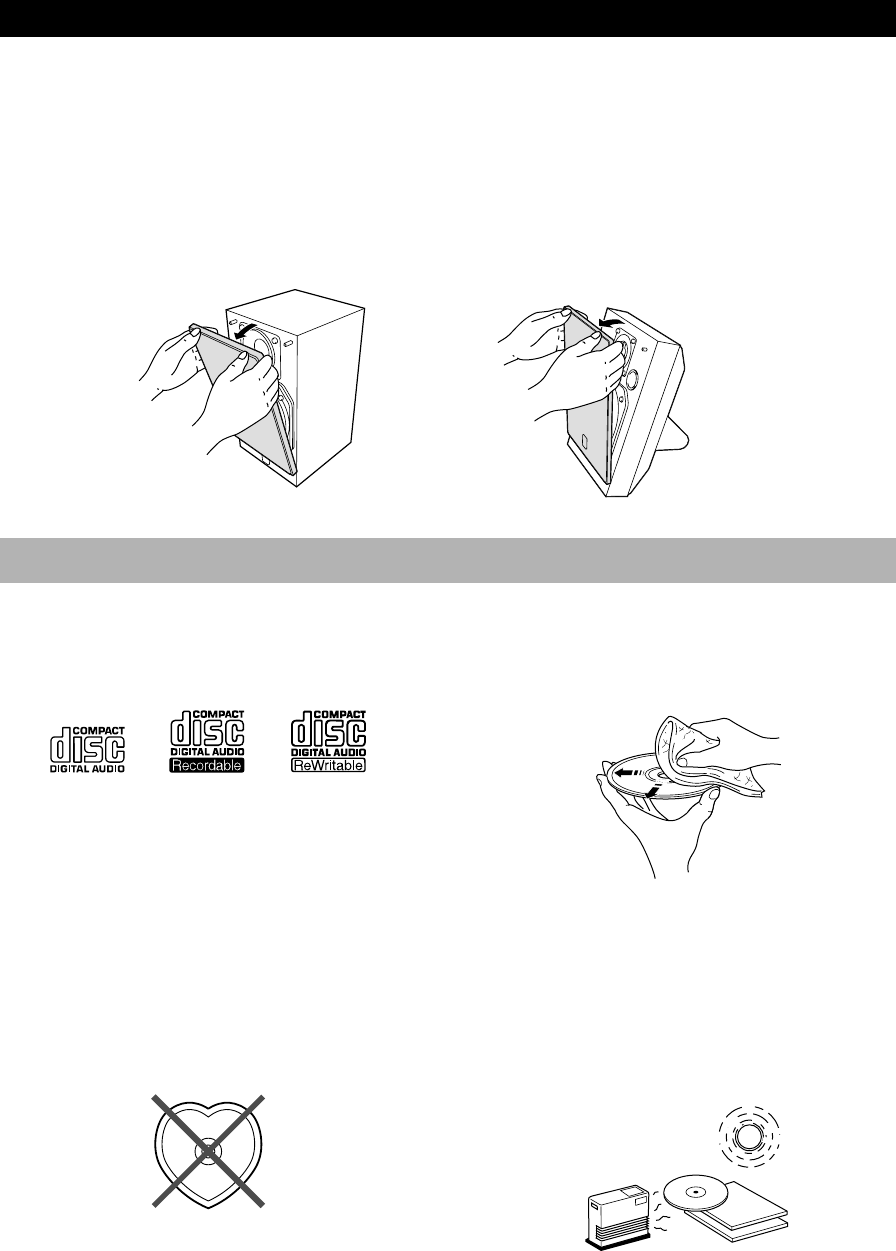
•This compact disc player is designed for use with the
following types of discs only. Never attempt to load any
other type of disc into the unit. The unit can also play
8-cm (3-inch) compact discs.
•Be sure to use only CD-R and CD-RW discs made by
reliable manufacturers.
•Compact discs are not subjected to wear during play,
but damage to the disc surface when the disc is being
handled can adversely affect disc play.
•Do not use cleaning discs or warped discs. All of these
could damage the unit.
To prevent malfunction of this unit
•Do not use any non-standard shaped CD (heart, etc.)
available on the market, because it may damage the
unit.
•Do not use a CD with tape, seals, or paste on it, because
damage to the unit may result.
No!
•Compact discs are not affected by small particles of
dust or fingerprints on their playing surface, but even so
they should be kept clean. Wipe by using a clean, dry
cloth. Do not wipe with a circular motion; wipe straight
outward from the center.
•Do not try to clean the disc’s surface by using any type
of disc cleaner, record spray, antistatic spray or liquid,
or any other chemical-based liquid, because such
substances might irreparably damage the disc’s surface.
•Do not expose discs to direct sunlight, high temperature
or high humidity for a long period of time, because
these might warp or otherwise damage the disc.
GETTING STARTED
■ Removing the front cover of the speakers
The front cover is fastened to the enclosure at four points and can be removed if desired. To remove the cover, hold on to
both sides and slowly pull straight away from the speaker. To reattach, line up the four holes on the inner surface of the
cover with the four corresponding pegs on the speaker and push gently.
Note
When the cover is removed, be sure not to touch the speaker units with your hands or to exert excessive force on them.
NX-TS20 NX-TS10
04/TSX-10E(6.12)e 01.6.12, 4:17 PM10
11
English
Remote control
GETTING STARTED
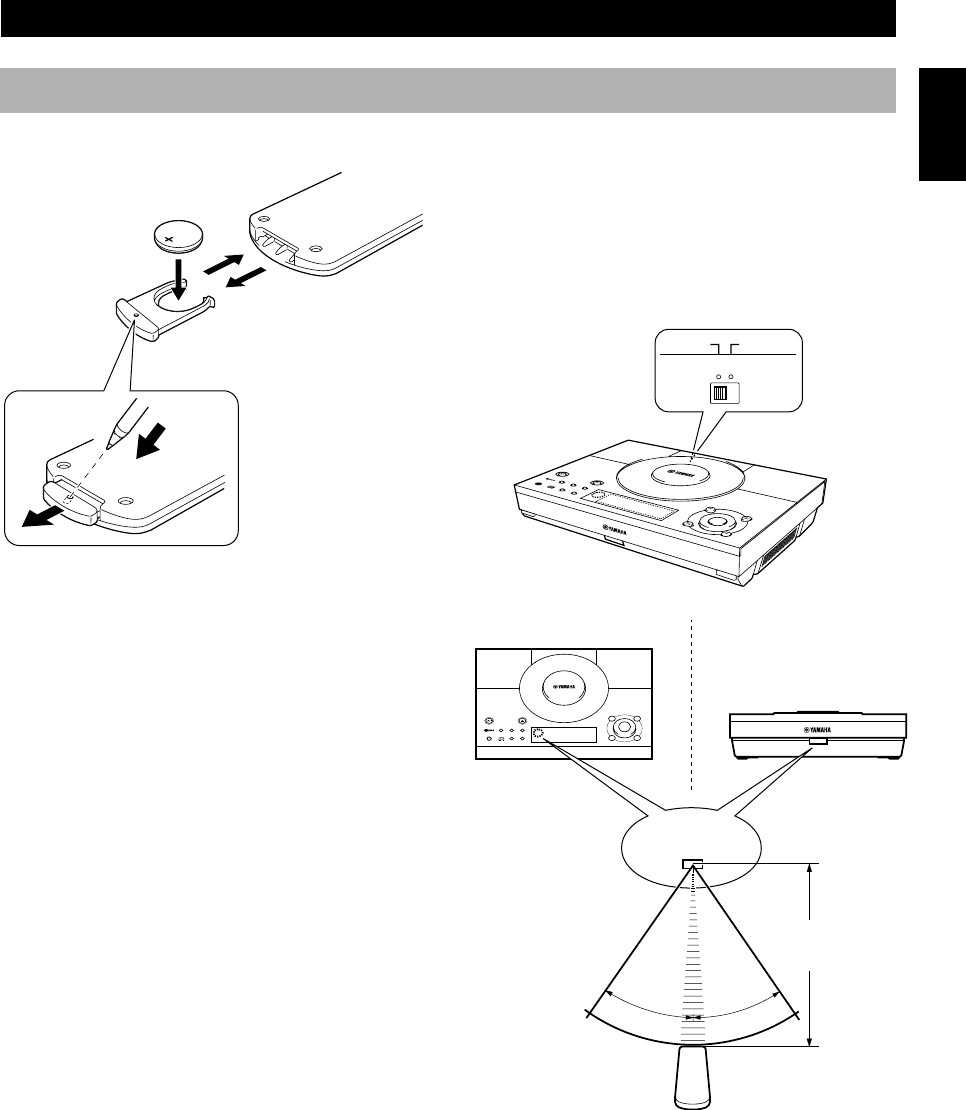
■ Remote control operation range
When the unit is hung on the wall, or installed with the
stands, set the remote control sensor switch to the
OTHER position. When using the unit installed
horizontally, set the switch to the HRIZ position.
Notes
●There should be no large obstacles between the remote control
and the main unit.
●If the remote control sensor is directly illuminated by strong
lighting (especially an inverter type of fluorescent lamp, etc.),
it might cause the remote control not to work correctly. In this
case, reposition the main unit to avoid direct lighting.
●If you install the unit horizontally and operate with the remote
control from a higher position than the unit, setting the remote
control sensor switch to OTHER may improve the response.
■ Loading the battery for the remote
control
1Slide out the battery holder from the remote control
by pushing into the hole in the holder with a ball-point
pen, etc.
2Place the battery in the holder, positive side upward.
3Slide the holder into the remote control.
■ Battery replacement
If you find that the remote control must be used closer to
the main unit than usual, the battery is weak. Replace the
battery with new one.
■ Notes on the lithium battery
Please take care when using the lithium battery as it may
explode if mistreated.
●Never abuse or disassemble the battery.
●Be sure the battery polarity is correct. If it is not
installed correctly, it may cause fire or explosion.
●Avoid placing the lithium battery and also the remote
control with the battery installed, in high temperature
such as direct sunlight.
●Do not recharge the battery.
●When replacing the battery, make sure to only use a
CR2025 battery.
●Keep the battery out of reach of children. If swallowed,
get immediate medical help.
●When disposing of the battery, insulate it with tape, etc.
Never dispose of it in fire. Also, dispose of the battery
according to local regulations.
●If the battery leaks, dispose of it immediately. Avoid
touching the leaked material or letting it come in
contact with clothing, etc. Skin contact may cause burn.
If it occurs, wash with water promptly and get medical
attention.
TIMER
TIME ADJ
30°
30°
1
2
3
Remote control
sensor
Within approximately
6 m (20 feet)
HRIZ OTHER
Remote control sensor switch
In the OTHER position In the HRIZ position
04/TSX-10E(6.12)e 01.6.12, 4:17 PM11
12
Setting the clock
You must set the clock before you use the timer functions.
The clock is based on the 12-hour system for U.S.A. and
Canada models, and the 24-hour system for Europe, U.K.,
Australia and China models.
1While the power is on, press DISPLAY to display
the time.
2While holding TIME ADJ, press HOUR + to set the
hour.
•If you want to move the time in the reverse
direction, press HOUR – while holding TIME
ADJ.
3While holding TIME ADJ, press MIN + to set the
minutes.
•If you want to move the time in the reverse
direction, press MIN – while holding TIME ADJ.
To display the clock
Press DISPLAY.
First “Clock Time” appears and then the current time is
displayed for about 8 seconds. Then the normal display
returns.
Note
•In the event of a power failure or when the AC power cord is
disconnected for more than five minutes, “Set Clock” may
appear on the display instead of the current time. In that case,
you need to reset the clock.
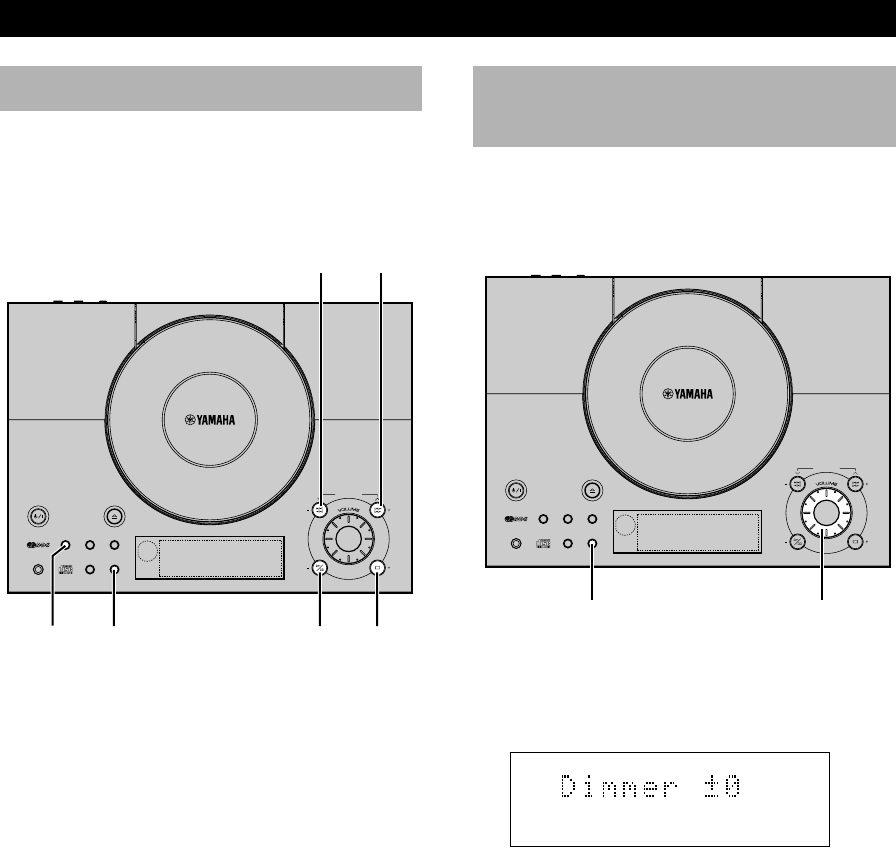
Adjusting the brightness
of the display
You can adjust the brightness of the display not only
when the unit is turned on but also in the standby mode.
The adjustment can be made individually.
Press and hold DISPLAY for about two seconds so that
“Dimmer ±0” appears on the display. While holding
DISPLAY, turn VOLUME clockwise to increase or
counterclockwise to decrease brightness.
Control Range: ±0 to –6 (Preset value: ±0)
Note
•During the standby mode, the display is not as bright as the
one when the unit is on. You can further decrease the
brightness in the standby mode so that the light does not
disturb in a dark ambience.
VOLUMEDISPLAY
HOUR +
DISPLAYTIME ADJ MIN +
GETTING STARTED
TONEPROG
TOTAL
REPRDS
AUTO
STEREO
PRESET
PSPTYRTCT
B. BOOST
RANDOMS F
PTY HOLD
TUNED
MEMORYSLEEPTIMER
NATURAL SOUND CD RECEIVER
STANDBY/ON
OPEN/CLOSE
MEMORY
AUTO/MAN´L
TIMER
SLEEP
PRESET/TUNING
INPUT
SNOOZE
A/B/C/D/E
HOUR
MIN MIN
HOUR
PHONES DISPLAY
TIME ADJ
PRESET/BAMD
TONEPROG
TOTAL
REPRDS
AUTO
STEREO
PRESET
PSPTYRTCT
B. BOOST
RANDOMS F
PTY HOLD
TUNED
MEMORYSLEEPTIMER
NATURAL SOUND CD RECEIVER
STANDBY/ON
OPEN/CLOSE
MEMORY
AUTO/MAN´L
TIMER
SLEEP
PRESET/TUNING
A/B/C/D/E
HOUR
MIN MIN
HOUR
PHONES DISPLAY
TIME ADJ
PRESET/BAMD
INPUT
SNOOZE
HOUR –
MIN –
04/TSX-10E(6.12)e 01.6.12, 4:17 PM12
English
13
TONEPROG
TOTAL
REPRDS
AUTO
STEREO
PRESET
PSPTYRTCT
B. BOOST
RANDOMS F
PTY HOLD
TUNED
MEMORYSLEEPTIMER
NATURAL SOUND CD RECEIVER
STANDBY/ON
OPEN/CLOSE
MEMORY
AUTO/MAN´L
TIMER
SLEEP
PRESET/TUNING
A/B/C/D/E
HOUR
MIN MIN
HOUR
PHONES DISPLAY
TIME ADJ
PRESET/BAMD
INPUT
SNOOZE
SLEEP
B. BOOST
LEVEL
STANDBY/ON
BASS/TREBLE
MODE
ABCDE
MUTE
VOL
DISPLAY
INPUT
REP
TIME
RANDOM
TUNER
START
FREQ/RDS
PRESET PRESET
RTY SEEK
LISTENING TO A SOURCE
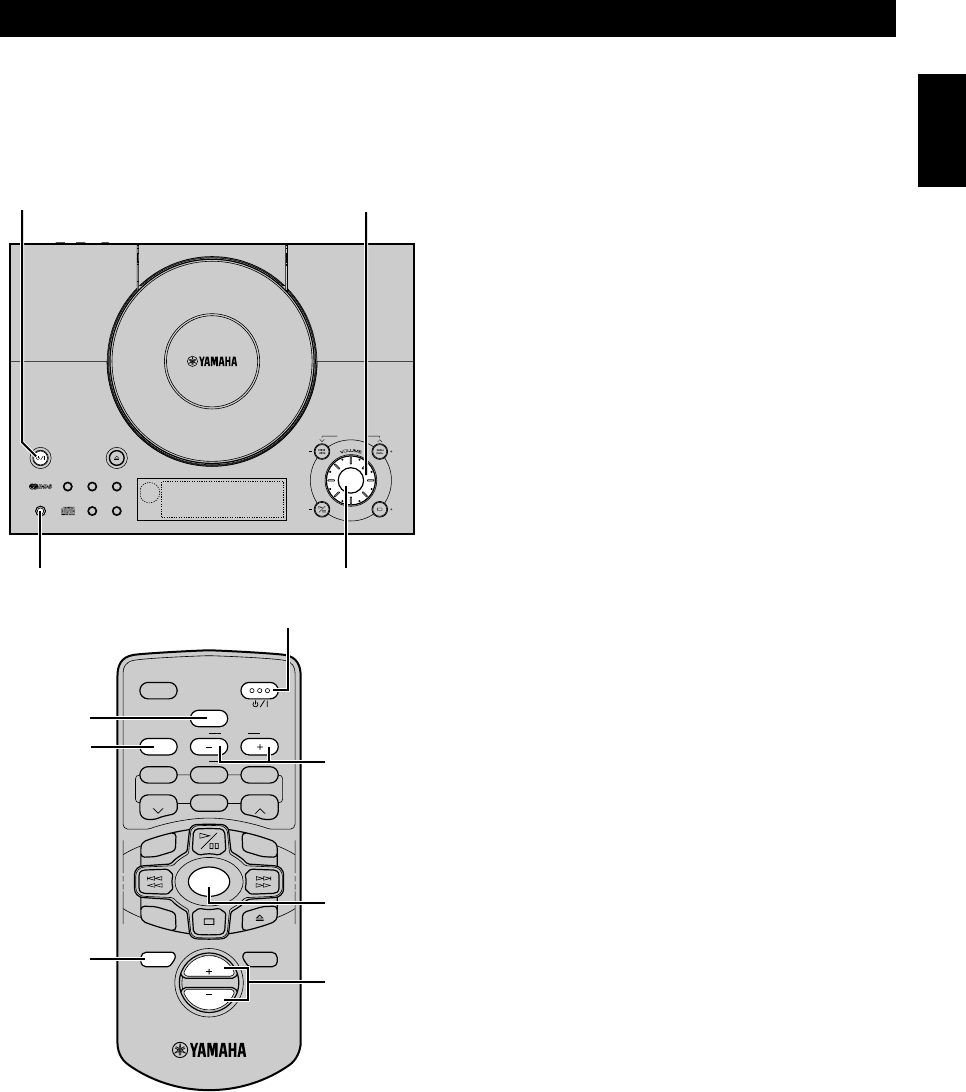
1Turn on the power by pressing STANDBY/ON.
2Select the desired input source by pressing INPUT
repeatedly until the source appears on the display.
•When you operate the component connected to the
LINE IN terminal, select AUX.
3Play the source. (Refer to the instructions of each
selected component.)
4Adjust the volume level by turning VOLUME on the
main unit or pressing VOLUME +/– on the remote
control.
䡵 Sound controls
You can perform various sound controls using the remote
control. These controls and VOLUME adjustment have no
effect on the material being recorded with the component
connected to the LINE OUT terminal.
MUTE:
You can mute the sound.
Press MUTE.
•“Mute” appears on the display.
Pressing the button again cancels this feature.
BASS/TREBLE:
You can adjust the level of low frequency response
(BASS) and high frequency response (TREBLE).
1Press BASS/TREBLE repeatedly until “BASS
Ⳳ0dB” or “TREBLE Ⳳ0dB” appears on the
display.
2Press LEVEL –/+ to adjust the level.
The value increases or decreases in steps of 2 dB.
Control range: –10dB to +10dB (Preset value: Ⳳ0dB)
B. BOOST (Bass boost):
You can reinforce the bass frequency response.
Press B.BOOST.
•The “B.BOOST” indicator lights up on the display.
Pressing the button again cancels this feature.
䡵 When you use headphones
Connect the headphones to the PHONES jack. You can
listen to the sound to be output from the speakers through
the headphones.
䡵 When you have finished using this
unit
Press STANDBY/ON to set this unit to the standby mode.
•The brightness of the display decreases.
INPUT
VOLUME
STANDBY/ON
PHONES
This chapter explains the basic operations common to
tuning, playing CDs and other connected components.
BASS/
TREBLE
B. BOOST
MUTE
STANDBY/ON
LEVEL –/+
INPUT
VOLUME +/–
05/TSX-10E(6.12)a 01.6.12, 4:17 PM13
14
COMPACT DISC PLAYER OPERATIONS
TONEPROG
TOTAL
REPRDS
AUTO
STEREO
PRESET
PSPTYRTCT
B. BOOST
RANDOMS F
PTY HOLD
TUNED
MEMORYSLEEPTIMER
NATURAL SOUND CD RECEIVER
STANDBY/ON
OPEN/CLOSE
MEMORY
AUTO/MAN´L
TIMER
SLEEP
PRESET/TUNING
A/B/C/D/E
HOUR
MIN MIN
HOUR
PHONES DISPLAY
TIME ADJ
PRESET/BAMD
INPUT
SNOOZE
SLEEP
B. BOOST
LEVEL
STANDBY/ON
BASS/TREBLE
MODE
ABCDE
MUTE
VOL
DISPLAY
INPUT
REP
TIME
RANDOM
TUNER
START
FREQ/RDS
PRESET PRESET
RTY SEEK
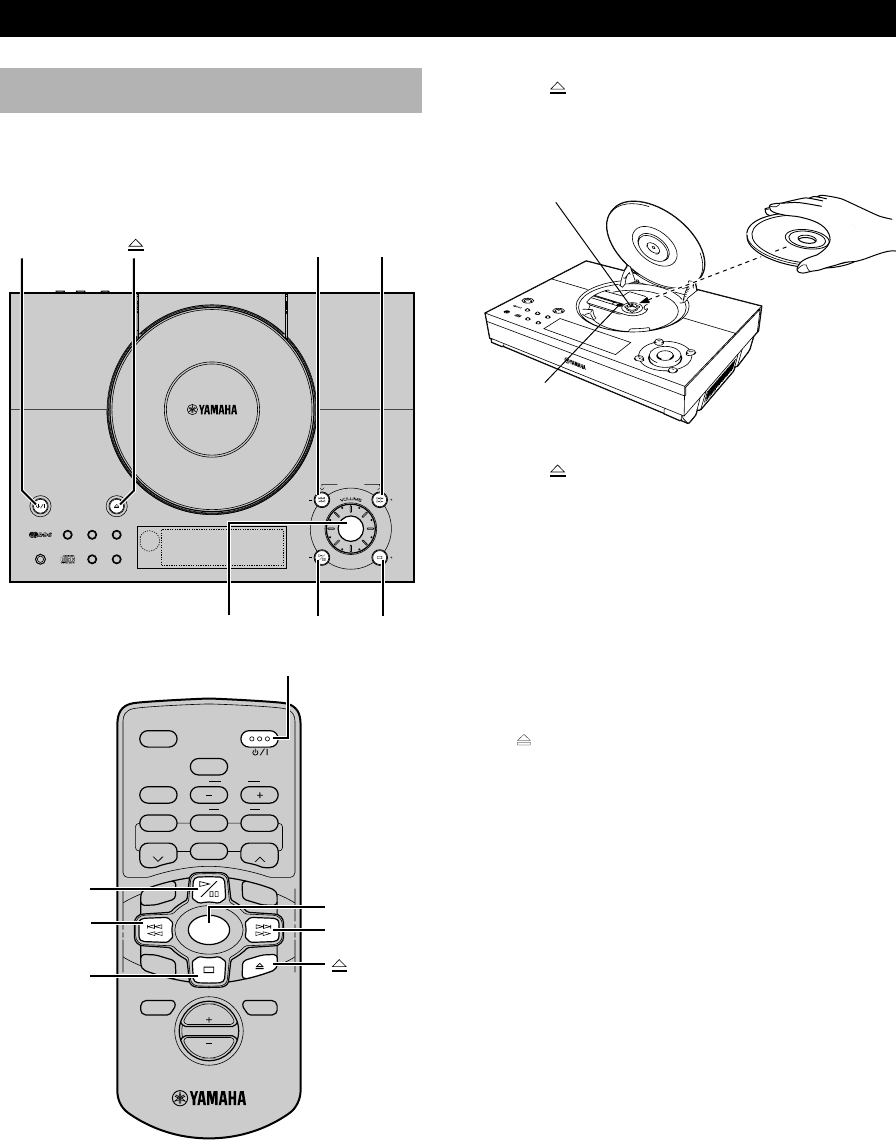
To play CDs
1Press STANDBY/ON to turn on this unit.
2Press INPUT repeatedly until “CD” appears on the
display.
CD play
Never touch or look directly at the laser
pickup lens when the cover is open.
3Press to open the cover, and place a CD with the
label side upward on the CD holder.
* Press down the CD until the holder clicks.
4Press to close the cover.
5Press ^ to start play.
This unit starts play.
To pause play
Press ^.
To resume play, press ^ again.
To stop play
Press &.
To remove the CD
Press to open the cover, and remove the CD from the
holder.
To play a specific track on the disc (Skip)
Press ⁄ › to skip forward or $ ! to skip
backward. Press once for each track to be skipped.
Notes
•This operation can also be performed when the unit is in the
pause or stop mode.
•During stop mode, if ⁄ ›or $ !is pressed, the
track number successively changes to higher numbers (or
lower numbers).
To advance or reverse playback rapidly
(Search)
Press and hold ⁄ › to advance playback rapidly, and
$ ! to reverse playback rapidly.
Note
•This unit cannot play a CD-R or CD-RW disc unless the disc
has been finalized. Please make sure to finalize the disc on the
CD recorder before playing it on this unit.
^
&
^&
⁄ ›$ !
STANDBY/ON
INPUT
STANDBY/ON
⁄ ›
$ !
INPUT
Holder
Laser pickup
lens
06/TSX-10E(6.12)a 01.6.12, 4:17 PM14
15
COMPACT DISC PLAYER OPERATIONS
English
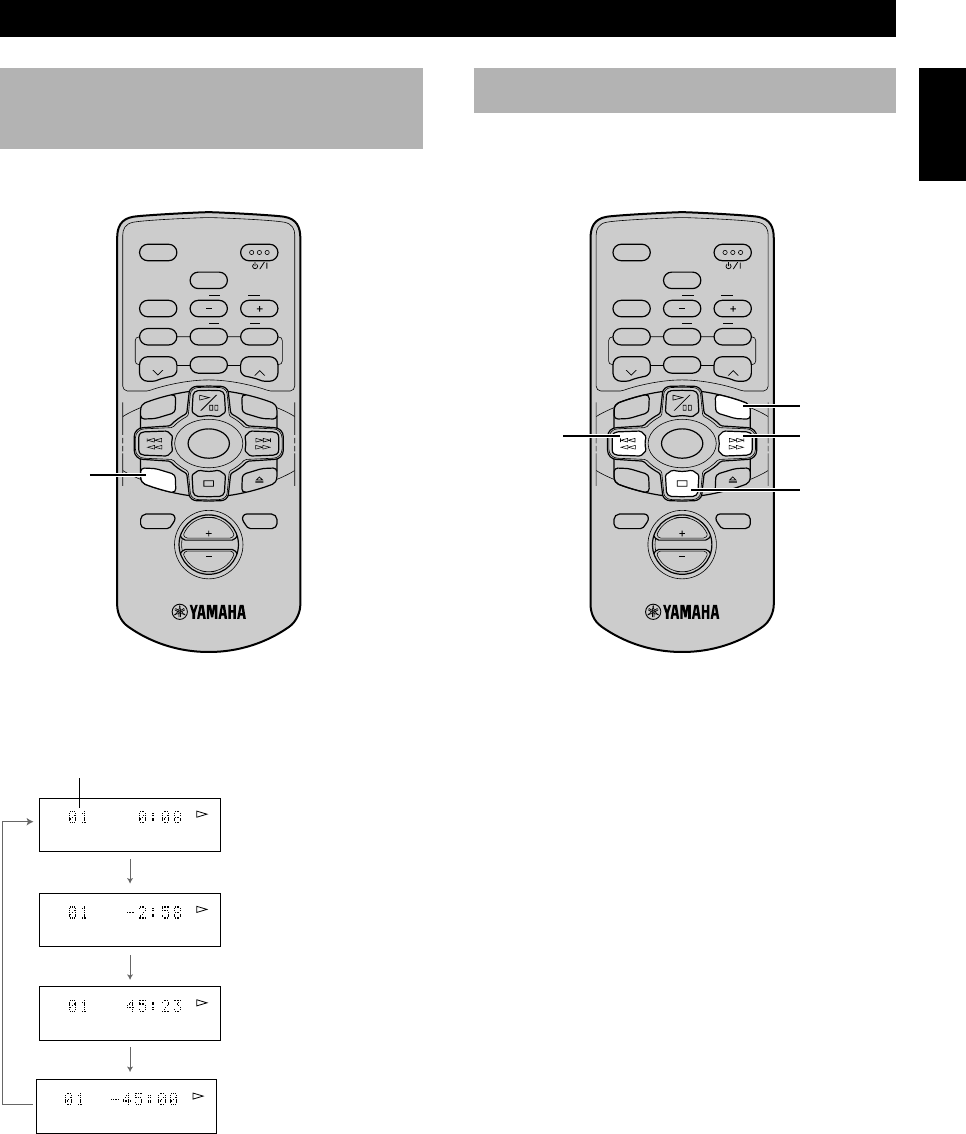
Each time you press TIME, the display changes as
follows:
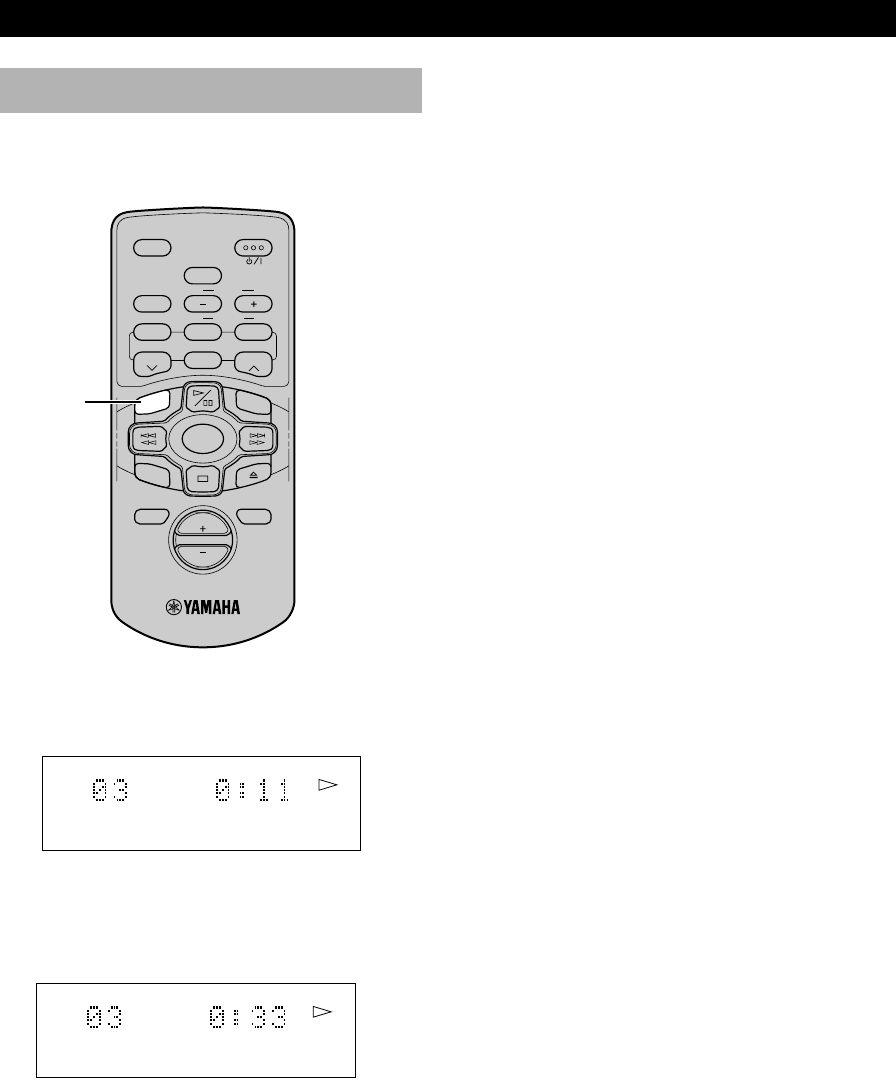
Press RANDOM.
•“RANDOM” indicator lights up on the display.
The unit starts random sequence play.
To cancel the random-sequence play
mode
Press & or RANDOM.
•“RANDOM” disappears from the display.
Notes
•If ⁄ › is pressed during random-sequence play, the next
randomly programmed track will be played.
If $ ! is pressed, play will return to the beginning of the
current track.
•The total remaining time on the disc will not be displayed
during random-sequence play.
Random-sequence play
The unit can play all the tracks in a random sequence.
RANDOM
Selecting the time
display
You can select any of four time displays by pressing
TIME.
TIME
Elapsed time of the
current track
Total remaining time of
the disc
Total disc play time
Remaining time of the
current track
Current track number
SLEEP
B. BOOST
LEVEL
STANDBY/ON
BASS/TREBLE
MODE
ABCDE
MUTE
VOL
DISPLAY
INPUT
REP
RANDOM
TUNER
START
FREQ/RDS
PRESET PRESET
RTY SEEK
TIME
SLEEP
B. BOOST
LEVEL
STANDBY/ON
BASS/TREBLE
MODE
ABCDE
MUTE
VOL
DISPLAY
INPUT
TUNER
START
FREQ/RDS
PRESET PRESET
RTY SEEK
TIME
RANDOM
REP
&
⁄ ›$ !
TOTAL
TOTAL
06/TSX-10E(6.12)a 01.6.12, 4:18 PM15
16
COMPACT DISC PLAYER OPERATIONS
SLEEP
B. BOOST
LEVEL
STANDBY/ON
BASS/TREBLE
MODE
ABCDE
MUTE
VOL
DISPLAY
INPUT
TUNER
START
FREQ/RDS
PRESET PRESET
RTY SEEK
TIME
RANDOM
REP
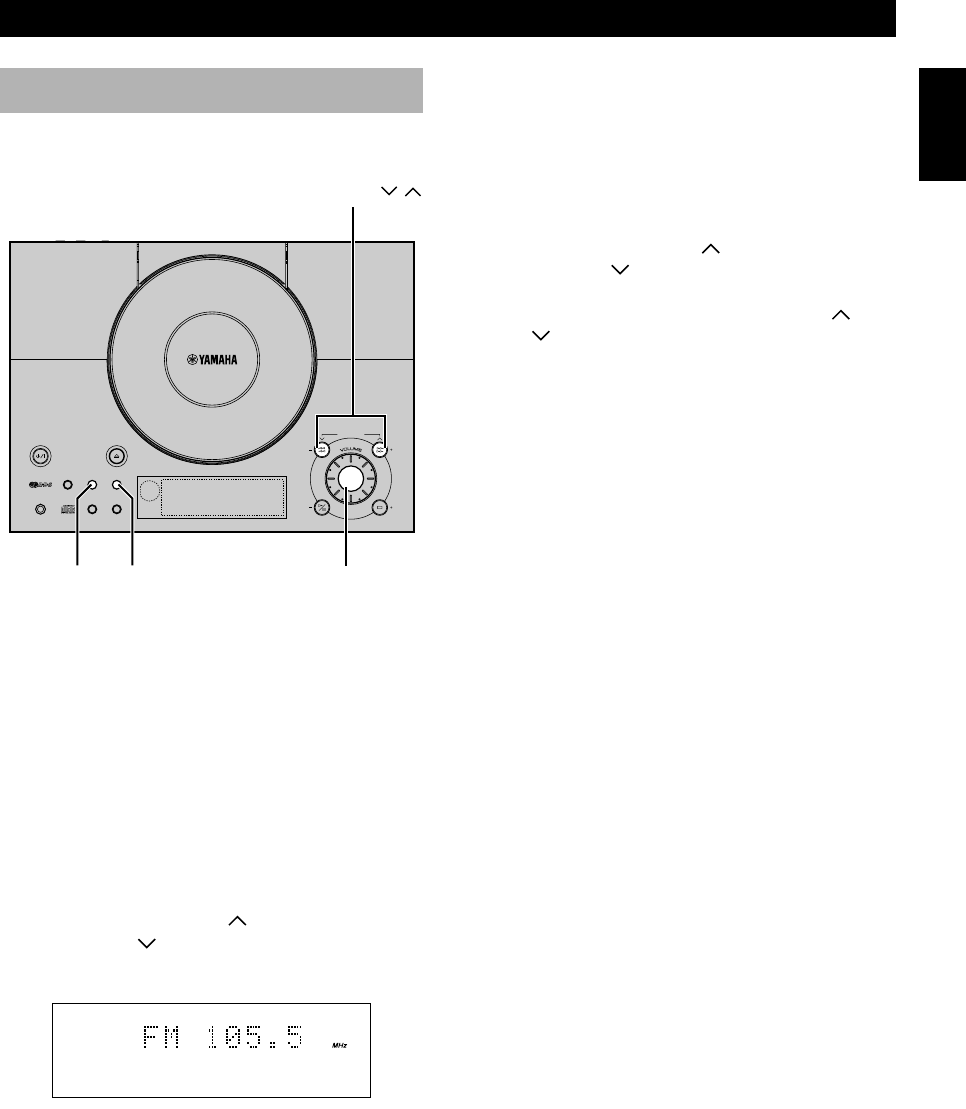
SINGLE REPEAT
The current track is played repeatedly.
FULL REPEAT
The current disc is played repeatedly.
•In random-sequence play mode, all randomly
sequenced tracks are played repeatedly, but each time in
different order.
To cancel the repeat play mode
Press REP successively until “REP F” disappears from
the display.
Repeat play
You can play any desired track or disc repeatedly.
Press REP to select the repeat mode.
REP
REP
S
REP
F
06/TSX-10E(6.12)a 01.6.12, 4:18 PM16
17
English
TUNER OPERATIONS
English
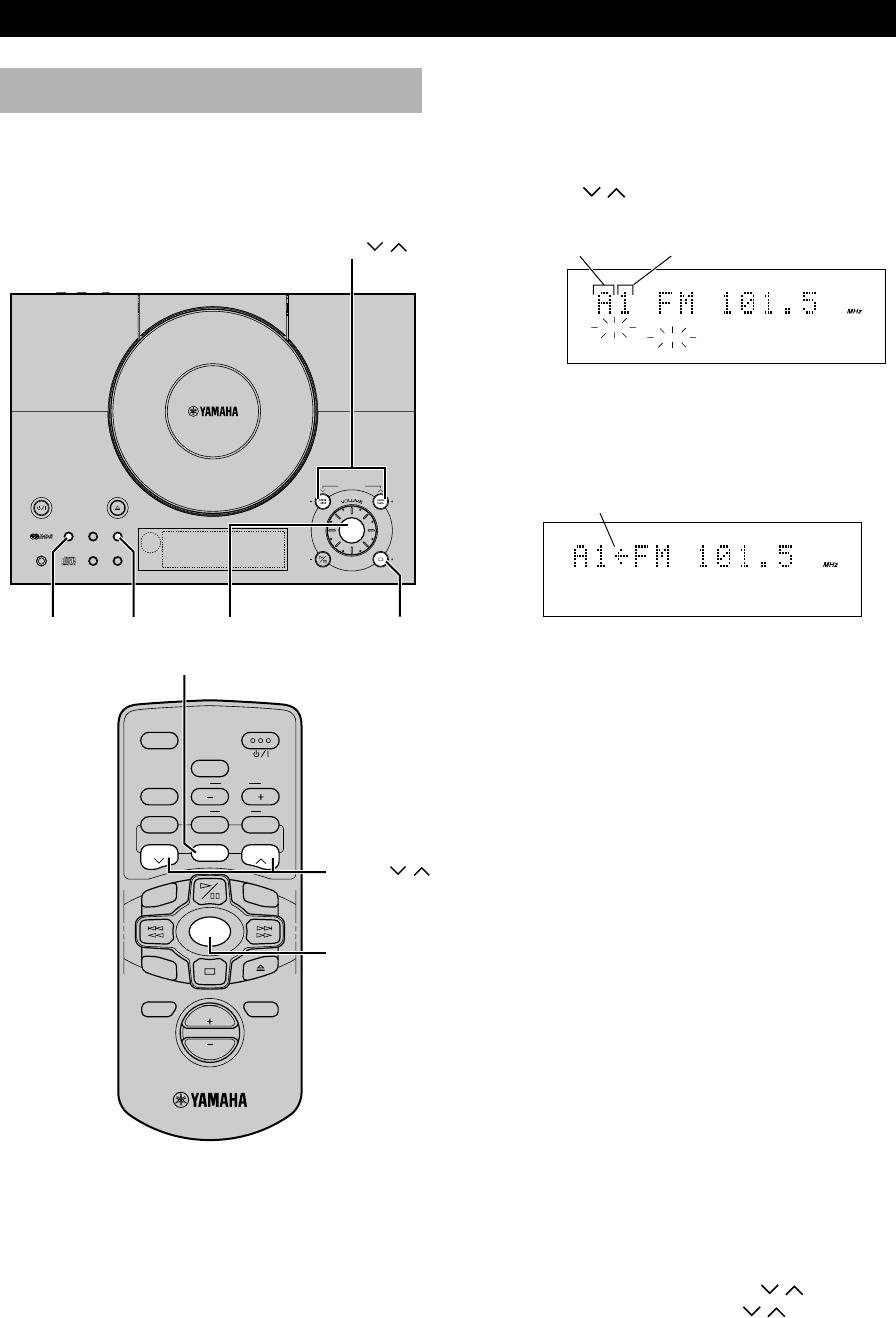
Automatic tuning
1Select TUNER by pressing INPUT repeatedly until
the frequency of a radio station appears in the
display.
2Press PRESET/BAND to select the AM or FM
reception band. Do not select the preset tuning mode
(in which “PRESET” appears on the display).
3Press AUTO/MAN’L so that “AUTO” appears in the
display.
4Press PRESET/TUNING (for a higher
frequency) or (for a lower frequency).
5The unit starts searching for a station.
When the unit finds a station, the unit stops searching
and “TUNED” appears on the display.
6If the located station is not the one you want, repeat
steps 4 and 5 until a station you want is tuned in.
Notes
•If automatic tuning search does not find the desired station, try
manual tuning as described next.
•When an FM stereo broadcast with sufficient signal strength is
received, “STEREO” appears on the display and you can listen
to stereo sound.
Listening to the radio
You can find radio stations automatically and manually.
Manual tuning
1Follow steps 1 and 2 described in “Automatic
tuning.”
2Press AUTO/MAN’L so that “AUTO” disappears
from the display.
3Press PRESET/TUNING (for a higher
frequency) or (for a lower frequency) to select the
desired station.
•Each time you press PRESET/TUNING or
, the frequency changes in small steps.
PRESET/TUNING /
PRESET/BAND INPUT
AUTO/MAN’L
TONEPROG
TOTAL
REPRDS
AUTO
STEREO
PRESET
PSPTYRTCT
B. BOOST
RANDOMS F
PTY HOLD
TUNED
MEMORYSLEEPTIMER
NATURAL SOUND CD RECEIVER
STANDBY/ON
OPEN/CLOSE
MEMORY
AUTO/MAN´L
TIMER
SLEEP
PRESET/TUNING
A/B/C/D/E
HOUR
MIN MIN
HOUR
PHONES DISPLAY
TIME ADJ
PRESET/BAMD
INPUT
SNOOZE
AUTO
STEREO
TUNED
07/TSX-10E(6.12)a 01.6.12, 4:18 PM17
18
TUNER OPERATIONS
3Before “MEMORY” goes out, press A/B/C/D/E
repeatedly to select the desired group (A to E) of
preset stations.
4Before “MEMORY” goes out, use PRESET/
TUNING / to select a desired preset number (1
to 8).
5Press MEMORY.
•“MEMORY”, “PRESET”, and the preset number
appears on the display.
6Repeat steps 1 to 5 until all desired stations are
preset.
Notes
•A new station can be preset in place of a previous one.
•The preset stations are retained for a week after you disconnect
the AC power cord or if a power failure occurs.
To preset stations automatically
1Select TUNER as the input source by pressing
INPUT.
2Press MEMORY for about 2 seconds.
•The unit starts presetting stations, “AUTO” and
“MEMORY” flash on the display.
Received stations are stored to A1, A2...A8 sequentially.
After 40 stations or all FM and AM stations are stored, the
display will show the station preset on A1.
To recall a preset station
1Select TUNER as the input spurce.
2If “PRESET” is not lit on the display, press
PRESET/BAND to light it.
3Select the desired preset station number by using A/
B/C/D/E and PRESET/TUNING / on the main
unit (or ABCDE and PRESET / on the remote
control).
TONEPROG
TOTAL
REPRDS
AUTO
STEREO
PRESET
PSPTYRTCT
B. BOOST
RANDOMS F
PTY HOLD
TUNED
MEMORYSLEEPTIMER
NATURAL SOUND CD RECEIVER
STANDBY/ON
OPEN/CLOSE
MEMORY
AUTO/MAN´L
TIMER
SLEEP
PRESET/TUNING
A/B/C/D/E
HOUR
MIN MIN
HOUR
PHONES DISPLAY
TIME ADJ
PRESET/BAMD
INPUT
SNOOZE
SLEEP
B. BOOST
LEVEL
STANDBY/ON
BASS/TREBLE
MODE
ABCDE
MUTE
VOL
DISPLAY
INPUT
REP
TIME
RANDOM
TUNER
START
FREQ/RDS
PRESET PRESET
RTY SEEK
Presetting stations
The unit can preset station frequencies selected by
Automatic tuning or Manual tuning. Up to 40 stations can
be stored. With this function, you can select any desired
station by pressing the corresponding preset station
number.
To preset stations manually
1Tune in a desired station.
(Refer to the previous page for the tuning procedure.)
2Press MEMORY.
•“MEMORY” and “PRESET” flash on the display
for about 5 seconds.
INPUT
PRESET/BAND
MEMORY A/B/C/D/E
PRESET /
PRESET/TUNING /
The arrow appears for one second when
the displayed station is preset successfully.
INPUT
ABCDE
STEREO
PRESET
TUNED
MEMORY
STEREO
PRESET
TUNED
MEMORY
Preset number
Group
07/TSX-10E(6.12)a 01.6.12, 4:18 PM18
19
Playing CDsGetting Started
RECEIVING RDS STATIONS
English
Receiving RDS data
RDS (Radio Data System) is a data transmission system
used by FM stations in many countries. Stations using this
system transmit an inaudible stream of data in addition to
the normal radio signal. RDS data contains various types
of information, such as PS (Program Service), PTY
(Program Type), RT (Radio Text), and CT (Clock Time).
1Tune in an FM station broadcasting RDS data. (Refer
to page 17 and 18.)
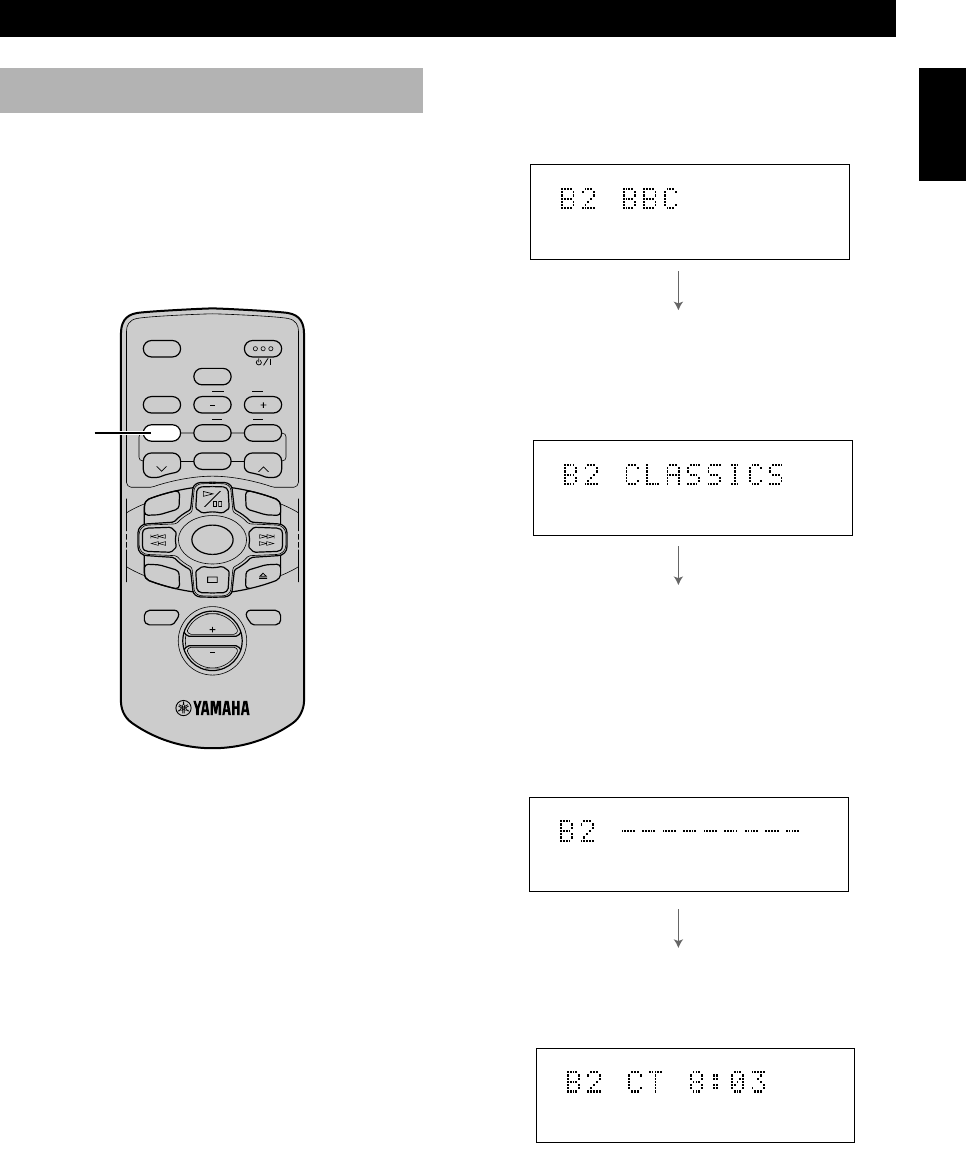
2Press FREQ/RDS to choose the mode. Each time
you press FREQ/RDS, the type changes as follows:
FREQ/RDS
PS
The name of the RDS station being received is displayed.
•If the unit cannot find a station with PS data, the unit stops
searching and “NO PS” appears on the display.
PTY
The program type of the RDS station now being received
is displayed. You can make this unit search for a station
which is broadcasting programs of a desired program
type. (Refer to PTY program mode in the next section for
details.)
RT
Information about the program (such as the title of the
song, name of the singer, etc.) on the RDS station being
received is displayed by a maximum of 64 alphanumeric
characters, including the umlaut symbol. If other
characters are used by the RT data, they are displayed
with an underscore.
•If the unit cannot find a station with RT data, the unit stops
searching and “NO RT” appears on the display.
CT
Current time is displayed.
•If the unit cannot find a station with CT data, the unit stops
searching and “NO CT” appears on the display.
Notes
•RDS may not work properly if the station you have tuned in to
is not transmitting the RDS signal properly or if the signal
strength is weak.
•Some FM stations do not offer RDS services. Of those that do,
not all provide the same types of services. The types provided
by the received RDS station are dimmed on the display. Check
with your local radio stations for details on available RDS
services in your area.
SLEEP
B. BOOST
LEVEL
STANDBY/ON
BASS/TREBLE
MODE
ABCDE
MUTE
VOL
DISPLAY
INPUT
TUNER
START
FREQ/RDS
PRESET PRESET
RTY SEEK
TIME
RANDOM
REP
RDS PS
RDS PTY
RDS CT
08/TSX-10E(6.12)b 01.6.12, 4:18 PM19
20
RECEIVING RDS STATIONS
PTY SEEK mode
You can locate a desired station by selecting a program
type. The unit searches all preset stations for the type of
programs currently being broadcast among the RDS
stations.
To locate a station
1Tune in an FM station. (Refer to page 17 and 18.)
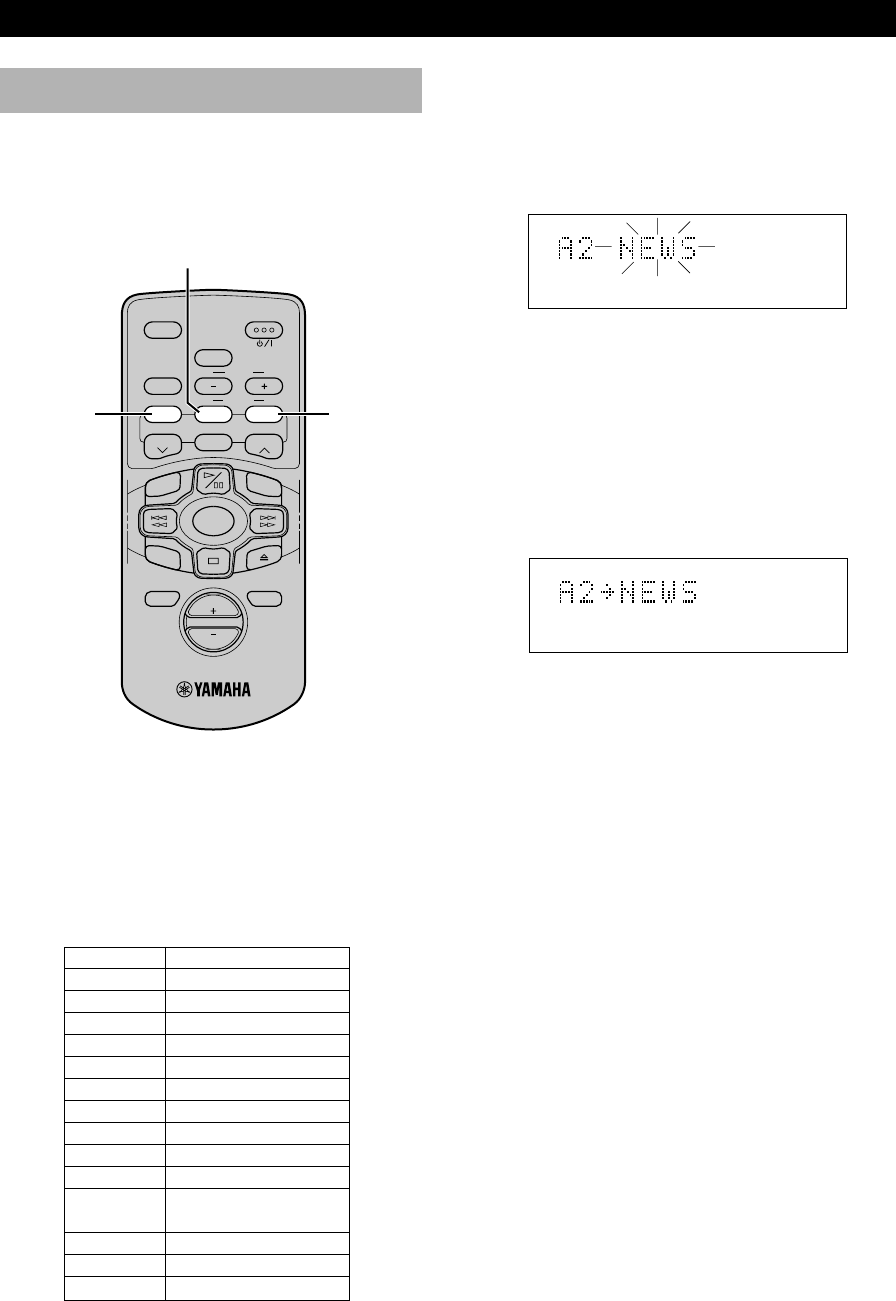
2Press PTY SEEK MODE once so that “PTY” and a
PTY program flash on the display.
3Within about 20 seconds, press FREQ/RDS
repeatedly until the desired program type appears on
the display.
4Within about 20 seconds, press PTY SEEK START.
•If a station broadcasting the selected program type
is found, the unit stops searching and the Program
Service name appears on the display.
“PTY HOLD” appears on the display.
5Repeat step 4 until the desired station is located.
If there is no station broadcasting the program type
you select, “NO PTY” appears on the display, then
the Program Service name or frequency appears on
the display.
List of Program Types
PTY SEEK MODE
FREQ/RDS PTY SEEK
START
NEWS
AFFAIRS
INFO
SPORT
EDUCATE
DRAMA
CULTURE
SCIENCE
VARIED
POP M
ROCK M
M.O.R. M
LIGHT M
CLASSICS
OTHER M
News
Current Affairs
General Information
Sports
Education
Drama
Culture
Science
Light Entertainment
Pops
Rock
Middle of the Road
Music (Easy-listening)
Light Classics
Serious Classics
Other Music
SLEEP
B. BOOST
LEVEL
STANDBY/ON
BASS/TREBLE
MODE
ABCDE
MUTE
VOL
DISPLAY
INPUT
TUNER
START
FREQ/RDS
PRESET PRESET
RTY SEEK
TIME
RANDOM
REP
PTY
RDS
PRESET
PTY
PTY HOLD
08/TSX-10E(6.12)b 01.6.12, 4:18 PM20
21
Playing CDsGetting Started
RECEIVING RDS STATIONS
English
Optional settings for
RDS functions
The tuner has the following functions which make use of
the RDS data service. These are originally in operation
ON. However, you can turn these functions OFF, if so
desired.
defs
1Select the FM band. (Refer to page 17.)
2Press DISPLAY to display the current time.
3Press FREQ/RDS.
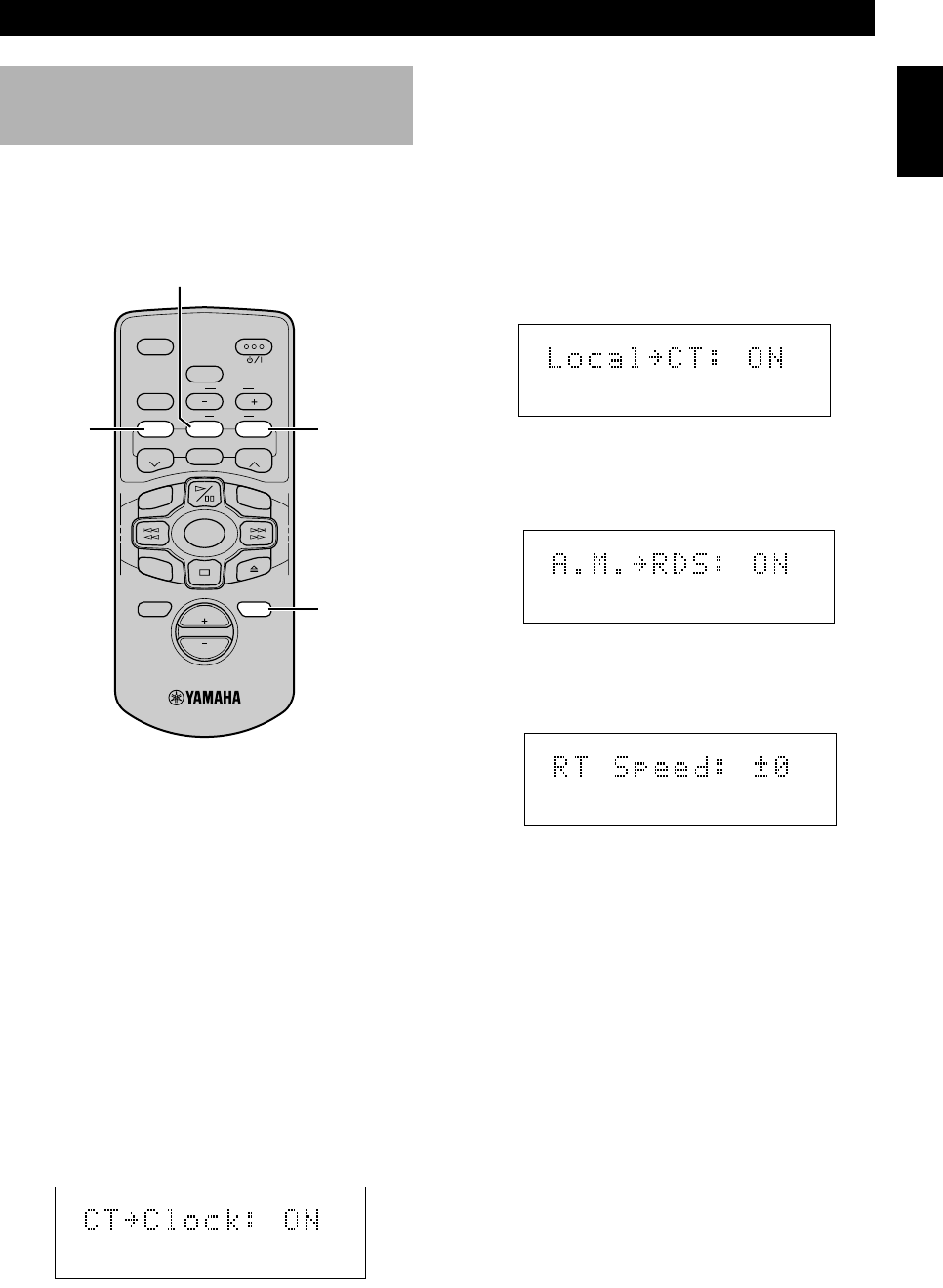
4Each time you press PTY SEEK MODE the display
will change as follows:
1. CT = CLOCK (ON/OFF)
The tuner corrects the time of the built-in clock
automatically by synchronizing it with the CT
data from the RDS station being received.
•If you receive an RDS station of some other
country, the built-in clock is synchronized with
the time setting of that country.
•If the built-in clock is not yet set for the current
time or was reset due to a power failure, etc., it
will be set for the time of the CT data
automatically, whether this setting is ON or OFF.
2. LOCAL = CT (ON/OFF)
If the RDS station being received employs the
local time (daylight savings time, etc.) data
service, its time is displayed in the CT mode.
3. A.M. = RDS (ON/OFF)
RDS stations are searched instead of all FM
stations by the automatic preset tuning operation
when the setting is ON. (Refer to page 10.)
4. RT SPEED: ±0
Changes the scrolling speed of radio text.
Increase the value to increase the speed, and
decrease the value to reduce the speed.
Control Range: ±0 to ±3 (Preset value: ±0)
5Choose the ON or OFF function by pressing PTY
SEEK START and confirming it in the display.
Press PTY SEEK START repeatedly to change the
value for RT SPEED.
•If there is no operation for about 20 seconds, this
mode is cancelled and the frequency display
returns. If the station is broadcasting PS data, it
switches to the PS mode.
6Press FREQ/RDS again to restore the frequency
display mode.
PTY SEEK MODE
PTY SEEK
START
FREQ/RDS
DISPLAY
SLEEP
B. BOOST
LEVEL
STANDBY/ON
BASS/TREBLE
MODE
ABCDE
MUTE
VOL
DISPLAY
INPUT
TUNER
START
FREQ/RDS
PRESET PRESET
RTY SEEK
TIME
RANDOM
REP
08/TSX-10E(6.12)b 01.6.12, 4:18 PM21
22
USING THE BUILT-IN TIMER
TONEPROG
TOTAL
REPRDS
AUTO
STEREO
PRESET
PSPTYRTCT
B. BOOST
RANDOMS F
PTY HOLD
TUNED
MEMORYSLEEPTIMER
NATURAL SOUND CD RECEIVER
STANDBY/ON
OPEN/CLOSE
MEMORY
AUTO/MAN´L
TIMER
SLEEP
PRESET/TUNING
A/B/C/D/E
HOUR
MIN MIN
HOUR
PHONES DISPLAY
TIME ADJ
PRESET/BAMD
INPUT
SNOOZE
Timer play
By using the built-in timer, you can have the unit turn on
at a specified time and begin playing automatically. You
can also specify the turn off time.
3. ON Time
“ON Time” appears on the display for a second,
and then changes to the time setting mode.
佥Press HOUR –/+ to set the hour.
佥Press MIN –/+ to set the minute.
4. OFF Time
Set the time the same way as above.
If you set the ON time but not any OFF time,
timer play will finish automatically after an hour.
5. Timer Volume
You can specify the desired volume level for the
timer play by turning VOLUME or pressing
VOLUME +/– on the remote control.
•If you adjust this setting during play, the
volume of the currently playing material
changes so that you can confirm the volume
level for the timer play. When the display mode
changes, the volume reverts to the original level.
Note
•The display mode will change in about 8 seconds. If the
mode is changed before the setting is completed, call up
the mode again by pressing DISPLAY once or more.
2Press TIMER to complete the timer setting.
•If you press TIMER during the “ON Time” or
“OFF Time” mode, the system is put in the
standby mode and “TIMER” lights up on the
display. To continue using the system, press
STANDBY/ON to turn on this unit.
When timer play starts, the backlight of the volume
control starts flashing slowly.
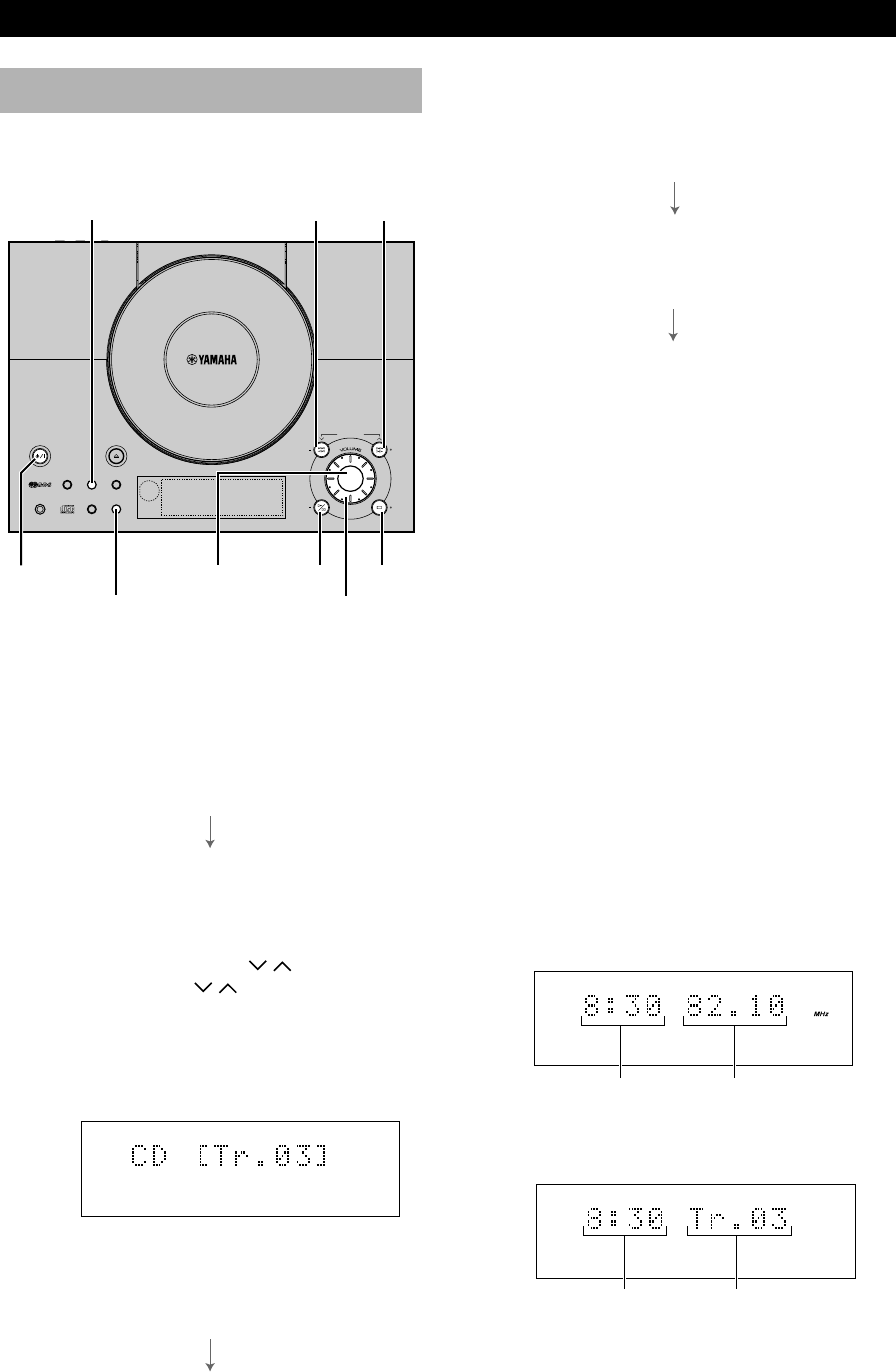
•If TUNER is selected as the timer source, the current
time and the frequency of the current station appears on
the display.
•If CD has been selected as the timer source, the current
time and the current track number appears on the
display.
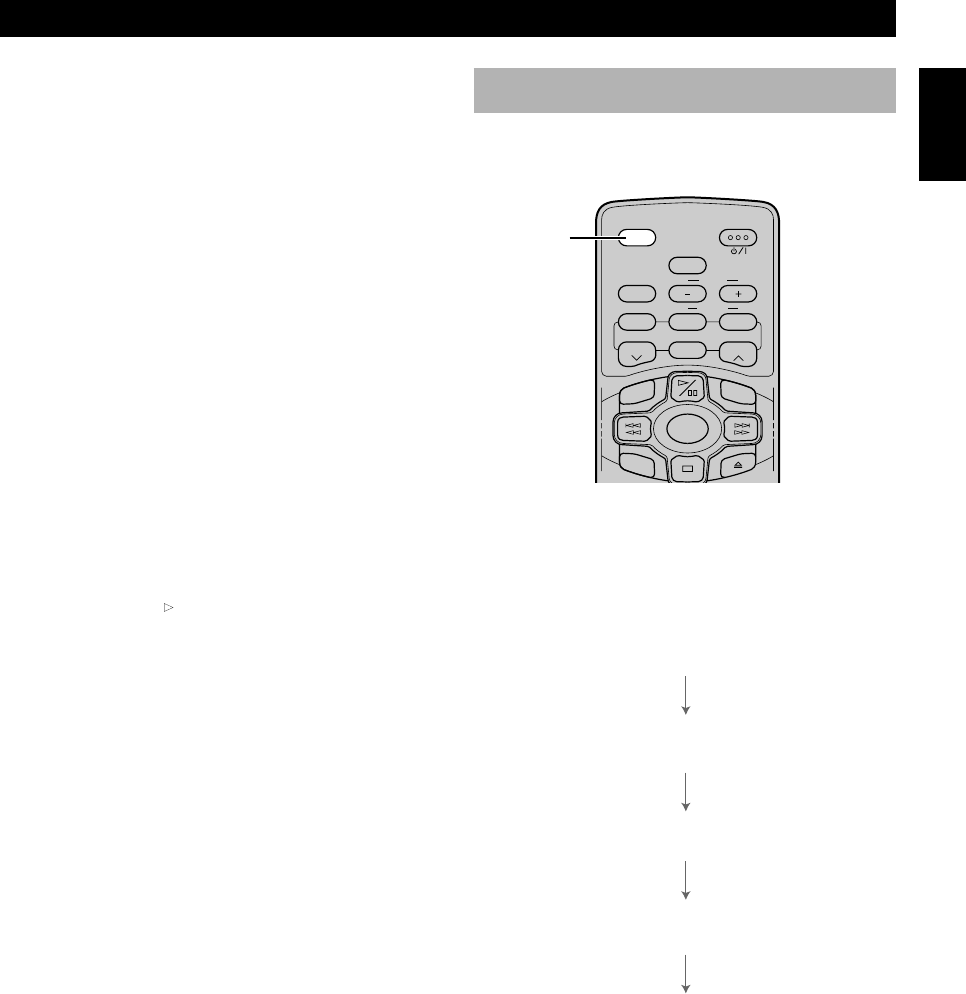
1Press DISPLAY.
Whenever DISPLAY is pressed, the display mode
changes as follows:
1. Clock Time (TIMER on/off mode)
If you have not set the clock yet, “Set Clock”
appears. You need to set the current time as
described on page 12.
2. Timer Input
Select the source to be played by pressing INPUT.
•When you select TUNER, you can select the
desired preset station.
佥Use PRESET/BAND, A/B/C/D/E and
PRESET/TUNING / on the main unit
or PRESET / and ABCDE on the
remote control to select the station.
•When you select CD, the following display
appears. You can specify the desired track you
want to start playing and set the repeat and/or
random-sequence mode.
佥Use $ !, ⁄ › to specify the track.
佥Press REPEAT on the remote control to set
the repeat mode.
佥Press RANDOM on the remote control to set
the random-sequence mode.
MIN –
INPUT
SNOOZE
DISPLAY
HOUR –
TIMER HOUR +
MIN +
STANDBY/ON
VOLUME
Current time Frequency
Current time Current track
09/TSX-10E(6.12)a 01.6.12, 4:18 PM22
23
English
USING THE BUILT-IN TIMER
SLEEP
B. BOOST
LEVEL
STANDBY/ON
BASS/TREBLE
MODE
ABCDE
INPUT
TUNER
START
FREQ/RDS
PRESET PRESET
RTY SEEK
TIME
RANDOM
REP
Sleep timer
The unit can be turned off automatically at a selected
SLEEP time.
1Play the desired sound source.
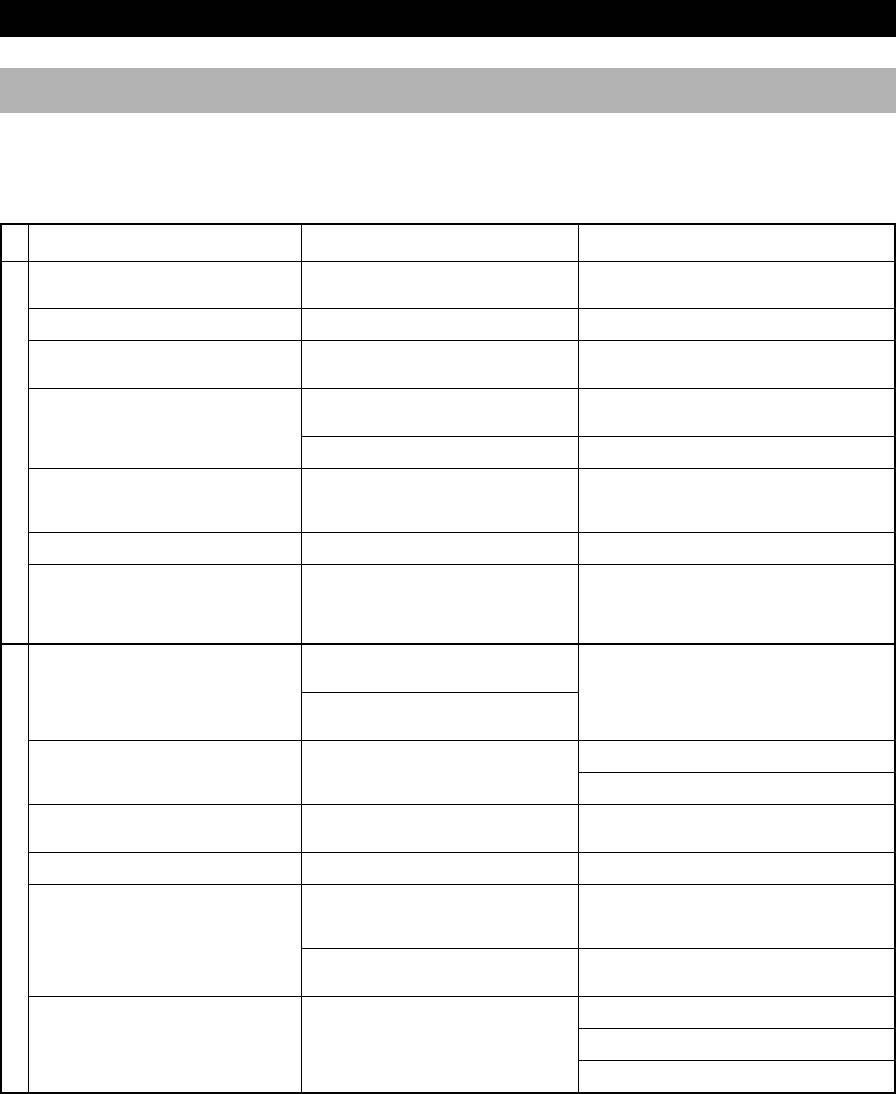
2Press SLEEP repeatedly until the desired sleep time
appears in the display. Each time you press SLEEP,
the sleep time changes as follows:
About 4 seconds after setting, the normal display will
resume.
•“SLEEP” will appear in the display.
3The unit will turn off automatically when the selected
sleep time is reached.
Notes
•If you press SLEEP while the sleep timer is functioning, the
remaining time is displayed. Then pressing the button
successively changes the sleep time described as above.
•When you have set both the sleep timer and timer play, the
unit turns off at the time which comes first (at the designated
sleep time or the time set on “4. OFF TIME”).
SLEEP
SLEEP 2h00m
SLEEP 1h30m
SLEEP 1h00m
SLEEP 0h30m
SLEEP OFF
To cancel the timer play setting
Press DISPLAY to show the current time, then press
TIMER so that “TIMER” goes off on the display. You
can also cancel by pressing TIMER in the standby mode.
Note
•In the event of a power failure or when the AC power cord is
disconnected for more than five minutes, “Set Clock” may
appear on the display instead of the current time. In that case,
you need to reset the clock.
䡵 Snooze function
With this feature, you can stop the timer play temporarily
and resume play automatically in five minutes. When you
set the timer play as the alarm, it helps you not to
oversleep.
Press SNOOZE during timer play.
The current time and “Snooze” turns on and off slowly on
the display. Also the backlight of the volume control turns
off.
Notes
•Some controls such as (play), INPUT, etc. do not work in
the snooze mode.
•If you have selected CD as the input source, the unit resumes
from the beginning of the track that was playing when
SNOOZE was pressed.
09/TSX-10E(6.12)a 01.6.12, 4:18 PM23
24
ADDITIONAL INFORMATION
Troubleshooting
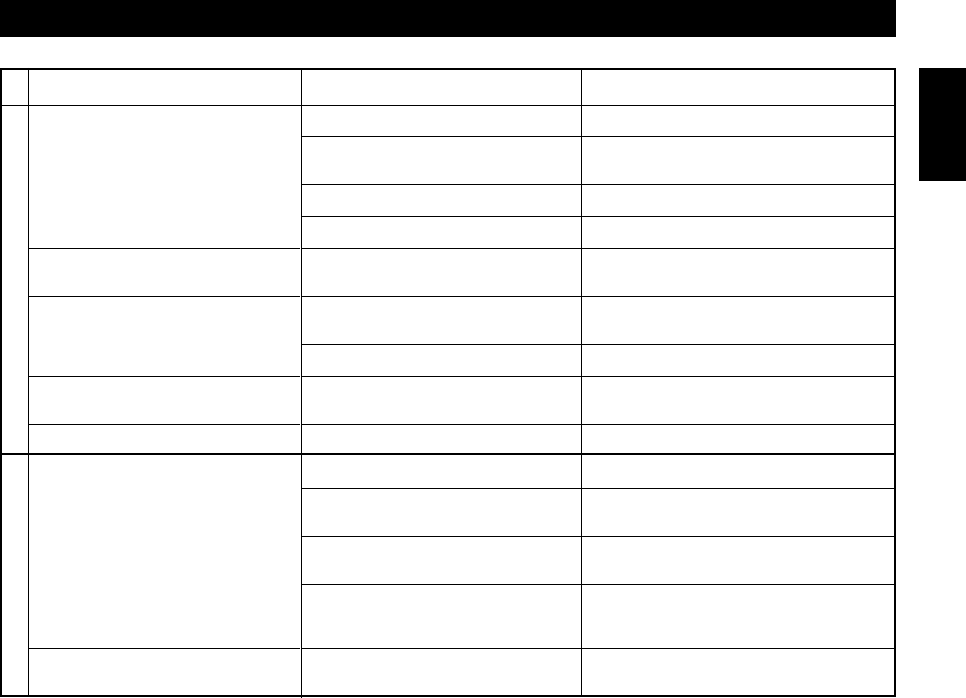
If the unit fails to operate normally, check the following points to determine whether the fault can be corrected by the
simple measures suggested. If it cannot be corrected, or if the fault is not listed in the SYMPTOM column, disconnect the
power cord and contact your authorized YAMAHA dealer or service center for help.
The main unit does not switch ON
when STANDBY/ON is pressed.
No sound from one speaker.
The sound suddenly disappers.
No sound from an external
component connected with the main
unit or play does not begin.
Sound distorted.
Cannot set timer.
The main unit does not work
normally.
Excessive static in FM broadcasts.
Noise increases during stereo
broadcast reception.
Stereo broadcasts are noisy and the
STEREO indicator blinks on and off.
Cannot select preset stations.
Buzzing or static during AM
broadcasts.
AM broadcast sensitivity is poor.
SYMPTOM CAUSE REMEDY
Securely connect the power cord.
Connect properly.
Check the speaker wires are not touching each other
and then turn the main unit back on.
Connect the cords properly. If the problem persists,
the cords may be defective.
Select AUX by pressing the INPUT button.
Turn on the component.
Set current time.
Unplug the AC power cord from the wall outlet, and
then plug in again after about one minute.
Position the FM antenna as high and as far away
from nearby roads as possible. Connect using a
coaxial cable.
Check the antenna connection.
Install a multi-element type FM antenna if possible.
Install an antenna appropriate for the electric field
strength of your area.
Reprogram memory presets.
The problem is difficult to eliminate, but can be
lessened by grounding the AM loop antenna.
Move away from the TV or microprocessor.
Properly connect the AM loop antenna.
Change orientation of the AM loop antenna.
Install an external AM loop antenna.
The AC power cord is not connected or not
completely connected.
Loose speaker connections.
The protection circuit has been activated
because of a short circuit, etc.
Incorrect cord connections.
Input source selection is not proper.
The external component connected to the
LINE IN terminal of the main unit is not
turned on.
Current time is not set.
The internal microcomputer has been frozen
by an external electric shock (lightning,
excessive static electricity, etc.) or the power
supply voltage is too low.
Interference from the starting motor of a
nearby car.
Interference from the thermostat of a nearby
electrical appliance.
Antenna input is too weak due to obstructions
or excessive distance from the broadcasting
station.
Insufficient antenna input.
Preset memory has been erased.
Interference from sources such as lightning,
fluorescent lights, electric motors or the
thermostat of nearby electrical appliance.
A TV or microprocessor is being used
nearby.
Radio signal is weak or the antenna is not
properly connected.
GENERAL
TUNER
10/TSX-10E(6.12)b 01.6.12, 4:18 PM24
25
ADDITIONAL INFORMATION
English
SYMPTOM CAUSE REMEDY
Play does not begin.
Play is delayed, or begins at the
wrong place.
Sound “skips.”
Sound “hums.”
Noise from inside of the unit.
The remote control does not work.
TV functions strangely when the
remote control is being used.
Check the disc carefully; replace it if necessary.
Wait 20 to 30 minutes after switching the unit ON
before trying to play a disc.
Reload the disc with the label side facing up.
Clean the disc.
Check the disc carefully; replace it if necessary.
Relocate the unit.
Clean the disc.
Securely connect the audio cables. If the problem
persists, the cables may be defective.
Replace the disc.
Replace the battery with a new one.
Use within 6 meters and 60 degree radius.
Change the active remote control sensor to the other
one by using the remote control sensor switch.
Change the position of the unit.
Relocate the main unit away from the TV or cover
the TV’s remote control sensor.
The disc is damaged.
There is moisture on the laser pick-up.
The disc has been loaded upside down.
The disc is dirty.
The disc may be scratched or damaged.
The unit is being subjected to vibrations or
impacts.
The disc is dirty.
Improper cable connections.
The disc may be warped.
The battery of the remote control is too weak.
Remote control is too far away or is being
used at an incorrect angle.
The active remote control sensor cannot
receive the remote control signal.
Direct sunlight or strong lighting (of an
inverter type of fluorescent lamp, etc.) is
striking the remote control sensor of the unit.
The remote control is being used near a TV
set with a remote control sensor.
CD PLAYER
REMOTE CONTROL
10/TSX-10E(6.12)b 01.6.12, 4:18 PM25

26
ADDITIONAL INFORMATION
Specifications
Amplifier section
Minimum RMS output power per channel
.................................................. 18 W +18 W (4Ω 1kHz 10% THD)
DIN Standard output power per channel (Europe model)
.................................................... -- W + -- W (--Ω 1kHz --% THD)
Input sensitivity/Impedance
AUX .......................................................................... 250 mV/47 kΩ
Frequency Response
...................................................................... -- Hz to -- kHz, ±-- dB
Total Harmonic Distortion (20 Hz to 20 kHz)
12.5 W, 6 Ω ................................................................................. --%
Signal-to-Noise Ratio (IHF-A Network)
(250 mV, Input Shorted) ...........................................................-- dB
Output Level/Impedance
SUBWOOFER ................................................................. -- V/-- kΩ
PHONES ............................................................................ -- V/-- Ω
Tuner section
Tuning range
FM
[U.S.A. and Canada models]
.............................................................................. 87.5 – 107.9 MHz
[U.K., Europe, Australia and China models]
.......................................................................... 87.50 – 108.00 MHz
AM
[U.S.A., Canada and China models]
................................................................................. 530 – 1710 kHz
[U.K., Europe and Australia models]
................................................................................. 531 – 1611 kHz
Sensitivity
FM (IHF, MONO)
[U.S.A., Canada and China models]
................................................................................................ 1.5 µV
[U.K., Europe and Australia models]
................................................................................................ 1.8 µV
AM
.............................................................................................. -- µV/m
CD player section
D/A converter
.......................................................................................... S-bit DAC
Laser Diode Properties
•Material: GaAIAs
•Wavelength: 780 nm
•Emission duration: continuous
•Laser output: max. 44.6 µW*
* This output is the value measured at a distance of about 200 mm
from the objective lens surface on the Optical Pick-up Block.
Speaker section
Type
..................................................... 2-way bass-reflex speaker system
Magnetic shielding type
Driver
............................................................................ 10 cm cone woofer
2 cm dome tweeter
Maximum input power
................................................................................................... 20 Ω
Impedance
.................................................................................................... 4 W
Frequency response
............................................................................................ -- – -- Hz
Sensitivity
................................................................................... -- dB/2.83V/m
General
Power supply
[U.S.A. and Canada models]
............................................................................... AC 120 V, 60 Hz
[Australia model]
............................................................................... AC 240 V, 50 Hz
[U.K. and Europe models]
............................................................................... AC 230 V, 50 Hz
[China model]
............................................................................... AC 120 V, 60 Hz
Power consumption
.................................................................................................. 35 W
In standby mode: 3.0 W
Dimensions (W x H x D)
CRX-TS10/20
............................................................................ 297 x 80 x 214 mm
NX-TS10/15
.................................................................................... -- x -- x -- mm
NX-TS20
.................................................................................... -- x -- x -- mm
Weight
CRX-TS10/20
................................................................................................... -- kg
NX-TS10/15
................................................................................................... -- kg
NX-TS20
................................................................................................... -- kg
Accessories
............................................................................ Remote control x 1
Battery (CR2025) x 1
Indoor FM antenna x1
AM loop antenna x 1
Speaker cable x 2
Stand x 3
Mounting bracket x 1
Non-slip pad x 4
Screw x 9
Paper pattern x 1
Specifications are subject to change without notice.
10/TSX-10E(6.12)b 01.6.12, 4:18 PM26
