Yamaha MMP1 Getting Started [Italiano] It Gs A0
User Manual: Yamaha MMP1 Getting Started [Italiano]
Open the PDF directly: View PDF  .
.
Page Count: 29

JA
RU
IT
PT
ES
FR
DE
EN
EnglishDeutschFrançaisEspañolPortuguêsItaliano
日本語
SIGNAL PROCESSOR
Getting Started
Einführung
Prise en Main
Cómo Empezar
Introdução
Guida Introduttiva
Приступая к работе
セットアップガイド
1. IMPORTANT NOTICE: DO NOT MODIFY THIS UNIT!
This product, when installed as indicated in the instructions con-
tained in this manual, meets FCC requirements. Modifications not
expressly approved by Yamaha may void your authority, granted
by the FCC, to use the product.
2. IMPORTANT: When connecting this product to accessories
and/or another product use only high quality shielded cables.
Cable/s supplied with this product MUST be used. Follow all
installation instructions. Failure to follow instructions could void
your FCC authorization to use this product in the USA.
3. NOTE: This product has been tested and found to comply with
the requirements listed in FCC Regulations, Part 15 for Class “B”
digital devices. Compliance with these requirements provides
a reasonable level of assurance that your use of this product in
a residential environment will not result in harmful interference
with other electronic devices. This equipment generates/uses
radio frequencies and, if not installed and used according to the
instructions found in the users manual, may cause interference
harmful to the operation of other electronic devices. Compliance
with FCC regulations does not guarantee that interference will not
occur in all installations. If this product is found to be the source of
interference, which can be determined by turning the unit “OFF”
and “ON”, please try to eliminate the problem by using one of the
following measures:
Relocate either this product or the device that is being affected by
the interference.
Utilize power outlets that are on different branch (circuit breaker
or fuse) circuits or install AC line filter/s.
In the case of radio or TV interference, relocate/reorient the
antenna. If the antenna lead-in is 300 ohm ribbon lead, change
the lead-in to co-axial type cable.
If these corrective measures do not produce satisfactory results,
please contact the local retailer authorized to distribute this type
of product. If you can not locate the appropriate retailer, please
contact Yamaha Corporation of America, Electronic Service Divi-
sion, 6600 Orangethorpe Ave, Buena Park, CA90620
The above statements apply ONLY to those products distributed
by Yamaha Corporation of America or its subsidiaries.
* This applies only to products distributed by YAMAHA CORPORATION OF AMERICA. (class B)
FCC INFORMATION (U.S.A.)
* This applies only to products distributed by
YAMAHA CORPORATION OF AMERICA.
COMPLIANCE INFORMATION STATEMENT
(DECLARATION OF CONFORMITY PROCEDURE)
Responsible Party : Yamaha Corporation of America
Address : 6600 Orangethorpe Ave., Buena Park, Calif. 90620
Telephone : 714-522-9011
Type of Equipment : Signal processor
Model Name : MMP1
This device complies with Part 15 of the FCC Rules.
Operation is subject to the following two conditions:
1) this device may not cause harmful interference, and
2) this device must accept any interference received including interference
that may cause undesired operation.
See user manual instructions if interference to radio reception is suspected.
(FCC DoC)
이 기기는 가정용 (B 급 ) 전자파적합기기로서 주로
가정에서 사용하는 것을 목적으로 하며 , 모든
지역에서 사용할 수 있습니다 .
(class b korea)
In Finland: Laite on liitettävä suojamaadoituskoskettimilla varustettuun pistorasiaan.
In Norway: Apparatet må tilkoples jordet stikkontakt.
In Sweden: Apparaten skall anslutas till jordat uttag.
(class I hokuo)
OBSERVERA!
Apparaten kopplas inte ur växelströmskällan (nätet) så
länge som den ar ansluten till vägguttaget, även om
själva apparaten har stängts av.
ADVARSEL: Netspændingen til dette apparat er IKKE
afbrudt, sålænge netledningen sidder i en stikkontakt,
som er tændt — også selvom der er slukket på
apparatets afbryder.
VAROITUS: Laitteen toisiopiiriin kytketty käyttökytkin
ei irroita koko laitetta verkosta.
(standby)
ADVARSEL!
Lithiumbatteri—Eksplosionsfare ved fejlagtig
håndtering. Udskiftning må kun ske med batteri af
samme fabrikat og type. Levér det brugte batteri tilbage
til leverandoren.
VARNING
Explosionsfara vid felaktigt batteribyte. Använd samma
batterityp eller en ekvivalent typ som rekommenderas av
apparattillverkaren. Kassera använt batteri enligt
fabrikantens instruktion.
VAROITUS
Paristo voi räjähtää, jos se on virheellisesti asennettu.
Vaihda paristo ainoastaan laitevalmistajan
suosittelemaan tyyppiin. Hävitä käytetty paristo
valmistajan ohjeiden mukaisesti.
(lithium caution)
NEDERLAND/THE NETHERLANDS
• Dit apparaat bevat een lithium batterij voor geheugen back-up.
• This apparatus contains a lithium battery for memory back-up.
• Raadpleeg uw leverancier over de verwijdering van de batterij op het
moment dat u het apparaat ann het einde van de levensduur of gelieve dan
contact op te nemen met de vertegenwoordiging van Yamaha in uw land.
• For the removal of the battery at the moment of the disposal at the end of
life please consult your retailer or Yamaha representative office in your
country.
• Gooi de batterij niet weg, maar lever hem in als KCA.
• Do not throw away the battery. Instead, hand it in as small chemical waste.
(lithium disposal)
This product contains a battery that contains perchlorate material.
Perchlorate Material—special handling may apply,
See www.dtsc.ca.gov/hazardouswaste/perchlorate.
* This applies only to products distributed by
YAMAHA CORPORATION OF AMERICA.
(Perchlorate)
The above warning is located on the top of the unit.
L’avertissement ci-dessus est situé sur le dessus de l’unité.
Explanation of Graphical Symbols
Explication des symboles
The lightning flash with arrowhead symbol within an equilateral triangle is intended to alert the user to the presence of uninsulated “danger-
ous voltage” within the product’s enclosure that may be of sufficient magnitude to constitute a risk of electric shock to persons.
L’éclair avec une flèche à l’intérieur d’un triangle équilatéral est destiné à attirer l’attention de l’utilisateur sur la présence d’une « tension
dangereuse » non isolée à l’intérieur de l’appareil, pouvant être suffisamment élevée pour constituer un risque d’électrocution.
The exclamation point within an equilateral triangle is intended to alert the user to the presence of important operating and maintenance (ser-
vicing) instructions in the literature accompanying the product.
Le point d’exclamation à l’intérieur d’un triangle équilatéral est destiné à attirer l’attention de l’utilisateur sur la présence d’instructions
importantes sur l’emploi ou la maintenance (réparation) de l’appareil dans la documentation fournie.
IMPORTANT SAFETY
INSTRUCTIONS
1 Read these instructions.
2 Keep these instructions.
3 Heed all warnings.
4 Follow all instructions.
5 Do not use this apparatus near water.
6 Clean only with dry cloth.
7 Do not block any ventilation openings. Install in accordance with the
manufacturer’s instructions.
8 Do not install near any heat sources such as radiators, heat registers,
stoves, or other apparatus (including amplifiers) that produce heat.
9 Do not defeat the safety purpose of the polarized or grounding-type
plug. A polarized plug has two blades with one wider than the other. A
grounding type plug has two blades and a third grounding prong. The
wide blade or the third prong are provided for your safety. If the pro-
vided plug does not fit into your outlet, consult an electrician for
replacement of the obsolete outlet.
10 Protect the power cord from being walked on or pinched particularly
at plugs, convenience receptacles, and the point where they exit from
the apparatus.
11 Only use attachments/accessories specified by the manufacturer.
12 Use only with the cart, stand, tripod, bracket, or
table specified by the manufacturer, or sold with
the apparatus. When a cart is used, use caution
when moving the cart/apparatus combination to
avoid injury from tip-over.
13 Unplug this apparatus during lightning storms
or when unused for long periods of time.
14 Refer all servicing to qualified service personnel. Servicing is
required when the apparatus has been damaged in any way, such as
power-supply cord or plug is damaged, liquid has been spilled or
objects have fallen into the apparatus, the apparatus has been
exposed to rain or moisture, does not operate normally, or has been
dropped.
(UL60065_03)
PRÉCAUTIONS CONCER-
NANT LA SÉCURITÉ
1 Lire ces instructions.
2 Conserver ces instructions.
3 Tenir compte de tous les avertissements.
4 Suivre toutes les instructions.
5 Ne pas utiliser ce produit à proximité d’eau.
6 Nettoyer uniquement avec un chiffon propre et sec.
7 Ne pas bloquer les orifices de ventilation. Installer l’appareil confor-
mément aux instructions du fabricant.
8 Ne pas installer l’appareil à proximité d’une source de chaleur comme
un radiateur, une bouche de chaleur, un poêle ou tout autre appareil
(y compris un amplificateur) produisant de la chaleur.
9 Ne pas modifier le système de sécurité de la fiche polarisée ou de la
fiche de terre. Une fiche polarisée dispose de deux broches dont une
est plus large que l’autre. Une fiche de terre dispose de deux broches
et d’une troisième pour le raccordement à la terre. Cette broche plus
large ou cette troisième broche est destinée à assurer la sécurité de
l’utilisateur. Si la fiche équipant l’appareil n’est pas compatible avec
les prises de courant disponibles, faire remplacer les prises par un
électricien.
10 Acheminer les cordons d’alimentation de sorte qu’ils ne soient pas
piétinés ni coincés, en faisant tout spécialement attention aux fiches,
prises de courant et au point de sortie de l’appareil.
11 Utiliser exclusivement les fixations et accessoires spécifiés par le
fabricant.
12 Utiliser exclusivement le chariot, le stand, le tré-
pied, le support ou la table recommandés par le
fabricant ou vendus avec cet appareil. Si l’appa-
reil est posé sur un chariot, déplacer le chariot
avec précaution pour éviter tout risque de chute
et de blessure.
13 Débrancher l’appareil en cas d’orage ou
lorsqu’il doit rester hors service pendant une période prolongée.
14 Confier toute réparation à un personnel qualifié. Faire réparer l’appa-
reil s’il a subi tout dommage, par exemple si la fiche ou le cordon
d’alimentation est endommagé, si du liquide a coulé ou des objets
sont tombés à l’intérieur de l’appareil, si l’appareil a été exposé à la
pluie ou à de l’humidité, si l’appareil ne fonctionne pas normalement
ou est tombé.
(UL60065_03)
WARNING
TO REDUCE THE RISK OF FIRE OR ELECTRIC SHOCK, DO NOT
EXPOSE THIS APPARATUS TO RAIN OR MOISTURE.
AVERTISSEMENT
POUR RÉDUIRE LES RISQUES D’INCENDIE OU DE DÉCHARGE
ÉLECTRIQUE, N’EXPOSEZ PAS CET APPAREIL À LA PLUIE OU À
L’HUMIDITÉ.

4MMP1 Guida Introduttiva
Sommario
PRECAUZIONI ......................................................................................5
AVVISO ..............................................................................................................6
Informazioni........................................................................................................7
1. Benvenuti..........................................................................................8
1-1. Utenza di riferimento .................................................................................8
1-2. Uso previsto ..............................................................................................8
1-3. Accessori in dotazione .............................................................................. 8
1-4. Documentazione .......................................................................................8
1-5. Nomenclatura utilizzata nel presente manuale ......................................... 8
1-6. Applicazioni ...............................................................................................8
1-7. Aggiornamenti del firmware.......................................................................8
2. Nomi e funzioni ................................................................................9
2-1. Pannello frontale ......................................................................................9
2-2. Pannello posteriore ................................................................................10
3. Posizione e collegamenti ..............................................................12
3-1. Esempio di collegamento .......................................................................12
3-2. Operazioni preliminari al collegamento ................................................... 12
3-3. Precauzioni per il montaggio in rack ....................................................... 13
3-4. Alimentazione.......................................................................................... 13
3-5. Informazioni su Dante ............................................................................. 13
3-6. Note sull'utilizzo degli switch di rete ........................................................ 13
3-7. Impostazioni della rete Dante e instradamento dell'audio....................... 14
4. Installazione delle applicazioni.....................................................14
4-1. MMP1 Editor............................................................................................14
4-2. MMP1 Controller .....................................................................................14
5. Risoluzione dei problemi ..............................................................15
5-5. Ripristino delle impostazioni di fabbrica .................................................. 15
6. Specifications.....................................................(no fim do manual)
6-9. General specifications ..................................................(no fim do manual)
6-10. Pin assignment.............................................................. (no fim do manual)
6-11. Dimensions ................................................................... (no fim do manual)
7. Software Licenses and Copyrights ..................(no fim do manual)

MMP1 Guida Introduttiva 5
PRECAUZIONI
LEGGERE ATTENTAMENTE PRIMA
DI CONTINUARE
Conservare questo manuale in un luogo
sicuro per future consultazioni.
AVVERTENZA
Attenersi sempre alle precauzioni di base indicate
di seguito per evitare il rischio di lesioni gravi
o addirittura di morte conseguente a scosse elettriche,
cortocircuiti, danni, incendi o altri pericoli. Tali
precauzioni includono, fra le altre, quelle indicate di
seguito:
Alimentazione/cavo di alimentazione
• Non posizionare il cavo di alimentazione in prossimità di
fonti di calore, quali radiatori o caloriferi. Non piegarlo
eccessivamente né danneggiarlo. Non posizionare oggetti
pesanti sul cavo, né collocarlo in luoghi dove potrebbe
essere calpestato.
• Utilizzare solo la tensione corretta specificata per il
dispositivo. La tensione necessaria è indicata sulla piastrina
del nome dell'unità.
• Utilizzare solo il cavo di alimentazione o la spina elettrica
in dotazione.
Se si intende utilizzare il dispositivo in un paese diverso da
quello di acquisto, il cavo di alimentazione fornito potrebbe
non essere utilizzabile. Per ulteriori informazioni, contattare
il rivenditore Yamaha.
• Controllare periodicamente la spina elettrica ed
eventualmente rimuovere la sporcizia o la polvere
accumulata.
• Durante l'installazione del dispositivo, assicurarsi che la
presa CA utilizzata sia facilmente accessibile.
In caso di
problemi o malfunzionamenti, spegnere immediatamente
l'interruttore di alimentazione e scollegare immediatamente
la spina dalla presa elettrica e l'alimentatore dal connettore
[BACKUP DC INPUT].
Anche quando l'interruttore di
alimentazione è spento, a condizione che il cavo di
alimentazione non sia staccato dalla presa CA, il dispositivo
non si disconnette dalla sorgente di alimentazione.
• Se si prevede di non utilizzare il dispositivo per un lungo
periodo di tempo o in caso di temporali, rimuovere la spina
dalla presa elettrica.
• Collegare il cavo a una presa appropriata dotata di messa
aterra.
Non aprire
• Questo dispositivo non contiene componenti riparabili
dall'utente. Non aprire il dispositivo né smontare o
modificare in alcun modo i componenti interni. In caso di
malfunzionamento, non utilizzare lo strumento e richiedere
l'assistenza di un tecnico autorizzato Yamaha.
Esposizione all'acqua
• Non esporre il dispositivo alla pioggia, non usarlo vicino
all'acqua o in ambienti umidi o bagnati né sistemare su di
esso contenitori di liquidi (ad es. tazze, bicchieri o bottiglie)
che possano riversarsi in una qualsiasi delle aperture.
In caso di infiltrazione di liquido all'interno del dispositivo,
spegnere immediatamente il dispositivo e scollegare il cavo
di alimentazione dalla presa CA e l'alimentatore dal
connettore [BACKUP DC INPUT].
Richiedere quindi
l'assistenza di un tecnico autorizzato Yamaha.
• Non inserire o rimuovere la spina elettrica con le mani
bagnate.
Danni all'udito
• Prima di collegare il dispositivo ad altre apparecchiature,
spegnere tutti i dispositivi interessati. In caso contrario,
si possono verificare scosse elettriche, danni all'udito o alle
apparecchiature.
• Quando si accende il sistema audio, accendere sempre
l'amplificatore PER ULTIMO, per evitare danni all'udito
e all'altoparlante. Per lo stesso motivo, quando si disattiva
l'alimentazione, l'amplificatore di potenza deve essere
sempre spento PER PRIMO.
Esposizione al fuoco
• Non posizionare oggetti accesi o fiamme vive in prossimità
del dispositivo per evitare il rischio di incendio.
Anomalie
• Se si verifica uno dei problemi riportati di seguito, spegnere
immediatamente l'interruttore di alimentazione e scollegare
immediatamente la spina dalla presa elettrica
e l'alimentatore dal connettore [BACKUP DC INPUT].
- La spina o il cavo di alimentazione è danneggiato.
- Vengono emessi odori insoliti o fumo.
- Alcuni oggetti sono caduti nel dispositivo.
- Si verifica una improvvisa scomparsa del suono durante
l'utilizzo del dispositivo.
- Il dispositivo presenta crepe o altri danni visibili.
Richiedere quindi l'assistenza o la riparazione da parte
di un tecnico autorizzato Yamaha.
• In caso di caduta o danneggiamento del dispositivo
o dell'alimentatore, spegnere immediatamente l'interruttore
di alimentazione, scollegare la spina dalla presa elettrica
e l'alimentatore dal connettore [BACKUP DC INPUT],
per poi richiedere l'assistenza di un tecnico autorizzato
Yamaha.
PA_it_8 1/2
6MMP1 Guida Introduttiva
ATTENZIONE
Attenersi sempre alle precauzioni di base elencate di
seguito per evitare lesioni personali o danni al
dispositivo o ad altri oggetti. Tali precauzioni
includono, fra le altre, quelle indicate di seguito:
Alimentazione/cavo di alimentazione
• Per scollegare il cavo di alimentazione dal dispositivo
o dalla presa elettrica, afferrare sempre la spina e non
il cavo, per evitare di danneggiarlo.
• Per scollegare il dispositivo dall'alimentazione principale,
staccare entrambi i cavi di alimentazione.
Posizione
• Non collocare il dispositivo in posizione instabile, per
evitare che cada e che causi eventualmente lesioni.
• Non ostruire le prese d'aria. Il dispositivo presenta alcuni
fori di ventilazione laterali per evitare l'aumento eccessivo
della temperatura interna. In particolare, non appoggiare il
dispositivo sui lati, né in posizione capovolta. Una
ventilazione non adeguata può causare surriscaldamento,
con conseguenti danni al dispositivo o incendi.
• Non collocare il dispositivo in una posizione che comporti il
rischio di contatto con gas corrosivi o aria salmastra per
evitare possibili malfunzionamenti.
• Prima di spostare il dispositivo, scollegare tutti i cavi.
• Se il dispositivo viene montato in un rack EIA standard,
leggere attentamente la sezione "Precauzioni relative al
montaggio in rack" a pagina 13. Una ventilazione non
adeguata può causare surriscaldamento, con conseguenti
danni al dispositivo, malfunzionamenti o incendi.
Manutenzione
• Rimuovere il cavo di alimentazione dalla presa CA
e l'alimentatore dal connettore [BACKUP DC INPUT]
durante la pulizia del dispositivo.
Precauzioni di utilizzo
• Non inserire né lasciare cadere corpi estranei (carta,
plastica, metallo e così via) nelle aperture del dispositivo
(prese d'aria). In tal caso, spegnere immediatamente l'unità,
scollegare il cavo di alimentazione dalla presa CA
e richiedere l'assistenza di un tecnico autorizzato Yamaha.
• Non appoggiarsi al dispositivo né collocarvi sopra oggetti
pesanti. Non applicare forza eccessiva ai pulsanti,
agli switch o ai connettori per evitare lesioni.
• Evitare di tirare i cavi collegati per evitare lesioni personali
o danni al dispositivo.
Batteria di backup
• Non sostituire autonomamente la batteria di backup.
Tale operazione potrebbe causare un'esplosione e/o danni
ai dispositivi.
Quando la batteria di backup deve essere sostituita,
compare l'icona di errore sulla barra di menu di MMP1
Editor quando MMP1 è collegato a MMP1 Editor. In questo
caso rivolgersi a un rivenditore Yamaha per fare in modo
che un tecnico autorizzato dell'assistenza sostituisca la
batteria di backup.
AVVISO
Attenersi agli avvisi riportati di seguito per evitare il
malfunzionamento/danneggiamento del dispositivo e il
danneggiamento dei dati o di altri oggetti.
Utilizzo e manutenzione
• Non utilizzare il dispositivo in prossimità di apparecchi
televisivi, radio, apparecchiature AV, telefoni cellulari o altri
dispositivi elettrici. In questi casi, il dispositivo, l'apparecchio
TV o la radio potrebbero generare dei disturbi.
• Per evitare la deformazione del pannello, il funzionamento
instabile o il danneggiamento dei componenti interni, non
esporre il dispositivo a un'eccessiva quantità di polvere,
forti vibrazioni o condizioni climatiche estreme. Ad esempio,
non lasciare il dispositivo sotto la luce diretta del sole, in
prossimità di una fonte di calore o all'interno di una vettura
nelle ore diurne.
• Non collocare oggetti in vinile, plastica o gomma sul
dispositivo, per evitare di scolorire il pannello.
• Pulire il dispositivo con un panno morbido e asciutto. Non
utilizzare diluenti per vernici, solventi, detersivi liquidi
o salviette imbevute di sostanze chimiche.
• All'interno del dispositivo potrebbe formarsi della condensa
a causa di cambi repentini o drastici della temperatura
ambientale, ad esempio se il dispositivo viene spostato
oppure se si accende o spegne l'aria condizionata. L'uso di
un dispositivo al cui interno è presente della condensa può
causare dei danni. Se si ritiene che sia presente della
condensa, lasciare spento il dispositivo per alcune ore fino
alla completa asciugatura della condensa.
• I piedini di gomma inclusi nella confezione possono essere
applicati al dispositivo per evitare che questo si muova
quando viene appoggiato su superfici scivolose.
• Spegnere sempre il dispositivo quando non è utilizzato.
• Anche quando entrambi gli switch (P) [MAIN] e (P)
[BACKUP] sono in stato di standby (indicatori di
accensione spenti), una quantità minima di corrente
continua ad alimentare lo strumento. Quando non si utilizza
lo strumento per un periodo prolungato, accertarsi di
scollegare il cavo di alimentazione dalla presa CA
e l'alimentatore dal jack [BACKUP DC INPUT].
Yamaha declina qualsiasi responsabilità per i danni
derivanti da un utilizzo non corretto o dalle modifiche
apportate al dispositivo, nonché per la perdita o la
distruzione di dati.
PA_it_8 2/2

MMP1 Guida Introduttiva 7
Salvataggio dei dati
Il dispositivo contiene una piccola batteria di backup
incorporata che mantiene i dati nella memoria interna anche
quando viene spenta l'alimentazione del dispositivo.
La batteria di backup tenderà comunque a scaricarsi
e quando ciò accadrà, il contenuto della memoria interna
andrà perso.* Per evitare la perdita di dati, accertarsi di
sostituire la batteria di backup prima che si scarichi
completamente. Quando la carica residua della batteria di
backup diventa così scarsa che è necessario sostituirla,
compare l'icona di errore sulla barra di menu di MMP1 Editor
quando MMP1 è collegato a MMP1 Editor. Se viene
visualizzato uno di questi messaggi, non spegnere
l'alimentazione e trasferire immediatamente tutti i dati che si
desidera salvare su un computer o un dispositivo di
memorizzazione esterno e contattare un tecnico autorizzato
dell'assistenza Yamaha per richiedere la sostituzione della
batteria di backup. La durata media della batteria di backup
interna è di circa cinque anni, in base alle condizioni di
funzionamento.
Informazioni
Informazioni sul presente manuale
• Le illustrazioni e le schermate LCD presenti in questo
manuale vengono fornite esclusivamente a scopo
descrittivo.
• Yamaha Corporation non rilascia dichiarazioni o garanzie in
relazione all'uso del software e della documentazione
e declina qualsiasi responsabilità in merito ai risultati
prodotti dall'uso del presente manuale e del software.
• Windows è un marchio registrato di Microsoft® Corporation
negli Stati Uniti e in altri paesi.
• Mac e iPad sono marchi di proprietà di Apple Inc., registrati
negli Stati Uniti e in altri paesi.
• I nomi di società e prodotti presenti in questo manuale sono
marchi o marchi registrati delle rispettive società.
• Il software potrebbe essere modificato e aggiornato senza
notifica.
Modelli europei
Le informazioni per gli utenti/acquirenti sono specificate in
EN55103-2:2009.
Conformità alle seguenti specifiche ambientali: E1, E2, E3 e E4
(weee_eu_it_02)
(top_it_01)
Informazioni per gli utenti sulla raccolta
e lo smaltimento di vecchia attrezzatura
Questi simboli sui prodotti, sull'imballaggio e/
o sui documenti che li accompagnano,
indicano che i prodotti elettrici ed elettronici
non devono essere mischiati con i rifiuti
generici.
Per il trattamento, il recupero e il riciclaggio
appropriato di vecchi prodotti, si prega di
portarli ai punti di raccolta designati, in
accordo con la legislazione locale.
Smaltendo correttamente questi prodotti si potranno
recuperare risorse preziose, oltre a prevenire potenziali
effetti negativi sulla salute e l'ambiente che potrebbero
sorgere a causa del trattamento improprio dei rifiuti.
Per ulteriori informazioni sulla raccolta e il riciclaggio di
vecchi prodotti, si prega di contattare l’amministrazione
comunale locale, il servizio di smaltimento dei rifiuti o il
punto vendita dove sono stati acquistati gli articoli.
Per utenti imprenditori dell'Unione europea:
Se si desidera scartare attrezzatura elettrica ed
elettronica, si prega di contattare il proprio rivenditore o il
proprio fornitore per ulteriori informazioni.
Informazioni sullo smaltimento negli altri Paesi al di
fuori dell'Unione europea:
Questi simboli sono validi solamente nell'Unione Europea;
se si desidera scartare questi articoli, si prega di
contattare le autorità locali o il rivenditore e richiedere
informazioni sulla corretta modalità di smaltimento.
Il numero del modello, il numero di serie, i requisiti di
alimentazione e così via sono indicati sopra o accanto alla
piastrina del nome, posizionata sopra l'unità. Annotare il
numero di serie nello spazio indicato di seguito e conservare
il manuale come documento di comprovazione dell'acquisto;
in tal modo, in caso di furto, l'identificazione sarà più
semplice.
Numero del modello
Numero di serie

1. Benvenuti
8MMP1 Guida Introduttiva
1. Benvenuti
Grazie per aver scelto il Yamaha signal processor MMP1.
Per sfruttare al meglio le funzionalità di MMP1 e per
utilizzarlo a lungo e senza problemi, leggere con
attenzione il presente manuale. Inoltre, dopo averlo letto,
conservarlo al sicuro per averlo a portata di mano in caso
di riferimento futuro.
1-1. Utenza di riferimento
Questo prodotto è progettato per gli utenti che hanno
conoscenze e competenze di base relative alla
postproduzione, alla registrazione audio o alla
trasmissione.
1-2. Uso previsto
•Questo dispositivo è stato progettato per ottimizzare
l'ambiente di monitoraggio e comunicazione durante la
registrazione in studio con un DAW.
•Può essere utilizzato per missare più sorgenti audio
e instradare i segnali audio alle emittenti.
1-3. Accessori in dotazione
•Guida Introduttiva (la presente guida)
•Cavo di alimentazione
•Fermi in gomma (x4)
1-4. Documentazione
MMP1 prevede due manuali separati.
Guida Introduttiva (la presente guida)
Questo manuale descrive principalmente le operazioni di
configurazione di questo prodotto per l'uso, quali
l'installazione e il collegamento.
Manuale Operativo
(PDF; disponibile come download)
Questo manuale spiega le operazioni del prodotto se
utilizzato come con applicazione specifica. Il Manuale
Operativo può essere scaricato dal sito Web di Yamaha
Pro Audio:
http://www.yamahaproaudio.com/
NOTA
Il Manuale Operativo è un manuale elettronico in formato PDF.
È possibile scaricare la versione più recente di Adobe Acrobat
Reader DC necessaria per leggere il file PDF dal sito Web di
seguito:
http://www.adobe.com/
1-5. Nomenclatura utilizzata
nel presente manuale
Per distinguere tra i comandi sull'unità MMP1 e i comandi
sullo schermo, i nomi dei comandi sono scritti come segue:
•
I pulsanti fisici dell'unità sono denominati
tasti
mentre
i pulsanti virtuali sullo schermo sono denominati
pulsanti
.
•I nomi di tasti, switch, indicatori, jack, ecc. sull'unità
sono racchiusi tra [parentesi quadre]. Per alcuni
comandi, il nome della sezione viene riportato prima
delle parentesi quadre (ad es., il tasto SCENE [1]).
•I menu, i pulsanti, i tab, le finestre ecc. visualizzati sullo
schermo sono racchiusi tra "virgolette" (ad es.,
il pulsante "MUTE").
1-6. Applicazioni
Per utilizzare MMP1, servirsi delle seguenti applicazioni:
• MMP1 Editor (Windows, Mac)
Questa applicazione consente di controllare le funzioni
di MMP1.
• MMP1 Controller (iPad)
Questa applicazione è progettata per consentire il
funzionamento intuitivo di MMP1, con un set limitato di
funzioni controllabili.
Prima di utilizzare MMP1 Controller, è necessario
effettuare le impostazioni iniziali di MMP1 mediante
MMP1 Editor.
Per ulteriori informazioni su queste applicazioni,
consultare il Manuale Operativo di MMP1, scaricabile dal
sito Web Yamaha Pro Audio:
http://www.yamahaproaudio.com/
1-7. Aggiornamenti del
firmware
È possibile aggiornare il firmware dell'unità per
migliorarne il funzionamento, aggiungere funzioni
e correggere eventuali malfunzionamenti.
Dettagli sull'aggiornamento del firmware sono disponibili
sul sito Web Yamaha Pro Audio:
http://www.yamahaproaudio.com/
Per informazioni su come aggiornare il firmware, fare
riferimento alla guida per l'aggiornamento del firmware
disponibile sul sito Web.
NOTA
Per assicurare la compatibilità tra i dispositivi compatibili con
Dante, potrebbe essere necessario procedere all'aggiornamento
di più dispositivi compatibili con Dante. Per ulteriori informazioni,
fare riferimento ai dati sulla compatibilità del firmware disponibili
sul sito Web Yamaha Pro Audio:
http://www.yamahaproaudio.com/
2. Nomi e funzioni
MMP1 Guida Introduttiva 9
2. Nomi e funzioni
2-1. Pannello frontale
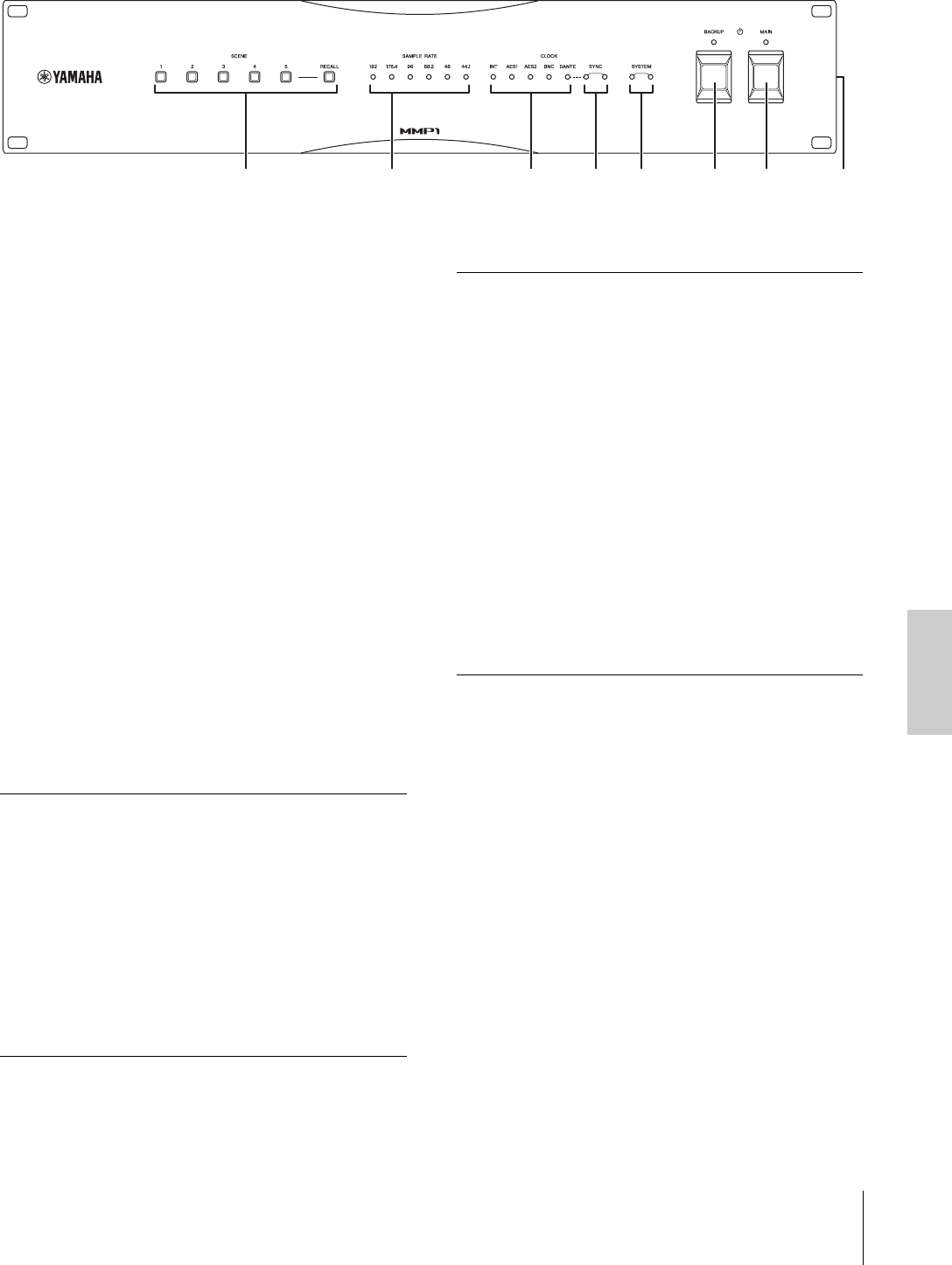
1Tasti SCENE [1] – [5], [RECALL]
Consentono di richiamare le scene memorizzate in
precedenza nell'unità. Quando si preme uno dei tasti
[1] – [5], il tasto lampeggia per circa 10 secondi. Se una
scena corrispondente al tasto non è memorizzata, il tasto
non lampeggia. Quando si preme il tasto [RECALL] e uno
dei tasti [1] – [5] lampeggia, la scena viene richiamata e il
tasto si illumina in modo continuo. Utilizzare MMP1 Editor
per memorizzare le scene.
NOTA
È possibile impostare il tasto [1] come tasto di esclusione audio
completa. Per ulteriori informazioni, consultare il Manuale
Operativo di MMP1.
2Indicatori SAMPLE RATE
Indica la frequenza di campionamento corrente utilizzata
dall'unità. L'indicatore sincronizzato con la sorgente del
wordclock si illumina. Se l'unità non può eseguire la
sincronizzazione con la sorgente del wordclock, uno di
tali indicatori lampeggia lentamente.
3Indicatori CLOCK
Indica una sorgente di wordclock. Quando la sorgente del
wordclock non è collegata all'unità o ha problemi, uno di
tali indicatori lampeggia lentamente.
4Indicatori SYNC
Indica lo stato di sincronizzazione tra la rete Dante e l'unità.
5Indicatori SYSTEM
Indica lo stato operativo dell'unità.
6PInterruttore di alimentazione
e indicatore [BACKUP]
Consente di accendere l'alimentazione CC dell'unità (O)
o di impostarla in standby (N). Quando l'alimentatore CC
è acceso, l'indicatore si illumina.
AVVISO
Anche se l'interruttore di alimentazione è in posizione di
standby (N), un flusso minimo di corrente continua ad
alimentare l'unità. Se non si intende utilizzare l'unità per
un periodo di tempo prolungato, scollegare il cavo di
alimentazione dal connettore [BACKUP DC INPUT].
NOTA
Impostare l'unità su on e standby in rapida successione potrebbe
causare un malfunzionamento dell'unità. Dopo aver impostato
l'unità in standby, attendere almeno sei secondi prima di
accenderla nuovamente.
12345678
Verde (acceso
continuamente)
L'unità funziona come clock slave
sulla rete Dante.
Verde (lampeggiante
lentamente)
L'unità funziona come clock master
sulla rete Dante.
Verde (spento)
Arancione (acceso
continuamente)
È in corso la sincronizzazione con la
rete Dante.
Arancione (lampeggiante
lentamente)
In comunicazione con la linea
secondaria di una rete ridondante.
Arancione (lampeggiante
due volte)
Si è verificato un errore sulla linea
secondaria di una rete ridondante.
Verde (acceso
continuamente)
Rosso (spento)
L'unità funziona correttamente.
Verde (lampeggiante
lentamente)
È in corso l'aggiornamento del
firmware.
Rosso (acceso
continuamente)
Si è verificato un errore nella memoria
dell'unità. Se non è possibile
risolvere il problema neanche
seguendo le istruzioni riportate nella
sezione "Ripristino delle impostazioni
di fabbrica" a pagina 15, contattare il
rivenditore Yamaha.
Rosso (lampeggiante
lentamente)
Si è verificato un errore nel modulo
Dante dell'unità.
Rosso (lampeggiante
rapidamente)
La tensione della batteria di backup
è ridotta. Rivolgersi a un rivenditore
Yamaha affinché un tecnico
autorizzato Yamaha sostituisca la
batteria di backup.
2. Nomi e funzioni
10 MMP1 Guida Introduttiva
7PInterruttore di alimentazione
e indicatore [MAIN]
Consente di accendere l'alimentazione CA dell'unità (O)
o di impostarla in standby (N). Quando l'alimentatore CA
è acceso, l'indicatore si illumina.
Quando entrambi gli switch P [MAIN] e P [BACKUP]
sono impostati su on (O), l'unità è alimentata
esclusivamente da corrente CA.
AVVISO
Anche se l'interruttore di alimentazione è in posizione di
standby (N), un flusso minimo di corrente continua ad
alimentare l'unità. Se non si intende utilizzare l'unità per
un periodo di tempo prolungato, scollegare il cavo di
alimentazione dalla presa CA.
NOTA
Impostare l'unità su on e standby in rapida successione potrebbe
causare un malfunzionamento dell'unità. Dopo aver impostato
l'unità in standby, attendere almeno sei secondi prima di
accenderla nuovamente.
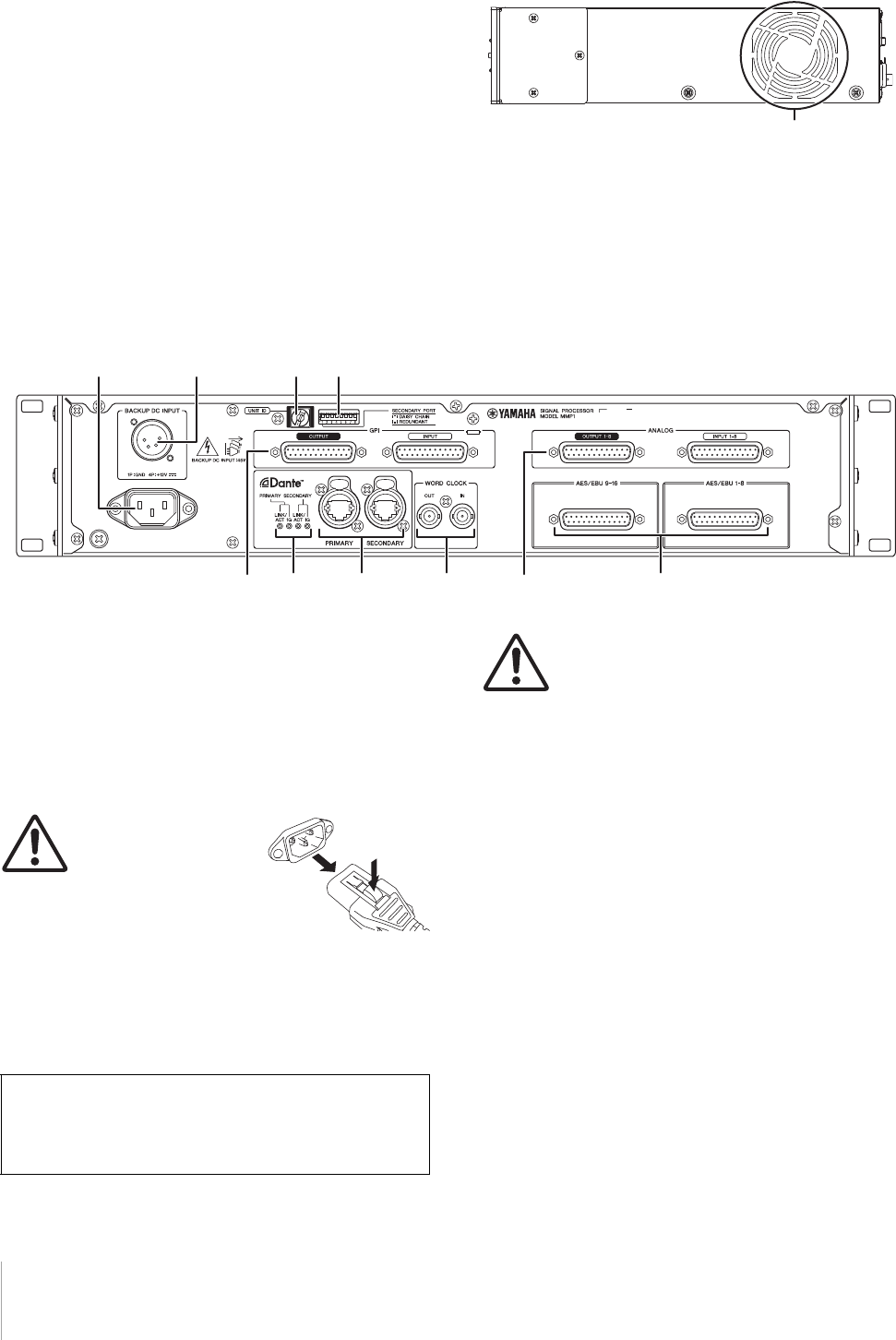
8Ventilazione
L'unità è dotata di ventole di raffreddamento che
espellono l'aria calda dall'unità. Prestare molta attenzione
a non bloccare le prese d'aria con oggetti.
2-2. Pannello posteriore
9Presa di ingresso dell'alimentazione CA
Consente di collegare il cavo di alimentazione CA in
dotazione. In primo luogo, collegare il cavo di
alimentazione CA all'unità, quindi inserire la spina del
cavo in una presa CA appropriata.
Inserire le spine dei cavi completamente, fino a bloccarle.
Per evitare lo scollegamento accidentale, il cavo di
alimentazione CA in dotazione presenta un meccanismo
di blocco V-lock a scatto.
ATTENZIONE
Accertarsi di mettere in
standby l'alimentazione
dell'unità prima di
collegare o scollegare un cavo di
alimentazione. Per scollegare il cavo
di alimentazione, rimuoverlo mentre
si tiene premuto il fermo sulla spina.
)Connettore [BACKUP DC INPUT]
Consente di collegare l'alimentatore CC esterno (+12 V,
45 W) per il backup dell'alimentazione CA. Il tipo di
connettore è XLR-4-32. Fare riferimento alla sezione
"Specifications" per le assegnazioni dei pin.
ATTENZIONE
Prima di collegare o scollegare l'alimentatore
esterno, è necessario impostare in standby
l'alimentazione dell'unità e disattivare
l'alimentazione esterna. La mancata osservanza di tale
precauzione può causare malfunzionamenti o scosse elettriche.
AVVISO
Quando si collega un alimentatore c.c. esterno, verificare che
abbia potenza nominale sufficiente. Nel caso abbia una
potenza nominale insufficiente, gli eventuali picchi di
corrente che si verificano quando l'unità è accesa possono
provocarne il funzionamento instabile o causare un
malfunzionamento. Per evitare malfunzionamenti causati da
picchi di corrente quando l'unità è accesa, attivare dell'unità
tramite l'interruttore di alimentazione [MAIN] P, invece che
con l'interruttore di alimentazione [BACKUP] P.
NOTA
•L'unità viene alimentata in c.a. quando sia l'interruttore di
alimentazione [MAIN] Psia l'interruttore [BACKUP]
Pvengono attivati (ON).
•
Quando entrambi gli alimentatori sono attivati, l'unità passa
automaticamente all'alimentazione in c.c. esterna se un
malfunzionamento causa l'interruzione dell'alimentazione in c.a.
!Switch rotante [UNIT ID]
Determina l'indirizzo ID che identifica questo dispositivo
sulla rete Dante. Se alla stessa rete sono collegati più
dispositivi Yamaha compatibili con Dante che richiedono
l'impostazione di un ID, impostare un ID diverso per
ciascun dispositivo.
Prese d'aria
)9!@
#$ %
^
&*
Anche quando l'interruttore di alimentazione P
[BACKUP] è in posizione di standby, la corrente di
standby viene comunque scaricata. Per questo motivo,
Yamaha non garantisce l'utilizzo delle batterie.

2. Nomi e funzioni
MMP1 Guida Introduttiva 11
NOTA
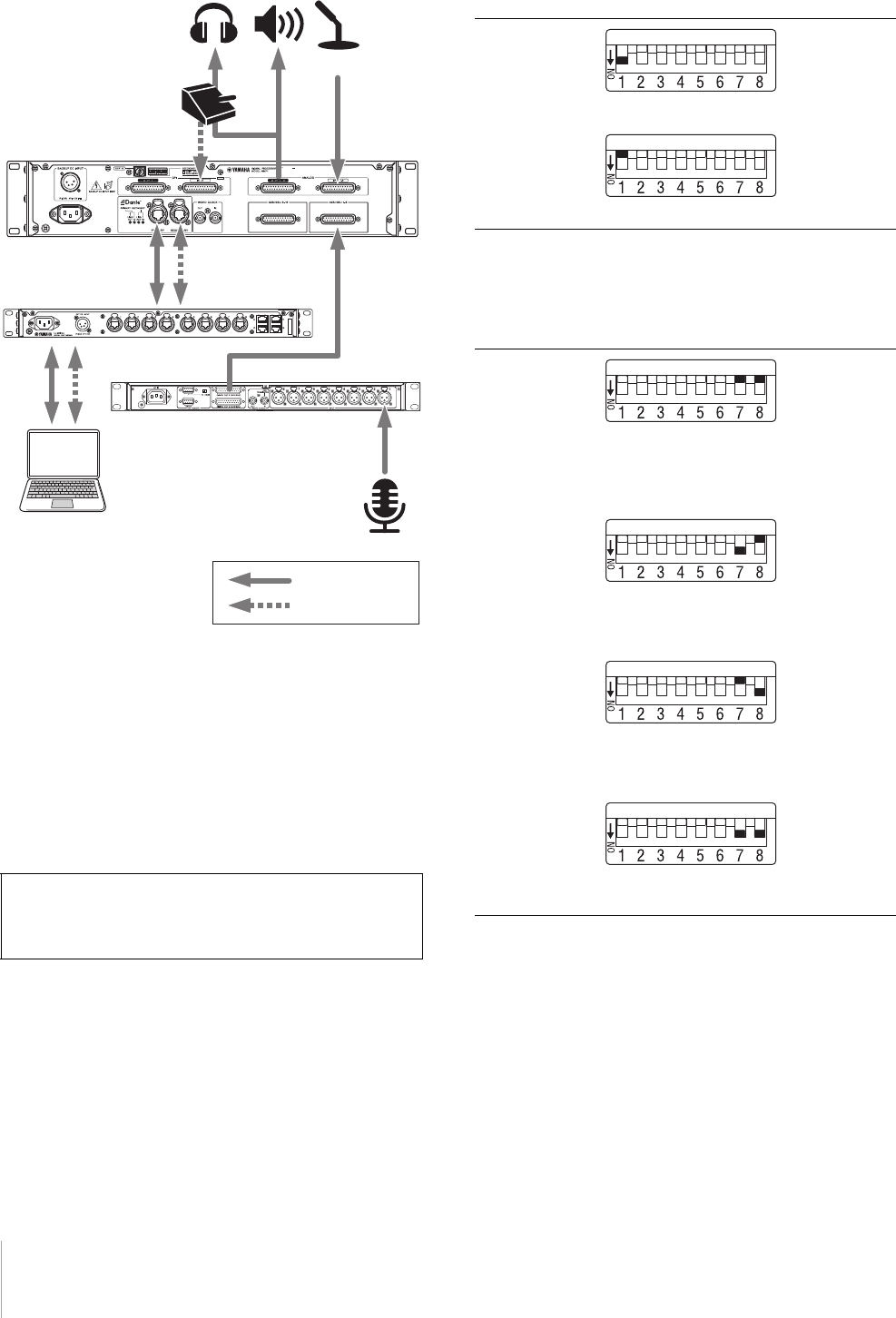
L'impostazione dell'ID con l'alimentazione attivata verrà applicata
in occasione della successiva accensione dell'alimentazione.
@DIP switch
Consentono di modificare le impostazioni dell'unità.
Fare riferimento alle sezioni "Operazioni preliminari al
collegamento" a pagina 12 e "Ripristino delle impostazioni
di fabbrica" a pagina 15.
NOTA
L'impostazione con l'alimentazione attivata verrà applicata in
occasione della successiva accensione dell'alimentazione.
#Connettori GPI [INPUT]/[OUTPUT]
Consentono di collegare dispositivi dotati di GPI. Il tipo di
connettore è D-sub femmina a 25 pin. Utilizzare MMP1
Editor per impostazioni GPI dettagliate sull'unità. Fare
riferimento alla sezione "
Specifications
" per la corrente e la
tensione dei singoli pin, nonché per l'assegnazione dei pin.
$Indicatori Dante [LINK/ACT]/[1G]
Mostrano lo stato di comunicazione dei connettori Dante
[PRIMARY] e [SECONDARY].
%
Connettori Dante [PRIMARY]/[SECONDARY]
Consentono il collegamento alla rete Dante. Il tipo di
connettore è etherCON (RJ-45). Un connettore consente
di trasferire fino a 64 canali (in/out) di audio.
NOTA
•Utilizzare un cavo STP (Shielded Twisted Pair) CAT5e standard
o superiore per evitare interferenze elettromagnetiche.
Assicurarsi che le parti in metallo dei connettori siano collegate
elettricamente alla schermatura del cavo STP mediante nastro
conduttore o materiale simile.
•Consentono di collegare solo dispositivi compatibili con Dante
o GbE (compresi i computer).
^Connettori WORD CLOCK [IN]/[OUT]
Consentono di collegare dispositivi per la ricezione o la
trasmissione di segnali wordclock. Il tipo di connettore
è BNC. Il connettore WORD CLOCK [IN] presenta una
terminazione interna con resistore di 75 ohm.
&
Connettori ANALOG [INPUT 1-8]/[OUTPUT 1-8]
Consentono di collegare dispositivi per la ricezione o la
trasmissione di segnali audio analogici. Il tipo di
connettore è D-sub a 25 pin (bilanciato). Un connettore
consente di trasferire fino a 8 canali (in/out) di audio.
*
Connettori [AES/EBU 1-8]/[AES/EBU 9-16]
Consentono di collegare dispositivi per la ricezione o la
trasmissione di segnali audio digitali in formato AES/EBU.
Il tipo di connettore è D-sub a 25 pin. Un connettore
consente di trasferire fino a 8 canali (in/out) di audio.
LINK/ACT Se i cavi Ethernet sono collegati correttamente,
questi indicatori lampeggiano rapidamente.
1G Questi indicatori sono accesi quando la rete Dante
funziona come Giga-bit Ethernet.
3. Posizione e collegamenti
12 MMP1 Guida Introduttiva
3. Posizione e collegamenti
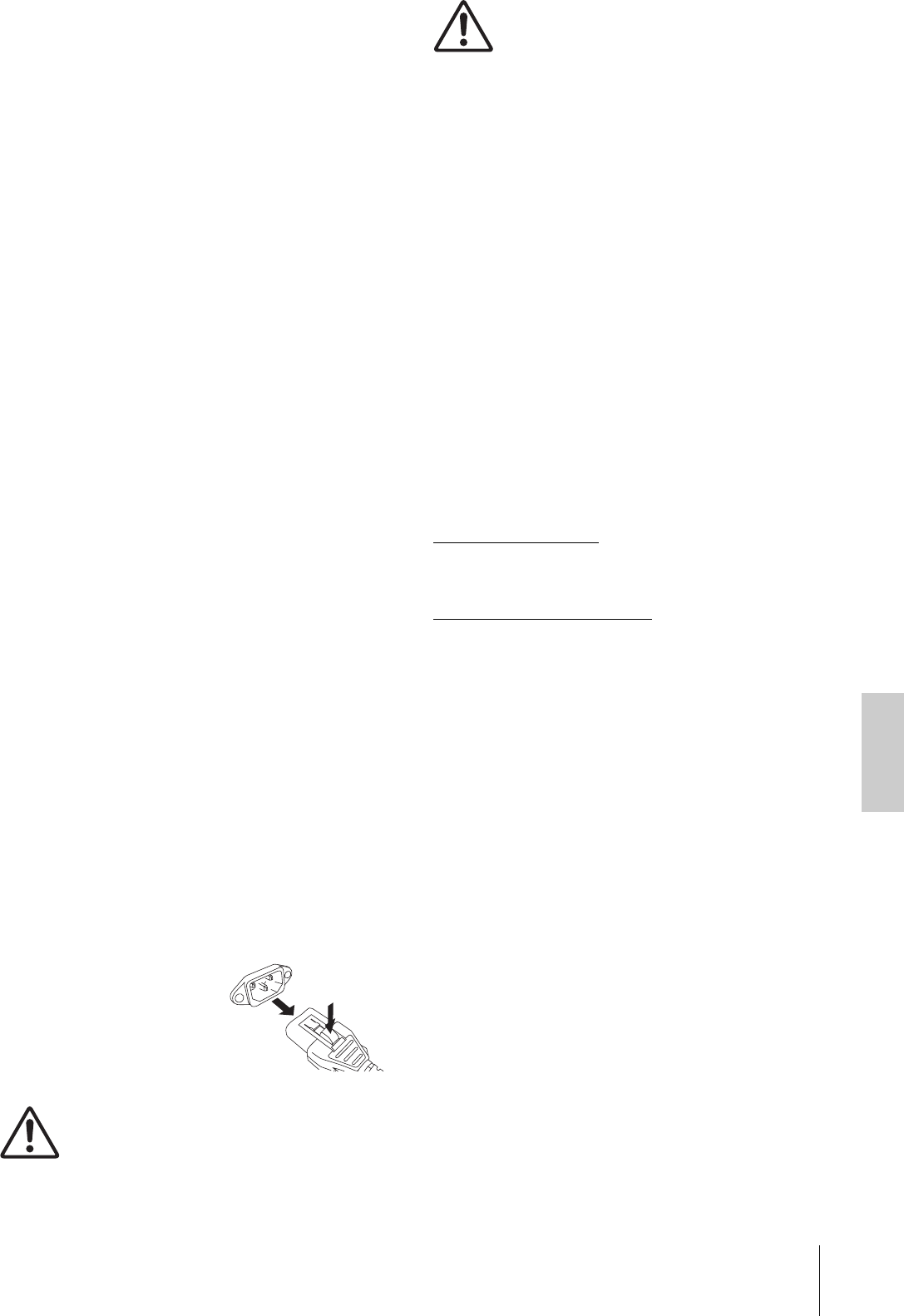
3-1. Esempio di collegamento
3-2. Operazioni preliminari al
collegamento
Effettuare le necessarie impostazioni prima di iniziare ad
utilizzare l'unità.
3-2-1. UNIT ID
3-2-2. Come stabilire un collegamento alla rete Dante
3-2-3. IP address
3-2-1. UNIT ID
Determina l'ID che identifica ciascun dispositivo sulla rete
Dante. Per questa impostazione, utilizzare lo switch
rotante sul pannello posteriore dell'unità. UNIT ID deve
essere un numero univoco nella rete.
3-2-2. Come stabilire un collegamento
alla rete Dante
L'unità può essere collegata alla rete Dante in due modi:
a stella (REDUNDANT) e a margherita (DAISY CHAIN).
Per questa impostazione, utilizzare il DIP switch 1 sul
pannello posteriore dell'unità.
3-2-3. IP address
Determina l'indirizzo IP per l'identificazione di questa
unità da un computer. Per questa impostazione, utilizzare
i DIP switch 7 e 8 sul pannello posteriore dell'unità.
Eventuali impostazioni modificate mentre
l'alimentazione è accesa verranno mantenute
e applicate al successivo avvio dell'unità.
MMP1
Switch di esclusione
del microfono
Switch di rete
Preamp
Computer
Segnali audio
Segnali di controllo
DAW
Talkback
REDUNDANT
DIP switch 1 abbassato (predefinito).
DAISY CHAIN
DIP switch 1 sollevato.
Auto IP
DIP switch 7 e 8 sollevati.
Un indirizzo IP viene impostato
automaticamente nell'intervallo compreso tra
169.254.0.1 e 169.254.254.254 (predefinito).
DHCP
DIP switch 7 abbassato e 8 sollevato.
Un indirizzo IP viene assegnato dal server
DHCP.
Static IP
(automatico)
DIP switch 7 sollevato e 8 abbassato.
L'indirizzo IP viene impostato su 192.168.0.xx
(xx corrisponde a UNIT ID).
Static IP (manuale)
DIP switch 7 e 8 abbassati.
Impostare l'indirizzo IP mediante MMP1 Editor.
3. Posizione e collegamenti
MMP1 Guida Introduttiva 13
3-3. Precauzioni per il
montaggio in rack
Questa unità è predisposta per il funzionamento
a temperature ambientali comprese nell'intervallo tra 0
e 40 gradi Celsius. Se l'unità viene montata insieme ad
altre unità MMP1 o altri dispositivi in un rack EIA standard,
le temperature interne possono aumentare provocando
un deterioramento delle prestazioni.
Durante il montaggio su rack dell'unità, attenersi sempre
ai seguenti requisiti per evitare il surriscaldamento:
•Se si desidera installare il dispositivo insieme MMP1 ad
altri prodotti in grado di produrre calore, come ad
esempio amplificatori di potenza, lasciare almeno
un'unità rack vuota tra questi e il resto delle
apparecchiature. Lasciare inoltre gli spazi aperti non
coperti o installare i pannelli di ventilazione appropriati
per ridurre la possibilità di surriscaldamento.
•Per assicurare un flusso d'aria sufficiente, lasciare
aperta la parte posteriore del rack e posizionarla ad
almeno 10 centimetri di distanza dalle pareti o da altre
superfici.
Se non è possibile lasciare aperta la parte posteriore
del rack, installare un kit di ventole o un'opzione di
ventilazione disponibile in commercio per assicurare un
flusso d'aria sufficiente. Se viene installato un kit di
ventole, la chiusura della parte posteriore del rack
garantisce un maggiore raffreddamento.
Per informazioni dettagliate, fare riferimento al manuale
relativo al rack e/o alla ventola.
3-4. Alimentazione
3-4-1. Collegamento del cavo di
alimentazione CA
1. Accertarsi che gli interruttori di alimentazione
P [MAIN] e P [BACKUP] siano in posizione di
standby (N).
2. Collegare il cavo di alimentazione in
dotazione alla presa di ingresso di
alimentazione CA dell'unità.
3. Collegare l'altra estremità del cavo di
alimentazione a una presa CA.
NOTA
•Per scollegare il cavo di
alimentazione, rimuoverlo
attenendosi alla procedura sopra
descritta nell'ordine 1 3 2.
•Per scollegare il cavo di
alimentazione, rimuoverlo mentre
si tiene premuto il fermo sulla
spina.
AVVERTENZA
Utilizzare solo il cavo di alimentazione CA in
dotazione. L'utilizzo di altri cavi potrebbe
provocare surriscaldamento o scosse elettriche.
ATTENZIONE
Accertarsi di mettere in standby l'alimentazione
dell'unità prima di collegare o scollegare un cavo
di alimentazione.
AVVISO
Anche se l'interruttore di alimentazione è in posizione di
standby (N), un flusso minimo di corrente continua ad
alimentare l'unità. Se si prevede di non utilizzare l'unità per
un periodo di tempo prolungato, accertarsi di scollegare il
cavo di alimentazione dalla presa CA.
3-4-2. Accensione e standby
Quando si accende l'unità, accertarsi di accendere
sempre gli amplificatori o le casse amplificate PER ULTIMI
per evitare danni all'altoparlante. Prima di impostare
l'unità in standby, spegnere sempre gli amplificatori o le
casse amplificate.
3-5. Informazioni su Dante
Dante è un protocollo audio di rete sviluppato da
Audinate. È stato progettato per fornire segnali audio
multicanale a varie frequenze di campionamento e di bit
e segnali di controllo di periferica attraverso una rete GbE
(Giga-bit Ethernet).
Per ulteriori informazioni su Dante, visitare il sito Web
Audinate:
http://www.audinate.com/
Ulteriori informazioni su Dante sono disponibili anche sul
sito Web Yamaha Pro Audio:
http://www.yamahaproaudio.com/
3-6. Note sull'utilizzo degli
switch di rete
Non utilizzare la funzionalità EEE (*) degli switch di rete su
una rete Dante.
Sebbene le impostazioni di consumo elettrico reciproche
tra gli switch che supportano la funzionalità EEE vengano
regolate automaticamente, per alcuni switch tali
impostazioni reciproche non vengono regolate
correttamente.
Ciò può causare l'attivazione di EEE nelle reti Dante
quando non è necessario, comportando performance di
sincronizzazione insoddisfacenti e occasionali perdite di
suono.
Si consiglia pertanto di attenersi alle seguenti indicazioni:
•Se si utilizzano switch gestiti, disattivare la funzionalità
EEE. Non utilizzare switch che impediscono la
disattivazione della funzionalità EEE.
•Quando si utilizzano switch non gestiti, non utilizzare
switch che supportano la funzionalità EEE. Non
è possibile disattivare la funzionalità EEE per tali switch.
* EEE (Energy Efficient Ethernet) è una tecnologia che consente
di ridurre il consumo elettrico degli switch nei periodi di traffico
di rete ridotto. È detta anche Green Ethernet e IEEE802.3az.

4. Installazione delle applicazioni
14 MMP1 Guida Introduttiva
3-7. Impostazioni della rete
Dante e instradamento
dell'audio
Con la rete Dante, è possibile instradare l'input e l'output
audio di più dispositivi Dante nel modo desiderato. A tale
scopo, è necessario scegliere quali segnali dei canali
vengono inviati ai diversi input.
Utilizzare Dante Controller per configurare l'instradamento
dell'audio della rete Dante.
È possibile scaricare Dante Controller dal seguente sito Web:
https://www.audinate.com/products/software/dante-
controller?lang=en
Per ulteriori informazioni su Dante Controller, fare
riferimento al Manuale di istruzioni di Dante Controller
(disponibile sullo stesso sito Web).
4. Installazione delle
applicazioni
4-1. MMP1 Editor
MMP1 Editor è un'applicazione per l'utilizzo di MMP1.
È compatibile con Windows e Mac.
1. Eseguire l'accesso con privilegi
amministrativi al computer per installare
MMP1 Editor.
2. Scaricare il programma di installazione di
MMP1 Editor (installer) dal sito Web Yamaha
Pro Audio:
http://www.yamahaproaudio.com/
3. Decomprimere il file scaricato.
4. Fare doppio clic sul programma di
installazione nella cartella di destinazione del
download per avviare l'installazione.
Il nome del programma di installazione è "setup.exe"
(per Windows) o "Yamaha MMP1 Editor Vx.x.x.pkg" (per
Mac). I caratteri "x.x.x" indicano la versione di MMP1.
5. Seguire le istruzioni visualizzate.
NOTA
•In Windows, se compare la finestra di dialogo "User Account
Control", fare clic su [Continue] o [Yes].
•Disinstallazione di MMP1 Editor
Windows: nel Pannello di controllo, fare clic su [Programmi
e funzionalità] o [Disinstalla un programma], quindi selezionare
MMP1 Editor e fare clic su [Disinstalla o modifica].
Mac: fare doppio clic su "Uninstall Yamaha MMP1 Editor.app",
quindi seguire le istruzioni visualizzate.
4-2. MMP1 Controller
MMP1 Controller è un'app per iPad che consente di
utilizzare MMP1. Questa app è progettata per utilizzare
MMP1 in modo intuitivo, limitando le funzioni controllabili
rispetto a MMP1 Editor.
1. Cercare "MMP1 Controller" nell'App Store.
2. Toccare "MMP1 Controller" per visualizzare
idettagli.
3. Toccare il pulsante "Free".
4. Toccare il pulsante "Install".
5. Seguire le istruzioni visualizzate.
5. Risoluzione dei problemi
MMP1 Guida Introduttiva 15
5. Risoluzione dei
problemi
Oltre a fare riferimento all'elenco dei problemi e soluzioni,
visitare il sito Web Pro Audio Yamaha per un elenco di
FAQ (domande frequenti).
http://www.yamahaproaudio.com/
5-1. MMP1 non rilevato da un
computer o da un iPad
•Accertarsi di aver impostato uno UNIT ID univoco,
se l'unità si trova sulla stessa rete Dante.
•Verificare che lo switch di rete funzioni correttamente.
Per risolvere il problema, disattivare e riattivare lo
switch di rete.
•Accertarsi che il cavo non sia danneggiato.
Per risolvere il problema, sostituire il cavo.
•Assicurarsi che l'indirizzo IP del computer e quello
dell'unità siano impostati correttamente.
5-2.Nessun suono
Quando il dispositivo è collegato alla rete Dante,
assicurarsi che le assegnazioni nella rete Dante siano
configurate correttamente con Dante Controller.
Per ulteriori informazioni, fare riferimento alla Dante
Controller User Guide disponibile sul sito Web.
https://www.audinate.com/products/software/dante-
controller?lang=en
5-3.Aggiornamento del firmware
Dettagli sull'aggiornamento del firmware sono disponibili
al seguente sito Web Yamaha Pro Audio:
http://www.yamahaproaudio.com/
5-4.Visualizzazione di un
messaggio di errore interno,
ad es. un errore di mancata
corrispondenza del
firmware, sul dispositivo
collegato a MMP1
Assicurarsi che ciascun dispositivo presenti una versione
compatibile.
Per ulteriori informazioni, fare riferimento ai dati sulla
compatibilità del firmware disponibili sul sito Web.
http://www.yamahaproaudio.com/
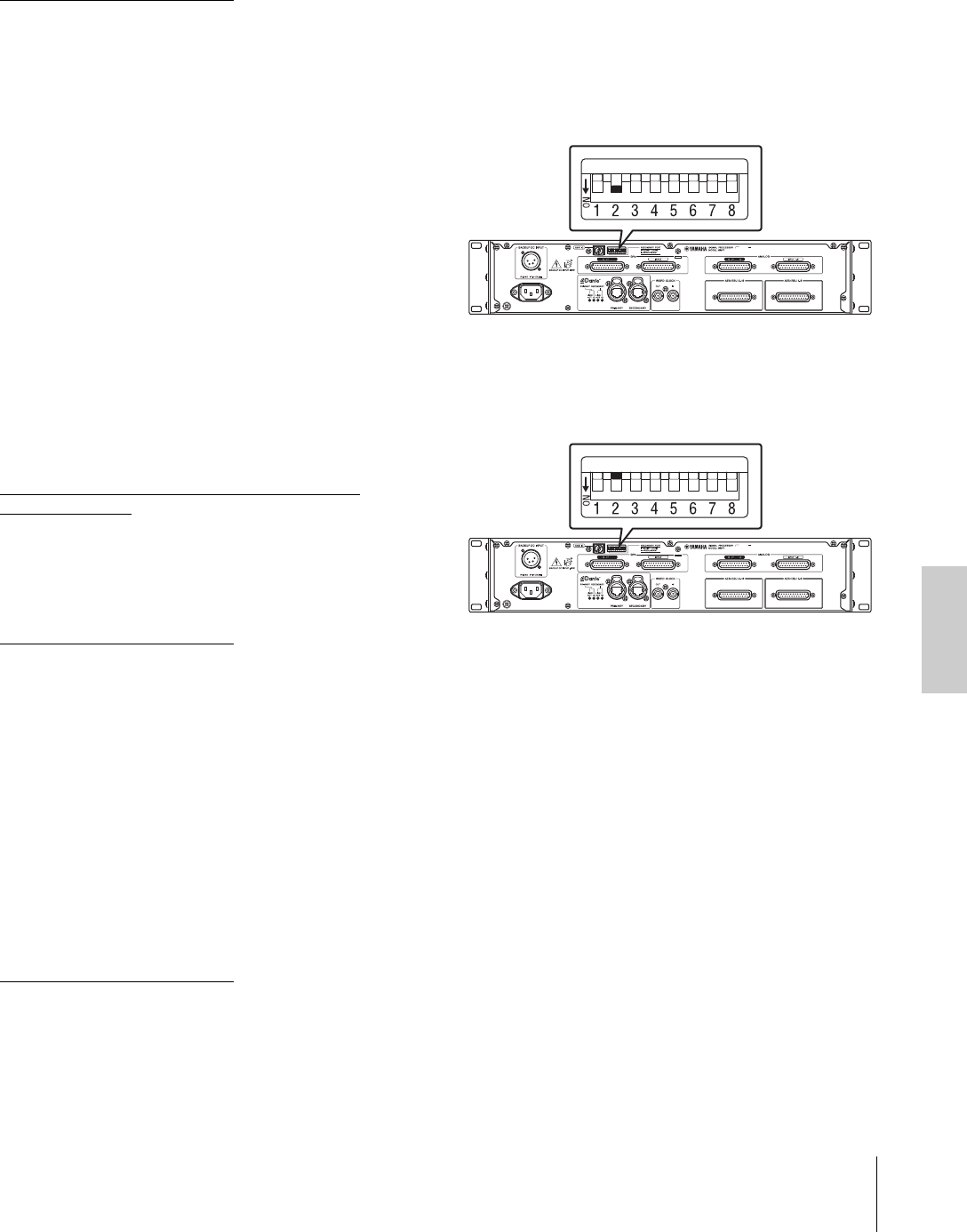
5-5. Ripristino delle
impostazioni di fabbrica
Procedere come segue per inizializzare la memoria
interna dell'unità ripristinando le impostazioni iniziali della
fabbrica.
1. Impostare l'unità in standby.
2. Attivare il DIP switch Dante 2 (GIÙ)
e accendere nuovamente l'unità.
Tutti gli indicatori del pannello frontale (ad eccezione
dell'indicatore di accensione) lampeggiano, indicando
che sono state ripristinate le impostazioni di fabbrica
di tutti i parametri.
3. Impostare l'unità in standby.
4. Attivare il DIP switch Dante 2 (SU) e accendere
nuovamente l'unità.
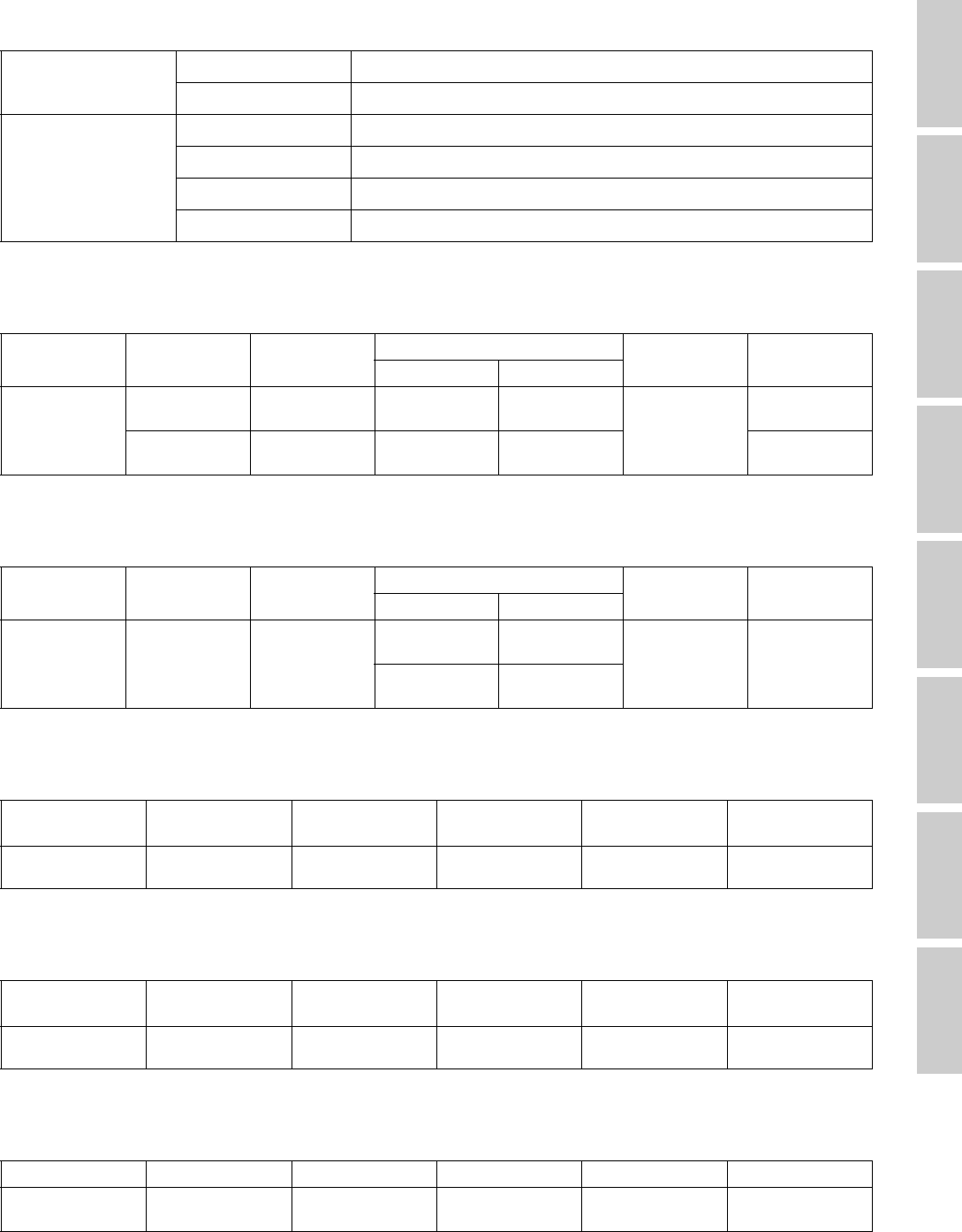
6. Specifications
6-1. ELECTRICAL CHARACTERISTICS
6-2. ANALOG INPUT CHARACTERISTICS
6-3. ANALOG OUTPUT CHARACTERISTICS
6-4. DIGITAL INPUT CHARACTERISTICS
6-5. DIGITAL OUTPUT CHARACTERISTICS
6-6. DIGITAL INPUT & OUTPUT CHARACTERISTICS
Sampling Frequency Internal 44.1kHz/48kHz/88.2kHz/96kHz/176.4kHz/192kHz
External 44.1kHz/48kHz/88.2kHz/96kHz/176.4kHz/192kHz, ±200ppm
Analog Input/Output
Frequency Response ±0.5 dB, 20Hz – 20kHz
THD+N 0.0031%, A-weighted, +4dB@20Hz – 20kHz, GAIN: 0dB, Fs=192kHz
Dynamic Range 110dB, A-weighted
Crosstalk@1kHz -100dB
Input
Terminals
Actual Load
Impedance
For Use with
Nominal
Input level Connector Balanced /
Unbalanced
Nominal
Max. before clip
ANALOG INPUT
1 – 8
20kΩ 150Ω Lines +4dB
(1.23 V)
+24dBu
(12.28V) D-SUB
Connector 25P
(Female)
Balanced
10kΩ 600Ω Lines -10dBV
(0.32 V)
+10dBV
(3.16V) Unbalanced
Output
Terminals
Actual Source
Impedance
For Use with
Nominal
Output level Connector Balanced /
Unbalanced
Nominal
Max. before clip
ANALOG
OUTPUT 1 – 8 75Ω (BAL) 10kΩ Lines
+4dBu
(1.23 V)
+24dBu
(12.28V) D-SUB
Connector 25P
(Female)
Balanced
-2dBu
(0.62V)
+18dBu
(6.16 V)
Terminal Format Data length Level Connector Balanced /
Unbalanced
AES/EBU 1 – 16 AES/EBU 24bit RS422 D-SUB Connector
25P (Female) Balanced
Terminal Format Data length Level Connector Balanced /
Unbalanced
AES/EBU 1 – 16 AES/EBU 24bit RS422 D-SUB Connector
25P (Female) Balanced
Terminal Format Data length Level Audio Connector
Primary/Secondary Dante 24bit 1000Base-T 64ch Input
64ch Output etherCON x 2
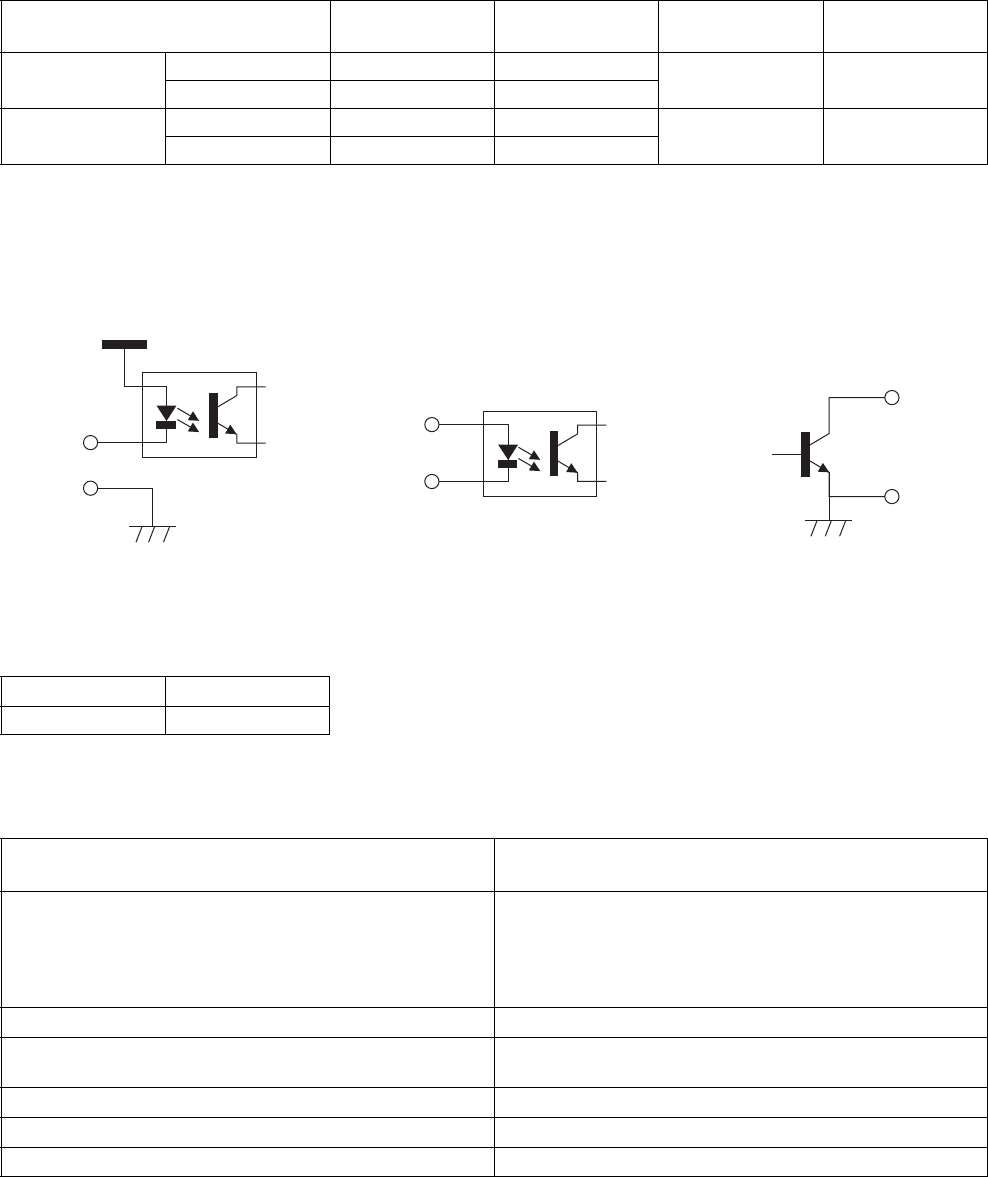
6-7. CONTROL I/O CHARACTERISTICS
• GPI inputs ch1-12: optically isolated. Load current = 3 mA (typical). See figure 1.
• GPI inputs ch13-16: optically isolated. IN+ input voltage range = 5 V to 24 V, Load current = 2 mA @5 V or 10 mA@24 V (typical). See
figure 2.
• GPI outputs ch1-10: Open collector outputs. Maximum current draw 75 mA (per channel). Withstand a voltage of 12 V. See figure 3.
• GPI +5 V outputs: Output voltage = 5 V ±0.25 V, Maximum supply current in total = 300 mA. See “6-10. Pin assignment / GPI [OUTPUT]
connector.”
6-8. EXTERNAL DC INPUT CHARACTERISTICS
6-9. General specifications
Terminal Format Level Connector Balanced /
Unbalanced
GPI IN — — D-SUB Connector
25P (Female) —
OUT — —
WORD CLOCK IN — TTL/75Ω terminated BNC —
OUT — TTL/75Ω
Terminal Connector
BACKUP DC INPUT XLR-4-32 type
Power Requirements
(wattage) 45W
Power Requirements for MAIN AC INPUT
(voltage and hertz)
US/Canada: 120V 60Hz
Japan: 100V 50/60Hz
China: 110 – 240V 50/60Hz
Korea: 220V 60Hz
Other: 110 – 240V 50/60Hz
Power Requirements for BACKUP DC INPUT 12V-14.8V, 4A
Temperature Range Operating temperature range: 0 – 40°C
Storage temperature range: -20 – 60°C
Dimensions (W x H x D) 480 x 88 x 368 mm (18.90" x 3.46" x 14.49")
Net Weight 7.0 kg (15.43 lb)
Included Accessories Power cable, Getting Started, Rubber stoppers (4)
+5V
IN
GND
IN+
IN-
Figure 1: GPI Inputs ch1-12 Figure 2: GPI Inputs ch13-16
OUT
COM
Figure 3: GPI outputs
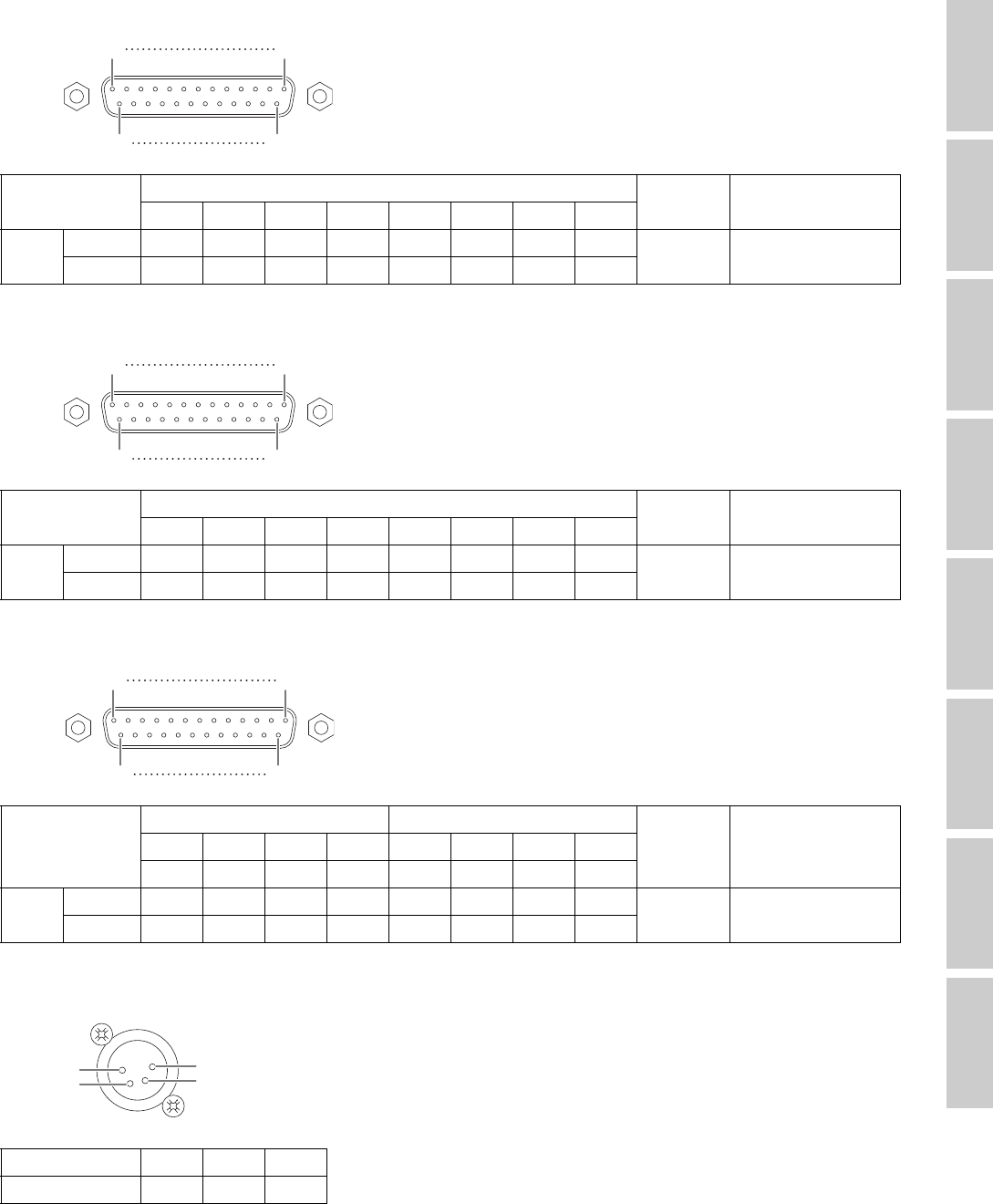
6-10. Pin assignment
ANALOG [INPUT] connector
ANALOG [OUTPUT] connector
[AES/EBU] connectors
[BACKUP DC INPUT] connector
Signal Input Ch N.O. GND
12345678
Pin Hot 24 10 21 7 18 4 15 1
13 2, 5, 8, 11, 16, 19, 22,
25
Cold 1223920617314
Signal Output Ch N.O. GND
12345678
Pin Hot 24 10 21 7 18 4 15 1
13 2, 5, 8, 11, 16, 19, 22,
25
Cold 1223920617314
Signal
Data In Ch Data Out Ch
N.O. GND1-2 3-4 5-6 7-8 1-2 3-4 5-6 7-8
9-10 11-12 13-14 15-16 9-10 11-12 13-14 15-16
Pin Hot 12345678
9,11 10, 12, 13, 22, 23, 24,
25
Cold 14 15 16 17 18 19 20 21
Signal N.O. GND +12V
Pin 2, 3 1 4
113
1425
113
1425
113
1425
1
2
4
3
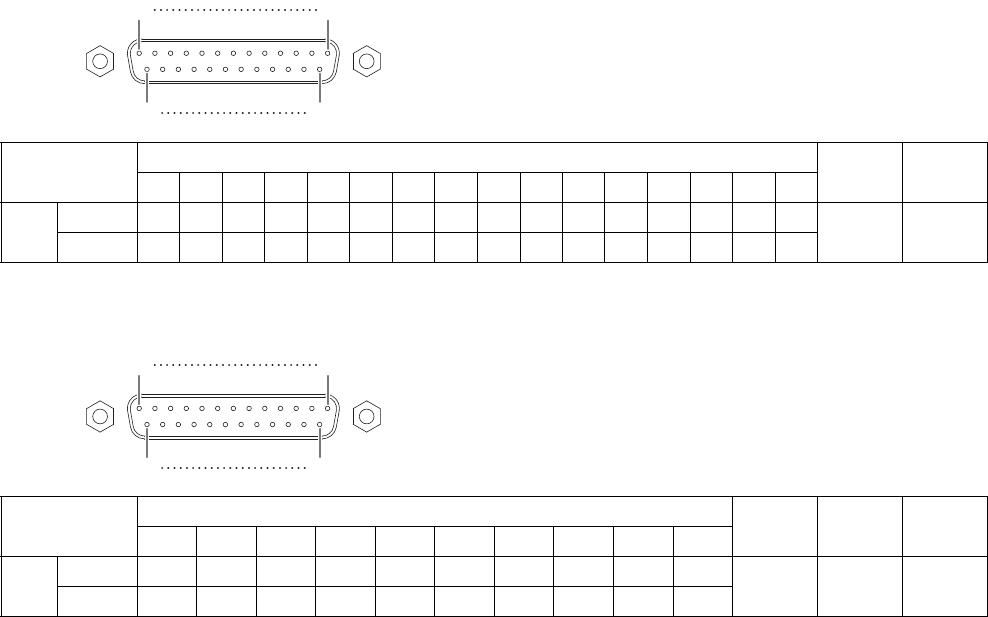
GPI [INPUT] connector
GPI [OUTPUT] connector
Signal GPI Input Channel N.O. GND
12345678910111213141516
Pin IN, IN+ 11421531641751861920212223
13 11, 12
24, 25
IN- 78910
Signal GPI Output Channel N.O. GND +5V
12345678910
Pin OUT 12345678910
13 11
24
12
25
COM 14 15 16 17 18 19 20 21 22 23
113
1425
113
1425
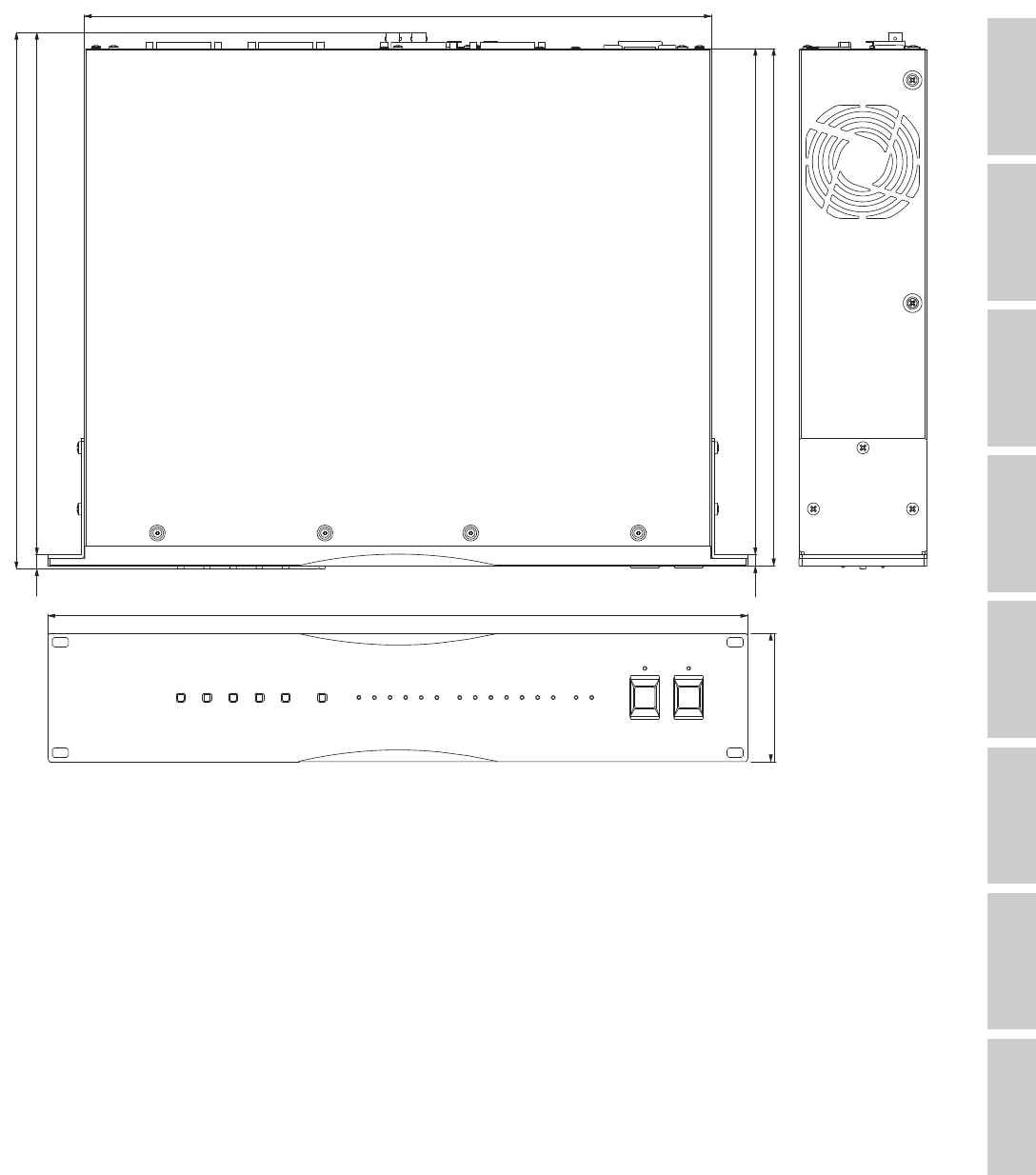
6-11. Dimensions
The contents of this manual apply to the latest specifications as of the publishing date. To obtain the latest manual, access the Yamaha
website then download the manual file.
Der Inhalt dieser Bedienungsanleitung gilt für die neuesten technischen Daten zum Zeitpunkt der Veröffentlichung. Um die neueste Version
der Anleitung zu erhalten, rufen Sie die Website von Yamaha auf und laden Sie dann die Datei mit der Bedienungsanleitung herunter.
Le contenu de ce mode d’emploi s’applique aux dernières caractéristiques techniques connues à la date de publication du manuel. Pour
obtenir la version la plus récente du manuel, accédez au site Web de Yamaha puis téléchargez le fichier du manuel concerné.
El contenido de este manual se aplica a las últimas especificaciones según la fecha de publicación. Para obtener el último manual, acceda
al sitio web de Yamaha y descargue el archivo del manual.
O conteúdo deste manual se aplica às especificações mais recentes a partir da data de publicação. Para obter o manual mais recente,
acesse o site da Yamaha e faça o download do arquivo do manual.
Il contenuto del presente manuale si applica alle ultime specifiche tecniche a partire dalla data di pubblicazione. Per ottenere la versione più
recente del manuale, accedere al sito Web Yamaha e scaricare il file corrispondente.
В содержании данного руководства приведены последние на момент публикации технические характеристики. Для получения
последней версии руководства посетите веб-сайт корпорации Yamaha и загрузите файл с руководством.
本書は、発行時点での最新仕様で説明しています。最新版は、ヤマハウェブサイトからダウンロードできます。
88
480
347.5 7.5
430
355
368
9.5 358.5
Unit: mm
7. Software Licenses and Copyrights
GNU GENERAL PUBLIC LICENSE
Version 2, June 1991
Copyright (C) 1989, 1991 Free Software Foundation, Inc.,
51 Franklin Street, Fifth Floor, Boston, MA 02110-1301 USA
Everyone is permitted to copy and distribute verbatim copies of this
license document, but changing it is not allowed.
Preamble
The licenses for most software are designed to take away your
freedom to share and change it. By contrast, the GNU General Public
License is intended to guarantee your freedom to share and change
free software--to make sure the software is free for all its users. This
General Public License applies to most of the Free Software
Foundation's software and to any other program whose authors
commit to using it. (Some other Free Software Foundation software is
covered by the GNU Lesser General Public License instead.) You can
apply it to your programs, too.
When we speak of free software, we are referring to freedom, not
price. Our General Public Licenses are designed to make sure that
you have the freedom to distribute copies of free software (and charge
for this service if you wish), that you receive source code or can get it if
you want it, that you can change the software or use pieces of it in new
free programs; and that you know you can do these things.
To protect your rights, we need to make restrictions that forbid anyone
to deny you these rights or to ask you to surrender the rights. These
restrictions translate to certain responsibilities for you if you distribute
copies of the software, or if you modify it.
For example, if you distribute copies of such a program, whether gratis
or for a fee, you must give the recipients all the rights that you have.
You must make sure that they, too, receive or can get the source code.
And you must show them these terms so they know their rights.
We protect your rights with two steps: (1) copyright the software, and
(2) offer you this license which gives you legal permission to copy,
distribute and/or modify the software.
Also, for each author's protection and ours, we want to make certain
that everyone understands that there is no warranty for this free
software. If the software is modified by someone else and passed on,
we want its recipients to know that what they have is not the original,
so that any problems introduced by others will not reflect on the
original authors' reputations.
Finally, any free program is threatened constantly by software patents.
We wish to avoid the danger that redistributors of a free program will
individually obtain patent licenses, in effect making the program
proprietary. To prevent this, we have made it clear that any patent must
be licensed for everyone's free use or not licensed at all.
The precise terms and conditions for copying, distribution and
modification follow.
GNU GENERAL PUBLIC LICENSE
TERMS AND CONDITIONS FOR COPYING,
DISTRIBUTION AND MODIFICATION
0. This License applies to any program or other work which contains a
notice placed by the copyright holder saying it may be distributed
under the terms of this General Public License. The “Program”, below,
refers to any such program or work, and a “work based on the
Program” means either the Program or any derivative work under
copyright law: that is to say, a work containing the Program or a portion
of it, either verbatim or with modifications and/or translated into
another language. (Hereinafter, translation is included without
limitation in the term “modification”.) Each licensee is addressed as
“you”.
Activities other than copying, distribution and modification are not
covered by this License; they are outside its scope. The act of running
the Program is not restricted, and the output from the Program is
covered only if its contents constitute a work based on the Program
(independent of having been made by running the Program). Whether
that is true depends on what the Program does.
1. You may copy and distribute verbatim copies of the Program's
source code as you receive it, in any medium, provided that you
conspicuously and appropriately publish on each copy an appropriate
copyright notice and disclaimer of warranty; keep intact all the notices
that refer to this License and to the absence of any warranty; and give
any other recipients of the Program a copy of this License along with
the Program.
You may charge a fee for the physical act of transferring a copy, and
you may at your option offer warranty protection in exchange for a fee.
2. You may modify your copy or copies of the Program or any portion
of it, thus forming a work based on the Program, and copy and
distribute such modifications or work under the terms of Section 1
above, provided that you also meet all of these conditions:
a) You must cause the modified files to carry prominent notices
stating that you changed the files and the date of any change.
b) You must cause any work that you distribute or publish, that in
whole or in part contains or is derived from the Program or any
part thereof, to be licensed as a whole at no charge to all third
parties under the terms of this License.
c) If the modified program normally reads commands interactively
when run, you must cause it, when started running for such
interactive use in the most ordinary way, to print or display an
announcement including an appropriate copyright notice and a
notice that there is no warranty (or else, saying that you provide a
warranty) and that users may redistribute the program under
these conditions, and telling the user how to view a copy of this
License. (Exception: if the Program itself is interactive but does
not normally print such an announcement, your work based on
the Program is not required to print an announcement.)
These requirements apply to the modified work as a whole. If
identifiable sections of that work are not derived from the Program,
and can be reasonably considered independent and separate works in
themselves, then this License, and its terms, do not apply to those
sections when you distribute them as separate works. But when you
distribute the same sections as part of a whole which is a work based
on the Program, the distribution of the whole must be on the terms of
this License, whose permissions for other licensees extend to the
entire whole, and thus to each and every part regardless of who wrote
it.
Thus, it is not the intent of this section to claim rights or contest your
rights to work written entirely by you; rather, the intent is to exercise
the right to control the distribution of derivative or collective works
based on the Program.
In addition, mere aggregation of another work not based on the
Program with the Program (or with a work based on the Program) on a
volume of a storage or distribution medium does not bring the other
work under the scope of this License.
3. You may copy and distribute the Program (or a work based on it,
under Section 2) in object code or executable form under the terms of
Sections 1 and 2 above provided that you also do one of the following:
a) Accompany it with the complete corresponding machine-
readable source code, which must be distributed under the terms
of Sections 1 and 2 above on a medium customarily used for
software interchange; or,
b) Accompany it with a written offer, valid for at least three years, to
give any third party, for a charge no more than your cost of
physically performing source distribution, a complete machine-
readable copy of the corresponding source code, to be
distributed under the terms of Sections 1 and 2 above on a
medium customarily used for software interchange; or,

c) Accompany it with the information you received as to the offer to
distribute corresponding source code. (This alternative is allowed
only for noncommercial distribution and only if you received the
program in object code or executable form with such an offer, in
accord with Subsection b above.)
The source code for a work means the preferred form of the work for
making modifications to it. For an executable work, complete source
code means all the source code for all modules it contains, plus any
associated interface definition files, plus the scripts used to control
compilation and installation of the executable. However, as a special
exception, the source code distributed need not include anything that
is normally distributed (in either source or binary form) with the major
components (compiler, kernel, and so on) of the operating system on
which the executable runs, unless that component itself accompanies
the executable.
If distribution of executable or object code is made by offering access
to copy from a designated place, then offering equivalent access to
copy the source code from the same place counts as distribution of the
source code, even though third parties are not compelled to copy the
source along with the object code.
4. You may not copy, modify, sublicense, or distribute the Program
except as expressly provided under this License. Any attempt
otherwise to copy, modify, sublicense or distribute the Program is void,
and will automatically terminate your rights under this License.
However, parties who have received copies, or rights, from you under
this License will not have their licenses terminated so long as such
parties remain in full compliance.
5. You are not required to accept this License, since you have not
signed it. However, nothing else grants you permission to modify or
distribute the Program or its derivative works. These actions are
prohibited by law if you do not accept this License. Therefore, by
modifying or distributing the Program (or any work based on the
Program), you indicate your acceptance of this License to do so, and
all its terms and conditions for copying, distributing or modifying the
Program or works based on it.
6. Each time you redistribute the Program (or any work based on the
Program), the recipient automatically receives a license from the
original licensor to copy, distribute or modify the Program subject to
these terms and conditions. You may not impose any further
restrictions on the recipients' exercise of the rights granted herein. You
are not responsible for enforcing compliance by third parties to this
License.
7. If, as a consequence of a court judgment or allegation of patent
infringement or for any other reason (not limited to patent issues),
conditions are imposed on you (whether by court order, agreement or
otherwise) that contradict the conditions of this License, they do not
excuse you from the conditions of this License. If you cannot distribute
so as to satisfy simultaneously your obligations under this License and
any other pertinent obligations, then as a consequence you may not
distribute the Program at all. For example, if a patent license would not
permit royalty-free redistribution of the Program by all those who
receive copies directly or indirectly through you, then the only way you
could satisfy both it and this License would be to refrain entirely from
distribution of the Program.
If any portion of this section is held invalid or unenforceable under any
particular circumstance, the balance of the section is intended to apply
and the section as a whole is intended to apply in other circumstances.
It is not the purpose of this section to induce you to infringe any
patents or other property right claims or to contest validity of any such
claims; this section has the sole purpose of protecting the integrity of
the free software distribution system, which is implemented by public
license practices. Many people have made generous contributions to
the wide range of software distributed through that system in reliance
on consistent application of that system; it is up to the author/donor to
decide if he or she is willing to distribute software through any other
system and a licensee cannot impose that choice.
This section is intended to make thoroughly clear what is believed to
be a consequence of the rest of this License.
8. If the distribution and/or use of the Program is restricted in certain
countries either by patents or by copyrighted interfaces, the original
copyright holder who places the Program under this License may add
an explicit geographical distribution limitation excluding those
countries, so that distribution is permitted only in or among countries
not thus excluded. In such case, this License incorporates the
limitation as if written in the body of this License.
9. The Free Software Foundation may publish revised and/or new
versions of the General Public License from time to time. Such new
versions will be similar in spirit to the present version, but may differ in
detail to address new problems or concerns.
Each version is given a distinguishing version number. If the Program
specifies a version number of this License which applies to it and “any
later version”, you have the option of following the terms and
conditions either of that version or of any later version published by the
Free Software Foundation. If the Program does not specify a version
number of this License, you may choose any version ever published
by the Free Software Foundation.
10. If you wish to incorporate parts of the Program into other free
programs whose distribution conditions are different, write to the
author to ask for permission. For software which is copyrighted by the
Free Software Foundation, write to the Free Software Foundation; we
sometimes make exceptions for this. Our decision will be guided by
the two goals of preserving the free status of all derivatives of our free
software and of promoting the sharing and reuse of software generally.
NO WARRANTY
11. BECAUSE THE PROGRAM IS LICENSED FREE OF CHARGE,
THERE IS NO WARRANTY FOR THE PROGRAM, TO THE EXTENT
PERMITTED BY APPLICABLE LAW. EXCEPT WHEN OTHERWISE
STATED IN WRITING THE COPYRIGHT HOLDERS AND/OR
OTHER PARTIES PROVIDE THE PROGRAM “AS IS” WITHOUT
WARRANTY OF ANY KIND, EITHER EXPRESSED OR IMPLIED,
INCLUDING, BUT NOT LIMITED TO, THE IMPLIED WARRANTIES
OF MERCHANTABILITY AND FITNESS FOR A PARTICULAR
PURPOSE. THE ENTIRE RISK AS TO THE QUALITY AND
PERFORMANCE OF THE PROGRAM IS WITH YOU. SHOULD THE
PROGRAM PROVE DEFECTIVE, YOU ASSUME THE COST OF ALL
NECESSARY SERVICING, REPAIR OR CORRECTION.
12. IN NO EVENT UNLESS REQUIRED BY APPLICABLE LAW OR
AGREED TO IN WRITING WILL ANY COPYRIGHT HOLDER, OR
ANY OTHER PARTY WHO MAY MODIFY AND/OR REDISTRIBUTE
THE PROGRAM AS PERMITTED ABOVE, BE LIABLE TO YOU FOR
DAMAGES, INCLUDING ANY GENERAL, SPECIAL, INCIDENTAL
OR CONSEQUENTIAL DAMAGES ARISING OUT OF THE USE OR
INABILITY TO USE THE PROGRAM (INCLUDING BUT NOT
LIMITED TO LOSS OF DATA OR DATA BEING RENDERED
INACCURATE OR LOSSES SUSTAINED BY YOU OR THIRD
PARTIES OR A FAILURE OF THE PROGRAM TO OPERATE WITH
ANY OTHER PROGRAMS), EVEN IF SUCH HOLDER OR OTHER
PARTY HAS BEEN ADVISED OF THE POSSIBILITY OF SUCH
DAMAGES.
END OF TERMS AND CONDITIONS
How to Apply These Terms to Your New
Programs
If you develop a new program, and you want it to be of the greatest
possible use to the public, the best way to achieve this is to make it
free software which everyone can redistribute and change under these
terms.
To do so, attach the following notices to the program. It is safest to
attach them to the start of each source file to most effectively convey
the exclusion of warranty; and each file should have at least the
“copyright” line and a pointer to where the full notice is found.
<one line to give the program's name and a brief idea of what it does.>
Copyright (C) <year> <name of author>
This program is free software; you can redistribute it and/or modify it
under the terms of the GNU General Public License as published by
the Free Software Foundation; either version 2 of the License, or (at
your option) any later version.
This program is distributed in the hope that it will be useful, but
WITHOUT ANY WARRANTY; without even the implied warranty of
MERCHANTABILITY or FITNESS FOR A PARTICULAR PURPOSE.
See the GNU General Public License for more details.
You should have received a copy of the GNU General Public License
along with this program; if not, write to the Free Software Foundation,
Inc., 51 Franklin Street, Fifth Floor, Boston, MA 02110-1301 USA.
Also add information on how to contact you by electronic and paper
mail.
If the program is interactive, make it output a short notice like this
when it starts in an interactive mode:
Gnomovision version 69, Copyright (C) year name of author
Gnomovision comes with ABSOLUTELY NO WARRANTY; for details
type `show w'. This is free software, and you are welcome to
redistribute it under certain conditions; type `show c' for details.
The hypothetical commands `show w' and `show c' should show the
appropriate parts of the General Public License. Of course, the
commands you use may be called something other than `show w' and
`show c'; they could even be mouse-clicks or menu items--whatever
suits your program.
You should also get your employer (if you work as a programmer) or
your school, if any, to sign a “copyright disclaimer” for the program, if
necessary. Here is a sample; alter the names:
Yoyodyne, Inc., hereby disclaims all copyright interest in the program
`Gnomovision' (which makes passes at compilers) written by James
Hacker.
<signature of Ty Coon>, 1 April 1989
Ty Coon, President of Vice
This General Public License does not permit incorporating your
program into proprietary programs. If your program is a subroutine
library, you may consider it more useful to permit linking proprietary
applications with the library. If this is what you want to do, use the GNU
Lesser General Public License instead of this License.
GNU LESSER GENERAL PUBLIC
LICENSE
Version 2.1, February 1999
Copyright (C) 1991, 1999 Free Software Foundation, Inc.,
51 Franklin Street, Fifth Floor, Boston, MA 02110-1301 USA
Everyone is permitted to copy and distribute verbatim copies of this
license document, but changing it is not allowed.
[This is the first released version of the Lesser GPL. It also counts as
the successor of the GNU Library Public License, version 2, hence the
version number 2.1.]
Preamble
The licenses for most software are designed to take away your
freedom to share and change it. By contrast, the GNU General Public
Licenses are intended to guarantee your freedom to share and change
free software--to make sure the software is free for all its users.
This license, the Lesser General Public License, applies to some
specially designated software packages--typically libraries--of the Free
Software Foundation and other authors who decide to use it. You can
use it too, but we suggest you first think carefully about whether this
license or the ordinary General Public License is the better strategy to
use in any particular case, based on the explanations below.
When we speak of free software, we are referring to freedom of use,
not price. Our General Public Licenses are designed to make sure that
you have the freedom to distribute copies of free software (and charge
for this service if you wish); that you receive source code or can get it if
you want it; that you can change the software and use pieces of it in
new free programs; and that you are informed that you can do these
things.
To protect your rights, we need to make restrictions that forbid
distributors to deny you these rights or to ask you to surrender these
rights. These restrictions translate to certain responsibilities for you if
you distribute copies of the library or if you modify it.
For example, if you distribute copies of the library, whether gratis or for
a fee, you must give the recipients all the rights that we gave you. You
must make sure that they, too, receive or can get the source code. If
you link other code with the library, you must provide complete object
files to the recipients, so that they can relink them with the library after
making changes to the library and recompiling it. And you must show
them these terms so they know their rights.
We protect your rights with a two-step method: (1) we copyright the
library, and (2) we offer you this license, which gives you legal
permission to copy, distribute and/or modify the library.
To protect each distributor, we want to make it very clear that there is
no warranty for the free library. Also, if the library is modified by
someone else and passed on, the recipients should know that what
they have is not the original version, so that the original author's
reputation will not be affected by problems that might be introduced by
others.
Finally, software patents pose a constant threat to the existence of any
free program. We wish to make sure that a company cannot effectively
restrict the users of a free program by obtaining a restrictive license
from a patent holder. Therefore, we insist that any patent license
obtained for a version of the library must be consistent with the full
freedom of use specified in this license.
Most GNU software, including some libraries, is covered by the
ordinary GNU General Public License. This license, the GNU Lesser
General Public License, applies to certain designated libraries, and is
quite different from the ordinary General Public License. We use this
license for certain libraries in order to permit linking those libraries into
non-free programs.
When a program is linked with a library, whether statically or using a
shared library, the combination of the two is legally speaking a
combined work, a derivative of the original library. The ordinary
General Public License therefore permits such linking only if the entire
combination fits its criteria of freedom. The Lesser General Public
License permits more lax criteria for linking other code with the library.

We call this license the "Lesser" General Public License because it
does Less to protect the user's freedom than the ordinary General
Public License. It also provides other free software developers Less of
an advantage over competing non-free programs. These
disadvantages are the reason we use the ordinary General Public
License for many libraries. However, the Lesser license provides
advantages in certain special circumstances.
For example, on rare occasions, there may be a special need to
encourage the widest possible use of a certain library, so that it
becomes a de-facto standard. To achieve this, non-free programs
must be allowed to use the library. A more frequent case is that a free
library does the same job as widely used non-free libraries. In this
case, there is little to gain by limiting the free library to free software
only, so we use the Lesser General Public License.
In other cases, permission to use a particular library in non-free
programs enables a greater number of people to use a large body of
free software. For example, permission to use the GNU C Library in
non-free programs enables many more people to use the whole GNU
operating system, as well as its variant, the GNU/Linux operating
system.
Although the Lesser General Public License is Less protective of the
users' freedom, it does ensure that the user of a program that is linked
with the Library has the freedom and the wherewithal to run that
program using a modified version of the Library.
The precise terms and conditions for copying, distribution and
modification follow. Pay close attention to the difference between a
"work based on the library" and a "work that uses the library". The
former contains code derived from the library, whereas the latter must
be combined with the library in order to run.
TERMS AND CONDITIONS FOR COPYING,
DISTRIBUTION AND MODIFICATION
0. This License Agreement applies to any software library or other
program which contains a notice placed by the copyright holder or
other authorized party saying it may be distributed under the terms of
this Lesser General Public License (also called "this License"). Each
licensee is addressed as "you".
A "library" means a collection of software functions and/or data
prepared so as to be conveniently linked with application programs
(which use some of those functions and data) to form executables.
The "Library", below, refers to any such software library or work which
has been distributed under these terms. A "work based on the Library"
means either the Library or any derivative work under copyright law:
that is to say, a work containing the Library or a portion of it, either
verbatim or with modifications and/or translated straightforwardly into
another language. (Hereinafter, translation is included without
limitation in the term "modification".)
"Source code" for a work means the preferred form of the work for
making modifications to it. For a library, complete source code means
all the source code for all modules it contains, plus any associated
interface definition files, plus the scripts used to control compilation
and installation of the library.
Activities other than copying, distribution and modification are not
covered by this License; they are outside its scope. The act of running
a program using the Library is not restricted, and output from such a
program is covered only if its contents constitute a work based on the
Library (independent of the use of the Library in a tool for writing it).
Whether that is true depends on what the Library does and what the
program that uses the Library does.
1. You may copy and distribute verbatim copies of the Library's
complete source code as you receive it, in any medium, provided that
you conspicuously and appropriately publish on each copy an
appropriate copyright notice and disclaimer of warranty; keep intact all
the notices that refer to this License and to the absence of any
warranty; and distribute a copy of this License along with the Library.
You may charge a fee for the physical act of transferring a copy, and
you may at your option offer warranty protection in exchange for a fee.
2. You may modify your copy or copies of the Library or any portion of
it, thus forming a work based on the Library, and copy and distribute
such modifications or work under the terms of Section 1 above,
provided that you also meet all of these conditions:
a) The modified work must itself be a software library.
b) You must cause the files modified to carry prominent notices
stating that you changed the files and the date of any change.
c) You must cause the whole of the work to be licensed at no charge
to all third parties under the terms of this License.
d) If a facility in the modified Library refers to a function or a table of
data to be supplied by an application program that uses the
facility, other than as an argument passed when the facility is
invoked, then you must make a good faith effort to ensure that, in
the event an application does not supply such function or table,
the facility still operates, and performs whatever part of its
purpose remains meaningful.
(For example, a function in a library to compute square roots has a
purpose that is entirely well-defined independent of the application.
Therefore, Subsection 2d requires that any application-supplied
function or table used by this function must be optional: if the
application does not supply it, the square root function must still
compute square roots.)
These requirements apply to the modified work as a whole. If
identifiable sections of that work are not derived from the Library, and
can be reasonably considered independent and separate works in
themselves, then this License, and its terms, do not apply to those
sections when you distribute them as separate works. But when you
distribute the same sections as part of a whole which is a work based
on the Library, the distribution of the whole must be on the terms of this
License, whose permissions for other licensees extend to the entire
whole, and thus to each and every part regardless of who wrote it.
Thus, it is not the intent of this section to claim rights or contest your
rights to work written entirely by you; rather, the intent is to exercise
the right to control the distribution of derivative or collective works
based on the Library.
In addition, mere aggregation of another work not based on the Library
with the Library (or with a work based on the Library) on a volume of a
storage or distribution medium does not bring the other work under the
scope of this License.
3. You may opt to apply the terms of the ordinary GNU General Public
License instead of this License to a given copy of the Library. To do
this, you must alter all the notices that refer to this License, so that
they refer to the ordinary GNU General Public License, version 2,
instead of to this License. (If a newer version than version 2 of the
ordinary GNU General Public License has appeared, then you can
specify that version instead if you wish.) Do not make any other
change in these notices.
Once this change is made in a given copy, it is irreversible for that
copy, so the ordinary GNU General Public License applies to all
subsequent copies and derivative works made from that copy.
This option is useful when you wish to copy part of the code of the
Library into a program that is not a library.
4. You may copy and distribute the Library (or a portion or derivative of
it, under Section 2) in object code or executable form under the terms
of Sections 1 and 2 above provided that you accompany it with the
complete corresponding machine-readable source code, which must
be distributed under the terms of Sections 1 and 2 above on a medium
customarily used for software interchange.
If distribution of object code is made by offering access to copy from a
designated place, then offering equivalent access to copy the source
code from the same place satisfies the requirement to distribute the
source code, even though third parties are not compelled to copy the
source along with the object code.
5. A program that contains no derivative of any portion of the Library,
but is designed to work with the Library by being compiled or linked
with it, is called a "work that uses the Library". Such a work, in
isolation, is not a derivative work of the Library, and therefore falls
outside the scope of this License.
However, linking a "work that uses the Library" with the Library creates
an executable that is a derivative of the Library (because it contains
portions of the Library), rather than a "work that uses the library". The
executable is therefore covered by this License. Section 6 states terms
for distribution of such executables.
When a "work that uses the Library" uses material from a header file
that is part of the Library, the object code for the work may be a
derivative work of the Library even though the source code is not.
Whether this is true is especially significant if the work can be linked
without the Library, or if the work is itself a library. The threshold for this
to be true is not precisely defined by law.
If such an object file uses only numerical parameters, data structure
layouts and accessors, and small macros and small inline functions
(ten lines or less in length), then the use of the object file is
unrestricted, regardless of whether it is legally a derivative work.
(Executables containing this object code plus portions of the Library
will still fall under Section 6.)
Otherwise, if the work is a derivative of the Library, you may distribute
the object code for the work under the terms of Section 6. Any
executables containing that work also fall under Section 6, whether or
not they are linked directly with the Library itself.
6. As an exception to the Sections above, you may also combine or
link a "work that uses the Library" with the Library to produce a work
containing portions of the Library, and distribute that work under terms
of your choice, provided that the terms permit modification of the work
for the customer's own use and reverse engineering for debugging
such modifications.
You must give prominent notice with each copy of the work that the
Library is used in it and that the Library and its use are covered by this
License. You must supply a copy of this License. If the work during
execution displays copyright notices, you must include the copyright
notice for the Library among them, as well as a reference directing the
user to the copy of this License. Also, you must do one of these things:
a) Accompany the work with the complete corresponding machine-
readable source code for the Library including whatever changes
were used in the work (which must be distributed under Sections
1 and 2 above); and, if the work is an executable linked with the
Library, with the complete machine-readable "work that uses the
Library", as object code and/or source code, so that the user can
modify the Library and then relink to produce a modified
executable containing the modified Library. (It is understood that
the user who changes the contents of definitions files in the
Library will not necessarily be able to recompile the application to
use the modified definitions.)
b) Use a suitable shared library mechanism for linking with the
Library. A suitable mechanism is one that (1) uses at run time a
copy of the library already present on the user's computer
system, rather than copying library functions into the executable,
and (2) will operate properly with a modified version of the library,
if the user installs one, as long as the modified version is
interface-compatible with the version that the work was made
with.
c) Accompany the work with a written offer, valid for at least three
years, to give the same user the materials specified in
Subsection 6a, above, for a charge no more than the cost of
performing this distribution.
d) If distribution of the work is made by offering access to copy from
a designated place, offer equivalent access to copy the above
specified materials from the same place.
e) Verify that the user has already received a copy of these
materials or that you have already sent this user a copy.
For an executable, the required form of the "work that uses the
Library" must include any data and utility programs needed for
reproducing the executable from it. However, as a special exception,
the materials to be distributed need not include anything that is
normally distributed (in either source or binary form) with the major
components (compiler, kernel, and so on) of the operating system on
which the executable runs, unless that component itself accompanies
the executable.
It may happen that this requirement contradicts the license restrictions
of other proprietary libraries that do not normally accompany the
operating system. Such a contradiction means you cannot use both
them and the Library together in an executable that you distribute.
7. You may place library facilities that are a work based on the Library
side-by-side in a single library together with other library facilities not
covered by this License, and distribute such a combined library,
provided that the separate distribution of the work based on the Library
and of the other library facilities is otherwise permitted, and provided
that you do these two things:
a) Accompany the combined library with a copy of the same work
based on the Library, uncombined with any other library facilities.
This must be distributed under the terms of the Sections above.
b) Give prominent notice with the combined library of the fact that
part of it is a work based on the Library, and explaining where to
find the accompanying uncombined form of the same work.
8. You may not copy, modify, sublicense, link with, or distribute the
Library except as expressly provided under this License. Any attempt
otherwise to copy, modify, sublicense, link with, or distribute the
Library is void, and will automatically terminate your rights under this
License. However, parties who have received copies, or rights, from
you under this License will not have their licenses terminated so long
as such parties remain in full compliance.
9. You are not required to accept this License, since you have not
signed it. However, nothing else grants you permission to modify or
distribute the Library or its derivative works. These actions are
prohibited by law if you do not accept this License. Therefore, by
modifying or distributing the Library (or any work based on the
Library), you indicate your acceptance of this License to do so, and all
its terms and conditions for copying, distributing or modifying the
Library or works based on it.
10. Each time you redistribute the Library (or any work based on the
Library), the recipient automatically receives a license from the original
licensor to copy, distribute, link with or modify the Library subject to
these terms and conditions. You may not impose any further
restrictions on the recipients' exercise of the rights granted herein. You
are not responsible for enforcing compliance by third parties with this
License.
11. If, as a consequence of a court judgment or allegation of patent
infringement or for any other reason (not limited to patent issues),
conditions are imposed on you (whether by court order, agreement or
otherwise) that contradict the conditions of this License, they do not
excuse you from the conditions of this License. If you cannot distribute
so as to satisfy simultaneously your obligations under this License and
any other pertinent obligations, then as a consequence you may not
distribute the Library at all. For example, if a patent license would not
permit royalty-free redistribution of the Library by all those who receive
copies directly or indirectly through you, then the only way you could
satisfy both it and this License would be to refrain entirely from
distribution of the Library.
If any portion of this section is held invalid or unenforceable under any
particular circumstance, the balance of the section is intended to apply,
and the section as a whole is intended to apply in other circumstances.
It is not the purpose of this section to induce you to infringe any
patents or other property right claims or to contest validity of any such
claims; this section has the sole purpose of protecting the integrity of
the free software distribution system which is implemented by public
license practices. Many people have made generous contributions to
the wide range of software distributed through that system in reliance
on consistent application of that system; it is up to the author/donor to
decide if he or she is willing to distribute software through any other
system and a licensee cannot impose that choice.
This section is intended to make thoroughly clear what is believed to
be a consequence of the rest of this License.
12. If the distribution and/or use of the Library is restricted in certain
countries either by patents or by copyrighted interfaces, the original
copyright holder who places the Library under this License may add an
explicit geographical distribution limitation excluding those countries,
so that distribution is permitted only in or among countries not thus
excluded. In such case, this License incorporates the limitation as if
written in the body of this License.
13. The Free Software Foundation may publish revised and/or new
versions of the Lesser General Public License from time to time. Such
new versions will be similar in spirit to the present version, but may
differ in detail to address new problems or concerns.

Each version is given a distinguishing version number. If the Library
specifies a version number of this License which applies to it and "any
later version", you have the option of following the terms and
conditions either of that version or of any later version published by the
Free Software Foundation. If the Library does not specify a license
version number, you may choose any version ever published by the
Free Software Foundation.
14. If you wish to incorporate parts of the Library into other free
programs whose distribution conditions are incompatible with these,
write to the author to ask for permission. For software which is
copyrighted by the Free Software Foundation, write to the Free
Software Foundation; we sometimes make exceptions for this. Our
decision will be guided by the two goals of preserving the free status of
all derivatives of our free software and of promoting the sharing and
reuse of software generally.
NO WARRANTY
15. BECAUSE THE LIBRARY IS LICENSED FREE OF CHARGE,
THERE IS NO WARRANTY FOR THE LIBRARY, TO THE EXTENT
PERMITTED BY APPLICABLE LAW. EXCEPT WHEN OTHERWISE
STATED IN WRITING THE COPYRIGHT HOLDERS AND/OR
OTHER PARTIES PROVIDE THE LIBRARY "AS IS" WITHOUT
WARRANTY OF ANY KIND, EITHER EXPRESSED OR IMPLIED,
INCLUDING, BUT NOT LIMITED TO, THE IMPLIED WARRANTIES
OF MERCHANTABILITY AND FITNESS FOR A PARTICULAR
PURPOSE. THE ENTIRE RISK AS TO THE QUALITY AND
PERFORMANCE OF THE LIBRARY IS WITH YOU. SHOULD THE
LIBRARY PROVE DEFECTIVE, YOU ASSUME THE COST OF ALL
NECESSARY SERVICING, REPAIR OR CORRECTION.
16. IN NO EVENT UNLESS REQUIRED BY APPLICABLE LAW OR
AGREED TO IN WRITING WILL ANY COPYRIGHT HOLDER, OR
ANY OTHER PARTY WHO MAY MODIFY AND/OR REDISTRIBUTE
THE LIBRARY AS PERMITTED ABOVE, BE LIABLE TO YOU FOR
DAMAGES, INCLUDING ANY GENERAL, SPECIAL, INCIDENTAL
OR CONSEQUENTIAL DAMAGES ARISING OUT OF THE USE OR
INABILITY TO USE THE LIBRARY (INCLUDING BUT NOT LIMITED
TO LOSS OF DATA OR DATA BEING RENDERED INACCURATE OR
LOSSES SUSTAINED BY YOU OR THIRD PARTIES OR A FAILURE
OF THE LIBRARY TO OPERATE WITH ANY OTHER SOFTWARE),
EVEN IF SUCH HOLDER OR OTHER PARTY HAS BEEN ADVISED
OF THE POSSIBILITY OF SUCH DAMAGES.
END OF TERMS AND CONDITIONS
How to Apply These Terms to Your New
Libraries
If you develop a new library, and you want it to be of the greatest
possible use to the public, we recommend making it free software that
everyone can redistribute and change. You can do so by permitting
redistribution under these terms (or, alternatively, under the terms of
the ordinary General Public License).
To apply these terms, attach the following notices to the library. It is
safest to attach them to the start of each source file to most effectively
convey the exclusion of warranty; and each file should have at least
the "copyright" line and a pointer to where the full notice is found.
<one line to give the library's name and an idea of what it does.>
Copyright (C) <year> <name of author>
This library is free software; you can redistribute it and/or modify it
under the terms of the GNU Lesser General Public License as
published by the Free Software Foundation; either version 2.1 of the
License, or (at your option) any later version.
This library is distributed in the hope that it will be useful, but
WITHOUT ANY WARRANTY; without even the implied warranty of
MERCHANTABILITY or FITNESS FOR A PARTICULAR PURPOSE.
See the GNU Lesser General Public License for more details.
You should have received a copy of the GNU Lesser General Public
License along with this library; if not, write to the Free Software
Foundation, Inc., 51 Franklin Street, Fifth Floor, Boston, MA 02110-
1301 USA
Also add information on how to contact you by electronic and paper
mail.
You should also get your employer (if you work as a programmer) or
your school, if any, to sign a "copyright disclaimer" for the library, if
necessary. Here is a sample; alter the names:
Yoyodyne, Inc., hereby disclaims all copyright interest in the library
`Frob' (a library for tweaking knobs) written by James Random Hacker.
<signature of Ty Coon>, 1 April 1990
Ty Coon, President of Vice
That's all there is to it!
Note on source code distribution
For three years after the final factory shipment, you may request from
Yamaha the source code for any portions of the product which are
licensed under the GNU General Public License and the GNU Lesser
General Public License by writing to the following address:
Product Planning Group, Business Development Department,
Commercial Audio Business Division, YAMAHA Corporation
10-1 Nakazawa-cho, Naka-ku, Hamamatsu, 430-8650, JAPAN
The source code will be provided at no charge; however, we may
require you to reimburse Yamaha for the cost of delivering the source
code to you.
• Note that we shall bear no responsibility whatsoever for any damage
arising from changes (additions/ deletions) made to the software for
this product by a third party other than Yamaha (or party authorized
by Yamaha).
• Note that re-use of source code released to the public domain by
Yamaha is unguaranteed, and Yamaha shall not bear any
responsibility whatsoever for the source code.
• The source code can be downloaded from the following address:
http://yamahaproaudio.com/
Hinweis für den Zugriff auf Quellcode
In einem Zeitraum von bis zu drei Jahren nach endgültiger
Auslieferung können Sie von Yamaha den Quellcode für alle Teile des
Produkts anfordern, die der GNU General Public License und der
GNU Lesser General Public License unterliegen, indem Sie ein
Schreiben an folgende Adresse richten:
Product Planning Group, Business Development Department,
Commercial Audio Business Division, YAMAHA Corporation
10-1 Nakazawa-cho, Naka-ku, Hamamatsu, 430-8650, JAPAN
Der Quellcode wird kostenlos zur Verfügung gestellt; es kann jedoch
sein, dass wir Sie bitten, Yamaha für die durch die Lieferung
entstandenen Kosten zu entschädigen.
• Bedenken Sie bitte, dass wir keine Verantwortung für Schäden
übernehmen, die aus Änderungen (Hinzufügung/Löschung) an der
Software für dieses Produkt entstehen, die von Dritten außer
Yamaha selbst (oder von Yamaha hierfür autorisierten Parteien)
vorgenommen wurden.
• Bedenken Sie, dass die Wiederverwendung von Quellcode, der von
Yamaha an die Public Domain übergeben wurde, keiner Garantie
unterliegt und dass Yamaha keine Verantwortung für den Quellcode
übernimmt.
• Der Quellcode kann von der folgenden Adresse heruntergeladen
werden: http://yamahaproaudio.com/
Note concernant la distribution du code
source
Au cours des trois années qui suivent la sortie d'usine de l'appareil,
vous pouvez demander à Yamaha le code source de toute partie du
produit fournie sous licence dans le cadre d'une licence GNU General
Public License ou GNU Lesser General Public License en envoyant un
courrier à l'adresse suivante :
Product Planning Group, Business Development Department,
Commercial Audio Business Division, YAMAHA Corporation
10-1 Nakazawa-cho, Naka-ku, Hamamatsu, 430-8650, JAPAN
Le code source vous sera fourni gratuitement. Nous pouvons toutefois
vous demander de rembourser à Yamaha les frais d'expédition du
code.
• Notez que nous déclinons toute responsabilité pour les dommages
résultant de modifications (ajouts/suppressions) apportées au
logiciel de ce produit par un tiers autre que Yamaha (ou une partie
autorisée par Yamaha).
• Notez que la réutilisation du code source distribué dans le domaine
public par Yamaha n'est pas garantie et que Yamaha décline toute
responsabilité pour le code source.
• Vous pouvez également télécharger le code source à l'adresse
suivante : http://yamahaproaudio.com/
Nota sobre la distribución del código fuente
Hasta tres años después de la salida final de fábrica, puede solicitar a
Yamaha el código fuente de cualquier parte del producto para el que se
conceda licencia según la Licencia Pública General de GNU y la Licencia
Pública General Reducida de GNU, enviando solicitud escrita a:
Product Planning Group, Business Development Department,
Commercial Audio Business Division, YAMAHA Corporation
10-1 Nakazawa-cho, Naka-ku, Hamamatsu, 430-8650, JAPAN
El código fuente se proporcionará sin cargo alguno; sin embargo,
Yamaha podría solicitar el reembolso del coste de envío.
• Debe tenerse en cuenta que no admitiremos responsabilidad alguna
por cualesquiera daños que puedan derivarse de los cambios
(adiciones o eliminaciones) realizados en el software de este
producto por un tercero que no sea Yamaha (o alguien autorizado
por Yamaha).
• Asimismo, debe tenerse en cuenta que la reutilización del código
fuente que Yamaha hace de dominio público no tiene garantía
alguna, y Yamaha no asumirá responsabilidad respecto a este
código.
• El código fuente se puede descargar de la siguiente dirección:
http://yamahaproaudio.com/
Observação sobre a distribuição do código-
fonte
Por três anos após a expedição final da fábrica, você pode solicitar à
Yamaha o código-fonte de quaisquer partes do produto que estejam
licenciadas sob a Licença Pública Geral GNU e a Licença Pública
Geral GNU Lesser escrevendo para o seguinte endereço:
Product Planning Group, Business Development Department,
Commercial Audio Business Division, YAMAHA Corporation
10-1 Nakazawa-cho, Naka-ku, Hamamatsu, 430-8650, JAPAN
O código-fonte será fornecido sem custos, porém, podemos solicitar
que você reembolse a Yamaha pelos custos de envio.
• Observe que não nos responsabilizamos de forma alguma por
quaisquer danos decorrentes de alterações (adições/subtrações)
feitas no software para este produto por terceiros externos à
Yamaha (ou por partes autorizadas pela Yamaha).
• Observe que a reutilização do código-fonte liberado ao domínio
público pela Yamaha não tem garantia e a Yamaha não assume
qualquer responsabilidade, de qualquer forma, pelo código-fonte.
• O código-fonte pode ser baixado no seguinte endereço:
http://www.yamahaproaudio.com/
Note sulla distribuzione del codice sorgente
Entro tre anni dalla consegna di fabbrica finale è possibile richiedere a
Yamaha il codice sorgente di qualsiasi parte del prodotto fornita con
licenza GNU General Public License e licenza GNU Lesser General
Public License scrivendo al seguente indirizzo:
Product Planning Group, Business Development Department,
Commercial Audio Business Division, YAMAHA Corporation
10-1 Nakazawa-cho, Naka-ku, Hamamatsu, 430-8650, JAPAN
Il codice sorgente verrà fornito senza spese, tuttavia Yamaha
richiederà un rimborso per i relativo costi di spedizione.
• Yamaha non si assume alcuna responsabilità per eventuali danni
derivanti da modifiche (aggiunte/eliminazioni) effettuate al software
di questo prodotto da terze parti diverse da Yamaha (o da terze parti
autorizzate da Yamaha).
• Il riutilizzo del codice sorgente rilasciato come dominio pubblico da
parte di Yamaha non è garantito e Yamaha non si assume alcuna
responsabilità relativa al codice sorgente.
• È possibile scaricare il codice sorgente dal seguente indirizzo:
http://yamahaproaudio.com/
Замечание о распространении исходного
кода
В течение трех лет после отгрузки с завода можно запросить в
компании Yamaha исходный код для любой категории
программных продуктов, на которые распространяется
Универсальная общественная лицензия GNU и Универсальная
общественная лицензия ограниченного применения GNU,
обратившись по следующему адресу:
Product Planning Group, Business Development Department,
Commercial Audio Business Division, YAMAHA Corporation
10-1 Nakazawa-cho, Naka-ku, Hamamatsu, 430-8650, JAPAN
Исходный код поставляется бесплатно, однако вас могут
попросить возместить корпорации Yamaha расходы по его
пересылке.
•Следует отметить, что корпорация не несет ответственности за
любой ущерб, возникший в результате изменений (дополнений/
удалений), произведенных в программном обеспечении для
данного продукта третьими лицами, не имеющими отношения к
корпорации Yamaha (или не являющимися уполномоченными
представителями корпорации Yamaha).
•Также следует отметить, что вторичное использование
исходного кода, выпущенного для публичного использования
корпорацией Yamaha, не является предметом гарантии и что
Yamaha не несет ответственности за любое использование
такого исходного кода.
•Исходный код можно загрузить с веб-сайта по адресу:
http://yamahaproaudio.com/
ソースコード配布について
本製品の最終出荷⽇から3年間は、製品のソースコードのうちGNU
General Public LicenseとGNU Lesser General Public Licenceに基
づいてライセンス供与された部分については、ソースコードを配布
させていただきます。以下の住所にお問い合わせください。
〒430-8650 浜松市中区中沢町10-1
ヤマハ株式会社
音響事業統括部 事業開発部 商品企画グループ
ソースコードの配布⾃体は無償ですが、ソースコードの送料につき
ましてはご負担いただきます。
• 弊社(または弊社認定の関係者)以外の第三者による、この製品の
ソフトウェアに対する変更や追加、削除などによって発⽣したい
かなる損害に対しても、弊社は⼀切責任を負いません。
• 弊社により⼀般に公開されたソースコードの再利⽤は保証されて
おりません。ソースコードに関して弊社は⼀切責任を負いません。
• また、ソースコードは以下のURLでも配布しております。
http://www.yamahaproaudio.com/japan/

Yamaha Pro Audio global website
http://www.yamahaproaudio.com/
Yamaha Downloads
http://download.yamaha.com/ ZV90460
Manual Development Group
© 2017 Yamaha Corporation
Published 09/2017 MWES*.*- **A0
