Yamaha THR Head Owner's Manual Manual_EN Thr100hd 100h En Om B0 Web
User Manual: Yamaha THR HEAD Owner's Manual_EN
Open the PDF directly: View PDF  .
.
Page Count: 25
Manual Development Group
Yamaha Corporation
Revised 08/2017 PO-B0
ZQ05310-3 版次 : R2
THR
Series
Guitar Amplifier
THR100HD / THR100H
EnglishDeutschFrançaisItalianoEspañol
Português
Pусский
VOLUME INPUT
IIREVERBPRESENCETREBLEMIDDLEBASSMASTERGAINBOOSTER
MODERN
LEAD
CRUNCH
CLEAN
SOLID
SOLID
II
VOLUME INPUT
IREVERBPRESENCETREBLEMIDDLEBASSMASTERGAINBOOSTER
MODERN
LEAD
CRUNCH
CLEAN
I
I
+
II
SOLID
VOLUME INPUT REVERBPRESENCETREBLEMIDDLEBASSMASTERGAINBOOSTER
MODERN
LEAD
CRUNCH
CLEAN
THR100H
THR100HD
THR100HD / THR100H
日本語
KOZHRUPTESITFRDEJAEN
2
Explanation of Graphical Symbols
Explication des symboles
The lightning ash with arrowhead symbol within an equilateral triangle is intended to alert the user to the presence of uninsulated
“dangerous voltage” within the product’s enclosure that may be of sufcient magnitude to constitute a risk of electric shock to persons.
L’éclair avec une èche à l’intérieur d’un triangle équilatéral est destiné à attirer l’attention de l’utilisateur sur la présence d’une « tension
dangereuse » non isolée à l’intérieur de l’appareil, pouvant être sufsamment élevée pour constituer un risque d’électrocution.
The exclamation point within an equilateral triangle is intended to alert the user to the presence of important operating and mainte-
nance (servicing) instructions in the literature accompanying the product.
Le point d’exclamation à l’intérieur d’un triangle équilatéral est destiné à attirer l’attention de l’utilisateur sur la présence d’instructions
importantes sur l’emploi ou la maintenance (réparation) de l’appareil dans la documentation fournie.
IMPORTANT SAFETY
INSTRUCTIONS
PRÉCAUTIONSCONCER-
NANT LA SÉCURITÉ
1 Read these instructions.
2 Keep these instructions.
3 Heed all warnings.
4 Follow all instructions.
5 Do not use this apparatus near water.
6 Clean only with dry cloth.
7 Do not block any ventilation openings. Install in accordance
with the manufacturer’s instructions.
8 Do not install near any heat sources such as radiators, heat
registers, stoves, or other apparatus (including ampliers)
that produce heat.
9 Do not defeat the safety purpose of the polarized or ground-
ing-type plug. A polarized plug has two blades with one wider
than the other. A grounding type plug has two blades and
a third grounding prong. The wide blade or the third prong
are provided for your safety. If the provided plug does not t
into your outlet, consult an electrician for replacement of the
obsolete outlet.
10 Protect the power cord from being walked on or pinched
particularly at plugs, convenience receptacles, and the point
where they exit from the apparatus.
11 Only use attachments/accessories specied by the manufac-
turer.
12 Use only with the cart, stand, tripod, bracket,
or table specied by the manufacturer, or
sold with the apparatus. When a cart is used,
use caution when moving the cart/apparatus
combination to avoid injury from tip-over.
13 Unplug this apparatus during lightning storms
or when unused for long periods of time.
14 Refer all servicing to qualied service personnel. Servicing
is required when the apparatus has been damaged in any
way, such as power-supply cord or plug is damaged, liquid
has been spilled or objects have fallen into the apparatus, the
apparatus has been exposed to rain or moisture, does not
operate normally, or has been dropped.
WARNING
TO REDUCE THE RISK OF FIRE OR ELECTRIC SHOCK, DO NOT
EXPOSE THIS APPARATUS TO RAIN OR MOISTURE.
(UL60065_03) AVERTISSEMENT
POUR RÉDUIRE LES RISQUES D’INCENDIE OU DE DÉCHARGE
ÉLECTRIQUE, N’EXPOSEZ PAS CET APPAREIL À LA PLUIE OU À L’HUMIDITÉ.
(UL60065_03)
1 Lire ces instructions.
2 Conserver ces instructions.
3 Tenir compte de tous les avertissements.
4 Suivre toutes les instructions.
5 Ne pas utiliser ce produit à proximité d’eau.
6 Nettoyer uniquement avec un chiffon propre et sec.
7 Ne pas bloquer les orices de ventilation. Installer l’appareil
conformément aux instructions du fabricant.
8 Ne pas installer l’appareil à proximité d’une source de chaleur
comme un radiateur, une bouche de chaleur, un poêle ou
tout autre appareil (y compris un amplicateur) produisant de
la chaleur.
9
Ne pas modier le système de sécurité de la che polarisée ou
de la che de terre. Une che polarisée dispose de deux broches
dont une est plus large que l’autre. Une che de terre dispose de
deux broches et d’une troisième pour le raccordement à la terre.
Cette broche plus large ou cette troisième broche est destinée à
assurer la sécurité de l’utilisateur. Si la che équipant l’appareil
n’est pas compatible avec les prises de courant disponibles,
faire remplacer les prises par un électricien.
10 Acheminer les cordons d’alimentation de sorte qu’ils ne soient
pas piétinés ni coincés, en faisant tout spécialement attention
aux ches, prises de courant et au point de sortie de l’appareil.
11 Utiliser exclusivement les xations et accessoires spéciés
par le fabricant.
12 Utiliser exclusivement le chariot, le stand, le
trépied, le support ou la table recommandés
par le fabricant ou vendus avec cet appareil.
Si l’appareil est posé sur un chariot, déplacer
le chariot avec précaution pour éviter tout
risque de chute et de blessure.
13 Débrancher l’appareil en cas d’orage ou lorsqu’il doit rester
hors service pendant une période prolongée.
14 Coner toute réparation à un personnel qualié. Faire réparer
l’appareil s’il a subi tout dommage, par exemple si la che
ou le cordon d’alimentation est endommagé, si du liquide a
coulé ou des objets sont tombés à l’intérieur de l’appareil, si
l’appareil a été exposé à la pluie ou à de l’humidité, si l’appareil
ne fonctionne pas normalement ou est tombé.

3
COMPLIANCE INFORMATION STATEMENT
(DECLARATION OF CONFORMITY PROCEDURE)
Responsible Party : Yamaha Corporation of America
Address : 6600 Orangethorpe Ave., Buena Park, Calif. 90620
Telephone : 714-522-9011
Type of Equipment : GUITAR AMPLIFIER
Model Name : THR100HD/THR100H
This device complies with Part 15 of the FCC Rules.
Operation is subject to the following two conditions:
1) this device may not cause harmful interference, and
2) this device must accept any interference received including interference that may cause
undesired operation.
See user manual instructions if interference to radio reception is suspected.
* This applies only to products distributed by YAMAHA CORPORATION OF AMERICA. (FCC DoC)
FCC INFORMATION (U.S.A.)
1. IMPORTANT NOTICE: DO NOT
MODIFY THIS UNIT!
This product, when installed as indicated
in the instructions contained in this man-
ual, meets FCC requirements. Modifica-
tions not expressly approved by Yamaha
may void your authority, granted by the
FCC, to use the product.
2. IMPORTANT: When connecting this
product to accessories and/or another
product use only high quality shielded
cables. Cable/s supplied with this prod-
uct MUST be used. Follow all installation
instructions. Failure to follow instructions
could void your FCC authorization to use
this product in the USA.
3. NOTE: This product has been tested
and found to comply with the require-
ments listed in FCC Regulations, Part 15
for Class “B” digital devices. Compliance
with these requirements provides a rea-
sonable level of assurance that your use
of this product in a residential environ-
ment will not result in harmful interference
with other electronic devices. This equip-
ment generates/uses radio frequencies
and, if not installed and used according
to the instructions found in the users
manual, may cause interference harmful
to the operation of other electronic de-
vices. Compliance with FCC regulations
does not guarantee that interference will
not occur in all installations. If this prod-
uct is found to be the source of interfer-
ence, which can be determined by turning
the unit “OFF” and “ON”, please try to
eliminate the problem by using one of the
following measures:
Relocate either this product or the device
that is being affected by the interference.
Utilize power outlets that are on different
branch (circuit breaker or fuse) circuits or
install AC line filter/s.
In the case of radio or TV interference, re-
locate/reorient the antenna. If the antenna
lead-in is 300 ohm ribbon lead, change
the lead-in to co-axial type cable.
If these corrective measures do not pro-
duce satisfactory results, please contact
the local retailer authorized to distribute
this type of product. If you can not locate
the appropriate retailer, please contact
Yamaha Corporation of America, Electron-
ic Service Division, 6600 Orangethorpe
Ave, Buena Park, CA90620
The above statements apply ONLY to those
products distributed by Yamaha Corpora-
tion of America or its subsidiaries.
* This applies only to products distributed by YAMAHA CORPORATION OF AMERICA. (class B)

4
This device complies with Part 15 of the FCC Rules. Operation is subject to the following two
conditions:
(1) this device may not cause harmful interference, and (2) this device must accept any inter-
ference received, including interference that may cause undesired operation.
This Class B digital apparatus complies with Canadian ICES-003.
Cet appareil numérique de la classe B est conforme à la norme NMB-003 du Canada.
“ Laite on liitettävä suojamaadoituskoskettimilla
varustettuun pistorasiaan”
“Apparatet må tilkoples jordet stikkontakt”
“Apparaten skall anslutas till jordat uttag”
5
English
Index
PRECAUTIONS ...........................................6
Features ................................................... 9
Package Contents ........................................9
Names and Functions ................................. 10
Connecting the Cabinet ............................... 16
Power Connection ..................................... 19
Using the Effect Loop ................................. 19
Using the Footswitch .................................. 20
More Detailed Settings ............................... 21
Troubleshooting ........................................ 23
Specications .......................................... 24
THR series Guitar Amplier
THR100HD / THR100H
Owner’s Manual
Information for Users on Collection and Disposal of Old Equipment
This symbol on the products, packaging, and/or accompanying documents means that used electrical and electronic products should
not be mixed with general household waste.
For proper treatment, recovery and recycling of old products, please take them to applicable collection points, in accordance with
your national legislation and the Directives 2002/96/EC.
By disposing of these products correctly, you will help to save valuable resources and prevent any potential negative effects on hu-
man health and the environment which could otherwise arise from inappropriate waste handling.
For more information about collection and recycling of old products, please contact your local municipality, your waste disposal
service or the point of sale where you purchased the items.
[For business users in the European Union]
If you wish to discard electrical and electronic equipment, please contact your dealer or supplier for further information.
[Information on Disposal in other Countries outside the European Union]
This symbol is only valid in the European Union. If you wish to discard these items, please contact your local authorities or dealer and ask for the
correct method of disposal.
(weee_eu_en_01)
6
PRECAUTIONS
PLEASE READ CAREFULLY BEFORE PROCEEDING
Please keep this manual in a safe and handy place for future reference.
WARNING
Always follow the basic precautions listed below to avoid the possibility of serious injury
or even death from electrical shock, short-circuiting, damages, re or other hazards. These
precautions include, but are not limited to, the following:
Power supply/Power cord
• Donotplacethepowercordnearheatsourcessuch
as heaters or radiators. Also, do not excessively
bend or otherwise damage the cord, or place heavy
objects on it.
• Onlyusethevoltagespeciedascorrectforthe
device. The required voltage is printed on the name
plate of the device.
• Useonlythesuppliedpowercord/plug.
• Checktheelectricplugperiodicallyandremoveany
dirt or dust which may have accumulated on it.
• Besuretoconnecttoanappropriateoutletwitha
protective grounding connection. Improper ground-
ingcanresultinelectricalshock.(→page19)
Do not open
• Thisdevicecontainsnouser-serviceableparts.
Do not open the device or attempt to disassemble
or modify the internal components in any way. If it
should appear to be malfunctioning, discontinue
useimmediatelyandhaveitinspectedbyqualied
Yamaha service personnel.
Water warning
• Donotexposethedevicetorain,useitnearwater
or in damp or wet conditions, place on it any contain-
ers (such as vases, bottles or glasses) containing
liquids which might spill into any openings. If any
liquid such as water seeps into the device, turn off
the power immediately and unplug the power cord
from the AC outlet. Then have the device inspected
byqualiedYamahaservicepersonnel.
• Neverinsertorremoveanelectricplugwithwet
hands.
Fire warning
• Donotputburningitems,suchascandles,onthe
unit.Aburningitemmayfalloverandcauseare.
If you notice any abnormality
• Whenoneofthefollowingproblemsoccur,imme-
diately turn off the power switch and disconnect the
electric plug from the outlet. Then have the device
inspected by Yamaha service personnel.
- The power cord or plug becomes frayed or dam-
aged.
- It emits unusual smells or smoke.
- Some object has been dropped into the device.
- There is a sudden loss of sound during use of the
device.
7
CAUTION
Always follow the basic precautions listed below to avoid the possibility of physical injury
to you or others, or damage to the device or other property. These precautions include, but
are not limited to, the following:
Yamahacannotbeheldresponsiblefordamagecausedbyimproperuseormodicationstothedevice,ordata
that is lost or destroyed.
The name plate is located on the bottom of the unit.
Always turn the power off when the device is not in use.
• Beforemovingthedevice,removeallconnected
cables, to prevent damage to the cables or injury to
anyone who might trip over them.
• Whensettinguptheproduct,makesurethatthe
AC outlet you are using is easily accessible. If some
trouble or malfunction occurs, immediately turn off
the power switch and disconnect the plug from the
outlet. Even when the power switch is turned off,
electricityisstillowingtotheproductatthemini-
mumlevel.Whenyouarenotusingtheproductfora
long time, make sure to unplug the power cord from
the wall AC outlet.
Connections
• Beforeconnectingthedevicetootherelectronic
components, turn off the power for all components.
Before turning the power on or off for all compo-
nents, set all volume levels to minimum.
• Besuretosetthevolumesofallcomponentsattheir
minimum levels and gradually raise the volume con-
trols while playing the instrument to set the desired
listening level.
Handling caution
• Donotusetheinstrument/deviceorheadphonesfor
a long period of time at a high or uncomfortable vol-
ume level, since this can cause permanent hearing
loss. If you experience any hearing loss or ringing in
the ears, consult a physician.
Power supply/Power cord
• Donotconnectthedevicetoanelectricaloutlet
using a multiple-connector. Doing so can result in
lower sound quality, or possibly cause overheating
in the outlet.
• Whenremovingtheelectricplugfromthedevice
or an outlet, always hold the plug itself and not the
cord. Pulling by the cord can damage it.
• Removetheelectricplugfromtheoutletwhenthe
device is not to be used for extended periods of
time, or during electrical storms.
Location
• Donotplacethedeviceinanunstableposition
where it might accidentally fall over.
• Donotplaceobjectsinfrontofthedevice’sairvent,
since this may prevent adequate ventilation of the
internal components, and possibly result in the
device overheating.
• Pleasedonotusethisdeviceinarack.Also,avoid
the following conditions when placing the device:
- Do not cover with a cloth or table cloth.
- Do not place the device on a rug or carpet, etc.
- Donotplacetheamplieronitssideorupside
down.
- Donotplaceinaconnedareawithpoorventi-
lation.
Notfollowingtheabovecancauseheattobuildup
insideofthedeviceresultinginmalfunctionorre.
Keep at least 5cm of space above, left and right
sides, and behind the device.

8
NOTICE
To avoid the possibility of malfunction/ damage to
the product, damage to data, or damage to other
property, follow the notices below.
n Handling and Maintenance
• DonotusethedeviceinthevicinityofaTV,radio,
stereo equipment, mobile phone, or other electric
devices.Otherwise,thedevice,TV,orradiomay
generatenoise.Whenyouusethedevicealongwith
an application on your iPad, iPhone or iPod touch, we
recommendthatyouset“AirplaneMode”to“ON”on
that device in order to avoid noise caused by com-
munication.
• Donotexposethedevicetoexcessivedustor
vibrations, or extreme cold or heat (such as in direct
sunlight, near a heater, or in a car during the day) to
preventthepossibilityofpaneldisguration,damage
to the internal components or unstable operation.
(Veriedoperatingtemperaturerange:5°–40°C,or
41°–104°F.)
• Donotplacevinyl,plasticorrubberobjectsonthe
device, since this might cause discoloration.
• Whencleaningthedevice,useasoftanddrycloth.
Do not use paint thinners, solvents, alcohol, cleaning
uids,orchemical-impregnatedwipingcloths.
Information
n About copyrights
• Copyingofthesoftwareisstrictlyprohibited.
• Thisproductincorporatesandbundlescomputer
programs and contents in which Yamaha owns
copyrights or with respect to which it has license to
useothers’copyrights.Suchcopyrightedmaterials
include, without limitation, all computer software,
styleles,MIDIles,WAVEdata,musicalscores
and sound recordings. Any unauthorized use of such
programs and contents outside of personal use is
not permitted under relevant laws. Any violation of
copyrighthaslegalconsequences.DON’TMAKE,
DISTRIBUTEORUSEILLEGALCOPIES.
n About this manual
• Theillustrationsasshowninthismanualareforin-
structional purposes only, and may appear somewhat
different from those on your device.
• Unlessotherwisestated,allillustrationsusedinthis
manualareoftheTHR100HD.
• WindowsisaregisteredtrademarkofMicrosoft®
Corporation in the United States and other countries.
• Apple,MacandMacintosharetrademarksofApple
Inc., registered in the U.S. and other countries.
• Thecompanynamesandproductnamesinthis
manual are the trademarks or registered trademarks
of their respective companies.

9
n Package Contents
The following items are included in the package. Make sure that all items are present.
l THR100HD
• Guitar Amp x1
• Power cord x 1
• Exclusive Footswitch (5 switch) x1
• 5P DIN Footswitch cable x1
• Owner’s Manual (this booklet) x 1
Thank you for purchasing the Yamaha THR100HD/100H Guitar Amplier.
In order to get the most out of this product, please read this Owner’s
Manual thoroughly before using. After you’ve nished reading the manual,
keep it in a safe place for future reference.
n Features
• Lightweight and compact amp head delivers the sound and tone, as well as volume, sound pres-
sure level, and dynamics you would expect from professional quality tube ampliers.
• Yamaha’s exclusive VCM Technology provides virtual modeling of both preamp and power
tube sections delivering a wider range of sound tailoring combinations for more detailed and
unique tone creation.
* What is VCM Technology?
An original physical modeling technology developed by Yamaha, VCM Technology reproduces the characteristics of
analog circuitry at a micro level to accurately reproduce the modeled equipment.
• Equipped with the same high-quality reverb as found on Yamaha’s high-end mixers.
•
Newly developed Class-D power amplier faithfully reproduces the specic operating character-
istics of a tube amp, letting you experience authentic tube sound pressure level and dynamics.
• The THR100HD features a Dual Amplier design that lets you create sound with two ampliers
from a single head unit. This feature is also useful for providing separate amplication for two
electric guitars, letting two people perform simultaneously.
• A speaker simulator on both the LINE OUT and PHONES jacks replicates the dynamic, airy
tone of a speaker cabinet recorded in a studio with a microphone, letting you enjoy studio
quality tone through the direct line signal. Third-party IR data* for cabinet and microphone
types can also be used providing an even wider array of cabinet/micing combinations for
sound creation.
* IR data refers to speaker response data (impulse response).
l THR100H
• Guitar Amp x1
• Power cord x 1
• Exclusive Footswitch (3 switch) x1
• 5P DIN Footswitch cable x1
• Owner’s Manual (this booklet) x 1
10
Names and Functions
l Front Panel
l Front Panel
l Signal Flow
l Signal Flow
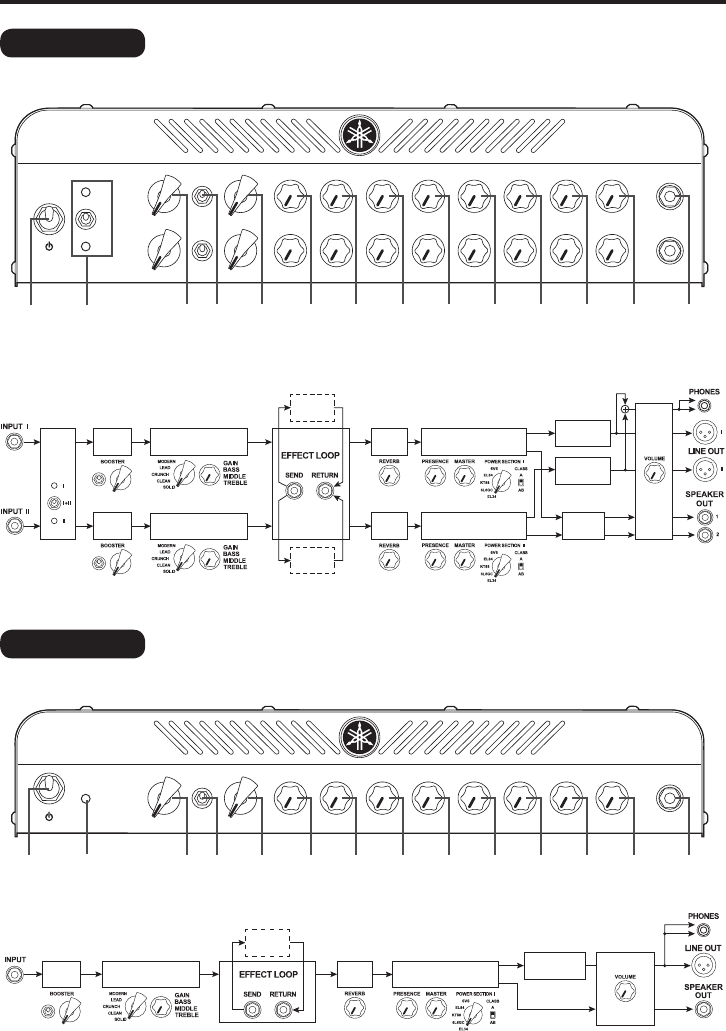
THR100HD
THR100H
SOLID
VOLUME INPUT REVERBPRESENCETREBLEMIDDLEBASSMASTERGAINBOOSTER
MODERN
LEAD
CRUNCH
CLEAN
w e r yt u i o !0 !1 !2 !3 !4 q
VOLUME INPUT
IIREVERBPRESENCETREBLEMIDDLEBASSMASTERGAINBOOSTER
MODERN
LEAD
CRUNCH
CLEAN
SOLID
SOLID
II
VOLUME INPUT
IREVERBPRESENCETREBLEMIDDLEBASSMASTERGAINBOOSTER
MODERN
LEAD
CRUNCH
CLEAN
I
I
+
II
e r yt u i o !0 !1 !2 !3 !4 qw
AMP
Select
Booster
Booster
Preamp
Preamp
Booster Preamp
Reverb
Reverb
Reverb
Poweramp
Poweramp
Poweramp
External
Effector
External
Effector
External
Effector
Speaker
Simulation
Speaker
Simulation
Speaker
Simulation
Mixer
11
Names and Functions
* Speaker and Cabinet
Whentheheadandspeakersectionsofaguitar
amplierareseparate,thespeakersectionis
generally called the “cabinet”. As the number of
speakers installed in a cabinet varies among designs,
this manual will refer to the device that connects to
theSPEAKEROUTjackasa“cabinet”,andtothe
individual speakers as a “speaker”.
q INPUT I/II
Connect the guitar to this jack.
OntheTHR100HD, the Amp Select switch e
assignssignalowfromINPUTIandINPUT
II to either Amp I (up position) or Amp II (lower
position).
CAUTION
If you are only connecting one guitar to the
amp, use the INPUT I jack. Do not use the
INPUT II jack. Doing so may cause malfunc-
tion.
w (Power switch)
Theunit’spowerswitch.Whenthepoweris
switchedON,theAmpLampe and the Front
GrillLamplight.
CAUTION
If an abnormality is detected during opera-
tion, a protective function activates stopping
output from the SPEAKER OUT jacks. The
front grill lamp switches off and the power is
forced OFF. Refer to the “Troubleshooting”
section on page 23 for more information on
what to do when the protection function is
activated.
e [THR100HD] Amp Select switch/
Lamps
Thisswitchselectstheampliertobeusedin
respecttotheINPUTIandINPUTIIjacksq.
Thelamp(I/II)fortheselectedamplierlights.
When a guitar is connected to the INPUT I jack
I .......The signal from the guitar connected to
theINPUTIjackissenttoAmpI(top).
OnlytheoutputofAmpI(top)issenttothe
output circuit*.
* OutputCircuit:ReferstotheSPEAKER
OUT,LINEOUT,PHONESjacks.
II ......The signal from the guitar connected to
theINPUTIjackissenttoAmpII(bottom).
OnlytheoutputofAmpII(bottom)issent
to the output circuit.
I+II ...The signal from the guitar connected to the
INPUTIjackissenttobothAmpI(top)and
Amp II (bottom). The outputs of both Amp I
and II are sent to the output circuit.
If guitars are connected to the INPUT I and II
jacks
I .......The signal from the guitar connected to
theINPUTIjackissenttoAmpI(top).
OnlytheoutputofAmpI(top)issenttothe
output circuit.
II ......The signal from the guitar connected to the
INPUTIIjackissenttoAmpII(bottom).
OnlytheoutputofAmpII(bottom)issent
to the output circuit.
I+II ...ThesignalfromtheINPUTIjackissentto
AmpI(top)andthesignalfromtheINPUT
II jack is sent to Amp II (bottom). The
output of each Amp is sent to its respective
output circuit.
e [THR100H] Power Lamp
Lightswhentheamp’spowerisswitchedON.
r Amp Type selector
Selects the amp simulation type for the preamp
section.
MODERN:AmericanHardRockstackamptone
with rich low-end and sustain.
LEAD: Moderate preamp gain with the great
mid-range tone of a classic British amp.

12
Names and Functions
CRUNCH: Bright clear tone with the dynamic
distortion of a British combo amp.
CLEAN: Clear, rich clean tone characteristic of
an American combo amp.
SOLID: Clear tone typical of a solid-state amp.
*******************************************************************
n VCM Technology
ThevevirtualamptypesfoundintheTHR100are
producedusingYamaha’sproprietaryVCMTechnology,a
newly developed amp modeling technology that faithfully
reproduces the operating characteristics of controls and
distinctivetoneofeachindividualamp.VCMalsoletsyou
switch the virtual power tubes in the power amp section via
the rear panel Tube Type selector !5.
*******************************************************************
t BOOSTER switch
SwitchestheBoosterON/OFF.
* When this switch is in the ON position, the
included foot switch can be used to switch the
booster function ON/OFF. (→ page 20)
y BOOSTER
Adjusts the amount of overdrive.
* Use the “THR HD_H Utility” application to set
the booster type. (→ page 21)
u GAIN
Adjusts the amount of gain in the preamp
section. Turn the knob clockwise to increase the
amount of preamp gain.
i MASTER
Adjusts the amount of gain in the power amp
section. Turn the knob clockwise to increase the
gain.
o BASS
Adjusts the tonal character of the preamp
section. Turn the knob clockwise to enhance
low-range frequencies.
!0 MIDDLE
Adjusts the tonal character of the preamp
section. Turn the knob clockwise to enhance
mid-range frequencies.
!1 TREBLE
Adjusts the tonal character of the preamp
section. Turn the knob clockwise to enhance
high-range frequencies.
!2 PRESENCE
Adjusts the high-range frequencies of the power
amp input section. Turn the knob clockwise to
enhance high-range frequencies that are higher
thantheTREBLEcontrol.
!3 REVERB
AdjuststhesendleveltotheReverbcircuit.Turn
the knob clockwise to increase the amount of
the effect.
* Turn the knob fully counter-clockwise to turn the
effect off.
* Use the “THR HD_H Utility” application to set
the reverb type. (→ page 21)
!4 VOLUME
Adjuststhenalvolumeofthesoundcreated
according to the panel control settings. This
settingiscommonfortheSPEAKEROUT,LINE
OUT,andPHONESjacks.
13
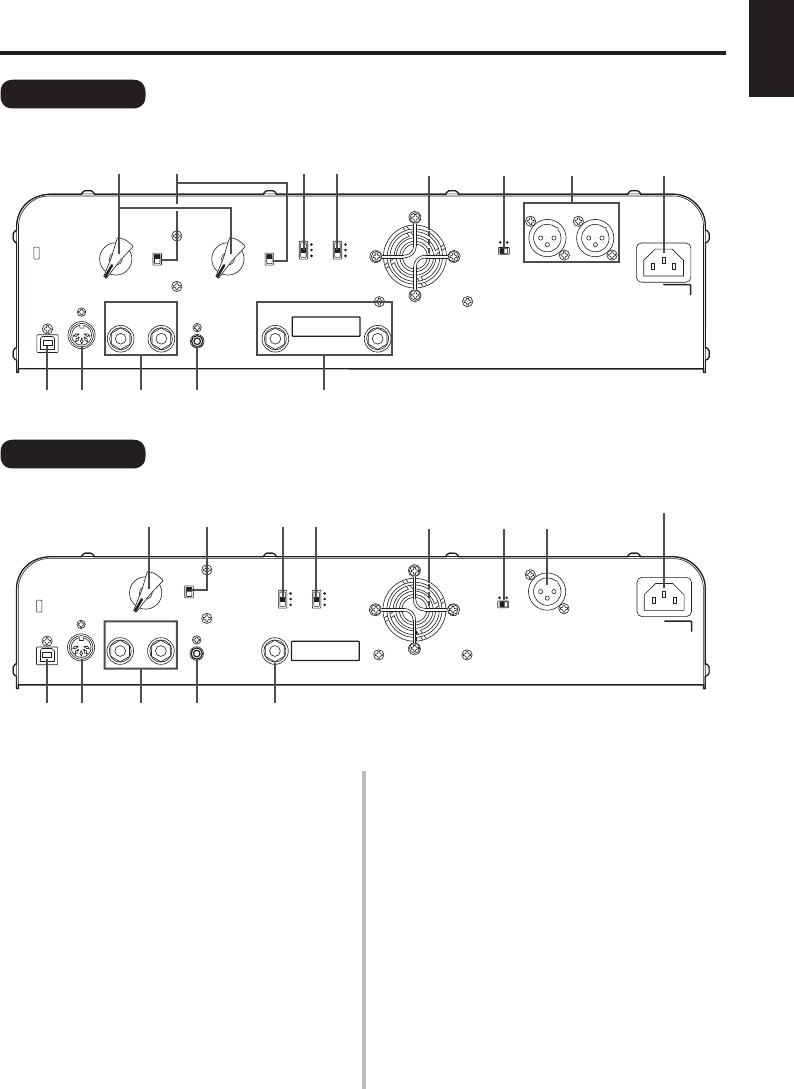
!5 POWER SECTION
Tube Type selector
Selects the tube simulation type.
6V6: Tube used in small American combo amps
delivers distortion even at a low volume level.
EL84: Tube often used in British combo amps
delivers a soft drive.
KT88: This tube is used in a variety of amps
designed for everything from jazz to metal
and produces little distortion even at raised
volumes.
Names and Functions
l
Rear Panel
l
Rear Panel
THR100HD
THR100H
6L6GC:TubeoftenusedinAmericanampliers
produces a fat, resonant mid-range tone.
EL34:TubeoftenusedinBritishampliers
produces great mid to high range projection.
* The THR100 amp does not incorporate physical
tubes in its design. Instead, it utilizes Yamaha’s
VCM Technology to faithfully reproduce the
characteristics of each of these tube types.
6V6
EL84
SEND RETURN
EFFECT LOOP PHONESUSB TO FSW
KT88
6L6GC
EL34
POWER SECTION
CLASS
A
AB
SPEAKER
4Ω
8
Ω
16Ω
25W
50
W
1
00
W
SPEAKER OUT
IMPEDANCE 4~16Ω
CLASS 2 WIRING
GND LIFT
AC IN
LINE OUT
!9@4 @3@6 @5
!5 !7 !8 @0 @1 @7@2!6
6V6
EL84
21
SEND RETURN
EFFECT LOOP PHONESUSB TO FSW
KT88
6L6GC
EL34
POWER SECTION I
CLASS
A
AB
6V6
EL84
KT88
6L6GC
EL34
POWER SECTION II SPEAKER
CLASS
A
AB
4Ω
8
Ω
16Ω
25W
50
W
1
00
W
SPEAKER OUT
IMPEDANCE 4~16Ω
CLASS 2 WIRING
GND LIFT
LINE OUT
III
AC IN
LINE OUT
!9@4 @3@6 @5
!5 !7 !8 @0 @1 @7@2!6
14
Names and Functions
!6 POWER SECTION
Tube Class switch
Selects the operating type of the tube selected
with the Tube Type selector !5.
CLASS A:
This system delivers excellent response and is
highly sensitive to touch, and playing nuances.
CLASS AB:
This system delivers more power with greater
volume.
!7 SPEAKER
Impedance switch
Setstheamplier’simpedancetomatchthe
specicationsofthecabinettobeconnectedto
theSPEAKEROUT!9 jack.
OntheTHR100HD, this switch setting is
commonforbothSPEAKEROUT1and2jacks.
CAUTION
Before connecting the cabinet to the amplier,
please read and fully understand the “Con-
necting the Cabinet” section (→ page 16) and
match the impedance setting to the cabinet’s
specications. Using the wrong setting can
result in damage to the cabinet and to the amp.
!8 SPEAKER
Power Output switch
Setstheamplier’soutputwattagetomatchthe
specicationsofthecabinettobeconnectedto
theSPEAKEROUT!9 jack.
OntheTHR100HD, this setting is common for
bothSPEAKEROUT1and2jacks.
CAUTION
Before connecting the cabinet to the ampli-
er, please read and fully understand the
“Connecting the Cabinet” section (→ page
16) and match the output wattage setting to
the cabinet’s specications. Using the wrong
setting can result in damage to the cabinet
and to the amp.
!9 SPEAKER OUT
Connects the cabinet to the amp.
OntheTHR100HD, jack 1 and jack 2 signals
differ according to the Amp Select switch e
settingandwhethertheSPEAKEROUT2jack
is connected to a cable. Please refer to the
“Connecting the Cabinet” section (→ page 16)
for more information.
@0 Cooling Fan
Discharges heat from inside the amp to the
outside. Sensors inside the amp automatically
adjust fan speed.
CAUTION
Use the device in a location that has good
ventilation and keep the back open to prevent
heat from building up.
@1 GND/LIFT
ConnectsthegroundfortheLINEOUTjack@2
totheamp’schassis(GND)ordisconnectsthe
ground(LIFT).Ifyouexperiencehumornoise,
switchingtoLIFTmaysolvetheproblem.
@2 LINE OUT
Line-levelbalancedoutputforthesignalthathas
passed through the speaker simulation*.
* Use the “THR HD_H Utility” application to set
the speaker simulation type. (→ page 21)
OntheTHR100HD,AmpIoutputissenttoLINE
OUTI,andAmpIIoutputissenttoLINEOUTII.
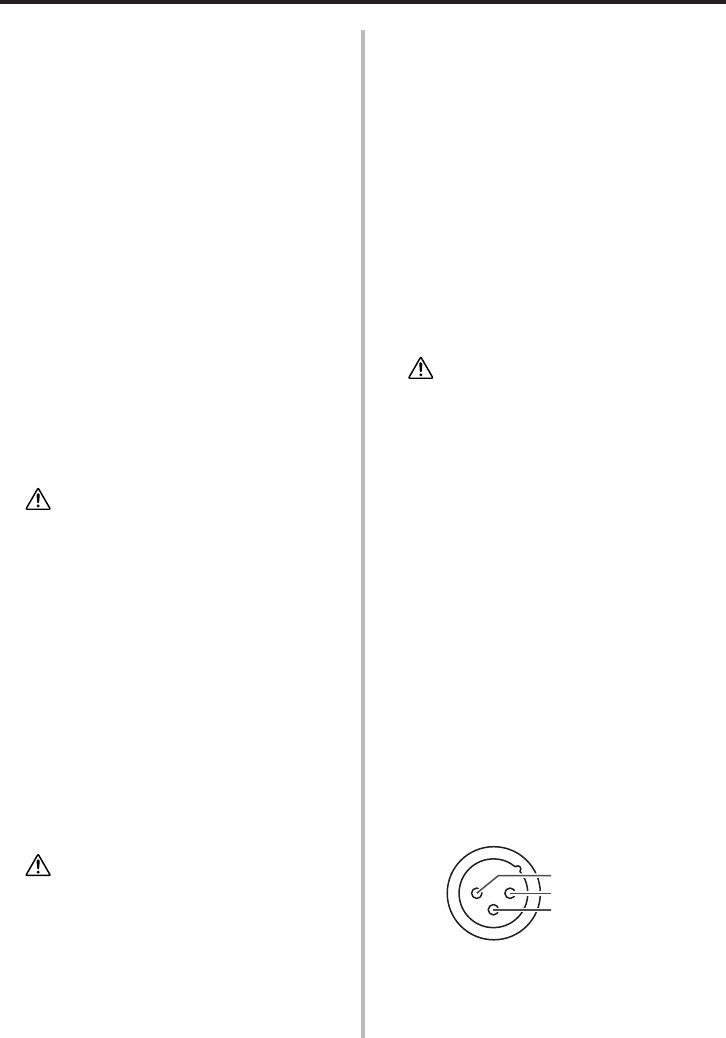
1: Ground (shield)
2: Hot (+)
3: Cold (-)

15
Names and Functions
@3 PHONES
This is a stereo mini phone jack for headphones.
LiketheLINEOUTjack@2, the signal for this
jack passes through the speaker simulator.
ThejackisstereobutoutputtobothLandR
terminals is the same (mono).
OntheTHR100HD,bothLINEOUTIandII
jacksignalsaremixedandsenttobothLandR
terminals.
* Connecting a plug to the PHONES jack stops
output to the SPEAKER OUT 1/2 jacks. Output to
the LINE OUT I/II jacks is not affected.
@4 EFFECT LOOP SEND/RETURN
ThesearetheSENDandRETURNjacksfor
an external effect loop. Please refer to the
“UsingtheEffectLoop”section(→ page 19) for
instructions on using the effect loop.
* The included footswitch can switch the effect
loop ON/OFF. (→ page 20)
@5 TO FSW (Footswitch)
Connectorforthefootswitch.Refertothe“Using
the Footswitch” section (→ page 20) for more
information.
@6 USB
Use a USB cable (sold separately) to connect a
computer to the device.
* Refer to the “More Detailed Settings” section
(→ page 21) for more information.
@7 AC IN
Use the supplied AC power cord to connect the
device to an AC outlet. For safety, please be
sure to connect the ground.
16
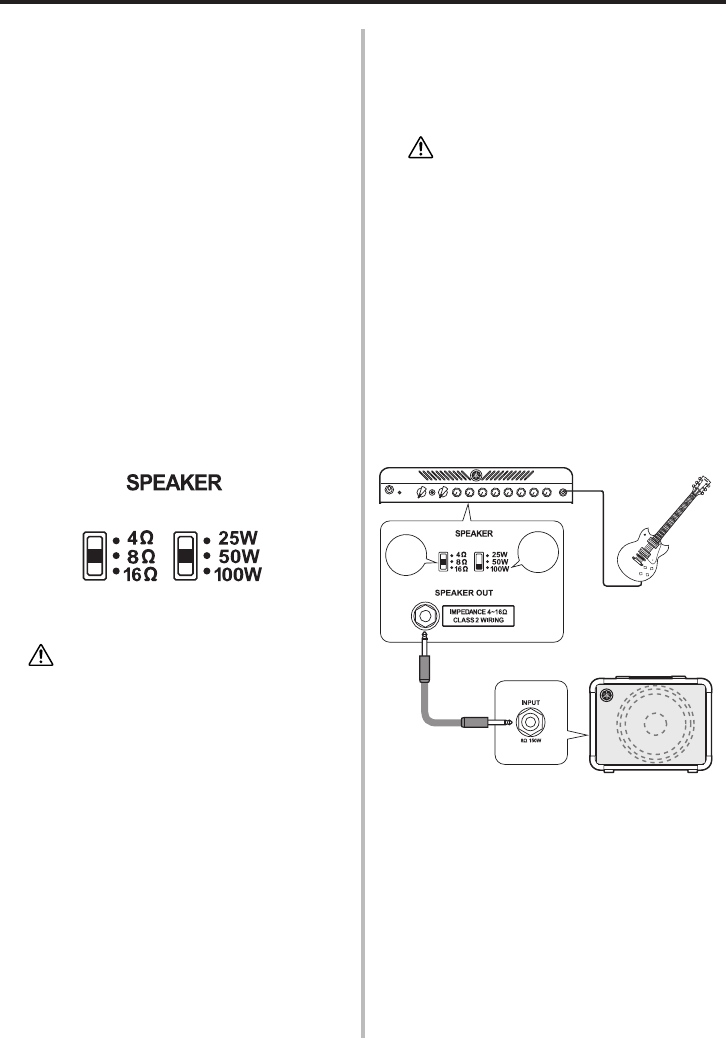
Connecting the Cabinet
n Cabinet Specications
Before connecting the cabinet, please check the
following two points.
l Cabinet Power Rating
l Cabinet Impedance
l Cabinet Power Rating
SetthePowerOutputswitchontheamplier’srear
panel to the value that matches the power rating* of
the cabinet being connected to the amp.
* The power rating may be listed as “Power
Rating” or “Peak Power Rating” in the cabinet’s
specications.
l Cabinet Impedance
SettheImpedanceswitchontheamp’srearpanelto
match the impedance of the cabinet being connected
to the amp.
CAUTION
Using the wrong setting can damage the
speakers and the amp.
l
Settings on the Yamaha THRC212 cabinet
will
change power rating and impedance
requirements for the cabinet. Please read
the THRC212 Owner’s Manual carefully and
make the appropriate settings.
l When connecting multiple cabinets make
the proper settings after calculating the
overall system’s permissible input and total
impedance. Also, keep the impedance of
the connected devices within a range of 4Ω
to 16Ω.
n Connections and Settings
Connecttheampliertothecabinetusinga
commercially available speaker cable (mono phone
to mono phone).
CAUTION
l
Always turn the amplier power OFF before
making connections or disconnecting the
devices. Not doing so can result in electric
shock.
l
Never use an instrument (guitar) cable.
Using an instrument cable can damage the
speakers and the amp.
l Connection Example 1
ConnectingtheTHR100HtoaTHRC112(Output
Power:150W,Impedance:8Ω).
Impedance switch Power Output switch
100W
8Ω
THRC112
THR100H
17
100W
8Ω
Connecting the Cabinet
l Connection Example 2
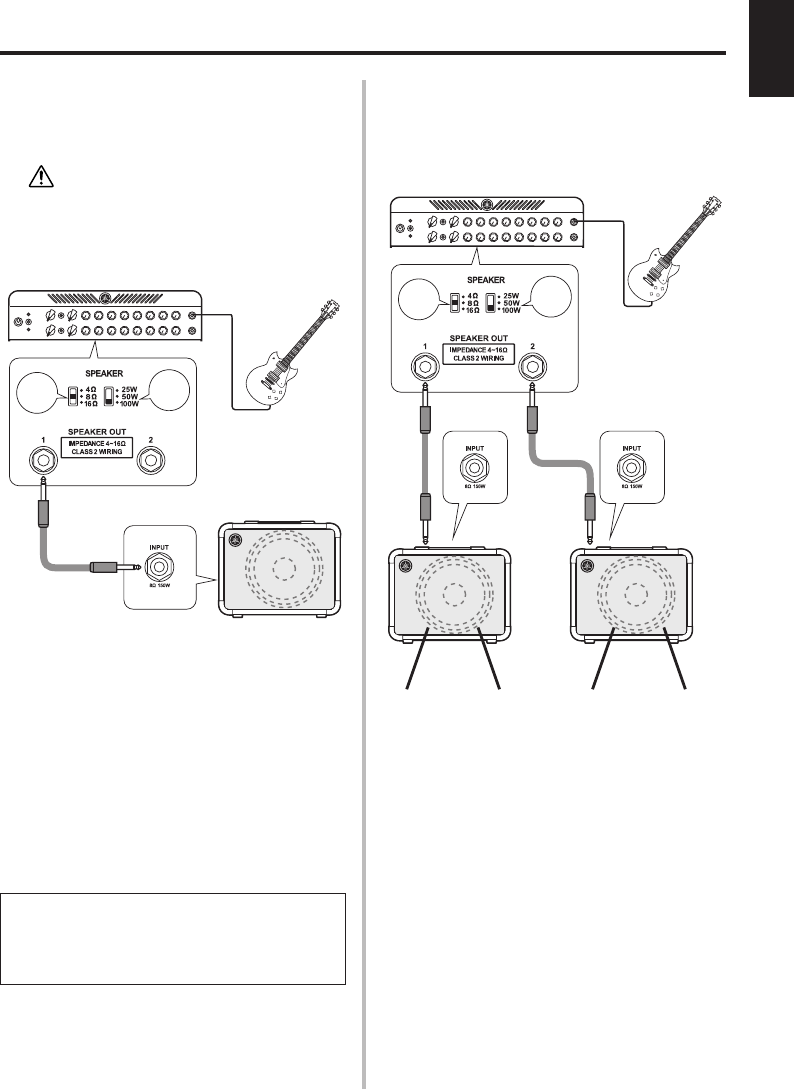
ConnectingtheTHR100HDtoaTHRC112(Output
Power:150W,Impedance:8Ω).
CAUTION
Always use the SPEAKER OUT 1 jack when
connecting a single cabinet to the amp.
l Connection Example 3
ConnectingtheTHR100HDtoapairofTHRC112
cabinets(OutputPower:150W,Impedance:8Ω).
I
INPUT
THR100HD Amp Select switch setting and the
Signal Output to the Cabinet
l Amp Select switch = I
Amp I (top) sound is output.
l Amp Select switch = II
Amp II (bottom) sound is output.
l Amp Select switch = I+II
Amp I (top) sound and Amp II (bottom) sound is output.
Rated output for the THR100HD is 50W
when a 4Ω cabinet is connected to the
SPEAKER OUT 1 jack.
100W
8Ω
THRC112
I
INPUT
THRC112 THRC112
Amp I
Sound
Amp II
Sound
THR100HD
THR100HD
THR100HD Amp Select switch setting and the
Signal Output to the Cabinets
l
Amp Select switch = I
AmpI(top)soundissenttotheSPEAKEROUT1jack.
NosignalissenttotheSPEAKEROUT2jack.
l
Amp Select switch = II
AmpII(bottom)soundissenttotheSPEAKEROUT2
jack.NosignalissenttotheSPEAKERIjack.
l
Amp Select switch = I+II
Amp I (top) →SPEAKEROUT1jack,AmpII(bottom)
→SPEAKEROUT2jack,eachamphasitsown
output.
18
100W
8Ω
DUAL
I
INPUT
Amp II
Sound
Amp I
Sound
Connecting the Cabinet
THRC212
THR100HD
100W
8Ω
I
II
INPUT
Amp II
(Guitar 2)
Sound
Amp I
(Guitar 1)
Sound
THRC112 THRC112
THR100HD
Guitar
1
Guitar
2
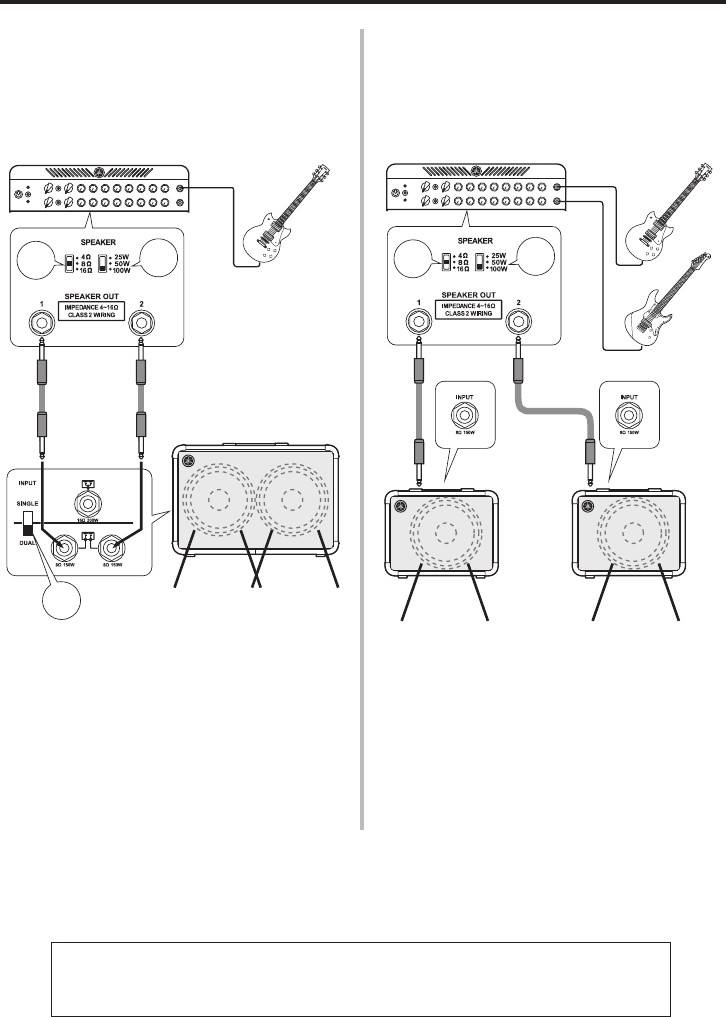
l Connection Example 4
ConnectingtheTHR100HDtotheTHRC212(Output
Power:150W,Impedance:8Ω).
ThetwospeakersinstalledintheTHRC212cabinet
operate independently.
The THR100HD’s Amp Select switch setting and
signal output to the cabinet are the same as in
Example 3.
l Connection Example 5
ConnectingtheTHR100HDtoapairofTHRC112
cabinets(OutputPower:150W,Impedance:8Ω)and
playing two guitars connected to the amp.
TheTHRC112connectedtotheSPEAKEROUT1
jackproducesthesoundfromAmpI(Guitar1),while
theTHRC112connectedtotheSPEAKEROUT2
jackproducesthesoundfromAmpII(Guitar2).
The THR100HD’s Amp Select switch setting and
signal output to the cabinet are the same as in
Example 3.
Rated output for the THR100HD is 50W + 50W when the SPEAKER OUT 1, 2
jacks each have a separate cabinet connected.
19
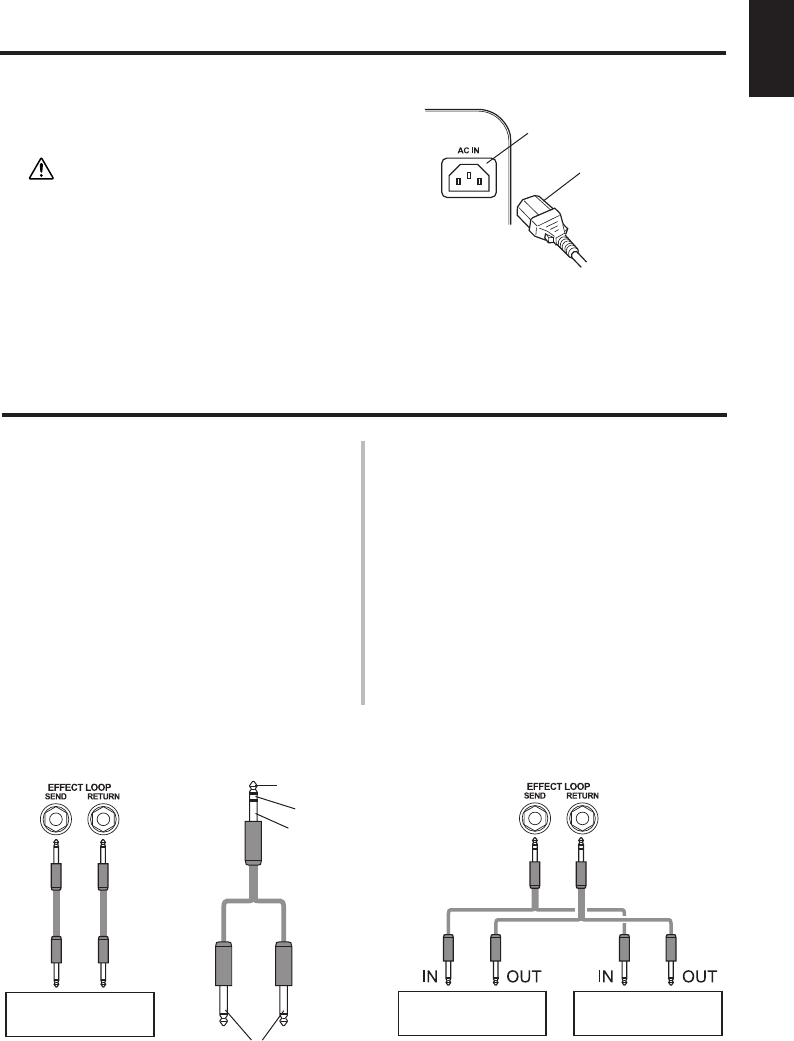
Power Connection
Connect the supplied power cord to the rear panel
ACINconnector,thenconnecttheotherendtoan
AC outlet.
CAUTION
For safe operation, always connect the ground
wire.
AC IN connector
Power cord (supplied)
Rear Panel
Using the Effect Loop
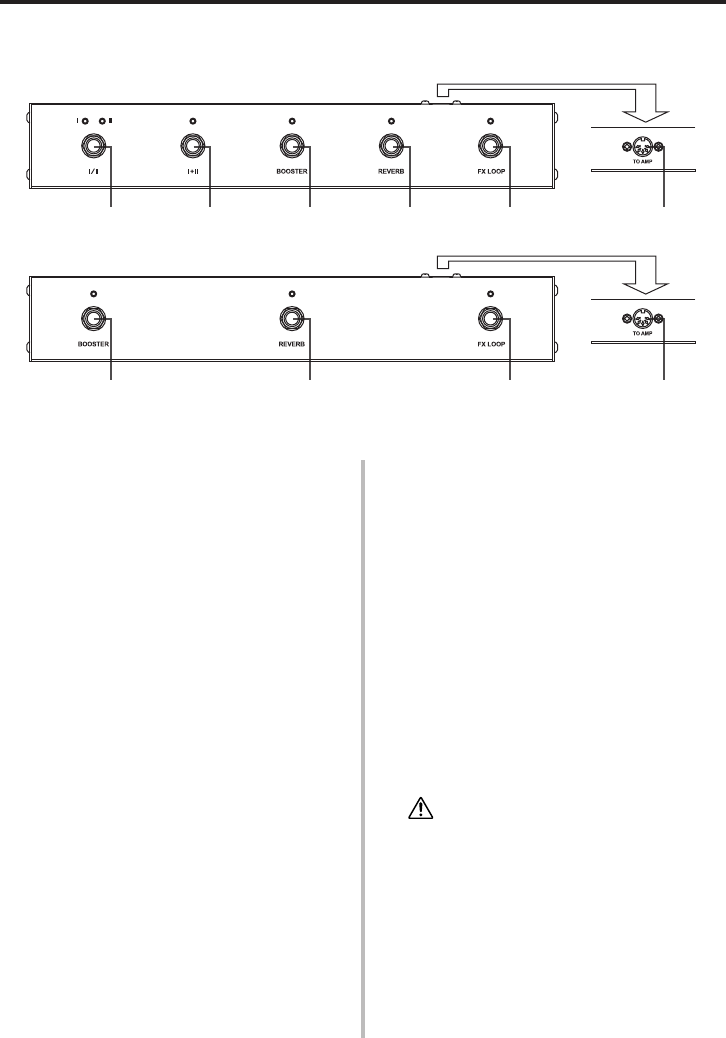
UsetheEFFECTLOOPSEND/RETURNjacksto
connect an external effector. (Diagram 1)
YoucanswitchtheEffectLoopON/OFFusingthe
includedfootswitch.(→page20)
* The external effects circuit is set to serial at
factory but can be switched to parallel using the
“THR HD_H Utility” application. (→ page 21)
* Never directly connect the EFFECT LOOP SEND
jack to the RETURN jack.
TheSEND/RETURNjacksontheTHR100HD are
stereo(TRS)withtheTipcarryingtheL/MONOsignal,
andtheRingcarryingtheRsignal(Diagram 2).
To connect different external effectors to the Tip
andtheRingseparately,useaninsertcable(sold
separately) as shown in Diagram 2, and connect the
effectors as shown in Diagram 3.
* To connect two external effectors as shown in
Diagram 3, use the “THR HD_H Utility” to set the
FX LOOP SEND and RETURN Serial Connection
modes to “Separate” (→ page 21).
IN OUT
Diagram 1 Diagram 2 Diagram 3
Effector Amp I (L) Effector Amp II (R) Effector
Tipe (L): L/MONO
Ring (R): R
Sleeve (G): GND
Monaural phone jack
LR
LRLR
20
Using the Footswitch
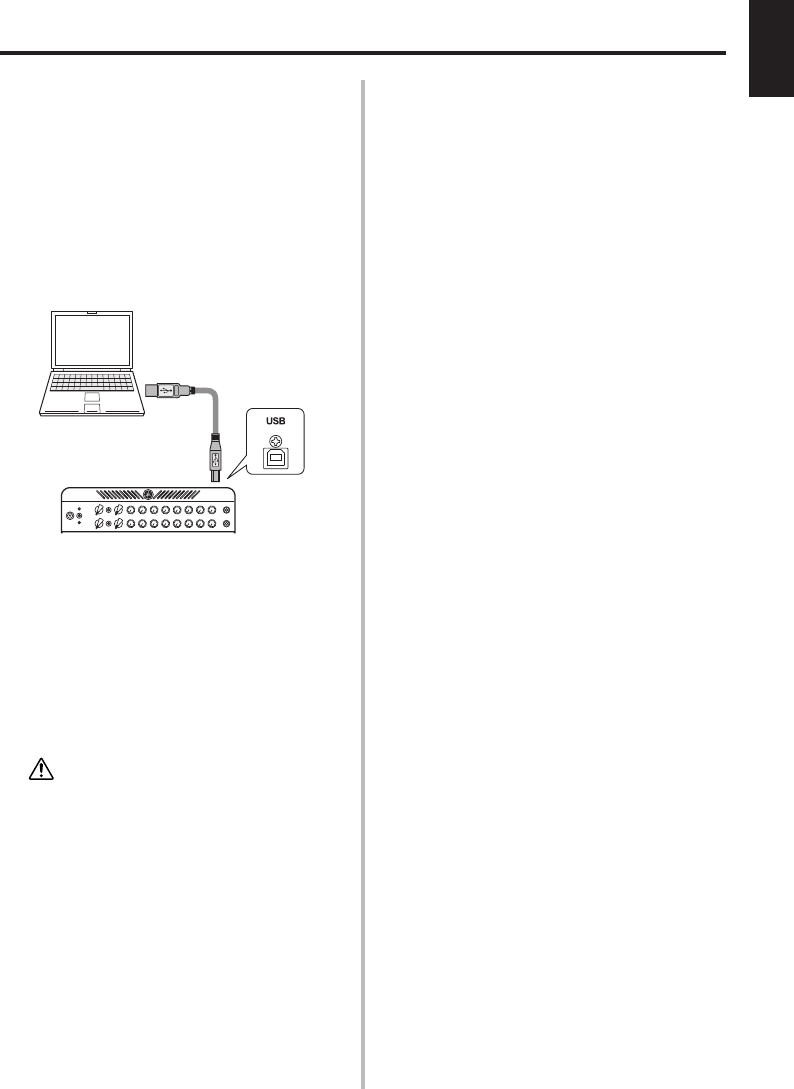
Someoftheamp’sfunctionsandswitchsettingscanbecontrolledwithyourfeetusingthesuppliedfootswitch.
t FX LOOP
Switches the signal from the rear panel EFFECT
LOOPSEND/RETURNjackON/OFF.BothAmp
I and Amp II are switched simultaneously.
* When the FX LOOP switch is set to “SERIAL”
with the “THR HD_H Utility” application, no
sound is produced if the loop is activated
without an external effector connected to the
EFFECT LOOP SEND/RETURN jacks.
y TO AMP
Use the supplied footswitch cable to connect
thisterminaltotheTOFSWterminalontherear
panel of the amp.
CAUTION
Always switch the amplier’s power OFF
before connecting the cable.
q [THR100HD] AMP I/II
Switches the front panel Amp Select switch
setting between AMP I and II.
w [THR100HD] Amp I+II
Switches the front panel Amp Select switch to
I+II (lamp lit).
Press the switch again to enable the Amp I/II
switch q setting.
e BOOSTER
SwitchestheBOOSTERfunctionON/OFF.Both
Amp I and Amp II are switched simultaneously.
* Only switches the BOOSTER function ON/OFF
for the amp that has its front panel BOOSTER
switch in the ON position. The switch has no
effect if both the Amp I and Amp II front panel
BOOSTER switches are in the OFF position.
r REVERB
SwitchesthereverbeffectON/OFF.BothAmpI
and Amp II are switched simultaneously.
q
e
w e
r
r t y
t y
l THR100HD
l THR100H
21
More Detailed Settings
n Connect to a Computer
Connectingacomputertotheamplier’sUSBjack
provides access to the following functions.
l Edit amp settings with the “THR HD_H Utility”
editor.
l Update the unit’s system rmware.
A commercially available USB cable is required to
connectacomputertotheamplier.
Precautions in regard to using the USB jack
Make sure you follow the points below when con-
nectingacomputertotheTHRUSBjack.Failingto
dosomayresultinthecomputerortheTHRfreez-
ing or shutting down, as well as corruption or even
loss of data. If the device or computer does freeze,
restart the application or computer.
CAUTION
•UseonlyanABtypeUSBcablelessthanthree
(3) meters in length. USB 3.0 cables are not
compatible.
•Besuretowakethecomputerfromsuspend-
ed/sleep/ standby mode before connecting a
computer to the USB jack.
•Alwaysquitallapplicationsthatarerunning
on the computer before connecting or discon-
necting the USB cable and set the volume
output on the computer to its minimum level.
•Waitatleast6secondsbetweenconnecting
or disconnecting the USB cable.
•Connectingtheampliertoacomputermay
block the computer’s sound input/output.
Switch to another device as needed.
n Using the “THR HD_H
Utility”
The “THRHD_HUtility” is a specialized application
that allows the user to perform detailed settings that
cannot be accessed with the panel controls.
l What You Can Do with the
“THR HD_H Utility”
l Set the built-in BOOSTER type (3 types).
l Set the Effect Loop circuit type (serial/parallel).
l Set the built-in REVERB type (4 types).
l Set the noise gate level (OFF/1/2/3).
l Set the speaker simulation for each of the
amplier types.
l Switch the FX LOOP SEND/RETURN signal
path (Separate/Mixed).
l To Use the “THR HD_H
Utility”
Beforeconnectingyourcomputertotheamplier,
you will need to download and install the “THRHD_
H Utility” and the required driver from the Yamaha
web site below.
http://download.yamaha.com/
* Check the above website for information on
system requirements.
l Driver Installation
1. Access the following website and download the
latest version of the “Yamaha Steinberg USB
Driver”,thelewilldecompressandopen.
http://download.yamaha.com/
* Check the above website for information on
system requirements.
* Before using, please understand that even if
your computer meets all operating requirements,
the software may not function correctly.
Computer
USB cable (sold separately)

22
More Detailed Settings
n Updating the Amplier’s
Firmware
Updatesfortheamp’sinternalrmwareprovide
improvements to the device.
ToupdateyourTHR100HD/100H,pleasefollowthe
procedure below.
* Before proceeding, install the latest version of the
“Yamaha Steinberg USB Driver”. (→ page 21)
l Update Procedure
1.Visitthefollowingwebsiteanddownloadthe“THR
HD_H Updater”.
http://download.yamaha.com/
* Please refer to the URL provided above for
system requirements.
2.Expandthedownloadedle(compressedZIPle).
3.Runthe“THRHD_HUpdater”.
* Refer to the “THR HD_H Updater” User’s Manual
for detailed instructions.
* The “Yamaha Steinberg USB Driver” may be
updated without notice. Please visit the above
website for the latest details and updates.
2. Install the “Yamaha Steinberg USB Driver” in
yourcomputer.RefertotheInstallationGuide
thatisincludedinthedownloadedle.
l Installing “THR HD_H Utility”
1. Access the following web site and download the
“THRHD_HUtility”.
http://download.yamaha.com/
* Check the above website for information on
system requirements.
2. Startthedownloadedleandfollowtheinstruc-
tions that appear in the display to install the “THR
HD_H Utility”.
3. Refertothe“THRHD_HUtility”Owner’sManual
ortheHelpGuideforinformationonsettingsand
operation of the “THRHD_HUtility”.
l Using the “THR HD_H Utility”
1. Use a USB cable to connect a computer to the
THR100HD/100H.(→ page 21)
2. TurntheTHR100HD/100HpowerON,launchthe
“THRHD_HUtility”.
3. Use the “THRHD_HUtility” to perform various
settings. Edited settings are stored in the ampli-
er.
* Please refer to the “THR HD_H Utility” Owner’s
Manual for more information on detailed settings
and how to use the application.

23
Troubleshooting
No power
l Is the power cord properly connected?
(→page19)
No sound
l Is an instrument properly connected to the
INPUTjack?
l THR100HD: Is the instrument connected to
theINPUTIIjack?Ifonlyasingleinstrument
is being used, it must be connected to the
INPUTIjack.
lIstheinstrument’svolumecontrolturnedup?
lAretheGAIN,MASTER,orVOLUMEcontrols
set to “0”?
l Is the Amp Select switch properly set?
l Is the cabinet properly connected? (→ page
16)
l IfyouhaveselectedtheCLEANamptype,no
sound is produced if the tone controls are set
to “0”.
l Are a pair of headphones connected to the
PHONESjack?
l Is the cable used to connect the instrument to
the amp damaged?
l Is the cable used to connect the amp to the
cabinet damaged?
lIstheFXLOOPfootswitchONwithoutan
external effector connected to the EFFECT
LOOPSEND/RETURNjacks?(→ page 21)
Stopped producing sound while
playing
1) The front grill lamp is not lit
l The thermal protection system has activated,
terminatingoutputtotheSPEAKEROUTjack.
Allowtheampliertocooldownthenswitch
thepowerONagain.Ifthethermalprotection
system activates again, unplug the power cord
and contact the Yamaha dealer from whom
you purchased the device.
l The tip end of the speaker cable is grounded
or touched by static electricity causing a short.
Check the speaker cable and after eliminating
thecause,switchthepowerOFFandthenON
again. If the protection circuit activates again,
immediatelyturnthepowerOFF,disconnect
the power cord, and contact the Yamaha
dealer from whom you purchased the device.
2) The power is OFF
l The internal circuitry may not be functioning
properly.ImmediatelyturnthepowerOFF,
disconnect the power cord, and contact the
Yamaha dealer from whom you purchased the
device.

24
Specications
Digital Section
• Built-inAmpSimulations
SOLID, CLEAN, CRUNCH, LEAD, MODERN
•Built-inEffects
BOOSTER (WHITE/GREEN/AMBER*)
REVERB (SPRING/PLATE/ROOM/HALL*)
NOISE GATE*
SPEAKER SIMULATION*
* Only available in the “THR HD_H Utility.”
Controller/Switch
THR100HD
AMP I, II Common: Power switch, Amp Select
switch, Impedance switch, Power Rating
switch, GND/LIFT switch
AMP I, II One Each: Amp Type selector,
BOOSTER switch, BOOSTER, GAIN, MAS-
TER, BASS, MIDDLE, TREBLE, PRESENCE,
REVERB, VOLUME, POWER SECTION selec-
tor, CLASS switch
THR100H
Power switch, Amp Type selector, BOOSTER
switch, BOOSTER, GAIN, MASTER, BASS,
MIDDLE, TREBLE, PRESENCE, REVERB,
VOLUME, POWER SECTION selector, CLASS
switch, Impedance switch, Power Rating
switch, GND/LIFT switch
Connections
THR100HD
INPUT I, II (Standard Monaural phone jack)
PHONES (Stereo Mini phone jack)
SPEAKER OUT 1/2 (Standard Monaural phone jack)
EFFECT LOOP SEND/RETURN (Standard
Stereo phone jack)
LINE OUT 1/2 (XLR Male)
TO FSW (5P DIN)
USB 2.0 (Type B)
AC IN (3P)
THR100H
INPUT (Standard Monaural phone jack)
PHONES (Stereo Mini phone jack)
SPEAKER OUT (Standard Monaural phone jack)
EFFECT LOOP SEND/RETURN (Standard
Stereo phone jack)
LINE OUT (XLR Male)
TO FSW (5P DIN)
USB 2.0 (Type B)
AC IN (3P)
Input Level
INPUT : -10 dBu/1MΩ
Rated Output
THR100HD
SPEAKER OUT 1 only: 100W (50W at 4Ω)
SPEAKER OUT 1+2 : 50W+50W
THR100H
100W
Power Source
AC100V - 240V, 50/60 Hz
Power Consumption
THR100HD: 60 W
THR100H: 40 W
Dimensions (W x D x H)
THR100HD: 445×248×125 mm
THR100H: 445×248×95 mm
Weight
THR100HD: 4.2 kg
THR100H: 3.6 kg
Accessories
THR100HD
• Power cord x 1
• Exclusive Footswitch (5 switch) x1
• 5P DIN Footswitch Cable x1
• Owner’s Manual (this booklet) x 1
THR100H
• Power cord x 1
• Exclusive Footswitch (3 switch) x1
• 5P DIN Footswitch Cable x1
• Owner’s Manual (this booklet) x 1
*
The contents of this manual apply to the latest
specications as of the publishing date.
To obtain the latest manual, access the Yamaha
website then download the manual le.

Manual Development Group
Yamaha Corporation
Revised 08/2017 PO-B0
VAC8430-1版次 : R2
THR
Series
Guitar Amplifier
THR100HD / THR100H
EnglishDeutschFrançaisItalianoEspañol
Português
Pусский
VOLUME INPUT IIREVERBPRESENCETREBLEMIDDLEBASSMASTERGAINBOOSTER
MODERN
LEAD
CRUNCH
CLEAN
SOLID
SOLID
II
VOLUME INPUT IREVERBPRESENCETREBLEMIDDLEBASSMASTERGAINBOOSTER
MODERN
LEAD
CRUNCH
CLEAN
I
I+II
SOLID
VOLUME INPUT REVERBPRESENCETREBLEMIDDLEBASSMASTERGAINBOOSTER
MODERN
LEAD
CRUNCH
CLEAN
THR100H
THR100HD
THR100HD / THR100H
日本語
KOZHRUPTESITFRDEJAEN
