Yamaha R S202 Owner’s Manual Owner's Web ZU46020 Om UA En
User Manual: Yamaha R-S202 Owner's Manual
Open the PDF directly: View PDF  .
.
Page Count: 28
UA
EN
OWNER’S MANUAL
Receiver
i En
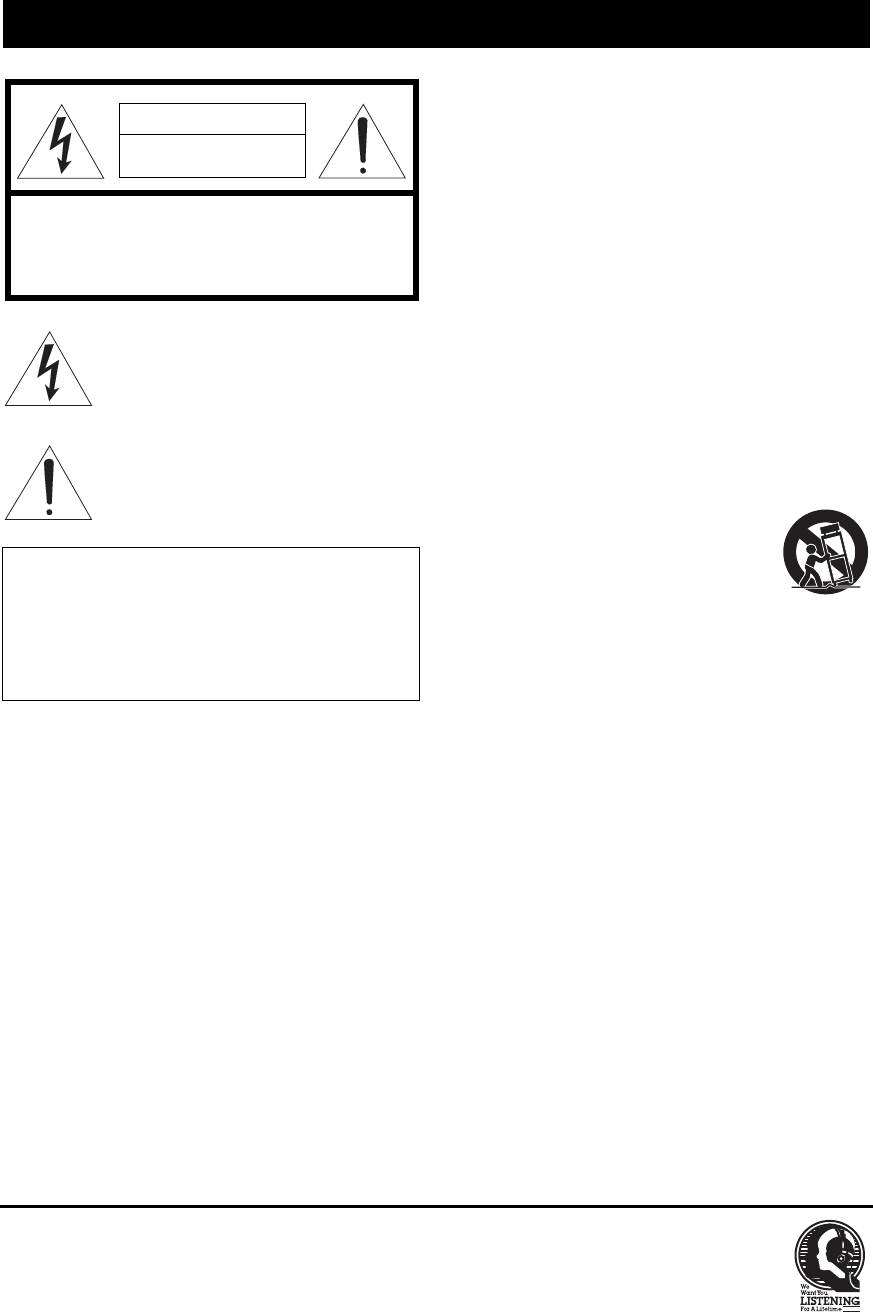
• Explanation of Graphical Symbols
The lightning flash with arrowhead symbol, within
an equilateral triangle, is intended to alert you to the
presence of uninsulated “dangerous voltage” within
the product’s enclosure that may be of sufficient
magnitude to constitute a risk of electric shock to
persons.
The exclamation point within an equilateral triangle
is intended to alert you to the presence of important
operating and maintenance (servicing) instructions
in the literature accompanying the appliance.
1 Read these instructions.
2 Keep these instructions.
3 Heed all warnings.
4 Follow all instructions.
5 Do not use this apparatus near water.
6 Clean only with dry cloth.
7 Do not block any ventilation openings. Install in
accordance with the manufacturer’s instructions.
8 Do not install near any heat sources such as radiators,
heat registers, stoves, or other apparatus (including
amplifiers) that produce heat.
9 Do not defeat the safety purpose of the polarized or
grounding-type plug. A polarized plug has two blades
with one wider than the other. A grounding type plug has
two blades and a third grounding prong. The wide blade
or the third prong are provided for your safety. If the
provided plug does not fit into your outlet, consult an
electrician for replacement of the obsolete outlet.
10 Protect the power cord from being walked on or pinched
particularly at plugs, convenience receptacles, and the
point where they exit from the apparatus.
11 Only use attachments/accessories specified by the
manufacturer.
12 Use only with the cart, stand, tripod,
bracket, or table specified by the
manufacturer, or sold with the apparatus.
When a cart is used, use caution when
moving the cart/apparatus combination to
avoid injury from tip-over.
13 Unplug this apparatus during lightning storms or when
unused for long periods of time.
14 Refer all servicing to qualified service personnel.
Servicing is required when the apparatus has been
damaged in any way, such as power-supply cord or plug
is damaged, liquid has been spilled or objects have fallen
into the apparatus, the apparatus has been exposed to rain
or moisture, does not operate normally, or has been
dropped.
IMPORTANT SAFETY INSTRUCTIONS
IMPORTANT
Please record the serial number of this unit in the space
below.
MODEL:
Serial No.:
The serial number is located on the rear of the unit. Retain
this Owner’s Manual in a safe place for future reference.
CAUTION
RISK OF ELECTRIC SHOCK
DO NOT OPEN
CAUTION: TO REDUCE THE RISK OF
ELECTRIC SHOCK, DO NOT REMOVE
COVER (OR BACK). NO USER-SERVICEABLE
PARTS INSIDE. REFER SERVICING TO
QUALIFIED SERVICE PERSONNEL.
We Want You Listening For A Lifetime
Yamaha and the Electronic Industries Association’s Consumer Electronics Group want you to get the most out of your
equipment by playing it at a safe level. One that lets the sound come through loud and clear without annoying blaring or
distortion – and, most importantly, without affecting your sensitive hearing. Since hearing damage from loud sounds is
often undetectable until it is too late, Yamaha and the Electronic Industries Association’s Consumer Electronics Group
recommend you to avoid prolonged exposure from excessive volume levels.
IMPORTANT SAFETY INSTRUCTIONS
ii En
FCC INFORMATION (for US customers)
1IMPORTANT NOTICE: DO NOT MODIFY THIS
UNIT!
This product, when installed as indicated in the
instructions contained in this manual, meets FCC
requirements. Modifications not expressly approved by
Yamaha may void your authority, granted by the FCC,
to use the product.
2IMPORTANT: When connecting this product to
accessories and/or another product use only high quality
shielded cables. Cable/s supplied with this product MUST
be used. Follow all installation instructions. Failure to
follow instructions could void your FCC authorization to
use this product in the USA.
3NOTE: This product has been tested and found to comply
with the requirements listed in FCC Regulations, Part 15
for Class “B” digital devices. Compliance with these
requirements provides a reasonable level of assurance that
your use of this product in a residential environment will
not result in harmful interference with other electronic
devices.
This equipment generates/uses radio frequencies and,
if not installed and used according to the instructions
found in the users manual, may cause interference
harmful to the operation of other electronic devices.
Compliance with FCC regulations does not guarantee
that interference will not occur in all installations. If
this product is found to be the source of interference,
which can be determined by turning the unit “OFF”
and “ON”, please try to eliminate the problem by using
one of the following measures:
Relocate either this product or the device that is being
affected by the interference.
Utilize power outlets that are on different branch
(circuit breaker or fuse) circuits or install AC line
filter/s.
In the case of radio or TV interference, relocate/
reorient the antenna. If the antenna lead-in is 300 ohm
ribbon lead, change the lead-in to coaxial type cable.
If these corrective measures do not produce
satisfactory results, please contact the local retailer
authorized to distribute this type of product. If you can
not locate the appropriate retailer, please contact
Yamaha Corporation of America A/V Division, 6600
Orangethorpe Avenue, Buena Park, CA 90620, USA.
The above statements apply ONLY to those products
distributed by Yamaha Corporation of America or its
subsidiaries.
FOR CANADIAN CUSTOMERS
To prevent electric shock, match wide blade of plug to wide slot and fully insert.
CAN ICES-3 (B)/NMB-3(B)
NOTICE
This equipment has been tested and found to comply with the limits for a Class B digital device, pursuant to part 15 of the FCC
Rules. These limits are designed to provide reasonable protection against harmful interference in aresidential installation.
This equipment generates, uses and can radiate radio frequency energy and, if not installed and used in accordance with the
instructions, may cause harmful interference to radio communications. However, there is no guarantee that interference will
not occur in a particular installation. If this equipment does cause harmful interference to radio or television reception, which
can be determined by turning the equipment off and on, the user is encouraged to try to correct the interference by one or more
of the following measures:
– Reorient or relocate the receiving antenna.
– Increase the separation between the equipment and receiver.
– Connect the equipment into an outlet on a circuit different from that to which the receiver is connected.
– Consult the dealer or an experienced radio/TV technician for help.
This equipment compiles with FCC/IC radiation exposure limits set forth for uncontrolled equipment and meets the FCC radio
frequency (RF) Exposure Guidelines and RSS-102 of the IC radio frequency (RF) Exposure rules. This equipment has very
low levels of RF energy that it deemed to comply without maximum permissive exposure evaluation (MPE). But it is desirable
that it should be installed and operated with at least 20 cm and more between the radiator and person’s body.
This transmitter must not be co-located or operated in conjunction with any other antenna or transmitter.
FCC CAUTION
Change or modifications not expressly approved by the
party responsible for compliance could void the user’s
authority to operate the equipment.
Do not use this unit within 22 cm (9 inches) of persons with a
heart pacemaker implant or defibrillator implant.
Radio waves may affect electro-medical devices.
Do not use this unit near medical devices or inside medical
facilities.
This transmitter must not be co-located or operated in
conjunction with any other antenna or transmitter.
iii En
1 To assure the finest performance, please read this manual
carefully. Keep it in a safe place for future reference.
2 Install this sound system in a well ventilated, cool, dry,
clean place - away from direct sunlight, heat sources,
vibration, dust, moisture, and/or cold. For proper
ventilation, allow the following minimum clearances
around this unit.
Top: 30 cm (11-3/4 in)
Rear: 20 cm (7-7/8 in)
Sides: 20 cm (7-7/8 in)
3 Locate this unit away from other electrical appliances,
motors, or transformers to avoid humming sounds.
4 Do not expose this unit to sudden temperature changes
from cold to hot, and do not locate this unit in an
environment with high humidity (i.e. a room with a
humidifier) to prevent condensation inside this unit,
which may cause an electrical shock, fire, damage to this
unit, and/or personal injury.
5 Avoid installing this unit where foreign object may fall
onto this unit and/or this unit may be exposed to liquid
dripping or splashing. On the top of this unit, do not
place:
– Other components, as they may cause damage and/or
discoloration on the surface of this unit.
– Burning objects (i.e. candles), as they may cause fire,
damage to this unit, and/or personal injury.
– Containers with liquid in them, as they may fall and
liquid may cause electrical shock to the user and/or
damage to this unit.
6 Do not cover this unit with a newspaper, tablecloth,
curtain, etc. in order not to obstruct heat radiation. If the
temperature inside this unit rises, it may cause fire,
damage to this unit, and/or personal injury.
7 Do not plug in this unit to an AC wall outlet until all
connections are complete.
8 Do not operate this unit upside-down. It may overheat,
possibly causing damage.
9 Do not use force on switches, knobs and/or cords.
10 When disconnecting the power cable from the AC wall
outlet, grasp the plug; do not pull the cable.
11 Do not clean this unit with chemical solvents; this might
damage the finish. Use a clean, dry cloth.
12 Only voltage specified on this unit must be used. Using
this unit with a higher voltage than specified is dangerous
and may cause fire, damage to this unit, and/or personal
injury. Yamaha will not be held responsible for any
damage resulting from use of this unit with a voltage
other than specified.
13 To prevent damage by lightning, keep the power cable
and outdoor antennas disconnected from an AC wall
outlet or this unit during a lightning storm.
14 Do not attempt to modify or fix this unit. Contact
qualified Yamaha service personnel when any service is
needed. The cabinet should never be opened for any
reasons.
15 When not planning to use this unit for long periods of
time (i.e. vacation), disconnect the AC power plug from
the AC wall outlet.
16 Be sure to read the “TROUBLESHOOTING” section on
common operating errors before concluding that this unit
is faulty.
17 Before moving this unit, press A(power) to set this unit
to standby mode, and then disconnect the AC power plug
from the AC wall outlet.
18 Condensation will form when the surrounding
temperature changes suddenly. Disconnect the power
cable from the outlet, then leave this unit alone.
19 When using this unit for a long time, this unit may
become warm. Turn the power off, then leave this unit
alone for cooling.
20 Install this unit near the AC wall outlet and where the AC
power plug can be reached easily.
21 The batteries shall not be exposed to excessive heat such
as sunshine, fire or the like.
22 Excessive sound pressure from earphones and
headphones can cause hearing loss.
This label is required to be attached to a product of which
the temperature of the top cover may be hot during
operation.
CAUTION: READ THIS BEFORE OPERATING YOUR UNIT.
This unit is not disconnected from the AC power source as long as
it is connected to the AC wall outlet, even if this unit itself is turned
off by A. This state is called the standby mode. In this state, this
unit is designed to consume a very small quantity of power.
WARNING
TO REDUCE THE RISK OF FIRE OR ELECTRIC SHOCK, DO
NOT EXPOSE THIS UNIT TO RAIN OR MOISTURE.
1 En
USEFUL FEATURES............................................... 1
SUPPLIED ACCESSORIES .................................... 1
CONTROLS AND FUNCTIONS ............................ 2
Front panel.................................................................... 2
Front panel display ....................................................... 4
Rear panel ..................................................................... 5
Remote control ............................................................. 6
Using the remote control .............................................. 8
CONNECTIONS ....................................................... 9
Connecting speakers and source components .............. 9
Connecting the FM/AM antennas .............................. 11
Connecting power cable ............................................. 11
PLAYBACK ............................................................ 12
Playing a source.......................................................... 12
Using the sleep timer .................................................. 12
LISTENING TO MUSIC FROM YOUR
Bluetooth DEVICE...................................................13
Playing back from your Bluetooth device .................. 13
Connecting an already-paired device via Bluetooth ... 14
Disconnecting a Bluetooth connection ....................... 14
FM/AM TUNING ....................................................15
Using preset functions ................................................ 15
SETTING THE OPTION MENU FOR EACH
INPUT SOURCE .....................................................19
Option menu items ..................................................... 19
TROUBLESHOOTING ..........................................20
SPECIFICATIONS .................................................23
■About this manual
•y indicates a tip for your operation.
• The instructions in this manual describe the operation of this unit with the supplied remote control. You can also use the buttons or
knobs on the front panel if they have the same or similar names as those on the remote control.
This unit allows you to:
◆Enjoy clear audio sound wirelessly using Bluetooth
technology (see page 13).
◆Listen to FM and AM radio stations (see page 15).
◆Use the remote control of this unit to operate a Yamaha
CD player (see page 7).
◆Save power by using the AUTO POWER STANDBY
function (see page 19).
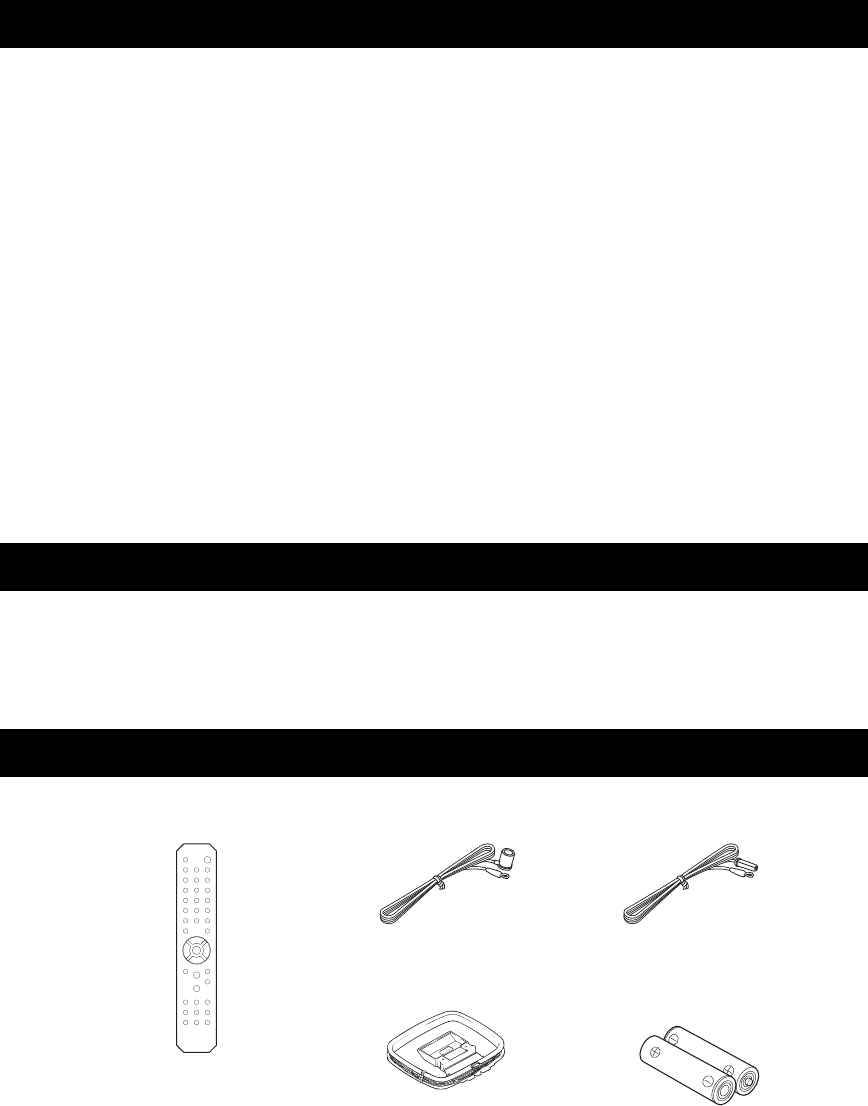
Please check that you received all of the following parts.
CONTENTS
USEFUL FEATURES
SUPPLIED ACCESSORIES
Remote control
AM antenna Batteries (x2)
(AA, R6, UM-3)
FM antenna
*One of the above is supplied depending on the region of purchase.
2 En
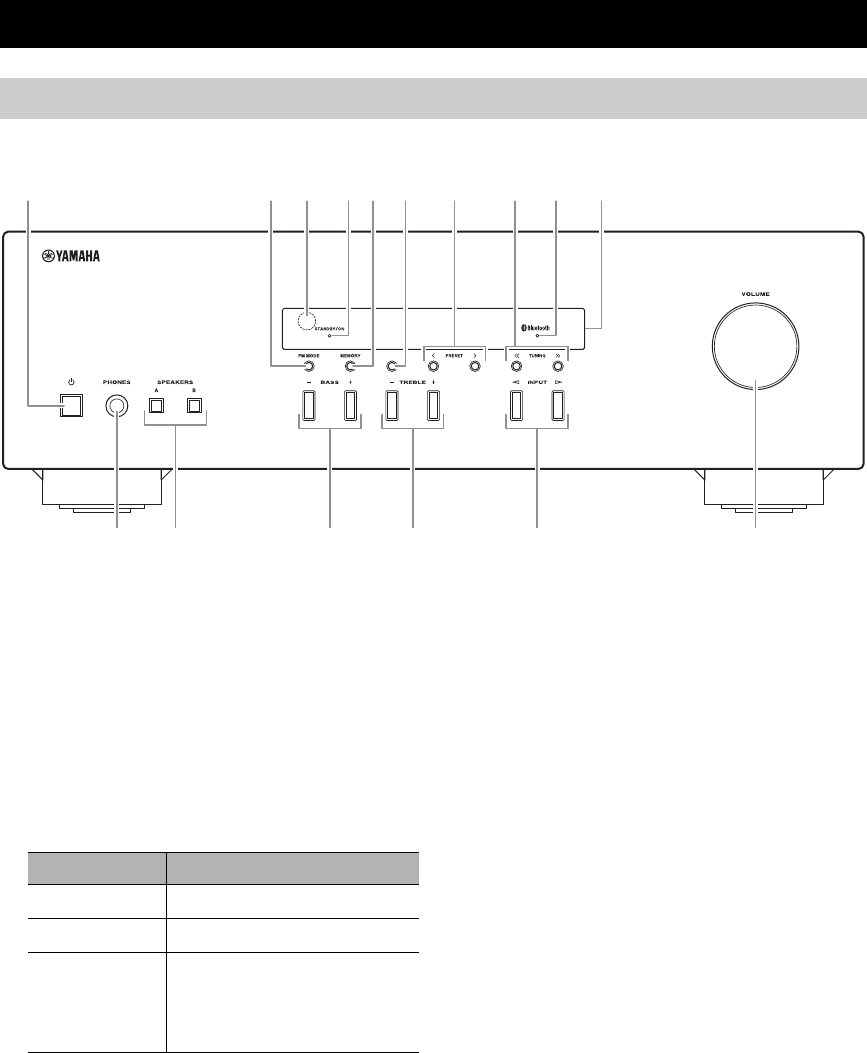
1A (power)
Turns this unit on, or sets it to standby mode.
2FM MODE
Changes the FM radio wave reception mode (stereo or
monaural) when TUNER is selected as the input
source (see page 15).
3Remote control sensor
Receives infrared signals from the remote control.
4STANDBY/ON indicator
5MEMORY
Stores the current radio station as a preset when
TUNER is selected as the input source (see page 16).
6BAND
Sets the radio tuner band when TUNER is selected as
the input source (see page 15).
7PRESET j / i
Selects a preset radio station when TUNER is selected
as the input source (see page 17).
8TUNING jj / ii
Selects the tuning frequency when TUNER is selected
as the input source (see page 15).
9Bluetooth indicator
Indicates the status of the connection with the
Bluetooth device (see page 13).
0Front panel display
Shows information about the operational status of this
unit (see page 4).
CONTROLS AND FUNCTIONS
Front panel
BAND
1254 9 03 6
ABF
C D E
7 8
Indicator Status
Brightly lit The power of this unit is “on”.
Dimly lit This unit is in “standby” mode.
Off The power of this unit is “off”.
To turn off this unit, disconnect
the power cable from an AC
wall outlet.

CONTROLS AND FUNCTIONS
3 En
APHONES jack
For connecting headphones.
y
Press SPEAKERS A/B so that the SP A/B indicators (see
page 4) turn off before you connect your headphones to the
PHONES jack.
BSPEAKERS A/B
Turns on or off the speaker set connected to the
SPEAKERS A and/or SPEAKERS B terminals on the
rear panel each time the corresponding button is
pressed (see page
12
).
CBASS –/+
Increases or decreases the low frequency response.
Control range: –10 dB to +10 dB
DTREBLE –/+
Increases or decreases the high frequency response.
Control range: –10 dB to +10 dB
EINPUT l / h
Selects the input source you want to listen to.
FVOLUME control
Increases or decreases the sound output level.
CONTROLS AND FUNCTIONS
4 En
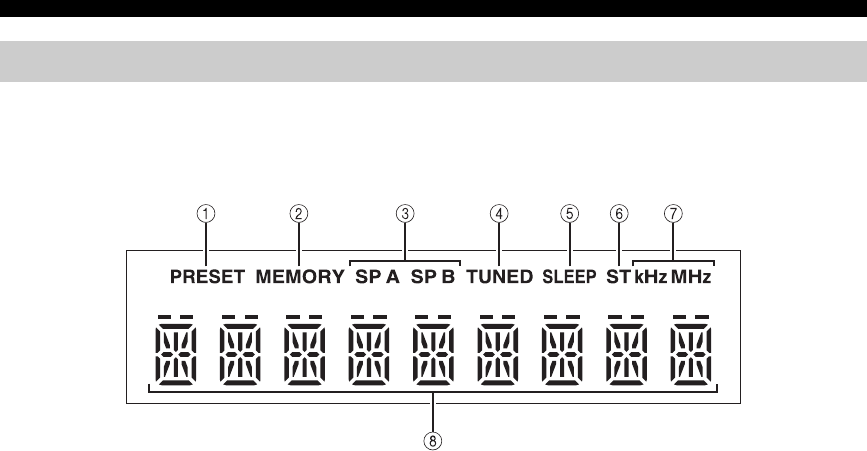
1PRESET indicator
Lights up or blinks when using the preset function (see
page 16).
2MEMORY indicator
Lights up or blinks when registering radio stations as
presets (see page 16).
3SP (SPEAKERS) A/B indicators
Light up according to the set of speakers selected.
Both indicators light up when both sets of speakers are
selected.
4TUNED indicator
Lights up when this unit is tuned in to an FM or AM
station with a strong signal.
5SLEEP indicator
Lights up when the sleep timer is turned on (see
page 12).
6ST indicator
Lights up when this unit is in stereo mode and tuning
in an FM station with a stereo broadcast.
7kHz/MHz indicators
Lights up according to the current broadcast
frequency.
kHz: AM
MHz: FM
8Multi-information display
Shows information when adjusting or changing
settings.
Front panel display
CONTROLS AND FUNCTIONS
5 En
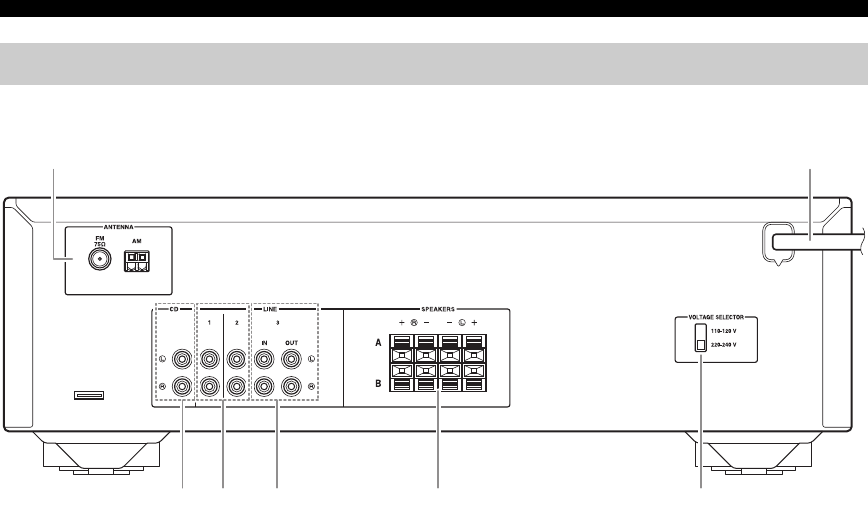
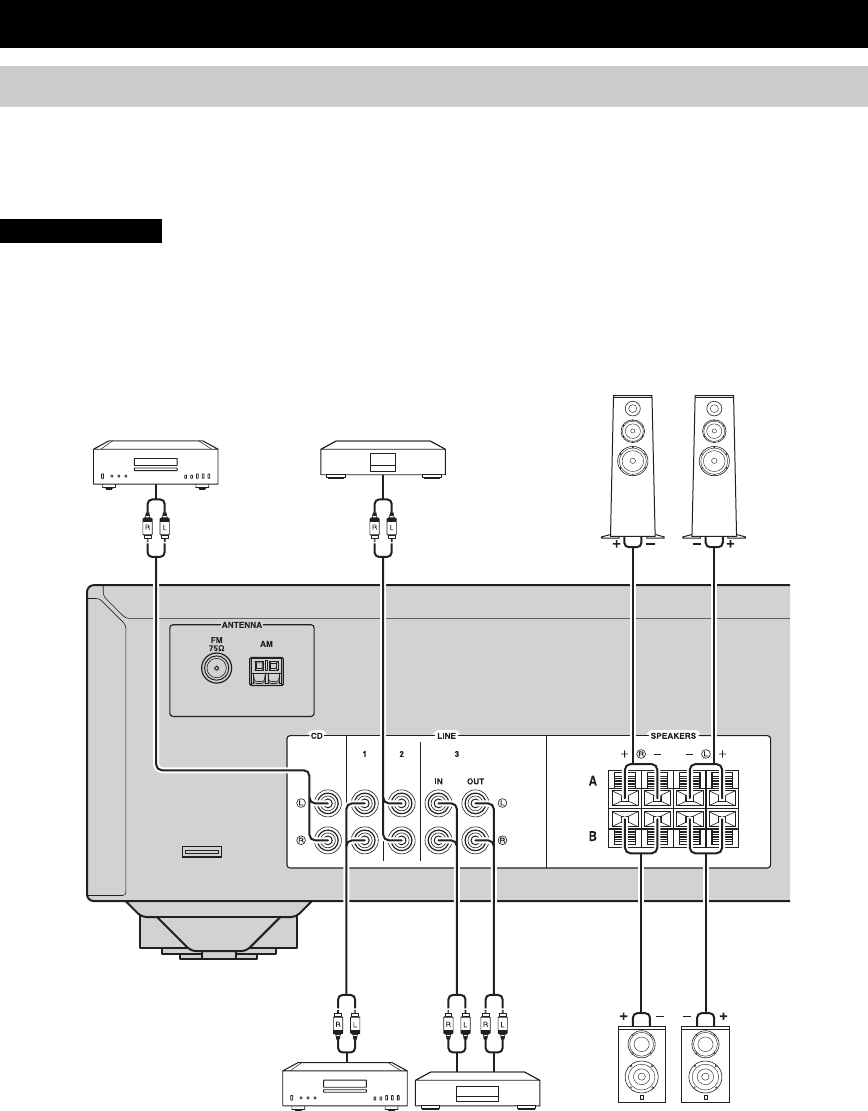
1ANTENNA terminals
Used to connect the radio antennas (see page 11).
2Power cable
For connecting this unit to an AC wall outlet (see
page 11).
3CD jacks
Used to connect a CD player (see page 9).
4LINE 1-2 jacks
Used to connect audio components (see page 9).
5LINE 3 jacks
IN jacks
Used to connect to audio output jacks of an audio
component (see page 9).
OUT jacks
Used to connect to audio input jacks of an audio
component (see page 9).
6SPEAKERS terminals
Used to connect speakers (see page 9).
7VOLTAGE SELECTOR
(Only for General model)
Rear panel
7634 5
21
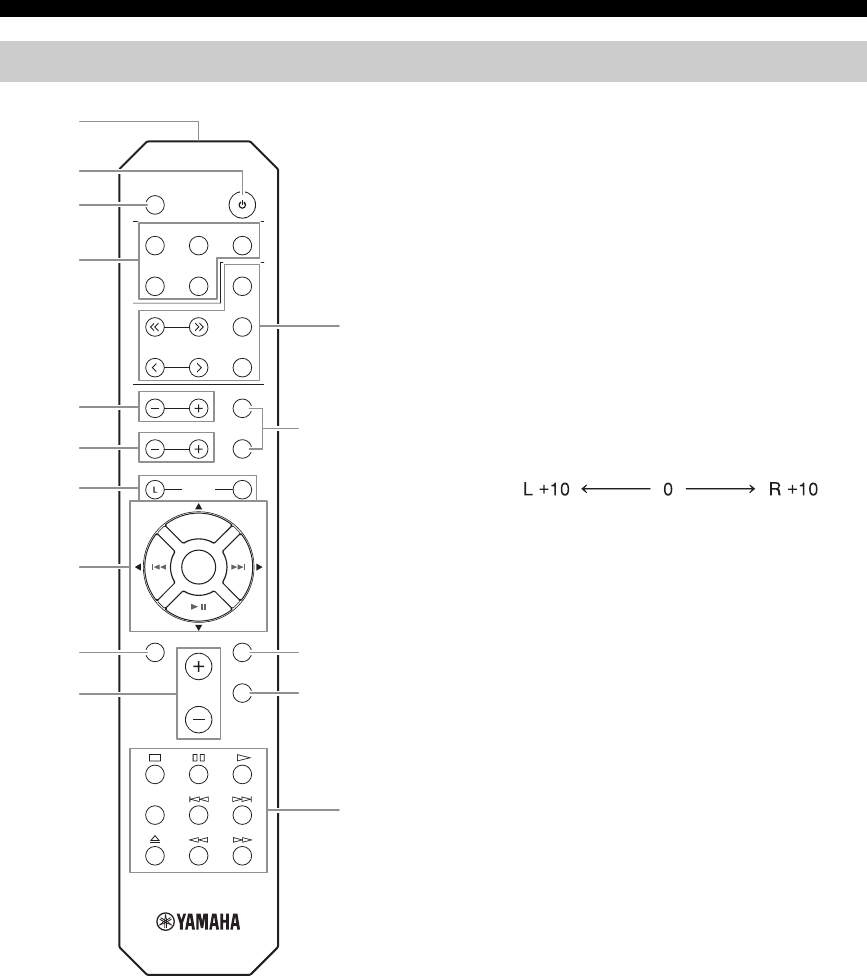
CONTROLS AND FUNCTIONS
6 En
■Common controls
The following parts and controls can be used no matter
which input source is selected.
1Infrared signal transmitter
Sends infrared signals.
2A (power)
Turns this unit on, or sets it to standby mode.
3SLEEP
Sets the sleep timer (see page 12).
4Input selector buttons
Select the input source you want to listen to.
y
The input source names correspond to the names of the
connection jacks on the rear panel.
5TREBLE –/+
Increases or decreases the high frequency response.
Control range: –10 dB to +10 dB
6BASS –/+
Increases or decreases the low frequency response.
Control range: –10 dB to +10 dB
7BALANCE L/R
Adjusts the sound output balance of the left and right
speakers to compensate for sound imbalances.
Control range:
8 / / / / ENTER
Selects and confirms items in the Option menu (see
page 19).
9MENU
Turns the Option menu on and off (see page 19).
0VOLUME +/–
Increases or decreases the sound output level.
ASPEAKERS A/B
Turns on or off the speaker set connected to the
SPEAKERS A and/or SPEAKERS B terminals on the
rear panel each time the corresponding button is
pressed (see page
12
).
BDIMMER
Select the brightness level of the front panel display
from 3 levels by pressing this button repeatedly.
y
• This setting is retained even if you turn off this unit.
• The default setting is the brightest.
CMUTE
Mutes the sound output. Press again to restore the
sound output to the previous volume level.
Remote control
SLEEP
LINE 1
CD TUNER
TUNING
PRESET
TREBLE
SPEAKERS
B
A
R
BASS
MENU
DIMMER
MUTE
VOLUME
DISC SKIP
BALANCE
BLUETOOTH
ENTER
MEMORY
INFO
BAND
LINE 2 LINE 3
1
2
3
9B
C
E
A
4
5
6
0
7
8
D
(+20 dB) (center) (+20 dB)
The opposite side of
channel is muted.
The opposite side of
channel is muted.

CONTROLS AND FUNCTIONS
7 En
■Radio function controls
The following buttons can be used when TUNER is
selected as the input source.
DTUNING jj / ii
Selects the tuning frequency (see page 15).
PRESET j / i
Selects a preset radio station (see page 17).
BAND
Switches the radio tuner band.
MEMORY
Stores the current radio station as a preset (see
page 16).
INFO
Only for Europe model:
Switches information shown on the front panel
display.
■Yamaha CD player controls
The following buttons can be used to control a Yamaha
CD player.
EYamaha CD player control buttons
sStops playback
ePauses playback
pStarts playback
DISC SKIP Skips to the next disc in a CD changer
bSkips backward
aSkips forward
Ejects the disc
wRewinds playback
fFast-forwards playback
Even when using a Yamaha CD player, certain components and
features may not be available. Refer to your component’s owner’s
manual for more information.
■Bluetooth controls
The following buttons can be used to control a Bluetooth
device.
8Bluetooth control buttons
BLUETOOTH Switches the audio source to
Bluetooth
I Skips backward
ISkips forward
II Starts/pauses playback
Yamaha does not guarantee the operation of all Bluetooth devices.
Note
Note
CONTROLS AND FUNCTIONS
8 En
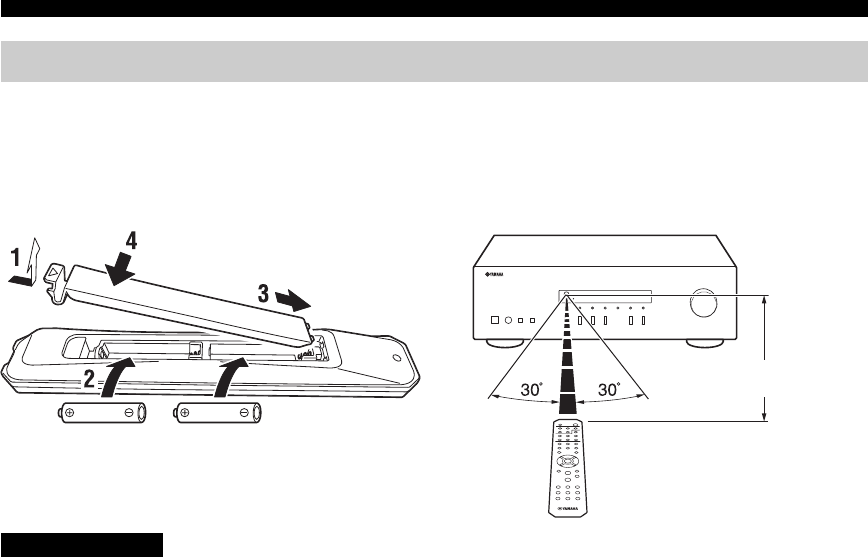
■Installing batteries
Change all batteries if you notice the operation range of
the remote control narrows. Before inserting new
batteries, wipe the battery compartment clean.
■Operation range
Point the remote control at the remote control sensor on
this unit and remain within the operating range shown
below. The area between the remote control and this unit
must be clear of large obstacles.
• Be careful not to drop the remote control.
• If the batteries run out, immediately remove them from the remote control to prevent an explosion or acid leak.
• If you find leaking batteries, discard the batteries immediately, taking care not to touch the leaked material. If the leaked material
comes into contact with your skin or gets into your eyes or mouth, rinse it away immediately and consult a doctor. Clean the battery
compartment thoroughly before installing new batteries.
• Do not use old batteries together with new ones. This may shorten the life of the new batteries or cause old batteries to leak.
• Do not use different types of batteries (such as alkaline and manganese batteries) together. Batteries that look the same may have a
different specification.
• Dispose of batteries according to your regional regulations.
• Keep the batteries in a location out of reach of children.
Batteries can be dangerous if a child were to put in his or her mouth.
• If you plan not to use this unit for a long period of time, remove the batteries from this unit. Otherwise, the batteries will wear out,
possibly resulting in a leakage of battery liquid that may damage this unit.
Using the remote control
AA, R6, UM-3 batteries
Approximately
6 m (20 ft)
Remote control
CAUTION
9 En
Make sure to connect L (left) to L, R (right) to R, “+” to “+” and “–” to “–”. If the connections are faulty, no sound will
be heard from the speakers, and if the polarity of the speaker connections is incorrect, the sound will be unnatural and
lack bass. Refer to the owner’s manual for each of your components.
Make sure to use RCA cables to connect audio components.
• Do not connect this unit or other components to the main power until all connections between components are
complete.
• Do not let bare speaker wires touch each other or any metal part of this unit. This could damage this unit and/or the
speakers.
CONNECTIONS
Connecting speakers and source components
CAUTION
Audio
out
CD recorder,
etc.
DVD player,
etc.
Audio
out
Left
Audio
out
Audio
out
Audio
in
Speakers B
Tape deck, etc.
CD player
Speakers A
Right
LeftRight
10 En
CONNECTIONS
■OUT jacks
• The OUT jacks output audio signals of the currently
selected input (except when LINE 3 is selected).
• Volume level, tone control and balance settings do not
affect the OUT jacks.
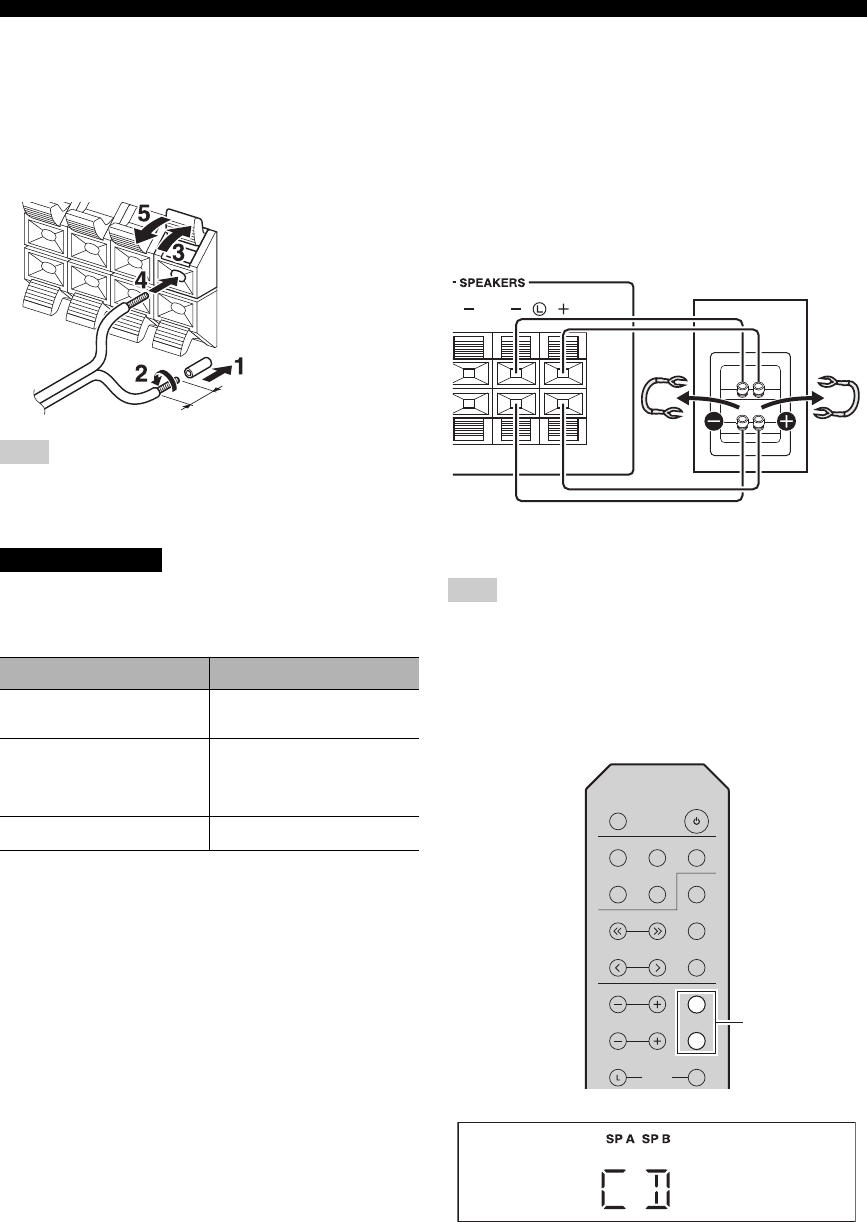
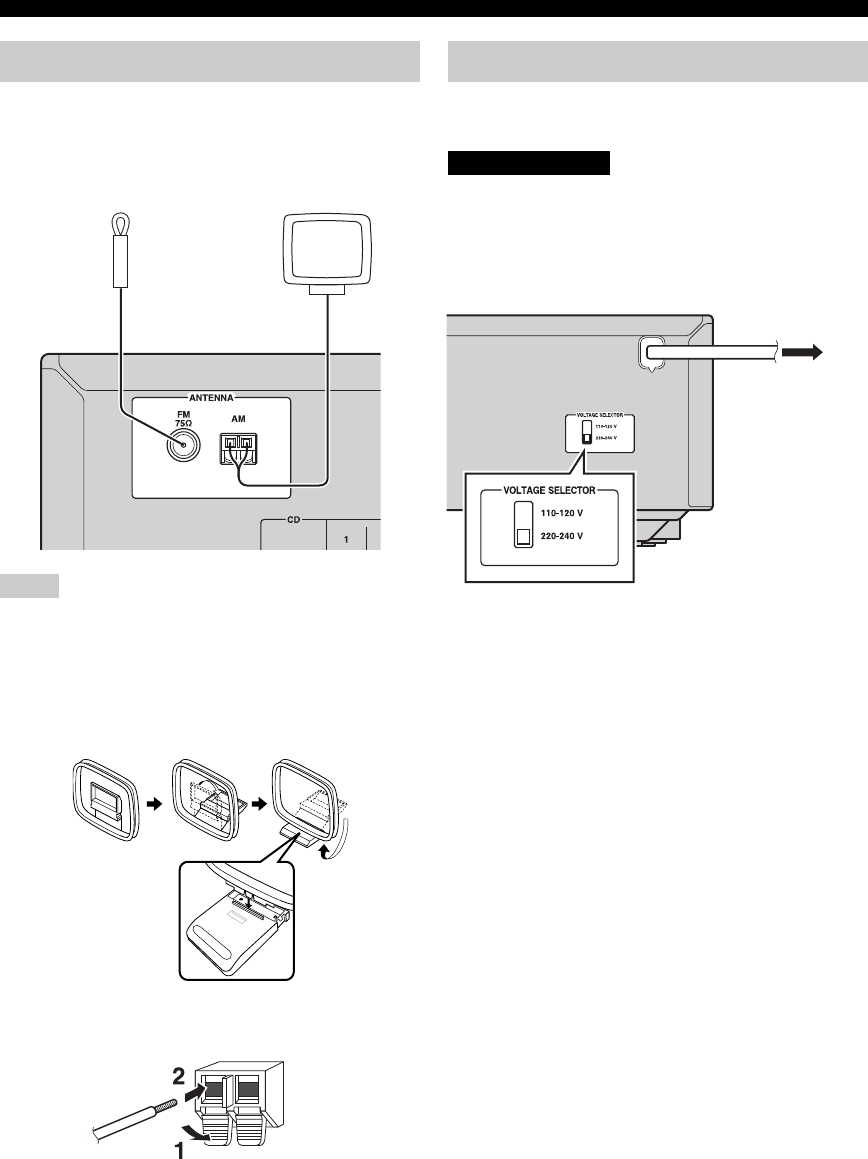
■Connecting speaker cables
When inserting speaker cables into the speaker terminals, insert
only the bare speaker wire. If insulated cable is inserted, the
connection may be poor and sound may not be heard.
Connect the speakers with an impedance as shown below.
If you connect speakers with an excessively low
impedance, this unit may overheat.
■Bi-wire connection
Bi-wire connection separates the woofer from the
combined midrange and tweeter section.
A bi-wire compatible speaker has four binding post
terminals. These two sets of terminals allow the speaker to
be split into two independent sections. With these
connections, the mid and high frequency drivers are
connected to one set of terminals and the low frequency
driver to another set of terminals.
Connect the other speaker to the other set of terminals in
the same way.
When making bi-wire connections, remove the shorting bridges
or cables on the speaker.
y
To use the bi-wire connections, press SPEAKERS A and
SPEAKERS B so that both SP A and B light up on the front panel
display.
Note
CAUTION
Speaker connection Speaker impedance
SPEAKERS A or
SPEAKERS B
8 or higher
SPEAKERS A and
SPEAKERS B
16 or higher
(except for North
America model)
Bi-wiring 8 or higher
Remove approximately
10 mm (3/8 in) of
insulation from the end of
each speaker cable.
Note
Rear panel
Speaker
SLEEP
LINE 1
CD TUNER
TUNING
PRESET
TREBLE
SPEAKERS
R
BASS
BALANCE
MEMORY
INFO
BAND
LINE 2 LINE 3
B
A
B
A
SPEAKERS A/B
11 En
CONNECTIONS
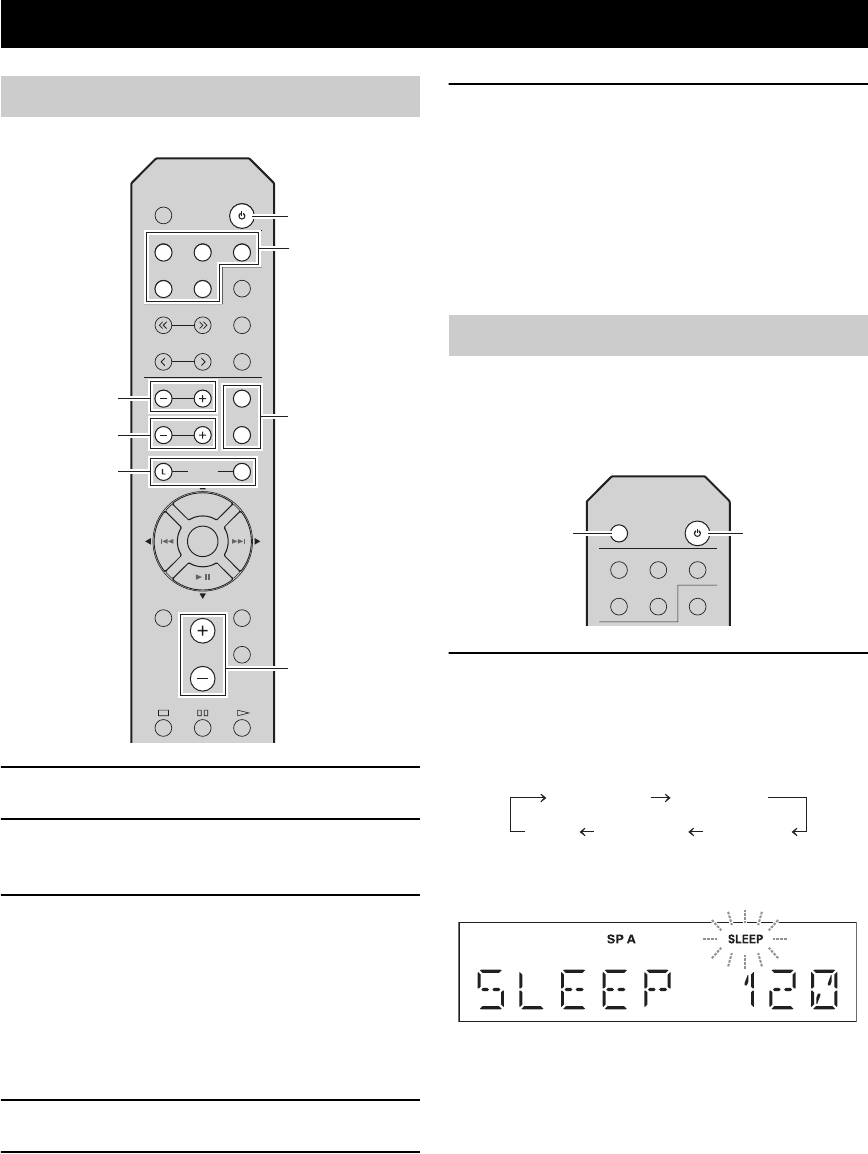
Connect the supplied FM/AM antenna to this unit.
Fix the end of the FM antenna to a wall, and place the AM
antenna.
• If you experience poor reception quality, install an outdoor
antenna.
• Unwind only the length of cable needed from the AM antenna
unit.
• The wires of the AM antenna have no polarity.
■Assembling the AM antenna
■Connecting the wire of the AM antenna
Plug the power cable into an AC wall outlet after all other
connections are complete.
Only for General model:
Before connecting the power cable, make sure you set
VOLTAGE SELECTOR of this unit according to your
local voltage. Improper setting of VOLTAGE SELECTOR
may cause fire and damage to this unit.
Connecting the FM/AM antennas
Notes
FM antenna AM antenna
Connecting power cable
CAUTION
To the AC wall
outlet with the
power cable
12 En
1Press A (power) to turn on this unit.
2Press one of the Input selector buttons to
select the desired input source.
3Press SPEAKERS A and/or SPEAKERS B to
select the desired speaker(s).
y
• When one set of speakers is connected using bi-wire
connections, or when using two sets of speakers
simultaneously (A and B), make sure SP A and SP B are
displayed on the front panel display.
• When listening with headphones, turn off the speakers.
4Play the source.
5Press VOLUME +/– to adjust the sound
output level.
y
You can adjust the tonal quality by using BASS –/+ and
TREBLE –/+, and the left/right sound balance of speakers
by using BALANCE L/R (see page 6).
6When finished listening, press A (power) to
set this unit to standby mode.
Press A (power) to turn this unit on again.
y
• You can also use the buttons or knobs on the front panel if
they have the same or similar names as those on the
remote control.
• For recording, see page 5.
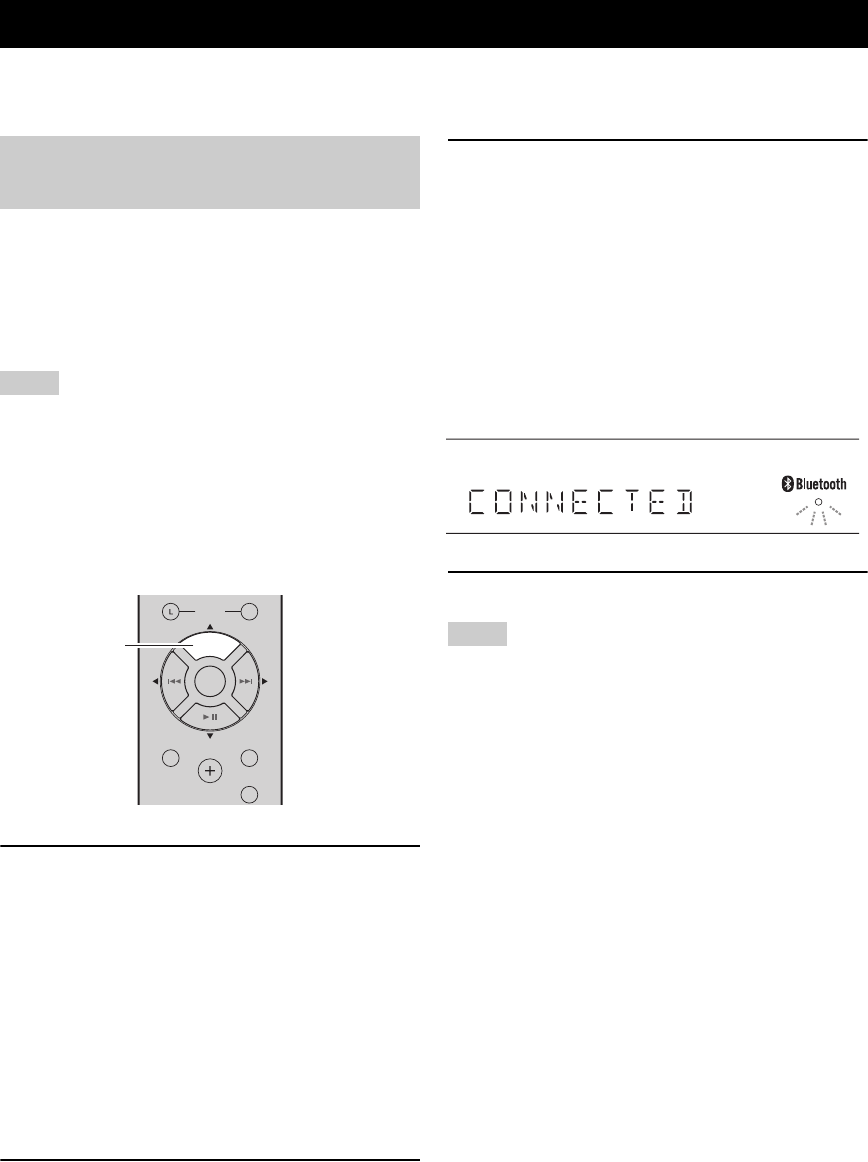
Use this feature to automatically set this unit to standby
mode after a certain amount of time. The sleep timer is
useful when you are going to sleep while this unit is
playing or recording a source.
Press SLEEP repeatedly to set the time duration
until the unit enters standby mode.
Each time you press SLEEP, the time duration indicated
on the front panel display changes cyclically as shown
below.
The SLEEP indicator blinks while setting the amount of
time for the sleep timer.
If the sleep timer is set, the SLEEP indicator on the front
panel display lights up.
y
To cancel the sleep timer, do one of the following:
– Select “SLEEP OFF”.
– Press A (power) to set this unit to standby mode.
PLAYBACK
Playing a source
SLEEP
LINE 1
CD TUNER
TUNING
PRESET
TREBLE
SPEAKERS
R
BASS
MENU
DIMMER
MUTE
VOLUME
BALANCE
BLUETOOTH
ENTER
MEMORY
INFO
BAND
LINE 2 LINE 3
B
A
R
B
A
A (power)
Input selector
buttons
SPEAKERS A/B
VOLUME +/–
TREBLE –/+
BASS –/+
BALANCE L/R
Using the sleep timer
SLEEP
LINE 1
CD TUNER
BAND
LINE 2 LINE 3
A (power)
SLEEP
120 min 90 min
60 min30 minoff
13 En
This unit provides Bluetooth functionality. You can enjoy wireless music playback from your Bluetooth device (mobile
phone, digital audio player, etc.). Please also refer to the owner’s manual of your Bluetooth device.
You’ll need to perform the pairing operation the first time
you use your Bluetooth device with this unit, or if the
pairing settings have been deleted. Pairing is an operation
that registers the Bluetooth device with this unit. If pairing
is not successful, refer to the item “Bluetooth” in
“TROUBLESHOOTING” (see page 21).
• Yamaha does not guarantee all connections between this unit
and Bluetooth device.
• This unit can be paired with up to 8 Bluetooth devices. When
pairing with the 9th device has succeeded, pairing data for the
device with the oldest connection date will be deleted.
• While connecting to the Bluetooth device and perform the
pairing with another device, the current Bluetooth connection
will be canceled.
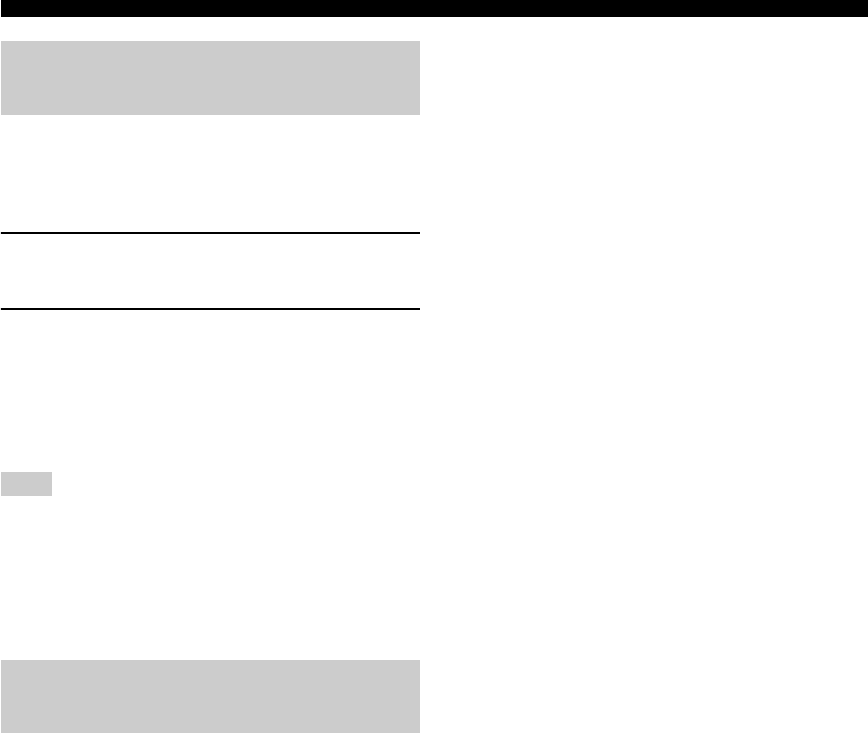
1Press the BLUETOOTH source button for
more than 3 seconds to enter pairing mode.
• Pairing mode lasts for 5 minutes.
• In pairing mode, the front panel display of this unit
will indicate “PAIRING,” and the Bluetooth
indicator will blink.
y
You can also enter pairing mode in either of the following
two ways:
– Press and hold down INPUT l or h on this unit for
three seconds.
– Select “PAIRING” from the Option menu, and then
press ENTER (see page 19).
2Turn on the Bluetooth function on the
Bluetooth device.
For details refer to the owner’s manual of the
Bluetooth device.
3From the Bluetooth connection list of the
Bluetooth device, choose this unit (R-S202
Yamaha ).
• When pairing has been completed, the front panel
display of this unit will indicate “COMPLETED”.
• When the Bluetooth device is connected, the front
panel display of this unit will indicate
“CONNECTED” and the Bluetooth indicator will
light up.
y
If you are asked to enter a password, enter the numerals
“0000”.
4Play back music from the Bluetooth device.
• Take care that the volume setting of this unit is not too high. We
recommend that you adjust the volume on the Bluetooth device.
• If Bluetooth is selected as the audio source, this unit will
automatically turn off when 20 minutes have elapsed without
any Bluetooth connection nor any operation performed.
y
You can use the Bluetooth control buttons on the remote control
to control playback (see page 7).
LISTENING TO MUSIC FROM YOUR Bluetooth DEVICE
Playing back from your Bluetooth
device
Notes
R
MENU
DIMMER
MUTE
VOLUME
BALANCE
BLUETOOTH
ENTER
BLUETOOTH
BLUETOOTH
Notes
14 En
LISTENING TO MUSIC FROM YOUR Bluetooth DEVICE
Once pairing has been completed, connecting a Bluetooth
will be easy the next time.
■Connecting from the Bluetooth device
1In the Bluetooth settings of the Bluetooth
device, turn Bluetooth on.
2From the Bluetooth connection list of the
Bluetooth device, choose this unit (R-S202
Yamaha).
The Bluetooth connection will be established, and the
front panel display of this unit will indicate
“CONNECTED”.
Bluetooth
connections c
annot be established from the
Bluetooth
device when this unit is in standby.
y
You can use the Bluetooth control buttons on the remote control
to control playback (see page 7).
If any of the following operations are performed while a
Bluetooth connection is being used, the Bluetooth
connection will be disconnected.
– Switch the audio source other than Bluetooth.
– Press A (power) to set this unit to standby mode.
– Turn off the Bluetooth setting of the Bluetooth device.
Connecting an already-paired
device via Bluetooth
Note
Disconnecting a Bluetooth
connection
15 En
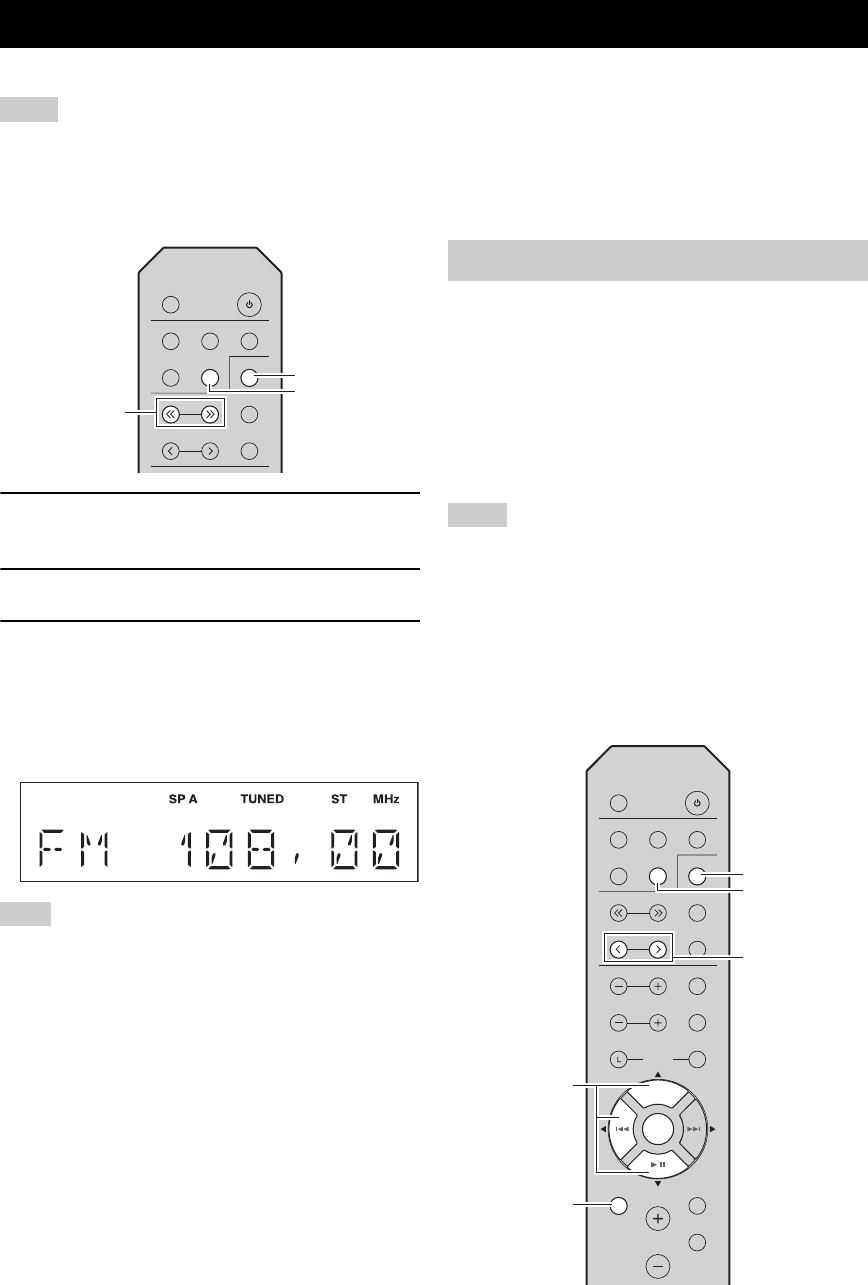
You can tune in to a radio station by specifying its frequency or selecting from registered radio stations.
• The radio frequencies differ depending on the country or region where this unit is being used. Front panel display illustrations shown
in this section are based on Europe model.
• Only for Asia and General models:
Be sure to set the tuner frequency step according to the frequency spacing in your area before you tune in to a radio station (see
page 19).
1Press TUNER to select the tuner as the input
source.
2Press BAND to select the FM/AM band.
3Press and hold TUNING jj / ii to begin
tuning.
Press ii to tune in to a higher frequency.
Press jj to tune in to a lower frequency.
When this unit tunes in to a station, the TUNED
indicator lights up on the front panel display.
If the tuning search does not stop at the desired station because
the station signals are weak, press TUNING jj / ii repeatedly to
tune in to the desired station.
y
You can also use the buttons on the front panel if they have the
same or similar names as those on the remote control.
■Improving FM reception
If the signal from the station is weak and the sound quality
is not good, set the FM band reception mode to monaural
mode to improve reception.
Front panel
Press FM MODE, and then make sure the ST indicator is
turned off (see page 4).
Remote control
Enter FM MODE from the Option menu to select MONO
(monaural mode) (see page 19).
You can register up to 40 radio stations as presets. Once
you have registered stations, you can easily tune in to
them by recalling the presets. You can automatically
register FM stations that have strong signals. If the FM
stations you want to store have weak signals, you can
register them manually (see page 16).
■Presetting stations automatically
(Only for FM stations)
• If a station is registered to a preset number that already has a
station registered to it, the previously registered station is
overwritten.
• Only for Europe model:
Only Radio Data System broadcasting stations can be preset
automatically.
y
FM stations registered as presets using the automatic preset
registration feature will be heard in stereo.
FM/AM TUNING
Notes
Note
SLEEP
LINE 1
CD TUNER
TUNING
PRESET
MEMORY
INFO
BAND
LINE 2 LINE 3
TUNING jj / ii
TUNER
BAND
Using preset functions
Notes
SLEEP
LINE 1
CD TUNER
TUNING
PRESET
TREBLE
SPEAKERS
R
BASS
MENU
DIMMER
MUTE
VOLUME
BALANCE
BLUETOOTH
ENTER
MEMORY
INFO
BAND
LINE 2 LINE 3
B
A
BLUETOOTH
ENTER
PRESET j / i
TUNER
/ /
ENTER
MENU
BAND
16 En
FM/AM TUNING
1Press TUNER to select the tuner as the input
source.
2Press BAND to select the FM band.
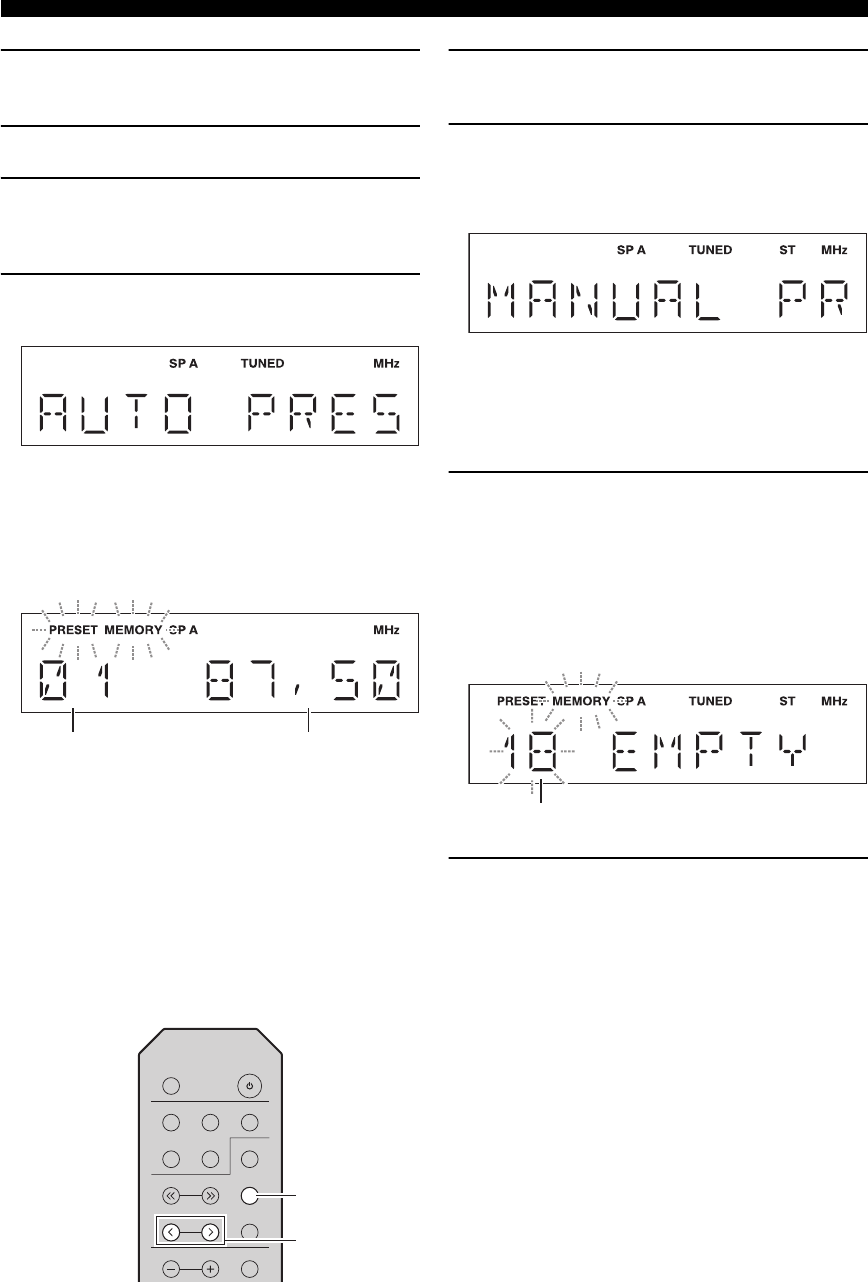
3Press MENU to enter the Option menu.
The Option menu for TUNER is displayed (see
page 19).
4Press / to select “AUTO PRESET”, and
then press ENTER.
This unit starts scanning the FM band about
3 seconds later from the lowest frequency upwards.
y
• Before scanning begins, you can specify the first preset
number to be used by pressing PRESET j / i or / .
• To cancel scanning, press .
When a station to preset is found, information is
displayed on the front panel display as shown in the
illustration above.
When scanning is complete, “FINISH” is displayed,
and then the display returns to the Option menu.
To return the display to the original state, press
MENU.
■Presetting stations manually
You can manually register the desired radio stations.
1Tune in to the desired FM/AM station.
See page 15 for tuning instructions.
2Press MEMORY.
“MANUAL PRESET” is displayed briefly on the
front panel display, and then the preset number to
which the station will be registered is displayed.
y
By holding down MEMORY for more than 2 seconds, you
can skip the following steps and automatically register the
selected station to an empty preset number (i.e., the preset
number following the last preset number used).
3Press PRESET j / i to select the preset
number to which the station will be
registered.
When you select a preset number to which no station
is registered, “EMPTY” is displayed. When you
select a preset number to which a station has already
been registered, the frequency of the station is
displayed.
4Press MEMORY.
When registration is complete, the display returns to
the original state.
y
• To cancel registration, switch input or band or do not perform
any operations for about 30 seconds.
• You can also preset stations manually by pressing buttons on
the front panel with the same names as remote control.
Preset number Frequency
SLEEP
LINE 1
CD TUNER
TUNING
PRESET
TREBLE
MEMORY
INFO
BAND
LINE 2 LINE 3
A
PRESET j / i
MEMORY
Preset number
17 En
FM/AM TUNING
■Recalling a preset station
You can recall preset stations that were registered by
presetting automatically or manually.
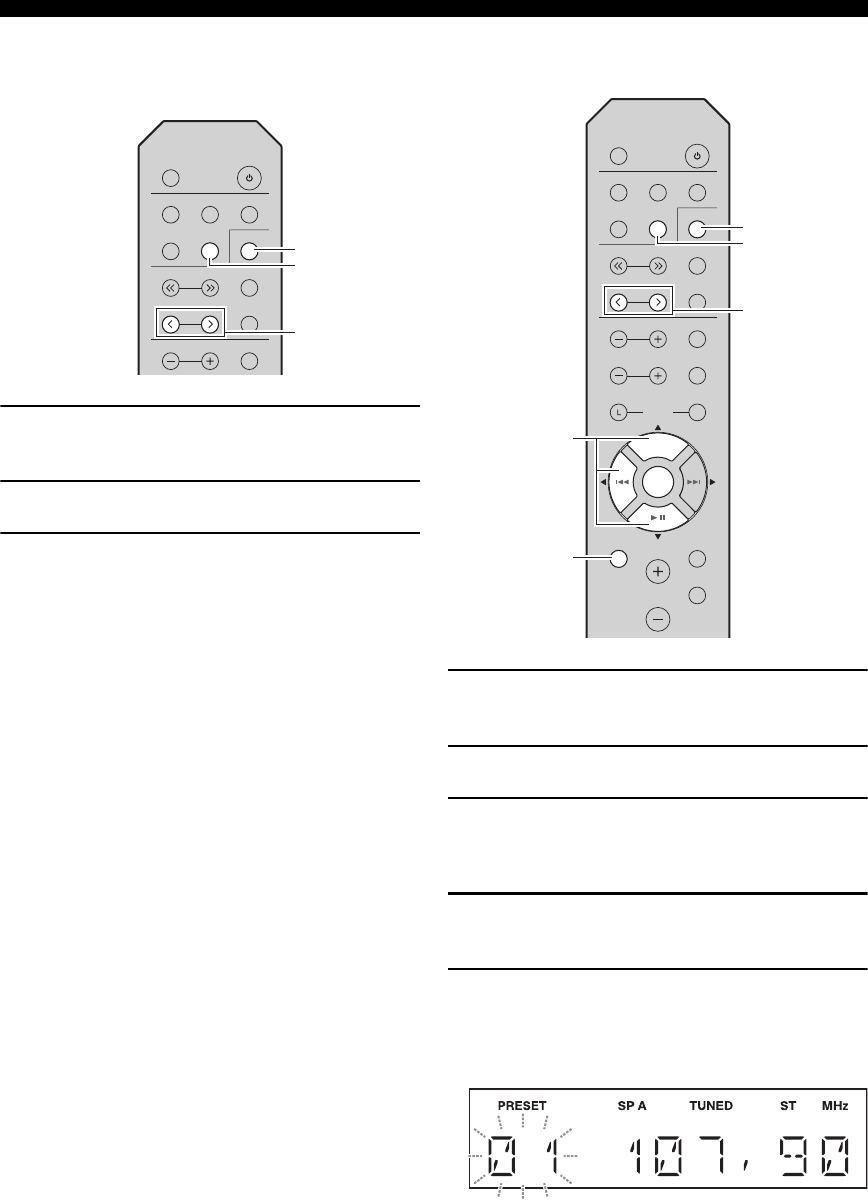
1Press TUNER to select the tuner as the input
source.
2Press BAND to select the FM/AM band.
3Press PRESET j / i to select a preset
number.
y
• Preset numbers to which no stations are registered are
skipped.
• If this unit does not have any preset stations, “NO
PRESET” is displayed.
• If the station signals that you want to recall are weak, try
tuning in to a station manually.
• You can also recall a preset station by pressing
PRESET j/i on the front panel.
■Clearing a preset station
Follow the steps below to clear a preset station.
1Press TUNER to select the tuner as the input
source.
2Press BAND to select the FM/AM band.
3Press MENU to enter the Option menu.
The Option menu for TUNER is displayed (see
page 19).
4Press / to select “CLEAR PRESET”, and
then press ENTER.
5Select the desired preset station number by
pressing / repeatedly.
The selected preset number blinks on the front panel
display.
y
• You can also use PRESET j / i instead.
• To cancel clearing the preset station, press or leave this
unit without any operations for about 30 seconds.
SLEEP
LINE 1
CD TUNER
TUNING
PRESET
TREBLE
MEMORY
INFO
BAND
LINE 2 LINE 3
A
PRESET j / i
TUNER
BAND
SLEEP
LINE 1
CD TUNER
TUNING
PRESET
TREBLE
SPEAKERS
R
BASS
MENU
DIMMER
MUTE
VOLUME
BALANCE
BLUETOOTH
ENTER
MEMORY
INFO
BAND
LINE 2 LINE 3
B
A
BLUETOOTH
ENTER
PRESET j / i
TUNER
/ /
ENTER
MENU
BAND
18 En
FM/AM TUNING
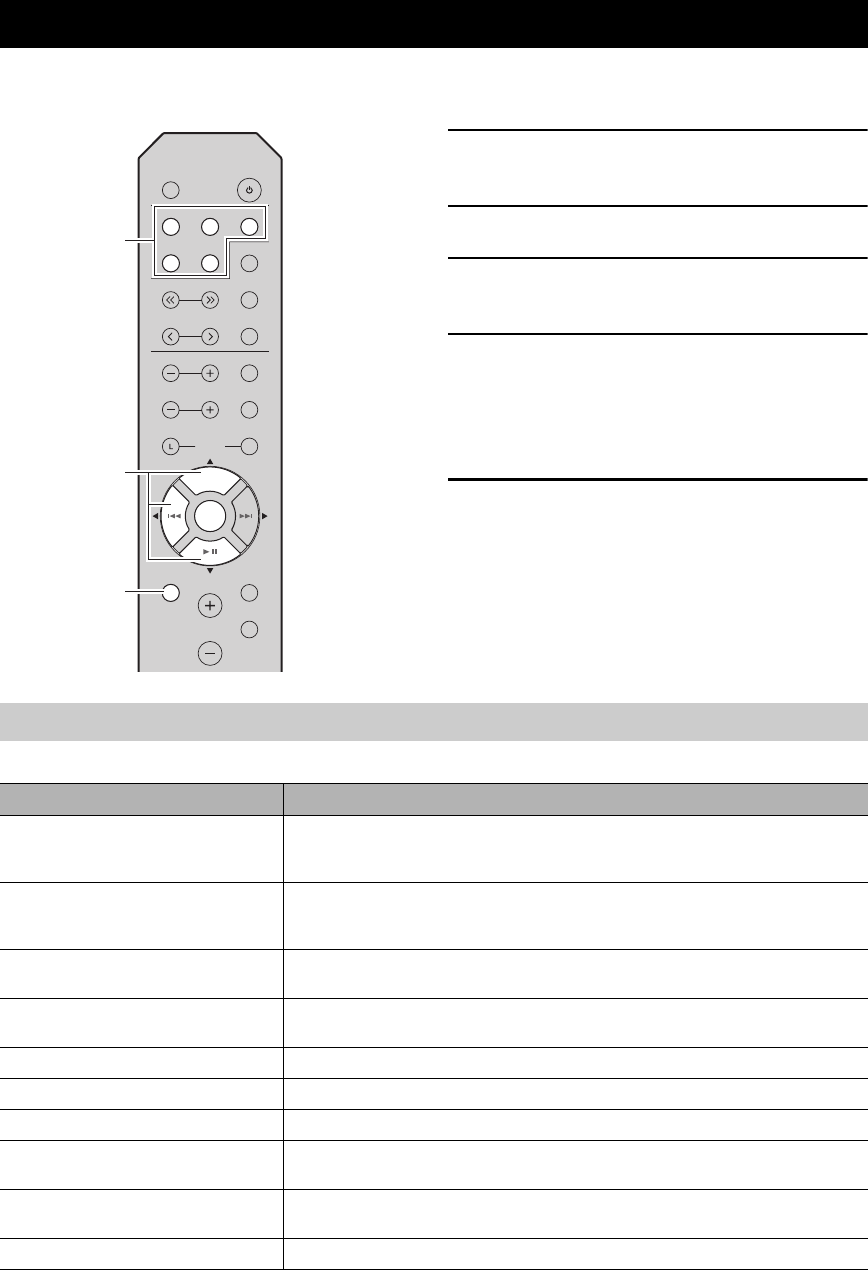
6Press ENTER again to confirm.
“CLEARED” is displayed on the front panel display.
Then, another preset station is shown on the front
panel display. When there is no more preset station,
“NO PRESET” is displayed, and then the display
returns to the Option menu.
To return the display to the original state, press
MENU.
■Clearing all preset stations
Follow the steps below to clear all preset stations.
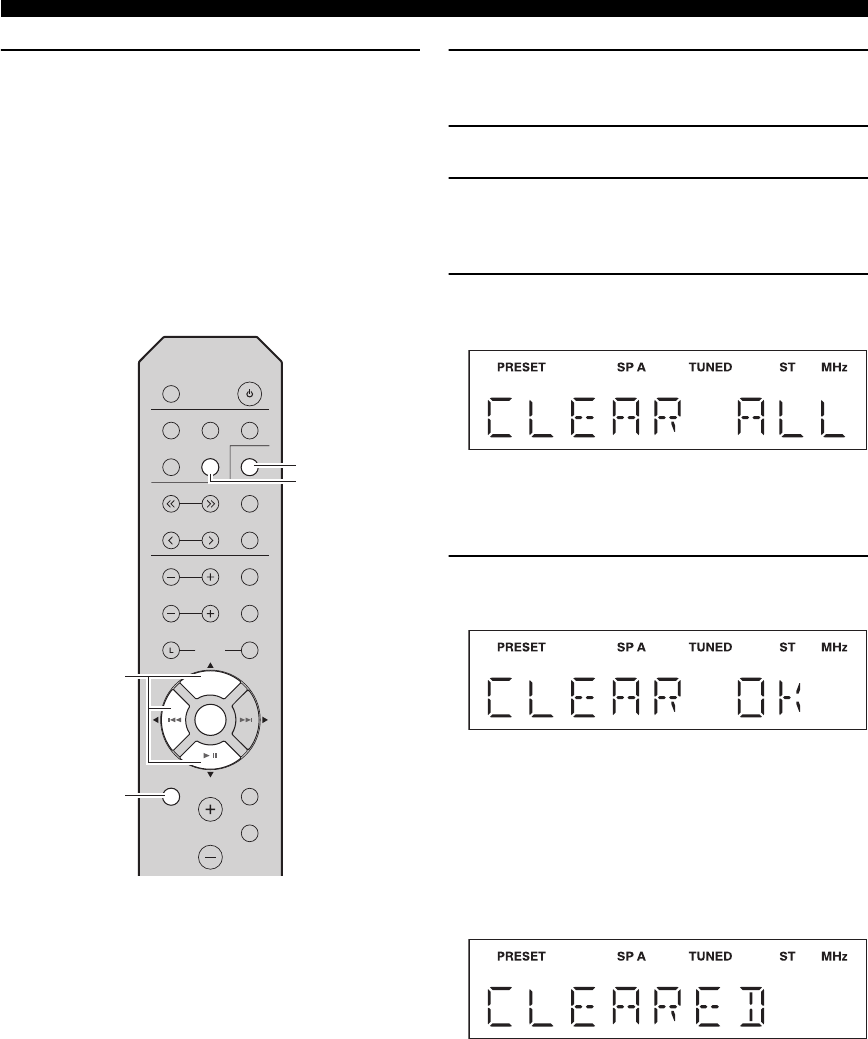
1Press TUNER to select the tuner as the input
source.
2Press BAND to select the FM/AM band.
3Press MENU to enter the Option menu.
The Option menu for TUNER is displayed (see
page 19).
4Press / to select “CLEAR ALL PRESET”,
and then press ENTER.
y
To cancel the operation and return to the Option menu,
press .
5Press / to select “CLEAR OK”, and then
press ENTER.
y
To cancel without clearing the presets, select “CLEAR NO”.
When all presets have been cleared, “CLEARED” is
displayed, and then the display returns to the Option
menu.
To return the display to the original state, press
MENU.
SLEEP
LINE 1
CD TUNER
TUNING
PRESET
TREBLE
SPEAKERS
R
BASS
MENU
DIMMER
MUTE
VOLUME
BALANCE
BLUETOOTH
ENTER
MEMORY
INFO
BAND
LINE 2 LINE 3
B
A
BLUETOOTH
ENTER
TUNER
/ /
ENTER
MENU
BAND
19 En
The Option menu allows you to configure various settings for each input source and recall those settings automatically
when an input source is selected.
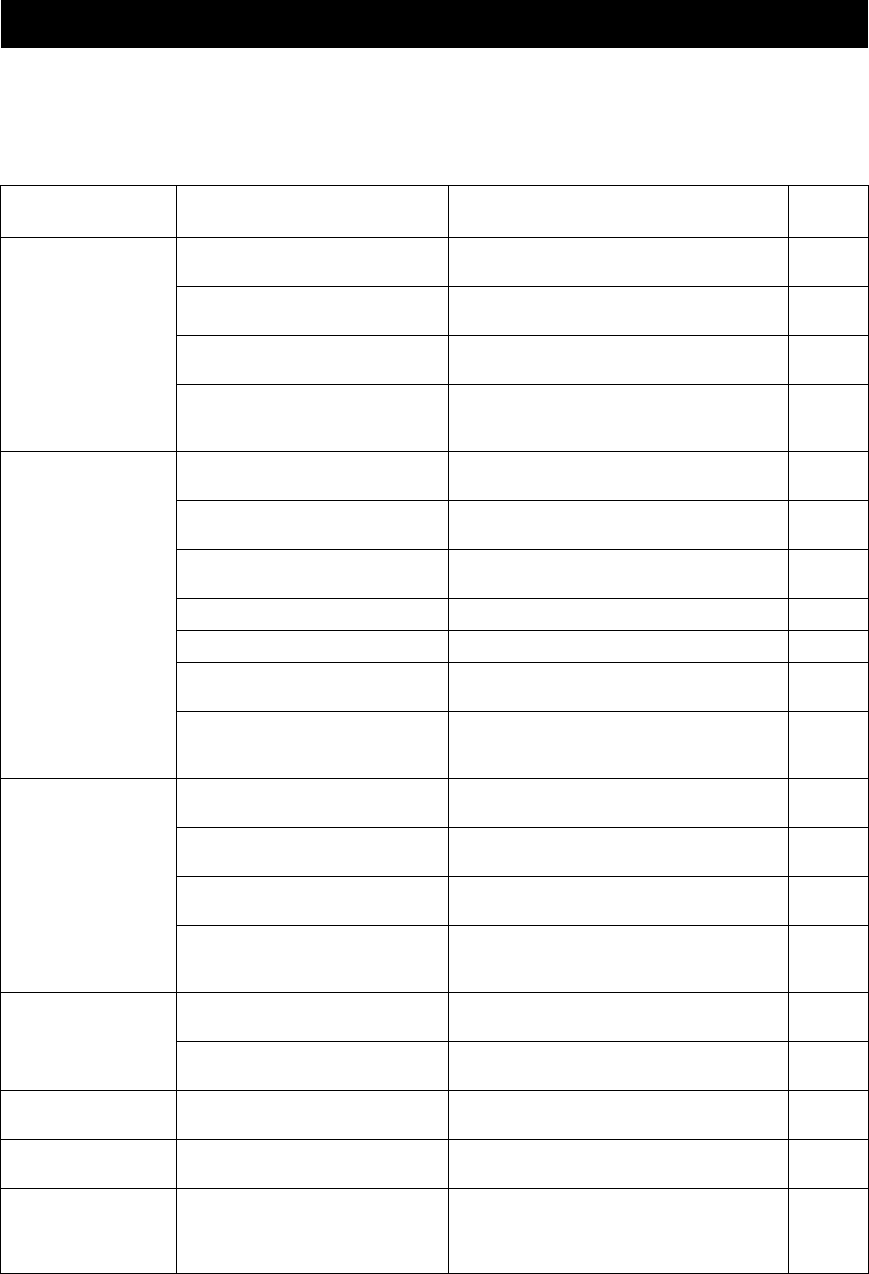
1Press one of the Input selector buttons to
select the desired input source.
2Press MENU.
3Press / to select the desired menu item,
and then press ENTER.
4Press / to change the settings, and then
press ENTER.
y
To return to the screen where you can select menu items,
press .
5To exit the Option menu, press MENU.
Available menu items vary depending on the selected input source.
y
The default settings are marked with “*”.
SETTING THE OPTION MENU FOR EACH INPUT SOURCE
SLEEP
LINE 1
CD TUNER
TUNING
PRESET
TREBLE
SPEAKERS
R
BASS
MENU
DIMMER
MUTE
VOLUME
BALANCE
BLUETOOTH
ENTER
MEMORY
INFO
BAND
LINE 2 LINE 3
B
A
BLUETOOTH
ENTER
Input selector
buttons
MENU
/ /
ENTER
Option menu items
Menu item Description
MAX VOLUME (MAX VOL) Sets the maximum volume level so that the volume will not be accidentally increased above a
certain level.
Adjustable range: 01 to 99, MAX*
INITIAL VOLUME (INIT VOL) Sets the volume at the time this unit is turned on. When this parameter is set to “OFF”, the
volume level used when this unit was set to standby is applied.
Adjustable range: OFF*, MUTE, 01 to 99, MAX
TUNER STEP (TUNER STP)
Only for Asia and General models
Sets tuner frequency step.
Choices: AM10/FM100, AM9/FM50*
FM MODE Changes the FM radio wave reception mode (see page 15).
Choices: STEREO*, MONO
AUTO PRESET (A, PREST) Automatically detects FM radio stations and registers them as preset stations (see page 15).
CLEAR PRESET (C, PREST) Clears a selected preset station (see page 17).
CLEAR ALL PRESET (C,A, PREST) Clears all preset stations (see page 18).
AUTO POWER STANDBY
(AUTO STBY)
Sets this unit to standby mode automatically if no operation is performed in the specified time.
Choices: OFF, 2H, 4H, 8H*, 12H
BLUETOOTH Enables or disables the Bluetooth function.
Choices: OFF, ON*
PAIRING Enters pairing mode (see page 13).
20 En
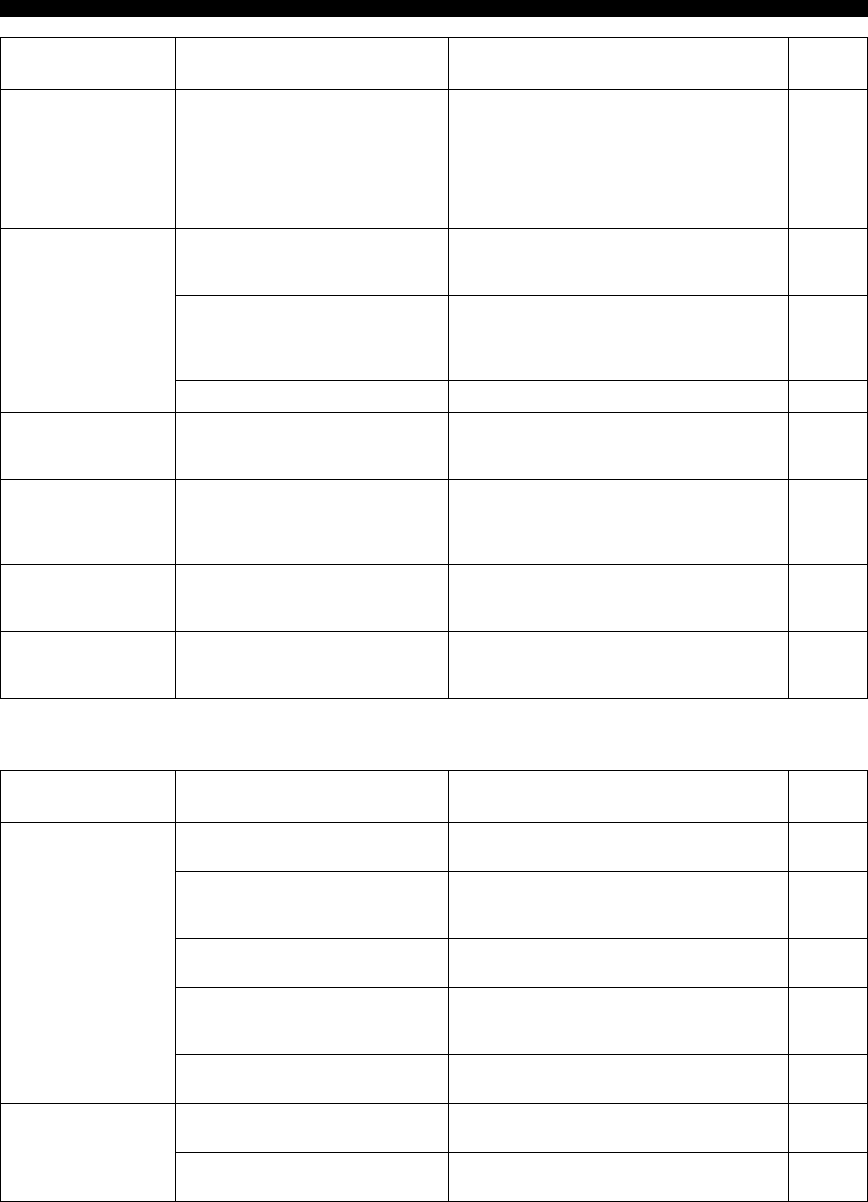
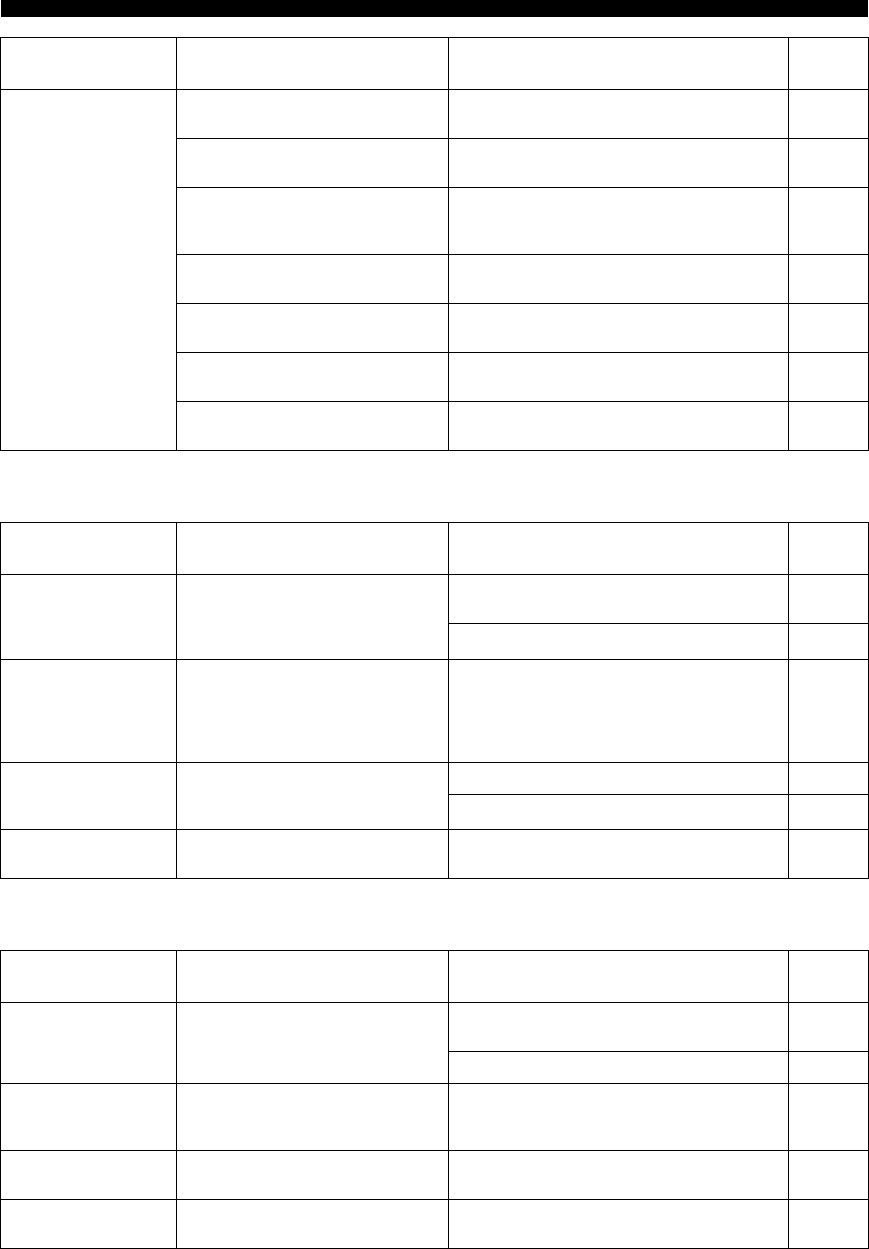
Refer to the chart below if this unit does not function properly. If the problem you are experiencing is not listed below or
if the instructions below do not help, set this unit to standby mode, disconnect the power cable, and then contact the
nearest authorized Yamaha dealer or service center.
■General
TROUBLESHOOTING
Problem Cause Remedy See
page
This unit fails to turn
on.
The power cable is not connected or the
plug is not completely inserted.
Connect the power cable firmly. —
The impedance setting of the connected
speaker is too small.
Use speaker(s) with proper speaker impedance. 10
The protection circuitry has been activated
because of a short circuit, etc.
Check that the speaker wires are not touching each
other and then turn the power of this unit back on. 9
This unit has been exposed to a strong
external electric shock (such as lightning
or strong static electricity).
Set this unit to standby mode, disconnect the power
cable, plug it back in after 30 seconds, then use it
normally.
—
No sound Incorrect input or output cable
connections.
Connect the cables properly. If the problem persists,
the cables may be defective. 9
No appropriate input source has been
selected.
Select an appropriate input source by pressing one of
the Input selector buttons on the remote control. 12
The SPEAKERS A/B switches are not set
properly.
Turn on the corresponding SPEAKERS A or
SPEAKERS B. 12
Speaker connections are not secure. Secure the connections. 9
Output has been muted. Deactivate the mute function. 6
The MAX VOL or INITIAL VOLUME
setting is set too low.
Set the setting to a higher value. 19
The component corresponding to the
selected input source is turned off or is not
playing.
Turn the component on and make sure it is playing.
—
The sound suddenly
goes off.
The protection circuitry has been activated
because of a short circuit, etc.
Check that the speaker wires are not touching each
other and then turn the power of this unit back on. 9
This unit has become too hot. Make sure the openings on the top panel are not
blocked. —
The SLEEP function has engaged and the
unit has entered standby mode.
Cancel the sleep timer. 12
The AUTO POWER STANDBY has set
this unit to standby mode.
Change the AUTO POWER STANDBY setting to a
longer setting or OFF from the Option menu by
pressing MENU.
19
Only the speaker on
one side can be
heard.
Incorrect cable connections. Connect the cables properly. If the problem persists,
the cables may be defective. 9
Incorrect setting for the BALANCE L/R
setting.
Set the BALANCE L/R setting to the appropriate
position. 6
There is a lack of bass
and no ambience.
The + and – wires are connected in
reverse at the amplifier or the speakers.
Connect the speaker wires to the correct + and –
phase. 9
A “humming” sound
can be heard.
Incorrect cable connections. Connect the audio plugs firmly. If the problem
persists, the cables may be defective. 9
The volume level
cannot be increased,
or the sound is
distorted.
The component connected to the LINE 3
IN/OUT jacks of this unit is turned off.
Turn on the power of the component.
—
21 En
TROUBLESHOOTING
■Bluetooth
The sound is
degraded when
listening with
headphones
connected to a CD
player connected to
this unit.
This unit has been set to standby mode. Turn on the power of this unit.
12
The remote control
does not work nor
function properly.
Wrong distance or angle. The remote control will function within a maximum
range of 6 m (20 ft) and no more than 30 degrees off-
axis from the front panel.
8
Direct sunlight or lighting (from an
inverter type of fluorescent lamp, etc.) is
striking the remote control sensor of this
unit.
Reposition this unit.
—
The batteries are weak. Replace all batteries. 8
This unit responds to
the remote control for
a Yamaha AV receiver.
The remote controls for both this unit and
the AV receiver have been programmed
with the same remote control code.
Change the remote control ID of the Yamaha AV
receiver. For more information, please refer to the
owner’s manual for the AV receiver.
—
You r CD p laye r
cannot be operated
with the remote
control.
The remote control does not support the
CD player.
Refer to the owner’s manual supplied with the CD
player. —
“OVER HEAT”
appears on the front
panel display.
This unit has become too hot. Make sure the openings on the top panel are not
blocked. —
“CHECK SP” appears
on the front panel
display.
Speaker cables got shorted out. Twist bare wires of speaker cables firmly, and then
connect to this unit and speakers properly. —
Problem Cause Remedy See
page
Problem Cause Remedy See
page
Cannot make this unit
paired with the
Bluetooth device.
The Bluetooth device does not support
A2DP.
Perform pairing operations with a device which
supports A2DP. —
A Bluetooth adaptor, etc. that you want to
pair with this unit has a password other
than “0000”.
Use a Bluetooth adaptor, etc. whose password is
“0000”. —
This unit and the Bluetooth device are too
far apart.
Move the Bluetooth device closer to this unit. —
There is a device (microwave oven,
wireless LAN, etc.) outputs signals in the
2.4 GHz frequency band nearby.
Move this unit away from the device that is emitting
radio-frequency signals. —
In the option menu, BLUETOOTH is set
to OFF.
In the option menu, set BLUETOOTH to ON. 19
Can’t establish a
Bluetooth
connection.
This unit is not registered on the
connection list of the Bluetooth device.
Perform pairing operations again. 13
In the option menu, BLUETOOTH is set
to OFF.
In the option menu, set BLUETOOTH to ON. 19
22 En
TROUBLESHOOTING
■FM reception
■AM reception
No sound is produced
or the sound is
interrupted during
playback.
The Bluetooth connection of this unit with
the Bluetooth device is disconnected.
Perform Bluetooth connection operations again. 13
This unit and the Bluetooth device are too
far apart.
Move the Bluetooth device closer to this unit. —
There is a device (microwave oven,
wireless LAN, etc.) outputs signals in the
2.4 GHz frequency band nearby.
Move this unit away from the device that is emitting
radio-frequency signals. —
The Bluetooth function of the Bluetooth
device is off.
Turn on the Bluetooth function of the Bluetooth
device. —
The Bluetooth device is not set to send
Bluetooth audio signals to this unit.
Check that the Bluetooth function of the Bluetooth
device is set properly. —
The pairing setting of the Bluetooth device
is not set to this unit.
Set the pairing setting of the Bluetooth device to this
unit. —
The Bluetooth device’s volume is set to
the minimum.
Increase the volume level. —
Problem Cause Remedy See
page
Problem Cause Remedy See
page
FM stereo reception
is noisy.
The particular characteristics of the FM
stereo broadcasts being received may
cause this problem when the transmitter is
too far away or the antenna input is poor.
Check the antenna connections.
Try using a high-quality directional FM antenna. 11
Switch to monaural mode. 15
There is distortion,
and clear reception
cannot be obtained
even with a good FM
antenna.
There is multipath interference. Adjust the antenna position to eliminate the multipath
interference.
—
The desired station
cannot be tuned in
automatically.
The signal is too weak. Try using a high-quality directional FM antenna. 11
Try tuning manually. 15
“NO PRESET” is
displayed.
No preset stations are registered. Register stations you want to listen to as preset
stations before operation. 15
Problem Cause Remedy See
page
The desired station
cannot be tuned in
automatically.
The signal is weak or the antenna
connections are loose.
Tighten the AM antenna connections and orient it for
the best reception. —
Try tuning manually. 15
There are continuous
crackling and hissing
noises.
The noises may result from lightning,
fluorescent lamps, motors, thermostats or
other electrical equipment.
Try using an outdoor antenna and a earth ground.
This will help somewhat, but it is difficult to
eliminate all noise.
—
There are buzzing and
whining noises.
A TV set is being used nearby. Move this unit away from the TV set. —
“NO PRESET” is
displayed.
No preset stations are registered. Register stations you want to listen to as preset
stations before operation. 16

23 En
AUDIO SECTION
• Minimum RMS output power
(8 , 40 Hz to 20 kHz, 0.2% THD)
[North America, General, China, Korea, Australia and
Europe models] ................................................. 100 W + 100 W
[Asia model] ......................................................... 85 W + 85 W
• Dynamic power per channel (8 6 4 2 IHF)
....................................................... 125 W/150 W/165 W/180 W
• Maximum power per channel (4 1 kHz, 0.7%, THD)
[Europe model] ..................................................................... 115 W
• Maximum effective output power (8 1 kHz, 10%, THD)
[General model] ....................................................................140 W
[Asia model] .........................................................................125 W
• Input sensitivity/Input impedance (1 kHz, 100 W/8 )
CD, etc. ................................................................. 500 mV/47 k
• Output level/Output impedance
CD, etc. (Input 1 kHz, 500 mV)
LINE3 OUT ....................................................... 500 mV/2.2 k
CD, etc. (Input 1 kHz, 500 mV, 8 )
PHONES ............................................................ 470 mV/470
• Frequency response
CD, etc. (20 Hz to 20 kHz) ........................................... 0 ± 0.5 dB
CD, etc. (10 Hz to 100 kHz) ......................................... 0 ± 3.0 dB
• Total harmonic distortion
CD, etc. to SPEAKERS
(20 Hz to 20 kHz, 50 W/8 ) .................................... 0.2% or less
• Signal to noise ratio (IHF-A)
CD, etc. (500 mV input shorted) ......................... 100 dB or more
• Residual noise (IHF-A) .......................................................... 70 µV
• Tone control characteristics
BASS
Boost/Cut (50 Hz) .......................................................... ± 10 dB
Turnover frequency .......................................................... 170 Hz
TREBLE
Boost/Cut (20 kHz) ........................................................ ± 10 dB
Turnover frequency ......................................................... 3.0 kHz
Bluetooth SECTION
•Bluetooth version ........................................................ Ver. 4.1+EDR
• Supported profile ...................................................... A2DP, AVRCP
• Compatible codec ............................................................SBC, AAC
• Maximum communication distance ........10m (without interference)
• Wireless output ..................................................... Bluetooth Class 2
• Supported contents protection ............................... SCMS-T method
FM SECTION
• Tuning range
[North America model] ................................... 87.5 to 107.9 MHz
[General and Asia models]
................................... 87.5 to 107.9 MHz/87.50 to 108.00 MHz
[China, Korea, Australia and Europe models]
................................................................... 87.50 to 108.00 MHz
• 50 dB quieting sensitivity (IHF-A, 1 kHz, 100% MOD.)
Mono ................................................................... 3 µV (20.8 dBf)
• Signal to noise ratio (IHF-A)
Mono/Stereo .............................................................. 71 dB/70 dB
• Harmonic distortion (1 kHz)
Mono/Stereo ................................................................ 0.4%/0.4%
• Antenna Input......................................................... 75 , unbalanced
AM SECTION
• Tuning range
[North America model] ...................................... 530 to 1710 kHz
[General and Asia models] ...... 530 to 1710 kHz/531 to 1611 kHz
[China, Korea, Australia and Europe models] .... 531 to 1611 kHz
GENERAL
• Power supply
[North America model] ...................................... AC 120 V, 60 Hz
[General model] ...................... AC 110-120/220-240 V, 50/60 Hz
[China model] ......................................................AC 220 V, 50 Hz
[Korea model] .....................................................AC 220 V, 60 Hz
[Australia model] ............................................... AC 240 V, 50 Hz
[Europe model] ................................................... AC 230 V, 50 Hz
[Asia model] .......................................... AC 220-240 V, 50/60 Hz
• Power consumption
[North America, General, China, Korea, Australia and
Europe models] ............................................................... 175 W
[Asia model] ....................................................................... 140 W
• Standby power consumption
[North America, China, Korea, Australia, Europe and
Asia models] .................................................................... 0.3 W
• Dimensions (W H D) ................................ 435 141 322 mm
(17'1/8" 5'1/2" 12'5/8")
• Weight .................................................................... 6.7 kg (14.8 lbs)
* The contents of this manual apply to the latest specifications as of the
publishing date. To obtain the latest manual, access the Yamaha website
then download the manual file.
The Bluetooth® word mark and logos are registered trademarks
owned by Bluetooth SIG, Inc. and any use of such marks by Yamaha
Corporation is under license.
Bluetooth
Bluetooth is a technology for wireless communication between
devices within an area of about 10 meters (33 ft) employing the
2.4 GHz frequency band, a band which can be used without a license.
Handling Bluetooth communications
• The 2.4 GHz band used by Bluetooth compatible devices is a radio
band shared by many types of equipment. While Bluetooth
compatible devices use a technology minimizing the influence of
other components using the same radio band, such influence may
reduce the speed or distance of communications and in some cases
interrupt communications.
• The speed of signal transfer and the distance at which
communication is possible differs according to the distance
between the communicating devices, the presence of obstacles,
radio wave conditions and the type of equipment.
• Yamaha does not guarantee all wireless connections between this
unit and devices compatible with Bluetooth function.
SPECIFICATIONS

ZU46020
Published 03/2016 IP-A0
© 2016 Yamaha Corporation
Manual Development Department
Printed in Malaysia
Yamaha Downloads
http://download.yamaha.com/
Yamaha Global Site
http://www.yamaha.com/
