Yepzon YPZN1C GPS Tracker User Manual

Yepzon Oy GPS Tracker Users Manual

Users Manual

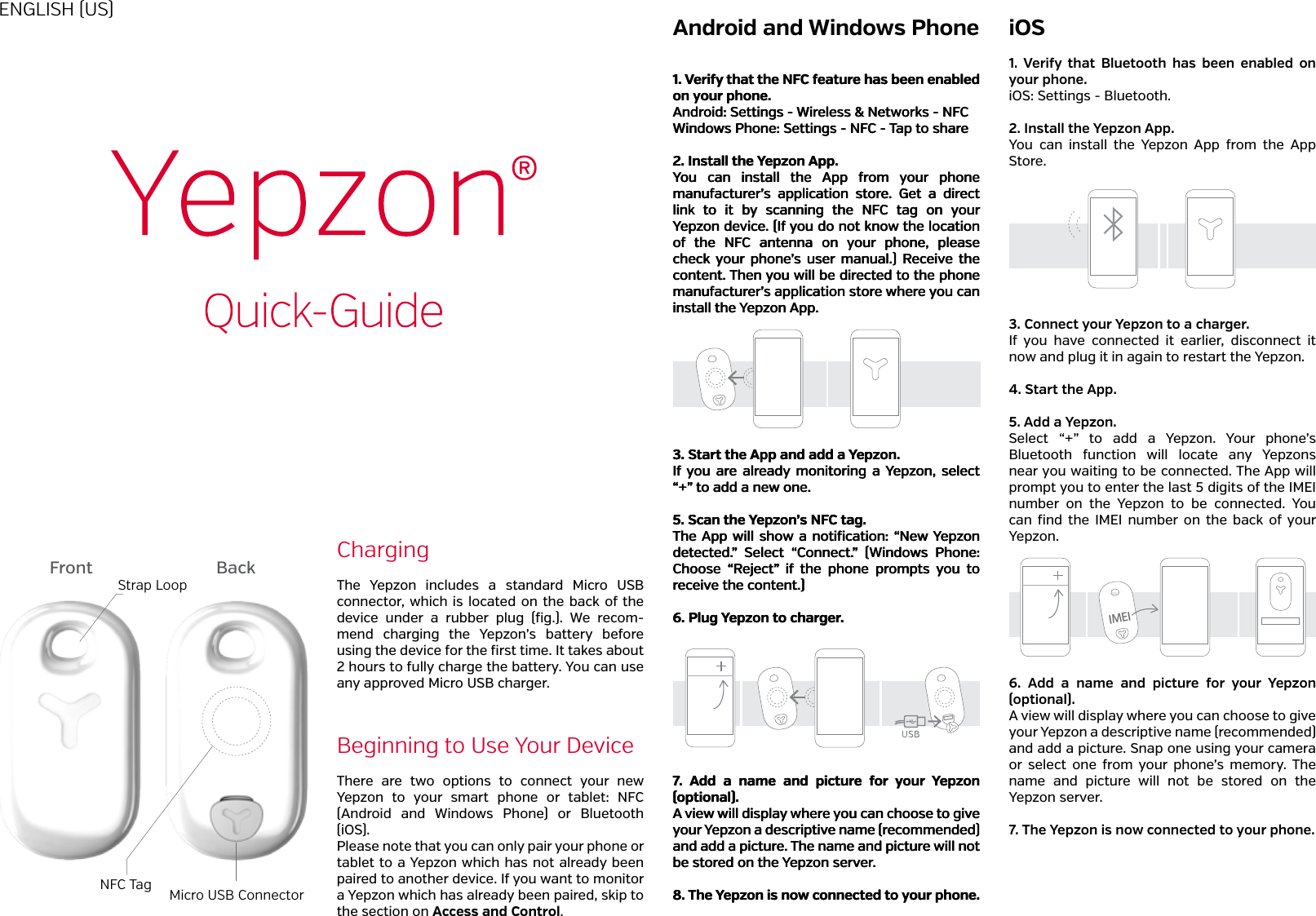
ChargingBeginning to Use Your DeviceThe  Yepzon  includes  a  standard  Micro  USB connector, which is located on the back of the device  under  a  rubber  plug  (fig.).  We  recom-mend  charging  the  Yepzon’s  battery  before using the device for the first time. It takes about 2 hours to fully charge the battery. You can use any approved Micro USB charger.There  are  two  options  to  connect  your  new Yepzon  to  your  smart  phone  or  tablet:  NFC (Android  and  Windows  Phone)  or  Bluetooth (iOS).Please note that you can only pair your phone or tablet to a Yepzon which has not already been paired to another device. If you want to monitor a Yepzon which has already been paired, skip to the section on Access and Control.Android and Windows Phone iOSENGLISH (US)111...   VVVeeerrriiifffyyy   ttthhhaaattt   ttthhheee   NNNFFFCCC   fffeeeaaatttuuurrreee   hhhaaasss   bbbeeeeeennn   eeennnaaabbbllleeeddd   ooonnn   yyyooouuurrr   ppphhhooonnneee...AAAnnndddrrroooiiiddd:::   SSSeeettttttiiinnngggsss   ---   WWWiiirrreeellleeessssss   &&&   NNNeeetttwwwooorrrkkksss   ---   NNNFFFCCCWWWiiinnndddooowwwsss   PPPhhhooonnneee:::   SSSeeettttttiiinnngggsss   ---   NNNFFFCCC   ---   TTTaaappp   tttooo   ssshhhaaarrreee222...   IIInnnssstttaaallllll   ttthhheee   YYYeeepppzzzooonnn   AAApppppp...YYYooouuu    cccaaannn    iiinnnssstttaaallllll    ttthhheee    AAApppppp    fffrrrooommm    yyyooouuurrr    ppphhhooonnneee   mmmaaannnuuufffaaaccctttuuurrreeerrr’’’sss    aaappppppllliiicccaaatttiiiooonnn    ssstttooorrreee...    GGGeeettt    aaa    dddiiirrreeecccttt   llliiinnnkkk    tttooo    iiittt    bbbyyy    ssscccaaannnnnniiinnnggg    ttthhheee    NNNFFFCCC    tttaaaggg    ooonnn    yyyooouuurrr   YYYeeepppzzzooonnn   dddeeevvviiiccceee...   (((IIIfff   yyyooouuu   dddooo   nnnooottt   kkknnnooowww   ttthhheee   lllooocccaaatttiiiooonnn   ooofff    ttthhheee    NNNFFFCCC    aaannnttteeennnnnnaaa    ooonnn    yyyooouuurrr    ppphhhooonnneee,,,    pppllleeeaaassseee   ccchhheeeccckkk    yyyooouuurrr    ppphhhooonnneee’’’sss    uuussseeerrr    mmmaaannnuuuaaalll...)))   RRReeeccceeeiiivvveee   ttthhheee   cccooonnnttteeennnttt...   TTThhheeennn   yyyooouuu   wwwiiillllll   bbbeee   dddiiirrreeecccttteeeddd   tttooo   ttthhheee   ppphhhooonnneee   mmmaaannnuuufffaaaccctttuuurrreeerrr’’’sss   aaappppppllliiicccaaatttiiiooonnn   ssstttooorrreee   wwwhhheeerrreee   yyyooouuu   cccaaannn   iiinnnssstttaaallllll   ttthhheee   YYYeeepppzzzooonnn   AAApppppp...333...   SSStttaaarrrttt   ttthhheee   AAApppppp   aaannnddd   aaadddddd   aaa   YYYeeepppzzzooonnn...IIIfff   yyyooouuu    aaarrreee    aaalllrrreeeaaadddyyy   mmmooonnniiitttooorrriiinnnggg    aaa   YYYeeepppzzzooonnn,,,    ssseeellleeecccttt   “““+++”””   tttooo   aaadddddd   aaa   nnneeewww   ooonnneee...555...   SSScccaaannn   ttthhheee   YYYeeepppzzzooonnn’’’sss   NNNFFFCCC   tttaaaggg...TTThhheee   AAApppppp   wwwiiillllll   ssshhhooowww   aaa   nnnoootttiiifffiiicccaaatttiiiooonnn:::   “““NNNeeewww   YYYeeepppzzzooonnn   dddeeettteeecccttteeeddd...”””    SSSeeellleeecccttt    “““CCCooonnnnnneeecccttt...”””    (((WWWiiinnndddooowwwsss    PPPhhhooonnneee:::   CCChhhoooooossseee    “““RRReeejjjeeecccttt”””    iiifff    ttthhheee    ppphhhooonnneee    ppprrrooommmppptttsss    yyyooouuu    tttooo   rrreeeccceeeiiivvveee   ttthhheee   cccooonnnttteeennnttt...)))   666...   PPPllluuuggg   YYYeeepppzzzooonnn   tttooo   ccchhhaaarrrgggeeerrr...777...    AAAdddddd    aaa    nnnaaammmeee    aaannnddd    pppiiiccctttuuurrreee    fffooorrr    yyyooouuurrr    YYYeeepppzzzooonnn   (((oooppptttiiiooonnnaaalll)))...AAA   vvviiieeewww   wwwiiillllll   dddiiisssppplllaaayyy   wwwhhheeerrreee   yyyooouuu   cccaaannn   ccchhhoooooossseee   tttooo   gggiiivvveee   yyyooouuurrr   YYYeeepppzzzooonnn   aaa   dddeeessscccrrriiippptttiiivvveee   nnnaaammmeee   (((rrreeecccooommmmmmeeennndddeeeddd)))   aaannnddd   aaadddddd   aaa   pppiiiccctttuuurrreee...   TTThhheee   nnnaaammmeee   aaannnddd   pppiiiccctttuuurrreee   wwwiiillllll   nnnooottt   bbbeee   ssstttooorrreeeddd   ooonnn   ttthhheee   YYYeeepppzzzooonnn   ssseeerrrvvveeerrr...888...   TTThhheee   YYYeeepppzzzooonnn   iiisss   nnnooowww   cccooonnnnnneeecccttteeeddd   tttooo   yyyooouuurrr   ppphhhooonnneee...1.  Verify  that  Bluetooth  has  been  enabled  on your phone.iOS: Settings - Bluetooth.2. Install the Yepzon App.You  can  install  the  Yepzon  App  from  the  App Store.3. Connect your Yepzon to a charger.If  you  have  connected  it  earlier,  disconnect  it now and plug it in again to restart the Yepzon.4. Start the App.5. Add a Yepzon.Select  “+”  to  add  a  Yepzon.  Your  phone’s Bluetooth  function  will  locate  any  Yepzons near you waiting to be connected. The App will prompt you to enter the last 5 digits of the IMEI number  on  the  Yepzon  to  be  connected.  You can  find  the  IMEI  number  on  the  back  of your Yepzon. 6.  Add  a  name  and  picture  for  your  Yepzon (optional).A view will display where you can choose to give your Yepzon a descriptive name (recommended) and add a picture. Snap one using your camera or  select  one  from  your  phone’s  memory.  The name  and  picture  will  not  be  stored  on  the Yepzon server.7. The Yepzon is now connected to your phone.Front BackStrap LoopNFC Tag Micro USB ConnectorIMEI
ResetIn  the  Yepzon  App  there  is  an  option  to  subscribe  a  backup message to  your email.  Aer giving  the  email address  you will get an  auto-reply message  containing a  link. Using  the  link  will clear all users and reset the Yepzon to its factory settings. Aer  it  is  reset,  the  Yepzon  may  be  paired  again  with  any device as if it was new. This is useful if you accidentally remove the Yepzon  App  from  your  phone without  removing  the  access rights first, or if your phone is lost or damaged and you have not shared the control of the Yepzon with another device.Access and ControlWe strongly recommend that you share the control of each Yepzon with at least one other smartphone or tablet, since if control of a Yepzon is only via one phone and that phone is lost or damaged, the Yepzon cannot be paired with another phone without resetting it first (see the section on Reset).Aer  pairing  the  Yepzon  with  one  device,  the  access rights can be shared by the existing user from the Yepzon App. There is no limit on how many people can follow one Yepzon.To  share  the  control,  open  the  Yepzon  App  and  tap  the icon of the Yepzon whose control you want to share. Tap the sharing icon and follow the instructions on the screen. Depending on  the platform  there are dierent options  for how  to  share.  All  platforms  give  the  option  to  share  the control via email. Windows Phone and  Android  also  give an option to share by NFC. Android gives further options, including Bluetooth and SMS. We recommend sharing via email, as this works best across all platforms. Example 1: Mary pairs a Yepzon with her iPhone. She also shares the  control to  her old  Android phone  without NFC functionality. One day her iPhone is broken. She takes the Android phone, removes the access rights from the broken iPhone, and shares them via email to her brand new Win-dows Phone.Example 2: Lisa wants to use a Yepzon to know where her elderly father is going. She pairs the Yepzon to her Android tablet and shares the control with her brothers and sisters, some of whom live on the other side of the world.LocationTo locate a Yepzon, open the App and tap “Locate.” The App will show you the status of the device and ask if you want to start locating it. If you agree, the location request is sent to the Yepzon the next time it connects to the server. If you cancel, the request will not be sent. The map view will anyway show both your own location and the last known (GSM base station) location of the Yepzon. At the same time, the top of the screen will display the time remain-ing before the Yepzon will connect to the server, receive the location request, and start satnav detection.Yepzon  uses  a  network  of  GSM  base  stations  and  GPS satnav to determine its location. If the device is indoors, or if the  GPS signal  is not  strong enough,  the GPS location data may not be received. In this case, an accurate loca-tion cannot be determined via GPS.However, the location request will also activate the Yepzon’s Bluetooth transmitter. If the Yepzon is within the range of a  Bluetooth  signal  (<50m),  the  phone  (only  Android  and iOS) will inform you  of this and show a rough distance to the Yepzon.  Note  that buildings and other  obstacles can drastically reduce the range of the Bluetooth signal.The location data is refreshed on the map for three minutes. If you want to continue the tracking, you can start a new 3-minute locating session aer the previous session is over.SettingsThe Yepzon has two basic modes: Moving and Sleeping. Moving, obviously, means that the device is on the move. Once  Yepzon’s  acceleration  sensor  detects  that  move-ment has stopped, aer 20 minutes the device will switch to  Sleeping  mode  in order to save battery life. When the sensor detects that the device is moving  again, it  will im-mediately switch Yepzon back to Moving mode.You can set how frequently the Yepzon will connect to the server  in  each  mode.  Setting  a  long  interval  will  save Yepzon’s battery, but will also create a longer delay before you receive the Yepzon’s location data. Therefore, you should choose the settings based on your personal requirements and  use.  Default  settings  for  connection  intervals  are  5 minutes on the move and 6 hours when sleeping. Note that  a  short  refresh  rate will also  use  up  more data transfer  capacity,  as  well  as  more  power.  You  can  find more information in the section on Recommended Use.Example 1: Peter takes his lively son to a big playground. He places the Yepzon in his son’s pocket and sets the refresh rate in the Moving mode to 1 minute, because he wants to know his son’s location as quickly as possible in case the child disappears  from sight.  Battery consumption  is not  a concern  because  Peter  has  fully  charged  the  Yepzon  in the morning.Example 2: Paul is forced to park his car for a month. He is worried about thieves. He hides the Yepzon under the hat shelf of the car and sets the refresh rate in the Mov-ing mode to 10 minutes. He sets the refresh rate in Sleep-ing  mode  to  12  hours.  During  the  week,  he  occasionally checks  the  Yepzon’s  status  on  his  phone.  Paul  finds  out that  the  Yepzon  had  quickly  entered  Sleeping  mode  and remained there, meaning that his car has not been moved. The battery will easily last for the entire month.Find  more  information  about  dierent  modes  in  our website at http://yepzon.com/support/HistoryThis view lets you check the Yepzon’s previous modes and location data. 100 latest entries are shown.Recommended UseWe recommend sharing control of each Yepzon with at least one other user. This way, the device can still be controlled even if the primary controlling device has been lost or damaged.If you want to remove the Yepzon App from your phone, you should first remove every instance of Yepzon control.When  the  Yepzon  App  is  updated,  details  of  the con-trolled Yepzons will be maintained.Yepzon GPS locator utilizes cellular network data connection. When  you  purchase  a  Yepzon,  a  certain  amount  of  data transfer may  be included  in the purchase  price. The  amount can vary by retailer. The App will inform you when the data is about to end. When Yepzon has run out of data, you can buy more via the App. With Yepzon’s default settings and an av-erage usage of 8 hours per day and one locating request per day, the data consumption would be about 5MB/month.Check Yepzon’s functionality in your country of residence and the countries to which you plan to travel at http://yepzon.com/support/.Yepzon utilizes  cellular networks.  With any  device,  the func-tionality  of  the  networks  may  vary  depending  on  availability, trac, or environmental factors.The accuracy and scope of the location data may vary due to factors such as location, environment, and third party activities, and may sometimes be limited. For example, accurate location data may not be received underground or inside buildings.You  can  read  more  on  recommended  use  at  http://yepzon.com/support/.SafetyYepzon  is  not  a  substitute  for  parental  supervision. Al-ways adhere to local laws and regulations.Switch  o  the  Yepzon  in  places  where  the  use  of  cellular phones is not permitted or where it can create interference, for example on board  airplanes, in  the vicinity of  medical equip-ment, and at blasting sites.Federal Communication Commission Interference StatementThis equipment has been tested and found to comply with thelimits for a Class B digital device, pursuant to Part 15 of theFCC Rules. These limits are designed to provide reasonableprotection against harmful interference in a residential installa-tion.This equipment generates, uses and can radiate radiofrequency energy and, if not installed and used in accordancewith the instructions, may cause harmful interference to radiocommunications. However, there is no guarantee thatinterference will not occur in a particular installation. If thisequipment does cause harmful interference to radio ortelevision reception, which can be determined by turning theequipment off and on, the user is encouraged to try to correctthe interference by one of the following measures:  Reorientor relocate the receiving antenna. Increase the separation between the equipment and receiver. Connect the equipment into an outlet on a circuit different fromthat to which the receiver is connected. . Consult the dealer oran experienced  radio/TV technician for help. FCC Caution: To assure continued compliance, any changesor modifications not expressly approved by the party respons-ible for compliance could void the user’s authority to operatethis equipment. (Example - use only shielded interface cableswhen connecting to computer or peripheral devices).FCC Radiation Exposure StatementThis transmitter must not be co-located or operating in con-junction with any other antenna or transmitter.This device complies with Part 15 of the FCC Rules. Oper-ation is subject to the following two conditions:(1) This devicemay not cause harmful interference, and (2) This device mustaccept any interference received, including interference thatmay cause undesired operation.This  product  meets  applicable  national  SAR  limits  of 1.6W/kg. The specific maximum SAR values can be found at yepzon.com/support.  When  carrying  the  product  or  using  it while worn on your body, either use an accessory such as a holster or  otherwise  maintain  a distance of  0,5  cm  from the body to ensure compliance with RF exposure requirements.All wireless devices are sensitive to interference, which can impair the functionality of the device.In principle Yepzon is waterproof, as long as the rubber plug covering the USB port is tightly closed.  If fastened e.g. to a schoolbag, rainfall  on  the  way  home will not  bother  it  at  all.  However, we recommend not to wear it while swimming, nor drop  it  underwater.    Also,  do  not  allow  it  to  fall  onto  hard surfaces or be hit by sharp objects, as this may damage the electronics.The device is designed to be used at temperatures between -10 – +40°C.  Coldness  may  impair  the  battery  capacity. Do not subject the  device to great temperature variation  to pre-vent condensation from forming inside the device. The  device  includes  an  integrated  rechargeable  battery, which  cannot  be  removed.  You  should  not  dispose  of  the device with household waste. Instead, return it to the place of purchase or to a recycling point. You can check the location of the  nearest recycling  point from  the local  waste manage-ment authorities. Do not attempt to remove or modify the bat-tery, as this may damage the device and create a hazard. Only use standard undamaged chargers equipped with a Mi-cro USB connector. Avoid using excessive force when plug-ging the connector into the Yepzon port.You  can  read  more  on  safety  at  www.yepzon.com/ sup-port.You can find the manufacturer’s Declaration of Conformity at www.yepzon.com/legal.

Navigation menu