YiDianTong Ecommerce Y-D002-150 Remote+Nunchuck Controller for Nintendo Wii User Manual

Shenzhen YiDianTong Ecommerce Co., Ltd. Remote+Nunchuck Controller for Nintendo Wii

User Manual

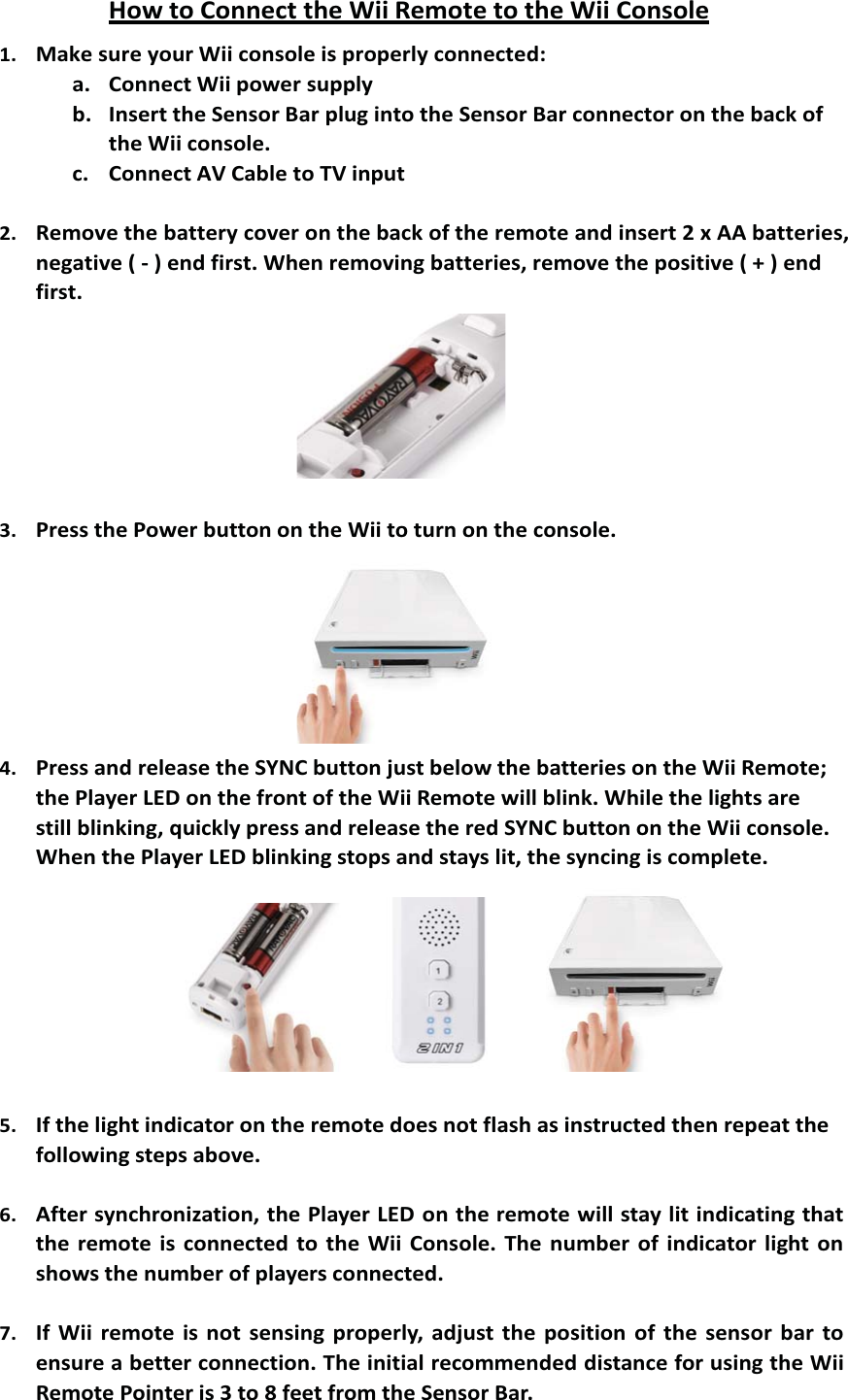
How to Connect the Wii Remote to the Wii Console1. Make sure your Wii console is properly connected:a. Connect Wii power supplyb. Insert the Sensor Bar plug into the Sensor Bar connector on the back ofthe Wii console.c. Connect AV Cable to TV input2. Remove the battery cover on the back of the remote and insert 2 x AA batteries,negative ( - ) end first. When removing batteries, remove the positive ( + ) endfirst.3. Press the Power button on the Wii to turn on the console.4. Press and release the SYNC button just below the batteries on the Wii Remote;the Player LED on the front of the Wii Remote will blink. While the lights arestill blinking, quickly press and release the red SYNC button on the Wii console.When the Player LED blinking stops and stays lit, the syncing is complete.5. If the light indicator on the remote does not flash as instructed then repeat thefollowing steps above.6. After synchronization, the Player LED on the remote will stay lit indicating thatthe remote is connected to the Wii Console. The number of indicator light onshows the number of players connected.7. If Wii remote is not sensing properly, adjust the position of the sensor bar toensure a better connection. The initial recommended distance for using the WiiRemote Pointer is 3 to 8 feet from the Sensor Bar.
  FCC WARNING  This device complies with Part 15 of the FCC Rules. Operation is subject to the following two conditions: (1) This device may not cause harmful interference, and (2) this device must accept any interference received, including interference that may cause undesired operation.  NOTE 1: Any changes or modifications to this unit not expressly approved by the party responsible for compliance could void the user's authority to operate the equipment.

Navigation menu