Z Com 08000 A WIRELESS LAN CARD User Manual generic F
Z Com Inc A WIRELESS LAN CARD generic F
Z Com >
User Manual
1
11Mbps Wireless LAN Compact Flash Adapter
Quick Installation Guide Version 1.0.0
Network Configuration
The 11Mbps Wireless Compact Flash Adapter provides you an easy and fast way to access your
wireless and wired network. The Wireless Compact Flash Adapter, which utilizes the latest
advancement of PC industry – Compact Flash technology, allows you to install and use the card
reader easier than ever before.
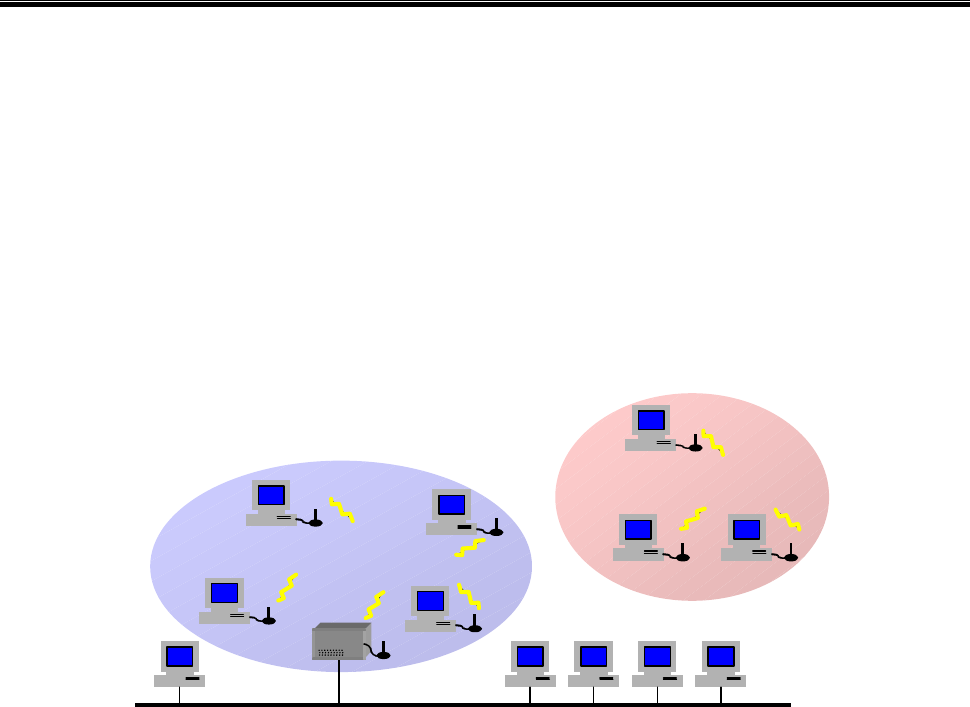
The 11Mbps Wireless Compact Flash Adapter can be operated in Ad-Hoc and Infrastructure
network configurations. Ad-Hoc mode allows wireless stations to join a Basic Service Set (i.e.,
peer-to-peer mode, without access point). Infrastructure mode allows wireless clients to join an
Extended Basic Service Set (i.e., connect to access point)
Package Content
11Mbps Wireless Compact Flash Adapter x 1 Software Floppy Disk x 1
Quick Installation Guide x 1
11Mbpsp Wireless Compact Flash Adapter Installation under CE 3.0
1. Run the “Setup.exe” utility.
2. Connect the 11Mbps Wireless Compact Flash Adapter to your PDA. The PDA will auto-detect
the Wireless Compact Flash Adapter and an “Unrecognized Card” windows shows up to prompt
you to enter the driver name. Enter “wlan11” and click OK to continue.
3. Assign an IP address to your Wireless Compact Flash Adapter. You may choose to give a fixed
IP address or have the Wireless Compact Flash automatically obtain an IP address from your
DHCP server.
Infrastructure Network
Ad-hoc Network
Wired Network
Wireless Network
Access Point
2
Use of Wireless LAN Utility
The 11Mbps Wireless LAN Utility provides the following items for you to configure the 11Mbps
Wireless Compact Flash Adapter. To run the utility, go to StartàSettings. Go to the System
tab, and click the “Wireless LAN Settings” icon. The utility interface will then appear and
configuration can be made.
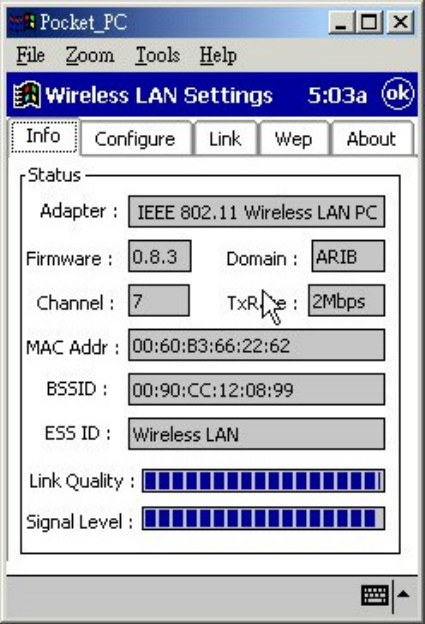
Info:
This item shows the current information on the 11Mbps Wireless LAN Compact Flash Adapter
such as Adapter Name, Firmware, Domain, Channel, Tx Rate, MAC Address, BSSID, ESSID, Link
Quality and Link Quality.
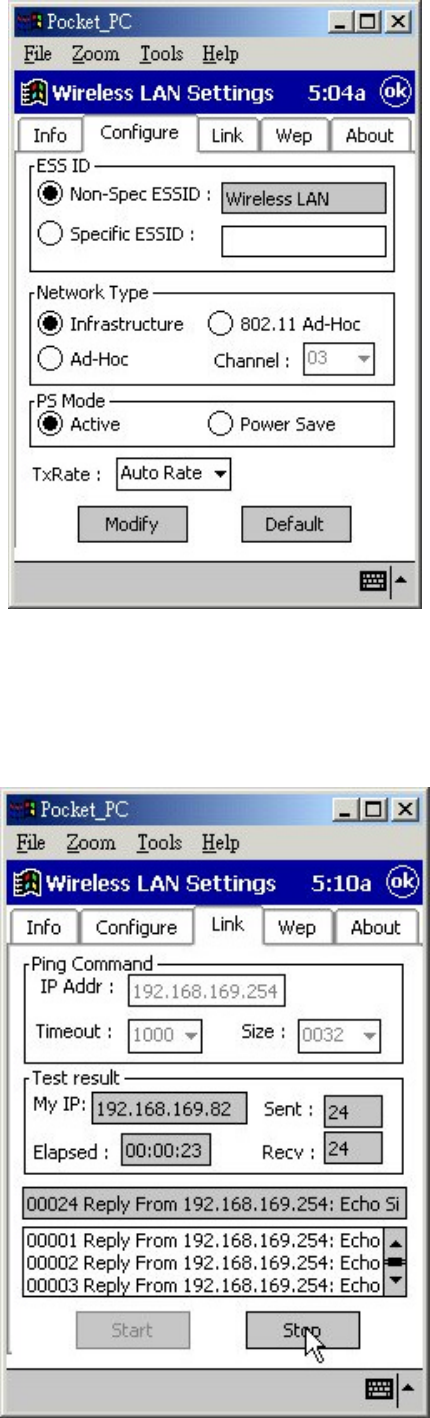
Configure:
This item allows you to modify the configuration parameters for the 11Mbps Wireless Compact
Flash Adapter such as ESSID, Network Type, Channel, PS mode, and Tx Rate. After making
changes on the configuration, click on the Modify button to make the changes take affect.
3
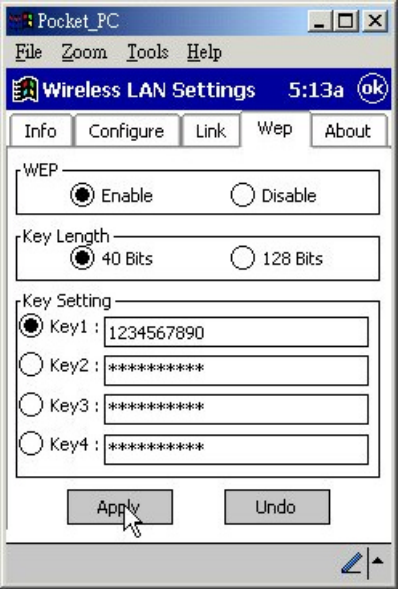
Link:
Similar to Ping Command, this tool allows you to point-to-point data transmission quality between
two stations. By entering IP address of another station and set the timeout and packet size you
may know whether the communication has been made successfully or not.
4
Wep
The encryption function enables you to encrypt and decrypt your wireless data, making your data
more secure. To enable the WEP encryption, select the “Enable” check box, select the Key
Length, either 64 bit or 128 bit, and enter the WEP Keys in the Key field. For 40-Bits encryption
the key values are 10 digit hexadecimal values in the range of “A-F” and “0-9”, preceded by the
characters “0x” values (e.g. 11AA22BB33). For 128-Bits encryption the key values are 26 digit
hexadecimal values in the range of “A-F” and “0-9”, preceded by the characters “0x” values (e.g.
0x11AA22BB33123456789ABCDEFF). After entering the WEP keys, choose the WEP Key to
use and then click Apply to make the configuration take effect.
Technical Support
You can find the most recent software and user documentation on your supplier’s Web site. If you
have difficulty resolving the problem while installing or using the 11Mbps Wireless COMPACT
FLASH Adapter, please contact your supplier for support.
5
FCC Information
This device complies with Part 15 of the FCC Rules. Operation is subject to the following two
conditions: (1) this device may not cause harmful interference, and (2) this device must accept any
interference received; including interference that may cause undesired operation.
Federal Communications Commission (FCC) Statement
This Equipment has been tested and found to comply with the limits for a Class B digital device,
pursuant to Part 15 of the FCC rules. These limits are designed to provide reasonable protection
against harmful interference in a residential installation. This equipment generates, uses and can
radiate radio frequency energy and, if not installed and used in accordance with the instructions,
may cause harmful interference to radio communications. However, there is no guarantee that
interference will not occur in a particular installation. If this equipment does cause harmful
interference to radio or television reception, which can be determined by turning the equipment off
and on, the user is encouraged to try to correct the interference by one or more of the following
measures:
- Reorient or relocate the receiving antenna.
- Increase the separation between the equipment and receiver.
- Connect the equipment into an outlet on a circuit different from that to which the receiver is
connected.
- Consult the dealer or an experienced radio/TV technician for help.
The Wireless Compact Flash Adapter Specifications
!"#$%&
'"( &&)&*&+,-#%
&&)&.+,-# /%
&&)&0&+,-#"$%
&10)&*&+,-#%
&10)&0&+,-#%
2 34*565#$7%
1134*1*6&55
&34..16&05
34!655
2( 8'""
3" 9#3113:%8;9#&3:%8<9#3:%
= 1=>5?@<A7:
A"
BA"4C!15
2BA"4C&15
340
""A 1<
7(
D2C55.
3:C).!<
113:C).*<
&3:C).E<
3:C)E<
82 &113:
3 3F.5&
" GA