ZEGO ELECTRONIC 21TX Z-Wings User Manual 2206 YR

ZEGO ELECTRONIC COMPANY LIMITED Z-Wings 2206 YR

User Manual

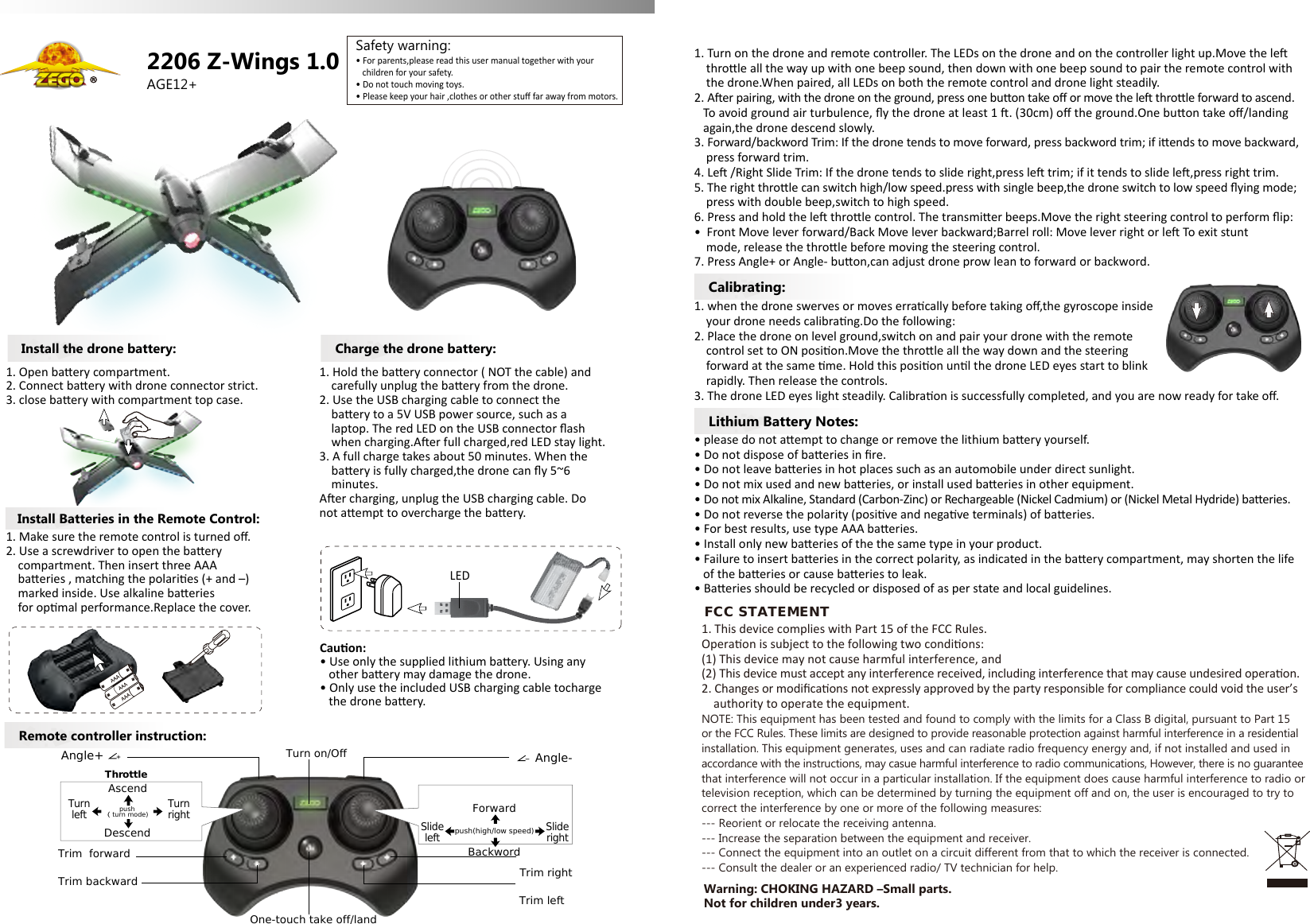
AGE12+Remote controller instruction:Lithium Battery Notes:Calibrating:2206 Z-Wings 1.0• For parents,please read this user manual together with your    children for your safety.• Do not touch moving toys.• Please keep your hair ,clothes or other stuff far away from motors.Safety warning:Install Batteries in the Remote Control:Install the drone battery:1. Make sure the remote control is turned off.2. Use a screwdriver to open the baery     compartment. Then insert three AAA     baeries , matching the polaries (+ and –)    marked inside. Use alkaline baeries     for opmal performance.Replace the cover.1. Open baery compartment.2. Connect baery with drone connector strict.3. close baery with compartment top case.Charge the drone battery:1. Hold the baery connector ( NOT the cable) and     carefully unplug the baery from the drone.2. Use the USB charging cable to connect the     baery to a 5V USB power source, such as a     laptop. The red LED on the USB connector flash     when charging.Aer full charged,red LED stay light.3. A full charge takes about 50 minutes. When the     baery is fully charged,the drone can fly 5~6     minutes.Aer charging, unplug the USB charging cable. Do not aempt to overcharge the baery.Cauon:• Use only the supplied lithium baery. Using any   other baery may damage the drone.• Only use the included USB charging cable tocharge    the drone baery.1. Turn on the drone and remote controller. The LEDs on the drone and on the controller light up.Move the le     throle all the way up with one beep sound, then down with one beep sound to pair the remote control with    the drone.When paired, all LEDs on both the remote control and drone light steadily.2. Aer pairing, with the drone on the ground, press one buon take off or move the le throle forward to ascend.    To avoid ground air turbulence, fly the drone at least 1 . (30cm) off the ground.One buon take off/landing    again,the drone descend slowly.3. Forward/backword Trim: If the drone tends to move forward, press backword trim; if iends to move backward,     press forward trim.4. Le /Right Slide Trim: If the drone tends to slide right,press le trim; if it tends to slide le,press right trim.5. The right throle can switch high/low speed.press with single beep,the drone switch to low speed flying mode;    press with double beep,switch to high speed.6. Press and hold the le throle control. The transmier beeps.Move the right steering control to perform flip:•  Front Move lever forward/Back Move lever backward;Barrel roll: Move lever right or le To exit stunt     mode, release the throle before moving the steering control.7. Press Angle+ or Angle- buon,can adjust drone prow lean to forward or backword.1. when the drone swerves or moves erracally before taking off,the gyroscope inside     your drone needs calibrang.Do the following:2. Place the drone on level ground,switch on and pair your drone with the remote     control set to ON posion.Move the throle all the way down and the steering     forward at the same me. Hold this posion unl the drone LED eyes start to blink     rapidly. Then release the controls.3. The drone LED eyes light steadily. Calibraon is successfully completed, and you are now ready for take off.• please do not aempt to change or remove the lithium baery yourself.• Do not dispose of baeries in fire.• Do not leave baeries in hot places such as an automobile under direct sunlight.• Do not mix used and new baeries, or install used baeries in other equipment.• Do not mix Alkaline, Standard (Carbon-Zinc) or Rechargeable (Nickel Cadmium) or (Nickel Metal Hydride) baeries.• Do not reverse the polarity (posive and negave terminals) of baeries.• For best results, use type AAA baeries.• Install only new baeries of the the same type in your product.• Failure to insert baeries in the correct polarity, as indicated in the baery compartment, may shorten the life    of the baeries or cause baeries to leak.• Baeries should be recycled or disposed of as per state and local guidelines.LEDTrim backwardTrim  forwardTrim leftTrim rightOne-touch take off/landDescendTurnleftTurnrightAscendSlideleftSliderightForwardBackwordTurn on/Off Angle-Angle+ThrottleSteeringpush( turn mode)  push(high/low speed)Warning: CHOKING HAZARD –Small parts. Not for children under3 years.FCC STATEMENT1. This device complies with Part 15 of the FCC Rules.Operaon is subject to the following two condions:(1) This device may not cause harmful interference, and(2) This device must accept any interference received, including interference that may cause undesired operaon.2. Changes or modificaons not expressly approved by the party responsible for compliance could void the user’s     authority to operate the equipment.NOTE: This equipment has been tested and found to comply with the limits for a Class B digital, pursuant to Part 15 or the FCC Rules. These limits are designed to provide reasonable protection against harmful interference in a residentialinstallation. This equipment generates, uses and can radiate radio frequency energy and, if not installed and used in accordance with the instructions, may casue harmful interference to radio communications, However, there is no guaranteethat interference will not occur in a particular installation. If the equipment does cause harmful interference to radio ortelevision reception, which can be determined by turning the equipment off and on, the user is encouraged to try to correct the interference by one or more of the following measures:--- Reorient or relocate the receiving antenna.--- Increase the separation between the equipment and receiver.--- Connect the equipment into an outlet on a circuit different from that to which the receiver is connected.--- Consult the dealer or an experienced radio/ TV technician for help.

Navigation menu