ZEGO ELECTRONIC 4RX Copter of Vektor Drone User Manual

ZEGO ELECTRONIC COMPANY LIMITED Copter of Vektor Drone

User Manual

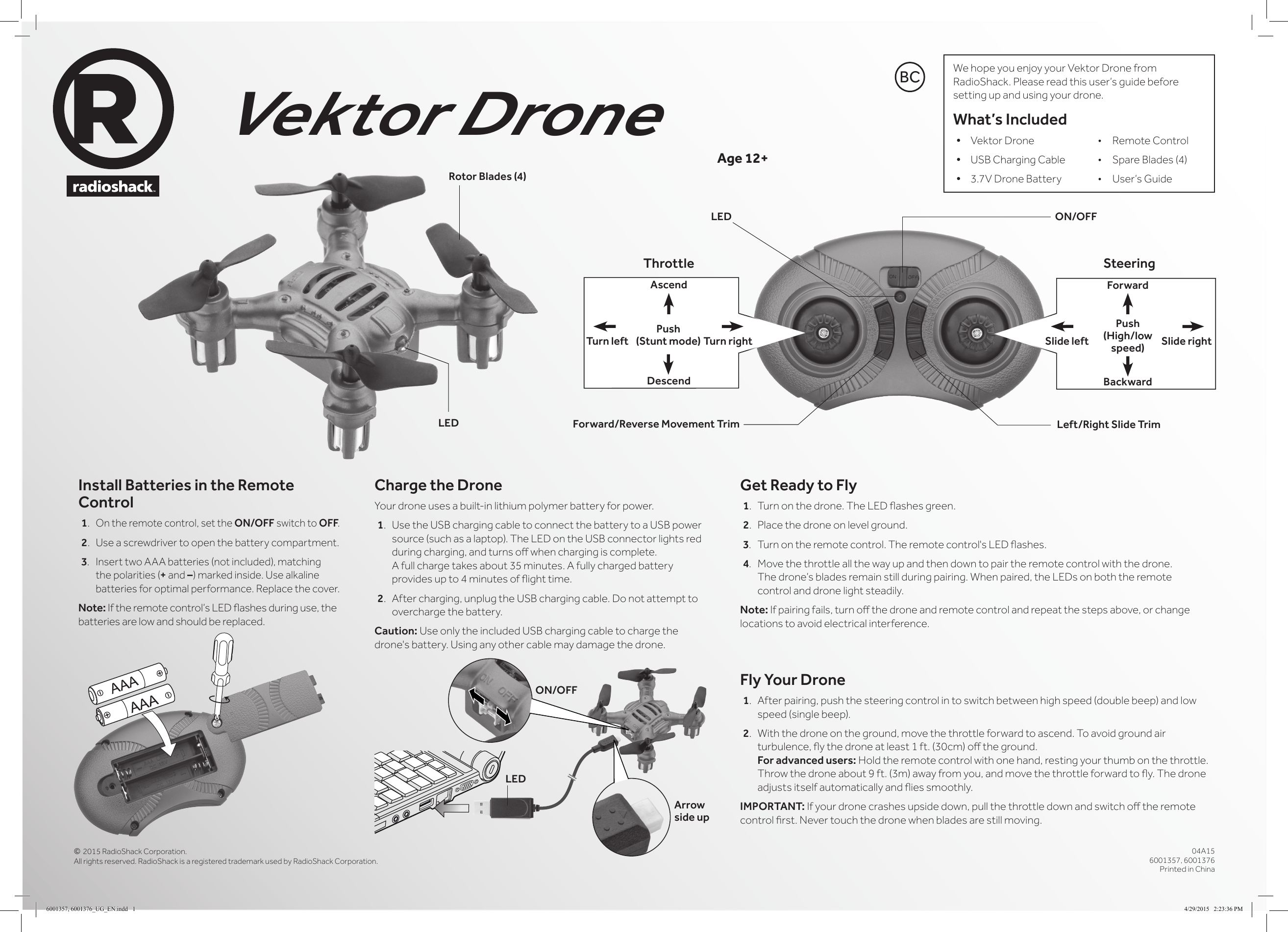
© 2015 RadioShack Corporation. All rights reserved. RadioShack is a registered trademark used by RadioShack Corporation.04A156001357, 6001376Printed in ChinaVektor DroneInstall Batteries in the Remote Control1. On the remote control, set the ON/OFF switch to OFF.2. Use a screwdriver to open the battery compartment.3. Insert two AAA batteries (not included), matching the polarities (+ and –) marked inside. Use alkaline batteries for optimal performance. Replace the cover.Note: If the remote control’s LED ashes during use, the batteries are low and should be replaced.Age 12+Get Ready to Fly1.  Turn on the drone. The LED ashes green.2.  Place the drone on level ground. 3. Turn on the remote control. The remote control's LED ashes.4. Move the throttle all the way up and then down to pair the remote control with the drone. The drone’s blades remain still during pairing. When paired, the LEDs on both the remote control and drone light steadily.Note: If pairing fails, turn o the drone and remote control and repeat the steps above, or change locations to avoid electrical interference.Fly Your Drone1.  After pairing, push the steering control in to switch between high speed (double beep) and low speed (single beep).2.  With the drone on the ground, move the throttle forward to ascend. To avoid ground air turbulence, y the drone at least 1 ft. (30cm) o the ground. For advanced users: Hold the remote control with one hand, resting your thumb on the throttle. Throw the drone about 9 ft. (3m) away from you, and move the throttle forward to y. The drone adjusts itself automatically and ies smoothly.IMPORTANT: If your drone crashes upside down, pull the throttle down and switch o the remote control rst. Never touch the drone when blades are still moving.We hope you enjoy your Vektor Drone from RadioShack. Please read this user’s guide before setting up and using your drone.What’s Included• Vektor Drone  •  Remote Control• USB Charging Cable  •  Spare Blades (4)• 3.7V Drone Battery  •  User’s GuideCharge the DroneYour drone uses a built-in lithium polymer battery for power.1. Use the USB charging cable to connect the battery to a USB power source (such as a laptop). The LED on the USB connector lights red during charging, and turns o when charging is complete. A full charge takes about 35 minutes. A fully charged battery provides up to 4 minutes of ight time.2.  After charging, unplug the USB charging cable. Do not attempt to overcharge the battery.Caution: Use only the included USB charging cable to charge the drone's battery. Using any other cable may damage the drone.LED ON/OFFLEDArrow side upLEDRotor Blades (4)Left/Right Slide TrimForward/Reverse Movement TrimThrottle SteeringForwardAscendBackwardDescendSlide rightTurn right Slide leftTurn leftPush (Stunt mode)Push (High/low speed)BCON/OFF6001357, 6001376_UG_EN.indd   1 4/29/2015   2:23:36 PM
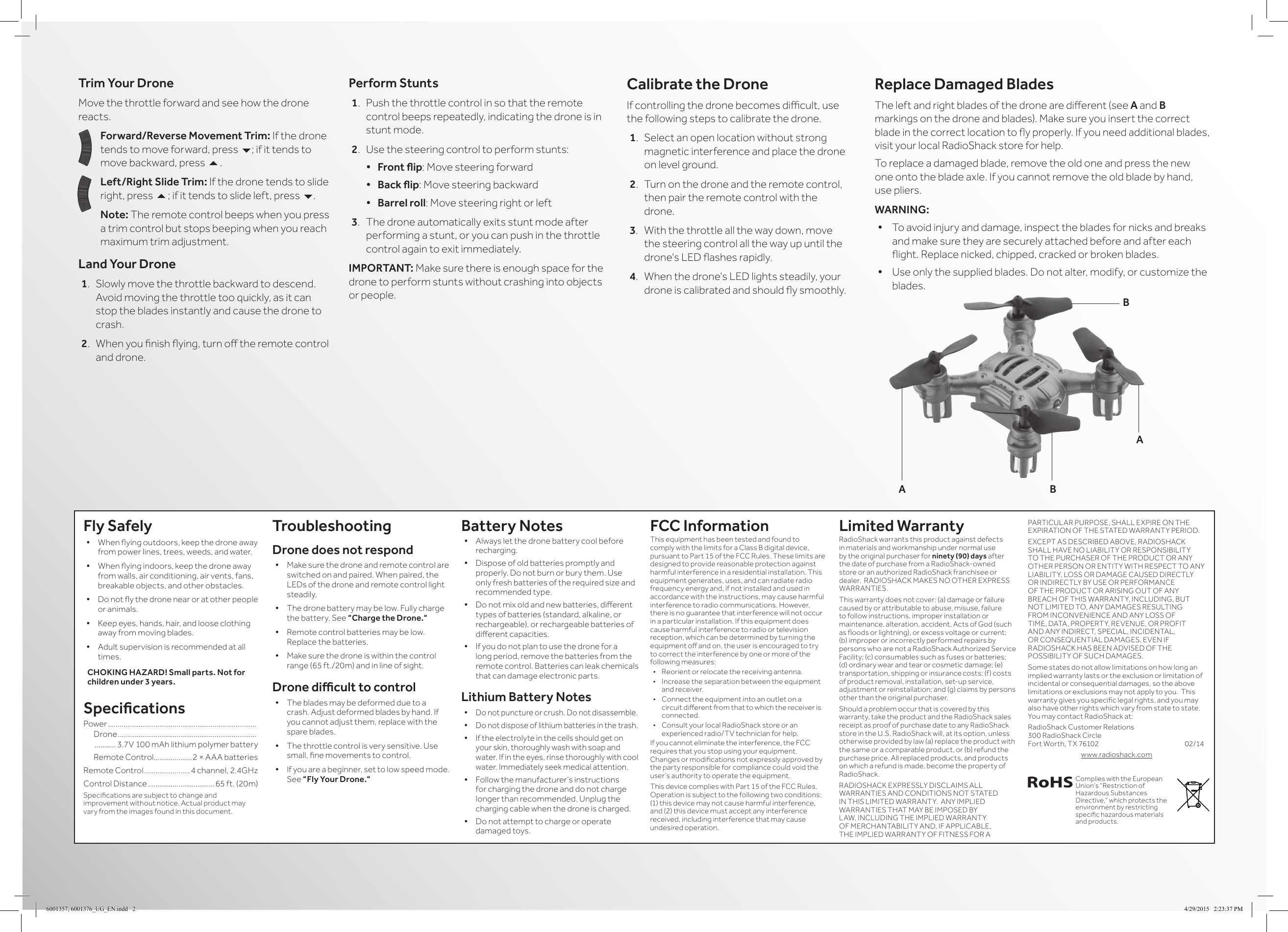
Trim Your DroneMove the throttle forward and see how the drone reacts.Forward/Reverse Movement Trim: If the drone tends to move forward, press 6; if it tends to move backward, press 5.Left/Right Slide Trim: If the drone tends to slide right, press 5; if it tends to slide left, press 6.Note: The remote control beeps when you press a trim control but stops beeping when you reach maximum trim adjustment.Land Your Drone1.  Slowly move the throttle backward to descend. Avoid moving the throttle too quickly, as it can stop the blades instantly and cause the drone to crash.2.  When you nish ying, turn o the remote control and drone. Perform Stunts1.  Push the throttle control in so that the remote control beeps repeatedly, indicating the drone is in stunt mode.2.  Use the steering control to perform stunts:• Frontip: Move steering forward• Backip: Move steering backward• Barrel roll: Move steering right or left3.  The drone automatically exits stunt mode after performing a stunt, or you can push in the throttle control again to exit immediately.IMPORTANT: Make sure there is enough space for the drone to perform stunts without crashing into objects or people.Calibrate the DroneIf controlling the drone becomes dicult, use the following steps to calibrate the drone.1.  Select an open location without strong magnetic interference and place the drone on level ground.2.  Turn on the drone and the remote control, then pair the remote control with the drone.3.  With the throttle all the way down, move the steering control all the way up until the drone's LED ashes rapidly.4.  When the drone's LED lights steadily, your drone is calibrated and should y smoothly.Fly Safely• When ying outdoors, keep the drone away from power lines, trees, weeds, and water.• When ying indoors, keep the drone away from walls, air conditioning, air vents, fans, breakable objects, and other obstacles.• Do not y the drone near or at other people or animals.• Keep eyes, hands, hair, and loose clothing away from moving blades.• Adult supervision is recommended at all times.CHOKING HAZARD! Small parts. Not for children under 3 years.SpecicationsPower ..............................................................................    Drone .........................................................................     ........... 3.7V 100 mAh lithium polymer battery  Remote Control ....................2 × AAA batteriesRemote Control ........................4 channel, 2.4GHzControl Distance ...................................65 ft. (20m)Specications are subject to change and improvement without notice. Actual product may vary from the images found in this document.TroubleshootingDrone does not respond• Make sure the drone and remote control are switched on and paired. When paired, the LEDs of the drone and remote control light steadily.• The drone battery may be low. Fully charge the battery. See “Charge the Drone.“• Remote control batteries may be low. Replace the batteries.• Make sure the drone is within the control range (65 ft./20m) and in line of sight.Dronediculttocontrol• The blades may be deformed due to a crash. Adjust deformed blades by hand. If you cannot adjust them, replace with the spare blades.• The throttle control is very sensitive. Use small, ne movements to control.• If you are a beginner, set to low speed mode. See “Fly Your Drone.“  Battery Notes• Always let the drone battery cool before recharging.• Dispose of old batteries promptly and properly. Do not burn or bury them. Use only fresh batteries of the required size and recommended type. • Do not mix old and new batteries, dierent types of batteries (standard, alkaline, or rechargeable), or rechargeable batteries of dierent capacities.• If you do not plan to use the drone for a long period, remove the batteries from the remote control. Batteries can leak chemicals that can damage electronic parts.Lithium Battery Notes• Do not puncture or crush. Do not disassemble.• Do not dispose of lithium batteries in the trash.• If the electrolyte in the cells should get on your skin, thoroughly wash with soap and water. If in the eyes, rinse thoroughly with cool water. Immediately seek medical attention.• Follow the manufacturer’s instructions for charging the drone and do not charge longer than recommended. Unplug the charging cable when the drone is charged.• Do not attempt to charge or operate damaged toys.FCC InformationThis equipment has been tested and found to comply with the limits for a Class B digital device, pursuant to Part 15 of the FCC Rules. These limits are designed to provide reasonable protection against harmful interference in a residential installation. This equipment generates, uses, and can radiate radio frequency energy and, if not installed and used in accordance with the instructions, may cause harmful interference to radio communications. However, there is no guarantee that interference will not occur in a particular installation. If this equipment does cause harmful interference to radio or television reception, which can be determined by turning the equipment o and on, the user is encouraged to try to correct the interference by one or more of the following measures:•  Reorient or relocate the receiving antenna.•  Increase the separation between the equipment and receiver. •  Connect the equipment into an outlet on a circuit dierent from that to which the receiver is connected. •  Consult your local RadioShack store or an experienced radio/TV technician for help.If you cannot eliminate the interference, the FCC requires that you stop using your equipment. Changes or modications not expressly approved by the party responsible for compliance could void the user’s authority to operate the equipment.This device complies with Part 15 of the FCC Rules. Operation is subject to the following two conditions: (1) this device may not cause harmful interference, and (2) this device must accept any interference received, including interference that may cause undesired operation.Limited WarrantyRadioShack warrants this product against defects in materials and workmanship under normal use by the original purchaser for ninety (90) days after the date of purchase from a RadioShack-owned store or an authorized RadioShack franchisee or dealer.  RADIOSHACK MAKES NO OTHER EXPRESS WARRANTIES.This warranty does not cover: (a) damage or failure caused by or attributable to abuse, misuse, failure to follow instructions, improper installation or maintenance, alteration, accident, Acts of God (such as oods or lightning), or excess voltage or current; (b) improper or incorrectly performed repairs by persons who are not a RadioShack Authorized Service Facility; (c) consumables such as fuses or batteries; (d) ordinary wear and tear or cosmetic damage; (e) transportation, shipping or insurance costs; (f) costs of product removal, installation, set-up service, adjustment or reinstallation; and (g) claims by persons other than the original purchaser.Should a problem occur that is covered by this warranty, take the product and the RadioShack sales receipt as proof of purchase date to any RadioShack store in the U.S. RadioShack will, at its option, unless otherwise provided by law (a) replace the product with the same or a comparable product, or (b) refund the purchase price. All replaced products, and products on which a refund is made, become the property of RadioShack.RADIOSHACK EXPRESSLY DISCLAIMS ALL WARRANTIES AND CONDITIONS NOT STATED IN THIS LIMITED WARRANTY.  ANY IMPLIED WARRANTIES THAT MAY BE IMPOSED BY LAW, INCLUDING THE IMPLIED WARRANTY OF MERCHANTABILITY AND, IF APPLICABLE, THE IMPLIED WARRANTY OF FITNESS FOR A PARTICULAR PURPOSE, SHALL EXPIRE ON THE EXPIRATION OF THE STATED WARRANTY PERIOD. EXCEPT AS DESCRIBED ABOVE, RADIOSHACK SHALL HAVE NO LIABILITY OR RESPONSIBILITY TO THE PURCHASER OF THE PRODUCT OR ANY OTHER PERSON OR ENTITY WITH RESPECT TO ANY LIABILITY, LOSS OR DAMAGE CAUSED DIRECTLY OR INDIRECTLY BY USE OR PERFORMANCE OF THE PRODUCT OR ARISING OUT OF ANY BREACH OF THIS WARRANTY, INCLUDING, BUT NOT LIMITED TO, ANY DAMAGES RESULTING FROM INCONVENIENCE AND ANY LOSS OF TIME, DATA, PROPERTY, REVENUE, OR PROFIT AND ANY INDIRECT, SPECIAL, INCIDENTAL, OR CONSEQUENTIAL DAMAGES, EVEN IF RADIOSHACK HAS BEEN ADVISED OF THE POSSIBILITY OF SUCH DAMAGES.Some states do not allow limitations on how long an implied warranty lasts or the exclusion or limitation of incidental or consequential damages, so the above limitations or exclusions may not apply to you.  This warranty gives you specic legal rights, and you may also have other rights which vary from state to state. You may contact RadioShack at:RadioShack Customer Relations 300 RadioShack Circle  Fort Worth, TX 76102             02/14www.radioshack.comReplace Damaged BladesThe left and right blades of the drone are dierent (see A and B markings on the drone and blades). Make sure you insert the correct blade in the correct location to y properly. If you need additional blades, visit your local RadioShack store for help.To replace a damaged blade, remove the old one and press the new one onto the blade axle. If you cannot remove the old blade by hand, use pliers.WARNING:• To avoid injury and damage, inspect the blades for nicks and breaks and make sure they are securely attached before and after each ight. Replace nicked, chipped, cracked or broken blades.• Use only the supplied blades. Do not alter, modify, or customize the blades. ABABComplies with the European Union’s “Restriction of Hazardous Substances Directive,” which protects the environment by restricting specic hazardous materials and products.6001357, 6001376_UG_EN.indd   2 4/29/2015   2:23:37 PM

Navigation menu