ZEGO ELECTRONIC 5TX Controller of Dominator Drone User Manual

ZEGO ELECTRONIC COMPANY LIMITED Controller of Dominator Drone Users Manual

Users Manual

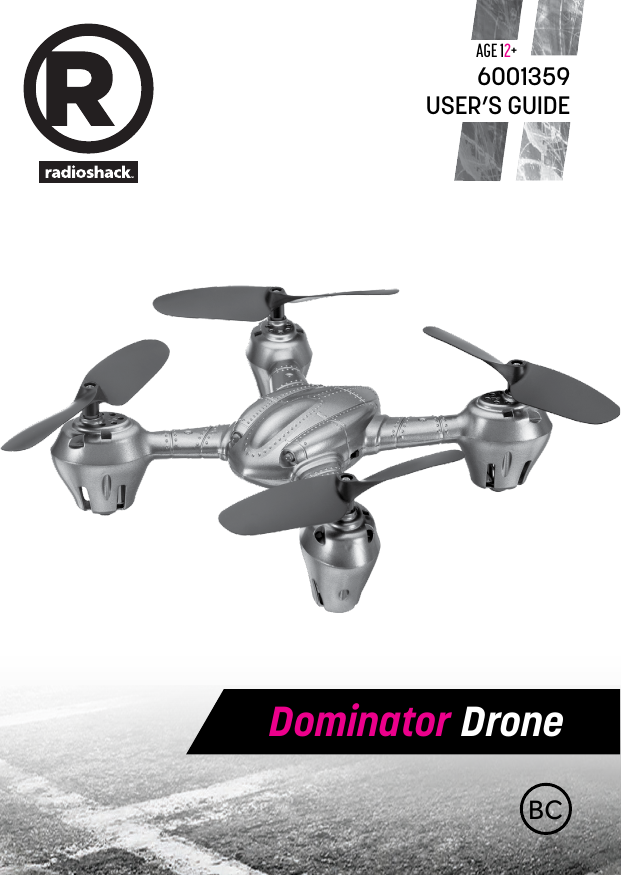
BCDominator DroneAge 12+USER’S GUIDE6001359
2 3We hope you enjoy your Dominator Drone from RadioShack. Please read this user’s guide before setting up and using your drone.Features •6-axis super stabilizing control system •Flip 360 degree stunt mode •Beginners and Advanced modesPackage Contents • Drone • RemoteControl • USBChargingCable • SpareBlades(2) • User’s GuideSpecificationsPower .......................................................................................................................Drone ...........................................................3.7V lithium polymer battery RemoteControl................................................................4 × AA batteries ControlDistance ......................................................................70ft.(21.33m)Specifications are subject to change and improvement without notice. Actual product may vary from the images found in this document.Fly Safely • Whenyingoutdoors,keepthedroneawayfrompowerlines,trees,weeds,andwater. • Whenyingindoors,keepthedroneawayfromwalls,airconditioning,airvents,fans,breakableobjects,andotherobstacles. • Donotythedronenearoratotherpeopleoranimals. • Keepeyes,hands,hair,andlooseclothingawayfrommovingblades. •Adult supervision is recommended at all times.ContentsFeatures .................................................................................3Package Contents ................................................................. 3Specications ........................................................................3Fly Safely ................................................................................ 3Install Batteries in the Remote Control ............................... 4Battery Notes .............................................................................................. 4Lithium Battery Notes .............................................................................. 4Charge the Drone .................................................................. 5Get Ready to Fly: Pairing .......................................................8Fly Your Drone........................................................................ 8Trim Your Drone ......................................................................................... 8Land Your Drone......................................................................................... 9Perform Stunts ........................................................................................... 9Calibrate the Drone ...............................................................9Replace Damaged Blades....................................................10Troubleshooting .................................................................. 11Drone does not respond ........................................................................ 11Dronediculttocontrol ........................................................................ 11FCC Information ..................................................................12Limited Warranty .................................................................13CHOKING HAZARD! Small parts. Not for children under 3 years.
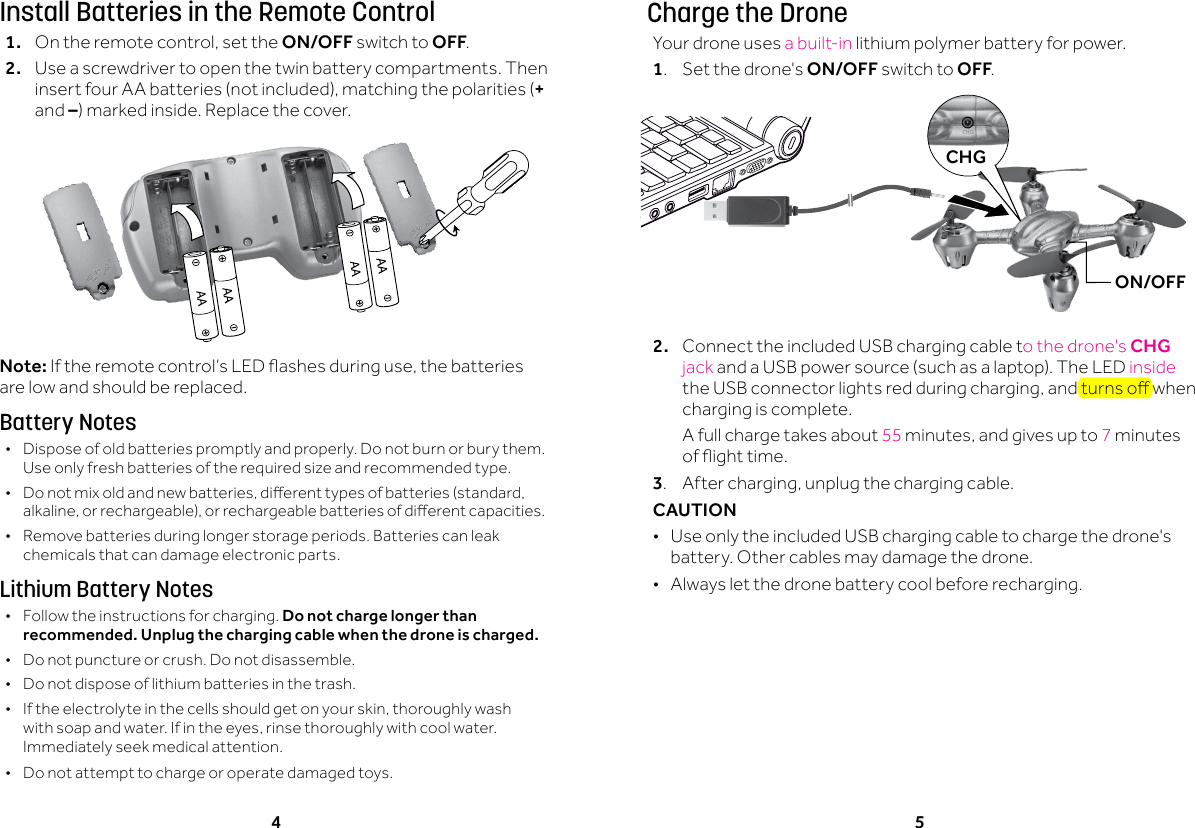
4 5Install Batteries in the Remote Control1. Ontheremotecontrol,setthe ON/OFF switch to OFF.2.  Use a screwdriver to open the twin battery compartments. Then insertfourAAbatteries(notincluded),matchingthepolarities(+ and –)markedinside.Replacethecover.Note:Iftheremotecontrol’sLEDashesduringuse,thebatteriesare low and should be replaced.Battery Notes •Dispose of old batteries promptly and properly. Do not burn or bury them. Use only fresh batteries of the required size and recommended type.  • Donotmixoldandnewbatteries,dierenttypesofbatteries(standard,alkaline,orrechargeable),orrechargeablebatteriesofdierentcapacities. •Remove batteries during longer storage periods. Batteries can leak chemicals that can damage electronic parts.Lithium Battery Notes •Follow the instructions for charging. Do not charge longer than recommended. Unplug the charging cable when the drone is charged. •Do not puncture or crush. Do not disassemble. •Do not dispose of lithium batteries in the trash. • Iftheelectrolyteinthecellsshouldgetonyourskin,thoroughlywashwithsoapandwater.Ifintheeyes,rinsethoroughlywithcoolwater.Immediately seek medical attention. •Do not attempt to charge or operate damaged toys.Charge the DroneYour drone uses a built-in lithium polymer battery for power. 1.  Set the drone's ON/OFF switch to OFF.2.  ConnecttheincludedUSBchargingcableto the drone's CHG jack andaUSBpowersource(suchasalaptop).TheLEDinside theUSBconnectorlightsredduringcharging,andturnsowhencharging is complete.  A full charge takes about 55 minutes,andgivesupto7 minutes ofighttime.3. Aftercharging,unplugthechargingcable.CAUTION  •Use only the included USB charging cable to charge the drone's battery. Other cables may damage the drone. •Always let the drone battery cool before recharging.CHGON/OFF
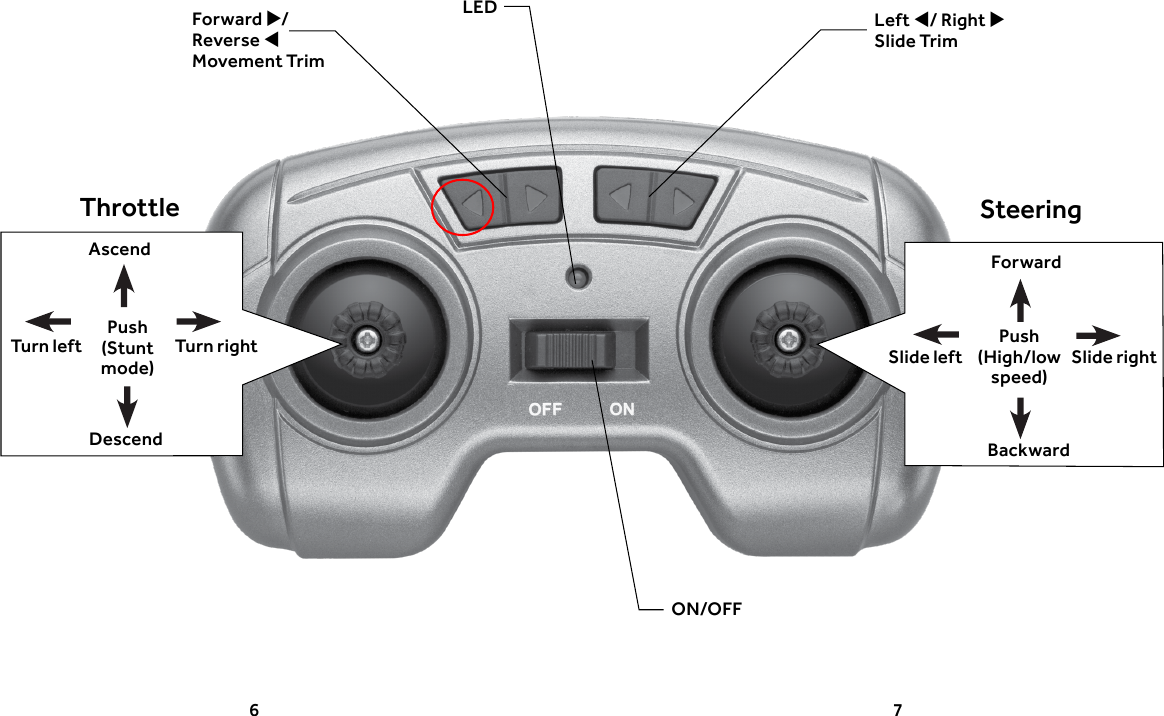
6 7Left / Right  Slide TrimForward /Reverse  Movement TrimThrottle SteeringAscendDescendTurn rightTurn leftLEDON/OFFForwardBackwardSlide rightSlide leftPush (High/low speed)Push (Stunt mode)
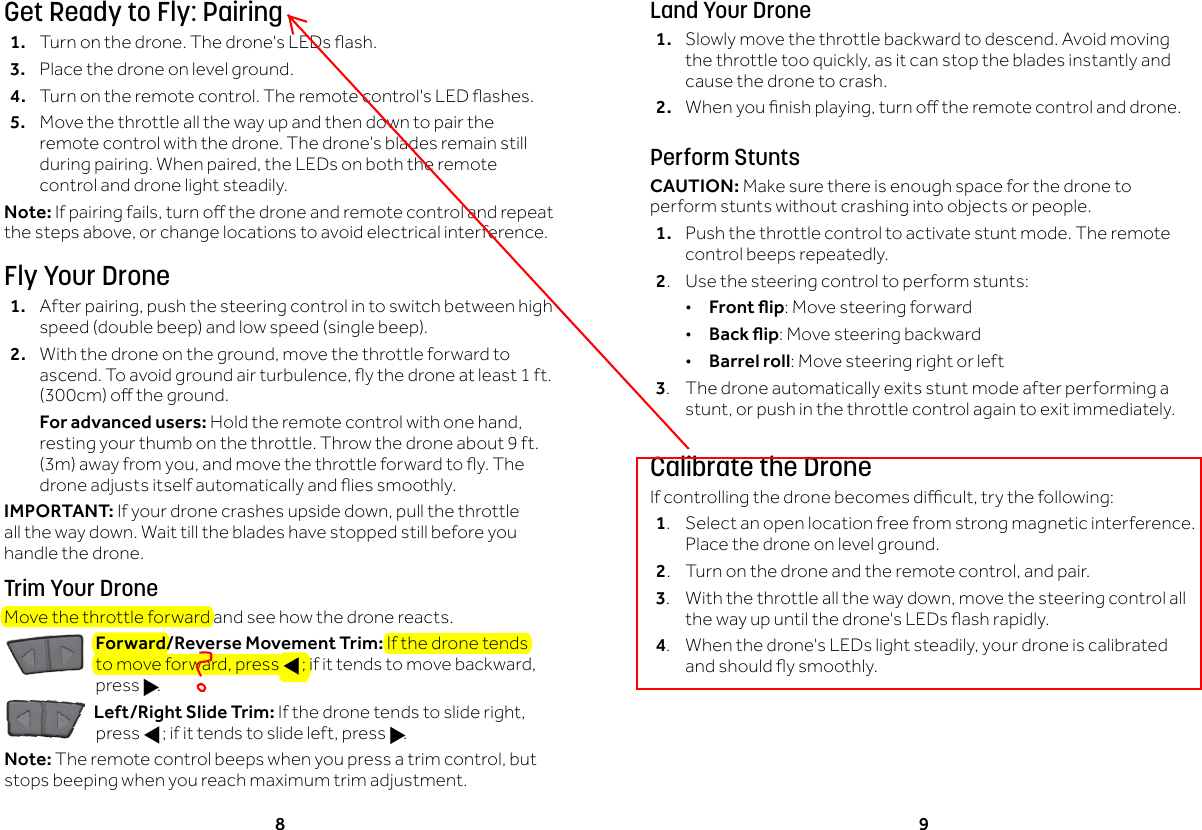
8 9Get Ready to Fly: Pairing1. Turnonthedrone.Thedrone'sLEDsash.3.  Place the drone on level ground. 4. Turnontheremotecontrol.Theremotecontrol'sLEDashes.5.  Move the throttle all the way up and then down to pair the remote control with the drone. The drone’s blades remain still duringpairing.Whenpaired,theLEDsonboththeremotecontrol and drone light steadily.Note: Ifpairingfails,turnothedroneandremotecontrolandrepeatthestepsabove,orchangelocationstoavoidelectricalinterference.Fly Your Drone1. Afterpairing,pushthesteeringcontrolintoswitchbetweenhighspeed(doublebeep)andlowspeed(singlebeep).2. Withthedroneontheground,movethethrottleforwardtoascend.Toavoidgroundairturbulence,ythedroneatleast1ft.(300cm)otheground.  For advanced users:Holdtheremotecontrolwithonehand,resting your thumb on the throttle. Throw the drone about 9 ft. (3m)awayfromyou,andmovethethrottleforwardtoy.Thedroneadjustsitselfautomaticallyandiessmoothly.IMPORTANT: Ifyourdronecrashesupsidedown,pullthethrottleall the way down. Wait till the blades have stopped still before you handle the drone.Trim Your DroneMove the throttle forward and see how the drone reacts.Forward/Reverse Movement Trim: If the drone tends tomoveforward,pressf;ifittendstomovebackward,press g.Left/Right Slide Trim:Ifthedronetendstoslideright,press f;ifittendstoslideleft,pressg.Note: Theremotecontrolbeepswhenyoupressatrimcontrol,butstops beeping when you reach maximum trim adjustment.Land Your Drone1.  Slowly move the throttle backward to descend. Avoid moving thethrottletooquickly,asitcanstopthebladesinstantlyandcause the drone to crash.2. Whenyounishplaying,turnotheremotecontrolanddrone.Perform StuntsCAUTION: Make sure there is enough space for the drone to perform stunts without crashing into objects or people.1.  Push the throttle control to activate stunt mode. The remote control beeps repeatedly.2.  Use the steering control to perform stunts: •Front ip: Move steering forward •Back ip: Move steering backward •Barrel roll: Move steering right or left3.  The drone automatically exits stunt mode after performing a stunt,orpushinthethrottlecontrolagaintoexitimmediately.Calibrate the DroneIfcontrollingthedronebecomesdicult,trythefollowing:1.  Select an open location free from strong magnetic interference. Place the drone on level ground.2. Turnonthedroneandtheremotecontrol,andpair.3. Withthethrottleallthewaydown,movethesteeringcontrolallthewayupuntilthedrone'sLEDsashrapidly.4. Whenthedrone'sLEDslightsteadily,yourdroneiscalibratedandshouldysmoothly.
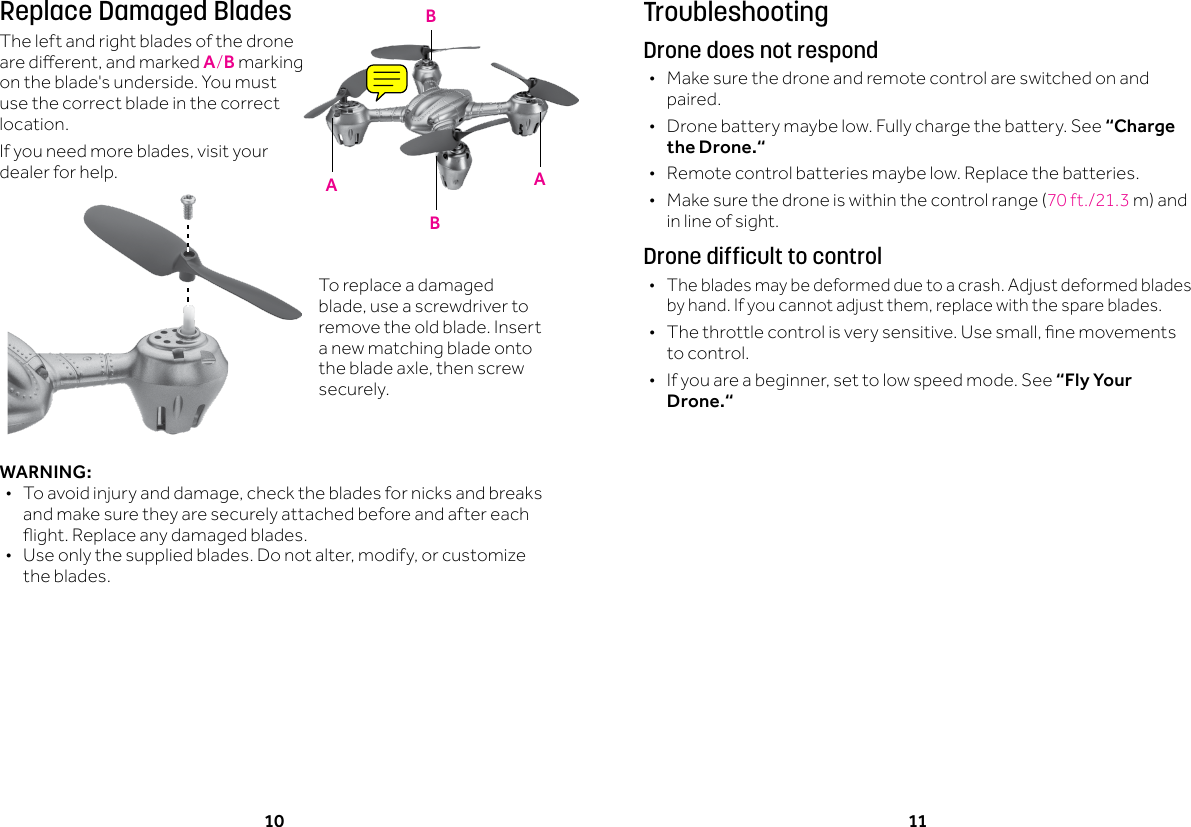
10 11TroubleshootingDrone does not respond •Make sure the drone and remote control are switched on and paired. •Drone battery maybe low. Fully charge the battery. See “Charge the Drone.“ •Remote control batteries maybe low. Replace the batteries. • Makesurethedroneiswithinthecontrolrange(70ft./21.3m)andin line of sight.Drone difficult to control •The blades may be deformed due to a crash. Adjust deformed blades byhand.Ifyoucannotadjustthem,replacewiththespareblades. • Thethrottlecontrolisverysensitive.Usesmall,nemovementsto control. • Ifyouareabeginner,settolowspeedmode.See“Fly Your Drone.“Replace Damaged BladesThe left and right blades of the drone aredierent,andmarkedA/B marking on the blade's underside. You must use the correct blade in the correct location. Ifyouneedmoreblades,visityourdealer for help.WARNING: • Toavoidinjuryanddamage,checkthebladesfornicksandbreaksand make sure they are securely attached before and after each ight.Replaceanydamagedblades. • Useonlythesuppliedblades.Donotalter,modify,orcustomizethe blades. AABBTo replace a damaged blade,useascrewdrivertoremove the old blade. Insert a new matching blade onto thebladeaxle,thenscrewsecurely.
12 13Limited WarrantyRadioShack warrants this product against defects in materials and workmanship under normal use by the original purchaser for ninety (90) days after the date of purchase from a RadioShack-owned store or an authorized RadioShack franchisee or dealer. RADIOSHACKMAKESNOOTHEREXPRESSWARRANTIES.Thiswarrantydoesnotcover:(a)damageorfailurecausedbyorattributabletoabuse,misuse,failuretofollowinstructions,improperinstallationormaintenance,alteration,accident,ActsofGod(suchasoodsorlightning),orexcessvoltageorcurrent;(b)improper or incorrectly performed repairs by persons who are not a RadioShack AuthorizedServiceFacility;(c)consumablessuchasfusesorbatteries;(d)ordinarywearandtearorcosmeticdamage;(e)transportation,shippingorinsurancecosts;(f)costsofproductremoval,installation,set-upservice,adjustmentorreinstallation;and(g)claimsbypersonsotherthantheoriginalpurchaser.Shouldaproblemoccurthatiscoveredbythiswarranty,taketheproductandtheRadioShack sales receipt as proof of purchase date to any RadioShack store in the U.S. RadioShackwill,atitsoption,unlessotherwiseprovidedbylaw(a)replacetheproductwiththesameoracomparableproduct,or(b)refundthepurchaseprice.Allreplacedproducts,andproductsonwhicharefundismade,becomethepropertyofRadioShack.RADIOSHACKEXPRESSLYDISCLAIMSALLWARRANTIESANDCONDITIONSNOTSTATED IN THIS LIMITED WARRANTY. ANY IMPLIED WARRANTIES THAT MAY BE IMPOSEDBYLAW,INCLUDINGTHEIMPLIEDWARRANTYOFMERCHANTABILITYAND,IFAPPLICABLE,THEIMPLIEDWARRANTYOFFITNESSFORAPARTICULARPURPOSE,SHALLEXPIREONTHEEXPIRATIONOFTHESTATEDWARRANTYPERIOD.EXCEPTASDESCRIBEDABOVE,RADIOSHACKSHALLHAVENOLIABILITYORRESPONSIBILITYTOTHEPURCHASEROFTHEPRODUCTORANYOTHERPERSONORENTITYWITHRESPECTTOANYLIABILITY,LOSSORDAMAGECAUSEDDIRECTLYORINDIRECTLYBYUSEORPERFORMANCEOFTHEPRODUCTORARISINGOUTOFANYBREACHOFTHISWARRANTY,INCLUDING,BUTNOTLIMITEDTO,ANYDAMAGESRESULTINGFROMINCONVENIENCEANDANYLOSSOFTIME,DATA,PROPERTY,REVENUE,ORPROFITANDANYINDIRECT,SPECIAL,INCIDENTAL,ORCONSEQUENTIALDAMAGES,EVENIFRADIOSHACKHASBEENADVISEDOFTHEPOSSIBILITYOFSUCHDAMAGES.Some states do not allow limitations on how long an implied warranty lasts or the exclusionorlimitationofincidentalorconsequentialdamages,sotheabovelimitationsorexclusionsmaynotapplytoyou.Thiswarrantygivesyouspeciclegalrights,andyoumay also have other rights which vary from state to state.  ContactRadioShackat: RadioShackCustomerRelations 300RadioShackCircle FortWorth,TX76102   02/14www.radioshack.comFCC InformationThisequipmenthasbeentestedandfoundtocomplywiththelimitsforaClassBdigitaldevice,pursuanttoPart15oftheFCCRules.Theselimitsaredesignedtoprovidereasonable protection against harmful interference in a residential installation. This equipmentgenerates,uses,andcanradiateradiofrequencyenergyand,ifnotinstalledandusedinaccordancewiththeinstructions,maycauseharmfulinterferencetoradiocommunications.However,thereisnoguaranteethatinterferencewillnotoccurinaparticular installation. If this equipment does cause harmful interference to radio or televisionreception,whichcanbedeterminedbyturningtheequipmentoandon,theuser is encouraged to try to correct the interference by one or more of the following measures:• Reorientorrelocatethereceivingantenna.• Increasetheseparationbetweentheequipmentandreceiver.• Connecttheequipmentintoanoutletonacircuitdierentfromthattowhichthereceiver is connected. Consultthe dealer or an experienced radio/TV technician for help.Ifyoucannoteliminatetheinterference,theFCCrequiresthatyoustopusingyourequipment.Changesormodicationsnotexpresslyapprovedbythepartyresponsiblefor compliance could void the user’s authority to operate the equipment.ThisdevicecomplieswithPart15oftheFCCRules.Operationissubjecttothefollowingtwoconditions:(1)thisdevicemaynotcauseharmfulinterference,and(2)thisdevicemustacceptanyinterferencereceived,includinginterferencethatmaycauseundesired operation.Product Dominator Drone Model 6001359Responsible PartyRadioShack 300RadioShackCircle FortWorth,TX76102Phone 817-415-3200
©2015GeneralWirelessOperationsInc.All rights reserved. RadioShack is a registered trademark used by General Wireless Operations Inc.Printed inChina07A156001359ComplieswiththeEuropeanUnion’s“RestrictionofHazardousSubstancesDirective,”whichprotectstheenvironmentbyrestrictingspecichazardousmaterialsandproducts.

Navigation menu