ZFX Technology 248 Car Charger User Manual PMAC101 User Guide 20170615

SHENZHEN ZHENGFANGXING TECHNOLOGY CO., LTD Car Charger PMAC101 User Guide 20170615

User Manual

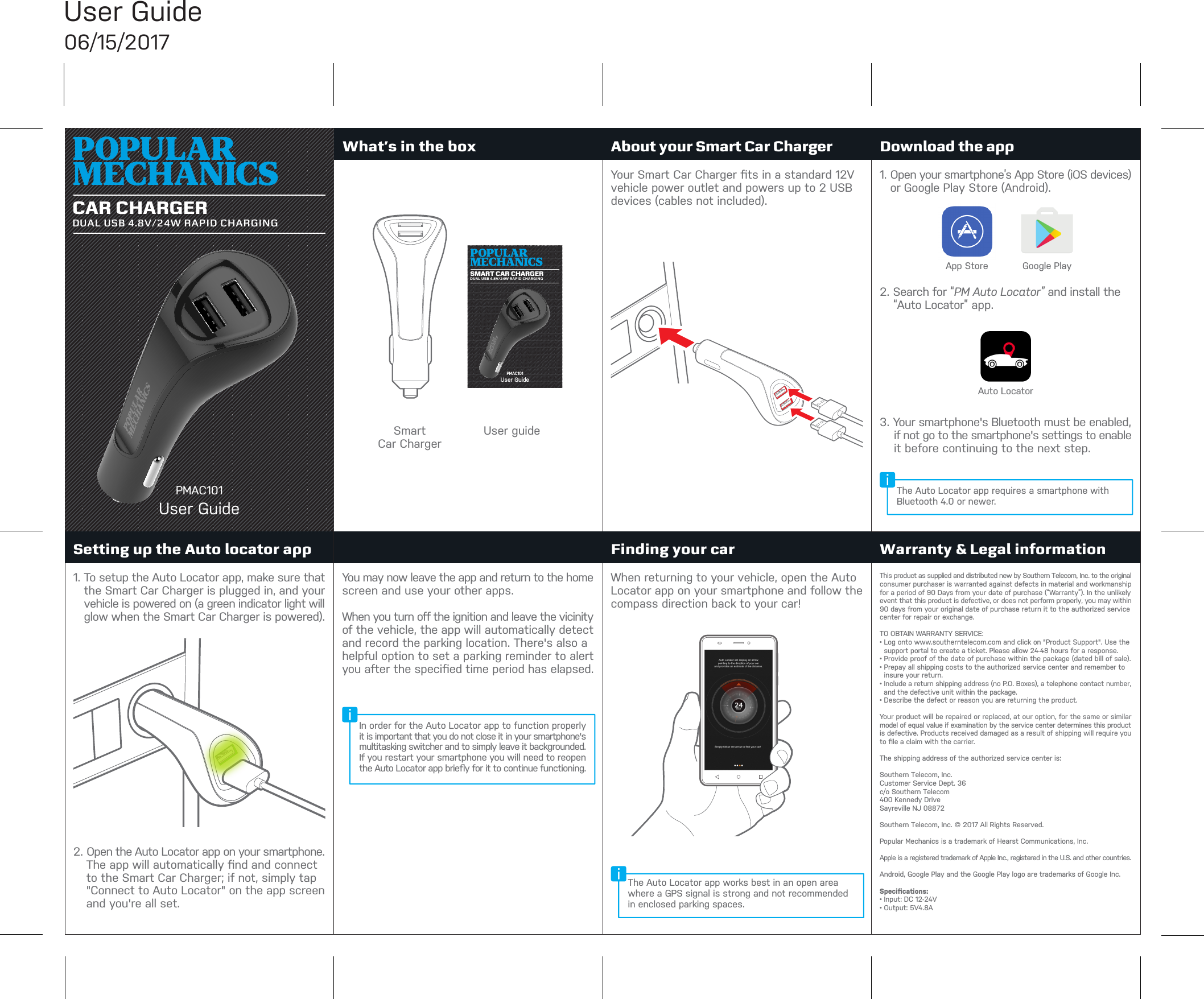
What’s in the box About your Smart Car ChargerSetting up the Auto locator app Finding your car Warranty & Legal informationDownload the appPMAC101User GuideUser Guide06/15/2017CAR CHARGERDUAL USB 4.8V/24W RAPID CHARGINGGoogle PlayApp StorePMAC101User GuideSMART CAR CHARGERDUAL USB 4.8V/24W RAPID CHARGINGSmartCar ChargerUser guideYour Smart Car Charger fits in a standard 12V vehicle power outlet and powers up to 2 USB devices (cables not included).1. To setup the Auto Locator app, make sure thatthe Smart Car Charger is plugged in, and yourvehicle is powered on (a green indicator light willglow when the Smart Car Charger is powered).2. Open the Auto Locator app on your smartphone.The app will automatically find and connectto the Smart Car Charger; if not, simply tap"Connect to Auto Locator" on the app screenand you're all set.You may now leave the app and return to the home screen and use your other apps.When you turn off the ignition and leave the vicinity of the vehicle, the app will automatically detect and record the parking location. There's also a helpful option to set a parking reminder to alert you after the specified time period has elapsed.When returning to your vehicle, open the Auto Locator app on your smartphone and follow the compass direction back to your car!This product as supplied and distributed new by Southern Telecom, Inc. to the original consumer purchaser is warranted against defects in material and workmanship for a period of 90 Days from your date of purchase (“Warranty”). In the unlikely event that this product is defective, or does not perform properly, you may within 90 days from your original date of purchase return it to the authorized service center for repair or exchange.TO OBTAIN WARRANTY SERVICE:• Log onto www.southerntelecom.com and click on "Product Support". Use the support portal to create a ticket. Please allow 24-48 hours for a response. • Provide proof of the date of purchase within the package (dated bill of sale).• Prepay all shipping costs to the authorized service center and remember to insure your return.• Include a return shipping address (no P.O. Boxes), a telephone contact number, and the defective unit within the package.• Describe the defect or reason you are returning the product. Your product will be repaired or replaced, at our option, for the same or similar model of equal value if examination by the service center determines this product is defective. Products received damaged as a result of shipping will require you to file a claim with the carrier.The shipping address of the authorized service center is:Southern Telecom, Inc.Customer Service Dept. 36c/o Southern Telecom400 Kennedy DriveSayreville NJ 08872Southern Telecom, Inc. © 2017 All Rights Reserved. Popular Mechanics is a trademark of Hearst Communications, Inc.Apple is a registered trademark of Apple Inc., registered in the U.S. and other countries.Android, Google Play and the Google Play logo are trademarks of Google Inc.Specifications:• Input: DC 12-24V• Output: 5V4.8A1. Open your smartphone’s App Store (iOS devices)or Google Play Store (Android).2. Search for “PM Auto Locator” and install the“Auto Locator” app.3. Your smartphone's Bluetooth must be enabled,if not go to the smartphone's settings to enableit before continuing to the next step.Auto LocatorThe Auto Locator app works best in an open area where a GPS signal is strong and not recommended in enclosed parking spaces.In order for the Auto Locator app to function properly it is important that you do not close it in your smartphone's multitasking switcher and to simply leave it backgrounded. If you restart your smartphone you will need to reopen the Auto Locator app briefly for it to continue functioning.The Auto Locator app requires a smartphone with Bluetooth 4.0 or newer.
Warning StatementUser Guide06/15/2017This equipment has been tested and found to comply with the limits for a Class B digital device, pursuant to part 15 of the FCC Rules. These limits are designed to provide reasonable protection against harmful interference in a residential installation. This equipment generates, uses and can radiate radio frequency energy and, if not installed and used in accordance with the instructions, may cause harmful interference to radio communications. However, there is no guarantee that interference will not occur in a particular installation. If this equipment does cause harmful interference to radio or television reception, which can be determined by turning the equipment off and on, the user is encouraged to try to correct the interference by one or more of the following measures:• Reorient or relocate the receiving antenna.• Increase the separation between the equipment and receiver.• Connect the equipment into an outlet on a circuit differentfrom that to which the receiver is connected.• Consult the dealer or an experienced radio/TV technician forhelp.Caution: Any changes or modifications to this device not explicitly approved by manufacturer could void your authority to operate this equipment.This device complies with part 15 of the FCC Rules. Operation is subject to the following two conditions: (1) This device may not cause harmful interference, and (2) this device must accept any interference received, including interference that may cause undesired operation.To comply with FCC RF exposure compliance requirements, this grant is applicable to only mobile configurations. The antennas used for this transmitter must be installed to provide a separation distance of at least 20 cm from all persons and must not be co-located or operating in conjunction with any other antenna or transmitter.

Navigation menu