ZHEJIANG HOMEY ELECTRICAL TECHNOLOGY DLM-1 EMITTER'S User Manual DLM 1 English
ZHEJIANG HOMEY ELECTRICAL TECHNOLOGY CO., LTD. EMITTER'S DLM 1 English
USERS MANUAL
DLM-1 Single-channel Emitter’s Manual
I. Please check whether all the parts are in the package after opening the packing.
z DLM-1 emitter: 1pcs
z Bracket for DLM-1 emitter: 1pcs
z Fixing bolt for bracket: 1 pcs
z Sleeve anchor for bracket fixing: 1pcs
z Installation instruction manual: 1 pcs
II. Product description
DLM-1 emitter is a hand held type emitter with one channel only,and should work with
the motor controller. The emitter signal command is transmitted through the radio
wave of 315.00 MHZ frequency.
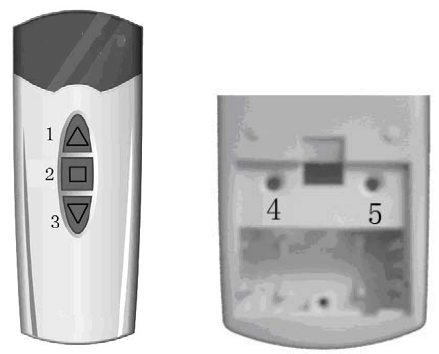
DLM-1 emitter is applicable to any “Control-” series controller, and it can work
with the RDM-5 emitter and the RDF-1 emitter.
1、Up 2、Down 3、Stop 4、Recognizing Button 5、Invalid
Ⅲ. Before installation
The emitter’s bracket can be fixed on any vertical surface.
Note: The emitter should be installed in environment of under the range of the IP
protecting index, and it should not be fixed on the surface of metals or things with
magnetism, in order to avoid negative effects.
The control range of the radio wave is restricted by law and engineering measures, so
please check whether the emitter and controller works well in the preconcerted position
before installation.
Please read this instruction carefully before installation.
IV. Using Instructions
z Characteristics description of the emitter
1. Power supply: 12V Li battery, Model CR 23A
2. Protecting Index: IP 20;
3. Working temperature: -20℃
~
+55℃;
4. When the emitter sends out the same signal command for 8 seconds unfailingly,
the course will automaticlly end up by the emitter itself.
5. SMT pasting components,and the surface of the components is moistureproof
after strict disposal.
6. An emitter can control a controller or a group of controllers.
7. System Guarantee: 2 years
z Operation Instructions
1. Press down the UP(∧) button on the emitter, the roller blind works upward
(the awning expands out); Press down the DOWN(∨) button, the roller blind
works downward(the awning closes up);Press down the STOP
button(No.3button),the roller blind (the awning)stops.
2. Logging on program setting through the controller: Cut off the power supply of the
controller, and then restore the power supply again.After that, you will hear a
sound of “Du..Du..Du..Du” continuously from the inside of the controller, then
loosen the button,now the controller is under the mode of recognizing.Within 4
seconds of that, you should press down the UP(∧)button and the DOWN(∨)
button of the emitter that is to be recognized simultaneously for 6 seconds
unfailingly, until the controller sounds a long ring. (If the controller has already
stored some emitter’s address before, you will hear the hint of 2 long
rings);Now the address information of the single-frequency emitter is stored in
the contoller,immediately the controller will end up its program setting mode
automatically. (If the emitter addresses in the controller are more than 10, the
controller will sound 6 long rings, that indicates the more emitter can not be
recognized again)
3. Logging on program setting through emitters: With the power supply of the
controller on, press down the recognizing button(No.5button) on the back of the
emitter whose address information has been recognized in the controller,till the
controller sounds a continuous ring of “Du..Du..Du..Du..” from the inside,then
loosen the button,now the controller is under the mode of recognizing.Within 4
seconds of that, take out the emitter needing to be recognized, and press down
the UP(∧)button and the DOWN(∨)button simultaneouly for 6 seconds
continuously, until the controller sounds two long rings.Now the address
information of the single-frequency emitter has already been stored in the
controller, meanwhile, the controller will end up its program setting mode
automatically(if the emitter addresses in the controller are more than 10,then the
controller will sounds 6 long rings,which indicates the more emitter can not be
recognized again).
4.Cancel settings of all emitters through the controller: Firstly cut off the power
supply of the controller ,then restore the power supply again.After that,you will
hear a continuous ring of “Du..Du..Du..Du”, within 8 seconds of that, press down
the UP(∧)button and the DOWN (∨)button simultaneously of the already
recognized emitter for a continuous 2 seconds, till the controller sounds a long
ring, now all the recognized emitters’ address information have been cleared up
from the controller.
5. Cancel settings of all already recognized emitters one by one through emitters: Press
down the recognizing button(No.4button) on the back of the emitter whose address
information has been recognized in the controller,till the controller sounds a continuous
ring of “Du..Du..Du..Du” from the inside,then loosen the button .And within 8 seconds of
that,please press down the UP(∧)button and the DOWN (∨)button simultaneously of the
already recognized emitter which you want to cancel now for a unfailing 2 seconds, till the
receiver sounds a long ring, and then the recognized emitter’s address information has
been cleared up from the controller.Similarly, do as the above instructs, the other emitters
matching with the same receiver can also be cancelled from the receiver.
Additional Instructions
z If the running direction of the roller blinds(awnings) is opposite to the setting of
the direction buttons of the emitter,you can reverse the running direction of the
roller blinds(awnings) by pressing the reverse button(At the same time,hold down
the No.2button and No.3button) press down the button continuously till the controller
sounds a continuous ring, and then the reverse operation is done OK.
z Through the method of “Cancel settings of all emitters through the controller”,
then the controller will be empty;through the method of “Cancel settings of all
already recognized emitters one by one through emitters”,then the controller will
reserve the last group emmiter’s coding information automatically. (but, If only left
a emitter which can control the receiver, then the emitter which is matching with the
receiver can not be cancelled from the receiver if you only use the “Cancel settings
of all already recognized emitters one by one through emitters”method).
z Within 10 seconds after turning on the power supply,press down the STOP
button(No.3button) on the recognized emitter,then the controller will exit the
recognizing programm;If the operation to the unrecognized emitter is not
recognizing operation, the controller will not respond to it;After the setting of
either recognizing or cancelling,the controller will exit the recognizing or
cancelling program automatically; If the controller couldn’t receive any effectual
signal from the emitter within 10 seconds after the controller enters the mode of
recognizing or cancelling,the controller will exit the recognizing or cancelling
program automatically because of overtime.The operations of cancelling and
recognizing are the same,if the emitter has been recognized before, then the
operation will do the cancelling;on the contrary, if the emitter is unrecognized
before, then the operation will do the recognizing.
z If the emitter is missed, then you can make a new emitter recognized by the
controller through the method of “Logging on program setting through the
controller” . Suggest to use the new recognized emitter to clean up all the prior
emitters’ address coding information through the method of “Cancel settings of all
emitters through the controller”,and then do the same recognizing operation to
make the new emitter be recognized again. Because if the recognized emitters
corresponding with the same controller are more than 10, the 11th emitter cann’t
be recognized by the controller again.
Security Instructions
z Used in a dry condition
z Use original components
z Comply to special regulation of each country
z Children should be kept away from the control equipment
z Use the same type substitution battery (CR 23A)
z Proper disposal for trashy battery after used up
z If operate several remote-control equipments simultaneously, the running
condition of each equipment should be seen when operating
z The operation may be interfered by other long-distance communication or
terminal units(for example, interfered by some remote-control equipments
taking the same frequency wave as carrier)
z Not suggest using the remote-control system if there is high interference risk.
z Please displace the emitter battery if the control distance minishes obviously or
the control command is not sensitive again(tear off the label on the back of the
emitter, then screw off the cross screw by a pocket cross screwdriver to open
the back cover, and then displace the battery, finally close the back cover and
fasten the screw)
FCC NOTE:
THE MANUFACTURERIS NOT RESPONSIBLE FOR ANY RADIO OR TV
INTERFERENCE CAUSED BY UNAUTHORIZED MODIFICATIONS TO THIS
EQUIPMENT. SUCH MODIFICATIONS COULD VOID THE USER’ S AUTHORITY TO
OPERATE THE EQUIPMENT.