ZHENSHENG TECHNOLOGY M9 M9 bluetooth headphones User Manual M6 M9
SHENZHEN ZHENSHENG TECHNOLOGY CO.,LTD. M9 bluetooth headphones M6 M9
User Manual
Dear Customer
Thank you for choosing ring sport Wireless headset. Please
read the user manual carefully for proper instruction to maximize the
advantage of our product. Our Wireless headset is well designed
fashionably, smart and portable, pure acoustic and multi functional.
We have patents for the whole series of our Wireless headsets. Our
Wireless headsets are applied with the top advanced electro
acoustic technology, providing you the best enjoyment of music any
time at home, outdoor or business situation, and provide the perfect
acoustic with your notebook and any digital audiovisual devices.
Leading you to wonderful music!
Please choose the right size of earbuds
For the best experience of audio and comfort, please choose the
earbuds in right size to wear.
Pair the Wireless headset for the first time:
1.With the headset power off, hold and press the “MFB” until the
headset is in pairing mode, red indicator light and blue indicator light
flash alternately.
2.Active the Wireless function on your phone and search Wireless
devices
3.Select “M.X” for paring, input pairing code”0000”if needed
Connect Automatically
1.With the headset power off, short press the “MFB” to power on
2.The Ring will search and connect with the last connected device.
How to connect with 2 devices
1.After paired the first mobile phone, please turn off the Wireless
function of the first mobile phone.
2.Pair the headset with the second mobile phone.
3.Active the Wireless function of the first mobile phone, manual
connection with the first mobile phone.
Preface
Product Description Function of Call and Music Status and Signal
How to Wear How to use
How to Connect
Wireless headset
User Manual
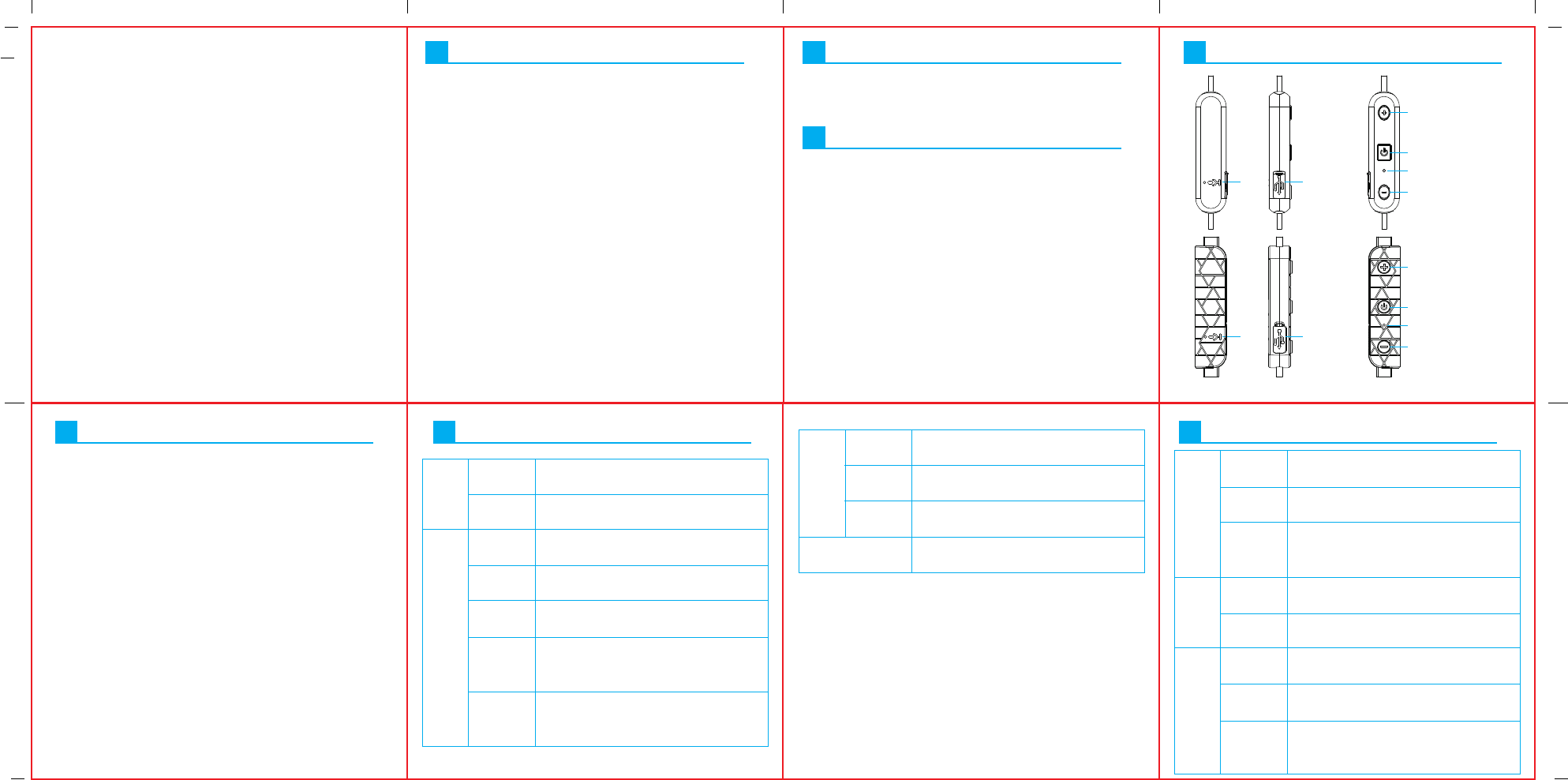
MIC
V+ / Next Track
V- / Previous Track
Multifunction button(MFB)
Indicator light
V+ / Next Track
V- / Previous Track
Multifunction button(MFB)
Indicator light
MIC
USB charging
socket
USB charging
socket
Item: Sport Wireless Headset
Version:V4.1
Charging means:power adapter outpupt(DC5V 100mA)
Battery:High-capability rechargeable lithium polymer battery
Wireless Operation: class 2
Profiles Supported:Headset/handsfree/A2DP/AVRCP
Talk time: up to 5 hours
Playing time: up to 3 hours
Stand by time: up to 80 hours
Charging time: about 1 hours
Long press "MFB" button for one second, blue
light will flash
Long Press "MFB" button for 3 seconds, the
light goes out
Click "MFB" button when there is an incoming
call
short press the "MFB" button when it is in the
call status
long press "MFB" button when there is an
incoming call
When the mobile phone is in the standby mode
or playing music, double click the MFB button.
(Note: the phone needs to support this function)
When the mobile phone standby mode or
playing music, long press the MFB button
(Note: the phone needs to support this function)
Short press "MFB" button when playing the
music
press the "+" key for about one second when
playing
press the "-" key for about one second when
playing
Short press "+" or "-" key to adjust the
volume
Open the charging port dust cover, connect
Micro USB cable
Red light will illuminate when charging, and
the blue light will illuminate when it is fully
charged
When the battery voltage drops below 3.3V,
it will remind low battery
When the battery voltage drops below 3V,
the headset will automatically shut down
The blue light will flash twice and provide
voice prompts "power on"
The red light will flash three times and provide
voice prompt "power off"
voice prompts: one, two ..and report number
Power on
Play/Pause
Charge
Mode
Charge
ing
Charge
Time
Charge
Status
Low battery
alarm
Low battery
power off
Power on
prompt
Power off
prompt
Reporting
the number
of phone call
Next Track
Volume Control
Previous
Track
Power off
Answer the
telephone
Hang up
Refuse
phone call
Last Number
Redial
Voice dial
ON/OFF
Music
Call
Note: When playing music, long press MFB to hang up the incoming
call. When playing the music, short press MFB button to pause/play
music.
Low
power
Voice
Prompt
Full charge will take about 3 hours

Warning Statement
This device complies with part 15 of the FCC Rules. Operation is subject to the
following two conditions: (1) This device may not cause harmful interference, and (2)
this device must accept any interference received, including interference that may cause
undesired operation.
Any Changes or modifications not expressly approved by the party responsible for
compliance could void the user's authority to operate the equipment.
Note: This equipment has been tested and found to comply with the limits for a Class B
digital device, pursuant to part 15 of the FCC Rules. These limits are designed to
provide reasonable protection against harmful interference in a residential installation.
This equipment generates uses and can radiate radio frequency energy and, if not
installed and used in accordance with the instructions, may cause harmful interference
to radio communications. However, there is no guarantee that interference will not
occur in a particular installation. If this equipment does cause harmful interference to
radio or television reception, which can be determined by turning the equipment off and
on, the user is encouraged to try to correct the interference by one or more of the
following measures:
-Reorient or relocate the receiving antenna.
-Increase the separation between the equipment and receiver.
-Connect the equipment into an outlet on a circuit different from that to which the
receiver is connected.
-Consult the dealer or an experienced radio/TV technician for help.