ZHONGSHAN OCIDA LIGHTING LFMT LED Bluetooth BULB User Manual
ZHONGSHAN OCIDA LIGHTING CO., LTD. LED Bluetooth BULB Users Manual
user_manual
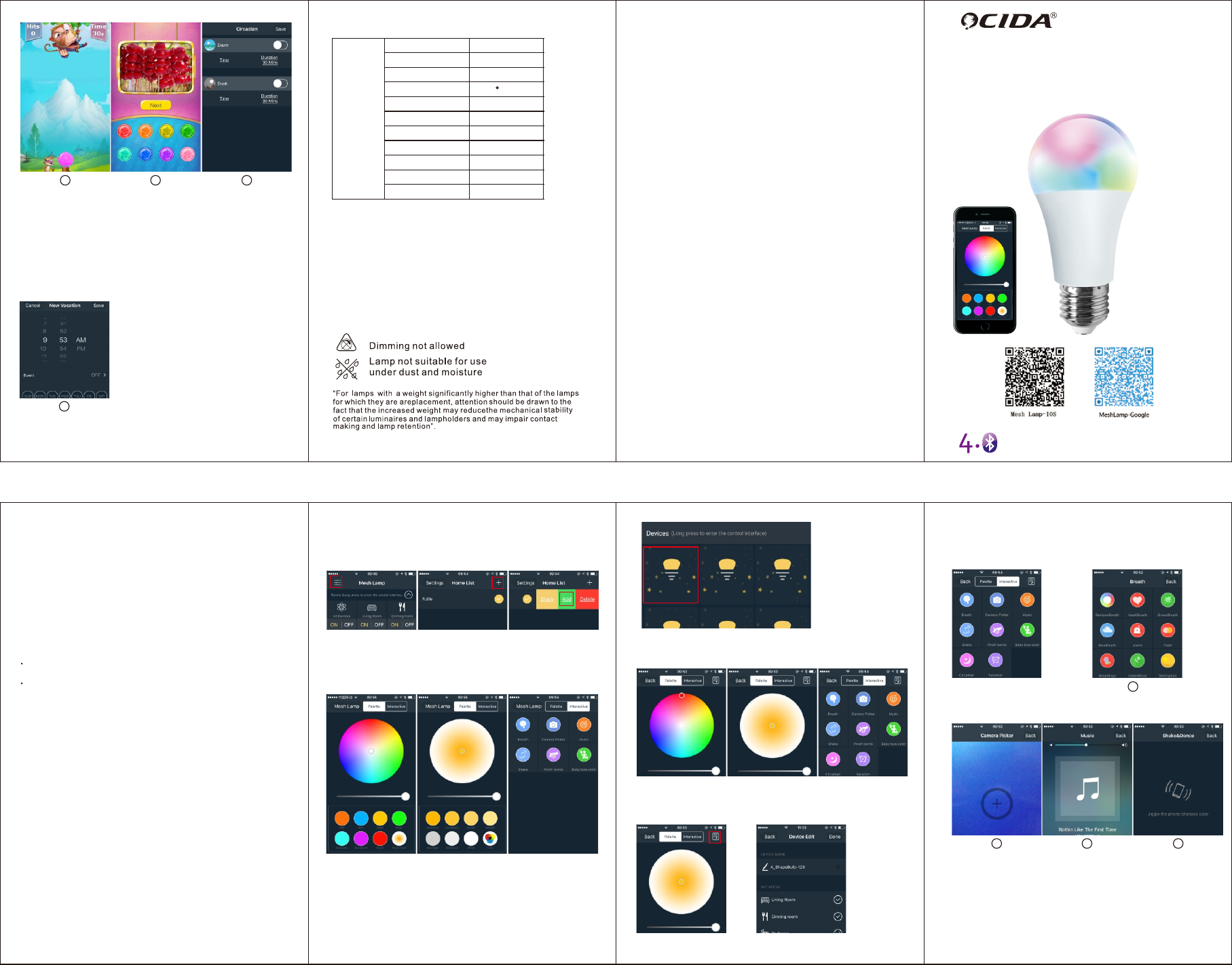
The Instruction of
LED Bluetooth BULB
Apply BLE mesh 4.0 match to
Smartphone APP control technology
6
Product Parameters
Lamp
Size
Voltage
Life time
60x118mm
Base E27/E26
AC100-240V
Beam Angle 220
30000 h
Power 7W
CCT(2400-7000K)+RGB
16+million Kinds
Color
Precautions
1.Regularly clean the lamp with soft cloth,A little detergent is
acceptable ;
2.Please carefully read the User manual to confirm whether the working
environment meets the specification of the conditions ;
3.Cut off the power supply before insatll the lamps,to prevent
electric shock ;
4.Do not touch the lamp surface when it is liting;
5.This product is limted to indoor lighting,can not be used for sealed
contaniers or outdoor lighting;
6.the product should be avoided in the heat source and hot steam,
corrosive gas sites, so as not to affect life;
N.W 60g
Brightness 2%-100%
Lumen 600Lm(Max); 12LM(Min)
Current 0.12A
5
Function Five: Pinch bomb game. Slipping the colorful balls below to the
monster’s mouth, bulb will turn into corresponding colors, thus to achieve
the interaction between human and smart bulb.
5 6
Function Six: Baby love color, which is a game to teach children recognizing
colors. Let children learn in the process of playing.。
7
Function Seven: Circadian rhythm is divided into day rhythm and night rhythm.
Day rhythm means under the current color and brightness state, the brightness
gradually increased to 100% in the specified time. Night rhythm means under
the current color and brightness state, the brightness slowly reduced to 0 in the
specified time. The opening time and duration of day and night rhythm set
by the user.
8
Function Eight: Timer Mode. You could add alarm clock (reminder function)
and set to-do list on current device. Use the timer option to turn your
smart bulbs on or off at any time.
Features:
• Adopting BLE mesh Technology: connect hundreds of
devices fast and stably.
• APP control: easy to manage all devices and control the light freely.
• Coordinating with panel control, remote control to make home
more intelligent and comfortable.
• CCT adjustable:from coolwhite(7000k) to warmwhite(2400k),
Achieveing freely and stepless dimming.
• Brightbess can be adjusted from 2% to 100%.Perfectly replace
Thyristor Dimming.
• Personalize your lighting with 16+ millions of color plus cool and
warm white.
•The bulbs can controlled by several smart phones;no hubs,no
gateways,no wifi,no bridges,makes it easy to control every bulb. The operation of room
• Clicking the switch to turn on and off all devices in the room.
• Longly pressing the device icon to enter room control interface,
then you can change all lamp’s color in the room;
• Longly pressing the device icon to enter device control interface,
you can change the color and brightness of a single device;
• Download App from AppStore ( DR code is at the end of the article )
• Open the power switch and turn on the bulb;
• Open bluetooth;
Search the device and its type
• Open Mesh Lamp App, the application will automatically search and
connect nearby Mesh Lamp hardware devices. And the device that
have connected with the network will be shown in the home page list;
•The device will automatically identify the device's type when connected
with the netwotk. If there is an unknown type or a device without name,
turning off the device once, the software will automatic obtain the type of device;
•When the Bluetooth connection is unstable, the APP will
automatically connect the device;
Prerequisite
Operating Devices
• The equipment list can be divided into two parts: the room and single
equipment. As the name implies. The equipment is controlled in unit
of rooms and bulbs respectively ;
• The main function of the room operation are two parts: switch and
controls.
• The operation of a single device mainly includes switches, remote
controls, positioning devices, renaming, adding rooms, etc.
• Clicking the button above the title of group to remove and expand
the list of the group.
Single device operation
•Clicking the device icon to switch device,. If you can not set the device
type successfully as loading the device in first time, please click the
device icon, then you will get the device's type;
Double clicking the device icon and locate the device when you can
not make sure which device is what you wanted.
•
• In the control interface, clicking the button on the upper right corner of the
device, you can modify the device's name; clicking and select the appropriate
room, you can add or remove the device from the appropriate room.
123
A-O2 A-O3 A-O4
BreatheColoring BreatheColoring BreatheColoring
Support for adding new group, share group, home system encryption,
and avoid malicious control by strangers.
Achieving the interaction between human and smart bulb. Customize
breath, alarm clock, Circadian rhythm, music, game and other
personalized functions.
At first, setting is based on home as a unit. Click the interface inside the
red box to enter home list. Then click “+” to add new home, and slip to
the left sharing to family members. Click “Add” to add new devices.
Home setting
China Mobile China Mobile China Mobile
China Mobile China Mobile China Mobile
China Mobile China Mobile China Mobile
BreatheColoring
China Mobile
4
Interaction Function
Click “interaction” in picture. It shows Breath, Pick Color by Camera, Music,
Shake, Pinch bomb, Baby love color, Circadian rhythm, Timer functions. You
could click any one to enter.
1
Function One: There are 9 modes of breath in Breath function. You could
choose any mode in accordance with personal wishes. Every mode has
correspond light changes.
Function Two: Pick Color by Camera. Making camera focus on the object
which has the color you want, bulbs will turn into the close color.
2 3
Function Three: Music. Choosing music to play, bulb will change colors
automatically according to music’s rhythm and is unaffected on
external noise.
4
Function Four: Shake & Dance. Bulb will change colors by following
dance steps or shaking smartphone.
China Mobile China Mobile
China Mobile
China Mobile China Mobile China Mobile
China Mobile
FCC Warning Statement:
Changes or modifications not expressly approved by
the party responsible for compliance could void the
user’s authority to operate the equipment. This
equipment has been tested and found to comply
with the limits for a Class B digital device, pursuant to
Part 15 of the FCC Rules. These limits are designed
to provide reasonable protection against harmful
interference in a residential installation. This
equipment generates uses and can radiate radio
requency energy and, if not installed and used in
accordance with the instructions, may cause harmful
interference to radio communications. However,
there is no guarantee that interference will not occur
in a particular installation. If this equipment does
cause harmful interference to radio or television
reception, which can be determined by turning the
equipment off and on, the user is encouraged to try to
correct the interference by one or more of the
following measures:
--Reorient or relocate the receiving antenna.
--Increase the separation between the equipment
and receiver.
--Connect the equipment into an outlet on a circuit
different from that to which the receiver is connected.
--Consult the dealer or an experienced radio/TV
technician for help.