Zhongshan Transtek Electronics SKS-1749-B1 Kitchen Scale User Manual LS406 B

Zhongshan Transtek Electronics Co., Ltd Kitchen Scale LS406 B

Contents

User Manual Rev1

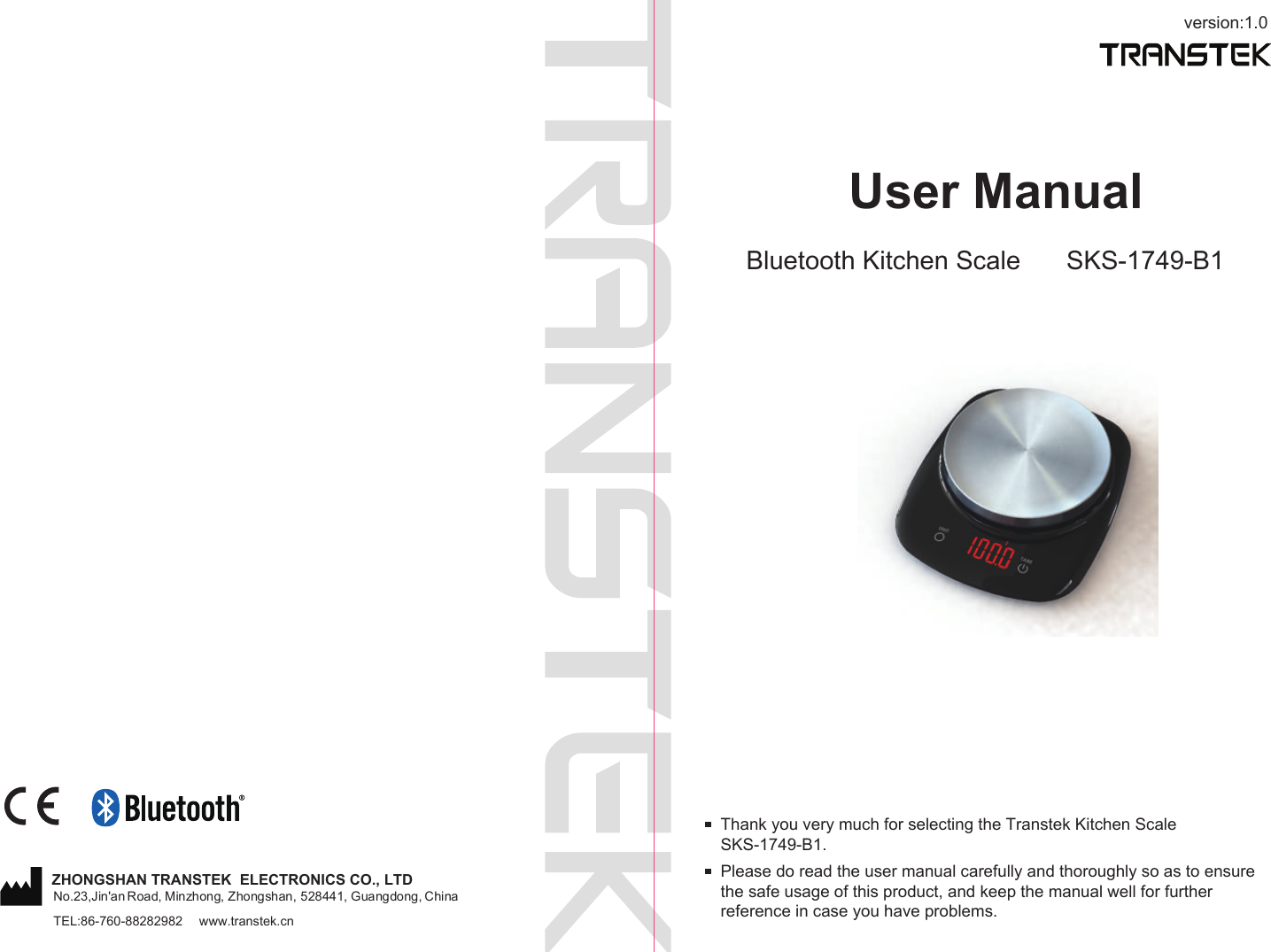
version:1.0User ManualBluetooth Kitchen Scale SKS-1749-B1Please do read the user manual carefully and thoroughly so as to ensure the safe usage of this product, and keep the manual well for further reference in case you have problems.Thank you very much for selecting the Transtek Kitchen Scale SKS-1749-B1.TEL:86-760-88282982  www.transtek.cnZHONGSHAN TRANSTEK  ELECTRONICS CO., LTDNo.23,Jin'an Road, Minzhong, Zhongshan, 528441, Guangdong, China
1Table of ContentsTable of ContentsProduct Overview Device Components LED DisplayInitial Start-UpOperationWeighing ModeTroubleshootingSpecificationsMaintenanceWarranty34 71314................................................................................................................. Function Indication 3......................................................................................................................................................................................................................................................................................................................................................................................................................................................................................................................................................................................................................................................................................................................................................................Measuring with Tare Function8.................................................................................................... List  4........................................................................................................................................9Safety InstructionsWarning Symbol   2..................................................... ............................................................Safety Instructions  2....................................................................................................................Changing the Weight Unit 6............................................... ............................................................Insert the Batteries 5...............................................................................................................Installing the App and Pair-Up ............................................... ....................................................Troubleshooting 11........................................................................................................................When Data Transmitting... ......................................................................................................... 1214..........................................................................................................................15..........................................................................................................................15Appendix  FCC Regulations  EMC Guidance
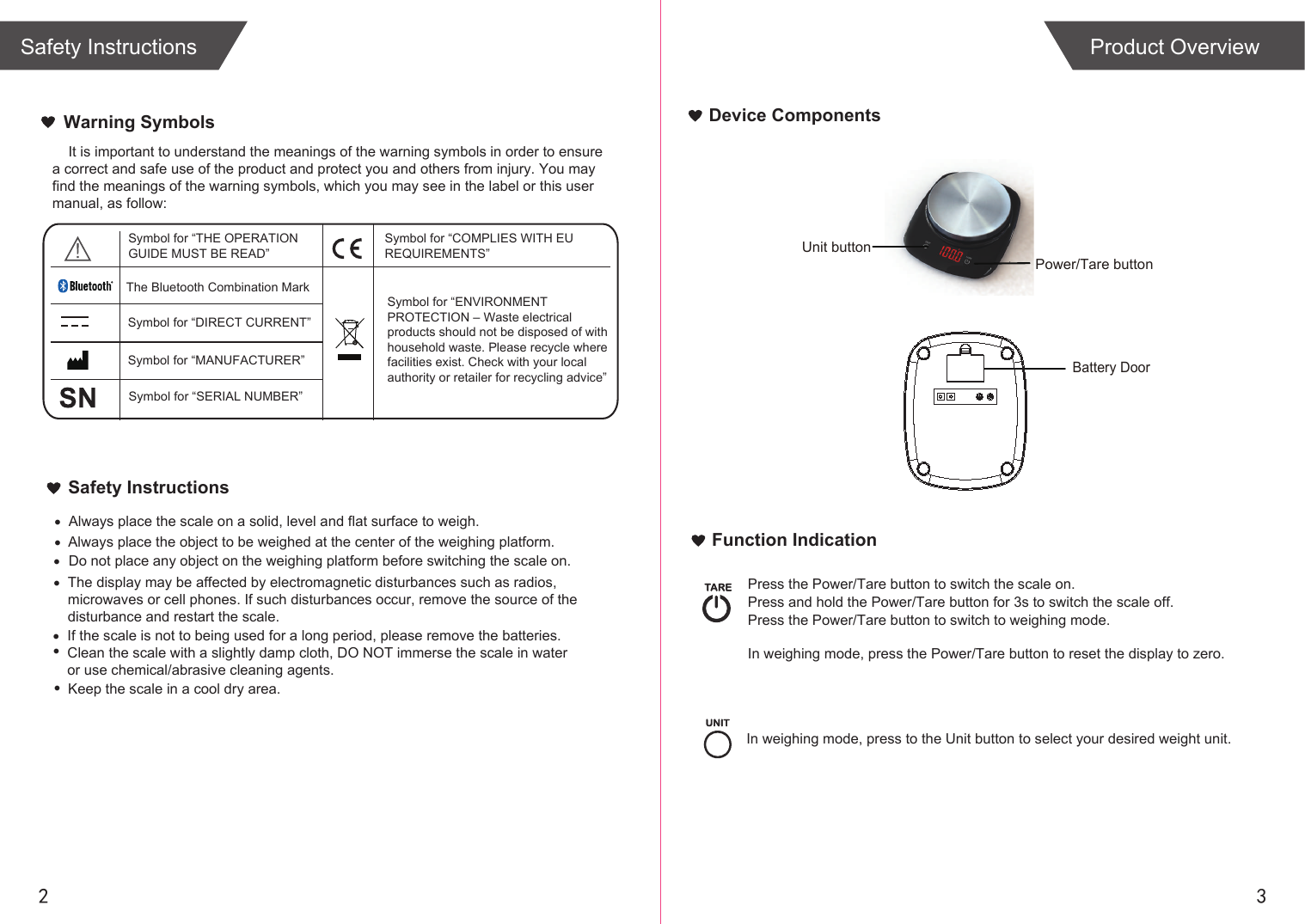
2 3Device ComponentsFunction IndicationBattery Door            Power/Tare button  Unit buttonIn weighing mode, press the Power/Tare button to reset the display to zero. Press the Power/Tare button to switch the scale on.Press and hold the Power/Tare button for 3s to switch the scale off.Press the Power/Tare button to switch to weighing mode.In weighing mode, press to the Unit button to select your desired weight unit.Product OverviewWarning Symbols•••••If the scale is not to being used for a long period, please remove the batteries.Clean the scale with a slightly damp cloth, DO NOT immerse the scale in water or use chemical/abrasive cleaning agents.•    It is important to understand the meanings of the warning symbols in order to ensure a correct and safe use of the product and protect you and others from injury. You may find the meanings of the warning symbols, which you may see in the label or this usermanual, as follow:Safety InstructionsAlways place the scale on a solid, level and flat surface to weigh. Always place the object to be weighed at the center of the weighing platform.Do not place any object on the weighing platform before switching the scale on.Keep the scale in a cool dry area.Symbol for “THE OPERATION GUIDE MUST BE READ”Symbol for “MANUFACTURER”Symbol for “ENVIRONMENT PROTECTION – Waste electrical products should not be disposed of with household waste. Please recycle where facilities exist. Check with your local authority or retailer for recycling advice”Symbol for “DIRECT CURRENT”Symbol for “COMPLIES WITH EU REQUIREMENTS”Symbol for “SERIAL NUMBER”The Bluetooth Combination MarkThe display may be affected by electromagnetic disturbances such as radios,microwaves or cell phones. If such disturbances occur, remove the source of thedisturbance and restart the scale.•Safety Instructions
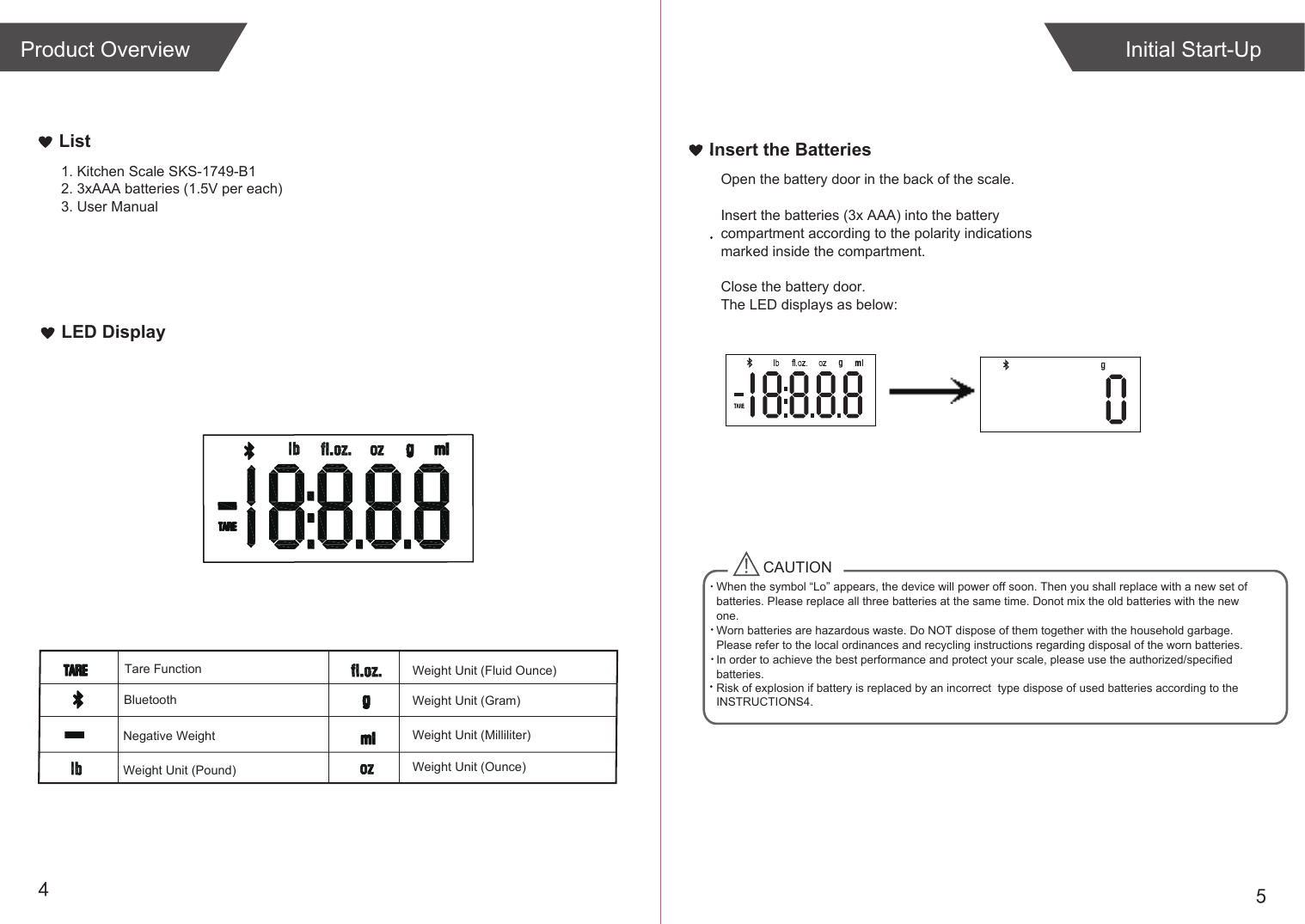
54Weight Unit (Fluid Ounce)Weight Unit (Gram)Negative WeightLED DisplayList1. Kitchen Scale SKS-1749-B12. 3xAAA batteries (1.5V per each)3. User ManualInitial Start-UpTare FunctionInsert the BatteriesOpen the battery door in the back of the scale.Insert the batteries (3x AAA) into the battery compartment according to the polarity indications marked inside the compartment.Close the battery door.The LED displays as below:CAUTIONWhen the symbol “Lo” appears, the device will power off soon. Then you shall replace with a new set of batteries. Please replace all three batteries at the same time. Donot mix the old batteries with the new one. Worn batteries are hazardous waste. Do NOT dispose of them together with the household garbage. Please refer to the local ordinances and recycling instructions regarding disposal of the worn batteries.In order to achieve the best performance and protect your scale, please use the authorized/specified batteries.Risk of explosion if battery is replaced by an incorrect  type dispose of used batteries according to the INSTRUCTIONS4.BluetoothProduct OverviewWeight Unit (Milliliter)Weight Unit (Pound) Weight Unit (Ounce)
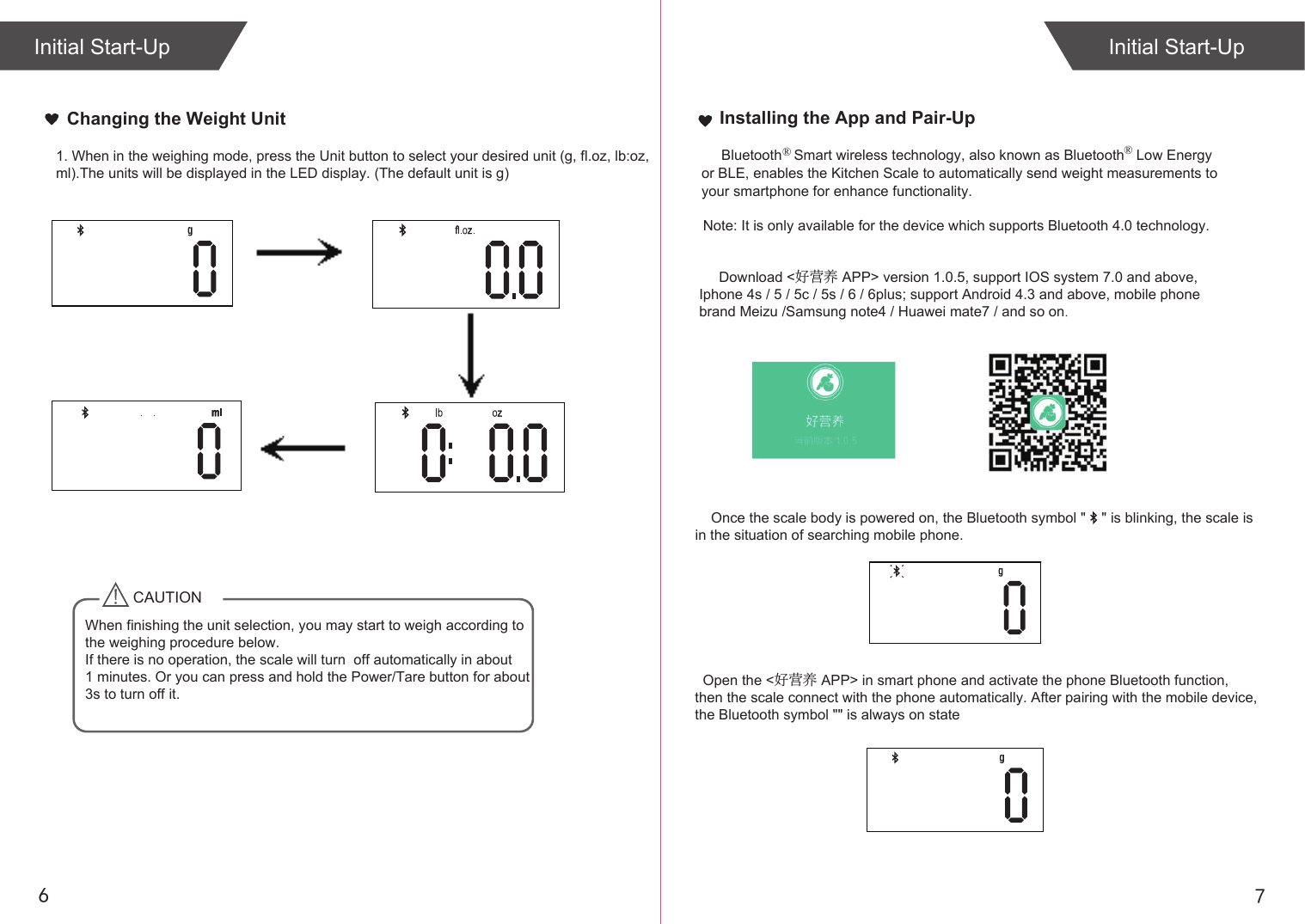
    Note: It is only available for the device which supports Bluetooth 4.0 technology.                                                 Download <好营养 APP> version 1.0.5, support IOS system 7.0 and above,    Iphone 4s / 5 / 5c / 5s / 6 / 6plus; support Android 4.3 and above, mobile phone    brand Meizu /Samsung note4 / Huawei mate7 / and so on.                                                                                 Once the scale body is powered on, the Bluetooth symbol "    " is blinking, the scale is   in the situation of searching mobile phone.761. When in the weighing mode, press the Unit button to select your desired unit (g, fl.oz, lb:oz,ml).The units will be displayed in the LED display. (The default unit is g)Initial Start-UpCAUTIONWhen finishing the unit selection, you may start to weigh according to the weighing procedure below.If there is no operation, the scale will turn  off automatically in about 1 minutes. Or you can press and hold the Power/Tare button for about 3s to turn off it. Installing the App and Pair-Up        Bluetooth   Smart wireless technology, also known as Bluetooth  Low Energy or BLE, enables the Kitchen Scale to automatically send weight measurements to your smartphone for enhance functionality.®  ® Initial Start-UpChanging the Weight Unit  Open the <好营养 APP> in smart phone and activate the phone Bluetooth function, then the scale connect with the phone automatically. After pairing with the mobile device, the Bluetooth symbol "" is always on state
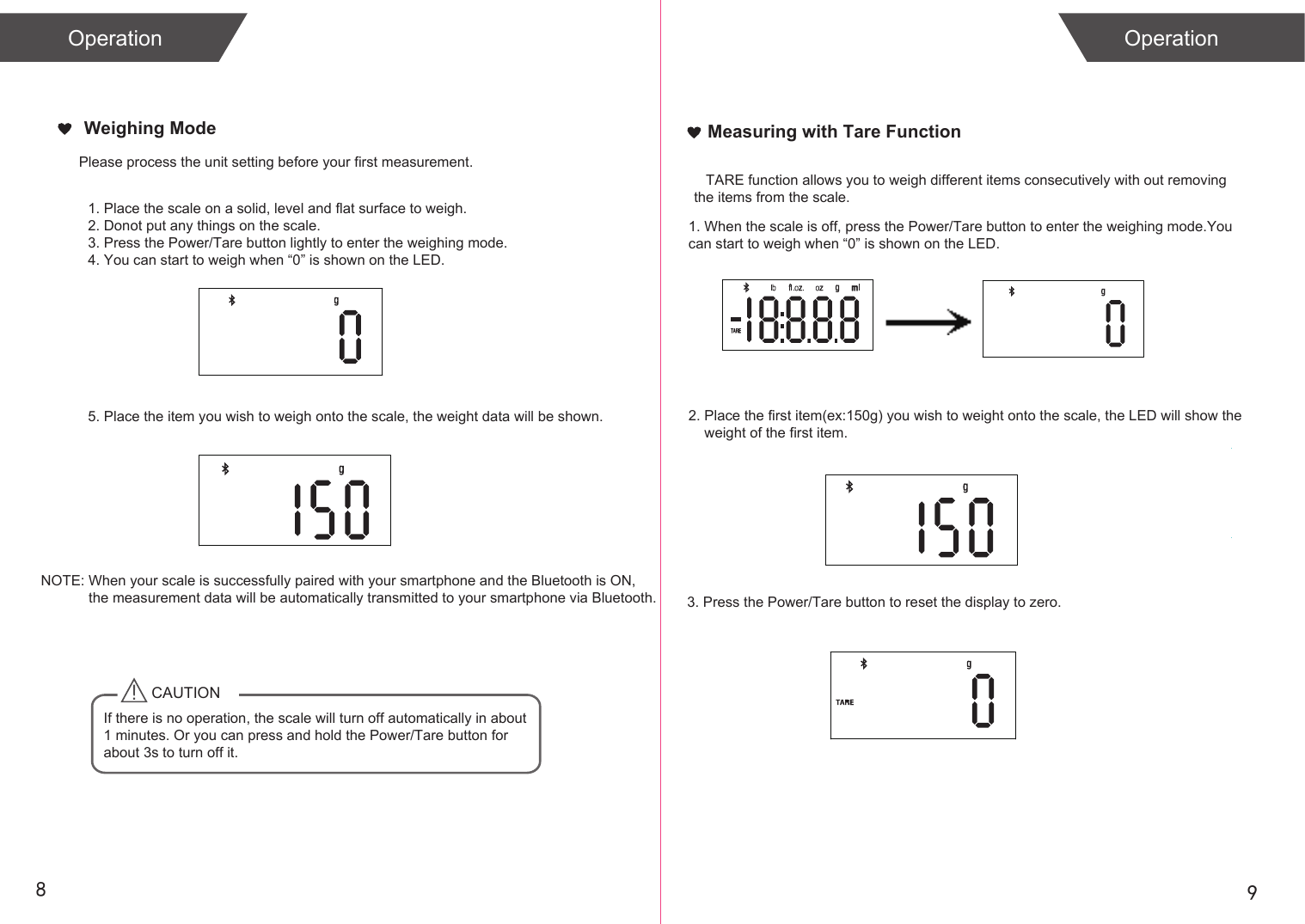
Please process the unit setting before your first measurement. 89Measuring with Tare FunctionCAUTIONIf there is no operation, the scale will turn off automatically in about 1 minutes. Or you can press and hold the Power/Tare button for about 3s to turn off it. NOTE: When your scale is successfully paired with your smartphone and the Bluetooth is ON,             the measurement data will be automatically transmitted to your smartphone via Bluetooth.            1. When the scale is off, press the Power/Tare button to enter the weighing mode.You can start to weigh when “0” is shown on the LED.2. Place the first item(ex:150g) you wish to weight onto the scale, the LED will show the     weight of the first item.   TARE function allows you to weigh different items consecutively with out removing the items from the scale. 3. Press the Power/Tare button to reset the display to zero.        1. Place the scale on a solid, level and flat surface to weigh. 2. Donot put any things on the scale.3. Press the Power/Tare button lightly to enter the weighing mode.4. You can start to weigh when “0” is shown on the LED.5. Place the item you wish to weigh onto the scale, the weight data will be shown.Operation OperationWeighing Mode
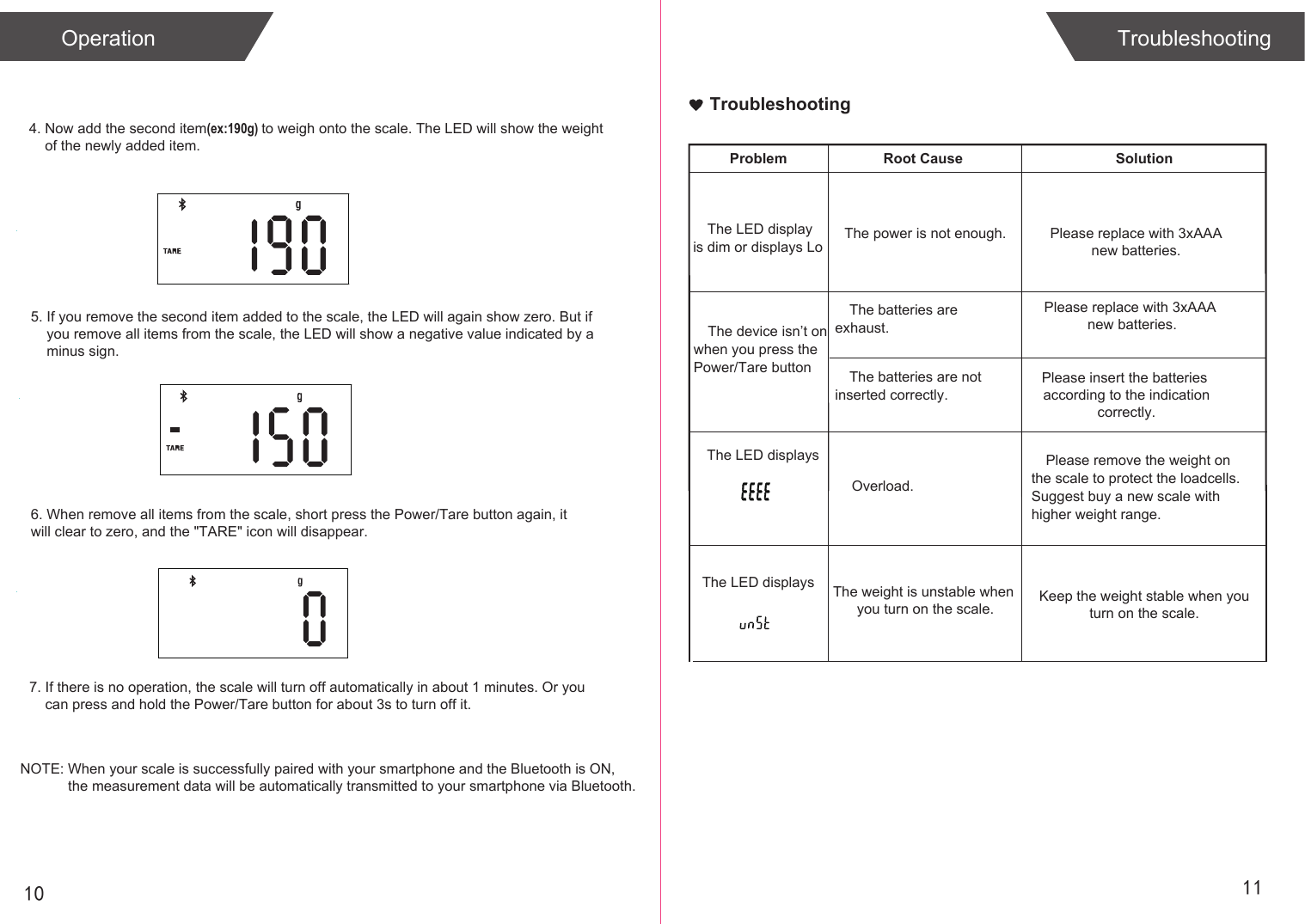
10 117. If there is no operation, the scale will turn off automatically in about 1 minutes. Or you     can press and hold the Power/Tare button for about 3s to turn off it. 4. Now add the second item(ex:190g) to weigh onto the scale. The LED will show the weight     of the newly added item. 5. If you remove the second item added to the scale, the LED will again show zero. But if     you remove all items from the scale, the LED will show a negative value indicated by a     minus sign. 6. When remove all items from the scale, short press the Power/Tare button again, it will clear to zero, and the "TARE" icon will disappear.Operation TroubleshootingNOTE: When your scale is successfully paired with your smartphone and the Bluetooth is ON,             the measurement data will be automatically transmitted to your smartphone via Bluetooth.            The LED displays  The weight is unstable when you turn on the scale. Keep the weight stable when youturn on the scale.TroubleshootingProblem Root Cause SolutionThe LED display is dim or displays LoThe device isn’t on   when you press the Power/Tare button The batteries are exhaust.Overload.The LED displays Please remove the weight on the scale to protect the loadcells. Suggest buy a new scale with higher weight range.The power is not enough. Please replace with 3xAAAnew batteries.Please replace with 3xAAA new batteries.The batteries are not inserted correctly.Please insert the batteries according to the indicationcorrectly.
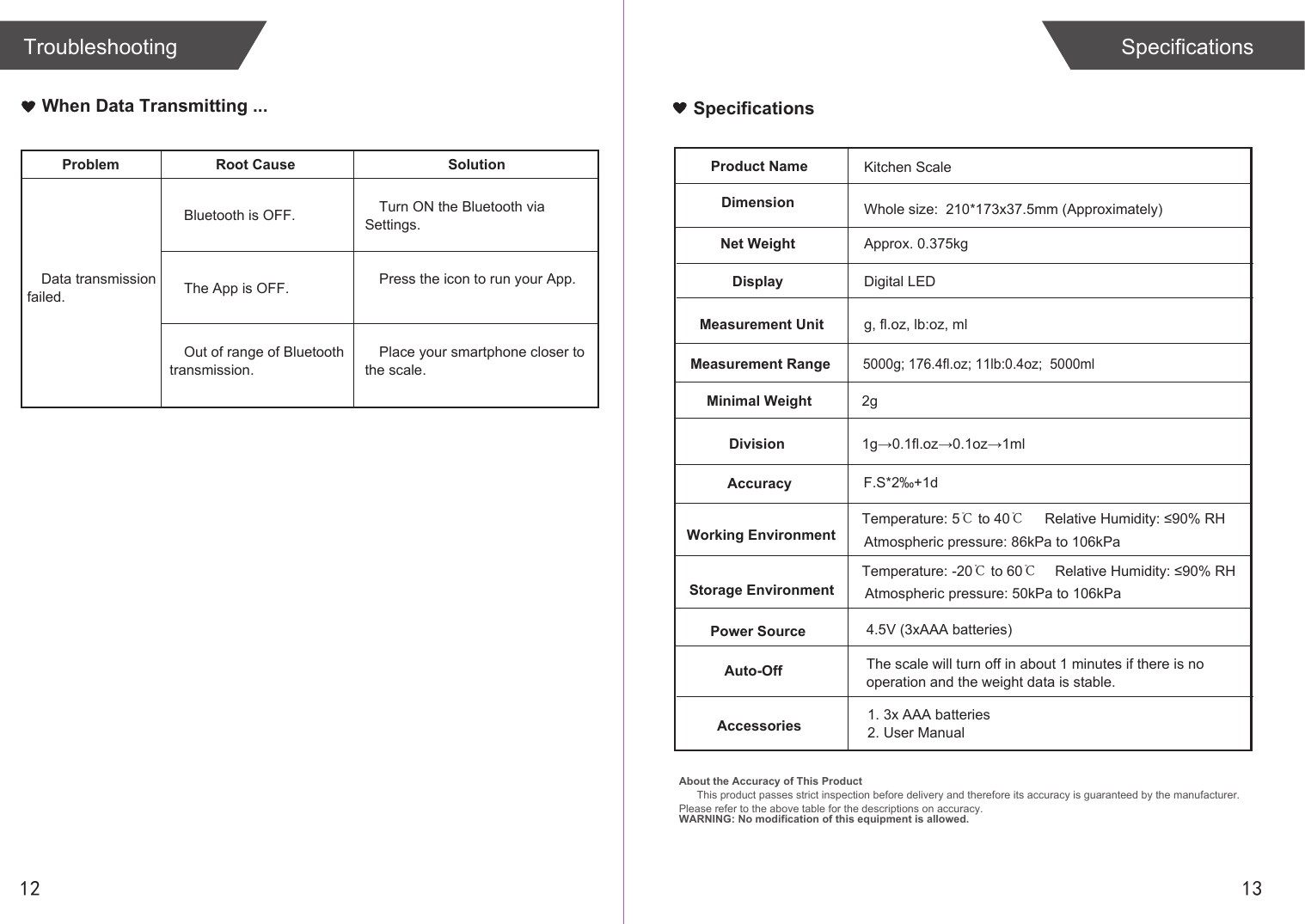
SpecificationsProduct NameDimensionKitchen ScaleWhole size:  210*173x37.5mm (Approximately)Net Weight Approx. 0.375kgDisplay Digital LED Measurement Unit g, fl.oz, lb:oz, mlMeasurement RangeMinimal Weight5000g; 176.4fl.oz; 11lb:0.4oz;  5000mlDivisionAccuracy F.S*2‰+1dWorking EnvironmentStorage EnvironmentPower Source 4.5V (3xAAA batteries) Auto-OffAccessories 1. 3x AAA batteries2. User Manual1g→0.1fl.oz→0.1oz→1ml2gAbout the Accuracy of This ProductThis product passes strict inspection before delivery and therefore its accuracy is guaranteed by the manufacturer. Please refer to the above table for the descriptions on accuracy. WARNING: No modification of this equipment is allowed.12SpecificationsTroubleshootingProblem Root Cause SolutionBluetooth is OFF.Data transmission failed.Turn ON the Bluetooth via Settings.The App is OFF. Press the icon to run your App.Place your smartphone closer to the scale.Out of range of Bluetooth transmission.When Data Transmitting ...13The scale will turn off in about 1 minutes if there is no operation and the weight data is stable.Temperature: 5℃ to 40℃Temperature: -20℃ to 60℃Relative Humidity: ≤90% RHAtmospheric pressure: 86kPa to 106kPaAtmospheric pressure: 50kPa to 106kPaRelative Humidity: ≤90% RH
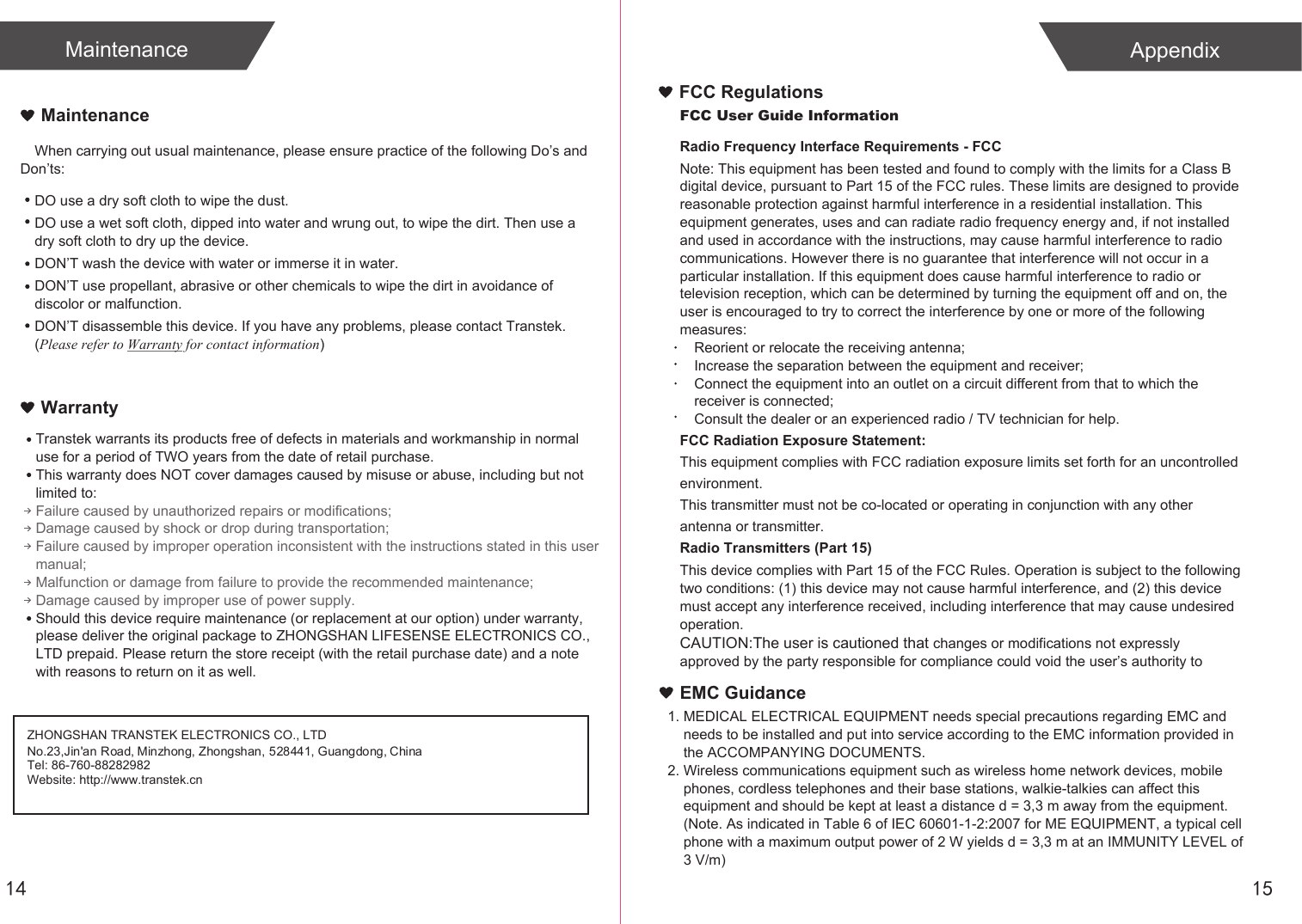
14MaintenanceWhen carrying out usual maintenance, please ensure practice of the following Do’s and Don’ts:Transtek warrants its products free of defects in materials and workmanship in normal use for a period of TWO years from the date of retail purchase.This warranty does NOT cover damages caused by misuse or abuse, including but not limited to: Failure caused by unauthorized repairs or modifications;Damage caused by shock or drop during transportation;Failure caused by improper operation inconsistent with the instructions stated in this user manual;Malfunction or damage from failure to provide the recommended maintenance;Damage caused by improper use of power supply.Should this device require maintenance (or replacement at our option) under warranty, please deliver the original package to ZHONGSHAN LIFESENSE ELECTRONICS CO., LTD prepaid. Please return the store receipt (with the retail purchase date) and a note with reasons to return on it as well.MaintenanceWarrantyDO use a dry soft cloth to wipe the dust.DO use a wet soft cloth, dipped into water and wrung out, to wipe the dirt. Then use a dry soft cloth to dry up the device.DON’T wash the device with water or immerse it in water.DON’T use propellant, abrasive or other chemicals to wipe the dirt in avoidance of discolor or malfunction.DON’T disassemble this device. If you have any problems, please contact Transtek. (Please refer to Warranty for contact information)ZHONGSHAN TRANSTEK ELECTRONICS CO., LTDTel: 86-760-88282982Website: http://www.transtek.cn No.23,Jin'an Road, Minzhong, Zhongshan, 528441, Guangdong, China15AppendixEMC Guidance1. MEDICAL ELECTRICAL EQUIPMENT needs special precautions regarding EMC and     needs to be installed and put into service according to the EMC information provided in     the ACCOMPANYING DOCUMENTS. 2. Wireless communications equipment such as wireless home network devices, mobile     phones, cordless telephones and their base stations, walkie-talkies can affect this     equipment and should be kept at least a distance d = 3,3 m away from the equipment.    (Note. As indicated in Table 6 of IEC 60601-1-2:2007 for ME EQUIPMENT, a typical cell     phone with a maximum output power of 2 W yields d = 3,3 m at an IMMUNITY LEVEL of     3 V/m)FCC User Guide InformationRadio Frequency Interface Requirements - FCCNote: This equipment has been tested and found to comply with the limits for a Class B digital device, pursuant to Part 15 of the FCC rules. These limits are designed to provide reasonable protection against harmful interference in a residential installation. This equipment generates, uses and can radiate radio frequency energy and, if not installed and used in accordance with the instructions, may cause harmful interference to radio communications. However there is no guarantee that interference will not occur in a particular installation. If this equipment does cause harmful interference to radio or television reception, which can be determined by turning the equipment off and on, the user is encouraged to try to correct the interference by one or more of the following measures:Reorient or relocate the receiving antenna;Increase the separation between the equipment and receiver;Connect the equipment into an outlet on a circuit different from that to which the receiver is connected;Consult the dealer or an experienced radio / TV technician for help.FCC Radiation Exposure Statement:This equipment complies with FCC radiation exposure limits set forth for an uncontrolled environment.This transmitter must not be co-located or operating in conjunction with any other antenna or transmitter.Radio Transmitters (Part 15)This device complies with Part 15 of the FCC Rules. Operation is subject to the following two conditions: (1) this device may not cause harmful interference, and (2) this device must accept any interference received, including interference that may cause undesired operation.CAUTION:The user is cautioned that changes or modifications not expressly approved by the party responsible for compliance could void the user’s authority to FCC Regulations

Navigation menu