Zhuhai Raysharp Technology RS-SNW Wireless receptor User Manual

Zhuhai RaySharp Technology Co.,Ltd Wireless receptor Users Manual

User Manual

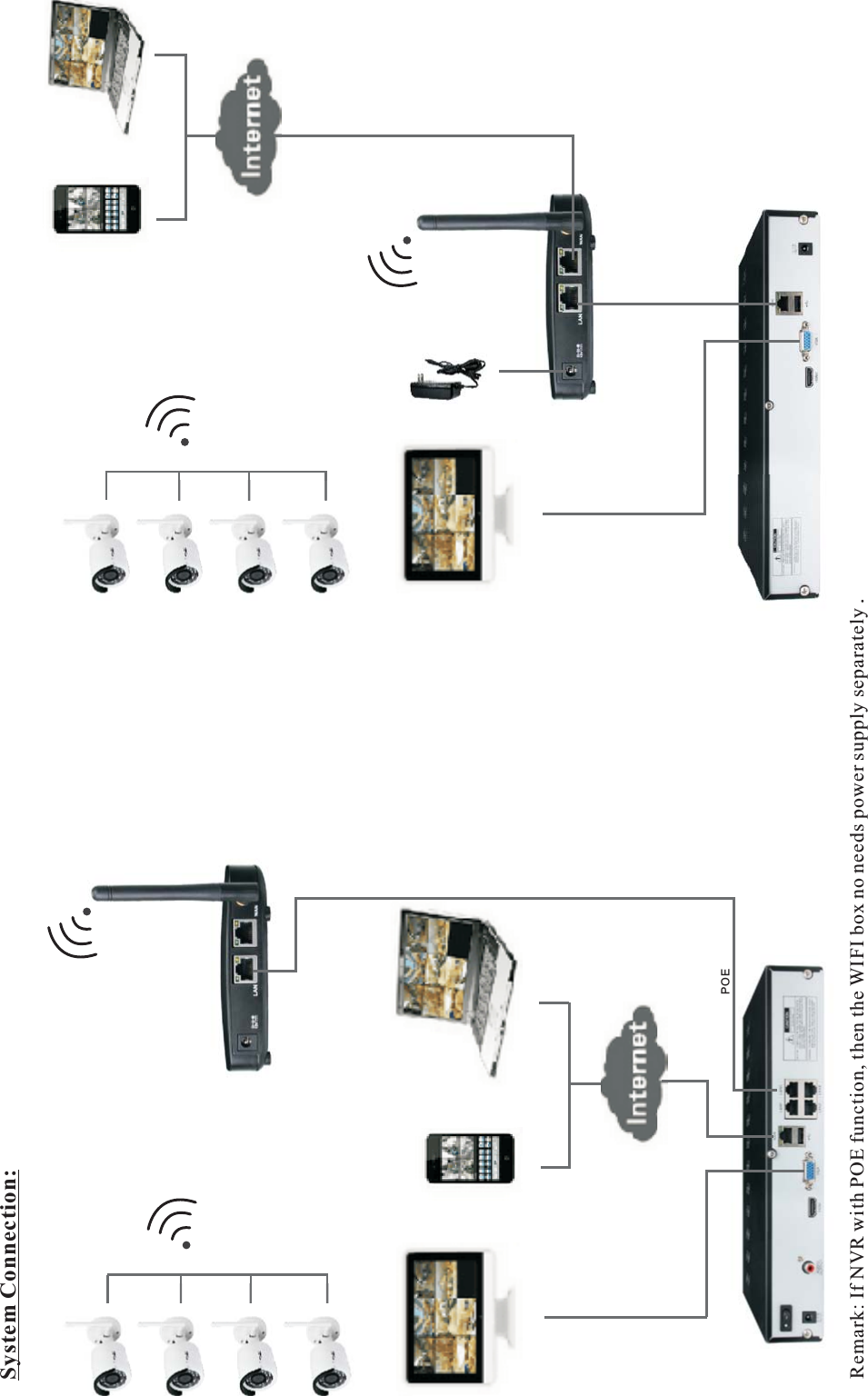
System Connection:Remark: If NVR with POE function, then the WIFI box no needs power supply separately .POEWWIIFFII  KKIITT  UUSSEERR  MMAANNUUAALL
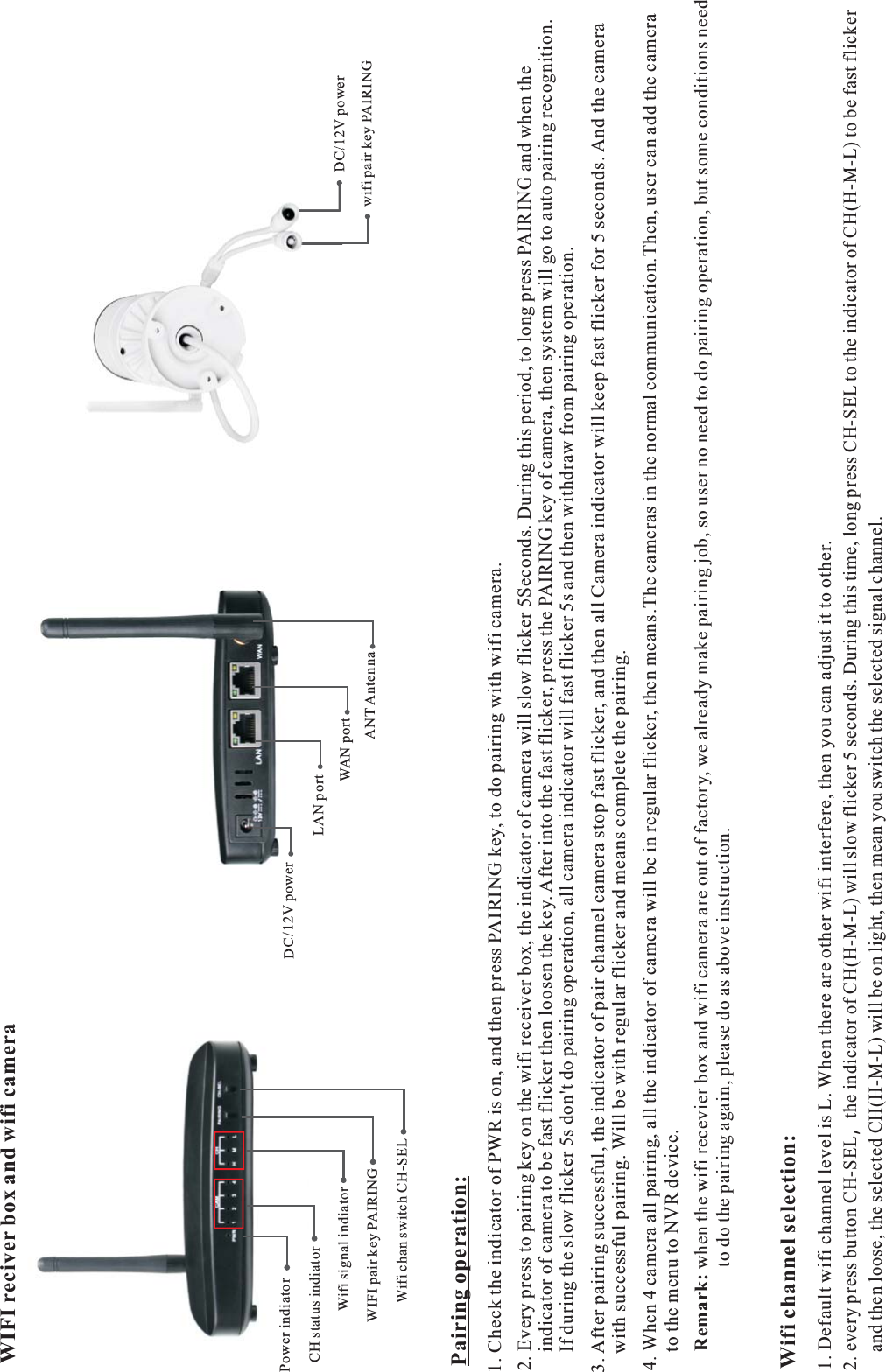
DC/12V powerLAN portANT AntennaWAN port DC/12V powerwifi pair key PAIRINGPairing operation:1. Check the indicator of PWR is on, and then press PAIRING key, to do pairing with wifi camera.2. Every press to pairing key on the wifi receiver box, the indicator of camera will slow flicker 5Seconds. During this period, to long press PAIRING and when the     indicator of camera to be fast flicker then loosen the key. After into the fast flicker, press the PAIRING key of camera, then system will go to auto pairing recognition.    If during the slow flicker 5s don't do pairing operation, all camera indicator will fast flicker 5s and then withdraw from pairing operation.3. After pairing successful, the indicator of pair channel camera stop fast flicker, and then all Camera indicator will keep fast flicker for 5 seconds. And the camera     with successful pairing. Will be with regular flicker and means complete the pairing.4. When 4 camera all pairing, all the indicator of camera will be in regular flicker, then means.The cameras in the normal communication.Then, user can add the camera     to the menu to NVR device.Remark: when the wifi recevier box and wifi camera are out of factory, we already make pairing job, so user no need to do pairing operation, but some conditions need                  to do the pairing again, please do as above instruction.2. every press button CH-SEL,the indicator of CH(H-M-L) will slow flicker 5 seconds. During this time, long press CH-SEL to the indicator of CH(H-M-L) to be fast flicker    and then loose, the selected CH(H-M-L) will be on light, then mean you switch the selected signal channel.Wifi channel selection:Power indiatorCH status indiatorWifi signal indiator WIFI pair key PAIRINGWifi chan switch CH-SEL1. Default wifi channel level is L. When there are other wifi interfere, then you can adjust it to other.WIFI reciver box and wifi camera
FCC StatementChanges or modifications not expressly approved by the party responsible for compliance could void the user's authority to operate the equipment.This equipment has been tested and found to comply with the limits for a Class B digital device, pursuant to Part 15 of the FCC Rules. These limits aredesigned to provide reasonable protection against harmful interference in a residential installation. This equipment generates uses and can radiate radio frequency energy and, if not installed and used in accordance with theinstructions, may cause harmful interference to radio communications. However, there is no guarantee that interference will not occur in a particular installation. If this equipment does cause harmful interference to radio or television reception, which can be determined by turning the equipment off and on, the user is encouraged to try to correct the interference by one or more of the following measures:-- Reorient or relocate the receiving antenna.-- Increase the separation between the equipment and receiver.-- Connect the equipment into an outlet on a circuit different from that to which the receiver is connected.-- Consult the dealer or an experienced radio/TV technician for helpThis device complies with part 15 of the FCC rules. Operation is subject to the following two conditions (1)this device may not cause harmful interference,and (2) this device must accept any interference received, including interference that may cause undesired operation.It is recommended to use the adapter as followInput: AC 100-240V, 50/60HzOutput: DC 12V, 0.5A

Navigation menu