Zimi SXJ01ZM Mi Home Security Camera User Manual

Zimi Corporation Mi Home Security Camera Users Manual

Users Manual

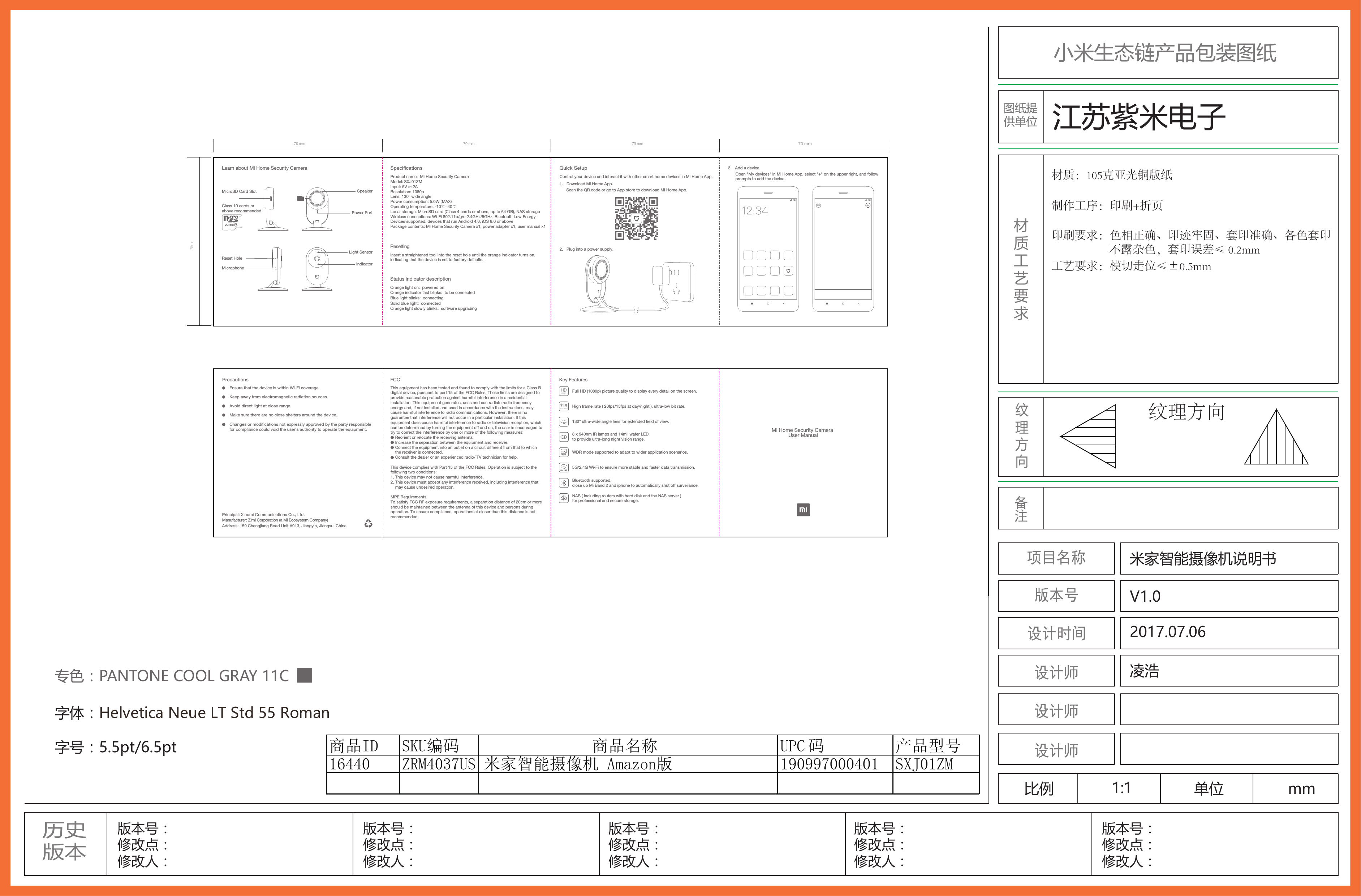
小米生态链产品包装图纸历史版本版本号:修改点:修改人:商品16440 ZRM4037US 米家智能摄像机 Amazon版 190997000401 SXJ01ZMID SKU编码 商品名称 UPC 码 产品型号版本号:修改点:修改人:版本号:修改点:修改人:版本号:修改点:修改人:版本号:修改点:修改人:纹理方向专色:PANTONE COOL GRAY 11C字体:Helvetica Neue LT Std 55 Roman字号:5.5pt/6.5pt材质工艺要求比例 1:1 单位 mm米家智能摄像机说明书V1.02017.07.06凌浩印刷要求:色相正确、印迹牢固、套印准确、各色套印                        不露杂色,套印误差≤ 0.2mm工艺要求:模切走位≤±0.5mm制作工序:印刷+折页材质:105克亚光铜版纸江苏紫米电子纹理方向Principal: Xiaomi Communications Co., Ltd.Manufacturer: Zimi Corporation (a Mi Ecosystem Company)Address: 159 Chengjiang Road Unit A913, Jiangyin, Jiangsu, ChinaPrecautionsEnsure that the device is within Wi-Fi coverage.Keep away from electromagnetic radiation sources. Avoid direct light at close range.Make sure there are no close shelters around the device.Mi Home Security Camera User ManualKey FeaturesFull HD (1080p) picture quality to display every detail on the screen.High frame rate ( 20fps/15fps at day/night ), ultra-low bit rate.130° ultra-wide angle lens for extended eld of view.8 x 940nm IR lamps and 14mil wafer LED to provide ultra-long night vision range.WDR mode supported to adapt to wider application scenarios.5G/2.4G Wi-Fi to ensure more stable and faster data transmission.Bluetooth supported, close up Mi Band 2 and iphone to automatically shut off surveilance.5G 2.4GNAS ( including routers with hard disk and the NAS server ) for professional and secure storage.1080P130°20FPS15FPSWDR79 mm79mm79 mm 79 mm79 mm3.   Add a device.Open "My devices" in Mi Home App, select "+" on the upper right, and follow prompts to add the device.        Quick SetupControl your device and interact it with other smart home devices in Mi Home App.1.   Download Mi Home App.Scan the QR code or go to App store to download Mi Home App.ResettingSpecicationsLearn about Mi Home Security Camera2.   Plug into a power supply.Insert a straightened tool into the reset hole until the orange indicator turns on, indicating that the device is set to factory defaults.Status indicator descriptionOrange light on:  powered onOrange indicator fast blinks:  to be connectedBlue light blinks:  connectingSolid blue light:  connectedOrange light slowly blinks:  software upgradingProduct name:  Mi Home Security Camera Model: SXJ01ZMInput: 5V     2AResolution: 1080pLens: 130° wide anglePower consumption: 5.0W (MAX)Operating temperature: -10℃~40℃Local storage: MicroSD card (Class 4 cards or above, up to 64 GB), NAS storageWireless connections: Wi-Fi 802.11b/g/n 2.4GHz/5GHz, Bluetooth Low EnergyDevices supported: devices that run Android 4.0, iOS 8.0 or abovePackage contents: Mi Home Security Camera x1, power adapter x1, user manual x1IndicatorMicrophoneReset HoleLight SensorMicroSD Card SlotPower PortSpeakerClass 10 cards or above recommendedFCCThisequipmenthasbeentestedandfoundtocomplywiththelimitsforaClassBdigitaldevice,pursuanttopart15oftheFCCRules.Theselimitsaredesignedtoprovidereasonableprotectionagainstharmfulinterferenceinaresidentialinstallation.Thisequipmentgenerates,usesandcanradiateradiofrequencyenergyand,ifnotinstalledandusedinaccordancewiththeinstructions,maycauseharmfulinterferencetoradiocommunications.However,thereisnoguaranteethatinterferencewillnotoccurinaparticularinstallation.Ifthisequipmentdoescauseharmfulinterferencetoradioortelevisionreception,whichcanbedeterminedbyturningtheequipmentoffandon,theuserisencouragedtotrytocorrecttheinterferencebyoneormoreofthefollowingmeasures:    Reorientorrelocatethereceivingantenna.    Increasetheseparationbetweentheequipmentandreceiver.    Connecttheequipmentintoanoutletonacircuitdifferentfromthattowhich    the receiverisconnected.    Consultthedealeroranexperiencedradio/TVtechnicianforhelp.This device complies with Part 15 of the FCC Rules. Operation is subject to the following two conditions: 1. This device may not cause harmful interference, 2. This device must accept any interference received, including interference that     may cause undesired operation.MPERequirementsTosatisfyFCCRFexposurerequirements,aseparationdistanceof20cmormoreshouldbemaintainedbetweentheantennaofthisdeviceandpersonsduringoperation.Toensurecompliance,operationsatcloserthanthisdistanceisnotrecommended.Changes or modications not expressly approved by the party responsible for compliance could void the user's authority to operate the equipment.

Navigation menu