Zound HELLAS Hellas User Manual hellas user guide 01 EN indd
Zound Industries Hellas hellas user guide 01 EN indd
Zound >
Users Manual
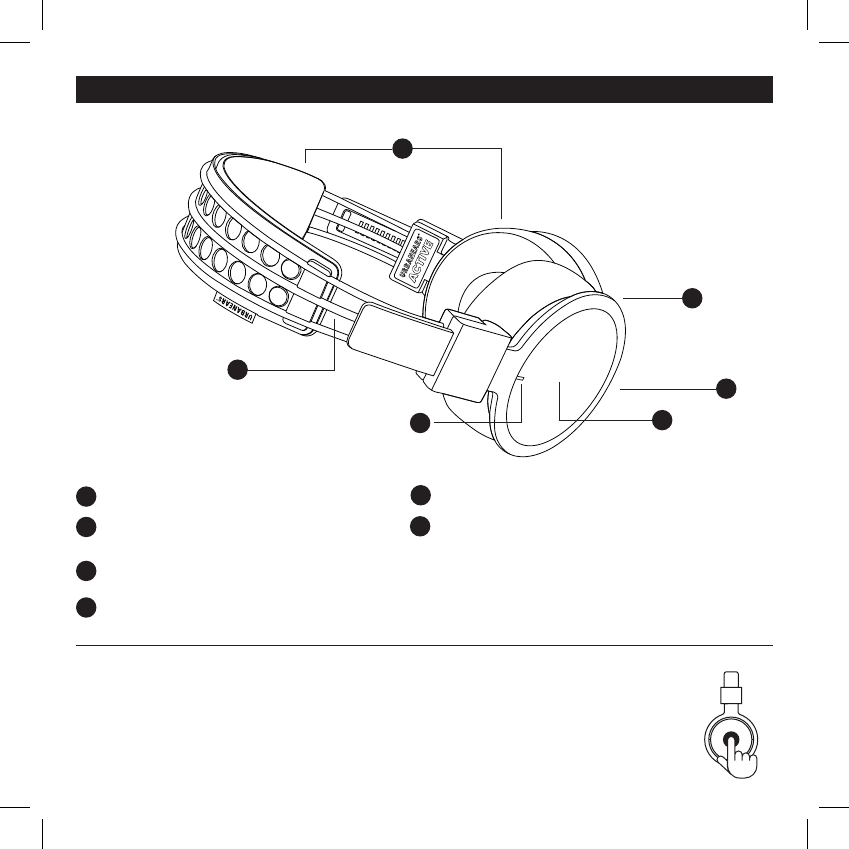
Machine washable headband and ear cushions
LED indicator – Discrete and unlit during normal
operation.
Built-in touch interface (right side)
Micro USB connector for charging the battery
Reflective cord
Microphone for answering phone calls
INTERFACES
1
1
4
4
3
3
2
5
2
6
5
6
HELLAS USER MANUAL ENG
USING THE HEADPHONES
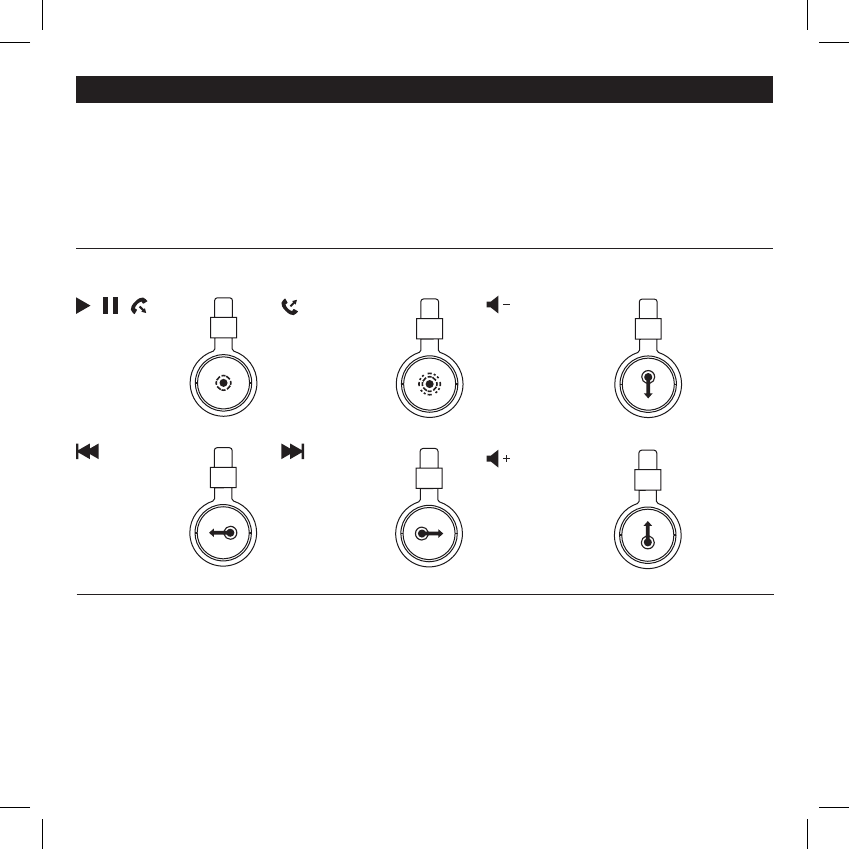
Locate the Touch Interface on the right ear cup. All user interfac-
es are done through commands on the touch interface. An audio
signal indicates when a command is activated.
TURN THE HEADPHONES ON/OFF
Power On: Press and hold the touch interface for
4 seconds Power Off: Press and hold the touch
interface for 4 seconds.
Note! The headphones will auto shut-off if
inactive and disconnected for 10 minutes.
CONTROLS
HELLAS USER MANUAL ENG
CHARGING
Plug the headphones into a USB power source using the micro USB cable. The USB cable can only be used for charging. 2 hours
charge gives approximately 14 hours of playback at medium volume.
Charge the battery before using the headphones for the first time.
CONNECTING TO A BLUETOOTH® ENABLED SOUND SOURCE
Follow the steps below when pairing your headphones with your sound source (smartphone, tablet or computer) for the first time.
1. If the device is turned off: Keep holding the touch interface for 4 seconds.
2. Select and connect to HELLAS on your sound source, according to its user manual.
After the initial pairing, the two devices will auto-connect when they are switched on and within the range of 10 meters.
PLAY/PAUSE/
ANSWER CALL
Single tap
PREVIOUS SONG
Swipe backward
NEXT SONG
Swipe forward
HANG UP/
REJECT CALL
Double tap
DECREASE
VOLUME
Swipe downward
INCREASE
VOLUME
Swipe upward
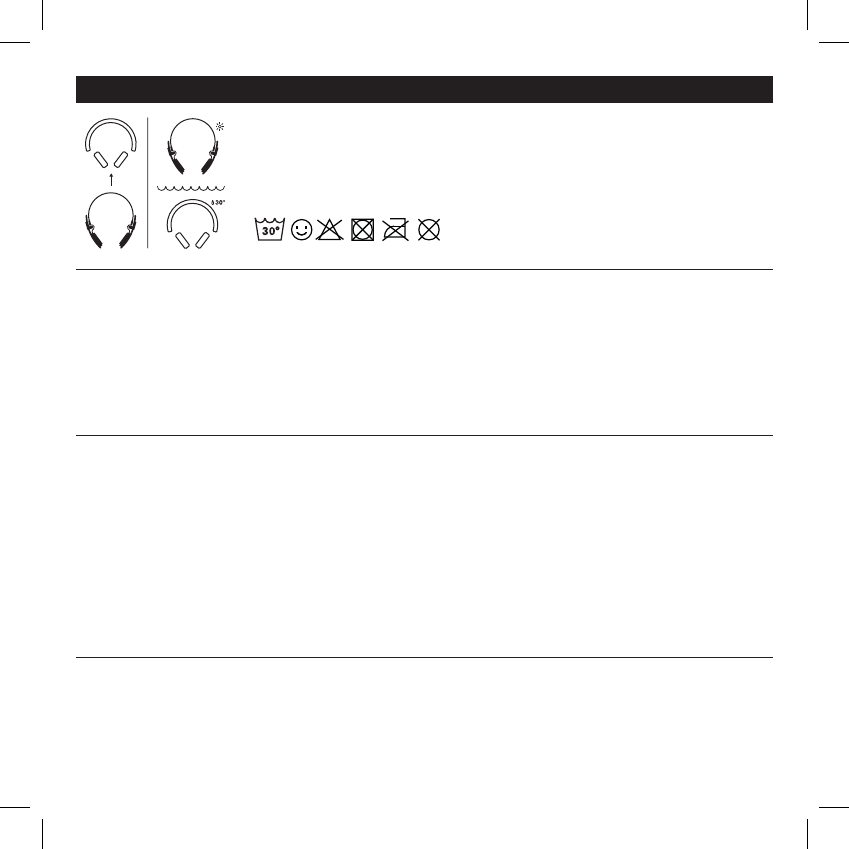
CLEANING THE HEADPHONES
Detach the washable headband and ear cushions and machine-wash in 30° C
(Cold/Cool). Clean the headphones with a soft, dry cloth.
Note! Do not use liquids or sprays. Happy sweating!
LED INDICATOR
Status Indicates
Red (continuous) Battery charging
White (continuous) Fully charged and connected to a USB power source
Blue (fast blinking) Pairing mode, waiting to pair
White (Slow blinking) Waiting to connect
White (10 sek interval) Connected and switched on
Off Headphones are switched off or in normal operation
TROUBLE SHOOTING
Problem Action
Not powering on Charge the headphone using the USB cable.
Make sure the headphone is off before turning it on.
Not charging Make sure the USB power source is switched on.
The LED indicator is red while charging and white when fully charged.
Not pairing Move the devices closer to each other and away from any interference or obstruction.
Make sure the headphone is not connected to a different sound source when entering the pairing mode.
Disable and enable Bluetooth® communication on your sound source.
No sound Make sure the headphone is on and connected.
Make sure the sound source is playing.
Poor sound quality Move the devices closer to each other and away from any interference or obstruction.
IMPORTANT SAFETY INSTRUCTIONS
•Set your sound source to low volume before using the headphones.
•Do not use these headphones when operating a motor vehicle, a bicycle, or machinery or where your inability to hear outside
sounds may present a danger to you or others.
•Using these headphones limits your ability to hear noises around you, regardless of listening volume. Please use caution when using
these headphones.
HELLAS USER MANUAL ENG
HELLAS USER MANUAL ENG
• Do not drop, sit on, or allow the headphone to be immersed in water.
• Keep away from fire, water, and high voltage equipment.
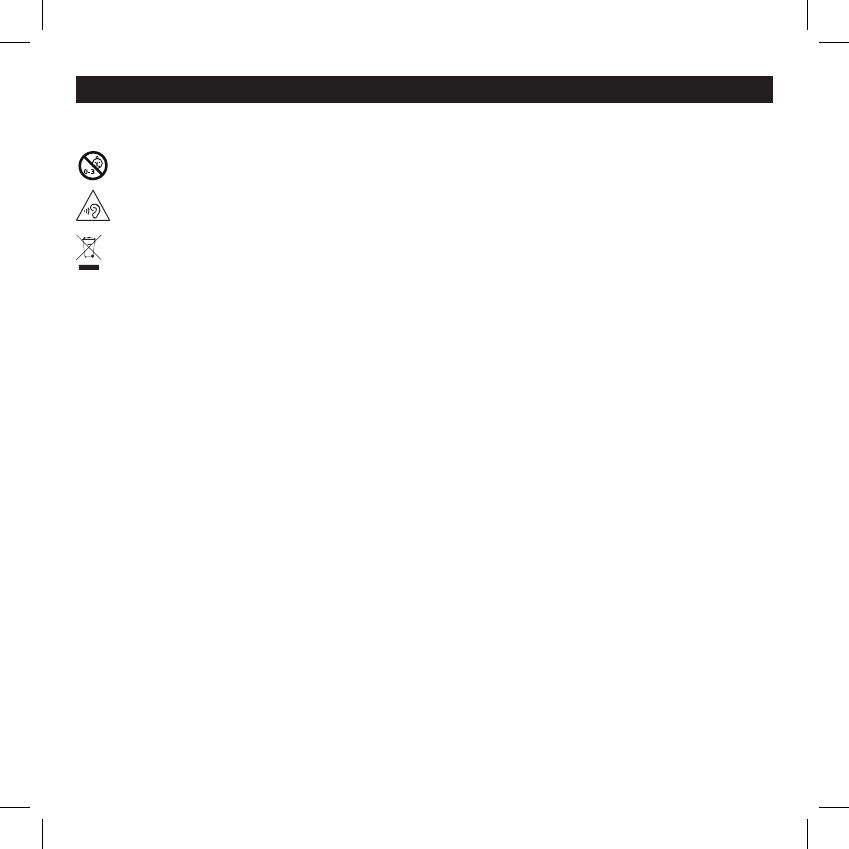
Not suitable for children under age three. Contains small parts, which may be a choking hazard.
Long-term exposure to loud music or sounds may cause hearing loss. To prevent possible hearing damage, do not listen at
high volume levels for long periods.
This is not household waste. Instead it shall be handed over to the applicable collection point for the recycling of electrical
and electronic equipment. This product was produced after Jan 1 2006.
FCC WARNING
Any Changes or modifications not expressly approved by the party responsible for compliance
could void the user’s authority to operate the equipment.This device complies with part 15 of
the FCC Rules. Operation is subject to the following two conditions: (1) This device may not
cause harmful interference, and (2) this device must accept any interference received, including
interference that may cause undesired operation.This equipment complies with FCC radiation
exposure limits set forth for an uncontrolled environment.Note: This equipment has been tested
and found to comply with the limits for a Class B digital device, pursuant to part 15 of the FCC
Rules. These limits are designed to provide reasonable protection against harmful interference in
a residential installation. This equipment generates, uses and can radiate radio frequency energy
and, if not installed and used in accordance with the instructions, may cause harmful interfer-
ence to radio communications. However, there is no guarantee that interference will not occur in
a particular installation. If this equipment does cause harmful interference to radio or television
reception, which can be determined by turning the equipment off and on, the user is encouraged
to try to correct the interference by one or more of the following measures:
• Reorient or relocate the receiving antenna.
• Increase the separation between the equipment and receiver.
• Connect the equipment into an outlet on a circuit different from that to which the receiver is
connected.
• Consult the dealer or an experienced radio/TV technician for help.
IC WARNING
This device complies with Industry Canada license-exempt RSS standard(s). Operation is
subject to the following two conditions: (1) this device may not cause interference, and (2) this
device must accept any interference, including interference that may cause undesired operation
of the device.
Le présent appareil est conforme aux CNR d’Industrie Canada applicables aux appareils radio
exempts de licence. L’exploitation est autorisée aux deux conditions suivantes :(1) l’appareil
ne doit pas produire de brouillage, et (2) l’utilisateur de l’appareil doit accepter tout brouillage
radioélectrique subi, même si le brouillage est susceptible d’en compromettre le fonctionnement.
The device is compliance with RF field strength limits, users can obtain Canadian information on
RF exposure and compliance.
Le présent appareil est conforme de ce matériel aux conformités ou aux limites d’intensité de
champ RF, les utilisateurs peuvent sur l’exposition aux radiofréquences et la conformité and
compliance d’acquérir les informations correspondante. This Class B digital apparatus complies
with Canadian ICES-003.Cet appareil numérique de la classe B est conforme à la norme
NMB-003 du Canada.
ADMINISTRATIVE REGULATIONS ON LOW
POWER RADIO WAVES RADIATED DEVICES WARNING:
ARTICLE 12
Without permission granted by the NCC, any company, enterprise, or user is not allowed to
change frequency, enhance transmitting power or alter original characteristic as well as perfor-
mance to an approved low power radio-frequency devices.
ARTICLE 14
The low power radio-frequency devices shall not influence aircraft security and interfere legal
communications; If found, the user shall cease operating immediately until no interference is
achieved.
The said legal communications means radio communications is operated in compliance with the
Telecommunications Act.
The low power radio-frequency devices must be susceptible with the interference from legal
communications or ISM radio wave radiated devices.
For any questions or concerns contact: support@urbanears.com
Zound Industries International AB
Box 6063
10231 Stockholm, Sweden
Designed in Stockholm • Produced in China
The Bluetooth® word mark and logos are registered trademarks
owned by Bluetooth SIG, Inc. and any use of such marks by
Zound Industries AB is under license.
This equipment complies with FCC radiation exposure limits set forth for an uncontrolled
environment .
This transmitter must not be co-located or operating in conjunction with any other antenna or
transmitter.