Acronis Backup Advanced 11.7 Network Connections En
Backup Advanced 11.5 - Network Connections BackupAdvanced_Network_Reference_en-US Free User Guide for Acronis Backup Software, Manual
User Manual: acronis Backup Advanced 11.7 - Network Connections Free User Guide for Acronis Backup Software, Manual
Open the PDF directly: View PDF  .
.
Page Count: 2
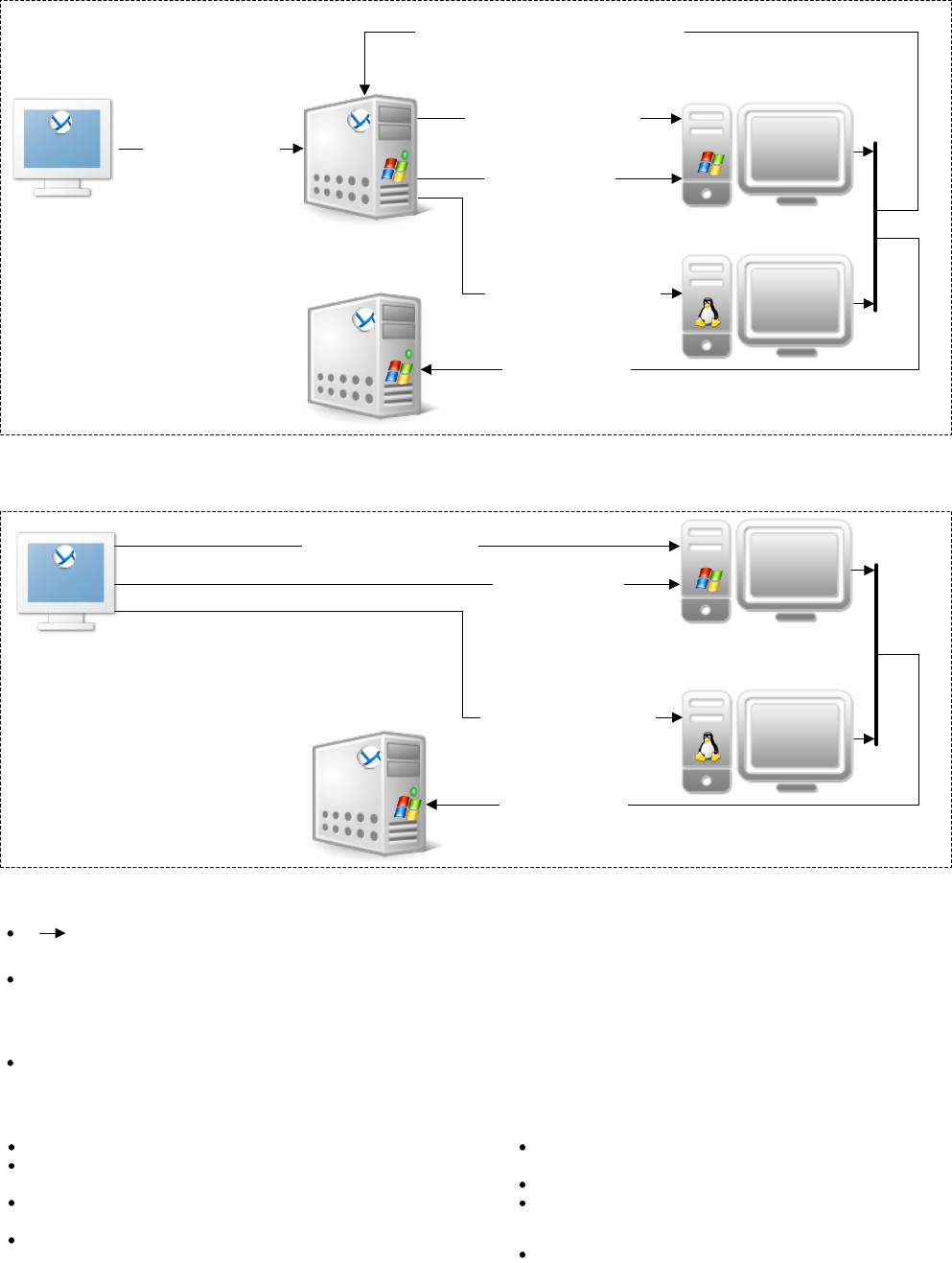
TCP 445:
Sending files (see the list)
TCP 25001:
Sending installation
parameters
Management
console
TCP 445:
Sending files (see the list) TCP 25001:
Sending installation
parameters
Management Server is present
Management Server is absent
TCP 22 (SSH):
Sending files (see the list)
Starting installation
TCP 22 (SSH):
Sending files (see the list)
Starting installation
Management
server
License
server
1. Remote installation of Agents
TCP 9876:
Acquiring a license
TCP 9876:
Registration on the management server
Management
console
License
server TCP 9876:
Acquiring a license
(Use of the license server is optional.)
TCP 22: Traffic is encrypted by using the SSH protocol.
TCP 445: Traffic encryption depends on the File and
Printer Sharing options in Windows
TCP 9876: By default, traffic is encrypted. Encryption is
configured through the Acronis administrative template.
TCP 25001: Traffic itself isn’t encrypted. But all user
names and passwords are sent encrypted.
Encryption notes:
Installation packages (.msi files): Contain
components being installed
Acroinst.exe: Manages the installation process
Msi_setup.exe: Installs a component
List of transferred files (Windows):
Installation packages (.i686 or .x86_64 files)
List of transferred files (Linux):
Acronis Backup Advanced: Network Connections
: The arrow direction shows which component initiates a connection. The text shows the destination port. The source port is 1025–
5000 (Windows prior to Windows Vista), 49152–65535 (Windows Vista and later), or 32768–61000 (Linux and the virtual appliance).
The agent registers itself by using the specified network name or IP address of the management server. If the network name is
specified, the agent obtains the IP address either from the DNS server or from the hosts file (%SystemRoot%\system32\drivers\etc\
hosts in Windows or /etc/hosts in Linux). Adding the management server to this file helps when the agent is located on a different
subnet than the management server.
In a non-DNS environment, it is necessary to enable Network Discovery and File and Printer Sharing on the machine from where the
installation is performed (the management server or the management console). This requires additional TCP and UDP ports to be open.
Connection notes:
TCP 9876:
Requesting to install
components
Firewall
Agent for
VMware
(Windows)
Agent
for
Linux
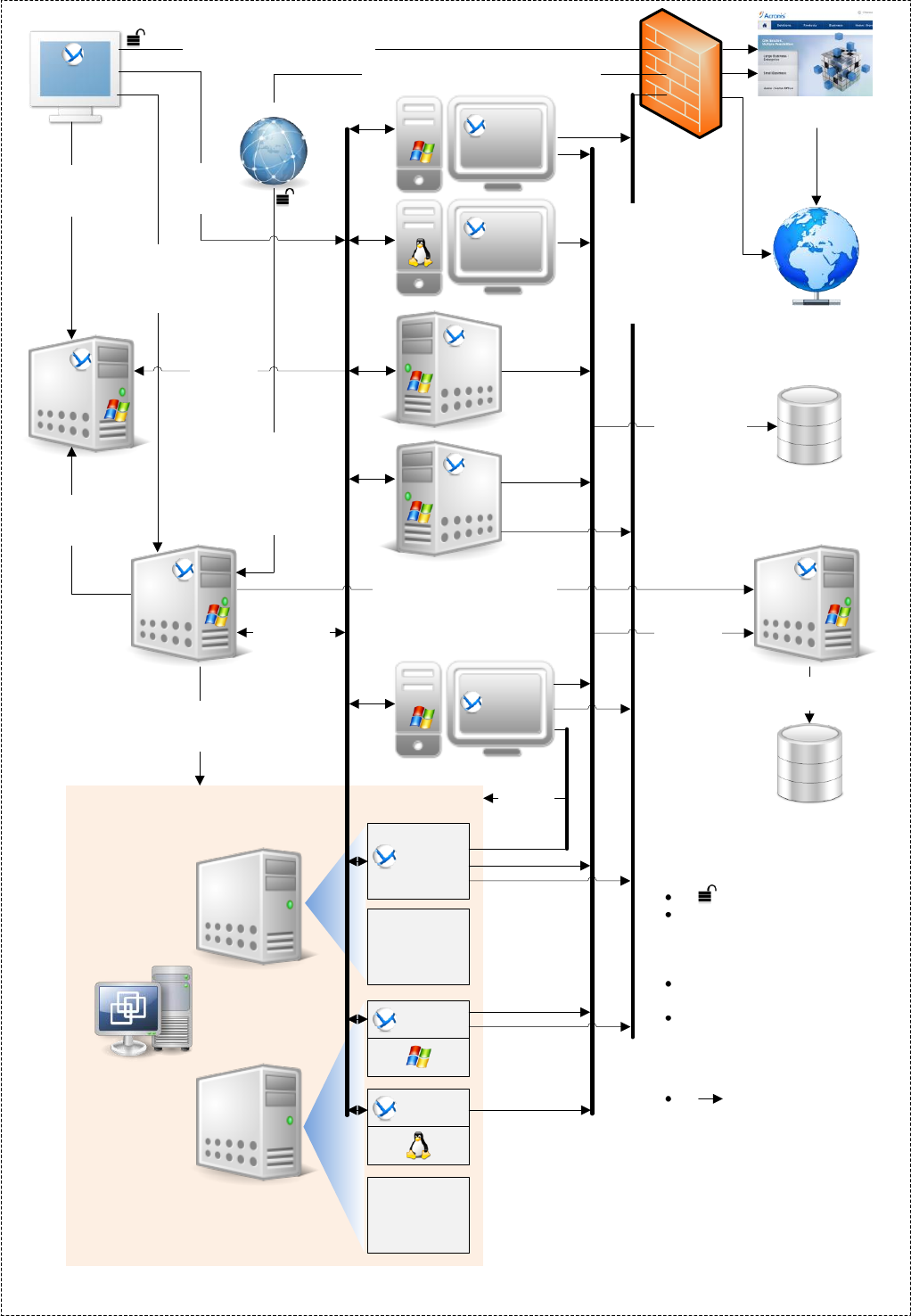
TCP 8080 (HTTP):
Accessing the
management server
Web page;
downloading
installation packages
Managed vault
(network share, NAS)
Agent for
Hyper-V
Storage
node
License
server
VMware vSphere
ESX(i)
host
ESX(i)
host
VMware
vCenter
Server
Virtual machines
VM
Agent for
Linux
Agent for
Windows
VM
Management
server
Unmanaged vault
(network share,
NAS, FTP, SFTP)
TCP 9876:
Registering,
managing
agents*
Standard
ports and protocols
Standard ports
and protocols
TCP 9876:
Accessing
managed
vaults
TCP 443,
TCP 902:
Accessing VMware vSphere
TCP 443
(HTTPS),
TCP 44445,
TCP 55556:
Accessing
the cloud
storage
TCP 443
TCP 902
To managed and
unmanaged vaults
TCP 443 (HTTPS):
Retrieving files from the cloud storage
TCP 9876:
Managing
licenses
Acronis Cloud Backup
Storage
TCP 9876:
Managing
licenses
Agent for
Exchange
Agent
for
Windows
Acronis
website
Web browser
TCP 9876:
Managing storage nodes and
centralized catalog
Management
console
TCP 80 (HTTP):
Checking for software updates
2. Communication between components
* Registering: Connection is initiated by either the
management server or the agent, depending on which
component triggers the registration process.
Managing: The management server initiates a connection to
deploy centralized backup plans and collect logs. An agent
initiates a connection to notify that the machine has come
online or that its IP address has changed.
TCP 9876:
Communicating
with the
management server
TCP 9876:
Managing
agents
TCP 9876:
Checking
licenses
Connection note:
: The arrow direction
shows which component
initiates a connection.
Encryption notes:
: Traffic is not encrypted.
TCP 9876: By default, traffic is
encrypted. Encryption is
configured through the Acronis
administrative template.
TCP 443: Traffic is encrypted
by the HTTPS protocol.
TCP 44445, TCP 55556:
Traffic is encrypted.
To the
cloud
storage
Agent for
VMware
(Virtual
Appliance)
