Doro Phone Easy 606 Owner's Manual EN
User Manual: doro PhoneEasy 606 - Owner's Manual Free User Guide for Doro Mobile Phone, Manual
Open the PDF directly: View PDF  .
.
Page Count: 56
- Installation
- Charging
- Symbols
- Operation
- Phonebook
- ICE (In Case of Emergency)
- Messages
- Call log
- Settings
- Additional functions
- Troubleshooting
- Safety instructions
- Care and maintenance
- Warranty
- Specifications
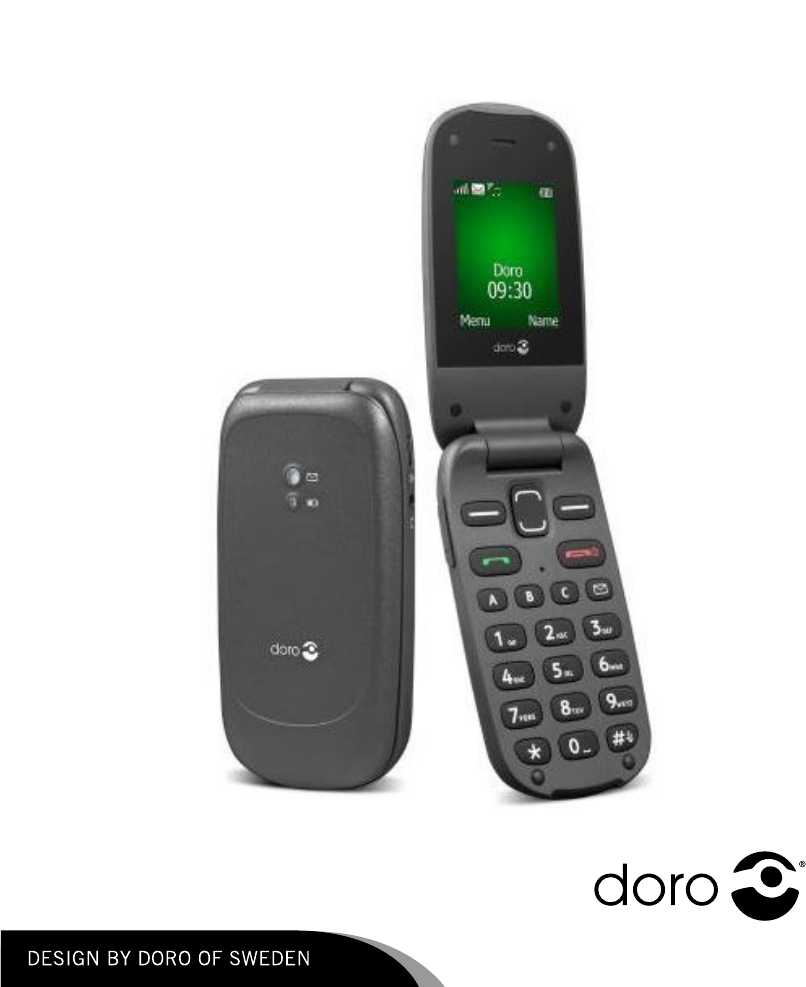
DoroPhoneEasy®606
English

1
2
4
5
6
7
3
8
12
11
9
10
13
14
15
16
17
18
19
English
1.Earpiece
2.Display
3.Arrowbuttons
4.Leftselectionbutton
5.Callbutton
6.Speeddial
7.Voicemail
8.Silent/Inputmethod
9.Messageshortcut
10.Microphone
11.Endcall/Poweron/off
12.Rightselectionbutton
13.Assistancebutton
14.Redlight=Batterylevel
low/Charging
15.Greenlight=Newmessage
/Missedcall
16.Loudspeaker
17.Volumekeys
18.Chargingsocket
19.Headsetsocket

English
Contents
Installation................................................................................1
InstallingtheSIMcardandthebattery..................................1
Charging....................................................................................2
Symbols....................................................................................3
Assistivefunctions...............................................................3
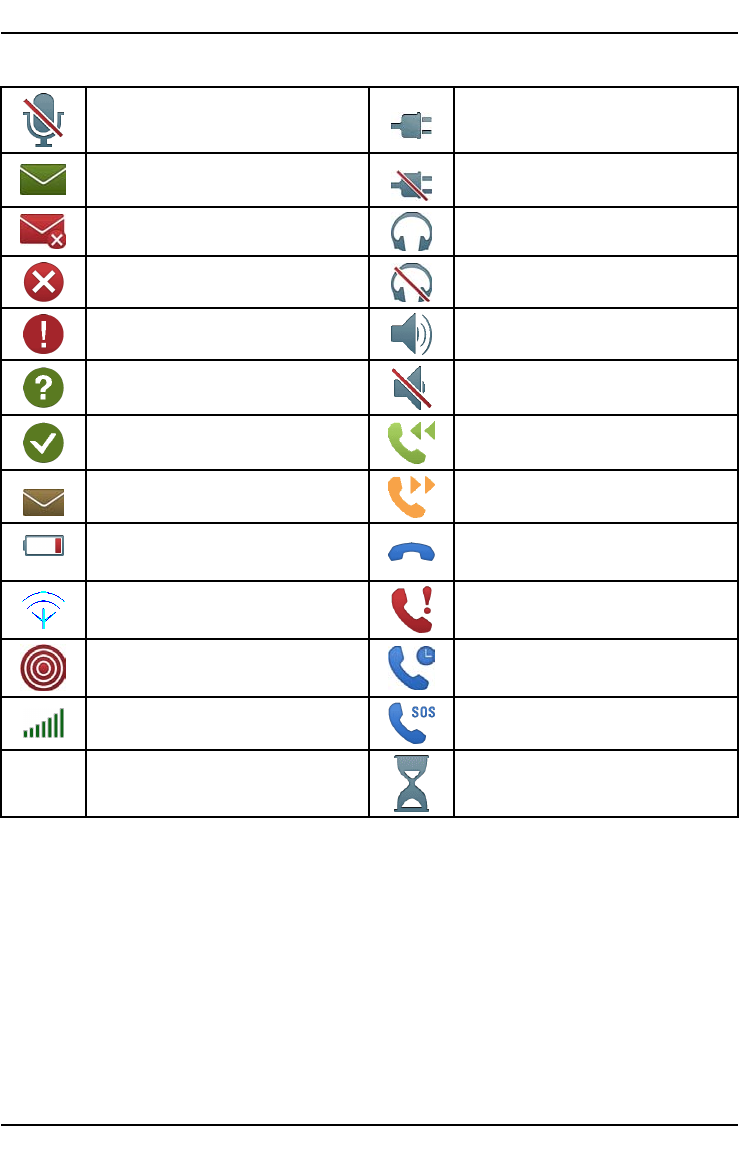
Displaystatussymbols.........................................................3
Displaymainsymbols...........................................................4
Operation...................................................................................5
Activatingthephone............................................................5
Makingacall.......................................................................6
MakingacallfromthePhonebook.........................................6
Receivingacall...................................................................6
Volumecontrol.....................................................................6
Enteringtext
...................................................................7
Calloptions.........................................................................8
Callwaiting.........................................................................8
Callinformation...................................................................9
Silent..................................................................................9
Headset..............................................................................9
SOScalls............................................................................9
Assistancebutton
............................................................10
Phonebook.................................................................................11
Creatingaphonebookentry...................................................11
CreatingICEentry(InCaseofEmergency)
.........................12
Managingphonebookentries.................................................12
ICE(InCaseofEmergency).....................................................13
Messages...................................................................................15
CreatingandsendingSMS....................................................15
Inbox,Outbox......................................................................15
Calllog......................................................................................16
Retrievinganddialling..........................................................16
Settings.....................................................................................17
General...............................................................................17
Sound.................................................................................20
Display................................................................................22
Calls...................................................................................23

English
Messages............................................................................28
Assistance
.......................................................................30
Bluetooth®...........................................................................32
Security..............................................................................33
Additionalfunctions....................................................................36
Alarm..................................................................................36
Organizer............................................................................36
Calculator............................................................................37
FMradio.............................................................................38
InstructionsfortheREMOTEUSER.......................................39
Troubleshooting..........................................................................44
Safetyinstructions......................................................................45
Networkservicesandcosts...................................................46
Operatingenvironment.........................................................46
Medicalunits......................................................................46
Areaswithexplosionrisk......................................................47
Li-ionbattery.......................................................................47
Protectyourhearing.............................................................47
Emergencycalls...................................................................48
Vehicles..............................................................................48
Careandmaintenance................................................................49
Warranty....................................................................................49
Specications............................................................................49
SpecicAbsorptionRate(SAR).............................................50
DeclarationofConformity.....................................................50
English
Installation
IMPORTANT!
Turnoffthephoneanddisconnectthechargerbeforeremovingthe
batterycover.
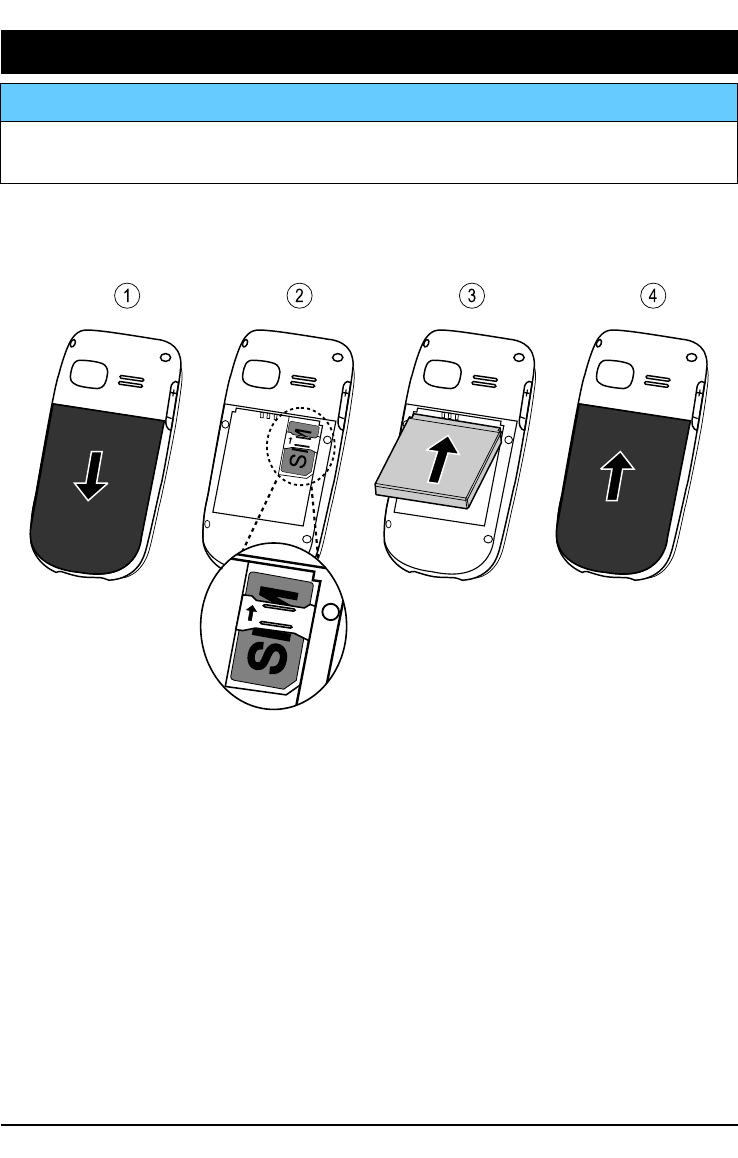
InstallingtheSIMcardandthebattery
TheSIMcardholderislocatedbehindthebattery.
1234
1.Removethebatterycoverandthebatteryifitisalreadyinstalled.
2.InserttheSIMcardbygentlyslidingitintotheholder.Makesure
thattheSIMcard’scontactsarefacinginwardsandthatthecut
offcornerispointingdownwards.Takecarenottoscratchor
bendthecontactsontheSIMcard.
3.Insertthebatterybyslidingitintothebatterycompartmentwith
thecontactsfacingupwardstotheleft.
4.Replacethebatterycover.
1
English
Charging
CAUTION
Onlyusebatteries,chargerandaccessoriesthathavebeenapprovedfor
usewiththisparticularmodel.Connectingotheraccessoriesmaybe
dangerousandmayinvalidatethephonestypeapprovalandguarantee.
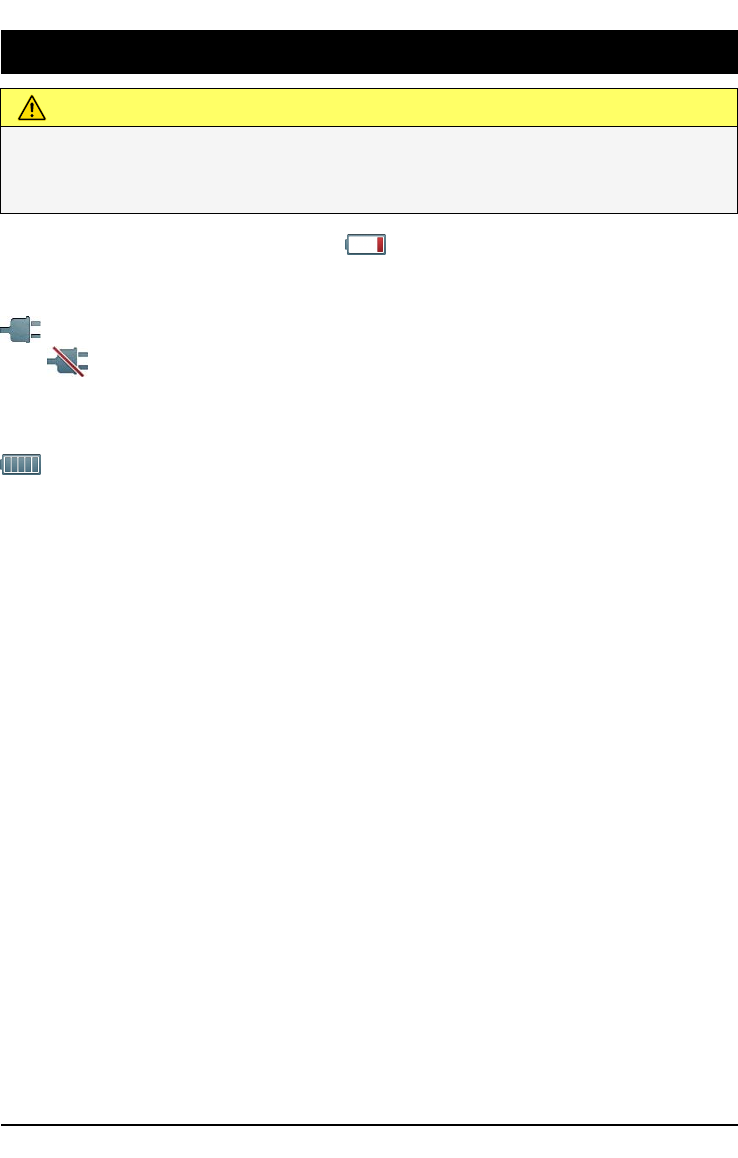
Whenthebatteryisrunninglow, isdisplayedandawarningsignal
isheard.Tochargethebattery,connectthemainsadaptertoawall
socketandtothechargingsockety.
isdisplayedbrieywhenthechargerisconnectedtothephone,
and
whenitisdisconnected.Thebatterychargeindicatorwill
beanimatedwhilecharging.Ittakesapproximately3hourstofully
chargethebattery.
isdisplayedonthescreenwhenchargingiscompleted.Ifthe
phoneisturnedoffwhenthechargerisconnectedtothephoneonly
thebatterychargeindicatorwillbeshownonthedisplay.
Note!
TosavepowertheLCDbacklightgoesoffafterawhile.Pressanybutton
toilluminatethedisplay.Fullbatterycapacitywillnotbereacheduntil
thebatteryhasbeencharged3–4times.Batteriesdegradeovertime,
whichmeansthatcalltimeandstandbytimewillnormallydecrease
withregularuse.
Saveenergy
Whenyouhavefullychargedthebatteryanddisconnectedthecharger
fromthedevice,unplugthechargerfromthewalloutlet.
2
English
Symbols
Assistivefunctions
Thefollowingsymbolsindicateinformationinthemanualabout
assistivefunctionsfor:
Seeing Handling
Hearing Safety
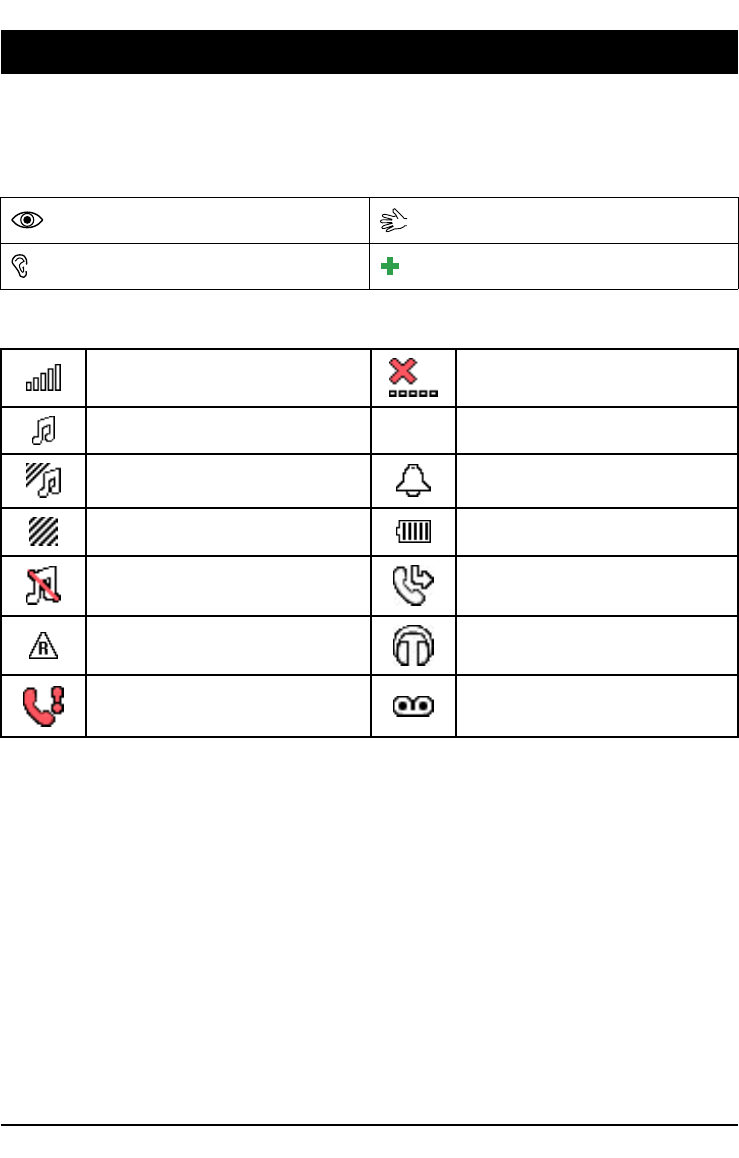
Displaystatussymbols
Signalstrength
Nonetworkcoverage
Ringonly5UnreadmessageinInbox
Ring+vibration Alarmactive
Vibrationonly
Batterylevel
Silent Callforwardactivated
Roaming(inothernetwork)
Headsetconnected
Missedcall
Voicemailmessage
received
3
English
Displaymainsymbols
Mute
Chargerconnected
Messagesending
successful
Chargerremoved
Messagesendingfailed Headsetin
Error Headsetout
Warning Speakeron
Query Speakeroff
Done(conrmed) Incomingcall
Newmessage
Outgoingcall
Batterylevellow
Callended
Searching
Missedcall.PressReadto
seethemissedcalls.
Assistancecall Callon-hold
Volumecontrol
SOScallsonly
Processing,pleasewait
4

English
Operation
Activatingthephone
Pressandholdtheredbutton
onthephonetoturniton/off.
ConrmwithYestopoweroff.
IftheSIMcardisvalidbutprotectedwithaPINcode(Personal
IdenticationNumber),PINisdisplayed.EnterthePINcodeand
pressOK(upperleftcornerofkeypad).DeletewithClear(
upperrightcornerofkeypad).
Note!
IfPINandPUKcodeswerenotprovidedwithyourSIMcard,please
contactyourserviceprovider.
Attempts:#showsthenumberofPINattemptsleft.Whennomore
attemptsremain,PINblockedisdisplayed.TheSIMcardmustnow
beunlockedwiththePUKcode(PersonalUnblockingKey).
1.EnterthePUKcodeandconrmwithOK.
2.EnteranewPINcodeandconrmwithOK.
3.Re-enternewPINcodeandconrmwithOK.
Start-upwizard
Whenstartingthephoneforthersttime,youcanusetheStart-up
wizardtosetsomebasicsettings.
•PressYestochangeorNoifyoudonotwanttochange.
Tip:
YoucanruntheStart-upwizardlaterifyouwant,seeStart-upwizard,
p.18.
Standby(Idlemode)
Whenthephoneisreadytouse,andyouhavenotkeyedinany
characters,thephoneisinstandby.
LeftselectionbuttoninstandbyisMenu.
RightselectionbuttoninstandbyisName.
Tip:
Youcanalwayspress toreturntostandby.
5
English
Changingthelanguage,timeanddate
ThedefaultlanguageisdeterminedbytheSIMcard.SeeGeneral,
p.17onhowtochangelanguage,timeanddate.
Makingacall
1.Enterthephonenumberincludingtheareacode.Deletewith
Clear.
2.Press
todial.PressAborttocanceldialling.
3.Presstoendthecall.
Tip:
Forinternationalcalls,alwaysuse+beforethecountrycodeforbest
operation.Press*twicefortheinternationalprex+.
MakingacallfromthePhonebook
1.PressNametoopenthephonebook.
2.Usethearrowbuttons
/ toscrollthroughthephonebookor
quicksearchbypressingthekeycorrespondingtotherstletter
oftheentry,seeEnteringtext
,p.7.
3.PressCalltodialtheselectedentry,orpressBack.
Receivingacall
Toansweranincomingcallwhentheipisclosed,opentheip.
ToansweranincomingcallwhenyouhavesetOpentoanswertoOff,
seeAnswermode,p.25.
1.Opentheipandpresstoanswer,orpressSilenttoswitch
offtheringsignalandthenRejecttorejectthecall(busysignal).
Alternatively,presstorejectthecalldirectly.
2.Presstoendthecall.
Tip:
Pressandhold+or–totemporarilyswitchofftheringsignalwithout
openingtheip.
Volumecontrol
Usethesidebuttons+/–toadjustthesoundvolumeduringacall.
Thevolumelevelisindicatedonthedisplay.Ifyouusehearing
aidorhavehearingdifcultieswhenusingthetelephoneinnoisy
6

English
environment,youcancustomisethephonesaudiosettings,seeAudio
setup
,p.20.
Enteringtext
Pressanumericalkeyrepeatedlyuntilthedesiredcharacterisshown.
Waitafewsecondsbeforeenteringthenextcharacter.
Press*foralistofspecialcharacters.Selectthedesiredcharacter
with
/ andpressOKtoenterit.
Usethesidekeys+/–or
/ tomovethecursorwithinthetext.
Press#tocycleuppercase,lowercaseandnumerals.
Pressandhold#tochangeinputlanguage.
Enteringtextwithpredictivetext
InsomelanguagesyoucanusetheSmartABC(eZiType™)input
methodwhichusesadictionarytosuggestwords.SeePredictivetext
,p.28onhowtoactivatepredictivetext.
Presseachkeyonce,evenifthedisplayedcharacterisnottheone
youwant.Thedictionarywillsuggestwordsbasedonthekeysyou
havepressed.
1.Towritetheword“Fred”,press3,7,3,3.Completethe
wordbeforelookingatthesuggestions.
2.Use
/ toviewthesuggestedwords.
3.PressSelectandcontinuewiththenextword.
Alternatively,press0tocontinuewiththenextword.
Ifnoneofthesuggestedwordsarecorrect,usemanualinputmode.
Theicononthetopleftofthedisplayindicatestheinputmode:
AbcSentencecasewithpredictivetext
ABCUPPERCASEwithpredictivetext
abclowercasewithpredictivetext
AbcSentencecase
ABCUPPERCASE
abclowercase
123Numerals
7

English
Calloptions
Duringacalltheselectionbuttons1(
)giveaccesstoadditional
functions:
Options(leftselectionbutton)
Amenuwiththefollowingoptionsisdisplayed:
Holdsingle
call/Retrieve
single
Hold/retrievethecurrentcall.
Endsingle
call
Endthecurrentcall(sameas ).
NewcallCallanothernumber(Conference).
PhonebookSearchthephonebook.
MessagesWriteorreadSMSmessages.
MuteDisablethemicrophone.
SPKon(rightselectionbutton)
Note!
Thehandsfreefunctionallowsonlyonepersonatatimetotalk.
Switchingbetweentalk/listenistriggeredbythesoundoftheperson
talking.Loudnoises(music,etc.)inthebackgroundmayinterfere
withthefunction.
Callwaiting
Analerttonewillbeheardifthereisanincomingcallwhiletalking.
Toputthecurrentcallonholdandanswertheincomingcall,press
Options,selectAnswerandthenOK.
Tip:
Callwaitingmustbeactivated,seeCallsetup,p.26.
1.selectionbuttonshavemultiplefunctions.Thecurrentkeyfunctionis
shownabovetheselectionbuttononthedisplay.
8
English
Callinformation
Duringacall,theoutgoingorincomingphonenumberandthe
elapsedcalltimeisdisplayed.Iftheidentityofthecalleriswithheld,
Unknownisdisplayed.
Silent
SilentisaxedprolewithKeypadtone,MessagetoneandRingtone
disabled,whileVibration,TasksandAlarmareunchanged.
Tip:
Pressandholdshortcutbutton#toactivate/deactivateSilent.
Headset
Whenaheadsetisconnected,theinternalmicrophoneinthephoneis
automaticallydisconnected.
Whenreceivingacallyoucanusetheanswerkeyontheheadset
cable(ifithasone)toanswerandendcalls.
CAUTION
Usingaheadsetathighvolumemaydamageyourhearing.Adjustthe
volumelevelcarefullywhenusingaheadset.
SOScalls
Aslongasthephoneisswitchedon,itisalwayspossibletomakean
emergencycallbyenteringthemainlocalemergencynumberforyour
presentlocationfollowedby
.
Somenetworksacceptcallstoemergencynumberswithoutavalid
SIMcard.Contactyourserviceproviderformoreinformation.
9
English
Assistancebutton
IMPORTANT!
AlwaysinformrecipientsintheNumberlistthattheyarelistedasyour
assistancecontacts.
CAUTION
Whenanassistancecallisactivatedthephoneispre-setto
handsfree/speakerphonemode.Donotholdthedevicenearyourear
whenthehandsfreemodeisinuse,becausethevolumemaybe
extremelyloud.
TheAssistancebuttonallowseasyaccesstocontactyourpredened
helpnumbers(Numberlist)shouldyouneedhelp.TheAssistance
functionmayneedtobeactivatedbeforeuse.SeeAssistance
,
p.30onhowtoactivateasdescribedorwith3buttonpresses,howto
enterrecipientsinthenumberslist,andhowtoeditthetextmessage.
•PressandholdtheAssistancebuttonfor3seconds,orpressit
twicewithin1second.Theassistancecallbeginsafteradelayof
5seconds.Inthistimeyoucanpreventapossiblefalsealarm
bypressing.
•AnassistanceSMSissenttoallrecipients.
•Therstrecipientsinthelistisdialled.Ifthecallisnot
answeredwithin25seconds,thenextnumberisdialled.Dialling
isrepeated3timesoruntilthecallisanswered,oruntil
ispressed.
•Theassistancefunctionmaybeconguredsothatthereceiver
ofthecallmustpress"0"(zero)toconrm,inordertostopthe
alarmsequence.Ifthereisariskthattheassistancecallwillbe
answeredbyavoicemail/answeringservice,pleaseactivatethe
functionConrmwith"0".SeeConrmwith"0",p.31.
10
English
Note!
Someprivatesecuritycompaniescanacceptautomaticcallsfromtheir
clients.Alwayscontactthesecuritycompanybeforeusingtheirphone
number.
IMPORTANT!
Informationtothereceiver ofanassistancecall,whenConrmwith
"0"isactivated:
•Afterreceivingtheassistancemessage,eachnumberinthe
Numberlistwillbecalledsequentially.
•Toconrmtheassistancecall,thereceiver
needstopress0.
•Ifthereceiverdoesn’tpress0within60seconds(after
answering)thecallwillbedisconnectedandthenextnumber
insequencewillbecalled.
•Ifthereceiverpresses0within60seconds,thecallis
conrmedandnofurthercallattemptswillbemade(assistance
sequenceinterrupted).
Phonebook
Thephonebookcanstore100entrieswith3phonenumberstoeach
entry.
Creatingaphonebookentry
1.PressMenu,scrolltoandpressOK.
2.Select-Newcontact-andpressAdd.
3.EnteraNameforthecontact,seeEnteringtext ,p.7.
DeletewithClear.
4.Use/ toselect Mobile,Homeor Ofce,andenter
thephonenumber(s)includingtheareacode.
5.PressSave.
Tip:
Forinternationalcalls,alwaysuse+beforethecountrycodeforbest
operation.Press*twicefortheinternationalprex+.
11

English
CreatingICEentry(InCaseofEmergency)
Withthisadditionalinformationandmedicalinformation,rst
responderscanaccessthisinformationfromthevictim'sphonein
caseofemergency.Intheeventofatrauma,itiscriticaltohavethis
informationasearlyaspossiblewhichcanincreasethechancesof
survival.Alleldsareoptional,butthemoreinformationprovidedthe
better.SeeICE(InCaseofEmergency)
,p.13onhowtocongure
yourICEinformation.
Managingphonebookentries
1.PressMenu,scrolltoandpressOK.
2.SelectacontactandpressOptions.
3.SelectoneofthefollowingoptionsandpressOK.
View
Showdetailsfortheselectedcontact.
Edit
1.Use/ tomovethecursor.DeletewithClear.
2.PressSave.
Add
SeeCreatingaphonebookentry,p.11.
Call
PressOKtocallthecontact.
SendSMS
PressOKtowriteaSMSmessage,seeCreatingandsendingSMS,
p.15.
Delete
PressOKtodeletetheselectedphonebookentry.PressYestoconrm
orNotoabort.
Deleteall
SelectFromSIMorFromphoneandpressOKtodeleteallphonebook
entriesfromtheSIMcardorphonememory.
12

English
EnterthephonecodeandpressOKtoconrm.Thedefaultphone
codeis1234.
Copyall
SelectFromSIMandpressOKtocopyallphonebookentriesfromthe
SIMcardtothephonememory.PressYestoconrmorNotoabort.
SelectFromphoneandpressOKtocopyallphonebookentriesfrom
thephonememorytotheSIMcard.PressYestoconrmorNoto
abort.
SendvCard
SelectSendbySMSandpressOKtosendtheselectedphonebook
entryasavCardviaSMS.Enterthephonenumberoftherecipient.
Alternativelyusethearrowkeys
/ toscrollthroughthe
phonebook,orquicksearchbypressingthekeycorrespondingtothe
rstletteroftheentry,seeEnteringtext
,p.7.PressOKtosend.
ICE(InCaseofEmergency)
Firstresponderscanaccessimportantinformationsuchasmedical
informationfromthevictim'sphoneincaseofemergency.Inthe
eventofatrauma,itiscriticaltohavethisinformationasearlyas
possibletoincreasethechancesofsurvival.Alleldsareoptional,
butthemoreinformationprovidedthebetter.
1.PressMenu,scrollto
andpressOK.
2.SelectandpressOK,thenuse / toscrollthelistof
entries.
3.PressEdittoaddoreditinformationineachentry,seeEntering
text,p.7.DeletewithClear.PressSavewhendone.
Name:Yourownname.
Birth:Yourdateofbirth.
Height:Yourheight.
Weight:Yourweight.
Language:Yourlanguage.
Insurance:Yourinsuranceproviderandpolicynumber.
13

English
Contact1:
Contact2:
Doctor:
PressOptionsandthenOKtoAddorDeletea
contactfromthephonebook,orSavetoacceptthe
currententry.Ifpossible,addyourrelationshipto
yourICEcontactsinthephonebook,suchas“ICE
WifeMarySmith”.
Condition:Anymedicalconditions/medicaldevices(e.g.
diabetic,pacemaker).
Allergies:Anyknownallergies(e.g.penicillin,beestings).
Bloodtype:Yourbloodtype.
Vaccination:Anyrelevantvaccinations.
Medication:Anymedicationthatyouaretreatedwith.
Otherinfo:Otherinformation(e.g.organdonor,livingwill,
consenttotreat).
14

English
Messages
CreatingandsendingSMS
Note!
BeforeyoucansendanySMS,youneedtosaveyourmessagecentre
number.Thenumbertoyourservicecentreissuppliedbyyourservice
providerandisusuallysetontheSIMcard.Ifnot,youcanenterthe
numberyourself.SeeSMScentre,p.28.
1.Pressshortcutbutton orpressMenu,scrollto andpress
OK.
2.SelectWritemessageandpressOK.
3.Typeyourmessage,seeEnteringtext,p.7,thenpressTo.
4.SelectarecipientfromPhonebookandpressAdd.
Alternatively,selectEnternumbertoaddrecipientmanually.
EnterthephonenumberandpressOK.
SelectAddtoaddmorerecipientorpressSendtosend.
5.Youcanalsomodifytherecipientsbyselectingoneandpress
OptionstoEdit,Delete,Deleteall.
Note!
Ifyouchoosetoaddmultiplerecipients,youwillbechargedforeach
recipient(maximum10).Forinternationalcalls,alwaysuse+before
thecountrycodeforbestoperation.Press*twicefortheinternational
prex+.
Inbox,Outbox
SMSunread SMSsent
SMSread SMSunsent
1.Pressshortcutbutton orpressMenu,scrollto andpress
OK.
2.SelectInbox/OutboxandpressOK.
3.SelectamessageandpressRead.
Use/ toscrollthemessageup/down.
4.PressOptionsforthefollowingoptions:
Resend
Sendagaintothesamereceiver.
15
English
Reply
Typeyourreply,thenpressDone.Messageissentimmediately.
Call
PressOKtocallthecontact.
Delete
PressYestodeletethemessage,orNotoreturn.
Edit
Editthemessage,thenpressSend.
Forward
Forwardamessage.Editthemessage(ifdesired),thenpressSend.
Usenumber
Displaysallphonenumberscontainedinthemessageaswellasthe
sender'snumber.Selectoneofthedisplayednumbersandpress
Optionsforfollowingoptions:
CallCalltheselectednumber.
SaveSavethenumberinthephonebook.
SendSMSWriteanewSMSmessage.
Calllog
Received,missedanddialledcallsaresavedinacombinedcalllog.
20callsofeachtypecanbestoredinthelog.Formultiplecalls
relatingtothesamenumber,onlythemostrecentcallissaved.
Retrievinganddialling
1.Press.
Alternatively,pressMenu,scrollto
andpressOK.
2.Use/ toscrollthroughtheCalllog.
Receivedcall
Dialledcall
Missedcall
16

English
3.Press todialthenumberorpressOptionsforthefollowing
settings:
ViewShowdetailsfortheselectedcall.
DeleteDeletethecall.
DeleteallDeleteallcallsintheCalllog.
SaveSavethenumberinthePhonebook.
Settings
Note!
Thesettingsdescribedinthischapterarecarriedoutinstandbymode.
Press
toreturntostandbymode.
General
Time&date
Settingthetimeanddate
1.PressMenu,scrollto
andpressOK.
2.SelectGeneralandpressOK.
3.SelectTime&dateandpressOK.
4.SelectSettimeandpressOK.
5.Enterthetime(HH:MM),thenpressOK.
6.SelectSetdateandpressOK.
7.Enterthedate(DD/MM/YYYY),thenpressOK.
Settingthetime/dateformat
1.PressMenu,scrolltoandpressOK.
2.SelectGeneralandpressOK.
3.SelectTime&dateandpressOK.
4.SelectSetformatandpressOK.
5.SelectTimeformatandpressOK.
6.Select12hoursor24hoursandpressOK.
7.SelectDateformatandpressOK.
8.SelectthedesireddateformatandpressOK.
SettingAutotimeon/off
1.PressMenu,scrolltoandpressOK.
17

English
2.SelectGeneralandpressOK.
3.SelectTime&dateandpressOK.
4.SelectAutotimeandpressOK.
5.SelectOn/OffandpressOK.
Tosetthephonetoautomaticallyupdatethetimeanddateaccording
tothecurrenttimezone,selectOn.Automaticupdateofdateand
timedoesnotchangethetimeyouhavesetforthealarmclockorthe
calendar.Theyareinlocaltime.Updatingmaycausesomealarmsyou
havesettoexpire.Dependingonnetworksupportandsubscription.
Language
Thedefaultlanguageforthephonemenus,messagesetc.is
determinedbytheSIMcard.Youcanchangethistoanyother
languagesupportedbythephone.
1.PressMenu,scrollto
andpressOK.
2.SelectGeneralandpressOK.
3.SelectLanguageandpressOK.
4.Scroll/ toselectalanguage,thenpressOK.
Start-upwizard
UsetheStart-upwizardtosetsomebasicsettings.
PressYestochangeLanguage,Time&date,Ringtone,Volume,Text
sizeorThemes.PressNoifyoudonotwanttochange.
Ownernumber
ThephonenumbersassignedtoyourSIMcardaresavedifthisis
allowedbythecard.
Toview/editthenumbers:
1.PressMenu,scrollto
andpressOK.
2.SelectGeneralandpressOK.
3.SelectOwnernumberandpressOK.
SeePhonebook,p.11onhowtoaddnames/numbers.
Toeditordeleteanexistingentry,selectitandpressOptions,then
selectEditorDeleteandpressOK.
18

English
Blockfunction
Youcandisablefunctionstosimplifytheuseofthephone.
1.PressMenu,scrollto
andpressOK.
2.SelectGeneralandpressOK.
3.SelectBlockfunctionandpressOK.
4.SelecteachfunctionyouwanttodisableandpressOff.
5.PressDonetoconrm.
Networksetup
Yourphoneautomaticallyselectsyour(serviceproviders)home
networkifthisiswithinrange.Ifnotwithinrange,youmayuse
anothernetwork,providedyournetworkoperatorhasanagreement
thatallowsyoutodoso.Thisiscalledroaming.Contactyourservice
providerformoreinformation.
1.PressMenu,scrolltoandpressOK.
2.SelectGeneralandpressOK.
3.SelectNetworksetupandpressOK.
4.SelectoneofthefollowingoptionsandpressOKtoconrm.
Newsearch
Performnewsearchifconnectionislost.
Selectnetwork
Toviewavailablenetworks,pressSelectnetwork.Alistofavailable
networkoperatorsisdisplayed(afterashortdelay).Selectdesired
operatorandpressOK.
Networkmode
Toselectanothernetwork,selectNetworkmodeandthenselectone
ofthefollowingoptions.
AutomaticNetworkisselectedautomatically.
ManualNetworkisselectedmanually.UseSelectnetworkto
selectdesiredoperator.
Services
Thismenumaycontainpre-programmedservicesfromyournetwork
provider.Dependingonnetworksupportandsubscription.
19
English
1.PressMenu,scrollto andpressOK.
2.SelectGeneralandpressOK.
3.SelectServicesandpressOK.
Phonebookstorage
1.PressMenu,scrolltoandpressOK.
2.SelectGeneralandpressOK.
3.SelectPhonebookstorageandpressOK.
4.SelectoneofthefollowingoptionsandpressOK.
SIM1phonenumberpercontact.Numberandlengthofthe
phonenumbers/contactsthatcanbestoredwillvary
dependingonSIMcard/serviceproviderpreferences.
Phone100contactswith3phonenumberseachMobile,Home
orOfce.
Sound
Note!
SilentneedstobesettoOfftoaccessTonesetup,Volume,Alerttype
andExtratone.SeeSilent,p.21.
Audiosetup
Ifyouuseahearingaidorhavehearingdifcultieswhenusingthe
telephoneinanoisyenvironment,youcancustomisethephones
audiosettings.
1.PressMenu,scrollto
andpressOK.
2.SelectSoundandpressOK.
3.SelectAudiosetupandpressOK.
4.SelectoneofthefollowingoptionsandpressOK.
NormalFornormalhearinginnormalconditions.
MediumFormildhearingimpairmentorusageinnoisy
environment.
HighFormoderatehearingimpairmentorusageinverynoisy
environment.
Tonesetup
1.PressMenu,scrollto andpressOK.
20
English
2.SelectSoundandpressOK.
3.SelectTonesetupandpressOK.
4.SelectRingtoneandpressOK.
5.Scroll
/ toselectoneoftheavailablemelodies,themelody
willbeplayed.PressOKtoconrmorBacktodiscardchanges.
6.Setuptheotherfeaturestonesinthesameway.
Ringtonevolume
1.PressMenu,scrollto andpressOK.
2.SelectSoundandpressOK.
3.SelectVolumeandpressOK.
4.Scroll/ tochangetheringvolume,thenpressOK.
Silent
1.PressMenu,scrollto
andpressOK.
2.SelectSoundandpressOK.
3.SelectSilentandpressOK.
4.SelectOnorOffandpressOK.
Tip:
Pressandholdshortcutbutton#toactivate/deactivateSilentmode.
Alerttype
Incomingcallscanbesignalledbyaringtoneand/orvibration.
1.PressMenu,scrollto
andpressOK.
2.SelectSoundandpressOK.
3.SelectAlerttypeandpressOK.
4.Scroll/ toselectsignallingmode,thenpressOK.
RingonlyRingtoneonly.
Vib.onlyVibrationonly.
Vib.andringVibrationandringtone.
Vib.then
ring
Startswithvibrationandaddsringtoneafterashort
while.
SilentNosoundorvibration,thedisplaylightislit.
21

English
Extratone
Warninganderrortonesareusedtoalertyouoflowbatterypower,
phoneandSIMcarderrorsetc.
1.PressMenu,scrollto
andpressOK.
2.SelectSoundandpressOK.
3.SelectExtratoneandpressOK.
4.SelectWarningandpressOn/Offtoenable/disable.
5.SelectErrorandpressOn/Offtoenable/disable.
6.PressDonetosave.
Display
Wallpaper
Youcanselectdifferentdisplaybackgrounds.
1.PressMenu,scrolltoandpressOK.
2.SelectDisplayandpressOK.
3.SelectWallpaperandpressOK.
4.Scroll/ todisplayavailablewallpapers.
5.PressOKtoconrmorBacktodiscardchanges.
Textsize
Youcancustomisethetextsizeformessagesandthephonebook.
1.PressMenu,scrollto
andpressOK.
2.SelectDisplayandpressOK.
3.SelectTextsizeandpressOK.
4.SelectNormalorLargeandpressOK.
Idledisplay
Instandbymodethedisplaycanshowclockonly,clockandthe
serviceproviderorallinformation.
1.PressMenu,scrolltoandpressOK.
2.SelectDisplayandpressOK.
3.SelectIdledisplayandpressOK.
4.SelectClockonly,Clock&OperatororAllinfoandpressOK.
22

English
Themes
Youcanselectdifferentthemestopersonalisethephonesdisplay
textandbackground.
1.PressMenu,scrollto
andpressOK.
2.SelectDisplayandpressOK.
3.SelectThemesandpressOK.
4.Scroll/ toselectatheme.
5.PressOKtoconrmorBacktodiscardchanges.
LCDbacklight
Selectthedelaytimeforthedisplaybacklight.
1.PressMenu,scrollto
andpressOK.
2.SelectDisplayandpressOK.
3.SelectLCDbacklightandpressOK.
4.Select15sec.,30sec.or1minandpressOK.
Brightness
Youcancustomisethephonesbrightnesssettings.
1.PressMenu,scrollto
andpressOK.
2.SelectDisplayandpressOK.
3.SelectBrightnessandpressOK.
4.SelectLevel1–Level3andpressOK.
Calls
Voicemail
Ifyoursubscriptionincludesanansweringservice,callerscanleave
avoicemailmessagewhenyoucannotansweracall.Voicemail
isanetworkserviceandyoumayneedtosubscribetoitrst.For
moreinformationandforthevoicemailnumber,contactyourservice
provider.
1.PressMenu,scrolltoandpressOK.
2.SelectCallsandpressOK.
3.SelectVoicemailandpressOK.
4.SelectEmptyandpressAdd.
23

English
5.SelectPhonebooktoaddacontactfromthePhonebook.
Alternatively,pressManual.SeePhonebook,p.11onhowtoadd
names/numbers.
6.PressOK.
Toeditordeleteanexistingentry,selectitandpressOptions,then
selectEditorDeleteandpressOK.
Callvoicemail
1.PressMenu,scrollto
andpressOK.
2.SelectCallsandpressOK.
3.SelectVoicemailandpressOK.
4.SelectOptionsandpressOK.
5.SelectCallvoicemailandpressOKtocallthevoicemailbox.
Tip:
Pressandholdshortcutbutton1tocallyourvoicemail.
Speeddial
A,B,Candthenumericalkeys0and2–9canbeusedfor
speeddialling.
Addingspeeddialnumbers
1.PressMenu,scrollto
andpressOK.
2.SelectCallsandpressOK.
3.SelectSpeeddialandpressOK.
4.SelectAandpress.
5.SelectanentryfromthephonebookandpressOK.
6.RepeattoaddspeeddialentriesforbuttonsB,C,0,2–9.
Tochangecontact,selectanexistingentryandpressOptions,then
selectEditorDeleteandpressOK.
Tospeeddialanentryfromstandby,pressandholdthecorresponding
button.
Youcaneditthecontactinformationforthededicatedspeeddial
buttonsA,BandC.
1.Pressthecorrespondingbutton.Use
/ tohighlightthe
nameorthenumber,thenpressEdit.
24

English
2.PressOKtoconrm.DeletewithClear.
Top10
Settheentryasoneoftherst10contactslistedinthe
phonebook.
1.PressMenu,scrollto
andpressOK.
2.SelectCallsandpressOK.
3.SelectTop10andpressOK.
4.SelectoneoftheemptyentriesandpressAdd.
5.Use/ toscrollthroughthephonebookorquicksearchby
pressingthekeycorrespondingtotherstletteroftheentry.
6.PressOKtosavetheselectedentry,orpressBacktodiscard
changes.
TodeleteaTop10entry,selecttheentryintheTop10listandpress
Options,thenDelete.
Calltime
Duringacall,thedurationofthecallisshown.Youcancheckthe
durationofyourcalls.
1.PressMenu,scrollto
andpressOK.
2.SelectCallsandpressOK.
3.SelectCalltimeandpressOK.
4.SelectoneofthefollowingoptionsandpressOK.
LastcallShowtheelapsedtimeofthemostrecentcall.
Outgoing
calls
Showtheelapsedtimeofalldialledcalls.
Received
calls
Showtheelapsedtimeofallreceivedcalls.
ResetallPressYestoresetthetimer,orNotodiscardchanges.
Answermode
SelectOpentoanswerandpressOK,selectOnandpressOKto
answerincomingcallsbyopeningtheip.
SelectAnykeyandpressOK,selectOnandpressOKtobeableto
answerincomingcallsbypressinganybutton(exemption
).
25
English
Callsetup
Dependingonnetworksupportandsubscription.Contactyourservice
providerformoreinformation.
CallerID
Displayorhideyourphonenumberontherecipientsphonewhen
youcall.
1.PressMenu,scrollto
andpressOK.
2.SelectCallsandpressOK.
3.SelectCallsetupandpressOK.
4.SelectCallerIDandpressOK.
5.SelectoneofthefollowingoptionsandpressOK.
Setby
network
Usedefaultsettingbythenetwork.
HideIDNevershowyournumber.
SendIDAlwaysshowyournumber.
Callwaiting
Youcanhandlemorethanonecallatatime.Analerttonewillbe
heardifthereisanincomingcallwhiletalking.Toputthecurrent
callonholdandanswertheincomingcall,pressOptions,select
AnswerandthenOK.
1.PressMenu,scrollto
andpressOK.
2.SelectCallsandpressOK.
3.SelectCallsetupandpressOK.
4.SelectCallwaitingandpressOK.
5.SelectoneofthefollowingoptionsandpressOK.
ActivateEnablescallwaiting.
DeactivateDisablescallwaiting.
QuerystatusDisplaysifcallwaitingisactiveornot.
Calldivert
Youcandivertcallstoanansweringserviceortoanotherphone
number.Setupwhichcallsshouldbediverted.Selectacondition
andpressOK,thenselectActivate,DeactivateorQuerystatus(see
Callwaiting,p.26)foreach.
26
English
1.PressMenu,scrollto andpressOK.
2.SelectCallsandpressOK.
3.SelectCallsetupandpressOK.
4.SelectCalldivertandpressOK.
5.SelectoneofthefollowingoptionsandpressOK.
VoicecallsDivertsallvoicecalls.
UnreachableDivertsincomingcallsifthephoneisturnedofforout
ofrange.
NoreplyDivertsincomingcallsifunanswered.
IfbusyDivertsincomingcallsifthelineisbusy.
Cancel
diverts
Donotdivertcalls.
Callbarring
Yourphonecanberestrictedtodisallowcertaintypesofcalls.
Note!
ApasswordisneededtoapplyCallbarring.Contactyourservice
providertogetthepassword.
1.PressMenu,scrollto andpressOK.
2.SelectCallsandpressOK.
3.SelectCallsetupandpressOK.
4.SelectCallbarringandpressOK.
5.SelectoneofthefollowingoptionsandpressOK.
Outgoing
calls
PressOKthenselect:
AllcallsUsercananswerincomingcallsbutnotdialout.
Internat.callsUsercannotcallinternationalnumbers.
Int.except
home
Usercannotcallinternationalnumbersexcepttothe
countryassociatedwiththeSIMcard.
Incoming
calls
PressOKthenselect:
AllcallsUsercandialoutbutnotreceiveincomingcalls.
27

English
When
roaming
Usercannotreceiveincomingcallswhileroaming
(operatinginothernetworks).
CancelallCancelallcallbarring(passwordneeded).
Messages
1.PressMenu,scrollto
andpressOK.
2.SelectMessagesandpressOK.
3.SelectoneofthefollowingoptionsandpressOK.
Predictivetext
SelectOnandpressOKtoenablePredictivetext/eZiType™,see
Enteringtext
,p.7.
Writespeed
Youcanchangethespeedatwhichkeypadcharactersrepeat(before
thecursormovesontothenextcharacter).
SelectFast,NormalorSlowandpressOK.
Memorystatus
DisplaysthepercentageofmemoryspaceusedontheSIMcardand
inthephonememory.Phonememorycanstoreupto200messages.
Storage
1.SelectSIM(default)tostoremessagesontheSIMcard,orPhone
tostoremessagesinthephonememory.
2.PressOK.
SMScentre
Thisnumberisneededtousethemessagefunction.Thenumberto
yourservicecentreissuppliedbyyourserviceproviderandisusually
setontheSIMcard.IftheservicecentrenumberissavedontheSIM
carditisshown.Ifnot,youcanenterthenumberyourself.Contact
yourserviceproviderformoreinformation.
1.PressEditandentertheservicecentrenumber.PressClearto
delete.
2.PressOKtosavethenewnumber.
28
English
Cellbroadcast
Youcanreceivemessagesonvarioustopicsfromyourserviceprovider,
suchasweatherortrafcconditionsinaparticularregion.For
availablechannelsandrelevantchannelsettings,contactyourservice
provider.Cellbroadcastmessagescannotbereceivedwhenthedevice
isroaming.
SelectCellbroadcastandpressOKforthefollowingsettings:
Function
on/off
ToturninformationOnorOff.
Read
messages
PressOKtoreadthemessage.
LanguagesSelectlanguageOn/OffandpressDone.
Channel
settings
Selectfromwhichchannelsyouwanttoreceive/subscribe
messages.UsetheoptionsSubscribe,Cancel
subscription,Add,EditandDeletetodeneyour
channels.
Reminder
TheSMSreminderalertsyouonceifyouhaven'tcheckedyourtext
messagewithin10minutesfromreceipt.Ifnoticationenvelopeis
removedbypressing
,noreminderwillbeheard.
SelectReminderandpressOn/Offtoenable/disable.
Vibration
TheSMSvibrationalertisseveralshortvibrationsthatcontinuesfor
eitherShort(4seconds)orLong(12seconds).
Note!
IfAlerttypeissettoRingonlythephonewillnotvibrate.
Deliveryreport
YoucanselectifyouwantthephonetonotifyyouwhenyourSMS
hasreachedthereceiver.
SelectDeliveryreportandpressOK.SelectOnorOfftoenable/disable.
PressOKtosave.
29
English
Note!
IfyouchooseDeliveryreport=On,someoperatorswillchargeyoufor
thatmessage.
Delete
SelectInboxtodeleteallmessagesinInbox.PressYesconrmorNo
todiscardchanges.
SelectOutboxtodeleteallmessagesinOutbox.PressYesconrm
orNotodiscardchanges.
SelectDeletealltodeleteallmessagesatthesametime.PressYes
conrmorNotodiscardchanges.
Assistance
SettingsfortheAssistancebuttonfunction.
1.PressMenu,scrollto
andpressOK.
2.SelectAssistanceandpressOKforthefollowingsettings:
Activation
SelectoneofthefollowingoptionsandpressOK.
OnNormalToactivate,pressandholdbuttonforapproximately3
seconds,orpresstwicewithin1second.
On(3)Toactivate,pressbutton3timeswithin1second.
OffAssistancebuttondisabled.
Numberlist
ThelistofnumbersthatwillbecalledwhentheAssistancebutton
ispressed.
1.SelectEmptyandpressAdd.
2.SelectPhonebooktoaddacontactfromthephonebook.
Alternatively,pressManual.SeePhonebook,p.11onhowtoadd
names/numbers.
3.PressOK.
Repeatuntilyouhave5contacts(maximum).
30

English
Toeditordeleteanexistingentry,selectitandpressOptions,then
selectEditorDeleteandpressOK.
SMS
Themessagetobesenttothecontactsinnumberslistwhenthe
Assistancebuttonispressed.
Activation
SelectoneofthefollowingoptionsandpressOK.
OnThephonesendsatextmessagebeforedialling.
OffThephonedialswithoutsendingamessagerst.
Message
PressEditandenterthemessageandthenpressOKtoconrm.
Note!
YoumustwriteamessageifyouactivatetheSMSfunction.
Conrmwith"0"
SelectoneofthefollowingoptionsandpressOK.
OnThefunctionwillworkasaboveAND:Ifthereceiver
doesn’tpress0within60secondsthecallwillbe
disconnectedandthenextnumberinthesequencewill
becalled.Ifthereceiverpresses0within60seconds,
thecallisconrmedandnofurthercallattemptswillbe
made(assistancesequenceinterrupted).
OffThephonewilldialtherstnumberonthelist.Ifthecall
isnotansweredwithin25seconds,thenextnumberis
dialled.Diallingisrepeated3timesoruntilthecallis
answered,oruntil
ispressed.
Signaltype
Adjustmentofthesignaltypefornoticationoftheassistance
sequence.
SelectoneofthefollowingoptionsandpressOK.
31
English
HighLoudsignals(default).
LowOnelowsignal.
SilentNosoundindication,likeanormalcall.
Alarminfo
Pleasereadthisimportantsafetyinformationbeforeenablingthe
assistancefunction:
Becarefulaboutincludingnumberswithautomaticansweringinthe
calllist,asthealarmsequencestopsoncethecallisanswered.
Note!
ThisinformationisnotapplicableifConrmwith"0"issettoOn.
Bluetooth®
IMPORTANT!
WhenyouarenotusingBluetoothconnectivity,selectFunction
on/off/OfforVisibility/Off.Donotpairwithanunknowndevice.
YoucanconnectwirelesslytootherBluetoothcompatibledevices
suchasheadsets.
1.PressMenu,scrollto
andpressOK.
2.SelectBluetoothandpressOKforthefollowingsettings:
Functionon/off
SelectOn/OffandpressOKtoenable/disableBluetooth.
Visibility
SelectOn/Offtomakeyourphonevisible/invisibletootherdevices.
Note!
Topreventotherdevicesfromndingyourdevice,selectOff.Evenif
youselectOff,paireddevicescanstilldetectyourdevice.
Devicename
EnterthenameyourphoneshouldappearasforotherBluetooth
devicesandpressOK.
32
English
Searchdevice
SearchforavailableBluetoothaudiodevices.IfBluetoothisnot
enabledyoucanenableitnowbypressingYes.
1.SelectfromthelistofdevicesandpressBondtoconnect.
2.WhenconnectingtoanotherBluetoothdeviceyouneedashared
password.EnterthepasswordandpressOK.
Mydevice
Listssaveddevicesandenablesyoutoaddnewdevices.Selectdevice
fromthelistandpressOptions.
Connect/Dis-
connect
Connect/disconnectselecteddevice.Selectrequired
prole,usuallyaheadset.
SetdefaultSelecttheconnecteddeviceasdefault.
RenameChangethenameofthedevice.
DeleteDeletethedevicefromthelist.
DeleteallDeletealldevicesfromthelist.
Audiopath
SelectoneofthefollowingoptionsandpressOK.
PhoneIncomingcallsareansweredwiththephone.
ForwardBTIncomingcallsareforwardedtoBluetoothdevice.
Security
1.PressMenu,scrollto
andpressOK.
2.SelectSecurityandpressOK.
SIMlock
TheSIMcardisprotectedwithaPINcode(PersonalIdentication
Number).ThephonecanbesettoaskforthePINcodeonstartup.
SelectoneofthefollowingoptionsandpressOK.
33

English
OnPINcodeactivated,youneedtoenterthePINcodeevery
timethephoneisstarted.
OffPINcodedeactivated.Warning,ifSIMcardislost/stolen
itisunprotected.
AutomaticYoudonotneedtoenterthePINcodewhenthephone
isstarted,thephoneremembersitautomatically.IfSIM
cardismovedtoanotherphone(lost/stolen),thePIN
codeneedstobeenteredtounlock.
Note!
YouneedtoinputthecurrentPINcodetodisable/enableSIMlock.
Phonelock
SelectOn/OffandpressOKtoenable/disable.
Note!
YouneedtoinputthecurrentPhonecodetodisable/enablePhonelock.
ThedefaultPhonecodeis1234.
Remoteconguration
Allowpersonsthatyoutrust,usuallyafamilymemberorfriend,to
sendinformationtoyourDoroPhoneEasy®606.Youcanreceive
phonebookcontactsandcontactsforspeeddialkeys,calendartasks
andsettingsfortheassistancebutton.Whenactivated,youdon’thave
todoanything,it’stheotherpersonthatsendsinformationtoyou.
SelectRemotecongandpressOKforthefollowingsettings:
Activation
SelectOntoactivateremotecongurationandpressOK.
OnRemotecongurationenabled.
OffRemotecongurationdisabled.
Numberlist
Youneedtoaddthenameandnumberofthepeoplewhoareallowed
tosendinformationfromtheirphonetoyourDoroPhoneEasy®606.
1.SelectNumberlistandpressOK.
2.SelectEmptyandpressAdd.
34
English
3.SelectPhonebooktoaddacontactfromthePhonebook.
Alternatively,pressManual.
4.Press
.
5.EnterthenumberandpressOK.
Repeatuntilyouhave5contacts(maximum).
Toeditordeleteanexistingentry,selectitandpressOptions,then
selectView,EditorDeleteandpressOK.
Fixeddial(FDN)
YoucanlimitcallstocertainnumberssavedontheSIMcard.Thelist
ofallowednumbersisprotectedbyyourPIN2-code.
ModeSelectOn/OffandpressOK.EnterPIN2.PressOKto
conrm.
Fixed
numbers
PressAddtoentertherstallowednumber.Alternatively,
selectanentryandpressOptionsforthefollowing
settings:Add,EditorDeleteandpressOK.EnterPIN2.
PressOKtoconrm.
Note!
Youcansavepartsofphonenumbers.Forexample,ifyousave01234,
allowscallstoallnumbersstartingwith01234.Itispossibletoplace
anSOScallbyenteringthemainlocalemergencynumberfollowedby
evenwhenxeddialisactivated.Whenxeddialisactivatedyou
arenotallowedtoviewormanageanyphonenumberssavedontheSIM
card.YouarenotabletosendanySMSeither.
Passwords(changeyourpasswords)
TochangethePIN,PIN2orthePhonecodepasswords:
1.EnterthecurrentcodeandconrmwithOK.
2.EnteranewcodeandconrmwithOK.
3.EnterthenewcodeagainandconrmwithOK.
Resetsettings
IfyouselectResetsettings,thechangesthatyouhavemadetothe
phonesettingswillberesettodefaultsettings.Inputthephone
passwordandpressOKtoreset.
35

English
Resetall
IfyouselectResetall,yourphonessettingsandcontent,suchas
contacts,numberlistsandmessages,willbedeletedfromthephone
memory(SIMmemoryisnotaffected).Inputthephonepasswordand
pressOKtoreset.
Note!
ThedefaultPhonecodeis1234.
Additionalfunctions
Alarm
1.PressMenu,scrollto
andpressOK.
2.SelectOnandpressOK.
3.Enterthealarmtimeusingthekeypad,thenpressOK.
4.Forasingleoccurrence,selectSingleandpressOK.
5.Forarepeatedalarm,selectRepeatedandpressOK.Scroll
throughthelistofweekdaysandpressOn/Offtoenable/disable
thealarmforeachweekday,thenpressDone.
6.Toeditanalarm,pressEdit,thenpressOK.
7.Tostopthealarm,pressOff.Thealarmisnowdeleted.
Note!
Thealarmwillworkevenwhenthephoneisswitchedoff.Donotpress
Yestopoweronifwirelessphoneuseisprohibitedorwhenitmay
causeinterferenceordanger.
Whenthealarmgoesoffasignalwillsound.PressStoptoturnoffthe
alarmorpressSnoozetorepeatthealarmafter9minutes.
Organizer
1.PressMenu,scrollto
andpressOK.
2.SelectoneofthefollowingoptionsandpressOK.
Calendar
View
Showtasksfortheselecteddate.
36
English
Addtask
1.Enterdateforthetask,thenpress
.
2.Entertimeforthetask,thenpress.
3.Entersubject.
4.PressOK.
Jumptodate
EnterthedateandpressOK.
Viewall
SelectataskandpressOptionsforthefollowingoptions:
EditEditselectedtask.
DeleteDeleteselectedtask.
DeleteallDeletealltasks.
Note!
Thecalendarwillworkevenwhenthephoneisswitchedoff.Donot
pressYestopoweronifmobilephoneuseisprohibitedorwhenit
maycauseinterferenceordanger.
Dailyreminder
1.Entertimeforthetask,thenpress
.
2.Entersubject.
3.PressOKtosavethetask.
Note!
Worksevenwhenthephoneisswitchedoff.DonotpressYestopower
onifmobilephoneuseisprohibitedorwhenitmaycauseinterference
ordanger.
Whenthealarmgoesoffasignalwillsound.PressStoptoturnoffthe
alarmorpressSnoozetorepeatthealarmafter9minutes.
Calculator
Thecalculatorcanperformbasicmathematicaloperations.
1.PressMenu,scrollto
andpressOK.
2.Entertherstnumber.Use#toenterdecimalpoints.
37
English
3.Usethearrowbuttonstoselectanoperation(+,-,x,÷)and
pressOK.
4.EnterthenextnumberandpressOK.
5.Repeatsteps2–4asnecessary.
Select=andpressOKtocalculatetheresult.
FMradio
TheFMradiohasafrequencyrangefrom87.5to108.0MHzand
9presetchannels.
Turningtheradioon
1.Connecttheheadsettotheheadsetsocket
.
2.PressMenu,scrolltoandpressOK.Theradioisturnedon.
Thetunedfrequencyisdisplayed.Selectchannelusing
or
.Usethesidekeys+/-toadjustthevolume.
3.Press
toreturntostandbymode.Theradiowillcontinue
toplay.
Savefrequency
1.PressMenu,scrollto
andpressOK.
2.Selectchannelusingor .
3.Whenastationhasbeenfound,selectOptions.
4.SelectSavefrequencyandpressOK.
5.Enteranameforthenewchannel,seeEnteringtext
,p.7.
6.PressSave.
Switchoff
1.PressMenu,scrolltoandpressOK.
2.PressOptions,thenpressSwitchoff.
Tip:
Disconnectingtheheadsetwillalsoturnofftheradio.
Channellist(editingthechannellist)
1.PressMenu,scrollto
andpressOK.
2.SelectOptions.
3.SelectChannellistandpressOK.
38
English
4.SelectthechannelyouwishtoeditandpressOptionsorAdd.
5.SelectoneofthefollowingoptionsandpressOK.
PlayPlaytheselectedchannel.
DeleteDeletethechannel.PressYestoconrmorNotoreturn
tothechannellist.
EditEditthechannelname,thenpress toeditthe
frequency,use#toenterthedecimalpoint.PressSave.
Selectingchannels
Presskeys1-9toquick-selectapresetchannelwhiletheradio
isplaying.
Manualinput(changingsearchmode)
1.PressMenu,scrollto
andpressOK.
2.SelectOptions.
3.SelectManualinputandpressOK.
4.SelectoneofthefollowingoptionsandpressOK.
FinetuneManualtuningwith or .
AutosearchAutomaticstationsearchwith
or .
Autosave
Note!
Thiswilloverwriteallpreviouslysavedchannels!
1.PressMenu,scrollto andpressOK.
2.SelectOptions.
3.SelectAutosaveandpressOKtoautomaticallyinstallavailable
radiostationsinchannels1-9.
InstructionsfortheREMOTEUSER
Sendingremotecontrolcommandsbytextmessage.
ActivationmustbesettoOnandtheremoteusermustbeentered
inNumberlistontheDoroPhoneEasy®606.
MenuSecurity Remotecong.
39
English
AllcontactssenttoDoroPhoneEasy®606byremotecongurationare
storedinthePhone(evenifstorageissettoSIM).
3phonenumbersforeachcontact
Mobile, Homeor Ofce.
Note!
SMSformatmustbe*#Command#,otherwisetheSMScannotbe
identiedasaremotecontrolcommand.
Parametersarethecontentyouwanttosendandyoumustuse#sign
toseparatetwoparameters.IntablesP=Parameters.
Settingacontactinthephonebook
CommandP1P2P3P4
phonebookname
max.
length=30
mobile
max.
length=40
homeofce
Example:
YouwanttosendJeffJackson’smobilenumber,homenumberand
hisofcenumbertoDoroPhoneEasy®606.Themobilenumberis:
0700-393939.Homenumber:046-2805011.Ofcenumber:
046-2805083.
*#phonebook#JeffJackson#0700393939#0462805011#046280
5083#
Thenumberwillbesavedinthe606Phonebookas:
JeffJackson
0700393939
0462805011
0462805083
40

English
Note!
Onlyusenumeralsforparameters2,3and4.Ifyouuselettersinthese
parametersitwillbestoredasempty/blankinthePhonebook.
ContactsalreadysavedinthePhonebook,willnotbereplaced.They
willbeduplicated.Thisistoavoidunintentionalremovalofcontacts
fromthePhonebook.
Tip:
Whenstoringinternationalnumbers,alwaysuse+beforethecountry
codeforbestoperation.Enterthephonenumberincludingthearea
code.
Settingtheassistancefunction
CommandP1P2P3P4
alerta
activation
0/1/2
0=Off
1=On
Normal
2=On(3)
alertn
number
1–5
locationin
Numberlist
Name
max.
length=30
number
max.
length=40
alertm
message
0/1
0=Off
1=On
Text
max.
length=70
alertc
conrmwith
“0”
0/1
0=Off
1=On
alerts
signaltype
0/1/2
0=High
1=Low
2=Silent
Example:
Youwanttoactivatetheassistancefunction.
*#alert#a#1#
YouwantJeffJacksontobestoredinNumberlistinpositionone(1)
withphonenumber:0700-393939.
41

English
*#alert#n#1#JeffJackson#0700393939#
YouwanttheSMSmessagetobesentoutwhentheassistancebutton
ispressed.Exampleofcontentintextmessage:Thisisanassistance
message.Pleasetakeappropriateactions.
*#alert#m#1#Thisisanassistancemessage.Pleasetakeappropriate
actions.#
YouwanttoturnonthefunctionConrmwith"0".
*#alert#c#1#
YouwanttosettheSignaltypetolow.
*#alert#s#1#
Tip:
Remembertowritedownthepositionsyousend.Thiswayitiseasier
foryoutosendchangeslater.
Settingtheonetouchmemories
CommandP1P2P3
memorykeya
Akey
Name
maxlength=
30
number
maxlength=40
memorykeyb
Bkey
Name
maxlength=
30
number
maxlength=40
memorykeyc
Ckey
Name
maxlength=
30
number
maxlength=40
Example:
YouwanttosetJeffJackson’smobilenumberinmemorykeyAin
DoroPhoneEasy®606.
MarthaThomsoninmemorykeyBandSteveLewisinmemorykeyC.
*#memorykey#a#JeffJackson#0700393939#
42

English
*#memorykey#b#MarthaThomson#0768991014#
*#memorykey#c#SteveLewis#0709441819#
Addtasktocalendar
CommandP1P2P3
taskyyyymmdd
Date
hhmm
Time
note
descriptionoftask.
max.length=35
Example1:
YouwanttosendanewcalendartasktoDoroPhoneEasy®606.Itis
foradentistappointmentonDecember1,2010at10:30.
*#task#20101201#1030#dentistappointment#
43

English
Troubleshooting
Phonecannotbeswitchedon
BatterychargelowConnectthepoweradapterandchargethe
batteryfor3hours.Fullbatterycapacityis
reachedafterthebatteryhasbeencharged
3–4times.
Batteryincorrectly
installed
Checktheinstallationofthebattery.
Failuretochargethebattery
Batteryorcharger
damaged
Checkthebatteryandcharger.
Batteryshouldonlybe
chargedintemperatures
between0°Cand40°C
Improvethechargingenvironment.
Chargerincorrectly
connectedtophoneor
powersocket
Checkthechargerconnections.
Standbytimedecreases
Batterychargecapacity
toolow
Installanewbattery.
Toofarfrombase
station,phoneis
constantlysearching
forsignal
Searchingthenetworkconsumesbattery
power.Findaplacewithastrongersignal,or
temporarilyturnoffthephone.
Failuretoplaceorreceivecalls
CallbarringactivatedDeactivatecallbarring.Ifthisdoesnotsolve
theproblem,contactyourserviceprovider.
PINcodenotaccepted
WrongPINcodeentered
toomanytimes
EnterthePUKcodetochangethePINcode,
orcontactyourserviceprovider.
44

English
SIMcarderror
SIMcarddamagedChecktheconditionoftheSIMcard.Ifitis
damaged,contactyourserviceprovider.
SIMcardincorrectly
installed
ChecktheinstallationoftheSIMcard.Remove
thecardandreinstallit.
SIMcarddirtyordampWipethecontactsurfacesoftheSIMcardwith
acleancloth.
Failuretoconnecttonetwork
SIMcardinvalidContactyourserviceprovider.
NocoverageofGSM
service
Contactyourserviceprovider.
Weaksignal
ToofarfrombasestationTryagainfromanotherlocation.
NetworkcongestionTrycallingatalatertime.
Echoornoise
Regionalproblemfrom
badnetworkrelay
Hangupandredial.Thismayswitchto
anothernetworkrelay.
Failuretoaddacontact
PhonebookmemoryfullDeletecontactstofreeupmemory.
Failuretosetafunction
Functionnotsupported
orsubscribedfrom
network
Contactyourserviceprovider.
Safetyinstructions
CAUTION
Theunitandtheaccessoriescancontainsmallparts.Keepallofthe
equipmentoutofthereachofsmallchildren.
Themainsadapteristhedisconnectdevicebetweentheproductand
mainspower.Themainssocketoutletmustbeclosetotheequipment
andeasilyaccessible.
45

English
Networkservicesandcosts
YourdeviceisapprovedforuseontheGSM900/1800/1900MHznetworks.Touse
thedevice,youneedasubscriptionwithaserviceprovider.
Usingnetworkservicesmayresultintrafccosts.Someproductfeaturesrequire
supportfromthenetwork,andyoumayneedtosubscribetothem.
Operatingenvironment
Followtherulesandlawsthatapplywhereveryouare,andalwaysturnofftheunit
wheneveritsuseisprohibitedorcancauseinterferenceorhazards.Onlyusethe
unitinitsnormaluserposition.
Thisunitcomplieswithguidelinesforradiationwhenitisusedeitherinanormal
positionagainstyourear,orwhenitisatleast1.5cmfromyourbody.Iftheunit
iscarriedclosetoyourbodyinacase,beltholderorotherholder,theseholders
shouldnotcontainanymetal,andtheproductshouldbeplacedatthedistance
fromyourbodyspeciedabove.Makesurethatthedistanceinstructionsaboveare
followeduntilthetransferiscomplete.
Partsoftheunitaremagnetic.Theunitcanattractmetalobjects.Donotkeep
creditcardsorothermagneticmedianeartheunit.Thereisariskthatinformation
storedonthemcanbeerased.
Medicalunits
Theuseofequipmentthattransmitsradiosignals,forexample,mobilephones,can
interferewithinsufcientlyprotectedmedicalequipment.Consultadoctororthe
manufactureroftheequipmenttodetermineifithasadequateprotectionagainst
externalradiosignals,orifyouhaveanyquestions.Ifnoticeshavebeenputupat
healthcarefacilitiesinstructingyoutoturnofftheunitwhileyouarethere,you
shouldcomply.Hospitalsandotherhealthcarefacilitiessometimesuseequipment
thatcanbesensitivetoexternalradiosignals.
Pacemakers
TheHealthIndustryManufacturersAssociationrecommendsthataminimum
separationof15cmbemaintainedbetweenahandheldwirelessphoneanda
pacemakertoavoidpotentialinterferencewiththepacemaker.Personswith
pacemakers:
•Shouldalwayskeepthephonemorethan15cmfromtheirpacemakerwhen
thephoneisturnedon.
•Shouldnotcarrythephoneinabreastpocket.
•Shouldusetheearoppositethepacemakertominimizethepotentialfor
interference.
Ifyouhaveanyreasontosuspectthatinterferenceistakingplace,turnthephone
offimmediately.
46
English
Areaswithexplosionrisk
Alwaysturnofftheunitwhenyouareinanareawherethereisariskofexplosion.
Followallsignsandinstructions.Thereisariskofexplosioninplacesthatinclude
areaswhereyouarenormallyrequestedtoturnoffyourcarengine.Intheseareas,
sparkscancauseexplosionorrewhichcanleadtopersonalinjuryorevendeath.
Turnofftheunitatllingstations,andanyotherplacethathasfuelpumpsand
autorepairfacilities.
Followtherestrictionsthatapplytotheuseofradioequipmentnearplaceswhere
fuelisstoredandsold,chemicalfactoriesandplaceswhereblastingisinprogress.
Areaswithriskforexplosionareoften–butnotalways–clearlymarked.Thisalso
appliestobelowdecksonships;thetransportorstorageofchemicals;vehiclesthat
useliquidfuel(suchaspropaneorbutane);areaswheretheaircontainschemicals
orparticles,suchasgrain,dustormetalpowder.
Li-ionbattery
ThisproductcontainsaLi-ionbattery.Thereisariskofreandburnsifthebattery
packishandledimproperly.
WARNING
Dangerofexplosionifbatteryisincorrectlyreplaced.Toreducerisk
ofreorburns,donotdisassemble,crush,puncture,shortexternal
contacts,exposetotemperatureabove60°C(140°F),ordisposeof
inreorwater.Recycleordisposeofusedbatteriesaccordingtothe
localregulationsorreferenceguidesuppliedwithyourproduct.
Protectyourhearing
ThisdevicehasbeentestedtocomplywiththeSoundPressureLevelrequirement
laiddownintheapplicableEN50332-1and/orEN50332-2standards.
47
English
WARNING
Excessiveexposuretoloudsoundscancausehearingdamage.
Exposuretoloudsoundswhiledrivingmaydistractyour
attentionandcauseanaccident.Listentoaheadsetata
moderatelevel,anddonotholdthedevicenearyourearwhen
theloudspeakerisinuse.
Note!
ForFrance,mobileheadphonesorearphonesforthisdevicehavebeen
testedtocomplywiththeSoundPressurerequirementlaiddonein
theapplicableNFEN50332-1:2000and/orNFEN50332-2:2003
standardsasrequiredbyFrenchArticleL.5232-1.
Apleinepuissance,l’écouteprolongéedubaladeurpeutendommager
l’oreilledel’utilisateur.
Emergencycalls
IMPORTANT!
Mobilephonesuseradiosignals,themobilephonenetwork,the
terrestrialnetworkanduser-programmedfunctions.Thismeansthat
connectioncannotbeguaranteedinallcircumstances.Therefore,never
relyonlyonamobilephoneforveryimportantcallssuchasmedical
emergencies.
Vehicles
Radiosignalscanaffectelectronicsystemsinmotorvehicles(forexample,electronic
fuelinjection,ABSbrakes,automaticcruisecontrol,airbagsystems)thathavebeen
incorrectlyinstalledorareinadequatelyprotected.Contactthemanufacturerorits
representativeformoreinformationaboutyourvehicleoranyadditionalequipment.
Donotkeeportransportammableliquids,gasesorexplosivestogetherwiththe
unitoritsaccessories.Forvehiclesequippedwithairbags:Rememberthatair
bagsllwithairwithconsiderableforce.
Donotplaceobjects,includingxedorportableradioequipmentintheareaabove
theairbagortheareawhereitmightexpand.Seriousinjuriesmaybecausedifthe
mobilephoneequipmentisincorrectlyinstalledandtheairbagllswithair.
Itisprohibitedtousetheunitinight.Turnofftheunitbeforeyouboardaplane.
Usingwirelesstelecomunitsinsideaplanecanposeriskstoairsafetyandinterfere
withtelecommunications.Itmayalsobeillegal.
48

English
Careandmaintenance
Yourunitisatechnicallyadvancedproductandshouldbetreatedwiththegreatest
care.Negligencemayvoidthewarranty.
•Protecttheunitfrommoisture.Rain/snowfall,moistureandalltypesof
liquidcancontainsubstancesthatcorrodetheelectroniccircuits.Iftheunit
getswet,youshouldremovethebatteryandallowtheunittodrycompletely
beforeyoureplaceit.
•Donotuseorkeeptheunitindusty,dirtyenvironments.Theunit’smoving
partsandelectroniccomponentscanbedamaged.
•Donotkeeptheunitinwarmplaces.Hightemperaturescanreducethelifespan
forelectronicequipment,damagebatteriesanddistortormeltcertainplastics.
•Donotkeeptheunitincoldplaces.Whentheunitwarmsuptonormal
temperature,condensationcanformontheinsidewhichcandamagethe
electroniccircuits.
•Donottrytoopentheunitinanyotherwaythanthatwhichisindicatedhere.
•Donotdroptheunit.Donotknockorshakeiteither.Ifitistreatedroughlythe
circuitsandprecisionmechanicscanbebroken.
•Donotusestrongchemicalstocleantheunit.
Theadviceappliestotheunit,battery,mainsadapterandotheraccessories.Ifthe
phoneisnotworkingasitshould,pleasecontacttheplaceofpurchaseforservice.
Don’tforgetthereceiptoracopyoftheinvoice.
Warranty
Thisproductisguaranteedforaperiodof12monthsfromthedateofpurchase.
Intheunlikelyeventofafaultoccurringduringthisperiod,pleasecontactthe
placeofpurchase.Proofofpurchaseisrequiredforanyserviceorsupportneeded
duringtheguaranteeperiod.
Thisguaranteewillnotapplytoafaultcausedbyanaccidentorasimilarincident
ordamage,liquidingress,negligence,abnormalusage,non-maintenanceorany
othercircumstancesontheuser’spart.Furthermore,thisguaranteewillnotapplyto
anyfaultcausedbyathunderstormoranyothervoltageuctuations.Asamatterof
precaution,werecommenddisconnectingthechargerduringathunderstorm.
Batteriesareconsumablesandarenotincludedinanyguarantee.
ThisguaranteedoesnotapplyifbatteriesotherthanDOROoriginalbatteriesare
used.
Specications
Network:GSM900/1800/1900MHz
Dimensions:104mmx53mmx21mm
49

English
Weight:102g(includingbattery)
Battery:3.7V/800mAhLi-ionbattery
Bluetooth®isaregisteredtrademarkofBluetoothSIG,inc.
eZiType™isatrademarkofZiCorporation.
vCardisatrademarkoftheInternetMailConsortium.
SpecicAbsorptionRate(SAR)
Thisdevicemeetsapplicableinternationalsafetyrequirementsforexposuretoradio
waves.DoroPhoneEasy®606measures0.568W/kgmeasuredover10gtissue.
ThemaximumlimitaccordingtoWHOis2.0W/kgmeasuredover10gtissue.
DeclarationofConformity
DoroherebydeclaresthatDoroPhoneEasy®606conformstotheessential
requirementsandotherrelevantregulationscontainedintheDirectives1999/5/EC
(R&TTE)and2011/65/EC(RoHS).AcopyoftheDeclarationofConformityis
availableatwww.doro.com/dofc
50

