holyiot technology NRF52832 Ibeacon User Manual 15 NRF52832 UserMan
Shenzhen holyiot technology Co.,LTD Ibeacon 15 NRF52832 UserMan
15_NRF52832 UserMan
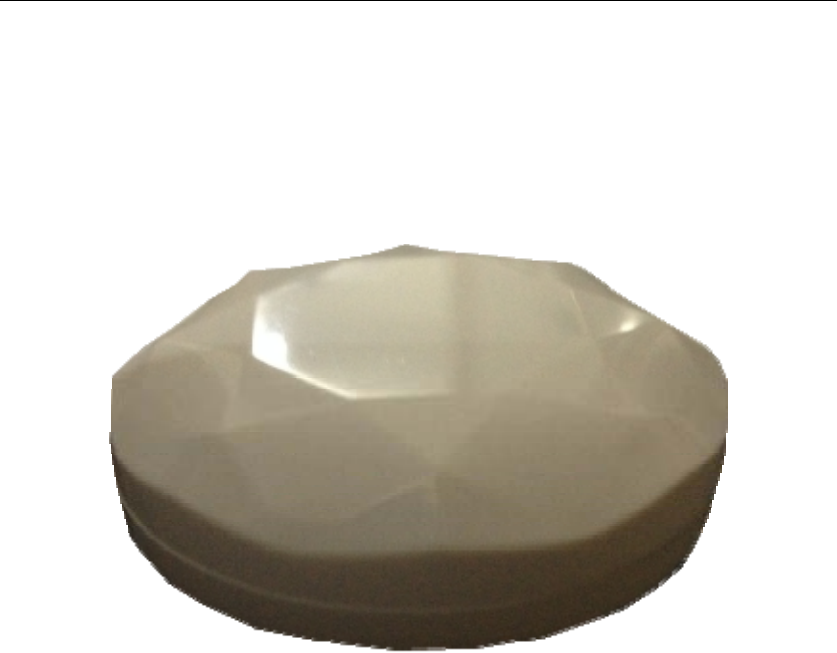
Shenzhen holyiot technology Co., Ltd
Shenzhen holyiot technology Co.,Ltd Mr .Wang:18576759686 QQ:460425175
1
User Manual_NRF52832
Shenzhen holyiot technology Co.,Ltd Mr .Wang:18576759686 QQ:460425175
2
一. Pair with the ibeacon device
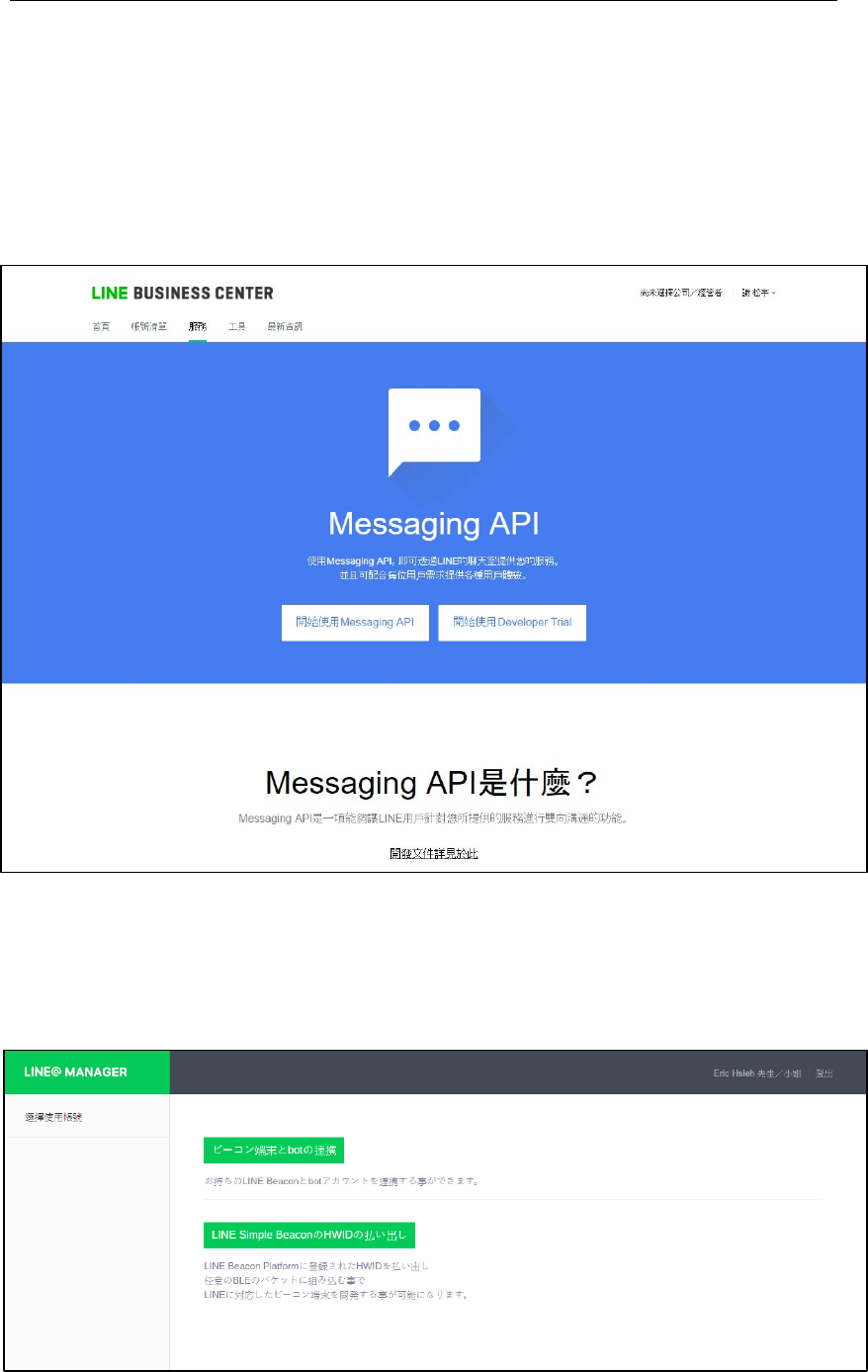
1. Register a developer account
Go to LINE BUSINESS CENTER website register a developer account (developer
Trail) :(https://business.line.me/zh-hant/services/bot)
2. Register the device
After registered, go to LINE@MANAGER management page register the
device :(https://admin-official.line.me/beacon/register#/)
Shenzhen holyiot technology Co., Ltd
Shenzhen holyiot technology Co.,Ltd Mr .Wang:18576759686 QQ:460425175
3
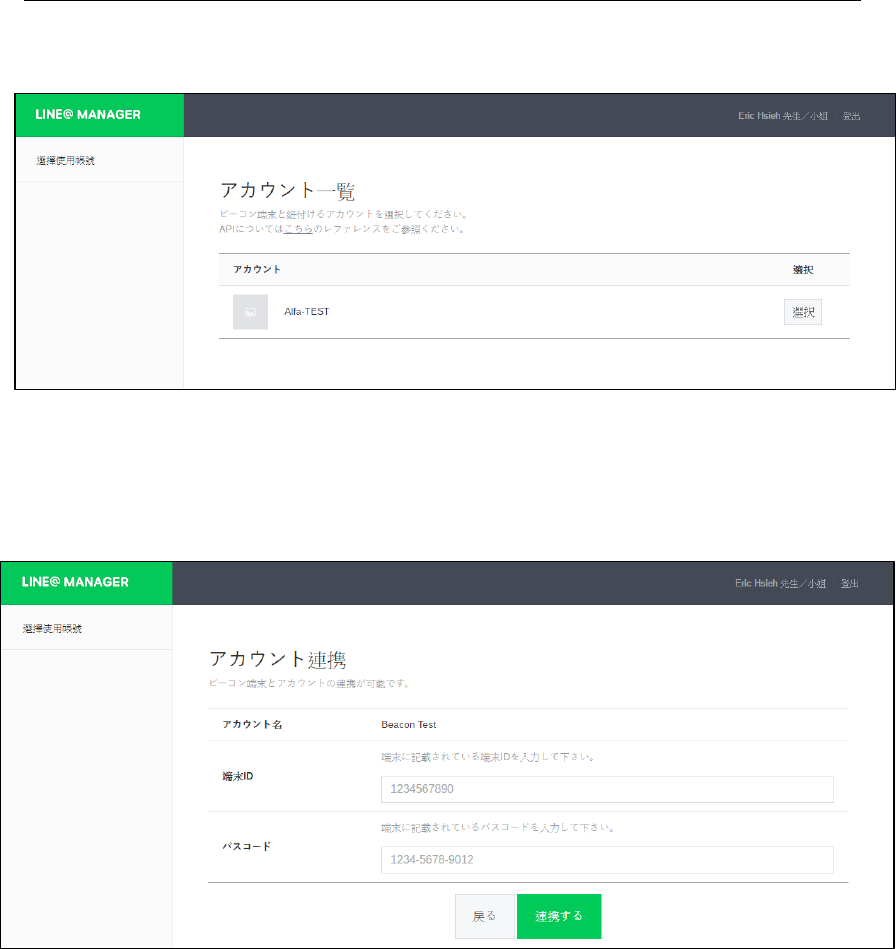
3. Login account
Find out the code which have produce info refer to the manual ,and input the
HWID and Password
二. How to use ibeacon
1. Open the System manual
Refer to the offical documents,
please visit here :https://devdocs.line.me/en/
According to the developer manual, then set the device.
Please visit here: https://devdocs.line.me/en/#line-beacon
Shenzhen holyiot technology Co., Ltd
Shenzhen holyiot technology Co.,Ltd Mr .Wang:18576759686 QQ:460425175
4
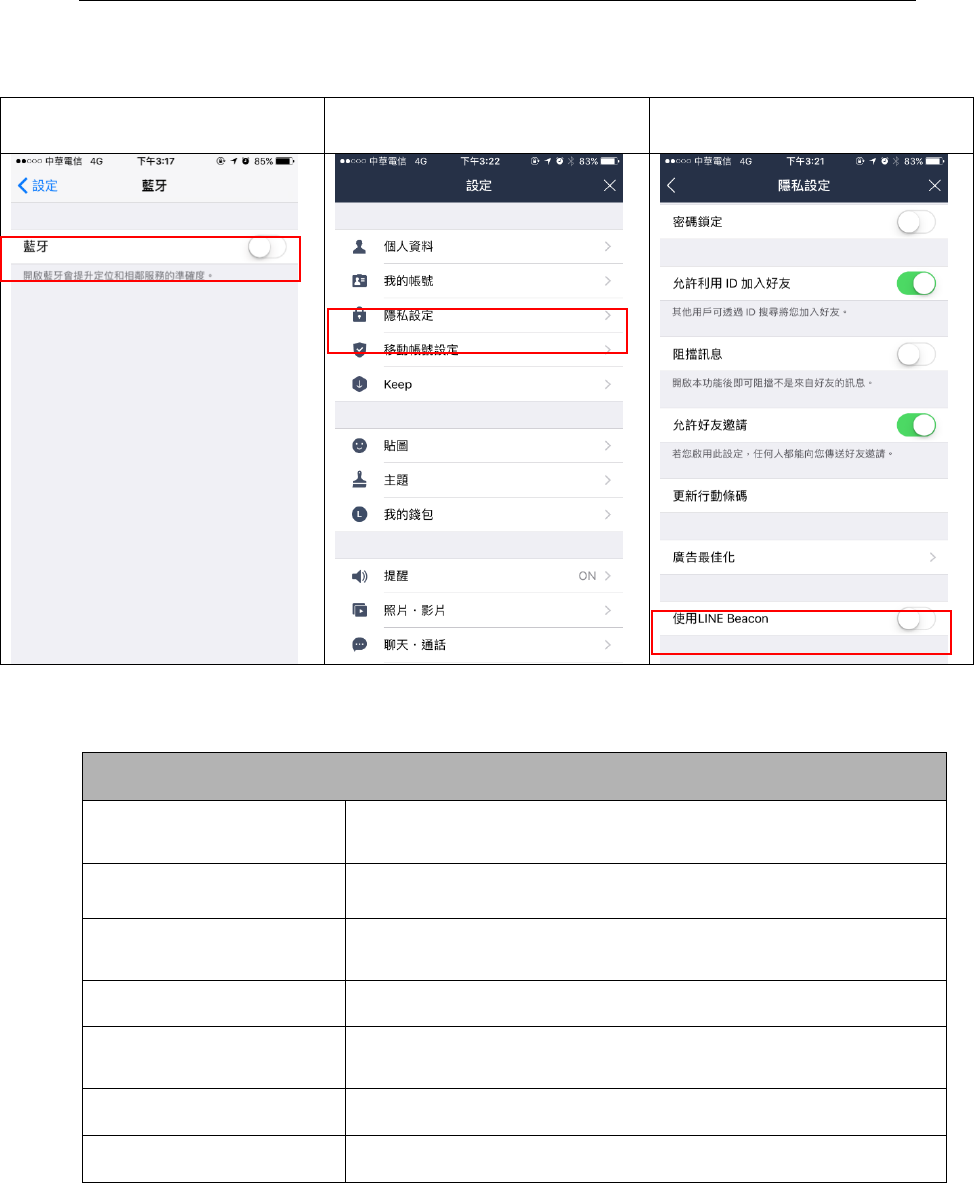
2. Settting the ibeacon as below
第一步:打開手機藍芽 第二步:打開 LINE 設定
第三部:打開隱私設定後開啟使
用 LINE Beacon 選項
三.About ibeacon- NRF52832
Ibeacon- NRF52832
Bluetooth chip NRF52832AA
Size 46mm*17.2mm
Weight 38g
Meterial ABS
Other Waterproof
Color Black , green white
Protocol Bluetooth 4.0 , iBeacon
Shenzhen holyiot technology Co., Ltd
Shenzhen holyiot technology Co.,Ltd Mr .Wang:18576759686 QQ:460425175
5
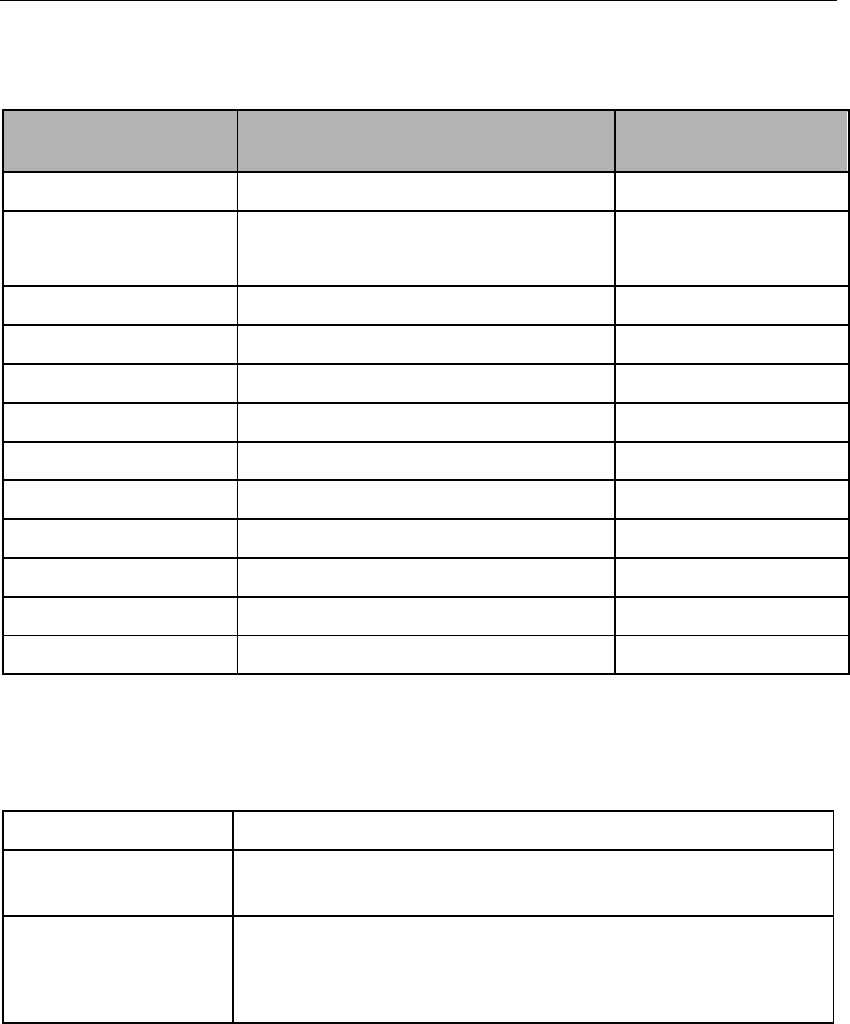
四.Ibeacon- NRF52832 hardware features
Name Parameter
Battery CR2477
Battery
capacity 1000MA
Voltage 3.0VDC
TX power 0dBm -30~4dBm
Frequency 500ms 100~2000ms
Sleep power 12uW
Sleep current 2uA
Support iOS7.0+/Andriod 4.3+
OTA Yes
Security Password security
Distance 0-60m(in the open air) Range
Battery life 12--24 month Broadcast interval
五. ibeacon- NRF52832 support system
Support Phone device
iOS 7.0 above iPhone 4S,iPhone 5, iPhone 5S,iphone 6,
iPhone 6p,iPad 3, iPad mini, iPad air ect.
Android 4.3
above
Samsung Galaxy S III,Galaxy S IV,Galaxy
Note II,Galaxy Note III and Motorola Razr,
HTC One ect.
六. User Applications
First the User must open the Bluetooth setting and when the user
in the range of the Beacon. The Line app will got notice or a
message . This technology can use for sent the coupon : when the
client(customers) come to the store . The phone wil will a message
from Line , the message will include advertisement and Text
coupon and other informations
Shenzhen holyiot technology Co., Ltd
Shenzhen holyiot technology Co.,Ltd Mr .Wang:18576759686 QQ:460425175
6
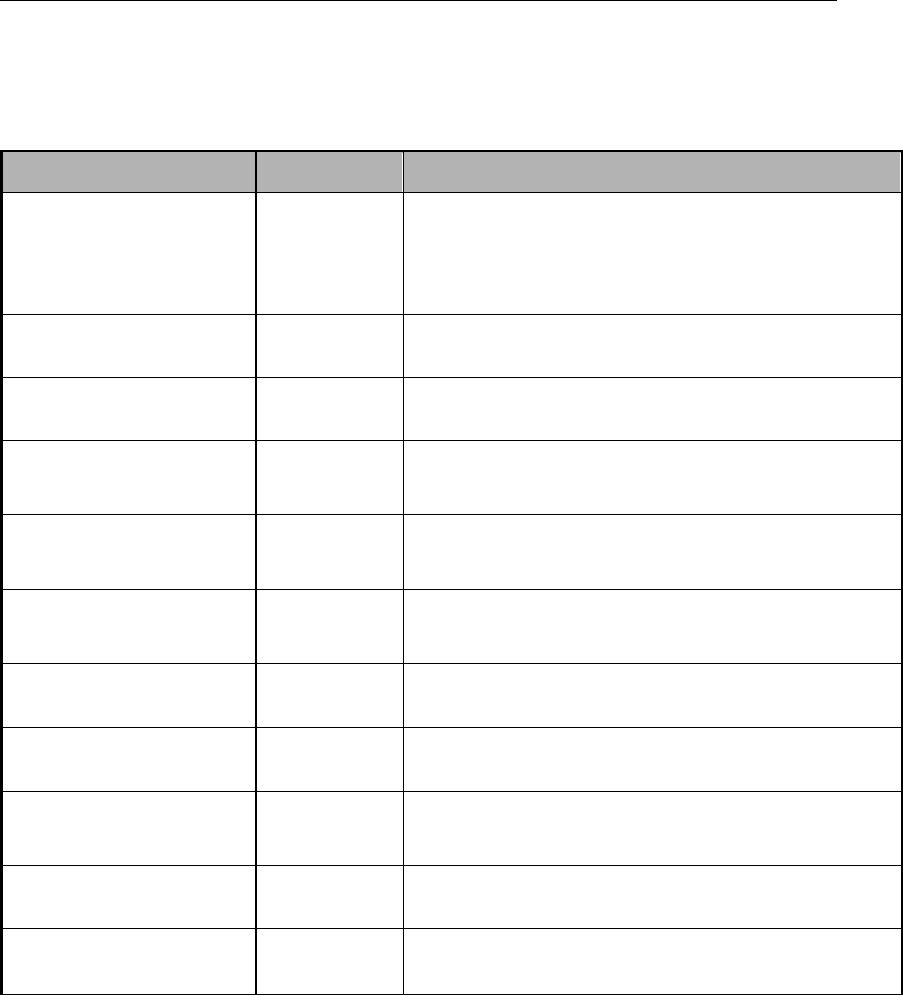
七.ibeacon- NRF52832 firmware Setting
Parameter Name Value
UUID Device ID FDA50693-A4E2-4FB1-AFCF-
C6EB07647825
Major 0-65535(default:10032)
Minor 0-65535(default:)
Transmission
Power -30~4dBm(default:0dBm)
Change
Password 5bytes (default : AA14061112)
Broadcasting
Interval 100-2000ms(default:500ms)
Serial ID 0-65535
iBeacon Name 1-14 bytes,default:holyiot
Connection
Mode is_connect(0/1)
Soft Reboot Default password:AA14061112
Battery Service Battery level
Shenzhen holyiot technology Co., Ltd

Shenzhen holyiot technology Co.,Ltd Mr .Wang:18576759686 QQ:460425175
7
FCC Notice:
This device complies with Part 15 of the FCC Rules. Operation is subject to
the following two conditions: (1) This device may not cause harmful
interference. (2) This device must accept any interference received, including
interference that may cause undesired operation.
Warning:
NOTE: This equipment has been tested and found to comply with the limits for
a Class B digital device, pursuant to Part 15 of the FCC Rules. These limits
are designed to provide reasonable protection against harmful interference in
a residential installation. This equipment generates uses and can radiate radio
frequency energy and, if not installed and used in accordance with the
instructions, may cause harmful interference to radio communications.
However, there is no guarantee that interference will not occur in a particular
installation. If this equipment does cause harmful interference to radio or
television reception, which can be determined by turning the equipment off
and on, the user is encouraged to try to correct the interference by one or
more of the following measures:
---Reorient or relocate the receiving antenna.
---Increase the separation between the equipment and receiver.
---Connect the equipment into an outlet on a circuit different from that to which
the receiver is connected.
---Consult the dealer or an experienced radio/TV technician for help.
WARNING: Changes or modifications not expressly approved by the party
responsible for compliance could void the user's authority to operate the
equipment.
The device has been evaluated to meet general RF exposure requirement.
The device can be used in portable condition without restriction.
About us
Shenzhen holyiot technology Co.,Ltd
Address:Room 308 . Building 9 , wangtang industrial park , Xili town ,
Nanshan district ,Shenzhen , China
Contact name :MR wang
telephone :185 7675 9686
Phone :0755--8654 6492
Email :460425175@qq.com
Website :http://www.hyyunjia.com/
Shenzhen holyiot technology Co., Ltd