

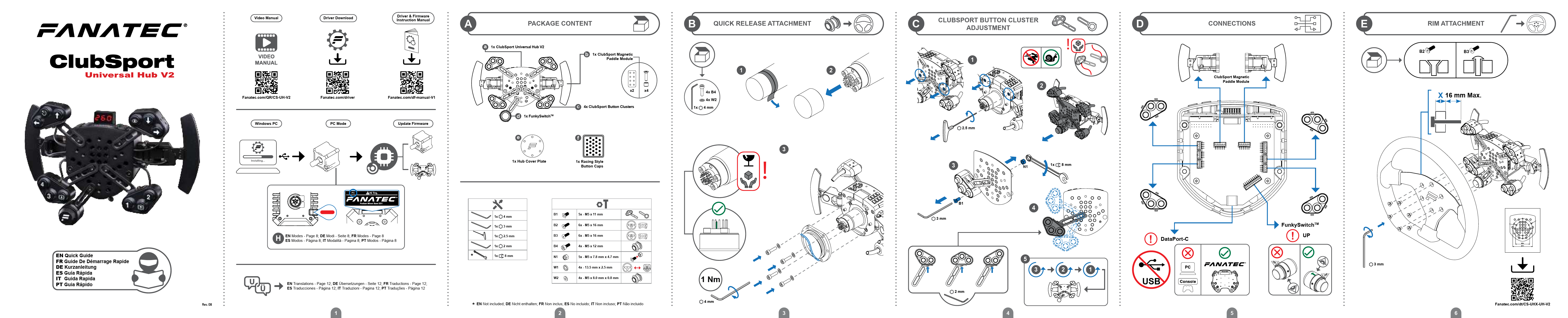
Package Content
- 1x ClubSport Universal Hub V2
- 1x ClubSport Magnetic Paddle Module
- 4x ClubSport Button Clusters
- 1x FunkySwitch™
- 1x Hub Cover Plate
- 1x Racing Style Button Caps
Hardware Included:
- Screws: 5x M5 x 11 mm (B1), 6x M5 x 16 mm (B2), 6x M5 x 16 mm (B3), 4x M5 x 12 mm (B4)
- Special Screws: 5x M5 x 7.8 mm x 4.7 mm (N1)
- Washers: 4x 13.5 mm x 2.5 mm (W1), 4x M5 x 8.0 mm x 0.8 mm (W2)
- Tools: 1x 4 mm Allen key, 1x 3 mm Allen key, 1x 2.5 mm Allen key, 1x 2 mm Allen key, 1x 8 mm Allen key
Note: Some items may not be included in all regions.
Assembly and Connections
Quick Release Attachment (B)
Attach the ClubSport Universal Hub V2 to your wheel base using 4x B4 screws and 4x W2 washers. Tighten to 1 Nm torque using the 4 mm Allen key.
ClubSport Button Cluster Adjustment (C)
Mount the ClubSport Button Clusters using the provided screws (e.g., B1, N1) and Allen keys (e.g., 3 mm, 8 mm). Ensure proper fitment.
Connections (D)
Connect the ClubSport Magnetic Paddle Module and the FunkySwitch™ to the ? USB DataPort-C on the hub.
Rim Attachment (E)
Attach your steering wheel rim to the Universal Hub V2. Ensure the rim thickness does not exceed 16 mm.
Calibration
Centre Calibration (F)
- Enter the Tuning Menu.
- Perform centre calibration (indicated by "CAL 000").
- Exit the Tuning Menu.
Shifter Calibration (G)
Calibrate the shifter for all gears. This process may vary depending on the connected shifter and game.
Note: Shifters sold separately.
Modes and Tuning Options
Modes (H)
Select between PC and Console modes. The exact functionality may depend on your connected wheel base.
Tuning Options (I)
- Enter the Tuning Menu.
- Navigate through the options using the designated buttons.
- Exit the Tuning Menu when finished.
Module Adjustment and Display
ClubSport Magnetic Paddle Module Adjustment (J)
Adjust the position of the magnetic paddle modules using the provided screws and Allen keys (e.g., 2 mm, 4 mm).
Display Adjustment (K)
Adjust the display settings as needed.
Button Mapping (L)
Map buttons for different configurations on PC and PlayStation®.
Paddle Shift Mapping
- Paddle Shift Left: PC: [Button 12], PlayStation®: [L1 Button]
- Paddle Shift Right: PC: [Button 11], PlayStation®: [R1 Button]
Button Group 1
| # | PC | PlayStation® |
|---|---|---|
| 1 | [Button Pi] | [L2 Button] |
| 2 | [Button 9] | [L1 Button] |
| 3 | [Button 7] | [L3 Button] |
| 4 | [Button 10] | [R2 Button] |
| 5 | [Button 8] | [R1 Button] |
| 6 | [Button 12] | [R3 Button] |
| 7 | [Button 11] | [Up Button] |
| 8 | [Button 6] | [Down Button] |
| 9 | [Button 5] | [Left Button] |
| 10 | [Button 1] | [Right Button] |
| 11 | [Button 2] | [Tuning Button] |
| 12 | [Button 3] | [Mode Button] |
| 13 | [Button 4] | [X Button] |
Button Group 2
| # | PC | PlayStation® |
|---|---|---|
| 1 | [Button Pi] | [L2 Button] |
| 2 | [Button 9] | [L1 Button] |
| 3 | [Button 7] | [L3 Button] |
| 4 | [Button 10] | [R2 Button] |
| 5 | [Button 8] | [R1 Button] |
| 6 | [Button 12] | [R3 Button] |
| 7 | [Button 11] | [Up Button] |
| 8 | [Button 6] | [Down Button] |
| 9 | [Button 5] | [Left Button] |
| 10 | [Button 1] | [Right Button] |
| 11 | [Button 2] | [Tuning Button] |
| 12 | [Button 3] | [Mode Button] |
| 13 | [Button 4] | [X Button] |
Button Group 3
| # | PC | PlayStation® |
|---|---|---|
| 1 | [Button Pi] | [L2 Button] |
| 2 | [Button 9] | [L1 Button] |
| 3 | [Button 7] | [L3 Button] |
| 4 | [Button 10] | [R2 Button] |
| 5 | [Button 8] | [R1 Button] |
| 6 | [Button 12] | [R3 Button] |
| 7 | [Button 11] | [Up Button] |
| 8 | [Button 6] | [Down Button] |
| 9 | [Button 5] | [Left Button] |
| 10 | [Button 1] | [Right Button] |
| 11 | [Button 2] | [Tuning Button] |
| 12 | [Button 3] | [Mode Button] |
| 13 | [Button 4] | [X Button] |
Button Group 4
| # | PC | PlayStation® |
|---|---|---|
| 1 | [Button Pi] | [L2 Button] |
| 2 | [Button 9] | [L1 Button] |
| 3 | [Button 7] | [L3 Button] |
| 4 | [Button 10] | [R2 Button] |
| 5 | [Button 8] | [R1 Button] |
| 6 | [Button 12] | [R3 Button] |
| 7 | [Button 11] | [Up Button] |
| 8 | [Button 6] | [Down Button] |
| 9 | [Button 5] | [Left Button] |
| 10 | [Button 1] | [Right Button] |
| 11 | [Button 2] | [Tuning Button] |
| 12 | [Button 3] | [Mode Button] |
| 13 | [Button 4] | [X Button] |
FunkySwitch™ Mapping
Map the FunkySwitch™ for PC and PlayStation®.
- PC: Buttons -23/-24
- PlayStation®: Buttons -*GSB 1 / -*GSB 2
* GSB = Game-Specific Button
Support and Compliance
Support (M)
For support, visit Fanatec's official website:
Warranty Information
The product warranty is provided by Endor AG. Refer to the included warranty sheet and the terms & conditions of Endor AG on fanatec.com.
FCC Compliance
This device complies with part 15 of the FCC rules. Operation is subject to two conditions: it must not cause harmful interference, and must accept any interference received. Modifications not explicitly described in the manual can void the user's authority to operate the device. This device has been tested and approved for Class B digital devices, providing adequate protection against harmful interference in residential areas.
RoHS Compliance
ENDOR products comply with the European Union Directive 2011/65/EU and its amendments, including exemptions for the use of lead in high-temperature solder. ENDOR is working to phase out these exempted substances where technically possible.
Company Information
Manufactured and distributed by:
Endor AG
E.ON-Allee 3 - 84036 Landshut - Germany
Telephone: +49 (871) 9221-122
Email: info.webshop@fanatec.com
Website: www.fanatec.com - www.endor.ag
Fanatec® is a registered trademark of Endor AG.
Designed and developed by Endor AG in Germany.
Made in China.
