
Home
›
WP15WBD-RK Bi-directional Data Transfer Evaluation Kit User Manual for the P9221-R3 and P9242-R3

WP15WBD-RK Bi-directional Data Transfer Evaluation Kit User Manual for the P9221-R3 and P9242-R3
File info: application/pdf · 21 pages · 1.57MB
WP15WBD-RK Bi-directional Data Transfer Evaluation Kit User Manual for the P9221-R3 and P9242-R3
Full PDF Document

If the inline viewer fails, it will open the original document in compatibility mode automatically. You can also open the file directly.
Extracted Text
WP15WBD-RK Bi-directional Data Transfer Evaluation Kit User Manual for the P9221-R3 and P9242-R3

Description
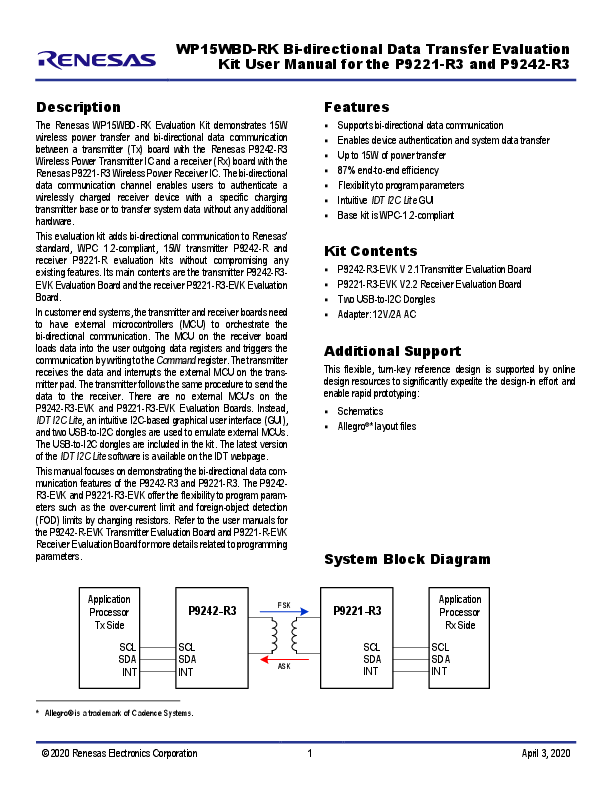
The Renesas WP15WBD-RK Evaluation Kit demonstrates 15W wireless power transfer and bi-directional data communication between a transmitter (Tx) board with the Renesas P9242-R3 Wireless Power Transmitter IC and a receiver (Rx) board with the Renesas P9221-R3 Wireless Power Receiver IC. The bi-directional data communication channel enables users to authenticate a wirelessly charged receiver device with a specific charging transmitter base or to transfer system data without any additional hardware.
This evaluation kit adds bi-directional communication to Renesas' standard, WPC 1.2-compliant, 15W transmitter P9242-R and receiver P9221-R evaluation kits without compromising any existing features. Its main contents are the transmitter P9242-R3EVK Evaluation Board and the receiver P9221-R3-EVK Evaluation Board.
In customer end systems, the transmitter and receiver boards need to have external microcontrollers (MCU) to orchestrate the bi-directional communication. The MCU on the receiver board loads data into the user outgoing data registers and triggers the communication by writing to the Command register. The transmitter receives the data and interrupts the external MCU on the transmitter pad. The transmitter follows the same procedure to send the data to the receiver. There are no external MCU's on the P9242-R3-EVK and P9221-R3-EVK Evaluation Boards. Instead, IDT I2C Lite, an intuitive I2C-based graphical user interface (GUI), and two USB-to-I2C dongles are used to emulate external MCUs. The USB-to-I2C dongles are included in the kit. The latest version of the IDT I2C Lite software is available on the IDT webpage.
This manual focuses on demonstrating the bi-directional data communication features of the P9242-R3 and P9221-R3. The P9242R3-EVK and P9221-R3-EVK offer the flexibility to program parameters such as the over-current limit and foreign-object detection (FOD) limits by changing resistors. Refer to the user manuals for the P9242-R-EVK Transmitter Evaluation Board and P9221-R-EVK Receiver Evaluation Board for more details related to programming parameters.

Application Processor Tx Side

P9242-R3

FSK

SCL

SCL

SDA

SDA

INT

INT

AS K

Features
 Supports bi-directional data communication  Enables device authentication and system data transfer  Up to 15W of power transfer  87% end-to-end efficiency  Flexibility to program parameters  Intuitive IDT I2C Lite GUI  Base kit is WPC-1.2-compliant
Kit Contents
 P9242-R3-EVK V 2.1Transmitter Evaluation Board  P9221-R3-EVK V2.2 Receiver Evaluation Board  Two USB-to-I2C Dongles  Adapter: 12V/2A AC
Additional Support
This flexible, turn-key reference design is supported by online design resources to significantly expedite the design-in effort and enable rapid prototyping:  Schematics  Allegro�* layout files

System Block Diagram

P9221-R3
SCL SDA INT

Application Processor Rx Side
SCL SDA INT

* Allegro� is a trademark of Cadence Systems.

� 2020 Renesas Electronics Corporation

1

April 3, 2020

WP15WBD-RK Bi-directional Data Transfer Evaluation Kit User Manual for the P9221-R3 and P9242-R3
Important Notes
Disclaimer
Integrated Device Technology, Inc. and its affiliated companies (herein referred to as "IDT") shall not be liable for any damages arising out of defects resulting from (i) delivered hardware or software (ii) non-observance of instructions contained in this manual and in any other documentation provided to user, or (iii) misuse, abuse, use under abnormal conditions, or alteration by anyone other than IDT.
TO THE EXTENT PERMITTED BY LAW, IDT HEREBY EXPRESSLY DISCLAIMS AND USER EXPRESSLY WAIVES ANY AND ALL WARRANTIES, WHETHER EXPRESS, IMPLIED, OR STATUTORY, INCLUDING, WITHOUT LIMITATION, IMPLIED WARRANTIES OF MERCHANTABILITY AND OF FITNESS FOR A PARTICULAR PURPOSE, STATUTORY WARRANTY OF NON-INFRINGEMENT, AND ANY OTHER WARRANTY THAT MAY ARISE BY REASON OF USAGE OF TRADE, CUSTOM, OR COURSE OF DEALING.
Restrictions in Use
Renesas' WP15WBD-RK Evaluation Kit is designed for evaluation purposes only. It must not be used for module production or production test setups.
Contents
1. Setup ............................................................................................................................................................................................................4 1.1 Required or Recommended User Equipment......................................................................................................................................4 1.2 Required Software on Computer .........................................................................................................................................................4 1.2.1 Software Installation .............................................................................................................................................................4 1.3 Kit Hardware Connections...................................................................................................................................................................5
2. Usage Guide.................................................................................................................................................................................................7 2.1 Overview of the P9221-R3-EVK ..........................................................................................................................................................7 2.2 Overview of the P9242-R3-EVK ..........................................................................................................................................................8
3. Evaluating Bi Directional Data Communication ..........................................................................................................................................10 3.1 Transferring Data from the Receiver to the Transmitter ....................................................................................................................10 3.2 Transferring Data from the Transmitter to the Receiver ....................................................................................................................12
4. Schematics, Bill of Materials (BOM), and Board Layout.............................................................................................................................13 4.1 P9221-R3-EVK Evaluation Board Schematics V2.2..........................................................................................................................13 4.2 P9242-R3-EVK Evaluation Board Schematics V2.1..........................................................................................................................14
5. Bill of Materials (BOM)................................................................................................................................................................................15 6. Partner Products Information......................................................................................................................................................................19
6.1 Evaluation Kits...................................................................................................................................................................................19 6.2 Transmitter Coils ...............................................................................................................................................................................19 6.3 Receiver Coils ...................................................................................................................................................................................20 7. Ordering Information...................................................................................................................................................................................20 8. Revision History..........................................................................................................................................................................................20

� 2020 Renesas Electronics Corporation

2

April 3, 2020

WP15WBD-RK Bi-directional Data Transfer Evaluation Kit User Manual for the P9221-R3 and P9242-R3
List of Figures
Figure 1. Windows Device Manager Display for Troubleshooting the USB Connection.....................................................................................4 Figure 2. Evaluation Kit Connections using the P9242-R3 Transmitter Evaluation Board and the P9221-R3 Receiver Evaluation Board........5 Figure 3. I2C Header Connection to the P9221-R3-EVK Receiver Board..........................................................................................................6 Figure 4. I2C Header Connection to the P9242-R3-EVK Transmitter Board......................................................................................................6 Figure 5. I2C Dongle Header..............................................................................................................................................................................6 Figure 6. P9221-R3 V2.2 Evaluation Board Features.........................................................................................................................................7 Figure 7. P9242-R3 V2.1 Evaluation Board Features.........................................................................................................................................8 Figure 8. P9242-R3 V2.1 Evaluation Board Details............................................................................................................................................9 Figure 9. IDT I2C Lite Software Overview ........................................................................................................................................................10
List of Tables
Table 1. P9221-R3-EVK BOM V2.2 ................................................................................................................................................................15 Table 2. P9242-R3-EVK BOM V2.1 ................................................................................................................................................................16 Table 3. Recommended Transmitter Coil Manufactures .................................................................................................................................19 Table 4. Recommended Receiver Coil Manufacturers ....................................................................................................................................20

� 2020 Renesas Electronics Corporation

3

April 3, 2020

WP15WBD-RK Bi-directional Data Transfer Evaluation Kit User Manual for the P9221-R3 and P9242-R3
1. Setup
1.1 Required or Recommended User Equipment
The following additional lab equipment is required for using the kit:  Computer with the Windows� 7 or Windows� 10 operating system.
Note: An optional second computer can expedite the evaluation. For this option, a second USB-to-I2C dongle is provided in the kit. In this case, repeat the setup procedures in section 1.2 for the second computer using the second dongle.  Oscilloscope  Multimeter  Power cables
1.2 Required Software on Computer
Visit the WP15WBD-RK website at www.IDT.com/WP15WBD-RK, and download latest version of the IDT I2C Lite software, script files, and USB drivers from the IDT website. The software provides an intuitive graphical user interface for sending I2C commands using the USB-to-I2C dongle shipped with the Evaluation Kit.
1.2.1 Software Installation Follow these procedures to install the software:
1. Do not connect the USB-to-I2C dongle before installing the software. 2. Run the downloaded USB Drivers Setup executable file and follow the user prompts to install the USB drivers. 3. After finishing the setup of the USB drivers, connect one of the USB-to-I2C dongles to the USB port. Wait for a few moments to let
Windows� map the drivers for the dongle. 4. Open the Device Manager from the Windows control panel and check the devices listed under "Universal Serial Bus controllers"
section. "FT4222H Interface A" and "FT4222H Interface B" should appear in this section as shown in Figure 1. 5. Run the IDT I2C Lite Setup file and follow the user prompts to install the IDT I2C Lite software. 6. Place the downloaded script files in the C:\Users\...\AppData\Roaming\IDT I2C Lite folder to expedite loading the script files into the
IDT I2C Lite software. These scripts contain a series of I2C commands to send and receive data on the receiver and transmitter.
Figure 1. Windows Device Manager Display for Troubleshooting the USB Connection

� 2020 Renesas Electronics Corporation

4

April 3, 2020

WP15WBD-RK Bi-directional Data Transfer Evaluation Kit User Manual for the P9221-R3 and P9242-R3
1.3 Kit Hardware Connections
Follow these procedures to set up the kit as shown in Figure 2. 1. Plug the 12V adapter or user's power supply into the J3 barrel connector on the bottom of the P9242-R3-EVK board (see Figure 7). 2. Place the P9221-R3-EVK on the transmitter (TX) pad with the components facing up as shown in Figure 2. 3. Verify that the two green LEDs identified in Figure 2 are illuminated indicating that coupling has been established. 4. Connect wires to the VOUT and GND test points on the P9221-R3-EVK receiver to measure the output voltage (see Figure 6) and apply
a load requiring less than the programmed current limit. 5. Connect the USB-to-I2C dongle to the computer's USB port. If using a second computer, connect the second dongle to its USB port. 6. To send I2C commands to the P9221-R3-EVK, connect the I2C header on one of the connected dongles to J1 on the P9221-R3-EVK as
shown in Figure 3. The black wire on the dongle should be on the GND pin of the J1 Header. See sections 3.1 and 3.2 for detailed instructions. 7. To send I2C commands to the P9242-R3-EVK, connect the I2C header on one of the connected dongles to J2 on the P9242-R3-EVK as shown in Figure 4. The black wire on the dongle should be on the GND pin of the J2 header. See sections 3.1 and 3.2 for detailed instructions.
Figure 2. Evaluation Kit Connections using the P9242-R3 Transmitter Evaluation Board and the P9221-R3 Receiver Evaluation Board
P9242-R3-EVK
Transmitter Coil
P9221-R3-EVK

Green LEDs illuminate when connection has been established.
� 2020 Renesas Electronics Corporation

Note: The buzzer shown on the P9242-R3-EVK is not placed for this kit.

5

April 3, 2020

WP15WBD-RK Bi-directional Data Transfer Evaluation Kit User Manual for the P9221-R3 and P9242-R3
Figure 3. I2C Header Connection to the P9221-R3-EVK Receiver Board
GND pin on J1 J1 Header with I2C Port Dongle's I2C Header Black wire must be on the GND pin of J1.
Figure 4. I2C Header Connection to the P9242-R3-EVK Transmitter Board
Dongle I2C Header Black wire must be on the GND pin of J2. J2 Header with I2C Port

Figure 5. I2C Dongle Header

Blank SCL SDA GND

� 2020 Renesas Electronics Corporation

6

April 3, 2020

WP15WBD-RK Bi-directional Data Transfer Evaluation Kit User Manual for the P9221-R3 and P9242-R3
2. Usage Guide
2.1 Overview of the P9221-R3-EVK
Figure 6. P9221-R3 V2.2 Evaluation Board Features

Receiver Coil

External Temperature Sensing Resistor IDT P9221-R3 IC VOUT GND
J1 Header

Y- Alignment Guide Voltage (ALGY)

X- Alignment Guide Voltage (ALGX)

VRECT

GND

Interrupt Flag

Output Voltage Adjustment (VOSET)

SCL SDA GND

Over-Current FOD Gain FOD Offset

Limit Adjustment Adjustment Adjustment

(ILIM)

(RPG)

(RPO)

� 2020 Renesas Electronics Corporation

7

April 3, 2020

WP15WBD-RK Bi-directional Data Transfer Evaluation Kit User Manual for the P9221-R3 and P9242-R3

2.2 Overview of the P9242-R3-EVK
Figure 7. P9242-R3 V2.1 Evaluation Board Features
J3 Vin Power Barrel Connector (see the bottom of the board)
P9242-RB Main IC

Tx Coil

Vin Power Connector: Micro-USB LED1 and LED2 Pattern Indicators

MP-A2 Coil

J2 I2C Header J5
Note: The P9242-RB IC is used on the P9242-R3 V2.1 Evaluation board instead of the P9242-R3 IC. The P9242-R3 has bi-directional communication firmware pre-programmed into its one-time programmable memory and does not allow the firmware to be customized. The P9242-RB offers a pre-programmed bootloader that must be used in conjunction with an external flash. Bidirectional communications firmware is loaded into the external flash. The firmware can be customized in external flash. There is no functionality difference between the P9242-R3 V2.1 Evaluation board with P9242-R3 IC and the P9242-RB with external flash.

� 2020 Renesas Electronics Corporation

8

April 3, 2020

WP15WBD-RK Bi-directional Data Transfer Evaluation Kit User Manual for the P9221-R3 and P9242-R3
Figure 8. P9242-R3 V2.1 Evaluation Board Details

� 2020 Renesas Electronics Corporation

9

April 3, 2020

WP15WBD-RK Bi-directional Data Transfer Evaluation Kit User Manual for the P9221-R3 and P9242-R3

3. Evaluating Bi Directional Data Communication

3.1 Transferring Data from the Receiver to the Transmitter
To send the data from the P9221-R3 to the P9242-R3, the external microcontroller (MCU) on the receiver loads data into the user outgoing data registers of the P9221-R3 and triggers the communication by writing to the Command register of the P9221-R3 via the I2C bus. The P9242-R3 receives the data and interrupts the external MCU on the transmitter pad. The external MCU on the transmitter pad reads the user incoming data registers via the I2C bus after it receives the interrupt. More details on the data transfer algorithm are in the P9221-R3 and P9242-R3 datasheets.
There are no external MCUs on the receiver and transmitter evaluation boards in the WP15WBD-RD Evaluation Kit. Instead the IDT I2C Lite software and USB-to-I2C dongles are used to simulate an external MCU. The USB-to-I2C dongle does not have the capability to generate interrupts for the IDT I2C Lite software, so it is necessary to poll the Status register to check for incoming data or probe the INT test point on the P9242-R3-EVK (IO_B4 test point) using an oscilloscope.
Follow these procedures to transfer the data from the receiver board to the transmitter board:
1. Power up the transmitter and receiver evaluation boards by following the steps in section 1.3.
2. Verify that the green LEDs (identified in Figure 2) on both the transmitter and receiver boards are illuminated indicating that devices are in the power transfer phase. Bi-directional communication is enabled only when the devices are in the power transfer phase.
3. Connect the USB-to-I2C dongle to the computer's USB port and connect the I2C header of the dongle to J1 on the P9221-R3-EVK board as shown in Figure 3. The black wire on the dongle should be on the GND pin of the J1 header.
4. Open the IDT I2C Lite GUI by going to the Windows start menu: IDT GUI Application  IDT I2C Lite. Figure 9 shows an overview.

Figure 9. IDT I2C Lite Software Overview

Open and Close Scripts Select Device

I2C Address of Selected Device

Selected Device Connection Status

USB-to-I2C Dongle Connection Status

Run all Commands in the Script

Add or Remove I2C Commands in the Script

Delay between Consecutive I2C Transactions
Continuously Run the Same Script

Log I2C R/W Results

USB-to-I2C Dongle Starting Register Number of Bytes to Read or

Selected Device Clear Data Fields

Connection Status Address

Write Including Starting Address Connection Status

Version #

� 2020 Renesas Electronics Corporation

10

April 3, 2020

WP15WBD-RK Bi-directional Data Transfer Evaluation Kit User Manual for the P9221-R3 and P9242-R3
5. Verify the proper USB dongle connection by checking the USB icon status in the top right corner of the GUI. When the USB dongle is properly connected, the USB icon should be bright blue and the bottom left corner should indicate "IDT dongle connected."
6. Select "P9221 RX" from the "Device" drop-down menu in the GUI.
7. Verify that the proper P9221-R3-EVK connection is recognized by the GUI by checking the device icon in the top right corner of the GUI. When the P9221-R3-EVK is properly connected, the selected device icon should be bright blue and the message in the middle of the bottom status bar in the GUI should indicate "P9221 connected."
8. Click "Open Script" from the "File" menu in the top left corner of the GUI, and navigate to the "Send 8 bytes from Rx to Tx" script. This script has all the I2C commands required to send the data from the P9221-R3 to the P9242-R3. The script can be customized by using the "+" and "�" buttons in the GUI.
9. Click the "Run all" button to run all the I2C commands in the script to send the data from the P9221-R3 to the P9242-R3.
10. If using only one computer, gently disconnect the dongle I2C header from the receiver board, and connect the I2C header to J2 of the P9242-R3-EVK transmitter board as shown in Figure 4. The black wire on the dongle should be on the GND pin on the J2 header.
If using two computers, follow the subsequent steps on the second computer to read the data.
11. Select "P9242 TX" from the "Device" drop down menu in the GUI.
12. Verify the proper P9242-R3-EVK connection to GUI by checking the selected device icon in the top right corner of the GUI. When the P9242-R3-EVK is properly connected, the icon should be in bright blue color and the bottom status bar in the GUI should indicate "P9242 connected."
13. Click "Open Script" from the "File" menu in the top left corner of the GUI, and navigate to the "Read 8 bytes of data on Tx" script. This script has all the I2C commands required to read data coming into the P9242-R3. The script can be customized by using the "+" and "�" buttons in the GUI.
14. Click the "Run all" button to run all the I2C commands in the script to read the incoming data in the P9242-R3.
15. Verify that the incoming data on the P9242-R3 matches the P9221-R3 outgoing data.

� 2020 Renesas Electronics Corporation

11

April 3, 2020

WP15WBD-RK Bi-directional Data Transfer Evaluation Kit User Manual for the P9221-R3 and P9242-R3
3.2 Transferring Data from the Transmitter to the Receiver
To send the data from the P9242-R3 to the P9221-R3, the external microcontroller (MCU) on the transmitter loads data into the user outgoing data registers of the P9242-R3 and triggers the communication by writing to the Command register of the P242-R3 via the I2C bus. The P9221R3 receives the data and interrupts the external MCU on the receiver board. The external MCU on the receiver board reads the user incoming data registers via the I2C bus after it receives the interrupt. More details on the data transfer algorithm are in the P9221-R3 and P9242-R3 datasheets.
There are no external MCU's on the receiver and transmitter evaluation boards in the WP15WBD-RD Evaluation Kit. Instead, the IDT I2C Lite software and USB-to-I2C dongle are used to simulate an external MCU. The USB-to-I2C dongle does not have the capability to generate interrupts for the IDT I2C Lite software, so it is necessary to poll the Data Received Status register to check for incoming data or probe the interrupt pin on the P9221-R3 (pin 2 on the J1 header on the P9221-R3-EVK board) using an oscilloscope.
Follow these procedures to transfer the data from the transmitter board to the receiver board:
1. Power up the transmitter and receiver evaluation boards by following the steps in section 1.3.
2. Verify that the green LEDs (identified in Figure 2) on both transmitter and receiver boards are illuminated indicating that devices are in the power transfer phase. Bi-directional communication is enabled only when the devices are in the power transfer phase.
3. Connect the USB-to-I2C dongle to the computer's USB port and connect the I2C header of the dongle to J2 on the P9242-R3-EVK board as shown in Figure 4. The black wire on the dongle should be on the GND pin of the J2 header.
4. Open the IDT I2C Lite GUI by going to the Windows start menu: IDT GUI Application  IDT I2C Lite. See Figure 9.
5. Verify the proper USB dongle connection by checking the USB icon status in the top right corner of the GUI. When the USB dongle is properly connected, the USB icon should be bright blue and the bottom left corner should indicate "IDT dongle connected."
6. Select "P9242 TX" from the "Device" drop-down menu in the GUI.
7. Verify that the proper P9242-R3-EVK connection is recognized by the GUI by checking the selected device icon in the top right corner of the GUI. When the P9242-R3-EVK evaluation board is properly connected, the icon should be bright blue and the message in the middle of the bottom status bar in the GUI should indicate "P9242 connected."
8. Click "Open Script" from the "File" menu in the top left corner of the GUI, and navigate to the "Send 2 bytes from Tx to Rx" script. This script has all the I2C commands required to send the data from the P9242-R3 to the P9221-R3. The script can be customized by using the "+" and "�" buttons in the GUI.
9. Click the "Run all" button to run all the I2C commands in the script to send the data from the P9242-R3 to the P9221-R3.
10. If using only one computer, gently disconnect the dongle I2C header from the transmitter board, and connect the I2C header to J1 on the P9221-R3-EVK receiver board as shown in Figure 3. The black wire on the dongle should be on the GND pin of the J1 header.
If using two computers, follow the subsequent steps on the second computer to read the data.
11. Select "P9221 RX" from the "Device" drop-down menu in the GUI.
12. Verify the proper P9221-R3-EVK connection to the GUI by checking the selected device icon in the top right corner of the GUI. When the P9221-R3-EVK evaluation board is properly connected, the icon should be bright blue and the bottom status bar in the GUI should indicate "P9221 connected."
13. Click "Open Script" from the "File" menu in the top left corner of the GUI, and navigate to the "Read 2 bytes of data on Rx" script. This script has all the I2C commands required to read data coming into the P9221-R3. The script can be customized by using the "+" and "�" buttons in the GUI.
14. Click the "Run all" button to run all the I2C commands in the script to read the data coming into the P9221-R3.
15. Verify that the incoming data on the P9221-R3 matches the P9242-R3 outgoing data.

� 2020 Renesas Electronics Corporation

12

April 3, 2020

P9221-R MM EV Board V2.2

RX Power Coil

WP15WBD-RK Bi-directional Data Transfer Evaluation Kit User Manual for the P9221-R3 and P9242-R3
4. Schematics, Bill of Materials (BOM), and Board Layout
4.1 P9221-R3-EVK Evaluation Board Schematics V2.2

� 2020 Renesas Electronics Corporation

AlignY coil AlignX coil

LC
L1

C1 100nF/50V

C2 100nF/50V
C3 100nF/50V
C5 100nF/50V

AC2T

C9 3.3nF

AC2

Vrect GND1

R15 10K R16 10K R35 0

J1
1 2 3 4 5
I2C

TS INT SCL SDA

ALGX

ALGY

D7

D6

5.1V

5.1V

TS

I2CRAIL

SCL

R14 R13

C25

5.1k 5.1k

NP

WP

SDA R18
NP

9 E_PAD

R6 NP R8 0

VDD5V VPP18

NP 8
VCC 7
WP 6
SCL 5
SDA

U2
1 A0
2 A1
3 A2
4 VSS

RSV1

VOUT

R2

36

VRECT

G3 RSV3 H3 RSV2
G4 RSV1 H4 TS/EOC
A3 SCL B3 SDA C3 INT A2 ALIGNX B2 ALIGNY
C2 SINK

C6 47nF

C7 NP

C14 47nF

C15 NP

VRECT C33 10uF

C21 10uF

C22 10uF

C8 15nF
C16 15nF
C23 0.1uF

G2 H1 AC1 H2 AC1_1
AC1_2 G1 B1 BST1 A1 RSV4
COMM1 G5 H5 AC2 H6 AC2_1
AC2_2 G6 B6 BST2 A6 RSV5
COMM2 E1 E2 VRECT E5 VRECT1 E6 VRECT2 F2 VRECT3 F3 VRECT4 F4 VRECT5 F5 VRECT6
VRECT7

C1 C6 PGND J1 PGND1 J2 PGND2 J3 PGND3 J4 PGND4 J5 PGND5 J6 PGND6
PGND7

U1 P9221-R

B5 EN
D1 OUT D2 OUT1 D3 OUT2 D4 OUT3 D5 OUT4 D6 OUT5
F1 VDD5V
F6 VDD18
A4 VOSET/Q-Fact B4
ILIM C4 RPPO A5 RPPG C5 RSV6

GCOM

/EN R17 10k

VOSNS

C10 C11 C12

10uF 10uF NP

LED

VDD5V

D1

VDD5V

5.1k

VPP18

C18

R1

VPP18

1uF

C20 1uF

VOSET ILIM RPO RPG DEN

R39

R28 R30 R38 R34

R19

10k

NP

NP

10K

10k

10K

TS

R27 R29 R22 R33

10K

10K

NP

NP

RTS NP

VOUT

VOUT

GND

R41 NP

VPP18
C19 0.1uF R23 10k

RSV1

INT

INT

C31 0.1uF

R42 NP

13

April 3, 2020

AC_Adapter

48 CSP
47 CSN
46 ISNS_OUT
45 IDEMI
44 VDEM1
43 RSV
42 RSV
41 GND
40 VBRG_IN
39 DRV_VIN
38 GH_BRG1
37 BST_ BRG1

WP15WBD-RK Bi-directional Data Transfer Evaluation Kit User Manual for the P9221-R3 and P9242-R3
4.2 P9242-R3-EVK Evaluation Board Schematics V2.1

� 2020 Renesas Electronics Corporation

usb_micro_ab

9

J1

7

6

SLD GND

5 4

ID

3

D+

2

11

D-

1

10

VCC

8 SLD

J3

GNDT2 GND

usb_id

R39

0

D+

R38
R5 NP

0

D-

VIN1

VINT1

NP

2

C44 4.7u

C42 0.1uF

1 L2

GND1

GNDT1

VIN 3

C43

4

1uF

R6

C8

J4

10K

6.8nF

C9

C7

56p

56p

GND2 GND3 GND4

ISNS_L ISNS_H

ISNS_OUT ISNS_IN

v s2 v s3

C17 680p

VINT2
VIN C2 0.1uF

C29 0.1uF
C30 0.1uF

VIN

C31 10uF

VCC_5V C33

VSNS_IN R13 10K
C22 22nF

C19 5.6nF

R11 200K

C28 22uF

C32 22uF

ISNS_H ISNS_L

R18

0.02

V_BRIDGE

10

10

R15

R21

C27

1uF

C39 5.6nF

R14 2.4K

D1 BAV21W

LDO33 R1

R12 390K

1K R10
390K

R35 200K

D2 BAV21W

R34 100K

R16

10K

Q8

VCOIL_OV

2N7002

C18 1nF

C35 5.6nF
OVP_CTL

14

ENB

VIN

C15

C14

0.1uF

10uF

VCC_5V

VCC5V
C5 10uF

C4 0.1uF

LDO33

LDO33
C16 1uF

C21 0.1uF

LDO18

LDO18

C6

1uF

C13 0.1uF

R7

1K

1 EN

2 GND

C12 1uF

3 PREG

4 VIN

L1

4.7uH 5 SW_S

6 GND

7 LDO33

8 VIN_LDO

9 LDO18

10 LED1

11 LED2

12 VDDIO

LDO33

LDO33 LDO33

LED1

2

1

RED

LED2

2

1

GREEN

R3 1K R4 680

LED1 LED2

IO_B5

Debugg, for development only

4 43 32 21 1

ILIM LED_PAT LDO33

J5

IO_B6 IO_A0 IO_A1

LDO33

68000-105HLF

R47

5

5.1k

54

43 32 21

SCL SDA

1

J2

R46 5.1k
SCL SDA

LDO33

Programming Connector

D-

13

D+

14

SCL

15

SDA

16

ILIM

17

LED_PAT 18

IO_A5

R48

10K ILIM

R43

10K LED_PAT

R22

NP INT_TP

VCOIL_OV 19

TS

20

LOAD

21

OVP_CTL 22

DD+ SCL SDA ILIM/FOD LED/Q-Fact VCOIL TS LOAD OVP_CTL Q_DRV1 Q_DRV2

Q_DRV1 23

Q_DRV2 24

U1 P9242-R3
36 SW_BRG1
35 GL_BRG1
34 GND
33 GL_BRG2
32 SW_BRG2
31 BST_BRG2
30 GH_BRG2
29 /INT
28 RSV
27 RSV
26 RSV
25 RSV

0.1uF
SW_BRG2 C34 0.1uF
INT_TP IO_B3 IO_B2 IO_B1 IO_B0

49 EP

IO_B8 IO_B7 IO_A7 IO_A6
IO_A4

PZ1

1

2 R9

NP

1 NP

2

R20

10K

RTH1

0.1uF C26

t

R40

NP

R44

NP

R19

NP

R24 NP
IO_B0 IO_B2

VBRG

8

7

6

5

R25 12

R27 12
IO_B4 R32 100K
IO_B3
IO_B2
IO_B1
IO_B0

R29 12

R30 100K

R28 12

R31 100K

R26 100K
R42 10K
R41 10K

Q6 3

1

2

7

5

4

6

DMG7430LFG 4

C38 10uF
Q1
VLX2

3

2

1

8

7

6

5

4
SIA453EDJ-T1-GE3 R45 220

1

2

3

Q4 DMG7430LFG

8

8

7

6

5

Q2 4 DMG7430LFG

3

2

1

8

7

6

5

3

2

1

Q3 4
DMG7430LFG R33 3

C41 10uF

C3 0.1uF

C10 22nF
R37 0.1

C20 100nF
C23 68nF C24 47nF C25 NP

C37 10uF

C40 10uF

C1 0.1uF

VLX1 C11 22nF
R36 0.1

VCOIL
LX2
TX-Coil assembly
LX1

LDO33 Q_DRV2
U2 1 2 CS# 3 DO 4 WP#
GND

9 EPAD

LDO33 R23 10K
8 VCC 7 HLD# 6 CLK 5
DI NP

Q7 Q_DRV1
2N7002

Q5

R8 100K

2N7002

LDO33
C36 NP

THIS DOCUMENT CONTAINS INFORMATION PROPRIETARY TO Integrated Device Technology, Inc. (IDT). USE OR DISCLOSURE WITHOUT THE WRITTEN PERMISSION OF AN OFFICER OF IDT IS EXPRESSLY FORBIDDEN

IO_B1 IO_B3

Title
P9242-R3 MM Board V 2.1

Size

Document Number

Custom

Rev 2.2

Date:

Wednesday , October 11, 2017 Sheet

1

of 1

April 3, 2020

WP15WBD-RK Bi-directional Data Transfer Evaluation Kit User Manual for the P9221-R3 and P9242-R3

5. Bill of Materials (BOM)

Table 1. P9221-R3-EVK BOM V2.2

Item Quantity

Reference

Value

1

16 AC2T, VDD5V, VPP18,

PTH_TP

VOSET, TS, SDA, SCL, RPO,

RPG, INT, ILIM, GCOM,

DEN, ALGY, ALGX, /EN

2

2

AC2, LC

NP

3

4

C1, C2, C3, C5

100nF/ 50V

4

2

C6, C14

47nF

5

2

C7, C15

NP

6

2

C8, C16

15nF

7

1

C9

3.3nF

8

5

C10, C11, C21, C22, C33

10�F

9

1

C12

NP

10

1

C18

NP

11

1

C20

1�F

12

3

C19, C25, C31

0.1�F

13

1

C23

0.1�F

14

1

D1

LED

15

2

D6,D7

5.1V

16

5

GND1, VRECT, VOUT,

Test

VOSNS, GND

Point

17

1

L1

RX coil

18

1

J1

NP

19

1

RTS

20

3

R1, R13, R14

NP 5.1k

21

1

R2

22

1

R6

23

1

R8

24

2

R15, R16

36 NP 0 10k

25

10 R17, R19, R23, R27, R28,

10k

R29, R30, R34, R38, R39

26

3

R18, R22, ,R33

NP

27

1

R35

0

Description Test Pad
Test Point CAP CER 0.1UF 50V X5R 0402
CAP CER 0.047UF 50V X7R 0402 CAP CER 0.047UF 50V X7R 0402 CAP CER 0.015UF 50V X7R 0402 CAP CER 3300PF 50V X7R 0402 CAP CER 10UF 25V X5R 0603 CAP CER 10UF 25V X5R 0603 CAP CER 1UF 10V X5R 0402 CAP CER 1UF 10V X5R 0402 CAP CER 0.1UF 10V X5R 0201 CAP CER 0.1UF 25V X5R 0201 LED GREEN CLEAR 0603 SMD DIODE ZENER 5.1V 100MW 0201 TEST POINT PC MINIATURE SMT
AMOTECH, Rx Power Coil HEADER_1X5_0P1PITCH60P42D
RES SMD 5.1K OHM 5% 1/16W 0402 RES SMD 36 OHM 5% 1/2W 0805 RES SMD 0.0OHM 1/10W 0402 RES SMD 0.0OHM 1/10W 0402 RES SMD 10KOHM 1% 1/10W 0603 RES SMD 10K OHM 5% 1/10W 0402 RES SMD 10K OHM 5% 1/10W 0402 RES SMD 0.0OHM JUMPER 1/10W 0603

Part Number
GRM155R61H104KE19D
C1005X7R1H473K050BB C1005X7R1H473K050BB GRM155R71H153KA12J
CL05B332KB5NNNC CL10A106MA8NRNC CL10A106MA8NRNC GRM155R61A105KE15D GRM155R61A105KE15D C0603X5R1A104K030BC CL03A104KA3NNNC
150060GS75000 CZRZ5V1B-HF
5015
ASC-504060M22-S00 68002-205HLF
MCR01MRTJ512
ERJ-P06J360V ERJ-2GE0R00X ERJ-2GE0R00X RC0603FR-0710KL
ERJ-2GEJ103X
ERJ-2GEJ103X
MCR03EZPJ000

PCB Footprint 10MIL_35PAD
test_pt_sm_135x70 0402
0402 0402 0402 0402 0603 0603 0402 0402 0201 0201 0603_diode 0201 test_pt_sm_135x70
10MIL_35PAD header_1x5_0p1Pitch60 p42d
NTC2 0402
0805 0402 0402 0603
0402
0402
0603

� 2020 Renesas Electronics Corporation

15

April 3, 2020

WP15WBD-RK Bi-directional Data Transfer Evaluation Kit User Manual for the P9221-R3 and P9242-R3

Item Quantity

28

1

U1

29

1

U2

Reference

Value

Description

P9221-R3 Wireless power receiver

NP IC EEPROM 128KBIT 400KHZ 8TDFN

Part Number P9221-R3
24AA128T-I/MNY

PCB Footprint csp52_2p64x3p94_0p4mm
TDFN08

Table 2. P9242-R3-EVK BOM V2.1

Item Quantity

Reference

1

12 C1, C2, C3, C4, C13, C15,

C21, C26, C29, C30, C33,

C34

2

7 C5, C14, C31, C37, C38,

C40, C41

3

4 C6, C12, C16, C27

4

2 C7, C9

5

1 C8

6

2 C10, C11

7

1 C17

8

1 C18

9

3 C19, C35, C39

10

1 C20

11

1 C22

12

1 C23

13

1 C24

14

1 C25

15

2 C28, C32

16

1 C36

17

1 C42

18

1 C43

19

1 C44

20

2 D1, D2

Value 0.1�F

Description
CAP CER 0.1�F 25V 10% X7R 0402

Part Number C1005X7R1E104K050BB

10�F
1�F 56pF 6.8nF 22nF
680pF 1nF
5.6nF
100nF 22nF
68nF 47nF NP
22�F
0.1uF
0.1�F
1�F
4.7�F
BAV21W

CAP CER 10�F 25V 20% X5R 0603
CAP CER 1�F 25V 20% X5R 0402
CAP CER 56PF 50V NP0 0402
CAP CER 6800PF 25V X7R 0402
0.022�F 50V Ceramic Capacitor X7R 0603
CAP CER 680PF 50V X7R 0402
CAP CER 1000pF �10% 50V X7R 0402
5600pF 100V Ceramic Capacitor C0G, NP0 0603
CAP CER 0.1�F 100V C0G 1206
CAP CER 0.022�F 50V 10% X7R 0402
CAP CER 0.068�F 100V NP0 1206
CAP CER 0.047�F 100V NP0 1206
CAP CER 10000PF 100V C0G 1206
CAP CER 22�F 25V 20% X5R 1206
CAP CER 0.1�F 25V 10% X7R 0402
0.10�F 50V Ceramic Capacitor X7R 0603
1�F 25V Ceramic Capacitor X5R 0603
4.7�F 25V Ceramic Capacitor X5R 0603
DIODE GEN PURP 80V 125MA DFN

C1608X5R1E106M080AC
C1005X5R1E105M050BC CL05C560JB5NNNC GRM155R71E682KA01D GCM188R71H223KA37D
CL05B681KB5NNNC GRM155R71H102KA01D
C1608C0G2A562J080AC
C3216C0G2A104K160AC GRM155R71H223KA12D
C3216C0G2A683K160AC C3216C0G2A473J115AC C3216C0G2A103J115AA
GRM31CR61E226KE15L
C1005X7R1E104K050BB
GRM188R71H104KA93D
GRM188R61E105KA12D
GRM188R61E475KE11D
BAV21W-7-F

PCB Footprint 0402
0603 0402 0402 0402 0603 0402 0402 0603 1206 0402 1206 1206 1206 1206 0402 0603 0603 0603 sod123

� 2020 Renesas Electronics Corporation

16

April 3, 2020

WP15WBD-RK Bi-directional Data Transfer Evaluation Kit User Manual for the P9221-R3 and P9242-R3

Item Quantity

Reference

Value

21

30 VLX1, VINT1, IO_B1, IO_A1, PTH_TP

GNDT1, vs2, VLX2, VINT2,

IO_B2, GNDT2, vs3, IO_B3,

IO_B4, IO_A4, VCC5V,

IO_B5, IO_A5, IO_B6,

IO_A6, IO_B7, IO_A7,

IO_B8, LDO18, LDO33,

VSNS_IN, VCOIL, VBRG,

IO_B0, IO_A0, ENB

22

7 VIN1, GND1, GND2, GND3, TP

GND4, VIN, GND

23

1 J1

5P

24

1 J2

25

1 J3

26

1 J4

68000105HLF
AC Adapter
TP

27

1 J5

28

1 LED1

29

1 LED2

30

2 LX1, LX2

31

1 L1

SIP con LED LED NP 4.7�H

32

1 L2

NP

33

1 PZ1

NP

34

4 Q1, Q2, Q3, Q4

35

3 Q5, Q7, Q8

36

1 Q6

DMG74 30LFG
2N7002
MOSFET

37

1 RTH1

NP

38

3 R1, R3, R7

1k

39

1 R4

680

40

1 R5

NP

41

9 R6, R13, , R16, R20, R23, 10k

R41, R42, R43, R48

42

5 R8, R26, R30, R31, R32

100k

Description 30 GAUGE WIRE PAD
TEST POINT PC MINIATURE SMT
CONN RCPT MCR USB AB SMD TH SHLL BERGSTIK II .100" SR STRAIGHT
CONN POWER JACK 2.5X5.5MM HI CUR CONN HEADER 3POS .100" STR GOLD 4-position header LED RED CLEAR 0603 SMD LED GREEN CLEAR 0603 SMD Tx coil assemble through hole FIXED IND 4.7�H 620MA 500 MOHM Common mode EMI choke BUZZER PIEZO 4KHZ 12.2MM PC MNT MOSFET N-CH 30V 10.5A PWRDI3333 N-Channel 60-V (D-S) MOSFET MOSFET P-CH 30V 24A PPAK SC-70-6 NTC thermistor 10k bead RES SMD 1K OHM 5% 1/16W 0402 RES SMD 680 OHM 5% 1/16W 0402 RES SMD 0.0 OHM JUMPER 1/10W RES SMD 10K OHM 1% 1/10W 0402 RES SMD 100K OHM 5% 1/10W 0402

Part Number NP
5015 ZX62D-AB-5P8 68000-105HLF PJ-002AH 901200763 961104-6404-AR 150060RS75000 150060GS75000 NA CIG10W4R7MNC ACM4520-901-2P-T-000 PS1240P02CT3 DMG7430LFG-7 2N7002KT1G SIA453EDJ-T1-GE3 NTCLE203E3103JB0 RC0402JR-071KL RC0402JR-07680RL RC0402JR-070RL RC0402FR-0710KL ERJ-2GEJ104X

PCB Footprint TEST_PT30DPAD
test_pt_sm_135x70 usb_micro_ab sip5
CONN_POWER_JACK5 _5MM sip3 sip-4
0603_diode 0603_diode TP_TXCoil
L0603 EMI_TDK_ACM4520L
9235_buzzer powerdi3333_8ld_fet
SOT23_3 sc70_6ld_fet
0805 0402 0402 0402 0402 0402

� 2020 Renesas Electronics Corporation

17

April 3, 2020

WP15WBD-RK Bi-directional Data Transfer Evaluation Kit User Manual for the P9221-R3 and P9242-R3

Item Quantity

Reference

Value

Description

Part Number

PCB Footprint

43

1 R24

100K

RES SMD 100K OHM 5% 1/10W

ERJ-2GEJ104X

0402

0402

44

1 R9

NP

RES SMD 100 OHM 5% 1/10W

RC0603JR-07100RL

0603

0603

45

2 R10, R12

390k RES SMD 390K OHM 5% 1/10W ERJ-3GEYJ394V

0603

0603

46

1 R14

2.4k RES SMD 2.4K OHM 5% 1/10W

ERJ-2GEJ242X

0402

0402

47

2 R11, R35

200k RES SMD 200K OHM 1% 1/10W RC1608F204CS

0603

0603

48

2 R15, R21

10

RES SMD 10 OHM 1% 1/10W

ERJ-2RKF10R0X

0402

0402

49

1 R18

0.02 RES SMD 0.02 OHM 1% 1/8W

WSL0805R0200FEA

0805

0805

50

4 R19, R22, R40, R44

NP

RES SMD 10K OHM 1% 1/10W

RC0402FR-0710KL

0402

0402

51

4 R25, R27, R28, R29

12

RES SMD 12 OHM 5% 1/10W

ERJ-2GEJ120X

0402

0402

52

1 R33

3

RES SMD 3 OHM 1% 1/8W 0805 RC0805FR-073RL

0805

53

1 R34

100k RES SMD 100K OHM 1% 1/10W ERJ-3EKF1003V

0603

0603

54

2 R36, R37

0.1

RES SMD 0.1 OHM 5% 1/6W 0402 ERJ-2BSJR10X

0402

55

2 R38, R39

0

RES SMD 0.0 OHM JUMPER

RC0402JR-070RL

0402

1/10W

56

1 R45

220 RES SMD 220 OHM 1% 0.4W

RC1206FR-07220RL

1206

0805

57

2 R46, R47

5.1k RES SMD 5.1K OHM 5% 1/16W

MCR01MRTJ512

0402

0402

58

1

U1[a]

P9242-RB Transmitter (Bootloader Part)

P9242-RB

socketqfn_48_6x6_0p4

59

1 U2

W25X20 SPIFLASH 2M-BIT 4KB UNIFORM W25X20CLUXIG TR CLUXIG SECT

uson_2x3_8LD

[a] The P9242-RB offers a pre-programmed bootloader that must be used in conjunction with an external flash. Bi-directional communications firmware is loaded into the external flash. The firmware can be customized in external flash. There is no functionality difference between the P9242-R3 V2.1 Evaluation board with P9242-R3 IC and the P9242-RB with external flash.

� 2020 Renesas Electronics Corporation

18

April 3, 2020

WP15WBD-RK Bi-directional Data Transfer Evaluation Kit User Manual for the P9221-R3 and P9242-R3
6. Partner Products Information
6.1 Evaluation Kits
Renesas partnered with Wurth Elektronik to build a development kit for customers with the same bill of materials and reference designators as the WP15WBD-RK. For more information on the development kit, see the Wurth Elecktronik website.

6.2 Transmitter Coils

Table 3. Recommended Transmitter Coil Manufactures

Output Power 15W 15W 15W

Vendor SUNLORD
TDK WURTH

Part Number SWA53N53H30C11B WT525225-12F2-MA2-G
760308103102

Inductance at 100kHz 10�H 10.6�H 10�H

DCR at 20�C 50m 40m 55m

� 2020 Renesas Electronics Corporation

19

April 3, 2020

WP15WBD-RK Bi-directional Data Transfer Evaluation Kit User Manual for the P9221-R3 and P9242-R3

6.3 Receiver Coils

Table 4. Recommended Receiver Coil Manufacturers

Output Power 15W 15W 15W 15W

Vendor AMOTECH
TDK SUNLORD WURTH

Part Number ASC-504060E00-S00 WR424245-13K2-G SWA50R40H06C02B
760308102207

Inductance at 100kHz 8.2�H 11.2�H 8.4�H 8.0�H

ACR at 20�C 220m 170m 150m 80m

Series Resonant Capacitance 400nF 300nF 400nF 400nF

7. Ordering Information

Orderable Part Number

Description

WP15WBD-RK

WP15WBD-RK Bi-directional Data Transfer Evaluation Kit including P9242-R3-EVK Transmitter Evaluation Board, P9221-R3-EVK Receiver Evaluation Board, two USB to I2C Dongles, and 12V/2A AC Adapter.

8. Revision History

Revision Date April 3, 2020 November 21, 2018
October 19, 2017

Description of Change  Added Partner Products Information  Updated Figure 7 (and added note below figure) and Figure 8  Updated Table 2 Initial release.

� 2020 Renesas Electronics Corporation

20

April 3, 2020

IMPORTANT NOTICE AND DISCLAIMER
RENESAS ELECTRONICS CORPORATION AND ITS SUBSIDIARIES ("RENESAS") PROVIDES TECHNICAL SPECIFICATIONS AND RELIABILITY DATA (INCLUDING DATASHEETS), DESIGN RESOURCES (INCLUDING REFERENCE DESIGNS), APPLICATION OR OTHER DESIGN ADVICE, WEB TOOLS, SAFETY INFORMATION, AND OTHER RESOURCES "AS IS" AND WITH ALL FAULTS, AND DISCLAIMS ALL WARRANTIES, EXPRESS OR IMPLIED, INCLUDING, WITHOUT LIMITATION, ANY IMPLIED WARRANTIES OF MERCHANTABILITY, FITNESS FOR A PARTICULAR PURPOSE, OR NON-INFRINGEMENT OF THIRD PARTY INTELLECTUAL PROPERTY RIGHTS.
These resources are intended for developers skilled in the art designing with Renesas products. You are solely responsible for (1) selecting the appropriate products for your application, (2) designing, validating, and testing your application, and (3) ensuring your application meets applicable standards, and any other safety, security, or other requirements. These resources are subject to change without notice. Renesas grants you permission to use these resources only for development of an application that uses Renesas products. Other reproduction or use of these resources is strictly prohibited. No license is granted to any other Renesas intellectual property or to any third party intellectual property. Renesas disclaims responsibility for, and you will fully indemnify Renesas and its representatives against, any claims, damages, costs, losses, or liabilities arising out of your use of these resources. Renesas' products are provided only subject to Renesas' Terms and Conditions of Sale or other applicable terms agreed to in writing. No use of any Renesas resources expands or otherwise alters any applicable warranties or warranty disclaimers for these products.

(Rev.1.0 Mar 2020)

Corporate Headquarters
TOYOSU FORESIA, 3-2-24 Toyosu, Koto-ku, Tokyo 135-0061, Japan www.renesas.com
Trademarks
Renesas and the Renesas logo are trademarks of Renesas Electronics Corporation. All trademarks and registered trademarks are the property of their respective owners.

Contact Information
For further information on a product, technology, the most up-to-date version of a document, or your nearest sales office, please visit: www.renesas.com/contact/

� 2020 Renesas Electronics Corporation. All rights reserved.