

File info: application/pdf · 2 pages · 111.78KB
SHABBOS KEEPER
SHABBOS KEEPER - ZMAN Technologies
Installation should be completed at least 24 hours prior to the Sabbath so that the. Shabbos Keeper has sufficient time to update the refrigerator software.
Full PDF Document

If the inline viewer fails, it will open the original document in compatibility mode automatically. You can also open the file directly.
Extracted Text
Refrigerator
SHABBOS KEEPER
100% Shabbos Certified Through 2050

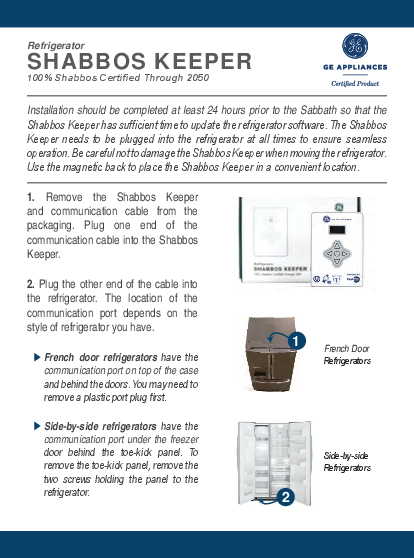
Installation should be completed at least 24 hours prior to the Sabbath so that the Shabbos Keeper has sufficient time to update the refrigerator software. The Shabbos Keeper needs to be plugged into the refrigerator at all times to ensure seamless operation. Be careful not to damage the Shabbos Keeper when moving the refrigerator. Use the magnetic back to place the Shabbos Keeper in a convenient location.

1. Remove the Shabbos Keeper and communication cable from the packaging. Plug one end of the communication cable into the Shabbos Keeper.

2. Plug the other end of the cable into the refrigerator. The location of the communication port depends on the style of refrigerator you have.
French door refrigerators have the communication port on top of the case and behind the doors. You may need to remove a plastic port plug first.

1
French Door Refrigerators

Side-by-side refrigerators have the communication port under the freezer door behind the toe-kick panel. To remove the toe-kick panel, remove the two screws holding the panel to the refrigerator.

Side-by-side Refrigerators
2

Refrigerator
SHABBOS KEEPER
100% Shabbos Certified Through 2050

3. The Shabbos Keeper will perform a software update and display "UPDATING SOFTWARE" on the display. This will take approximately 15 minutes. Your refrigerator may restart during this time. The display and lights may go dark for over 5 minutes. Do not disconnect power to the refrigerator during this time.
4. After installation is complete, your Shabbos Keeper is ready to be set-up. Use the left and right arrow buttons to input today's date. Press enter (middle button) once complete.
5. Use the buttons to input the current time. Press the enter button once completed.
6. Use the buttons to select your city and state. If your city is not listed, you may enter your latitude and longitude coordinates directly.
7. After set-up is complete, changing the time, date, and location settings can be achieved by pressing and holding the right and left arrows together for a few seconds.

UPDATING
SOFTWARE ***

NY MANHATTAN

OR

CITY NOT LISTED

LATITUDE 00.00

LONGITUDE 00.00

IMPORTANT: On some refrigerators, ice may not be removed from the bucket during Shabbos unless the ice maker is manually deactivated before Shabbos. If you have any issues, visit www.zmantechnologies.com or email sales@zmantechnologies.com for more details.