

File info: application/pdf · 32 pages · 1.97MB
Wallbox, DIN, W16
Wallbox, DIN, W16 - GWL
Last document update: September 1, 2020 ... 3phase wallbox with keyswitch and low tarif signal input. ... firmware upgrade interface.
Full PDF Document

If the inline viewer fails, it will open the original document in compatibility mode automatically. You can also open the file directly.
Extracted Text
EVSE
Wallbox, DIN, W16
datasheet
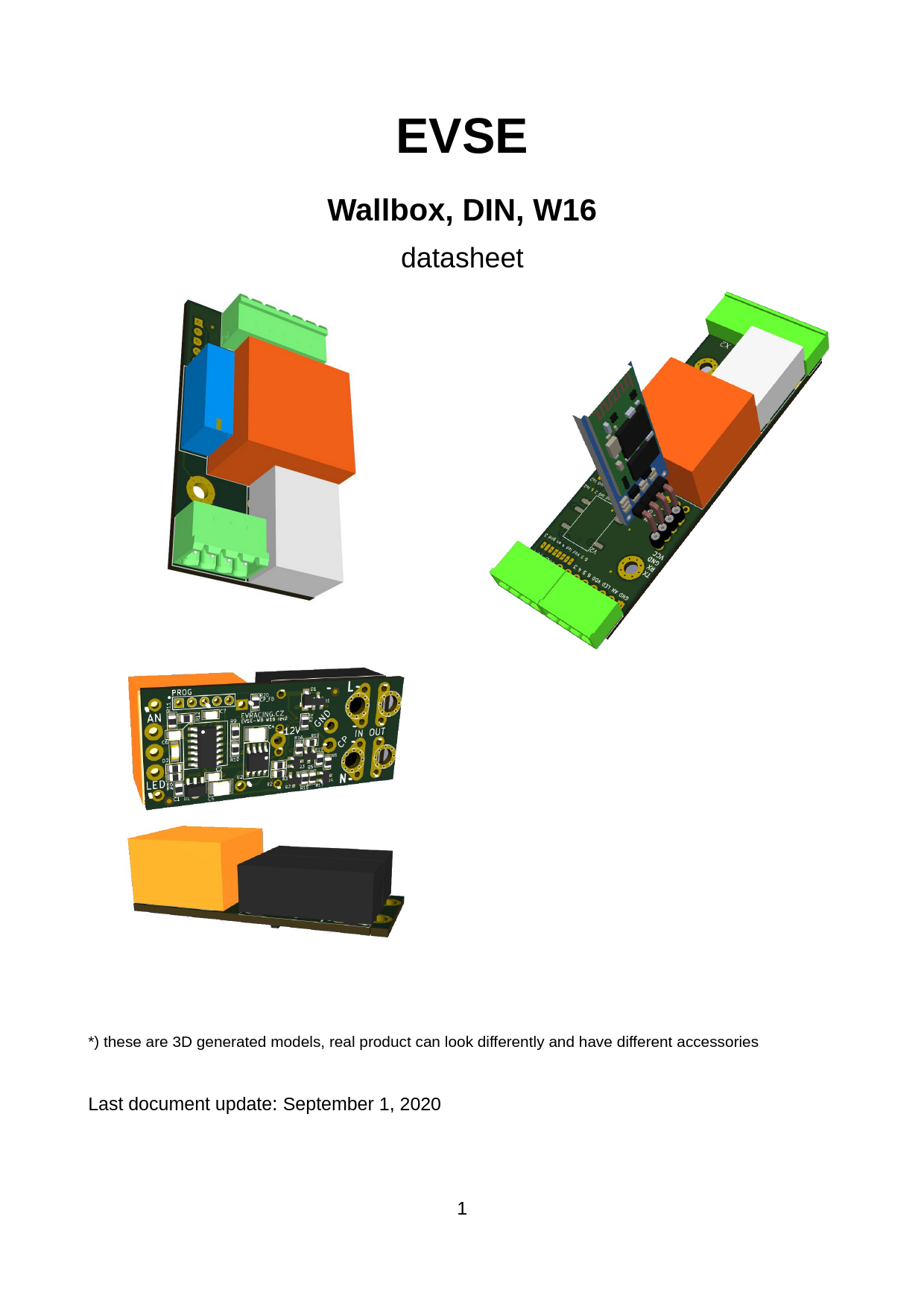
*) these are 3D generated models, real product can look differently and have different accessories
Last document update: September 1, 2020 1

Table of Contents
Introduction.............................................................................................................................3 Read me first.................................................................................................................3 Theory of operation.......................................................................................................3 Compatibility..................................................................................................................3
General description EVSE WB, DIN, W16.............................................................................4 EVSE WB - board description................................................................................................5 EVSE DIN - board description...............................................................................................7 EVSE W16 - board description..............................................................................................9 Customizations.....................................................................................................................11
Current limitation A � using PROG pin 5.....................................................................11 Current limitation B � using PROG pin 4.....................................................................11 Precise current setting with Analog Input....................................................................11 Current limitation based on PV production..................................................................11 Application examples...........................................................................................................12 3phase wallbox with keyswitch and low tarif signal input............................................12 3phase wallbox including a cable and plug.................................................................12 32A EVSE with connector J1772.................................................................................14 Recommended contactors..........................................................................................15 Using external 12V relay.............................................................................................15 Continuous EVSE current regulation using a pot (e.g. 6-32A)...................................16 0 - 10V configuration...................................................................................................16 Cable selection guide..................................................................................................17 Customer solutions and projects.................................................................................18 FAQ......................................................................................................................................19 1) How many PP resistors do I need?.........................................................................19 2) EVSE does not work (config problem)....................................................................19 3) LED indication explained.........................................................................................19 4) How to keep current settings after grid failure?......................................................19 Advanced configuration.......................................................................................................20 HC06 bluetooth module + Android app.......................................................................20 Flashing new firmware.................................................................................................21 Bootloader mode.........................................................................................................21 Troubleshooting...........................................................................................................22 How to determine firmware version?...........................................................................22 Analog input control.....................................................................................................22 Firmware updates................................................................................................................26 Communication examples....................................................................................................28 Read holding registers example..................................................................................28 Reading the data out with Python (USB � serial adapter)..........................................28
2

Introduction
EVSE stands for electric vehicle supply equipment. It is an element that supplies electric energy for the recharging of electric or plug-in vehicles.
Read me first
The EVSE board is supplied with default 32A settings (or 16A for EVSE W16). Please check the chapter "Customizations" for more information about further possibilities of changing maximum charging current. 220 Ohm RPP is included with the kit (EVSE WB).
Theory of operation
Pilot signal duty cycle provided by EVSE defines maximum charging capacity. The car can define several states by pulling the pilot signal down to certain voltage levels (3V, 6V, 9V). Based on this feedback EVSE will trigger the relay for the vehicle to charge or evaluate the state as an error (electricity will not be provided to the output socket/connector).
For more information please check:
� http://en.wikipedia.org/wiki/IEC_62196 � http://en.wikipedia.org/wiki/SAE_J1772 � https://github.com/kortas87/simple-evse/wiki (https://code.google.com/p/simple-evse/)

Resistance PP-PE (max cable throughput)

Resistance [ohm]

Current limit [A]

Wire cross-section [mm2]

> 1500 *

6

--

1500

13

1.5

680

20

2.5

220

32

6

100

63

16

<100 **

80

�

* no resistor connected

** recommended ~50 Ohm

Compatibility
� Tesla Model S � Nissan Leaf � Mitsubishi iMiev (Peugeon iOn, Citroen cZero) � Opel Ampera � eGolf � Mitsubishi Outlander PHEV � Citroen Berlingo Electrique � and others...

3

General description EVSE WB, DIN, W16

Parameters
Supply voltage Power consumption AC/DC power Operating temperature Protection index Onboard resistor for external LED Vehicle compatibility Connection options

90 � 265 VAC <1W 1W or 3W -20 to 80 �C IP00 1k all vehicles according to IEC 62196 HC06 bluetooth, UART-USB converter, wifi ESP8266, ethernet USR-TCP232/GSM, ...

All boards are based on the same software and hardware. Main differences between each other are described in this table:

EVSE

WB

DIN

W16

W50

DIN rail mounting

yes with 3D

yes

no

yes

printed case *)

PP detection

yes

yes

no

yes

power relay

no

no

yes 2x16A **) yes 4x50A

3phase

yes

yes

no **)

yes

fits inside

no

no

yes

no

Type2 or Type1

wiring

easy

easy

medium

easy

supports vehicles

all

all

all

all

uart communication

yes

yes

yes

yes

in production

yes

yes

yes

late 2019

*) 3D data available on request

**) possible to change for 1x32A Panasonic relay with the same size or add another 2pcs

16A relay to get compact 11kW 3phase charger (wiring = difficult)

4

EVSE WB - board description

Parameters
Dimension (without connectors) Mounting holes spacing Relay Weight Order code Options

60 x 30 x 25 mm 30 x 20 mm 5A 250V 80 g EVSE-WB HC06 bluetooth, UART-USB converter

EVSE WB board has 2 connectors. 4-pin X1 for high voltage side and 6-pin for signaling wires and control purposes. There is also PROG connector used for flashing new firmware (ICSP), additional communication and can be further used for adjusting EVSE current (see "Customizations" chapter).

Picture 1: EVSE WB 5

X1 connector = 4pins

pin

name

1: L

phase

2: N

neutral

3: PE

protection-earth

4: rel

relay output

description 230V power supply for EVSE board and external contactor
Ground reference This output drives coil of an external contactor Maximum allowed current is 3A.

X2 connector = 6pins

pin

name

1: CP

control pilot

2: PP

proximity pilot

3: 5V

5V power output

4: GND 5: LED

ground external LED

6: AN

analog input

description
To vehicle connector
To vehicle connector
Used as a power supply for external components (max 40mA)
Ground reference
Includes 1k resistor onboard, connects to LED anode against ground
Used for button or current sensor input

PROG connector = 5pin header

pin

name

description

1

VPP

ICSP** / RFU* [marked by rectangle] from Jan 2018 bootloader enable pin

2

VDD

3

GND

5 V Ground

4

DAT / TX

ICSP** / current boost / communication function

5

CLK / RX

* reserved for future use

** firmware upgrade interface

ICSP** / current limit / communication function

6

EVSE DIN - board description

Parameters
Dimension (without connectors) Mounting holes spacing Relay Weight Order code Options

86 x 29 x 25 mm 54 x 18 mm 5A 250V 85 g EVSE-DIN RS485 driver, HC06 bluetooth, UART converter, 3W AC/DC

For the minimum installation you can only wire 6pin X1 connector (required: L,N,REL,PE,PP,CP).

Picture 2: EVSE DIN 7

X1 connector = 6pins

pin

name

1: L

phase

2: N

neutral

3: rel

relay output

4: PE 5: PP 6: CP

protection-earth proximity pilot control pilot

description 230V power supply for EVSE board and external contactor
This output drives coil of an external contactor Maximum allowed current is 3A Ground reference To vehicle connector To vehicle connector

X2 connector = 2pins (OPTION)

pin

name

description

1:1

function defined by extension module

2:2

function defined by extension module

X3 connector = 4pins

pin

name

1: 5V

5V power output

2: LED external LED

3: AN 4: GND

analog input ground

description
Used as a power supply for external components (max 40mA)
Includes 1k resistor onboard, connects to LED anode against ground
Used for button or current sensor input
Ground reference

X4 connector = 4pins (OPTION)

pin

name

description

1:3

function defined by extension module

2:4

function defined by extension module

3:5

function defined by extension module

4:6

function defined by extension module

PROG connector = 5pin header (OPTION)
same function as EVSE WB

UART connector = 4pin header (OPTION)
can be used for direct connection of HC06 (female header)

8

EVSE W16 - board description

Parameters
Dimension rev2 Dimension rev3 Relay (default) Relay option 32A Weight Order code
Options

59 (55) x 26 x 22 mm 58 x 25 x 20 mm 2x16A 250V 1x32A Approx. 50 g EVSE-W16 (2x16A relay) EVSE-W16_32A (1x32A relay) HC06 bluetooth, USB-UART converter

EVSE-W16 is the smallest board and also includes power relays for 16A. It can be considered as a successor of the original Simple EVSE, but with improved CP driver to support all vehicles, new software and AC/DC + relay integration. Solderable terminals instead of plugs keep it smaller. It can be mounted in many kinds of small boxes including Type1 or Type2 female connectors.
EVSE-W16 rev3 (May 2020) is upgraded version with following advantages: - better surge rating and optimized component layout - integrated fuse and inrush current limiter - option for 32A relay (one phase type1/type2 ~7kW charger)

Picture 3: EVSE W16 rev2 board

Picture 4: EVSE W16 rev3 board

9

Picture 5: EVSE W16 rev3 wiring details Picture 6: EVSE W16 rev2 wiring details
10

pins overview

pin

name

L in

phase

N in

neutral

L out

phase

N out

neutral

PE

protection-earth

CP

control pilot

LED

external LED

AN GND

analog input ground

12V, -

relay coil contacts

description 230V power supply for EVSE board + power input
switched power output for the EV connector
= GND To vehicle connector (Type1 or Type2) Includes 1k resistor onboard, connects to LED anode against ground Used for button or current sensor input Ground reference (+ second GND between AN and LED), this is also PE reference can be used for adding relays for 3phase charger

PROG connector = 5pin header (OPTION)
same function as EVSE WB

11

Customizations

Current limitation A � using PROG pin 5
Check the table for details of how you can set the maximum current. This settings will override PIN 4 settings.

PROG connector connection

current limit

pin5 > 4.5 V

open (internal pull-up only) 32 A [default]

2.5 V < pin5 < 4.5 V 100-200k* resistor to GND 25 A

0.2 V < pin5 < 2.5 V ~3-20k* resistor to GND

16 A

pin5 < 0.2 V

tied to GND

10 A

* resistor value may differ since internal pull-up has no defined value from production (~50k supposed), in

most cases 100k for 25A and 5k for 16A is recommended

Picture 7: PROG header location on EVSE-WB board

Current limitation B � using PROG pin 4
Check the table for details of how you can set the maximum current.

PROG connector connection

current limit

pin4 > 4.5 V

open (internal pull-up only) 32 A [default]

2.5 V < pin4 < 4.5 V 100-200k* resistor to GND 48 A

0.2 V < pin4 < 2.5 V ~3-20k* resistor to GND

63 A

pin4 < 0.2 V

tied to GND

80 A

* resistor value may differ since internal pull-up has no defined value from production (~50k supposed), in

most cases 5k for 63A and 100k for 48A is recommended

12

Precise current setting with Analog Input
Press and hold button connected to Analog input AN of for a few seconds until LED starts to blink rapidly. Then count LED blinks which correspond to number of ampers. Please note that this limit will be set until you reboot the EVSE (make a power cycle). Button is connected the way that it pulls the signal down to ground (level <1V).
Current limitation based on PV production
We recommend to use any kind of control system (smart home PLC, Beaglebone with RS485 and SDM630 electricity meter, SDS micro...) and control the EVSE current continuously either by voltage input AN, via data communication (UART/RS485), or simply in 2 or more steps by relay outputs (EVSE is off, EVSE current low, EVSE current high). Each system is different as well as customer needs.
13

Application examples
In these application examples we suppose that customer uses appropriate contactor with 230V coil. Please check section "Recommended contactors".
3phase wallbox with keyswitch and low tarif signal input
Keyswitch can be used to lock (disable) / unlock (enable) wallbox (access control).
4position rotary switch details
Values 10/16/25/32 [A] can be customized.
_
14

3phase wallbox including a cable and plug
In this example we make 3 phase Wallbox using DSIEC-2E cable. PWM duty will be limited by the size of RPP (refer to the Theory of operation chapter). If you do not connect any RPP current will be limited to only 6A. If your EVSE includes a cable which is fixed then you can hard-wire RPP resistor for cable's nominal value.
Picture 8: EVSE WB type2 fixed cable 15

32A EVSE with connector J1772
With EVSE Wallbox board you can quickly build a charging station for your Nissan Leaf 6.6kW or any other vehicle equipped with J1772 plug.

Optional Analog Input connection: The internal J1772 connection allows to use S1 proximity button as an auxiliary button for EVSE. With the help of this button you can easily change charging current with the smallest step of 1A (see Features Precise current setting).

Picture 9: J1772 proximity button connection detail

Picture 10: J1772 connector - signal and power wires 16

Recommended contactors
You should use relays / contactors equipped with 230V coil and connect them directly to the board connector X1. Here are some examples which relays can be used. The most common one (4pole contactor 25A) can be easily obtained in local electrical accessories shop (Conrad, K&V Elektro...)
� 3-phase, maximum current 20A (e.g. Tesla 11 kW): Noark Ex9CH25 40, Elko VS420
� 3-phase, maximum current 40A (e.g. Tesla 16.5 / 22 kW, ZOE 22 kW): Elko VS440, Eaton Z-SCH 230V/25-40
� 1-phase, maximum current 16-20A (e.g. Peugeot iOn 3 kW, Tesla 3-4kW): Eaton Z-R230/S
� 1-phase, maximum current 40A (e.g. Nissan Leaf 6.6 kW): RELPOL R40N or use normal 4-pole contactor
Picture 12: 40A 1phase relay Picture 11: 20A 3phase relay
Using external 12V relay
In some cases it would be possible to use another 12V coil relay (maximum 0.8W coil consumption), however this approach requires desoldering of the original relay and is recommended only to advanced users. Automotive relays can handle sufficient currents however their voltage rating is not high enough. Pins marked by pink are connected to a 12V relay coil:
17

Picture 13: EVSE WB - connecting 12V relay directly
Continuous EVSE current regulation using a pot (e.g. 6-32A)
Use AN as EVSE voltage input and connect a potentiometer wiper. The other two terminals are to be connected to GND and 5V. Minimum 6A and maximum 32A can be adjusted in registers as needed.
- set 2003 = 0 analog input current regulation - set 2000 = 32A maximum current (AN = 5V) - set 2002 = 6A minimum current (AN = 0V) See the register table for more details. If you do not know how to change register values, please check "Advanced configuration" chapter.
0 - 10V configuration
Add a 1k resistor R12. R11 is also 1k and it will create a divider 1:1. Please note that this setup is recommended to use only with I/O modules having 0-10V analog output galvanically isolated.
18

Cable selection guide

rubber cables suitable for electric vehicles (type H07RN-F 450/750V)

type

diameter current weight

[mm]

[A]

[kg/m]

application

5G6 + 0,75

18-22

38

5G4 + 0.75

16-20

30

5G2.5 + 0.75 13-17

20

0.7

0.5

Type2 female 3phase charger, Type2 male to Type2 female extension cable

0.4

4G6

16-20

37

0.6 Type1 1phase charger, Type2 male to

Type1 extension cable

3G6

14-18

40

0.4 Type1 or Type2 1phase charger with

EVSE built into the connector *)

*) other variants: 3x2.5mm 1phase, 5x2.5mm 3phase

Picture 14: 3G6, 4G6, 5G2.5+0.75, 5G4+0.75, 5G6+0.75

19

Customer solutions and projects

Picture 16: EVSE WB in custom box with 4position current switch

Picture 15: 3D printer box for EVSE WB in comparison to EVSE DIN

Picture 17: Charging cable made with EVSE DIN together with 4pole contactor in a box

Picture 18: SDM630 electric meter + EVSE DIN RS485, web interface (http://
openwb.de)

Picture 19: Wifi interface for EVSE WB (https://github.com/CurtRod/SimpleEVSE-
WiFi)

20

FAQ
1) How many PP resistors do I need?
As described in more detail above in the schematic (page 15), there must be one resistor in Type2 female (car side) and other resistor connected to an EVSE. Both are usually part of the extension cable Typ2 female (car side) to Type2 male (EVSE side). When using a fixed cable (not possible to disconnect from the EVSE) then the size of EVSE PP resistor can be "hardcoded" (modbus versions only, see register 2007 below) or a resistor of a fixed size have to be connected (usually 220 ohm for 32A cable).
2) EVSE does not work (config problem)
Make sure that the EVSE is not turned off (2005 configuration register). If the board does not respond at all, make sure the the UART parameters are correct (9600 baudrate, RX/TX+GND wired correctly). Did not the Modbus address change by accident (reg. 2001)? Any kind of software / firmware / settings problem can be solved using a PicKIT and reprogramming the board from scratch using MPLAB IPE (do not forget to erase the chip too!). PicKIT 4 can be bought on Farnell (https://uk.farnell.com/search?st=pickit%204). EVSE firmware is ready for download from this link: http://evracing.cz/evse/evse-wallbox/fw_pickit/ . Parameters and options: - chip name is PIC16F1825 - "power target circuit from tool" (use 2-2.5V) - "use high voltage program mode entry" - pin1 (Vpp) is always marked (both on Pickit and the board too) - if "power target circuit from tool" does not work, power the board externally - when everything is ready, select HEX file "Browse" and click "Program" - after successful programming you will see "Programming complete" in log window
3) LED indication explained
Using the pin LED you can directly connect LED to indicate EVSE status. The output includes 1k resistor. External LED has the same indication function as on-board LED.
21

LED
1x fast + pause
2x fast + pause 1x long + pause 20x fast in 0.5s 1x each 0.3s
3x fast + pause 4x fast + pause 5x fast + pause 6x fast + pause

State description Normal operation: pilot signal is steady +12V, no vehicle connected (can be customized � always ON) PWM signal is generated, vehicle is present vehicle requested power, contactor is ON enter or leave current setting mode current setting mode � one more amper set Error states (no charging): EVSE is disabled in software (FW >= 6) Charging with ventilation is disabled (FW >= 13) Pilot signal check failed (FW >= 11) Residual current check failure (FW >= 16)

4) How to keep current settings after grid failure?
- see "advanced configuration" and enable communication (if necessary), see NOTE#1 - see HC06 bluetooth module + Android app - set 2004 = 1 to save current set by button OR - set 2000 = "desired amp value" to keep this maximum current every time

22

Advanced configuration
Beginning January 2018 all boards can be configured by MODBUS. By default MODBUS interface is disabled and old functions of PROG pins are kept. However you can enable it by grounding PIN4 and PIN5 of PROG connector while powering the board up please see NOTE#1 instead.

Physical layer is not galvanically isolated UART (0-5V) or optionable isolated RS485 EVSE DIN only.
The default device ID is 1 (can be changed in register 2001).

Some values can be then read or written over MODBUS protocol. PROG pin header is used for this purpose with following pinout:

PROG connector pin3 pin4 pin5

connection GND TX RX

This feature is useful for further development and testing with EVSE Wallbox board and can be also a great way to interface other devices such as Raspberry PI, Ethernet UART bridges (e.g. WIZnet or USR serial-to-ethernet boards), various WiFi modules etc.
HC06 bluetooth module + Android app
Preferred way is to use HC06 Bluetooth converter and Android application developed for this purpose. By default the communication is disabled (see NOTE#1 below register table), because the original analog functions of RX,TX pins are kept (for changing current by resistors).
You can download and install the app from here (*.apk extension): http://evracing.cz/evse/ evse-wallbox/
HC06 is connected to PROG connector.
1. power up the board, HC06 should start blinking 2. pair your Android device with the adapter (default pin 1234) 3. open the EVSE app and choose the paired bluetooth adapter in its settings 4. hit connect button and wait for connection 5. read & write registers you need

23

Flashing new firmware
Flashing new firmware using Android phone is supported (with bluetooth adapter) on all EVSE DIN devices and on EVSE Wallbox devices only with "modbus firmware". In order to flash new version of firmware bootloader mode must be enabled (last bit of the register 2005 - see the below).
Bootloader mode
If bootloader mode is activated the LED is solid on or off and it toggles when there is active communication. Bootloader mode can be turned off by changing the configuration register or it happens automatically after successful flashing of new firmware or there is a timeout of approximately 4 minutes. When bootloader mode is activated, modbus slave address is set to 1. The other way to enter bootloader mode is to keep analog input down when the device is booting (before powering on) for about 12 seconds (CHECK: or some more complicated way to prevent accidental bootloader turn on? CONCLUSION: if divider 1:1 used for AN => colision, result: this option disabled) Bootloader change with board having initial revision 10: bootloader can be enabled by pulling MCLR (pin 1 PROG header) down for at least 12 seconds. This is needed for the case that software upgrade fails and there is no possibility to enable bootloader by changing the register.
24

Troubleshooting
If the download of a new firmware was not completed then you need to try it again, otherwise the board will not function properly. Last chance to fix badly programmed board is using PICKIT programmer (you can order PicKIT 4 on Farnell to get it fast).
How to determine firmware version?
If you power up the EVSE board and the LED is on for about 2 - 3 seconds you have Modbus firmware onboard and it is disabled. You can enable it this way NOTE#1. Firmware revision can be then read from register 1005.
Analog input control
Charging current can be changed based on analog input AN voltage (when register 2003 = 0). Minimum value is set in register 2002 and maximum in register 2000. Default supported range is 0 - 5V. Analog input is referenced to GND and is not isolated Charging current (IPWM) for the vehicle is calculated:
IPWM = UAN / 5 * IMAX
Where UAN is the voltage measured at the input AN and IMAX is actual maximum current. Default is 32A, however it can be adjusted by settings or "current boost" / "current limit" feature or change in configuration register. If the resulting current is smaller than 6A then the EVSE state will change to "pilot steady 12V" and vehicle stops charing. Minimum current can be also adjusted in the register.
25

Register table

Register address 1000 1001 1002
1003 1004
1005 1006
1007
1008 1009 1010 ... 2000

R/W def Description ault

R/W

Actual configured amps value (from reg 2002 to 80A)

R

Actual amps value output

R

Vehicle state:

1: ready

2: EV is present

3: charging

4: charging with ventilation

5: failure (e.g. diode check, RCD failure)

R

6 / 13 / 20 / 32 / 63 / 80 A

Maximum current limitation according to a cable based on PP

resistor detection

R/W

bit0: turn off charging now

bit1: run selftest and RCD test procedure (approx 30s)

bit2: clear RCD error

bit3 - bit15: not used

R

Firmware revision

R

EVSE state

1: steady 12V

2: PWM is being generated

(only if 1000 >= 6)

3: OFF, steady 12V

R

EVSE status and fails

bit0: relay on/off

bit1: diode check fail

bit2: vent required fail

bit3: waiting for pilot release (error recovery delay)

bit4: RCD check error

bit5:

bit6-bit15: reserved

R

Error timeout

if > 0 then waiting for automatic clear

R

Selftest timeout

if > 0 then waiting for a selftest to complete

R

reserved

...

R/W 32 Default amps value after boot (max 80A, min 6A)

26

Register address 2001 2002 2003
2004

R/W def Description ault

R/W 0

Function of PROG PIN 4 + 5, slave address (default 0: current limit or boost functions available) 0: analog inputs enabled > 0: MODBUS communication enabled This value also means the slave address.

R/W 5

Minimum amps value, allowed 0 - 13 if set to 0 the EVSE will completely stop charging during analog input mode (2003 = 0) and AN = 0V

R/W 1

Analog input config: 0: analog input current regulation, input 0 - 5V corresponds to the range:
minimum amps --> default amps note that there is a weak pullup resistor enabled for this input (no input connected --> 5V)

R/W 0

1: each blink 1 amp step (default), starts from 0 2: each blink 2 amps step, starts from 0 3: each blink 3 amps step, starts from 0 ..... 10: each blink 10 amps step, starts from 0 11: mapping table: registers 2010 - 2017
1x blink = value from 2010 2x blink = value from 2011
...
Amps settings after power on (applies only to a changes made by the button), whether to save amps settings to eeprom each time it changes or not 0 - do not save amps value (default) 1 - save amps value to register 2000 every time it changes

27

Register address 2005
2006 2007 2008 2009 2010 2011 2012 2013

R/W def Description ault

R/W 1

bit0: Enable button for current change (no sense when 2003 = 0) 0: disabled 1: enabled (default) bit1: Stop charging when button pressed 0: disabled (default) 1: enabled charging will automatically start after you manually unplug and plug the cable to the vehicle bit2: Pilot ready state LED 0: blinks once (default) 1: is always ON bit3: enable charging on vehicle status D (ventilation required) 0: vehicle status D charging is disabled 1: vehicle status D charging is enabled (default) bit4: enable RCD feedback on MCLR pin (pin 4) 0: disabled, no RCD connected (default) 1: enabled bit5: auto clear RCD error 0: disabled (default, power cycle needed) 1: enabled (clear RCD error after <30s min timeout) bit6: (rev16 and later) 0: AN internal pull-up enabled (default) 1: AN internal pull-up disabled bit7-12: reserved bit13: disable EVSE after charge (write 8192) bit14: disable EVSE (write 16384) bit15: enable bootloader mode (write 32768)

NOTE: if both bit0 and bit1 are enabled then "interrupt charging" will have higher priority, when charging

R/W 0

RFU: Current sharing mode is active (two or more EVSEs connected to a single breaker) 0 - charging current is half of the default current amps > 0: this amps value will be used

R/W 0

PP detection 0: PP detection enabled (default) value > 0: detection disabled, fixed PP limit entered [A]

R/W

reserved

R

Bootloader firmware revision

R/W 6 Amps value 1

R/W 10 Amps value 2

R/W 16 Amps value 3

R/W 25 Amps value 4

28

Register address

R/W def Description ault

2014

R/W 32 Amps value 5

2015

R/W 48 Amps value 6

2016

R/W 63 Amps value 7

2017

R/W 80 Amps value 8

Register addresses are in decimal format!

NOTE#1: By default MODBUS is NOT enabled, so the original analog input switches can be used (current limit and current boost functions). MODBUS can be enabled by pulling AN input down to GND while booting (= when you power the device up) at least 5 times within 3 seconds seconds (button activated). This will change register 2001 to the value 1, but it will not save the value permanently. Value will be saved after first successful R/W operation over MODBUS (register number >=2000).

NOTE#2: You can restore default settings of all registers by saving a value 65535 to the register 2010

NOTE#3: Only functions 03 (Read Holding Registers) and 16 (Preset Multiple Registers) are implemented. For more details please check: http://www.simplymodbus.ca/FAQ.htm

RFU: reserved for future use

EVSE selftest:

1) turn on +12V (0 seconds) 2) turn on PWM generation, 5th second 3) enable 220R pp resistor (max 32A, 50% duty cycle), 10th second 4) turn on contactor (15th second) 5) RCD test procedure (if configured, 20th second, performs 500ms pulse on TEST-IN) 6) selftest finished after 30 seconds

Selftest counter (reg 1009)

Relay out

300

off

250

off

200

off

150

ON

100-95

ON

0

off

RCD test

PP

out

220ohm

Action

off

off

Steady +12V CP signal

off

off

PWM 1kHz start, default duty cycle

off

ON

PWM duty cycle change to 50%

off

ON

Relay activation

ON

ON

Test output RCD enabled ~500ms

off

off

Steady +12V CP signal

NOTE: if equipped with RCD sensor, the test must finish with RCD error (LED blinks six times). RCD error must be cleared manually or by timeout (depending on config)

29

Firmware updates
2020-06-25 revision 17: - stricter CP signal check (pilot low decision level, shorted diode) 2020-04-27 revision 16: - added RCD feedback support for EVSE-WBDIN (e.g. Bender RCMB121 and others) - added configuration bit for AN pullup (can be disabled)
2020-02-15 revision 15: - added minimum pilot_high condition (fix for Metrel A 1532 � status E/F test)
2019-09-01 revision 13: - possible to change LED behavior in pilot steady state - diode check fail increased error recovery delay - EVSE status vent / without vent
2019-04-26 revision 12: - RX buffer limit fix (mainly for RS485 systems)
2018-12-10 revision 11: - improved CP signal check (implements status E), requires feedback resistor 100k (rev3 board R20, rev2 board R13, DIN version R21) - if you do not upgrade feedback resistor, do not use firmware 11+
2018-10-30 revision 10: - fix evse status register 1002 initial value (probably caused problems in OpenWB) - modbus timeout set to 5 steps
2018-08-28 revision 9: - combined code for EVSE DIN 485 and EVSE WB (but 2 different hex files) - uart communication fix (RX overflow error check) - weak pullup disabled for PP detection pin - modbus timeout set to 3 steps
2018-02-06 bootloader v3: - fix: removed reconfiguration from bootloader code (causing rewriting reg 2002)
2017-11-18 bootloader v2: - added possibility to turn bootloader on by hardware pin 1 (Vpp/MCLR)
2017-11-18 Androi app v2: - fixed .hex file parser (firmware upgrade), always use latest app version for firmware flashing!
2017-10-31 revision 8: - added "disable EVSE after charge" bit (register 2005) - fixed issue with voltage AN input - now follows minimum amps and does not turn off
30

2017-06-23 revision 7: - interrupt routine rewritten (modbus communication) - correct vehicle status update, if pwm is not being generated - modbus timeout set to 20 steps 2017-06-07 revision 6: - new configuration bits, register 2005 (disable EVSE, interrupt charging, change current) - error code signalization 2017-05-03 revision 5: - fixed current limit based on cable PP resistor (and analog pin input) 2017-04-26 revision 4: - fixed amps value from AI (e.g. for max 32A reached only 31A and 5V input) - fixed minimum amps value (was not taken into account) 2017-04-21 revision 3: - added bootloader (Android application) - fixed bug with analog input not working while modbus enabled - added control register 1004 2017-04-13 revision 2: - changeable slave address in reg 2001 - stop charging button function reg 2005 (no timeout, but wait for unplug & plug), bitfield introduced for more possible options - added register 1005 (firmware revision number) 2017-02-17 revision 1: - initial version
31

Communication examples
Connection parameters: speed 9600, bytesize 8, stop bit 1, no parity, byte order Motorola.

Read holding registers example
01 03 03 E8 00 02 44 7B (request)

bytes 01 03 03 E8 00 02 44 7B

description The slave address (always 01 unless changed by customer) Function code (03 is for read holding registers function) The data address of the first register to read The total number of registers requested. CRC-16 Modbus (cyclic redundancy check)

01 03 04 00 20 00 20 FA 21 (answer)

bytes 01 03 04 00 20 00 20 FA 21

description The slave address (always 01) Function code (03 is for read holding registers function) The number of data bytes to follow (2 registers x 2 bytes each = 4) The contents of register 1000 (32A) The contents of register 1001 (32A) CRC-16 Modbus (cyclic redundancy check)

Reading the data out with Python (USB � serial adapter)
You can use almost any MODBUS master utility for Windows / Linux / Mac. For common users we recommend using QModBus (http://qmodbus.sourceforge.net/). There is also QModMaster (http://sourceforge.net/projects/qmodmaster/) utility, but there may be a problem with write multiple registers function (there is bug in the software which causes register shift) - so use it carefully.

Advanced users can use Python / pymodbus (https://github.com/bashwork/pymodbus) for further development or similar libraries.
In following example we read out first 7 registers

#!/usr/bin/python3 from pymodbus.client.sync import ModbusSerialClient client = ModbusSerialClient(method = "rtu", port="/dev/ttyUSB0, baudrate=9600, stopbits=1, bytesize=8, timeout=1) rq = client.read_holding_registers(1000,7,unit=1) print(rq.registers)
#Reading the data out with Python (USB � serial adapter)

32