

Introduction to Ezairo® 7160 SL Pre Suite
The Ezairo® 7160 SL Pre Suite is a complete, turnkey solution designed for the development of hearing aids that utilize Bluetooth® Low Energy technology. This guide aims to simplify the initial steps for developers, outlining the interaction between system components and the necessary tools for a smooth development process.
Product Overview
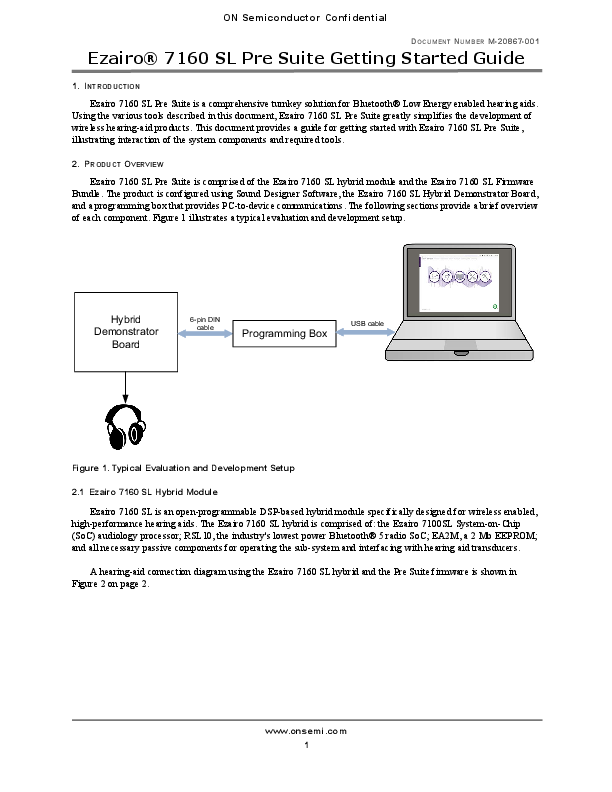
This suite comprises the Ezairo® 7160 SL hybrid module and the Ezairo® 7160 SL Firmware Bundle. Development is facilitated through the Sound Designer Software, the Ezairo® 7160 SL Hybrid Demonstrator Board, and a programming box for PC-to-device communication. Key components and their setup are illustrated to provide a clear understanding of the system architecture.
Key Components and Features
- Ezairo® 7160 SL Hybrid Module: An open-programmable DSP-based hybrid module engineered for high-performance, wireless hearing aids. It integrates the Ezairo 7100SL SoC, RSL10 Bluetooth® 5 radio SoC, and EEPROM for essential functions.
- Ezairo® 7160 SL Firmware Bundle: This bundle provides all necessary features for advanced Bluetooth Low Energy wireless hearing aids, including volume control, multi-protocol audio streaming, wireless binaural synchronization, and advanced audio processing features like adaptive feedback cancellation and noise reduction.
- Sound Designer Software: An engineering tool from ON Semiconductor that enables hearing aid manufacturers to configure the Pre Suite firmware, derive various hearing aid products, and manage the development lifecycle. It includes a Windows application and a Software Development Kit (SDK).
- Hybrid Demonstrator Board: Designed for evaluating and developing wireless-enabled hearing aids using the Ezairo® 7160 SL. It supports various configuration options and simplifies the development, testing, and debugging process.
- Programming Box: Facilitates communication between a PC and the Ezairo® 7160 SL, enabling configuration and programming through interfaces like I2C. Various compatible programming boxes are supported.
Getting Started with Development
The initial setup involves downloading and installing the Sound Designer Software, configuring the Hybrid Demonstrator Board, and connecting the programming box. Detailed instructions are provided for each step, ensuring a straightforward process for new users. For more in-depth information, refer to the linked resources such as the Ezairo 7160 SL Firmware Bundle User's Guide.
